Paper Doll
Work Smarter, Hurt Less: Ergonomic Tips for Healthier Hands, Smarter Breaks, and Better Productivity
Repetitive stress injuries. Carpal tunnel. Cubital tunnel. Tech neck. Tendinitis. Mouse elbow. (It’s a real thing!) Over the last few weeks, we’ve covered a variety of issues related to workspace injuries and organizing preventative ergonomic solutions — all in hopes of better, and healthier, productivity.
- The Productivity-Boosting Power of Ergonomics — Organizing Your Workspace and Systems for Success
- Paper Doll Introduces Ergonomic Helpers that Organize Your Posture
- The 20-20-20 Rule — Protect Your Eyes and Boost Your Productivity
Talking about ergonomic wellness is not super-fun, though better than having workplace injuries, but hopefully these blog posts have been better than listening to a health and safety lecture on The Office.
We’ve looked at workspace arrangement, posture helpers, and breaks for our eyes. In today’s post, we’re going to wrap up with some final solutions and thoughts on how to stay healthy while working.
LEND A YOURSELF A HAND FOR ERGONOMIC WELLNESS
While our necks, backs, and heads take brunt of the abuse we heap on our bodies, our arms and hands can be ill-treated. How often do you find yourself gripping your mouse (or your phone) too tightly, only to feel your hands aching later in the day?
KEYBOARD YOGA
Last week, we looked at a variety desktop apps to help us remember to take doctor-recommended breaks to soothe our eyes, ensure that we blink, and reduce dry eyes, eye strain, and fatigue. Unfortunately, orthopedic hand specialists aren’t as enthusiastic as eye doctors in getting the word out about taking care of our hands, wrists, and arms to prevent repetitive stress injuries.
Keyboard Yoga to the rescue!
Keyboard Yoga is a project created by ZSA Technology Labs, Inc., a Taiwanese manufacturer of built-to-order ergonomic “split” keyboards. However, Keyboard Yoga is not commercial in nature, and unless you clicked through a few pages, you’d never know the connection to the manufacturer.
The screen for Keyboard Yoga is reminiscent of the earliest video games; it appears fairly low-tech. There’s a purple-ish outer space theme, with several planets of indeterminate type bobbing up and down in the atmosphere. Two parallel but unequal blobs in the center of the screen grow and shrink and you move through the Keyboard Yoga experience.
When you click the button to begin, you are prompted to put on headphones and select a British-accented male or female voice for narration.
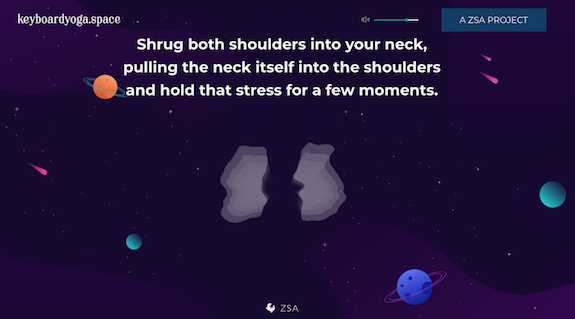
Ethereal music and ocean sounds play in the background as you are guided through a series of gentle hand and wrist exercises. In addition to providing soothing breaks from gripping the mouse or power-typing, the calming, meditative narration leads you to relax various parts of your body and take a mental break from the stresses of the workday.
(As I’ve been researching this series on ergonomic health, I’ve found using Keyboard Yoga to be a great way to revive my aching wrists and a flagging spirit.)
The narrator explains that if you stop typing at any point during the experience, the narration will cease but the music will continue. (I wouldn’t have minded an actual pause button, but otherwise, it’s nice to know that the relaxing background music will continue if you get called away mid-yoga “pose.”)
The “yoga” itself involves both physical actions and reflection on your body’s relationship to the keyboard, mouse, and screen. Much like an actual yoga class, you are called to notice tension in your palms and wrists, the angles at which you hold and move your fingers and hands, the placement of your elbows, the curve of your spine, the placement of your shoulders, your breathing, and so on.
As the “yoga” continues, the narration guides the user through progressive relaxing and tensing of muscles through fist-making with one hand while randomly typing with the other. It continues through neck and head circles, and then a variety of breathing exercises. The entire process takes less than ten minutes, though I cannot be certain of the exact length, because it’s so relaxing that one occasionally forgets to keep typing, causing the narration to pause.
PERKINS KEYBOARD YOGA
I was so charmed by ZSA’s Keyboard Yoga, I went in search more information about “keyboard yoga.” This was initially difficult to Google because Lenovo manufactures an ergonomic-friendly computer model called Yoga.
However, I was intrigued when I found that the Perkins School for the Blind had an entire (and very instructive) page on keyboard yoga, which it defined as becoming aware of your body in relationship to the items on the desk in front of you. While the material is designed for people with low vision, the page includes information on ergonomic finger curvature and placement, posture, body position, foot positioning, and wrist and elbow placement.
The Perkins Keyboard page also includes a fun set of typing exercises for practicing typing that will, for some of you, harken back to typing class in high school.
ACTUAL YOGA
Yoga instructors can provide you with helpful yoga moves and poses to incorporate into your regular yoga practice. The popular Yoga with Adrienne host, Adriene Mishler, has a video entitled Yoga For Hands, Fingers, Wrists | 11-Minute Yoga Quickie.
This gentle video is designed to reduce inflammation, increase range of motion in wrists, and improve flexibility in the small muscles of the hands, fingers, and forearms.
The SaraBeth Yoga channel also has an easy 5-minute Desk Yoga for Wrist Health video for soothing forearms, wrists, and fingers.
AUTO MOUSE
Do you struggle with repetitive stress injuries? Could you use some pain-free mousing?
Auto Mouse from Sphere 10 Software is a Windows-based background utility for your computer, designed to alleviate the strain associated with overuse of a computer mouse. It changes the way you operate your mouse by shifting the hand/arm workload in an ergonomically positive way, from your mousing hand to your keyboard hand(s).
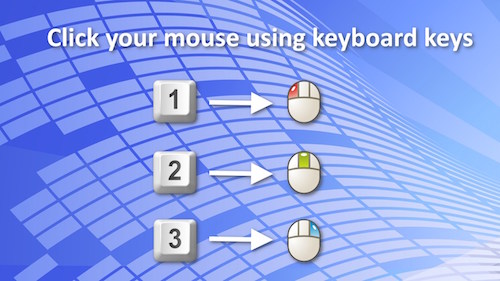
Auto Mouse can be configured to your specifications, so depending on your setting selections, you can select to map mouse functions to your keyboard, like:
- “click the mouse” (that is, approximate the clicking of the mouse) by using keyboard combinations
- automatically click the mouse by ceasing to move the mouse
- choose to sometimes activate the on-screen mouse using an activation key
- flip the right and left mouse button actions to make mousing easier for left-handed users
- show an expanding on-screen ring when a click is issued to gauge progress
- allow keyboard arrows to move the on-screen mouse
- make a mouse-click noise to simulate an actual mouse click
- control the duration between the when the mouse stops moving and auto-click is issued
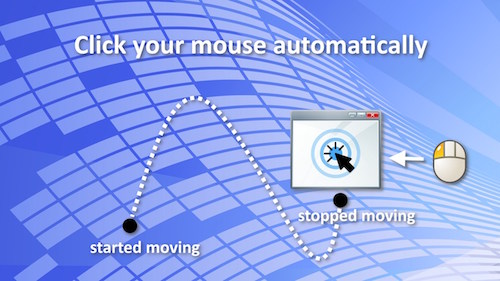
Auto Mouse also removes the need to tap a laptop touchpad. Instead, you can press a key in order to to click your mouse button but without hijacking that key when you need to actually type.
You can download Auto Mouse directly from the Microsoft App Store. Auto Mouse is free.
Other “Handy” Ways to Maintain Hand/Wrist/Arm Wellness Ergonomically
Learn keyboard commands
Almost every computer program has keyboard commands, combinations of keystrokes that avoid you having to lift your hands from the keyboard and move your mouse. You certainly already know some, like Command-X for Cut or Control V to paste in Windows. But you’d be amazed at how many keystrokes you didn’t know there were!
CheatSheet for Mac from SourceForge is a free utility that displays the keyboard shortcuts available in the active app whenever you hold down a “modifier key,” generally the ⌘ key. Rather than memorizing oodles of key combinations, just view a nifty overlay of commands — for that app — by category.
The best Windows alternative to CheatSheet seems to be CheatKeys; you hold down the CTRL key (or a global hotkey of your choice) and it provides a list of all active short-cuts for whatever app you’re in. Unfortunately, CheatKeys is not free; there’s a 14-day free trial, and during the current promotional period, a one-time license (for use on up to two devices) is currently $12.99 (down from the standard price of $19.99).
The point is that the less mousing you do, the fewer repetitive stress injuries you’re likely to get.
Choose an alternate keyboard or mouse
Ergonomic keyboards come in three main types:
- Split Keyboards — The keyboard is separated into two somewhat equal halves, so you can align your hands directly with your shoulders. This is as much to prevent you from hunching over your keyboard as to soothe your hands.
- Contoured/Concave Keyboards —The keys sit in a bowl-shaped well to match the natural resting lengths of your fingers. (If this description calls to mind Madge and the old Palmolive “Your soaking in it!” commercial, I’m sorry.)
- Wave/Curved Keyboards — With this type, there’s one single, continuous keyboard but the keyboard’s shape tends to be sloped or wavelike/undulating to keep the wrists from bending.
For more information, see Wired’s The Best Ergonomic Keyboards for Your Tired Hands.
Ergonomic mice also come in multiple styles, including a vertical mouse or a trackball mouse, and while both are easier on the hands, you do still use your wrist. With a trackpad mouse (whether on your laptop or as a free-standing combination trackpad mouse), like the Apple Magic Trackpad, you’re not moving your wrist; instead, you control the cursor with your thumb. Experiment to see what works best for you.
PC Magazine recently covered The Best Ergonomic Mice for 2026.
Ask for a referral
If you experience discomfort or pain in your hands, wrists, or arms, ask your healthcare provider for a referral to hand therapy (also called occupational therapy) treatment.
Zzzappy
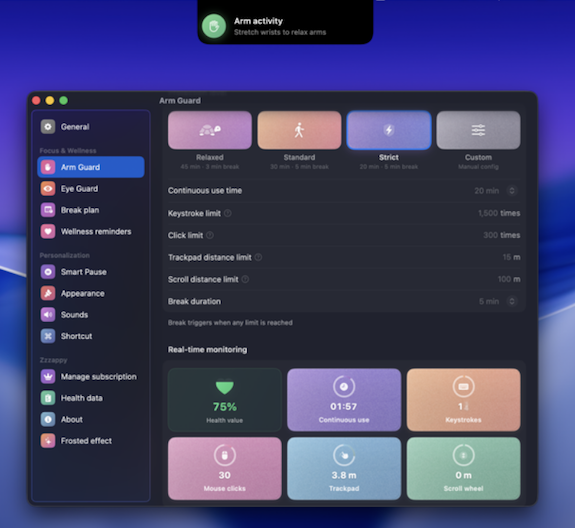
100 Plans’ Zzzappy is a bit of combo plate, as it monitors both your eyeball/screen time and your “arm input load” in order to scientifically schedule breaks to protect your vision and prevent repetitive strain injuries (RSIs).
Arm Fatigue Detection
Zzzappy’s Arm Fatigue Detection provides real-time monitoring on five types of ergonomic inputs to prevent RSIs, tendinitis, and computer elbow/mouse elbow:
- keystrokes
- mouse clicks
- trackpad travel
- scroll distance
- continuous use duration
Using these metrics, Zzzappy calculates a composite fatigue score, and if any of the metrics hit a no-no threshold, Zzzappy triggers a break (so you can stretch, do some keyboard yoga, and generally stop giving yourself booboos)!
Eye Guard
Zzzappy’s Eye Guard also promotes the 20-20-20 Rule we discussed last week. It has a variety of features, including:
- built-in light, deep, and customizable pre-sets for taking eye-soothing breaks
- flexible time-of-day schedules
- gentle pre-break alerts so that you won’t be startled out of flow when it’s time to take a break
- snooze settings, in case you need a little more time
Zzzappy also has multiple display styles for blink and posture nudges while you’re working.
Smart Pause
We all know that no matter how important eye, hand, and body health is, sometimes we just shouldn’t be disturbed. Zzzappy’s Smart Pause will automatically pause when it detects that you’re on video calls or in meetings, watching video playback, participating in an event on your calendar, and during “fullscreen” gaming. You can also define your own “deep focus” app list so that if you’re using an app that always requires your full attention, Zzzappy knows to play it cool.
If you’re away from your Mac for five or more minutes, Zzzappy recognizes that that’s already a break, and considers it among your metrics.
Immersive Breaks
Because Zzzappy provides eyeball breaks as well as hand/arm in breaks, it keeps you from continuing to stare. Instead, it overlays your choice of blur, grain, frosted glass or ambient glow effects. You can add customized motivational messages (carrot or stick style, depending on what motivates you) or an animation to show you the progress through any given break.
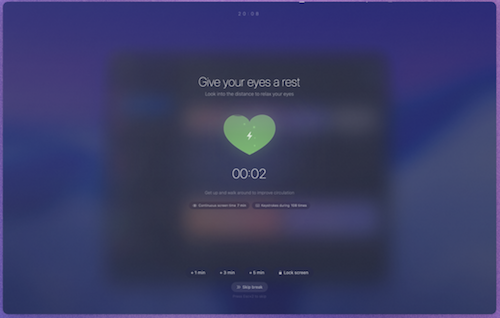
And if you’re using a multiple-screen setup, Zzzappy can sync the overlay across all screens.
With one tap, you can force a lock screen so you’ll really want to step away from the screen.
Health Dashboard
For users who are motivated by data, the health dashboard provides a bevy of goodies:
- Visual charts illustrating screen time, input load, and break patterns.
- Tracking statistics to show:
- completion rates
- streaks
- personal records over time
- Smart insights to use AI analysis of performance data and give users personalized advice.
All of Zzzappy’s data is kept locally on the Mac, with nothing uploaded to the cloud.
Zzzappy Pricing
You can try Zzzappy for free for three days. After that, it’s a one-time purchase of $9.90.
IMPROVE YOUR ERGONOMICS WITH MOVEMENT REMINDERS
Ten minutes before each hour, my Fitbit buzzes to remind me to get up and walk at least 250 steps. Do I do it? Not always.
As I noted in the second post in this series, posture reminders don’t work as well as the posture correcting apps that show you what you’re doing wrong and how you should sit instead. Similarly, reminders to get up and move (or do anything good for your body) are only as good as your willingness to take action when prompted.
It’s not that reminders aren’t useful; they are. But just like buying an organizing book or an exercise video won’t declutter your home or strengthen your abs, just downloading a reminder app won’t get you across the finish line. Pair apps and reminders with cues for why you want to take these self-care measures, whether it’s to be strong and mighty when you reach retirement and are no longer shackled to your computer, or to stay fit to keep up with your children or grandchildren. Know your why.
RMinder
RMinder is a free Chrome extension (so it works on all platforms). Periodically, Rminder pops up on your screen to remind you to do the essential ergonomic and other tasks to maintain your health. RMinder nudges you to:
- Correct your posture — This is only a reminder, not a real-time evaluation or instruction as to what to do
- Blink — Here’s a good time to practice the 20-20-20 Rule!
- Hydrate (with water, not the sugary, caffeinated so-called beverages that keep us from screaming into the void)
- Stretch
These are the things we often forget to do while working, browsing, or gaming. As failing to do them can adversely affect our health, the prompts from this free extension are like an angel on our shoulder (or a mom peering over your shoulder), reminding you to do some self-care.
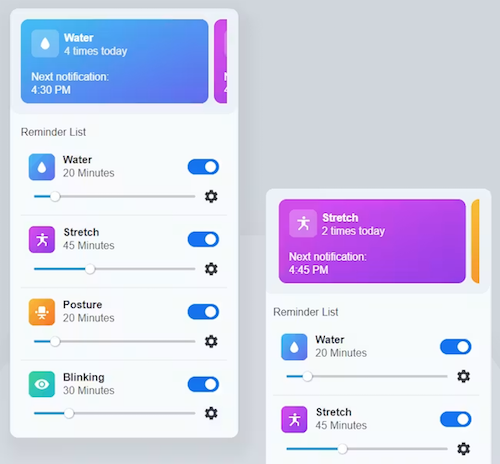
Rminder lets you customize the interval between notifications and the actual text of the notification, in case you want to be mean, funny, or extra-caring to yourself.
You can also chose to turn off notifications (when you need some intense focus time). Note: some users complain about the audio alert that’s simultaneous with the pop up.
STRETCHLY
Stretchly is a free, open-source app that reminds you to take a break when you’re on your computer. Stretchly is available to download for Mac, Windows, and Linux operating systems (though Mac users will want to read the instructions for installation using Homebrew).
By default, Stretchly prompts users to take a 20-second “mini break” every 10 minutes and a 5-minute “long break” after 30 minutes to reduce fatigue, improve productivity, and prevent RSIs. However, you can customize the intervals for either type of break.
In addition to reminding you to take a break, Stretchly will fill your screen with suggested wellness activities.
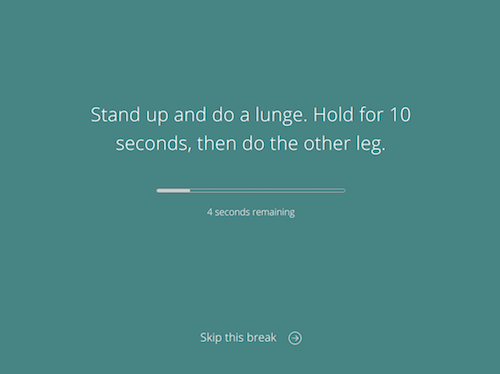
Stretchly notifies you 10 seconds prior to a mini break and 30 seconds before a long break to give you a gentle nudge to pause your work. When Stretchly starts a break, you have the option to postpone a mini break for 2 minutes or a long break for 5 minutes; just click on the link at the bottom of window or use the Ctrl/Cmd + X keyboard shortcut. (There’s an optional “Strict Mode” that prevents you from postponing or skipping breaks.)
Stretchly monitors your computer’s idle time; if you haven’t typed or clicked for at least five minutes, the app will pause breaks until your activity starts again, because (duh!) if you’re not at your computer, you don’t need a break from your computer! It will also pause breaks if your computer is set to Do Not Disturb.
MOTION MINUTE
EU-based desktop app Motion Minute reminds you to take regular, healthy breaks while working at your desk, boosting wellness, and productivity.
Motion Minute works on both Windows and Mac operating systems. It uses animated models to guide you through exercises to reduce tension and stiffness, enhance blood circulation, and improve posture and focus.
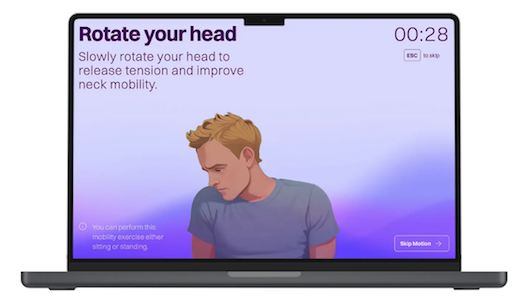
There’s a free 7-day trial, after which there one-time payment, lifetime licenses, each offering two times more exercises than in the trial. The Starter is €7.95 for one license while the Friends level is €9.90 for two licenses. Each version gets one year of free updates.
BE KIND TO YOUR BODY
If the movie Jerry McGuire is to be believed, the human head weighs eight pounds. (If Google is to be believed, it’s closer to 10 or 11.)
When you’re working at your desk, staring at a screen all day and then curved like a question mark with a death grip on your phone once the workday is over, you’re balancing that beachball head on a much smaller pedestal — your neck.
As we’ve reviewed over four weeks, your neck and shoulders and back — really, all of you except your hair — is dealt a low blow by the way you treat it all day!
Let’s close out this series with resources to help you be kind to your body so that no matter whether you are working or playing, trying to be productive or recovering from that effort, you will be healthy and safe:
- DeskFit: 20 Essential Desk Exercises You Can Do Without Leaving Your Office or Home Workspace (NASA) — This robust PDF from NASA has clear exercise graphics and instructions, helpful whether you want to be an astronaut or just look like one.
- Desk Exercises to Stay Fit At Work (UPMC Healthbeat)
- Desk Stretches Video Collection (Mayo Clinic)
- Office Ergonomics – Stretching – At the Workstation (Canadian Center for Occupational Health and Safety)
- Six Ergonomic Desk Exercises for Office Workers to Relieve Musculoskeletal Issues (Fellowes)
- Stretches to Do at Work Every Day (Healthline)
Thank you for sticking with this series, and I hope you’ve found some new strategies for organizing your workspaces, your systems, and your body for better health.
The 20-20-20 Rule — Protect Your Eyes and Boost Your Productivity
You may have many workspaces. You may have an office or workstation owned by your company. Perhaps you have a home office (even if that’s your kitchen table). Students have desks in their dorms and carrels in the stacks of the library.
But you have only one body, and organizing it for wellness means more than just organizing the space around you for productivity. Over the last few weeks, we’ve been delving deeply into key ergonomic issues:
- The Productivity-Boosting Power of Ergonomics — Organizing Your Workspace and Systems for Success looked at the basics of an ergonomic layout and how to arrange yourself within it, from screen height to your chair selection, from your keyboard and mouse placement to your lighting.
- Paper Doll Introduces Ergonomic Helpers that Organize Your Posture was chock-full of tech tools, from AI and webcam software that monitors your posture and provides sci-fi looking feedback in real time, to gentler versions that create on-screen animated animal versions of you, cartoonishly alerting you to unhealthy neck and head positioning, to an adorable Dreams line of stuffed animals designed to let you hug them into your own good posture. I’m still in love with the hedgehog.

Posture, however, is only one important element of your ergonomic wellness, so today we’re going to look at resources and methods for preventing eye strain and repetitive stress injuries and maintaining your overall health. A healthy body is essential for your long-term productivity and happiness.
GOOD EYE HEALTH
Prolonged screen use can cause digital eye strain and dry eyes. The more eye strain or discomfort you have, the harder it will be to read or edit what’s on your screen. Whether you notice it or not, it will also increase fatigue, decrease mood, and reduce productivity. Nobody wants that!
In fact, there’s such a thing as Computer Vision Syndrome (CVS), which can affect 50-90% of individuals who spend parts of their workdays in front of screens. Symptoms of CVS (the syndrome, not the drugstore with the super-long receipts) include blurred vision, dry eyes, headaches, fatigue, and neck pain. It is also known as digital eye strain, because staring at your children or your dog or the ocean does not lead to the same kind of malady.
Computer Vision Syndrome can be caused by many of the ergonomic mistakes we’ve covered over the past few weeks, including a combination of:
- sitting at the wrong distance from your screen
- bad sitting/screen-reading posture
- bad lighting
- glare from your screen
- uncorrected vision problems and the need for different vision correction
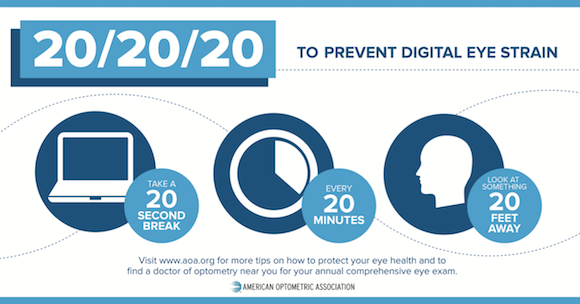
Many of the ergonomic corrections we’ve already covered can reverse CVS. In addition, the American Optometric Association recommends the 20-20-20 Rule to maximize digital eye health. (As does Paper Doll.)
 Of course, just as we discussed about posture last week, knowing the importance of maintaining good eye health is easier than actual enacting the right behaviors and systems.
Often, a reminder prompt isn’t enough; sometimes, we need someone or something to hijack our attention to ensure that we take a visual break.
Let’s look at some digital tools for helping you organize your way to better eye health.
DESKTOP APPS TO PRESERVE EYE WELLNESS
LOOKAWAY
LookAway is software that places your computer in rest mode at periodic intervals to prompt you to rest your eyes. When your rest break is over, it plays a gentle chime to lead you back to focus mode.
(Currently, LookAway is Mac-only, but the site references adding Windows compatibility soon.)
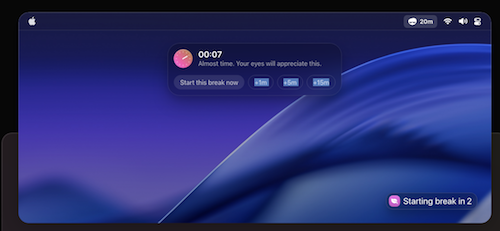
LookAway’s live status menu bar icon give you immediate access to settings where you can adjust your preferences, making it easy to check timers, or take an unscheduled break.
There’s also a floating countdown that follows your cursor, keeping you aware of any impending break.
Customize Your Breaks, Reminders, and Notifications
Once you install LookAway, set it up with your preferred customizations! You can adjust the intervals between your breaks, the durations, and give yourself a break from breaks (as it were) when you need to prioritize your focus.
- Balanced Mode gives you twenty minutes of screen time, followed by a 20-second break, with longer breaks disabled.
- Deep Focus Mode gives you fewer breaks, so you have 45 minutes of screen time, followed by 30-second breaks between sessions. Then, every three breaks, you get a full five-minute break. It’s similar to a Pomodoro, where you get 5-minute breaks after every 25-minute session, and then a longer break after four sessions. Your eyeballs (and the rest of you) get to maintain focus without sacrificing those baby blues (or browns, or…you get it).
- Eye Care Mode has much more frequent screen time breaks. It reminds you to pause after every 15 minutes, but just for 15 seconds, and after four work sessions, you get a three-minute break.
- Wellness Mode is designed not only for eye care, but for soothing your entire self, including aligning your posture. Work a full 25-minute Pomodoro, take a 45-second eyeball break, and every two breaks, take five minutes away for a full vision/body/mind re-set.
Use pre-break notifications to give yourself a gentle prompting to wrap up your current task. If you struggle with transitions, this eases you into the break without making you feel interrupted or like you’ve lost control of the flow of your work.
For overall wellness:
- turn on blink reminders to prevent dry eyes
- enable posture reminders to prompt you to maintain a healthy sitting position all day long
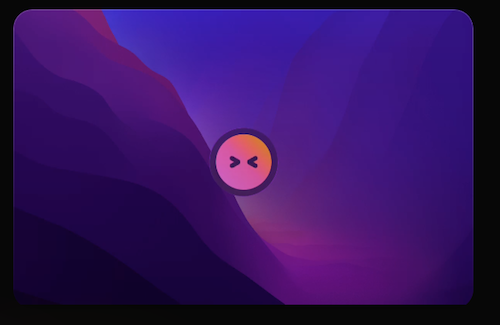
LookAway Blink Reminder
Set office hours to control the days and/or times you want these break reminders.
Create your own automations and integrations
You needn’t be a programmer to get more out of LookAway. You can trigger your own automations to set a process in motion for starting or ending breaks. For example, use AppleScript and Shortcuts and just click “add shortcut” or “add script” under the “Start of Break” or “End of Break” settings to:
- dim the screen when a break starts to subtly “force” you to really-and-truly take that eyeball break, and return it to full brightness when it’s time to work, sort of like how they flicker the lights during the intermission at a Broadway show.
- lock the screen entirely to not-so-subtly force yourself to actually take that longer break. If you can’t see the screen, you are more likely to get some fresh air or take a bio break.
- pause your music/podcast (so you can pick up where you left off when you get back to work)
- activate Do Not Disturb when your break ends so that you can get back into focus mode for deep work.
- change your Slack status to “away” (or “online”) with a customized message to teammates, like, “Dude, I’m just gone for three minutes to make my eyeballs work. Roll your eyes and come back in a little while!”
LookAway Mirror
What good is a screen break from your computer if you just grab your phone or your tablet?
The LookAway app has mobile sync via LookAway Mirror, so your breaks on your Mac sync up with any paired devices. The LookAway Mirror app will block all of the websites and any non-essential apps to dissuade you from even turning to a screen device (except, y’know, the microwave).
Breaks Sync with LookAway does need the internet to work, though devices need not be on the same network. You can pair up to 3 devices to a Mac, and pair up to 5 Macs to an iPhone or iPad. (Keep running the LookAway Mirror app in the background; don’t use Force Quit, or the break sync will stop.)
Sometimes, being idle is smart!
LookAway’s Intelligent Idle-Time Detection recognizes when you’ve left your desk and will automatically pause or reset the timer. Why? Because if you’re not staring at the screen, you don’t need to be reminded to stop staring at the screen!
I think this is brilliant, as it keeps you from conditioning yourself to ignore the notifications.
Know Your Stats
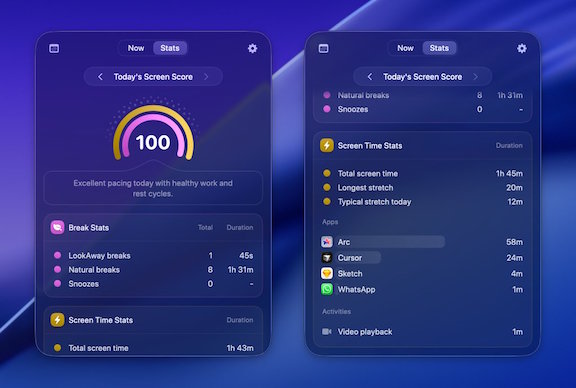
Some people really need or want statistics to help motivate them to make progress. If that’s your jam, LookAway will show you your behavior patterns without you having to juggle spreadsheets.
Eyeballing (no pun intended) your stats will tell you whether your work sessions drag on too long to be healthy, whether there are certain programs or sites that sabotage your schedule, or if you keeping procrastinating on taking breaks (or skip them altogether) way more often than you intend. Conversely, your stats might show that your break sessions are improving your habits and your health. (Yay!)
Look at stats like:
- Total daily screen time (because if you’re glued to the screen for work, you may want to explore your options — or ask your company for an ophthalmology stipend!)
- Number of breaks, so you can see if and how often you truly stepped back from your screen
- The longest session you worked without actually taking a break
- Median session lengths so you can spot your typical work rhythm, analyze whether it’s good for you, and consider how to schedule your day for better eye health and wellness.
- Your time spent using the app when you are in active screen sessions, as well as website usage (categorized by domain names) in browsers supported by LookAway.
- Your Screen Score, which delivers a summary of whether your screen habits that day were healthy (or not).
Smart Detection
There are times when you need to be highly engaged with what’s on your screen. LookAway can use the camera and microphone to detect when you don’t want to be interrupted (or embarrassed when others can see your screen) — if you’re in a Zoom or other video call, screen sharing, recording, watching a video or presentation, gaming in fullscreen — and automatically pauses reminders.
You can customize a list of apps that require deep focus, so the app will pause reminders, ensuring you can work distraction-free. Focus when you need to, but be prompted for breaks otherwise.
The Cost of Look(ing) Away
LookAway has three types of personal licenses. A Single license is $19 for one “seat” (device) while a Personal License is $29/two seats; each includes one year of free updates. For a second year, updates are 50% off. Personal licenses renewals are $10 for the first seat and $5 for each additional seat. (You can keep using Look Away without the updates, or pay for a renewal.)
There’s a Team License at multiples of $29/seat for 5 or more seats, which includes priority support, and soon, team stats. Team license renewals are $15 per seat. You may also buy a Believer License with 5 seats and get lifetime updates for $99.
INTERMISSION (formerly BREAKS FOR EYES)
Intermission, created by Alex Greene, works much like the intermission at a theater. Instead of the orchestra stopping, the curtain coming down, and the lights coming up, this kind of intermission brings a curtain down on your screen and forces a break in your work. (Or, your binge-watching Love Island on your laptop. Paper Doll won’t judge. Much.)
Intermission is currently available for MacOS and iOS only.
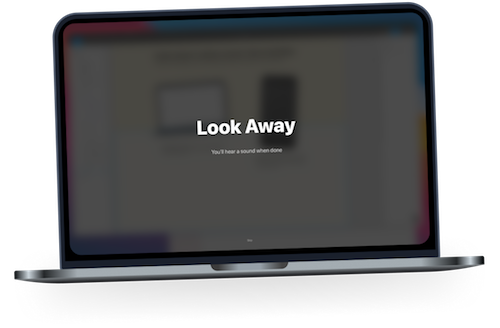
Intermission completely blocks your screen for 20 seconds every 20 minutes. (You can click “Skip” if your attention is truly required.) When your intermission time is up, you’ll hear an audio alert and get a “Well done!” on your screen. (If you prefer a more subtle alert, you can set Intermission to give you a small, visual break prompt.)
While Intermission doesn’t force you to look away from your screen, a blank screen saying, “Look Away” is pretty boring, so you’ll be more likely to look around the room, look out your window, or even get up and do what you’d do at the theater — stretch, get a snack, or take a bio break.
Intermission also doesn’t bother with gamification, streaks, or stats. It just tells you to rest your eyes.
Customized Intermissions
Intermission lets you customize the program to fit your preferences.
- Rules — Adjust the duration of your intermissions as well as how often you take these breaks. For example, you can set it to take a 30-second intermission every half hour.
- Sounds — Pick the chime that plays at the end of the intermission. (Again, just like when you’re at the theater.
- Messages — To improve accountability, change the message that gets displayed from “Look Away” to something that will inspire you to take a more active break.
You can make other adjustments to fit your needs.
- Snooze — Click on the eyeball icon in your menu bar and the drop-down lets you snooze intermissions for 30 minutes, 1 hour, 2 hours, 4 hours or an entire day, so if you’re watching a movie on your laptop, in a Zoom, or attending an all-day online conference, you can postpone your breaks without guilt. (But do take breaks!)
- Heads-Up — To prevent startling you, the “Heads-Up” notification alerting you to an upcoming break can be set for 5 or 20 seconds prior to the start of an intermission break, or you can skip it or delay advanced notifications, if you prefer.
The Cost of Intermission
Intermission has a 7-day free trial, after which you’ll be prompted for a one-time payment of $7.99 for a lifetime license.
BLINK EYE
BlinkEye from Noman Dhoni offers full-screen popups with a 20-second countdown to prompt users to look away.
Blink Eye is available for Windows, Mac, and Linux operating systems. (Note: You can’t download the MacOS version from the MacApp store yet, but there are Installation instructions at the site for using Homebrew.)
Laying out the Benefits of Blinking Your Eyes
While all apps based on the 20-20-20 Rule general have the same purposes, Blink Eye spells out both its health and productivity goals:
- Reduce eye strain — By taking regular periodic breaks, you prevent the eye strain and visual fatigue that comes from prolonged staring at your screen.
- Prevent dry eyes — When you stare, you fail to blink. When you don’t blink, your eyes get try, which causes irritation and harm.
- Promotes long-term eye health — Stopping to not only take a break from your screen, but then focusing on objects in the distance (remember: 20 feet away!) forces you to relax your eye muscles
- Improve mental focus — Fatigued eyes mean a fatigued brain. When you take short short breaks for your yes, it gives you a mental break too, improving your focus and productivity when you get back to work.
Not So Minimalist
Blink Eye is not quite as minimalist as it bills itself, as there are a variety of customizable bells and whistles.
- Customizable reminder timers — Not everyone needs a Pomodoro. Sometimes, you have to be reminded to not only stop for your eyes, but to stop for lunch or pick up the kids.
- Customizable reminder texts — Only you know whether you need a carrot or stick; set a reminder that tells you to “Take care of those pretty eyes” or “Stop being a corporate drone!”
- Customizable reminder screen savers and themes— Blink Eye has a full of screen options from which to choose.
- Customizable sounds — Because, duh, if you want to control what the app says to you, you probably also want the alerts and notifications to sound a certain way.
- Customizable dashboard — However you want Blink Eye to work, there’s probably a setting or settings and preferences.
Blink Eye has a Pomodoro timer to incorporate productivity break-taking, and for users who want to incorporate time tracking, Blink Eye offers daily, weekly, and lifetime usage statistics.
In addition, Blink Eye is working on multilingual support, and audio mute during reminders for when you need to maintain focus right up until the eye-break time, and a workday setup to customize the specific points in your workday when reminders should appear.
You Needn’t Blink at the Cost of Blink Eye
Blink Eye has multiple payment levels and two payment options; all features are included at every level. Choose one-time payments for an annual per-device license (with no automatic renewals or recurring billing) including free updates all year, or a lifetime per-device license:
- one device license at $9.99/year or $28.99/forever
- two device licenses at $16.99/year or $49.99/forever
- or five device licenses 39.99/year or $109.99/forever
Blink Eye is open-source software, meaning it’s community-driven. The cost of the license goes toward not only premium features for you but funding further development (and supporting the developers).
CARE U EYES
CareUEyes for Windows operates a little differently. While it does have a break timer to prompt you to relocate your eyeballs, it does so much more.
CareUEyes bills itself as “Eye Protection Software for PC” and operates on Windows (11/10/8/7/XP) and MacOS (12+) operating systems.
Blue Light Filtering
CareUEyes protects your eyes by reducing harmful blue light, adjusting your computer’s screen color temperature. (If caution against blue light sounds familiar, I wrote about how blue light can negatively affect your sleep in Do (Not) Be Alarmed: Paper Doll’s Wake-Up Advice for Productivity.)
The program includes eight pre-set modes with varying color temperatures, so you can begin using the program without having to adjust anything. (That said, the color temperatures are fully customizable with a wide temperature range, so you can pick what you need for your lighting and screen content situation.) Your screen can automatically adjust color temperatures based on sunrise and sunset in your time zone.
No matter how you adjust your screen color temperature, it won’t change the color of your screenshots, so your work can be seamless.
Optimize Your Screen Brightness
In addition to getting the heck away from blue light, your vision health can be soothed by adjusting your screen brightness to the situation for maximum comfort. Because screens that are too bright or too dim can lead to eye strain, CareUEyes promises precise brightness control with 1% accuracy (with is finer control than the default Windows settings, though on par with those of Macs) and extended brightness ranges beyond most monitors’ typical default limits. It also claims:
- Comfortable brightness adjustment without washing out colors or adding flicker
- Automatically rightness adjustment based on the time of day to match your environment
- Multi-monitor support , so you can adjust each of your displays independently of one another or sync the brightness controls across all screens.
CareUEyes also has keyboard shortcuts so you can quickly adjust the brightness using custom hotkeys instead of heading to the settings.
Take a Break with CareUEyes
As with the other software and apps we’ve explored, there is the 20-20-20 Rule-adherent timer set-up, with a variety of options:
- Customize break reminders — Pick your own personalized break intervals, in case you need them more often than every 20 minutes, or if you need a touch more focus time.
- Structured break cycles — Just as we talk about with Pomodoros, we need longer or shorter breaks after different types of sessions. CareUEyes will automatically alternate breaks of longer and shorter durations.
- Enforced breaks — Lock your screen temporarily so that you can’t cheat yourself out of recess for your eyes.
- Smart pause detection — As described with LookAway, there’s no sense in getting timed when you’re not even in front of your screen. CareUEyes automatically pauses the timer when you step away from the computer.
Focus on the Magic
CareUEyes also has a few unexpectedly intriguing features:
Focus Read lets you highlight active reading areas on the screen to help you improve your concentrate, while Focus Blur blurs background windows to lessen any visual distractions. This is not only helpful for all of our eyes, but one imagines it would be a boon people with ADHD, and frankly, all of us with too many sensory distractions.
MagicX lets you enable a magic window in which you can either darken or grayscale any window to reduce distractions and make content easier to read. The dark mode inverts your window colors; greyscale mode makes your window look more like the e-ink on a Kindle.
CareUCost?
CareUEyes has three licensing options:
- $2.90/month for a monthly (auto-renewing) license for one computer. All updates are free, and you can switch which computer you wish to use it on.
- $19.90/year for an annual (auto-renewing) license for one computer. All updates are free, and you can switch which computer you wish to use it on.
- $39.90/lifetime license for up to three computers with lifetime updates. You can switch which computers you use it on at any time, and unlike the monthly and yearly licenses, you upgrade from standard support to priority support.
CareUEyes has the most robust “eye health” approach of all the apps I’ve reviewed. The very Windows-y, boxy-format isn’t to my Mac-loving tastes, but with an inexpensive one-month trial, it’s an inexpensive way to see if it’s for you.
You’ve been reading this post for a while, so it might be a good time to take a break, rest your eyes, look at something 20 feet away, and plan to come back for next week’s final installment in this series on organizing your life for better ergonomic health. We’ll look at apps, ergonomic tools, and some fun (!) exercises to keep you healthy and productive.
One last thought about vision health. When was the last time you had a complete eye exam? If you can’t remember, put it on your to-do list for this week. Your future self will thank you.
Paper Doll Introduces Ergonomic Helpers that Organize Your Posture
Last week, in The Productivity-Boosting Power of Ergonomics — Organizing Your Workspace and Systems for Success, we looked at the field of ergonomics and how adjusting the placement of things in your workspace and revising your systems can be a huge boon to both your health and productivity.
We examined screen height, keyboard and mouse placement, chair selection and spinal support, foot placement, and lighting set-up. We also reviewed the importance (for your body, brain, and eye health) of taking breaks, how to optimize your frequency and type of movement, and how to listen to your body.
Did you take last week’s advice to heart? Roll your shoulders. Roll your hips. Roll your eyes. If everything feels wonky, you probably didn’t.
ORGANIZE YOUR BODY FOR THE LONG TERM
When we think about work-related injuries and dangers, we often think about firefighters, people in the military, or other workers in environmentally precarious situations. But without ergonomic tweaks to your space and systems, sitting at a desk can be dangerous, too.
According to a recent study published in Nature, Musculoskeletal Disorders Among Office Workers: Prevalence, Ergonomic Risk Factors and Their Interrelationships, work-related musculoskeletal disorders (WMSDs) impact up to 81% of workers across their careers. 58.6% of these injuries affect the neck, 52.5% happen to the lower back (52.5%), and 37.4% are located in the shoulders.
The research found that “suboptimal workstation ergonomics” lead to our ouchies. However, as we reviewed last week, intervening with ergonomic improvements to your surroundings and your behaviors can mitigate the risks of these musculoskeletal booboos.
Unless you’re watching The Big Bang Theory, these kinds of injuries aren’t a laughing matter.
As with everything related to organizing and productivity, knowing what you should do and actually doing it aren’t always the same thing.
We’re humans, not robots. We hunch and lean and squint even when we know better. Even when we’ve set up our physical space so we can do better.
Even if we want to do everything we’re advised, we may still need a little extra help — perhaps from technology.
There are three general types of posture-improving tech. One focuses on reminding workers to straighten up and fly right (or at least to straighten up). Timed reminders can be somewhat helpful, as soon as we focus intently on our work, the more likely it is that our proper posture will degrade.
The second method, software, especially when it combines AI with observed data via webcams and/or earphones, is a more robust approach for analyzing and improving posture for better health.
A third method, as described in Worker Wellness: Manual Checks vs Tech—What Improves Posture Most?, indicates an even more effective route: continuous monitoring through wearable tech that alerts you to ergonomic problems and prompts automatic breaks. Those solutions are often expensive and impractical for use at your desk. However, there are some interesting developments, like the Upright GO 2 Monitor, with a posture monitor for back tilt via movement sensors and vibrational biofeedback.
Today’s post shares some intriguing and quirky solutions to help you on your ergonomic path for posture. Next week, we’ll end this series on organizing your ergonomics by exploring solutions for safeguarding your vision and other bodily wellness aspects.
IMPROVE YOUR POSTURE WITH AI & WEBCAMS
SUPERSHRIMP
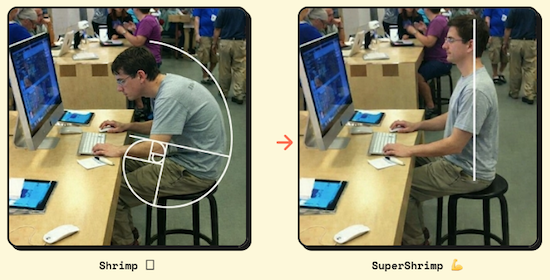
Created by Marc Lou, who wasn’t happy with his own posture, SuperShrimp turns your webcam into a posture coach to help catch you when you’re slouching. (You just checked to see if you were slouching, didn’t you?)
@2026 SuperShrimp
SuperShrimp was designed to turn your webcam into a posture coach. Like an Elf-on-a-Shelf, it catches you being ergonomically naughty while you work. It also offers real-time posture scores, alerts, and analytics.
When AI detects you sitting “like a shrimp,” curved over onto itself, it sends you a notification with a video of your posture to alert you to sit up straight and reposition your body. It’s kind of like a traffic camera, spotting (and then snapping a photo of) you violating the posture laws — but you can self-correct instead of paying a fine (musculoskeletal disease) later on.
SuperShrimp Posture Score
SuperShrimp uses your webcam and on-device AI to analyze your posture gives you a real-time score from 0 to 100.
@2026 SuperShrimp
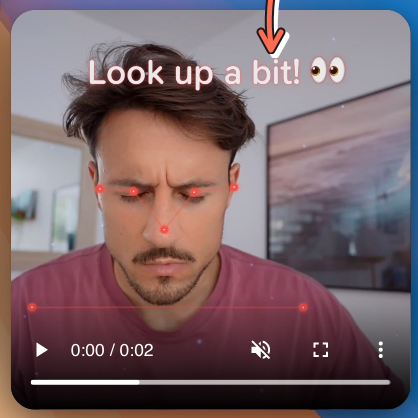
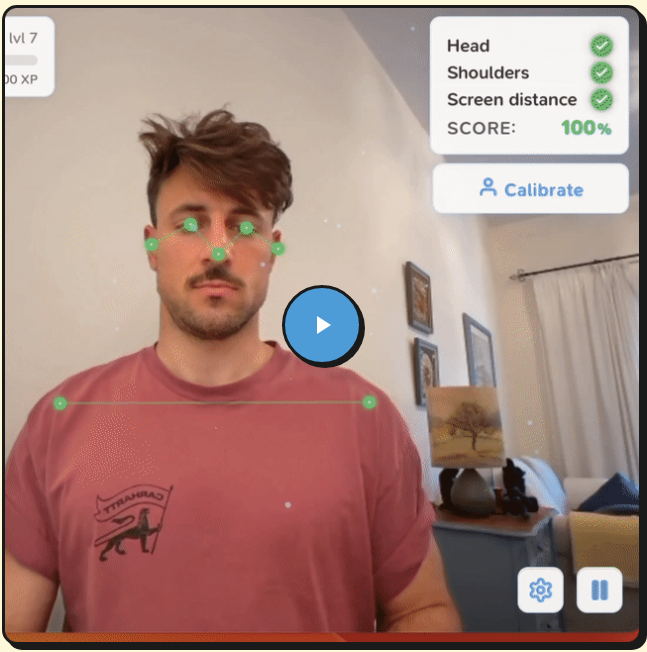
SuperShrimp also provides on-screen guidance to tell you not only how to stop sitting the way you are, but how to move to the correct position. Whether your eyes aren’t looking at your work at the right angle or you’re curving your spine into a hunch, bad ergonomic positioning shows up on-screen in red, but turns green when you move into the correct position. Positive reinforcement for the win!
As you work, a live video of yourself pops up onscreen, noting incorrect positioning of your:
- head — Remember, from last week, the importance of positioning the screen so you’re not looking too far up or down?
- shoulders
- the distance from your eyes to the screen — Once again, get the right prescription for eyeglasses or contacts, or at least adjust the font and contrast, as explained in last week’s post.
@2026 SuperShrimp
Get a Slouch Alert
The SuperShrimp app runs in the background, silently, so you can minimize the window and ignore it. However, as soon as it detects that your posture has become sub-optimal, a visual notification pops up so you can see what you’re doing wrong and course-correct, all without your cranky 7th grade teaching shouting, “Stop slouching!” at you.
Lou describes the live notification as “non-intrusive,” which I take to mean that there’s no audio to pull you away from your work. But you do see a video of yourself, just as when you’re on Zoom. Instead of fixing your bangs, though, you’ll glance at it to fix your posture.
Track Your Improvement Over Time
Are you into tracking your progress and comparing today’s self to last month’s self to improve your behavior? SuperShrimp includes detailed analytics to allow you to track your posture-related habits. Visualize exactly how much of your work day you spend in good vs. bad posture, and whether you are trending toward improvement or couch potato-dom. The app offers:
- Good vs. bad posture time splits
- Daily and weekly score trends
- Progress tracking over time
Embrace the Competitive Shrimp Spirit
If gamification motivates you, Super Shrimp has you covered. It lets you earn XP (experience points) across ten levels of good posture development.
For each minute of good posture, you earn XP and get to see your shrimp evolve, up to the top level.
There’s even a leaderboard for a little healthy competition.
Even Shrimp Need Privacy
Most of don’t want our posture to end up splattered on the internet. SuperShrimp runs locally on your computer with on-device AI. None of the images are captured by SuperShrimp or stored on their (or any) servers, and you don’t need the internet for it to detect your posture.
Your webcam’s feed gets processed and displayed in real time and then is immediately discarded. Thus, no matter what’s going on in front of your webcam, whether it’s bad posture or funny faces or silent swearing, nobody but you will see.
How the SuperShrimp Tech Works
SuperShrimp works with any kind of modern web cam, including built-in laptop/desktop cameras, after-market/external USB webcams, and even the iPhone continuity camera. In each case, your activity is auto-detected by the camera.
Although the site promotes that this was invented for MacOS, it also works on Windows and Linux; just be sure to download the right version for your operating system.
SuperShrimp is designed to be a “lightweight background app,” using minimal battery power while monitoring and correcting your posture. When you’re working, it’s working.
If you’re using a laptop, you may be concerned about battery usage, but SuperShrimp claims to have a few tricks up its sleeve. (Do shrimp have sleeves?) The software focuses on you in the foreground and analyzes fewer frames in the background (because who cares whether your bookshelf or window has good posture?). If you walk away from your work area, SuperShrimp pauses the posture detection.
The Cost of Seafood These Days
Once purchase the right version of the app for your operating system, you’ll receive an email with a license key and download link. Download the app — one license is good for any one device — and enter the license key when prompted to activate it on your computer or phone. (If you want to use it on multiple devices, like your office desktop and your laptop, you’ll need to buy a separate license for each device.)
Officially, the software is $29 but it’s available now for a one-time payment of $17 (with the promo code LAUNCH) for a lifetime license for one device. There are no subscriptions, per se, and this price includes all features, plus one year of updates. There’s a 30-day money-back guarantee on all purchases of SuperShrimp; just use the support page to request your refund.
[If this reminds you of something you’ve already seen on the pages of Paper Doll, it’s similar the Do Not Touch Your Face app I wrote about early in the pandemic in Organize Your Health: Parental Wisdom, Innovation, and the New Time Timer® Wash.]
SITSENSE
Launched in 2025 by students Chaitanya Agarwal and Rithik Kulkarni, SitSense is a glossier competitor to SuperShrimp, billing itself as the “#1 AI Posture Coach.” It’s available as a web app (working with all modern browsers, like (Chrome, Firefox, Safari, Edge) and as a Chrome extension (with Edge and Firefox extensions reported to be coming soon).
SitSense and Sensibility
SitSense analyzed 540+ hours of real posture data, finding that most muscle strain starts with nuanced alignment changes related to the “head–neck angle, forward head posture, and tilt.” To stop problems before they begin, SitSense uses the webcam to detect these moments right away, and then uses on-screen guides you to help you re-set and prevent discomfort.
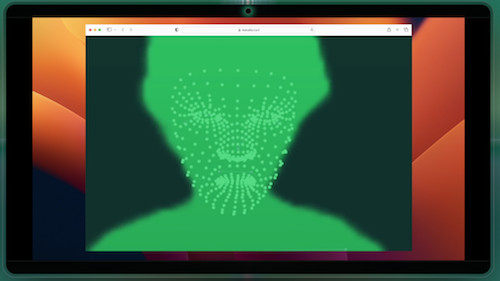
So, once you start your webcam, SitSense begins tracking your posture in real time. It scores your spinal/neck/head alignment, and then uses personalized on-screen cues to guide you back to a neutral posture to prevent muscle tension.
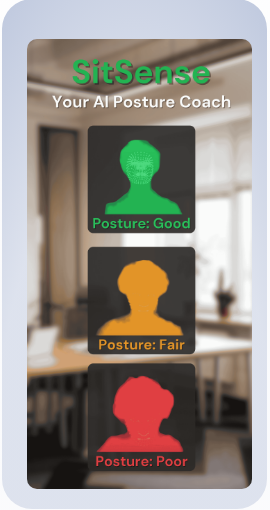
©2026 SitSense
In addition to the instant feedback of live posture scoring and nudging into healthy posture, SitSense uses micro-goals and daily goals, streaks, badges, and leaderboards to gamify and motivate healthy improvements.
SitSense Privacy
All of the video analysis is processed locally on your device, so no video or images get stored or transmitted to SitSense. They do save the numerical posture metrics that track your progress and train their AI, but all video processing happens in the browser and is not uploaded. (See more on their privacy policy.)
Cost
SitSense has a 3-day free trial, after which Pro pricing is $4.99/month or the equivalent of $2.99/month if you pay annually ($34.99).
Need a budget option? There’s also a completely free Chrome extension.
SitSense’s blog included a bevy of evidence-based posts about “posture science, workplace ergonomics, and building healthier habits at your desk.” If you’re dubious AI-based programs like this can help, Does Posture Correction Software Actually Work? may change your mind.
SIT APP
Sit App, developed by UK software engineer Ali Smith, uses on-device AI and your webcam to monitor your posture from your laptop or desktop. It works on Mac, Windows, and Linux operating systems.
Train the Droid
Getting started with Sit App is as easy as posing for a selfie. When prompted, take ten seconds to show the Droid how you’d like to sit, posing proudly. Next, show off your shlumpiest poor posture.
While you go back to work, Sit App’s cartoon Droid (whom I imagine sounds like a Minion), lives up in the corner of your screen (like in a minimized Zoom window), and its cyclops-like eye observes your posture via the webcam.
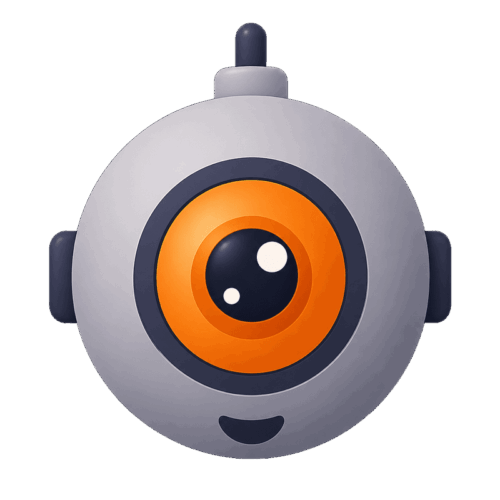
If you start sinking and slouching, the Droid icon “pokes its head into the corner of your screen” and, depending on which nudging method you pick, will display silent visuals, provide a quiet vocal prompt, or give a loud yoohoo to get you sitting up properly again.
When not monitoring, Sit App quietly in the background, using only minimal memory and CPU and shouldn’t impact your computer’s operation. You can use it during video conferencing, and (if using the Pro level), Sit App only takes abut 10 seconds to recalibrate if you switch from sitting to standing, or vice versa.
Stay Motivated
Sit App has three elements to keep you inspired:
- Daily streaks — Because habits (like improving your posture) depend on consistency, Sit App notes your repeated wins and the Droid icon shares in your celebration.
- Weekly insights — The more you understand your weak moments, the easier it is to course correct. The app can tell you when you are slumping, so you can figure out how to conquer the obstacles, whether it’s during Monday Meeting demoralization or after Friday’s heavy carb lunches.
- Nudges, not nagging — You get to decide when the Droid greets you (and when not, setting quiet hours) and the level of sensitivity.
Sit App’s Privacy-First Pose
The Droid is no tattletale. It processes all data on your computer, and no photos or videos are saved, so your image never gets transmitted online. In fact, it doesn’t even require internet, so you can work offline (which is healthier for your brain, anyway).
The Droid sneaks a quick check of your posture and then like Dory in Finding Nemo, forgets what you looked like. Sit App does maintain the metrics you care about: time spent in good posture, and the above mentioned streaks and weekly trends. The facts of your successes are tracked, just not the visual evidence.
See Sit App at work.
Cost
Sit App is free for one hour of daily posture monitoring — there’s no trial and you won’t be asked for your credit card, which should give you an idea of whether it helps you.
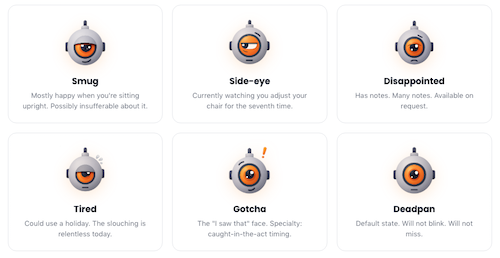
Additionally, there’s a Pro level for $2.92/month (billed annually at $34.99) with a 7-day free trial to see if you like the extra bells and whistles, for unlimited monitoring. You also get reminders to take standing and stretching breaks, priority support (from a person, not an AI), and customized moods and voice alerts from the Droid. (Droid “moods,” are depicted by the little dude’s mouth, eye, and eyebrow positioning include: smug, side-eye, disappointed, tired, gotcha, and deadpan.)
The Pro level also gives you a variety of setups, whether for home, office, or standing desk use. (You can cancel the Pro level at any time.)
Sit App’s blog is new but fairly robust, with science-based posts covering a wide variety of desk-related musculoskeletal issues and how to solve them. How to Tell If You Have Bad Posture (5 Self-Tests You Can Do at Home) is a good place to start.
GET ANIMATED ABOUT POSTURE COACHING
Are the above methods all well and good, but you want something more adorable, a posture monitor that reflects your cute personal aesthetic?
There are a number of too-precious solutions for monitoring posture, but unfortunately, they all seem to be for Apple fans.
HEADSUP — IMPROVE POSTURE
Created by JiaHao Wang, HeadsUp detects your head position through your AirPods or Beats Fit Pro earphones and your webcam, and helps you align your sitting posture. It works on Mac, iPhone, iPad, and Apple Watch.
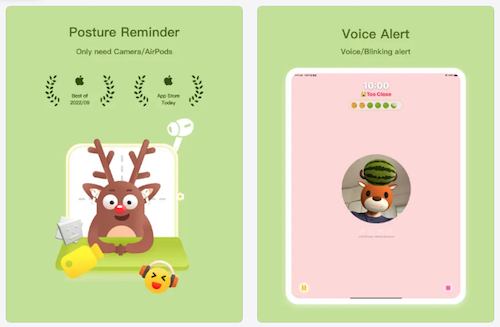
The app will analyze your posture and take that data to “transform” you into an on-screen cartoon animal with a watermelon on your head. If this brings to mind Dirty Dancing, yes — you, too, can say that you carried a watermelon.
The key is that if you lower or tilt your head, the watermelon will fall off your animated (dear, dog, cow, or bear) avatar’s head, prompting you to straighten your head.
There’s a customized sensitivity adjustment, so your watermelon doesn’t wobble unnecessarily. Lower it when you’re reading and writing by hand; aim it higher when using the computer.
HeadsUp offers a variety of gentle reminder modes, including a human voice, a chirping frog, and a silent mode to reduce distraction. There’s also a reminder to take a break after 40 minutes of continuous sitting. Additionally, HeadsUp has an on-screen Pomodoro timer to improve productivity unrelated to body-based fatigue.
For those who value statistics, the app provides metrics regarding your head and neck posture (and focus time) for the current day, the past seven and thirty days, and the entire past year. The statistics screen is held in your iCloud, ensuring that only you have access to your data. (You can also install a desktop widget to view today’s and the past week’s statistics.)
There are no ads or push notifications, and the app is free.
POSTURE PAL
Similar to HeadsUp, PosturePal is a cartoon-based monitor for your head, neck, and shoulder posture, and works on Mac and iPhone. Developed by Samuel McGarry, Vicki Petrova, and Jordin Bruin, the app uses the motion sensors in AirPods (or Beats Fit Pro) to detect your positioning and keeps track of your neck tilt.
If your posture becomes unhealthy, Posture Pal can alert you in multiple ways:
- visually, with your animated pal popping up on your screen with a concerned look
- via a sound alert
- vibrationally, on an iPhone
- via notifications on an Apple Watch
- by lowering the volume level on your phone when poor posture is detected and raising the volume when you correct your positioning
You can set daily goals, use timers (for 5 to 60 minutes) to focus on improving your posture, and set low, medium, or high sensitivity levels for monitoring. View detailed information about posture sessions, including average pitch, roll, and yaw (which sounds far more science-y than the little cartoon would imply).
Users can upgrade from the free App to Posture Pal Pro ($24.99/year or $6.99/month) and get added options, including selecting custom colors and themes, 12 different app icons, and picking one of three Posture Pals.
NEKOZE
Want cute posture feedback but the only animal you care about is a cat? Try Nekoze. Using facial recognition software, the desktop app detects slouching and Nekoze’s cartoon cat pops up on-screen and meows at you.
That’s pretty much the whole app, though you can adjust the detection sensitivity and silence the cat for visual alerts without audio.
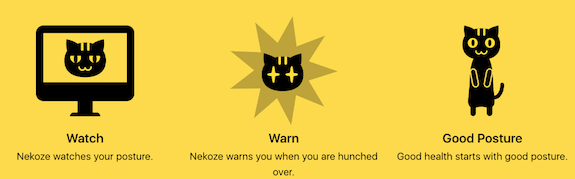
Nekoze has niche appeal; it’s Mac-only, kitty-only, and slouching-only. (The description at the App store says, “Requires MacOS Monterey or later and a hunchbacked human.”) It doesn’t use AI, and users report the interface hasn’t been updated.
Nekoze’s developer, Katsuma Tanaka, says no data is collected, as detailed in the Nekoze privacy policy.
Nekoze is free; there’s not even a paid tier.
Interestingly, Nekoze seems to have been developed back in 2015, and presented at the 9th International Conference on Pervasive Computing Technologies for Healthcare by Tanaka, et. al.
The Other Kind of Posture Pal
We’ve looked at AI and data points. We’ve looked at cartoonish posture detection. But sometimes, you want a solution that’s not based in technology.
Would you prefer something warm and fuzzy to the uncanny valley of AI? How about a stuffed animal designed to help you maintain better posture?

©2026 Posture Pal® at Sonny Angel USA
The Japanese plush toys from Dreams are designed to promote good posture while giving you some cozy affection.
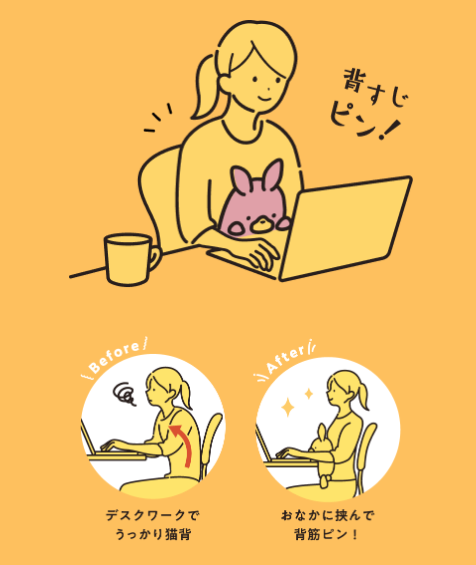
Place your plush buddy firmly between your abdomen and the edge of your desk to keep it upright without squishing it. In order to keep your little friend from falling, you’ll need to maintain a straight spine and keep your back muscles elongated, while relaxing your whole body form so that you can stay in this position while working without dividing your focus.
The soft, sweet Posture Pals can soothe your inner child while you reply to cranky emails or work on expense reports, all without messing up your alignment. The translations of the Japanese websites note that inside each Posture Pal, there’s a “heart” to help each stuffy stay upright and hold your desk while you’re away from your seat.
Posture Pals currently come in 40+ varieties, and more are being introduced, including through special partnerships with designers and “celebrities,” like Shark Meow and Shrimp Meow from pop illustrator Juno, and Elmo and Cookie Monster from Sesame Street. English-language updates are announced at the Dreams site.
Make friends with Rabbit, Bear, Sloth, Monkey, Orangutan, Shiba Inu, Calico Cat, Hedgehog (Paper Doll‘s favorite), Koala, Snakes (green and white), Horses (brown and white), Lobster, Turtle, Whale, Walrus, Seal, Axolotl (my other favorite), Triceratops, Stegosaurus, Tyrannosaurus, Unicorn, Yeti, and a handful of Japanese creations that I’ve been unable to identify.

©2026 Dreams
In the United States, they run $38 at Sonny Angel USA and Strange Cat Toys; in Europe, they range from €25.95-€34.95 at Fioko, which seems to have the most complete inventory. Only the Rabbit seems to be available on Amazon, for $32.
Posture Pal may be too twee to use in a corporate office or on a Zoom, but at home or in a dorm room, why not get a little comfort while preserving your posture?
Next week, we’ll continue our foray into organizing your wellness with ergonomic tweaks for your eyes, hands, arms, and healthy movement breaks.
Until then, catch up on last week’s post, take note of where your body is trying to tell you something is “ouchie,” and share your thoughts about these AI and other posture-coaching options.
The Productivity-Boosting Power of Ergonomics — Organizing Your Workspace and Systems for Success
How are you feeling right now?
Any stiff muscles? Sore neck? Eye strain? Do you actually look forward to sitting at your desk for a day of work? When your work day is over, are you energized, or do you find yourself trying to twist, pretzel-style, to pop everything back into place?
The truth is, if your workspace setup isn’t organized in a healthy way, to serve not only your productivity but your physical health, you’re likely to get cranky, which will, in turn, adversely impact your productivity. There’s a direct correlation between the ergonomic set-up in a workspace and your physical health, satisfaction with our work, and psychological well-being.
Well, unless we’re millionaire Carter Pewterschmidt. He’s got his own thing going on.
If you aren’t a rich dude singing happily to your aches and owies, you might need some ergonomic improvements.
WHAT IS ERGONOMICS?
Ergonomics isn’t merely theory; it’s an applied science. It focuses on designing workspaces, developing systems, and arranging items in an environment to augment any actual (or potential) physical, mental, and/or environmental limitations of users of the space.
Instead of forcing people (students in the classroom, office workers at desks, people on the line in factories, etc.), to strain themselves for the good of the work, ergonomics aims to improve the experience, maximizing safety in anticipation of:
-
Reducing injuries — Creating a new workspace set-up can reduce the physical overexertion and strain that causes chronic medical conditions like repetitive stress injuries (like carpal tunnel syndrome) and back pain.
- Improving comfort and maximizing well-being — Good ergonomic design in your workspace will minimize unnecessary stress on your body (particularly your neck, back, and eyes), reduce fatigue, and improve daily health, and will likely increase your overall satisfaction with the work you have to accomplish.
-
Increasing productivity — Your boss (if you have one other than yourself) may not care about your ergonomics, but everyone cares about the bottom line. Productivity means more (and better) output, and if you are distracted by fatigue, headaches, blurred vision, or back, neck, or wrist pain, you’re not going to be doing your best work.
Ergonomic problems eventually become productivity problems. Conversely, if you can complete more work, faster, with fewer errors, less discomfort or strain, and fewer obstacles, it’s a win-win for you and anyone depending on you, whether that’s your boss, your clients, your readers, or the tiny humans you have to pick up and carry when their bodies suddenly turn into toddler-shaped noodles.
The key idea is that the best ergonomic workspace isn’t one that forces your body to adapt to your tools (computer, desk, accessories) but one that adapts your tools to your (unique) body.
If you’re sitting at your desk right now, stop and take a reality check:
- Are you leaning in toward your screen because you’re overdue for an eyeglass prescription upgrade?
- Are your shoulders up by your ears?
- Are your elbows properly at a 90° angle from your upper arms as you type or are your forearms angled upward from your elbows to your hands because you’re typing on a table or desk that wasn’t designed for computer use?
- Are you sitting on the bed or the couch and trying to keep your laptop balanced on your lap without straining to look downward at the keyboard?
- Are your feet flat on the floor or are your ankles crossed? (If you’re fun-sized like me, are you balancing your feet on the base or the casters of your chair, or are perhaps even en pointe, ballet-style, to keep your legs from dangling?)
- Are you sitting criss-cross-applesauce, or with one foot dangling and the other under your bottom?
- Does anything hurt right now? Your neck? Shoulders? Back? Hips?
Photo by Kindel Media at Pexels
THE ESSENTIALS OF AN ERGONOMIC WORKSPACE
Technology changes how we approach ergonomics. Twenty-five years ago, when I started working with organizing and productivity clients, many had recently switched from desks designed for typewriter use or writing by hand; computer keyboards ended up being too high, causing wrist, neck, and shoulder strain.
Next, people modified their desks or bought desks with keyboard trays, which often positioned keyboards far too low, forcing users to choose between sitting at a comfortable height for reading a screen or a comfortable height for typing, but not both. Then came laptops, with a host of new issues, not to mention tablets and Bluetooth keyboards completely separate from computers — or even desks.
As technology changes, our approach to ergonomics must evolve. Forewarned is forearmed. (And if we had four arms, would we have more or less muscle strain?)
Let’s start with a “Heads, Shoulders, Knees, and Toes” approach, top-to-bottom, to work through how to arrange your workspace.
Set the Monitor at the Optimal Height and Distance
Consider the following basics for your monitor set-up:
- The top third of your screen should sit roughly at or slightly below eye level in order to prevent neck strain.
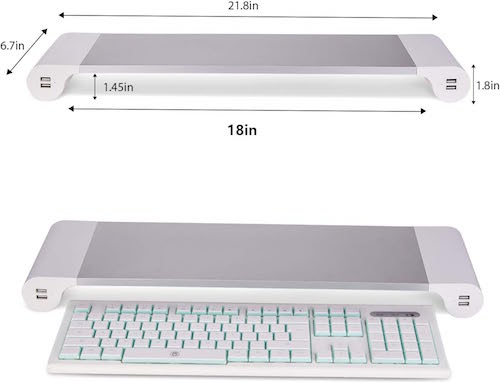
- If the top of your screen is too low, invest in a monitor riser. This one, with 4 USB charging ports, is the one I use.
-
- If you’re on a low-budget, try stacking a few reams of copy paper or thick books.
- If it’s too high, your chair isn’t positioned high enough relative to your monitor. Get a cushion.
- The center of the screen should be directly in front of you.
- The monitor should be about an arm’s length away from your face.
- If you’ve positioned the monitor much closer to you, you’re probably trying to compensate for a vision issue. Make an appointment to get your vision checked and ask your eye doctor for a prescription for glasses to use at the computer.
A common error, which is bad for your eyes, neck, and shoulders, is lowering tilting and lowering your head toward the screen instead of raising the screen so your eyes can easily scan everything you need to read.
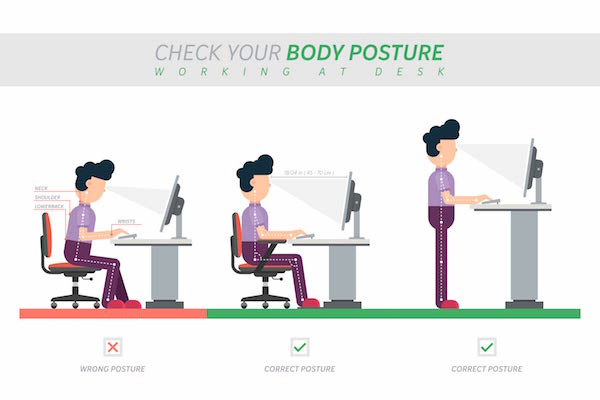
Ergonomics Vectors by Vecteezy
Don’t Get Bent Out of Shape
Your goal is to sit so that your:
- elbows are close to your body, and bent at (or slightly great than) 90° when you’re typing.
- eorearms are parallel to the floor, not angled upward or downward
- wrists neutral, not bent upward — If your screen had eyes, it should not be able to see your palms!
Keep the Keyboard and Mouse Close To You
- Your mouse (if you use one) should be close at hand. — Mouse users reach for the mouse hundreds to thousands of times during the day — you shouldn’t have to stretch for it.
- The keyboard shouldn’t be pushed too far away from you. Again, don’t stretch for it unless you’re pulling it out from under the monitor riser to start a work sprint.
- Make sure chair armrests aren’t preventing proper arm positioning.
Get a Grown-up Desk Chair and Support Your Lower Back
You may have done your math homework sprawled on your stomach on the living room carpet, but your body will not thank you for trying the same position today.
I get that most people can’t afford an Eames, or even a Herman Miller, desk chair. (Including Paper Doll. Trust me, I’m not spending thousands on a desk chair, either.)
That’s fine — supportive doesn’t have to mean expensive.
But there are some essential characteristics of a chair that’s ergonomically beneficial for you so that you can maintain what’s called a “neutral” posture.
CUergo, the Cornell University (my alma mater, in case I haven’t mentioned it in the last 15 minutes) Ergonomics Web, has an helpful checklist of questions on its page, How To Choose an Ergonomic Chair.
It covers issues related to the seat pan (where your tushy goes), height adjustability, lumbar support (of which, more later), hip room, comfort over time, chair recline capabilities and support, the importance of a 5-pedestal base, gliding and swiveling capabilities, and the ever-consequential debate over arm rests.
Just remember that your back needs to be supported by the chair, not just your muscles. (Yes, we should all work to have a strong core to support our backs, but I’m not here to gym-shame anyone.) If your desk chair is failing you in terms of lumbar support, consider some less expensive alternatives:
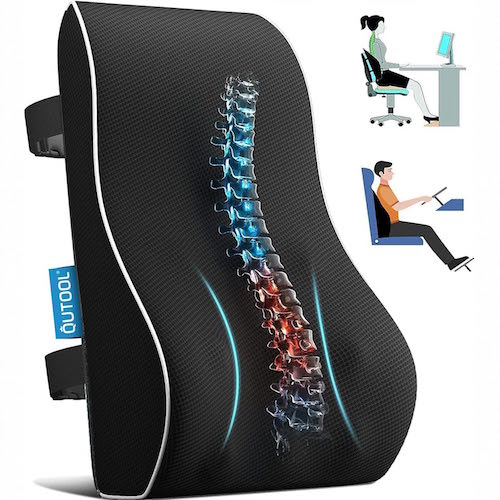
- Consider a lumbar pillow — These are designed to support your lower back by promoting a natural spine curvature, relieving pressure while you’re sitting.
- Try placing a rolled towel or bolster behind your lower back.
- If possible, adjust your chair depth so you can sit back fully instead of hunching forward.
Feet, Do Your Stuff!
When seated at your desk, your feet should be placed flat on the floor. If the only way you can sit so you can see your monitor and keep your neck, shoulders, and arms in the proper position to work means that your feet are dangling, use an adjustable or foam foot rest.
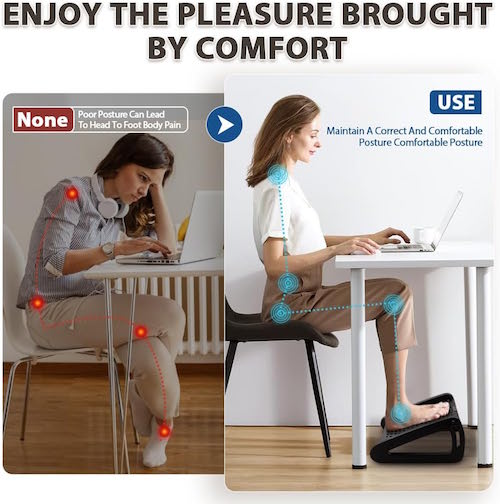
You can buy one, but you can also use a cardboard box, a folded or rolled blanket, or a rolled beach towel.
What’s wrong with dangling, you may ask? After all, little kids look adorable when their feet dangle from a chair due to their diminutive size. First, they’re likely only sitting that way for a few minutes at a time; kids wiggle around. You, however, are at your desk most of an eight-hour day! If your feet dangle:
- it increases the pressure under the thighs
- it causes your upward posture to deteriorate
- it can lead to lower-back discomfort
Note: a traditional desk chair isn’t your only option. Healthy Computing has a nifty article on the concept of active sitting, whereby you can improve your health by engaging specific muscles while using alternative seating, like a balance ball chair, kneeling chair, or even squatting. The benefits of active sitting (or dynamic sitting) include improved posture, increased core strength, reduced muscle tension, and increased blood circulation.
(Fair warning, if you try a balance ball chair for the first time, don’t do it on a Zoom call. Seriously.)
What About Standing Desks?
In 2018, I wrote one of my most popular posts, Paper Doll on The Truth(s) About Standing Desks. In that post, I looked at the benefits and potential drawbacks of using a standing desk, and offered up some neato-keen standing desk options and alternatives at all price levels. While an eight-year-old post isn’t ideal for shopping ideas, you may find the post intriguing for the ergonomic aspects.
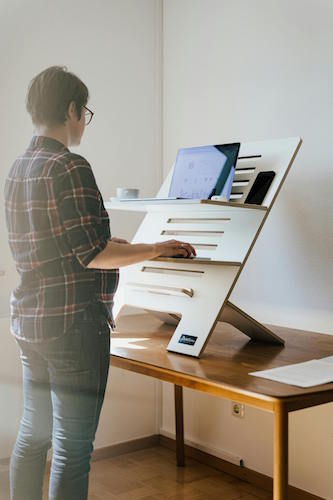
Photo by Standsome Worklifestyle at Pexels.com
The long and the short of it? Sitting all day is very bad for you. But standing all day isn’t necessarily that much better. You’ll likely shift your hips, lean, and slump. A neutral posture isn’t going to magically appear just by using a standing desk. Furniture doesn’t override habits. It’s being sedentary, rather than the height at which you are sedentary, that does the evil deeds.
That said, you might wish to peruse a more recent Healthline article, 6 Benefits of a Standing Desk, for some surprising benefits of standing desks, including new research that finds that use of standing desks may reduce blood pressure, blood sugar, and improve mood, in addition to the general benefits of avoiding sedentary work habits.
Light Up Your (Work) Life
Your desk arrangement and how you sit at it are important, but don’t forget about good lighting. Poor lighting can lead to eye strain, fatigue, headaches, and squinting, and squinting leads to wrinkles. You heard it here first, folks — ergonomic lighting works like the Fountain of Youth. (OK, don’t quote me on that.)
Note: Paper Doll is not a lighting expert, and the kinds and brightness-levels of lighting you may want to use (overhead lighting, natural lighting, task lighting) are beyond the scope of this post. However, consider these tips to start your ergonomic glow-up (no pun — wait, in retrospect, pun intended.)
- Position your monitor/screens to be perpendicular to windows — If the light is directly behind you, it will bounce off the monitor. If sunlight is coming from windows directly in front of you, you’ll need shades. (And sunscreen. Remember the wrinkles!)
- Reduce glare — If light from a lamp is reflecting off of your screen, you’re going to unintentionally squint or move your body to avoid the glare. Instead, move the monitor!
- Add task lighting for “fine detail” non-computing work like handwritten paperwork, reading documents or books, or doing handiwork. (If you’re time traveling from Jane Austen’s era and will be doing needlework, bring those candles closer so as not to strain your vision. If you squint and get wrinkles, you may find yourself unmarried at 27 and a burden on your family.)
- Adjust your computer to compensate for lighting issues — Check the Accessibility settings on your computer to increase contrast, and increase the font size on your screen, if necessary. (You can simultaneously click Command and the + sign on a Mac to quickly increase the font size; do it multiple times to keep increasing the font until it’s ridiculously large. Click Command and the minus (-) sign an equal number of times to revert to the original size. I’m not aware of an equivalent on Windows computers, but Start > Settings > Accessibility > Text size will work.)
WITH ERGONOMICS, HABITS ARE MORE IMPORTANT THAN FURNITURE
I’ve heard ergonomics specialists say that, “The best posture is the next posture.” This means that it’s not healthy to stay in one position too long, and obviously no one posture is tenable (or healthy) for eight hours straight. You need a mix of sitting, standing, stretching, bending, or walking — regular or Monty Python silly walks, as you prefer.
Alan Hedge, Cornell’s Professor Emeritus of Ergonomics, conducted research and developed a process whereby in each half-hour at work, you should:
- sit for 20 minutes
- stand for 8 minutes
- and move around for at least 2 minutes
His research found that employing a “20-8-2” work pattern improved task performance over time without decreasing attention span or short term memory while also increasing total energy expenditure and decreasing sedentary time. Get moving!
Of course, the best way to remember to change your positions frequently is to not leave it up to your brain, which is already overloaded.
Remember to Take Breaks
Set a reminder alarm on your computer or phone to change positions, move your eyeballs, roll your shoulders, drink water (and then walk to refill your water), take a bio break, shake your sillies out…Shake, Shake, Shake Senora!
Don’t wait until you’re already feeling discomfort to take micro-breaks during your work day. Revisit my post, Take a Break — How Breaks Improve Health and Productivity, which covers everything from micro-breaks for your body and your brain to the 20-20-20 Rule to prevent computer vision syndrome. Here’s a cheat sheet:
- every 20 minutes, look away from your screen and toward/at something
- 20 feet away
- for at least 20 seconds
Whether you’re looking at a poster of a kitten or Pedro Pascal, that’s nobody’s business but your own.
Alternate Tasks Throughout the Day
You may think you do the same thing all day, but knowledge workers (programmers, writers, coaches, etc.) have a lot of differing tasks. Think: writing, research, making phone calls, doing Zooms, filing, planning, etc.
Adopt different postures whenever you don’t absolutely have to be seated at your desk. For example:
- I naturally pace when I talk on the phone, getting in steps while not having to even think about it.
- Arrange your office with your archival files across the office, prompting you to stand to do your filing. Find your groove and file along while listening to your favorite Spotify playlist.
- Rehearse for your next presentation or speaking engagement while standing or even doing sun salutations.
Use a Zone Defense to Avoid Unnecessary or Awkward Reaching
Borrow from industrial ergonomics and create specific zones for your “stuff” to ensure that you are stretching healthily (and not too often). The fewer unnecessary reaches, twists, and stretches, the better your habits will be.
Your primary zone, or what I usually refer to as your “primary real estate” is what you use constantly during the course of your work day. That’s your keyboard, mouse (if you use one), water bottle, and phone. Put them so that you can reach them without inviting repetitive stress injuries.
This is where your want to make sure you are limiting your rehearsal to be a famous contortionist. For example:
- Put your printer behind your chair on or the side of your L-shaped desk if you want to access it quickly and often. But if you want to incorporate more (of the right kind of) movement in your work day, put the printer where you have to get up and walk to it. Do not put it just far away enough from your chair that you have to twist yourself unnaturally and risk falling off your chair to reach it.
- Got annoying charging cables strewn under your desk so that you’re always having to fiddle with them to keep your mojo going? Reposition them so you you’re not squishing yourself (and risking bumping your head) every time you need to power up your phone.
Your secondary zone is what you use only occasionally in the course of the day, and with intentionality. If you use a paper planner, it’s OK if that’s a bit of a stretch to the back half of your desk, or reference files, because you’re rolling, leaning, or stretching only on occasion.
Your storage zone reflects much-less-often used items in your work space. If you’re not reaching for them with frequency, get them out of your workspace to make acquisition accessible but intentional. Don’t clutter up your workspace with archival files or the bulk of your office supplies.
Give your tech a designated home. A well-organized workspace minimizes awkward movements. It serves you; you shouldn’t have to serve it.
Speaking of Headsets
This is very much a do-as-I-say, not-as-I-do ergonomic recommendation, but cradling the phone between your shoulder and your ear is not only very “last century,” but it’s terrible ergonomics. So is leaning across your desk to shout into a speakerphone (or cell phone speaker).
Get yourself a hands-free headset or earbuds, whether fancy or corded. (Just don’t get up while wearing corded ones plugged into your computer, or they’ll be yanked painfully out of your ears. Don’t ask me how I know.)
Listen to Your Body
There’s an important ergonomic habit that we all fail to develop: listening to what our bodies tell us. My feet hurt because I may spend hours in faux-ballet mode, ankles crosses, balanced on my toes because I’m not tall enough to rest my feet flat on the floor. (Professional organizer, heal thyself! I’m buying a foot rest as soon as I hit “submit” on this post.)
Too often, we treat discomfort as a signal to endure. Those of us who get migraines laugh knowingly at TikToks referencing how we tend to ignore “auras” and the start of pain when we could (and should) go take our medication. We rub our strained eyes when we know we should be taking a break — and not touching our eyes! For goodness’ sake, people cross their legs to get one more set of emails written instead of taking a bio break. Go to the bathroom!
Aches, pains, and bodily discomfort — it’s all feedback, just like a client survey or performance review. Pay attention to discomfort, find the cause, and take appropriate action early. Organize your space and your habits for wellness.
Aches, pains, and bodily discomfort — it's all feedback, just like a client survey or a performance review. Pay attention to discomfort, find the cause, and take appropriate action early. Organize your space and your habits for… Share on XWRAPPING UP WITHOUT TWISTING YOURSELF IN KNOTS
If you work at a desk all day, you might feel like you’re auditioning for a role as a famous movie character, but not one likely to share the stage with Pedro Pascal. There’s:
- Quasimodo and his hunched posture
- Gollum and his thousand-yard stare
- Igor and his one-shoulder slump
A little ergonomic insight, however, can make all the difference.
While today’s post offers steps to improve the ergonomic design of your workspace, I know hard it can be to develop habits that stick. So, next week’s post offers up a bevy of quirky apps and tools to support your new ergonomic plan.
We’ll look at ways to gamify ergonomic improvements for your posture, soothe eye health, reduce the strain of mouse overuse, and even relax with keyboard yoga. In the meantime, feel free to share your ergonomic concerns and/or wins in the comments.
How to Be On Time — Smart Strategies to Stop Running Late
Last week, as I walked up to a client’s door, she opened it with a giggle. “Do you realize you always arrive at exactly 12:59? How do you manage it?”
Some of it is luck. The client’s in my zip code, I don’t have to get on the highway, and (thus far) I haven’t encountered traffic delays. But I also have a client on the back side of one of the mountains near Chattanooga, and no matter how early I leave, there’s invariably an accident blocking traffic to (or up) the mountain. But in every instance, I walk out the door at the exact time I’ve intended; for my own sanity, I don’t even attempt to do anything unanticipated (especially answering the phone) in the ten minutes before I’m supposed to leave.
Being on time is no moral victory. (Nor is being late a moral failing.) But to be a good role model for clients regarding organizing and productivity, I need to walk the talk, and time management — particularly arriving on time — is important. It’s also doable!
WHY BEING ON TIME MATTERS
Different cultures have different experiences and expectations of time. In some places, it’s considered the height of rudeness to arrive after the appointed hour, whether for a meeting or social event. In others, start times are “suggestions” and arriving at the time for which you were invited might find someone still in a meeting or (for a dinner party) still cooking or getting dressed.
On The West Wing, there’s an episode where President Bartlet is interviewing secretaries and one makes a comment about how “the French have a pliable relationship with time.” Conversely, there’s this about German perceptions of punctuality:
For our purposes, we’ll focus on North American standards for being on time.
What’s Wrong With Being Late?
Tardiness has bad PR. It causes a wide variety of negative consequences for the person waiting and for you:
- Confusion — At the very least, particularly when the appointed meeting is at a third location (neither your home or office nor theirs), if you aren’t somewhere when you say you will be when you planned to be, like for a first date or a meeting, it can cause confusion. The person you’re meeting may fear they’ve gotten the time, the date, or the location wrong.
- Worry — If you’re meeting someone with whom you’re close, like a friend, family member, or loved one, as the minutes click onward and you’ve neither arrived nor called, they’ll start worrying that you’re in a ditch somewhere, bleeding from a head wound. Not cool, dude.
- Inconvenience — Showing up late causes situational stress for others. If you have an appointment to see the doctor or to get a haircut and you are materially late, it forces them to determine whether to try to squeeze you in and risk making everyone else late for the rest of the day, or to give up on the appointment (which you might need very much) and require you to reschedule. In this way, being late inconveniences the person you are meeting, others with no relationship to you, and you, yourself.
- Perceived Disrespect — If there’s a power imbalance (for example, you’re late for an interview or a meeting with a prospective client), or if you exhibit habitual lateness, others are more likely to perceive your tardiness as a sign of either arrogance or laziness.
Perception of Arrogance
With arrogance, others may assume that you believe your time is more valuable than theirs, and that you’ve judged them unworthy of the deference or respect due to them, personally or professionally.
People who are generally on time (assuming they’re from a culture that values temporal precision) take lateness as a sign of disrespect. Failure to arrive on time sets a tone for business relationships as well as friendships and romantic relationships, and you may encounter a frostiness based on an inaccurate perception of your intentions.
Perception of Laziness
As for laziness, you may have been late because you tried to squeeze in one more sales call or review one more email, but the other person’s perception is that you couldn’t get your act together. Being late repeatedly makes a person seem flaky.
Failure to attend to small details, like arriving at the appointed hour, can make others doubt your ability to serve their needs and master larger details related to delivery dates, precise measurements, or accurate financials. If you show up late for a date, or if you call half an hour after you were supposed to have arrived at the restaurant to say you’re “Be there in 5” when you haven’t even left yet, it isn’t going to endear you to anyone. As time goes on, you may find yourself not taken seriously.
Stress
Think about the last time you were late, whether or not it was your fault. How did you feel? Did your heart race? Did you start to perspire? Did you react by driving faster than you normally would, or with less care? For people who value being perceived as responsible, detail-oriented, and caring, and who value the time of the person waiting, knowing that you’re running late can feel terrible.
In the olden days, before we had cell phones, if you were running behind after you got in the car, there was little you could do except rehearse your apologies and curse the traffic (and maybe yourself). With cell phones connected to cars, we can now text or call hands-free (though it’s not entirely distraction-free and still carries dangers), but being late can still be embarrassing and stressful.
Poor Self-Esteem
Nobody wants to think less of themselves. But when we make promises or agreements to be somewhere and we are not, particularly if any part of our lateness is our own fault, and even more particularly if we grew up with parents who equated tardiness with moral failings, being meaningfully late is going to wear away at one’s self-esteem.
Rather than seeing the situation as one that requires new strategies, you might start imagine yourself through others’ eyes in a not-very-compassionate way and think of yourself as a “screw-up.”
Resentment
The harder you perceived yourself working — doing one more task before you left the office or taking care of one more thing at home — the more likely you are to be resentful when you run late. You may resent your boss or co-workers or a client weighing you down or resent loved ones for “causing” you to be late (perhaps by not fulfilling spoken or unspoken expectations).
You could unreasonably resent the person you’re meeting because they even have expectations of you. (“Why don’t they know how busy my life is?!”) You might resent your parents for not teaching you better time management skills or drilling them so intently that you rebelled against them. And you may resent yourself for failing to live up to your own expectations.
Conversely, for what it’s worth, if you follow strategies for being on time, on the rare occasions that you are late, people will assume that it was not your fault. (However, you run the risk of your one-time tardiness being played for sport.)
WHY PEOPLE ARE LATE
They Have Difficulty Perceiving Time
Before I get too far into the weeds, it would be irresponsible for me not to note that in addition to the aforementioned cultural differences experiencing time, there are also neurological differences in how some people perceive time.
People with ADD and ADHD, as well those on the autism spectrum or with any of various executive function disorders, may perceive time differently. They may fail to experience or “feel” the passage of time the same way someone neurotypical does, and transitions between finishing one task and moving on to the next can be more difficult or uncomfortable to accomplish. It would be an unkind mistake to assume that they can “just set alarms” or “just leave earlier.”
Neurodivergence notwithstanding, perceiving the passage of time can be difficult for many people. Paying more attention to how long it takes to do a task, using tools that help you visualize the passage of time, and creating audiovisual alerts to transition times can help you identify when your time perception is out-of-sync with that of others. (Or maybe you’re just French and have a pliable relationship with time?)
If you tend to mis-estimate how long something will take to accomplish, if you don’t have a good sense of what ten minutes or an hour “feels” like, or if you tend to hyper-focus and aren’t aware of the march of time, the following posts may help you in this regard.
- How to Use Timers for Improved Productivity and Focus — Part 1
- How to Use Timers for Improved Productivity and Focus — Part 2: Picking a Good Timer
- How to Use Timers for Improved Productivity and Focus — Part 3: Tangible Timers
- How to Use Timers for Improved Productivity and Focus — Part 4: Digital Timers
- How to Use Timers for Improved Productivity — Part 5: Hybrid Timers and Bonus Material
They Lack of Reality Checks on Time Use
Do you know how you spend your time?
Knowledge is power, so self-knowledge should give you superpowers. If you have a “pliable” relationship with time and are often surprised that the entire morning has gone by, or that you’ve tarried far longer on a task than you’d planned, you and the clock need to have a diplomatic summit.
Take a reality check on how much time you use to accomplish a task. Do you rarely complete a task in one sitting? It might be due to excessive interruptions from others, or you might suffer from shiny object syndrome, ping-ponging your attention to whatever catches your eye at the time. While ADD or ADHD may be a contributing factor, it’s also possible you just never strengthened the behavioral muscles necessary to focus on one task to completion.
A time audit may be just what you need to get a handle on where your time is leaking. My post from January, How to Use Time Tracking to Improve Your Productivity, explains how to use time tracking to improve your mindfulness and focus, better prioritize your tasks and time use, make decisions about time use based on more accurate date, reduce your stress, and be more accountable.
It’s a known scientific phenomenon that measuring a behavior can change it. People who write down how much they eat instinctively refrain from eating when they’re not really hungry. Logging when you’re aimlessly surfing the web forces you to realize that you’re aimlessly surfing the web. Identifying how much time you spend on a low-priority task can encourage you to automate or delegate it.
Note when you get sidetracked. An unexpected caller or visitor can throw your planned schedule out of whack. When you answer the phone and again when you hang up, take note of the time. (Your phone’s caller ID feature is useful for time tracking.) In person, don’t clock-watch while chatting, but stand up. Your back and your feet will make you more cognizant of the passage of time and prompt you to curtail stories that aren’t on point when you’re on deadline. Use time-tracking software (as suggested in the above post) to measure your digital activities.
Finally, if your schedule is truly jam-packed and you can’t attend all of everything, it’s less disruptive to leave the first meeting early than arrive at the second one late.
They Neglect Prioritizing and Planning
Sometimes, people are late because they are either overscheduled, so they’re delayed in getting where they’re going, or underscheduled (lacking necessary structure) and don’t realize where they should be.
There are numerous posts in the Paper Doll vault regarding how to prioritize, plan, and schedule your tasks so you can accomplish what’s most important. Start with the concepts reviewed in February’s Paper Doll’s Cheat Sheet for Celebrating Time Management Month.
Too many people fly by the seat of their pants, doing things when they feel inspired or when they remember to do them. They fear that putting anything on the calendar except appointments to which they are required to show up will ruin their their inspiration and natural “flow.”
But ask yourself, what are you good at accomplishing on time, every time? Chances are it’s what you’ve scheduled uninterrupted time to do. It’s essential to build time into your schedule for tackling all of the work to be completed. If you cringe at the idea of a schedule, fear being too regimented, and think you prefer to go by your gut, ask yourself how effective acting on instinct has been thus far for your productivity.
Perform a brain dump and list of all of your regular activities. Sort them into categories, just like in school, when you had math (now it’s bookkeeping) or English (perhaps marketing) or debate (meetings and negotiations). All of those activities were regulated by a fixed schedule that ensured you had ample time to focus on each subject.
A bell triggered transition time. Your schedule even accounted for lunch and gym, to keep your brain and body healthy. Both work and life are learning environments, so take yourself back to school.
We’ve often discussed how useful time blocking can be, so start by drafting the ideal calendar week so that all of the essential categories of life have time slots in which to fit them. Just as you can’t organize until you’ve reduced the unnecessary or less needed items so there’s room to fit them in your space, you will need to consider what you might have to remove from your schedule so that you have enough time to do the things you need to do and (most of what) you want to do.
If you need a little help decluttering your schedule, consider the advice in 52 Ways to Say NO to a Request So You Can Say YES to Your Priorities.
They Forget About Transitions and Obstacles
Do you carefully enter everything on your schedule but still find yourself showing up late to appointments, even when they’re online and you’re sitting right there in your chair?
You may be missing out on one of the most important strategies for being on time, accounting for delays and obstacles over which you have no control.
Schedule Buffer Time
If you have an appointment from 1 p.m. to 2 p.m. and another from 2 p.m. to 3 p.m., it might seem like as long as the first one ends on time (and how likely is that?), you’re all set. Nope.
When will you:
- listen to phone messages?
- check email?
- reply to messages?
- use the rest room?
- shift your mental focus?
Taking breaks is essential, both to keep your personal engine from wearing down and to ensure that there’s enough mental and temporal space between tasks. (Check out Take a Break — How Breaks Improve Health and Productivity.)
Plan buffer time before and after meetings, Zooms, business lunches. Add buffer time after your deep work sessions, as it might take your brain some time to transition after you’ve spent an hour (or hours) of focused work time on an important project.
Schedule buffer time between your last appointment and the end of each workday to review your planner, tickler file, and action items for the next workday.
In your personal life, you have more flexibility because you can skip unloading the dishwasher or doing the laundry if your toddler is having a meltdown. But you’ll still need buffer time to cope with unanticipated problems.
Let’s say your morning schedule is usually a well-oiled machine: wake up, breakfast, brush teeth, get the kids in the car, and do drop-off at day care and school before heading to work. What will you do if your toddler refuses to wear her shoes? If you spill coffee down the front of your shirt?
Anticipate obstacles beyond your control: the need for safety precautions due to weather or traffic, interruptions that are both urgent and important and can’t be delegated, and technical difficulties. Life occasionally has sharp edges; pad them.
Schedule Travel Time
Travel time is a sub-category of buffer time, and it’s one that’s likely to cause you the most frustration. Setting aside enough time to get to an out-of-office appointment (and then afterward back to work or home) means that you’re somewhat able to control for variables like extra-chatty people or if the person meeting you is running late.
You can’t control traffic, but you can schedule your day so that there’s 20% more travel time allotted than GPS says it will take. You can set a reminder for 30 minutes before you’re supposed to leave to check what GPS or Waze says is going on with traffic on your route. You can call the person you’re meeting to let them know you’ve monitored the situation and will be leaving early, but to prepare for delays.
Count Backward to Consider All Activities
When you’re planning your ability to add something to your schedule (or evaluating whether you need to subtract something, or a few somethings), count backward. If your doctor’s appointment is scheduled for 3 p.m., you’re probably supposed to be there to do paperwork by 2:45 p.m. Unless you know the parking situation well, give yourself ten minutes to park, so you need to arrive by 2:35 p.m. If GPS says it will take 30 minutes, give yourself about 40 minutes.
If you need to leave where you are by five minutes to 2 p.m., follow the most important time management rule and use the restroom before you get in the car! To accomplish all of this, you have to be dressed, with everything you need to take with you, by 1:50 p.m., which means that by about 1:30 p.m., you need to have:
- finished lunch (and brushed your teeth)
- wound down any meetings or Zooms
- anyone leaving the house or office with you ready and prepared
In other words, just because you have an out-of-office appointment at 3 p.m., it doesn’t mean you can schedule right up until the minute you have to be there.
If you count all the way back to the start of your day and find that’s where you’re getting stuck, Do (Not) Be Alarmed: Paper Doll’s Wake-Up Advice for Productivity can help you create buffer time between sleep and your first daily obligation.
GET COMFORTABLE WITH BEING EARLY
If you’re habitually late, you may subconsciously be uncomfortable with the idea of being early or kept waiting. If disorganization normally makes you feel overwhelmed and pressed for time, you’ve probably developed habits to avoid waiting for others or missing out on the productive use of your time.
Cookie Monster meme via GIPHY
Reject the siren call of doing “just one more thing” when it’s time to make a transition to a new task or walk out the door. You may think these efforts will make you more efficient, but it’s likely you haven’t anticipated the associated pitfalls.
To prepare for being early or kept waiting by others:
- Double-check the meeting location and time in advance so your early arrival won’t fill you with anxiety over whether you’ve done all the right things. Review the purpose of the meeting, the details you want to cover, the questions you want to ask (or answer), and the desired result.
- Keep your briefcase or backpack stocked with materials that will absorb your interest while you wait. If you’re a paper person, maintain a folder of clipped journal or magazine articles you’ve been meaning to read; if you’re all-digital, read the open tabs on your phone. If something triggers an actionable task, schedule it.
- Bring a book or e-reader so that you can catch up on the business or personal reading you rarely have time to do.
- Review your running list of notes from the past week to see if anything needs to be moved to a higher priority or rescheduled.
- Maintain social relationships with a quick text to say, “I’m heading into a meeting/doctor’s appointment/haircut but I wanted to tell you I’ve missed you and was thinking about you today.” Modern life is stressful and it’s easy to lose connection when you’re rushing around. Use “found time” to make quick connections with people who matter to you.
Become more adept and comfortable with the idea of arriving early and waiting serenely, instead of always being the last person to rush through the door, apologizing. Think of buffer time as an emergency fund for your schedule. It’s there if you need it; if not, you have something small but productive to occupy your time and thoughts.
Think of buffer time as an emergency fund for your schedule. It’s there if you need it; if not, you have something small but productive to occupy your time and thoughts. Share on XFINAL THOUGHTS ON BEING ON TIME
Some people insist that everyone has the same 24 hours each day to get everything done. However, the single mother with two jobs and an unreliable (or no) car, sometimes forced to take public transportation, or the person taking care of children while being caregiver to an ill or elderly parent or in-law has far more to squeeze into those 24 hours each day than a single dude just out of college or a person with financial means to just “make things happen!”
Similarly, if you’ve got a chronic illness or a job that has you on-call, you can’t always be where you intended (or even promised) to be, on time every time. Sometimes, you have to give yourself grace.
That’s why time management is a misnomer. You can’t manage time, but you can manage your use of it, to the best of your abilities, given the circumstances. And, if you still end up late, you can manage your attitude when you arrive:



Follow Me