Archive for ‘Task Management’ Category
How to Be On Time — Smart Strategies to Stop Running Late
Last week, as I walked up to a client’s door, she opened it with a giggle. “Do you realize you always arrive at exactly 12:59? How do you manage it?”
Some of it is luck. The client’s in my zip code, I don’t have to get on the highway, and (thus far) I haven’t encountered traffic delays. But I also have a client on the back side of one of the mountains near Chattanooga, and no matter how early I leave, there’s invariably an accident blocking traffic to (or up) the mountain. But in every instance, I walk out the door at the exact time I’ve intended; for my own sanity, I don’t even attempt to do anything unanticipated (especially answering the phone) in the ten minutes before I’m supposed to leave.
Being on time is no moral victory. (Nor is being late a moral failing.) But to be a good role model for clients regarding organizing and productivity, I need to walk the talk, and time management — particularly arriving on time — is important. It’s also doable!
WHY BEING ON TIME MATTERS
Different cultures have different experiences and expectations of time. In some places, it’s considered the height of rudeness to arrive after the appointed hour, whether for a meeting or social event. In others, start times are “suggestions” and arriving at the time for which you were invited might find someone still in a meeting or (for a dinner party) still cooking or getting dressed.
On The West Wing, there’s an episode where President Bartlet is interviewing secretaries and one makes a comment about how “the French have a pliable relationship with time.” Conversely, there’s this about German perceptions of punctuality:
For our purposes, we’ll focus on North American standards for being on time.
What’s Wrong With Being Late?
Tardiness has bad PR. It causes a wide variety of negative consequences for the person waiting and for you:
- Confusion — At the very least, particularly when the appointed meeting is at a third location (neither your home or office nor theirs), if you aren’t somewhere when you say you will be when you planned to be, like for a first date or a meeting, it can cause confusion. The person you’re meeting may fear they’ve gotten the time, the date, or the location wrong.
- Worry — If you’re meeting someone with whom you’re close, like a friend, family member, or loved one, as the minutes click onward and you’ve neither arrived nor called, they’ll start worrying that you’re in a ditch somewhere, bleeding from a head wound. Not cool, dude.
- Inconvenience — Showing up late causes situational stress for others. If you have an appointment to see the doctor or to get a haircut and you are materially late, it forces them to determine whether to try to squeeze you in and risk making everyone else late for the rest of the day, or to give up on the appointment (which you might need very much) and require you to reschedule. In this way, being late inconveniences the person you are meeting, others with no relationship to you, and you, yourself.
- Perceived Disrespect — If there’s a power imbalance (for example, you’re late for an interview or a meeting with a prospective client), or if you exhibit habitual lateness, others are more likely to perceive your tardiness as a sign of either arrogance or laziness.
Perception of Arrogance
With arrogance, others may assume that you believe your time is more valuable than theirs, and that you’ve judged them unworthy of the deference or respect due to them, personally or professionally.
People who are generally on time (assuming they’re from a culture that values temporal precision) take lateness as a sign of disrespect. Failure to arrive on time sets a tone for business relationships as well as friendships and romantic relationships, and you may encounter a frostiness based on an inaccurate perception of your intentions.
Perception of Laziness
As for laziness, you may have been late because you tried to squeeze in one more sales call or review one more email, but the other person’s perception is that you couldn’t get your act together. Being late repeatedly makes a person seem flaky.
Failure to attend to small details, like arriving at the appointed hour, can make others doubt your ability to serve their needs and master larger details related to delivery dates, precise measurements, or accurate financials. If you show up late for a date, or if you call half an hour after you were supposed to have arrived at the restaurant to say you’re “Be there in 5” when you haven’t even left yet, it isn’t going to endear you to anyone. As time goes on, you may find yourself not taken seriously.
Stress
Think about the last time you were late, whether or not it was your fault. How did you feel? Did your heart race? Did you start to perspire? Did you react by driving faster than you normally would, or with less care? For people who value being perceived as responsible, detail-oriented, and caring, and who value the time of the person waiting, knowing that you’re running late can feel terrible.
In the olden days, before we had cell phones, if you were running behind after you got in the car, there was little you could do except rehearse your apologies and curse the traffic (and maybe yourself). With cell phones connected to cars, we can now text or call hands-free (though it’s not entirely distraction-free and still carries dangers), but being late can still be embarrassing and stressful.
Poor Self-Esteem
Nobody wants to think less of themselves. But when we make promises or agreements to be somewhere and we are not, particularly if any part of our lateness is our own fault, and even more particularly if we grew up with parents who equated tardiness with moral failings, being meaningfully late is going to wear away at one’s self-esteem.
Rather than seeing the situation as one that requires new strategies, you might start imagine yourself through others’ eyes in a not-very-compassionate way and think of yourself as a “screw-up.”
Resentment
The harder you perceived yourself working — doing one more task before you left the office or taking care of one more thing at home — the more likely you are to be resentful when you run late. You may resent your boss or co-workers or a client weighing you down or resent loved ones for “causing” you to be late (perhaps by not fulfilling spoken or unspoken expectations).
You could unreasonably resent the person you’re meeting because they even have expectations of you. (“Why don’t they know how busy my life is?!”) You might resent your parents for not teaching you better time management skills or drilling them so intently that you rebelled against them. And you may resent yourself for failing to live up to your own expectations.
Conversely, for what it’s worth, if you follow strategies for being on time, on the rare occasions that you are late, people will assume that it was not your fault. (However, you run the risk of your one-time tardiness being played for sport.)
WHY PEOPLE ARE LATE
They Have Difficulty Perceiving Time
Before I get too far into the weeds, it would be irresponsible for me not to note that in addition to the aforementioned cultural differences experiencing time, there are also neurological differences in how some people perceive time.
People with ADD and ADHD, as well those on the autism spectrum or with any of various executive function disorders, may perceive time differently. They may fail to experience or “feel” the passage of time the same way someone neurotypical does, and transitions between finishing one task and moving on to the next can be more difficult or uncomfortable to accomplish. It would be an unkind mistake to assume that they can “just set alarms” or “just leave earlier.”
Neurodivergence notwithstanding, perceiving the passage of time can be difficult for many people. Paying more attention to how long it takes to do a task, using tools that help you visualize the passage of time, and creating audiovisual alerts to transition times can help you identify when your time perception is out-of-sync with that of others. (Or maybe you’re just French and have a pliable relationship with time?)
If you tend to mis-estimate how long something will take to accomplish, if you don’t have a good sense of what ten minutes or an hour “feels” like, or if you tend to hyper-focus and aren’t aware of the march of time, the following posts may help you in this regard.
- How to Use Timers for Improved Productivity and Focus — Part 1
- How to Use Timers for Improved Productivity and Focus — Part 2: Picking a Good Timer
- How to Use Timers for Improved Productivity and Focus — Part 3: Tangible Timers
- How to Use Timers for Improved Productivity and Focus — Part 4: Digital Timers
- How to Use Timers for Improved Productivity — Part 5: Hybrid Timers and Bonus Material
They Lack of Reality Checks on Time Use
Do you know how you spend your time?
Knowledge is power, so self-knowledge should give you superpowers. If you have a “pliable” relationship with time and are often surprised that the entire morning has gone by, or that you’ve tarried far longer on a task than you’d planned, you and the clock need to have a diplomatic summit.
Take a reality check on how much time you use to accomplish a task. Do you rarely complete a task in one sitting? It might be due to excessive interruptions from others, or you might suffer from shiny object syndrome, ping-ponging your attention to whatever catches your eye at the time. While ADD or ADHD may be a contributing factor, it’s also possible you just never strengthened the behavioral muscles necessary to focus on one task to completion.
A time audit may be just what you need to get a handle on where your time is leaking. My post from January, How to Use Time Tracking to Improve Your Productivity, explains how to use time tracking to improve your mindfulness and focus, better prioritize your tasks and time use, make decisions about time use based on more accurate date, reduce your stress, and be more accountable.
It’s a known scientific phenomenon that measuring a behavior can change it. People who write down how much they eat instinctively refrain from eating when they’re not really hungry. Logging when you’re aimlessly surfing the web forces you to realize that you’re aimlessly surfing the web. Identifying how much time you spend on a low-priority task can encourage you to automate or delegate it.
Note when you get sidetracked. An unexpected caller or visitor can throw your planned schedule out of whack. When you answer the phone and again when you hang up, take note of the time. (Your phone’s caller ID feature is useful for time tracking.) In person, don’t clock-watch while chatting, but stand up. Your back and your feet will make you more cognizant of the passage of time and prompt you to curtail stories that aren’t on point when you’re on deadline. Use time-tracking software (as suggested in the above post) to measure your digital activities.
Finally, if your schedule is truly jam-packed and you can’t attend all of everything, it’s less disruptive to leave the first meeting early than arrive at the second one late.
They Neglect Prioritizing and Planning
Sometimes, people are late because they are either overscheduled, so they’re delayed in getting where they’re going, or underscheduled (lacking necessary structure) and don’t realize where they should be.
There are numerous posts in the Paper Doll vault regarding how to prioritize, plan, and schedule your tasks so you can accomplish what’s most important. Start with the concepts reviewed in February’s Paper Doll’s Cheat Sheet for Celebrating Time Management Month.
Too many people fly by the seat of their pants, doing things when they feel inspired or when they remember to do them. They fear that putting anything on the calendar except appointments to which they are required to show up will ruin their their inspiration and natural “flow.”
But ask yourself, what are you good at accomplishing on time, every time? Chances are it’s what you’ve scheduled uninterrupted time to do. It’s essential to build time into your schedule for tackling all of the work to be completed. If you cringe at the idea of a schedule, fear being too regimented, and think you prefer to go by your gut, ask yourself how effective acting on instinct has been thus far for your productivity.
Perform a brain dump and list of all of your regular activities. Sort them into categories, just like in school, when you had math (now it’s bookkeeping) or English (perhaps marketing) or debate (meetings and negotiations). All of those activities were regulated by a fixed schedule that ensured you had ample time to focus on each subject.
A bell triggered transition time. Your schedule even accounted for lunch and gym, to keep your brain and body healthy. Both work and life are learning environments, so take yourself back to school.
We’ve often discussed how useful time blocking can be, so start by drafting the ideal calendar week so that all of the essential categories of life have time slots in which to fit them. Just as you can’t organize until you’ve reduced the unnecessary or less needed items so there’s room to fit them in your space, you will need to consider what you might have to remove from your schedule so that you have enough time to do the things you need to do and (most of what) you want to do.
If you need a little help decluttering your schedule, consider the advice in 52 Ways to Say NO to a Request So You Can Say YES to Your Priorities.
They Forget About Transitions and Obstacles
Do you carefully enter everything on your schedule but still find yourself showing up late to appointments, even when they’re online and you’re sitting right there in your chair?
You may be missing out on one of the most important strategies for being on time, accounting for delays and obstacles over which you have no control.
Schedule Buffer Time
If you have an appointment from 1 p.m. to 2 p.m. and another from 2 p.m. to 3 p.m., it might seem like as long as the first one ends on time (and how likely is that?), you’re all set. Nope.
When will you:
- listen to phone messages?
- check email?
- reply to messages?
- use the rest room?
- shift your mental focus?
Taking breaks is essential, both to keep your personal engine from wearing down and to ensure that there’s enough mental and temporal space between tasks. (Check out Take a Break — How Breaks Improve Health and Productivity.)
Plan buffer time before and after meetings, Zooms, business lunches. Add buffer time after your deep work sessions, as it might take your brain some time to transition after you’ve spent an hour (or hours) of focused work time on an important project.
Schedule buffer time between your last appointment and the end of each workday to review your planner, tickler file, and action items for the next workday.
In your personal life, you have more flexibility because you can skip unloading the dishwasher or doing the laundry if your toddler is having a meltdown. But you’ll still need buffer time to cope with unanticipated problems.
Let’s say your morning schedule is usually a well-oiled machine: wake up, breakfast, brush teeth, get the kids in the car, and do drop-off at day care and school before heading to work. What will you do if your toddler refuses to wear her shoes? If you spill coffee down the front of your shirt?
Anticipate obstacles beyond your control: the need for safety precautions due to weather or traffic, interruptions that are both urgent and important and can’t be delegated, and technical difficulties. Life occasionally has sharp edges; pad them.
Schedule Travel Time
Travel time is a sub-category of buffer time, and it’s one that’s likely to cause you the most frustration. Setting aside enough time to get to an out-of-office appointment (and then afterward back to work or home) means that you’re somewhat able to control for variables like extra-chatty people or if the person meeting you is running late.
You can’t control traffic, but you can schedule your day so that there’s 20% more travel time allotted than GPS says it will take. You can set a reminder for 30 minutes before you’re supposed to leave to check what GPS or Waze says is going on with traffic on your route. You can call the person you’re meeting to let them know you’ve monitored the situation and will be leaving early, but to prepare for delays.
Count Backward to Consider All Activities
When you’re planning your ability to add something to your schedule (or evaluating whether you need to subtract something, or a few somethings), count backward. If your doctor’s appointment is scheduled for 3 p.m., you’re probably supposed to be there to do paperwork by 2:45 p.m. Unless you know the parking situation well, give yourself ten minutes to park, so you need to arrive by 2:35 p.m. If GPS says it will take 30 minutes, give yourself about 40 minutes.
If you need to leave where you are by five minutes to 2 p.m., follow the most important time management rule and use the restroom before you get in the car! To accomplish all of this, you have to be dressed, with everything you need to take with you, by 1:50 p.m., which means that by about 1:30 p.m., you need to have:
- finished lunch (and brushed your teeth)
- wound down any meetings or Zooms
- anyone leaving the house or office with you ready and prepared
In other words, just because you have an out-of-office appointment at 3 p.m., it doesn’t mean you can schedule right up until the minute you have to be there.
If you count all the way back to the start of your day and find that’s where you’re getting stuck, Do (Not) Be Alarmed: Paper Doll’s Wake-Up Advice for Productivity can help you create buffer time between sleep and your first daily obligation.
GET COMFORTABLE WITH BEING EARLY
If you’re habitually late, you may subconsciously be uncomfortable with the idea of being early or kept waiting. If disorganization normally makes you feel overwhelmed and pressed for time, you’ve probably developed habits to avoid waiting for others or missing out on the productive use of your time.
Cookie Monster meme via GIPHY
Reject the siren call of doing “just one more thing” when it’s time to make a transition to a new task or walk out the door. You may think these efforts will make you more efficient, but it’s likely you haven’t anticipated the associated pitfalls.
To prepare for being early or kept waiting by others:
- Double-check the meeting location and time in advance so your early arrival won’t fill you with anxiety over whether you’ve done all the right things. Review the purpose of the meeting, the details you want to cover, the questions you want to ask (or answer), and the desired result.
- Keep your briefcase or backpack stocked with materials that will absorb your interest while you wait. If you’re a paper person, maintain a folder of clipped journal or magazine articles you’ve been meaning to read; if you’re all-digital, read the open tabs on your phone. If something triggers an actionable task, schedule it.
- Bring a book or e-reader so that you can catch up on the business or personal reading you rarely have time to do.
- Review your running list of notes from the past week to see if anything needs to be moved to a higher priority or rescheduled.
- Maintain social relationships with a quick text to say, “I’m heading into a meeting/doctor’s appointment/haircut but I wanted to tell you I’ve missed you and was thinking about you today.” Modern life is stressful and it’s easy to lose connection when you’re rushing around. Use “found time” to make quick connections with people who matter to you.
Become more adept and comfortable with the idea of arriving early and waiting serenely, instead of always being the last person to rush through the door, apologizing. Think of buffer time as an emergency fund for your schedule. It’s there if you need it; if not, you have something small but productive to occupy your time and thoughts.
Think of buffer time as an emergency fund for your schedule. It’s there if you need it; if not, you have something small but productive to occupy your time and thoughts. Share on XFINAL THOUGHTS ON BEING ON TIME
Some people insist that everyone has the same 24 hours each day to get everything done. However, the single mother with two jobs and an unreliable (or no) car, sometimes forced to take public transportation, or the person taking care of children while being caregiver to an ill or elderly parent or in-law has far more to squeeze into those 24 hours each day than a single dude just out of college or a person with financial means to just “make things happen!”
Similarly, if you’ve got a chronic illness or a job that has you on-call, you can’t always be where you intended (or even promised) to be, on time every time. Sometimes, you have to give yourself grace.
That’s why time management is a misnomer. You can’t manage time, but you can manage your use of it, to the best of your abilities, given the circumstances. And, if you still end up late, you can manage your attitude when you arrive:
Paper Doll Organizes Your Shower Thoughts and Keeps You On-Task
A client recently asked me if I’m always productive.
Of course, the answer is no. Professional organizers may have superpowers when it comes to pattern recognition or creative use of space, but we aren’t magical beings or robots. Most of us have developed systems to make it easier to get tasks done on time and prevent things from falling through the cracks.
For example, I’m not a morning person. You’ll find a lot of people praising the 5 o’clock miracle of early rising to get a jump on the day. That’s not me. I’m more likely to say, “Wait, there’s a five o’clock in the morning, too?!”
I can accomplish a wide variety of tasks while the world sleeps, from midnight until the wee hours, but from 5 a.m. until much closer to lunchtime, the world better not make any serious demands of my critical thinking.
I want to sleep until the very last possible moment before I get out of bed on days when I have client sessions or Zoom meetings, which means that I limit everything I have to do in the morning before an appointment to the bare minimum: grooming and eating.
That means that the day before, I’ve made sure that there’s enough gas in my tank, and that there’s an umbrella by the door if it looks like rain (and another in the car, in case it didn’t look like rain before I left the house). My clothes are laundered and my email replies already await others when they arrive in their offices. The next day’s locations are already entered into my maps app for easy navigation the minute I get in the car.
This kind of lifestyle also means that the night before, I have selected (and laid out) my outfit for the next day, right down to the shoes. I have packed my work bag and literally the only thing I need to do (once I am fed, groomed, and dressed) is to put my phone in my purse, pick up my bag, purse, and keys (which are neatly awaiting me), and walk out the door.
LOST TIME AND SHOWER THOUGHTS
But this doesn’t mean I never get tripped up.
My biggest stumbling block is “lost time.” No, not in the sense that I’ve been abducted by aliens, though that would be a better explanation. And unlike my clients with ADHD, I’m not sucked into hyperfocusing and forgetting to make transitions from one tasks to another; nor do I let myself get distracted by unexpected things. (When the phone rings in the morning, if caller ID doesn’t show that it’s the client to whom I’m heading, I let it go to voicemail.)
In general, I’m pretty systematic such that I’m always doing what I have to do by when I have to do it. But “empty,” unplanned time? Time not scheduled for writing, client sessions, research, or personal tasks? That’s when things may go off the rails for a few minutes. And yes, it’s only a few minutes, but when you hate mornings and schedule your time so that every moment has an assignment, even a few misspent moments can be a problem.
The truth is that I daydream. Some people call them shower thoughts. Other people, night thoughts.
(Once you get to the bit about the bear, it gets a little scatalogical, so you might want to stop there.)
Sometimes, these are random, as Kumail Nanjiani describes in the video. On occasion, they can be what’s called L’esprit de l’escalier, the French term meaning “staircase wit,” when you realize too late the perfect comeback you should have made in some recent conversation. Often, I’m rewriting scenes from a TV show in my head so that storylines end up the way I wish they had.
And more often than I have ever previously admitted in public, I’m having imaginary conversations with the Founding Fathers, gently explaining where they went wrong, lacking either anticipatory imagination or clarity of expression — or explaining to Jane Austen why Elinor Dashwood deserved so much better than Edward Ferrars (with apologies to both Hugh Grant and Dan Stevens, who did much to elevate that emo rich boy with no aspirations or direction).
I like to think of these little mental forays as a testament to my own creativity, but given my tightly timed mornings, I do need to explore ways to stick to my schedule without hiccups.
SPINBRUSH SMART CLEAN™
Sometimes, I start rewriting a Grey’s Anatomy scene in my head while brushing my teeth, but if I get lost in thought, it wouldn’t be very healthy for me to brush my teeth for ten minutes straight. This isn’t a particularly worrying occurrence, but while tumbling through some daytime night thoughts (as it were) about this blog, a product in my local Ollie’s Bargain Outlet caught my eye.
Intrigued, I picked up a Spinbrush Smart Clean™, a battery-operated toothbrush that keeps time at the forefront of one’s mind.

This isn’t a commercial. I’m not a dentist, and even if I represented four out of five Paper Dolls, I’d have no way to evaluate the claims made, which are that it:
- Removes more plaque in hard-to-reach areas than a manual brush
- Reduces surface stains by 50% after one week when used with regular toothpaste
- The soft, triple-sided bristles clean deeper between teeth; split-head design moderates the amount of pressure applied, so it’s gentle on teeth and gums.
What I can corroborate is that the Spinbrush Smart Clean™ has what they call a 30-second pacer that gently pulses after each of four blocks of time, ostensibly to assure that you adequately brush each quadrant of your mouth rather than brushing your front teeth and then falling into a daydream.
Then, it turns off automatically after two minutes, which is just (gently) jarring enough to shake you out of a reverie and reminded you to move on to the next essential ablutions.
(If you’d like to try it out, the Spinbrush Smart Clean™ is $12.90 at Amazon or about $2.99 if you manage to find it at Ollie’s.)
If this toothbrush seems vaguely reminiscent of something else, it may be because I wrote Organize Your Health: Parental Wisdom, Innovation, and the New Time Timer® Wash in which I evaluated how helpful (particularly during the pandemic) the Time Timer® Wash, a touchless, water-resistant visual timer, might be for children and adults to visualize the passage of time and spend enough of it washing their hands.
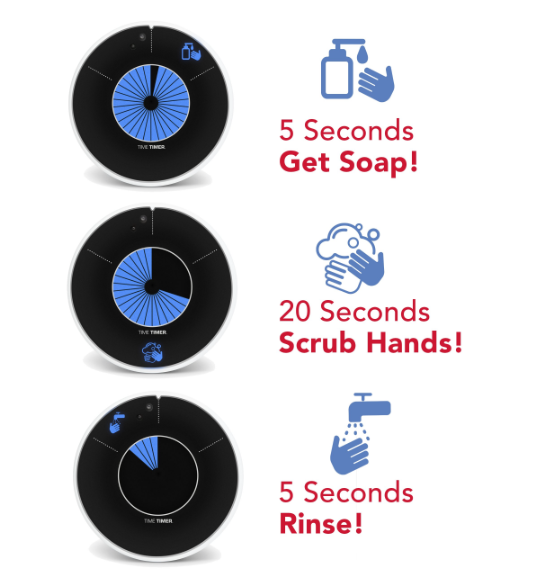
And lookie there, the perfect opportunity for a transition!
TIME TIMER ELEMENT
Time Timer is always innovating, and recently shared the pre-launch of their newest product.
The Time Timer Element is a compact, water-resistant visual timer that’s designed — like many of the Time Timer products — to assist children and adults build time awareness and improve their self-management skills.
It other words, it’s ideal for anyone who has a tendency to daydream or have so many shower thoughts that they get distracted and forget to stop dawdling, get out of the shower, and continue on with their day.
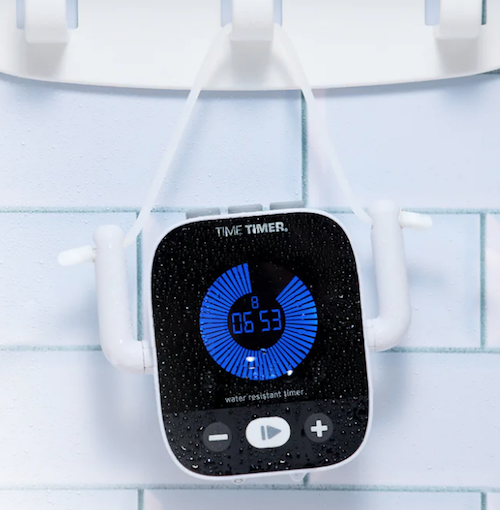
The Time Timer Element seeks to help users stay on track with their daily routines in a place where there’s unlikely to be other stimuli (clocks, TVs with commercial breaks, other human activity) to call attention to the passage of time. And, in particular, it’s made to work in the shower or near the sink!
As a personal note, once I’m putting on my makeup or doing my hair, I’m pretty attentive. But some of you ladies know what I mean — there’s a very narrow window from the time you take your hair down from the towel for you to use product and apply heat, and if you miss that window, well, you may not look like a clown for the rest of the day, but you definitely won’t look like you.
Dawdling can be an image-killer, so a timer for making sure your grooming activities stay on-task is a win-win for productivity and your personal brand.
The Time Timer Element has a variety of features to that make it an interesting option.
The Time Timer Element Is IPX6 Water-Resistant
Are you wondering what the heck IPX6 water resistance is? Well, so was I.
“IP” refers to “Ingress Protection” — It turns out that the International Electrotechnical Commission (IEC) has developed ingress protection (IP) ratings to grade the resistance of an enclosure (like a plastic or metal case) “against the intrusion of dust or liquids.”
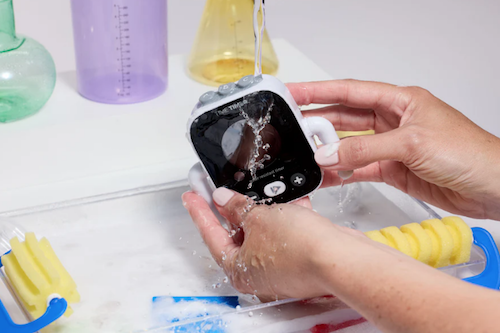
IP6 means means a device (like this timer) is “protected against powerful, high-pressure water jets from any direction for at least 3 minutes.” Picture heavy rain, spray from a hose, or — you guessed it — water coming from a shower nozzle. IP6 indicates a high water resistance, but not so high that you could submerge it in water. (That would be an IPX7 or IPX8 rating.)
The “X” just means it is not tested for dust. So if your bathroom is dusty, well, you’re on your own.
The point is that the Time Time Element is specifically designed to work in wet environments like showers and bathrooms in general. Don’t turn it into a float for your rubber ducky, but otherwise, it should be fine.
The Time Timer Element Has Customizable Presets
The Time Timer Element comes with three customizable pre-set timer buttons on the top of the timer for increments of:
- 2 minutes
- 8 minutes
- 25 minutes
Additionally, you can program a countdown on the Element for any duration up to 99:59. (If you need more than an hour and forty minutes for grooming, I don’t know what to tell you.)
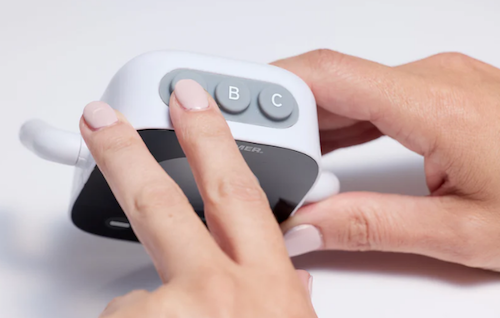
So, if you’re deep conditioning your hair with a hot oil treatment, the two- or eight-minute timers might be just perfect. If you want to take a bath but are fearful of drifting off and missing your transition to making dinner or watching your favorite show, the 25-minute timer might be apt.
And, for those who are familiar with the now-viral Gen Z references to an “everything shower” — where you accomplish it all from exfoliation to hair masks to lymphatic drainage — setting timers for both the activities and the transition time might make the whole process seem less daunting.
The Time Timer Element Has a Flexible Design for Varying Display Styles
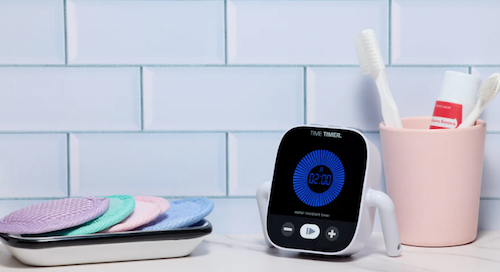
As with all of the digital Time Timer products, like the Wash and the Twist, on the “face” there’s a digital countdown in the center (for those who can easily envision time numerically/digitally) and a visual, colored disk that decreases as the time time remaining decreases for those who need to better “feel” the passage of time.
Below the timer face, there are buttons for increasing, decreasing, or pausing/playing the timer. As previously shown, on the “head” of the Element, there are the three pre-set buttons.
As you examine the whole timer, you may find that the Element looks a bit like a cute little dude.
It includes:
- adjustable arms (bending upward, to hold the removable cord in place, if you’re hanging it, or bending downward, as if it were monkey-walking on its hands)
- a removable cord
- suction cups to display the Element at various angles on the wall of a shower or other vertical surface
Thus, the Element can hang from the shower head, sit on the corner of the bathroom counter, or climb the wall.
Other Uses for the Time Timer Element
Additionally, the bathroom is not the only place the Element can be of use for helping you keep track of the time. Time Timer notes that “you can use the Element indoors or outdoors, wherever water is part of the routine” and suggests its other applicability in:
- In the kitchen when cooking — Although there are a variety of Time Timer products that can be used in the kitchen, particularly the Time Timer Twist, the water resistance of the Element makes it particularly apt for when you’re doing “splashy” activities near the sink.
- Throughout the house while you’re cleaning — Some household cleaning tasks require waiting a certain amount of time (like while the Scrubbing Bubbles are hard at work); do you really want to use your expensive cell phone near a bucket or sink full of soapy water?
- Outdoors, while playing or gardening — Do you want to teach your kids that they can stay in the pool for just 20 more minutes? Or keep yourself from straining your knees or back too long while you’re tending to your flowers or veggies? Whether it’s splashing from the pool or the hose, the water-resistant Element can keep everyone on-task.
- At school or work in a lab — Splashes don’t just occur at home. Whether you’re in Home Ec (though they probably call that something else these days?) or a chemistry lab, keeping yourself on-task with a water-resistant timer can be a boon to safety as well as productivity.
The Time Timer Element is selling for $38.95 at the Time Timer shop. not yet for sale, so there is no pricing information. Sign up for pre-sale notifications at the website and they’ll let you know when it’s ready for Prime Time.
For more on timers and other ways to prompt yourself to stay on task, revisit other Paper Doll posts, including:
- How to Use Timers for Improved Productivity and Focus — Part 1
- How to Use Timers for Improved Productivity and Focus — Part 2: Picking a Good Timer
- How to Use Timers for Improved Productivity and Focus — Part 3: Tangible Timers — This post does a SUPER-deep dive into Time Timer products, in particular!
- How to Use Timers for Improved Productivity and Focus — Part 4: Digital Timers
- How to Use Timers for Improved Productivity — Part 5: Hybrid Timers and Bonus Material
- Do (Not) Be Alarmed: Paper Doll’s Wake-Up Advice for Productivity
CAPTURE THOSE VITAL SHOWER THOUGHTS
Sometimes, people can’t make it out of the shower for fear they’ll lose a great idea and stand there, dripping, reciting the idea to themselves. If that’s your issue, you might enjoy a delightful product that’s been around for a long time but seems to operate under the radar.
Aqua Notes is a waterproof notepad that affixes to the shower wall with suction cups. Each 5.25″ x 3.5″ pad with 40 sheets of waterproof paper and an Aqua Pencil with its own suction cup pencil holder.
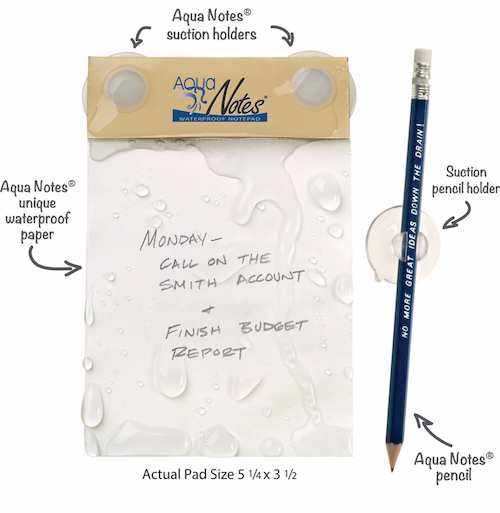
Purchase them directly from the Aqua Notes web site for $15 or from Amazon for $11.95. (A 5-pack of refill notebooks is $50; they also have Twistable colored pencils with suction cups for kids, shower artists, or anyone who needs to be able to write color-coded shower notes.)
Good luck getting out of the shower and getting on with a productive day! But if your brain is still still full of thoughts that are holding you back or slowing you down, know that you are not alone. Case in point, Lorelei Gilmore.
Affiliate Disclosure: Some of the links above are affiliate links, and I may get a small remuneration (at no additional cost to you) if you make a purchase after clicking through to the resulting pages. The opinions, as always, are my own. (Seriously, who else would claim them?)
Whimsical Tools to Improve Your Productivity: Mochi Focus, Mom Clock, and Kiki
THE NASTY TRUTH ABOUT PRODUCTIVITY
Would you like to know a nasty little secret from the world of productivity? Sometimes, getting things done — or more often, not getting them done — is a drag.
Last month, in Paper Doll’s Cheat Sheet for Celebrating Time Management Month, we looked at all the steps for making progress on the tasks we wish to (or must) complete. We talked about memento mori and knowing what we want to achieve in the precious amount of time we have on Earth, and revisited blocking time so that we can be both effective and efficient.
We also reviewed ways to prioritize the tasks we strive to complete and then dove deeply into the strategies for getting ourselves to start, from body doubling and accountability partners to using timers to make use of activation energy. (Speaking of energy, the post also reminded everyone to manage their physical energy through sleep, rest, and rejuvenation through breaks.)
We explored methods for blocking interruptions and obstacles (whether created by others or ourselves), and tracking our time to reflect on our entire systems to figure out where to make tweaks.
Whew. If that sounds like it would be a lot of work, well, that’s part of the problem. Being productive requires work. That’s why we say we’re going to work rather than we’re going to fun.
In a perfect world, if we followed all of these steps, failure would be impossible. We would know what we had to do, figure out what steps were the most important, schedule the work, settle ourselves in, and get it done. Huzzah!
But this is not a perfect world. We told the clocks to spring ahead over the weekend, so many of us are tired and cranky. (A little of that can be eased along with the advice in Organize Your Sleep When the Clocks Change and Beyond.) Depending on where you are today, it may be cold and grey outside.
And mostly, the inability to accomplish one’s goals — even when applying all of these strategies — comes down to a single, solitary truth: I don’t wanna!
Yes, people want the end result. They want their taxes done, their closets organized, and their dreams fulfilled. But they do not want to be bored, annoyed, wearied, or tasked with labor.
Sometimes we all, even professional organizers, just don’t wanna.
When this happens, it’s usually a matter of more than managing one’s physical energy. There are seasons of life when we need serious mental health care and tenderness, such as when we are grieving, experiencing anxiety, or suffering from depression, before we can think about make headway.
When our internal obstacles are less severe, activation energy, or getting ourselves to start, sometimes needs a rousing kick in the pants. Other times, we need the 21st century to stop kicking us when we’re down. Sometimes, we just need to give ourselves a break and find a way to add a little joy to the process.
At the end last year, in 2025 Wrapped: Do An Annual Review To Design Your Best Life, I wrote that my word for 2026 was WHIMSY. What is whimsy, exactly? It’s defined as:
“a playful, quaint, or fanciful attitude and behavior that is often unpredictable, spontaneous, and charmingly eccentric. It represents a shift away from rigid, serious, or conventional thinking, favoring instead a lighthearted, imaginative approach to life.”
Today’s post looks at some tools that offer a few charmingly eccentric, lighthearted, imaginative tools to tip self-management part of time management in your favor.
MOCHI FOCUS
Do you find that you’re better getting things done when you’re modeling good time management for others?
Mochi Focus combines a playful take on a Pomodoro timer with both a gamification element and a site blocker-turned-gentle-taskmaster.
Rather than an app, Mochi Focus is a browser extension for Chrome. (Why are all the good extensions only built for Chrome? Surely Safari deserves as much love!)
When you begin, Mochi Focus starts you off with a little blob of a pet, which they call it a “mascot.” You set to work, and the longer you stay on task, the bigger the little blob grows. Basically, instead of feeding your app food, you are nourishing it with your focused attention.
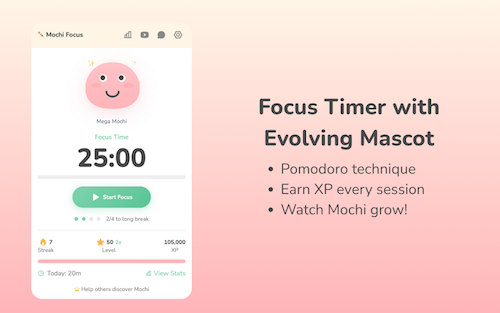
Mochi Focus Timer
A traditional “official” Pomodoro requires 25 minutes of work with a 5 minute break, and no more than four sessions without a longer break. In the abstract, the Pomodoro Technique works well to get our butts in our seats and complete many kinds of tasks.
However, not all tasks are created equal. Crafting an employee review isn’t the same as paying monthly bills, and neither one is the same as editing a chapter of your novel or cleaning out your closet.
Mochi Focus recognizes that some tasks require focus for shorter or longer periods of time. Thus, you get to customize your focus session lengths, anywhere from 1 minute (perhaps to do a plank or sun salutation) to 120 minutes (to rehearse for a presentation or make the mud room look less muddy).
You set the timer, and then Mochi Focus automatically switches between periods of intense focus and the break periods that keep your mental and physical energy from getting stale or expiring altogether. As with an “official” Pomodoro, Mochi Focus enforces a longer break after four sessions for use, but after set-up, you get to keep your hands off the timer for the duration.
The Mochi Focus Timer Mascot
Mochi incorporates gamification, because if we would do the work we have to do just because we have to do it, we wouldn’t need apps to make it fun.
Competing against ourselves is low-stakes, unlike competition with strangers. We win the “game” of getting things done to give our little pal Mochi a boost. You earn 1 XP (in the parlance of gamers, that’s experience points) for each minute you spend on focused work.

As you work, your Mochi mascot grows from baby-sized to Mega form. Depending on your level of experience (from 1 to 50), there are four stages of evolution. As you go along, you build daily streaks for bonus XP, and there are 14 achievement badges to give you positive reinforcement as you attend to your tasks.
In addition to tracking your progress through Mochi’s growth, there are also some adorable (might we say “whimsical?”) interactive features, including five interactive expressions in reaction to completed activity. The little guy expresses pride in your efforts with eye tracking, blinking, and click reactions.
Mochi Focus Website Blocker
Focus is not achieved by one’s competitive nature alone. Let’s face it, we all sometimes need a little help with boundary-setting.
The Mochi Focus website blocker feature is similar to Rescue Time, Cold Turkey, and Freedom, and allows you block yourself from accessing distracting sites during your focused work time. To get you started, Mochi Focus suggests more than 50 sites to block, and you can add your own time-wasters.
If you try to access those sites when you’re supposed to be working, you get a cheery page both reminding you that your access is blocked and encouraging you to go back to what you’ve assigned yourself to do. It’s like having the most gentle of accountability companions with a hint of Jeeves the butler.
On the up-side, when you’ve finished your pre-set focus session, Mochi Focus automatically unblocks those tempting sites so you can play during your breaks.
Pros and Cons of Mochi Focus
On the plus side, Mochi Focus has great features. It’s:
- is a simple, distraction-free interface that doesn’t require a steep learning curve.
- installs right in your browser.
- works offline, so you aren’t web-dependent.
- doesn’t require an account.
- tracks your progress through the main screen and a stats dashboard.
- stores all data locally on your device.
- is 100% free, with all of the various features unlocked. There aren’t even pesky ads or attempts to up-sell you to higher tiers.
But, more importantly, especially when it’s the mental weight that’s detracting from your motivation, Mochi Focus:
- doesn’t nag you to work, but encourages you to get back to your planned area of focus
- digitally prevents you from goofing off while also giving you a reason to care for yourself and your goals by nurturing a little blobby dude.
- offers a whimsical approach, with a blobby cartoon companion who shares your focus journey, joins in celebrating your achievements, and keeps you motivated!
Mochi Focus isn’t for everyone, though. Consider if the following might make it a bad fit for your practice focus.
- It only works with Chrome, so it’s not for you if you swear by Safari or are fixated on Firefox.
- Because it only works in the browser, if you use multiple devices (computers, tablets, phones, etc.), your stats aren’t going to reflect your entire progress. (Update: Mochi Focus was created by Boyd Guang, a solo developer from Thailand. He reports that cloud sync is coming, along with focus-oriented audio and more themes.)
- If you get anxious when competing against yourself, or this brings up memories of the Tamagatchi digital pet you let die 30 years ago, this might not be your thing.
- It’s simple, gentle, and visually sweet. If you prefer the stick to the stick (vs. carrot) approach, this may not be your jam.
To get a sense of the Mochi Focus vibe, check the Focus with Mochi YouTube channel with a variety of videos (with four+ Pomodoro sessions) backed by focus-inducing, lo-fi music.
Whether you’re a remote office worker or a student or just someone looking for more sticktoitiveness, if you’re looking for something to pep up your Pomodoro-style focus sessions, this might be fun to try. And again, it’s free, so there’s no downside to trying.
Mochi Focus works on a few different levels. It has your back by blocking your distractions and giving you a competitive approach with points and stats, but also covers your softer side by pairing you with a teammate for whom your success is their success. It’s animated accountability.
Whatever works, right?
But hey, if the gentle companion approach doesn’t work, perhaps you need something a little bossier.
Mom Clock
Sometimes, neither the gentle, companionable approach nor the competitive angle works. If that’s the case, you may have to consider seeking support from the one person who can strike fear in you by using your full name — first, middle, and last — in a tone that brooks no debate.
Sometimes, you just have to call in a mother.

The Mom Clock is an iOS app and Chrome extension that adopts a strict disciplinarian approach to stop procrastination.
This is no gentle parenting. Instead, Mom Clock uses alarms and app-blocking to force you to do what you said you intended to do.
The way Mom Clock’s creators explain it:
Mom Clock is not a productivity tool.
It doesn’t motivate you. It doesn’t encourage you. It doesn’t ask how you’re feeling.
You already know what you’re supposed to do. Mom Clock simply enforces it.
Once you set up Mom Clock with your plan for when you’re going to work, you go to work. Full stop.
You’ve got (relatively) little choice, because Mom Clock understands time blocking (as in, when you’re supposed to work) and uses the power of blocking (as in, it will block all of those distracting websites during the hours you tell it you’re supposed to be focused).
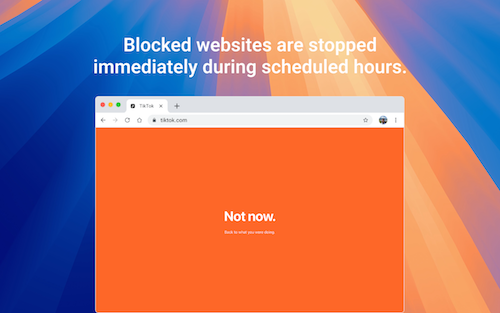
When you’re supposed to be working, you can’t do anything else with your device. When your time is up, Mom Clock starts firing alarms that tell you to stop whatever you’re doing. (Just as “she” enforces your work time, she’s serious about those breaks, too! After all, your mom always knew when you needed a nap, right?)
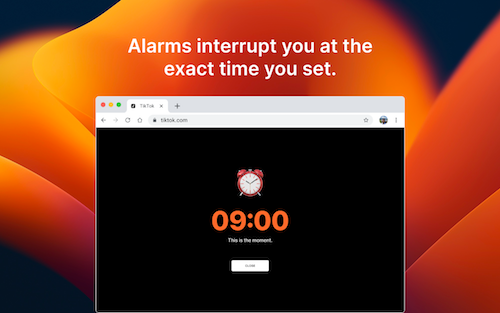
In between your start and stop, Mom Clock is working quietly in the background, just like she was when you were a kid, doing your homework. Unlike Mochi Focus’ companion style, Mom Clock calls to mind the phrase, “I’m not your friend, I’m your mother!”
Pros and Cons of Mom Clock
Depending on your style, pros and cons may be interchangeable, so you have to know your own preferences. Mom Clock is:
- Designed to be as simple as possible to reduce friction and make the activation energy easy to obtain.
- You don’t need to register for an account.
- There’s no cloud sync.
- There’s no data collection.
- Mom Clock runs in the app or locally in your browser.
- Uses no gamification — Because there are no stats, there’s nothing to keep track of and there’s no attention to what you’ve done in the past or where you’re headed in the future. Mom Clock is about what you’re doing RIGHT NOW.
- Brooks no backtalk — There’s no negotiation for snoozing “just five more minutes!” You just do what mom says! There’s not even an “or else!”
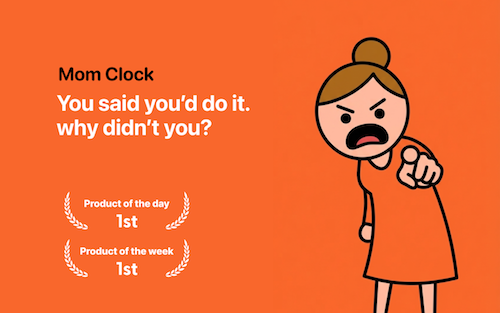
It it just me, or does she remind anyone else of the Angry Mama microwave cleaner?

Just set the rules once for when you want to work, and Mom Clock makes sure you follow them.
Your “Mom” knows your routine, only instead of innately knowing which days you have soccer practice and when you have to stay late for drama club, “she” knows (because you set) your different schedules for work, study, fitness, or sleep. Mom Clock doesn’t ask whether you “feel” like working. She’s just going to stare you down.
Your “Mom” takes away your phone privileges by blocking the tempting apps and websites that prevent you from doing what you should be doing.
As Mom Clock says:
She doesn’t remind. She insists.
No soft nudges. No ‘maybe later.’ Just action.
You don’t need more motivation
Start doing what you said you would. She shouldn’t have to ask twice.
Beyond the main features, Mom Clock has several additional elements, including:
- an online clock — Showing the exact hour, minute, and second; it is constantly updating; it also reports the date (to remind you of time ticking down on those work or school deadlines)
- a time conversion page — Whether you want to convert seconds to minutes or minutes to seconds, minutes to hours or hours to minutes, hours to days or days to hours, or even days to weeks or weeks to years, it’s all available at a click. This way, if you want to remember how many minutes are in a year, and don’t want to start singing Seasons of Love from Rent (though why wouldn’t you?), there’s an accessible feature.
- countdown timers — whether you need to count down to holidays, events, work deadlines, or personally-important dates, just set your timezone, track the countdown in real time, and share links to the countdown when and if necessary. There are a variety of pre-created countdowns for international holidays, so you’ll never forget Mother’s day or Diwali or Hanukkah. You can also select options to count down to when you have to pay your rent, will get paid, can move to your dream home, or may finally retire.
- planner tools — for doing a Pomodoro session (or several) or using time blocks. The Pomodoro timer comes with pre-sets for a traditional 25:5, a 50:10 for deep work, and 90:20 extended session. The time blocking planner has pre-sets to help you with a workday, a study day, and a balanced day for blending focused work, meetings, and recovery time.
- days since counter — whether you’re counting down from the first day you started exercising or the last day you engaged in a bad habit, Mom Clock is keeping track of your landmark dates.
But mostly, the key to Mom Clock is that it eliminates all of the discussion you have with yourself where you let yourself off the hook. There are no more promises to yourself to start “later” or “tomorrow” that you never fulfill.
Mom Clock states its mission as: To make the things you promised yourself actually happen.
Mom Clock knows that willpower is often too challenging and that you can’t always wait to get psyched up into that activation energy.
Sometimes you just need the power of your “Mom” telling you to just do it. NOW!
If Focus Mochi is for workers who embrace gentle parenting, Mom Clock is for those who are seeking an Old School parenting approach because more than motivation, they need someone to hold their feet to the fire.
It’s worth checking out the Mom Clock blog, with wise “motherly” wisdom in posts like:
KIKI
Maybe you need something not as cute as Mochi, but not as bossy as your Mom.
KiKi, created by Isaac Blankensmith, is a MacOS program that calls itself “the accountability monster for people who are easily distracted.” It’s not a very monstrous monster, to be sure.
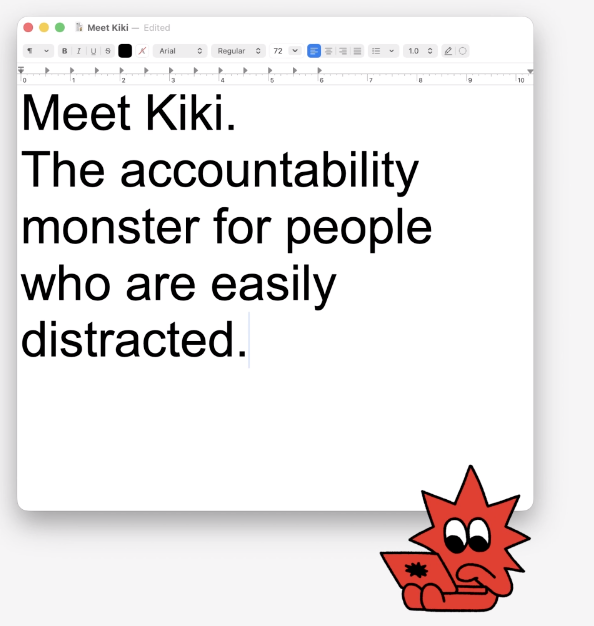
The makers of Kiki envision the program as similar in function to a Pomodoro timer, but better.
First, you identify for Kiki what you’re supposed to be working on in the most specific ways. You write down one concrete task, like:
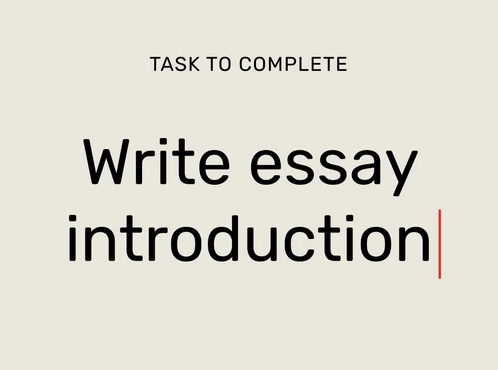
Next, instead of eliminating all the apps and websites you aren’t allowed to use, you select just what sites you will need to complete your task.
For example, if I’m writing a blog, I need WordPress and Canva, and maybe Pexels or Unsplash. (Yes, I’ll need YouTube later for pop culture videos, but to get the writing and graphics selection stage down, just these sites would be essential.) Kiki will block everything else.
Once your intention, resources, and time are set, just focus on your work. Kiki creates a distraction-free, multitask-free realm until your time is up. If you try to do something outside of the plan, Kiki throws flames onto your screen and pipes up with verbal admonishments!
Mono-focus for the productivity win!
Kiki’s Bonus Features
Kiki tracks your progress, showing how focused you were in each session and over time. For those who analyze data points (or need it to keep them honest), Kiki’s tracking feature may help you stay on course.
Kiki is the escape room you cannot escape. There’s no “safe word” and, allegedly, Kiki cannot be tricked. Once Kiki is activated, there’s literally no way to sneak off to entertain yourself while you’re on that device. (I mean, yes, you can go use your phone, but that’ll likely just guilt you out, and if it’s guilt you want, wouldn’t that be better from your (Clock) Mom than from a monster?)
Or, as Kiki says on the website, “Sometimes good work happens after you run out of ways to avoid it.”
Be forewarned about Kiki’s more “monstrous” alerts. One reviewer noted that it shouted “Get back to work!” while she was in a meeting and attempting tasks that we’re part of her scheduled activity. Eek!
Kiki has a free trial, after which it’s $4.99/month paid monthly or $2.49/month paid annually ($29.88year). While it’s designed for Mac, it only plays nicely with Chrome and Safari browsers.
So, if you want to be nagged (by my a monster rather than a Momster) but also want statistics, Kiki may be worth a look.
These are just a few of the delightful productivity-related apps and extensions I’ve found recently. There are others, with sheep and llamas, quirky gamification and silly stats, and there will be follow-up posts with other tools for this year of whimsy.
Is there an app or tool that you use to organize your time or tasks and that you’d describe as whimsical?
26 Ways to Celebrate GO Month to Get More Organized and Productive
Happy New Year! Happy GO Month!
Each January is Get Organized & Be Productive (GO) Month. Back in 2005, NAPO (then called the National Association of Professional Organizers) proclaimed the first Get Organized Month, as a national public awareness campaign about organizing and our profession.
A decade later, the month was expanded to incorporate productivity, just two years before we officially became the National Association of Productivity & Organizing Professionals. Our purpose remains the same. All of us — professional organizers, productivity specialists, declutterers, coaches, etc. — celebrate how we improve the lives of our clients by creating environments and developing skills to support productivity, health, and well-being.
Practitioners like Paper Doll are here to help you create systems and skills, improve your homes, workspaces, and attitudes, and live your best, most productive life.
For more great organizing and productivity tips during GO Month, you can also follow NAPO’s Social Media Accounts:
Today’s post offers some 26 ice cream samples of organizing and productivity tactics to make 2026 a little easier.
ORGANIZE YOUR PAPER IN 2026
1) Create a Tax Prep Folder
April 15th will be here before you know it. From now through February, you’ll receive tax documents (1099s, 1098s, W2s) in the mail. You may also get emails reminding you to log in to brokerage and other accounts to download your important tax documents.
Don’t wait until the last minute to gather these items. It’s not just good organizing advice, but helpful financial advice, too, because the sooner you get your important tax documents together, the faster you (or your accountant) can get you your refund, or at worst, let you prepare for the size of your tax bite.
Your tax prep folder doesn’t have to be fancy; a plain tabbed folder kept at the front of your financial files section should suffice. However, if you’re dealing with a lot of documents, you might prefer a dedicated accordion-style folder like the Smead All-in-One Income Tax Organizer.

Organize now so you won’t lose deductions, pay more taxes, or get in trouble with the IRS!
2) Roll Out the Red Carpet for Your VIPs
Make 2026 the year that you get your affairs in order. Estate documents and other essential paperwork must be created, obviously, but also reviewed and updated on a periodic basis.
As I’ve said before, this aspect of organizing may be boring (if you aren’t a professional organizer), but boring is good! If your VIPs are boring, it means that you and your family won’t ever experience any ugly surprises during difficult times, like when someone is in the hospital, when there’s been a death in the family, or even when dealing with the aftermath of a natural disaster.
Start by reading these from-the-vault posts to figure out your next steps.
- How to Replace and Organize 7 Essential Government Documents
- How to Create, Organize, and Safeguard 5 Essential Legal and Estate Documents
- The Professor and Mary Ann: 8 Other Essential Documents You Need To Create
- Paper Doll’s Ultimate Guide to Organizing Yourself to Get a REAL ID
- Paper Doll’s Ultimate Guide to Getting a Document Notarized
- Paper Doll’s Ultimate Guide to Legally Changing Your Name
- A New VIP: A Form You Didn’t Know You Needed
Then list documents you already have (and their locations) and identify what you need to create, and then plan meetings with your family and a trusted advisor to set things in motion.
3) Declutter and Preserve Your Family Photos and Memorabilia
Two years ago, a beloved client passed away, and I’ve been working with his son to go through more than a century of photos, from passed-down black-and-white picures of ancestors on both sides of the family to lighthearted snapshots and travelogues from the gentleman’s young military years. We review prints and slides, as well as delicate (and crumbling) correspondence.
Do you have print photos that would be lost in case of a fire or flood because you don’t have the negatives (or store them with the photos)? Would digital photos on your phone be lost if your phone got smushed or stolen? You need backup!
I’m not suggesting you do this every day in January, but make a plan. What if you spent an hour every Sunday morning sorting through photos? Could you invite a family member or friend to help you consider what to keep and what categories to use?
Contact a NAPO member who specializes in organizing photos, or visit The Photo Managers to find experts who can help you safeguard your photo history.
While I’m on the subject, I absolutely have to recommend, yet again, my colleague Hazel Thornton‘s What’s a Photo Without the Story? How to Create Your Family Legacy.

For more ideas, consider:
- How to Collect, Organize, and Preserve Family Memories and History (Part 1) — The Questions
- How to Collect, Organize, and Preserve Family Memories and History (Part 2) — The Methods
- How to Collect, Organize, and Preserve Family Memories and History (Part 3) — AI & More
4) Know What’s In Your Wallet
Have you looked at what’s in your wallet lately? Would you notice if one of your credit cards went missing? It’s a new year — did you put your new health insurance card in there?
- Pull everything out of your wallet.
- Discard or put away anything that doesn’t belong in there. (Receipts for taxable events, like medical expenses? Keep. The name of a book your friend recommended? Log it in your Notes app or put it on hold at the public library before you forget.)
- Take an inventory of everything in your wallet. Depending on your patience, you have two options:
- Lay two columns of cards (side by side), face-down, on a copy machine. Press “copy” and then flip each card in place to the rear-side, and copy that, two. Repeat the process until everything in your wallet has been secured. Alternatively, you can scan these to your computer and save it all as a multi-page PDF. If you ever lose your wallet, you’ll be happy to have the account numbers, expiration dates, security codes, and contact numbers for your licenses, insurance cards, and credit and debit cards.
- Use your phone to take photos of the front and back of the cards and upload the pictures.
Whichever method you choose, password-protect digital versions of this document in storage or on your phone, and keep the paper copies in your fireproof safe or lockable file drawer.
5) Clean Off Your Desk
Next Monday, January 12, 2026 is National Clean Off Your Desk Day. Celebrate it by making a clean sweep of everything piled up on your desk, de-germify it, and think carefully about what belongs on it.
Read last year’s Paper Doll Celebrates National Clean Off Your Desk Day for step-by-step for making your desk a space for productivity instead of mystery crumbs and mountains of papers.
Then refresh your space with ideas from Organize Your Desktop with Your Perfect Desk Pad: 2025 Update and Paper Doll Explores the Best of Desktop File Boxes.

ORGANIZE YOUR DIGITAL SPACES IN 2026
Digital clutter may not take up physical space, but it wears down our batteries, both in our devices and our personal batteries because of the overwhelm of excess.
6) Declutter Your Phone Apps
The Pareto Principle says that 80% of our success comes from 20% of our efforts. It holds true in many ways; 80% of the time, we wear the same 20% of our wardrobe, kids play with the same 20% of their toys; we use the same 20% of our apps.
It’s why letting things go from the 80% we hardly ever use makes us feel less cluttered and more productive, even though we anticipate we’ll feel anxious about having let them go — that’s why they’re cluttering up our digital spaces in the first place!
- Flip through your home screens and take inventory — What apps did you download and never even try because they required creating a login? What apps did you give up on because they were buggy? Let go of low-hanging fruit.
- Clean up by deleting apps you used the least often (or never). To see the last time you used an app on iOS (for iPhone or iPad), follow this path: Settings>General > iPhone (or iPad) Storage. There are a few different ways to check app usage on Android devices.
- Addicted to your phone? Check your Digital Wellbeing feature on Android or ScreenTime on iOS. Uninstall whatever is obviously distracting you with overuse.
- Move distracting apps that you can’t (or can’t bear to) uninstall to your last home screen page to create more friction and make it less likely you’ll happen upon them when looking for your bank app.
- Fill your first home screen with apps you need and want to use because of the benefits they bring to your well-being.
- Organize the remainder of your apps by dragging-and-dropping them into folders labeled for shopping, dining, social media, productivity apps, etc. Keep them — just make them less convenient.
The point isn’t to get rid of your digital life. Just eliminate what distracts you from what’s important.
7) Clear Out Your Voicemail Inbox
In the olden days, people called you and either you were home and answered, or not home, and never knew you had a call. (If you’re GenZ and reading this: yes, really.) At work, if you weren’t at your desk during working hours, a receptionist took a message. After hours, either the “answering service” took your urgent call, or people waited until you got in on the next business day.
In the 1980s, we got answering machines and our messages lived where our landline phones did.
In the 1990s, we had voicemail, and at the turn of the century, people started calling less and texting more. Now, too many of our messages are spam, and voicemail fills up.
Have you ever called someone — or worse, returned a call — only to hear “This voicemail box is full and is not accepting messages. Please try again later.”
What if your message is important? Do you text? What do you do if it’s a business? On the flip side, if your child’s school, your doctor’s office, or a client needs to reach you, do you want them to suffer this frustration?
Clear up your voicemail box with the following steps:
- On landlines, dial in, listen, and start deleting messages.
- On cell phones, iPhones and most Android phones show transcribed messages. Known contacts should appear by name, making it easy to figure out whether a message is still needed even before you read it. Unknown numbers may be spammers (swipe left!), but may be people you’ve never entered into your contacts. Review those messages, and anything that doesn’t make the cut, delete!
- Save numbers for contacts you may need in the future. — Add a last name and any context necessary. I have a contact saved as First name: MaryBeth, Last name: “Hit my car in the parking lot.”
Until recently, the only “Terri” in my contacts was my hair stylist, but when I was in Portugal and Spain in September, I added my tour-mate to my regular iPhone contacts. Just before my last haircut appointment, I voice-texted, “I’m here, but looking for parking. I’ll see you in a minute.” When I got to her space, she said she hadn’t received my message. A moment later, my tour-mate Terri texted, “You’re here to see me?” with a series of laughing emojis. Doh!
Last names (and context) are important!
- Be ruthless in getting rid of old voicemails. What should make the grade? Messages that you save for:
- work purposes — but confer with your boss or your IT department regarding rules in this regard
- legal purposes (such as when someone is stalking or harassing you, or offering a set of deal points for a contract.
- sentimental purposes — but be judicious. Can you picture yourself sitting in an airport, listening to a loved one’s message over and over?
- Download messages you want to keep permanently. On iPhones, tap the voicemail you wish to save and you’ll see the share icon in the upper right corner; share the resulting MP3 to your photos or notes app, Evernote, social media or wherever else, just as you’d share an article or a picture.
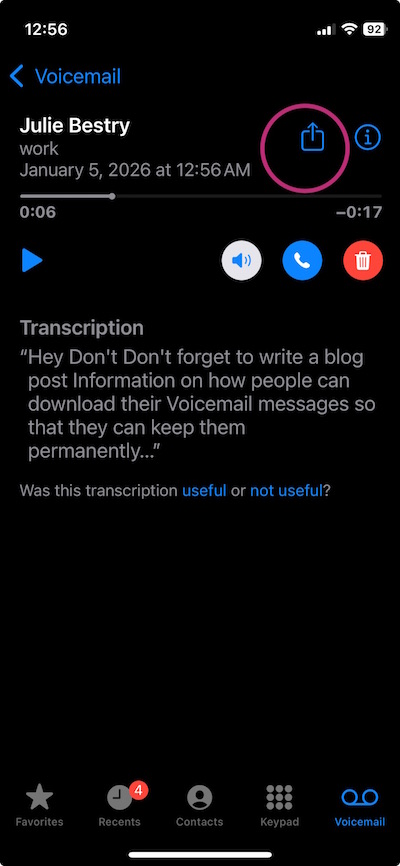
On Android phones, tap on the message to see a list of options. Click one of the save or archive options you prefer and select the storage location. For more voicemail-saving techniques, read Smith AI’s How to Download and Save Important Voicemails.
8) Clear out your email inbox
For years, people have laughed at me, saying that search worked so well and email providers granted so much storage space that it was no longer necessary to clear inboxes. Still, I blithely went on advising my clients to regularly clear their inboxes, and to create a hierarchy based on categories matching their analog filing systems.
Recently, I’ve felt vindicated as Gmail and other email providers have been adding storage limits, and people recognize that search (even AI-assisted search) sometimes takes longer than going to a particular sub-folder with a helpful title.
Email is a headache! According to an analysis by the McKinsey Global Institute, on average, 28% of work time is spent reading or replying to emails. And the average worker — and yes, you’re all above average — checks email 11 times per hour. 84% of us keep email open in the background while working, making it oh-so-easy to “check” our email.
The problem is that we CHECK IT over and over again looking for that dopamine hit, but we often look at emails without doing anything with them, like opening the fridge in hopes that someone has magically made something delicious and put it in there. 
You may think that Inbox Zero is the cure, plowing away at email but getting further behind in important work. James Clear has said, “The most invisible form of wasted time is doing a good job on an unimportant task.” Email clutters our lives like that.
There’s no permanent state of inbox zero (unless you stop sending outbound emails and block all inbound senders), any more than finishing all of the laundry today will create laundry basket zero unless your family plans on becoming very tidy nudists.
There's no permanent state of inbox zero, any more than finishing all of the laundry today will create laundry basket zero unless your family plans on becoming very tidy nudists. Share on XProcessing email isn’t your job, it’s just one method of communication and information acquisition, and it’s not always the right one. Instead:
- Unsubscribe from whatever you never read. (It’s like buying vegetables that you know you should eat but they disappear into the back of the fridge and eventually get slimy.) Take five minutes a day to declutter your future inbox.
- Set up a simple hierarchy of subfolders with names of major projects, client names, or whatever works for you. Having a place for emails to safely, dependably live will encourage you to manually or automatically route necessary ones of your inbox. As with voicemail, don’t feel like you should save everything.
- Learn how to use your email platform’s filters or rules function to automatically sort mailing lists to one sub-folder, anything you’re always CCed on even though you know it’s nothing to do with you to another, and so on.
- If you’re overwhelmed by your huge backlog, move everything from more than a month ago to a folder you call “Archived” and start with a minty-fresh inbox. You can always go into the “Archived” folder and sort if you’re feeling enthusiastic, but at least you’re dealing with something more manageable.
9) Know What You Don’t Know About Your Tech
In Digital Disaster Prep: How to Organize Your Tech Info Before You Need It earlier this year, I walked readers through all sorts of information you need to know before something goes wrong with your tech. Do you know where to find your:
- IP Address
- Network and router information
- ISP contact information
- Device Identifiers
- Operating system license keys
- Software and game activation codes
Your household probably added some hardware and software goodies this holiday season. This is the perfect time for you to read the post and start logging all of your essential tech information.
ORGANIZE YOUR TIME IN 2026
10) Track Your Time to Figure Out Where Your Time Is Going
To improve your productivity, the first thing you must do is get a handle on how you’re spending your time.
Read my How to Use Time Tracking to Improve Your Productivity from last January to understand the benefits of time tracking, including mindfulness and focus, prioritization, data-driven decision making, stress reduction, and accountability. The post also prepares you to face challenges and overcome the obstacles, and offers strategies and resources for tracking your use of time.
Track for just one day, or participate in a weeklong time tracking project such as Laura Vanderkam’s annual event. Register for her 2026 Time Tracking Challenge from January 12-19, 2026. I do it every year!
11) Get a Better Sense of the Passage of Time
For some people, knowing what time really “feels” like takes some effort.
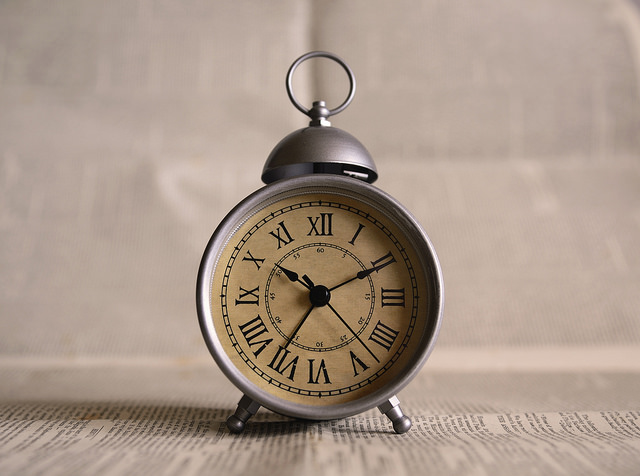
First, put real, analog clocks wherever you tend to get lost in time. Is that your desk (even though you wear a watch and your computer has a clock)? Is that the bathroom, because you lose awareness of time while doing your hair or soaking in the tub? Is it your car, which has a perfectly serviceable clock but the time is always wrong because you never learned how to change it for Daylight Saving Time?
Next, read about all the ways timers can help you get a better sense of your time.
- How to Use Timers for Improved Productivity and Focus — Part 1
- How to Use Timers for Improved Productivity and Focus — Part 2: Picking a Good Timer
- How to Use Timers for Improved Productivity and Focus — Part 3: Tangible Timers
- How to Use Timers for Improved Productivity and Focus — Part 4: Digital Timers
- How to Use Timers for Improved Productivity — Part 5: Hybrid Timers and Bonus Material
12) Time Travel in Your Planner
If you use a paper planner, hopefully you already have one for 2026; if not, that’s step #1. But even if you are 100% digital, this advice goes for you, too.
It’s tempting to just fill in your January pages and figure you’ll adjust as you go along. But even if you’ve had the same meeting every Tuesday for the past 5 years, somehow, some way, you’ll double-book if it’s not in your planner or calendar.
Spread out at your desk or your kitchen table, grab a cup of cocoa or something to soothe you into the new year, and do the following:
- Page through each week of last year’s planner and copy everything that recurs by date (like birthdays and anniversaries).
- Add events that happened in 2025 and are already scheduled to happen again, but not on the same dates (like conferences, work retreats, medical tests and appointments, etc.).
- Use last year’s schedule activities to prompt you to make a list of anything you might need to schedule or add to your long-range tasks, like meeting with your accountant, scheduling annual medical tests/exams.
13) Eliminate What Doesn’t Excite You
I’m a big believer in the concept that whatever isn’t a “Hell, yeah!” is a “Heck, no!” at least in terms of what you can control. (Unlike Marie Kondo, who encourages people to get rid of tangible items that don’t bring joy, I know that you can’t just toss your old tax returns.
Similarly, you can’t strike everything that isn’t joyous off of your calendar. You still have get a dental cleaning at least twice a year, whether you like it or not.
But why not make 2026 the year you step back from volunteer positions that take your time and energy, but don’t give you delight?
How about taking that book club (for which you never like the selected books) off your schedule? You can always agree to meet the people one-on-one without the obligation to read the newest oversized dystopian novel.
Set yourself, and your calendar, free.
14) Pick a Problem-Solving Day
Theming your days can make you more productive because you don’t have to keep switching tasks. Marketing Mondays or Financial Fridays let you schedule a block of similarly-themed tasks so you can focus and get into “flow.”
I encourage clients to pick one day of the week for problem-solving. Block a few hours on a specific day for sitting on the phone and asking, repeatedly, for someone to escalate your call. This is the day you set aside for time to get help on whatever is making your computer do THAT THING.
Knowing that you have a slot firmly in place will allow you to worry less about getting problematic or frustrating things accomplished, and because there’s one place in your schedule for solving problems, you will be able to focus when that day arrives.
ORGANIZE YOUR FINANCES IN 2026
15) Stop Singing “I Owe, I Owe, It’s Off To Work I Go”
Debt creates mental clutter. Knowing is always better than not knowing, so make 2026 the year that you know what you owe and figure out what’s going on with your money and where it’s going.
- Make a list of every credit card, loan, and any other kind of debt you have. Note the creditor, the amount, and the interest rate.
- Next, make a list of every fixed expense you have.
Seeing it all in black and white (and red) may be sobering, but it’s the first step toward figuring what you can do about it.
Maybe you can refinance a car loan or mortgage to lower your monthly costs?
Perhaps you can call your credit card companies and request a reduction in your interest rates. (Nerd Wallet has a great article on How to Get a Lower APR on Your Credit Card.)
Maybe you can cut expenses for things you’re not even using.
16) Go Spelunking for Lost Money
Start with your couch cushions. Whether your loose change is in a jar in the laundry room or at the bottom of your purse, it’s (literally) weighing you down wasting your financial potential. Put on some music and start rolling coins (or bribe your kids to do it) and take the money to the bank. Alternatively, dump it all in a canister and take it to a Coinstar machine or any credit union that accepts and counts coins for free.

To recoup other “lost” money, follow steps in these Paper Doll posts:
- Show Me the Money — A 2025 Guide to Finding Forgotten Funds & Unclaimed Property
- Lost & Found: Recover Unclaimed Money, Property, and Savings Bonds
- How to Track, Lower, or Cancel Your Recurring Subscription-Based Bills
- Organize and Lower Your Medical Bills: Spot Errors, Negotiate Costs, and Save Money
17) Re-Shop Your Auto Insurance
When was the last time you actually shopped for car insurance? If you’ve kept the same insurance for years, you’re almost assuredly overpaying. As with the cable company, this is one of those instances where newer customers are rewarded with the best deals, and loyal customers are not rewarded for loyalty.
It doesn’t cost anything to shop around. Even if you find a better rate, you may be able to return to your agent and say, “Hey, the guys across the street quoted me quite a bit less. Can you match it?”
Note: if you use online pricing comparisons, you’ll be bombarded with emails, so consider creating a new Gmail account just for these replies.
Before you make any calls, though, familiarize yourself with the basics of car insurance with Organize for an Accident: Don’t Crash Your Car Insurance Paperwork [UPDATED]

RECITE THESE ORGANIZING AND PRODUCTIVITY MOTTOS
When you’re having a hard time tackling the clutter or focusing on the work, pick one of these mantras to help point you in the right direction.
18) Don’t put things down; put them away.
19) Declutter first, then contain it. (Don’t acquire clutter to contain your clutter!)
20) Everything should have a home, but not everything has to live with you.
21) Someday is not a day on the calendar.
22) Break every task into its smallest possible step. If you can’t get started, the first step is probably not small enough.
23) Cut yourself slack. Give yourself grace.
24) Progress, not perfection.
25) Albert Einstein said, “Organized people are just too lazy to go looking for what they want.” Be lazy!
Paper Doll on the Power of a DONE List
DON’T BE LISTLESS
We all know the power of a To-Do list.
When we’re feeling overwhelmed by all the little dings in our brains reminding us, over and over, of what we have to do, we turn to a brain dump. While it may, at first, seem overwhelming, completely off-loading everything we have to do — from paying quarterly estimated taxes to making (or ordering) a birthday cake for a tiny human to dropping off that trunk-load of donations — takes the weight off our shoulders.
Having to constantly remember TO do something keeps us from being to think in a nuanced way ABOUT how we’ll approach a task. Think of a brain dump as a prototype To-Do list. It works with almost any kind of productivity technique.
Review How to Make a Big To-Do
If you’re following David Allen’s Getting Things Done paradigm (even if you didn’t know until now that you were doing so), you start by gathering tasks from all of the places you’ve captured what you have to do, like a scribbled note, email, voicemail or memo on your desk.) Then clarify what efforts the end-results involve, and organize them into by context. If the items are actionable, you’ll break big things down into smaller, actionable “next steps” and likely send them to a To-Do list.
Alternatively, you might create lists according to Steven Covey’s Sharpen the Saw approach as part of the 7 Habits of Highly Effective People. Covey’s Weekly Compass allows you to consider your tasks under larger rubrics reflecting your roles. For example, Paper Doll‘s roles include professional organizer, blogger, product creator, marketer, daughter, and friend. (It also includes “aspiring heiress” to cover all my self-care tasks.)
If you’re freestyling, without any particular system, it still goes the same way. Download all of the remembered tasks floating around your brain to a tangible or digital form, add items prompted by reminders in your environment, and ta-da, it’s a To-Do!
Still, it’s hard for your brain to know what to do next when the upcoming tasks are “schedule a colonoscopy, buy a dress for my high school reunion, and write a cost-cutting report for the CEO.” Instead, it makes sense to divide To-Do lists into categories, like “work” and “life.”
Depending on the complexities of your situations, you’ll probably want to break these down into subcategories. For “work,” you might have lists for client follow-up, marketing tasks, reports to write, presentations, and so on. For “life,” you task categories may be financial and household, plus personal concerns like parenting tasks (ranging logistical, like carpooling or being a room mother for a field trip, to big-ticket items like having big talks), relationship management, and self-care.
For mosts of us, To-Do lists are the first step toward getting the work of life accomplished, and numerous Paper Doll have walked you through those steps. But there’s another kind of list that serves a different, though adjacent purpose. That’s a Done list.
WHAT IS THE DIFFERENCE BETWEEN A TO-DO LIST AND A DONE LIST?
It’s possible you’ve never heard of a Done list. You could oversimplify and say that a To-Do list is a log of things you intend to do and a Done list is a list of what you’ve done.
Or, you might say a To-Do list is tactics, while a Done list is metrics.
But there are philosophical differences between the common To-Do list and the far-less-known Done list.
Stress Factor
A To-Do list can be hopeful, but it can also provoke anxiety. All of those “shoulds” can wear a person down, making us feel unproductive. The more we have on a To-Do list, the more we are reminded of what remains undone; for some, this can trigger procrastination.
Aspiration vs. Reality
A To-Do list shows shows our intentions, but that means everything on it is aspirational. As long as there’s a verb at the start, it could include anything, from “pick up the dry cleaning” to “convince George Clooney to invite me to dinner with him and Amal.”
A To-Do list holds potential, but you can’t take potential to the bank or serve it up for dinner. Conversely, there’s nothing aspirational in a Done list; it’s entirely reflective of what you’ve actually done, whether you’d planned to do so or not. Given that, Done lists take into account surprises, interruptions, and how you’ve managed to succeed despite inputs that were out of your control.
A To-Do list holds potential, but you can't take potential to the bank or serve it up for dinner. A Done list take into account surprises, interruptions, and how you've managed to succeed despite inputs that were out of your… Share on XExpectations
A To-Do list it can also be overwhelming, especially if you overload it with more than you can accomplish in a day. A Done list, however, looks at your day’s activities from a different perspective. It leaves aside the should-have-dones or the never-got-to items and embraces reality.
A Done list ignores expectations, allowing you to revel in what you’ve achieved without measuring against any particular pre-conceived benchmarks.
Identity
Your To-Do list says who you want to be. It creates a necessary blueprint, because we can’t accomplish much without a vision. Your idea of who you want to be might involve a ten-point plan taking you from college to career to marriage and parenthood, or it might be more passionate than prescribed. (Are you having wicked dreams about leaving Tennessee? Is Santa Monica calling you? Is there any chance Chappell Roan is reading my blog?)
Your Done list says who you are. There may be more to accomplish, but there’s an achievement or three you can point to and say, “I’m a person who has already [XXXX] and nothing and nobody can take that away from me.”
A To-Do list is akin to the clutter of exercise videos or the diet books you buy or the cardio classes you schedule on your calendar (or the bathing suit you buy because THIS is the summer you will actually swim to get in shape). But a Done list is the steps counted by your Fitbit or Apple Watch, the way your waistband fits, or the numbers when the doctor checks your blood pressure.
Momentum
A To-Do list is static, like runners in the blocks before a race begins. A Done list, as it’s built, reflects the runners making progress (against their own time? against each competitor?) and pushing onward through the winner’s tape.
Don’t burn your To-Do lists. Just see the potential of adding a Done list to your productivity repertoir.
THE BENEFITS OF A DONE LIST?
Blogger Katherine Firth at Research Degree Insiders encourages us to look at our days more deeply. She asks, “But how do we know if we have succeeded in our day, or just succeeded ticking things off our To-Do list? Is a day where we did lots of important, urgent and valuable things (none of which were in our plans) still a success?”
And in the May 28, 2025 edition of Laura Vanderkam’s Vanderhacks Substack, she notes, after we tackle on our To-Do lists, “Now, of course, stuff comes up. Stuff always comes up. … You leave enough space that the unexpected doesn’t derail the expected. Shouldn’t we get credit for doing the stuff that came up too?“
Let’s consider the attributes and benefits of a Done list:
- Compare plans vs. accomplishments — This is the most pedestrian of benefits.
- Create an official record — If you ever wonder if you canceled your satellite radio service or sent that thank you note, the Done list offers concrete proof.
- Perform a reality check — The official record is like sports statistics, but this benefit is like a mini-career retrospective before your jersey number gets retired (for the day). Reflecting Vanderkam’s question, if we’re going to give ourselves credit, let’s make sure we credit ourselves for everything and not just what we said we’d do.
If you’re always asking, “Where did the day (or week or month) go?” or spend each day fighting dragons it’s easy to dismiss your un-done tasks as failures. The Done list tallies your successes.
- Add a real-time component to appreciating your accomplishments — When you try to capture your successes far after the fact, memories of what you did well can be fleeting.
When I worked in TV, I had a boss who favored saying, “One ‘aw [expletive deleted]’ can wipe out 10 ‘atta-boys.'” He meant that a stellar reputation among others can be stained by one misdeed, but I take it to mean how our brains judge us, too.
We remember our failures, our mistakes, our almost-but-not-quites. Instead of remembering that you didn’t get a job, wouldn’t it be more helpful to recall that you made it through four rounds of interviews and have developed better responses to those weird questions?
Instead of remembering that you didn't get a job, wouldn't it be more helpful to recall that you made it through four rounds of interviews and have developed better responses to those wacky questions? Share on X- Develop positive reinforcement — So much of modern life is ongoing: how often does anyone get to Inbox: 0 (or Laundry Basket: 0)? It’s hard to feel like any attention is given to what we’ve finished before it’s time to chase ourselves to the next benchmark.
A Done list reminds you that you can do it because you have done it. Recognize your successes. The Done list gives credit to the depth and breadth of achievements and sends dopamine hits to your brain, making coming back tomorrow easier and more eagerly anticipated.
- Boost confidence in yourself and not just your output — We are always our own worst critics, and in this part of the Western Hemisphere (and in this part of the 21st century), we are bombarded with messages that if we don’t “produce” then we aren’t enough. This is a reminder that you ARE enough, and if you need more to undergird that reminder of your value, may I direct you to:
- Reduce (or reject) your “productivity debt” — In his most recent book, Meditations for Mortals: four Weeks to Embrace Your Limitations and Make Time for What Counts, Oliver Burkeman writes about the role of a Done list in counteracting the sense of productivity debt.

Burkeman notes that:
Many people these days report the feeling that they begin each morning in a kind of ‘productivity debt,’ which they must struggle to pay off over the course of the day, in hopes of returning to a zero balance by the time evening comes. If they fail — or worse, don’t even try — it’s as though they haven’t quite justified their existence on the planet.
While Burkeman clarifies the difference between the tasks we must in order to pay the rent, or how it’s “generally a good idea” to make sure your kids have food and clothing. But very much like what I wrote in my series on toxic productivity, he gets to the heart of what happens when we go beyond the push to be productive pressed on us by society into something more insidious:
But we overlay this everyday sense of obligation with existential duty not only to achieve certain ends, or to meet our basic responsibilities to others, but because it’s a cosmic debt we’ve somehow incurred in exchange for being alive….Our frenetic activity is often an effort to shore up a sense of ourselves as minimally acceptable members of society.
Burkeman reflects that whether the origins of this sense of inadequacy comes from the Protestant work ethic, our parents, or consumerism (um, check out that first toxic productivity post, eh), this “productivity debt mindset” means that even our checked-off To-Do list items create an ever-higher standard to achieve.
He posits that a Done list — rather than serving as a yardstick against your To-Do list — should invite you “to compare your output to the hypothetical situation where you stayed in bed and did nothing at all” and goes further to ask, “What makes that comparison any less legitimate than the other one?”
Whoa.
Of course, Burkeman’s recent area of expertise is the finitude, or limited nature, of life, and he doesn’t see the Done list as merely a way to give ourselves a rah-rah. He envisions the process of the Done list as one that makes us increasingly likely to make better decisions about what efforts and tasks to face in the first place, make more progress on them, and experience less anxiety about the things we’ve chosen to neglect.
My colleague Linda Samuels’ recent post, How a Helpful Productivity Reframe Makes More Time for Fun on making a “satisfying” day dovetails nicely with this line of thinking.
- Conquer task rebellion — Are you the kind of person whom the minute you’re assigned something (even if you assign it to yourself), you suddenly don’t want to do it? A Done list is an alternate productivity tool for keeping a close eye on your important tasks and obligations.
- Make sure others appreciate your achievements — Vanderhack’s Substack post acknowledges two bonuses to the Done list:
If you ever need to convince someone that you are in fact working hard, you can just send your manager your Done list. If you are managing people, you can ask team members to keep Done lists and share them with you. That way, at your next check-in you can congratulate them on a job well…done.
- Create an operations manual — What you did helps you figure out what you will want to do. For example, blogger Randall Degges explains that he uses his Done list to make sure he’s gone through all of the steps in his programming work. For some ideas on how to develop this idea, consider reading Atul Gawande’s The Checklist Manifesto.

- Blend a Done list into your gratitude practice — If you’re inclined to regularly practice gratitude (or, especially, if you’re not), a Done list shows you what you can be grateful for and show gratitude to: your skills and talents, for the time you had available to accomplish something, for the people or agencies that helped you accomplish what you wanted.
A long list of doctor’s appointments and medical tests on your To-Do list can be daunting. But seeing things like “Made mammogram appointment” or “Got dental crown replaced” on your Done list gives you the opportunity to feel grateful to be healthy or restored to health, that there are specialists to whom you can turn for expert care, and that you have health insurance. For those of us who are terrible at gratitude journaling, our Done list is a good alternative.
WHAT GOES ON YOUR DONE LIST?
We all know the joke that on days where we struggle to make headway, we might put “wake up” or “make a To-Do list” on our To-Do list, just so we’ll have things to cross off.
If your Done list were merely your To-Do list with items checked off, those pseudo-tasks, while helping you get your mojo going might* — under most circumstances — feel silly upon reflection. The following that might go on your Done list:
- Calls made
- Appointments kept
- Meetings attended
- Work obligations completed
- Errands run
- Household chores tackled
- Procrastinated-upon “adulting” completed
But a Done list may capture more than just the tasks you performed but also some higher level achievements like:
- ideas you generated, like brainstormed concepts for a blog post or outlining a plan for a vacation itinerary
- metrics of what you are achieving, like if you walked 10,000 steps or recorded three videos or did ten language lessons on Duolingo. If you plan to read a certain number of pages or chapters or books in a set period of time, you can log your efforts toward those goals. If you planned to read 40 books a year, but only read 35, something that shows you that you DID read 35 books is a lot more motivating than the fact that you fell somewhat short of the overall goal. The metrics let you focus on what you did do.
- what you didn’t do that you didn’t want to do. If your goal is to have a no-spend Sunday and you found cost-free activities and didn’t spend a penny, huzzah! Write it down! If you’re struggling to maintain no-contact status with that ex you miss but know isn’t good for you, when you complete a day of NOT CALLING THE PERSON, give yourself a prize!
*Is there anything too inconsequential to put on a Done list?
It depends on you. If you’re not struggling with depression right now, “took a shower” or “brushed teeth” is going to fill up your Done list unnecessarily. If you aren’t suffering with an eating disorder, writing “ate lunch,” or “had a healthy mid-day snack” probably needn’t show up on your list.
However, any challenge you overcome deserves to be celebrated. If you have ADHD, tracking that you got to work (or got the kids to school) on time is valid. Your Done list can track these successes, and it will remind you that you can do, and have done, hard things.
And if you struggle with giving yourself compassion, whether you’re dealing with chronic pain or illness, mental health issues, or anything that makes the tasks of daily living (including self-care, cleaning, organizing, etc.) hard, I recommend How to Keep House While Drowning: A Gentle Approach to Cleaning and Organizing by K.C. Davis.
HOW TO CREATE A DONE LIST
Add items to your Done list contemporaneously with achieving them so you won’t forget anything. If that’s not possible, schedule time at the end of the day to log and review your successes.
I know there’s a temptation to think that if you’ve already got a To-Do list, you can just check items off as you complete them. I’m not saying that you can’t do this, but it’s much too easy to forget things.
So, if you’re tempted to reject my advice to keep them separate, then please do the following:
- add all of your unanticipated achievements to your To-Do list as you go
- at least use a check mark or similar ✅ symbol in the left-hand margin rather than
striking throughwhat you’ve done; the point is to be able to see what you HAVE accomplished - move incomplete tasks to a list for the next (or some future) day; then cross out those items, remembering that crossing it out means it’s been moved, not accomplished.
However, I really encourage you to make your Done list a separate endeavor from your To-Do list.
Pick a style that reflects your preferences:
Analog Done List Formats
- a handwritten paper list
- a journal/bullet journal page
- pretty sticky notes on the wall, perhaps in a Kanban format as I described in Checklists, Gantt Charts, and Kanban Boards – Organize Your Tasks
- index cards — In 2007, Entrepreneur and venture capitalist Marc Andreessen recommended an “anti-To-Do list” as part of Pmarca Guide to Personal Productivity, tracking accomplishments on the flip-side of an index card used for daily To-Do items.
Digital Done List Formats
- a digital document in a format like Word, Google Docs, Excel, or Google Sheet
- daily or weekly emails to yourself — keep a running list of “dones” and then send it to yourself to archive.
- an Evernote note using the Daily Note template function, formatted to your preference
- Apple’s Done List app, which allows you to type or use emoji to track your completed tasks
- your phone’s Notes app
Some people post their achievements as a running list of social media posts. That requires a strong ego, thick skin, and an achievement list that doesn’t include awkward personal care tasks. If you’re an introvert or a menopausal woman, you might want to skip this method.
Not everything lends itself to a list format. Sometimes, seeing a task on a list doesn’t tell the whole story. There are times when journaling “the story of my day” will not only be the better alternative to logging achievements, but appreciating them.
Remember Unplanned Successes
Don’t forget to include huge leaps that weren’t on your list.
Did you fly for the first time since the pandemic even though you’ve been scared to do it? Did you set consequences and enforce a boundary and with someone who historically tramples them? Did you (politely but firmly) explain that you will not be “voluntold” (forced into volunteering) for a project, whether in life or at work?
Put them down as DONE!
DON’T BE DONE WITH YOUR DONE LIST
Post your Done lists for the week on a bulletin board or the fridge so that you can reflect on your successes.
Leave it side-by-side with tomorrow’s To-Do list so that when you sit at your desk, you can review yesterday’s successes before attacking today’s goals.
Put reviewing your Done list on your calendar. Review it before heading out for the weekend.
Create a Success Folder and at the end of the quarter, go through and highlight the “big ticket” successes. When you do your personal annual review, haul these out so you can record the bigger (or small but important) accomplishments. (See Organize Your Annual Review & Mindset Blueprint for 2023 for examples.)
And now…I’m done.



Follow Me