Archive for ‘Paper Organizing’ Category
Paper Doll Organizes You To Prepare for an Emergency
September is National Preparedness Month.
The variety of emergencies to consider is mind-boggling. Last week, we observed the 22nd anniversary of 9/11 and the University of North Carolina at Chapel Hill experienced its second active shooter since late August.
Just this month, massive floods have overwhelmed Libya, Hong Kong, and Greece, and closer to hope, Pennsylvania, West Virginia, and the festival-turned-city of Burning Man in Nevada were all overwhelmed by storms and floods.
A little over a week ago, a 6.8 magnitude earthquake caused devastation in Morocco. There always seem to be wildfires in the United States, while in the past year, smoke from Canadian wildfires drifted down through the U.S., causing breathing problems for allergy and asthma sufferers. Two weeks ago, there was a landslide into a grocery store parking lot in Gatlinburg, Tennessee, a few hours from me.
Fire and smoke, flood and blizzards, tornadoes and hurricanes — they can’t be ignored, and though this isn’t a forum to discuss global climate change, it is essential that we change and upgrade our emergency preparedness habits.
Organizing is a key principle in emergency preparedness. Without organization, there’s no way to communicate with loved ones, quickly locate what you need to protect yourself during the emergency and recover afterward, or get to a safe place and arrange for a secure location during the recovery period.
We can’t cover all aspects of emergency preparedness in one post. I recommend everyone visit the federal government’s Ready.gov to get started with emergency and disaster preparedness.
CREATE AN EMERGENCY KIT
Building an emergency kit involves is more than making sure that you have first aid supplies, although that’s important.
Start with the essentials
- Water and non-perishable food for several days — Depending on how widespread the emergency is, you may not have access to restaurants, cooking facilities, or electricity. It’s estimated that you should have one gallon of water, per person, per day and note that while water doesn’t expire, those dates on bottled water refer to the expiration of the plastic bottle, after which the chemicals in the plastic begin to break down. Periodically through the year, replace your emergency water bottles with new ones and use up the old ones before the expiration date. For food, aim for high-energy, high nutrition things that your family will actually eat. Be realistic, not aspirational!
- Can and bottle openers — If you have canned/bottled emergency food, please make sure you have a way to access it.
- Dining supplies — An emergency probably isn’t the best time to be picky. Stock paper plates and towels, and plastic utensils and cups.
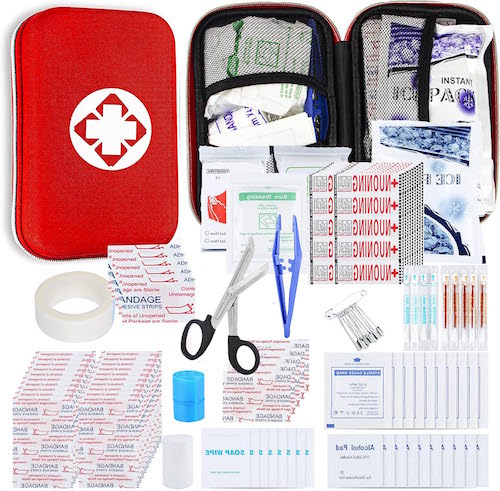
- First aid kit — Stock your own if you’ve already got many of the supplies, or purchase a pre-made first aid kit from the pharmacy section of a Big Box store (Target has nice ones) or Amazon.
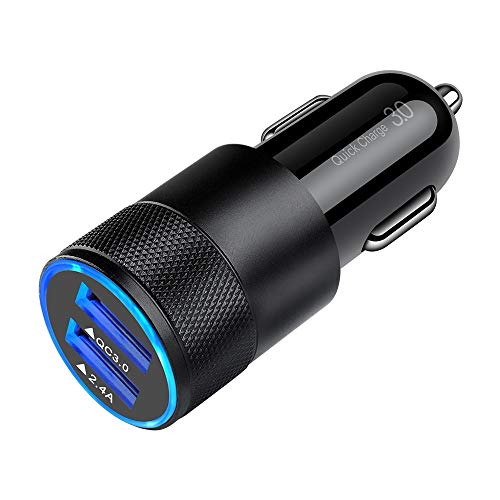
- Things that make stuff light up or go — That means extra batteries, chargers, and power banks. Keep matches in a waterproof container, or get a few long-handled lighters. Cell phones have flashlights, but you don’t want to wear down your phone’s battery if you don’t have access to electricity or your car in an emergency. Almost all modern cars have USB outlets for charging your phone, but if there’s a chance you’ll be in an older vehicle, there are chargers you can plug into a car’s cigarette lighter.
An NOAA Weather Radio — I recently tried to help a client with low vision set up her inexpensive emergency weather radio, and we were disappointed with the poor quality and the lack of intuitive design. CNN has a good article on The Best Emergency Radios in 2023. In addition to one that takes batteries, a hand-crank option not only relieves your fear of running out of power, but it gives elementary school-aged kids an activity to occupy them and make them feel useful.
- Plastic sheeting and duct tape, in case you have to shelter in place, and masks (to prevent inhalation of dust, contaminants, and germs). If it was good for nothing else, COVID got most of us in the habit of having masks on hand.
- Fire extinguisher — You should have these in your home and car anyway. At the very least, get the hand-held kind that look like bug spray cans. Consider emergency fire blankets, too!

- Sanitation and hygiene items — Disinfecting wipes, hand sanitizer, and garbage bags with plastic ties (the latter in case you lack access to bathroom facilities) keep you healthy while you wait things out. Also consider what feminine supplies and other personal hygiene items you might need.
- Whistles or other other noisemaking devices help you gain attention and seek assistance — If you don’t have a whistle, consider what else you or your kids might have handy, like kazoos or toy instruments.
- Maps — Remember paper maps? If you have to evacuate your community when cell towers are down and your usual routes are closed, a paper map enables you to navigate to safety.
- Comfort items — Depending on the type of emergency you face, you could be away from home for several days. Pack a complete change of clothes and well-fitting, sturdy shoes for each person, plus a sleeping bag or blanket for each individual.
If this is overwhelming, you may want to start with a ready-made 72-Hour grab & go kit.

If, however, you really want to built the ideal emergency Go bag, sites like Emergency Prep Gear have robust suggestions.
Another great resource is the American Red Cross Emergency Preparedness Checklist.
Remember items specific to you or your family members
- Got a baby? Think through everything the tiny human might need — Formula and bottles, diapers, wipes, etc. If you normally pump your milk, make sure you have a workable backup in case your pump is inoperable or unavailable.
- Prescription medications — I may be able to go a week without my Flintstones Complete vitamins, but not my diabetes medicine. Either keep a week’s worth of your meds in your emergency kit and switch them out each time you refill your prescription (so you’re never taking expired meds, and use the “emergency meds” right after you get a refill); otherwise, make sure your meds are grab-and-go ready at all times!
- Non-prescription items — Know your pain relievers and which work best for different kinds of pains or fevers, and pack OTC meds for all manner of tummy distress. Don’t forget contact lens solution!
- Pets are part of the family, so be sure you’ve got food, water, and meds for Fido or Fluffy
Don’t forget about papers, money, and things that work like money
If there’s a widespread electric outage in your community, credit and debit cards may not work, and if you’re used to using Apple Pay on your phone for most purchases, lack of data if cell towers are down may be a shock. Only you know how much cash on hand will make you feel safe, but consider getting the kind of under-clothing money belt you might use for international travel to keep your emergency funds hidden and safe.
If you can’t currently afford to keep any cash on hand for emergency situations, try putting away even one dollar at the end of each day in a cookie jar or piggy bank. Set an alarm on your phone to remind you daily to build up that at-home emergency fund.

During and after an emergency, you’re going to need to be able to access important family documents (or at least photographic evidence of them). Keep copies of insurance policies (at the very least, the page with your policy numbers, toll-free claim number, and declarations page).
You also want to make sure you have access to your family members’ ID and bank records. Secure them electronically in a cloud vault (for when there’s electricity); if you leave your home with paperwork (such as when you evacuate during a home fire or wildfire), be sure their secured in waterproof container.
Ready.gov had a great page for financial preparedness for emergencies. That link is a treasure trove of checklists, financial safety advice, instructions on how to built an emergency financial first aid kit, and a stack of PDFs and links to help you safeguard your financial situation during times of emergency and recovery.
The time to organize and prepare for an emergency is now, when there is no emergency. Brainstorm what you couldn’t do without. You’re not towing your house behind your car, but you do want to trigger any possible items you might not consider in the heat of the moment.
DEVELOP AN EMERGENCY PLAN FOR GETTING OUT OR STAYING PUT
Once you’ve got your emergency kit in place, it’s time to develop your emergency plan. Again, you don’t have to re-invent the wheel, as Ready.gov has a series of checklists for specific circumstance and needs:
- People with Disabilities
- People with Pets
- College Students
- Seniors
- Working with your kids to help develop your emergency plans
- Modifying your plan by location, because not all emergencies happen when you’re at home with your preparedness supplies. Have plans for when you’re at work and kids are school.
- Developing Emergency Plans for Your Business
Create a Written Plan
Once you’ve gone through everything I’ve referenced here and everything at Ready.gov, you’ll be able to start developing checklists for what you need, whom to call, where to go, and how to get there. It may seem excessive, but a written plan will help you organize your thoughts.
Maintain multiple copies of your plan in various locations: in your glove compartment, on the bulletin board or in an uncluttered desk drawer at your office, and within easy reach of major household exits. Talk through the plan every so often with your family.
Teenagers and older kids should know what’s relevant to them (like finding their siblings and arranging to meet at an agreed-upon location) and might keep a copy of the plan in their lockers. Your elementary school-aged kids should have emergency contact cards so if they get separated from family members they can make sure the grownups around them can contact the right people.
Practice Makes Perfect
Practice fire drills and escape routes in your home and office, and don’t just talk about it, but walk through the route. Identify a meeting point outside, away from the danger and be sure to designate someone to count heads.
Mention your escape routes to overnight guests in your home. If you have a card in your guest room with the Wi-Fi password, put info about the escape route there. (Everyone pays attention to Wi-Fi info; it’ll catch their eye!)
Beyond your home, develop an evacuation plan that considers all possible contingencies. If you need to drive yourself and your family out of town, know your community’s civil defense procedures to ensure your plan doesn’t contravene the official route. Don’t get in trouble with the authorities during an emergency!
Talk About Talking (During an Emergency)
Identify a long-distance communications point-person — Grandma in Boca? Your college kid in another state? Make sure they have a copy of your emergency plan and they they know the route in case your family members gets separated, can’t reach one another, but can reach the at-a-distance person.
Plan communications alternatives if family or co-workers are far-flung or traveling. Funnel updates to your long-distance point-person to share.
While the most important thing is to organize your safety, everyone will operate more effectively if they can reduce the stress related to not knowing what’s going on.
Five Minute Warning
What if you had only five minutes to rescue beloved possessions?
Your emergency plan will help you safely evacuate your family and make sure you have the absolute essentials. But what about items of sentimental value or things insurance can’t ever replace? What could you safely gather and take with you if you had only minutes to leave?
Never delay a safe departure, but consider these issues now in case you face a situation where you will have little opportunity to safeguard items of sentimental value. (Tips for parents: if your tiny human has a much loved stuffed animal, get a duplicate to keep with the emergency kit.)

Baby & Teddy Bear Image by StockSnap from Pixabay
In an evacuation, you can’t bring all of your family photos and scrapbooks. (But do make sure each of you has one recent photo of every family member in case your family becomes separated.)
Start now by identifying, digitizing, and uploading the photos that you’d miss long after the emergency is over. Seek help from a professional organizer who specializes in organizing photos, either through NAPO or The Photo Managers.
One more excellent resource for helping you develop your emergency kit and all of your plans is my colleague Judith Kolberg’s book Organize for Disaster: Prepare Your Family and Your Home for Any Natural Disaster or Unnatural Disaster.

HAVE THE RIGHT INSURANCE BEFORE YOU NEED IT!
- Do you have homeowner’s or renter’s insurance?
- Is your insurance policy up-to-date?
- Is your coverage equal to your recovery needs? Do you have replacement-value coverage? Do you know that replacement value is not the same as market value? Replacement value means insurance will provide funds equal to the pre-loss value, not the original value, of an item.
- Have you included an insurance rider for any recently-acquired big-ticket items (including jewelry, collectibles, and electronics)?
- Do you have a sewage backup rider? If your sump pump fails, things can get ugly…quickly!
- Do you have flood insurance? This can only be purchased from the National Flood Insurance Program and is not part of homeowner’s or renter’s insurance. See how flood insurance risk is evaluated below, and enter your address in the FEMA Flood Map Service Center to see a flood map for your area.
GET AND STAY INFORMED
Download the FEMA app to your phone; then make sure everyone in your family does, too. (Don’t forget the seniors!) Learn about the kinds of alerts the government may put out, including wireless emergency alerts (WEA) and the Emergency Alert System (EAS).
Next, know what kinds of disasters might happen in your area. It might be obvious for a newcomer to California to read up on earthquakes, but other situations might be a surprise. If your home is far from a river or ocean but experiences surprisingly heavy snowfalls, warm spring rains could bring flooding.
Also, know how your community prepares. As a native of Buffalo, NY, the first “incapacitating” snowfall I experienced in Tennessee ranked up there with a typical Tuesday back home, but I quickly learned that unlike Buffalo, Chattanooga was not prepared to deploy zillions of snow plows and salt trucks. My city is flanked by mountains, and while snow and ice melt by mid-morning at my house, getting up and down the mountains can be treacherous or impossible.
Have that NOAA Weather Radio radio I mentioned above. And while it’s easy to assume that you’ll just know if there’s a potential hazard in your area because “someone” will call you, people will be dealing with their own issues. Make a habit of monitoring the local radio or TV news when inclement weather is approaching.
Be Ready for the Nationwide Emergency Alert Test!
Finally, on Wednesday, October 4, 2023, at 2:20 p.m. Eastern Time, FEMA and the FCC are planning a nationwide Emergency Alert Test of WEA and EAS capabilities. The government wants to ensure that the systems are effective for warning about emergencies, particularly at the national level.
The WEA part of the test will go out over all cell phones.
If your phone is turned on, you’re going to get this alert, and it will probably be loud! If you’ve got baby in your house, be forewarned and maybe put any cell phones in the garage for the hour surrounding the test or otherwise muffle the phone under blankets. (You could turn your phone off, but then you won’t know if it works for you.)
Starting at 2:20 p.m. ET, cell towers will broadcast the test for approximately 30 minutes during which time all WEA-compatible phones within range of an active cell tower should get this test message:
“THIS IS A TEST of the National Wireless Emergency Alert System. No action is needed.”
(If your phone is set to Spanish, it will display: “ESTA ES UNA PRUEBA del Sistema Nacional de Alerta de Emergencia. No se necesita acción.”)
The EAS bit of the test will go out over radio and TV, just like the annoying Emergency Broadcast System tests we all recall. No big whoop.
Ironically, in case there’s widespread severe weather or some other major emergency, the test will be postponed from October 4th to October 11th.
Do you feel organized and prepared for an emergency? What do you wish you knew before you faced a weather emergency or other kind of disaster? Please share in the comments.
Paper Doll Says: Don’t Get Stuck in a Rut — Take Big Leaps
Are you feeling stuck? When you flipped the calendar to the new month and realized how close we are to the end of summer, and even the end of the year, were you struck by a gnawing feeling that you’ve been mired in the same place for too long?
Are your New Year’s resolutions the same every year? Do you make the same wishes, have the same complaints, and feel like you’re Groundhog Day-ing it through life?
At the end of May, in Organize Your Summer So It Doesn’t Disappear So Quickly, we talked about how the lack of structure, novelty, and sensory clues for the passage of time (along with lack of self-care and an excess of technology) can make us sluggish. We may keep doing the same things, over and over. We may not notice that sometimes we are very efficiently doing the wrong things.
Perhaps it’s time to stop doing some things, start doing other things differently, and to take bold strides on other things altogether.
Although most people think of professional organizers in terms of their possessions, I usually talk about how I help people manager their stuff. Stuff is more complex than just possessions. Your stuff may be what’s piled up on your desk or precariously balanced on your kitchen counter or squished into your closet.
Alternatively, the stuff causing you overwhelm may be the excess in your schedule rather than your space. The temporal, rather than the tangible, can also weigh you down.
However, it’s possible to be crowded out of your enjoyment of life by other than too much in your space and schedule. You could have so much going on in your brain that you can’t accomplish what you want.
The stuff in your head could be ADHD. It might be anxiety or clinical depression. And it certainly could be fear. In fact, several years ago, in Paper Doll Talks With Smead About Fear & Disorganization, I shared how fear holds us back.
Too much, or at least too much of what doesn’t serve you, can keep you from moving forward, from taking leaps. Today, we’re going to look at how to get out of a rut and then consider taking bold leaps forward.
HOW TO GET OUT OF A RUT
Investigate Your Life
Pull on your Sherlock Holmes deerstalker hat, twirl your Hercule Poirot mustache, jump in your Nancy Drew blue roadster, and think about what’s feeling stuck in your life. Let’s start by identifying the symptoms of being in a rut.

Have you lost your enthusiasm? If you can’t pinpoint obvious reasons (lack of recuperative sleep, diagnosed depression, a bed that’s just too comfy) for not wanting to get out of bed, you may be in a rut.
When someone asks you what you want — what to do, what (or where) to eat, or where to go, whether for the afternoon or for a holiday — do you mentally check out? Sometimes, when you’re in a rut, you can’t even imagine different ways of doing things.
You’re not broken. You’re probably in a rut.
The next step is to figure out why? Is it you, or is it what’s in your space, your schedule, or your head (that shouldn’t be) or what’s not there that should be? Understanding the root cause is essential.
It is too much of something? Is there clutter that’s keeping you from entertaining in your space or feeling relaxed enough in your home to pursue your activities? It may be obvious, as this is an organizing blog, but check your space for excess. Are you in a rut physically because you always have to move things off the counter to reach the microwave, or pull suitcases out of the closet to get to your clothes?
Do you have too many activities filling up your schedule? I don’t just mean work-related, though too many Zooms or in-person meetings can wear you down. Maybe your kids are signed up for so many after-school activities, which means you’re constantly schlepping them to-and-fro. Maybe you’ve been in the same clubs with the same people for what seems like forever.
Have you outgrown the life you’re leading? I’m not suggesting you need to take the 10:25 to Reno and leave your job and family behind. But there may be aspects of your life that no longer fit, like a too-small pair of jeans that makes you feel like you can’t really breathe.
It’s possible that you’ve grown out of the things you’ve collected. When my sister was in college, she had a few small elephant-themed items, and soon it became habitual for people to give her elephants in the form of earrings and knickknacks and stuffed animals. Somewhere after a few decades, I noticed that she wasn’t displaying the elephants. She was over the elephants.
And again, you may have things in your schedule that don’t serve the person you are, or the person you want to be. You calendar might not be overloaded, but the things in your calendar may no longer be giving you joy. Are you going to that book club because you’ve always gone or because you love the books and the people? (If you’re going just because you love the cheese plate, be assured that you really can buy that yummy cheese and eat it all yourself.)

Cheese board photo by Andra C Taylor Jr on Unsplash
Track the Clues: Routine or Rut?
If, while playing detective, you find it hard to actually detect what’s wrong, you may need to get more granular. Pick a random week (or start with a day if a week seems overwhelming) and take note of what you do and how your week (or day) flows.
- Are there things you do the same way, over and over?
- Does each day’s schedule blend into the next?
- Do you have trouble differentiating between the average Monday and the average Thursday? (Does every day feel “average?”)
You may be thinking, “But Paper Doll, I have a routine! Isn’t the best way to make sure everything gets done to have a routine?”
Yes!
But also no, not always.
Routines and ruts are related concepts, but they have distinct differences:
A routine is a planned and organized set of tasks or activities that you regularly follow. Your laundry routine makes sure that you don’t have to send your tiny humans to school in Wonder Woman bathing suits under their clothes. Your morning routine gives you the centering, mindful energy, nutrition, and caffeine to keep you from smacking your annoying co-workers with a keyboard.
You design your routines to help you manage your time, reduce stress, and increase efficiency.
Conversely, a rut is a stagnant pattern, one that makes you feel unmotivated or unfulfilled. When you’re in a rut, you may find yourself going through the motions without any sense of intentionality. You’re doing what you’ve always done, getting what you always got. (The longer you’re in a rut, perhaps the less you get back?)
A routine is a deliberate; you structure the sequence of actions and schedule them to create a order in your life. A routine empowers you. By contrast, the stagnant nature of a rut — because you are no longer deliberately evaluating the success and productivity of the routine but just mindlessly abiding by it — may leave you feeling unfulfilled at best, and trapped at worst.
Ruts may occur in our diets, our personal activities, our careers, or our relationships. While Woody Allen isn’t exactly a favored source of inspiration these days, the movie Annie Hall has an apt quote.
While routines can be healthy and productive, ruts are usually associated with a lack of progress and satisfaction in life. We often consider “improvement” to be the key sign of progress, but in some cases, breadth, depth, or variety may also be evidence of progress.
Putting it all together, a routine helps you achieve a groove. But sometimes, treading that same ground, over and over, turns a groove into a rut.
The Magic of Intentionality
Once you see where your life is lacking progress, variety, or fulfillment, you can achieve more of what you want by intentionally making changes in various ways:
- Subtract — Look at what’s blocking your energy and take those obstacles away. If you’re not doing your workout because there’s junk piled up in your workout room, use all the resources we often talk about to sort, clear the clutter, move things to more logical homes, and/or donate, sell, or discard what no longer fits your life.
If there are activities that no longer float your boat, jump overboard. You might have to relinquish responsibilities and it could momentarily inconvenience others to have to find someone to handle the role you’ve done uncomplainingly for far too long. That’s OK.
Offer to help your replacement with the transition, but stand firm on letting go of tasks that don’t nourish you personally or professionally.
- Add — If you’re in a rut, just taking things away probably won’t solve all of your problems.
Having more empty space may mean you don’t have as much housework to do, or it could make you uncomfortable. If you finally eject all of your ex’s stuff from the house, the emptiness may make your space, and even your life, feel cold or lacking. Mindfully consider what you might enjoy having in your space.
Similarly, emptying your schedule of undesirable obligations may not be enough. Having all that extra time may initially make your life feel empty. You needn’t fill every moment all over again with different activities, but do open your mind to exploring what you may have not realized you were missing.
Start by adding self-care activities to slowly fill up a small number of those relinquished schedule slots. Remember to make time for sleep, mindfulness or meditation, exercise, nutrition, and uplifting social relationships. Feed your body and your mind to jump out of that rut.
Daydream and allow for possibilities you never previously considered. Just because you never considered yourself artistic or creative before doesn’t mean you might not explore a painting class or community theater. Maybe you’ll try to acquire new skills or knowledge relevant to your goals, but remember that personal fulfillment or enjoyment is a good enough reason to have new experiences.
Not everything is about productivity. Let joy be enough.
- Prioritize — Once you know the negative effects of the rut you were in and have considered how you want to replace (or enjoy the absence of) the tangible, temporal, and cognitive clutter you had before, figure out what’s most important to you.
Do you want to work on your body? Your spiritual well-being? Your professional development? Do you want to taking dance lessons or spend more time reading?
Spend some time writing down everything that was missing from your life when you were in a rut, and what you want to experience instead. Then pick your top two priorities.
Why two? If you are working on just one priority, and achieve it, turning to the next on your list will make you feel like you are starting from scratch, which can be demotivating. Focusing on one priority, but having a backup that gets a little attention, means you always have an proactive alternative to consider when you need a pause.
Why only two? Focusing on changing more than two areas of your life simultaneously usually leads to overwhelm. The goal is to lighten your life, not weigh you down.
- Break it down — Once you figure out what you want, figure out what gets you there.
Let’s say your rut was dietary. No matter how much you love tacos, having Taco Tuesday every week, with no change in the ingredients or dining companions or cooking responsibilities can be a bit much. Break your proposed life changes down into small steps and reconsider everything.
Maybe your spouse will cook more often; perhaps your family will experiment with group meal planning and grocery delivery, eliminating Thursday shopping trips (and the need for a babysitter).
- Reinvigorate your routines — Remember what we said about the difference between ruts and routines. It’s OK to have routines; just be intentional about them.
Getting out of a rut doesn’t mean abandoning all structure from your life and schedule. It doesn’t mean never cleaning the bathroom; it does mean giving yourself permission to delegate the task your teenager (either as a life lesson or in return for car privileges) or hire a cleaner.
It doesn’t mean never taking your kids to their activities, but it does mean exploring the alternatives — trading off with your co-parent, with other kids’ parents, or (if your kids are old enough) arranging for a car service — so the time you spend going to your children’s activities are more often related to seeing or participating in those activities (as a supportive audience or coach) because you are now more fulfilled.
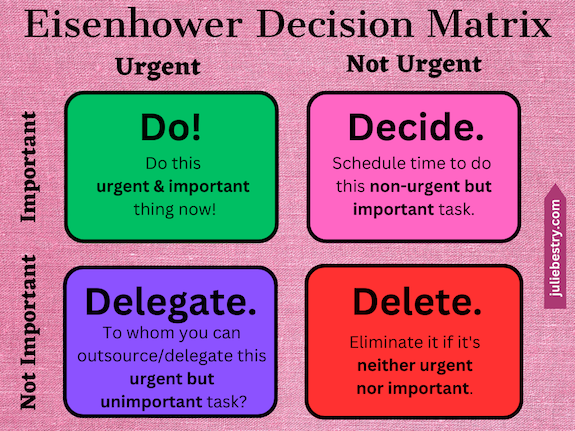
Use the time management skills you’ve learned from this blog and elsewhere to use the Eisenhower Matrix to put more of your attention on tasks with high importance and/or high urgency and reject or lessen the things with lesser value to your life.
- Replace the bad stuff with good stuff — This is a follow-up on the advice to add and subtract. If you were in a nutrition rut, you might eliminate the purchase of empty calorie foods. If your life has been filled with the equivalent of empty calories, eliminate the distractions of app notifications, clutter in your workspace, and interruptions from people and relationships that don’t fit your greater good.
- Stay flexible — If you’ve been in a rut for a long time, empty space (in your home, your schedule, or your mind) may feel scary. You could be tempted to create lots of new routines with just as little flexibility as before, and you’ll find yourself worn down again. Leave yourself open to adapt to new possibilities. Nobody gets out of a rut overnight. Have patience with yourself.
- Welcome support — Reach out to supportive friends or family for help brainstorming, noticing habits, or seeing new pathways. Professional organizers and productivity coaches can help you find new ways to make changes in your space, schedule, or thoughts. If you’ve been weighed down by more problematic thoughts or feelings, consider how a therapist can provide valuable perspective, guidance, and support. You’re not alone.
For more on excaping a rut:
You 2.0: How to Break Out of a Rut (Hidden Brain podcast)
How to Get Out of a Rut in 8 Steps (Master Class article)
How To Get Out of a Mental Rut, According To Psychologists (Well+Good article)
Getting Off the Treadmill: Six Ways to Break Out of a Rut (Science.com article)
Finally, and especially as we’re approaching the Jewish New Year at the end of this week, I encourage you to revisit Organizing A Fresh Start: Catalysts for Success for motivation and support.
HOW TO TAKE A BIG LEAP
The opposite of a rut can be a leap.

Sunset Leap by Kid Circus on Unsplash
Once we figure out what to stop doing, and start examining what we’re going to do differently, we give ourselves permission to think on a grander scale.
We have lots of reasons why we don’t take leaps, and they are similar to why we stay in ruts. Why make waves? Why risk new problems? We generally step back from taking leaps because of fear, and those fears may or may not be warranted, but they definitely keep us in limbo, wanting but never trying.
I’m a cautious person by nature. I suspect that’s true of many professional organizers. We’d rather prevent problems than have to fix them, even though our arsenal of skills helps us do both.
In college, I never took Italian because I feared doing damage to my GPA, and I was a decade out of graduate school before I realized that never once after I left academia did anyone, ever, ask about my GPA. Studying Italian these five years has brought joy to my life; my only regret is that my introduction came from the cartoon characters in Duolingo and not the the professors and fellow students at Cornell 35 years earlier.
There’s no wrong time to take a leap. There are certainly wrong ways. Selling your wares for magic beans isn’t smart; giving up your well-paying career to become a professional surfer when you’ve lived your entire life in Iowa probably won’t yield a secure life. But I’d like to share the advice on leap-taking I’ve gleaned from a few articles I’ve read lately.
Regrets, I’ve Had a Few
In Woulda, Coulda, Shoulda: The Haunting Regret of Failing Our Ideal Selves, the author looks at the published research of Cornell University professor Tom Gilovich and former grad student Shai Davidai in The Ideal Road Not Taken: The Self-Discrepancies Involved in People’s Most Enduring Regrets.
They identfied three elements of our sense of self, the:
- actual self — the attributes a person believes they possess.
- ideal self — the attributes people would ideally like to possess (including their “hopes, goals, aspirations or wishes”)
- ought self — what a person feels they should have been, based on duties, obligations and responsibilities.
Through six experiments, Gilovich and Davidai looked at two areas of discrepancy — what they call ought-related regrets and ideal-related regrets.
When people look back at their lives, they cope fairly well with any discrepancy between what they thought they ought to have done, in terms of duties and responsibilities, and what they actually did. Basically, we forgive ourselves when we feel like we ought to have dieted and exercised, we ought to have been more attentive to our studies, or we ought to have been better at managing our money.
Conversely, when we fail to take actions that could allow us to become our ideal selves, those regrets remain unresolved; we don’t get over our failure to act to become whomever we might have been.
Most tellingly, Gilovich said, “In the short term, people regret their actions more than inactions, but in the long term, the inaction regrets stick around longer.”
This brings to mind two of my favorite quotes:
“It is never too late to be what you might have been.” ~ George Eliot
It is never too late to be what you might have been. ~ George Eliot Share on X“The life you have led doesn’t need to be the only life you have.” ~ Anna Quindlen
The life you have led doesn't need to be the only life you have. ~ Anna Quindlen Share on XRisky Business
Do You Rarely Take Risks? Maybe it’s Time You Do, talks about how mindful risk-taking can be extremely rewarding. As we age, we’re more likely to settle into our comfort zone, and that coziness of comfort zone can easily leave us mired in a rut.
The article shares the advice of clinical psychologist Carla Marie Manly, who warns that as we age, we tend to turn more toward fixed mindsets than growth mindsets, narrowing the new opportunities we give ourselves. Manly advises that we first work to be conscious of the fact that we’re prone to lock down, which enables us to be aware of our fear and then deal with the related discomfort.
Manly argues in favor of acknowledging our discomfort but choosing risks that we find compelling. They don’t have to be big risks; the “riskiness” might be as small as ending up with a meal you don’t love as much what you usually order. But organizing your life to experience things that are new, different, and outside of your comfort zone increases the chance that you will increase the size of your comfort zone!
Respect Yourself. Don’t Reject Yourself.
One of the best things I’ve read lately related to taking leaps came from this article from Ness Labs entitled Turning Fear of Failure Into Increments of Curiosity.
So often, when we fail to take a leap, we do it out of fear of failure, particularly the fear of others judging us, especially if we fail.
The focus of this excellent piece is that we should approach bold strides as if we were scientists. The scientific method says, “Hey, let’s try this and see if it turns out the way we expect.” And if it doesn’t? Science says, “That’s cool, too! Because now we know!”
The article recommends making small moves and iterating again and again, creating bigger growth loops. It’s a short piece, and I recommend reading at least the end, where the author walks through the steps of an intentional life experiment for getting past the fears that keep us all from moving forward.
But my favorite part of the piece was near the beginning. The author, Anne-Laure Le Cunff, recalls being ill at ease about applying to a selective academic program abroad; she feared she would not be accepted. Le Cunff’s mother noted, “It’s not your decision to make.”
This was a “wow” for me. When we hesitate to take action out of fear that we will not win, or be accepted, or hired, or loved, we are taking the opportunity to reject or accept us out of the hands of the panel or the company or the person whose decision it should rightfully be.
The Big Leap — It’s Your Decision
Nobody can make the decision for you as to whether you will make bold strides, or when, or how.
The following short film examines a dilemma at the top of a ten-meter diving tower: to leap or to risk the embarrassment of climbing all the way back down. I think you’ll find it worth the price of admission. (Note: Almost all of the dialogue is in Swedish with English subtitles, but there are a few English profanities. Consider yourself forewarned.)
Fortune favors the bold, or so goes an ancient Latin proverb. Would you leap?
Paper Doll Explores New & Nifty Office and School Supplies
There’s something about the start of September that makes many of us hearken back to our youth and the rich potential of a fistful of new school supplies. Cast your mind back and I bet you can recall your favorite crayon. Mine was periwinkle, more for the funny name than the demure hue. (As you might imagine from my wordy posts, and as Paper Mommy will quickly confirm, I’ve never exactly been demure.)
It doesn’t matter whether you’re in kindergarten or graduate school; it doesn’t matter whether you’re being forced to return to the office after a few years of remote work or ready to embark on setting up your own home-based workspace, there’s something powerfully motivating about new office supplies and decor to help you get and stay organized and enthused.
The point of today’s post is not to encourage you to purchase clutter and pile unnecessary items up around your workspace; nor is it to give you lists of supplies you and/or your tiny humans already have. Rather, it’s an opportunity for you to see the potential of your space in a new way and consider what features or colors might boost your enthusiasm.
STICKY NODES
Post-it® Notes are fun and colorful, but they’re not entirely environmentally friendly, even when recyclable. Dry-erase (and wet-erase) boards are better for the planet, but they’re usually drab white and lacking delight.
Meet Sticky Nodes — the best of both worlds — they’re dry-erase sticky notes!
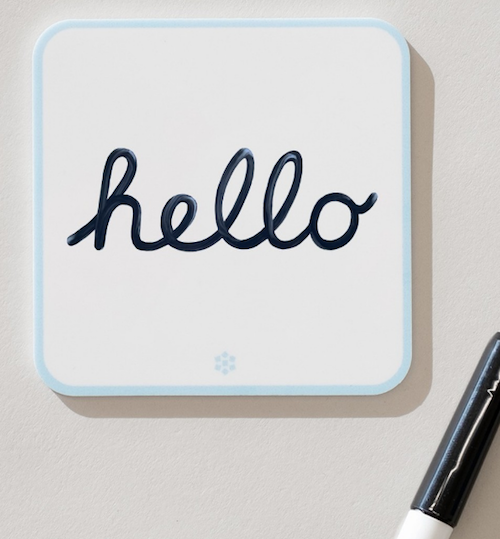
Sticky Nodes are:
- Erasable — Write with dry- or wet-erase markers, then wipe (or spritz and wipe) to start fresh.
- Restickable — Affix Sticky Nodes to any smooth surface, reposition at will, and they won’t leave a mark. Sticky Nodes use a unique “smooth-stick,” adhesive-ree technology, so you don’t have to worry about damaging your paint job.
- Reusable — Re-use face of the Sticky Node by erasing with a dry-erase marker or a damp cloth; re-use the whole Node by moving it to where it’s needed, over and over again.

Around the office, at school, or in your home, put them on file cabinets or walls, whiteboards or chalkboards, mirrors or windows.
Capture and organize your genius thoughts, scribble notes, brainstorm on your own or with your need, or mix-and-match to help you study or tech. At home, post the WiFi password of the day draw a comic to greet your tiny human at the end of the school day. Your kids can keep track of weekly schedule items in their lockers, and at the office, you can make clear when you’re available to be bothered or to be left alone. Stick Nodes have all the same uses as sticky notes, but you don’t have to fill your trash can.
Personally, I’d like to see them add more colors to the line-up. (Periwinkle, anyone?) Additionally, it would be nice if they had mix-and-match packs; for example, if you got the ten-pack, you might prefer 5 blue, three green, and two yellow rather than an entire batch of blue.
If you’d like to try Sticky Nodes, they offer a sample kit, which includes one yellow node and one black fine-tip marker for $12, shipped for free in the US! (At that price, it might be more affordable just to get a 5-pack!)
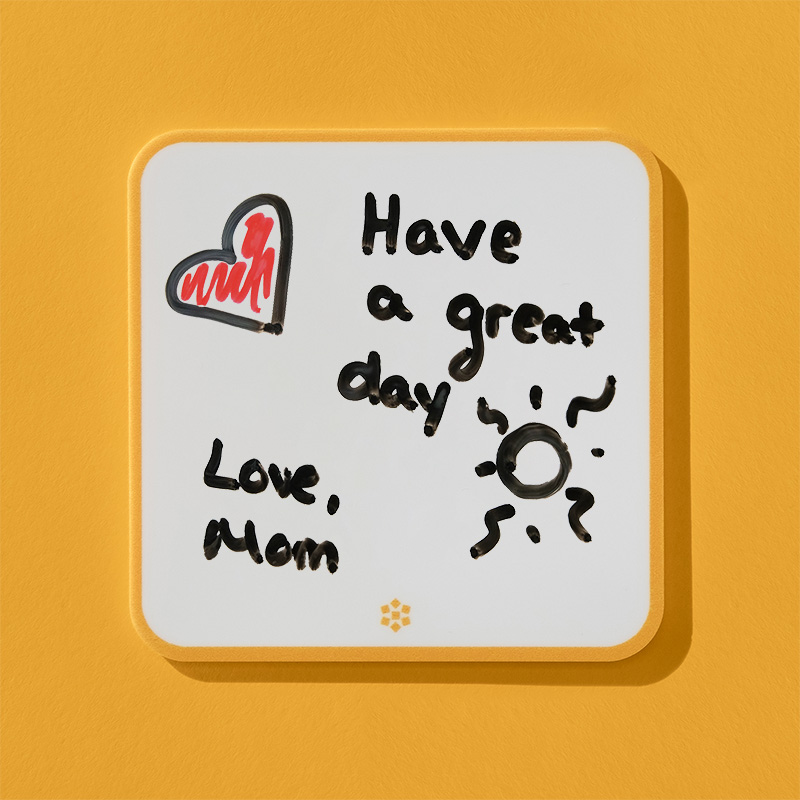
No offense to Sticky Node, but Paper Mommy‘s drawings are better!
Sticky Nodes also recommends and sells fine-point Expo-branded dry- and wet-erase markers (scroll down at that link) but you can also easily find these at any big-box store or Amazon. Pick a wide-enough array of colored markers so that you can color-code your Sticky Nodes for your own purposes. Assign a color to each kid in your family, or give a color to each daily task or task-group (to do, to eat, to wear, to read, etc.).
POPPIN’ FRESH!
Some products are just motivationally magical, and Poppin’s line of office furniture and supplies accomplishes this through color (and high-quality).
Poppin’s desk collection includes monitor risers, stackers, letter trays, organizer caddies, desk-drawer organizers, mixed-use organizers, accessory trays, file sorters, and two of my favorites for stand-up organizing style, 9.75″L x 12.25″H x 3.75″D magazine file boxes ($21):

and 12.25″L x 9.75″H x 3.75″D lacquer-like file boxes ($26):
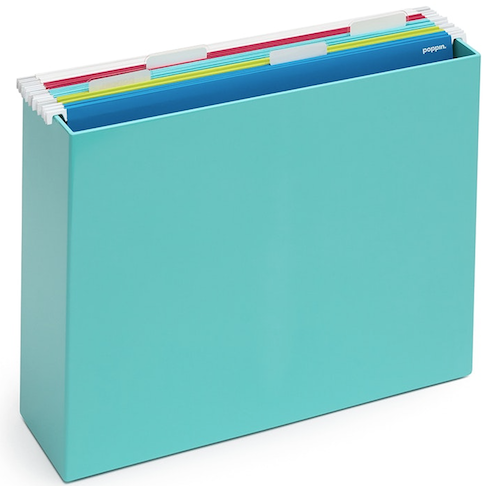
I’m also always amused by the 6.25″L x 2.8″W x 1.25″H Softie Grip Grass doohickey ($16.50), designed to hold pens, cards, and the random fiddly things on your desk.
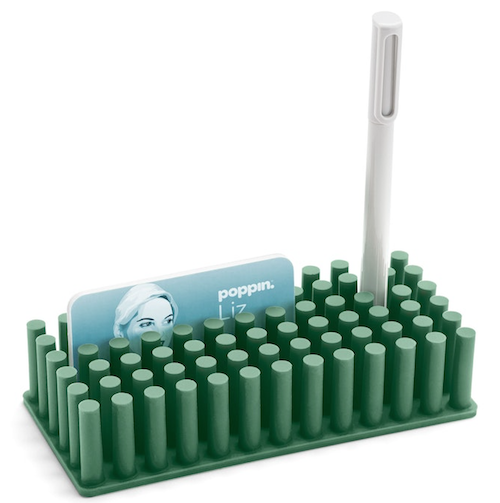
The desk organizing color scheme includes white, blush, dark gray, aqua, slate blue, sage, and sky, with some products available in fewer colors.
But as cool as their desktop products are, I always seem to covet Poppin’s wall organizing products. Here’s a little video to introduce you to the variety of options in their Small Space Organization Collection, designed to make use of vertical space.
As noted in the video, products in the line can be affixed to the walls with adhesive or mounted (using screws), and some of the products are magnetic and can be used to attach the to metal items (like filing cabinets) or to other products in the line. Poppin has:
- wall shelves ($25), measuring 3.25″W x 4″H x 12.5″D, in blush, dark grey, slate blue, and white

- wall pockets ($25), measuring 12.5″W x 7″H x 2.5″D, in blush, dark grey, slate blue, and white

- wall cups ($14.50), measuring 4.5″W x 4.5″H x 2″D, in white, blush, dark grey, and slate blue
Each of the above products in the line are made of sturdy plastic polystyrene with a matte finish and come with removable adhesive strips, magnets, and screws for mounting. The removable adhesive strips hold up to 2 pounds; the magnets hold up to 1 pounds, and screws hold up to 15 pounds.
Poppin also makes dark grey fabric pinboards in two sizes, a 12.5″L x 12.5″W x 0.5″D square ($29) and a 25″W x 12″H jumbo version ($55).
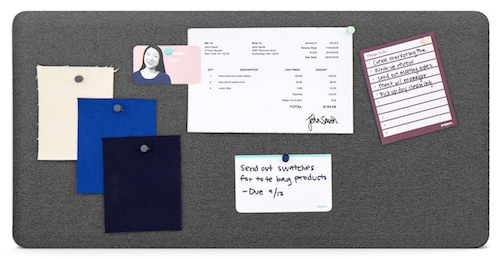
And, of course, they have a variety of pretty pushpins in assorted colors. But what I like best about Poppin’s “small space” line for making good use of vertical space is a product (actually three) they barely promote. There’s the white magnetic dry erase board ($26), measuring 12.5″W x 12.5″H x 0.5″D. But let’s face it, a plain white dry-erase board, even a magnetic one, isn’t that much to write home about.
But two other versions, with the same measurements and at the same price, up the ante. There’s the lined White Magnetic To-Do Dry-Erase Board:
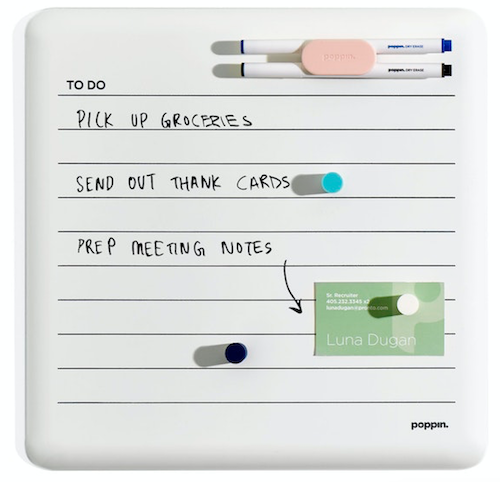
and the lined White Magnetic Weekly Dry Erase Board, pre-printed with the days of the week.
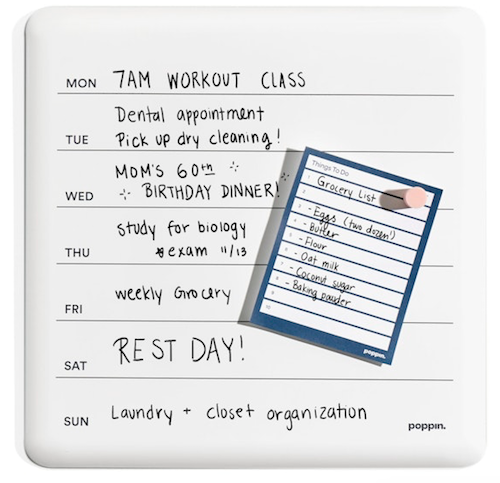
Of course, Poppin has pretty magnetic holders for the dry-erase pens and matching-color magnets.
Can’t you see these doing triple-duty at home, work, or in a dorm room?
TIKTOK MADE ME BUY IT
OK, TikTok didn’t actually make buy anything, but that’s what the voiceovers on so many of the little “advertainment” videos say. But TikTok did help me find two intriguing products.
PrintRGo
The first nifty office/school supply I saw recently kept appearing in my TikTok feed. It’s a tiny printer, and while I’m not the kind to push gadgets, I immediately saw the appeal of the PrintRGo thermal pocket printer. (Make sure you use the menu in the top right corner to switch from UK to US pricing.)

The use case may seem narrow, but if you’ve ever taken a biology course and had to label parts of a cell — and remember that the mitochondria is the powerhouse of the cell — or an studied for anatomy class where you had to learn a complex series of muscles, you know that you learn by spaced repetition and visual support.
Free-hand drawing and labeling is a pain, as is making copies. This little 3.4″ × 3.5″ × 1.6″ printer uses no ink, so you never have to wait for the ink to dry; instead, it uses adhesive-backed thermal paper to print at a maximum resolution of 203 DPI. (It does double-duty, so it also works some fun magic as a low-resolution photo printer and a label printer.)
Unfortunately, TikTok videos don’t embed particularly well, but this link will give you an idea of how the PrintRGo works.
In each box, you get a PrintRGo printer, charging cable, one roll of thermal paper, and a user’s manual. PrintRGo works via Bluetooth using the Phomemo app, and functions Android and IOS devices. It’s wireless, so you just pair it with your phone (just as with other Bluetooth devices like a Fitbit or keyboard) and you’re ready to print!
Take a photo with your phone, use the app to print it from your PrintRGo, and it thermal prints to sticker paper (at a speed of 10mm per second), and once you have your little masterpiece, printouts can adhere to your notebook or study cards.
Full-price for the PrintRGo is $78, but it’s currently selling at the official website for $48.
If you’re not comfortable purchasing from a TikTok advertiser, Amazon has a number of similarly adorable options that seem to work on the same principle, using the same Phomemo app. One version is the Phomemo M02 Pocket Printer ($49.99).
Bookmate
The other TikTok school/office supply that caught my attention disappeared from my feed (as often happens) when I fat-fingered (fat-thumbed?) the corner of my phone. No matter, because my fabulous friend and colleague Hazel Thornton independently sent it to me in a private TikTok message with a note, “New product for a blog post?” Indeed, it is!
Bookmate from AchieversMust appears to be designed primarily for teachers and students, but really anyone who reads and tends to annotate, take notes, or mark pages for followup will find it useful for reducing clutter. Bookmate combines one magnetic case (which holds sticky tape flags for marking pages and pen loops so you always have a writing tool or highlighter handy) and a magnetic base.
The case allows for you to refill the sticky flags, and you can use any standard tape flags to refill the Max or Pro cases, or purchase the same specific colors from AchieversMust. (You can only refill the Lite version with their tape flags. FYI.)
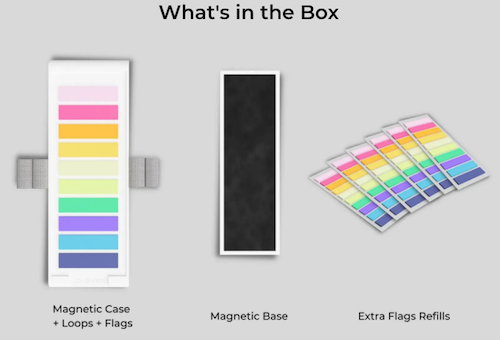
You put the magnetic base inside the front of your book or notebook and the magnetic case (with your tape flags and pens) sticks to the front. (The company claims the magnet is strong enough to adhere through a hardcover book, but I’m a twinge dubious.)
Some photos show users hanging glasses or sunglasses from an outer loop. Again, TikTok videos are wackadoodle when it comes to embedding, but you can see Bookmate in action on the Instagram page.There are three versions of the Bookmate:
- Max — has four pen loops (two on each side) and a 200-count of flags in ten different colors, for $39.95
- Pro — has four pen loops (two on the left, two on the right) (two on each side) and a 100-count of flags in six different colors, for $33.95
- Lite — has two pen loops (one on each side) and an 80-count of 2 different tape flags, for $19.95

They offer free shipping on all orders above $60. Also, from now through September 10, 2023, you can buy two at 10% off each or buy 3 at 25% off each. (There’s also a 30-day money-back guarantee.)
EVERYTHING OLD IS NEW AGAIN
I remember visiting my father’s law office when I was a child, and I noticed that every attorney’s desk had a serious-looking leather desk pad. As a student in the 80s, my real work desk was wherever I found myself — a library study carrel, my bed, a random table in an empty classroom. By the time I started working in television, the closest anyone seemed to get to a desk pad was a giant desk calendar.
Nowadays, nobody is using a desk pad for blotting a fountain pen, but desk protectors are back in style. I was roaming through a big box store this weekend, looking for a lightning cable to use in my rental car (as mine is still in my stolen, damaged, recovered, and still-not-repaired Kia), when I noticed a stack of what looked like miniature yoga mats.
It turns out they were oversized desktop mouse pads. The one that caught my eye was a 35″ x 16″ pink, flowered, onn.-brand (yes, it’s “onn.”) XL Desktop Mouse Mat with an anti-slip base. The style is called Surf. (It also comes in grey and rainbow-stripes.)

And it was only $9.88!
It’s been a long time since I looked for a mouse pad or a desk mat, so I was surprised and delighted by how many products, marketed as either oversized mouse pads or desk pads, were available to brighten up the work space.
Yes, the real purpose is to give you a larger space to roll your mouse while keeping your glass or wooden desktop free of scratches, spills, dust, stains, and all matter of the detritus that ends up crumbly and sticky and yuckified on your desk. But why not feel like you’re basking luxury while doing homework or eking out a living?
First, I found this Bubm Desk Pad Protector Office Desk Mat made of faux leather. It comes in three sizes: 23.6″ x 13.8″, 31.5″ x15.7″, or 35.4″ x 17″. The description stated that it was “waterproof and easy to clean, made of heavy-duty, durable PU leather,” and cleaning it is allegedly as easy as wiping with a damp cloth. Particularly nifty is that it’s reversible, so the version I picked, below, labeled “purple”

is actually light pink on one side and a mauve-y purple on the other. It comes in ten other versions with both soothing and oh-so-bright color combinations.
The price of the one above is $13.99, though other color combinations are about a dollar less.
Even if you only peruse Amazon, you’ll find a wide of color schemes to fit your workspace mood and decor, from the perky (one has a neon-themed scribble of “Good vibes only”) to more muted options like the one above. To close out, let’s look at French Koko’s 36″ x 16.5″ Floral Dream desk mat.


Do you find yourself looking for a refresh this time of year? Do you wish you were starting the year with a bouquet of freshly sharpened crayons? Are any of the above options appealing for you, or have you found a new favorite while you’ve shopped for school or office supplies lately? Please share your thoughts below.
Happy September!
How to Create Your Apple & Google Legacy Contacts

RECAPPING DIGITAL SOCIAL LEGACY ACTIVITY
Last week, in Paper Doll Explains Digital Social Legacy Account Management, we talked about the importance of your digital social legacy, and all the social, emotional, financial, and other reasons why you might want to set an official legacy contact or make sure your digital executor (or digital heir, representative, or designee) can access your digital content and preserve your legacy.
We also saw that most social media platforms have disappointing digital social legacy management tools. Facebook has an official legacy contact, but the instructions are out of date and wonky. Facebook owns Instagram, but there’s no Instagram legacy contact option.
Further, even though Facebook and Instagram, as well as LinkedIn (which also has no legacy contact) will allow you to memorialize your account, only Facebook allows you to name someone to access your data, share it with your family, or preserve your content anywhere other than on the social media platform. And Twitter (X) and TikTok don’t have any policies for memorialization.
Basically, with the exception of Facebook, unless you provide your login credentials to a loved one (which may be considered a violation of terms of service on some platforms, like LinkedIn), there’s no completely kosher way to ensure that your digital social legacy is preserved.
Luckily, Apple and Google are far more prepared to help you and your loved ones secure your digital legacy. Today’s post provides the lowdown on what you need to do to lock everything down now so that your preferred designee can access and distribute your digital assets the way you want.
Designating Your Digital Legacy Contact
Last week, we looked at your best bets for putting your digital legacy in the good hands of your digital executor (or digital heir, representative, or designee). I wrote:
-
- Whom do you trust to carry out your wishes, or anticipate your preferences if you leave no instructions?
- With whom will you still be in close contact by the time a digital social legacy has to be managed?
- To whom are you comfortable giving access to private conversations?
- Which of your friends is likely to stay current enough with technology to be able to handle your digital legacy?
So, yes, you have to trust that the person you pick will follow your wishes, just as a traditional executor of a will. By the time of your demise, you’ll still want them to be close to you.
Whereas social media content is already pretty public to begin with, your digital executor must be someone in whom you’re secure granting access to your whole portfolio of digital assets. Things get much more complicated when we’re also considering your photos, emails, text messages, documents, apps and pretty much anything you access by using your Apple ID or Google credentials (including any small business venture you run)
Finally, with regard to last week’s criteria, your pick has to have more specific technological savvy. If your digital executor has lived in a 100% Android world, will they find it frustrating to amble through your all-Apple neighborhood? On the other side, while most people have some experience with Google products, Apple folks may get stuck on Android mobile quirks.
Technology Confusion via GIPHY
CREATE AN APPLE LEGACY CONTACT
Simply put, an Apple Legacy Contact is the person you designate to have official access to your Apple ID/account after your death. This is not merely someone having your login credentials. Rather, it’s a secure method for giving your trusted contact access to the data stored in your Apple account once you’ve passed away.
Remember, your data covers more than pictures and notes; it’s literally everything associated with your Apple ID, from the content of your cloud accounts to backups and current materials on your Apple devices, whether via iOS, MacOS, or iPadOS.
Prepare to Add Your Apple Legacy Contact
My foregoing suggestions notwithstanding, your Apple Legacy Contact can be (almost) anyone you want. They don’t have to own an Apple device! They don’t even have to have their own Apple ID. (Though they will be assigned a special one later, but not until you make your untimely departure.)
However, your Legacy Contact does have to be at least 13 years old in North America. (Other nations have different age requirements, the same as those for being able to create an Apple account, ranging from 14-16).
In addition to picking your Legacy Contact, you’ll need to make sure that you:
- Are signed into an Apple device (running at least either iOS 15.2, iPadOS 15.2, or macOS Monterey 12.1) with your Apple ID.
- Have enabled and turned on two-factor authentication for your Apple ID.
How to Add Your Apple Legacy Contact
Now that you’re properly logged in, set up your Apple Legacy Contact using the following methods, depending on what kind of device you’re using.
On a Mac:
- Click on the Apple menu in the upper left corner of your screen and select System Preferences. Click on your Apple ID.
- Click on Password & Security and select Legacy Contact.
- Click Add Legacy Contact and follow the prompts.
Be ready to authenticate your access with Touch ID (finger on your keyboard) or by entering your Mac login password.
On iPhones and iPads:
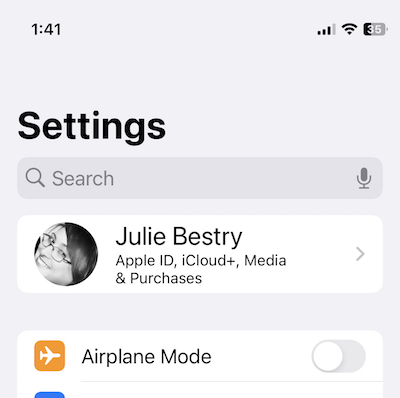
- Go to the Settings app and tap on your name. (You’ll likely see your face to the left of your name, “Apple ID, iCloud+, Media & Purchases” just below your name, and “>” to the right of your name.)
- Tap Password & Security. On the resulting screen, scroll down almost to the end and tap Legacy Contact.
- Tap Add Legacy Contact. After a resulting info page, you’ll be taken to your mobile device’s contact page. Just tap the preferred contact’s name.
Be prepared to authenticate with Face ID, Touch ID, or passcode for your device.
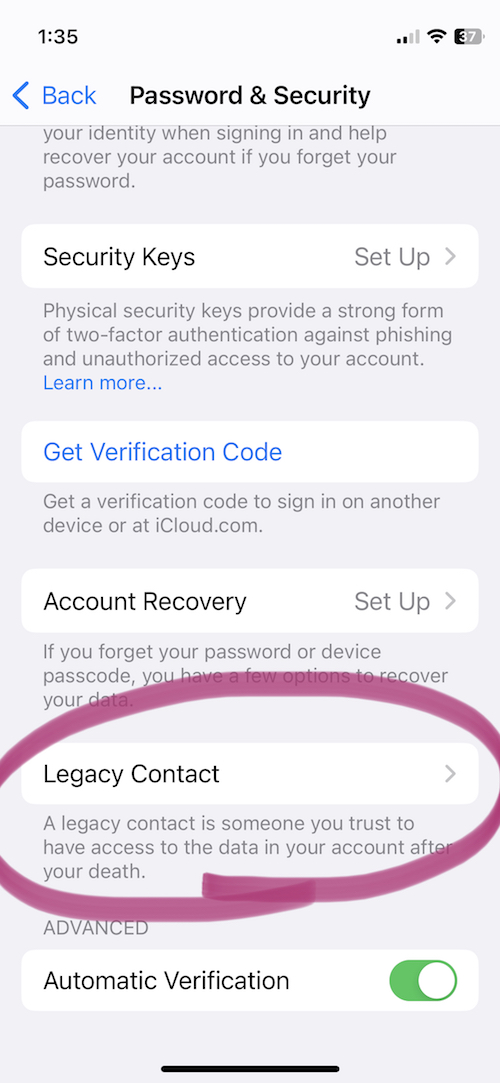
If you’ve ever used this process before to set up a Legacy Contact, once you get to step 2 (on any device), you’ll see the name/face for the person you’ve already selected. At that point, in step 3, you can add an additional Legacy Contact (you can have two or more) or tap on the name/face of your current Legacy Contact to see more info.
If you’ve just set up Taylor Swift as your Legacy Contact for the first time, or even if she was already there, the resulting page will say:
Legacy Contact:
Taylor Swift can inherit your data and use your Apple devices after you have passed away. To request access to your account, Taylor will need to provide the access key shared by you and a copy of your death certificate.
Then you’ll see two options:
- View Access Key — This will give you a screen entitled “Legacy Contact Access Key” with a QR code and a multi-line series of letters and numbers. The screen has an option to print a copy for your records or your contact. (See below for informating your Legacy Contact.)
- Remove Contact — If you click this, the contact will be removed.
If you want to remove a contact (for example, if you get a divorce from your former contact, or you have a “bad bestie breakup” with Taylor), be sure to assign a new Legacy Contact.
No matter which device you use, Apple will send you an email confirmation when a Legacy Contact is added or removed.
Inform Your Legacy Contact
The next step is to let your Legacy Contact know what’s up. (Most people would not consider this assignment a fun surprise after they’ve lost someone as dear as you!)
Print a paper copy to keep with your estate papers and/or will (perhaps in your safe deposit box) if the executor of your will and your Legacy Contact are the same person.
Alternatively, consider creating a PDF to keep on a secure flash drive with other instructions for your Legacy Contact. I gave a digital copy to my Appple Legacy Contact, but you might want to arrange for delivery only after your demise.
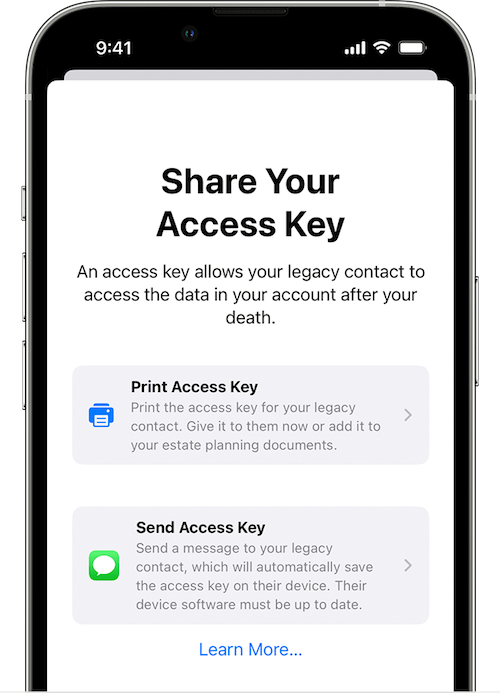
Upon creating your Legacy Contact, Apple gives you the option to print the access key or send a message. However, to send the access key via Apple Messages, your contact has to be using at least iOS 15.2, iPadOS 15.2, or macOS Monterey 12.1 or later. If they accept responsibility, their device will automatically store a copy of the access key in their Apple ID settings. Conversely, if they decline your Legacy Contact request, you’ll be notified that they noped out and you’ll be able to choose someone else.
If your Legacy Contact is using older versions of the Apple software, they’ll be prompted to update and then you can use the send a message option.
If they don’t use Apple devices at all, your only option is to give them the printed version or PDF of the access key.
What Your Apple Legacy Contact Needs to Do
Sometime, long (long, long) in the future, you will eventually pass away peacefully in your sleep. At a respectful point after that, your Apple Legacy contact will need to file an access request. They’ll need:
- A copy of your death certificate. Because of this, you’ll want to make sure your Apple Legacy Contact is, if not also the executor of your will, then someone who has at least an amicable relationship with them. (In other words, if your bestie is otherwise ideal as your Apple Legacy Contact but can’t be in the same room as your spouse or executor without everyone resorting to fisticuffs, it will likely be hard for them to access a copy of your death certificate and set things in motion.
- The Apple access key (paper or digital) you generated when you chose them as your official Apple Legacy Contact.
If they accepted the role as Legacy Contact when you shared it digitally, it’s listed under their own Apple ID. They’ll follow the same prompts as above for creating a Legacy Contact, but once they get to the Legacy Contact screen, they’ll see your name/face and will be able to tap to get further details, view the access key, and start an access request.
Your Apple Legacy Contact will use the access key to request access. Apple will review the request, verify all of the information, and (assuming everything is A-OK) give them access to your Apple account data.
“How?” you wonder?
Your Legacy Contact will be granted a special Apple ID (separate from your own Apple ID and theirs) that they must set up to access your account. Note: your own Apple ID and password combination won’t work anymore.
Your Apple Legacy Contact will only have access to your data for three years from when the legacy account request is approved. Whether they start accessing the account right away or not until months or years later, the approval date starts the three-year clock! After three years, your Apple account will be permanently deleted.
What Can Your Apple Legacy Contact Access?
First, be aware that if you have have more than one Legacy Contact, any one of them can independently access your account, make decisions about your data, and even permanently delete data (before the three-year mark when Apple will do it). So think critically before assigning two or more Legacy Contacts.
What what can your Apple Legacy Contact access? Just about anything stored in iCloud or a device’s iCloud backup. You can’t pick and choose and say your Legacy Contact can see your documents but not your photos, or can see your emails but not your text messages. Accessible data may include iCloud Photos, Apple Mail (but not non-Apple Mail platforms stored only in third-party sites, like Microsoft 365), and notes, contacts, calendars, and reminders.
They may also be able to access any iMessages backed up to iCloud, iPhone call history, files in iCloud Drive, Health Data app data, Voice Memos recordings, and your Safari bookmarks and reading list — not that you have anything embarrassing in there — as well as anything on your devices that you’ve secured in iCloud Backup, like App Store apps and all the content (photos, videos, documents, etc.) stored on your device.
However, your Legacy Contact can’t access any of your payment info on purchases made through Apple Pay or cards saved under your Apple ID, nor any of your in-app purchases. They also can’t get into Keychain to access Safari-based or Wi-Fi user names and passwords, internet accounts, or credit card numbers and expiration dates. If you want them to be able to see that information, provide it separately, outside of Apple channels.
For more, visit Apple’s Data That a Legacy Contact Can Access page.
CREATE A GOOGLE INACTIVE ACCOUNT MANAGER
While Google does not have a legacy contact, per se, it does allow you to designate an Inactive Account Manager. This lets you to grant your loved ones access your accounts and data once the accounts (and presumably, you) become “inactive.”
The Inactive Account Manager ensures that if you cease using your accounts for an extended period of time, there is a way for your digital heirs or others to prompt you to be active (if that’s physically, or metaphysically, possible) or to enable them to access accounts and data on your behalf.

(Somehow, Sleeping Beauty‘s inactivity seems more palatable than thing about a more permanent version.)
What Does Inactive Really Mean (to Google)?
You may have received an email from the Google Accounts Team this weekend. It said that as part of their efforts to protect data:
…We are updating the inactivity period for a Google Account to two years across all our products and services. This change starts rolling out today and will apply to any Google Account that’s been inactive, meaning it has not been signed into or used within a two-year period. An inactive account and any content in it will be eligible for deletion from December 1, 2023.
(…)
If your account is considered inactive, we will send several reminder emails to both you and your recovery emails (if any have been provided) before we take any action or delete any account content. These reminder emails will go out at least 8 months before any action is taken on your account.
After a Google Account is deleted, the Gmail address for the deleted account cannot be used again when creating a new Google Account.
To keep your Google accounts active, the letter pointed out that you can do anything from reading and sending an email (in Gmail), using Google Drive, watching YouTube videos while logged in, “checking in” on Android, downloading an app to an Android device, and more, as specified in their Inactive Google Account Policy.
The letter points out that you can download your data using Google Takeout, and plan for your inactivity (including any Divine Google Inactivity in the Great Beyond) by setting up the Inactive Account Manager.
Obviously, if you’re alive and kicking, you want to check into your Google accounts often enough in a two-year period that all of your account roots and tendrils won’t be pruned away. Google says it will send periodic emails to your account and any recovery email you have set up.
However, we have no way of knowing how good the Wi-Fi is in the Great Beyond, so if you want your loved ones to have access to the data in your accounts before Google deletes it, setting up your Inactive Account Manager is a wise next step.
Set Up Your Google Inactive Account Manager
Google’s going to consider you inactive after two years of inactivity, but you won’t want to cut it that closely. Choose a deadline for when the company should consider your account inactive enough — for example, after three months or 12 months of inactivity — to give your Inactive Account Manager a yoohoo. If you pass away and no longer use the account, that timeline will be triggered.
When you set up the Inactive Account Manager, you can choose to either share your data with someone or delete your account once the deadline has passed. You can also choose to share different data with different people. (So, Taylor Swift can access all YourTube videos for your family and write tribute songs based on them; meanwhile, you can designate America’s Dad, Tom Hanks, to safely review your Gmail and Google Drive.)
- Log into your Google account.
- Go to your Inactive Account Manager page. It’s initially very sparse, with some boilerplate language.
- Click Start.
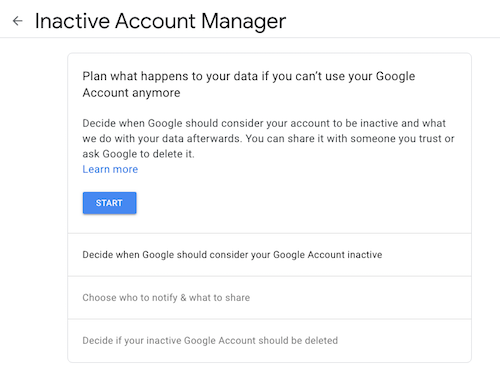
Google will walk you through a series of prompts:
- State how long Google should wait (3, 6, 12, or 18 months) before considering your account as inactive and notifying your Inactive Account Manager. (Tom Hanks loves you, but he’s a busy guy, so let’s not bother him with false starts.)
- Provide and confirm your own contact information: phone number, Google email address, and a recovery email address.
- Identify whom should be notified and which of your content can be shared with them if you do not respond to attempts to contact you. You can select up to 10 people! For each, you provide an email address and select from a long list of sharable Google-related data (calendars, contacts, Google Drive, Gmail, YouTube, etc.). You can click “Select all,” “Select None,” or specific items.
- Confirm the person(s) to be notified, and (if you wish) add a personal message that will be sent to them only after your account has been inactive for the period of time you’ve designated.
- Create an optional autoreply message to go to anyone who sends you an email at your Gmail account after you’ve been “inactive.” (Be kind. Don’t freak people out after you’re gone.)
Revise or turn off your inactivity plan at any time.
Your Inactive Account Manager will have 3 months from the time you “go inactive” to download a copy of any data that you selected from your Google account. After three months, Google will delete your account and its activity and data.
Note: if you never set up the inactive Account Manager, your digital heirs will still be able to submit a request to access or close the account. However, they’d have to go through the same onerous (and unofficial) process we discussed last week when talking about closing social media accounts: providing photo ID, sharing a death certificate, and otherwise proving authorization.
RESOURCES FOR MANAGING YOUR DIGITAL ACCOUNT LEGACIES
There are only so many issues that can be covered across two posts regarding how to handle digital legacies. You may want to review the following resources to help you develop your digital estate plan, whether involving major operating system platforms or social media accounts.
Creating Your Digital Estate Plan (Kindle) by my esteemed veteran professional organizing colleague Judith Kolberg — Judith’s books are chock-full of wise advice and clarifying narratives. This book will guide you through the essentials of setting up a plan to make sure your digital estate and legacy is handled as you want.

How To Safeguard Your Digital Privacy (DeathWithDignity.org)
How to Prepare Your Digital Life for Your Death (PCMag.com)
Ask Help Desk: How to Set Up Legacy Contacts for Your Online Accounts (Washington Post)
How to Add Legacy Contacts to Your Accounts (NOLO)
What To Do With Someone’s Social Media Accounts After Someone Dies (MyFarewelling.com)
Digital Legacy Tutorials for the Public (Digital Legacy Association)
Social Media Will Template (Digital Legacy Association)
As social media continues to grow and software-as-a-service becomes a mainstay of 21st-century life, our needs for social legacy memorials, legacy contacts, and individuals to handle our digital estates will continue to grow.
Are there issues related to this topic you’d like to see me cover? And how are you coming along with setting up these kinds of contacts?
Paper Doll Explains Digital Social Legacy Account Management

ANTICIPATE THE FUTURE
An essential part of organizing your paper and information involves thinking wisely about the future. It requires anticipating what might (or will) happen and taking precautions to make things less problematic when the possible, probable, or guaranteed happens. This is why so many Paper Doll posts deal with organizing your information to pay your taxes or cope with illnesses or prepare for the worst-case scenario.
Because we don’t know when we might get ill, or be unable to handle our financial affairs, or shuffle off this mortal coil, there are documents and actions for ensuring that others will be able to take care of what’s necessary. Some essential posts from the Paper Doll vault for accomplishing these tasks include:
How to Create, Organize, and Safeguard 5 Essential Legal and Estate Documents
The Professor and Mary Ann: 8 Other Essential Documents You Need To Create
Paper Doll’s 10-Minute Tasks to Make Difficult Moments Easier
Paper Doll’s Ultimate Guide to Getting a Document Notarized
A New VIP: A Form You Didn’t Know You Needed
Cross-Training for Families: Organize for All Eventualities
In most cases, attention is focused on tangible, paper documents. However, there are some key digital precautions that everyone should take.
HOW TO SECURE YOUR DIGITAL SOCIAL LEGACY
Until the last few decades, digital assets weren’t a matter for much concern beyond ensuring that your loved ones could access your computer. Thirty years ago, most people did not even have email. It was 1995 before Wells Fargo was one of the first financial institutions to offer online banking, and most people have only needed online credentials for their most important financial accounts in the last 15-20 years.
But then there’s social media. It’s hard for younger people to believe, but Friendster, one of the first social media platforms, didn’t start until 2002. MySpace followed in 2003, and Facebook launched in 2004, but only to college students. Personally, I started on Twitter and Facebook in 2008, and platforms like Instagram and TikTok are still in their relative infancy. (Of course, each social media platform is generally taken up by younger people before its popularity spreads.)
So, it’s understandable that, unlike making sure your loved ones or executor of your will can access your checking and investment accounts to deal with your financial legacy, most individuals have spent little time thinking about handling digital social legacies.
Perhaps you’re thinking you’ll just abandon your accounts, leaving a digital ghost town. You’ll be gone, so who cares? Right? Wrong.
First, social media accounts are always ripe for hacking; you don’t want your account and image taken over by ne’er-do-wells who might prey on unsuspecting friends or followers by faking your identity. Second, social media accounts contain a wide variety of personal information, personal and family history, and photos, things that you want your loved ones to be able to control.
If you operate a business, your social media accounts for your company are almost certainly tied to your personal accounts. (For example, you can’t have a business page on Facebook without first having a personal profile.) This means that the continuity of your company’s marketing is dependent upon control over your own social media.
And finally, there’s a personal legacy to consider. You might want to keep your accounts up, as is, after you depart for all eternity (or at least until a megalomaniacal billionaire destroys your favorite platform). But you might prefer to have it taken down so that links to it cannot be used to harm your good name or be engaged in unseemly online activity. It’s tricky.
However, none of your wishes can be followed if your loved ones lack control over your social media platforms. To that end, let’s look at how you can ensure your digital social legacy is secure.
Put Your Legacy in Good Hands
Before you consider the what, you need to select the who, in terms of whom do you want to put in charge of your digital social legacy? This may or may not be the same person to whom you’d give your Power of Attorney or have as the executor of your will or designate to be guardian of your children.
Whether you call them your digital executor, digital heir, representative, or designee, you need to ask yourself:
- Whom do you trust to carry out your wishes, or anticipate your preferences if you leave no instructions? What you think you’d want in 2023 may not include things that will be unimaginable until 2043.
- With whom will you still be in close contact by the time a digital social legacy has to be managed? It’s hard to believe, but your bestie from college may be someone you haven’t spoken to in a decade by the time you are in your 40’s. One of your closest friends in your 60’s may, sadly, not be in the world (let alone your world) when you’re all in your 80’s.
- To whom are you comfortable giving access to private conversations? You haven’t necessary said or done anything in your Twitter DMs or Facebook chats that would bring shame on your family, but maybe you went through a period where you said unkind things about your ex-spouse or had some spicy conversations? You might not want your current significant other or adult children to read everything in your private social media inbox.
- Which of your friends is likely to stay current enough with technology to be able to handle your digital legacy? Your BFF may meet all the above criteria but not know a QR code from Krispy Kreme, or two-factor authentication from two-for-one taco night. Digital skills matter.
Inventory Your Digital Social Assets
Make an inventory of your social media assets. I’ve previously written about having a general digital asset inventory. Obviously, you’ll make sure the executor of your will has access to all of your financial assets (accounts for banks, brokerage houses, etc.), and next week’s post will look at a wider array of digital assets related to your personal and professional life.
For this, you’ll need organized list or spreadsheet of all of your social media platforms indicating:
- The name of the platform (Facebook, TikTok, Instagram, etc.)
- The locations where you access it (phone, computer, tablet, etc.)
- Your screen name
- Your login credentials* or the location where you keep them
* Your login credentials should change frequently, which means you may need to update this information often. Rather than keeping your logins on paper or an unlocked spreadsheet, see if your digital password manager offers emergency account access. This allows you to set access for an individual’s email address if something happens to you.
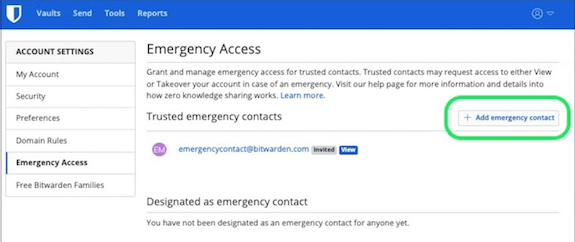
They can put in their credentials (as set by you), and you’ll be notified by email that they made an access attempt. If you’re still around, you’ll say, “Eeek! Why is the lothario I met on a cruise and married three days later trying to access my digital password manager?! I’m shutting this down and calling my attorney!” But if you take no action — because action is no longer something of which you’re capable — then they’ll gain access and be able to oversee handling/dismantling your accounts.
Once you figure out who is going to handle your digital social legacy, and have arranged for them to know where your accounts exist, there are different protocols for each platform.
Facebook Digital Legacy
One of the good things Mark Zuckerberg and company did was establish the idea of creating a Facebook legacy contact. Your legacy contact can be assigned to manage your main profile after you pass away, assuming the page has been memorialized. (You should set your memorialization preferences in your account. Anyone can request that a page be memorialized. If a request is put in, Facebook goes through a process of verifying that the person has passed away.)
A few notes: first, legacy contacts only apply to your main Facebook profile. Second, profiles don’t have to be memorialized. You can choose to have your profile deleted after you’re gone. Finally, if your legacy contact somehow doesn’t know you’ve passed but someone else requests that Facebook memorializes your account, your legacy contact will be notified by email and be able to set the rest of the process in motion.
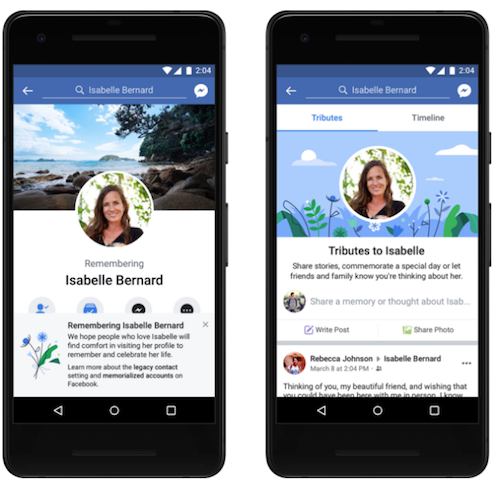
Legacy contacts can’t actually log into your account, and thus can’t read any of your messages. They also can’t remove any of your friends or make new friend requests. A Facebook legacy contact isn’t pretending to be you, just managing your account on your behalf.
What can your Facebook legacy contact do?
- Download a copy of what you’ve shared on Facebook, assuming you’ve turned this feature on. This is a nice way to create an archive of your digital life to pass down through your family, and guarantees access to photos and information even if Facebook eventually ceases to exist. (Note, if your digital designee is just logging in with your credentials, they can also download your archive, as just you can do at any time.)
- Write a pinned post for your profile. This might be used to inform others that you’ve passed, share a final message, provide details about a memorial service, or otherwise speak to issues related to your legacy.
- Update the cover photo and profile picture for your account. Consider discussing this, in advance, with your legacy contact or revisit this issue every few years, leaving instructions in a digital will where you might have a digital executor handle such things.
- Request the removal of your Facebook account after a memorial period.
Also, be aware that your legacy contact can view all of your posts, even if you’ve ever created a post with the privacy set to Only Me. (I suspect most people are less likely to have “Only Me” posts where secret, private stuff exists. I mean, who would bother posting that to Facebook only to hide it? I assume most people use Only Me posts to draft posts, then forget to change the privacy setting. No? Just me?)
To add a legacy contact to your main Facebook profile, you can try to follow the official instructions here. There are instructions for whether you’re using a computer browser, iPhone app, or Android app, and there’s a “More” dropdown for help with the iPad app, mobile browsers, or Facebook “Lite.” The variety is the good news. The bad news? They’re out of date.
Unfortunately, when I painstakingly followed Facebook’s instructions for the computer browser (so I could verify them for you), I found that the settings Facebook said would be visible were not. Blerg.
I selected Settings & Privacy, then clicked Settings, and then was supposed to see General Profile Settings, from which I was to locate Memorialization Settings. But I never saw General Profile Settings, and none of the options I clicked yielded anything that looked like that. Ugh!
Sooooo, I followed the iPhone settings, and they were also not exact. However, I was able to noodle my way to what I needed, so I’m going to give you my own directions for using the iOS app to set your memorialization and legacy contact settings (and hope maybe Facebook’s Android directions are correct).
- Click on your face/avatar on the bottom right of the iOS Facebook app.
- Scroll down to Settings & Privacy and then tap on Settings.
- You’ll see the logo for Meta (Facebook’s parent company) and then Accounts Center. The first option is “Personal details.” Tap that. Weirdly, this will open the actual Accounts Center on a fresh screen.
- Scroll down to Personal Details (yes, again), and on the resulting page, click on Account Ownership and Control.
- You will see “Memorialization” or “Deactivation or Deletion” as options. Select Memorialization. On the resulting page, you should be able to select Memorialization and your legacy contact. I’d set mine years ago, so my only options were to delete or change what I’d already created.
It’s frustrating that Facebook doesn’t make this easier, and more frustrating that their instruction pages fail to keep pace with their platform changes. Imagine how much more frustrating it would be if you waited decades and tried to deal with this while in poor health or declining cognitive capacity!
Twitter (X) Digital Legacy
Twitter has become X (but almost nobody is actually calling it that); the documentation still says Twitter. And, unfortunately, Twitter/X does not have a formal legacy contact. Instead, your digital executor or representative will have to contact Twitter directly to delete your account. (Twitter does not have memorialized accounts.)
Twitter/X is very clear that, “We are unable to provide account access to anyone regardless of their relationship to the deceased.” So, if you don’t provide login credentials for your account to your loved ones, they will not be able to archive your posts. If there’s any chance that your family will want to archive the content of your account, they should follow these steps:
- On your Twitter/X account page, navigate to settings. (In the browser, click on “More” at the bottom of the left-side column, and Settings & Support will be your last option. In iOS, click on your face/avatar, scroll down, and Settings & Support will be the last option.)
- Click on Settings and Privacy.
- Click on Your Account.
- Click on Download an Archive of Your Data. You may have to re-confirm your password or send a code shared to you by email or text.
Note: if your designee has access to your account credentials to do all of the above, they can also follow steps 1-3 above and then select Deactivate Your Account.
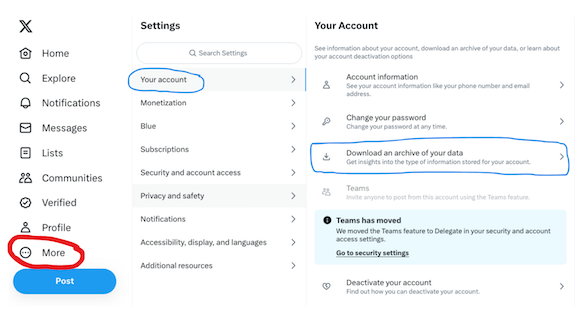
To close your Twitter/X account (without access to login credentials), someone will need to submit a request for the removal of a deceased user’s account.
They’ll need to go to the Twitter deactivation page and select “I need help deactivating and account owned by a person who is incapacitated, or deceased” and then select “The owner of the account is deceased.” They’ll then fill in the remainder of the form with their name and contact information, relationship to you (the account owner), and the Twitter account name.
Allegedly (because we’ve all heard stories about how things are going at Twitter/X these days), your designee will be emailed instructions for providing more details, including information about themselves (including proof of identification) and a copy of the death certificate, in order to process deletion of the account.
Instagram Digital Legacy
Instagram is a Facebook-owned platform, so you have the same options as with Facebook, to have your account memorialized or deleted after you pass away.
Mystifyingly, however, Instagram does not allow you to make your selections while you are still living! Rather, to have your Instagram account memorialized or removed, if your designees does not have access to your login credentials, they’ll have to follow a similar process to Twitter’s and furnish proof that they are your verified representative and that you have passed on.
This page explains how to request memorializing an Instagram account. They will start by filling out this Instagram form for memorialization or this form for deletion and provide information about themselves and the deceased, including uploading a copy of a death certificate.
As with other platforms, if your designee has access to your login credentials, they can log in as you to download and archive your entire account for posterity. Of course, as with most social accounts, you can do this periodically on your own. I don’t really use Instagram, so my entire account activity is visible on one screen.

TikTok Digital Legacy
If you only use TikTok as a source of viewable entertainment, you may not care what happens with your account. Still, I’d advise you to have your digital executor log in with your credentials and close your account via these steps:
- Tap your Profile icon at the bottom right of the screen.
- Now tap the three horizontal lines (sometimes colloquially called the hamburger) at the top right of the screen.
- Select Settings and Privacy.
- Select Account. (The official instructions say to tap “Manage Your Account” but that appears to be an outdated choice.)
- Select Deactivate or Delete Your Account and confirm your selection.
On that same account screen, the next option down lets you choose Download Your Data; they’ll get an archive of your profile, activity, and app settings. However, the format options are TXT (human-readable) or JSON (machine-readable) files, so your loved ones will be able to see random comments you made, but not the cute videos you watched.
If you are a TikTok creator, note that there are no memorialization options. Your digital legacy contact can (as described above) act as you, with your credentials. It’s not uncommon to see someone’s parent or spouse appear on TikTok, explaining that the account holder has passed away. However, without access to those credentials, there’s no way to alert someone’s TikTok followers and fans that they are gone.
This is problematic because many TikTok creators use their accounts to earn money. Left unattended, an account (and the resultant earnings) could be hacked, and imposters could use the account to scam followers. To prevent this, and to ensure any monetization of existing videos is protected, this is one account where making sure your loved ones have your credentials and can access your account may protect not only your creative legacy, but your financial one as well.
LinkedIn Legacy Contact
Perhaps because LinkedIn is designed for professionals, you’d expect that more thought would be put into protecting account-holders’ legacies. I was disappointed, however, to find out that LinkedIn does not allow you to set a legacy contact in advance, nor can you arrange for page memorialization for yourself.

(This is LinkedIn’s official example of a memorialized account. Research indicates, and I hope, that this is not an actual person’s memorialized account.)
Your designee can contact LinkedIn, however, to arrange to memorialize your profile or close it. For either option, they must fill in a form verifying their standing to act on your behalf and providing proof of your passing.
It’s important to note that unlike (for example) Facebook’s memorialization practice, a legacy contact or representative can’t add a tribute or post explaining what has transpired. Instead, LinkedIn locks the account.
Still, there are significant benefits to LinkedIn’s memorialization process. They place a memorialization badge on the profile page as a symbol of remembrance. They also cancel all LinkedIn products (except Apple-related subscriptions), terminate connections to third-party services and close mobile and desktop sessions (so nobody can sneak into the deceased’s office or home computer to access account information).
LinkedIn also stops sending notifications to the decedent (so the loved one handling their email won’t have to deal with junk mail) and ceases sending notifications about them (re: birthdays, work anniversaries, etc.) to members of their network. The person who died will stop popping up in automated sections of the site, like “People you may know” and “recommended connections.” If you’ve ever been startled to see the name and likeness of someone who has passed away show up on your Facebook or Twitter account unexpectedly, you know how much a relief LinkedIn’s approach could be.
JUST THE BEGINNING
Social media accounts are just the beginning of your non-financial digital legacy. Next time, we’re going to look at how you can set up your Legacy Contact for your Apple ID account and an Inactive Account Manager (and Trusted Contact) for your Google accounts.
I’ll also share a bevy of resources for helping you manage accounts for those who have passed and make things easier for directing your own digital legacy.



Follow Me