Paper Doll
Paper Doll on the Magic of Making Lists
THE APPEAL OF A LIST
Paper Doll is a sucker for lists.
My childhood diaries (y’know the kind, pink with a lock that could easily be opened by a bobby pin) were just page after page of my mini-me wishes and hopes.
One of the first organizing-related books I ever purchased (when I was still in high school, back when dinosaurs roamed the earth and the top song on the Billboard charts
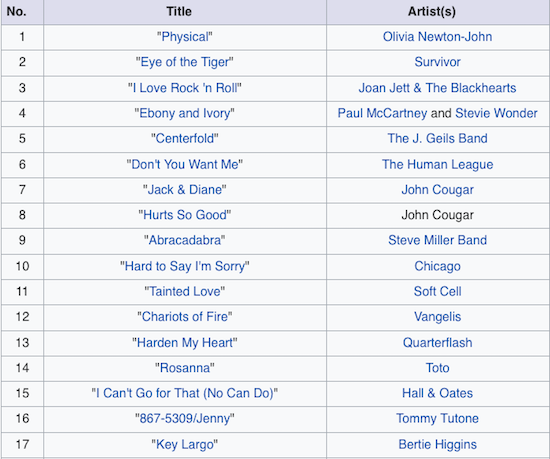
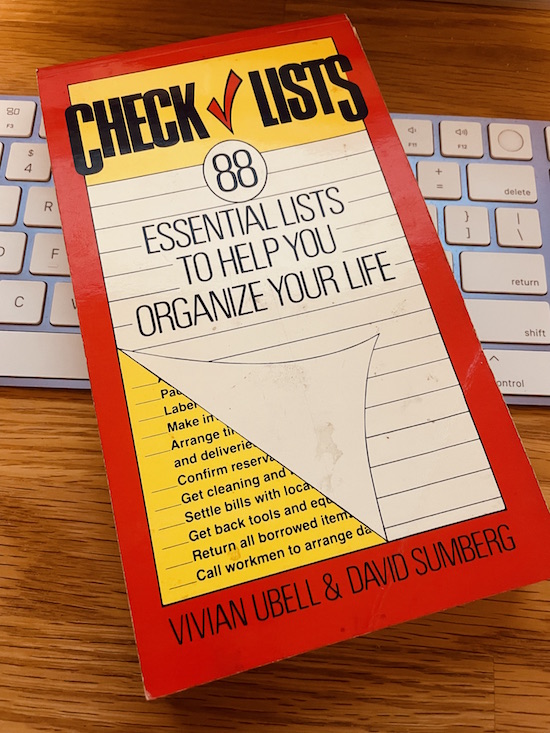
was Olivia Newton-John’s Physical), which still sits on my bookshelf, was Checklists: 88 Essential Lists to Help You Organize Your Life. It contains a wide variety of lists my 15-year-old self assumed would be, as the book title indicated, essential for becoming an adult.
Many of the lists were, and still are, useful. The “What To Do” checklists started with life transitions like how to find a roommate, plan a wedding, prepare for having a baby (or adopting one), buy a new or used car, or get ready for a move. These continued on through less happy events, like what to do if you’re going through a separation or a divorce, are a victim of a burglary, have to stay in the hospital, or need to plan funeral arrangements.
I will grant you that many of these step-by-step To Do lists, such as how to apply to college or for a mortgage are outdated these forty (gasp!) years later, and I can’t say I ever found the lists for buying a summer home or putting my boat in the water particularly useful. Oh, but the aspirational aspect of it all!
The other sections of the book were equally magical, with checklists for packing (for everything from a day at the beach to — I kid you not — sending your child to boarding school) to hosting social events (from children’s birthday parties to showers to Christmas dinners and Passover seders). And even after 20 years as a professional organizer, I still take a gander at the “What to Have” checklists for organizing every space from tool boxes and medicine chests to linen closets and garden sheds.
Even last week, when I was perusing the new books shelves at my public library, I couldn’t bring myself to bypass 52 Ways to Walk: The Surprising Science of Walking for Wellness and Joy, One Week at a Time.

It’s not that I don’t know how to walk; I get my 10,000 steps every day. But I was captivated by a portion of the introduction, where author Annabel Streets (yes, a book on walking by someone named Streets!) writes:
Nor is walking merely step-counting or “exercise.” Yes, good physical and mental health are happy by-products. But the joys of walking are infinitely greater than clocking up steps. Think of it as a means of unraveling towns and cities, of connecting with nature, of bonding with our dogs, of fostering friendships of finding faith and freedom, of giving the finger to air-polluting traffic of nurturing our sense of smell, of satisfying our cravings for starlight and darkness, of helping us appreciate the exquisitely complicated and beautiful world we inhabit.
However, had the title on the spine not seemed like a ready-made list, I’d surely have moved on without it.
The world has been conspiring to put lists on my mind even more than usual lately, and if you don’t mind the presumption, I’d like to share some of the thoughts I’ve had regarding list-making.
USE LISTS TO SET (AND MAINTAIN) BOUNDARIES
Last Thursday, I was reading James Clear‘s weekly newsletter. If you’re not familiar with Clear, I encourage you to read his excellent Atomic Habits: An Easy & Proven Way to Build Good Habits & Break Bad Ones.

While I’m careful to keep my inbox lean, I confess that I subscribe to many (perhaps too many) newsletters for inspiration for this blog and to find resources for my clients. Some are on organizing and productivity; others are financial. I enjoy many of the AARP newsletters, particularly Sisters from AARP, which celebrates and offers wisdom for Black women. And though they profess to be about mindfulness, mental health, and positive psychology, I realize that many of the newsletters are written for millennials and Gen Z. I’m voracious.
Clear’s 3-2-1 Newsletter avoids any and all of the excesses many of my other newsletters display; his is pared down to the essentials: three wise (tweetable) quotes from Clear himself, two quotes from others, and one question for the week. (Last week’s remarkable question, “What is a small but courageous choice you can make today?” has floated through my head for days.)
A short “list” itself, the newsletter is what I, in all my years of blogging, can never aspire to: brevity. But I do not begrudge Clear’s success because you, my dear readers, are often the benefactors of the concepts he shares. Last week, he linked to a tweet by Jenée Desmond-Harris, a writer, editorialist, editor, and the current Dear Prudence for Slate.
I started dividing my to-do list into 1) things I have to do, 2) things I want to do, and 3) things other people want me to do. Life changing! I often don’t get to 3 and I finally realized omg, is this what it means to have boundaries?! ???
— Jenée (@jdesmondharris) June 26, 2021
I loved this tweet. First, I always try to teach my clients that when they’re overwhelmed and overburdened by a To Do list that is more a Could Do list, they need to check to make sure what they’re doing brings them closer to their goals.
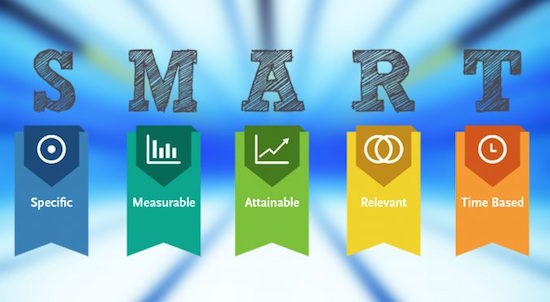
When you're overwhelmed and overburdened by a To Do list that is more a *Could* Do list, check to make sure what you're doing brings you closer to your goals. Share on XAnd I’m sure you’ve heard me say that, more important than SMART goals (which are specific, measurable, attainable, relevant, and time-specific) are SMARTY goals, where they Y represents values and ideals that are YOURS.
If you are constantly laboring toward goals that are not your own, but are your spouse’s, your parents’, or society’s, you will eventually come to resent the labor and the sense of obligation, and likely passive-aggressively (or just aggressively) rebel, possibly without even realizing it, but to your detriment.
Second, I appreciated this tweet because it dovetails nicely with a quote from one my colleagues. Four of my veteran professional organizing colleagues — Maria White, Yve Irish, Karen Sprinkle, and Nancy Haworth — and I are in a mastermind group. To help us achieve our goals, we start each week sharing our intentions; at the end of the week, we report back on how well we’ve done, and discuss our obstacles (and whether they’ve been internal or external).
Yve, famous for her enthusiastic Memojis when sending cheerleading texts, replied to one of my weekly emails with, “Woohoo Julie! Two great organizing sessions and they both booked follow-ups! I think you got all of the important things done. Much of the not-dones are items from someone else’s To Do list.”
Until then, I’d been feeling a little down about not having achieved everything in my (admittedly overambitious) list. But Yve was right. The things I hadn’t completed had not been, in the words of Jenée Desmond-Harris, things I had to do or things I wanted to do.
They were things someone else wanted from me, tasks for which I had not obligated myself. Without recognizing I’d done it, I’d practiced that mantra found photocopied and posted on assistants’ desks nationwide: “Lack of preparation on your part does not constitute an emergency on my part.”
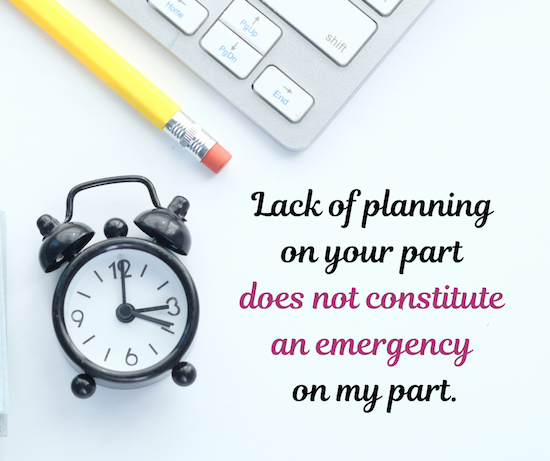
I was focusing on the important and urgent tasks on my own To Do lists. I was guarding my own boundaries.
When we make our To Do lists, perhaps we should consider dividing them into these categories, what we must do and what we want to do, and put the oxygen masks over our own noses and mouths first before attending to others (tiny humans notwithstanding).
USE LISTS TO DECIDE WHAT YOU WANT FROM LIFE
Desmond-Harris, as well as my colleague Yve, got me thinking about the kinds of lists we create. We all have task lists, those To Do items, whether analog or digital, that get us through our days or weeks. At the micro level, these lists help us achieve our smaller, more discrete goals.
But what about our big ticket goals? Do you keep lists of those?
I went back to the post I wrote at the start of this year, Review & Renew for 2022: Resolutions, Goals, and Words of the Year to think about goals and visions. I found plenty of lists there, including Gretchen Rubin’s list of 21 things she’d wanted to do in 2021. Of course, she’s got a 22 in 2022.
When I got to the end of the post, I saw I’d linked to Jack Canfield‘s post on creating vision boards. About 16 or 17 years ago, Jack Canfield (of the Chicken Soup for the Soul books) was a guest speaker at a NAPO Conference. He’d just authored The Success Principles: How to Get From Where You Are to Where You Want to Be, and everyone heading to conference was buzzing about it.

It’s been enough years (I was still in my thirties!) that you’d think the book would not have had such a hold on me, but the “assignment” on page 28 has held a fascination for me ever since.
In the chapter “Decide What You Want,” Canfield suggests readers make an “I Want” list and delineate 30 things you want to do, thirty things you want to have, and thirty things you want to be — before you die.
Readers, I went to an Ivy League college. I have a Master’s degree. I started my own business. But I have to tell you, writing out these three lists was the most difficult intellectual experience of my life. I’ve carried this folded-up list in my daily planner all of these years, taking it out with some frequency, and occasionally adding something new or checking off an accomplishment. My inability to complete the lists sometimes makes me wonder if I need a therapist or a life coach!
I only managed to come up with 11 things I wanted to do, of which I’ve done three (including finally reading Anna Karenina last year); and though I got to check off visiting the UK, the most exciting things I’ve done since creating the list, visiting Italy and publishing my book, didn’t even make the list! My imagination was too confined!
Similarly, my list of (tangible and intangible) things I wanted to have only made it to item 15. I’ve only acquired three, but those three (including my little, red Kia Soul) give me joy each day. And my shortest list, of things I wanted to be, only reached eight items, of which I’ve only achieved one.
And yet, I’m happy with my life and with my lists. The things we want at any given time help shape the choices we make; but the choices we make can shape what we want next.
The things we want at any given time help shape the choices we make; but the choices we make can shape what we want next. Share on XSometimes, our lists (like the ones in my elementary school diary) may seem silly in retrospect; others show us how far we’ve come.
What would you put on Jack Canfield’s lists? What are:
- 30 things you want to do?
- 30 things you want to have?
- 30 things you want to be?
DO YOU NEED A NEEDLE LIST?
About a month ago, the Huffington Post published a piece by Kelsey Borresen called Want to Declutter Your Brain? Cross Something Off Your Needle List. I read it within a day or two of publication, agreed with the general gist, and went on about my life, not having given it much thought. Since then, there hasn’t been a day when it hasn’t shown up in one of those many newsletters to which I subscribe or appeared in my Twitter feed.
The article is needling me!
It’s easy to see why. I encourage you to read it in full, but the basic concept is that we all have these things on our To Do lists that we fail, repeatedly, to do. Usually, they aren’t huge projects, but fairly simple tasks that we avoid, over and over. And yet we cross them off today’s task list and dutifully put them on tomorrow’s, where they will fail to be attended to for several days (or weeks) hence. And they’ll continue to needle us.
Quoting an Instagram post of chef/author Serena Wolf, who coined the term, Needle Lists are filled with the small tasks that create that hum of low-level anxiety as we continue to fail to accomplish them.
It’s the donation bags in our trunk (or worse, blocking the front hall) that haven’t been taken to charity. It’s the sink that’s full of dishes because the dishwasher of clean dishes hasn’t been unloaded. It’s the thank you notes that have gone unmailed (or unwritten). And for the past two weeks, for me, it was the oil change that I planned to get each day, but by the time everything else got accomplished, my mechanic had closed for the evening.
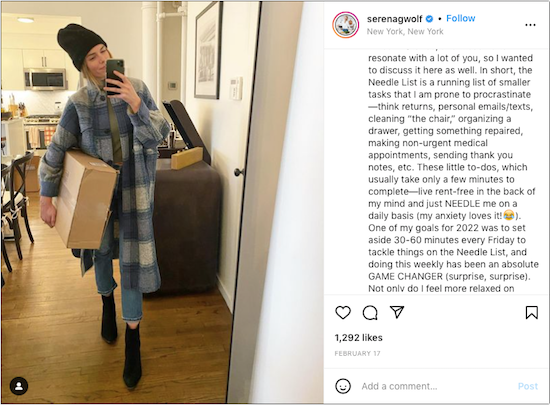
Wolf’s plan, simple but a bit of genius, was to set aside 30-60 minutes each Friday to tackle items on her Needle List. She notes, “Not only do I feel more relaxed on weekends, but it also makes me more productive during the week because I find it easier to focus with less mental clutter. The batching mentality also helps relieve any stress/anxiety when a new Needle List item pops up because I can drop it into Friday’s brain basket.”
Happily, this goes along with advice I’ve shared about time-blocking, here:
Playing With Blocks: Success Strategies for Time Blocking Productivity
Paper Doll Shares Secrets from the Task Management & Time Blocking Summit 2022
Time blocking basics are key to the Needle List. Wolf has a place to collect these otherwise needling, cringe-provoking tasks.
She sidesteps the problem of there being no “Someday” on the calendar by scheduling these tasks for a fixed block, on Fridays. (For you, it might be a Saturday morning or a Monday afternoon or a Wednesday lunch hour.)
And she goes through her week confident that a task won’t fall through the cracks, so she can stop constantly reminding herself that there’s something undone.
If you’d like to try making a Needle List and time blocking a part of your week to address these things in a batch, I’d encourage you to use a tickler file to its best advantage.
Let’s say, like Wolf, you’re going to block Friday afternoons to stop things from needling you. Why not write yourself notes (so you’ll think about what you have to do, in a nuanced way, rather than just constantly thinking of what you will do) and collect them with receipts, items to mail, etc., in that Friday slot of the ticker file. Anything left incomplete this Friday gets moved to the next Friday opportunity; it’s no longer hanging over you; it’s been rescheduled!
THE POWER OF LISTS
- Lists can be organizational — they create structure and boundaries.
A shopping list ensures that you purchase what you need, and assuming you don’t go into Target (because it’s impossible to leave Target with just what’s on your shopping list) you won’t buy what you don’t need. Gift wish lists (including wedding registries) make it more likely that people won’t waste their money on things you don’t want or need, that won’t mesh with your values or fit your physique.
A To Do list helps you do a brain-dump of everything you know you must accomplish, and then create lists of tasks, whether in the order you intend to accomplish them or batched in groups so that you can take them from list-mode on paper (or in an app) to time-blocking mode on your calendar. And if your lists are divided, as Desmond-Harris suggests, into what you must do and what you want to do, leaving those things others want you to do for last (or never), safeguarding your boundaries, how many more of your big-ticket goals might you achieve?
A packing list, and other travel-related lists, can ensure that you consider your needs and wants without last-minute pressure. (Take Paper Doll’s 5 Essential Lists For Planning an International Vacation, for example.)
Lists of books we want to read, movies and television programs we want to watch, and places we’d like to visit create structure and boundaries without greatly limiting our options. When we’re faced with an Amazon or Netflix full of titles, lists of recommendations can keep us from wasting time surfing or making mediocre choices.
- Lists can relieve anxiety.
Trying to remember everything you need and want to do is exhausting. It’s also untenable. That’s where lists come in.
A well-done, properly-approached list can prune the stress out of your life. A massive list written on both sides of piece of paper, with items you need at the market combined with 5-year-plan types of projects without distinct tasks is not a well-done list.
Neither is anything scribbled on the back of an envelope, or on 63 sticky notes on every vertical and horizontal surface around you. Lists that live in all the different in-boxes of your life, in email and Asana and Evernote, in the notebook in your bag and the whiteboard in your office, are too likely to discombobulate you.
Some people swear by David Allen’s Getting Things Done, which, when followed closely, is a love letter to lists. I appreciate GTD and teach it to clients whose style it fits, but find elements of it to be overly complex.
Others swear by list-based bullet journaling, created by Ryder Carroll,
but which has long since taken on a life of its own, and which I (and many of my clients find intimidating in its modern form).
Personally, I’m a fan of the 1-2-3 list. I believe in the philosophy that if it won’t fit on a Post-it®, it won’t fit in your day, so I counsel overburdened clients to look through their master lists, brain dump lists, and inboxes, and for any given day, find one big task, two medium-sized tasks, and three small tasks which are their absolute must-do items for the day, the ones that if that’s all they complete, they’ll declare victory.
This is why, when I first teach clients how to use a tickler file (you have read my Tickle Yourself Organized, right?), I’m often discouraging them from piling too many things in any one day’s slot. I may write without brevity, but I coach others to embrace it!
- Lists can be aspirational.
As with Jack Canfield’s entries, not every list is designed to accomplish the things listed in that book I bought back in 1982. Yes, we need lists to tell us what to do, pack, and purchase. But for envisioning the possibilities in our life — and for reviewing with less embarrassment than reading our teenage journals — lists can help us imagine different lives.
Might you make a list of other careers you could have? Other cities (or countries) in which you might live? Other personal attributes you’d like to have, or habits you’d like to extinguish?
There are days (or years) where we feel boxed in, where it can be difficult to imagine a different “we” that we could be. Vision boards are highly touted for helping people imagine how (and as whom) else they might live. However, I’ve found that whenever I clip photos to create a vision board, they always end up being full of tall, lithe women with long ponytails, doing yoga with lush, green mountains in the background. Eventually, I learned that I don’t want to do yoga; I just want to be a tall, lithe woman with a long ponytail.
For me, vision boards don’t work for expanding my self-view, but lists do. Perhaps they will for you, too?
What lists are essential in your life? Please share in the comments!
Paper Doll’s Ultimate Stress-Free Backup Plan
Last Thursday, March 31, 2022, was World Backup Day.
When was the last time you backed up your computer?
THAT SYNCING FEELING
One of three things just happened when you read that question.
- You felt a bit smug and superior because you’ve got automatic backups set for all of your devices, you know how they work, and are confident that everything is working as it should.
- You felt a sinking feeling in your stomach and wanted to reach over and click to literally any other page because you’re pretty sure you’re not backed up anywhere.
- You felt confused. You know some things are “synced” and you are pretty sure some things are backed up, and you know you have copies of your important files, but every time you hear about backing up, you have a vague feeling that you don’t know what you don’t know. (Speaking of which, you may want to read Chron’s Explain the Difference Between Sync & Backup.)
I’m not going to guilt-trip you. I know that you know that you need to back up your data for safekeeping. You know that you need to back up your data, just as you know you need floss your teeth and change your car’s oil. But knowing is not doing, and it’s certainly not doing as often as it should be done.
You know that you need to back up your data, just as you know you need floss your teeth and change your car's oil. But knowing is not doing, and it's certainly not doing as often as it should be done. Share on XI get it. If you don’t already have a keen handle on your backup system, just reading this tweet is like sitting there and waiting for the hygienist to fuss at you for not flossing, or flossing properly, or often enough, or like having the mechanic make that face, the one where he knows that you know that he knows you should have brought your car in at least a thousand miles ago.
But stuff goes wrong. There are fires, floods, and tornadoes. There are hard drive crashes and burglaries. There are laptops that get left behind at airport security or in coffee shops. 29% (almost a third) of lost data is due to accidents. (Got a kid or a cat who delights in spilling liquids near your expensive gadgets? Have you ever tripped over the charging cord as you ran to rescue said kid or cat or whomever?)
The truth is, it does us no good to organize our resources (digital, paper, or otherwise) if our things aren’t protected. A solid back-up plan is like an excellent insurance policy.
No, you don’t like paying a monthly premium for health insurance or re-upping your insurance every six months on your car. But I bet if you were really sick and needed expensive medical care, or if you’d just had a car accident, and someone asked you, “Are you glad you bought insurance?” you wouldn’t wave your hand away and categorize it as having been an extravagance.
Backups are 21st-century insurance policies against loss of important information, loss of work (and thus loss of time), and loss of convenience (of having all of your preferences and file hierachies set the way you like them). Today, we’re going to look at some of the essential concepts of backing up so it doesn’t seem like such a frustrating, nebulous topic.
A FEW KEY CONCEPTS
No matter how you back up your computer, there are two concepts that will make all the difference between assured success and the creeping fear of failure:
Embrace the Autopilot

Your life is busy. Maybe you’ve got a career or even a business that you run, or you could be a full-time or part-time student. Perhaps you’ve got kids you’re raising or senior parents you’re helping care for, or possibly both. You’re trying to keep all the balls in the air, so it’s no surprise that computer backup is not first and foremost in your grey matter.
The key to digital security is backing up regularly and frequently. If you only backed up once a week, but create dozens of important documents, or write thousands of words in even a few documents, backing up only occasionally would put your stuff at risk.
Plus, if you use only manual, non-automated backups, then you’d be dependent upon prospective memory (in other words, you’d have to remember to remember) to back up. With everything else going on in your life, are you like to remember to back up?
Maybe you’re thinking, “That’s OK. I’ll set a reminder on my phone. I’ll schedule backups for every Monday at 11 a.m.!”
Great idea, in the abstract. However, although scheduling backups is well intentioned, let’s do a reality check. How often have you set a reminder to drink more water, or get up from the computer and walk, or do any other smart habit, only to find yourself swiping the task away from your screen when you’re engrossed in something else?
And what if your schedule calls you to be away from your computer when you’ve planned to back it up? What if you’re picking up a sick kid at the nurse’s office or in a meeting that has run long?
Using technology to automate the backup process means you can safely set it and (mostly) forget it.
Use the Belt-and-Suspenders Approach
Malware. Ransomeware. Hard drives crashes. Stolen computers. Third-party providers go out of business or eliminate services. There is no single, 100%-secure way to protect your research, spreadsheets, writing, photos or other data from every possible problem.
Usually, when we’re organizing homes or offices, redundancy can lead to clutter. However, when we’re talking about backup, redundancy is essential to secure your data and let you sleep at night.
So, I encourage you to develop a backup plan that involves using multiple strategies simultaneously.
FOUR METHODS OF BACKUP
There are four methods for (very generally) backing up your data.
“Flash” the Peace Sign
Most people wouldn’t start with mentioning this, but if you’re not backing up anything right now, you can give yourself some sense of peace by using a flash drive.
Just copy your most important stuff (like your thesis, your major project for work, the novel you’re writing, vital photos, etc.) onto a flash drive and make sure it travels with you wherever you go.

Why wouldn’t most people advise this method? It fails all of our requirements!
It’s not a system, isn’t automated, doesn’t ensure that you do it regularly and frequently, and on its own, it doesn’t protect against most dangers.
I mean, you could set an alarm on your phone to back up iterations of your most important documents and new photos at the end of each day…but you’ll probably ignore it. And, unless you ensure that your flash drive is almost never (except when backing up) near your computer, it’s less belt-and-suspenders and more like holding-your-pants-up-with-one-hand. It’s better than nothing, but just barely.
Do Some “Hard” Time
Backing up to a local external drive is the first real strategy I want you to consider, and one that is a lot easier than you probably fear. The process is shockingly simple, and I’ll admit that years ago, I’d put off doing automated local backup, too. And then I kicked myself for having put it off for so long once I saw how easy it was to set up. We’re talking minutes. Like during-a-long-commercial-break number of minutes.
Back up your computer to a hard drive using software designed to automate the process, like Apple’s built-in Time Machine.
Although Time Machine is free, you’ll want to purchase an external hard drive that’s bigger than the hard drive inside your computer. So, if your computer has a 1 TB hard drive, you might purchase a 2TB external hard drive.
If you weigh it against the value it provides, tangible data storage is cheap. It also takes up very little space. Previously, I used an Apple AirPort Time Capsule and backed up my computer over Wi-Fi, so the external hard drive didn’t even live in the same room as my computer. Now, I have a 2 TB Western Digital My Passport for Mac External Hard Drive that’s about the size of a deck of cards, and at 4.22″ x 2.95″, it’s smaller than an index card! It’s plugged into the back of my computer, sits right behind it out of the way, and I can completely ignore it except to dust it.
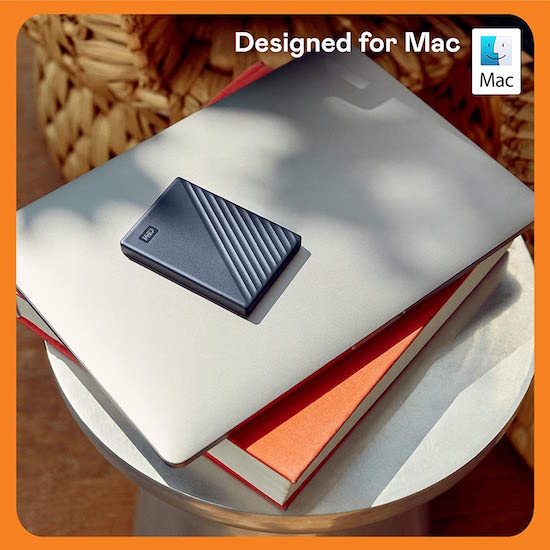

Once you have acquired an external hard drive, you connect it to your computer (usually with a USB, USB-C, or Thunderbolt cable) and then open the software. With Time Machine, you open Time Machine preferences, either from the menu bar or via System Preferences from the Apple Menu. You’ll be prompted to select a backup disk (the one you just acquired) and then Time Machine will automatically start backing up your computer. No muss, no fuss.
If you’ve got a PC running Windows, the process works in a similar way, but Microsoft doesn’t have an easy-peasy built-in software solution identical to Time Machine. (Windows has a bunch of independent, and sometimes confusingly conflicting, solutions.)
That means, on the one hand, you have more backup software choices. On the other hand, more backup choices makes it more likely you’ll put off acquiring and installing the software. To make it a little easier, I suggest you look at the following articles written by people on the Windows side of things, recommending free and paid solutions:
Best Windows Backup Software 2022 (PC World)
The Best Backup Software for Windows 2022 (Tech Advisor)
The Best Backup Software and Services for 2022 (PC Mag)
(Note, some of the above will include software that works with cloud solutions, as well as local hard drives.)
Backing up the data on your computer to a local external hard drive will prevent against computer failure but not against fire or a natural disaster. If your backup is right next to your computer, they’re subject to the same environmental ouchies.
Again, this is why we want to use a belt-and-suspenders approach. If you’re not planning on using a cloud solution (see more, below), then you’ll want to consider having two different external hard drives, and switching them off, perhaps keeping one off-site (at your office, a family member’s home, or in your safe deposit box) so that there’s something up-to-date and off-site at all times.
Send in the Clones

Of the “local” solutions, this is the one that’s the most advanced, but it also yields the most benefits. A clone of your computer literally copies your entire machine/computer, so all of the programs and the data get cloned, or copied, to an identical hard drive. SuperDuper for Mac and EaseUS for PCs are well-known options, or peruse Tech Radar’s Best Disk Cloning Software of 2022 for more ideas.
Cloning a disk makes an exact duplicate of the original source hard drive. It includes the data, but not just the data; it also includes every installed program, any partitions of the hard drive, and any hard drive configurations as well. So, while the other backup methods get you your data, cloning gives you an exact duplicate, more like Dolly the Sheep and less like the bearded, bizarro/evil versions of characters in sci-fi TV shows.

With a clone, your computer’s hard drive and the clone’s hard drive have all the same content in exactly the same disk layout, whereas cloud backup generally backs up data, but not software programs.
Finally, a cloned hard drive with an operating system is going to be bootable, meaning you can use it to start up any replacement computer as if it were the original. You don’t have have to perform a “recovery” as you would from your data on an external local backup or cloud backup.
Enjoy Serenity in the Clouds
A cloud solution is a sort of heavenly automation. With a cloud service, you install a small piece of software on your hard drive of your computer. Once you follow some on-screen instructions for setting up the app or software, the cloud service will make copies of all of your data — first a full backup of all of your data, then for all future efforts, and incremental backup of anything you’ve added or changed since the last automated backup — and then upload it to their servers.
The cloud backup world has been changeable, some might even say stormy, in recent years. Personally, I have been a happy, longtime user of Backblaze, pleased with the ease of use and price. But Crash Plan moved away from consumer-based backup to focus on small business and enterprise-level clients, while Mozy got purchased by Carbonite in 2018 and was shut down altogether. Carbonite remains popular, and IDrive seems to be getting a lot of love from cloud-service reviewers lately.
Some of my clients tell me that they are wary of the cloud. They tell me they don’t like the idea of trusting some company with their valuable data in a space they can’t literally touch. So, I ask them if their bank lets them go into the vault and hand-count their money on an average Tuesday. No?
But it’s the same thing. You’re trusting your bank to hold onto your valuable financial resources, even though you can’t literally touch the money at a moment’s notice. But while you can download all your data from the cloud to recover a lost file or crashed computer at 3 a.m., the bank will only let you get a limited amount of money from an ATM in the middle of the night. (OK, granted, it’s not a perfect metaphor. There’s no governmental FDIC-equivalent in the world of cloud computing, but there is bank-level encryption and security!)
Remember that you’re weighing the likelihood of a failure of a data security company against relying solely on your amateur backup skills and praying that your pet or tiny human isn’t going to knock your expensive hardware to the ground or flood it with milk.

Cloud Photo by icon0.com
By the way, the “cloud” is just a fancy way of saying that you’ve uploaded data via the internet and that it lives one someone else’s computer. And that computer is one of a bunch of computers networked together as a “server farm.”
Yes, clouds and farms are usually fairly separated by several miles of airspace, but nobody sat down to create a hierarchy of metaphors at the dawn of the computer revolution. So, the cloud may be on skyscrapers up in the clouds, or underground in nuclear fallout shelters. At one point a decade ago, Google was looking at putting server farms on off-coast ships!
Anyhooooo, cloud service, like local backup to an external hard drive, requires some minimal initial labor, after which you can “set it and forget it.” A monthly or annual feel will be charged to your credit card or deducted from your bank account (depending on how you set it up), but otherwise, that’s all you have to do to ensure that all of your settings and documents are preserved as insurance against any computer-ish calamity.
Putting Them Together
The system you decide on needs to let you sleep easily at night. My own belt-and-suspenders approach means that I use:
- Time Machine to automatically back up my entire hard drive to the external drive that sits on my desk. This means that if something happens to the computer, but not to my whole house, I’ve got all my backups right here beside me.
- Backblaze to automatically back up my entire hard drive to the cloud, so I need not fear one of Tennessee’s tornados from eliminating twenty years of my business records.
- A flash drive with anything that I might need on a moment’s notice. It goes with me when I travel. However, now that Wi-Fi is accessible in most places, and most printers have a Wi-Fi option to print from a phone or tablet, my flash drive method has largely been replaced by storing files in Dropbox.
Personally, I don’t use the bootable clone option, though my colleague Jeri Dansky swears by SuperDuper. What matters is that you pick and combine multiple options that allow you to automate and guarantee regular and frequent backup.
IF YOU’RE FEELING BACKED UP AGAINST THE WALL
You may still be feeling stressed about the prospect of technology. That’s understandable, but the solution is not to bury your head in the sand. Just as you can’t avoid health checkups for fear they will be uncomfortable or problematic, you must not avoid setting up a backup plan.

Computer Against Brick Wall Photo by Tomasz Gawłowski on Unsplash
Whether you talk to your tech-minded grand-kid or neighbor, a professional organizer who specializes in technology organizing, or an IT specialist, do start the ball rolling. Here are some of the questions you might want to ask and then have them walk you through the solutions:
- How do I install the software?
- How do I schedule backups?
- How frequently should I run them?
- If just one file is corrupted or accidentally deleted, how do I restore the backup copy?
- If I have sensitive files, do I need to encrypt them before backing them up? How?
- If my whole computer crashes, can I use the clone boot it up? How?
- In my cloud service account, how far back will my backed-up files be stored? Are there different price points for keeping versions backed up longer?
- Will the cloud service system store multiple versions of files (one from each backup), or only the most recent copy?
Once you get all your questions answered and have everything set up, remember to test your backup system.
Even if you combine multiple automated backup systems with local and cloud backup, wackadoodle things happen, and you do not want any surprises if or when you have to recover data.
Really commit to a periodic test-restore of a backed-up file to make sure that data is being saved correctly. Don’t just set a reminder you might swipe away, but put it on your calendar and think of it as an essential, if annoying, appointment — like getting your teeth cleaned or having your oil changed.
In the comments section, tell me what backup strategy you employ. And if you haven’t been backing up your computer, let me know what you plan to start using, going forward.
On the Road Again: Organize Your Mobile Office
Road Warrior Image by Mohamed Hassan from Pixabay
During the last two years, the watchword has been “work from home.” In this recent WFH era, we’ve eschewed office buildings and turned snuggly corners of our bedrooms and dining rooms into home offices. Many companies have closed their local operations altogether, finally trusting that there’s no need to micromanage their knowledge-worker staffs. More and more, companies are OK with letting people work where and how they operate best.
Of course, this isn’t the case with everyone. Some employers are rushing at breakneck speed to return the North American workplace experience to “normal,” despite the distinct rise in European and Asian COVID cases of the Omicron BA.2 subvariant. Count me as one of those who is curmudgeonly aghast at the state-by-state dropping of precautions, as I noted in the following reply to a friend, which got a lot of Twitter love.
I am so tired of people saying it’s over because they want it to be over. It’s not a relationship, it’s a virus.
— Julie Bestry, CPO® (@ProfOrganizer) March 23, 2022
Obviously, though, there are some people who can’t work from home. Your favorite restaurant can’t let the sous-chef work from his back deck. An OB-GYN is the perfect example of how you can’t phone in every kind of delivery!
And people who travel about for work, whose very career depends on them physically arriving at different locations, whether locally, regionally, nationally, or internationally, need to get on the road (or the tarmac), however ambivalent they might feel about the prospect. And, of course, they need to be organized.
HOW TO ORGANIZE YOUR MOBILE OFFICE
From smart phones to Zoom to cloud computing, modern technology has made road warriors a little less embattled, but keeping your mobile office from looking like an outtake from Game of Thrones battle requires some special equipment and finesse.
Over twenty years as a professional organizer, I have worked with a wide variety of clients who work, at least some of the time, from the road.
There have been numerous pharmaceutical sales representatives who needed to organize medical literature, promotional materials, medication samples, durable medical goods, and anatomical models and schlep them from medical offices and hospitals in their assigned local or regional areas. I’ve worked with a few mobile pharmacists serving as pharmacy supervisors, traveling each week to different outlets, and working both as members of their profession and in consultant/supervisory capacities on behalf of their companies.
I had one client who traveled her “territories” in various parts of the country for a restaurant chain, training franchisees and their staff on everything from computer systems to how to prepare and garnish certain delicious foodstuffs. And one client shared memorable tales of his experiences as a high-level insurance executive assigned to travel and review high profile claims.
What all of these hearty folks had in common is that they needed to have all of their necessary office supplies, documents, and resources available to them with the same ease of accessibility as when they were comfortably seated in actual offices. While each had unique needs, their were a wide number of commonalities.
In the Car
Let’s focus on documents. Back at a decidedly stationary office, you’d have filing cabinets, hanging file drawers in a desk, and a variety of other options with the distinct advantage that you never need worry about jostling.
Cars, however, jostle. They are buffeted by the wind on the highway and hit unanticipated bumps from potholes and running over detritus that has fallen off of other vehicles.
If your mobile office requires bringing lots of glossy literature, forms, or other pre-printed material, you’ll want to approximate a standard filing system as much as possible.
Personally, I’m a fan of sturdy file crates. These crates, fashioned after old-school milk crates but with file rails on all four sides (to accommodate letter-sized or legal-sized files) take a licking and keep on ticking when you’ve got a heavy load of hanging files filled with file folders and lots of paper.
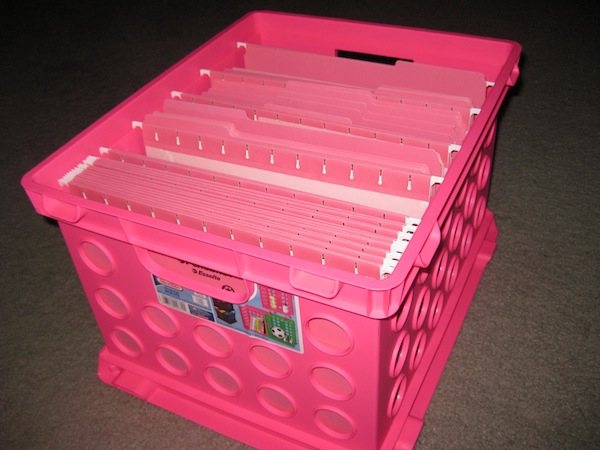
My favorite version is made by Sterilite and, like the very best versions of the TARDIS’s control room, has lots of “round things.” I own them in four different shades of pink/plum/mauve, plus blues and blacks. Another client swears by teal.
In most “big box” stores like Target or Walmart or office supply stores, you can usually fine single crates for $5-10. (Storex makes a very similar version, with weirder displays of “round things,” but usually only in packs of three or more for somewhat higher prices.)

A good alternative to file creates is to pick a few sturdy lidded totes equipped with hanging file rails. In this case, I’m not referencing portable file boxes (we’ll get to those), but larger file tubs requiring a two-handed grip. Bankers Box (yes, famous for their fold-into-place cardboard paper storage) has hearty one:

Office Depot and Staples have their own lines of dependable tubs. They key is that you want a heavy-duty file tote or tub with hanging rails, one that will withstand the test of time and changes in temperature and humidity. A warped tote is not a happy tote.
These crates or totes should generally stay in your trunk or the rear of your hatchback/SUV, removed rarely just for cleaning of the vehicle. In general, if you keep the contents organized and maintained, updating which folders (and which file contents) are stored within, they shouldn’t require much upkeep.
Aesthetics are less important than durability. However, if you’re eager to move your resources from your trunk to your a hotel room or event venue, there are other options, with functional and aesthetic appeal.
Last year, I guest-blogged for the great folks at meori, and wrote From Dad’s Study to the Modern Home Office, performing a deep dive into the essentials of a home office. One of my favorite products I got to know was meori’s Hanging Office Box.
It’s available in a few different colors, accommodates hanging files, and is collapsible.
Whichever you choose, use these kinds of file storage for stockpiling multiple copies of leave-behind resources: glossy one-sheets, brochures, catalogs, blank forms, and templates. To ensure that you’re always prepared for a surprise trip, restock your mobile file space weekly if you stay local, or upon each return from out of town.
On Client Calls
When you head into a client meeting while on the road, you’re not going to want to keep zipping back to your car for the documents you want to share or disburse. If you think of the trunk storage totes and crates as the big deep-freezer in your basement, these next options are more like your lunch box or picnic basket. You’ll use them for your laptop or tablet, essential files, and office supplies and related resources, like chargers. It’s the stuff you carry with you.
Recently, I shared with you my beloved ZÜCA Business Backpack.
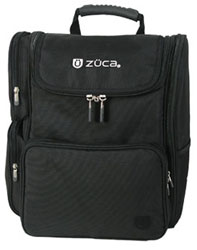
For an even more refined look, the Samsonite Business Slim Backpack (in Cognac or Black) is a sleek option.
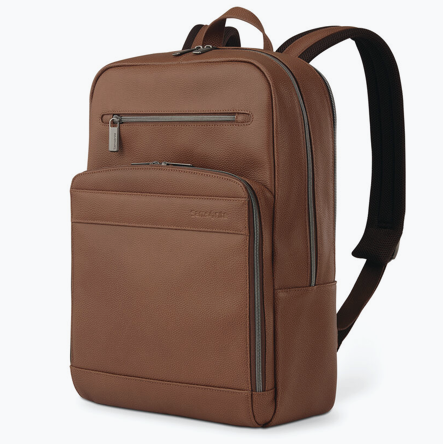
A full analysis of business backpacks is probably better left for a post on travel, but I can tell you that there’s enough of a variety of business backpacks that you can be assured they’ve come a long way from the backpacks of the days of pep rallies and bus rides. To find a professional backpack to your liking, consider these expert round-ups:
Specialist Satchels: The 19 Best Men’s Backpacks for Work from The Coolist
19 Best Laptop Backpacks the Provide Both Fashion and Function from Marie Claire
The 10 Best Business Travel Backpacks from the blog The Broke Backpacker
The Best Laptop Backpacks for Work (and Life) from Wired
If you’re looking for something with a little more accent on fashion, primarily for hanging files, there are alternatives to the standard backpack or briefcase. Sadly, the long-beloved (by clients and professional organizers alike) leatherette file totes from Jamie Raquel exist no more, but Levenger’s LevTex Portable File Totes scratch a similar itch.
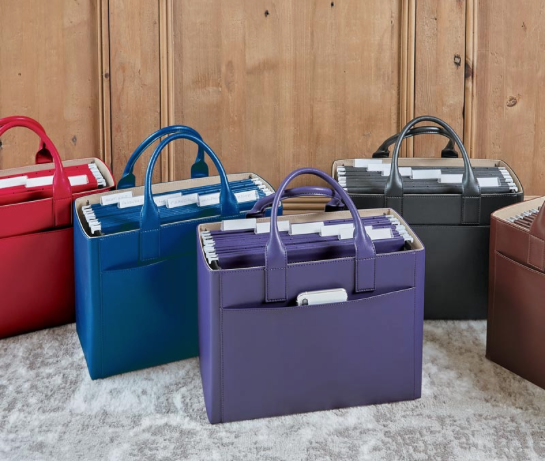
Available in Black, French Blue, Purple, Red, or Hickory, with a tan twill interior lining, the LevTex line runs $99.50 each (though I’m spotting it on sale for $69 at the time of publication of this post).
At a lower price point, Lakeside Collection has a similar faux leather Chic File Folder Organizer Tote in Red, Brown, and Black for just $39.99 via Amazon:

If image is less important to your line of work than durability, and you’ve got a lot of paperwork to share in meetings or at events, consider a portable file box with hinged lids, sturdy handles, and hanging file rails. Search for “portable hanging file box” and you’ll come up with a wide variety of brand-name and generic versions like this:

These are practical for bringing in just what you need for a specific client call: notes, blank contracts, and a subset of literature from the mobile file space in the trunk.
If you carry blueprints or other large-format documents, carry both a standard portable file box for business papers and an art portfolio case. If you will be leaving designs behind, use inexpensive red rope portfolios; invest in a durable leather or nylon case if you will be using it long-term.
When you’re on the road, is your need to schlep a more heavy-duty experience? Expanding rolling crates are suitable when your display materials include heavy catalogs and sample products. They offer a robust upgrade from portable file boxes and won’t break the bank — or your back.

For a more elegant or refined look, try a rolling catalog case or a leather litigation briefcase like you see lawyers (or, more likely, their paralegals) using on TV.
And while you’re gathering all the resources to show off to your clientele or supervisees, make sure you don’t lose sight of all the chargers, cables, gadgets, tools, and small personal items that keep you efficient.
One favorite line of professional organizers everywhere is the Grid-It! from Cocoon Innovations. I am constantly amazed at how much I can pack into a small space with just a Grid-It! board covered in elasticized bands, but Grid-It! never fails to secure possessions, prevent tangles, and ensure that nothing falls into a black hole.
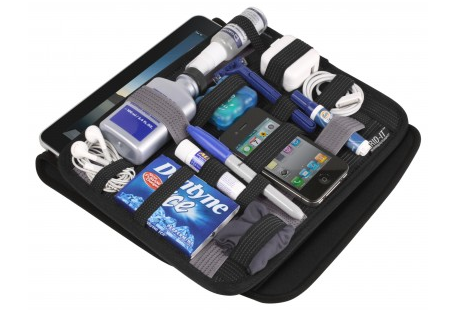
Cocoon also has an impressive array of slimline backpacks with Grid-It! stylings built in, for the road warrior who is living on the road, or in the air. Speaking of which…
On the Road…and On the Tarmac
Are you spending time in hotels, dropping in at co-working spaces, or hot-desking at divisions of your company as you jaunt around the country or around the world? When space is at a minimum but you want to feel like can keep your eye on all of your documents and resources, it can be helpful to adjust the vertical control. Look upward instead of outward!
For my clients who are always on the road, I suggest the Smead Cascading Wall Organizer. This snazzy revamp of the original can hang on the wall or anywhere from a nail, hook, or even a hotel hanger to reduce clutter in your workspace.
Made of durable, bright, and easy-to-clean polypropylene, the six colorful (yellow, orange, fuscia, green, blue, and purple) letter-size pockets can be removed to take to individual meetings. (Each folder holds up to 50 sheets.)
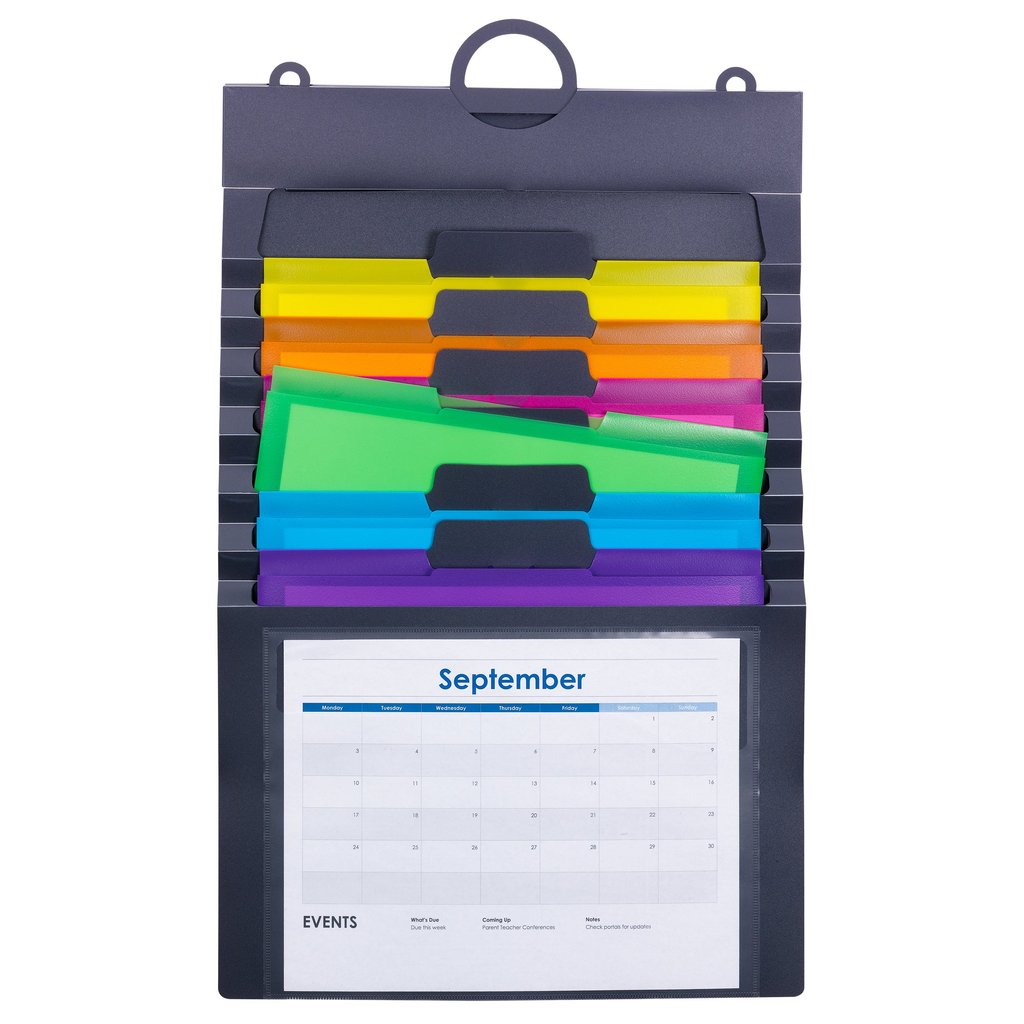
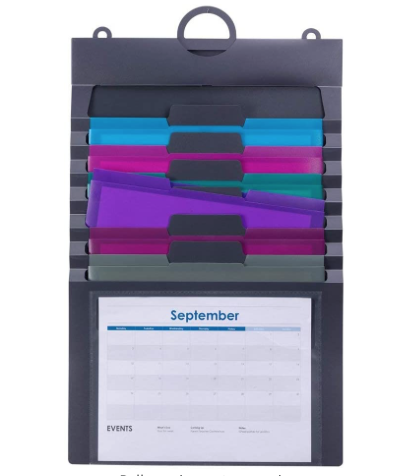
Use the clear front pocket to show the current month’s calendar, a project timeline or GANTT chart. (Fuzzy on that? Check out Checklists, Gantt Charts, and Kanban Boards – Organize Your Tasks from last year.) There’s a 3-part hanger (use one loop or all three), and an elastic cord closure for putting it all together and stowing it away.
The whole thing is PVC-free and acid-free, and measures 14 1/4″ wide by 24″ high (when fully expanded). Available directly from Smead for $19.03, or you can find it on Amazon for $29.88.
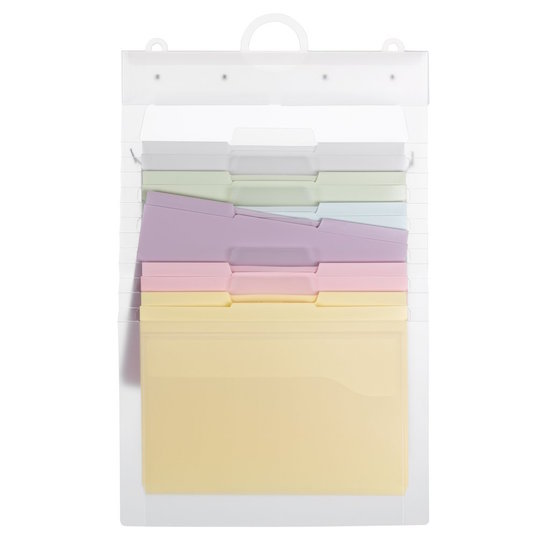
There are two variations on the theme. If the above brights are too vibrant for your super-stuffy colleagues, the clear version (with pastel pockets) of the Cascading Wall Organizer is also $19.03 at Smead or $11.10 at Amazon:
 Conversely, there’s one with sumptuous jewel tones for $10.94.
The Container Store has a similar product, the Multi-Color Cascading 6-Pocket Letter File Wall Organizer Tote, for $16.99.
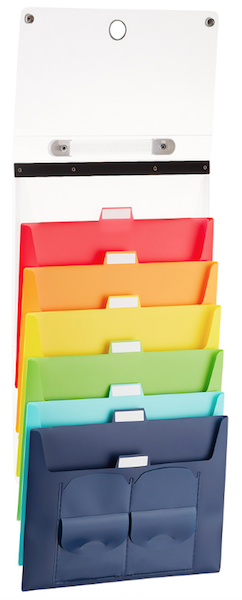
It measures 13 3/8″ wide by 10 1/2″ high, and when it’s not fully extended, it folds and collapses into a 1 1/2″ thick tote. Two snap closures open to reveal six cascading pockets (red, orange, yellow, green, teal, and dark blue) that hold letter-sized interior file folders (sold separately). You can label the tabbed pockets, and there’s both a handle for carrying the closed tote and a ring for hanging it for display.
At a similar price point of $25.29, the Pendaflex Hanging Organizer looks and works much like the others, with color-coded file pockets in an indestructible, poly carrying case.
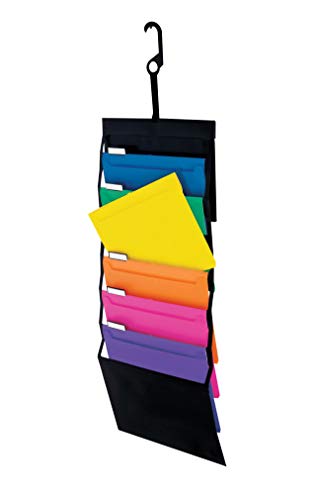
Expand it like an accordion file, collapse it to store in a briefcase, or hang it with the files neatly cascading from a hotel doorknob or coffeehouse chair when you set up a temporary workspace.
And sometimes, you just need a space of your own when you’re away from your own space. For such occasions, the Plan Station Pro is kind of interesting. It reminds me of the graduate student study carrels in college libraries, but set up on an ad hoc basis.
This nifty workstation measures 24″D x 48″W x 24″H and lets you create a sitting or standing desk wherever you land, whether that’s a hotel or a job site, for just $40. You carry it like a large portfolio, then hang or use the included dowels so it will free-stand to create a mini office.
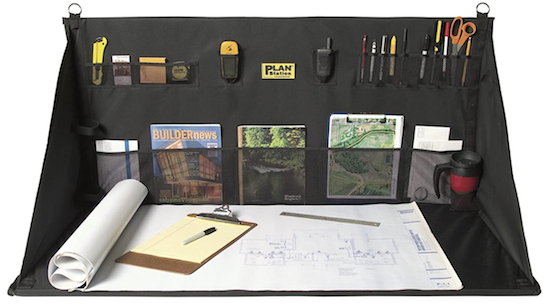
Finally, even if you have to work in a public space, avoid the temptation to invest in a wheel-mounted desk. If you must work from your car, it is roomier and more comfy (though admittedly more awkward-looking to ouotsiders) to sit in the center of the rear seat and balance your laptop on your knees.
There’s also a narrower version, the Plan Station Mini Portable Work Station, measuring 24″D x 32″W x 24″H. It’s currently $26.47.
Be Tactical With Your Tech
As Paper Doll, I’m always going to focus on your tangible, paper resources, but that doesn’t mean we’ll forget about the tech and other essentials. Your digital resources may live in the cloud, but you still need to reach them from down here on earth (and, OK, sometimes when you’re up in the clouds, too).
Generate a packing list to use with your backpack or satchel so that every night before you get on the road, you can make sure you’ve packed what’s necessary. Consider the following
- Phone (or a note to remind you to pack it in the morning once it’s charged)
- Laptop or tablet
- Mobile hot spot (you can tether your phone’s internet access, but you may want to buy a more powerful mobile router to make sure your computer, tablet, and any other Wi-Fi-able device gets the connection it needs)
- Bluetooth keyboard
- Bluetooth mouse (if you, like me, never got the hang of a trackpad)
- Bluetooth or wired number keypad (if you crunch a lot of numbers when working)
- Chargers and charging cables
- Adapters (because, between USB and USB-C, not to mention Lighting connections, nothing attaches to anything else these days without some fiddling)
- Headphones or ear buds (so that you can dial in to conference calls or Zooms with minimal distraction for yourself or other attendees)
- Flash drives (because you can never count on your laptop communicating nicely with the presentation set-up at any conference venue or work location)
- A legal pad or notebook (because sometimes, the internet or WiFi isn’t your friend)
- Post-It® Notes — always have a stack in your favorite color. Combine a sticky note and a Sharpie for everything from leaving a note on the bathroom mirror for hotel housekeeping to capturing an idea when the data on your phone peters out
- Your favorite pen, a colorful Sharpie (or several), highlighters (for calling someone’s attention to something in the analog/paper world)
- Headrest hangers, so you can keep your jacket or suit neatly hanging and wrinkle-free
Making Time for Putting it All Back Together
Block time every evening to review the list of people you will be seeing the next day. This is also a good time to check tomorrow’s slot in your tickler file. C’mon, you didn’t think I’d miss a chance to remind you about the value of tickler files, right? I’m always going to prompt you to tickle yourself organized, even when you’re on the road! (Especially when you’re on the road!)

Clarify the end goal of the meeting, so you know what you need to display or distribute. Verify that you have (or can acquire) enough copies of each. Make sure all essential items are in tomorrow’s tickler file slot.
After each appointment, before belting yourself into your car, ensure that any papers you acquired in the meeting are either filed for reference or added to your tickler file for prompt follow-up.
Laminate a checklist or create one in Evernote or your favorite digital system so that you can follow the same procedure every time you return from a client visit or sales trip.
Finally, taking a few moments to remove the pop cans, meal wrappers, and other schmutz of the day ensures that you will enter a fresh-smelling, chaos-free mobile office tomorrow.
Happy travels, and stay safe…and organized!
How to Organize and Track Your Packages and Mail
As mentioned before in these pages, Paper Doll loves mail! I love walking to the mailbox to get my mail, opening my mail and culling all the “shiny stuff” (the junk advertising inserted in bills), and picking up packages. I also enjoy sending greeting cards and packages, though I’m as likely as anyone else to let the nice folks at Amazon do most of my shipping for me.
Mail-related disorganization usually starts when people neglect to show up for mail call. Mail piles up, junk mail intermingles with important bills and insurance renewals, and a mess can ensue. We’ve talked before how to make life more efficient by handling mail strategically.
But sometimes, even people who do show up for mail call encounter some frustrations in trying to keep inbound and outbound mail tasks from cluttering their time and space. So, today, I have a roundup of solutions to help you keep tabs on mail and packages.
INFORMED DELIVERY FROM THE UNITED STATES POST OFFICE
Over the past several years, there have been, shall we say, “issues” with postal delivery. Things that used to arrive within a matter of two or three days can now be delayed for a week or more. It’s definitely been a frustration, but we can hope that the $107 billion overhaul of the USPS, via the Senate’s recent passage of the Postal Service Reform Act of 2022, should bring huge improvements. But the USPS has one feature right now that can ease your mail experience.
Informed Delivery is a free service from the USPS. You just sign up for an account using your preferred email address and password. Once you verify your identity, you will get a daily email showing what is due to be delivered to you that day.
The top section of each email shows you a black-and-white photograph of the front of your First Class (letters, cards, bills) and Third Class (advertising and junk mail) mail. For Second Class mail (newspapers and magazines), you generally get a notice that there’s a piece of mail for which there is no photograph. Fourth Class (media mail, like books, CDs, or DVDs) will generally show up under packages.
Below the postal mail section, there are two Informed Delivery sections related to packages: Arriving Today and Arriving Soon. The packages usually have tracking numbers associated with them, so you can see from where an item is traveling with one click.
You can get USPS tracking updates for your incoming packages, add special delivery instructions, manage requested email or text notifications regarding package deliveries, and even schedule redelivery if there’s a potential issue with when a particular package is set to arrive.
Informed Delivery has a secure online dashboard, so you can log in via any browser to see what mail is due, which is convenient if you’re trying to avoid logging into your email (like when you’re on vacation). Once you log in, you’ll have clickable access to any of the past seven days of delivery information, plus a weekly summary count of the number of mail pieces and packages you’ve received.
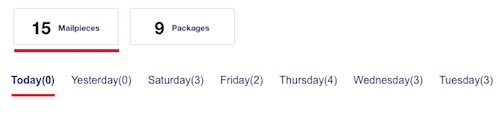
The dashboard also has a simple checkbox system where you can notify the post office if a package they’ve said would be delivered has not been. I’ve been using Informed Delivery for several years, and can only recall a few occasions where items were not delivered on the expected day, and none where the item did not arrive within one day.
In addition to email and the dashboard, you can also check your Informed Delivery via the USPS Mobile app for iOS or Android.
You may be wondering why you might want to know what’s coming in your mail.
Well, it all depends on your situation. For example, if you’re getting a package with perishable items, you’re going to want to make sure you head to the mailbox soon after the postal carrier arrives to get that package into the house on a sweltering (or frigid) day. Sometimes, you might be getting something in the mail that you want to keep as a surprise from other household members.
For me, it’s helpful to know if I’ve received checks in the mail; the postal carrier arrives after I leave for my client days, so if I know I have a check in the mailbox, I head toward my house, first, after a client session, before heading onward to the bank. (Yes, I can and sometimes do use mobile deposit, but that’s a subject for a different email.)
My mailbox is one of hundreds in two large mailbox banks on either side of my complex’s driveway, about as far as you can get from my front door and still be on the property. I’ll admit, even though I love mail, there are “in-office” days when it’s cold and raining and I really, really don’t want to go out only to find that the only mail I’ve received is a postcard ad. And our mailboxes are tiny (and weird, arrayed like small, vertical shoeboxes), so I don’t want to skip a day only to find, the next day, the box is crammed with two day’s worth of mail. Informed Delivery helps me know what’s what!
THE MAGIC OF GOOGLE
What if you are expecting a package (or have sent a package) and have the tracking number in hand? Sure, you can navigate over to the FedEx, UPS, or USPS websites, but you don’t have to.
Just pop over to Google and type in your tracking number. While you might possibly get other search results as well, you’ll definitely get a prominent box on the screen showing your shipping carrier and tracking number. Click the tracking number and it’ll take you directly to the tracking information for that package and carrier.
Seriously, it’s that easy.
This works great when the sender has given you the tracking number but not told you which shipping company they’ve used. This is common when you make a purchase from a third-party seller through a company like Ebay or Etsy. The sender may even have created the tracking number as a link in a confirmation email — but you know better than to click a link in an email from a stranger, right? Just copy-and-paste the tracking number into Google and you’ll be directed right to the official courier’s tracking page for your package.
HOW LONG IS THIS GOING TO TAKE? CHECK THE SERVICE STANDARDS MAP!
Let’s get back to the post office. Let’s say you want to mail a payment, send a birthday card, or get those save-the-date cards on their way for a big party, an event for work, or a wedding. As long as you’re sending First Class mail, cards, or flats (large envelopes), I’ve got a nifty tool for you.
USPS has a lesser-known service called Service Standards Maps as part of their Postal Pro division:
Select the service type — The USPS refers to this by “originating,” “destinating” (which is not a word in any non-USPS vocabulary, but the meaning is obvious), and “destination entry” (for which I’ve been unable to get a clear explanation).
Select the mail class category — Choose from First Class Letters and Flats, First Class Parcels, Marketing Mail, Package Services, Parcel Select and Parcel Select Lightweight, or Periodicals (magazines/newspapers).
Select the zip code and city name — Note, you can’t type in your 5-digit zip code. Instead, use the drop-down to find the first 3 digits in your zip code, and it’ll show you a corresponding city.
You can also click a box to see the cities in alphabetical order, instead, but be sure to cross-check to make sure the first three digits match your zip code. As we’ve learned from The Simpsons, there are a lot of Springfields out there!
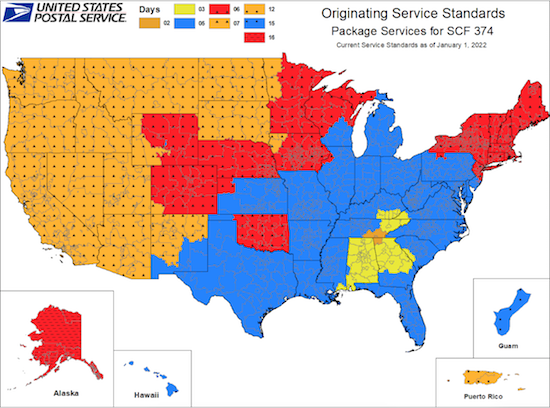
The resulting map will give you a good (and hopefully accurate) idea of how long your mail will take to get where it’s going. It’s not ideal to know that it’ll take three days to get to Atlanta from my house (when I could drive that in 90 minutes) or 16 days to get to Alaska (not that I know anyone there), but forewarned is forearmed!
WHAT IF YOU HAVE A LOT TO SHIP AND TRACK? THERE’S AN APP FOR THAT!
Maybe you’re not worried about mail and shipping for your home and family, but perhaps you sell things and have to ship them hither and yon?
Parcel is a neato-keen shipment tracking tool, but up-front, I’ll warn you that the apps are only for Mac and iOS (including iPhone, iPad, and Apple Watch, in case you need to track your shipments while you’re running a marathon)! You can, however, log in via any browser, if you must.
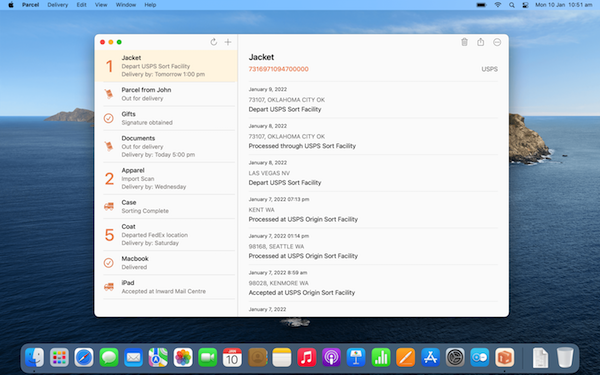
Parcel supports more than 300 different worldwide carriers including FedEx, UPS, USPS, DHL, Royal Mail, and, well, more than 295 more!
Tracking many packages manually is no fun. You’re constantly copying-and-pasting tracking numbers and checking daily to make sure that things are still on their way. Parcel is designed to keep you updated on all aspects of your shipments by notifying you about every “delivery event” with push notifications on any Mac or iOS devices. (However, note that push notifications require a premium subscription for $4.99 per year).
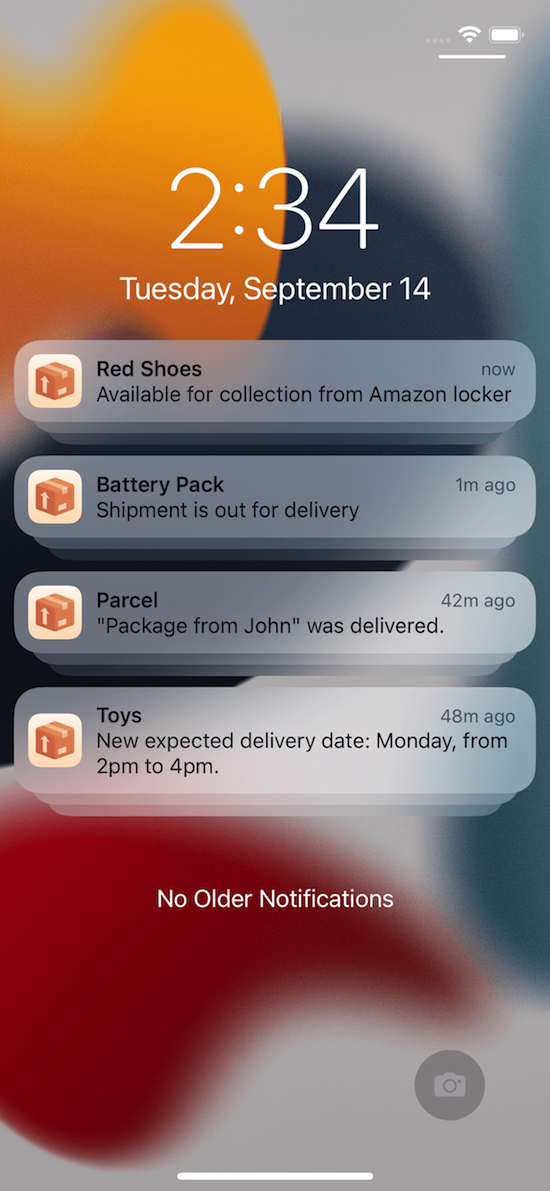
Other Parcel features include finding where your deliveries were and are and seeing that overlaid on a map, a day counter for keeping track of how long your package is in transit, and a barcode scanner. Plus, if you sell items through Amazon, Parcel has a secure Amazon integration.
Of course, Parcel isn’t the only multi-carrier tracker service. There are oodles! Others include:
- PackageMapping — While this site only tracks 17 courier services, if you’re in North America, that should be enough. Not only will you get package status updates by text, but you can see your package’s location overlaid on a map. Animated graphics tell you whether the most recent status for your package was via road, plane, boat, train, and more. (No word on whether there are animations for donkey mail or carrier pigeons.) If you create an account in the app, you can track all of your packages on one dashboard and get tracking notifications.
- Pkge.net tracks 750 delivery services on four continents.
- 17 Track is a free site and iOS and Android app that supports tracking more than 700 international postal services and couriers. Enter up to 40 tracking numbers in a single block on the 17 Track website, and they’ll give you a detailed breakdown of each package’s progress, individually.
WHAT ABOUT GETTING RID OF CARDBOARD BOX CLUTTER?
Do you save every Amazon box you get, because you just know you’ll need a box for shipping something, or for taking donations, or for helping your kid get that working, scale-model volcano to school?
I get it. As a professional organizer, I see lots and lots of cardboard boxes piled up and tipping over, and everyone has a good reason for why. But come on.
How many boxes do you have? Do you even know? Step away from the blog for a minute and go count. Maybe get them all into one room. Scary, I know.
Now, how many boxes have you really (really, really) used for shipping or whatever in the last month? Do you get incoming boxes often enough that you could replenish your stock in the course of a month? If so, it’s time to downsize your box collection.
If you’ve had the box for your microwave or printer (or other similarly BIG cardboard box) for more than a month, it’s time to cut it down, flatten it, and send it to recycling (or offer it up to your neighborhood Freecycle/Buy-Nothing group).
For those small and medium sized boxes, reduce your collection by two-thirds (to start). So, if you have nine boxes from Amazon, Bed, Bath, and Beyond, Kohl’s, or wherever you’ve become addicted to shopping over the past two years, let go of six of them. If you’ve got 24, well, get down to eight but try to let go of more. And then when new boxes come into your home, let go of the older ones. Insects love the adhesive that holds cardboard boxes together, and you don’t want to attract them, right?
For a less unwieldy option for small-to-medium items, consider Scotch Flex & Seal. I wrote extensively about this amazing stuff in This “Magic” Product Makes Shipping Packages as Easy as Wrapping Leftovers back in December 2019. (Ah, we were all so young and innocent then.) The following is an excerpt of what I wrote then.
3M is a marvel of innovation. The same parent company that brought us Post-It® Notes and Command hooks has done it again. They’ve invented a shipping solution that requires keeping less packing material and fewer supplies, takes less time, and creates a smaller dimensional weight for the things you ship.
And, honestly, I’m not persuaded that it isn’t some kind of magic.
Scotch™ Flex & Seal Shipping Roll
First, let’s get an overview of the product, with some fun, bouncy music.
Cool, eh? So, let’s dig deeper. How does this product save space, time, and money?
Eliminate clutter
What do you keep on hand for shipping packages? Boxes, right? Probably lots and lots of Amazon (and other) boxes. Maybe USPS “priority” boxes (which always seem to be way too large or just a little too shallow)? A family member bought a gorgeous Kitchenaid stand mixer and had it shipped. It came in a glossy, specially-carved Kitchenaid box (with a photo of the mixer on the package) inside a matching, plain, cardboard Kitchenaid-branded box (each with specially-placed handles for ergonomic carriage) and the whole thing was inside a box that would have made a nice toddler playhouse.
I bet you don’t just hoard boxes. I bet you have bubble wrap. (And not nice rolls of bubble wrap, but pre-used bubble wrap that someone in your house has popped and flattened along the edges, right?) Or maybe you have styrofoam peanuts. Or those clear, little balloons that look like nothing so much as an inflated zip-lock sandwich bag without the zipper?
And where are you storing these cardboard boxes, bubble mailers, poly bags, bubble wrap, and package stuffing? Probably wherever you can find to put it, and likely not in a very sound system. (No, I’m not peeking in your windows while you’re sleeping. Promise!)
Because the Flex & Seal allows you to customize your package to fit precisely around the edges of your item, there’s no wasted space and no unnecessary padding to keep on-hand. Scotch’s marketing claims to save up to 50% on supplies, time, and space vs. using boxes. I don’t know how they arrived at that statistic, but it does mean that you can take up less space, and the roll can be stored horizontally or vertically, like a rolled-up yoga mat.

Save time
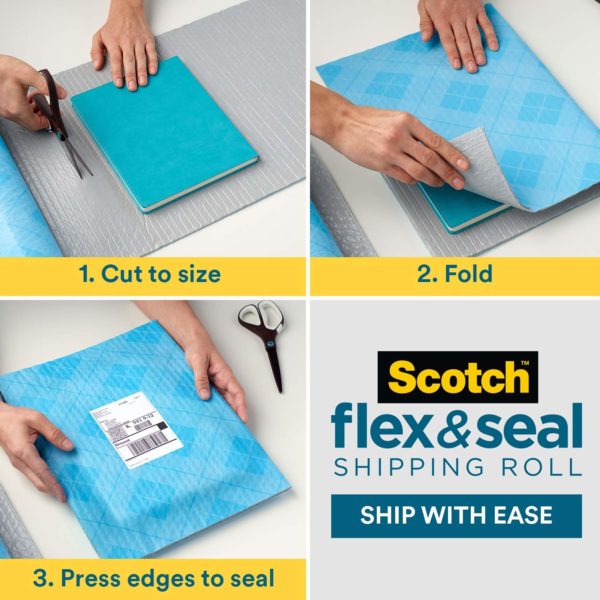
My clients are invariably piling up to-be-shipped items on the dining room table or on kitchen counters because they anticipate (often correctly) that it will be time-consuming to find a suitably-sized box, pad and pack the item(s) safely, and seal everything confidently. Scotch™ Flex & Seal Shipping Roll promises make packing as simple as:
- Cut a piece of the roll long enough to sandwich the item you’re shipping.
- Fold the Flex & Seal over whatever you’re shipping.
- Press to seal it by continuing to press around the three (non-folded) edges. (Imagine you’re wrapping your Thanksgiving leftovers in aluminum foil before putting them in the freezer. Or, as the product’s web site says, “Make sure you’re pressing gray surface to gray surface. A helpful way to remember it: Do not wrap like a present, fold and press like a calzone!”)
That’s it. Print out your label and affix it to the package. Wheeeee!
Secure and immobilize your package
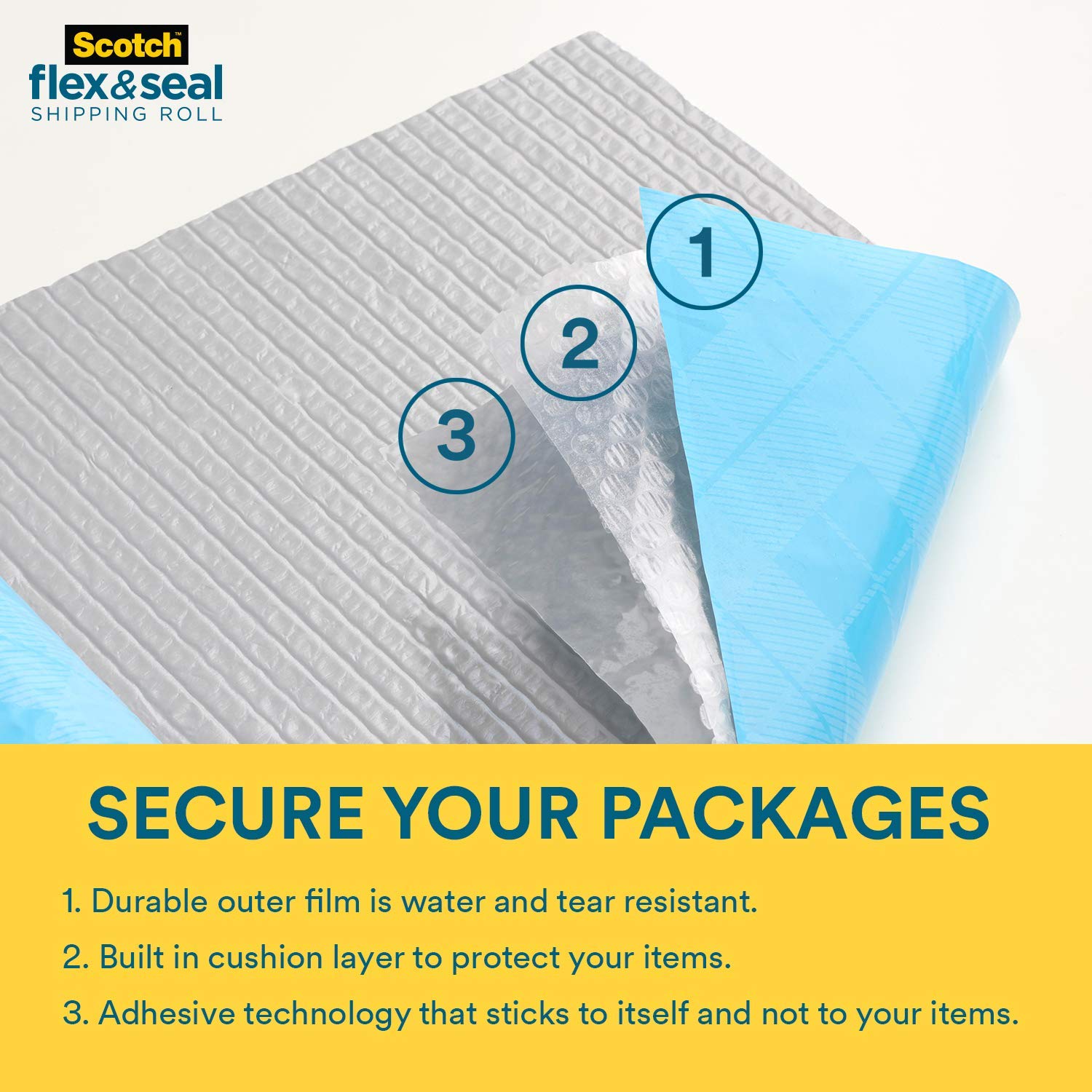
Scotch™ Flex & Seal Shipping Roll may look like a prettier version of bubble wrap, but it harbors a secret superpower. Flex & Seal is constructed with three layers.
The blue outer layer is tough and durable, making the package water-resistant and tear-resistant. The clear middle layer is bubble wrap, but seems slightly less inflated (and is difficult to pop), creating firm cushioning for the package.
And the grey inner layer is MAGIC. (OK, I’m sure it’s science, but Paper Doll can’t figure out how it works!) This inner layer’s “adhesive technology” makes it stick securely to itself but not whatever you’re shipping!
Scotch™ Flex & Seal Shipping Roll sticks to itself and not to what you put inside! What kooky shipping witchcraft is this? Share on XOnce you fold the Flex & Seal over your item (sandwiching it), just press firmly for a guaranteed seal. Folded and smushed (for another scientific term), the Flex & Seal conforms to the shape of whatever you’re shipping, immobilizing it to protect against wiggling during shipping.
Save money
The marketing for the Flex & Seal Shipping Roll notes that by eliminating extra packing and shipping supplies, and securely sealing around the shape of whatever you’re shipping, it can reduce the package’s dimensional weight. That should reduce your costs. Yay!
Scotch™ Flex and Seal Shipping Roll comes in four sizes:
- 10′ long x 15″ wide
- 20′ long x 15″ wide
- 50′ long x 15″ wide
- 200′ long x 15″ wide (suitable for small business shippers or people with LOTS of grandchildren)
Scotch™ Flex & Seal Shipping Roll is available online at Amazon and Shoplet, and at Target, Walmart, Office Depot, and Staples. Prices range from about $9 for the 10′ roll to $99 for the 200′ roll.
Wondering about the catalyst for today’s post? I direct you to last Friday’s Twitter thread of frustration, brought on by a two-day shipping problem where FedEx locally couldn’t figure out how to deliver a package, couldn’t communicate with me, couldn’t communicate with their own customer support and vice versa. To solve that, dear readers, it took insisting on being connected with Resolution Support.
So, Tina @FedEx called back today. Left one voicemail on landline w/my correct address but saying they’d been told I have a new one, and another voicemail on my cell, misreading (by one digit) my address & saying they were told I moved. Both messages directed me 1/6 https://t.co/DOsAi0C2yQ
— Julie Bestry, CPO® (@ProfOrganizer) March 18, 2022
Happily, it all turned out fine, in a particularly cheesy way:
To those DMing for details: It was a delayed, Wednesday in Memphis, yesterday & today in Chattanooga, (perishable) birthday present from @CraigJetMetFan via @DakinFarm. The freezy packs were warm but the cheese-y goodness within was still nice and cold. https://t.co/zRn4393ENH
— Julie Bestry, CPO® (@ProfOrganizer) March 18, 2022
Paper Doll Carries On About Everyday Carry: What’s In Your Bag?
 Are you familiar with Everyday Carry? Yes, it sounds more like a branding title for a line of messenger bags than an entire movement that ranges from “the things you schlep each day” to a massive platform for self-identification. But it is both the latter and, to a less dangerous degree than some political affiliations, very much the former.
WHAT IS EVERYDAY CARRY (EDC)?
When I first heard of the term “everyday carry” about a decade ago, I was reading Kevin Kelly’s superb Cool Tools blog. The blog is really aptly named, as it’s a smörgasbord of, well, really cool — and usually inexpensive — tools for solving life’s problems. It’s like having a circle of really resourceful friends writing about their latest finds.
I’d happened upon the blog via one or another random newsletters that had mentioned Kelly’s “What’s In My Bag?” section of his blog, which often hinged on average people (or possibly semi-famous people I didn’t recognize) talking about their organizing-related products and systems.
The above term “bag” should be taken loosely. For example, a recent post by writer and photographer Nicole Harkin answered, “What’s In My Drawer,” with a variety of oddities in her kitchen drawer. Sometimes, the bag is a larger space, like Chris Askwith’s “What’s In My Workshop?”
And another subset of the kinds of cool tools list appearing on the blog would be “everday carry” pocket tools: small pens, tiny versions of flashlights, pocket knives, itty-bitty compasses and levels, pry bars, battery chargers, multitools, carabiners, S-biners, miniature lighters, and all manner of things that good scouts might carry to be prepared.
It seemed quaint when I first noticed these occasional posts, but the more I surfed the “technology bro” corners of the web over the years (as productivity and technology realms often overlap), the closer a look I got at some of the trends in this area.
A tech friend who spends a lot of time on his bike told me that outdoorsy types (already, a category of human unlikely to cross paths with indoorsy Paper Doll) who biked, hiked, camped, and did similar activities where bugs and crawling/biting things live, tended to hang out in online forums to talk about the stuff they “carried” daily.
As in, things they carried every day when they were taking the subway or getting cake in the break room or flying to conferences in Pittsburgh or Dubuque, generally indoors, where they had no need to start life-saving fires, send an SOS, or rig a floatation device out of their cargo pants!
In the summer of 2019, before the pandemic meant that we were all at home and didn’t need to carry anything a greater distance than from the couch to the kitchen, Vox‘s Stephen T. Wright (not to be confused with the comedian Stephen Wright, who would likely have a bizarre field day with the topic) wrote, Meet the Men Obsessed with Carrying All the Right Stuff.
For some people, EDC (as those in the know apparently call it) is all about being prepared for any and every eventuality, in a scoutmaster-approved manner. But for others, it can become a realm of competition; instead of buying the fanciest car or the newest phone, some folks seek out the teeniest, weeniest “thing” that can do the most stuff. Hence, for example, all the different types of multitools.
I’ll leave you to the Vox article to explore the EDC subcultures, which tends to be predominantly male, knife-heavy, and painted in black or camouflage-adjacent colors; less often, they are miniaturized and as geeky as possible. In some corners of the web, GQ-friendly stylings are also popular. If you want to explore the concept, you can visit:
- The @EverydayCarry Twitter Account
With a solid and versatile set of #EDC tools at his disposal, Adolfo can keep most of his bases covered on weekends without packing too much gear.https://t.co/g4cvteatpF pic.twitter.com/l8hkuxYiqJ
— Everyday Carry (@everydaycarry) March 11, 2022
- Everyday Carry review website
- Carryology Blog
- The Gear Journal
- Urban EDC Supply
- EDC Blog
- The Manual’s Beginner’s Guide to Everyday Carry
WHAT’S MISSING FROM THE EDC ARENA?
Over the past decade, I’ve seen the references to everyday carry expand to the point that many of the design and technology blogs and accounts I read have regular everyday carry features. What do they all have in common? I note three things:
- A focus on tiny metal objects
- A focus on efficiency and preparedness at all costs
- A focus on the needs (and wants) of dudes
Before you tell me that women need the same things on a daily basis as men, I’ll stop you. All of us who grew up on 1970s television shows, boys and girls, expected that at some point we’d have to save ourselves from quicksand. We were prepared equally. But for the reality of our modern lives?
Yes, men and women have similar survival needs for making it through a day of hiking or white water rafting. But a day in the workplace? A walk through a parking garage at night? Not so much.
How many men do you know who carry pepper spray, a rape whistle, or one of those doohickeys where you pull out a tab and a horrendous, high-pitched alarm goes off?
When you look around, whom do you generally see carrying diaper bags? Who is blowing the noses of tiny humans with their inexhaustible supply of tissues? Who is prepared for rest rooms that have no soap or toilet paper?
Who is carrying the aspirin and tummy meds, the bandaids, the emery boards (for snagged nails), the extra masks, not just for ourselves, but because they’re are more likely to be the guardians of not only their own kids, but their kids’ friends and even random strangers?
The not-dudes.
My point isn’t that the male-centric EDC communities are bad, just that the competitive, posturing nature of some sub-groups can be a bit silly.
Preparedness is good. There just don’t seem to be many communities where the people coming together to talk about women’s EDC needs are discussed.
That doesn’t mean there aren’t resources. I’ve gathered some EDC articles written especially for women. These pieces have great tips for hiding your cash (in places dude-thieves are definitely not going to look), dealing with hygiene emergencies, and protecting personal safety, as well as coping with the universal 21st-century problems like a dead phone battery or the need for an itty-bitty flashlight.
Primal Survivor’s Women’s EDC Checklist: 17 Survival Items to Carry Every Day
Pew Pew Tactical’s Best Everyday Carry (EDC) Items List For Women
Tactical.com’s EDC Gear Women Should Never Leave Home Without
Everyday Carry Experts’ These EDC Items Should Be In Any Woman’s Purse
WHAT ABOUT THE EVERYDAY EVERYDAY CARRY?
So, let’s move beyond the emergent and urgent needs of so-called everyday carry. What about the plain old quotidian things we actually need to carry?
I’ll be honest, I can’t figure out why Paper Mommy‘s purse is so heavy. She’s been searching for the perfect purse since the Eisenhower administration, and I’ve accompanied her on a variety of purse-shopping adventures, so I know her requirements for inside and outside zippered compartments, pockets, and divided sections. What I can’t figure out is why it weighs more than my friend’s toddler (when he’s wearing a full-on snowsuit and boots).
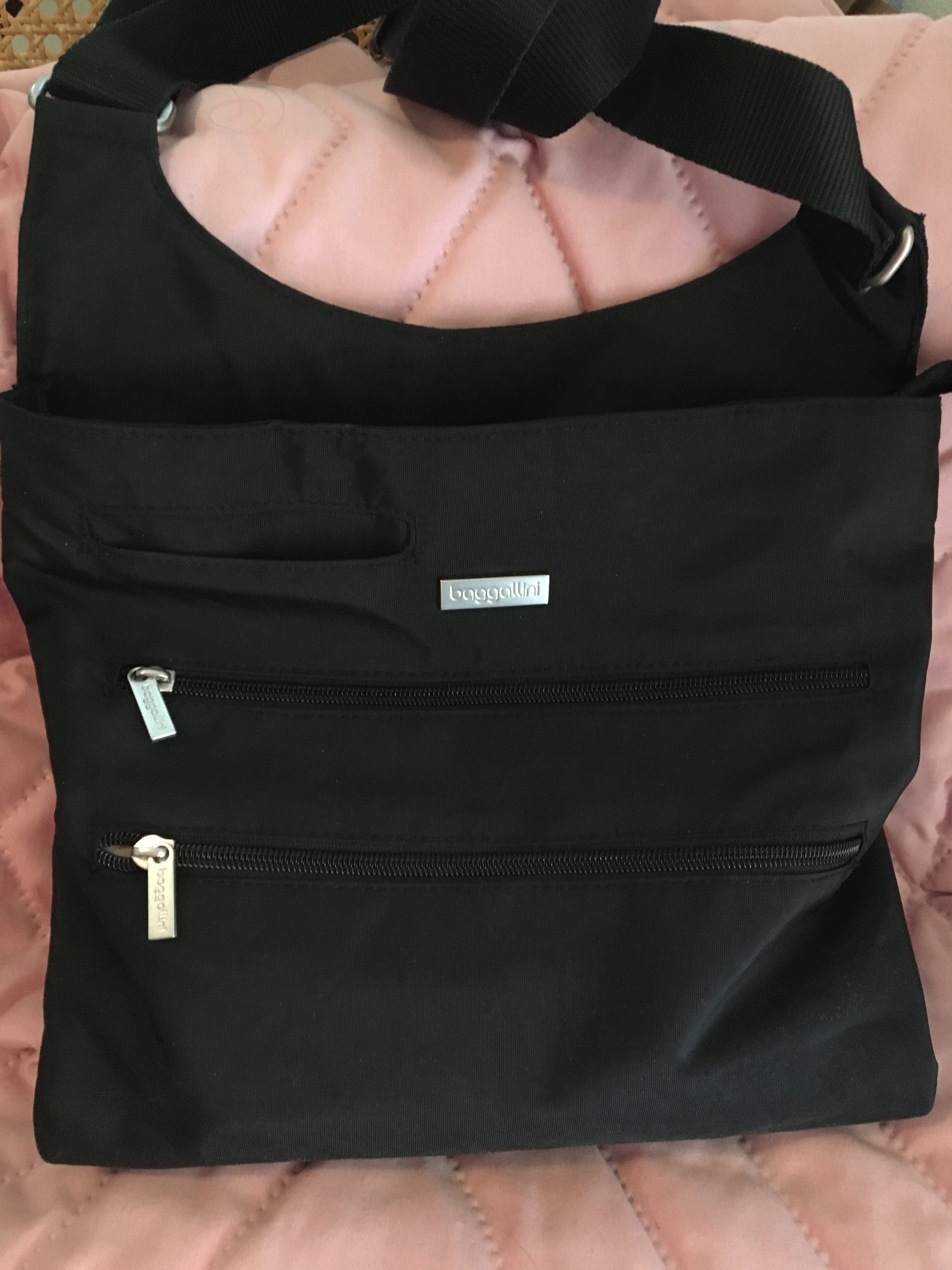
(After this Baggalini cross-body purse got me through two weeks in Italy, I realized that it was the ideal bag for everyday living. BTW, to nobody’s surprise, Paper Mommy picked it out.)
My own personal everyday carry is probably typical for a woman sans tiny humans, and doesn’t involve most of the things recommended in the articles above. I keep my phone charged, trust my car charger, and have my AAA card in my wallet and the app on my phone.
I probably can’t MacGyver much, but with the exception of the time Paper Mommy dropped her keys down the elevator shaft and we had to call upon the ingenuity of someone with rare Earth magnets and an approximation of a fishing pole, I’ve rarely needed much more to survive a typical day than the items in my purse, catalogued just now as:
- Cell phone
- Wallet
- Keys
- Business card case
- Compact (e.g., face powder, for the younger readers)
- 2 lipsticks
- Eyeglass case
- Hair scrunchie
- KN95 mask
- Stack of Starbucks gift cards (because people keep giving them to me as gifts and I almost never go there, so I give them to unhoused persons when it seems someone could really use a hot beverage or a meal)
- Individually-packaged antibacterial hand wipes (which I carried pre-pandemic)
- Tiny satin cosmetic bag for corralling hand sanitizer (and ensuring it doesn’t leak into my purse), ear buds for my phone, half a stack of pink Post-it® Notes, and a pen (so I don’t have to touch the pen at the reception desk in the doctor’s office or when signing a credit card slip).
My purse is a fairly light, but I’m no minimalist. I check a bag for every flight, and plan multiple outfits of every day of any vacation. When I was younger, I tried going out with just an ATM card and driver’s license tucked into my business card case, a lipstick in my pocket, and keys on a coiled bracelet. I felt naked.
WHAT ABOUT A PROFESSIONAL ORGANIZER’S EVERYDAY CARRY?
Ah, now there you’ve got me. My everyday carry for my in-person work with clients is a masterwork of precision. It’s the perfect combination of bag and contents.
When I first read Geralin Thomas‘ post ZÜCA Takes The Lug Out of Luggage, I was intrigued by her dazzling review ZÜCA‘s products. (Rolling suitcases with drawers and a built-in seat? Sign me up!)
The next time I saw Geralin, she was stopping traffic at the NAPO conference expo with her gorgeous ZÜCA Business Backpack.
Within weeks, I owned one too, and it looks and works pretty much as it did 13 years ago. If anything (heaven forbid) ever happened to it, I’d get another one exactly like it without a second thought.
So, what makes the ZÜCA Business Backback so nifty as an everyday carry (for all my EDC essentials)?
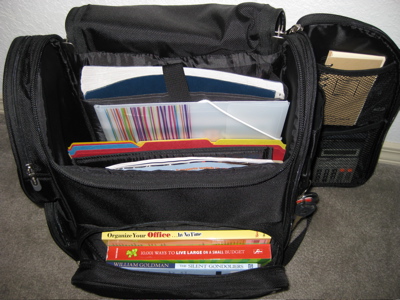
A lower-front zipped portion that, once unzipped, opens toward the user, like a glove compartment or an oven door. It’s suitable for small gadgets, but ideal for hardcover or paperback books you’ve selected to read on the plane or train. It’s also the perfect size and shape to stow your ticket, itinerary and other travel documents.
For my everyday carry, it’s stocked with my ancient Brother P-Touch PT-65 label-maker (20 years old and it keeps on ticking, but nowadays you’d want the PTD210) and some 12mm black-on-white label maker tape.
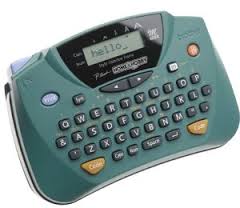
That compartment usually holds index cards and sticky notes for helping temporarily label client’s sorted paper piles, a small toiletry kit with a toothbrush, mini-toothpaste, and other hygiene tiems, and my Anker PowerCore5000 Portable Charger.
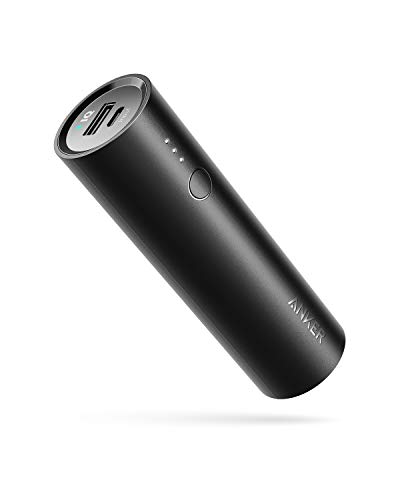
It’s about the size of a HoHo or Twinkie, comes in it’s own carrying case, and can charge my phone, tablet, or anything USB-ish. (Yes, one of these days, I’ll have to replace it with a USB-C charger, but today is not that day.) There’s usually a Nature Valley protein bar hidden away in there, as well. Organizing is hungry-making work!
Two side zipped compartments on the left (as you’re looking at at the bag; you can see the zippers in the first ZÜCA photo above) are ideal for multiple uses. For me, the lower, square compartment holds measuring tape, a mini-stapler and staple remover, paper clips, and other paper-specific organizing tools.
The upper compartment is cut on the diagonal. I used to use it for electronic cords and cables (now made unnecessary due to Bluetooth) so it houses my diabetes glucose meter, ensuring quick and easy access.
A right side “door” panel opens revealing oodles of space. The outer side has a mesh pocket suitable for a mini-umbrella or a bottle of water. The interior has two mesh compartments and is padded so you could use it for office essentials or for items that need a bit more TLC, like a stash of thumb drives or an external hard drive.
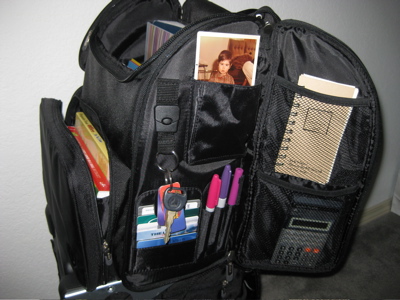
The side “wall” of the backpack, exposed by the opening of the “door” has compartments for pens as well as credit, loyalty, and identification cards. There’s a detachable keychain, so you never have to worry about losing keys in the dark recesses of the bag.
The interior is cordoned off into sections. From back to front, it has:
- A padded laptop sleeve—Suitable for a laptop or table, this section measures 10″ x 14″ x 2″ and is positioned firmly along the rear of the backback, so you’ve got no lumps or bumps against your spine. The padded sleeve also has a Velcro closure, so even if you stand on your head (or your backpack takes a tumble from the passenger seat to the floorboard of the car), your laptop should stay securely in place. I use this section for my iPad and Bluetooth keyboard, which is great when I’m helping clients organize documents in the cloud.
- A zippered mesh compartment on the front of the padded laptop sleeve, is a great way to hide away small documents like a passport or receipts. I use it for when clients give me “precious” items to research, like ancient photos or recently, a 1959 junior prom dance card!
- The middle interior portion is surprisingly wide enough to hold file folders “sideways,” as if they were within hanging folders. While I generally carry folders vertically in the backpack, it’s nice to have flexibility.
- There are padded sections attached to the interior front wall of the pack. While the width of these sections does not accommodate files in the normal fashion, they can easily be turned upright. They are also the perfect size to securely hold catalogs, magazines, legal pads, notebooks, and any other papers required by a mobile professional. I use the sections for my 7-ring Emily Ley paper daily planner (yes, I’m retro!),

my tickler file,
and my purple (they call it “orchid”) Roaring Spring legal pads.

The ZÜCA Business Backpack is light and comfortable enough for everyday carry. It has padded shoulder straps as well as padded sections on the reverse for shoulder blade and ribcage comfort.
I’m a fan of the lean architecture and flat bottom, so that no matter how much it’s stuffed, it won’t fall over. If you’re planning on using it for travel, note that there’s a hard handle for carrying it (like a bucket of water) and horizontal straps to attach it to a rolling bag’s telescoped handle.
Obviously, this is the perfect everyday carry for me, a professional organizer who focuses on client’s paper and information. I will admit, I used to carry one nifty tool, a girly, purple, flowered hammer with lots of miniature screwdrivers nested in the handle (similar to this one).
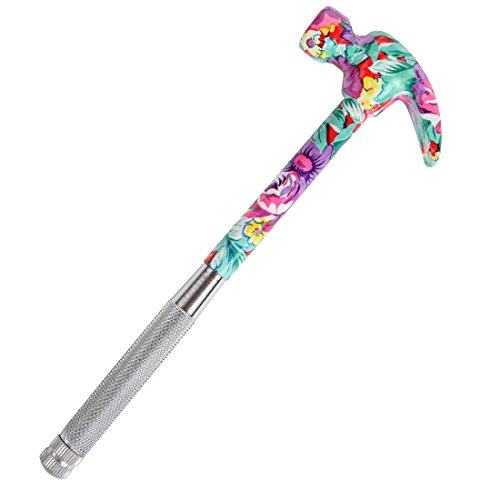
However, when I reported for Grand Jury Duty, the courthouse guards deemed it a weapon and told me I could either return it to the car or toss it in their trash. It was over 95° that day and I was parked seven blocks from the courthouse. You do the math. I’ve yet to replace it. That was more than five years ago, and I haven’t needed it. Nor have I needed a multi-tool, pocket knife, pry bar, or miniature lighter. But my iPhone does have flashlight, compass, and level apps, and thus far, that’s been plenty.
While I work with all sorts of residential, home office, and business clients, I’m not doing packing for relocations or installing shelving units, as some of my other colleagues might do. For the best everyday carry options for that kind of work, you’ll want to visit the March Productivity and Organizing Blog Carnival, which will go live on Wednesday, March 16, 2022.
Do you have anything surprising in your everyday carry? What’s in your bag (or cargo pockets) that you can’t live without?



Follow Me