Paper Doll
Paper Doll Celebrates National Library Card Sign-Up Month
Paper Doll‘s first job was as a page at the Clearfield Branch of the Erie County Public Library — the perfect stomping grounds for a Professional-Organizer-in-Training. Granted, the value of some skills (like maneuvering through a card catalog) might prove negligible as the 21st century progresses (unless we face a Revolution-like, world-wide loss of power).
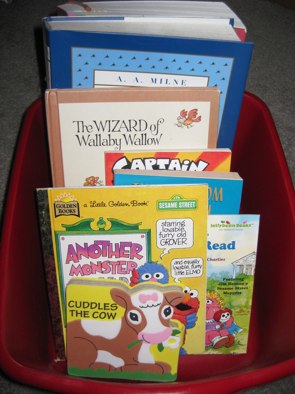
But I still marvel at systems I now use professionally, like organizing toddler books front-outward in dishpans (like how albums used to be displayed in record stores) so that little hands can flip each book forward or backward without destroying a bookshelf. After all, toddlers can’t read, so the spines of books are fairly useless to them; a series of dishpans (filled with vertically arrayed, face-out books) lets little ones tidily access any covers that strike their fancies.
From a professional organizer’s perspective, the best thing about libraries is the opportunity to allow yourself to trust that you need not maintain the entire world at your house. Those four hundred issues of National Geographic making your guest room floor buckle, but which you never approach except to dust and sigh? The library has them, too, for whenever you want to learn about the mating habits of the elephants of the Serengeti…and you’ll never have to dust them. (The Nat Geos, not the elephants. Well, those too.)
Of course, I’m not saying to give up purchasing books and magazines, but understand that there’s an alternative to becoming an accidental collector of books you’ll never read (or never read again). If you are overwhelmed by clutter in your space, but have a voracious hunger to read (or listen to music, or watch movies), check your public library’s collections first before running off to Amazon or your local bookseller or shopping mall.
The biggest lesson I learned is that a library is a treasure-trove of resources that most patrons never explore. Sure, people know about the books and magazines, and nowadays, movies. But our friends at the American Library Association have put together a slide show of ways to put your library card to work for you.
(Not a fan of slide shows? Review all 60 suggestions in list form.)
So, what magical powers does your library card bestow? Your library card, what bibliophiles and library peeps like to call “the smartest card in your wallet,” grants access to a vast array of offerings.
ITEMS TO BORROW
Although some special collections and reference materials can only be read in-house, the majority of tangible items at libraries can be borrowed and taken home for at least a week, and sometimes up to a month, including:
- Books in print and audio books on tapes and CDs
- Electronic books and digital magazines available through digital download services like Overdrive, OneClick Digital, TumbleBooks and Zinio
- Magazines and trade journals
- Graphic novels and comic books
- DVDs (including exercise and how-to books)
- CDs
- Phonograph records (yes, really!)
- Sheet music
- Museum passes — Call ahead to see what museum passes your library maintains and ascertain whether you’ll need to make reservations.
Other items may be available for same-day, in-library borrowing, such as:
- Board games
- Classic games, like chess, checkers and backgammon
- Computer and video games
- Video game controllers
- Headphones
Remember, your library is likely to be a member of one or more library systems through which you can request an interlibrary loan.
You can also reserve materials that are currently out (or at another branch). In most cases, if your library is able to send you a digital notification of a reserved item’s availability, there will be no charge; for older libraries still using postcard systems, your reservation may be about the cost of a postage stamp.
FREE SERVICES
Computer Access — At most public libraries, computer access is free; you’ll only pay for pages you choose to print.
Wi-Fi and Wired Internet Access — Not everyone has high speed internet access, and though it might seem otherwise, less than 49% of Americans have smart phones. Internet access is not ubiquitous. Get connected!
Database Access — Public libraries subscribe to an amazing array of genealogical, financial, medical, legal and other databases (including LexisNexis, PsychInfo, EBSCO — even the Chilton Auto Repair Database!) which are made available to patrons. Need work? Libraries are a superb source of employment guidance and job search databases.
Tech Support — Many libraries offer free courses in basic computer and web skills. Also, most librarians are able to provide guidance on common computer issues.
Test Prep — Public libraries provide online access to subscription databases for SAT, GRE, LSAT and other practice standardized tests.
Homework Help — Librarians won’t do your children’s homework, but they’re fonts of information regarding selection of the appropriate resources. Many public libraries also have homework assistance hot-lines and online homework help.
Tax Prep Assistance — Libraries don’t supply tax advice directly, but AARP and other community organizations provide volunteer, pro-bono tax preparation assistance at most branches.
Delivery — Not everyone is able to get to the library. Elderly, housebound or disabled patrons can often request to have library materials delivered to them. Contact your local library for available resources and review the offerings of the National Library Service for the Blind and Handicapped.
Children’s Entertainment — Public libraries have story hours, magic shows, movies, puppet shows, arts and craft activities and other events to keep children engaged while giving parents some breathing space.
LOW-COST SERVICES
In addition to the wide variety of free services provided by libraries, a number of services are supplied at limited costs. These include:
Faxing
Photocopying
Printing
Scanning
Notary Services — Call your library branch in advance to find out if and when the services of a notary public will be available.
Passport Services — Often the largest branch in a library system will assist with passport application processing.
Book Sales — Public library funding is always challenging. To bolster financial resources, libraries accept donations of books, magazines and digital materials for resale at periodic sales. Declutter throughout the year, letting go of items you know you’ll never access again, and add to the library’s coffers. If you’ve got adequate willpower, peruse the book sales for low prices on titles you can’t find elsewhere.
MEETING SPACES
Libraries maintain private rooms for not-for-profit endeavors, including:
Book Clubs
Game Groups
Community Meetings
Guest Lectures and Classes (Last summer, Paper Doll took courses in origami and how to use the library’s electronic book borrowing systems. It’s safe to say I’m more proficient at the latter than the former.)
QUIET SPACES
Some days, you just need to get away from the kids or the office and find a quiet space to write your novel, balance your checkbook or think through your life issues. Libraries are safe, temperature-controlled, and, unless you’re sitting right next to the children’s area, fairly serene.
THIS IS NOT YOUR GRANDMA’S LIBRARY
Haunted by the memories of the stuffy, dusty libraries of your childhood? The days of Marian the Librarian are long gone. Nowadays, Librarians Do Gaga, and libraries show up in the darnedest places, like abandoned Walmarts.
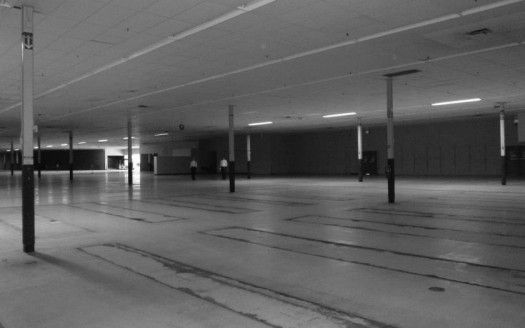

(For more, check out Flavorwire’s 10 Wonderful Libraries Repurposed from Unused Structures.)
Library services have gotten creative. Some let patrons “borrow” dogs so that reluctant young readers can practice their skills by reading to nonjudgmental and snuggle-able canines. Others libraries participate in HumanLibrary.org and other programs where you can “check out” a volunteer expert.
RETURN ON INVESTMENT
Still not sure what the library can offer you? How about saving and organizing those little green pieces of paper in your wallet? This simple worksheet will automatically calculate the financial value of your library card in terms of annual savings. (The cognitive, emotional and societal values are immeasurable, of course.)
GET YOUR LIBRARY CARD
I always ask new clients, “Do you have a calendar? A file system? A will? A fire extinguisher?” On the advice of librarian extraordinaire Jessamyn West, I’ll now be asking, “Do you have a library card?”
National Library Card Sign-Up Month is the perfect time to get a card for yourself or your kids. (Check out DotMomming‘s Kate Hannigan’s motivating, heartwarming tale of getting her son his first library card.)
1) Locate your public library.
2) Fill out an application, available at your branch or on most public library web sites.
3) Show valid ID with your current address. If you’re new to town and don’t yet have an ID bearing your address, most libraries will accept two items bearing your name and street address (but not PO box), such as current utility bills (e.g., telephone, gas, electric or cable), personal checks, voter registration cards, and other mail with postmarks from the past 30 days.
4) Use your new library card often. Plan a weekly visit with your family and explore your library’s offerings.
5) Set up a Library Shelf in your house where all the items you borrow from the public library “live” when they’re not being read or used. Having a set location where library items belong when not in use prevents them from going missing and assures you’ll be able to return them on time. (Don’t have a regularly-scheduled library day? When you check out your items, note the due date in your task app or on your calendar.)
DON’T FORGET TO GO DIGITAL
Once you’ve got your library card, be sure to set up your online library account. This will allow you to reserve/request items, renew items and check your due dates, all from the comfort of your own home.
Please, share your library stories. What do you love most about your library? Do you remember getting your first card? (Little could Paper Mommy have realized that one visit to the public library when I was three could have led to both my first job and my latest blog post.)
Paper Doll Organizing Carnival: The Readers and Writers Edition
It’s time again to round up the quixotic and intriguing paper-related issues, products and ideas that have popped up while we’ve been having other discussions.
THE FUTURE OF PAPER, REDUX
As loyal readers know, the subject of the future of paper is always dear to me. I was delighted to read the following tweet from technology expert (and my college friend) Ross Rubin:
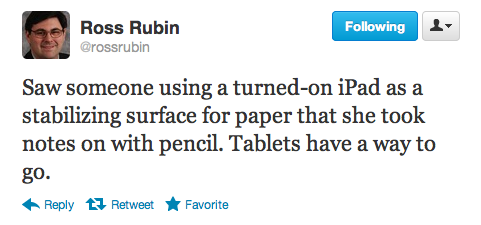
Saturday’s New York Times piece, In Defense of the Power of Paper by Phyllis Korkki, elaborated on this point. I encourage you to read the column and share your your thoughts.
I agree with the statements regarding the unique role paper plays in organizing our time and thoughts. I was particularly taken with Levenger CEO Steve Leveen’s statement that “digital technology is better for socializing and sharing, while paper is best for quiet contemplation.”
Beyond that, while I acknowledge the improvement of screen technology, especially in light of the iPad and Kindle, I still think the findings of the referenced (and now ancient) 1997 study, are valid regarding the theory that comprehension of paper text is superior to that which is read digitally or online.
Perhaps there is a generational chasm, but I find my attention span, and therefore my intellectual involvement, in any long-form text diminishes when I read it electronically vs. on paper. My brain, and my eyes, tire after half an hour perusing my Kindle, while I can read the same content (say, a Jane Austen novel) for hours on end from a well-thumbed paperback without distraction or ennui. Carrying thousands of books in my Kindle organizes my book collection, but it also seems to clutter my cognitive capacity.
Readers, what do you think?
LETTER WRITING LOVE
In August, we talked about the romance of postal mail and sending letters and postcards. So, I was understandably delighted when the incomparable Jeri Dansky called my attention to a Swiss Miss design post about The Letter Ledger from Paper & Type.
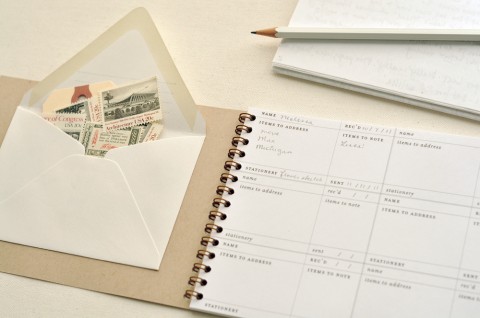
The 5 1/4″ x 7″ wire-bound ledger is designed to organize information related to incoming & outgoing correspondence, similar to previously-discussed organized tracking of books read, movies viewed and fortune cookie fortunes acquired.
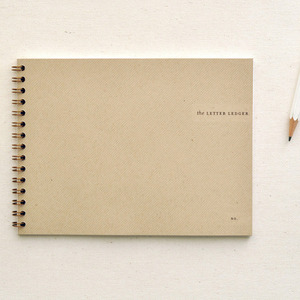
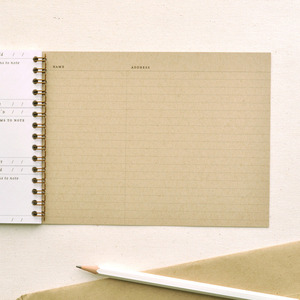
Inside the Kraft cover page, the ledger includes 42 pages of white writing paper (enough for more than 500 entries) printed with category headings. Affixed to the inside front cover is a small envelope to hold postage of varying denominations (because you don’t want to overpay for postcards!) and the rear inside cover serves as an address book for your most beloved correspondence. Log the dates you received or sent mail and the highlights, or note the essentials of your reply and even which stationery you used to send your response. Jane Austen would approve.
This old-world ledger fascinates Paper Doll, a devotee of all-things-John-Adams, as such ledgers for tracking correspondence are described in his various biographies. (If you’ve never read the letters between John and Abigail, I assure you, they’re eye-openers for examining late 18th and early 19th century gender equality!)
The Letter Ledger retails for $18.
Of course, if your tastes are more sleek and modern, perhaps you’d be intrigued by the Moleskine Black Line.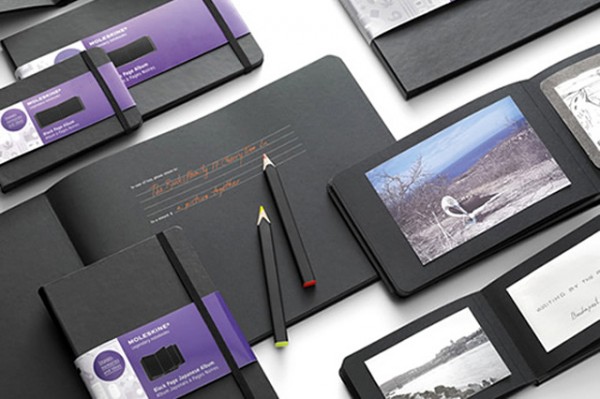
The Black Line is an all-black collection, featuring black-bound notebooks, with black-leaved pages for journaling, writing letters, organizing and collecting photos and postcards, and more. It’s dark and gothic (or at least goth), and yet elegant, likely to satisfy both Serious Artistes and college sophomores listening to Morrissey on auto-repeat.
The collection includes a line of fluorescent gel pens and pencils to ensure that anything you write will pop off the page instead of lurking in the inky blackness.
DATES WITH DESTINY
During the summer, we’re often content to let one day flow into the next, but as the weather turns brisk (which gee, I hope it will do soon), planning our hours, days, weeks and months takes on greater importance. Thanks go out to Dr. Joe Stirt of Book Of Joe for introducing me to the Monthly Sticky Note.
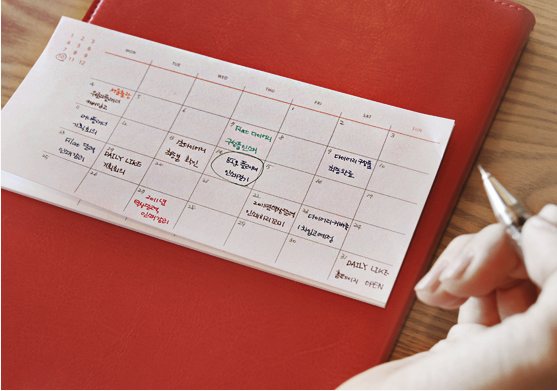
This nifty little minimalist planner from Mochi Things measures 2.8″ x 5.9″ with fifteen adhesive-backed calendar-blocked pages to a pad. The to-be-planned week starts on a Monday, with Saturday and Sunday hanging out at the far right of the page, which may confuse some users. Circle a number in the upper left corner to reflect the month of the year, and add in your own dates. Yes, it’s a little DIY, but each pad is only $1.95.
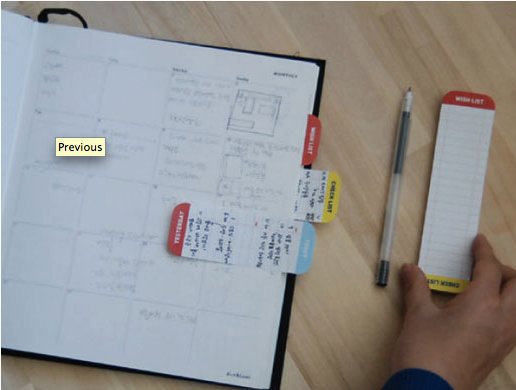
If your days are too jammed to maintain only a monthly view, Mochi Things has a Daily Sticky Note pad measuring 5.8″ x 1 1/2″. With a bigger area of space on which to write and adhesive placed throughout the middle of the note to maximize positioning options, the daily version is appealing. However, I’m not sure I understand why the red section opposite the blue “Today” area is marked “Yesterday” unless the notes also yield a Dr. Who-level power of time travel. In which case, $4.95 per pad goes from being an average value to quite an excellent one.
BOOK LOVE WITHOUT BOOK CLUTTER
For true book lovers, it’s hard to ever imagine that books could constitute clutter, but sometimes our passion for books may exceed the space in which we can store them. To limit the clutter, we’ve had a six-part series on keeping book excess to a minimum through book renting, trading, and borrowing, and by embracing technology.
However, even when book space is limited, vertical space can show off a passion for literature.
Postertext bills itself as creating “book posters for reading enthusiasts” and delivers on its promise in two ways. Postertext’s amazing collection of posters visually represent famous literary scenes in black-and-white “sketches.” However, when you get close, you see that the artistry is actually made up of miniaturized portions of text from the books. Using the concept of negative space, the design is made up of white space, surrounded by the oh-so-tiny text.
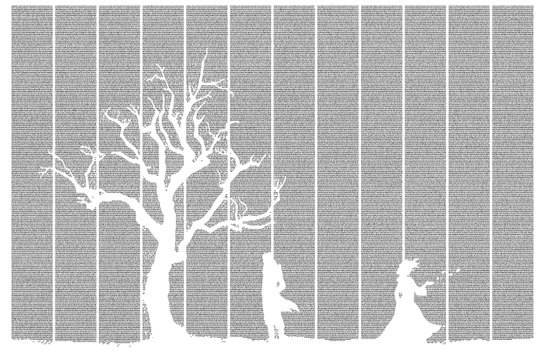
In Postertext’s words:
The FAQ page states that the text is large enough to be legible for someone with “normal eyesight,” but given that some tomes are epic in length as well as scope, the entire text of most books will not fit on a poster. The Adventure of Tom Sawyer‘s poster contains the entire book, while Moby Dick includes only 26 chapters. (Maybe if we could all agree that Melville might easily have excised the chapters on the history of whaling, more than just posters could be improved.)
Postertext focuses on ancient to “contemporary” classic literature, from The Iliad and The Odyssey, to Great Expectations and A Tale of Two Cities, to The Great Gatsby. Women authors are well represented, and you can find Pride and Prejudice, Little Women, Jane Eyre and Anne of Green Gables among the collections. Science fiction and fantasy fans have also not been ignored, as The Metamorphosis, Flatland, Frankenstein, The Time Machine and Peter Pan are all available.
Postertext only accepts Canadian currency, so be prepared to have your credit card payment automatically converted. Postertext ships to the U.S., the UK and various locales in Europe and Asia. (Check the FAQ.) The posters range from $32-35 (plus shipping), Canadian.

For something even more upscale and personalized, there’s Ideal Bookshelf. Artist Jane Mount will custom-create a painting depicting the books on your own (actual or fantasy) bookshelf. A custom painting for up to ten book spines is $310 for a creation that is either 9″ x 12″, 10″ x 14″, or 13″ x 19″ (unframed). Fifteen books on a 10″ x 14″ or 13″ x 19″ (unframed) masterpiece will run you $380. If your literary appetite is voracious, pick up to twenty books for $460 for a piece that is 10″ x 14″ or 13″ x 19″ (unframed). (Shipping is extra.)
You send photos of your books spines, and Mount takes 4-6 weeks to design a painting to reflect your reading tastes. If you don’t actually own the books, Mount can use photos from her collection, or track down your titles for an additional fee. The site notes that the customized creations are original gouache & ink paintings on Fabriano hot press paper. (Paper Doll has no idea what that means, but it sounds luxurious!)
For those of us not quite ready to be full-fledged patrons of the arts, Mount sells prints of a dazzling array of authorial collections in various sizes (5 1/2″ x 7 1/2″, 8 x 10″, 11″ x 14″, or 16″ x 20″ (unframed)) for $28, plus shipping. Bookshelf designs are wide-ranging, from topic-specific (cooking, fashion) to author-specific to magnificent and creative themes. The children’s classics bookshelf would be ideal (no pun intended) for a baby shower gift.
I have my eye on one of two Jane Austen collections, which are both far more visually appealing than my mismatched stockpile of Penguin and Signet paperbacks.
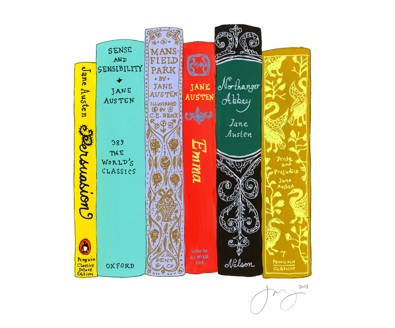
Ideal Bookshelf, Jane Mount
Ideal Bookshelf also sells themed note cards (based on the same variety of prints), and a book of Mount’s work, My Ideal Bookshelf, edited by Thessaly La Force, goes on sale in November. In it, leading cultural figures (including Alice Waters, Malcolm Gladwell, Michael Chabon, Alice Waters, James Patterson, Judd Apatow, Nancy Pearl, Patti Smith and Dave Eggers) share the books that that defined their dreams and ambitions. (It’s available for pre-order.)
As we journey towards autumn, the season of crisp new notebooks and pre-holiday catalogs, Paper Doll encourages you to use paper responsibly.
Paper Doll Says “Stick ‘Em Up” To Stay Organized
With Labor Day behind us, summer is all but officially over. The kids are back at school and that sense of “lazy, hazy, crazy days of summer” ennui needs to be packed away. It’s time again to focus on tackling the clutter and the daily tasks, and one of the ways we motivate ourselves is by acquiring new, fun office supplies.
While a cute but non-functional tool merely adds to our clutter supply, Back-To-School (or Back-to-the-School-of-Life) is a great time to indulge in functional items that uplift, charm and prompt greater organization. Today, we’re going to take a peek at a few items we can “stick up” — right in front of our faces — to keep us in a task-oriented, organizing mode.
WRITE AND WRITE AGAIN
At last month’s NAPO-Georgia meeting, the product of the month was a curious little item. At first, it seemed like any other small dry-erase tool, not much different (except in size) from the excellent At-A-Glance WallMates™ or other dry-erase boards we’ve previously discussed. But this little charmer was a tad different.
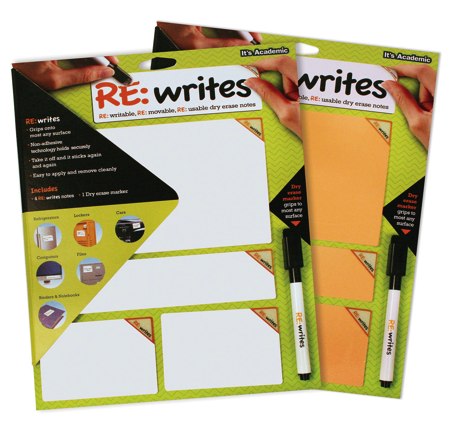
RE:writes offer a new kind of write-on/wipe-off surface. Rather than boards with hard backings, they’re thin, flexible and can adhere to practically any surface without the aid of magnets, sticky adhesive or magic fairy dust. Our NAPO chapter Membership Director, Helen Preston, illustrated the sticking power of RE:writes by affixing one to (and then removing it from) the (metal) conference room door, the (wallpapered) wall and even the (be-sweatered) shoulder of a fellow NAPO-Georgia member. It was cool!
RE:writes, from It’s Academic, are appealing from multiple perspectives:
They’re already small, so they fit neatly in tiny spaces, like the interior of the door of your student’s locker or inside the cover of an academic binder, and can be cut to fit even tinier nooks and crannies.
They’re dry-erase, so they’re re-usable without wasting scads of paper and they won’t turn into cluttered floozies. Write your tasks or shopping lists, do the deeds, erase and start over!
They’re re-positionable, and can be easily taken with you. Add your ongoing errand list on a RE:writes note at home, then stick it up on your dashboard so you don’t forget any of your stops.
They use no glue or sticky adhesive, so there’s no residue left behind, but because they’re also not magnetic, they’ll still stick to multiple surfaces, including the fancy new kitchen appliances, like stainless steel fridges to which magnets won’t attach. Have an emergency phone list for the babysitter? Store it inside the kitchen cabinet door and just move it to the fridge when the sitter is coming over. No mess, no stress.
They adhere to practically any surface, so you can stick them on the mirror in your children’s bathroom to remind them to brush, to your hubby’s coffee mug to remind him to take his vitamins, and to a car window, to remind your sister to not push the automatic window button, because it’ll make the defective window fall into the body of the car door. (That last one might only work for Paper Doll‘s ancient dollmobile.)
They’re reusable. According to It’s Academic’s president, Bruce Shapiro, RE:writes have a specialized patent-pending plastic core that acts like thousands of tiny suction cups, enabling them to cling to almost any surface. This plastic core remains “grippy.” If the surface gets coated with dust, dirt or other ickiness, RE:writes are washable — just rinse with water, and once they’re dry, they’re ready to use again.
Each RE:writes package includes a dry-erase marker with eraser.
RE:writes come in 50 color and size combinations, and are available at OfficeMax, Walmart, Walgreens, and RiteAid, for a suggested retail price starting at $5.99.
RE:writes is a SheKnows Parenting Awards 2012 nominee.
MARTHA MANIA
Another new-and-nifty dry-erase option comes from domestic doyenne Martha Stewart. It seems Martha’s partnership with Avery has really led to some prolific product development in recent months, and I was delighted to learn of this newest entry from my colleague Deb Lee, writing for Unclutterer last week. (That busy gal — she recently acquired SOHO Tech Training into D. Allison Lee Professional Organizers‘ fold, blogs for her own Organize to Revitalize and for Unclutterer, and is on the Clutter Diet pro team and Rubbermaid’s Professional Organizer Squad! And she’s a mommy! When does this woman sleep? Good thing she’s organized!)
The Martha Stewart Home Office with Avery Adhesive Dry Erase Decals are, in many ways, the more aesthetically-oriented sibling to the ever-efficient At-A-Glance WallMates™. Because they’re adhesive sheets, instead of a large white board, you’ve got more flexibility for placement on virtually any non-porous surface — stick them on plastic, glass, windows, wooden or metal doors, and drywall.
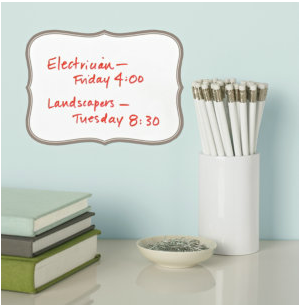
Intriguingly, the flexible sheets conform to both flat and curved surfaces. I’m picturing them on the rounded walls of the Oval Office, or curved interior plastic moldings of a private jet. (What? Paper Doll can’t be aspirational?)
The decals come in a variety of styles, both pre-printed and blank. Martha and Avery came up with three squared-off, pre-printed varieties.
The Weekly Planner has seven simple columns labeled Sunday through Saturday. Plan meals, wardrobes (complete with accessories), family activities, tasks and to-dos, and so on. In red and grey on a white background, the horizontally-arrayed planner is 5 7/8″ x 15 7/8″.
The Important Numbers Sheet is perfect for when Grandma and Grandpa come to babysit, or for finding information when stressed or in a hurry. The red and grey theme, on a white background, is arrayed vertically and measures 7 7/8″ x 11 7/8″.
I spotted the Kitchen Measurement Chart on a client’s fridge last week. There’s a milk-bottle pattern with measurement equivalencies on the right and a large window for grocery lists or notes on the left two-thirds of the decal. In a red and grey theme on a white background, the horizontal decal measures 7 7/8″ x 11 7/8″.
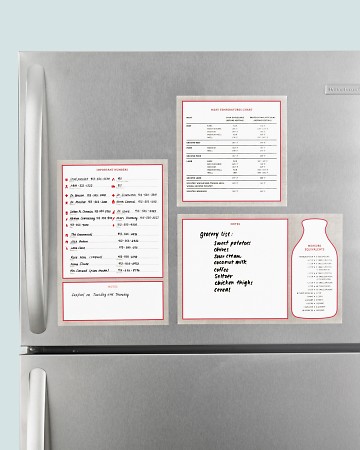
In addition to the pre-printed sheets sold separately, the line also includes a package of all three.
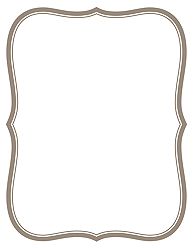
Martha and Avery have also designed some blank decals with colored borders in shapes that, as Deb Lee pointed out, make them look a bit like giant gift tags. The “Flourish” pattern of decals are white, with grey borders. Buy one large decal measuring 8 3/8″ x 10 7/8″ or a two-pack where each measures 5 7/8″ x 7 7/8″.
The red border decals in the “Classic” design are straighter edged, with rounded cut-out corners, and can be purchased as large single decals measuring 8 3/8″ x 10 7/8″ or two-packs of 5 7/8″ x 7 7/8″ decals. All styles and sizes of the blank decals can be arrayed vertically or horizontally.
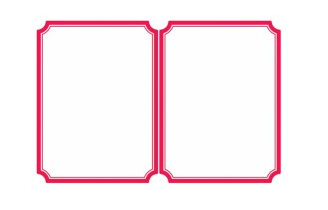
As they’re dry-erase and re-positionable, you can use them repeatedly (though they’re not washable), reducing your use of paper while maintaining order in your life.
To see them in action, check out the video, and be sure to read Deb Lee’s first-person user review at Unclutterer, too.
Individual Martha Stewart Home Office With Avery Adhesive Dry Erase Decals retail for about $4-$5, with multi-packs priced at around $11.
Designer Pu-Tai created the Peeling Tales, a combination grease pencil/chinagraph marker and narrative-delivery system, as well as the Solarise lampshade, which depicts the London skyline while mimicking the effect of sunrise through a thermochromic color-changing outer layer. Spiffy stuff. Well, Pu-Tai has done it again (in collaboration with Ayda Anlagan and Paul Blease), only this time, the result is both functional and design-friendly.
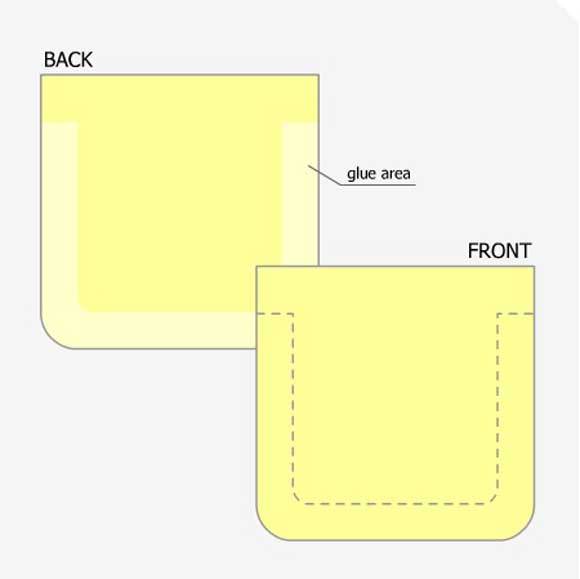
Pocket, basically an upside-down sticky note with some extra adhesive on the sides, creates a tiny…well, pocket. It’s simple in that sort of “why didn’t didn’t I think of that?” genius way.
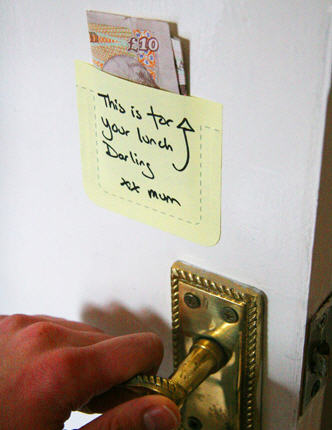
The design is practically perfect for keeping a few dollars, a receipt, or a couple of business cards handy. I wouldn’t mind seeing it in multiple styles, though, perhaps double-wide, and in a variety of colors.
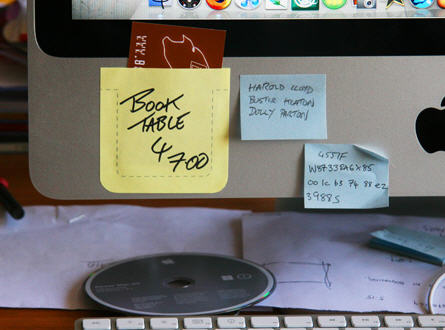
If only it were actually on the market. Sadly, Pu-Tai is more concerned with aesthetics than production, and nobody is making versions of Pocket for sale. You can attempt to make your own with the help of this sketch from Plugin-Design:
But perhaps it might just be best if 3M would negotiate with Pu-Tai to add Pocket to the already expansive Post-it line-up of pocket solutions?
Knowing what you have to accomplish and keeping that information front-and-center is one key to organizing your life. Setting auditory alerts and linking aspirational activities to established rituals can help, but to make sure you don’t get held up by all the competing clutter and important things in your life, stick ’em up!
A Textbook Case of Clutter: 11 Tips for Beating the High Cost of Textbooks
Three years ago, when we first broached the subject of college textbook clutter, textbook rental was a relatively new phenomenon. Since then, we explored the Textbook Information subsection of The Higher Education Opportunity Act, designed to give college students access to affordable course materials. However, enhanced transparency and un-bundling of resources only go so far.
When Paper Doll attended college, options were limited: Buy textbooks at the campus bookstore or the sole off-campus independent store; buy new textbooks or used ones. It was a seller’s market. Now, students have more textbook-buying options that ever before — rentals, e-texts, comparative textbook search engines — but caveat emptor, because there are still obstacles in the way of a positive textbook acquisition experience.
1) Do your due diligence.
Comb the course catalog and examine assigned materials carefully. But don’t stop there! Explore the course syllabus to see how much and how often any given resource will be used.
Don’t be afraid to contact the professor’s office to find out whether you’ll need to bring a resource to class (like a lab book) or whether a book can stay safely nestled in your dorm. Knowing whether you’ll need to schlep the text to class every Monday, Wednesday and Friday will determine whether you’ll be more comfortable opting for the 500-page hardcover or digital version.
2) Research whether a new text or edition is required every year.
Students may rationalize buying full-price new textbooks because they anticipate being able to sell them back at the end of the semester or year. A dirty secret of the textbook industry is that most popular texts undergo infinitesimal version “revisions” (like changing the font of an illustration’s caption). If your school upgrades the required edition each year, the brand-new text you purchase in late August might be practically worthless by May.
If a textbook is an evergreen, used year after year, especially if it’s in your major field of study and the material will be a useful resource long-term, lean towards buying it.
If the textbook changes every year, especially if it’s a subject you’re taking solely to fill core (non-major) requirements, consider renting it.
3) Find out whether the edition or version matters at all.
Check with the professor to make sure that the selection of an assigned reading wasn’t more a matter of university politics than a true course requirement.
For literature courses, unless a professor requires a specific annotated version, one copy of My Last Duchess or The Odyssey might be just as good as any other. Check the college library, Project Gutenberg, Amazon and other sites to access free copies.
4) Identify whether the whole book is assigned or just a chapter.
Check that syllabus. If you’ll only be required to read a relatively small section of a large book, might you borrow it from the college library and take notes before the due date?
It’s also possible to rent or purchase partial sections of books.

Reference Tree was the first source for renting textbooks by the chapter. Because materials are digital, there are no shipping costs or time delays. Reference Tree rents electronic versions of whole textbooks, sections and individual chapters, promising a savings of at least 25% and upwards of 40% over traditional text purchases. (Note: Reference Tree is a UK-based company.)

CengageBrain is similar, granting access to whole electronic texts, sections or chapters, as well as traditional (printed) text purchases and rentals. Register for an account, and then search the database by title, author, keyword or ISBN. Preview the chapter and the index of any textbook as a PDF file by clicking the “Free Stuff” tab on that textbook’s page. You’ll have to download special CengageBrain viewing software (which prevents file-sharing).
Access your purchased chapters online through your CengageBrain account. You can even download chapters to your hard drive and print them out, so you can scribble and highlight to your heart’s content.
CengageBrain is U.S.-based, but supports sales to Latin America, Europe, Africa and the Middle East. Canadian students should shop via NelsonBrain.com.
5) Know your study style: New vs. Used
If you’re germaphobic, like Paper Doll, every tiny stain or stray mark in a used textbook may distract you from your work.
Can you study from a gently- (or not-so-gently) used textbook with a prior student’s notes, underlining or highlighting, or will this distract too greatly from the learning experience? If the prior owner was a star student, you might benefit; if someone else marking what he or she thought was important will divert your critical thinking skills, you might need to opt for a new book.
6) Know Your Study Style: Rent vs. Own
There are two big concerns with renting texts. The first is the gap between ordering a printed textbook and its arrival. With most classes, it won’t be an issue, but if your professor assigns a reading on the first day of class and your delivery is delayed by hurricanes or Labor Day, you’ll be scrambling.
Second, lowering your costs by renting instead of buying makes sense as long as you return your books on time. Most book rental companies will let you request extensions, but extensions bring extra fees. Forgotten returns bring extra fees. Lost books bring really large extra fees!
Obviously, book-return obstacles are only an issue with tangible books. With digital books, the system just makes it all go “poof!” and you no longer possess your rental. However, if health issues or extenuating circumstances earn you an extension from your professor, but you haven’t requested an extension from your e-textbook rental provider, you’ll have trouble…and yes, extra costs.
Renting texts is a great alternative to buying, but it requires personal responsibility. (Parents, make sure your newly independent students understand this.)
7) Know your study style: Digital vs. Print
Just a few short years ago, digital textbooks didn’t even exist. Now, Amazon Digital Textbook Rentals exists specifically to deliver e-texts, and many of the standard online textbook sales and rental companies, like Chegg and eCampus, have developed e-textbook apps and services. And the iPad was designed, in part, with digital texts in mind.
Does a digital option fit with your learning style? Consider:
Advantages of Digital Texts
Digital texts are portable and convenient — they lighten the load on your shoulders and are more accessible; you’ll never unthinkingly grab your Calculus text when you wanted your Bio book just because both covers are brown.
They’re digitally searchable, so you won’t waste time flipping through pages to find a barely-remembered concept.
Notetaking and highlighting has gone high tech. See Chegg’s e-Textbook Reader video for an example of the note-taking potential.
You can usually control the type-face of what you’re reading, making it easier on your eyes.
Text-to-speech capabilities mean that for some books, you can just plug your earphones into your e-reader or computer and listen. If you tend to recall and understand concepts better once you’ve heard them, digital materials have a tremendous advantage.
Disadvantages of Digital Texts
The selection of digital textbooks is still much smaller than the paper versions.
Taking notes and highlighting is neither quite as simple nor as tactile as using a pen or a highlighter, and research shows that the kinesthetic experience of manually taking notes makes material more memorable.
A printed book never runs out of power, but your e-reader or computer may lose its juice If you don’t have your charger handy, you’ll have to traipse back to your dorm.
Technology changes over time — while your heavy Psych 101 text may have elements that become somewhat outdated over the decades, barring fires or flood, you’ll still be able to access concepts in a matter of minutes. Formats change — Paper Doll‘s brilliant (!) college papers, written in WriteNow (an ancient Mac precursor to MS Word) and saved to diskette, are largely inaccessible.
8) Don’t count on digital books saving you a bundle over printed texts.
Yes, the lack of production costs, the lesser impact on natural resources and the reduced need for human involvement should vastly reduce the cost of digital textbooks. But it doesn’t. The Chronicle of Higher Education has found that, on average, purchasing an e-book version of a textbook is only about $1 less expensive than buying the book in print.
There are many great reasons to go digital, including lightening your backpack. Just don’t assume you won’t also lighten your wallet.
9) Watch out for international versions of printed textbooks.
Students studying abroad may find that the textbook they’ll need for a class once they return home is available at a much lower price. The problem? International versions may have different pagination, different problem sets or examples, and different terminology (and not just different spelling). International versions of textbooks may also be printed on flimsier paper than North American students are used to, so highlighting and ink notes may bleed through the pages.
10) Compare costs for textbook purchases.
Since we last discussed it, the alternatives for comparing textbook costs have multiplied. In most cases, you enter the title, author, ISBN or keyword to search the book you want to buy or rent, and you’ll be presented with options that list availability of new/used/rentable texts, condition, price, and shipping costs, sorted by vendor. Newer comparison search engines include:



LocAtoZ (in Canada)

But my favorite tool is from the Twenty Million Minds Foundation. Select your state, university, department and course from progressive drop-down menus, and the resulting screen compares prices for the university’s campus bookstore, major textbook sellers, textbook renters and e-text providers. (If your school doesn’t participate, just search by book, author or ISBN.)
11) Keep an eye on the end of the semester.
When deciding what version of a textbook to buy, consider its long-term value to you. If you struggle with math, and will not be taking upper level math courses, don’t hold onto your textbooks, filling up your parents’ basement or your tiny post-college apartment with books you’ll never use.
If the material really isn’t up your alley now, you’re unlikely to develop a passion to learn quantum mechanics in your copious spare time, ten years from now, when you’re juggling work and family. (Paper Doll‘s money is on there being much more to know about quantum mechanics in 2022, anyway.) Use the same kinds of sites at which you buy used and new textbooks to sell them back when the semester is over.
Have a great school year. Learn well!
Indulgences, Unitaskers, and Paper Doll’s Take on the Little Printer
Paper Doll
is occasionally befuddled. On the one hand, as a professional organizer, I aim to reduce clutter, streamline information and make everything more functional. On the other hand, I’m only human, and I have an eye for a particular aesthetic. If something can be described as tiny and adorable, I’ve been known to try to rationalize a functional purpose.(For example, the tiny, white, rubber limousine atop my iMac was sent to me by organizing maven Jeri Dansky after I tweeted lines from Dorothy Parker’s wonderful One Perfect Rose. I’m resolute that positioning it above my workspace reminds me of the the twin elements of Parker’s insouciant humor and the importance of driving things forward. Right. Sure. It’s just sooooo cute!)
Reading Erin Doland’s Unclutterer, I sometimes find that the Wednesday Unitasker series is an exercise in forbearance for me. Things like the Hot Dog Dicer and Tummy Tub Baby Bath neither improve efficiency nor make much sense. As a professional organizer, these are the unused dust-gatherers I help my clients discard in order to create space and order. But then, there’s the Retro POP Handset,
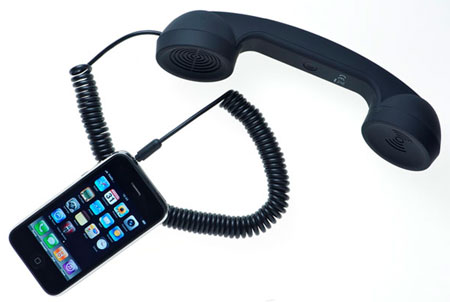
an old-fashioned phone receiver, that I crave every day, not only for its functionality (no more holding my phone in my hand — I actually prefer neck-crooking!) but for its retro form. (To be honest, though, I prefer the cordless ThinkGeek Bluetooth version. It’s not quite as authentic, but it also lessens the chance of getting the cord caught on a door handle.)
As I go about my business, I’m usually able to separate unitaskers from worthy products. For me, if it’s already in the home or office, the key is always, “Do you use it?” sometimes following up with, “Really, now, how often do you use it?” A simple reality check usually suffices. However, when you don’t actually own the item, the utility potential of any gadget or tchotchke may get over-exaggerated when the aesthetic appeal is high.
News alert: Sometimes wanting something outweighs needing it when we make decisions about acquisition.
All of this brings me to disclosing my own secret desire. Ever since word spread on Twitter last November regarding Little Printer, I’ve been of two minds: Surely, it was impractical! Certainly, I found it adorable! With each emailed press release, I breathed a sigh of relief that it was not yet on the market, so I did not need to bring rationality to the table. The day of reckoning has come. You see, Little Printer is available for pre-order.
LITTLE PRINTER, THE CONCEPT
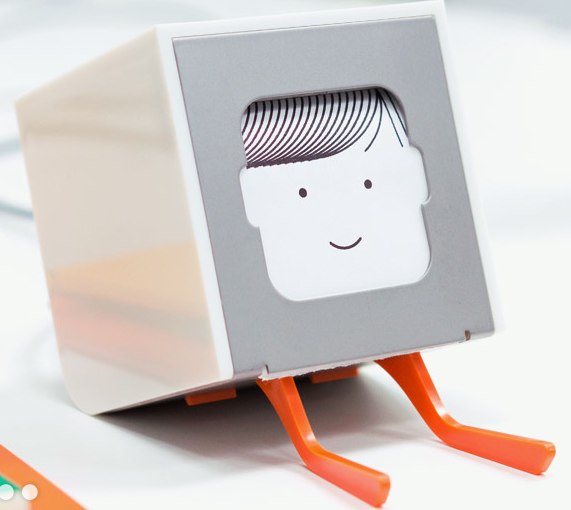
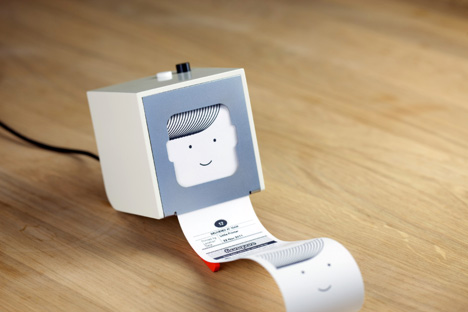
Little Printer, from the UK’s Berg Cloud is exactly that — a little printer. The teeny box, tipped up on plastic “legs,” holds a compact, ink-free thermal printer (like a miniature version of the kind fax machines used to use). It prints onto BPA-free thermal paper and is wirelessly connected to your home’s web service via another tiny device, the Bridge unit, that plugs into your router. Little Printer, itself, plugs in anywhere you’ve got a power outlet.
When Little Printer prints, Berg’s focus on graphic elements kicks in. In sharp-focus, retro black-and-white designs, Little Printer feeds out tiny “newspapers” reminiscent of half-tone lithography. Oooh, pretty.
WHAT LITTLE PRINTER PRINTS
In case you were wondering, no, Little Printer isn’t for printing out those daily, ad hoc necessities like instruction sheets and directions to your next meeting. Rather, Little Printer creates mini-documents, aggregating the information you program it to curate and print, all in the width of a sales receipt and no longer than 10 inches. (Oy, you’re thinking, didn’t we just figure out how to get rid of the clutter of receipts?)
Once you’ve set up the Little Printer, push the little black button and your registration code prints out. Grab your smart phone to sign in or create an account at http://remote.bergcloud.com. Just enter the registration code and it connects Little Printer to your user account.
Next, use Berg Cloud Remote (optimized for iPhones, Android and Windows smart phones, and compatible with any HTML5-capable web browser) to program the content you want Little Printer to print. There are a growing number of printable feeds, or publications, from Berg partners — they’re basically apps, but instead of delivering content to a smart phone or iPad, the data goes to your Little Printer.
Select publications like news headlines, listings of upcoming friends’ birthdays, recipes, to do lists…and you can even grant trusted friends access to send you messages via your Little Printer. Right now, publications have a decidedly UK skew, including The Guardian newspaper, BBC Worldwide, and Lanyrd, a LinkedIn-esque professional events directory. However, offerings also include popular-everywhere options from Google Tasks, Foursquare and Instagram.
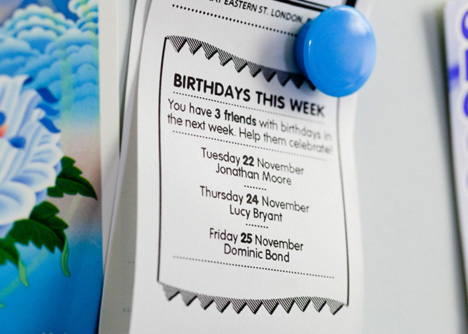
Little Printer isn’t just a ticker-tape of the web. That would be crazy. (Um, apparently, that’s what Little Printer v1.0 did, and the creators said they found it “incredibly annoying.”) Instead, it prints things like a daily puzzle you can stick in your planner to noodle over while you’re waiting for an appointment, beautiful images made from woodcut and pen-and-ink designs, updates from specific Twitter feeds you mark essential to your life, and so on.
At Berg Cloud’s “Hack Day” in July, staff and visitors created 73 different publications, ranging from practical, like an aggregate of local community event schedules by day, to the quirky, like Cat Grinder, that prints out photos of cats shared digitally by people in one’s specific geographic area…apparently so one can go visit the cats. (GPS-located cats? And people think we tweeters are pre-occupied?!)
Publications can be scheduled to arrive at any time of day. Berg Cloud recommends arranging for several publications to arrive at once, to collate in an ideal miniature newspaper for breakfast and/or bedtime.
To get a feel of all of this in action, watch the too-cute video.
THE LOOK
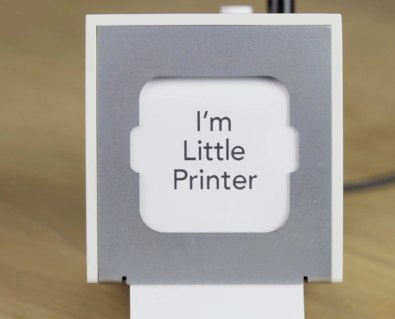
OK, we’ve covered what it does. But if it were ugly, or boring, or not at all novel, nobody would be talking about it. Rather, Little Printer caught people’s attention because it anthropomorphized the printer concept the same way Siri makes you feel like you’ve got a sharp little assistant living inside your phone.
The housing is constructed from glossy injection-molded plastic. A brushed steel faceplate holds the paper, creating a frame around each delivered printout. Until the next document is printed, the Little Printer frames just the edge of the paper, already printed with an adorable little face that reminds me of my beloved Fisher Price Little People classic figures from childhood. (Paper Doll assumes that’s how they’ve suckered everyone else, too. The original Little People rocked!)
Berg Cloud’s newest modification lets you pick from among four printable faces to serve as your Little Printer’s personality. There’s the the original you see in all the PR examples, as well as a long-haired girl, a girl with a medium-bob, and a cowlicked, bespectacled character whom I think is a boy.

THE COST
Starter kits are $259, with $30 flat shipping rates to the U.S. and Canada. Kits include the Little Printer (including paper roll), Berg Cloud Bridge, international power adapters, Ethernet cables and two rolls of replacement paper. (Berg will eventually sell paper rolls but currently recommends buying BPA-free thermal paper.)
In the UK and Europe, starter kits are priced at 199, with flat shipping of 6.50 in the UK and 15 throughout Europe.
European delivery doesn’t include Andorra, the Channel Islands, Gibraltar, Mount Athos, San Marino and Vatican City. I find it ironic that little countries can’t get the Little Printer.
SO, WHAT’S THE POINT?
Paper Doll always seems to be keeping feet planted in the 21st century, with a backwards glance towards the olden days whenever paper represents something with soul — letters or personal memorabilia. But almost everyone is trying to get rid of paper. What is Berg Cloud thinking?
Matt Webb, the face (aside from Little Printer’s face) of Berg Cloud, is all for social media, but seems to see paper as more intimate. He told the press, “What’s great about paper is that it’s made for sharing. You can scribble on a puzzle and give it to a friend, or stick birthday reminders up on the fridge for your family to see. Paper is basically a technology tailor-made for a home full of people.”
The potential clutter aside, I can’t entirely disagree. (And let’s be honest, most clutter is behaviorally-induced and not the fault of the stuff.) If I wanted my honeybunny to remember the milk, I’d put a note on the fridge, and stick a magnet on a coupon. And I know I loved every note Paper Mommy included in my lunch bag (she even wrapped a note in the napkin when I attended my high school reunion picnic). But little paper trinkets that derive from electronic sources? Who will embrace that?
John Pavlus, writing for Fast Company, said:
I’m reserving judgment on the user experience and physical appeal of Little Printer until I can actually get my hands on one. But after the initial shock wore off, I couldn’t get BERG’s odd little product out of my mind. I imagined setting it on my nightstand next to my alarm clock, tearing off my little “mini-newspaper” in the morning–a much more physically satisfying interaction, perhaps, than rotely grabbing my smartphone and pecking at Twitter.
I have to admit, that was my reaction, too. I’m not much of a cook (OK, I’m not a cook at all) but I’d be intrigued by a tiny printout of a recipe I could take with me to the exotic foods store to purchase ingredients. Even though Paper Mommy is on Twitter and Facebook, I’d love to get a little paper message from her that I could carry around all day, and I bet there are a lot of Mommies and Daddies out there who travel for business but would like to be able to make sure their kids start the day with a personalized note they can take with them.
I can imagine Little Printer used in schools to give kids tangible representations of things they’ve learned. For example, Little Printer publishes feeds from How Many People Are In Space Right Now?, and you can envision little kids adorning their cubbies with printed factoids.
As frequent readers know, I don’t have a smart phone. But even if I did, and even if I got completely accustomed to scrolling through information on a glass screen, checking something off a shopping or to do list on paper is just more satisfying. It’s more tactile. It’s more real.
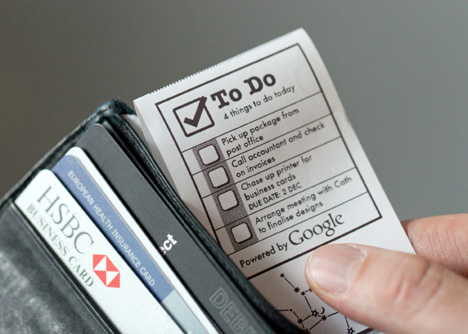
And yet, I know I’m rationalizing. At this price point, there’s no chance Paper Doll will be trying out the Little Printer any time soon, so my practical budget outweighs the appeal in terms of curiosity or aesthetics.
But that retro phone? Every girl needs her indulgences.



Follow Me