26 Ways to Celebrate GO Month to Get More Organized and Productive
Happy New Year! Happy GO Month!
Each January is Get Organized & Be Productive (GO) Month. Back in 2005, NAPO (then called the National Association of Professional Organizers) proclaimed the first Get Organized Month, as a national public awareness campaign about organizing and our profession.
A decade later, the month was expanded to incorporate productivity, just two years before we officially became the National Association of Productivity & Organizing Professionals. Our purpose remains the same. All of us — professional organizers, productivity specialists, declutterers, coaches, etc. — celebrate how we improve the lives of our clients by creating environments and developing skills to support productivity, health, and well-being.
Practitioners like Paper Doll are here to help you create systems and skills, improve your homes, workspaces, and attitudes, and live your best, most productive life.
For more great organizing and productivity tips during GO Month, you can also follow NAPO’s Social Media Accounts:
Today’s post offers some 26 ice cream samples of organizing and productivity tactics to make 2026 a little easier.
ORGANIZE YOUR PAPER IN 2026
1) Create a Tax Prep Folder
April 15th will be here before you know it. From now through February, you’ll receive tax documents (1099s, 1098s, W2s) in the mail. You may also get emails reminding you to log in to brokerage and other accounts to download your important tax documents.
Don’t wait until the last minute to gather these items. It’s not just good organizing advice, but helpful financial advice, too, because the sooner you get your important tax documents together, the faster you (or your accountant) can get you your refund, or at worst, let you prepare for the size of your tax bite.
Your tax prep folder doesn’t have to be fancy; a plain tabbed folder kept at the front of your financial files section should suffice. However, if you’re dealing with a lot of documents, you might prefer a dedicated accordion-style folder like the Smead All-in-One Income Tax Organizer.

Organize now so you won’t lose deductions, pay more taxes, or get in trouble with the IRS!
2) Roll Out the Red Carpet for Your VIPs
Make 2026 the year that you get your affairs in order. Estate documents and other essential paperwork must be created, obviously, but also reviewed and updated on a periodic basis.
As I’ve said before, this aspect of organizing may be boring (if you aren’t a professional organizer), but boring is good! If your VIPs are boring, it means that you and your family won’t ever experience any ugly surprises during difficult times, like when someone is in the hospital, when there’s been a death in the family, or even when dealing with the aftermath of a natural disaster.
Start by reading these from-the-vault posts to figure out your next steps.
- How to Replace and Organize 7 Essential Government Documents
- How to Create, Organize, and Safeguard 5 Essential Legal and Estate Documents
- The Professor and Mary Ann: 8 Other Essential Documents You Need To Create
- Paper Doll’s Ultimate Guide to Organizing Yourself to Get a REAL ID
- Paper Doll’s Ultimate Guide to Getting a Document Notarized
- Paper Doll’s Ultimate Guide to Legally Changing Your Name
- A New VIP: A Form You Didn’t Know You Needed
Then list documents you already have (and their locations) and identify what you need to create, and then plan meetings with your family and a trusted advisor to set things in motion.
3) Declutter and Preserve Your Family Photos and Memorabilia
Two years ago, a beloved client passed away, and I’ve been working with his son to go through more than a century of photos, from passed-down black-and-white picures of ancestors on both sides of the family to lighthearted snapshots and travelogues from the gentleman’s young military years. We review prints and slides, as well as delicate (and crumbling) correspondence.
Do you have print photos that would be lost in case of a fire or flood because you don’t have the negatives (or store them with the photos)? Would digital photos on your phone be lost if your phone got smushed or stolen? You need backup!
I’m not suggesting you do this every day in January, but make a plan. What if you spent an hour every Sunday morning sorting through photos? Could you invite a family member or friend to help you consider what to keep and what categories to use?
Contact a NAPO member who specializes in organizing photos, or visit The Photo Managers to find experts who can help you safeguard your photo history.
While I’m on the subject, I absolutely have to recommend, yet again, my colleague Hazel Thornton‘s What’s a Photo Without the Story? How to Create Your Family Legacy.

For more ideas, consider:
- How to Collect, Organize, and Preserve Family Memories and History (Part 1) — The Questions
- How to Collect, Organize, and Preserve Family Memories and History (Part 2) — The Methods
- How to Collect, Organize, and Preserve Family Memories and History (Part 3) — AI & More
4) Know What’s In Your Wallet
Have you looked at what’s in your wallet lately? Would you notice if one of your credit cards went missing? It’s a new year — did you put your new health insurance card in there?
- Pull everything out of your wallet.
- Discard or put away anything that doesn’t belong in there. (Receipts for taxable events, like medical expenses? Keep. The name of a book your friend recommended? Log it in your Notes app or put it on hold at the public library before you forget.)
- Take an inventory of everything in your wallet. Depending on your patience, you have two options:
- Lay two columns of cards (side by side), face-down, on a copy machine. Press “copy” and then flip each card in place to the rear-side, and copy that, two. Repeat the process until everything in your wallet has been secured. Alternatively, you can scan these to your computer and save it all as a multi-page PDF. If you ever lose your wallet, you’ll be happy to have the account numbers, expiration dates, security codes, and contact numbers for your licenses, insurance cards, and credit and debit cards.
- Use your phone to take photos of the front and back of the cards and upload the pictures.
Whichever method you choose, password-protect digital versions of this document in storage or on your phone, and keep the paper copies in your fireproof safe or lockable file drawer.
5) Clean Off Your Desk
Next Monday, January 12, 2026 is National Clean Off Your Desk Day. Celebrate it by making a clean sweep of everything piled up on your desk, de-germify it, and think carefully about what belongs on it.
Read last year’s Paper Doll Celebrates National Clean Off Your Desk Day for step-by-step for making your desk a space for productivity instead of mystery crumbs and mountains of papers.
Then refresh your space with ideas from Organize Your Desktop with Your Perfect Desk Pad: 2025 Update and Paper Doll Explores the Best of Desktop File Boxes.

ORGANIZE YOUR DIGITAL SPACES IN 2026
Digital clutter may not take up physical space, but it wears down our batteries, both in our devices and our personal batteries because of the overwhelm of excess.
6) Declutter Your Phone Apps
The Pareto Principle says that 80% of our success comes from 20% of our efforts. It holds true in many ways; 80% of the time, we wear the same 20% of our wardrobe, kids play with the same 20% of their toys; we use the same 20% of our apps.
It’s why letting things go from the 80% we hardly ever use makes us feel less cluttered and more productive, even though we anticipate we’ll feel anxious about having let them go — that’s why they’re cluttering up our digital spaces in the first place!
- Flip through your home screens and take inventory — What apps did you download and never even try because they required creating a login? What apps did you give up on because they were buggy? Let go of low-hanging fruit.
- Clean up by deleting apps you used the least often (or never). To see the last time you used an app on iOS (for iPhone or iPad), follow this path: Settings>General > iPhone (or iPad) Storage. There are a few different ways to check app usage on Android devices.
- Addicted to your phone? Check your Digital Wellbeing feature on Android or ScreenTime on iOS. Uninstall whatever is obviously distracting you with overuse.
- Move distracting apps that you can’t (or can’t bear to) uninstall to your last home screen page to create more friction and make it less likely you’ll happen upon them when looking for your bank app.
- Fill your first home screen with apps you need and want to use because of the benefits they bring to your well-being.
- Organize the remainder of your apps by dragging-and-dropping them into folders labeled for shopping, dining, social media, productivity apps, etc. Keep them — just make them less convenient.
The point isn’t to get rid of your digital life. Just eliminate what distracts you from what’s important.
7) Clear Out Your Voicemail Inbox
In the olden days, people called you and either you were home and answered, or not home, and never knew you had a call. (If you’re GenZ and reading this: yes, really.) At work, if you weren’t at your desk during working hours, a receptionist took a message. After hours, either the “answering service” took your urgent call, or people waited until you got in on the next business day.
In the 1980s, we got answering machines and our messages lived where our landline phones did.
In the 1990s, we had voicemail, and at the turn of the century, people started calling less and texting more. Now, too many of our messages are spam, and voicemail fills up.
Have you ever called someone — or worse, returned a call — only to hear “This voicemail box is full and is not accepting messages. Please try again later.”
What if your message is important? Do you text? What do you do if it’s a business? On the flip side, if your child’s school, your doctor’s office, or a client needs to reach you, do you want them to suffer this frustration?
Clear up your voicemail box with the following steps:
- On landlines, dial in, listen, and start deleting messages.
- On cell phones, iPhones and most Android phones show transcribed messages. Known contacts should appear by name, making it easy to figure out whether a message is still needed even before you read it. Unknown numbers may be spammers (swipe left!), but may be people you’ve never entered into your contacts. Review those messages, and anything that doesn’t make the cut, delete!
- Save numbers for contacts you may need in the future. — Add a last name and any context necessary. I have a contact saved as First name: MaryBeth, Last name: “Hit my car in the parking lot.”
Until recently, the only “Terri” in my contacts was my hair stylist, but when I was in Portugal and Spain in September, I added my tour-mate to my regular iPhone contacts. Just before my last haircut appointment, I voice-texted, “I’m here, but looking for parking. I’ll see you in a minute.” When I got to her space, she said she hadn’t received my message. A moment later, my tour-mate Terri texted, “You’re here to see me?” with a series of laughing emojis. Doh!
Last names (and context) are important!
- Be ruthless in getting rid of old voicemails. What should make the grade? Messages that you save for:
- work purposes — but confer with your boss or your IT department regarding rules in this regard
- legal purposes (such as when someone is stalking or harassing you, or offering a set of deal points for a contract.
- sentimental purposes — but be judicious. Can you picture yourself sitting in an airport, listening to a loved one’s message over and over?
- Download messages you want to keep permanently. On iPhones, tap the voicemail you wish to save and you’ll see the share icon in the upper right corner; share the resulting MP3 to your photos or notes app, Evernote, social media or wherever else, just as you’d share an article or a picture.
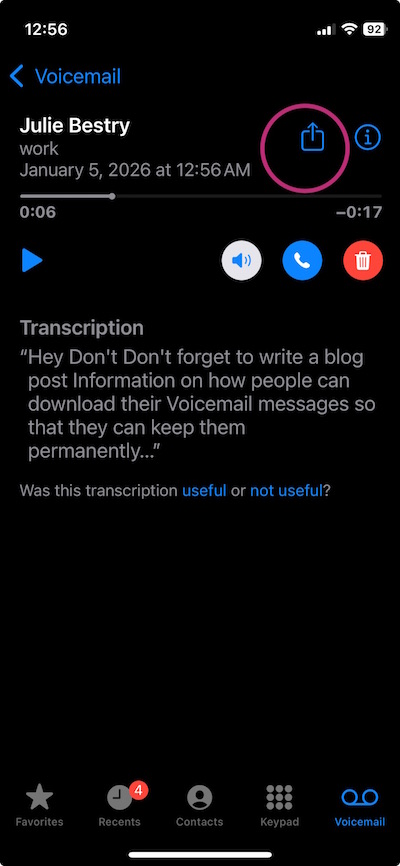
On Android phones, tap on the message to see a list of options. Click one of the save or archive options you prefer and select the storage location. For more voicemail-saving techniques, read Smith AI’s How to Download and Save Important Voicemails.
8) Clear out your email inbox
For years, people have laughed at me, saying that search worked so well and email providers granted so much storage space that it was no longer necessary to clear inboxes. Still, I blithely went on advising my clients to regularly clear their inboxes, and to create a hierarchy based on categories matching their analog filing systems.
Recently, I’ve felt vindicated as Gmail and other email providers have been adding storage limits, and people recognize that search (even AI-assisted search) sometimes takes longer than going to a particular sub-folder with a helpful title.
Email is a headache! According to an analysis by the McKinsey Global Institute, on average, 28% of work time is spent reading or replying to emails. And the average worker — and yes, you’re all above average — checks email 11 times per hour. 84% of us keep email open in the background while working, making it oh-so-easy to “check” our email.
The problem is that we CHECK IT over and over again looking for that dopamine hit, but we often look at emails without doing anything with them, like opening the fridge in hopes that someone has magically made something delicious and put it in there. 
You may think that Inbox Zero is the cure, plowing away at email but getting further behind in important work. James Clear has said, “The most invisible form of wasted time is doing a good job on an unimportant task.” Email clutters our lives like that.
There’s no permanent state of inbox zero (unless you stop sending outbound emails and block all inbound senders), any more than finishing all of the laundry today will create laundry basket zero unless your family plans on becoming very tidy nudists.
There's no permanent state of inbox zero, any more than finishing all of the laundry today will create laundry basket zero unless your family plans on becoming very tidy nudists. Share on XProcessing email isn’t your job, it’s just one method of communication and information acquisition, and it’s not always the right one. Instead:
- Unsubscribe from whatever you never read. (It’s like buying vegetables that you know you should eat but they disappear into the back of the fridge and eventually get slimy.) Take five minutes a day to declutter your future inbox.
- Set up a simple hierarchy of subfolders with names of major projects, client names, or whatever works for you. Having a place for emails to safely, dependably live will encourage you to manually or automatically route necessary ones of your inbox. As with voicemail, don’t feel like you should save everything.
- Learn how to use your email platform’s filters or rules function to automatically sort mailing lists to one sub-folder, anything you’re always CCed on even though you know it’s nothing to do with you to another, and so on.
- If you’re overwhelmed by your huge backlog, move everything from more than a month ago to a folder you call “Archived” and start with a minty-fresh inbox. You can always go into the “Archived” folder and sort if you’re feeling enthusiastic, but at least you’re dealing with something more manageable.
9) Know What You Don’t Know About Your Tech
In Digital Disaster Prep: How to Organize Your Tech Info Before You Need It earlier this year, I walked readers through all sorts of information you need to know before something goes wrong with your tech. Do you know where to find your:
- IP Address
- Network and router information
- ISP contact information
- Device Identifiers
- Operating system license keys
- Software and game activation codes
Your household probably added some hardware and software goodies this holiday season. This is the perfect time for you to read the post and start logging all of your essential tech information.
ORGANIZE YOUR TIME IN 2026
10) Track Your Time to Figure Out Where Your Time Is Going
To improve your productivity, the first thing you must do is get a handle on how you’re spending your time.
Read my How to Use Time Tracking to Improve Your Productivity from last January to understand the benefits of time tracking, including mindfulness and focus, prioritization, data-driven decision making, stress reduction, and accountability. The post also prepares you to face challenges and overcome the obstacles, and offers strategies and resources for tracking your use of time.
Track for just one day, or participate in a weeklong time tracking project such as Laura Vanderkam’s annual event. Register for her 2026 Time Tracking Challenge from January 12-19, 2026. I do it every year!
11) Get a Better Sense of the Passage of Time
For some people, knowing what time really “feels” like takes some effort.
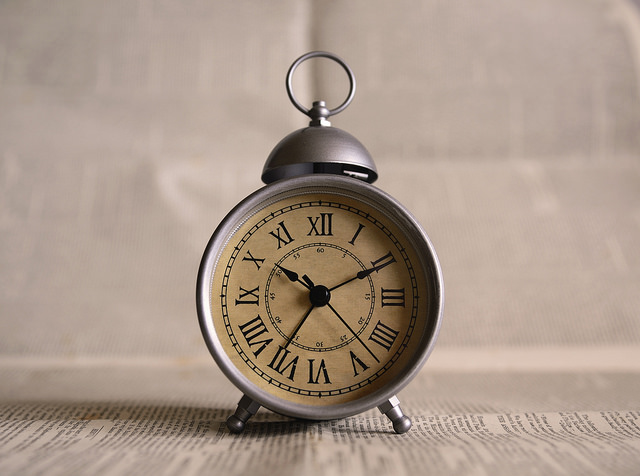
First, put real, analog clocks wherever you tend to get lost in time. Is that your desk (even though you wear a watch and your computer has a clock)? Is that the bathroom, because you lose awareness of time while doing your hair or soaking in the tub? Is it your car, which has a perfectly serviceable clock but the time is always wrong because you never learned how to change it for Daylight Saving Time?
Next, read about all the ways timers can help you get a better sense of your time.
- How to Use Timers for Improved Productivity and Focus — Part 1
- How to Use Timers for Improved Productivity and Focus — Part 2: Picking a Good Timer
- How to Use Timers for Improved Productivity and Focus — Part 3: Tangible Timers
- How to Use Timers for Improved Productivity and Focus — Part 4: Digital Timers
- How to Use Timers for Improved Productivity — Part 5: Hybrid Timers and Bonus Material
12) Time Travel in Your Planner
If you use a paper planner, hopefully you already have one for 2026; if not, that’s step #1. But even if you are 100% digital, this advice goes for you, too.
It’s tempting to just fill in your January pages and figure you’ll adjust as you go along. But even if you’ve had the same meeting every Tuesday for the past 5 years, somehow, some way, you’ll double-book if it’s not in your planner or calendar.
Spread out at your desk or your kitchen table, grab a cup of cocoa or something to soothe you into the new year, and do the following:
- Page through each week of last year’s planner and copy everything that recurs by date (like birthdays and anniversaries).
- Add events that happened in 2025 and are already scheduled to happen again, but not on the same dates (like conferences, work retreats, medical tests and appointments, etc.).
- Use last year’s schedule activities to prompt you to make a list of anything you might need to schedule or add to your long-range tasks, like meeting with your accountant, scheduling annual medical tests/exams.
13) Eliminate What Doesn’t Excite You
I’m a big believer in the concept that whatever isn’t a “Hell, yeah!” is a “Heck, no!” at least in terms of what you can control. (Unlike Marie Kondo, who encourages people to get rid of tangible items that don’t bring joy, I know that you can’t just toss your old tax returns.
Similarly, you can’t strike everything that isn’t joyous off of your calendar. You still have get a dental cleaning at least twice a year, whether you like it or not.
But why not make 2026 the year you step back from volunteer positions that take your time and energy, but don’t give you delight?
How about taking that book club (for which you never like the selected books) off your schedule? You can always agree to meet the people one-on-one without the obligation to read the newest oversized dystopian novel.
Set yourself, and your calendar, free.
14) Pick a Problem-Solving Day
Theming your days can make you more productive because you don’t have to keep switching tasks. Marketing Mondays or Financial Fridays let you schedule a block of similarly-themed tasks so you can focus and get into “flow.”
I encourage clients to pick one day of the week for problem-solving. Block a few hours on a specific day for sitting on the phone and asking, repeatedly, for someone to escalate your call. This is the day you set aside for time to get help on whatever is making your computer do THAT THING.
Knowing that you have a slot firmly in place will allow you to worry less about getting problematic or frustrating things accomplished, and because there’s one place in your schedule for solving problems, you will be able to focus when that day arrives.
ORGANIZE YOUR FINANCES IN 2026
15) Stop Singing “I Owe, I Owe, It’s Off To Work I Go”
Debt creates mental clutter. Knowing is always better than not knowing, so make 2026 the year that you know what you owe and figure out what’s going on with your money and where it’s going.
- Make a list of every credit card, loan, and any other kind of debt you have. Note the creditor, the amount, and the interest rate.
- Next, make a list of every fixed expense you have.
Seeing it all in black and white (and red) may be sobering, but it’s the first step toward figuring what you can do about it.
Maybe you can refinance a car loan or mortgage to lower your monthly costs?
Perhaps you can call your credit card companies and request a reduction in your interest rates. (Nerd Wallet has a great article on How to Get a Lower APR on Your Credit Card.)
Maybe you can cut expenses for things you’re not even using.
16) Go Spelunking for Lost Money
Start with your couch cushions. Whether your loose change is in a jar in the laundry room or at the bottom of your purse, it’s (literally) weighing you down wasting your financial potential. Put on some music and start rolling coins (or bribe your kids to do it) and take the money to the bank. Alternatively, dump it all in a canister and take it to a Coinstar machine or any credit union that accepts and counts coins for free.

To recoup other “lost” money, follow steps in these Paper Doll posts:
- Show Me the Money — A 2025 Guide to Finding Forgotten Funds & Unclaimed Property
- Lost & Found: Recover Unclaimed Money, Property, and Savings Bonds
- How to Track, Lower, or Cancel Your Recurring Subscription-Based Bills
- Organize and Lower Your Medical Bills: Spot Errors, Negotiate Costs, and Save Money
17) Re-Shop Your Auto Insurance
When was the last time you actually shopped for car insurance? If you’ve kept the same insurance for years, you’re almost assuredly overpaying. As with the cable company, this is one of those instances where newer customers are rewarded with the best deals, and loyal customers are not rewarded for loyalty.
It doesn’t cost anything to shop around. Even if you find a better rate, you may be able to return to your agent and say, “Hey, the guys across the street quoted me quite a bit less. Can you match it?”
Note: if you use online pricing comparisons, you’ll be bombarded with emails, so consider creating a new Gmail account just for these replies.
Before you make any calls, though, familiarize yourself with the basics of car insurance with Organize for an Accident: Don’t Crash Your Car Insurance Paperwork [UPDATED]

RECITE THESE ORGANIZING AND PRODUCTIVITY MOTTOS
When you’re having a hard time tackling the clutter or focusing on the work, pick one of these mantras to help point you in the right direction.
18) Don’t put things down; put them away.
19) Declutter first, then contain it. (Don’t acquire clutter to contain your clutter!)
20) Everything should have a home, but not everything has to live with you.
21) Someday is not a day on the calendar.
22) Break every task into its smallest possible step. If you can’t get started, the first step is probably not small enough.
23) Cut yourself slack. Give yourself grace.
24) Progress, not perfection.
25) Albert Einstein said, “Organized people are just too lazy to go looking for what they want.” Be lazy!



I am already working on most of these things. Julie, have you ever looked at the NOKBOX 9Next of Kin box)? My daughter-in-law told me about it several years ago and I set one up for my husband and myself. It was a great help.
My weakest area is digital. I hate to work on it so I usually don’t (sigh).
Thanks for the great list of 26 tactics for 2026.
Oooh, Jonda, I have seen the NOKBOX online and have been waiting to see it in person to decide whether I wanted to write about it. I’m often dubious about pre-created systems because of lack of flexibility, but the fact that you like it makes me much more interested.
For those of us who aren’t digital natives, like Millennials or GenZ, I get the preference for analog. After all, I’m Paper Doll. I think the trick is to do it with accountability; maybe you and Diane could do some sessions side-by-side working on your digital stuff?
Thank you so much for reading. Happy new year!
4, 14 and 17 are all on my list (or should be!). Thanks for the reminders.
4 is easy and can be knocked out in about 15-30 minutes, depending on how much is in your wallet. For problem-solving days, I recommend picking a short block, maybe even an hour to start, but early in the week to give you time for phone tag. Good luck with the insurance!
Come back to this post and let me know how it goes!
Thank you for reading and happy new year!
These are all great things to be working on. I have started my Tax folder for 2026 and am still working on my HUGE declutter project. Small bites are what work best for me as well as progress rather than perfection.
Thanks for sharing your take on this Diane. I like to keep one tax folder for the current year and one for the next, so there’s always someplace logical to keep a document as it arrives. (I often make charitable donations in January, just to be a little contrary, and I need those to go into NEXT year’s folder.)
Good luck with your small bites! Happy new year!
There are a lot of things to focus on. I know the idea isn’t to do all of them at once. Instead, I’m looking at your list of “26” as a great list of questions. How many of these are essential, but to be handled in the future? How many are taken care of? How many need immediate attention for 2026?
Many of these I’m all set with, like being tax prep ready, and having a good handle on my email inbox/system. For 2026, we’ll be working on financial and ‘affairs in order’ organizing. Mostly, we want to have things in better order for our kiddos if something were to happen to us. We’re organized for us, but not necessarily for them. I know I’ll feel a lot better doing the review and getting things laid out in one easy to access place. As Jonda mentioned, I’m looking at the NOKBOX product. I used something similar for my parents and it was the best investment ever made. It was so helpful to have the important documents in one location when I took over handling their affairs.
I’m glad you see that I meant it as a menu of options rather than a full January assignment. 😉 And yes, each person will have a different take on what’s needs immediate attention.
I think this might be the year of the NOKBOX for many people. I’ll be eager to hear what you think of it if you try it.
Thanks for reading. Happy new year!
Well, there certainly are lots of ways to get organized in 2026! Some of these I’m regularly on top of, while others are what I call “areas for growth.”
My biggest challenge is always anything tech-related. It changes constantly, and I just don’t enjoy sitting still and looking at a screen. I do work hard on deleting voicemails and emails, but photos feel like a lot. Most of the photos I take are work-related, but my family takes a lot and puts them into a family shared album. Who should maintain that is a question to put out there in the new year!
I’m struck by all of your links at how much content you have on your site, Julie. Well done putting so much help out there. Your site is a great place to go for so many topics – thank you!
I think each of us will have our own take on “areas for growth.” We all know that we should have these various tasks worked on, but somehow, having a “pick list” makes it easier to get started on something/anything.
Ah, the question of the shared albums is a good one. I suspect the key, especially as younger people build their own families, will give even more rise to the importance of professional photo organizers.
Thank you for the compliment about my content, and for taking time to read and share your thoughts. Happy new year!
What great reminders, Julie!
I love that you talked about going through your wallet. It is an area that I know people do not review for years. Their wallets get fatter and fatter and heavier, and they wonder why.
I had the kids and my husband take photos of all the wallet content so they know what they had there, and we placed the copy in a safe. Thanks for that reminder. I will remind them to review the wallet again. =)
It’s funny that we use our wallets daily and yet are surprised by what we find when we go spelunking. (Maybe it’s because so many wallets have secret hidey-holes?) I feel like the wallet review needs to be done at least every other year because of the number of cards that get replaced or added. Otherwise, it’s just a matter of pulling out old receipts. But it definitely takes maintenance.
Thanks for reading. Happy new year!