Archive for ‘Tech’ Category
NEET & Cozy Cables: A NAPO 2015 EXPO Organizers’ Choice Award Winner
Everybody complains about cable storage. You can’t swing a lightning cable without hitting a blog post or video or Pinterest page on keeping cables untangled, separated, and safe, whether via retail products or DIY methods. For example:
- Paper Doll’s Cable Conundrums & the MOS: Magnetic Organization System
- Organizing the Cords Under Your Desk! by Helena Alkhas
- Cords and Cables and Labels and Controlling the Cables: 3 Novel Solutions by Jeri Dansky
- 10 Ways To Get Cables Under Control by Gina Trapani
- Organize, Store and Buy Computer Cables Wisely by David Caolo for Unclutterer
- How To Tame Cable Cord Chaos (video) by Lori Marrero
- Untangle Your Life: Living Organized With Cables and Cords by Apartment Therapy
- 61 Clever Cord Organizers
However, most of the standard stabs at keeping cables and cords organized seem to focus on cables that stay put in your home or office. Other than Paper Doll-recommended Grid-It!, a past NAPO EXPO fan favorite, we rarely see much about how to corral cables in transit so they don’t get tangled in our book bags, purses and when we’re on the go. Happily, the NAPO 2015 Annual Conference and Organizing EXPO had an exciting new entry in the world of cable organization.
NEET Cable Keeper
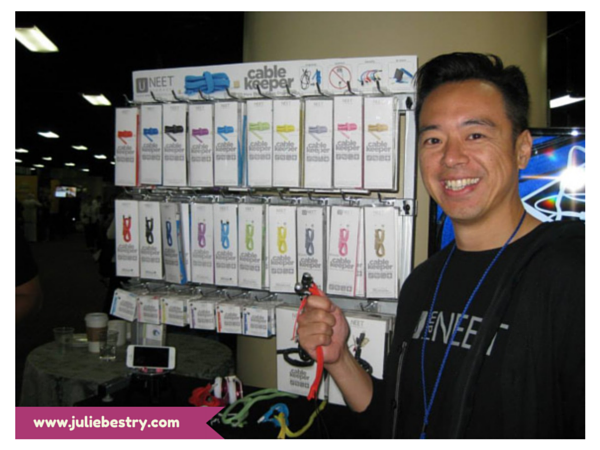
(©2015 Julie Bestry. Peter Chin, founder of NEET Products.)
Winner of the 2015 Organizers’ Choice Award, the NEET Cable Keeper is the equivalent of a tea cozy for your cables, if your tea cozy were crossed with a hoodie crossed with a corset. Each long, colorful strip of cloth material — NEET calls it a “shell” — isolates a single cord or cable from any other, and then includes these essential features:
Zipper — Here’s where the hoodie action comes in. There’s no threading your cable or cord through a complicated maze of plastic molding. (If you’ve ever tried to replace a drawstring in a pair of sweatpants, you know how frustrating that can be. Yes, you can attach a safety pin to guide the string, inch by inch, but ARGGGGGHHH, just recalling that makes Paper Doll grumpy.) Merely lay the cord or cable down across the NEET Cable Keeper and zip it up!
The bottom of the shell is flared, which allows you to encase larger USB ends, and it has ample space for multiple cables to be enclosed.
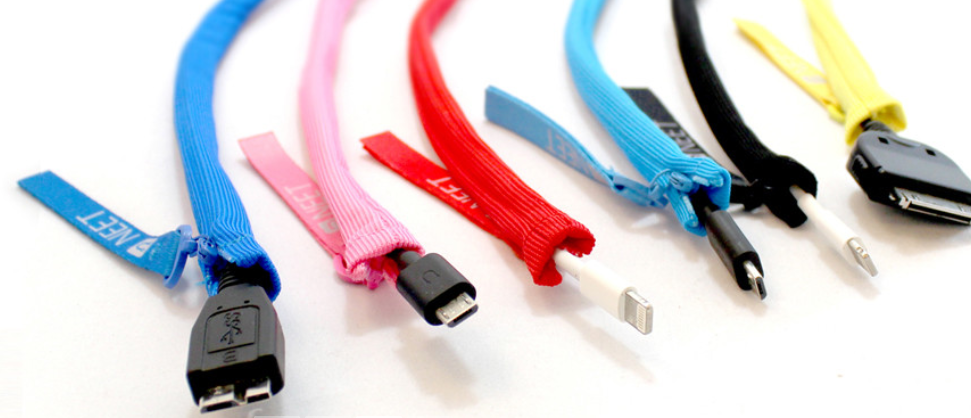
Structured Wire — Sewn into the length of the cloth strip is a bendable wire, much like the stays in a (modern) corset, that provide support stiffness and support. The structured wire services two purposes:
- It protects your cables and cords from damage. There’s no chance you’ll repeatedly fold your cord so tightly that the plastic coating will wear away, or accidentally crush it in a slammed filing cabinet drawer, damaging the delicate internal wires.
- It provides support for the whole cable or cord, making it suitable for wrapping neatly around your wrist as a bracelet, turning it into a loose necklace, or otherwise, bendy, gooseneck-lamp-style, making it beautiful as well as useful. NEET’s website even shows how to bend it into a stand for a smartphone.
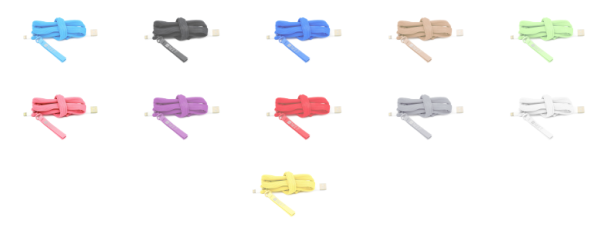
Colorful Wardrobe — The NEET Cable Keeper comes in a variety of colors, so you can tell at a glance from across the room whether the cable you’re spotting is your Kindle charger or your Apple Lightning cord. The NEET Cable Keepers come in black, blue, gold, green, light blue, pink, red, purple, silver, white and yellow.
After you zip your cable cozily into the NEET Cable Keeper, like a toddler into a snow-suit, you’re set. It becomes part of the cable itself, so you have no additional pieces to carry or potentially lose; there’s no reason to take it off, unless you’re one of those people who likes to change the colors of your accessories on a daily basis. (Really, stop that.)
Take a peek:
You can get the Keeper two ways, both designed for mobile device cables measuring 3 feet (or about 100cm) or longer and 1/4″ in diameter. If your cable is longer than 3 feet, the width of the Keeper will accommodate you gently folding it before zipping it up.
- NEET Cable Keeper M, with just the Keeper, is $12.
- NEET Cable Keeper M with either a Micro USB cable or an Apple Lightning cable is $18.
It’s available directly from the NEET, and via Amazon, The Grommet and a few other retailers.
Although they are not yet available for purchase, NEET is developing a line of cable organizers for ear buds, laptops, home entertainment, and professional use such as for DJ’s and audio/visual work.
If you own a business and think it would be cool to brand these NEET Cable Keepers for your own customers, NEET founder Peter Chin says, “The NEET Cable Keeper is customizable! We can customize NEET for you to promote your company, event, and brand. Great for corporate giveaways, employee retention programs and brand awareness. Send us a message and we will gladly connect you to our authorized customization partners.”
Zip, wind and organize. Neat (I mean, NEET), eh?
All About That Place (Where You Write Things Down)
To improve something, you must first observe & document it. Pen on paper once a day is a sufficient start.— Garrick van Buren (@garrickvanburen) November 17, 2014
Life and the internet have been conspiring recently, causing me to think about the issue of organizing one’s thoughts, and particularly, organizing them with pen on paper, as van Buren describes, rather than by typing.
Over the course of a few weeks, in addition to a speaking engagement and regular client work, I was involved with helping organize Chattanooga’s Second Annual Diabetes Expo. For all of these projects, there were little tasks, insights and just plain blobs of information coming up on my horizon. I encountered information I had to share with others (immediately as well as on delay), and had to juggle oodles of swiftly changing logistics, with not a lot of time to capture, let alone massage and manipulate, the data.
Before and during the expo, I was on my feet, running the length and width of a room the size of a high school gymnasium, plus up and down two short flights of stairs. (My Fitbit loved me that day!) Trying to walk and talk and type on an iPad just didn’t work, and I quickly gave up and went back to my beloved purple legal pad and pen.
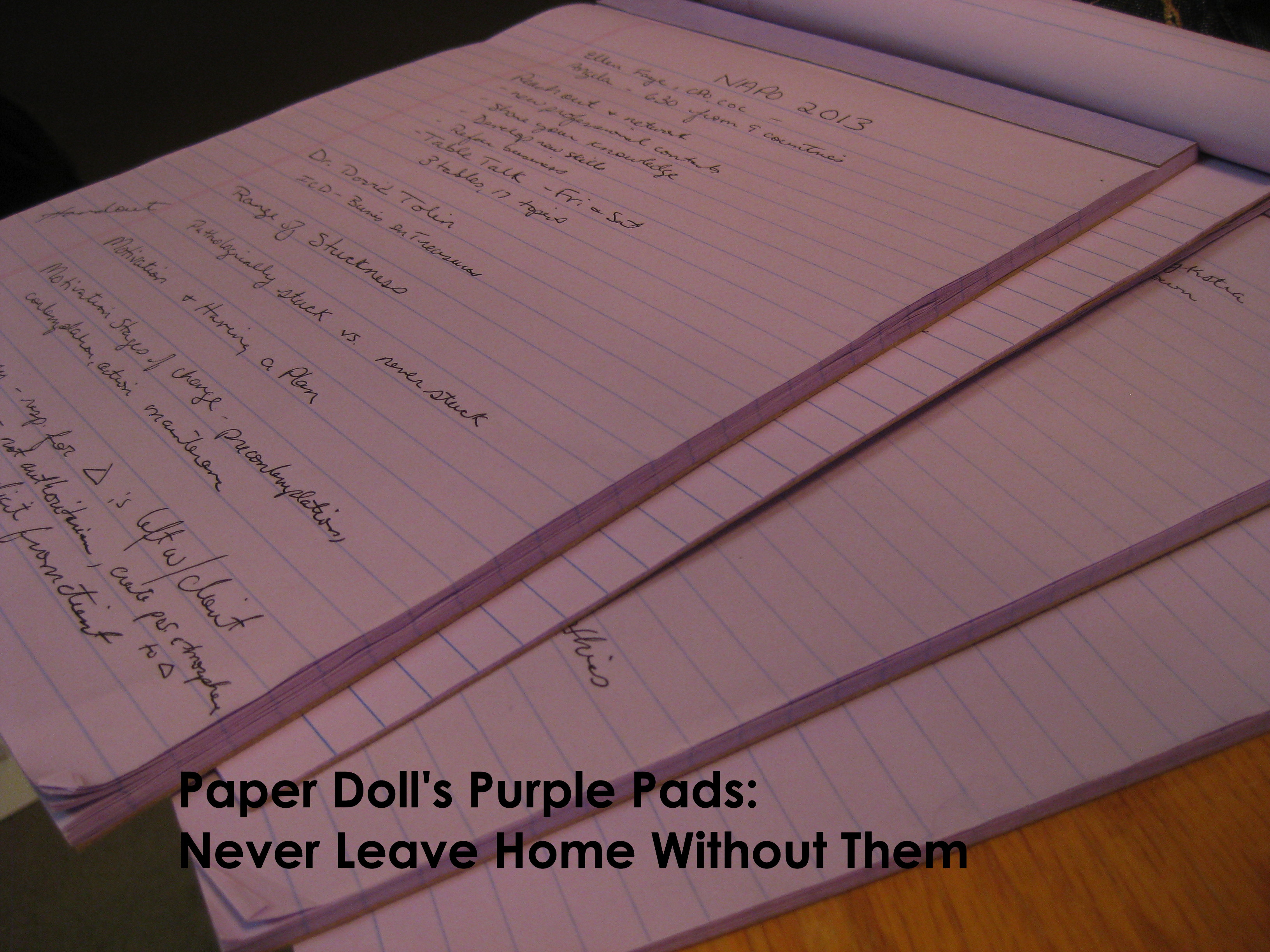
A page for problems needing solutions. A page for the mapped layout of all of the vendors. A page for checking off received door prizes. A page for changes we want to make to improve the process next year. You get the picture.
Was my handwriting abysmal and probably illegible to anyone but myself? Absolutely. But when my arms were full, I didn’t fear the budget-busting consequences of dropping my legal pad as I would have with my iPad.
After the month’s early hubbub, as I plowed through all I’d missed reading from my email and RSS feed and Twitter favorites, I eventually noticed the synchronicity of multiple open tabs in my browser. To borrow from Meghan Trainor:
It's All About That Place (Where I Choose to Write Things Down) Share on XFirst, I came across professional organizer Carrie Peeples guest-posting on Monica Ricci‘s blog, Your Life. Organized. Carrie wrote about The Secret To Shutting Up Your Busy Brain, and mentioned that:
The act of writing tells your brain that you’ve already processed that information and don’t have to worry about it. It frees your brain to do other things like focus on traffic or solve the next problem. The more you spend time trying to remember something the more time you’re NOT getting other things done.
This is known as the Zeigarnik Effect. Unless we rehearse or repeat things like phone numbers, or the beloved “a loaf of bread, a container of milk, and a stick of butter,” little details disappear from our short-term memories.
And a bigger deal, over the longer term, is that we tend to worry about the things where we’ve failed to achieve closure.
So, Carrie hits on the essentials: get it out of your head and down on paper (or the digital equivalent of paper), and your mind can go from the basic “what” and move on to more robust “why ” and “where” and “how” of the issue. When you write on a sticky note, it makes the information stick. Except, longtime readers know that I don’t want you to write on a sticky note or any other floozies (AKA: loose scraps of paper). I want you to have a notebook (paper or digital) that suits your capturing style. But do CAPTURE the information or ideas before they seep out of your brain and into the ether.
Next, Patrick Rhone of The Cramped, an entire blog dedicated to the analog writing experience, discussed a question of great importance: Why Analog? He delved into just a few of the reasons why handwriting something (vs. using your opposable thumbs to text it, or telling Siri to remember it) is advantageous. Rhone talks about the depth of history of the written language vs. digital data, the siren song of our personal notations, and the way a written draft shows the step-by-step thought process (including messy strikethroughs) that tend not to be visible with what we type. But my favorite of his points is this:
Writing by hand helps me retain more information. Countless studies show that the act of writing by hand is better for both retention and comprehension of ideas than typing them digitally. It engages the senses and synapses by a factor more than digital. I write by hand because it is the best way for me to remember and learn.
The Cramped also pointed me in the direction of Sienna Craig’s Huffington Post blog from earlier this year, entitled Reasons to Love Writing by Hand. Craig, a Dartmouth College professor, expresses surprise when her students report handwriting as creating an obstacle between the self and the expression of self. She writes:
One particularly eloquent student described handwriting as a kind of out-of-body experience: “It just doesn’t feel like it is me writing if I am not on a computer,” she said. This floored me, because for as long as I can remember, writing by hand has felt like an essential way for me to not only grapple with the world, but also to try, as the ancient Greeks remind us, to know thyself. My love for writing by hand takes many forms, and like most love affairs, is bittersweet, twisted in places, not immune to paradox and contradiction…
The entire essay is definitely worth a read (once you’ve finished this post, of course), but it’s her comment about paradox and contradiction that especially struck me, though I wasn’t immediately sure why until DocumentSnap‘s Brooks Duncan retweeted his The Paperless Conference from earlier this year. In it, Brooks — Paper Doll friend and resident expert on going paperless — included various references to my own blog post, NAPO2014: Taking Notes–The Paperless Experiment. That post includes citations of the research Rhone mentioned, above, about the superiority of writing (vs. typing) for comprehension and retention.
But it also gave me some stylistic insight.
Like Sienna Craig, I’m quick to note that I’m not a Luddite. (I hope my techie posts on digital signatures, Evernote and digital photography attest to that.) But I finally realized where the contradiction lies for me: between creating and capturing.
When I’m attending a class and taking notes, or working with clients, when I am doing a consultation on the phone or trying to understand a doctor’s instructions, my instinct is always to capture information on paper. However, when I draft my Paper Doll blog posts, when I write a set of complicated instructions or a delicate email, my fingers itch to reach out for the keyboard.
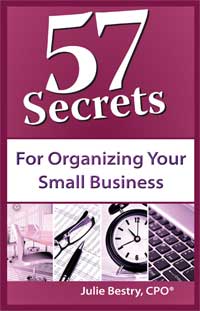
And certainly when I wrote 57 Secrets for Organizing Your Small Business, the words and phrases made their debuts in Microsoft Word, Evernote and drafts of emails. (My publisher would want me to note that Secret #4 in the book is Be Faithful To Your Information-Capturing System, and explains how to ensure the preservation of important thoughts and information, no matter your preferred capturing style. Y’know, like if you wanted to buy a holiday present for someone with this issue. Just sayin’.)
In essence, I’ve learned that for me, I hand write to take information in, to help my brain process it. But when I create, handwriting is an impediment — it slows me down. Perhaps it’s because I honed my typing skills in December of my freshman year of college, with a friend’s Mac and three term papers to type in one weekend, and now mfffflpffffl years later, my typing speed can keep up with my thoughts while my spidery, aging penmanship cannot.
Before these last few weeks, I hadn’t thought about when and why I choose to use analog vs. digital, paper vs. screen. I only knew that I do, and that it was instinctual. Dear readers, what about you? Are you like Patrick Rhone, all about the pen? Do you emulate pretty-much-paperless Brooks Duncan? Or are you more like Sienna Craig and myself, somewhat self-aware of your contradictory capturing relationship?
Wherever your incoming and outgoing thoughts live, it’s all about the place where you capture them so that you can set your mind free.
Organize Your Reading: A Customized Digital Newspaper…That’s Actually Paper!
Are you a reader? Organizing the form of information flow can be just as important as squaring away the content.
Previously, we’ve discussed how handwritten notetaking correlates better with learning and improved cognition than typewritten notes. Also, a recent Scientific American piece, The Reading Brain in the Digital Age: The Science of Paper versus Screens, reviewed the current research. It found that there was at least some indication that “by limiting the way people navigate texts, screens impair comprehension” and that “screens and e-readers interfere with two other important aspects of navigating texts: serendipity and a sense of control.”
Leaving behind the science of the matter, sometimes, you just want to read things on paper. Perhaps you want to scribble something in the margin, or highlight it, or circle a portion, or post it on your mirror for inspiration or your office door to make a statement. You want to clip it out and paste it on your high school locker door, or dorm room bulletin board, or office cubical half-wall. You want to share it with your great-grandma.
But GamGam may not want to log in to Facebook or Tumblr. And you can’t post your iPad on your mirror or your door, and even if you could, some goofball would come along and change the screen. The web is great, and there’s amazing stuff out there just waiting to be absorbed. But…sometimes…paper is ineffably better.
However, as you probably know from experience, indiscriminately printing things from the web is generally a no-go. Sure, you can print directions or a recipe, but usually you end up with excess: ads, navigation links and junk; you use up the color ink disproportionately to how much you care for the things that print in color. And yes, previously, we’ve talked about options to make your online reading simplified, and that can help reduce the waste of ink and paper. But, sigh, sometimes, we miss newspapers.
The UK company Newspaper Club, which helps consumers design and print their own newspapers, has come up with an innovative approach for just such moments. They call it Paper Later. (Not to be confused with the creativity app Paper. Or Facebook’s app called Paper.)
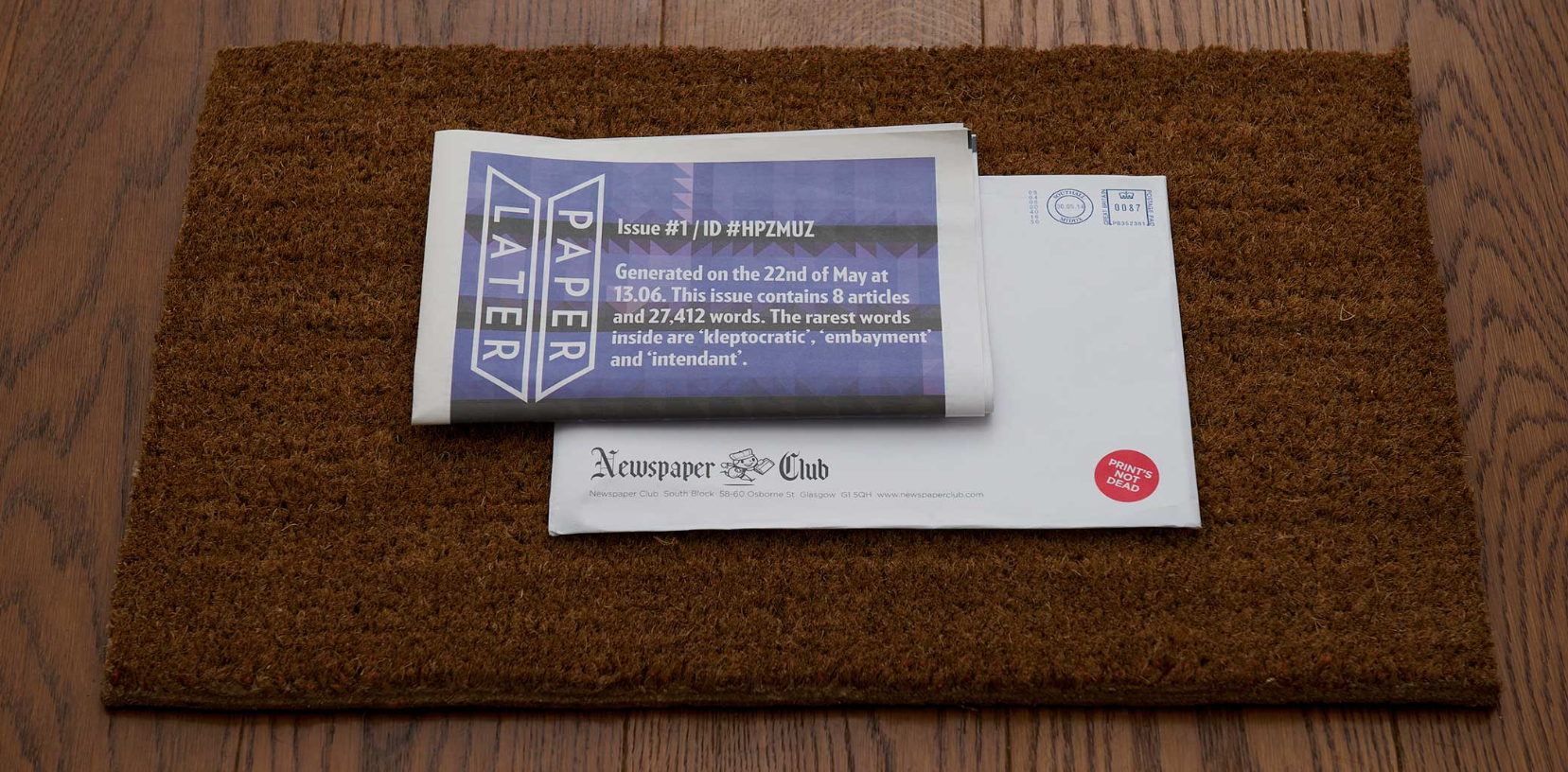
At first glance, Paper Later works similarly to other ‘read it later’ services like Instapaper, Pocket, Flipboard or Readability. As you’re reading along, click the “Save for Paper Later” button in your browser while you’re standing in line at the grocery store or waiting for the dental hygienist. Whatever you’re reading, click on your phone or tablet and select those really good bits of the web, particularly what’s come to be known as “longreads” from stellar sources like the eponymously named Longreads, Medium, Hazlitt (Canadian and oh-so-cool), ProPublica (for public interest journalism) or The Classical (for sports fans).
But instead of coming back and reading them on the web, you get to read them on paper. Real paper. And not like printing a PDF on your printer, but in a newspaper. So, click to save, and when you have enough articles, hit “print” and Paper Later will lay your newspaper out, print it and ship it to you, and it should be delivered within 3-5 working days. It’ll come in a card-backed envelope and should fit in a standard mailbox or through a standard letter slot.
You can save anything from the web, but articles and blog posts work best. Obviously, this is not for saving and printing hot news stories. It’s not for reading quickly and tweeting out to your followers. It’s designed to let you take the more thoughtful approach, to read on a long train or airplane ride, or while you’re enjoying those last few sunny, crisp days in the hammock. Pick stories that are a little closer to timeless — or at least those which will have meaning to you once you’ve collected enough to read.
Paper Later is printed on 55gsm newsprint, with a high recycled content. It’s FSC– and PEFC-certified, and sourced from Swedish forests (because apparently those Swedes grow the best newspaper trees). I was curious about the length of a typical customized Paper Later edition, and got a quick reply:
@ProfOrganizer you can order anything from 8-24pp, and many people hit the maximum, which works out to be 30-40k words, typically.
— PaperLater (@paperlaterhq) August 18, 2014
Paper Later reports that the end-result looks and feels like a traditional newspaper, but is a tad thicker than typical newspaper, and is thus less likely to tear.
Unlike the Little Printer, which (even with its recent advances) I still think is mainly good for a lark, I can envision a number of reasons why you might want to invest in a subscription to Paper Later.
- You love the experience of reading the paper, but find your daily newspaper mostly pointless because you’ve read it all on Twitter already.
- Paper is less distracting than digital. With Paper Later, there’s no advertising (which makes it better than a traditional newspaper). And you don’t have to worry about tilt-lock, or losing wi-fi, or dropping it on concrete.
- You’ve been trying to learn a new language, but digital just isn’t conducive for you to unravel the nuances of longer pieces. With your Paper Later in one hand and your favorite whatever-to-English dictionary (digital or otherwise) in the other, you can explore.
- Artistically archiving a project appeals to you. An expectant couple might be blogging about preparations for the baby-to-be, and a newspaper archive of those posts provides a touching and tangible record.
- You want to curate fabulous pieces of writing for a loved one who is not digitally adept. Great-Grandpa’s brain is still sharp, but perhaps his hands aren’t so steady, and a tablet or keyboard just doesn’t work for him. A newspaper filled with writing that satisfies his intellect might be just the ticket.
Unfortunately, Paper Later is only available in the UK for now, so only Paper Doll readers on the other side of the Atlantic, like Jacki Hollywood Brown (Canadian professional organizer and blogger on extended stay in England), can report in on how well it works, but there’s an option to write in to let them know you’d like Paper Later to expand to your locale.
At £4.99 (about US $8.28) per issue, it’s a small indulgence. Much like taking quiet time, sitting in a hammock and catching up on your reading.
NAPO2014: Organizing Photographs for the Future: Forever and Legacy Box
“Take a picture, it’ll last longer!”
Do you remember that childhood taunt if someone got caught staring? Nobody stares anymore, because everyone is busy taking photographs. The swirl in the coffee foam. Kids playing. Kittens. (Oh, good gracious, lots of kittens!) Breakfast. Lunch. Dinner. Public moments. Private moments. People photograph everything as if to ensure that failure of visual memory need not be as traumatic. (I suspect our great-grandparents had less stress having never heard, “Pics or it didn’t happen!“)
In a recent study published in Psychological Science, a journal of the Association for Psychological Science, Linda Henkel of Fairfield University found that study participants had worse memory for objects (like museum displays), and for specific object details, when they took photos of them. Is it unreasonable to extrapolate that we might better remember baby’s first steps or romantic dinners if we weren’t trying to capture them digitally?
Whatever the case may be, people will likely always be concerned with preserving their memories photographically, so today we’ll be looking at two Organizers’ Choice Award Winners from the 2014 National Association of Professional Organizers Annual Conference and Expo.
FOREVER™
Forever won for Best Productivity Solution for Mobile Workers, but “worker” is probably a misnomer. It’s for mobile humans, people who may be anywhere — any city or state, at home or on campus, in a retirement community or even, eventually, on the moon — but who want their photos with them. But there’s a little (or a lot) more to it than that.
Forever bills itself as permanent cloud storage for your memories. Permanent is an interesting concept these days, because as much as we’ve come to depend on digital solutions, we’ve also realized that we don’t get to control them or their longevity. Sure, we can use various systems, but Google unceremoniously dropped Google Reader last year, leaving millions of RSS feed users bereft. Beloved cloud-based solutions for storing information, contacts or finances (like Springpad, Bump, and Manilla) disappear due to changing business models, buyouts and venture capital failings.
With most cloud-held information, backing up and transitioning to another site may be simple or complicated, but it’s usually successful. Transitioning between two cloud-based photos sites, however, present myriad additional problems, as TUAW editor and Unclutterer blogger David Caolo found recently when he tried to move 14,000+ photos from a prior service to Flickr. During that process, he found that his cloud storage provider had stripped all of the metadata and tags that make photographs searchable.
Stripped metadata is just the beginning. As Forever founder Glen Meakam found, when he prepared to back up his family photos:
…social media sites claimed ownership and compressed everything that people posted. These sites also data mined and sold customer information to make money from advertisers, and when an account was no longer valuable to advertisers, it was shut down. Photo sharing and cloud storage sites were not much better. They lacked sharing capability, necessary media formats, or appropriate organizational tools. All were temporary and avoided granting any permanent ownership or digital rights to customers.
Forever’s model is based on two features: what it does, and how long it will do it.
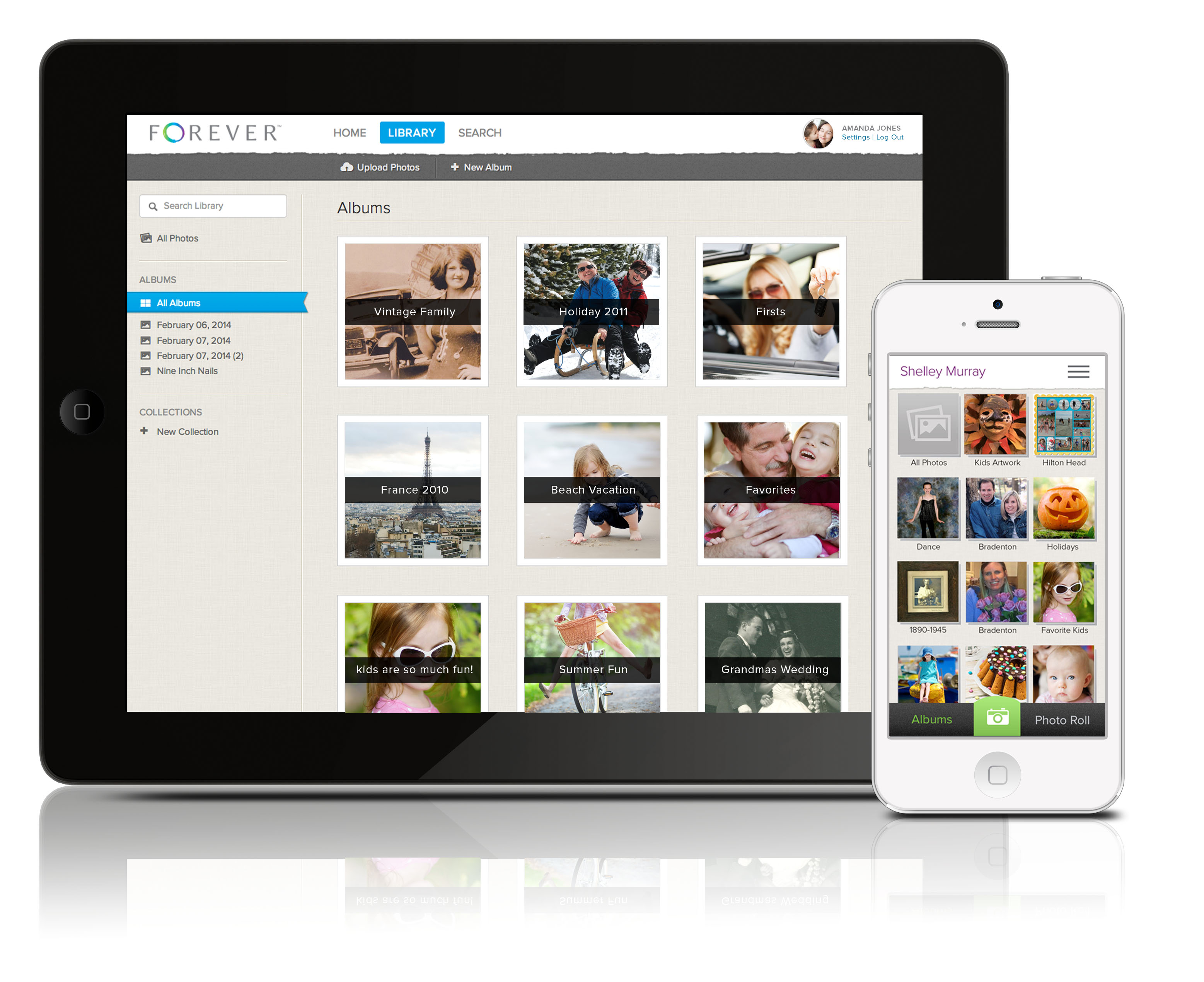
What it does (the basic services), includes:
- 1 gigabyte of storage (scanned physical items, digitized: 2000 printed photos, 1000 slides, 3 hours of VHS, Hi-8, 8mm film, 4000 pages of documents; digitized content from phones and cameras: 500-2000 photos, one hour of digital video, 140 MP3s)
- triple backed-up, encrypted storage
- guaranteed privacy with no data mining or advertising
- easy photo uploading via the website or mobile app (IOS-only)
- unlimited uploading, downloading and viewing
- non-photo storage, including recipes, legal documents, artwork, clippings (and soon, video)
- full-resolution photo preservation in any size, without compression
- the options to allow compression to make greater use of storage capacity or purchase more storage for a Forever Account
- photo organization in online albums; collation by time, theme, person, etc.
- privacy settings adjustable by image
- complete photo sharing options
- long-term digital migration — as photographic standards change, Forever plans to migrate to new file formats to enable continuous and stable preservation
Additionally, Forever trains and employs print and media organizers to scan, upload and organize photos (for an additional fee). As with traditional scanning/preserving services of this type, Forever sends you a trackable, insured, pre-paid box. You fill and ship it with photos, slides, video or film; they inventory, tag, scan and digitize everything, uploading it all and returning the contents to you.
How long is service/storage guaranteed? Forever claims it’s…well…forever: Your lifetime, plus 100 years! But for anyone whose 10th grade sweetheart promised to love them forever, that word can ring a bit hollow. So, how does Forever promise to future-proof customer’s photos?
Customer fees paid for permanent storage go into a Forever Guarantee Fund, a conservatively-managed fund created to generate income and grow over time, sort of like a university’s endowment. That interest income pays for “permanent storage, uploading, downloading, viewing, and sharing for your lifetime, plus 100 years – guaranteed.” Forever says, “although we can’t guarantee beyond 100 years, our goal is much, much longer. We call it Forever Trust™.”
What does this cost? Permanent membership requires a one-time payment of $250 (or $6.95/month for thirty-six months on the installment plan), and gives you everything listed in the bulleted section above, plus a personalized URL (like PaperDoll.Forever.com) and two hours of phone support. Permanent members can also name an Account Manager for future account administration (in the unfortunate event that you do not last forever).
Introductory membership is free for 90 days, and those members can use the Forever web and mobile apps, including photo sharing and content storage during that period, but have limited storage capacity and no long-term storage promise unless/until they upgrade to permanent membership.
Paper Doll is intrigued by the Forever Guarantee Fund. However, the lack of information on the web site regarding the actual cost of additional storage and the promise of merely two hours of phone support (which, one assumes, means you pay for more assistance over the course of membership) leaves me just about as cautious as one should be of a 10th grade sweetheart’s promises.
APPO™ LEGACY BOX
The Association of Personal Photo Organizers (APPO), founded by Cathi Nelson, is a membership association that trains, supports and provides industry tools to its 500+ members throughout the US, Canada, Australia, and the UK. Member Personal Photo Organizers work to attain the knowledge and expertise necessary to “rescue, manage, organize and save your photos allowing you to easily find, preserve and share your stories.”
APPO has developed a network of industry partners (including Forever™), brands of products and services that APPO’s leadership feels represent the best solutions for organizing photographic memories. At this year’s NAPO Expo, APPO’s Legacy Box earned the Organizers’ Choice Award for Best Solution for Everyday Organizing.
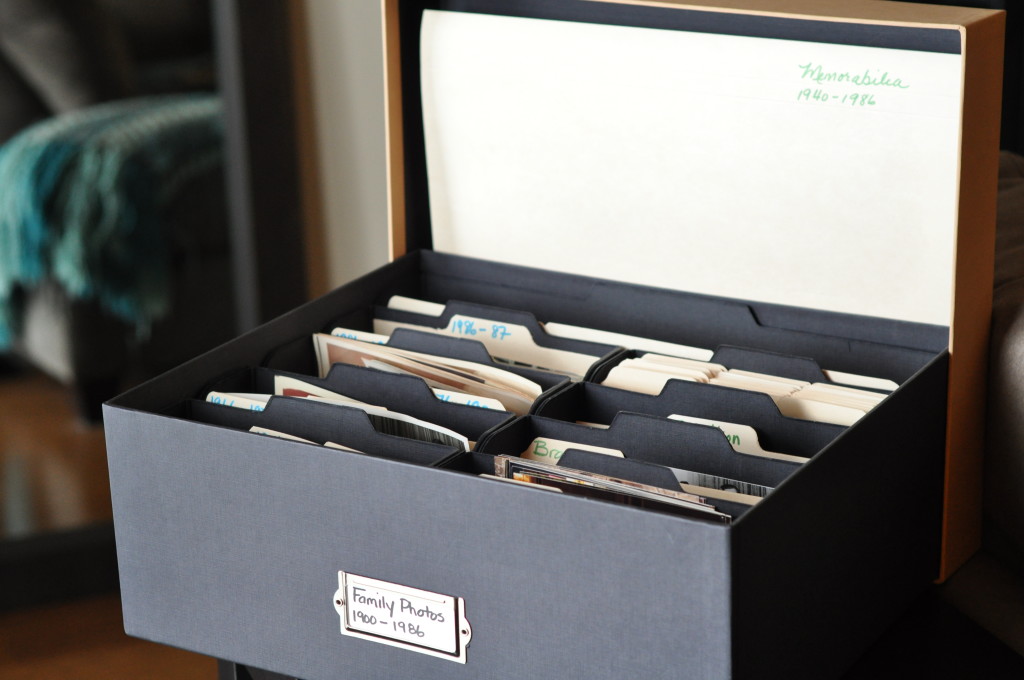
The Legacy Box is an archival storage box line designed to safely store, organize and preserve print photographs in an attractive, acid-free, lignin-free environment.
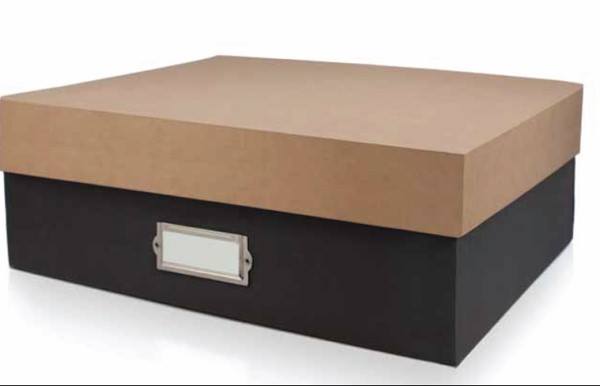 The large Legacy Box (15 3/4″ wide x 13 1/4″ deep x 5 3/4″ high) holds 2400 print photos measuring 4″ x 6″ or 5″ x 7″. It includes 54 dividers for sorting photos into sub-categories, as well as two storage pouches/envelopes (one, 14 3/4″ wide x 5″ high; the other, 7″ wide x 5″ high) for oddly-sized items, like panoramic photos, medals, ribbons and other memorabilia. Also included is an accordion envelope to hold larger photographs and memorabilia. (A smaller Legacy Box holds up to 1200 print photos.) A small, customizable label holder on the front of the box identifies the contents.
The Legacy Box is only available for purchase directly through an APPO Personal Photo Organizer.
Print or digital, local drive or cloud, go ahead and take your photos and preserve them for future generations. But please, put the camera/phone down on occasion and notice what’s going on outside the frame. Because, while photos are forever, life zips by in an blink.
From Paper to the Cloud: Ampad Shot Note
For a while, Paper Doll kept getting asked the same question: Paper or Digital? Nowadays, that’s the wrong question. More and more, it’s not a question at all, because the answer is paper and digital. Hybrid solutions are becoming more common because people need to organize their information in multiple ways.
Last year, we looked at the Evernote Smart Notebook by Moleskine. On the outside, it was a cool paper notebook, designed for writing or sketching and helping you look like a hipster, but on the inside, it was magically connected to cyberspace. With the Smart Notebook, you added little stickers next to whatever you created, used your digital device to align and snap a photo, and the picture landed safely in your preferred Evernote folder, tagged appropriately because of each sticker’s flavor of magic fairy dust.

Today’s entry into the paper/cloud hybrid notebook arena, Esselte’s Ampad Shot Note, with the motto “From Handwritten to Handheld,” is a little less hipster than Moleskine and a little more corporate/classroom.
The Basics: Shot Note comes in seven varieties. Four are band-bound at the top, like a typical legal pad. The 5″ x 8″ writing pads are available in wide rule and dot graph formats (suitable for to-do lists and quick thoughts); the 8 1/2″ x 11 3/4″ writing pads also come in wide rule and dot graph (appropriate for class and meeting notes). All pads have a rigid 60 pt chipboard backing and 40 micro-perforated 22 lb. paper sheets. (The pages are not lined or dot-gridded on the reverse sides, unlike with traditional notepads.)
Two of the Shot Notes are spiral-bound for easy flipping of pages, but are also micro-perforated. The 9″ x 12″ blank sketch pad has an extra-sturdy 80 pt chipboard backing so the artist in you can be nimble. Each pad has 40 sheets of 50 lb. paper. The 9 1/2″ x 7 3/4″ writing notebook is medium ruled, with 40 sheets of 22 lb. paper and a rigid 60 pt chipboard backing. The sketch pad has the spiral at the top; the notebook is spiral-bound on the left side.
For a larger canvas to display your brilliance, there’s a 23 1/4″ x by 31″ blank easel pad with 25 perforated, self-adhesive, repositionable sheets of bleed-free 20 lb. paper.
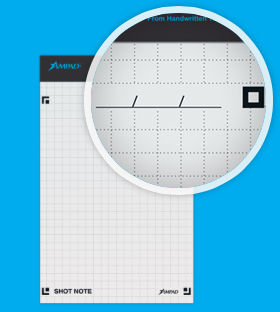
All of the Shot Note varieties have corner markers to help you align the pages (of which, more later). Note, the corner markers are only on the “front” pages, so if you write on the reverse of the sheets, it’s no different from writing on a standard notepad.
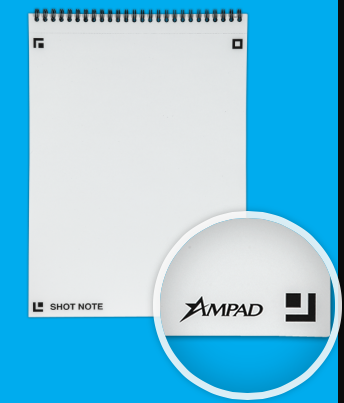
Each of the writing pads has markings in the upper right corner so that you can date your notes. (The sketch pads are undated.)
How Shot Note Works:
- Download the free Ampad Shot Note app for iOS or Android.
- Use the notebooks. Write notes, letters, sonnets. Doodle your name and your sweetie’s, or sketch the next architectural wonder.
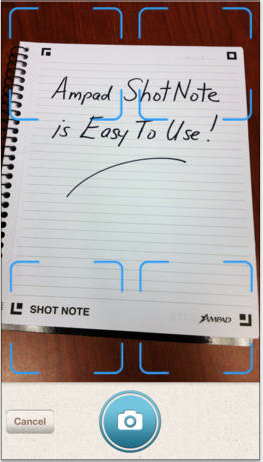
- Snap a photo of your creation using the Ampad Shot Note app, aligning the four corners of the page with the app’s doohickey for recognizing the corners. This uploads your page to the app.
 Name your file. Add a description and tags. The app will create a date- and time-stamp for you.
- Access and view the items you’ve captured. Search by name, tag or date/time-stamp.
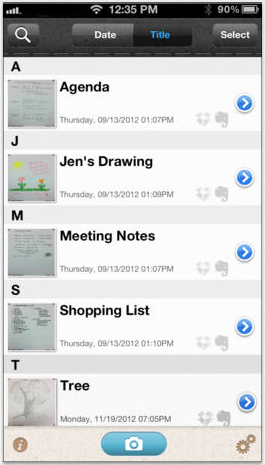 Share your items via email, Evernote, Dropbox, Twitter or message from your camera roll.
Why You Might Use the Shot Note Pads and App
You, like Paper Doll, may have a really shaky hand when it comes to snapping documents and pictures with a tablet. While an increasing number of digital devices have grid lines built into the camera apps to make it easier to shoot “straight,” some are easier to manage than others.
Your creativity only bursts forth when you set pen (or pencil) to paper. Maybe you get tongue-tied (finger-tied?) when you type, but really need to have a digital copy of what you create so can share with collaborators or clients.
Maybe you want to share a personal message for a love note or “good luck” blurb, and don’t want to sacrifice handwriting and personal doodles just to be able to have it received immediately.
What other things could you do with the Shot Note?
- Archive your children’s school projects and drawings.
- Share notes from class with your study group.
- Snap your grocery list and share it with your family so two (or more) of you can divide up zones of the supermarket and finish faster.
- Keep your originals safe at home (or at the office) when you’re traveling.
For more on how the Shot Note works, check out the spiffy little video.
Paper Doll‘s Thoughts: I was intrigued by the Shot Note when it debuted at the 2013 NAPO Conference last spring. I still think it’s neato, in the abstract, but there are some practical concerns. First, price. Available at Amazon, Staples and other office supply stores, the Shot Note regular pads lists between $6 and $10, which is pretty pricey for so few pages per pad, though Amazon carries them at a significant discount (a more reasonable $2-$4). The easel pad, listing from $70-$90 (yes, really!) and discounted at about half of that, is pretty darned expensive for 25 monster-sized sticky notes.
Beyond price, it’s not clear what the Shot Note can do that’s really special. Right now, it’s a camera app that nicely lines up the pages of utilitarian-looking notepads, and it’s decently integrated with the major productivity tools. But it strikes me that Evernote seems to have gotten much farther with integrating its camera app, and can even search handwriting as if it were text. Then again, Ampad is in the business of paper, not digital manipulation, so maybe it’s not fair to hold the two to the same standards.
I had one other thought. The Shot Note focuses on the written and the visually artistic, but Ampad could create a Shot Note side-spiral notebook of blank sheet music. I suspect that there are suitable apps for taking the uploaded, snapped, handwritten notes and allowing the paper and apps to make beautiful music together. (No charge for the idea, Ampad. Enjoy!)



Follow Me