Archive for ‘Productivity’ Category
Paper Doll Helps You Find Your Ideal Analog Habit Tracker
If you cannot measure it, you cannot improve it.
~ Lord Kelvin (William Thomson, 1st Baron Kelvin)
If you cannot measure it, you cannot improve it. ~ Lord Kelvin (William Thomson, 1st Baron Kelvin) Share on XTHE BENEFITS OF HABIT TRACKING
Over the past two weeks, in Organize Your Annual Review and Mindset Blueprint for 2023 and Paper Doll’s 23 Ideas for a More Organized & Productive 2023, we touched on the importance of building good habits, either in and of themselves or to replace deleterious ones. We talked about the wisdom of James Clear, author of Atomic Habits: An Easy & Proven Way to Build Good Habits & Break Bad Ones.
Clear’s best-seller, which should be read in its entirety, talks about how successfully tiny habits (at the metaphorically microscopic, atomic, level) are based in four laws of habit creation:
- Make it obvious
- Make it attractive
- Make it easy
- Make it satisfying
In chapter 16 of the book, Clear references the essential nature of habit tracking, and ties habit tracking to the above four laws, but I’d like to speak directly to the last one. He states, “One of the most satisfying feelings is the feeling of making progress.” Well, duh!
And how can we verify our progress? Well, often, we can measure it by looking at the end result. If we’re trying to lose weight, we can measure our progress in having to tighten our belts or buy smaller clothes. If your kids are making progress toward doing better in school, improved grades will eventually make it obvious.
But it takes time to see that kind of progress, and if we’re going to keep motivated, to stick with our habits, we’re going to need to be satisfied daily. We need to see a sign of progress, no matter how minuscule, often. That’s where habit tracking comes in.
Habit tracking gives us an immediate sense of progress, even if the progress is only in our willingness to make an effort.
Persistence is the measurement of your belief in yourself. ~ Brian Tracy
Persistence is the measurement of your belief in yourself. ~ Brian Tracy Share on XTHE DRAWBACKS OF HABIT TRACKING
I should note that there are some inherent drawbacks to tracking our habits.
Our intention is to draw our attention to what we’re doing so that we can strengthen our resolve and recognize our struggles so that we may overcome them.
However, it’s easy to become so focused on our string of achievements that we become obsessed. When that happens, any time we do end the streak has the potential to demoralize us and weaken our resolve to get back on the horse.
If you tell yourself that you will run every day, but the weather is so stormy that “it’s not fit outside for man nor beast,” you may see your options as two-fold and rigid: risk life and limb and frostbite to hit your goal and mark that X or dot on your tracker, or leave it blank. That’s black and white thinking.
And if you leave it blank, you may feel like you’ve already lost. Somewhere, in the back of your head, despondency sets in, and failure to achieve your goal on one day can make you feel like a failure overeall, uninspired to get back to your habit the next day.
But this is an unnecessary dichotomy. Our habit goals are just that, goals. Doing something is always better than doing nothing.
If you can’t run three miles today, could you sprint up and down the stairs in your house, or work out along with a walking or dancing video?
If you miss your 10,000 steps and only manage 7500, could you do 500 extra steps for the next 5 days (or 250 for the next 10, or …)?
Maybe you promised yourself you’d practice the piano for 30 minutes a day, but your work and childcare schedule made that impossible; could you just play some scales to stay limber, or play one song to boost your spirits and remind yourself why this is a goal habit in the first place?
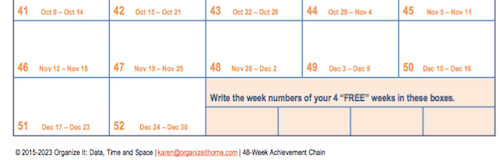
My colleague Karen Sprinkle created a wonderful 48-Week Achievement Guide, an e-book explaining how to use her patented chart for logging progress on goals. She recognized the inherent loss of momentum that comes from not getting to check off a day or week of a habit.
Thus, Karen’s chart creates space for four FREE weeks, weeks in which you have a “get out of jail free” card to not achieve your goals, while not exactly wrecking your streak, either.
Maria White interviewed Karen for episode #13 of her Enuff with the Stuff podcast, entitled Finally Accomplish Goals Using the 48-Week Achievement Guide. Take a listen.
DON’T BREAK THE CHAIN: THE BASIC CONCEPT
One of the best known tales of habit tracking comes from Jerry Seinfeld, master of his own (habit tracking) domain. Once asked how he wrote so many jokes, he explained that early in his career, he made a commitment to himself to write one joke a day.
Just one joke. But one joke every day.
He didn’t tell himself he had to have a Tonight Show monologue. He didn’t push himself to write a sitcom script. He just had to write one joke each day.
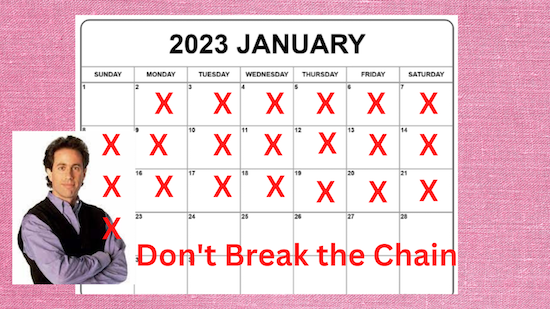
Seinfeld had a large wall calendar in his apartment, which showed all the dates in the year. Each time he wrote a joke, he marked the calendar with a red X, and as the story goes, he eventually had a long chain of red X’s to create a visual cue to show how he’d been consistently putting in the effort.
Did he need talent? Of course. Comedic timing? Without question. But Seinfeld’s advice to young comedians was simple: Don’t break the chain!
The chain of red X’s on the calendar is just the simplest form of habit tracking.
AUTOMATED HABIT TRACKERS
The easiest (though not necessarily the best) kind of habit tracker is one that is automatic, or done for you by something or someone else.
I recently bought a new scale, and realized that it had a Bluetooth function. I didn’t really need a scale with Bluetooth, but I was intrigued to find that once I connected it to the iPhone app (which itself connects to the Fitbit app), my scale tells the app not only my weight, but also my BMI, metabolic age, the percentage of my body made up by water and of skeletal muscles, my bone mass and muscle mass, and all the percentages of my fat that is body fat, subcutaneous fat, and visceral fat. And I hope that’s the last time I ever use the word “fat” in this blog!
My point is that all I have to do is to step on the scale (which I do only once per week so as not to obsess) and the app and the magic of Bluetooth does all the rest.
Similarly, while I can (and admittedly do) look at my Fitbit tracker on my wrist, the app takes care of tracking my efforts. Here’s how I did this past week.
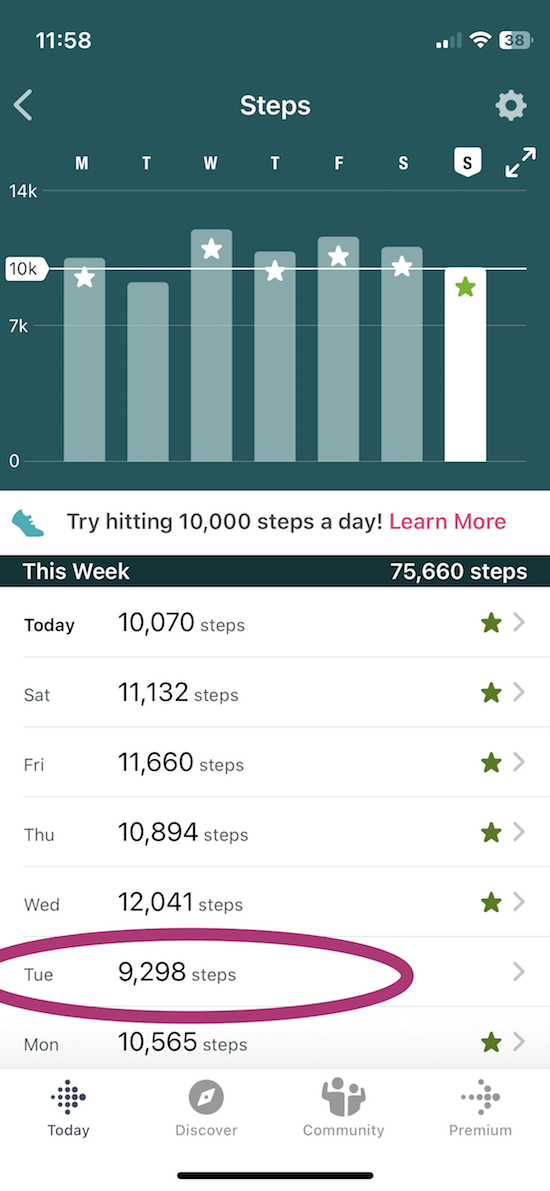
Note: while I didn’t make my 10K goal steps on Tuesday last week, I made up for it the next day. I didn’t get down on myself for it, because I knew that progress, not perfection, is key to building habits.
There are even “smart” water bottles that measure and communicate (again, by Bluetooth) with an app to track how much you’ve hydrated!

There are a few main benefits of an automated habit tracker:
- You don’t have to do any math. (Yes, I can add daily numbers to get weekly ones, but why should I have to?)
- Automated trackers require little effort, so you can concentrate on your behaviors without focusing on the mechanism for measuring them.
- You don’t have to worry that you will forget to consistently measure and track your habits.
Parents and teachers commonly track and report the success of children at achieving habits, from potty training to turning in homework to practicing vocabulary words. If you work in a call center, there’s software to measure your metrics: how many calls you took, how many ended in resolved problems, etc.
The key problem with automated habit tracking is that by completely off-loading the labor of tracking, there can be a disconnect between effort and how much you pay attention to your habits. This is why, although there are many excellent habit tracking apps, I recommend that clients start their habit tracking journey with proactive analog methods.
CONCEPTS TO CONSIDER WHEN SELECTING A HABIT TRACKING METHOD
As you’ve heard me say before, with regard to calendaring and note-taking, the determination of whether you should go analog or digital, or which method within either category you choose, depends more on your self-knowledge than what’s popular.
If you love apps and prefer to gamify your habits, a habit tracking app may be your best bet, even if I would personally argue against it. If you have an artistic bent and find color motivating, selecting an analog habit tracker that lets you use colorful markers or crayons to track your progress might be the key to your inspiration.
Consider the following:
- Delight — How much do you enjoy a particular method of tracking your habits? Do you get joy or a sense of calm when you stop to log or mark your progress because the colors please you or the app makes a delightful sound?
- Convenience — How easily accessible is your method of tracking your habit? Does your tracking method need to be portable? If it’s just a card in your wallet or an app on your phone, it may not make a difference, but if you want to have a beautiful tracker, you’ll need to have drawing implements with you or wait until you’re wherever they are. Will that delay impact the likelihood that you’ll track what you do? Will you be less likely to perform the habit if your tracking method isn’t always visible?
- Flexibility — Do you want to customize your tracker or just follow whatever already exists? For the same reasons that I find bullet journals stressful (too many options, too many reminders that I’m not artistic), I’d prefer an analog system that has practically no customization, but wouldn’t mind getting to plunk around with digital settings to change colors and graphs or charts in an app.
- Measurement style — Do raw numbers have meaning to you, or do you need to see a bar chart? (And do you care whether your charts are vertical or horizontal?) Does a particular measurement style affect how much attention you’ll pay to your tracking? The attention you pay will surely have an impact on how much you improve.
- Commitment and accountability — The nature of the habit tracking method you choose can increase (or decrease) how committed you are to tracking, and thus to the habit you are building. Does this method make you feel more committed? Does it make you feel accountable to it?
We manage what we monitor. ~ Gretchen Rubin
The more you embrace your habit tracking method, the more closely (in a healthy way) you will monitor it. And we are more likely to tweak and improve and, in the words of Gretchen Rubin, manage what we monitor.
We manage what we monitor. ~ Gretchen Rubin Share on XANALOG HABIT TRACKERS
There are a variety of analog habit tracking methods, from — yes, as Seinfeld did — making X’s on a blank calendar to buying or making your own cute trackers. The following are just a few suggestions so you can consider what you might like to try.
Adhesive Habit Trackers
Tiny adhesive habit tracker sticky notes have the advantage of fitting anywhere. If you use a paper planner (and if you need ideas about that, see Paper Doll’s Guide to Picking the Right Paper Planner), sticking your tracker on your current weekly page or even on the front of your planner will keep it — and your goals — front and center.
I’m a huge fan of almost anything in the 3M Noted by Post-it® line. I found the following in my local Target last year; the periwinkle shade drew me to it.
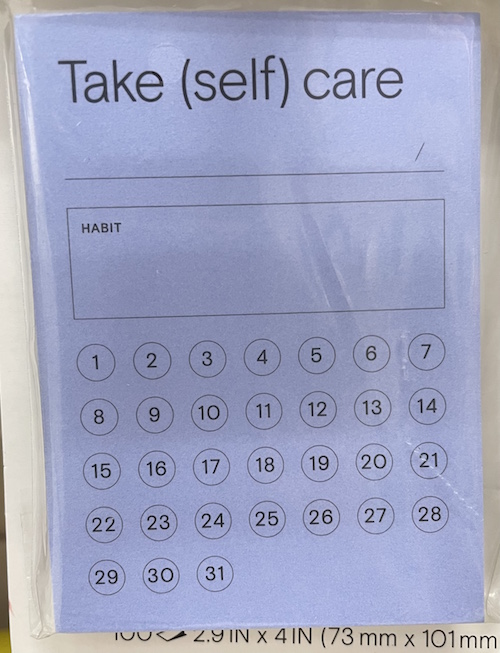
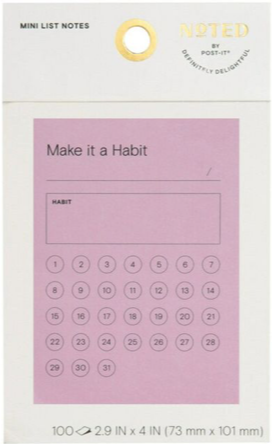
I haven’t been able to find this 2.9″ x 4″ Noted by Post-it® Habit Tracker at Amazon, but they are available at Target online and in stores. Online, 3M only mentions the pink version, for which they only have this tiny photo; the difference seems to be the “Make it a habit” label instead of the “Take (self) care” title.
The very-cool mäkēslife goal-setting/stationery store has a minimalist, $5 habit tracker sticky notepad. Because it only indicates the days of the week and has six lines for habits on each note, you can either track multiple habits each week, or one habit for six weeks (or two habits for three… you get the idea). The 60-sheet pad measures 3.25″ x 2.125″.
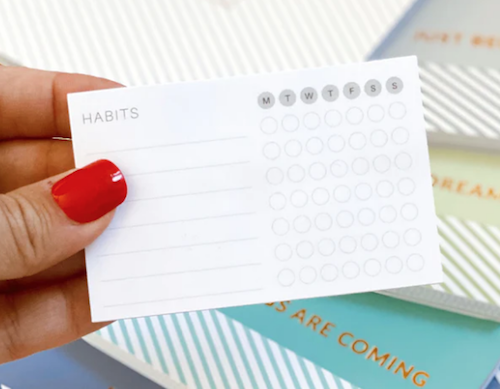
Adhesive habit trackers are quick and easy to grab, so they’re low-effort. Setting one up takes seconds, and checking a box or circle is no more effort than an X on the calendar. But only you know whether effort on the low end of the continuum will keep you motivated. Do you need more involvement to embrace the habit of tracking a habit?
Habit Tracker Printables
On various sites, you’ll find both free and for-purchase habit trackers. On Etsy, for example, a search of “Habit Tracker Printable” yields hundreds of choices, from the simple to complex.
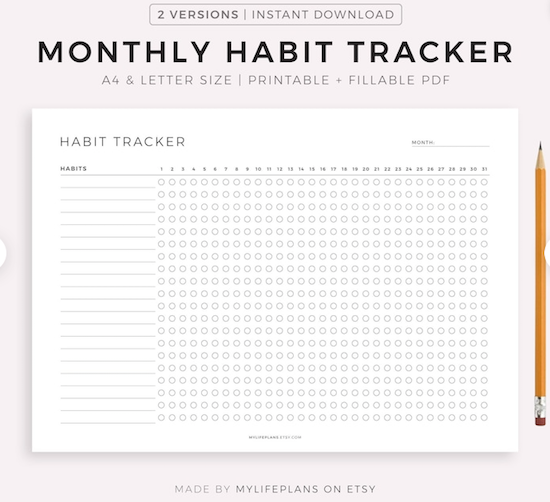
This streamlined, downloadable Monthly Habit Tracker from MyLifePlans on Etsy comes in two styles, one with boxes and one with circles, and is just $1.74:
My colleague Katherine Macy of Organized to Excel references her own (free) downloadable, printable habit tracker in the post Practical Tips for Living Your Best Life: The Smallest Achievable Step.
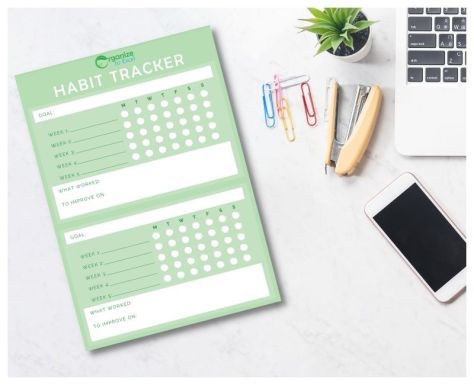
©2022 Organized to Excel
Another fun option is from Cristina at Saturday Gift. Cristina has created free downloadable, printable spiral habit trackers in 28-, 30- and 31-day styles, as well as a variety of mini-trackers, trackers designed to be used in bullet journals, and more.
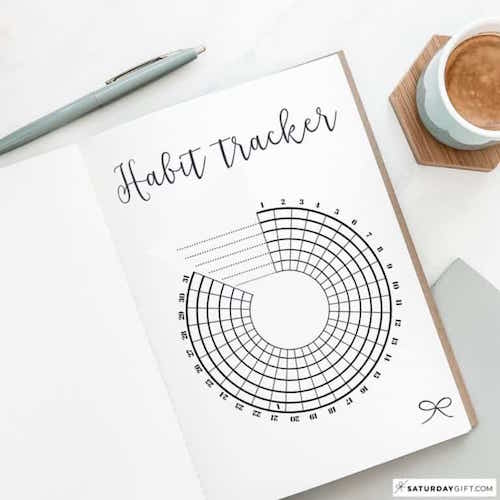
Printables are ideal for someone who prefers something that takes up a little more real estate and is less likely to get lost. You’re limited by the designer’s creation, though, so if you’re the type of person who needs a lot of customization, printables don’t offer much wiggle room for your muse.
Printables can also seem like homework. For an Obliger or Upholder (in Gretchen Rubin’s Four Tendencies parlance), this is a plus. If you’re a Rebel or Questioner, however, printables may work less for accountability and feel more like an (unwanted) obligation. Know thyself!
Habit Tracker Cards
Not everyone wants a sticky note or a full-size printable. Some people just want a tiny note they can tuck in their wallet or use as a bookmark, but keep handy.
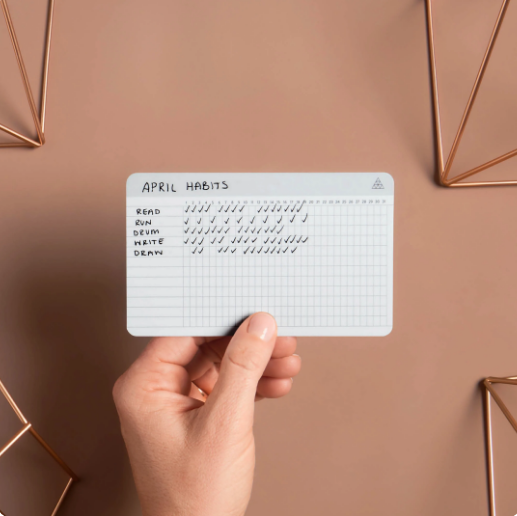
Baron Fig has a series of 3″ x 5″ Strategist Index Cards in three styles: Dot Grid and To-Do, each $10/pack of 100 and Habit Tracker cards for $15/pack of 20. All have rounded corners. (The Dot Grid and To-Do cards are blank on the back; the Habit Tracker cards have motivating quotes on the reverse.)
Fancy Plans takes the popular spiral style of habit tracking to the card form in their 3″ x 3″ Linen Textured Habit Tracker Journal Cards. ($7.99 for a six-card set.)
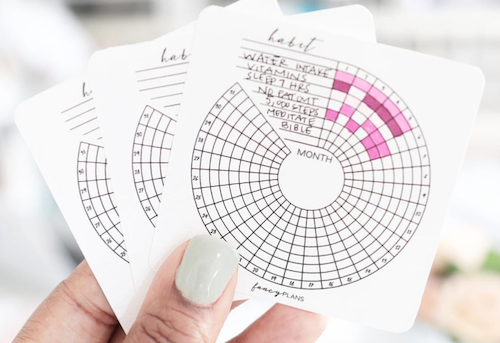
These square, spiral habit trackers are tiny and designed to be clipped into your journal/planner pages. Each tracks up to eight habits for an entire month.
Unlike more traditional index-style cards, these are smaller, and if you weren’t great at coloring inside the lines in kindergarten, the teeny-tiny boxes might outweigh the visually appealing nature of the spiral. Fear not; we’ll be looking at a similar but more expansive option a few sections down.
At Home With Quita’s YouTube channel has a great video on how to use these. Scroll to about nine minutes in when the coloring begins.
Of course, you could make your own DIY habit tracker card if you had the patience (and a straight edge, pencil, and stack of dollar-store index cards).
I liked the minimalist combination of “Don’t Break the Chain,” DIY, and cards (if not actual card stock) illustrated in this video from the Robert’s Theory YouTube channel. I also thought the white/silver ink on the black background had a nifty visual appeal.
Habit Tracker Journals
As with printables, you will have an embarrassment of riches from which to choose when you search for habit trackers journals.
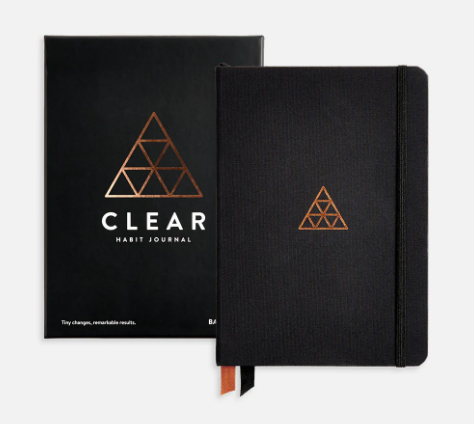
Baron Fig has created a Clear Habit Journal in collaboration with James Clear. The clothbound, hardcover, rounded-cornered, open-flat notebook features habit trackers, one-line-per-day journaling space, and lots of Clear-specific content. It comes in two sizes: Flagship (medium size at 5.4″ X 7.7″ and 224 pages) or Plus (large size, 7″ X 10″ and 208 pages). It’s $26.
 However, if you want a journal that you could place on display to clock your habit tracking as the day goes by, there are a variety of styles, from gridded notebooks to artistic visions.
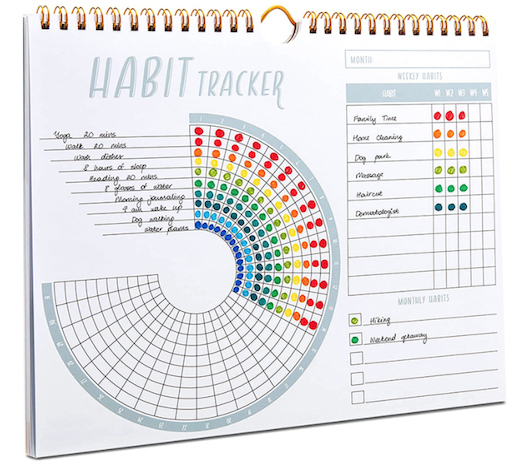
This Lamar Habit Tracker Calendar in the spiral style is undated, spiral-bound, and stands-up on its own, or you can hang it or lay it flat. It’s $16.95. You can track weekly and monthly habits.
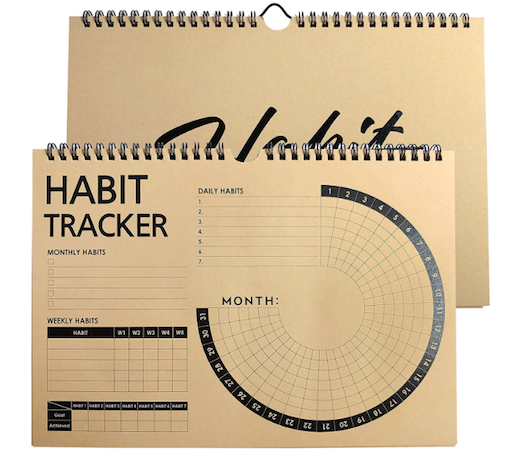
If you’d like something a little more subdued, Weanos has a Habit Tracker Journal in a similar format, but with Kraft coloring, for $14.99.
And you can explore the internet (or even just Amazon) for a wide variety of other habit tracker journals.
DIY Your Bullet Journals for Habit Tracking
All of the prior options give you pre-ordained structure for tracking your habits. Personally, I don’t want to fiddle with lots of customization; it takes away from the time I would prefer to spend on my habits rather than on creating a system for tracking my habits. I’m willing to trade the beautiful and creative (admittedly, because my artistic leanings are neither beautiful nor creative) for having all the boxes be the same size and not having to worry about my chicken-scratch handwriting.
However, if you like the idea of having a notebook with you in which to track your habits, and if you want to embrace customization in terms of style and color, a bullet journal or other blank journal might be ideal for you.
The internet is full of options for formatting. You may want to start with this short list, all with mind-blowing graphics for tracking your habits:
50 Habit Tracker Ideas for Bullet Journals (Bullet Journal Addict)
25 Bullet Journal Habit Tracker Layout Ideas to Help You Build Better Habits (Habits Buzz)
121 Habit Tracker Ideas for Your Bullet Journal (Planning Mindfully)
45+ Bullet Journal Habit Tracker Ideas & Examples for 2023 (Develop Good Habits)
10 Habit Tracker Spreads (Bullet Journal Habit video)
Intentional Habit Tracking (Bullet Journal)
In addition to design ideas, and especially helpful for those of us who aren’t so artistic but might like to explore habit tracking with a bullet journal, there are two tools that I find delightful.
Stickers
Sometimes, flashing back to third grade is just what you need to get a boost of motivation. (Though sadly, I suspect it’ll be hard to find any scratch & sniff habit tracking stickers.)
Stickers are fun, colorful, and add pep to paper. When I visited Italy and the UK, I bought a variety of stickers for use in my paper planners. Stickers for tracking habits would be equally motivating.
Just Google “habit tracker stickers” and you’ll find a nifty bounty of colorful options.
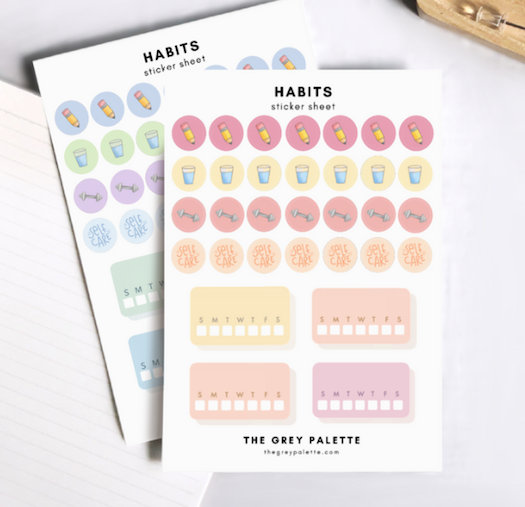
The Grey Palette‘s Habit Tracker sticker sheets in cool or warm hues offer up 4.5″ x 6.5″ stickers (32/pack for $5.25) for tracking Sunday to Saturday habits and habit-specific stickers.
Mochi Things has a huge variety of color-dot stickers, calendar stickers, and grownup activity stickers made from PVC material and generally priced under $5 for a set. If you’d rather use dots than markers, the Circle Pigment See-Through Stickers might fit the bill (and prevent marker bleed-through in journals).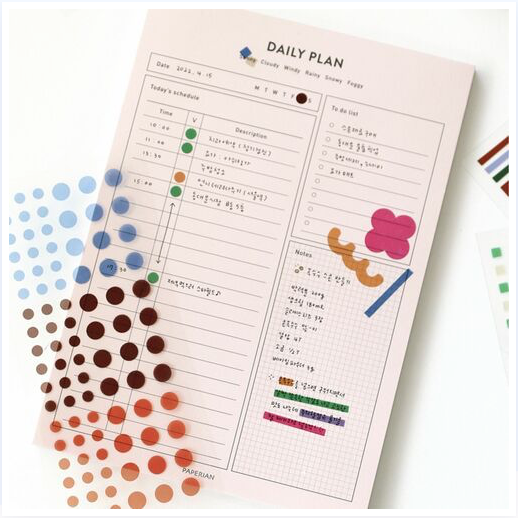
Rubber Stamp Blocks
If your fear of creating wiggly lines and lopsided grids in a bullet journal or DIY habit tracker is keeping you from embracing the format, rubber stamp blocks may be the secret shortcut.
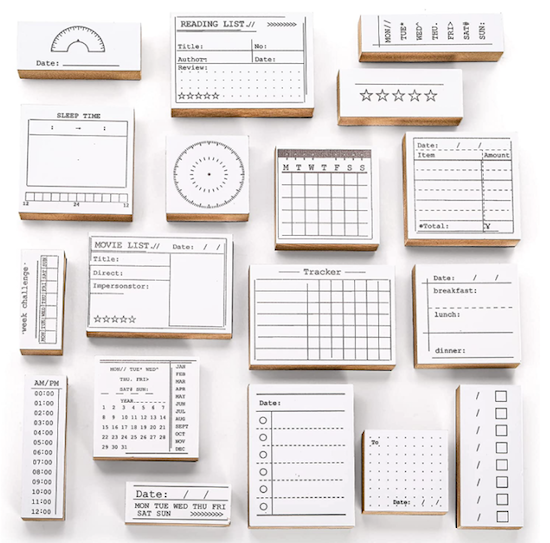
I found a large number of calendar/planner/habit tracker rubber stamp blocks on Amazon, Etsy, and around the internet, but they all seem to follow the same patterns, so I encourage you to find a price and style that appeals to your aesthetic.
This Tosnail 18-Piece Bullet Journal Stamp Kit creates all the stencil/formats you need for bullet journaling, including dated and undated tracking grids, as well as formats for just listing the days of the week, as well as stamps for calendaring, list-making, meal-planning, and more.
Although I’m a Paper Doll, I know there are a variety of digital habit tracking solutions, from simple spreadsheet-based grids to cool Evernote habit tracker templates to apps galore. We’ll explore digital habit tracking in the near future.
Until then, how do you track your habits? Please share in the comments.
Organize Your Annual Review & Mindset Blueprint for 2023

The holiday week is the perfect time of year to plan for next year, to set goals and intentions, and get a fresh start. Of course, you don’t need a new year for that. Check out Organizing A Fresh Start: Catalysts for Success from this past September to see all the ways you can find inspiration for fresh starts quarterly, monthly, weekly, and each day.
But before we can design the coming year, it’s essential to review the past, and to get a handle on what worked (and didn’t) so that we can use that knowledge to set us up for future successes.
LOOK IN THE REAR-VIEW MIRROR
On the very businesslike side of the productivity realm, this is called an annual review. People in the corporate world often experience this in terms of a sometimes-feared, often-maligned annual performance review.
That’s where you tell your boss how you think you did during the course of the year (in hopes of a raise, promotion, and an atta-boy/atta-girl), and your boss tells you how the company thinks you did (in hopes that you’ll be so thankful to have a job, you won’t notice that any extra money is going to the CEO’s newest yacht).
But a personal annual review, which can cover both lifestyle and professional topics, is solely for your own benefit. It’s to help you figure out the who, what, where, why, and how of your past year so that you can find the common threads (or snags) in your successes (or challenges).
Gather Supplies
The process is as formal or informal as you’d like, but I encourage you to start with some of the tools you use to create the structure of your year:
- planner or calendar
- journal
- correspondence — email or text threads — with your best friend, accountability partner, or mastermind group
- a sense of your values
With a pen and paper (or fresh Evernote note or blank document), sift through what you’ve written and logged about your life over the past year. Where did you go, with whom did you meet, and what did you do? As if you were reading a mystery, you’ll find yourself noticing clues to patterns in your year. (Feel free to wear your Sherlock Holmes deerstalker hat.)

There are a few kinds of clues, and depending upon your life and work, as well as what you value, different clues will yield evidence for making different kinds of decisions.
Know Your Values
Speaking of values, these are not uniform across nations, regions, communities, families, or even periods of our lives. In the United States Army’s Basic Combat Training, they focus on seven values: loyalty, duty, respect, selfless service, honor, integrity, and personal courage. Conversely, the immigration portal for the Durham Region of Ontario, Canada lists Canadian values as “equality, respect, safety, peace, nature – and we love our hockey!”
If you’re not quite sure how to identify the values that help you plan your life, here are some great resources:
Nir Eyal’s 20 Common Values [and Why People Can’t Agree On More] (Eyal is the author of Indistractible: How to Control Your Attention and Choose Your Life.)
James Clear’s 50 Core Values list (Clear is the author of Atomic Habits.)
Brené Brown’s 118 Dare To Lead List of Values (Brown is the author of Dare to Lead, as well as Daring Greatly, Rising Strong, and The Gifts of Imperfection.)
The Happiness Planner’s List of 230 Core Personal Values
Some people highly value achievement and contribution; for others it’s balance and inner harmony. For me, it’s knowledge, usefulness, and humor.
We’ll get to how to use your values in a bit. For now, it’s just helpful to go through one (or more) of these lists and identify from three-to-five overarching values that resonate with you and how you aspire to live your life.
Ask Qualitative Questions
The Good
- What challenges made me feel smart, empowered, or proud of myself this year?
- What did I create?
- What positive relationships did I begin or nurture?
- Who brought delight to my life?
- Who stepped up or stepped forward for me?
- What was my biggest personal highlight or moment I’d like to relive?
- What was my biggest professional moment I’d want to appear in my bio?
- What’s a good habit I developed this year?
The Neutral
- What did I learn about myself and/or my work this year?
- What did I learn how to do this year?
- What did neglect or avoid doing out of fear or self-doubt?
- What did I take on that didn’t suit my goals or my abilities?
- What was I wrong about? (Note: Being wrong isn’t a negative. Not one of us knows everything. In the words of Dr. Maya Angelou, “Do the best you can until you know better. When you know better, do better.”
The Ugly
- What challenges made me feel weaker or less-than?
- Whom did I dread having to see or speak with this year?
- Who let me down?
- Whom did I let down?
- What did I do this year that embarrassed me (professionally or personally) or made me cringe?
- When did I hide my light under a bushel?
- What am I faking knowing how how do? — Instead of pretending you know how to do something but are choosing a different path, ask for help. Make decision about what to do from a position of strength rather than weakness.
- What’s a bad habit I regret taking up or continuing?
- Where did I spend my time wastefully or unproductively? (It’s social media. For all of us.)
- Where did I spend my money wastefully or unwisely? (Target? Let’s take a poll. Was it Target?)
Although most of these are questions I’ve developed over the years, the inspiration for including this list came from the Rev Up for the Week weekly newsletter put out by Graham Allcott, author of How to Be a Productivity Ninja, among other titles.

2022 Year In Review: 50 Powerful Questions To Help You Reflect, which includes questions for looking back as well as looking ahead.
Ask Quantitative Questions
The quantitative questions, the ones that can be measured in “how much?” or “how many?” or “how often?” will depend on the metrics by which you’ve measured yourself in the past (or expect to in the future).
I’m not a quantitative person because I find that raw numbers rarely reflect context. If you asked “how many pounds did I lose in 2022” but you were pregnant or recovering from an illness or in mourning, the answers would be useless. It reminds me of the quote variously (but likely inaccurately) attributed to Albert Einstein:
Everybody is a genius. But if you judge a fish by its ability to climb a tree, it will live its whole life believing that it is stupid.”
If you’re a fish, don’t pick metrics for monkeys.
*Everybody is a genius. But if you judge a fish by its ability to climb a tree, it will live its whole life believing that it is stupid.* If you're a fish, don't pick metrics for monkeys. Share on XThat said, if you have metrics that matter to you, by all means, measure. But again, make sure those metrics measure what you actually value. Some ways to measure:
Professional Efforts:
- How often and when was I asked to contribute (to a team effort, a podcast, a conference)?
- How much revenue did my efforts bring in?
- How many clients did I serve?
- How many new clients (or projects) did I bring in?
Physical Health:
- How many reps can I do of X? (Or, by how many reps did I increase my stamina for X?)
- How many steps or miles did I walk (or run or swim or pedal)?
- How often did I “complete the rings” on my Apple Watch or hit the goals set in my app?
Financial Strength:
- By how much did I decrease (or increase) my debt?
- How much did I invest? (Note: Measuring the performance of your investments is important for driving your future investment decisions, but actual investment performance isn’t a measure of your abilities — I mean, unless you’re a stockbroker. You don’t control global markets; you don’t control the products or services or marketing strategies of the companies in which you invest. Please don’t judge yourself by your stock performance.)
Ask How Your Year Measured Up To Your Goals and Values
Goals and values are different. In both qualitative and quantitative ways, we can flip through our calendars and our LinkedIn achievements to see where we’ve hit the benchmarks we’ve set for ourselves. We all know about SMART goals and the importance of them being measurable.
But values? You can’t check off a box to say you’ve “done” a value. But that doesn’t mean you shouldn’t consider whether your accomplishments are in line with your actual values.
We all have things at which we’re stellar, things that we may consider (or others may consider) to be our superpowers. I have a mug that reads, “I WRITE. What’s your superpower?” Writing (and talking — so much talking) is intrinsic to who I am. Because knowledge, usefulness, and humor are my values, when I’m writing this blog, I’m in alignment.

But for most values, it can be hard to tell and certainly hard to measure. One method to measure if you’re living in alignment with your values (and the goals toward those values) comes from the Acceptance and Commitment Therapy (ACT) modality.
ACT is a type of psychotherapy that focuses on emphasizing actions that increase well-being, and the ACT Values Bulls-Eye helps people not only identify their values but envision how well they’re doing in trying to live in alignment. This short video offers some guidance for using a simplified version of the Bull’s-Eye; online, you’ll find a variety of modifications for circles, stars, and graphs.
Get Creative in Describing Your Year
Not everyone wants to feel like they’re putting themselves through a performance interview. But there are creative ways to look at the year you’ve just survived.
Morgana Rae, a wealth and life coach who transforms people’s relationships with money, had an interesting idea in her newsletter last Friday. She said that she had a “one-step super trick for empowerment” in the new year — to end the prior year with a headline!
Don’t worry, you don’t have to pretend to work for the New York Times or a clickbait web site. Morgana’s was “2022 was the year that nothing worked out as planned, but everything worked out.” In 2009 (the year I was hospitalized 6 times and mostly couldn’t work with clients), my headline could have been, “2009 was the year that gave me lots of entertaining-in-retrospect cocktail party anecdotes.”
In 2009 (when I was hospitalized 6 times and couldn't work), my headline could have been, *2009 was the year that gave me lots of entertaining-in-retrospect cocktail party anecdotes.* Share on X(Note: In January, Morgana is releasing a 10th Anniversary Edition of her best-seller, Financial Alchemy.)
If you’re pithy enough for headlines, could you end 2022 by describing it as a novel or a movie? You were the protagonist, but who (or what) were the heroes and villains of the story? What was the plot? Try to accurately — and/or entertainingly — describe your year in a paragraph.
Don’t Reinvent the Wheel
You don’t have to figure this out on your own. The free, downloadable YearCompass is a popular resource for a reason. Download this fillable, printable PDF — print the booklet version and fill it out by hand, or type your answers in the digital version — and explore the creative questions to get a deep, abiding sense of what your year really meant, and how to approach the coming year.
DESIGN A BLUEPRINT FOR NEXT YEAR’S MINDSET
Once you have a strong handle on the year that was, you can begin to set your goals and benchmarks for the year that will be. But writing down goals and creating a task list isn’t always motivating. That’s because we’re not all motivated the same way. In Gretchen Rubin‘s Four Tendencies Quiz, I’m definitely an Obliger.
If you’re not familiar with the basics of the Four Tendencies, the categories reflect how we respond to expectations. As an Obliger, I respond best to outer expectations — and so accountability (through working with my accountability partner, the magnificent Dr. Melissa Gratias, and with my Mastermind Group) is the key to meeting my goals. Inner expectations? Yeah, I blow right past those.
You might be an Obliger, Upholder, Questioner, or Rebel. Upholders do well with discipline; Questioners need to know the “why” behind the what; and Rebels? Well, I suspect everyone’s still trying to figure out how to get Rebels to do what they believe they want to (and should) do.
Resolutions
Beyond figuring out what kind of support works best for you, it helps to borrow from marketing. For a long time, resolutions had a good long run. But the truth is most people break their resolutions. (Read James Clear’s Atomic Habits for a handle on why that is.)
So, with that in mind, let’s go back to Graham Allcott and his video, How to Not Suck At Your New Year’s Resolutions.
And if you still want to make resolutions, take a peek at Vox’s In Search of an Attainable New Year’s Resolution, science-based piece (including advice on a values-based approach).
But again, I’m less a fan of making resolutions, and more inclined to cheer on a big, bold way to set an attitude for the coming year. There are a few we’ve discussed at Paper Doll HQ over the course of the years.
Word of the Year
Pick a Word of the Year to help you focus your attentions on your intentions.
Another way to think of it is, what is your theme for 2023?
Whether or not you define what you will do with goals or resolutions, choosing this word helps clarify the approach you will take. To quote myself from four years, ago, the idea is that you pick a word that “encapsulates the emotional heft of what you want your year to look and feel like.” Each time you agree to take something on, you can ask whether that event or project resonates with the word you’ve picked.
Decide for yourself what the rules are. Do you want to pick a word based on what your life was missing this year? Or go for a bold new direction in which you want to take your life?
As a colleague embraced retirement this year, she picked the word “humor” for 2022 and used her newfound time to post something funny every day on social media, bringing levity to her friends.
I consider my word as carefully as picking the three wishes I’d request from a genie. I think I’ve seen too many episodes of the Twilight Zone; I know that if something isn’t worded well, I can feel cursed. The year I picked “resilience,” I ended up with too many unfortunate things from which to bounce back.
I’ve told the story before that I picked “ample” for 2020, humorously entering the year with the phrase, “Ample: it’s not just for bosoms anymore.” 2020 gave us ample opportunities to sit at home, worry, and sanitize our hands. I had much more luck in 2021 with “delighted,” but wasn’t able to find a word that resonated this year.
For 2023, my word is fulfilled.
Here are some ideas for picking yours.
Word of the Year for 2023 (Goal Chaser)
Find Your Word for 2023 (Susannah Conway)
One-Word Themes for 2023 (Gretchen Rubin)
Quote or Motto of the Year
One word isn’t enough for some people. (Me. I mean me.)
Put on your marketing manager hat and consider what kind of quote, motto, or imperative phrase would motivate you.
By the way, to make sure I wanted to say “imperative phrase” I asked Siri and in my (male, Irish) Siri’s lilting voice, the reply I got was, “Imperatives are used principally for ordering, requesting or advising the listener to do (or not to do) something: “Put down the gun!”, “Pass me the sauce”, “Don’t go too near the tiger.”
Indeed. As a motto for 2023, “Don’t go too near the tiger” seems like a pretty wise option.
I’m not kidding. The “tiger” in question might be someone trying to get you to volunteer for one more committee or an acquaintance who drains your energy.
Whether you pick a word, a quote, a motto, or a mantra, put your motivator front and center. I discussed these ideas at greater length in Organizing A Fresh Start: Catalysts for Success, but find ways to infuse your year with your word or concept.
Use signage — Post your word or phrase on your fridge, the bathroom mirror, a sticky note in the center of your steering wheel, or wherever it will grab your attention. Get yourself a fun little felt word board with changeable letters and put it on display in your home or office.
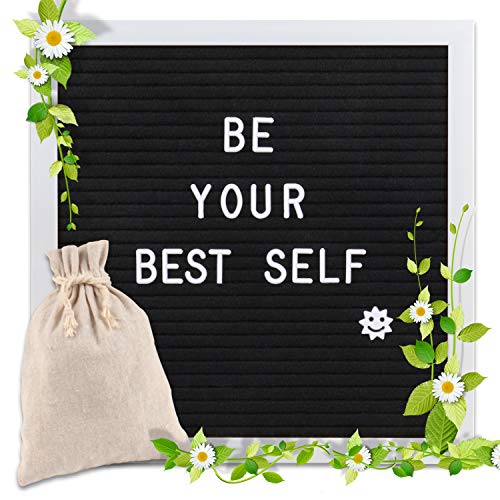
Alternatively, you could get a customized “Word of the Year” sticker, piece of jewelry or a plaque on Etsy.
Create a vision board — Combine your words with inspiring images to make your year’s theme resonate. My colleague Janine Adams, and her podcasting partner Shannon Wilkinson, had a great episode of their Getting to Good Enough last week on Creating a Vision Board.
I’m so design-challenged, but Janine talked about free, easy methods for creating a digital vision board that made me rethink my aversion. Janine and Shannon recommended this video from business consultant Ellen Coule.
Put together a playlist of songs that reflect your word or theme — At the start of every day, before you even get out of bed, play at least one song from the playlist to rev yourself up for achieving your goals.
For example, if you’re not happy where you are — in your job or your life or your fourth-floor walkup apartment — and want to inspire yourself to proactively move toward your next big thing, play The Animals “We Gotta Get Out of this Place” (which, by the way, was my theme song during graduate school for exactly the reason you think). For some, a positive song makes more sense; for others, reminding yourself of what you don’t want may motivate. Do you prefer a carrot or stick approach?
On the TV show Ally McBeal, several episodes dealt with Ally coming up with a theme song for her life. I’ll leave you with the song she picked.
My dearest Paper Doll readers, thank you for coming along on this journey with me. May your annual review be enlightening and your word or theme for 2023 inspire you. If you’ve already got a word or motto for the year, please share in the comments.
Happy New Year, and I’ll see you next year!
Paper Doll’s Guide to Picking the Right Paper Planner
With two weeks until the new year, you’ve probably already started planning for 2023. But if you’re agitated about next year not being any more orderly than this one, you might be hesitating about committing to a planning system. Today’s post is designed to put you more at ease, and give you some guiding principles.
WHY USE A PAPER PLANNER?
There’s nothing wrong with using a digital calendar. I use one myself, though not for scheduling. I use my digital calendar so that when I get an email with Zoom logins, or have a telephone consultation with a prospective client, I don’t have to go looking for the emails to find the links or phone numbers.
In Outlook, I can create an appointment or task directly from an email, and the system will prompt me at a pre-set time with all the key details. It’s like having my own personal Jeeves pop his head into the room to let me know the countess and duchess have arrived to join me for tea.
But honestly, I never use my digital calendar to plan my life. I’m a Paper Doll, so it stands to reason, I prefer a paper planner. But how do you know what’s best for you?
Let’s start with the mindset, and the different advantages and disadvantages of paper planners vs. digital calendars.
Learning Curve
If you are over the age of eight, you already know how to use a paper planner. On the monthly view, there are boxes for the days of the month to put major events, deadlines, and vacations. On the weekly and/or daily views, you can time block for tasks and list appointments.
Digital calendars aren’t complicated, per se, but they are not always intuitive. There might be a generational schism at play, but I’ve had clients try once, twice, even three times to input an appointment, only to have some technical or user kerfuffle lead them astray.
Why does this matter? Digital fatigue creates friction, and friction prevents people from completing a task, whether it’s removing the lid to the laundry hamper to toss clothes in, or schedule an appointment when the system isn’t working.
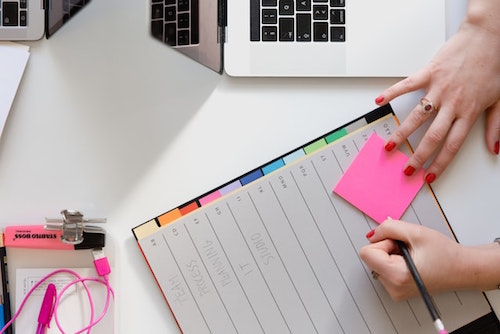
Woman With Planner Photo by Marten Bjork on Unsplash
Digital fatigue creates friction, and friction prevents people from completing a task, whether it's removing the lid to the laundry hamper to toss clothes in, or schedule an appointment when the system isn't working. Share on XControl vs. Convenience
At first, the ease of clicking to accept a meeting invitation would seem like an advantage for digital calendars. But is it?
When I train clients to improve their productivity, we focus on identifying priorities so that we can protect boundaries around them. On a digital calendar in your phone, you generally see the month with blobby dots signifying appointments on particular days.
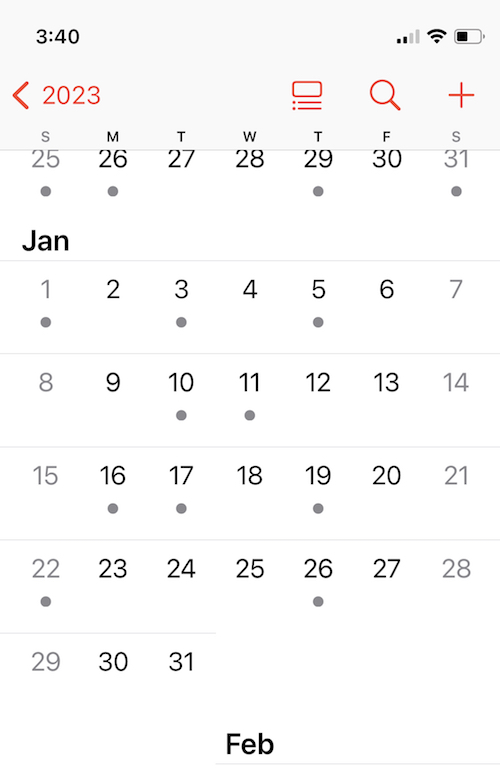
You have to click through to look at the individual date to schedule the meeting, but then you’re losing the surrounding context because you’re just seeing one appointed after another another in a list. Again, you can’t see time.
When we brainstorm ideas, schedule appointments, break projects into tasks and plan when we’ll do them, we’re thinking about context. When we see a whole month of appointments on the printed page, we instinctually know we have to give ourselves (and our brains) some recovery time. That’s less obvious when we only see the one time slot and the computer merely tells us if there’s a conflict. (Also, on the digital calendar, it’s less clear that you haven’t scheduled time for a potty break or commute.)
Many people — children, college students, people with ADHD, overwhelmed professionals —often suffer from a lack of ability to visualize the passage of time. An analog planner involves more tactile interaction with the appointments and tasks we schedule. As we deal with finding a reasonable time for each time, we gain mastery, not only over our schedules, but our comprehension of time.
Cost
Basic digital calendars are built-in to our phone and computer systems, and most apps are inexpensive. Conversely, paper planners may run you from $20-$50. But when it comes to our planning tools, cost does not necessarily equal value.
Yes, there’s a dollar value to the purchase price of an app vs. a paper planner. But there’s a time value related to mastering a new calendaring system. Are you prepared to commit yourself to learning the intricacies of a new app or the same app every time it updates?
Privacy vs. Searchability
This is another close call. Your paper planner is completely private, as long as you don’t leave it unattended; a digital planner generally syncs across all of your digital devices, which means that while it should be private, there’s never a 100% certainty that there are no prying, hacking eyes.
Conversely, your digital calendar is usually searchable. You can type a keyword or person’s name to find a scheduled appointment or task. Your planner can only be searched by trailing your gaze across each page, and the less careful you are with entering data, the more you risk losing the information when you need it.
Visual vs. Visual+Tactile
When you drive, do you think in terms of linear directions, or are you more inclined to recall what to do when you reach landmarks? If you prefer linearity, go digital; if you like touchpoints and landmarks, paper will likely resonate more.

Hand in Water Photo by Yoann Boyer on Unsplash
Does digital time “feel” real to you? On a digital calendar, every item appears in the same font and size. You can often color-code items, but digital entries have a vague sameness about them.
If you write something down, you can stop thinking of it, per se, and start thinking more robustly and contextually about it. Somehow, dragging an email into Outlook to set a meeting, or typing an appointment into your phone, leads to an out-of-sight, out-of-mind situation for many. But with a tangible paper planner, every time you eyeball your month or your week, you are speedily, comfortingly reminded of the important aspects your life.
Similarly, your fine motor skills applied to the task tend to be the same; you could be typing a grocery list or the key points for an interview (then buried into the notes section of a calendar event). With a paper planner, your tendency to print some things and handwrite others, your ability to use a particular color pen, to draw arrows and circles and adjust the size to shout or whisper on the page, yields a unique temporal language that makes sense to you.
Will a weighty paper planner “feel” more real to you vs. that free app (among dozens) on your phone?
Only you know for sure. For me, it’s a paper planner, all the way. But not all paper planners are created equal.
WHAT TO CONSIDER WHEN PICKING A PAPER PLANNER
Anxiety over making the wrong planner choice is common; it’s one of the reasons people give up one planner and buy another mid-year. You don’t want to plunk $30 or $45 on a pile of paper that will sit like a lump on your desk because you’re afraid to “mess up” a pretty planner. This keeps people from committing to their planners and being successful at scheduling events and tasks.
Some users want simplicity; others desire flexibility. Some clients want aesthetically pleasing planners to inspire them, while others seek a serious, “professional” look. There’s no one perfect planner for everyone, but there are clues in how you feel about potential features.
Page Design
- Adequate space — to show appointments and key information, especially on the monthly view. If you’ve got loopy handwriting, will small monthly view boxes cramp your style?
- Layout for monthly/weekly/daily views — Understand how you “see” time. Also, depending on your life and lifestyle, consider whether you need an academic or full-year calendar, or a planner with lots of extra space for weekend and night activities.
- Creative fields — Modern planners may give you spaces for more than just appointments and tasks. Do you want bubbles or fields or pages for note-taking, brainstorming, mind-mapping, or gratitude journaling?
- Practical fields for tracking metrics — On the flip side of those creative attributes, there are planners with spaces for habit tracking, budgets, meals/nutritional logging, goal-setting, and other countable, observable elements.
- Bonus features — Are you drawn to daily motivational quotes, religious references, or cartoons? I never loved my Franklin Planner so much as the year I was able to get one with a New Yorker cartoon each day. I’ve enjoyed my colorfully-tabbed Emily Ley planner for the last few years, but miss daily quotes and bits of wisdom.
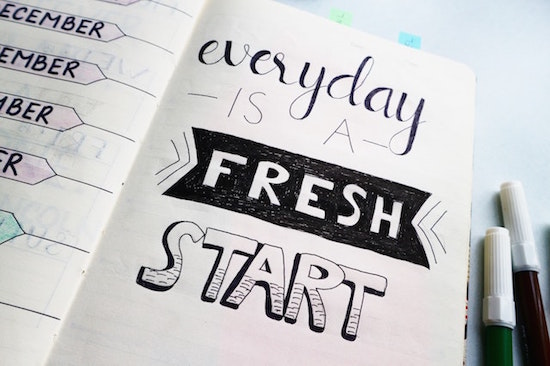
Planner Quote Photo by Bich Tran
Planner Design
In addition to features on the page, you might care about the design specifics of the planner itself:
- Size — Do you think you’d like an executive, classic, or condensed planner? The largest sized planner may not fit in your bag, or may take up too much real estate on your desk, but the tradeoff of picking the smallest option will be losing writing space.
- Weight — Does a hefty paper planner give you a greater sense of gravitas so that you’ll take your schedule seriously? Or will the bulk make it inconvenient for you to carry around?
- Binding — There are ring binders (usually with 7 rings), which let you choose how many pages you want to carry with you at any given time. (I like all the monthly pages, but prefer only last month, this month, and next month for weekly/daily pages.) Coil binding won’t let you remove or add pages, but tends to be more condensed. Both ring and coil binders assure your planner will stay open and lay flat; stitched binding may flop closed when the planner is new, and “perfect” binding (glued, like with a paperback book) can deteriorate with rough handling.
- Cover Style — Do your want your planner to have a leather (or “vegan leather”) cover for a fashion statement? What about a zipper? Are you good with a plastic or stiff paper cover? Will a simple planner cover help you take your planning more seriously or bore you? (Or are you willing to upgrade a staid cover with artwork or washi tape?)
Also remember that your planner is mostly about knowing what you have to do and when. If you need help with project management at the more granular level, take a peek at last year’s Checklists, Gantt Charts, and Kanban Boards – Organize Your Tasks.
PLANNER FORMATS: FOR WHOM ARE THEY REALLY DESIGNED?
As I research planners each year, I find that most planners fall into one of a few general categories:
Basic Planners
Think back to before the computer era, when you’d go to the dentist. Before leaving your appointment, the receptionist would consult a big, black-covered planner with neat columns, flip forward in the book, and write your name for a particular date (column) and time (row). That’s the what you’ll get when you seek various office supply store-branded calendars: columns and rows and not much else.
Basic planners offer a variety of the planner design elements above, but relatively few extra page design options. Popular examples:
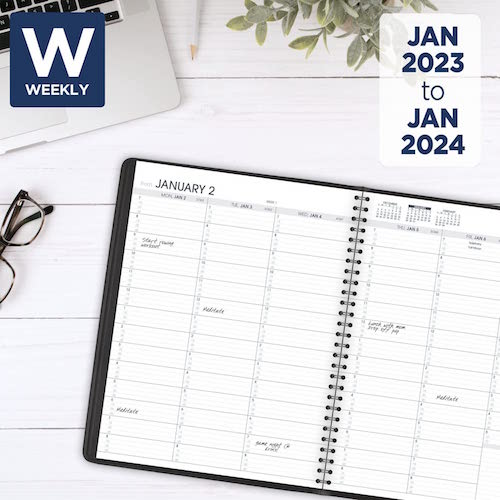
At-A-Glance — is the most like that dental office planner in the days of yore. It’s efficient and practical. If you’re easily distracted by colorful design elements, this style should keep you on the straight and narrow.
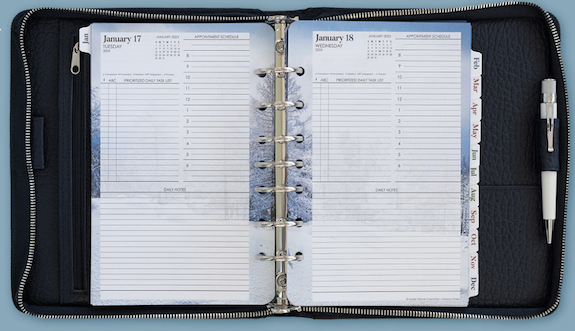
Franklin-Covey planners in the ring format are customizable. You not only get to pick your planner size, but also choose from a variety of themes. There are spaces for appointments, tasks, and notes on the same page; others have little boxes for tracking expenses. You can also purchase pages for contacts, more notes, budgeting, and a number of other extras.
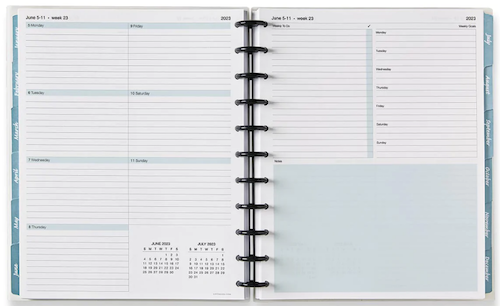
Levenger Circa SmartPlanners come in junior and letter sizes and some DIY customization. They use ring-like discs, such as we discussed in Noteworthy Notebooks (Part 4): Modular, Customizable, Disc-Based Notebooks.
Moleskine planners comes in a wide variety of sizes, colors, bindings and styles for monthly, weekly, daily, and combination views. Much like Moleskine notebooks, these are well made, with curved corners and elastic closures. These are often suited to creative souls who still want to stick to a simpler style and format.
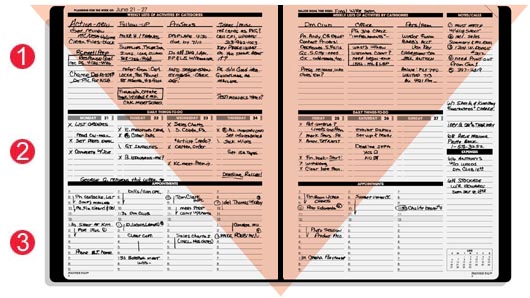
Planner Pads are the planners I recommend the most often to the widest variety of clients. There are monthly calendar pages, but the heart of the system is the weekly pages divided into three sections (projects/tasks, daily scheduled tasks, and daily appointments), which “funnel” the overall projects and tasks to where they belong each day. However, cover choice is limited to black and a sort of seafoam green. I’ve said it for years, but Planner Pads is missing a great marketing opportunity; they already have the best basic planners — why not make them a little more attractive?
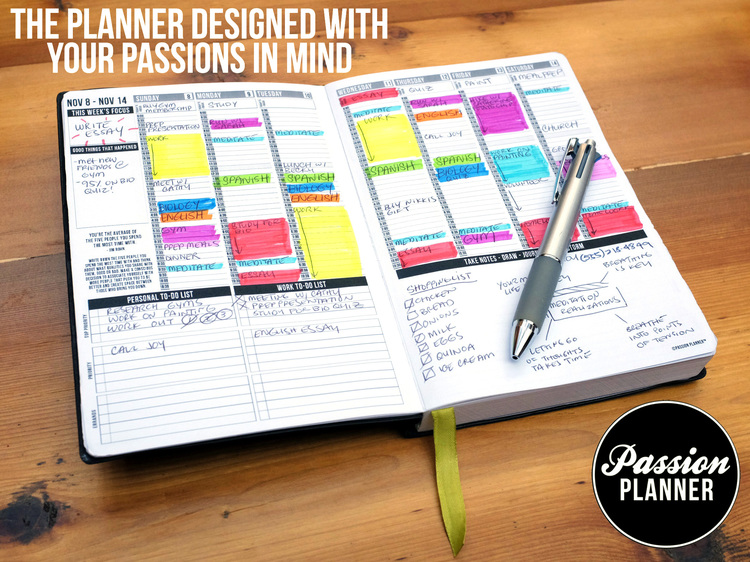
Passion Planners are still pretty straightforward, with columns for each date and sections for work and personal tasks and for notes, but they add weekly sidebars for focus areas and a place to jot down the “good things that happened” that week. The covers are faux leather and come in a variety of sumptuous colors; choose cover design, pick one of three sizes, and decide whether you want your week to start on Sunday or Monday.
Basic planners are the best for time blocking. (For more on this, see my Playing With Blocks: Success Strategies for Time Blocking Productivity from last year.) They tend to be promoted as gender-neutral options, with rare prompts for life goals or touchy-feely stuff.
“Fancy” Planners
For want of a better term, these are a step up from the basics. It’s worth noting that fancy planners marketed to women tend to focus on aesthetics and tracking emotional/psychological factors; planners marketed to men tend to include more tracking of quantifiable action-based metrics.
There are a handful of smaller sub-categories I’ve noticed in this realm.
The Animal Planners
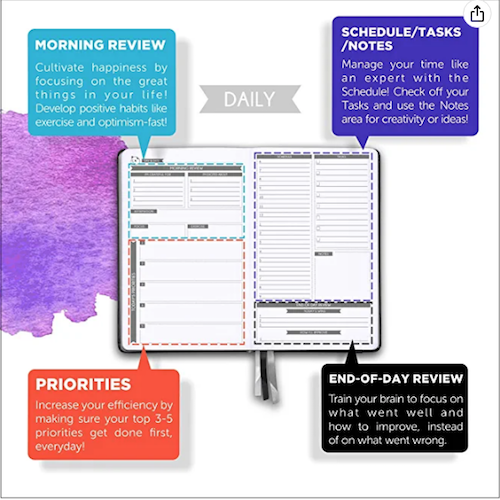
Panda Planner — In addition to scheduling tasks and appointments, it covers inspiration and goals in sections labeled “Today’s Priorities,” “Morning Review,” and “Things I Will Do to Make This Week Great.”

There are also sections for weekly reviews and weekly planning and focus on a daily habit. You can get three-month or yearly versions in a few different sizes, and there’s a cute panda embossed on the faux leather cover.
Clever Fox aims for the person shopping for a planner by personal aesthetic. Planners come in a rainbow of colors and have spaces for scheduling, identifying goals (broken down by health, career, family, finances, personal development, etc.), listing priorities, and tasks/to-dos. There are lots of “feelings” pages for gratitude, daily affirmations and creating vision boards. And, there’s something that appeals to everyone who fondly remembers seventh grade, stickers!

Simple Elephant Planner is similar in style and approach to Clever Fox, though in fewer colors. It comes with a mind map and vision board pages, but is undated. It’s my belief that undated planners lead users to avoid to fully committing to their planners, leading to system breakdown. Your milage may vary.
Life Coach/Celebrity Planners
Danielle LaPorte’s Desire Map Planner is full of “truth bombs, sacred pauses, gratitude, body & wellness, and “core desired feelings.” If you are a fan of life coach LaPorte and these words delight, you may be inspired by the year-at-a-glance, monthly calendars with goal prompts, vision board, goal mapping sheet with monthly action plan pages, and journaling pages for “notes and insights.”
Michael Hyatt’s Focus Planner leans more toward the tone of “basic” planners with some of the attributes of “fancy” ones. The top of each page helps you track whether you’ve done your morning/evening/workday startup/workday shutdown rituals. Larger sections focus on “Big 3” goals for the day, schedule, and a task/note column reminiscent of a bullet journal with a key to tracking how to mark each item to track what you’ve done, delegated, and deferred, as well as important aspects, questions, and items awaiting replies. You can get the planners with linen or leather covers in solid, mostly dark neutral colors, in pocket or portfolio sizes. Although the content is gender-neutral, it has a very masculine tone.
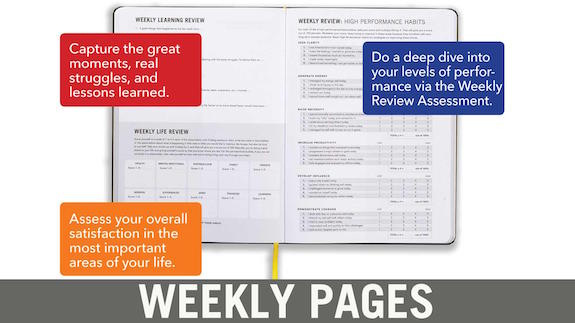
Brendon Burchard’s High Performance Planner is a combination planner and journal Burchard developed based on the study of how high performers plan. The planner’s features include mindset journaling prompts, daily goal boxes, evening scorecards based on the day’s results, weekly habit assessments, monthly project planning, and what he calls “whole life balance sheets.” It comes in six cheery colors, but is another with a very professional, serious feel. Unsurprisingly, there are no fun stickers.
The fancy planners, whether animal based (seriously, what is it with the animals?) or celebrity coach-driven, are better suited for those seeking to capture their entire lives in one place. That’s orderly, but it’s a lot of pressure to “get it right” and fill in lots of blanks.
Do you want your planner to feel like homework?
DO IT YOURSELF PLANNERS
DIY planners offer the best (or worst) of both worlds because you can make it whatever you want. The problem? The structure, as well as the execution, depends on you.
Bullet Journals still confuse me and cause anxiety. They have their fans and their detractors. All I can say is that no matter how many times I’m told I don’t have to make one look artistic or cool, any attempt on my part feels both too unstructured and too “uncool.”
James Clear’s Clear Habit Journal via Baron Fig is a combination daily journal, dot grid notebook, and habit tracker, but it’s not really a planner. Use it in conjunction with what you learn reading Atomic Habits, but I encourage you to embrace a planner that gives more structure to know when you do should things and not only track what you’ve already done.
Agendio deserves a blog post all its own. Basically, though, you use a digital platform for customizing the exact paper planner you need, controlling for everything from section categories to line spacing!
DIY planners may be best for the most advanced planner, not for the most creative one. While they may seem ideal for the Sally Albright (“I’ll have it on the side”) character in When Harry Met Sally, too many planning options can cause overwhelm, leading to avoidance and guilt.
Specialty Planners
Again, this could be an entire blog post for each of the fields and personalities that need unique planning options. What I will tell you is that if you are (or have) a student, I’ve seen nothing better than my colleague Leslie Josel’s Academic Planner, about which I’ve written many times.
WHAT ABOUT A HYBRID PLANNING SYSTEM?
As I mentioned in the beginning, I use a paper planner, but I also have a digital calendar. Yes, I’m using my Outlook calendar to keep me aware of the passage of time (with alerts) and prompt me when it’s time to make a transition between tasks.
The main problem with having a hybrid system is that you may get in the habit of putting information in one place and not both, creating a conflict. If you want to use a hybrid system, incorporate a weekly, if not daily, check-in to review both schedules and catch any conflicts.
HOW CAN YOU MAKE A PAPER PLANNER WORK FOR YOU?
Planners won’t make you do the work any more than buying exercise videos or cute new outfits will make you work out. But having a paper planner assures you that there’s a “home” for your activities and makes time feel more tangible.
Improve your planner use by time blocking, scheduling “executive time” each day to review your schedule for the next day — set an alarm until it becomes a habit — and having an accountability partner provide support.
In the end, the best system is the one in which you can feel confident, because the key to the success of any system is commitment, and nobody fully commits to a system in which they have shaky confidence.
Are you digital, paper, or hybrid planner? What planning system will you use in 2023?
Organize Your Writing Time for NaNoWriMo 2022
Have you ever imagined writing the Great American Novel?
Does the idea of getting revenge after the end of a turbulent relationship by (barely) disguising your ex as the villain (or victim) in a mystery appeal to you?
Maybe you’ve figured out exactly what Billy Joel was talking about when he sang that “Paul is a real estate novelist” and you’d like to be one too?
(If not, don’t skip out. There are treats here for anyone who wants to organize their time to achieve a goal.)
NaNoWriMo gives you the opportunity to follow your dream.
WHAT THE HECK IS NANOWRIMO?
In the weeks leading up to Halloween, and then all throughout the month of November, you may see #NaNoWriMo pop up in your social media feeds. NaNoWriMo is National Novel Writing Month.
If you’ve ever done a month-long challenge (plank or do yoga every day of January, keep a journal for mindfulness, give up Facebook for a month, etc.), you’ll be familiar with this kind of effort. Except, at the end, instead of a fit core, increased self-awareness, or the calm of not knowing that people with whom you went to high school are bringing about the downfall of civilization, you’ll have written a book!
Each year, NaNoWriMo participants commit to writing a 50,000-word novel between November 1st and 30th of the month. That amounts to an average of 1667 words per day, but it’s only the final count that matters. (Because nobody actually writes on Thanksgiving Day. Too many carbs.)
Sign up on the website, maybe join some supportive forums, and then start writing. You can log your daily count and even get cute little badges for your progress.

Officially, there are opportunities to prep your novel during September and October, and get guidance for developing a story idea, creating complex characters, constructing a detailed plot outline (because outlines, like maps, get you where you want to go), and building your story’s world.
All of these tasks are popular with plotters (people who create detailed outlines and prepare for the NaNoWriMo experience). Of course, there are also pantsers, authors who prefer to write by the seats of their pants and plan very little.
On a related note, there are also rebelsm with or without a cause. Although it’s designed as National Novel Writing Month, nobody is going to kick you out of the clubhouse for writing your dissertation, a graphic novel, your memoir, or whatever else you feel called to write. You may have noticed that I write really long blog posts — some topping 3000 words! One year, I used November to write most of a dozen blog posts and several articles.
It’s not cheating, it’s rebelling. (Doesn’t that sound a lot cooler? You can just imagine the leather jacket and the motorcycle.)
At any point, you can upload your novel to the NaNoWriMo website and it will verify your word count. When — let’s be confident! “if” is so iffy! — you hit that 50,000 word count, you can say that you’ve “won” NaNoWriMo for the year.
Winners get a certificate and a banner for display on social media accounts or any other web real estate, and you can purchase a T-shirt and other merchandise in the site’s store. Whether you actually publish or not — even if you never show your novel to anyone else — you’ll still know that you took on a challenge (one that didn’t involve surviving a global plague or not strangling any relatives at the Thanksgiving table) and triumphed.
GET BY WITH A LITTLE HELP FROM YOUR NANOWRIMO FRIENDS
Paper Doll readers know that I am all about mutual support, collaboration, and accountability, and so is NaNoWriMo. Throughout November (and actually, all year), you can avail yourself of a variety of writing assistance and support:
- Discussion Forums — for covering everything from navigating genres to developing storylines to filling plot holes and punching up dialogue
- Writing Groups — for writers seeking camaraderie with people of specific geographical regions, writing styles, or needs. There’s a group for writers with ADHD, authors who write fanfiction, and one called “Rom-Com Writers with Procrastination.”
- Regional Support — from as wide a swath as the whole of Africa to as narrow as a neighborhood near you, you can find people to share your journey
- Writing Buddies — NaNoWriMo makes it easy to find writing partners with whom you can trade ideas (or tales of woe)
As a Paper Doll reader, you already know the importance of accountability, but these two posts may also suit you well on your NaNoWriMo path.
- Count On Accountability: 5 Productivity Support Solutions
- Flow and Faux (Accountability): Productivity, Focus, and Alex Trebek
NaNoWriMo are offers both new and archived Pep Talks from professional writers. I mean, if Outlander author Diana Gabaldon, Alex Cross mystery creator James Patterson, young adult novelist John Green, and MacArthur Genius-winning sci-fi writer N.K. Jemison can’t inspire you to write, who can?
If you need more motivation, NaNoWriMo sponsors offer some amazing prizes for both participants and “winners” who meet the 50,000 word goal. These include discounts for writing software (including Scrivener, Pro Writing Aid, NovelPad, and Plottr), digital devices, and writing/publishing support, and more.
So, you’ve decided you’re going to do this. You register, you post a banner and share your goal on social media, and now you’re watching the clock tick down to November. Now what?
ORGANIZE YOUR WRITING TIME
Last week, I was approached by someone who wanted advice on carving out time to write while still working a full-time job. I was honest; there’s no way to have more than 24 hours in the day, and contrary to what gets thrown around on social media, we do not all have the same 24 hours.
If you’ve got a full-time job (or multiple part-time ones), are raising kids, have a chronic illness, are caring for one more senior parents, or some combination of any of the above, you’re going to have less disposable time (like a temporal disposable income) than a single, healthy twenty-something. Time is not going to freeze and make time for you to write. So, consider stacking a few of these options to achieve your writing goals.
Accept that you have to dedicate specific chunks of time to writing.
You may be a pantser, but that’s about figuring out what you’re going to write. There’s no way to achieve any writing goal, whether writing a novel or finishing a term paper, without deciding when you’re going to write.
If you’re the kind of person who has to feel motivation to do something, I’ve got news for you:
Action precedes motivation.
You have to do something before you’re ready. Your 50K-word novel doesn’t have to be perfect; it doesn’t have to be polished. It doesn’t even have to be good. Your November writing project can be a hot mess!
But here’s my favorite truth about writing. You can’t edit a blank page.
Your 50K word novel doesn't have to be perfect; it doesn't have to be polished. It doesn't even have to be good. Your writing project can be a hot mess! But here's my favorite truth about writing. You can't edit a blank page. Share on XSo feel free to write whenever you feel inspired. Nobody’s going to stop you from grabbing your notepad or keyboard or a quill pen (except, maybe the bird from which the feather was plucked). But schedule time to ensure that you have dependable time to write.
The same is true of organizing or anything else you do. Nobody will arrest you for jumping up during a commercial break in Grey’s Anatomy to load the dishwasher. But if you consider dinner tasks to include meal planning, cooking, clearing the table, and loading the dishwasher, and that “dinner isn’t finished until the dishes are done,” then you won’t ever have to dread walking into the kitchen.
Know what you’re going to write.
Even if you’re pantser and don’t know (or want to know) what you’re going to be writing on November 17th, let the back of your brain ruminate while you’re doing mindless tasks like bushing your teeth to get a sense of what you’ll be working on in your next writing session.
If you don’t know what you’re going to write, you will avoid sitting down to write. If you procrastinate and avoiding writing…you will not have written! Sad but true.
And if you do manage to sit down to write with no idea what you’re going to write about, you’ll get distracted. You do not want to get distracted, or you’ll end up with something like this:
Good, great, excellent pic.twitter.com/415p8iwDGH
— Writers’ HQ (@writers_hq) July 13, 2022
If you can’t stand the idea of knowing what you’re going to write ahead of time because you feel like that would mess with the mojo of your creative muse, there’s an alternative to an outline.
Grab a stack of index cards and write down key words or concepts: character’s names, key plot elements, essential conversational high points. Then stuff the carnds in a jar or a hat, and when you sit down to write, grab a card to use as a writing prompt. Yes, you’ll be writing out of order and will have a harder job later on, cutting and pasting, but you’ll be writing!
Block your time…and put some blocks on ice.
Start with my post Playing With Blocks: Success Strategies for Time Blocking Productivity to re-familiarize yourself again time blocking.
Look at your schedule (and if you don’t have one, pull out a paper or digital calendar and hour-by-hour, day-by-day) and write down everything that’s already an obligation. That may be work, school, childcare, other-care, scheduled self-care and personal growth (like yoga or practicing a language or instrument).
What do you use, a to-do list or a schedule? pic.twitter.com/UEG2dH1ES0
— Sarah Arnold-Hall (@saraharnoldhall) September 28, 2022
Then write down all the things you do that aren’t ever scheduled, but which you have to do, from sleeping to grooming to housework and grocery shopping.
Identify blank spaces — if you have any. Those are your first options for writing time. If you’ve got blank space, you might be able to use it to write. (I say “might” because nobody can have all their waking time occupied. We need time to veg out, as I discussed in Toxic Productivity Part 2: How to Change Your Mindset. We can’t create without downtime.)
What if you don’t have any blank spaces? Consider whether you can remove some responsibilities for the duration of November. It’s about priorities. (This is true no matter what life goals you are trying to reach.)
- Can you do one big grocery shop for the month and delegate the urgent milk-and-bread runs to another member of the household? (Or delegate all November grocery shopping and housework to someone whom you support in all of their goal achievement practices?)
- Hire a babysitter for a handful of hours each week?
- Are you willing to get up 45 minutes earlier, or stay up an hour later to get some writing time?
- Can you cut out scrolling through TikTok of your November (or limit it to when you’re standing in line at the store or hanging out anyplace where that you couldn’t otherwise sit down and write)?
- And, as a former broadcasting professional, I can’t believe I’m suggesting this, but could you cut an hour of TV viewing out of your life?
When it comes down to it, there some things you have to do in November: eat, sleep, hydrate, groom, work for pay, take care of dependent humans, and vote. (Please, please remember to vote!) But for 30 days, can you vacuum less? Binge fewer shows?)
What if you have blank spaces, but they’re short or weird? It’s possible you have lots of writing opportunities, but none are expansive chunks of ninety minutes or two hours. That’s OK. If you have a good outline (that’s where being a plotter has the advantage over being a pantser), you don’t need long blocks of time.
If you have 15 minutes between when you get home from work and everyone else gets home, focus on just one small part of your outline. Are you stuck on the dialogue for a scene for a pivotal conversation between two characters? Play-act the conversation while you’re in the shower or while driving; it’ll help you get the language and tone right; when you’re getting close to how it should sound (and are out of the shower), use the voice memo on your phone or dictate it into a text to yourself to capture the wording. You can transcribe or copy it into your manuscript later.
Rejoice in exploring short writing blocks. It’s less time to dither or second-guess your writing. Focus on getting words on paper. Consider having 25 minutes (one whole glorious pomodoro) the perfect amount of time to work on two or three great paragraphs.
Can you get up 15 minutes earlier and skip 10 minutes of Twitter scrolling to get those 25 minutes? There’s one writing block.
Can you bring your lunch to work so that you use half your lunch hour for eating and relaxing and the other half for writing?
Can you convince your significant other to take over an evening task like laundry, just for November, to give you 25 minutes every evening?
Boom! There’s your writing time!
Let NaNoWriMo figure out your best writing schedule.
NaNoWriMo has a cute social media-style quiz for figuring out the best schedule for your personality and lifestyle. It’ll only take about thirty seconds, and may yield some insight.
Guard your writing time.
Several ago, I wrote R-E-S-P-E-C-T: The Organizing Secret for Working At Home, and many of the concepts apply to helping others in your space respect your time and boundaries. But there are also tips for respecting your own time, staying focused and on-task, and not letting other’s non-emegencies squeeze your time.
Consider what motivates you.
Obviously, you shouldn’t do NaNoWriMo if it doesn’t appeal to you. But before the month even gets started, make a list of all the reasons why you want to do it.
Whether it’s to get back at your 11th-grade English teacher who was dismissive of your creative efforts or to give you confidence that you can step out of your comfort zone, come up with ten big and small reasons you are inspired to write a 50,000 word draft of a novel.
Then write ten more reasons. And ten more after that!
Read one of those reasons aloud at the start of every day in November. Give yourself a fighting chance to overcome inertia and achieve your goal!
Currently stuck in nocturnal. Where are you? pic.twitter.com/9ppvAultN0
— Writers’ HQ (@writers_hq) January 31, 2020
Track Your Progress
Every time I write about NaNoWriMo, I like to share David Seah’s Word Counting Calendar. Print out the black-and-white or color versions. Every day that you write, just log your total word count and then color in the appropriate boxes.
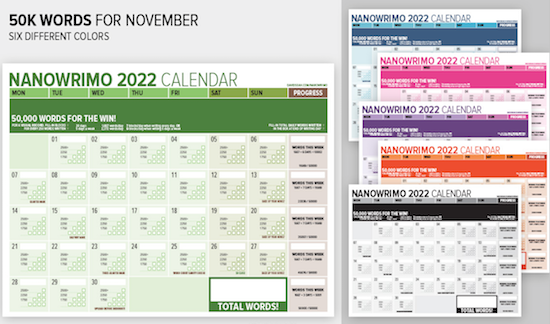
Post the calendar near your writing space to keep you motivated as you progress toward your goal.
EMBRACE THESE RESOURCES
You could write a book (or several) about all the resources available for supporting a writing project. Here are just a few classics and new-for-2022 to help you organize your thoughts, your research, your writing, and your November.
10 Steps to Get Started with Scrivener for NaNoWriMo — Updated for 2022, this list from the ultimate writer’s tool walks you through how to make the software serve your NaNo needs.
Your Essential Guide to Completing NaNoWriMo in Evernote — As an Evernote Expert, I’m constantly finding (and sharing) new ways to use Evernote to support work and personal goals. Anthony Bartlett has gathered some great advice, including linking to essential Evernote templates for creating character profiles, plotting your novel, story premises, and 3-act structures.
12 Creative Writing Templates for Planning Your Novel — Speaking of templates, Forrest Dylan Bryant walks you through a dozen templates, from those listed above to writing trackers to plot and character templates. Don’t reinvent the wheel when you can use Evernote templates to support your writing and story development.
A Novel Strategy: How to Organize Big Writing Projects — Speaking of Forrest, about five years ago, he wrote this nifty post about how to use Evernote to organize your notes for writing a novel.
(P.S. Combining all of the info above, if you’re thinking of using Scrivener, know that you can import your Evernote notes into Scrivener and see your notes and writing area side-by-side. Cool beans!)
What is NaNoWriMo? And How to Win in 2022 — Updated every year, this masterful post from Reedsy has dozens of tips for managing your time, developing your writing ear, and keeping up your motivation.
Write a 50,000-Word Pulp Novel Before Breakfast: My easy no-outline way of writing short novels in four weeks by Amethyst Qu
How to Survive NaNoWriMo in 2022: 17 Top Tips for Success — Self-Publishing School offers a list of winning habits to help make the most of your November.
Although I don’t write about NaNoWriMo every year, there are several posts in the vault, including those from 2017, where I created NaNoWriMoMo and wrote advice for organizing yourself for NaNoWriMo every single Monday of that November. Just type “NaNoWriMo” into the search sidebar on the left of this site to find them.
Whatever you choose to do with the coming month, I hope you take time to plan and organize to help your dreams come true.
Paper Doll Responds When They Say “Be Our Guest”
The theme of this week’s post has become somewhat bittersweet since the I originally conceived it. On Tuesday, October 11, 2022, Dame Angela Lansbury passed away at the age of 96. Depending on your age and tastes, you may know Lansbury from various points in her eighty-year career.
If you’re a cinephile, you may know her from films from her earliest role in Gaslight and in the 1940s to The Manchurian Candidate in the 1960s and Bedknobs and Broomsticks in the 1970s, to Anastasia, Mary Poppins Returns and the Knives Out sequel, which hasn’t even been released yet!
If you’re a fan of Broadway, you could have caught her in anything from Stephen Sondheim’s early Anyone Can Whistle to the title role in Auntie Mame to the distasteful pie-baking Mrs. Lovett in Sweeney Todd: The Demon Barber of Fleet Street. And, if you watched television in the 1980s, 1990s, or 2000s, then you probably knew her best as Jessica Fletcher from Murder, She Wrote.
However, if you’ve been a kid or a parent or a baby sitter any time since 1991, then you will recall Lansbury voicing Mrs. Potts (alongside Jerry Orbach’s Lumière) in the classic animated Disney production of Beauty and the Beast. And if you’re wondering what any of this has to do with organizing, here’s a hint:
Perhaps this post’s theme might seem less shoehorned in (if less palatable) if I could sing it to you. But recently, I was asked to serve as a guest and offer advice and information on three disparate topics: productivity, technology, and paper, and I’d like the opportunity to share this material with you.
THE CHATTANOOGA TIMES FREE PRESS EDGE MAGAZINE
On October 20, 2002, almost twenty years ago, in Professional Organizers Are A Growing Trend, I was profiled in the Chattanooga Times Free Press for the first time. Over the years, I’ve been delighted to be interviewed, right up through March 2021, when I was profiled in the newspaper’s Edge, a business-themed magazine.
However, I was particularly giddy when Jennifer McNally, the new editor of Edge asked me to write the October Business Acumen column in an issue devoted to staying productive. While the issue is geared toward professionals and business owners in the Chattanooga region, I think you’ll find it informative and appealing, no matter where you reside or what you do.
You can read the entire October issue of the Edge — my column spans pages 24 and 25, but other columns range from How to Own Failure (and Still Preserve Your Reputation) to the Take It From the Top series with advice from Chattanooga leaders on issues ranging from tracking goals, focus, and discipline to allocating time strategically and anticipating challenges.
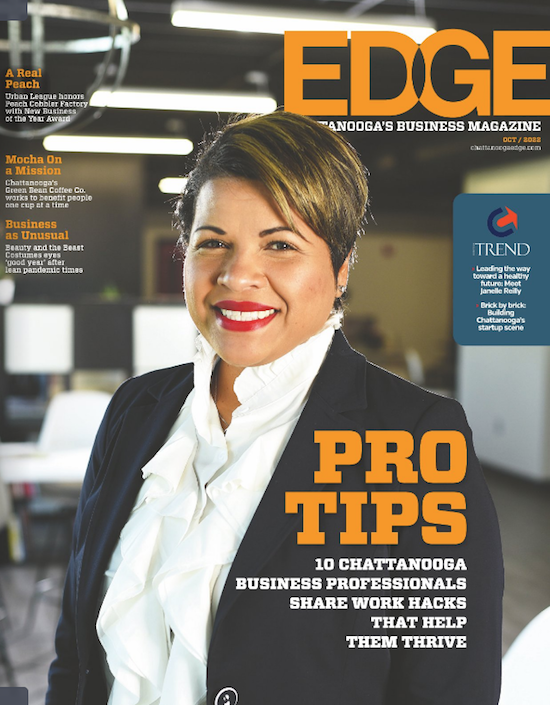
You can also head directly to my guest Business Acumen column, An Expert’s Secrets to Stress-Free Productivity on the newspaper’s site. To give you a taste, it starts with:
Do you feel like life is more demanding than ever, and that effective productivity is hard to achieve? Workdays (and too often, nights) are packed with back-to-back meetings and Zoom calls, Slack notifications and email alerts. Productivity can be elusive.
Maybe you feel like you’re doing more but accomplishing less that rewards you. Increasingly, we’re seeing toxic productivity, where pressure to meet unrealistic expectations zaps physical and mental energy, damaging motivation and self-esteem. But it doesn’t have to be this way.
In the column, I share my strategies for conquering overwhelm by identifying your priorities, protecting your focus, creating flow, and conquering procrastination. I encourage you to take a peek and let me know what you think.
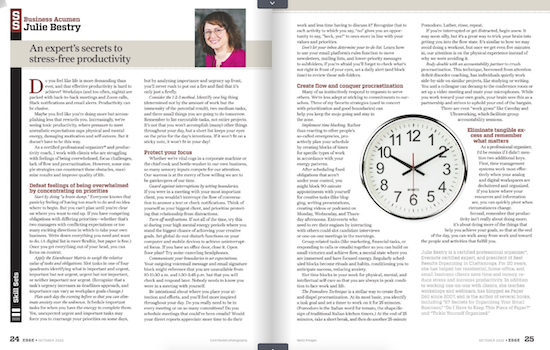
THE STREAMLINED CONNECTION
A particularly charming guest experience was getting to be on my friend and colleague Miriam Ortiz Y Pino‘s video podcast, The Streamlined Connection.
Miriam is a Certified Professional Organizer and Money Breakthrough Business Coach. Her company is More Than Organized, and she’s a firecracker! Like me, she’s been at this for more than two decades, and Miriam’s got an amazing way of creating transformation.
Miriam offers one-on-one in-person and virtual services including organizing, business coaching, speaking, and training in a variety of areas (including the fascinating topic of Sacred Money Archetypes). Miriam also delivers Streamlined Solutions courses for tackling clutter, time troubles, and paper, and live and virtual group workshops for professionals.
It’s an absolute trip to talk to Miriam, because every conversation yields insight. So, I was tickled to be the first guest on her show.
As a Paper Doll reader, you will not be surprised that, when given the opportunity to talk about organizing, I chose my favorite topic, paper. However, unlike when I talked about the philosophical aspects of Why Paper Still Matters on the NAPO podcast earlier this summer, Miriam and I went in a different direction.
On Organizing Paper with Julie Bestry: Paper FEAR and Tickles, we explored the nitty gritty of the frustrations of different types of paper clutter, and how strategically considering both fear and tickles can help you dig out from under.
Miriam has since had some organizing and productivity industry rock stars as guests, including Amy Payne, Regina Lark, Geralin Thomas, Mike Vardy, Leslie Josel, Robyn Reynolds, and Nietra Rose! (Seriously, check it out!)
ORGANIZED ASSISTANT
The amazing (and Canadian) Janet Barclay has graced Paper Doll‘s pages many times over the years. I’ve known Janet since the days before modern social media, when we were both getting the hang of things on Ryze.com. (Don’t go visit; it’s all spam now. Sigh.)
Although Janet started out as a professional organizer and productivity consultant, she eventually found and perfected her niche in supporting organizing professionals. She works her magic as a “website caregiver and designer,” which means she helps people keep their online identities afloat so we can focus on our own clients. She rocks that way.
But Janet rocks another way, as one of the biggest cheerleaders of the organizing and productivity profession. Her Organized Assistant web site is home to blog posts and articles that provide a broad perspective for those of us who work in the field, but she also created the Productivity and Organizing Blog Carnival for the reading public, collecting monthly themed posts on categories ranging from organizing junk drawers to efficiency in the workplace to organizing when a member of the family is ill.
I’m proud to say that I’m one of Janet’s Megastar Blogggers, having contributed to more than 50 monthly carnivals, and am joined by my fancy-pants colleagues Hazel Thornton, Linda Samuels, Sabrina Quairoli, and Seana Turner.
 In the spring, I referenced having recertified as an Evernote Certified Expert. As I often talk about the reasons I love and use Evernote, Janet asked if I’d like to share the certification process with her readers, and I was only too excited to do so.
As an Evernote user, it was easy to pull together my resources for the guest post. I had notes from my original certification as an Evernote Certified Business Consultant in 2015, then as an Evernote Certified Consultant a few years later, and now under the current program, an Evernote Certified Expert. Evernote’s so-powerful-it’s-spooky search capacity found everything I needed to write Adventures in Becoming an Evernote Certified Expert. (This also means I had no excuse for procrastinating on actually writing it!)
Hopefully, you’ll be entertained as you learn about my experience getting certified, and it may encourage you to get certified, use the skills and support of an Evernote Certified Expert, or just learn more about Evernote in its newest incarnation as so much more than just a note-taking app.
Writing this, I’m shocked to realize it’s been nine years since I’ve written an entire post about Evernote. It’s a completely different platform now, with so many more features and opportunities to organize your digital life. So, don’t be surprised to see more Paper Doll posts in the future regarding how you can use Evernote to be more organized and productive.
BE YOUR GUEST?
As much as I love working with my in-person and virtual clients, giving presentations, and writing this blog, it’s even more fun when I get to share a (digital) stage or blog space. As I’ve reported, throughout 2022 I’ve been on a variety of podcasts and have guested at various summits, about which you can read more:
Paper Doll on the NAPO Stand Out Podcast: Why Paper Still Matters
Paper Doll Picks: Organizing and Productivity Podcasts
Paper Doll on Planning & Prioritizing for Leadership
Paper Doll Shares Secrets from the Task Management & Time Blocking Summit 2022
Not enough Paper Doll for you? You can also check out my Press Room page for more links to interviews and guest spots.
If you have a podcast, summit, or blog for which you might like to interview me on topics related to paper and information organizing or productivity, please feel free to use the Contact page on my site to let me know how we might work together.
ONE LAST LOOK AT MRS. POTTS & LUMIÈRE
Paper Doll cannot live by organizing alone, and I hope that as my guests, you take some delight in the pop culture cameos that have populated this blog since 2007.
Whether solving crimes as Jessica Fletcher or making the worst pies in London as Mrs. Lovett, or getting nominated for Academy Awards, Tony Awards, Golden Globes, or Emmy or Grammy Awards, Angela Lansbury was beloved. And as Lumière to her Mrs. Potts, Jerry Orbach (Law & Order‘s Lennie Briscoe, Baby’s father in Dirty Dancing, and in oodles of other roles on stage and screen) was no slouch, either. With that, I’d like to close today’s post with this behind-the-scenes view of how they put together “Be Our Guest.”
Thank you for being my guest at the Paper Doll blog, and thank you for letting me be a guest on your computer and mobile devices all these years.



Follow Me