Archive for ‘Paper Organizing’ Category
Tax-Time Freebies To Keep You Organized
Have you already finished your taxes? Just starting them? Are you inching your way towards finishing them, and looking around you to find that you have a mountain of papers ready to shred?
March and April, collectively considered “tax time,” is the perfect opportunity to clear out your file folders, your desk drawers, your purses and wallets and pockets, and shred all the receipts and documents you don’t need to support your taxes.
Of course, if you’re not sure what you need to keep and what you’re able to toss or shred, Paper Doll has you covered with a detailed records retention schedule, Do I Really Have To Keep This Piece of Paper? Once you know what needs to be shredded, start gathering up the piles.
Three-inch stacks of cable bills dating back to your first apartment? Ciao!
That mountain of receipts from the coffee truck outside your building? Gone!
Frequent flyer loyalty mile statements from airlines that long ago merged with the big guys to become a super-mega airline? Buh-bye!
Dating back to the classic Paper Doll post, Shredding the Documents: Find Your Shredding Solution, we’ve talked about how essential it is to shred items that you no longer need for tax, legal or proof-of-ownership purposes, because merely tossing them in the trash could put you at risk for identity theft.
If you’ve got a great shredder, then shred away, one small pile at a time (because unless you’ve got an industrial-strength shredder, more than a short stack at a time will cause your residential shredder to overheat).
However, if the to-shred stack is as tall as your favorite little tax deduction — I mean third-grader — then you need to upgrade your shred game. And you have a few options!
PRESS THE EASY BUTTON
You know all about the Staples Easy Button, right? What could be easier than handing off your piles of unneeded, unwanted papers and having them magically destroyed…for free?

Head over to this Staples’ link to a coupon to shred up to 5 pounds of paper for FREE! Since it’s for shredding, the coupon is obviously valid in-store only. So, go to the link, print the coupon, bring it to your favorite Staples store along with your massive pile of excess papers to shred. Once the shred center folks at Staples take everything off your hands, present the coupon at checkout.
Of course, there’s some small print: Offer valid through 5/2/15 in-store only. Discount applies to shredding services of up to five pounds. Limit one per customer, nontransferable. May not be combined with any other coupon. No cash/credit back. Not valid on prior purchases.
HEAD DOWN TO THE DEPOT TO GET SAVINGS TO THE MAX
OK, corny, I know, but now that Office Max and Office Depot are one big happy family, you know that they’re not going to forget your need for shredding those monster piles.
Head over to the Office Depot/Office Max Tax Page and scroll to the bottom. Click on the link that looks like this:

and it’ll yield an actual coupon you can print (or bring in on your phone, tablet or other mobile device). Note: this coupon is for shredding up to two pounds of paper, and for a narrower time frame, from now through 4/25/15.
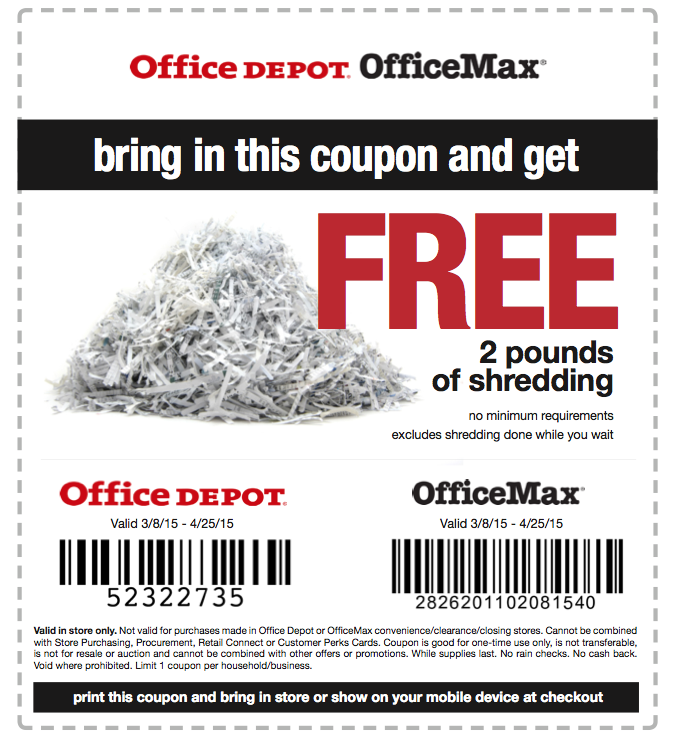
This photo is just a facsimile. (Check the actual coupon for the official small print.) So, click on the above link, print it out (or securely save it to your device in Dropbox or Evernote or whatever), gather up your shredding and get that pile of paper clutter out of your office or off your dining room table.
Declutter, protect your identity, and save money? Paper Doll thinks tax day just got a little less taxing!
Paper Doll Gets Hooked on GeckoTech and Meets a Spy: A Shoplet Review
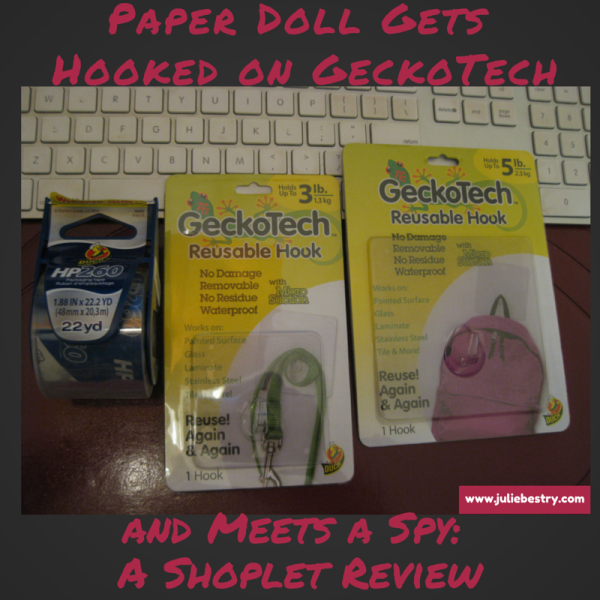
Periodically Paper Doll reviews new and established office supplies and accessories through the Shoplet Product Review Program.

A few years ago, I wrote the post If It Quacks Like a Duck Then It Might Be a Zebra, a Shoplet review of wackily-patterned Duck®-brand tape. Today, we’re looking at a different kind of quacker, a gecko that thinks it’s a duck.
HOOKING UP THE USUAL SUSPECTS
We professional organizers like to recommend vertical storage because it makes efficient use of otherwise underutilized empty wall/door/cabinet space. For example, we’ve previously talked about vertical file storage options that let you make use of walls in office, cubicles and even hotels. But sometimes you don’t need a big, fancy organizing tool. Sometimes, to hang a backpack or a coat, car keys or a flash drive, a nice hook will do.
When we talk about hanging things on hooks, we usually consider four solutions: nails, suction cups, adhesive-backed hooks, and 3M’s Command®-brand. Each has advantages and drawbacks:
- Nails are inexpensive — you can get a pound of them for about $3. But you also have to have a stud-finder to make sure you aren’t hammering that nail into a random piece of sheet rock, and a nail is a rather permanent solution to what might be a temporary need, especially if you’re a renter (or you redo your décor with any frequency).
- Suction cups with hooks on them seem like a great idea at first. We use them to hang squeegees and soaps-on-ropes in the shower and rainbow-glass knickknacks on our windows. But we don’t use them for heavy-duty stuff because experience tells us that the minute a suction cup gets lint-y or dusty, it pops off the window or wall.
- Plastic hooks with adhesive backing are fairly easy to place — they come with the spongy adhesive tab already affixed to the hook, and you just have to figure out where to plant it, and then remove the backing from the other side and stick it! But woe onto you if you put too much weight on a plastic hook or ever want to remove it. Chances are good that your paint job will be ruined or the spongy-sticky adhesive residue will stay behind. Good luck getting your security deposit back!
- Command®-brand hooks are great! They’re relatively easy to put in place, and are easily removed without damage to whatever surface you select. And let’s face it, they’ll hold anything, for just about forever. It’s usually my go-to option. However, although the hooks themselves are reusable, after you use up the original and spare adhesive tabs, you have to buy more.
Hence, today’s products for review. I received two: one three-pound and one five-pound capacity new breed of Reusable Hook.
THE BASICS
GeckoTech Reusable Hooks are different. No nails. No gummy adhesive. No complicated directions. And while yes, they use suction, this is not your bathtub squeegee/rainbow prism-holding suction cup.
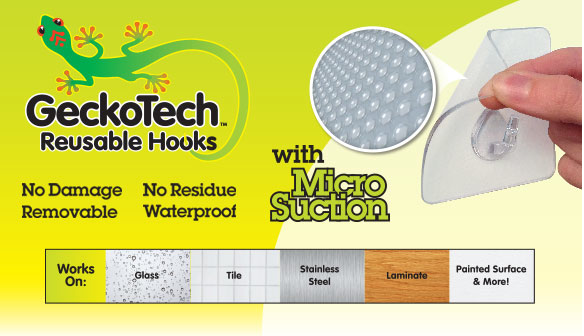
The GeckoTech Reusable Hooks come in four weight-bearing capacities and in five packaging varieties:
- Four hooks per package, each with up to 1/2-pound (.22 kg) capacity
- Two hooks per package, each with up to one pound (.45 kg) capacity
- One hook per package, each with up to three pounds (1.3 kg) capacity
- Two hooks per packages, each with up to 3 pounds (1.3 kg) capacity
- One hook, each with up to five pounds (2.3 kg) capacity
Each hook has a large, flat, smooth, transparent surface backing from which the small, plastic hook protrudes. The backing is flexible, and while the front feels smooth, the reverse, the part that is flush with the wall or other vertical surface, is covered with itty-bitty, teeny-weeny micro-suction, invisible thingies and feels kind of gummy, though it leaves no residue.
It’s also waterproof!
GeckoTech Reusable Hooks adhere to painted surfaces that can resist stains and are easy to clean — so, not textured or matte-finish surfaces. But it also works on plasterboard, glass, laminate, stainless steel and other smooth, hard, non-porous surfaces. They don’t recommend using it on wallpaper or textured surfaces — like the bumpy, stucko-like walls of Paper Doll HQ. (You should also avoid surfaces that are “dirty, uneven, peeling or coarse.” No surprises there, eh?)
GeckoTech Reusable Hooks run between $3.42 and $4.50 per package.
HOW GECKOTECH “INSTALLS”
Using the GeckoTech Reusable Hooks is pretty easy, even for the all-thumbs brigade at Paper Doll HQ:
- Clean the vertical surface with rubbing alcohol and allow to dry.
- Affix the GeckoTech to the vertical surface and use your fingers to push out any air bubbles. Wait an hour.
- Hang your stuff.
The packaging also advises to apply hooks when the surface temperature is between 40°F and 100°F, so no trying this in Buffalo garages when you’re bored at home on a snow day, OK?
GeckoTech claims to be “over-engineered” to hold more than the weight capacity listed for any given size, so the weight on the label seems like a safe limit to which you should adhere.
It’s right in the name — the product is removable. So, put it too high, or too low, or decide three months later that you’re packing up and moving to Miami to get away from harsh winters, and you can remove it with no muss, no fuss, and no damage. And then you can put it up somewhere else!
HOW GECKOTECH “UN-INSTALLS”
Peel off corner of the backing and lift it from the wall. That’s all!
OK, that’s not entirely all. If the GeckoTech hook has been up for more than 30 days, the packaging advises blowing a hair dryer at the hook to warm it for a moment before removing. That really is all.
HOW GECKOTECH “RE-INSTALLS”
Wash the hook with warm, soapy water. Let it air dry. Reuse.
GECKOTECH VS. THE OTHER GUYS
So how do the GeckoTech Reusable Hooks stack up against the other methods we’ve considered?
From the other reviews I’ve seen, as well as the promises on the packaging, the micro-suction that the backing doohickey creates means there’s no damage to the surface left behind, and no residue. So, that knocks nails and those plastic, sticky-backed hooks out of contention.
The promised weight-bearing seems accurate, so unlike the rainbow-prism colored glass suction-cup hook on the glass balcony door at Casa Paper Doll (the one that pops off the glass about once a month), this gecko stays stuck.
I only tried hanging a few household items (below), but from the looks of it on Pinterest, the GeckoTech Reusable Hooks work for corralling everything from pot lids on the inside of kitchen cabinets to holiday decorations on the mantel to the inside of a school or gym locker.
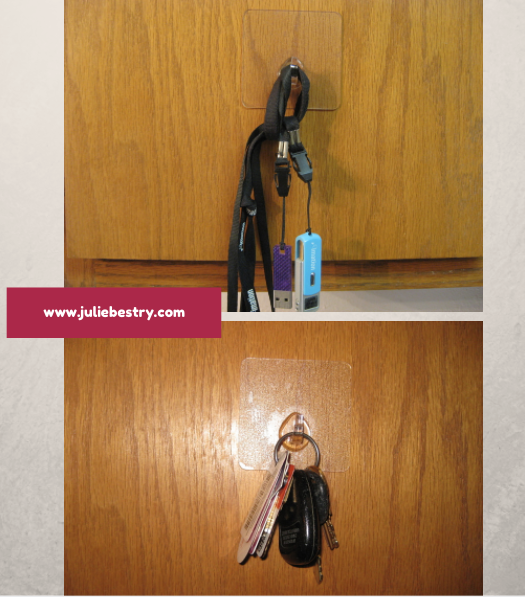
I’d say GeckoTech is pretty on-par with my beloved Command®-brand hooks for sticktoitiveness, and because GeckoTech is waterproof and lays flat against the vertical surface, it has a few added advantages — you can use these hooks in the shower without worry about soap-scum build-up.
THE VERDICT
I really did enjoy my chance to try out the GeckoTech. I liked that it was smooth and flat against any vertical surface. There’s no way for dust or schmutz to get in behind the hook, so you don’t have to worry about aerosolized oil in the kitchen (not that Paper Doll cooks) or stray yuckiness. You can remove, clean and re-apply these hooks at any time.
I also liked that because they are transparent, you don’t have to worry about color clashes in upscale rooms. Are these hooks gorgeous? No, but except for comparing them with the fanciest of Command®-brand hooks (like the brushed nickel types), this gecko is unobtrusive.
But there were some shortcomings. The maximum weight the strongest of these babies can handle is only five pounds, and that’s just not enough for a full backpack, or a workout bag with two-pound weights, or most purses. (Paper Doll‘s purse, below, is 3 pounds, shown hanging from a five-pound GeckoTech hook.)
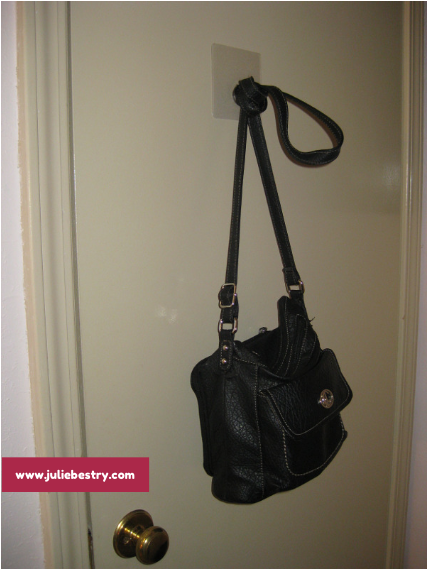
The GeckoTech worked fine holding a curling iron by its hanging loop, but although my fancy hair dryer is under two pounds, I didn’t quite feel confident to hang it from the three-pound hook, even for a test. (User flaw rather than product flaw, perhaps?)
GeckoTech is a win, in general, but I’d like to see even bigger ones with more weight-bearing capacity. I’m not sure at what point structural integrity would hamper this simple design, but I’d be eager to see the line expand.
007 HAS NOTHING ON HP260
The other item Shoplet provided for my review was Duck®-brand HP260 High Performance Packing Tape with a built-in dispenser. As I’ve already reviewed Duck®-brand packaging tape, I wasn’t sure what could be new. It’s still clear (“crystal clear,” the packaging reports) and yes, the 3.1mm wide tape is suitable for all of “your shipping and storage needs.” But it’s packing tape — there are only two kinds, good and lousy, and Duck® makes good tape. So what else?
I read on about the tape’s aggressive acrylic adhesive being superior for wide temperature application: “HP260 features a wide temperature range performance and is resistant to ultraviolet rays which eliminates yellowing and increases shelf life.“ I only had the tape here for a little over a week, and the temperature inside Paper Doll HQ is generally fixed between 68° and 72°. As I didn’t think to have a box shipped from Boston to Bali, I’ll have to take Shoplet and Duck® at their word. But there was one more thing.
HP260 is billed as WHISPER QUIET — and it is! Have you ever noticed how packaging tape is usually pretty squeaky? I don’t know what they’ve done to make this ninja-caliber silent, but it’s completely squeak-free. And you don’t have to take my word for it:
This spy-rated tape comes in 22.2-yard single rolls for $2.77 and multi-packs.
FINAL WORDS
GeckoTech Reusable Hooks and Duck®-brand HP260 High Performance Packaging Tape are available directly from Shoplet, which also carries business promotional products and maintains a (literally and figuratively) colorful blog about cool office supplies. In addition to selling office supplies in North America, Shoplet is a purveyor of office stationery in the UK.
Disclosure: I received these products for review purposes only, and was given no monetary compensation. The opinions, as always, are my own. (Who else would claim them?)
Organize Your Reading: From Paper to Digital–Peekster, Booke, MatchBook & BitLit
A few weeks ago, Paper Mommy sent me some mail. In the envelope — yes, an envelope, because Paper Mommy likes to go Old School — there were coupons, one of her goofily-captioned, one-panel, self-portrait comics with a big-bosomed, big-footed, curly-haired stick figure, and a clipping from the Buffalo News: an article with advice on shopping for a mattress.
I appreciated the article — Paper Doll HQ’s master suite really needs a new bed. But I’m not planning on shopping right away, so I had a few options:
- File the clipping into an article folder.
- Scan the article with a scanner and send to a shopping-themed folder on my hard drive, or in Dropbox or Evernote.
- Try out Evernote’s new Scannable app on my iPad.
But for an even quicker option that didn’t require me to take my hands off the keyboard, I Googled the article’s title and just saved it to Evernote, and now when I’m ready to shop, I have A to Zzzz Guide for Mattress Shoppers living in my personal cloud. Minimal hardware, no fiddling with a new app that I’d not quite tried out yet, and no paper clutter.
The point isn’t that paper is good or bad, but that we all deserve to have format options for our reading material.
Near the end of the summer, in Organize Your Reading: A Customized Digital Newspaper…That’s Actually Paper!, we talked about wishing we could sometimes have digital content available in print. Today, we’ll look at how sometimes we’ve got all the print content we want, but need a convenient way to make it digital.
MAGAZINES AND NEWSPAPERS
Informational paper clutter is always with us. My article on coping with informational paper overload, Knowledge is Power, is pretty much as valid as it was when I wrote it ten years ago. Why do we have this stuff around?
Are you holding onto magazines you never get around to reading because there was a time in your life when both your interest and schedule used to make it a must-read?
Do you hold onto entire Sunday newspapers because there’s just one long article you want to finish?
Do you have a stack of periodicals because there are articles or columns you want to send to someone, but you don’t have a stamp or an envelope because — let’s get real — you never send anything through the mail anymore?
So what do you do if you have a magazine or article clipping and want to share or save?
- Lowest-tech: Call your friend and read the article to her directly. Nobody home? Read it into voicemail.
- Lower-tech: Record yourself reading the message in Evernote (or, if you’re a Mac/iOS user, record it directly in iMessage to text it.) Got lots of friends? Think: repeated re-sends.
- Last-decade-tech: Use your favorite search engine to find the article’s title. If it comes up, text, tweet, email or FB to your intended recipient. For your own use, save it in a digital file or bookmark it.
- 2015 Tech: Take a peek at an app for that.

Peekster is an intriguing upstart.
1) Start by signing in on your iPhone or iPad with Facebook or Google+, or you can opt to sign in “later.” (Peekster promises not to post anything to your profile.) Peekster will ask if it can access your device. Say OK.
2) Point to the article headline or the first paragraph, per Peekster’s on-screen direction.
3) Just scan the headline of a print article and Peekster will use optical character recognition (OCR) to detect the matching content and bring up the digital version on your device so you can share it now or save it for reading or sharing later.
I kept aiming too far below where I was supposed to. That’s OK — Peekster offers on-screen guidelines to stretch and move the boundaries and tells you, “Adjust the frame to fit the headline or paragraph.” Pinch. Drag. Repeat. When you’ve got what you want, click the big tomato-red “Apply” button.
After a brief pause, Peekster will either direct you to your match or suggest alternatives if the print and digital versions of the article don’t have matching titles, or something else goes awry. Once you’ve got the right article or column lined up, click the icons to share via your social media accounts or file it away in Evernote or “read it later” apps we’ve discussed before, like Pocket or Instapaper.
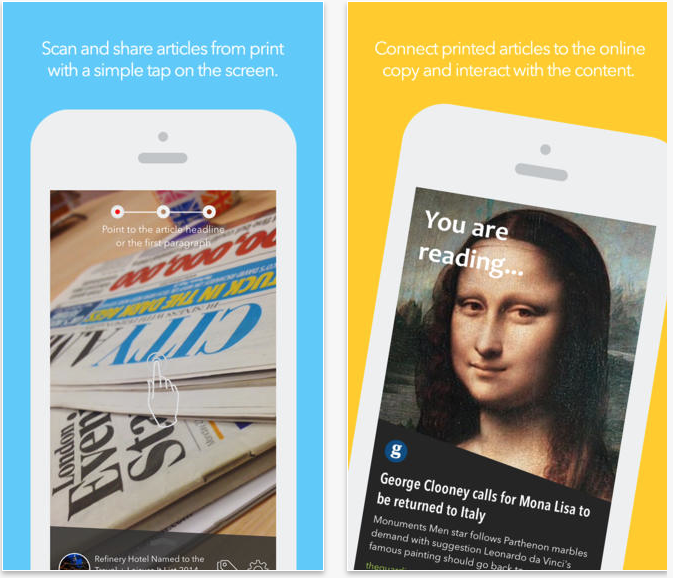
Over the past year, many reviewers have compared Peekster to Shazam — a music-matching-and-locating app that detects audio you hear on TV, the radio, or over a PA system and then finds it online — but for printed material. Like Shazam, Peekster will also suggest related material in which you might be interested.
Peekster is a free app in the iTunes store, but is not yet available for Android. Right now, the supported content options are limited. It was developed in the UK, so the initial content relationships are with free UK outlets and some premium content like The Independent, The Guardian and The Times. Peekster also supports The New York Times, The Wall Street Journal and The Washington Post. But let’s hope Entertainment Weekly and Real Simple won’t be far behind.
BOOKS
So, Peekster’s got you covered when you’re reading a newspaper or a magazine, but what if you’re reading a book? When I first started researching Peekster, I had trouble finding similar options. Think about it: you’re reading along in a paper book and want to share a funny line, or a weird metaphor — but unless the person is nearby so you can thrust the tome into their laps, sharing is difficult.
At first, Booke, pronounced “BOOK-uh,” seemed like a great alternative, so I watched the crowdfunded Indiegogo campaign closely.
I loved the idea of being able to not only share passages of printed books, but also search within the pages of a book by accessing the information digitally, or electronically bookmark printed books. Sadly, the campaign failed spectacularly, the app did not go forward. Insert sad face.
Thus far, I haven’t found an app to rival Booke, but there are a few interesting twists.

Amazon’s Kindle MatchBook is a program where if you’ve purchased the tangible copy of a book through Amazon, they’ll deeply discount the digital version to $2.99 ($9.99 for textbooks). However, only some titles are available. Of the hundreds of books I’ve purchased from Amazon over the many years, only seven are available through the MatchBook program.
Want something a little more app-ified?

A new app on the horizon is BitLit.
1) Download the free iOS app at the iTunes store. Prefer Android? They’ve got it at GooglePlay.
2) Sign in with Facebook or Google+. I did not see an email/password option, unfortunately.
3) Take what BitLit calls a “shelfie” — a photo of your bookshelf. Be sure to align the books properly.
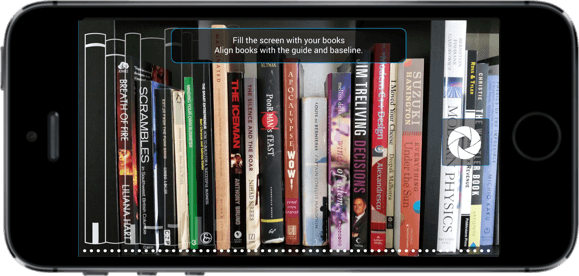
4) After a bit of processing time, BitLit will review your shelfie (yes, it is embarrassing to type that word out loud) and let you know which books in your collection are available to download digitally.
5) Now, here’s where it gets labor-intensive. For each book you own which is available, BitLit wants you to snap a photo the front cover of the book and then sign the copyright page in ALL CAPS. (I’m not quite sure how many of us could sign our name in all capital letters, as our signatures are pretty much ingrained as upper-and-lower-case.)
Once you complete this somewhat onerous step, BitLit will email you a digital copy of the book. For free. Well, free if you don’t consider the time spent snapping and figuring out how to make your signature ALL-CAPS as having any value. Then again, a minute of snapping may be worth more to you than the $2.99 you’d spend on Kindle MatchBook.
You can save yourself some effort, though. If you visit the Eligible Books page at BitLit, you can search by title, author or publisher to find a particular book so you don’t have to bother with a shelfie if none of your books are available.
Speaking of saving effort, if you’re in Canada, Australia or the UK, it’s worth checking out BitLit’s blog post on how BitLit helps you avoid the truly labor-intensive KindleConvert process.
[Editor’s note: Shelfie announced that it is ceasing operations effective January 31, 2017.]
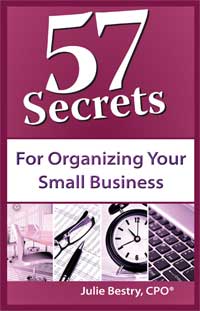
Of course, unless you get rid of your tangible books, neither MatchBook nor BitLit reduces your book stockpile, and you’re dependent upon the publishers of your preferred books actually participating. For example, my own book, 57 Secrets for Organizing Your Small Business, is not available digitally through either program.
And, while MatchBook and BitLit give you the the option to read books digitally, you still won’t be able to share.
Darn that failed Booke crowdfunding venture!
Lightening Up With HP’s EcoFFICIENT™ Paper: A Shoplet Review Post
Periodically Paper Doll reviews new and established office supplies and accessories through the Shoplet Product Review Program.
In the past, I’ve reviewed pens, decorative tape, clipboards and desktop organizers, in posts as varied as Paper Doll Puts Pen To Paper, If It Quacks Like a Duck, Then It Might Be a Zebra, and Organize With Clipboards & Desktop Caddies. However, today is the first time that Paper Doll has been called upon to review actual paper!
THE BASICS
I received two identical trial packs of HP’s new EcoFFICIENT™ Paper from the HP Everyday Papers line, with 50 sheets in each package. The Paper Doll Product Evaluation Team for this review was comprised of myself and a discerning client, using one incredibly stripped-down, basic printer (my own) and her fancy-schmancy printer/copier/scanner/fax/cappuccino maker/hair dryer. (OK, maybe client’s machine just seems exotic by comparison with mine.)
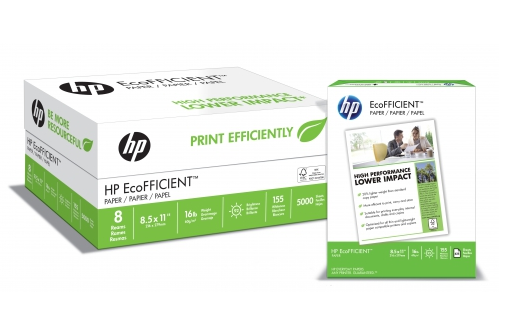
Like typical copy paper, the HP EcoFFICIENT™ paper is 8 1/2″ x 11″ and white. The stats are as follows:
Weight: 16 pound paper (Reviewing my client’s stockpile and my own, it appears we both usually use 20 pound paper.)
Brightness: 92 (My most recently used paper was 88; my client was using 92.)
Whiteness: 155 (My usual was only 125; my client’s stack didn’t reference whiteness.)
And, as you’d expect, the EcoFFICIENT™ is Certified by the Forest Stewardship Council.
THE CLAIMS
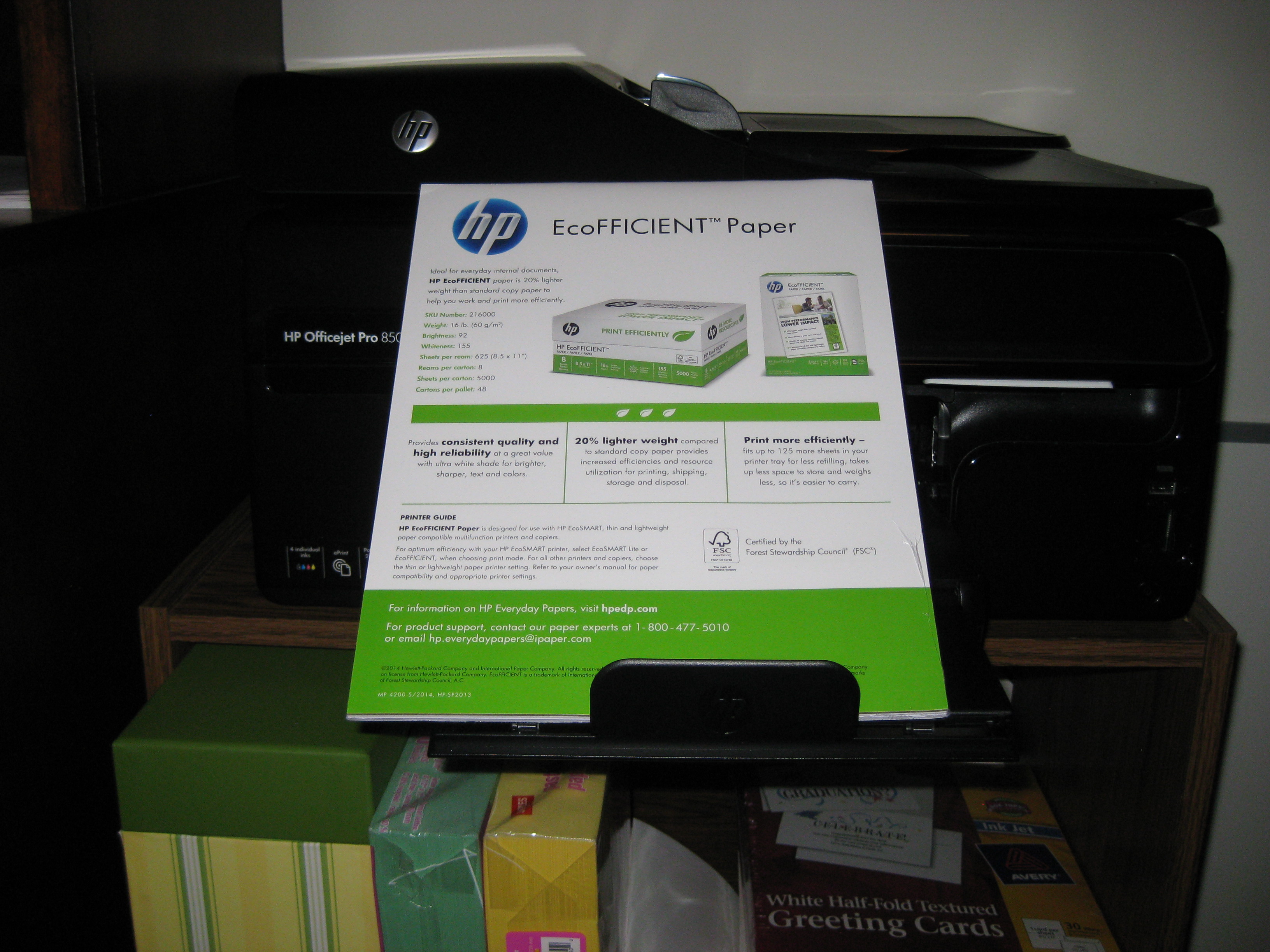
HP’s packaging blurb touts that the EcoFFICIENT™ paper prints more efficiently. The basis for these claims? It fits up to 125 more sheets in a printer tray for less refilling, takes up less space to store, and weighs less, so it’s easier to carry. Taking these issues one at a time:
Less refilling! Tastes Great! (Oh, wait, that’s not what they meant.): Well, yeah. You’ll be refilling a stack of (say) 200 sheets 20% more often with the unbearably chubby paper you’ve been using all along than with this svelte version.
Less storage space needed: Yup. The paper is flatter, so you can store more in the same space (or, if space is at a premium, store the same amount in a more compact space).
Weighs less: To me, this is the major advantage. Paper Doll may be a verbal and organizational powerhouse, but I have weak, wimpy wrists. A ream of paper, let alone two, can be heavy. Even if I weren’t too frugal to buy a whole case of paper at once, I still wouldn’t be able to carry it to my car and schlep it up a flight of stairs. A ream at a time, as it is, is hefty enough. EcoFFICIENT™ is definitely lighter.
HP reports the EcoFFICIENT™ runs 625 sheets per ream (instead of the typical 500). Using a digital food-grade scale, which I am sure is not at all scientifically accurate for my Ms. Wizard-ing, I found that HP wasn’t fibbing that this paper is 20% lighter weight compared to standard copy paper.
So far so good.
THE FINDINGS
The first thing I noticed, before opening the packages, was that the label said there were 50 sheets to each trial pack. I was dubious — it looked more like 25. I’ve been loading printers and copy machines since dinosaurs roamed the Earth, so I know what 50 sheets of paper looks (and feels) like. And this wasn’t it. Was this going to be like that old AirMail onion-skin paper on which my third grade pen-pal sent me letters about her fascinating life in Europe, circa 1975?
HP’s packaging promised the paper would provide “consistent quality and high reliability at a greater value with ultra white shade for brighter, sharper, text and colors.“ So, we put that to the test.
We stacked the printer tray and printed off all the ridiculous pages of a recent Comcast/Xfinity online bill. Our findings?
- The paper is sufficiently bright and white (though, to borrow from the cosmetics language women’s magazines use to describe foundation and blush, we found it to have a more bluish undertone, vs. traditional paper’s more yellow undertone).
- The paper is thin, but not appreciably more easily torn.
- The ink didn’t smudge or bleed.
- The text is as sharp as we’d expect to see on traditional weight paper, though (as with the paper’s brightness/whiteness) my photographic skills may leave that in doubt.
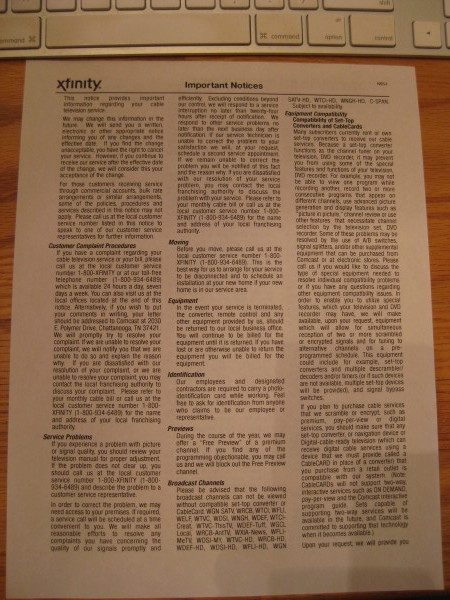
Note: the above-pictured, extremely wordy “Important Notices” page was printed double-sided, and unless you hold the paper directly up to a light bulb, it’s fairly easy to read without the reverse-side text image bleeding through.
However, the same can’t be said about our next experiment, when we printed the double-sided version of the last few pages of the bill, with a full-color SEC/ESPN logo ad on the reverse of a fairly blank page.
- We saw serious image bleed-through with color printing and double-sided pages.
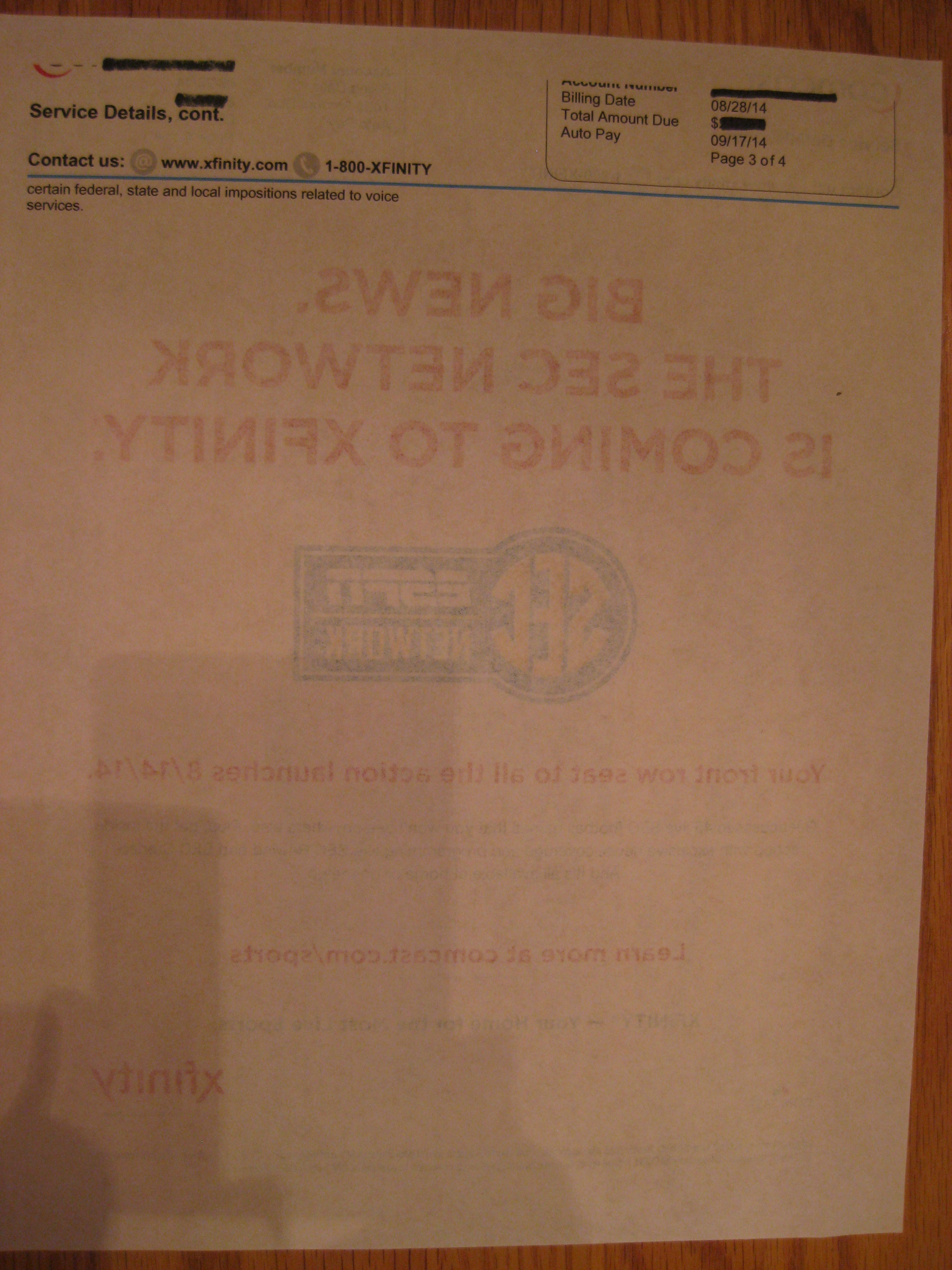
I should note, HP’s packaging for the EcoFFICIENT™ paper deems it “suitable for printing everyday internal documents, drafts and copies.” So, you’d still want to go for the high-end stuff for presentation papers, and Paper Doll suggests not printing double-sided color pages, which, depending on your printing needs, may reduce the sought-after efficiency.
THE TECH LINGO
HP says that the EcoFFICIENT™ Paper is designed for use with HP EcoSMART thin and lightweight paper-compatible multifunction printers and copiers. The packaging states:
For optimum efficiency with your HP EcoSMART printer, select EcoSMART Lite or EcoFFICIENT, when choosing print mode. For all other printers and copiers, choose thin or lightweight paper printer setting. Refer to your owner’s manual for paper compatibility and appropriate printer settings.
When did printers get so complicated?
Also, is it just me, or doesn’t it seem like they lightened the weight of the whole package by getting rid of an E in the word “efficient” to make it EcoFFICIENT™? Who knew an E could be so heavy?
HP EcoFFICIENT™ Paper is available directly from Shoplet, which also maintains a (literally and figuratively) colorful blog about cool office supplies. Shoplet also carries business promotional products and medical supplies. In addition to selling office supplies in North America, Shoplet is a purveyor of office stationery in the UK.
Disclosure: I received these products for review purposes only, and was given no monetary compensation. The opinions, as always, are my own. (Who else would claim them?)
Ten 10-Minute Financial Tasks to Organize Your Finances

[Editor’s note 4/27/2020: As we all cope with another month sheltering in place, financial issues are causing anxiety. Even if you’re not feeling highly motivated (or motivated at all), this classic Paper Doll post is filled with quick tasks to help you get a handle on your financial situation and feel more empowered.]
Readers, at three weeks into the new year, most people have petered out in their attempts to achieve their resolutions, or they’ve not even started, waiting until after they’ve taken down the tree or gotten the kids back to school. But the clock is ticking, and time is money. And while love of money may be the root of all evil, money itself is what keeps us from living in a van down by the river.
So today, Paper Doll is offering up a fast-forward kick-in-the-tush for organizing those little green pieces of paper we all like so much.
To that end: take ten minutes a day, for the last ten days of January, to take ten tiny steps toward getting your finances in order.
1) Sign up for your online Social Security account.
IRA. 401(k). 403(b). No matter how you’re saving for your retirement, there’s one program in which you’re pretty much guaranteed to be participating (unless you work for the railroads): Social Security. If your senior years are dependent upon your retirement savings, investments and benefits, wouldn’t it make sense to ensure the information is organized?
A few years ago, in Social Security Goes Paperless & Gets Lean, Green & A Little Mean, I told you about how the paper Social Security statements we’d been receiving annually were being discontinued.

A year later, I announced the new SocialSecurity.gov online account program in Paper Doll Makes a Statement: The Social (Security) Network.
But did you sign up?
If you haven’t yet signed up yet, now’s the time to do it. Go to the my Social Security website (let’s just ignore their e.e. cummings-esque decision not to capitalize “my”), and click on Create An Account to get started. Once you create your account, you’ll be able to track your earnings and verify that they’ve been properly reported (by you and/or your employer), and get estimates of your future benefits. If you’re already receiving benefits, accessing your account enables you to obtain a letter with proof of benefits (often needed for legal and financial purposes), change your address and direct deposit payment information, and manage your benefits.
If you have already set up your account, change your password. Now! The Social Security Administration actually makes you do what you’re already supposed to do — update your password every six months. If you haven’t, it’ll prompt you to do so when you log in. (Speaking of passwords, just this week, SplashData released a list of the worst passwords of 2014. Don’t use those. C’mon.)
2) Take your Social Security card out of your wallet.
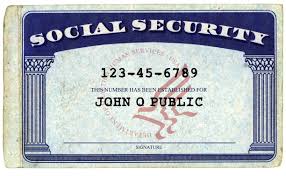 Seriously, dude. We’ve talked about this (in What’s In Your Wallet (That Shouldn’t Be)?). Your Social Security Card, in the wrong hands, is an invitation to identity theft and financial fraud. Memorize your number for when you have to unexpectedly fill in forms. (Really, it’s like a phone number, just nine digits.) Put the actual card in your VIP (very important paper) file system or in your fireproof safe, and only pull it out when you need it.
Can’t find your Social Security Card? Report it, especially if you think you’ve been the victim of identity theft, and then replace it.
3) Pull your credit report annually.
Yup, we’ve talked about this, too. Over and over and over. The only way to make sure that creditors have properly reported your financial activities, and to ensure that you’re protected against bad guys securing credit in your name, is to check your credit history.

To that end, the federal government mandated the creation of a free joint program among the credit reporting agencies (Experian, Equifax and TransUnion) at AnnualCreditReport.com. Click, answer enough identifying questions about past addresses and financial history to convincingly prove that you are who you say you are, and print (or make a PDF of) your credit report.
And then here’s the thing: read it. Downloading your credit report and not looking at it is like buying exercise videos and not taking the shrink-wrap off the DVDs. It creates clutter in your space, maintains clutter in your life (messy finances, like lumpy physiques), and keeps your future (financial) health insecure. Downloading your credit report and not looking at it is like buying exercise videos and not taking the shrink-wrap off the DVDs.
Remember, your credit report doesn’t automatically include your credit score. You generally have to pay each of the three credit reporting agencies extra for that. But that doesn’t mean you have to pay — DiscoverCard and other credit card companies have started to provide FICO scores (for more on that, check our classic Paper For Your Plastic: Organizing a Better FICO Score) and CreditKarma, a company enabling you to track your credit score over time, is a non-icky consumer option.
4) Look back at 2014.
Did you get married? Divorced? Have a baby? Adopt? Did your own little company shoot through the roof? You’ll be doing lots of paperwork soon to work on your taxes for last year, but don’t forget about setting things up for the coming year.
If you’re employed by someone else, you may be subject to more or fewer withholding exemptions. Sit down with your HR department to figure out how to change your withholdings on your W-4.
If you pay self-employment taxes, be sure to adjust your quarterly estimated taxes accordingly.
5) Balance your portfolio (and not on the top of your head).

The best way to organize your future finances is to be an active participant and know what you’re invested in, in what proportions, and keep tabs as the economy changes the balance of your holdings. Paper Doll isn’t a financial consultant. I read Money and Kiplinger’s and watch the quarterly statements on my investments, and I don’t have a clue about the math on my own.
Sit down with your financial advisor, if you have one, or find a fee-only financial planner through the National Association of Personal Financial Advisors (NAPFA), and find out where your money is: in what companies or mutual funds, in what types of accounts (growth, income, real estate, magic beans, etc.), in what proportions, and create a plan for getting your financial future organized.
6) Create, or add to, your emergency fund.

Experts used to say to keep three-to-six months’ worth of expenses in a liquid emergency fund. (And no, as much as Paper Doll believes diet Coke should be legal tender, this means your money is immediately accessible.) During the recent volatile economic years, that’s been upgraded to eight months.
Not even close? Keep reading for baby steps to help you get there.
7) Create a spending plan.
The word “budget” is about as appealing as the word “diet” — and about as effective. Instead, take a few minutes as your mail comes in each day to jot down what you pay each month, or use a financial dashboard like Mint to track all of your spending and income. Review expenses, including:
- Rent or Mortgage
- Insurance (health, homeowners/renters, auto, etc.)
- Utilities (electricity, gas, cable, internet, land line, cell phone, data plans)
- Child-related (baby sitters, tutors, music lessons, activity fees)
- Home-related (homeowners’ association dues, cleaners, lawn care, exterminators)
- Credit card bills
- Student loan payments
- Other debts (car loans, personal loans, etc.)
- Controllable expenses (groceries, dining out, clothing, personal purchases)
Show up for mail call. Avoiding the truth about your financial situation is like not going to the doctor because you’re afraid of the diagnosis. The sooner you know what’s going on, the quicker things can start improving.
Know your income and your monthly expenses. If the latter seems to outstrip the former, prioritize what can be cut (even temporarily). Knowledge is power.
8) Automate savings. Don’t play games.
Have you heard about the 52 Week Savings Challenge? This got big exposure in 2014 and has been making the rounds again. I’d love to credit the graphic below, but it’s simply been EVERYWHERE for the past year-plus, and nobody’s taken credit.
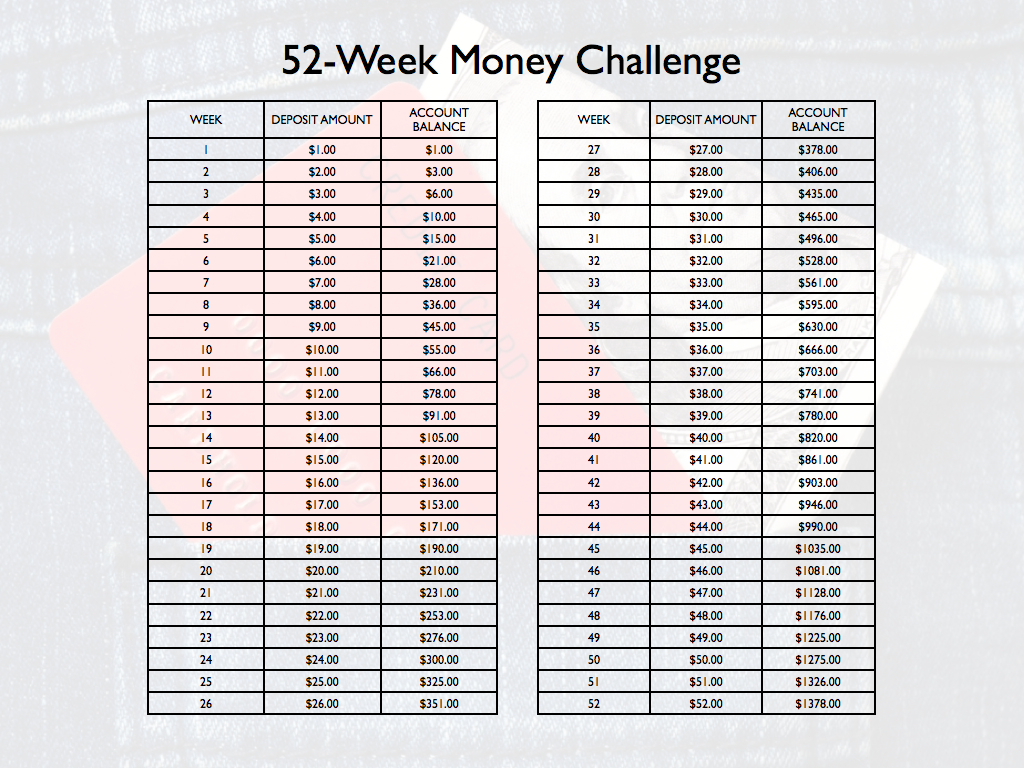 The theory was that each week of the year, you bank one dollar more than the week prior. What’s a dollar? What’s a couple bucks? Keep it up and after 52 weeks, you’ll amass close $1400 (plus interest), almost painlessly. Conceptually, it’s appealing, but I’ve got worries.
Let’s start with the plan as written. Sure, $3 is no biggie for most of us. But as you go along and head toward the end of the year, it might be hard to find a loose $47 or $50 every week. From Thanksgiving to the end of the year, alone, that’s $296, and for people who are struggling, that’s a toughie. (For those who increase each week’s savings by $10 instead of $1, the end of the year would be similarly problematic.)
One solution might be to move backward or mix it up. Start at $52 at the start of January, decreasing the amounts each month. Or number scraps of paper 1-52, put them in a jar and pick one out each week to transfer to savings.
A larger problem with the system is that it’s hard to automate transfers with an incremental increase. You probably can’t tell your bank to take $X+1 and transfer that each week. But you know that it’s easier to do something when you don’t need to find motivation to accomplish it.
I think it makes more sense to automate your savings. How much do you want to save this year? Divide by 52, and whether you’re putting away $5 or $500 (lucky you!), set up an automatic transfer through your bank, or consider seeing if your employer will split your direct deposit between two accounts.
9) Identify to what’s expiring when, and what it’ll cost you.
If you’ve completed task #7, you’ve got a handle on regular expenses, but what payments do you make annually, or upon expiration? Don’t be surprised — review last year’s credit card and bank statements and think about past financial annoyances. For example:
- Amazon Prime — Did you get in on the low rate last year before it bumped up?
- Annually renewed gift subscriptions — Do you regularly bestow largesse?
- Discounted services — Did you get a discounted 12-month package from your cable company? Is your low-rate cell contract up?
- Professional expenses — Do you need to renew dues or pay for certifications or licenses?
- Travel costs — Do you need to renew your passport, Global Entry or Trusted Traveler programs, or airport lounge memberships?
10) Don’t guess. Know.
Being organized doesn’t just mean sorting the paperwork or the emails that come every month. It means knowing what you have and where you have it, keeping what works and getting rid of what doesn’t suit your goals.
- Write down everything you spend. (If you never use cash, a financial dashboard may suffice, but you’ll pay more attention to those little drips and drops of funds if you put pen to paper.)
- Balance your checkbook register, even if you haven’t written actual checks in eons.
- Check receipts against your online bank and credit card statements.
- Scan your credit card statements as soon as they arrive, and call to verify anything that looks hinky.
It’s your money, honey. Your finances are like children. Keep them safe, help them grow, and they’ll make sure you have a happy old age.



Follow Me