Archive for ‘Paper Organizing’ Category
Paper Doll On Narwhals, Fake News, and How To Get A REAL ID
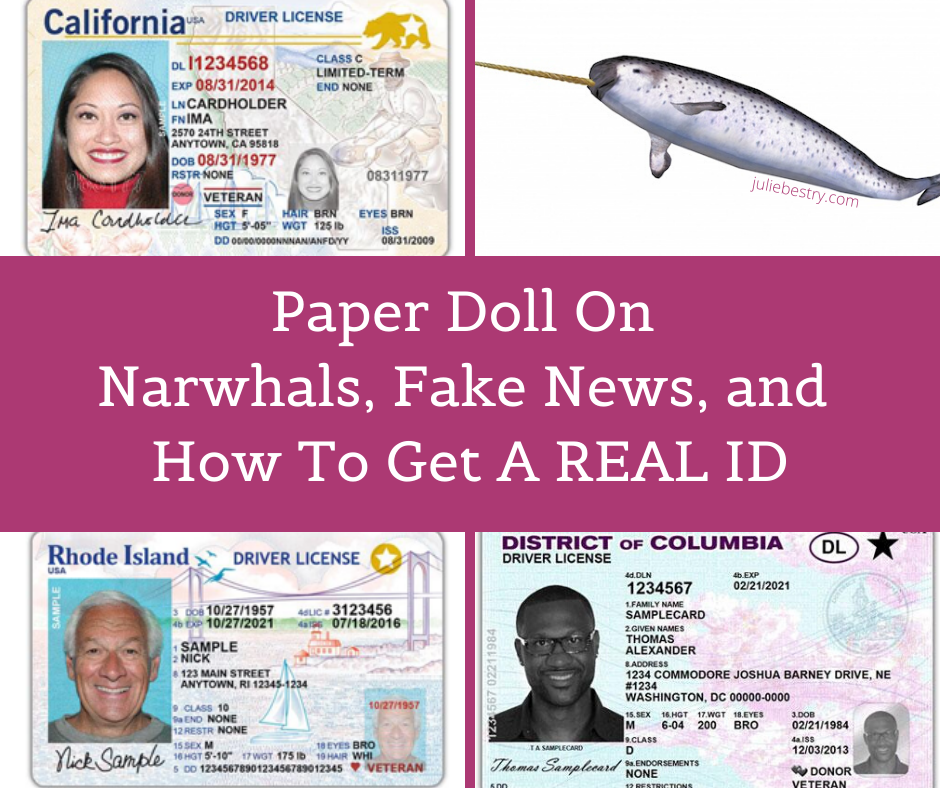 Sometimes, it seems like reality is subjective.
Real Housewives.
Fake news.
Real animals that seem like they should be fake. Don’t try to tell me that you believed narwhals were real when you first learned about them. I mean, unicorn fish? (Yes, I know they’re mammals.)
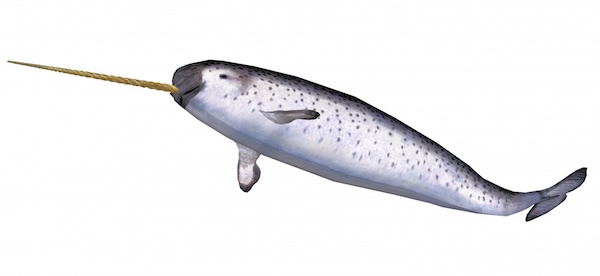
Narwhal Isolated by Piotr Siedlecki under the CC0 Public Domain License
Fake IDs. (My sister once had a fake ID, a driver’s license that had belonged to a family friend. They even shared a birthday. However, they did not share the same color eyes…and when quizzed by a bouncer, my sister didn’t know what eye color she was supposed to have had. Oops.)
REAL IDs.
WHAT IS A REAL ID?
Effective October 1, 2020 May 3, 2023 May 7, 2025, the REAL ID Act passed by the Congress in 2005, will finally go into effect. (Note: the date has changed several times due to COVID, but this is the effective date as of the DHS announcement in December 2022.)
As of that date, if you don’t have a REAL ID, identification that complies with the requirements of the REAL ID Act, your access to certain locations will be limited. The act, passed in the shadow of 9/11, did the following:
- It set clearer standards for government-issued photo IDs (like driver’s licenses, non-driver ID cards, and other government-issued cards), establishing a uniform set of security standards.
- The act prohibits any of the various government agencies (including the TSA) from accepting forms of identification that don’t meet the new standards.
- It’s supposed to add an extra layer of security to the process of flying by making it harder to acquire false documents and use them to board airplanes.
WHY DO YOU NEED A REAL ID?
Given the above, the main reason people will want to make sure their IDs are REAL ID-compliant is so they can board airplanes to fly for business, pleasure, and those uncategorized trips in between (to take care of ill relatives, look for houses in the cities to which they’re moving, visit a speciality doctor or clinic, or otherwise go somewhere too far away or inconvenient to drive or take the train). Basically, if you want to fly, you’ll need a REAL ID.
“But wait, what about passports?” you may be wondering. That makes you a smartypants! The document you use must be REAL ID-compliant unless you are using using an alternative acceptable document such as a passport or passport card, or a state-issued Enhanced Driver’s License.
But flying isn’t the only reason you might need a REAL ID. They will also be required to enter federal buildings (such as to give testimony or participate in legal procedings in a federal courthouse, and to enter nuclear power plants. Unless you are Homer Simpson, the former is a bit more likely than the latter, and flying more common than either one.
Please note: You cannot be required to show a REAL ID to vote. (I mean, unless your assigned polling place is on an airplane, in a federal building, or in a nuclear power plant. But that would be weird.)
As of this writing, there are seven states with voter ID laws, but they only issue REAL ID-compliant driver’s licenses and state IDs; in Georgia, Mississippi, Texas, and South Dakota, you can use an expired license as ID to vote, while in Hawaii, Utah, and Colorado, your ID must be current; in all seven, there are alternatives to using REAL ID. (For more on current state-by-state ID requirements for voting, VoteRiders.org has a great article, How Does Real ID Relate to Voter ID?)
The Act doesn’t require you to present identification anywhere it’s not currently required for accessing a federal facility, like the public areas of the Smithsonian Institute. And, again, the federal building or facility isn’t prohibited from accepting other forms of identity documents (such as a U.S. passport or passport card). But as we’ve discussed before on this blog the majority of Americans do not have valid passports. Currently, only 42% of Americans hold them. Granted, that’s a huge increase in the past few decades. In 1990, only 4% of Americans had passports. When I wrote about Passport Day in 2011, that number had reached 30%.
Children under 18 are not required to have REAL ID-compliant identification.
MINIMUM DOCUMENT REQUIREMENTS
For a state-issued ID (whether a driver’s license or other identification card) to be valid to serve as a REAL ID, it must include the following infomation:
- The person’s full legal name.
- The person’s date of birth.
- The person’s gender.
- The person’s driver’s license or identification card number.
- A digital photograph of the person.
- The person’s address of principle residence.
- The person’s signature.
- Physical security features designed to prevent tampering, counterfeiting, or duplication of the document for fraudulent purposes.
- A common machine-readable technology, with defined minimum data elements.
In addition, states (and territories) have a whole slew of rules to follow regarding how they must organize and use the documentary evidence they receive.
For example, states must retain any paper copies of the documents you provide for a minimum of 7 years or scanned/capture images of those source documents for a minimum of 10 years. (I suspect the federal government might need the help of some professional organizers to accomplish all of this!)
Shockingly, some states didn’t previously require photos even for driver’s licenses, but now all REAL IDs will require “facial image capture” and must establish “an effective procedure to confirm or verify a renewing applicant’s information.” (Isn’t it a bit surprising that wasn’t required before?)
All states will need to confirm Social Security account numbers with the Social Security Administration and check with other states to make sure your old licenses have been “terminated.”
States will also have to limit the validity period of all driver’s licenses and (non-temporary) ID cards to 8 years.
HOW DO YOU GET A REAL ID?
First, gather your documents. You will need to present the following original or certified documents to your state to apply for a REAL ID.
- Proof to establish citizenship or legal presence – Again, if you have a passport or passport card, you’re covered. Otherwise, you’ll need official documentation to prove you are a citizen.
- Proof of your full Social Security number – Find your official Social Security card. If you’ve lost yours, you’ll want to replace your Social Security card before trying to apply for a REAL ID.
- Two proofs of residency of the state in which you currently reside.
- Documentation of any name changes (due to marriage, divorce, adoption, change of name associated with a gender reassignment, etc.) explaining a discrepancy between the names on all your forms of proof
In general, you will apply to the local branch of your state’s Department of Motor Vehicles or equivalent. You will be be required to apply in-person, and it’s possible that only some (or even one) DMV location in your community will process these applications.
HOW DO I KNOW IF MY ID IS A REAL ID?
Look in the upper right-hand corner of your ID. Do you see a star that looks like any displayed below?

No star? It’s not REAL ID-complaint. Chance are that if you haven’t gotten a new state-issued ID card in the last couple of years, you probably don’t have a Real ID.
Tangential story: When I started college, it was right after the drinking age in New York State had gone from 19 to 21. A friend from a state that did not put birthdates on driver’s licenses and confidently ordered a beer to go with his dinner. The server squinted, puzzled that there was no birthdate.
“Oh, we don’t have birthdates on our driver’s licenses in [his home state].” The server was puzzled. “Then how do I know if you’re legal?” My friend smiled warmly and pointed to the top right corner of his ID. “See that green sticker that says 21? That’s how you know I’m at least 21. It’s a Green 21!” Mollified, the server handed him back his ID and wandered off to get his burger and beer.
Yes, readers, he randomly found a tiny, round, green sticker with 21 imprinted on it, and had the notion to put it on his license. The world was a lot less complicated in the mid-1980s.
DO I REALLY HAVE TO GET A REAL ID RIGHT NOW?
Not necessarily. Maybe you’re thinking, “But I have another five years left on my current driver’s license. Why should I pay a fee to get a new one?”
No plans to visit a nuclear power plant in the near future? Great! Pretty sure you won’t need to visit any federal buildings. OK. But flying? There are all sorts of unanticipated emergencies where you might unexpectedly need to fly. Wouldn’t you rather be prepared?
As mentioned above, there are alternatives to getting newly-issued REAL IDs in the short term, but most people are unlikely to have the majority of them. They include:
- Driver’s licenses or other state photo identity cards issued by Department of Motor Vehicles (or equivalent)
- U.S. passport
- U.S. passport card
- DHS trusted traveler cards like Global Entry, NEXUS, SENTRI, FAST (but see the next section)
- U.S. Department of Defense ID, including IDs issued to dependents
- Permanent resident card
- Border crossing card
- State-issued Enhanced Driver’s License (Currently only Michigan, Minnesota, New York, Vermont, and Washington issue these types of licenses.)
- Federally recognized, tribal-issued photo ID
- HSPD-12 PIV card (Personal Identification Verification Credentials are granted to federal government employees and contractors.)
- Foreign government-issued passport
- Canadian provincial driver’s license or Indian and Northern Affairs Canada card
- Transportation worker identification credential
- U.S. Citizenship and Immigration Services Employment Authorization Card (I-766)
- U.S. Merchant Mariner Credential
If you opt to put off getting a REAL ID, make sure that you always keep your passport and/or any of these other identification cards accessible. If you keep your passport in your bank’s safe deposit box and unexpectedly find out on a Saturday afternoon that you need to fly on Sunday, you’ll be out of luck.
WHAT’S THE HUBBUB ABOUT GLOBAL ENTRY CARDS?
You can use your Global Entry card, if you already have one, and the benefits of Global Entry are great. You get to keep your shoes, belt, and light jackets on when going through security, you don’t have to empty your pockets, and you can keep your little bag of liquids inside your carry-on.
There’s one small hitch. The current administration has just ruled that residents of New York State will not be allowed to renew or apply for new Global Entry cards, and it’s uncertain at this time if other states’ residents will be banned. (This is a complex political issue outside the parameters of an organizing blog. Please visit your preferred search engine for more details.)
GET REAL
Bottom line: if there’s any chance that you will be flying in 4th Quarter 2020 2nd Quarter 2023 (as of spring 2022) and you don’t have a passport, now is the time to gather your documents and apply for your REAL ID. The lines will only get longer as October approaches.
Finally, if you read the list of alternative IDs and were surprise that there is still a U.S.Merchant Marine, be assured you are not the only one. But like narwhals, they’re real. But Green 21s? Not so much.
Paper Doll Wraps Up the Holiday Season (Sneakily, Diagonally, and Intangibly)
Welcome to the home stretch of the holiday season.
Maybe you’re reading this while standing in a long line because this is the first chance you’ve had to shop and you were shocked to find that your favorite online store sold out of the only thing on your special person’s list.
Perhaps you bought all your presents last summer, wrapped and labeled them, and stored them in your secret hiding place months ago.
Either way, how are you going to keep the gifts a surprise until unwrapping time?
HIDING PLACES
I think the best place to keep gifts, wrapped or otherwise, from the prying eyes of tiny humans and others with insatiable curiosity is in an old suitcase. People will check under beds and in closets, but nobody looks in those cheerless valises in the basement, the ones that are faux leather and lack wheels and haven’t been used in 40+ years.
Yes, as a professional organizer, I encourage people to donate or recycle things that they don’t use, but quietly repurposing that blue suitcase circa 1978 counts as recycling!
Other options worth considering:
- Hidden in plain site — Would your kids (or your spouse) show any interest in prying up the lid of a Bankers Box labeled “2015 Tax Receipts,” “college textbooks,” or something similarly boring? Probably not. (Piling other stuff on top couldn’t hurt.) If you’re the only one in your house who cooks, a small wrapped gift or two hidden in the back of a kitchen cabinet, inside a rarely-used fondue pot, may be just what you need to stymie the sneaky searchers.
- Your friends’ & neighbors’ houses — One solution is just to trade storage. Take your wrapped gifts in boxes or lidded tubs to your cousin’s, co-worker’s, or BFF’s place, and return with hers. You can even tell your family not to bother snooping because you’ve made this trade. (Note: if your kids and their kids are friends, one may spy on the other’s behalf.)
- The trunk of your car — Obviously, this works in only two situations, when you normally have an incredibly tidy trunk (with ample room to store a gift-filled box labeled “work project”) or if you normally have a predictably packed and untidy trunk (in which case you need to hollow it out and hide gifts underneath the faux facade of mess. (Do not mark any boxes as “donations” or someone may unhelpfully deliver all your holiday gifts to charity!)
- Attics — The upside is that children and pets generally can’t get up to the attic on their own. The downside? It’s probably not that easy for you to get up there, either. Also, it’s probably dusty, there may be “critters” and there’s almost certainly temperature and humidity variations throughout the year. Keep that in mind if you’re storing any gifts that are sensitive to those kinds of changes, and store the gifts in a tightly lidded tub.
- Laundry hamper — Let’s face it; nobody is enthusiastic about doing laundry. Your kids aren’t about to suddenly volunteer to take the laundry from your room, even to please Santa.
- Trash bags — Big, black trash bags or leaf bags, especially if you have an attic, or garage, or basement with a variety of things already obscured by bags, may be the ticket. The problem? If there’s anyone who ever visits your house trying to be “helpful,” they may assume it’s trash and toss it out.
If your storage is at a premium and you have to keep wrapped gifts out and on display — and this trick works once you’re ready to put the gifts under the tree — fake the name tags. Instead of Mom, Dad, Aunt Jen, etc., make yourself a cheat sheet matching real names to “gift” names and put presents out for Lizzo, Daenerys, Baby Yoda, and so on.
WRAPPING SAVVY
Paper Doll is terrible at wrapping any gifts that don’t come in perfectly rectangular shapes. Back in NAPO2014: It’s a Wrap! Organizing Your Wrapping Supplies with Wrap It!, I told a story of my wrapping failures (and shared this adorable photo of a now-late-20s young man).

Many years ago, I offered up some alternatives for people with wrapping skill deficits:
It’s a Wrap! Wrapping Paper Alternatives, Furoshiki & Frogs (2008)
Paper Doll Wraps Up the Holidays and Makes It All Stick (Part 1) (2011)
Paper Doll Wraps Up Some Alternatives to Wrapping Paper (Part 2) (2011)
I’m obviously not the only person who has trouble wrapping presents, because the hottest video on the internet in the past few weeks has been one that went viral with ways to wrap gifts in unusual ways, and especially spotlighting wrapping gifts diagonally.
In case you haven’t seen it, be sure to press PLAY below and crank the volume. Oh, and stop by @BlossomHacks to give them some love. As often happens on the internet, credit got lost along the way, and most people were not aware that Blossom DIY created the video (which UK bookseller Waterstones made viral).
Wrapping gifts got a whole lot easier with these clever ideas! pic.twitter.com/sP4MXhpBBu
— Blossom (@BlossomHacks) December 14, 2019
By the way, if you care, Popular Mechanics has a feature on the math behind the diagonal wrapping hack.
WRAPPING and PACKING and SHIPPING, OH MY!
Finally, I’m an organizing and productivity expert, not a wrapping, packing, and shipping expert (my recent post, This “Magic” Product Makes Shipping Packages as Easy as Wrapping Leftovers, notwithstanding).
Luckily, our friends at Quill have more expertise on these issues and have been kind enough to share their infographic to take you through each of these holiday headaches with aplomb.
 Gift wrapping, packing, and shipping hacks to save money and make your life easierInfographic by Quill
A FINAL WORD
Of course, the best gifts don’t necessarily need to be wrapped or shipped. As we’ve talked about many times, gifts don’t need to be things at all.
We’ve spoken many times about how you can give gifts of experiences. Consider adventures (like the NASCAR Racing Experience or an afternoon in an escape room), entertainment (tickets to sporting events, museum exhibits, concerts, theater events, six months of Netflix or Hulu, or a year of Amazon Prime), practicality (gift certificates for car washes or an auto club membership like AAA), or consumables (homemade or subscription-based, or gift certificates to restaurants or coffee houses). And, of course, gifts of organization and productivity never go amiss.
Happy holidays, and I hope whatever you give (and receive) gifts makes life a little (or a lot) more joyous.
This “Magic” Product Makes Shipping Packages as Easy as Wrapping Leftovers
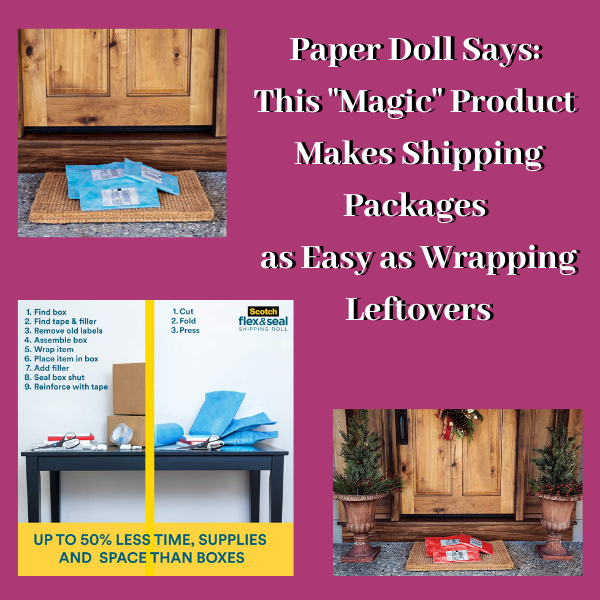 Packing and shipping is not exactly rocket science. And yet Paper Doll hears a lot about shipping-avoidance and packing-box frustration. In a perfect world, whenever we wanted to ship something, we’d have the ideal sized box (so as not to waste space, and also not to have one of those almost-sealed, bulging boxes where the flaps quite don’t meet). We’d also have just the right amount of padding material to prevent jostling, and it would all be easily recyclable.
My clients tell me they procrastinate on returning purchases and shipping care packages, birthday gifts, and other things because – although they have lots of boxes and bubble mailers thanks to their online shopping habits – nothing is ever the right size. This isn’t just a frustration; it’s also a financial issue.
In 2015, the major players in the ground shipping world, like UPS and FedEx, stopped pricing solely by the pound. They realized that a lot of relatively light packages were being shipped, and that cost them money. So, they started using dimensional weight, which had already been the practice for air-shipped packages.
What is dimensional weight?
The shipper calculates the cubic size of a package by multiplying its length, width, and height. Once the dimensional weight is calculated, they compare it to the actual weight of the package and the larger of the two is used to determine the package’s actual “billable” weight.
Need some help with the math? Google dimensional weight shipping calculators, like this one from ShippingEasy.com.
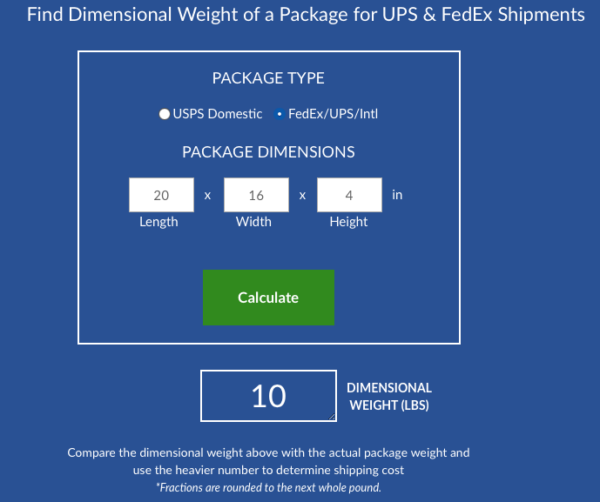
What does this all mean for you? A small thing in a bigger box will cost you more than that same thing in a smaller box, which means you have to keep even more shipping supplies on hand to find the just-right solution, and that causes clutter.
If only someone had a better idea. Oh, wait. Someone did!
SCOTCH™ FLEX & SEAL SHIPPING ROLL
3M is a marvel of innovation. The same parent company that brought us Post-It® Notes and Command hooks has done it again. They’ve invented a shipping solution that requires keeping less packing material and fewer supplies, takes less time, and creates a smaller dimensional weight for the things you ship.
And, honestly, I’m not persuaded that it isn’t some kind of magic.
Scotch™ Flex & Seal Shipping Roll
First, let’s get an overview of the product, with some fun, bouncy music.
Cool, eh? So, let’s dig deeper. How does this product save space, time, and money?
Eliminate clutter
What do you keep on hand for shipping packages? Boxes, right? Probably lots and lots of Amazon (and other) boxes. Maybe USPS “priority” boxes (which always seem to be way too large or just a little too shallow)? A family member bought a gorgeous Kitchenaid stand mixer and had it shipped. It came in a glossy, specially-carved Kitchenaid box (with a photo of the mixer on the package) inside a matching, plain, cardboard Kitchenaid-branded box (each with specially-placed handles for ergonomic carriage) and the whole thing was inside a box that would have made a nice toddler playhouse.
I bet you don’t just hoard boxes. I bet you have bubble wrap. (And not nice rolls of bubble wrap, but pre-used bubble wrap that someone in your house has popped and flattened along the edges, right?) Or maybe you have styrofoam peanuts. Or those clear, little balloons that look like nothing so much as an inflated zip-lock sandwich bag without the zipper?
And where are you storing these cardboard boxes, bubble mailers, poly bags, bubble wrap, and package stuffing? Probably wherever you can find to put it, and likely not in a very sound system. (No, I’m not peeking in your windows while you’re sleeping. Promise!)
Because the Flex & Seal allows you to customize your package to fit precisely around the edges of your item, there’s no wasted space in the box and no unnecessary padding to keep on-hand. Scotch’s marketing claims to save up to 50% on supplies, time, and space vs. using boxes. I don’t know how they arrived at that statistic, but it does mean that you can take up less space, and the roll can be stored horizontally or vertically, like a rolled-up yoga mat.

Save time
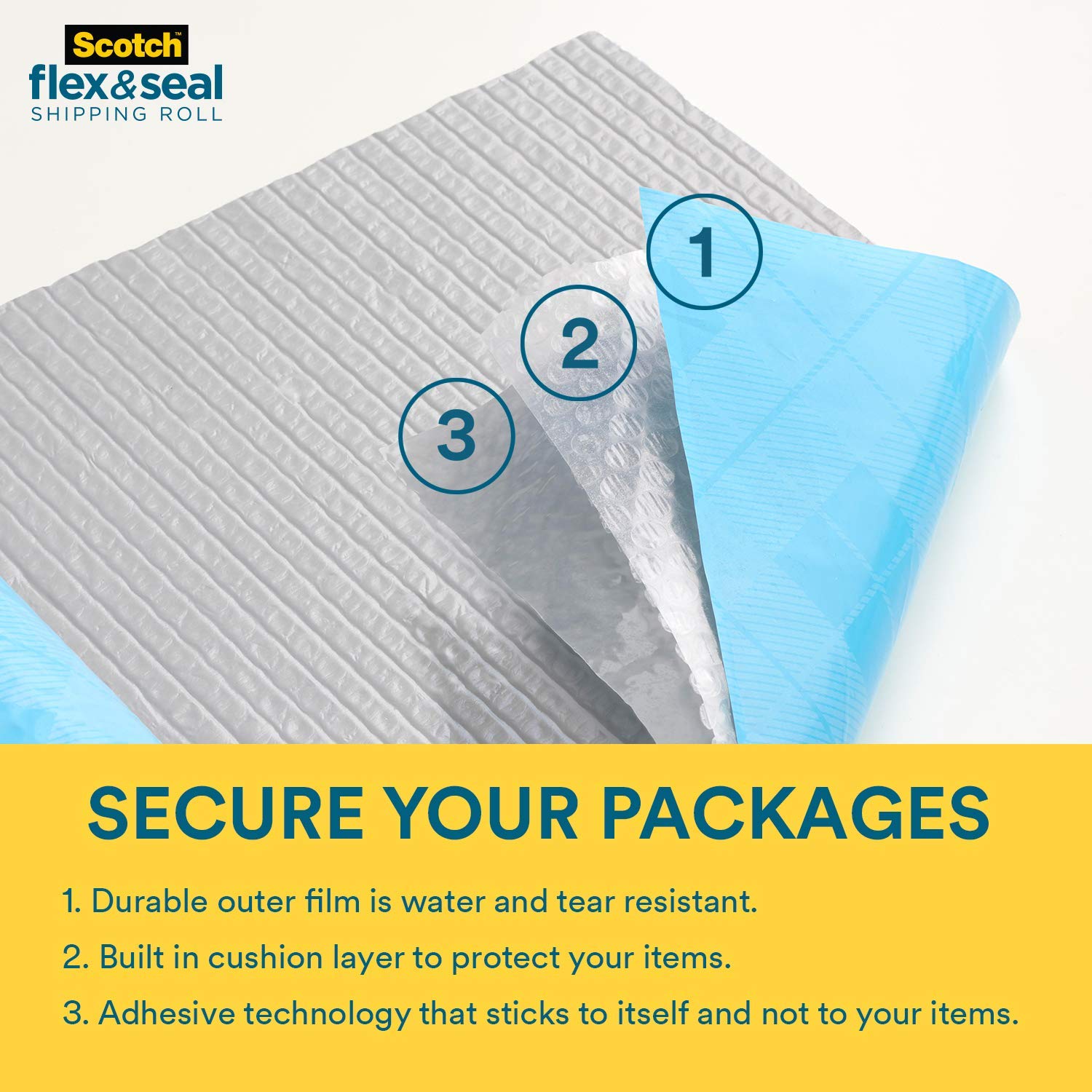
My clients are invariably piling up to-be-shipped items on the dining room table or on kitchen counters because they anticipate (often correctly) that it will be time-consuming to find a suitably-sized box, pad and pack the item(s) safely, and seal everything confidently. Scotch™ Flex & Seal Shipping Roll promises make packing as simple as:
- Cut a piece of the roll long enough to sandwich the item you’re shipping.
- Fold the Flex & Seal over whatever you’re shipping.
- Press to seal it by continuing to press around the three (non-folded) edges. (Imagine you’re wrapping your Thanksgiving leftovers in aluminum foil before putting them in the freezer. Or, as the product’s web site says, “Make sure you’re pressing gray surface to gray surface. A helpful way to remember it: Do not wrap like a present, fold and press like a calzone!”)
That’s it. Print out your label and affix it to the package. Wheeeee!
Secure and immobilize your package.
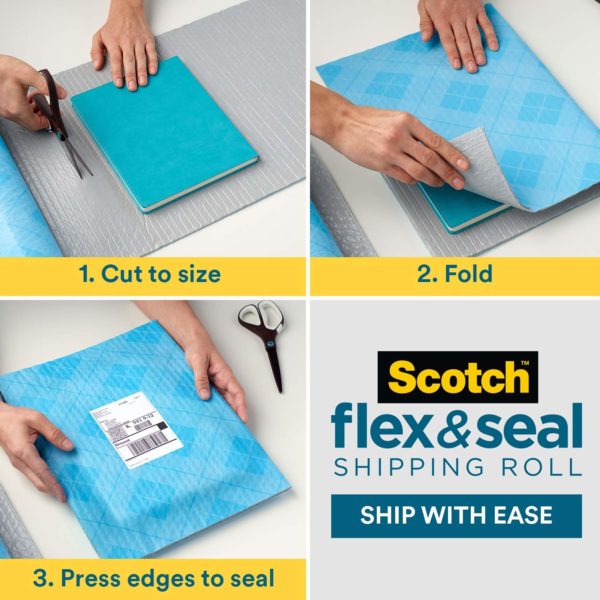
Scotch™ Flex & Seal Shipping Roll may look like a prettier version of bubble wrap, but it harbors a secret superpower. Flex & Seal is constructed with three layers.
The blue outer layer is tough and durable, making the package water-resistant and tear-resistant. The clear middle layer is bubble wrap, but seems slightly less inflated (and is difficult to pop), creating firm cushioning for the package.
And the grey inner layer is MAGIC. (OK, I’m sure it’s science, but Paper Doll can’t figure out how it works!) This inner layer’s “adhesive technology” makes it stick securely to itself but not whatever you’re shipping!
Scotch™ Flex & Seal Shipping Roll sticks to itself and not to what you put inside! What kooky shipping witchcraft is this? Share on XOnce you fold the Flex & Seal over your item (sandwiching it), just press firmly for a guaranteed seal. Folded and smushed (for another scientific term), the Flex & Seal conforms to the shape of whatever you’re shipping, immobilizing it to protect against wiggling during shipping.
Save money.
The marketing for the Flex & Seal Shipping Roll notes that by eliminating extra packing and shipping supplies, and securely sealing around the shape of whatever you’re shipping, it can reduce the package’s dimensional weight, as we discussed above. That should reduce your costs. Yay!
WHO CAN USE THIS?
Anyone who can comfortably maneuver scissors should be able to use the Flex & Seal. (If you’re doing a LOT of packing, consider a paper cutter in lieu of scissors.) If you – like Paper Doll – sometimes have trouble wrapping presents and fear this might be too similar of an experience, fear not. I’ve been known to unroll too little or too much wrapping paper and then the paper crumples and creases as I try to get just the right amount. Flex & Seal is thicker and sturdier, so that’s not an issue. Also, unlike rolls of wrapping paper, Flex & Seal is only 15″ wide, only a few inches longer than a paper towel roll, so it’s not unwieldy.
So, who can use this?
- People who rarely need to send packages. If you never have boxes or bubble mailers on hand and put off shipping things because you lack room to store them, this makes things pretty easy.
- People who send packages all the time – Grandparents? Check. Crafters who share their creations for fun or profit? Check. Small business owners who ship small, fiddly things? Check. Authors who autograph and ship copies of their books? Check!
When shouldn’t you use Scotch™ Flex & Seal? If you’re shipping something delicate or fragile, stick to a traditional packaging set-up, like a cardboard box with firm but flexible padding and a tight seal. Also, because the inner grey layers must be matched up, it’s not suitable for large packages.
ENVIRONMENTAL ISSUES
Flex & Seal is recyclable. Scotch™ advises just removing the label before dropping the packaging off at a plastic bag recycling location. While not all communities have plastic bag (or plastic film) recycling centers, you can enter your zip code into the search bar at PlasticFilmRecycling.org to find a center near you.
However, I am concerned that not all labels are so easy to peel off. My 10-foot roll of Flex & Seal came to me wrapped in actual Flex & Seal! (How’s that for good advertising? It was very meta.) But both the marketing label (promoting other 3M products) and the UPS label would not peel off cleanly, so I’m not sure if that renders the package un-recycle-able.
HOW TO OPEN FLEX & SEAL PACKAGING
I’ll admit, I was puzzled when my Flex & Seal Shipping Roll (again, wrapped in Flex & Seal) arrived. I saw that I could just cut it open with scissors, but I didn’t want to accidentally cut what was inside. But I also couldn’t just pull on opposite sides of the packaging as if I were opening a bag of potato chips.
In the end, I guessed (correctly), and carefully used the scissors on the corner of the packaging, but I’m betting I wasn’t the only uncertain person, as Scotch™ produced this video to set people straight about three different methods for opening Flex & Seal packaging!
VARIETIES OF FLEX & SEAL SHIPPING ROLL
Scotch™ Flex and Seal Shipping Roll comes in four sizes:
- 10′ long x 15″ wide
- 20′ long x 15″ wide
- 50′ long x 15″ wide
- 200′ long x 15″ wide (suitable for small business shippers or people with LOTS of grandchildren)
As for styling, well, there’s not a lot of variety. The standard is the blue exterior with the grey interior.
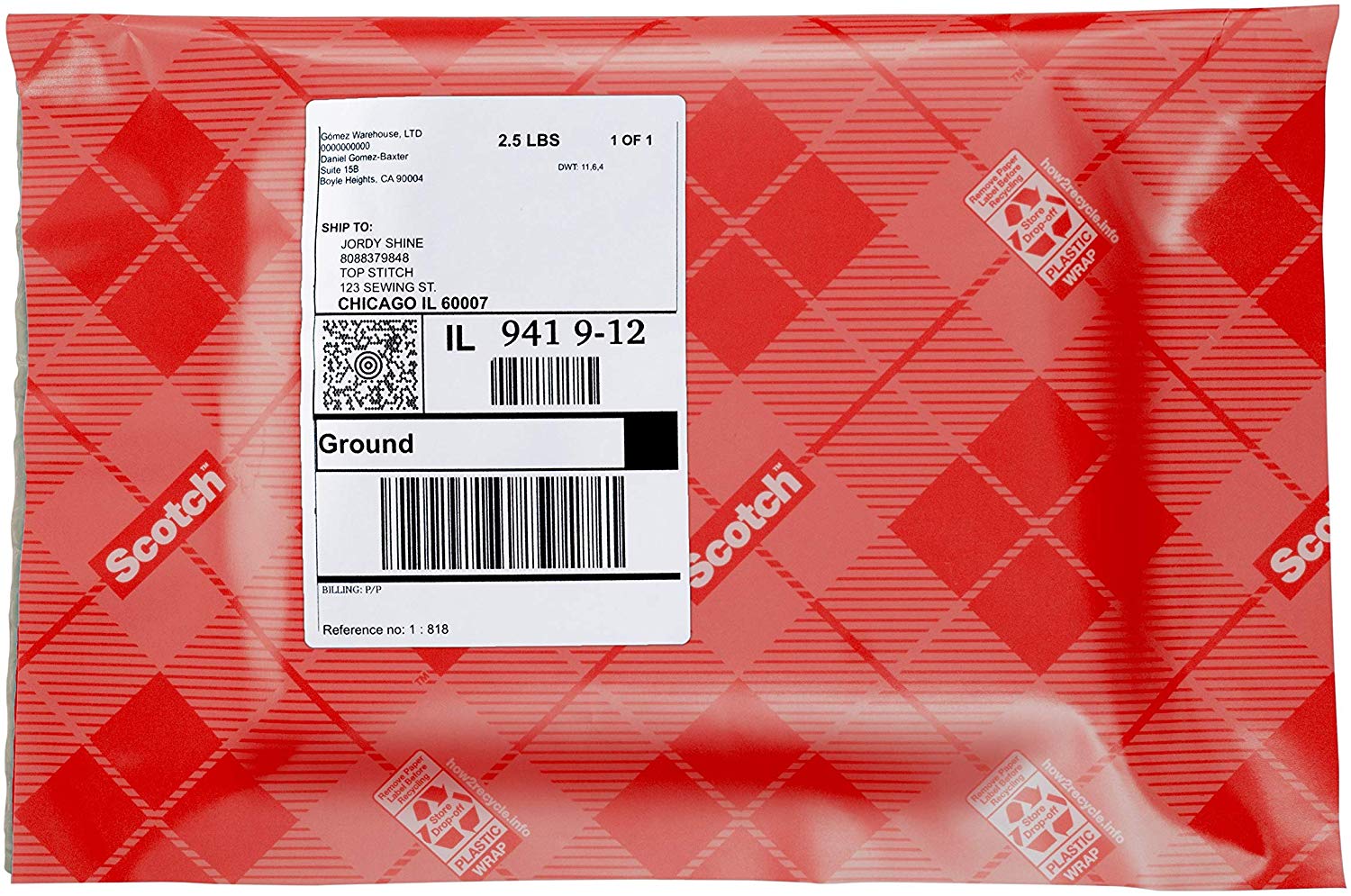
Looking for something a bit more festive for the holidays? That regular sky blue is cheery enough (and sorta suitable for Hanukkah) but if you’re looking for something a little more Christmassy, Scotch™ has created a Limited Edition Holiday Color (which you and I may recognize as “red”).
LOCATIONS AND PRICING
Scotch™ Flex & Seal Shipping Roll is available online at Amazon and Shoplet, and at Target, Walmart, Office Depot, and Staples. Prices range from about $8.50 for the 10′ roll to $99 for the 200′ roll.
Disclaimer: As part of a voluntary program, I help 3M evaluate some of their products. 3M sends me free samples and I analyze them, and give my honest opinion on their site. I had just received my 10′ roll when I saw that my colleague Seana Turner had included Flex & Seal in her post, Seana’s Top Gifts for 2019, which gave me the idea to write this post. Be assured that all opinions are my own. (Who else would claim them?)
Paper Doll on the Smead Podcast: Essential Lists For Organized Travel
“Twenty years from now you will be more disappointed by the things that you didn’t do than by the ones you did do. So throw off the bowlines. Sail away from the safe harbor. Catch the trade winds in your sails. Explore. Dream. Discover.”
~ Mark Twain
Whether you’re going over the river and through the woods for a holiday with Grandma or jet-setting off to some foreign rendezvous, travel can be both exciting and nervewracking. There are so many issues, from worrying that you’ll forget your medication to figuring out how to pack properly for the weather, that it’s easy to become anxious or overwhelmed.
Taking Twain’s message to heart, I would rather spend my twilight years remembering the joys of my madcap adventures (even if they involved some momentary anxiety) than basking in the coziness of never making a misstep due to never having taken a step at all.
Readers, you’ve heard me say this before: organizing cannot prevent all catastrophes, but it can prevent them from being so catastrophic.
Organizing cannot prevent all catastrophes, but it can prevent them from being so catastrophic. Share on XI’m a big believer that lists help keep our space and time organized, and work particularly well for banishing – or at least keeping at bay – some of that pre-travel anxiety.
You may recall my post from last fall, Paper Doll’s 5 Essential Lists For Planning an International Vacation, which I wrote after returning from my grand tour of Italy. Recently, that post prompted a great two-part conversation with John Hunt on the excellent Smead video podcast, Keeping You Organized.

We discussed exactly how you can use lists to conquer your trip-preparation fears and travel more confidently. For convenience, both parts of our conversation appear below.
Essential List for Organized Travel – Part 1 (Keeping You Organized, episode #263)
Essential List for Organized Travel – Part 2 (Keeping You Organized, episode #264)
If you’d rather listen to the podcasts (perhaps while packing or roaming through romantic, far-flung airports than be distracted by my hair (which I swear always looks better ten minutes before the podcast starts), you can visit the podcast pages directly at Smead and download the mp3s:
Essential List for Organized Travel – Part 1 (Keeping You Organized, episode #263) Audio Only
Essential List for Organized Travel – Part 2 (Keeping You Organized, episode #264) Audio Only
On the podcasts, I talked about the kinds of lists I use, as well as the apps, products, and services that I think help create a more organized travel experience. One of those items wasn’t widely available yet when I went to Italy, nor when I wrote my recap.
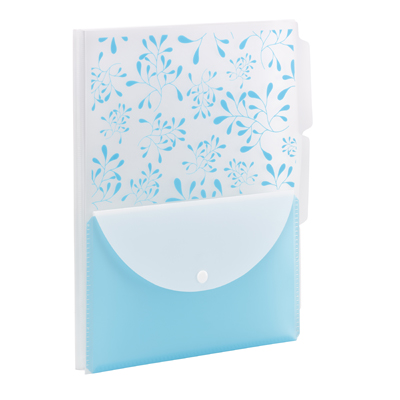
Last February, I was watching Smead’s myOrganized.life daily Facebook show. When I tuned in, I learned that friend-of-the-blog and Smead personality Leiann Thompson (John Hunt’s partner in crime) was stuck in a snowstorm and John was on his own, touting a new product: the Smead Poly Three-Divider Travel Organizer File.
Once John showed off the Travel Organizer File, I knew I had to get a closer look at this hybrid tool for organizing travel documents and necessities. It’s made of durable poly material, so it’s tear- and water-resistant. The back portion of the letter-sized organizer has three 1/3-cut tabbed divider sections, each of which has a 25-sheet storage capacity. The sections are useful for sorting documents by:
- different days of your itinerary
- different aspects of your trip (family reunion notes, conference documents, sightseeing itineraries), or
- different travel elements (airline reservations, hotel bookings, ground transportation info, etc.)
The Smead Poly Three-Divider Travel Organizer File also has a snap-closure pocket (also made of poly material) for collating travel expense receipts, baggage claim or valet tickets, restaurant/business cards, walking tour maps, and anything you collect along the way.
Smead has three colorful, fun designs, all of which give your enclosed documents some privacy from prying eyes. (You know, there’s always that one seatmate looking over your shoulder!) The teal-white flowered is shown above; Smead also makes purple and teal versions with a charcoal privacy design (below):
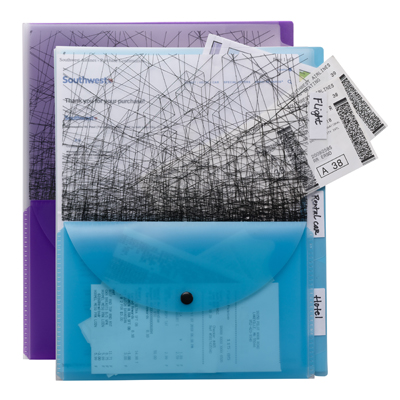 You can find a two-pack of the Smead Poly Three-Divider Travel Organizers at Amazon for around $9, as well as at Smead, and most office supply stores and stationers.
Happy (organized) traveling!
Paper Doll Interviews Melissa Gratias, Author of Seraphina Does Everything!
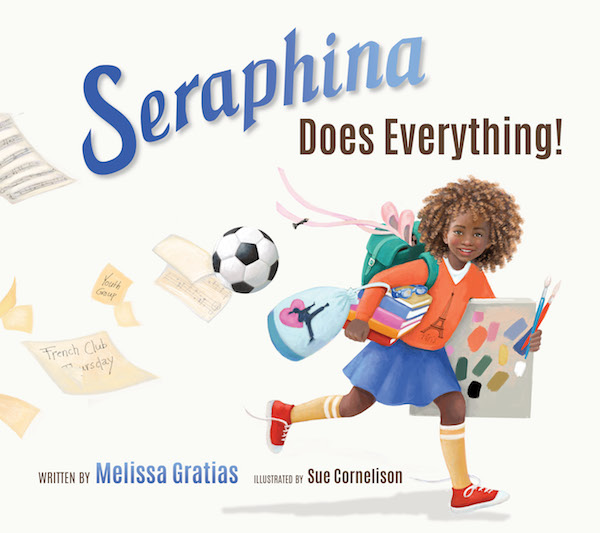
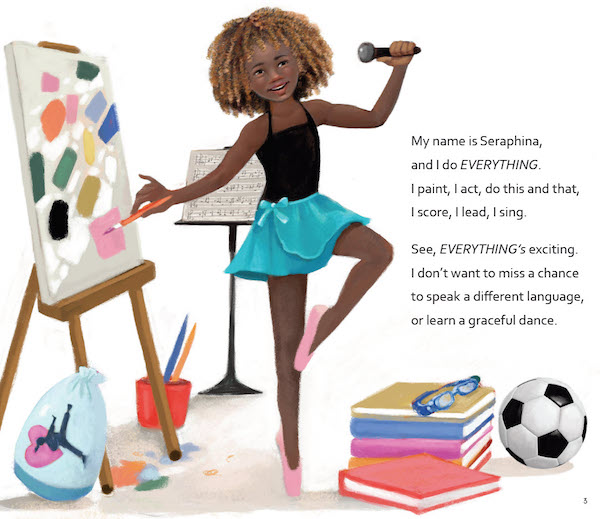
Today’s post is special – I’m introducing a new “friend of the blog.” Her name is Seraphina, and she’s the brainchild of my colleague, friend, accountability buddy, and Skyper-in-Crime, Melissa Gratias, Ph.D.

Melissa, known for her expertise helping busy professionals with their productivity, has authored a book about overwhelm and trying to juggle too many activities. And in a delightful twist, my girl Melissa has written this book for KIDS!
I was an early reader (and fan) of Seraphina, so when I found out that Seraphina Does Everything! was being released on April 9, 2019, I knew I wanted to spread the word to Paper Doll readers. This post is your chance to meet Melissa and Seraphina, and to avail yourself of a nifty bonus opportunity. (Stick around after the interview for important information about pre-sale orders and bonus bundles.)
Interview with Melissa Gratias
You and I met when you lived in Chattanooga and were starting your career as a professional organizer and productivity coach. But you’ve had a ZAM-POW-packed personal and professional life. Will you tell the Paper Doll readers how you got here?
Looney Tunes style…with Acme Rocket-Powered Roller Skates. Fortunately, things have gone better for me than for the coyote!
Part one of my life was academic: I received my master’s and doctoral degrees in psychology from Virginia Tech. I also enjoyed teaching at a university in Chattanooga.
Part two was corporate: I was a human resources specialist and eventually led several teams of people smarter than me.
Part three was entrepreneurial: I started my productivity consulting business in 2007 with some great advice from Paper Doll [Editor’s note: blush] and a lot of gumption. Since then, I have helped my clients through specialized productivity training, coaching, and consulting.
Part four is unfolding right now: Seraphina Does Everything! is an exciting project and has the potential to be a storybook series.
You have a lot of experience writing blog posts and ebooks for adults. How did you come to write a children’s book?

I started writing poems in fourth grade. I had a wonderful creative writing teacher, Mrs. Sapp, who I still remember fondly.
Then, I took a 30+ year break from writing poetry…well, except for that one about trees, graves, and deflated balloons that I wrote in the 9th grade. (I’d had a bad breakup.) [Editor’s note: We’ve all been there.]
During a speaking engagement in 2017, the president of a publishing company commented on my storytelling ability and asked if I would be interested in writing for kids. I was intrigued by his comment, went home, and wrote my first poem since elementary school. (The one with the dead tree doesn’t count).
My publisher, the National Center for Youth Issues (NCYI), has been producing storybooks since Mrs. Sapp told me I was a writer. I am writing stories for NCYI to help kids resolve the same issue that adults struggle with – how do we achieve balance?
The writing experience is different for every author. In the lingo of NaNoWriMo, there are plotters (people who outline and plan) and pantsers (those who write by the seat of their pants). What are you? How did Seraphina go from being an idea to a fully fleshed-out little girl with a life of her own?
I’m a dictator. Wait. That came out wrong.
I dictated the majority of Seraphina Does Everything! to my iPhone while sitting in the parking lot of the aquatic center where I live in Savannah, Georgia. My son is a competitive swimmer and I feel like I’ve spent a lifetime in that parking lot.
The story took several weeks to flesh out, and no, I’m not really an outliner. I could “see” the arc of the story in my head, but I wrote (spoke?) the story in no discernible order. Lots of verbiage ended up being cut, and at my publisher’s encouragement, I slip in and out of prose a few times in the book. I’m no Dr. Seuss, after all.
One fun aspect of writing Seraphina Does Everything! was naming my character. I searched baby name sites for hours. [Editor’s note: I neglected to ask if that raised Melissa’s husband’s eyebrows.] I wanted a name that reflected the energy of the amazing girl I’d grown to love. The name Seraphina means “fiery angel,” and that’s just what she is.
What aspect(s) of the book do you think will resonate the most with kids?
The kids who have read Seraphina Does Everything! love hearing Seraphina talk about her many activities. They get excited that Seraphina does some of the same things they like to do, including ballet, soccer, karate, art classes, and music lessons.
What’s interesting is to see them become a little pensive when Seraphina confesses to her dad that she is feeling sad. But my favorite part is when kids get a knowing smile on their face at the end of the book, just like Seraphina has. Kids are wiser than we sometimes give them credit for.
What’s in Seraphina Does Everything! for adults?
There are three words I hear most often from the teachers and parents who have read the book:
“I am Seraphina!”
Who doesn’t fall into the FOMO (Fear of Missing Out) trap from time-to-time? Many of us get overscheduled and overcommitted. We all must step back and re-evaluate our lives and work.
What is your favorite passage or section of the book?
I loved writing Dad’s responses to Seraphina’s dismay in the middle of the book. I could feel his affection and admiration for his daughter when she was crying in the back seat of the car.
Parents are demonized in the world too often. We are berated for both doing too much and not enough for our children. Most of us are just people who want the best for our kids. We want them to have options and opportunities. Seraphina’s dad is one of those people. He doesn’t drive her around to her activities for his own benefit. He loves his daughter. He wants her to have a good life. I relate to him.
The illustrations in Seraphina Does Everything! really make your great story pop off the page. What is your favorite illustration?
My publisher found the most amazing illustrator, Sue Cornelison. We selected her because of her ability to draw beautiful, diverse characters that communicate energy and emotion to the reader.
My favorite illustration is in the middle of the book when Seraphina is eating dinner in the back of the car. You see Seraphina’s thought-filled face on the left and the reflection of her face in the car window on the right. Behind the reflection is a girl in her driveway petting her dog. This image perfectly captures Seraphina’s internal struggle: Am I doing the things that really bring me joy?
Do you think there’s a stealth message for overextended parents in this book?
I’m hearing the theme song from Mission Impossible in my head right now…anyone else?
Yes, there is a message for us grown-ups, and it’s probably not very stealthy. After all, it is a storybook.
We all have busy seasons in our adult lives. It is easy to get carried away by our multiple commitments. If we are lucky, there will be someone to help us prioritize what’s important. And, like Seraphina, we can learn that “everything” isn’t something you do…it’s something you are.
[Editor’s note: The book also has tips for educators and parents, to help them guide children toward better balance and time management.]
How to Meet Seraphina
Seraphina Does Everything! is available in both softcover and hardcover. Grownups and tiny humans can read Seraphina and then create some breathing room for themselves in every day.
If you’d like a really special experience, you can also purchase the book directly from Melissa’s site. You’ll get an inscribed and signed copy of Seraphina, plus a not-available-anywhere-else essay by Melissa on how to teach life balance to children and teens.
Seraphina Does Everything! But you (and the tiny humans in your life) don’t have to do it all! Seraphina is a great role model for grownups and kids for prioritizing the best, and leaving aside the rest.



Follow Me