Archive for ‘Paper Organizing’ Category
Organize Away Frustration: Practice The Only Good Kind of “Intolerance”
tol · er · ate –– /ˈtäləˌrāt/; verb
- allow the existence, occurrence, or practice of (something that one does not necessarily like or agree with) without interference.
- accept or endure (someone or something unpleasant or disliked) with forbearance.
What Are You Tolerating?
Years ago, before I became a professional organizer, I was in the habit of reading books about life coaching. They all noted that the first step to creating the kind of life you want was to start by identifying the unsatisfying things that you tolerate. Knowing what makes you unhappy helps you create a strategy for eliminating those “tolerations,” the obstacles to your happiness.
Professionally, I get to use my role as an outside observer to help spot, and eliminate, what clients are tolerating. Too often, people can’t see the forest for the trees. They know they’re frustrated, but they often can’t pinpoint the origin of the pain.
I often assign homework to new clients, asking them to keep a small notebook or pad and write down every instance of when and where they’ve been annoyed by something in their spaces or schedules.
It’s easier to create an effective filing system if you eliminate the papers and documents that are out-of-date or unnecessary, and you’re not going to want to do it if your hanging file rail jiggles or squeaks every time you open a drawer. You can’t organize your closet if it’s full of clothes that don’t fit or flatter your body (or is piled with things that don’t belong in your clothes closet in the first place!), and you won’t work on it at all if the closet’s overhead lightbulb is burned out.
Once you identify a problem, you can begin to fix it.
Forgotten and Hidden Obstacles
Stated that way, it’s obvious. You can’t solve a problem that you don’t know exists.
But even knowing you have a problem doesn’t mean you’ll be inclined to fix it right away. We humans are procrastinators! If a light bulb burns out, but you don’t replace it immediately, the first few times you flip on the switch, you get frustrated anew – you’re alert to the annoyance and it’s acute.

But after a while, you get accustomed to less illumination over your bathroom mirror or dining table, and this problem becomes a low-level hum of almost-forgotten annoyance. You knew you had a problem, but as you learned to live with it, it became chronic, and consciously, you ignored it. Often, a second, or even a third light has to burn out before you can be bothered to make a change. We “put up” with things, tolerating them because we assume the physical energy to fix it will be greater than the mental energy of putting up with it. It’s not.
Professional organizers are not immune to ongoing tolerations. In the vein of “the shoemaker’s children go barefoot,” I’ve been known to let my small frustrations simmer into a stew of crankiness. But if you’re not in a mindset to actively take note of the problem in order to solve it, you’re likely to suffer in silence (or crankiness) without a sense of urgency or agency.
The Shower Curtain Liner Example
I’m short. I’m not exactly built in miniature, but I’m only 5’3″ and a few microns. A standard shower curtain/liner is typically 72 inches long, and to prevent the shower curtain from touching the floor or curving onto the floor of the tub, curtain rods should usually be installed around 75-to-77 inches from the floor. I have a lovely, gossamer shower curtain that hangs outside the tub, and an ordinary vinyl curtain liner hanging inside.
Cleaning vinyl shower curtain liners is a pain, and they’re cheap, so it’s easier to just replace them after a while.
The problem? With most shower curtain rings, even if you don’t need to launder the curtain, you still need to remove the curtain and the liner from the ring to access the liner. Because the ring itself is hanging from (or wrapped around) the rod, you have to be able to manually twist a plastic or metal portion of the ring to open it, releasing both the curtain and the liner.
Then you have to line up the button-hole style openings of the new liner to the ones in the curtain, and, one-by-one, insert the curtain rings and get the clasp to close. Depending on the kind of curtain hooks, you may have to twist the ring into place or pinch your skin on the metal hooks to get everything attached, like getting a new key onto an old keyring.
And if you’re petite, you have to do all of this while standing – balancing, teetering – on the edge of the bathtub.
First world problem, right? I mean, how many times a year do you replace your shower curtain liner? But every time I thought about doing it, I’d waste the powerful mental energy of my shower time grousing about this when I could have been finding a cure for the common cold or having an imaginary conversation with Alexander Hamilton.
But one day, I decided to do the exercise I recommend to my clients. I went room by room, listing each thing I’d been tolerating, each annoyance that was small on its own, but together conspired to frustrate my organized, joyous life.
At first, I only tackled the teeny tasks. I made decisions on clutter, moving things to the laundry, the dry-cleaning bag, the closet, the trash, and so on. Because I’m already fairly organized, this didn’t take long, and it honestly didn’t put much of a dent in my life. But then I kept coming back to that shower curtain toleration.
Instead of just hunkering down and changing the liner, I wondered, “How could this be less of a problem?” and, as I do with clients, brainstormed a list of possible solutions, no matter how silly.
- I could wish really hard that a genie would appear to do the task for me.
- I could move somewhere with a glass shower door.
- I could hire a cleaning person occasionally, timed to when I’d need the liner changed.
- I could buy a higher step-stool to make the height issue less drastic (if still risky).
- I could research shower curtains to see if there were alternatives to the norm.
Wait, what was that last one?
Who actually brainstorms, 'Is there a different or better way to do this?' People who eliminate their frustrations, that's who! Share on X
Finding a Solution
I’m sometimes shocked by how often a client or friend will state a problem and then sigh, as if it’s just something they have to suffer. Occasionally, they’ll say, “Well, I looked at doing X” or “But I tried Y” as if a powerful force field had kept them from going further. But let’s look at some quick, easy options. When facing an problem, you can:
- Google (or use your favorite search engine), tweaking your search terms to find what you need. There are tricks to improve your searches.
- Search on YouTube (which is ideal for solving “how to” problems, whether for plumbing repair, tying a tie, or fixing a stuck spacebar). Last year, someone stole my driver’s side mirror, yanking it from the electrical connections. (Who does that?!) A clear, concise YouTube video allowed me to purchase just the mirror and replace it myself, rather than having to take it to mechanic and pay for service.
- Search in an online forum like (the less dodgy parts of) Reddit, Facebook business or community groups, or neighborhood groups.
- Ask for suggestions on your social media pages.
- Visit or call your local public library. Librarians are experts at finding information. (Let’s say your problem requires a tool, and you don’t want to buy a specialized tool. Did you know many cities have tool libraries?)
- Ask a professional organizer. We know stuff. (We professional organizers get asked all sorts of things. “How do I fold a fitted sheet? What’s the best label-maker? How do I pay off my mortgage faster? Where can I donate this random item that’s of no use to me but might make someone else’s life magical?” Ask your PO!
Back to the Shower Curtain Liner
I didn’t know what I was seeking – yet – but I’d identified the problem. So, I Googled (and Googled and Googled). I found washable shower curtain liners that never need to be thrown away. That was good for the environment, but didn’t help me with my twisty/pinchy fingers or my balancing on the tub’s edge. Then I moved on to looking at all of the different kinds of shower curtain hooks and rings. I’d seen different colors and styles all my life, but they all functioned basically the same – you must twist, snap, or (at best) slide both the curtain and the liner onto/off of one hook.
Eventually, I found the term that would lead me to my solution: double shower curtain rings! The genius of a double shower curtain ring is that it separates the hanging of the shower curtain liner and the shower curtain itself; they hang independently, each on its own hook.
Vaguely reminiscent of tie hangers, the Amazer stainless-steel double shower curtain rings fit the bill!

I could now remove the shower curtain liner and replace it without messing with the in-place shower curtain, and it was as simple as sliding the hook through the button-hole. My fingers were saved! Because the there’s nothing to un-hook or un-twist, there’s no need to stand on the edge of the tub – I could easily reach up and hang the new liner in under a minute.
Since finding (and delighting) in this simple solution, I’ve found other kinds of double shower curtain rings.
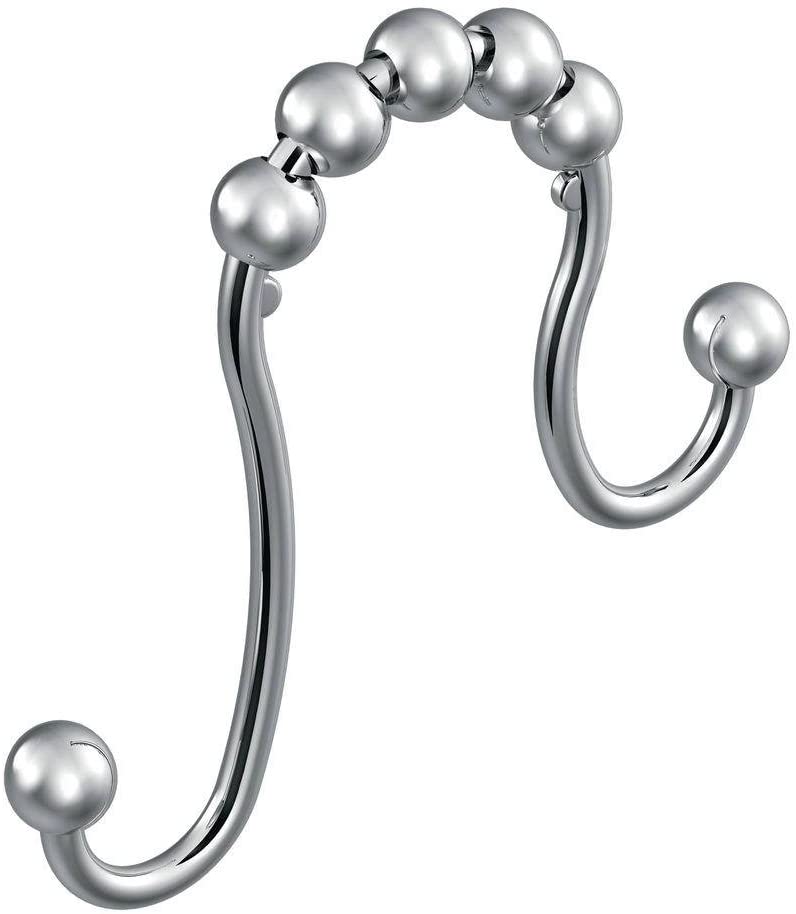
The Moen Double Shower Curtain Rings remind me of Marlo Thomas’ hairstyle on That Girl.

Orb’s Stainless Steel Double-Glide Hooks have an interior (shower-side) hook that hangs lower than the exterior hook. It’s a nifty design, but Paper Doll wonders whether the shower curtain liner may fall too low in the shower, creating a fall hazard.
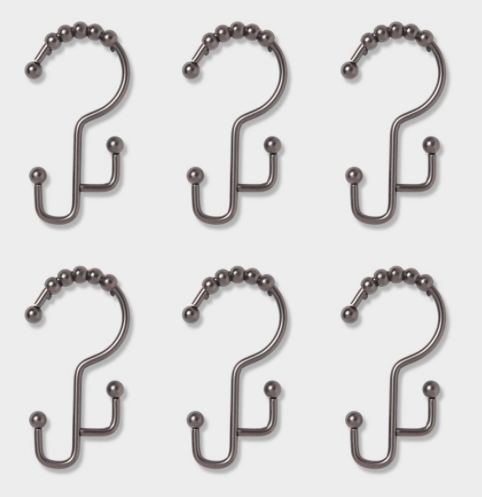
Maybe this is to hide the top of the liner from view outside of the shower, but the Mr. Monk in me would not appreciate the uneven nature.

Digging Deeply to Solve Your Problem
Almost all of the things we tolerate can be solved by one of the following:
- A product
- A service
- A change in behavior
- A change in attitude
But first, we have to dig deeply to figure out what the real problem is. Let’s go back to what we discussed at the beginning. (And then read the classic Paper Doll post, 5 “Real Simple” Reasons We Don’t Get the Laundry (or Paperwork) Done.)
Is your family dressing out of the laundry basket? You may complain that nobody helps you put away the laundry, or that you find putting away laundry to be a chore. But perhaps it’s really that your closets and drawers are overstuffed, which makes the prospect of even thinking about putting laundry away too frustrating to consider. So, you tolerate the initial problem (overstuffed closets and drawers), which leads you to tolerate a further annoyance (wearing, washing, and rewearing the same outfits over and over, and dressing out of the laundry basket).
Let’s say you’re not filing your papers. Your instinct may be to dismiss yourself as lazy. But looking deeper, you may realize that a change in attitude or behavior could help, and decide to talk to a therapist or coach. Is it that you don’t have the time or willingness to do your own filing? If so, a professional organizer or assistant may be the way to go.
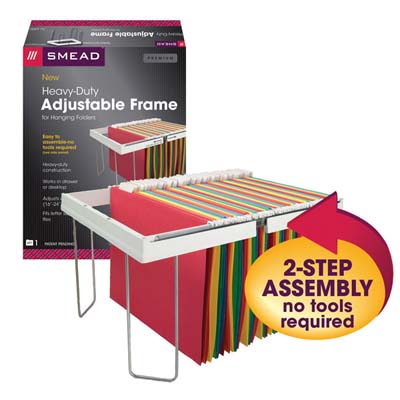
Perhaps on your own (or with a professional organizer’s guidance), you might realize that it’s not you – maybe it’s not even your system! Perhaps you’re avoiding filing because you’re chronically annoyed by a terrible, squeaky, unbalanced aftermarket file rail?
Over the past 13 years, the Paper Doll blog has covered a wide variety of products that offer solutions to organizing problems, most related to paper and information management. In fact, the most popular post in the history of this blog was the one where I told you about the Smead Heavy-Duty Adjustable Frame.
No matter how many times we get annoyed at a problem, we have to call it a problem so that we can start looking for a solution instead of just accepting the annoyance.
Then, if we are confident that a solution can be found, we are much more likely to explore all of the options.
Whether it’s your pantry or your filing cabinet, your to-do list or your darned shower curtain, there are always solutions, and between search engines and experts – like your friendly, neighborhood professional organizer – your life can be better.
Moving forward, I’d like to open up the blog to readers and ask you to submit your organizing problems, Dear Abby-style. (Be assured, your privacy will be protected.) If there’s a product that can solve it, I’ll try to find it for you. If there’s a behavioral approach, we’ll tackle it. And if we need an outside expert, then we’ll talk to a rocket scientist who can find the solution.
What are you tolerating?
The Truth About Celebrity Organizers, Magic Wands, and the Reality of Professional Organizing
 Yesterday, it happened again.
“It” is when someone (this time, on an international discussion-based web site I frequent) complains about needing organizational help but doesn’t know where to turn. Unfortunately, they don’t know that professional organizers even exist, or the only thing about organizing they’ve ever seen in the media is Marie Kondo’s show on Netflix.
The Kondo Thing and Celebrity Organizers
Many, many of my colleagues have written about the pros and cons of Kondo, her books, and her television show. However, I have always held off because while I think Kondo is an interesting character study in expert-as-celebrity, the profession of skilled, educated, non-judgmental, and empathetic professional organizers existed for many decades before Marie Kondo came along.
I think the big difference between Kondo and professional organizers in NAPO, ICD, POC, APDO-UK, and the like, is that we believe that systems need to be customized to the individual and hold that one system imposed onto everyone is a recipe for making people feel like failures.
For more than 18 years, I have been telling clients that “tidying” or “cleaning up” is about the stuff, but professional organizing is about the person who owns the stuff.
For more than 18 years, I have been telling clients that tidying or cleaning up is about the stuff, but professional organizing is about the person who owns the stuff. Share on XKondo presents some intriguing approaches in her books and on her Netflix show. I’ve often noted that about 70% of what she discusses is the same advice all professional organizers offer; about 25% focuses on her very precise rubric of organizing methods; and about 5% is culturally specific to her background. Rather than writing about her, per se, I’d point you to some posts by my colleagues, who are better able succinctly share their thoughts:
- The Five Stages of Marie Kondo & The Life-Changing Magic of Doing What Works for YOU by Hazel Thornton
- Tidying Up with Marie Kondo: A professional organizer’s view by Janine Adams
- What Happens When a Professional Organizer Gets Upset, and Finds She Has Much to Say? by Kathy Vines
Marie Kondo isn’t going to be the last famous organizing expert. She’s certainly not the first. When I started my professional organizing business, Julie Morgenstern was starting her meteoric publishing ascent. She won a national award at the NAPO conference in 2002, the first I attended, and her Professional Organizing from the Inside Out was already becoming a classic. I devoured her books, as I had done with Bonnie McCullough’s Totally Organized and Barbara Hemphill’s Taming the Paper Tiger books in the 1980s. A bit later, Oprah Winfrey, who helped make Julie Morgenstern a household name, brought Peter Walsh from Clean Sweep stalwart to media stardom
Good for them. Good for us (the professional organizers). Good for you (the readers who want to get organized)!
Concert Pianists and Magic Wands
I often tell a story about my mother, known to many of you readers as Paper Mommy. When I was little, I asked her what she wanted to be when she grew up. She smiled and said “A concert pianist.” Having just started piano lessons, I encouraged my mother to take lessons with me, and launched into a fantasy of her stellar career in music. I will never forget my mother’s incredible self-awareness and honesty when she explained that she didn’t want to become a concert pianist, she wanted to be one. She wanted the magic wand.
I will never forget my mother's incredible self-awareness and honesty when she explained that she didn't want to become a concert pianist, she wanted to be one. She wanted the magic wand. Share on XCelebrity professionals in all fields, including my own, offer the magic wand: the idea that there is one method, one Holy Grail of organizing that will work for all! It’s pretty compelling.
Superstar professional organizers do one great thing. They let people know (or remind those who have forgotten) that life does not have to be a series of frustrations and overwhelms. Help is available, whether that’s from a book, or a professional organizer, or the guidance of a more experienced friend or relative.
I’ve got news for you. I don’t care whose advice you follow. I mean, sure, I’m delighted that you’re on my blog and come here for advice on organizing. And I love my clients and wish I could clone myself and work with all of the clients who want and need my help, especially now, when so many people have been stuck at home and ostensibly have the time to focus on such projects. (On the plus side, I am now offering virtual services, which means that I can help more people in shorter bursts of time to kickstart their advancement toward organizing and productivity goals.)
But it’s not about me. Or Marie. Or Peter. Or Margareta Magnusson, the lovely lady who wrote The Gentle Art of Swedish Death Cleaning. (For what it’s worth, I find the Magnusson’s gentle, homespun psychological approach to downsizing to be far more applicable to my clients’ lives than most other “star” advice.)
No, it’s not about any of the celebrity organizers, or even my less-famous but fabulous colleagues in NAPO, ICD, POC, and the various organizations within the International Federation of Professional Organizing Associations.
It’s about the client. It’s about you. It’s about being ready and willing to make changes.
The No. 7 Moisturizer
Sometimes, people just want advice on buying storage containers – without ever having given thought as to whether they should hold onto everything they’re going to put in those bins. They believe the right container will solve all of their problems. And sometimes (a lot of the time), people look at celebrity organizers as the magic wands, or in this case, the magic storage bins.
Speaking of Marie Kondo, she’s back in the news lately because she’s hawking her (rather pricey) products appealing to the same human instincts to which we’re all subject. I’m a good example. Years ago, the posh-sounding UK brand No. 7 started selling products in the United States. They came out with a Protect and Perfect, a product designed to smooth the skin and given the just-starting-to-age face a nice boost. The product wasn’t that expensive, and I wasn’t looking particularly decrepit, but the ads in the glossy magazines were compelling, and I plunked down my $20 at Target.

Then two things happened.
First, after the initial few times I used the product, I slacked off. I’m not much of a beauty product person. I don’t watch the influencers on Instagram and YouTube to learn how to make a perfect smokey eye. (Though, six weeks into the pandemic quarantine, I did watch my stylist’s video on how to style my overly long bangs. Twice.)
Second, as time went by, even though I had only used the product in a lackluster fashion and hadn’t seen much effect when I did use it, every single time I saw an ad for the No. 7 product in the beauty magazines, I had a little blip of “I want that.” I had it. I’d used it. I’d blown it off. But I STILL WANTED IT. Advertising is insidious that way.
We want what the product or service promises, even if I’m not willing to do the work. Even if it’s not the right product for me. It’s the fantasy, not the reality.
Kondo’s first magic wand was her method; her second selling a series of “joy-sparking” products – including a $58 brass cookbook stand, a single shelf for $135, and a $69 set of three cardboard boxes for inserting in your drawers.
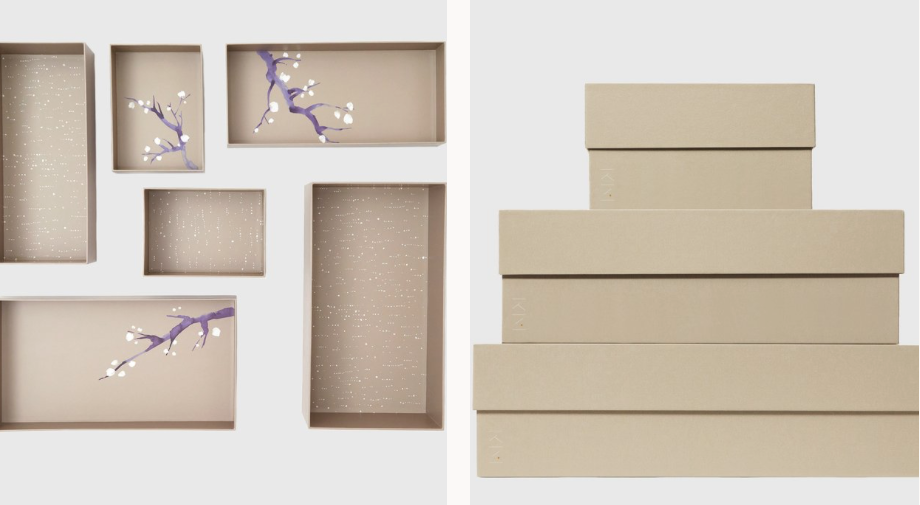
Celebrity organizers offer the fantasy. Some offer good advice. Most offer advice that will work if you follow it, as long as you:
- are able to follow it to the letter
- have the time, money, and physical dexterity to follow it to the letter
- don’t have clinical depression, an anxiety disorder, ADHD, a traumatic brain injury, a family member who has any of these complicating issues, a toddler who likes to touch things rather than sit pristinely and quietly in the middle of the room, pets, or spouses who act like toddlers or pets…
- possess the unerring ability to confidently make decisions without the support of others, have the resources to know what should be donated vs. consigned vs. sent to live on a farm upstate, and
- are incredibly self-motivated to start, continue, and finish a product without any guidance, support, or accountability
Is that you? Yay! But if it’s not you, and you’ve ever felt like a failure because the organizing advice in a book or on a TV show wasn’t enough to deliver the solutions you were seeking, you’re a member of a pretty big club.
For the same reason people who work with fitness coaches achieve more than those who buy exercise videos but never take them out of the plastic (or if they do, feel so awkward that they never make it through the first viewing), not everything works well as a solo endeavor.
Just as not everything is one-size-fits-all.
Just as not every organizer is for every client.
The Reality of Professional Organizing
Professional organizers have different specialities. Some organizers are generalists. Others specialize in types of clients (students, seniors citizens, new parents) or in locations (kitchens, closets, law offices, warehouses). I think of myself as a generalist who specializes in paper management and productivity.
In 2007, under the auspices of NAPO, the Board of Certification for Professional Organizers created a certification program requiring 1500 client-collaborative hours in order to sit for a comprehensive exam. This exam spans content related to client assessments, project plan development, implementation, and maintenance, and ethics. Recertification is dependent upon continuing education.
The Institute for Challenging Disorganization has certificate and specialist credentialing programs programs for organizing practitioners who work with clients with special needs relating ADHD, chronic disorganization, hoarding disorders, and aging.
There are other formal specialities. NAPO members can earn specialist certificates in residential organizing, household management, life transitions, workplace productivity, and team productivity. In addition to being a CPO, I’m an Evernote Certified Constultant. Affiliate with our professional are Senior Move Managers and Daily Money Managers (financial organizers). And yes, Marie Kondo even has training for practitioners who want to organize according to her methods.
The thing I’d love everyone to know is that your professional organizer can have the best training, be the most compassionate provider, and excel in delivery of services and breadth of expertise. But you, the client, are the key to everything.
You have to want more than a changed result. It’s essential to change the behavior that got you to this place of dissatisfaction in the first place. You may have to set boundaries with your child or your pet or your spouse. You may have to develop skills to figure out why you keep buying your own equivalent of No. 7 miracle youth-making skin care products, whether they are blank notebooks you never use, cute outfits you never wear, or healthy produce you never eat.
(Hey, I get it. Professional organizers do aspirational shopping, too. I’ve thrown out a lot of fuzzy vegetables in my time. ShoppingJulie has more confidence in my cooking skills than DiningJulie ever will.)
So What Should You Do?
I’m not advising you stop reading organizing and productivity books or magazines. (I love a good Real Simple multi-page spread on decluttering your entryway as much as the next person!) I’m not saying to stop watching home-improvement TV shows. They can be very entertaining, and these days, darned comforting. I certainly don’t even want you to stop decluttering or creating systems.
I just want you to know that just like the airbrushed bodies in magazines don’t really look like that, the gorgeous rooms in the IKEA and Container Store catalogs and Houzz and House Beautiful don’t look like that in real life, or 92 days into quarantine, or three days after Christmas, or in the middle of summer vacation, or after the whole family has been down with the flu.
Reality TV makes things look tidy, but reality is messy. Professional organizers can help. But none of us, not even (or especially not) the celebrities, have magic wands. You have to want more than the end result; you have to be willing to do the hard work (with us at your side) to gain the mental muscles to confidently make decisions and real behavioral changes.
Does Anybody Really Know What Time It Is? 5 Strategies to Cope With Pandemic Time Dilation

Does anybody really know what time it is? (I don’t)
Does anybody really care? (care about time)
If so I can’t imagine why (no, no)
Chicago, Chicago Transit Authority, 1969
©Warner Chappell Music, Inc, Spirit Music Group
This is not a post about time management.
In full disclosure, I started writing this post in February for Time Management Month. Paper Doll strongly believes that we cannot manage time; we can only manage ourselves. But we do need to better understand time, to have a sense of how it passes. And for most of us nowadays, it’s passing…well…weirdly.
We don’t know what time it is. We don’t know what day it is.
I don’t know who needs to hear this, but today is Friday.
— Laura Marie (@lmegordon) March 21, 2020
Just asked my husband what day it is. He’s Googling it. I’ll get back to you all with the results.
— Elizabeth Hackett (@LizHackett) April 8, 2020
Alexa is getting tired of me asking what day it is.
— Rodney Lacroix (@RodLacroix) April 17, 2020
In case you were worried that it was just you, even the news media has been talking about it.
Once we settled into sheltering-in-place, many of us, especially those working from home, found it speeding by as we added work-from-home tasks, family tasks, and self-education tasks. We sought anything we could to stop April from feeling like the sluggish month of March. And what does May hold?
Why We’re Losing Track of Time
It’s not that strange that we’ve lost our sense of time. Think about the week between Christmas and New Year’s, where every day feels vaguely like Sunday. We’re not working, or if we are, there’s a strange hum of quietude. Is Grey’s Anatomy on tonight? Is it Trash Day?
Vacation days are like this, too. For the first day or so, we’re on “real” time, not only hyper-aware of what day it is, but when it’s 10:30a, even if we’re on a beach or in a museum, our internal clocks tell us that our colleagues are stepping away to the break room or the coffee truck. Vacationing parents may be dressing for a late romantic dinner out but be subtly aware that normally, they’d be corralling the tiny humans for bath-time.
But by a few days into the vacation? All of that gets swept away. When I went to Italy in 2018, I realized that by the time we left Rome, it was no longer Friday, but merely “Day 7.” My real life was a hazy memory.
We’ve Lost Our Sense of Routine.
There are no daily markers. We’re not going to work on weekdays or having our Monday stand-up meetings. We’re not attending religious services on weekends, and we’re not driving our kids to piano lessons on Wednesday or soccer practice on Thursdays. We’re not going to yoga. We’re not going anywhere!
We are used to marking time by space – weekdays mean work or school; weekends mean stores or attending religious services or restaurants with friends. Now, our dining rooms are schoolrooms; our kitchens are offices. Our living rooms become gyms. We’re in the same few rooms doing everything. Our surroundings aren’t changing even when our activities do, so even if we’re substituting virtual activities for the “real” ones, everything has an otherworldly, dreamy quality.
Further, we’re not doing any of the little things that mark the time advancing in smaller increments (minutes, hours) toward the bigger events. If we’re not getting up to go to work or school in the morning, there’s no reason not to read until the wee hours. If the kids aren’t going to school, there’s no rush to finish dinner and clean up the kitchen we can pack their lunches for the next day.
There’s a sameness to our days. There’s no ebb and flow to our hours. We’re moving through molasses and then we’re our own time-lapse videos.
We’re Busy, But We’re Not Being Satisfied
As a professional organizer, I split my time between working in clients’ homes and offices, usually in four-hour blocks, helping them achieve their organizing and productivity goals, and working in my office on the administrivia of small business: researching and writing blogs, providing organizing advice to media outlets (speaking of which, check out page 58 of the May 2020 issue of Real Simple), talking to prospective clients, marketing, bookkeeping, and so on.
Although some clients are opting to avail themselves of my services virtually, my workdays are now spent primarily in the 8-foot square box of my office. I’ve done enough webinars and classes, including Yale’s The Science of Well-Being, that I’m probably only a few webinars away from getting a pandemic diploma. I’m busy, but I don’t feel productive.
If you’re doing the work-from-home thing, you still have emails and phone calls and Zoom meetings to replace your “real” life, but deadlines are more amorphous. You may be actually getting more work done because you’re not getting distracted by Katie’s birthday cake in the break room or back-to-back meetings or getting cornered by Doug, who wants to talk about the cute thing his cat did.
But even if you’re busier (heck, even if you’re more productive), nothing has the same sense of immediacy, and sometimes that means we lose that sense of satisfaction what we’d otherwise get from having made it through Hump Day or having finally reached the weekend.
When There’s No Difference Between Tuesday and Saturday, Why Do Anything Now?
The Dowager Countess of Grantham has a point. What is a weekend anymore?
Why scramble to finish a project by Thursday afternoon if nobody will see it until Friday morning? Or Monday? Or May 73rd? Why focus your time and energy to complete your work by 5 o’clock if there’s nothing to separate from 2 o’clock in the afternoon from 9 o’clock at night?
Why? You know the answer…from the before-times. You know that it takes until about Martin Luther King, Jr. Day to feel like you’re back in the rhythm after a winter holiday break. Most of us have been sheltering-in-place six or more weeks. We need to have an accurate sense of time to be productive (whatever that means to you) both now, and later, when life returns to normalcy. We need to keep ourselves and our kids from becoming temporally feral, wildly eating and sleeping (or not sleeping), starting projects without finishing them, and generally feeling unmoored.
Allostatic Load and Lack of Novelty, or What the Heck Happened to Our Brains?
Our brains are getting mushy. In ‘Allostatic Load’ Is the Psychological Reason for Our Pandemic Brain Fog, the research indicates that our body’s physiological reactions to emotional stress can be powerful. Even though we’re sitting around not doing much of anything, our stress hormones are building up, exhausting our bodies. But we need physical energy to do mental labor, which (in addition to the emotional stress we’re already carrying) means that our brains are slowing down while we shelter-in-place.
Additionally, our brains are hungry for novelty. Every day looks and feels very much like every other, so when we’re not seeing new people, visiting new locations, or engaging in novel activities, our brains go on autopilot. We stop noticing details, so we stop making new or vivid memories, so everything blends together. Tuesday is Saturday is Everyday.
Our Body Clocks Are Borked
This isn’t all just psychological. There are physical reasons why we’re not sensing the passage of time the way we ought.
- We’re not sleeping normally. The weirdness of our schedules makes it tempting to stay up reading, or binge-watching, or gaming, and also makes it more acceptable to sleep later, getting us out of our normal habits. When we’re not going to bed or getting up at our normal times, it messes up our circadian rhythms and it distorts how short or long (or interminably long) any given day feels. If you sleep until lunchtime, it feels like it got dark awfully early. If stress-monsters woke you at 5 a.m., then by mid-afternoon, it feels like bedtime should be approaching. And because sheltering-in-place while we’re not getting a lot of new stimuli coincides with anxiety, we’re having weird dreams.
- We’re not sleeping, period. It would be weird to not be anxious right now. We’re worried about our health, and the health of our loved ones. We’re worried about our personal finances—Will unemployment benefits will ever kick in? Or if we’re still working, will our companies survive with everyone intact? — and the global economy. (Whatever you do, don’t check your 401k or IRA statements!)
- We’re not eating normally. OK, some of you are cooking Alison Roman recipes and making sourdough, and still setting the table, but most of us are grazing and not eating normal foods (or amounts) at what could only charitably be called “mealtimes.”
- We’re not getting fresh air. One of my colleagues lives in New York City and hasn’t been out of her apartment – not her building, but her actual apartment – in more than 45 days. She has no balcony, no roof access, and she’s avoiding her beloved, coughing doorman. Those of us with porches or backyards may be getting out more, but the weather around the country has been unpredictable. There were snowstorms in April. We’ve had tornados in Tennessee. And there’s pollen. So Much Pollen!
- We’re not getting sunlight. If we’re not getting outside, unless we have skylights or floor-to-ceiling windows, we’re just not getting a lot of the goodness provided by that big, yellow ball in the sky that helps us regulate our circadian rhythms and our moods.
- We’re overexposed to blue light. We’re Zooming and WebExing, in front of our computers all day without the break-room parties and water cooler convos that get us away from our screens. We’re texting with friends and reading Coronavirus news, binge-watching Amazon Prime and Netflix and Hulu. And some of you are gaming or playing Animal Crossing. All that blue light is wreaking havoc on our circadian rhythms, along with all the other things it’s doing to our eyes, or mental health, and our hormones.
5 Tips to Reconnect to Time
1) Put structure in your life.
Create the kinds of daily rituals that you wouldn’t bother with if this were a staycation. Have mealtimes at set hours. Living like we did before, where lunch came at 12:30 p.m. and dinner at 7 p.m. makes it less likely that we will graze our way to the Pandemic 15, but it will also put some definition in each day.
Develop buffer habits. If you can safely go for a walk before dinner, knowing you’ll do that between work and cooking gives you a “commute” of sorts. Listen to the podcast you’d normally dial up, or get back in the habit of calling your mom “on the way home” from work.
Time block to create boundaries in your day. I know I said this wasn’t a time management post, but time-blocking is a key strategy from the world of productivity. Block off specific times in your schedule for overarching categories: passive work projects, creative/active work projects, self-care, self-education, entertainment. A place for everything – in a schedule where everything has a place.
Even if your life doesn’t have any natural boundaries, you can create them to work as transition periods. Have one or two things on your schedule every day where you are honoring obligations to others so that you’ll wind up one task so you can show up for the next. Meet a colleague for a Zoom lunch. Hold an accountability call with a friend to help you both manage to shower and dress well before the day is half over!
Consider creating daily time blocks in which you work on a particular project most weekdays:
- 45 minutes of housework (laundry, cleaning, organizing, etc.) early in the day for a sense of accomplishment
- an hour and a half of working on your taxes (because the delayed due date of July 15th will be here faster than we expect)
- two hours of researching blog posts or sourcing graphics or planning meals
- a one-hour block, daily, of calling or video-chatting with someone
Micro-block your time with the Pomodoro Technique to conquer your tasks list. In case you’re not familiar with the Pomodoro Technique, it’s a time management system designed to battle procrastination and increase productivity. The very basic concepts? Identify what you want to work on, set aside 25 minutes to do so, and then do it – and that time in inviolable. If you let yourself get interrupted, you have to start over. Every 25 minutes, you get a five-minute break. Lather, rinse, repeat.
We’ve talked about doing pomodoros on the blog before, but for a more robust look at this incredibly effective method, my colleague Stacey Harmon has created a How to Focus in Uncertain Times Using the Pomodoro Technique® training, which she has made available at no charge.
Theme your days. Handle financial tasks on Monday Mondays. Solve problems on Weirdness Wednesday. It doesn’t just have to be activities. Celebrate Taco Tuesdays and have a meal you’re looking forward to eating…and even making.
2) Enhance novelty.
Go through your address book, your contact list, and our LinkedIn contacts. When you’re bored, or weary, instead of texting your BFF or your mother, with whom you’ve already spoken 43 gazillion times, pick two new people to contact each day.
Touch base with a professional contact and you never know what brainstorms may occur. Chat with an old friend just to find out what’s happening. Novelty can make each day more vivid and distinct from the day before.
Use different spaces. Do you have a guest room you hardly ever use for anything except piling up things that don’t have a home? Consider pushing the bed to the side to create floor space and do your workout routine there.
Is the idea of a guest room laughable?
ah yes the hotel-like guest room with a sea view that we definitely all have pic.twitter.com/8teYONwJuj
— Current Affairs (@curaffairs) April 27, 2020
Search your home for an underused space, maybe with the help of a tiny human. (They have a natural gift for such treasure hunts). As a toddler, I used to like to sit on the small steps from the kitchen down to our side to wait for my sister to return from school. In my current home, I’ve found that sitting and reading at the landing at the top of my stairs gives me good light and a feeling that my reading nook is a special place. Find a new space for an old task. Play cards in the laundry room. Picnic in the backyard.
3) Create vivid sensory clues for the passing of time!
The timer on my Fitbit buzzes at fifty minutes past the hour, reminding me to take 250 steps. Use that as your cue not only to walk, but to take your eyes off the screen. Fitbit’s reminder to move is built into the app, and most fitness trackers have a similar function. You can also try a movement reminder app like StandUp! to prompt you to take a break at a predictable time.
Whether you are bored or absorbed in an activity, a vibrating reminder that another hour has passed can help you acclimate. Similarly, you can set chimes or alerts on your phone to play hourly at 17 minutes past the hour, or set auditory alarms for every three hours, to remind you to take meal and longer activity breaks.
Go Analog. Digital clocks don’t give you the same sense of the passage of time as old-school watches and clocks. Start by looking to see which of your digital clocks you can change to an analog appearance. Android phones allow you to change your lock screen from digital to analog easily. On the iPhone, the clock app icon is a working analog clock, but the lock screen stays digital. There are apps like FaceClock Analogue to give you a working clock, but they can’t be added to the lock screen.
If you have a digital screen (like the kind for a rear-facing camera), your car will also probably let you change from a digital to analog clock.
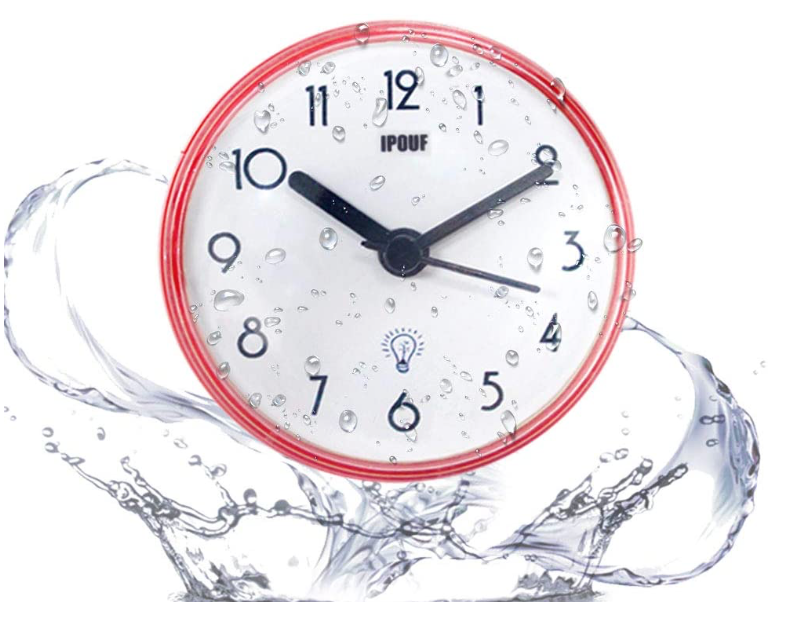
Put a clock in places where you tend to lose track of time. Do you dawdle in the shower or while putting on makeup? Attach a small waterproof clock to your bathroom mirror with a suction cup to keep tabs on how long you’ve been debating cutting your own bangs. (Don’t do it. Just. Don’t.)
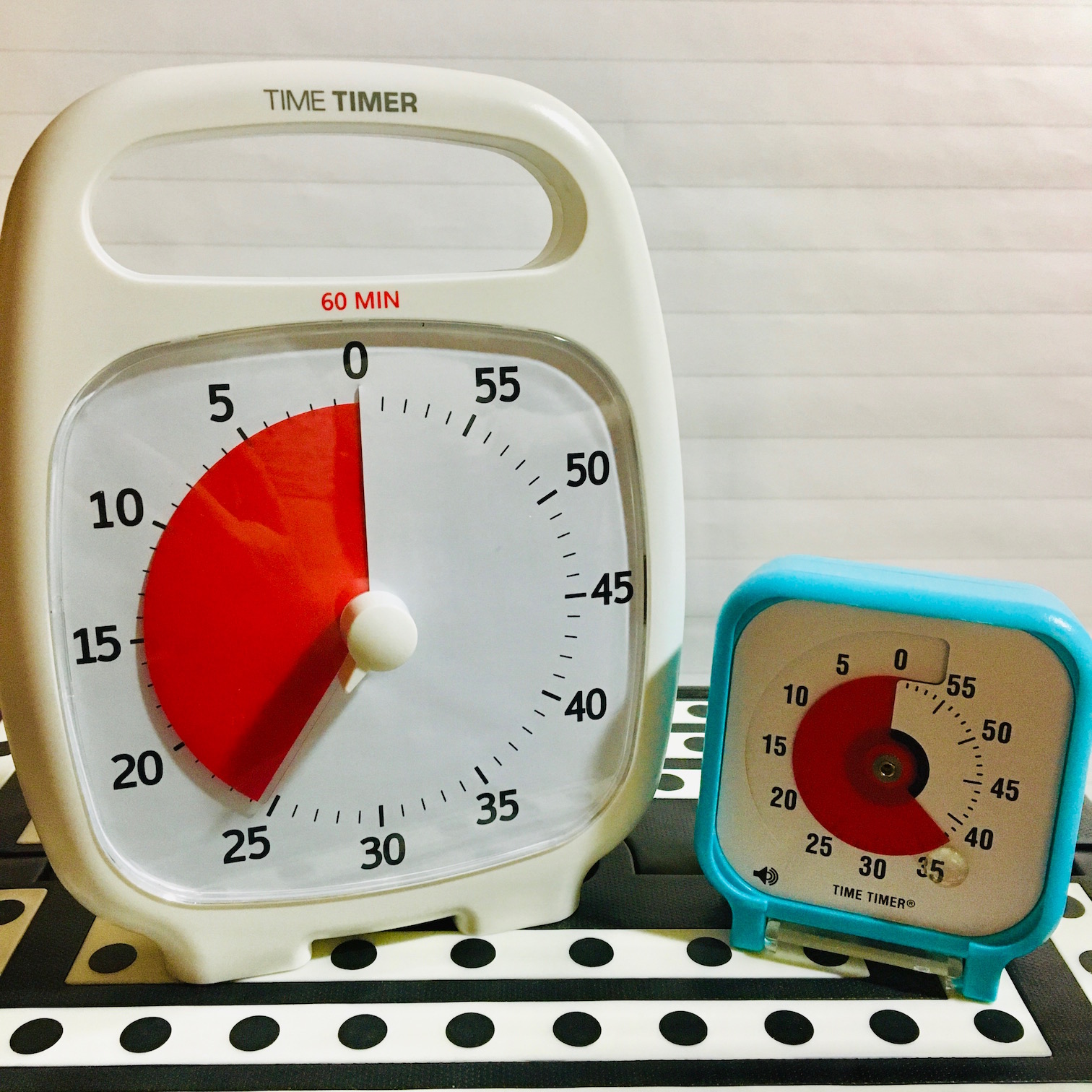
Embrace Time Timer – One of the favorite time management tools of professional organizers is Time Timer. I’ve written about many updates to Time Timer over the years, but the key thing to know is that the sweep of red helps your brain recognize time as it passes.
Please note, per Heather Rogers, the Co-President of Time Timer, “Until this crisis is over, the Time Timer apps for iOS and Android (available on the App Store and Google Play) will be free for everyone to help create some comforting structure wherever you are.
Also, all products at timetimer.com are 20% off with code HOME2020 and all US shipping is free while schools are closed.”
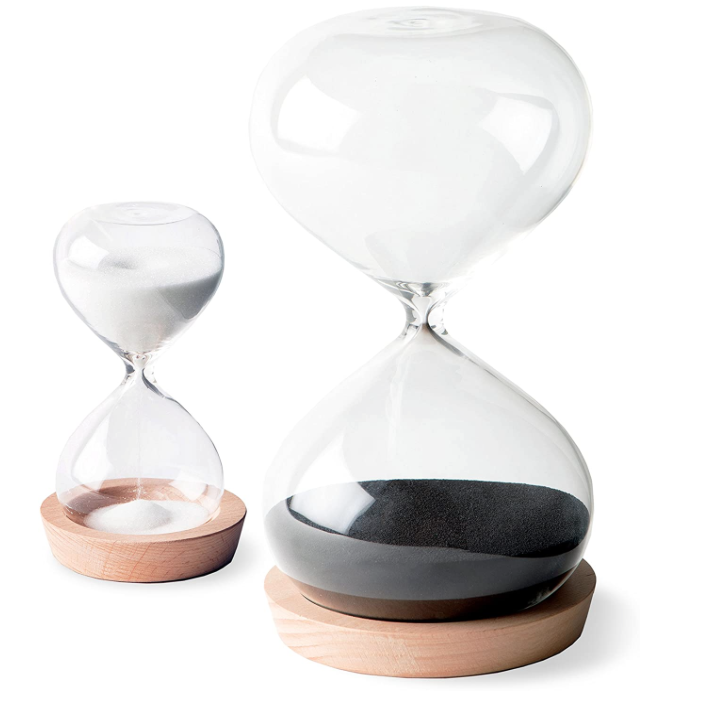
Of course, if analog isn’t retro enough for you, you could always take the sands-through-the-hourglass route.
Like sands through the hourglass, so are the days of our lives. Share on XYou won’t know what time it is, but if you take a few breaks to watch the time pass through a beautiful hourglass, you (and your kids) will have a stronger sense of how long five minutes or five hours really lasts.
4) Get what you know you need! The first month or six weeks of sheltering-in-place, we could be excused from letting everything devolve into an extended summer vacation, but now it’s time to get serious.
Get daylight. If you can get out and walk in nature (or your neighborhood) without encountering another unmasked human being within six feet, go for it. If you’re using the Pomodoro Technique, use your five-minute breaks to go outside. Jump rope or play hopscotch in the driveway. Run around the backyard. Dance to Lizzo on your balcony.
Get sleep. Close friends know that it’s ironic for me to give this advice, as sleep and I have a bitter and lifelong enmity. But the internet is chockfull of advice for getting enough sleep, even (and especially) if pandemic anxiety is keeping you awake.
Get exercise. Jumping to conclusions and stress-pacing aren’t enough. There are literally hundreds, perhaps thousands, of online workout options, from free to OMG-I-Can’t-Believe-I’m-Paying-Peleton. The standard go-to these days is Yoga With Adriene, but there are dozens of free live-streaming exercise classes (as well as recorded videos) to help you keep in shape. Or just run around with your kids or your dog.
Get dressed. Seriously. I know the jammies are comfy, but even having day-PJs and night-PJs isn’t enough. You don’t have to put on shoes, but if you shower, groom yourself, and actually put on underwear and real clothes each morning and change for bed each night, your sense of time will improve.
5) Take a Technology Break – There are all sorts of ways to get some social distance from your devices.
Give yourself a tech timeout every time you realize you’ve lost an hour to social media or cable news. (That’s where the fitness tracker reminders come in!) Leave the devices in a separate room during mealtimes. Talk to the people in lockdown with you, or if you’re alone (or just don’t like your peeps all that much after six weeks in the same house), read a book.
Put yourself and your family on a tech curfew. There’s nothing that happens after 8 p.m. (or 11 p.m., or whenever you’ve set the curfew) that you can’t catch up on the next morning. Give you eyes a break from the blue light.
Consider taking a Tech Shabbat. In 24/6: The Power of Unplugging One Day A Week, Tiffany Schlain makes an excellent case for the physical, mental, and social benefits of stepping away from the technology for a whole day.
Does anybody really know what time it is? Paper Doll really cares.
Paper Doll’s Ultimate Guide to Organizing a Virtual Field Trip
 Do you remember the field trips you went on as a kid? Even if the trip was headed somewhere you’d been before, or someplace that wasn’t that exciting, there was something compelling about having to turn in that golden ticket of a permission slip, having a shortened class schedule, getting on a bus, perhaps having to hold hands or hold onto a rope, and getting shushed by the teacher in a brand-new environment.
Growing up in Buffalo, I visited Tifft Farm Nature Preserve and learned how maple syrup was tapped, how maple sugar candy was made, and never to drink a beverage if your field trip is anywhere with outhouses instead of bathrooms!
As a kindergartner, I visited the Mirrored Room at the Albright-Knox Art Gallery, and was transfixed by the mirrored walls, ceiling, and furniture, although the mirrored floor terrified me. Would I fall through into another world?
Throughout elementary school, I got to visit the planetarium built right into one of the district’s newest high schools (giving me an unrealistic expectation of high school fun). And on multiple visits to the Buffalo Museum of Science, I was shocked to come face-to-face with a wooly mammoth.
Yes, my sandwich was always soggy by lunchtime, and my feet were usually tired by the time the bus returned to school, but the whole experience gave kids a burst of energy during long stretches of weeks without holidays.
Couldn’t you use a field trip right about now?
Every day, another thousand blogs tell you how to effectively work from home, entertain and education your children, and be productive on a myriad list of home projects, all during the uncertainties of sheltering in place. And certainly, Paper Doll has thoughts on all of those things. But that’s not what today’s post is about. Because you need a break. (OK, I need a break. Even professional organizers lose their motivation in these wooly mammoth times.)
While you may not be able to take a drive downtown or hop on a subway, you can still ease your mind and stir your soul. You may not be able to pop out to the library, but you can borrow ebooks from your public library. You may not be able to attend a workshop, but there are TedTalks galore. But there’s nothing like the energy of going on a field trip…so off we go!
ORGANIZE FOR A VIRTUAL FIELD TRIP
It’s far too easy to click on some links, making your experiences every bit as quotidian as clicking over to Instagram or going down a rabbit hole of YouTube videos. To make your field trip a mental, emotional, and visceral experience that feels like an adventure, follow these steps.
1) Make a production out of it. Get dressed up. Go outside, walk around the driveway, and come back in with fresh eyes. If your kids don’t have a lot of experience with museums, you can talk about how (when we go on real field trips), we don’t run, how we talk in hushed tones, and how we don’t push people, but we will be rewarded with magical experiences in huge rooms and bright colors and cool sites.
No tiny humans? You and your partner could dress in your fanciest clothes (or, y’know, not the same sweats you’ve been wearing all week) and agree to make the trip as vivid and special as possible. No stopping to check Twitter, no doing laundry.
On your own? Make it less of a solo excursion by sharing the experience with friends. Post a photo collage of yourself, your lunch (of which, more later), and the home screen of your visit’s location. “I’m going to the Louvre today. Ask Me Anything!” Periodically, post something surprising that you’ve learned. Even if you’re alone, you don’t have to be lonely on your field trip.
Even if you're alone, you don't have to be lonely on your field trip. Share on XMake time for your trip. Don’t just sandwich a quick whirl through the web between working on your sourdough starter and bingeing the next episode of Kitten Prince. (OK, I know, but I’m not giving that show any more press!)
Build it into the homeschool day, or schedule it for after dinner on a work-from-home Zoom-filled workday. Experiences are far more memorable than tangible things, which is why they make better gifts than things that turn into clutter. Give yourself a gift of the field trip experience.
Pack a lunch. Remember the brown paper sack lunches for field trips? Paper Mommy was always a room mother, helping corral the kids, but she tucked a note and a little doodled self-portrait into my lunch, folded in with my napkin, nonetheless. Perhaps you could tuck a little quiz or puzzle into a bagged lunch for your kids (or partner, or housemate)?

Or do the museum café thing and try to make a fancy coffee. Break out some wine and quarantine cheese, and make a night of it. When I toured the UK last September, we had gorgeous weather in Scotland, Wales, and most of England, but our only full day in London was dark and rainy all morning, and plagued with kerfuffles. Once we got to the British Museum, we were feeling a bit overwhelmed; there was too much to see in the few hours we had, and we were damp and cranky. After an hour of trying to hit the guidebook highlights (including the actual Rosetta Stone!), we stopped at one of the pop-up cafés on an upper floor, and surrounded by art, had little cakes and beverages, which refreshed our bodies and gave us verve.
You’ve been locked in for perhaps a month. Take your verve where you can get it!
Do some research. Learn things before you set off for about what you’re about to see, and wrap up with investigating more about what you’ve just experienced. If you were in school, your teacher would prepare a unit in art or Social Studies (do they still call it that?) or science so you’d know a bit before the big day.
Heading to a National Park, if only in your mind? Find out how Teddy Roosevelt helped to create the National Parks System, or sign your tiny human up to be a Junior Ranger. Going to a Van Gogh exhibit? Watch the (whole) Doctor Who episode, Vincent and the Doctor. (Grab tissues.)
Ask some questions and share your thoughts. What did you like best? What surprised you?
When I was small, Paper Mommy taught me a game where we looked at each painting in which a person or animal appeared, and we narrated what they were thinking or feeling. In general, we were snarky, but I’ve now played this game in every museum or art gallery I’ve ever visited, from Chattanooga to Chicago, from Cannes to London to Florence, making up a cinematic backstory for every “character” or scene played out in grand paintings and sculptures.

(What do you think he’s thinking?)
Visiting sea or land creatures on your virtual visit? Talk to your kids about what you learn, and ask them to compare or contrast aspects of how the animals care for their young or live with their families to the way humans do it. With a fellow grownup? Discuss aspects of animal life you wish more humans embraced. Or, y’know, talk to one another in faux animal voices. You do you, boo!
Thinking and wondering, rather than just looking, makes your field trip (and the things you saw on it) much more vivid.
Make a plan for a real field trip in the future. Quarantine will end. Someday, we will be traveling again, visiting again, vacationing again. Use what you learn on your field trips to make some proactive, mindful plans to help you hold on to your vision of the future.
Visit the gift shop. No field trip is complete without looking through the tchotchkes being sold. Some places, like the MOMA, have gift shops that rival Amazon for the amazing things you can acquire. But by visiting virtually, there’s no pressure to quickly decide between making a purchase or missing out. (And most museum shops, like the Musée Dorsay store, has temporarily suspended shipping orders, anyway.) Bookmark the product page, and you can always return to buy 24/7 if there’s something that captivates you days or weeks after your field trip.
The rest of this post is designed to give you a whole host of thrilling options for your field trips, but please feel welcome to share your own favorites in the comments. Where have you visited? Where will you go?
EXPERIENCE THE WORLD’S NATURAL BEAUTY
One of the most exciting ways to travel while sheltering in place is via one one particular new exhibit and interactive documentary from the increasingly cool Google Arts & Culture project. It was launched this spring to celebrate the Centennial of the National Parks Service. (Thanks, Teddy!)
These are no mere coffee table book photos. You can take 360° tours of U.S. National Parks. You probably know a little (or a lot) about the big ones, like the Grand Canyon (yes, even if all you remember is what you saw that Brady Bunch episode!) or Yosemite.
But this exhibit concentrates on the parks you might know less about, like Alaska’s Kenai Fjords, New Mexico’s Carlsbad Caverns, Florida’s Dry Tortugas (which sounds like a food truck menu item), Utah’s Bryce Canyon, and Hawaii’s volcanoes.
Of course, once you start searching for virtual field trip options in the world of nature, the opportunities seem boundless. Consider the Nature Conservancy of Oklahoma‘s OK360° guided tours and hikes.
Wish you could commune with nature? Take a virtual dive with the National Marine Sanctuaries and visit some watery depths from American Samoa to the Florida Keys to the Olympic Coast. Virtual dives let you see an underwater habitat (and even some sunken treasures) using only your computer, phone, or virtual reality headset.
Be cure to check out nature-oriented livestreams, too, like:
The Cincinnati Zoo and Botanical Garden, where you can visit with Fiona, the baby hippopotamus.
The Georgia Aquarium’s African Penguin webcam; you can also visit the tuxedoed birds’ neighbors via the beluga whale, alligator crossing, and piranha webcams!
The world-famous San Diego Zoo’s webcams — apes, baboons, burrowing owls, condors, elephants, pandas, polar bears, tigers, butterflies…take your pick, but right now, I’m sticking with their koala cam!
The New England Aquarium’s virtual visits follows along as the penguins are fed or the giant ocean tank is cleaned, and there’s a YouTube playlist of all of the NEAQ’s virtual visits.
Canada’s Farm Food 360° offers eleven virtual tours, from dairy cow and egg farms, to sheep and pig farms, to grain farms and feed mills. Sometimes, nature isn’t just there to be seen, but to help sustain us as well.
And if the natural world of days gone by is more your field trip style, take a jaunt through the online exhibits of the Smithsonian’s National Museum of Natural History. Perhaps you’ll feel less like a dusty fossil after a panoramic view of some old bones (and butterflies, and gems, and ancient history).
TAKE A VISIT TO THE ART MUSEUM
Not really an outdoorsy person or an animal lover? (Paper Doll feels your pain.) You can focus your mind with art!
Start with Google Arts and Culture’s Uffizzi Galleries, where you get the Google “street view” of Florence, Italy’s most famous art gallery. (I visited the Uffizzi in 2018; it’s breathtaking, in terms of both the art and the views of the city through upper floor windows, but I’m sure this virtual visit is less exhausting.)
Not all tours need to be 360° visits. Sometimes, you want to see things up-close and personal. Paris Musées, a group of 14 Paris museums, including Maison de Balzac, Petit Palais, and Maison de Victor Hugo, have made high-resolution digital copies of 100,000 artworks freely available to the public on their collections website. Look at everything (making a daily lunchtime field trip) or stare at one work, transfixed, like Cameron at the Chicago Art Museum in Ferris Bueller’s Day Off. (While you’re at it, read what filmmaker John Hughes had to say about those scenes!)
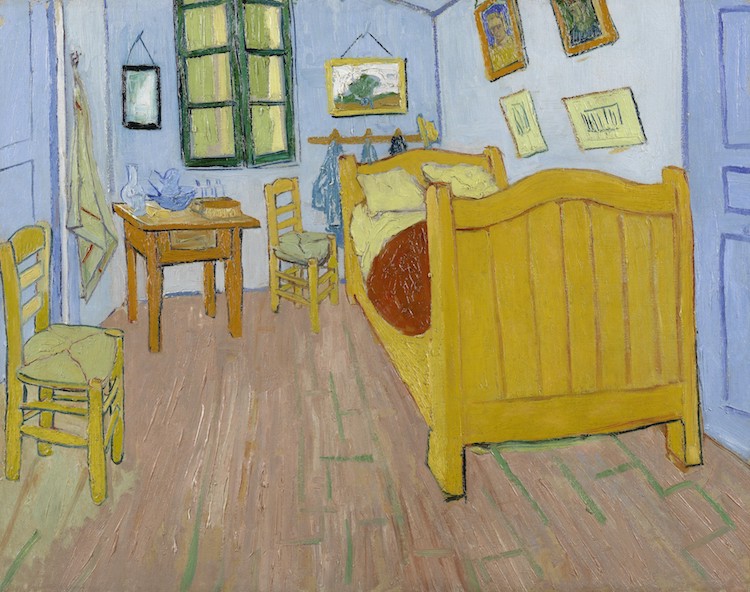
Weren’t we talking about Van Gogh a little while ago? Amsterdam’s Van Gogh Museum, which houses the largest collection of the tortured Post-Impressist master, has put nearly one thousand of his paintings and drawings online and developed a Van Gogh At Home teaching program to help parents share art with their children.
So even if you feel like you haven’t been out of your house in 132 years, you can snuggle under a blanket and view Van Gogh’s 1888 The Bedroom from the comfort of your own room.
Other amazing options for an art-related field trip:
The Solomon R. Guggenheim Museum in New York, NY.
The Art Institute of Chicago in Chicago, Illinois.
The National Gallery of Art in Washington, DC. (One current virtual tour is Degas at the Opéra! Also check out Google Arts and Culture’s panoramic tour of the NGA.)
The Smithsonian’s National Portrait Gallery in Washington, DC. (In addition to the Google Arts and Culture tour, the NPS has designed a “Visit at Home” program.)
Always wanted to visit the Louvre? Open Culture has gathered three high-definition videos from Wanderlust Travel Videos so you can see Mona Lisa‘s smile, but also many lesser-known works.
Musée Dorsay in Paris, France.
Tate Modern in London, England – From the Bath of Psyche to 500 Years of British Art, you’ll have your pick of views.
The British Museum in London, England is huge and glorious. And exhausting. But they’ve developed 11 tips for exploring from home and you won’t have to jockey for a view of Rosetta Stone.
Is this feeling too highbrow for you? What about a Google street view of 12 Banksy murals?
Maybe you don’t even want to take a field trip to see the art, per se, but you just want to see art about the art? The Metropolitan Museum of Art in New York City has developed a map of the museum for the whole family. (Scroll down, then read the article at Atlas Obscura.)
Don’t feel like even thinking about where to click? Just want the experience to wash over you? How about this 5-hour, one-take journey through St. Petersburg, Russia’s Hermitage Museum. 45 galleries, 588 masterpieces. Sure, it’s basically an ad for Apple’s iPhone 11, but it’s worth the price of admission (which, of course, is free).
And if you don’t know where you’d like to take a field trip to see art, try the Art Camera. Pick just one piece of art (Manet’s The Conservatory? Frieda Kahlo’s Self-Portrait With Monkey? Rembrandt’s The Night Watch?) and get up-close and personal with just one painting, learning every brush stroke.
GET SOME PERSPECTIVE FROM YOUR COUCH
It’s easier for art museums to put their collections online. History museums and interactive exhibits are a little more complex. However, whatever fascinates you in this world likely has a museum. Try firing up your search engine and typing in the subject, the word museum, and “at home” or “virtual” to see what comes up.
The Smithsonian’s National Museum of African American History and Culture has video resource guide for exploring their archives available from home. This might be the perfect time to participate in the Community Curation Project, sort your photos, and find your family’s history in American history.
The Smithsonian’s National Museum of American History has over 100 online exhibits. They aren’t all ready-for-Prime-Time, but if history is your jam, field trips to the past will keep you busy for so long, you’ll forget that you’re sheltering in place while you’re traveling in time.
The National Women’s History Museum has a wide variety of exciting online exhibits on topics as wide-ranging as the women of NASA to women in Congress, from women who campaigned for suffrage and civil rights to women who waged World War II.
Things will get better, so consider signing for memberships with your local cultural venues. Time Travelers is a reciprocal membership network for historical museums and societies throughout the United States. Members of historical institutions can receive exclusive benefits and privileges at museums and historical sites nationwide, including free or reduced admission, gift shop discounts, free parking, and much more. Your local museums, zoos, and other venues likely offer similar reciprocal opportunities.
GRAB SOME LITERATURE WITH YOUR LATTE
Perhaps a poetry reading is more your style? Patrick Stewart has been reading Shakespearean sonnets, most in numerical order, each day. (He declared that #5 was “too hard.”) Here’s just one.
Sonnet 3#ASonnetADay pic.twitter.com/hI4GzH49P8
— Patrick Stewart (@SirPatStew) March 24, 2020
EVERYONE IS BEAUTIFUL AT THE BALLET (AND THE OPERA, TOO)
You already know about music streaming services like Spotify and Amazon Music, but what about visiting the opera or taking in some classical music?
The Metropolitan Opera is offering nightly streams of operas, as well as free streaming events for students.
London’s Royal Opera House has a massive YouTube playlist of the Royal Opera and the Royal Ballet. The sidebar includes affiliated groups, like the Welsh National Opera and the Scottish Opera.
The Berlin Philharmonic is presenting livestreams, though I’ve yet to find a translation option for English. But music is supposed to be a universal language!
AND MORE
As a professional organizer, I eschew clutter. As a curious person who fancies herself a completist, I like to collect ALL of the options.
And if nothing I have suggested piques your interest, the MCN (formerly the Museum Computer Network) had a mind-boggling list of hundreds of virtual museum resources to serve your needs: museum portals, art and cultural museums, museums of history and natural science, online exhibits, e-learning opportunities, and digital archives. Suddenly, it almost seems like quarantine won’t last long enough.
I know you probably wish you were out and about, but until we are all traveling freely about the planet, unmasked, take some time to give yourself some daily or weekly delights. Have some great field trips. Just skip the ones that only have an outhouse.
Paper Doll Says The Tax Man Cometh: Organize Your Tax Forms
Eugene O’Neill wrote The Iceman Cometh. It’s about the human need for self-deception in order to carry on with life.
Well, I’ve got news for you. The taxman also cometh. Try as we might to deceive ourselves, we have only a little more than a month before we must complete our annual (and sometimes painful) math homework for the government. So pop some Beatles (or Beyoncé) into your sound system, and let’s get started.
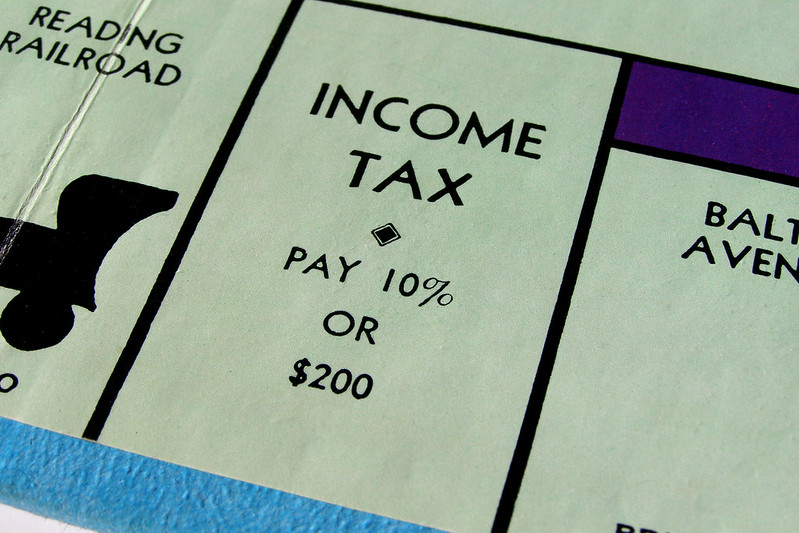
Photo courtesy of Chris Potter/CCPix at www.ccPixs.com under CC 2.0
The key to approaching your taxes is to be organized. (You’re on the Paper Doll blog. Were you expecting something more Zen?) And before you can start preparing your return, you need to know the numbers. Where are the numbers? On the forms!
GATHER YE FORMS
Every taxpayer’s situation is different. If you are single, had only one job all year, and lived in the state where you were employed, and have no investments outside of your retirement accounts, the number of forms you receive may be minimal. If you’re married, have a family, or have complicated investments, or bought or sold a house (or other property), you’ll have to gather more paperwork.
It all starts with the supporting documents called information returns. These are sent to you by others – employers, banks, brokerage houses, schools, casinos, and others. The law requires these entities to provide them to you (generally by January 31st), so you shouldn’t have to do much searching. They should have shown up in your mail. So that scary-but-official mail you threw on top of the microwave the week before Valentine’s Day? Move the oven mitts and get looking!
MONEY YOU RECEIVED
W-2 (Wage and Tax Statement)
Ever had a job? If you did, and you lasted more than a day, you should have received a W-2. Your employer is supposed to send one copy to you and one to the IRS, reporting how much you were paid (in wages, salaries, and/or tips). If applicable, it should also indicate how much money was withheld from you and paid to federal and/or state governments for taxes and FICA (Social Security and Medicare).
Federal, state, and local taxes, FICA, unemployment insurance, and a few other withholdings are considered statutory payroll tax deductions. Statutes (that is, laws) require them.
Sometimes, a court might rule that an an employee’s wages may be garnished, but this has nothing to do with sprigs of parsley. People behind on child support payments or who owe money in lawsuits may have money removed from their earnings, before it ever gets to their paychecks, to ensure it goes directly to whomever is owed.
Your W-2 may also report voluntary payroll deductions. These are amounts withheld from your paycheck, where you’ve granted permission. These may include your portion of health and life insurance premiums, contributions to your 401(k) or other retirement fund, employee stock purchasing plans, one-time or ongoing donations to the United Way, union dues, etc.
You probably got multiple copies of the same W-2. Employers submit copy A directly to the Social Security Administration (remember that FICA we talked about?) and keep copy D for their own records. Copies B and C are for the employee – you send one to the IRS with your federal tax return and keep one for your own records. Then, copies 1 and 2 are provided to file with any applicable state or local tax authorities. (I’ve never figured out why W-2 copies 1 and 2 aren’t called E and F. Did the same person who came up with this decide that bras should be sized as A, B, C, D, DD, DDD, F, FF, and G?)
I've never figured out why W-2 copies 1 and 2 aren't called E and F. Did the same person who came up with this decide that bras should be sized as A, B, C, D, DD, DDD, F, and G? Share on XIn theory, a W-2 should be mailed to the address listed on your W-4. (Don’t be confused. The W-4, which has a spanking-new look this year, is the form that tells your boss how much to withhold based on your number of dependents you have an any necessary adjustments.) Many smaller companies don’t bother mailing the W-2 and just hand them out to staff.
It’s March and you still don’t have yours? If you still work at the same company, go visit Madge in HR; if you’re long gone from that job (for good or ill), pick up the phone and call. Some things to consider:
- Did you change employers last year? You should have received W-2s from each employer. (If you changed jobs at the same company, you’ll receive one W-2 from each employer, not one per position. If you changed companies within a larger corporation, though, you may get one for each.)
- Did you change addresses since you filled out your W-4? There’s only so much a former employer will do to track you down to give you your W-2. Keep the boss updated!
Don’t assume that if you don’t have your W-2, that nobody knows what you made. Remember, the IRS got Copy A. The IRS knows what you made, so be sure you do, too! (If your former company went out of business or is otherwise dodging your calls, the IRS has a procedure to allow you to file your taxes in the absence of a W-2.)
Examine your W-2 it carefully. Do the numbers seem right? Compare them to the final pay stub you got for last year. Calendar years usually end mid-week (and sometimes, mid-pay period), so the numbers won’t correspond exactly, but they’ll be close enough for you to spot if something is seriously wrong. The sooner you call your employer’s attention to an error, the sooner you can prepare your return.
W-2G (Certain Gambling Winnings)

The W2G is the freewheeling cousin of the W-2. While a W-2 is for money you make while working, the W-2G is what you get while playing. If you win more than $600 in any gambling session at a casino – whoohoo! – the “house” should request your Tax ID (generally your Social Security number) and either prepare a W-2G on the spot or send it to you in January.
Casinos aren’t interested in keeping up with your losses, just your winnings, so they only tell the IRS about what they paid you. If you do go gambling and want to deduct losses, the IRS requires you to be able to provide receipts, tickets, statements or other records that show the amount of both your winnings and losses.
1099 (Income)
A 1099 is a form that basically says, “Hey, we paid you some money for something, but you weren’t an employee.” You get a copy; the IRS gets a copy. Easy-peasy.
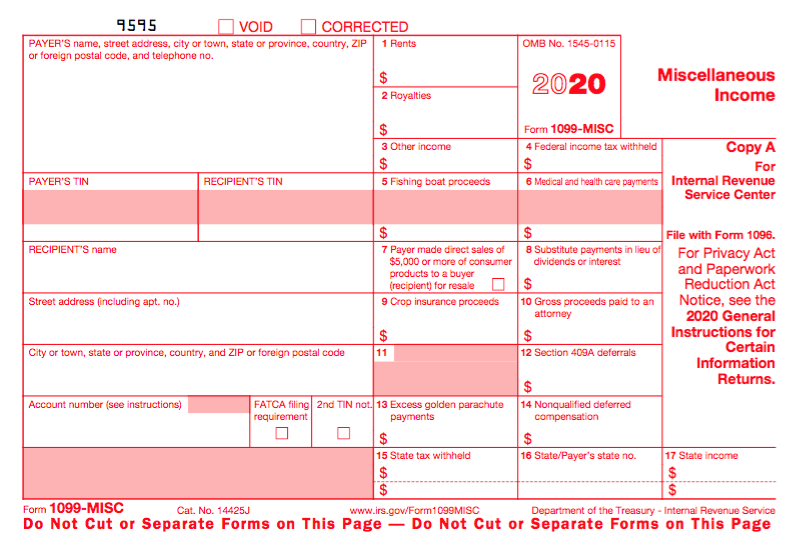
There’s not just one type of 1099; actually, there are a whole variety of 1099s. Some of the more common are:
Got a bank account? This form reflects the interest income you receive from interest-bearing savings and checking accounts, money market bank accounts, certificates of deposit, and other accounts that pay interest. It also notes whether foreign or U.S. taxes were withheld and if there were any penalties assigned for early withdrawal from an interest-bearing account. Internet-only banks often require you to log into your account to get your 1099-INT, so don’t count on it coming by mail. If you received less than $10 in interest, your bank may not send a 1099-INT.
Do you own stock or taxable investments? This form indicates the dividends or capital gains you received as an investor. Your broker, plan services company, mutual fund company or other type of investment company will send this form. Not all dividends are created equally; ask your tax professional if you have any that seem unusual or complicated. Whether you receive dividend checks or your dividends are held in a DRIP (a direct re-investment plan), if you did not earn at least $10 in dividends, you are unlikely to receive a 1099-DIV.
If you’re self-employed (a freelancer, an independent contractor, etc.), you should get a 1099-MISC. The problem is that even if someone paid you for doing work as an independent contractor, they may not know they should be sending you a 1099-MISC. So, if you are self-employed or irregularly employed, it’s essential to keep track of your incoming revenue. Otherwise, if the person who paid you ever gets audited, it could trigger some messy situations for you, too.
Your 1099s sometimes hide in plain sight. Occasionally, instead of sending a 1099 in a separate envelope, a bank or brokerage house may include a 1099 form in the same envelope – sometimes perforated, at the bottom of – a quarterly or end-of-year financial statement, so be sure to check all that boring-looking official mail that arrives. Multiple forms may be sent as a “combined 1099,” scrolling across multiple pages, so check the reverse of other forms, in case you seem to be missing one.
If you receive Social Security benefits, you should receive a SSA-1099 or an SSA-1042s, the latter being for non-citizens who live outside the United States but receive benefits. (For example, widows or widowers who are receiving spousal benefits.) The 1099-SSA tends to come on a long form, folded and sealed such that it makes its own envelope. If you did not receive your SSA-1099, you can log into your only Social Security account to access it.
And no, I have no idea why it’s called an SSA-1099 instead of a 1099-SSA. Obviously it was put together by the same people who created those extra 1099 pages…and bra sizing.
A 1099 doesn’t always indicate that you were literally paid money. For example, a 1099-C indicates that a party has forgiven a debt, like a mortgage or part of a credit card balance. You may owe tax on forgiven debts, and the 1099-C alerts the IRS that since you didn’t pay money owed, and got to keep it in your pocket, it’s as if you received money.
MONEY YOU PAID
1098 (Mortgage Interest)
A 1098 is not a 1099 with low-self-esteem. The straight-up 1098 reflects the interest you paid on your mortgage, which is generally deductible on your federal taxes. Renters don’t get 1098s; neither do homeowners who’ve paid off their mortgages. There are sub-types of 1098s for things other than interest on property loans.
- 1098-T indicates tuition you paid; you’ll get this from a college or training school.
- 1098-E shows you’ve paid interest on a student loan and will come from your lender
- 1098-C indicates the donation value of a car, boat or airplane. (Yes, even if you donated through 1-877-Kars4Kids.)

Photo by Daniel Salcius on Unsplash
1095-A (Health Insurance Statement)
The 1095-A is also called the Health Insurance Marketplace Statement. We are all generally required to have health insurance. If you purchased yours through a state or federal exchange, this document helps you determine whether you are able to receive an additional premium tax credit or have to pay some back.
Related forms include the 1095-B, supplied by companies with fewer than 50 employees, detailing the the type of coverage you had, the period of coverage, and your number of dependents, so you can prove you had the Minimum Essential Coverage (MEC) required by law. A 1095-C is similar, but for employers with more than 50 employees.
FINAL THOUGHTS
The post reviewed the most common in-bound forms you are likely to need (along with receipts for purchases and confirmations of donations), to help you prepare your income taxes. There are other, less common, information returns. If you receive a more mysterious form, or have questions about how to use a form, the IRS has a surprisingly easy Forms, Instructions and Publications Search.
Making sure you have all of the necessary forms in hand will make it much easier to prepare your tax return. Once you have filed your taxes, make a list of all the forms you received this year, and tuck that list into your tickler file for next January. Check off each form as it arrives, and you’ll have a better sense of when you’ll be ready to start working on your taxes.
With everything in hand, it’ll be harder to stick to that self-deception O’Neill wrote about in The Iceman Cometh, but knowing you’re prepared for the taxman may make you feel better.
If you drive a car, I’ll tax the street.
If you try to sit, I’ll tax your seat.
~The Beatles, “Taxman”



Follow Me