Archive for ‘Paper Organizing’ Category
The Perfect Unfolding As We Work From Home
 Readers, I beg your indulgence as I wax philosophical today about folding and unfolding as we work from home. (No, this isn’t about laundry. I’ve written about that before, in 5 “Real Simple” Reasons We Don’t Get the Laundry (or Paperwork) Done.)
This weekend was my birthday. Last year, I went out to dinner with a friend, and I remember that strange week, as everything was changing, but nobody knew what was to come. We tensely folded ourselves in toward the booth, away from our fellow diners. We were already being more circumspect, but it wasn’t until the next day or so before the reality of 2020 set in. (But this post isn’t really about that, either.)
The Folding and the Unfolding of the Lost Year
Over the past year, I’ve been thinking deeply about folding and unfolding as it relates to our lives now, both at home and at work. In most ways, our lives constricted 12 months ago. We were running around, blissfully living our lives, commuting to work, dining in restaurants, out there in the world. And then, almost overnight, we folded ourselves up, kit-and-caboodle, and took ourselves home. Crumpled into tinier lives in smaller spaces (at least smaller than the whole world we had at our disposal before), anxiety squished us into smaller versions of ourselves.
We’d packed up our work bags, our school bags, our schedules, and folded ourselves away in our houses, nervously watching newscasts and doomscrolling our devices as we perched on the edges of our couches and dining tables.
And then something interesting happened, though we couldn’t see it at first. We unfolded ourselves. We embraced freedom from sitting in one stuffy workspace, at one desk, between the same two co-workers. We unfolded the squished toes that had been crammed into the shoes we wore as part of our uniform to be taken seriously at work. We unpacked our projects and spread them out in the new spaces we had to create to work at home while avoiding feeling like we were living at work. (More on that in a bit.)
The Unfolding of New Opportunities
As some parts of our lives fell by the wayside, other new adventures eventually appeared.
I am proud to announce that I recently became Meori‘s first guest blogger. You might recall that I first wrote about Meori three years ago, in NAPO2018: Paper Doll Explores Meori & the Glorious Goodies Within.
When I was first contacted about being a guest blogger, I was enthusiastic but cautious, as I always am in these situations. As a Certified Professional Organizer®, I’ve built my practice on developing strategies to guide clients in creating systems for making their lives more organized and productive. I view organizing products as tools, always worthy of consideration, and I tell clients (and you readers) about how those tools can serve their needs. (And yes, I tell you about my favorite products.)
But I’m not a salesperson, and if they’d wanted someone to be a product spokesperson, I wouldn’t be anyone’s first choice. (I think we can agree that brevity is not the soul of my wit, and “pithy” is not in my wheelhouse.)
So, I was delighted when I first spoke with Deirdre Meyer, co-owner of Meori (with her husband Dirk) and Karen Oboy, Meori’s sales and marketing manager, about this opportunity. Deirdre made it clear that she wanted bloggers who knew about the necessary skills and systems of organizing.
And better yet, she wanted me to write a LONG post. (Readers? Can you imagine how hard it was for me not to jump through the Zoom window and hug them in their Seattle offices?)
In my premiere post, Home Office Storage Ideas: From Dad’s Office to the Modern Home Office, the great people of Meori gave me free reign to cover both the strategies (mindsets and systems) behind creating a peaceful, productivity-producing home office space and tactics (tools and methods) for making it all work. I encourage you to read the post at Meori’s site and let us know what ideas resonated with you. 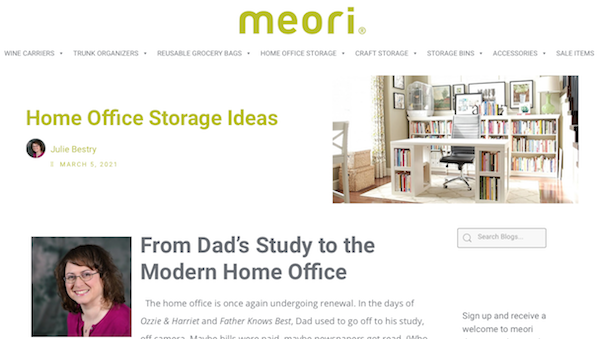
Unfolding and Folding Products
Initially, I was intrigued by Meori’s growing line of fold-flat storage products for home and office, but I was puzzled by their name, as I’d seen that the labels on the packaging were in English and German, and Meori didn’t strike me as a German word. It turns out, they combined two Japanese words, “meian” for great idea and “origami,” to create meori as “the fantastic idea of folding.”
I got excited, because I like things that fold and unfold, or collapse and recreate themselves. I’ve written before about how much I love Origami Rack shelves, desks, and racks, which “unfold” much like one opens an accordion or an ironing board. From flat-pack to fully useful in a minute!
Long before the pandemic, I was singing the praises of my Origami 6-Tier bookshelf, shown in operation above.
(I’m not an affiliate for either Meori or Origami Rack, but it occurs to me that, like Reese’s Peanut Butter Cups, these would be two great tastes that taste great together!)
Time To Unfold Again
We all eventually found our temporary footing, dealing with each ad hoc bump in the road that was 2020-2021. But lately, as the one-year mark approached, I’ve heard more complaints. Sitting on Zoom calls, I’ve noticed more and more people looking tense, almost as though they’d folded themselves directly into those tiny Zoom boxes. People are rolling their shoulders, trying to get rid of cricks in their necks. They’re fidgeting. They’re hitting the pandemic wall. They’re experiencing burnout.
Does that sound like someone you know (or someone you became) in the past year? It wouldn’t be surprising if it did, because a study by the CDC’s National Center for Health Statistics shows that 41% of Americans were showing signs of clinical depression or anxiety disorders at the start of this calendar year, up from 34% last spring. As I’ve written many times in the past year, we need to give ourselves some grace.
There have been multiple articles about hitting the pandemic wall:
It’s Not Just You: A Lot of Us Are Hitting the Pandemic Wall (Huffington Post)
Why Kids Are Hitting the Pandemic Wall (CNN)
America Has Hit the Pandemic Wall (The Washington Post)
This article from Mayo Clinic, Job Burnout: How to Spot it and Take Action, was created in the “before times” but it’s just as apt now. They define burnout as, “…a special type of work-related stress — a state of physical or emotional exhaustion that also involves a sense of reduced accomplishment and loss of personal identity.” Those symptoms sure sound familiar to my friends and clients.
Personally, after hitting a snag back in April, 2020, I felt like I was handling everything fairly well. After all, I’d been “working from home” (for administrivia) for most of twenty years, though it only make sense to organize at clients’ homes and offices, because that’s where the clutter lives!
“You are not working from home; you are at your home during a crisis trying to work.” pic.twitter.com/nsfb2ecTZZ
— Ethics in Bricks (@EthicsInBricks) January 2, 2021
But, as wise tweets reminded us, we weren’t just working from home. We were working from home during a crisis. I thought I’d handled the complexities of virtual organizing and “working from home” well until January, and then all bets were off. Focusing got harder; I blew through a soft deadline and had to explain to the nice Meori people that yes, I’d hit the pandemic wall, too.
Unfolding & Untangling Your Work Self and Your Self Self
It’s been my contention for a while that the biggest problem we experienced, just after we got a hang of working from home, is that we made our work lives so comfortable that we were now living at work.
One good thing about our old lives was that, for most people (who weren’t already working from home), it was easy to fold oneself up to fit in a work space and a home space. Before the pandemic, people who went off to work didn’t need the same kind of help as work-from-homers, such as I’d presented in R-E-S-P-E-C-T: The Organizing Secret for Working at Home back in 2015.
That post focused on how to show respect to yourself, and how to get others to respect the value of your time, when you’re working from home. Nowadays, that advice is more needed that ever.

Photo by rishikesh yogpeeth on Unsplash
If you’re feeling all-folded-up, maybe even tangled up, I encourage you to start with the following:
1) Separate your work space from your home space.
I know, that sounds ridiculous. You probably don’t have oodles of space You finally found the “good” lighting so you don’t mind having your Zoom camera turned on, so I’m not going to tell you to create two spaces, one for Zooming for work and one for Zoom-hanging with your friends. (But if you do have the space, your friends will love you just as much if you move the laptop or tablet to the couch, and look more like if they were on the couch with you, in an imperfectly-lit room, and less like you’re about to advance a Powerpoint slide at any moment.)
Basically, it’s been a year, and you’ve probably got a work space that works for you. (If not, that’s even more reason to check out my Meori guest post!) But maybe it’s time to create more space at home in which to live.
As the weather warms up, maybe move a chair onto your front porch and read 10 pages of a novel in the fresh air and daylight during your lunch break? Maybe make sure you’re not eating at your desk, even if your desk is your dining table?
2) Understand that downtime is good for you – and your career.
Usually, my advice is designed to make your work life more productive. For years, in the “before times,” I told clients to treat working from home as if they were working from an office. Run laundry or make personal calls at lunchtime, if you must, I’d say, but work when you are “at work” and do home things on your “personal” time.
Wow, how very 2019 of me!
This advice made sense when the struggle was ignoring inanimate sensory inputs (a pile of laundry, bills to be paid, dinner to defrost); now, the sensory inputs are tiny humans needing help, or a gentle prodding, with online school. You can’t, and shouldn’t, be all-work-and-no-play during the day.
According to research by the National Bureau of Economic Research, Zooming is helping us keep our meetings shorter, but we’re working longer. “We also find significant and durable increases in length of the average workday (+8.2 percent, or +48.5 minutes), along with short-term increases in email activity,” they found.
As the articles on hitting the pandemic wall acknowledge, we’re all experiencing overstimulation. We’re ALWAYS ON, so of course it’s hard to wind down. Just as the temptation to address home things during work hours must be guarded against, we struggle with doing more work during “home” time.
So, maybe don’t check work email while you wait for the pasta to boil. Pick up a book from your to-be-read pile instead of a report from work. Turn off your Slack notifications at night and on the weekend.
Embrace the idea that you are more than just your job. Perhaps read this New York Times article, Remember: What You Do Is Not Who You Are. A snippet I particularly liked, in (and following) an interview with Art Markman, a professor of psychology and marketing at the University of Texas at Austin, said:
“The brain needs a little downtime,” he said. “You can’t sustain concentration. Unless you can get away from the problems you’re trying to solve in your work life, you don’t give your brain a chance to reset and come up with a different way of characterizing what you’re dealing with. So even if your primary goal in life is to be as productive as possible at work, you need some time away to make that happen.”
This doesn’t mean you shouldn’t be invested in your work or not care about your career and the people you work with. That investment can be an asset, and being passionate about one’s work can help lead to better output. Rather, give that investment a ceiling.
3) Put the commute back into your day.
Inc. Magazine recently ran an article called The German Secret to Getting More Done While Working Remotely. Even though my job is to help people be more productive, inwardly, I groaned when I read the headline. Isn’t everyone already feeling guilty and dismayed by not getting more done, as if the purpose of life was to be more productive? (Paper Doll has a secret for you. I think the purpose of life is to ENJOY YOUR LIFE. Be productive so you can have more time to do that!)
Paper Doll has a secret for you. I think the purpose of life is to ENJOY YOUR LIFE. Be productive so you can have more time to do THAT! Share on XWhat did you do on your morning commute? Did you listen to a podcast? Talk to the people who sat by you on the train? Read? Maybe your “commute” was just driving your kids to school before turning around and heading home for the rest of your day. Are you missing those things? Your afternoon commute has similarly been blown out of the water.
For years, I’d recommended to clients who had trouble starting their work days to put on their shoes, even their coats, and go outside and then come back in before sitting down to work. Whether they went to a coffee house to procure overpriced coffee, walked around the block, or just went out the garage door and came back in the front door, this helped them trigger their brains that it was time to start the work day. Whether it’s our morning commute or our kids hearing the announcements over the PA at school (they DO still do that, right?), we need rituals to start our days.
Well, this fancy-pants Harvard professor – OK, I’ll be fair, it’s possible he has perfectly quotidian pants – advises much the same, though he focuses on the end of the workday. Per Professor Ashley Willhans, the Germans have a concept called feierabend. Google Translate merely says it’s “the end of the working day,” but apparent it’s more of “a daily evening celebration marking the moment when work is switched off for the day.” (And it apparently involves beer.)
In the old days, people sometimes went from work to the gym, and then home. So maybe this means our date with Yoga With Adriene needs to come at the end of our work day, and maybe that needs to be a bit earlier? Perhaps knowing that we can’t push dinner too terribly late (either for the comfort of our family or of our digestion) means that we’ll have to truly stop work so we can change from our work loungewear into our workout loungewear and work out at a decent hour so we can eat at a decent time?
My own end-of-day ritual is calling Paper Mommy. The idea of debriefing, recapping my work day, out loud (often during a 45-minute walk outside) is just what I need to unknot, detangle, and unfold my brain, my body, and my life. What kind of “commute” could you add to the start and end of your day?
Unfolding of Hope and Confidence
In the past year, my friend and colleague, Dr. Melissa Gratias, introduced me to the concept of the Shraddha Sutra she learned in her meditation class. (You can read Melissa’s take on it in her post, Are We Broken?)
śraddhā = śrad + dhāśrad literally means “that which gives you space and holds you in place” dhā provides nourishment for you to grow śraddhā conviction; faith; trust
However, my friend’s meditation teacher explained it more conceptually as “radical trust in the perfect unfolding” of one’s life.
Whoa.
Melissa and I have been discussing this concept a lot over the last year, as we look at how our spaces, our careers, our relationships, and our very lives have been evolving. I said it in my post, The Now Normal: When the New Normal Changes Quickly, and I have been surprised by how prophetic it was. (Whoohoo, Paper Doll!)
This March is not last March. We see sunlight instead of darkness. Every day, more of our parents and grandparents and friends are able to get the vaccine. More of us have a sense of what we want our lives to be (or not be) as we come out on the other side, as we unfold ourselves into new shapes and new selves.
Perhaps this probably didn’t sound very much like an organizing and productivity post. But please remember that the purpose of organizing, at least the Paper Doll version of it, is to have more space and time to do the things you want with the people you care about.
So, I don’t know about the radical trust part, but as we move forward, I hope that you experience the perfect unfolding of your life.
Flow and Faux (Accountability): Productivity, Focus, and Alex Trebek
Image by Engin Akyurt from Pixabay
Last week, in Count on Accountability: 5 Productivity Support Solutions, I presented five methods for getting accountability:
- accountability partners, like friends, colleagues, or people you can meet through apps like Supporti or Focusmate
- accountability groups, like mastermind groups, in-person study groups, virtual study groups like Hours, and professional groups
- professionals, including professional organizers, life coaches, and fitness trainers
- apps and gadgets, including StickK, Beeminder, the saucily-named (and partially redacted) Go F***ing Do It, and Pavlok
- events, whether DIYed, sponsored by a specific entity (like Deb Lee’s periodic Action Days), or “work gyms” like Caveday or Ultraworking
Across the various social networks, this post garnered quite a bit of conversation about what accountability methods worked for different people and for different activities.
Then, from Thursday through Saturday, I participated in the Task Management & Time Blocking Virtual Summit 2021, with so many of my all-star colleagues from NAPO and the productivity world, as well as big names and some surprising up-and-comers. (In an forthcoming post, you’ll be hearing about a group of talented young people surpassing all expectations in developing a task management solution. Spoilers!)
At the summit, during the online networking, a conversation among attendees sprung up regarding an accountability concern I hadn’t considered. While some mentioned that they were introverts, even the extroverts shared similar thoughts: they were intrigued by the accountability options I’d mentioned, but at least sometimes, they didn’t want to deal with other people!
WE’RE ZOOM-WEARY
I suspect the pandemic has simultaneously made us wary of other humans and weary of digital communication. After all, Zoom Fatigue (and Meet Fatigue, and Facetime Fatigue) is real:
Four Causes of Zoom Fatigue and Their Solutions (Stanford University)
Zoom Fatigue Isn’t Just a Buzzy Term: 4 Common Causes and Fixes (MindBodyGreen)
Four Reasons You’re Tired of Zoom Calls and What To Do About It (Washington Post)
Zoom Fatigue Cartoon (Marketoonist)
Zoom-weary lawyer via GIPHY
To all the common causes mentioned, I’ll add that our voices and our lungs are doing unrealized extra effort. When you’re in a conference room or office with someone, you have a sense of the room’s acoustics; you know when you’re being too loud or too quiet, and other people’s reactions will alert you to that fact. (Fear you’re too loud on your phone at your desk? Look around the room – if people are looking at you and then their eyes dart away, then shush! We don’t treat overheard conversations like radio, but like TV, and turn toward it.) On the phone, we also have a sense of how to modulate our voices properly.
But virtually? With people using computer microphones, ear buds, headsets, Bluetooth podcasting mics, and more, volume varies. We’re all self-conscious, uncertain about how we sound. When we get excited, we lift our voices (and may breathe heavier and more deeply) because the chasm between ourselves and the faces on the “black mirrors” in front of us make us feel like we’re shouting across miles.
“But Paper Doll,” you ask, “what does Zoom Fatigue have to do with productivity?”
ACCOUNTABILITY’S DISTRACTIBILITY PROBLEM
Right. Yes. Back at the virtual summit, what these people really liked about the idea of accountability events was feeling like they were working among others. But even though they wanted that feeling of being back in the office again, having some camaraderie, they were vocal about what they did NOT want:
- to feel observed while they were working
- to feel the need to be social (even though accountability events, work gyms, and even virtual co-working partnerships are supposed to limit the chitchat)
- to have to do their hair or makeup or put on semi-grownup clothes
- to feel judged
- to be distracted by the other people’s homes or offices, better hair, or virtual backgrounds (One woman said that if she ended up with a virtual accountability partner who was too attractive, she’d be too self-conscious to focus, recalling memories of 10th grade study hall.)
My response in these conversations developed over a few days. At first, I joked that maybe setting up children’s stuffed animals across the table, as if for a tea party, might approximate the body doubling phenomenon we discussed last week.
But then I realized that the problem with that solution (even once you get past the suspension of disbelief) is that there’s no apparent feeling of humanity. Body doubling and most actual accountability methods involve at least some minimal interaction, even if it’s just a virtual handshake preceding getting down to business.
But maybe it doesn’t always have to be the ability to SEE someone doing something. Maybe hearing somebody doing something might be enough to help us focus and concentrate?
SIDEBAR ON FLOW AND THE UNPRONOUNCEABLE MIHALY CSIKSZENTMIHALYI
You’ve probably heard about flow, a state of concentration or complete absorption with the activity at hand and the situation. You know – when you’re in the zone. The concept was popularized by Mihaly Csikszentmihalyi, in his book Flow: The Psychology of Optimal Experience.
The key idea of flow underpins everything we attempt in the productivity realm, from Cal Newport’s “deep work” to our Pomodoro Technique efforts. When we’re distracted by our own thoughts and worries, or the neighbor’s leaf blower, or an office-mate who chews his gum with his mouth open, it’s hard to get into flow. However, flow is what we need most. Hear about in the man’s own words:
If you had any trouble getting into flow with that talk, check out Fight Mediocrity’s animated book review of Flow and PositivePsychology.com’s deep dive into 8 Ways to Create Flow According to Mihaly Csikszentmihalyi.
Oh, and that unpronounceable name? If you can say this: “Me? Hi! Chick sent me. Hi!” then you can say his name. (You’re welcome.)
FAUX ACCOUNTABILITY FOR FLOW
So, if seeing other people in an unnatural co-working or accountability setting will be distracting, what about only hearing other people? And in particular, hearing them but having them not being able to hear you? And NOT having the kind of distractibility that comes from unintentional eavesdropping?

These summit discussions kept reminding me of my blog post, 11 Ways To Organize Your Focus With Ambient Noise. After six and a half years, this has proven to be one of my most popular posts. People really embraced the ideas of white (and brown, and pink) noise, and how soothing sounds enable you to get into flow.
Most of the neuroscience-approved solutions I provided were either nature sounds, like babbling brooks, rain, wind, etc., or similarly non-human sounds, like crackling fireplaces, showers, or washing machines. But a few of my suggestions had included background sounds that were not found in nature, but in the public realm, and in the past year, as people have missed going to coffee houses, bars, and yes, even the office, auditory “virtual happy places” have grown in popularity.
This is why I call it “faux” accountability. There’s none of that key accountability where you tell someone else what you need to work on and honor that externalized obligation to yourself; this is more like the general sense that when you’ve taken your work to a coffee shop, you’re counting on generating that flow state, getting yourself into the zone, and working. Out in the real world (of yore), you counted on a more implied sense of accountability.
You don’t tell the barista or the guy at the next table that you’re a serious person doing serious work writing a serious blog. But you buy your coffee to get the WiFi code, you sit at the table nearest the outlet so you can keep your laptop charged, and you get to work knowing that all those strangers (who really aren’t thinking about you at all, unless you’re hogging the outlet) are expecting you to GET. STUFF. DONE!
So, I posit, what if you could get that same feeling virtually?
Coffitivity
Coffitivity was the first browser-based site of its kind to hit the mainstream. Based on research by Ravi Mehta, Rui (Juliet) Zhu and Amar Cheema in Is Noise Always Bad? Exploring the Effects of Ambient Noise on Creative Cognition, and published in the Journal of Consumer Research, Coffitivity took the idea that “a moderate level of ambient noise is conducive to creative cognition” and ran with it. There are three free soundtracks in the cafe library:
- Morning Murmur – “a gentle hum gets the day going”
- Lunchtime Lounge – “busting chatter of the lunchtime rush”
- University Undertones – “the scholarly sounds of a campus cafe”
For $9/month, you can upgrade to premium level and access:
- Paris Paradise – “energizing ambiance from the City of Light”
- Brazil Bistro – “the musical chatter of a Brazilian coffeehouse”
- Texas Teahouse – “hefty sounds from a big state”

Coffitivity also has a friendly blog written with cognitive, financial, and social needs of freelancers, solopreneurs, and remote workers in mind.
Although Coffitivity is browser-based, there’s a MacOS desktop app if you want to run it when you’re offline.
HipsterSound
HipsterSound’s Cafe Vibes has three public audio tracks: the buzz of a busy Texas cafe, Les Charmants Cafés de Paris, and the gentle hum of a quiet restaurant. In addition, at the premium level, there’s the gentle chatter of a Danish restaurant, the bustling vibe of a Rio de Janiero restaurant, the animated buzz of a cafeteria, a lively library ambiance, and an advanced rain simulator.
In addition, you can toggle on/off a variety of other sounds, including a desk fan, a co-worker’s typing, nature sounds, and different venue noises (a jazz club, an open-air bistro) and listen to any combination of those sounds on their own OR combined with the cafe and restaurant audio tracks.
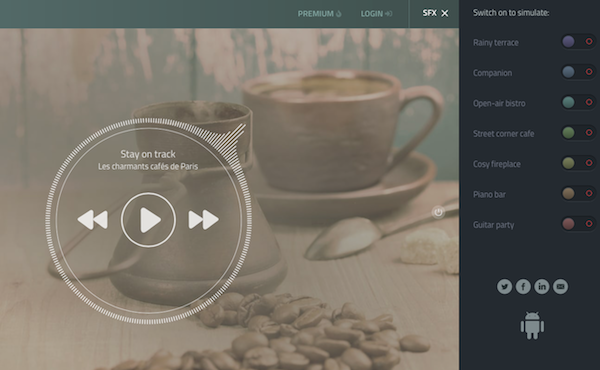
Because I didn’t pony up the $2/month (though you can pay less if you get a one-year subscription), I couldn’t listen in on the foreign language options. In general, though, none of the voices on these kinds of apps can be discerned enough to be distracting. After a year of lockdown, it might be a relief to do your work in Copenhagen or Rio!
Use HipsterSounds in your browser or via the Android app.
Cafe Restaurant, Calm Office and myNoise Development
Cafe Restaurant, from myNoise, which I included in my original post about ambient noise, looks much the same but has expanded its offerings. It still lets you use the sliders to adjust audio element styles that include the “levels” of Rumble, Restaurant, Chatter, two separate levels for Babble, Mess, Cafeteria, Cafe, Table, and Kitchen. You can now increase or decrease the speed of the soundtracks, and they’ve added both a meditation bell and a timer, useful for those who wish to implement the Pomodoro Technique.
One of the newer sibling ambient soundtracks that might be perfect for remote workers looking to simulate that soothing office hum is Calm Office.
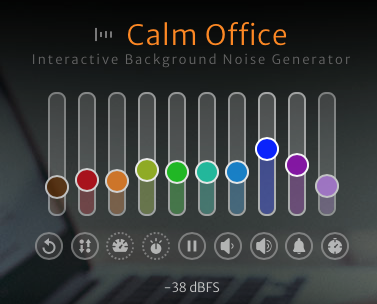
The adjustable sliders in this app include room tone, air conditioning (which, like in a real office, seems to lean toward the overpowering, (unintelligible) chatty colleagues, copy machine, printer and scanner, blended generic office noises, keyboard and mouse clicks, pen on paper, and a loudly ticking “office clock” noise.
myNoise has added a number of other related ambient environments you might want to add to your productivity arsenal:
- Catholic Church – adjustable levels are available for rain and thunder, two kinds of bells, an organ, two kinds of whispers, footsteps, random people noises, and the hushed voice of a priest. In college, I would sometimes do homework in the vestibule of a church while my friend attended Saturday evening Mass, and I can attest to the fact that (for this Jewish girl, at least), it made for a very calming background noise. I can imagine, however, that many other religious services might have a bit too much energetic verve to (sacrilegiously?) use as background noise.
- Mexico City – as part of a developing series of global cities, this option includes busy streets and traffic noises, the Mercado Coyoacan (market), mariachis, trompetistas, protests and police sirens, and birds. While it seems like it would be hard to get into flow with this atmosphere, to each one’s own.
- Night Commute – for those who miss the creative inspiration or flow state of their nightly drive or ride, this option does not offer up traffic noises, subway doors closing, or anything similar. Rather, it’s a mix of jazzy music that reminds me more of a movie montage of a commute than an actual commute.
The myNoise mixable soundtracks are available for the browser and in an iOS app; there’s an Android version, as well, but in the past seven years, myNoise has remained dissatisfied with ongoing Android problems and recommends Android users listen via mobile browsers.
Magical Tearoom
For something really simple, look no further than the Magical Tearoom. There are no pre-sets, no toggles, no sliders. There are no options at all. It’s just an eight-hour YouTube video with the cozy sounds of an old-fashioned tearoom, paired with a vaguely Eastern setting. The hot water periodically gets replenished, the tea leaves float, the steam rises, and other satisfied visitors burble unintelligibly, creating a calming, peaceful space for focusing on your work.
While one is left to assume that the “magic” comes from the sparkly bits flecked across the screen like so much pixie dust, I’ve found something else. In general, I need my white/pink/brown noise to be devoid of human sounds, so what’s magical to me here is that the atmosphere feels the most natural and the easiest to settle into. I’ve written much of this post “in” the Magical Tearoom.
I’d encourage you to check out the many other sound collections from this creator, Miracle Forest. Those tend to be shorter, about two hours in length (suitable for four Pomodoros, with breaks), and have themes, like a Hogwarts-inspired rainy Castle Reading Nook or Study Session at Night.
Sounds of Colleagues
Sounds of Colleagues is the result of a creative collaboration between Familjen STHLM, a Swedish advertising agency, and Red Pipe Studios, an audio branding agency. When Sweden locked down and offices closed, employees at both really missed their peeps, giving rise to this simple page.
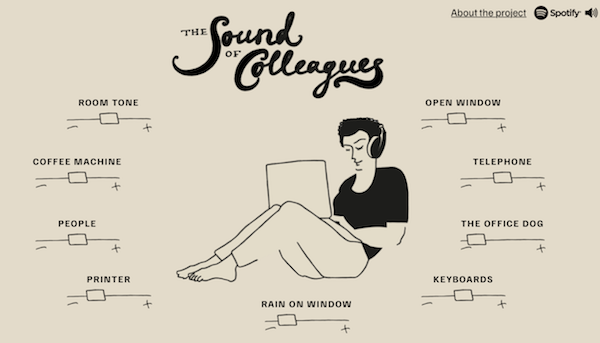
Use the sliders to raise or lower the levels of sounds of the general room tone, the coffee machine (likely nicer than what you had in your office), co-workers, printer, rain on the window, keyboards, sounds outside the open office window (including car horns and traffic). There’s also an alternatingly barky and whimpering office dog (and an occasional, whispered “good boy!”) and a ringing telephone. I urge you to turn the telephone sound down all the way, as the virtual phone is as annoyingly distracting as it is in real life.
If you miss your office, and maybe even the people in it, this is the most pleasantly realistic. For deep work, I suggest using the browser version works as I’ve described. However, if you prefer variety, on Spotify, you can listen to a playlist of short 2-5 minute tracks, with titles like “Corporate Office in the Middle of the City,” “90s Office With Landlines Ringing” (don’t – just don’t), and “Cocktails and Typewriters Anno 1960.” (There’s that Mad Men theme again!)
I Miss My Bar
Maybe you’re more of a Hemingway (“Write drunk. Edit sober.”) person, and you’d get more flow and accountability and less distraction in a bar than a coffee house or office?
Maybe you're more of a Hemingway ('Write drunk. Edit sober.') person, and you'd get more flow and accountability and less distraction in a bar than a coffee house or office? Share on XViral sensation I Miss My Bar has you covered. Maverick, a jazzy bar/restaurant in Monterrey, Mexico, had to close during the pandemic, but created this platform, leaving the following message:
We all miss our bar.
Hanging out with friends, deep conversations over Gin & Tonics, meeting great new people, the atmosphere.
Even though these things will never be replaced, at Maverick we’ve made this modern digital artifact to keep you company while this awful pandemic, which profoundly affects our industry throughout the world, finally passes and we can meet again safely.
Plug your device to a decent speaker set and use it as a background sound for your zoom parties, or just for your daily wind down cocktail at home.
As every hospitality professional in the world we, too, miss you as well. If you are feeling generous, try to find a way to support your favourite local bar staff today. You can support ours here.
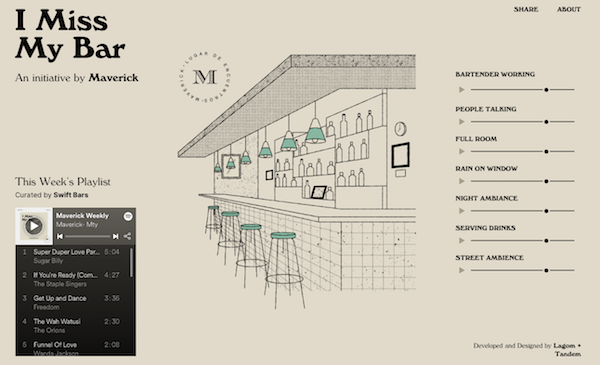
Get into your work groove while listening to the weekly music playlist; use the sliders to adjust the sounds of a bartender mixing drinks, a full-room crowd, rain on the window, night ambiance (in case you’re on the bar’s back deck), street noises, and drinks being served.
To get a sense of the Maverick bar’s actual ambience and menu, here’s a translated version of their website. I suspect, when the world tips back enough toward the old ways, Maverick will have a lot of real-world visitors.
AN ENCOURAGING WORD
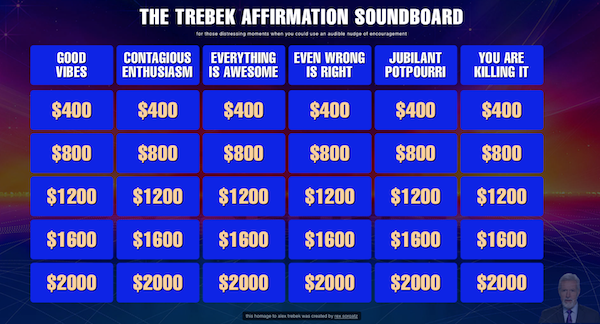
If one of these “faux” accountability methods helps you achieve flow, hunker down, and do your best work, there’s still one aspect of the traditional accountability experience you might still feel like you’re missing: the “Atta Girl!” or “Atta Boy!” at the end of a work session. And for this, the late and much-loved Alex Trebek has provided for us all, via an homage page created by Rex Sorgatz.
Visit the Trebek Affirmation Page, click on any (or all) of the dollar values, and let the dulcet tones of the eternal host of Jeopardy! give you whatever positive external feedback you need.
Finally, much of this post was inspired by the experience at this past week’s Task Management & Time Blocking Virtual Summit 2021, which I told you about in the Playing With Blocks: Success Strategies for Time Blocking Productivity. While the summit is over, you can still enjoy the educational experience at your own convenience if you purchase an All Access Pass.
Playing With Blocks: Success Strategies for Time Blocking Productivity
Background image by Ulrike Mai from Pixabay
Do you know Parkinson’s Law? It says that “work expands so as to fill the time available for its completion.” This is why you may go along having mediocre productivity but then absolutely crush your To Do list in the week before you leave on vacation. Deadlines, whether self-imposed or external, push us to get more done. When it absolutely, positively has to get done overnight (or by Friday, or whenever), we circle the wagons, halt interruptions, and knuckle down to get stuff done!
So, if we’re capable of getting more done (by which I mean, getting more of the important things accomplished), then why aren’t we doing it when urgency isn’t an issue? And what could turn that around? Time blocking!
HOW TO USE TIME BLOCKING
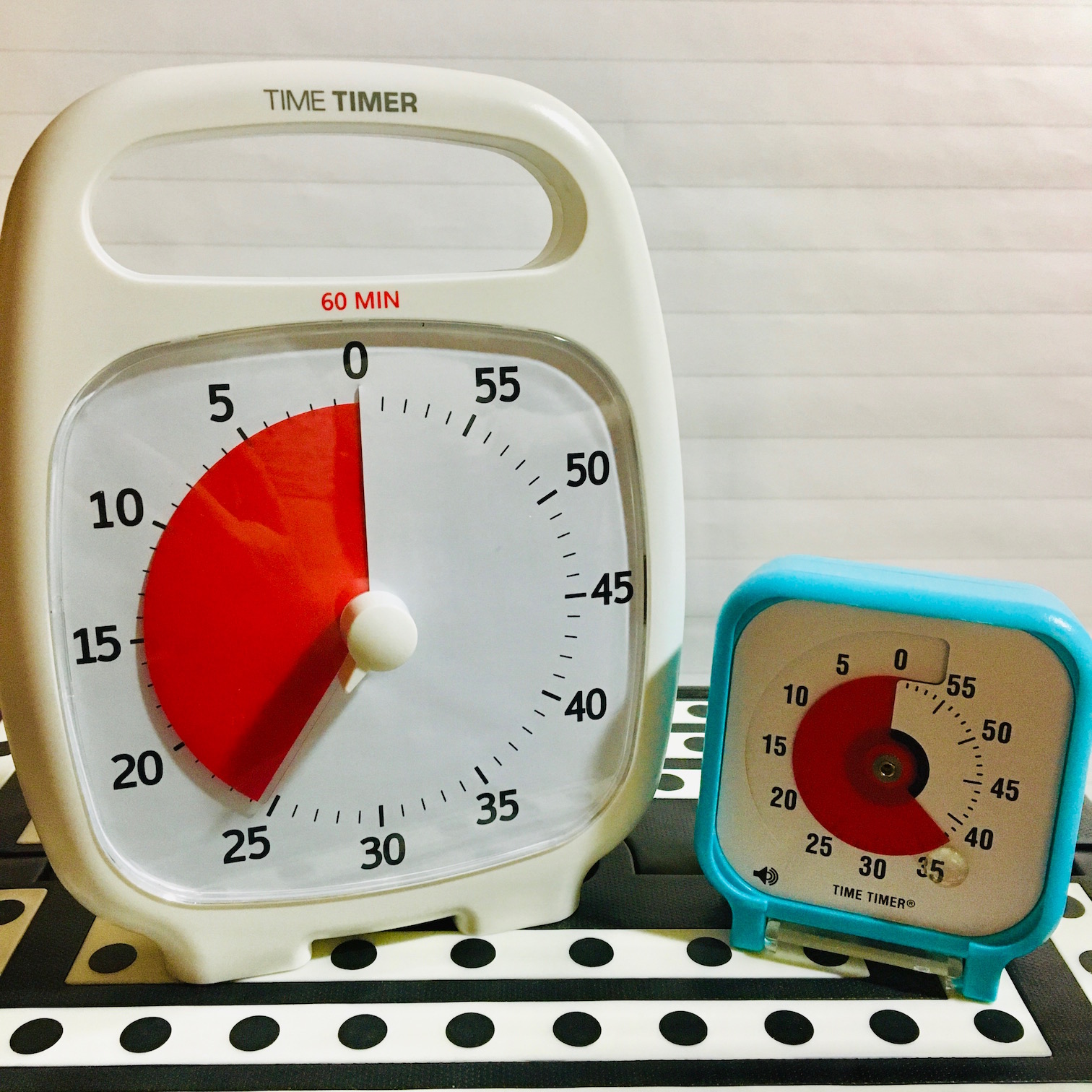
Time blocking is also known as calendar blocking or block scheduling. Mike Vardy called his daily themes “time chunking” and has developed a whole system (and book) on Time Crafting around related concepts. Time blocking isn’t new, but in recent years, people see it in a new light. Today, I’d like to give you the Paper Doll take on what makes time blocking work.
First, Know the Difference Between To Do Lists vs. Time Blocking
You already know how to make a To Do list. There are the things you do every day (which you probably don’t bother to put on your list) and there are unique things that are specific to a certain day (a particular phone call, a project you have to research) that you write down because you don’t want to forget.
The problem is that we tend to have mental lists of the things we innately have to (or want to) do, and they battle for priority and attention with the unique/atypical things on any given day. If we only work our lists, we’ll feel unsettled at some point because we know we’re not doing the things we’re usually doing right about now.
A list tells you “These are the things I care enough about doing, or think I should care enough about doing, to write down.” But lists don’t tell us when we’re going to do the tasks, and a task without a place to live in your schedule is unlikely to get done with full attention (or get done at all)!
The biggest advantage of time blocking is that it encourages us to commit to the things we claim to care about. If you block time to accomplish something, aren’t interrupted, have all your resources and still don’t do it? Then it’s a motivation problem, not a strategic problem (and that’s a whole other blog post).
Set aside your reluctance to schedule things.
It’s essential to build time into your schedule for tackling all of the work to be completed, or unscheduled but important tasks will be rushed and done haphazardly. If you cringe at the idea of a schedule, fear being too regimented, and think you prefer to go by your gut, ask yourself how effective acting on instinct has been thus far for your productivity.
Think blocking your time will dampen your creativity? I’m a professional organizer, not a creativity coach, but you know who IS a poster child for creativity? Author Stephen King, and do you know what he says? “Amateurs sit around and wait for inspiration. The rest of us just get up and go to work.”
Amateurs sit around and wait for inspiration. The rest of us just get up and go to work. ~ Stephen King Share on XAnd do you know who eats healthily? People who have a fairly defined “dinner time,” — if dinner is at 7 p.m., then you start cooking at 6 p.m., and you probably even plan for it early enough in the day to make sure you have the ingredients and have defrosted the essentials. You know who generally does not eat healthily? The person who has a random package of HoHos at 4:30 p.m., doesn’t think about dinner until her stomach growls at 7:30 p.m., and who has Alexa dial one of the same three delivery places pretty much every night.
Planning and blocking your time doesn’t mean you can’t be spontaneous. It means that you have some structure in your life so that you can wisely make decisions about doing things spontaneously. You can binge Bridgerton on Sunday, if you know what work blocks are set for Monday, even if you haven’t yet created your slide deck for a virtual presentation on Tuesday. Blocking out time to accomplish what you must do gives you the confidence to make decisions about what you might do.
Blocking out time to accomplish what you must do gives you the confidence to make decisions about what you might do. ~ Julie Bestry Share on XMake a list of all of your regular activities.
Begin with a brain dump. Pull up a blank screen and write down every task you regularly do. You can make this more kinesthetic (if less environmentally friendly) by writing each type of task on a separate index card or sticky note.
My brain dump might include replying to prospective client emails and media inquiries, working with clients (virtually or in-person), researching content for the blog, sourcing graphics, getting my 10,000 steps, connecting with far-flung friends, etc.
Sort all your tasks into categories. Work categories may not be all that different from school categories. You had math (now it’s bookkeeping or bill-paying) or English (now correspondence, marketing projects, or reading for fun). All of those activities were regulated by a fixed schedule that ensured you had ample time to focus on each subject. A bell triggered transition time. Your schedule even accounted for lunch and phys. ed. to keep your brain and body healthy.
Whether we’re talking about your work day or just your life, it’s all a learning experience; take yourself back to school, when the day was broken up into blocks for getting everything done, and make sure your highest priorities get scheduled first.
High priorities? Blocks rhyme with rocks, so start with your big rocks. You know the story about the big rocks, right?
Next, draft a calendar page.
Make sure all of the essential categories of your work and life have general homes in your daily and weekly schedule. You don’t have to block each day identically; in fact, you probably shouldn’t, or at least won’t.
Instead, consider how much time you usually require for the tasks in each category and how often you need to do them. You might need multiple 45-minute blocks each week for writing your blog or newsletter, plus snippets of time each morning and afternoon for social networking. If you’re trying to master the flute or learn Mandarin, you might schedule smaller blocks each day at the start and end of your day to learn and practice.
Let’s say, for example, that you are a fan of paper calendars and that you use Planner Pads, which offers a unique funnel system to help you organize, prioritize and schedule what matters most to you.
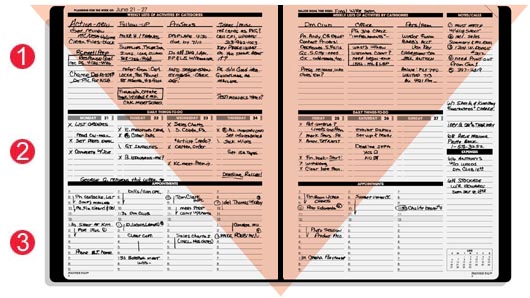
(FYI, through the February 28, 2021, I’ve got a discount code you can use. Just type AFF121 into the discount code section at checkout at PlannerPads.com.)
If you’re the kind of person who loves color-coding, associate categories with colors that have significance to you, like green for financial, red for marketing, purple for client work, blue for self-care, and so on. Each task doesn’t need its own color; just consider the overarching categories in terms of colors.
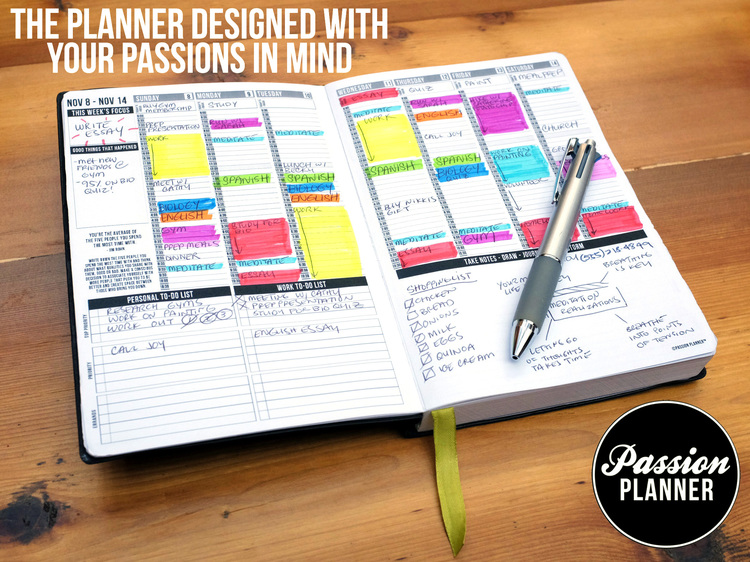
I love paper planners, but I will note two big disadvantages vs. digital.
First, if you’ve inked in a particular time block but have to move it due to a higher priority project bumping it, your calendar will get messy. You’ll either have to use correction liquid or tape; crossing things out and trying to change color coding will create illegible blobs. Sure, until you get a handle on time blocking, you could make a calendar out of blank wall, using sticky notes for each 90-minute or two-hour block, but that’s not exactly portable.
But with a digital planner, you can drag-and-drop a block to a different day or time slot, make quick corrections easily and get alerted to conflicts.
Second, it’s hard to replicate time blocks week-to-week on paper without extra labor. (However, this can be an advantage inside of a disadvantage, as the more hands-on you are with your time blocking, the more aware you’ll become with regard to how you use your time.)
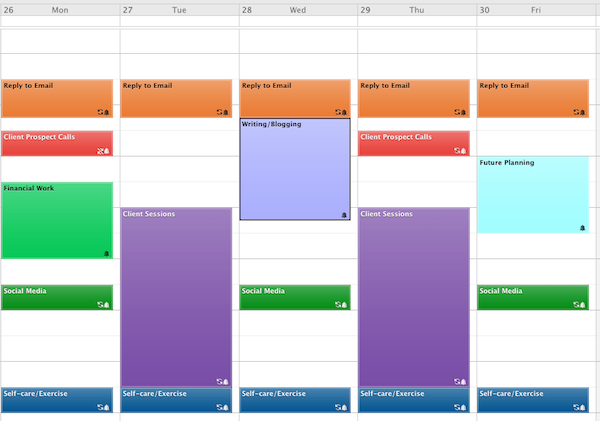
With a digital calendar like Outlook or Google, you can usually click on the event and change the recurrence from one time to “every weekday” at 9:15 a.m. to “every Monday, Tuesday, and Friday” with a few keystrokes.
Your time blocking method is always less important than your commitment to it.
Block at least one 90-minute slot each week to focus on an aspirational priority.
Do you have a dream? Maybe you want to work with a business coach to take you to the next level, join Toastmasters to develop speaking skills, or learn how to tango. Block time for uplifting priorities keep you motivated throughout your week.
Bubble-wrap your blocks.
Your brain can’t run at full speed 24/7. It didn’t even do that for an 8-hour workday pre-COVID. There were watercooler conversations about This Is Us, break room birthday parties, and really boring meetings where other people’s projects were being discussed and you just zoned out. (It’s OK. Everyone does it.)
Plan buffer time around Zoom meetings and conference calls. When the world gets back to normal, add in buffer time to account for traffic between appointments or chatty clients. And be sure to schedule time at the end of each afternoon to review your tickler file and action items for the next workday. Don’t know about tickler files? Check out my ebook, Tickle Yourself Organized.
Don’t try to block all your time back-to-back-to-back. Sometimes, you’ll have a 90-minute block that’s all creative work. Other times, it’s catching up on all of your open tabs, literally and figuratively. Sometimes, you’re going to need to have a break to just stare out the window at the first robin of spring or dance to three songs in a row until your face is red and your Fitbit is worried you’re in the danger zone.
Time blocking doesn’t mean turning yourself into a robot. It just means that your life won’t become a continual ooze from from one slothful activity to the next.
Block a section of each day for working on special projects.
Avoid Mondays for your most urgent and important projects so that long weekends and federal holidays won’t adversely impact your productivity.
For example, use 2:00-3:30 p.m. on Tuesdays for handling financial issues, or reserve an hour on Wednesdays for problem-solving sessions. It doesn’t mean that there won’t be tasks related to finances or problem-solving throughout the week, but having a designated time ensures your priorities won’t be unplanned or edged out.
Consider using Thursday afternoons for catching up on abandoned tasks, including organizing. (It’s not being defeatist; it’s realistic.) If you’re all caught up, you can release the blocked time for something more fun.
Remember to block out time for the “shallow” work.
In his book Deep Work, Cal Newport talks about focusing without distraction on a mentally demanding task; it’s when you’re fully invested in something. It’s the kind of valuable work that generally fails to get done unless we block time for it. That said, our shallow work, the stuff that isn’t particularly fulfilling but must be completed (filing papers, refilling prescriptions, answering emails, etc.) can also fall through the cracks if we don’t schedule time to do it.
Remember that you need time to be reactive as well as proactive.
Most of our days, we plan to be pro-active: to call, to write, to read, to teach, etc. At our best, we know what we need to accomplish, how we’ll break it down into smaller tasks, and what “success” looks like. Those are easy times to block.
But what about when we have to be reactive? Plan small-to-medium blocks each day to cover those unexpected tasks that become priorities only when someone else puts them on your plate.
Create blocks for a start-up and shut-down routine to begin and end each work day.
Think how your coffee/shower/breakfast combo revs you up for the day, or how a bath/book/bed routine puts little ones in the zone for sleepy time.
Bookend your day with planning tasks. Before leaving your desk behind, make sure you know what you need to accomplish tomorrow, and have all your resources prepared. I like to fill my browser tabs with the links I’ll need to hit the ground running. You might want to open up your CRM page to the first client call of the day, or just write the phone number of the first person you’re going to call on the first blank page of your notebook.
BONUS TIPS FOR SUCCESSFUL TIME BLOCKING
When you do sit down to work your time blocks, have a plan for making that block successful.
Get some accountability—If you’re having trouble getting your tush in the chair, have an accountability buddy with whom you can talk, text, or Zoom. Just having someone else know you’re working can make you feel less alone and more focused.
Be a hot tomato—Get to know the The Pomodoro Technique, a beloved strategy for forestalling procrastination and getting things done. At the most basic level, it involves setting an intention, working for 25 minutes, and taking a break, but familiarizing yourself with its many robust features can kick-start your productivity.
Respect yourself—It’s easy to put other people’s needs first, but if you don’t respect your time, neither will anyone else. Cut interruptions off at the pass: turn off notifications and mute your phone to ensure that for however long you’re working, your attention won’t turn to other people’s priorities.
Reward system—Again, you aren’t a robot. (Unless you are, in which case, welcome, and beep beep boop boop!) Plan little rewards throughout your day to acknowledge successes. Tell your followers what you’ve achieved, have a cookie, or call your mother for praise. (Or call my mother for it; Paper Mommy rocks!)
OBSTACLES TO TIME BLOCKING
Time blocking is not one-size-fits-all, and you may experience obstacles.
- Time blocking doesn’t always fit when other people are in charge of your schedule. Time blocking requires flexibility; if your clients or your boss get to determine your schedule, time blocking your work hours may not be possible.
However, that doesn’t mean you can’t use time blocking for your personal life. Block time on Saturday afternoons for family projects or errands; from 5:30a-6:30a on weekdays, block time to work on your novel or get fit.
- Sticking to time blocking isn’t always an option when your life or work time will be interrupted, almost by default. If you’re the sole at-home parent of a newborn, you can’t opt to continue doing Pomodoro blocks and just feed or change or attend to your baby during those five-minute breaks. If you work in medical care, you know that you can’t stick to your patient schedule if a true emergency walks through your door.
[Editor’s note: I will never, ever complain again about a doctor running late. In 2009, I walked into my doctor’s office waiting room and managed to say about five words before passing out into the arms of two sturdy nurses; within an hour, my doctor canceled the next several hours of appointments to perform an emergency procedure. So yeah, time blocking in health care doesn’t always work.]
- Time blocking requires planning, and planning requires self-awareness, and we aren’t all there yet. To effectively use time-blocking, you have to have a clear idea of:
- what you must accomplish,
- what all the steps in each project are,
- how often steps get repeated (so you can create ways to automate them),
- how long each step will take (including buffer time for potential technical problems and creative dry spells), and
- when your energy is at its peak for creativity, physical work, etc.
If necessary, I can catch a morning flight; on occasion, I’ve talked about organizing on some very early morning TV news segments. However, they can write all the 5 a.m. Magical Miracle Morning Magnificence books they want, but Paper Doll is never going to have enough caffeine, adrenaline, and cheer to regularly write, create, or even organize at o’dark-thirty. Self-awareness, baby!
Be honest with yourself about time blocking. If you’re not a morning person, schedule sales meetings and conference calls in the afternoon, when your social skills are at their best; if you can’t do math on a full stomach, work on revenue projections or start your taxes before you go to lunch.
TASK MANAGEMENT & TIME BLOCKING VIRTUAL SUMMIT 2021
Obviously, these are just the big-picture basics of time blocking. Are you interested in learning more? My friend, colleague, and former Cornell University International Living Center dorm-mate Francis Wade has brought myriad time management and productivity experts together for the second annual summit of its kind.
Francis is a productivity consultant, the founder of 2Time Labs, and author of the book Perfect Time Based Productivity.

Task Management & Time Blocking Virtual Summit 2021
Over three days, March 4-6, 2021, the summit will cover the foundations of time management and time blocking, present choice electives, and offer interactive, live activities.
Many friends of the Paper Doll blog are set to participate, including: Ray Sidney-Smith, Mike Vardy, Penny Zenker, Dr. Frank Buck, Augusto Pinaud, Deb Lee, Cena Block, Nicole Chamblin, and even yours truly, Paper Doll (as a panelist).
If you want to attend live each day (all day), the summit is free, or you can choose your own price to help defray costs of putting it on. But if you want to be able to return to the material over time, or watch at your own convenience – during time periods you’ve blocked out for your continuing education, you can purchase an All Access Pass.
Affiliate Disclaimer: This site uses affiliate programs to help generate a supporting income which allows us to continue our work and provide you with the best overall experience and valued information. If you have any concerns, we suggest you do not click on any affiliate links found throughout the website or blog. If you are uncertain as to the resulting link’s destination, you may hover your cursor over the linked material to see where it goes. We will always provide you with a company or agency name, which you can type into any search engine in order to reach the site independently of our links. For more information, please see the Affiliate Tracking section of this site’s Privacy Policy linked at the bottom of each page.
The Professor and Mary Ann: 8 Other Essential Documents You Need To Create

During the first season of Gilligan’s Island, the end of the original, stripped-down theme song went like this:
The ship set ground on the shore of this uncharted desert isle
With Gilligan, The Skipper too,
A millionaire and his wife,
The movie star, and the rest,
Here on Gilligan’s Isle.
As part of an unofficial three-part series, this post is the document version of “and the rest.”
Two weeks ago, in How to Replace and Organize 7 Essential Government Documents, we covered how to replace a missing birth certificate, Social Security Card, marriage license and certificate, divorce decree, military separation papers, death certificate, and passport. We also discussed the circumstances under which you’d need each, and how and where to store these documents safely.
Last week, in How to Create, Organize, and Safeguard 5 Essential Legal and Estate Documents, we continued by looking at important documents you should create and safeguard for your family’s security and your own peace of mind. These included Durable Powers of Attorney for finances and healthcare, a living will or advanced healthcare directive, a will, and a digital will.
All of those documents are “official” documents, paperwork you either obtain from the government or create (generally) with the help of a legal expert. But these aren’t the only papers that will help you create an easier life. Today, we’re going to talk about the other important documents I encourage you to create and maintain.
FINANCIAL DOCUMENTS
Last week, in the sections on Durable Power of Attorney for Finances and wills, we talked about the handling of your finances, either during a temporary absence or incapacitation or, in the case of a will, a more permanent absence. The only way someone can oversee the management and disbursement of your assets is to know what your assets entail. When it comes to organizing, you can’t be listless. So, make a list! Or a few!

Photo by Sharon McCutcheon on Unsplash
1) List of Assets and Accounts
For each of the following, you need to create a list or chart that indicates the following:
-
- the asset by name and type
- the financial institution (bank, brokerage house, transfer agent, etc.)
- the contact person and information, if appropriate (such as your personal banker, retirement officer in Human Resources, your Certified Financial Planner, etc.)
- the physical location of any tangible paperwork (safe, financial file drawer, etc.)
- and the log-in information for any digital account related to the asset.
Depending on where you keep this list and the level of security needed, you may wish to list only the URL and account user name. Then, you might keep all passwords in a digital password manager like 1Password, Dashlane, or LastPass, and only give the master password to the person holding your Power of Attorney for Finances. Alternatively, a digital password manager will generally allow you to share access for specific accounts with the email address(es) of your choice, such as for a family member or the holder of your Power of Attorney.
So, what goes on your lists? Review the options below, and then go through your files, your tax folders, and your memory to try to come up with everything you can recall. You may miss a few; as life goes on, when you encounter a document reminding you of an account, be sure to add it to the list.
List of financial assets:
- checking accounts
- savings accounts
- money markets accounts
- certificates of deposit (CDs)
- stocks, held individually
- bonds, held individually
- mutual funds
- Individual Retirement Accounts (IRAs)
- 401(k)
- 403(b)
- pension
- Social Security account
- insurance policies (with a cash value, such as life insurance)
- annuities
- cash on hand (such as in your safe or safety deposit box)
- treasury notes
- government bonds
List of tangible assets:
- real estate
- vehicles (automobiles, boats, all terrain vehicles, snowmobiles, etc.)
- jewelry
- artwork
- antiques
- collections
List of intangible assets:
- intellectual property rights (patents, copyrights, trademarks, royalty agreements)
- partnership agreements in businesses
How to Organize Your Lists
While any kind of list is better than leaving it to your memory, I don’t recommend using a plain text document or something like Word or Google Docs because those are harder to format for multiple columns and more difficult to adjust as circumstances change.
A spreadsheet, using something like Excel or Google Sheets, is the simplest method for keeping these lists. With a spreadsheet, you can sort alphabetically, by institution name, or other characteristic, and you can easily add or delete lines as necessary. You can also add additional fields, or make simple changes, such as updating beneficiaries, contact information, etc.
A more detailed solution would be to use Airtable. If you’ve never used it, consider it a database that works like a spreadsheet, but you can add pictures and documents into the field. It’s ideal for maintaining all of the text information related to your tangible assets while allowing you to insert photos into specific fields.
Finally, you may want to consider doing a complete home inventory for your tangible property. A popular home inventory solution about professional organizers is HomeZada, a suite of apps for managing all aspects of your home records, from inventory to remodeling to maintenance projects.
Whatever you use, the key is to write down every asset and to update the lists as you add, eliminate, or change your assets.
2) List of Debts and Accounts

Just as you created your list of assets, go through your monthly payables and paperwork to identify any debts you owe. These may include the following (but can include many others):
- mortgages
- auto loans
- college/education loans
- personal loans
- credit card debt
- home equity debt
- medical debt
- payday loans
A basic spreadsheet with all of the columns indicated at the start of the asset section should suffice.
3) Copy of the Contents of Your Wallet
The main reasons to keep a copy of the contents of your wallet is for recovery of control and for replacement of contents in case it’s ever lost or stolen. The copy provides you with all of the information you need: the exact way your name is listed on your card (with or without an a middle initial), the card number, any security code, and any toll-free numbers associated with reporting the loss and getting a replacement.

Image by Steve Buissinne from Pixabay
This is the easiest of your financial projects, particularly if you have a home scanner or printer, because you’re focused on everything in your wallet, the cards that most often leave your home.
- Take everything out of your wallet.
- Lay the cards face (logo) down in two neat columns, and scan the front.
- Leaving each card roughly in place, flip them all over so the reverse (signature) side of the card faces down, and scan that side. This way, each card is in the same position on both scans.
- If necessary, create a second set of scans. (If you need more than two sets of scans, you’re probably carrying too much in your wallet.)
The key is to scan the front and reverse of everything you carry in your wallet, including your driver’s license, health and auto insurance cards, credit and debit cards, AAA or auto club card, library card, etc.
If you carry cards related to implanted medical devices, make sure to copy those as well, but you may prefer to keep the originals in your medical files at home, and carry a photocopy when necessary, such as when you’re having medical treatment or going through a metal detector or scanner.
It’s up to you whether you want to copy retail loyalty cards, as you’re not generally in danger if those are lost or stolen.
For more about good “wallet hygiene,” check out these classic Paper Doll posts:
What’s In Your Wallet (That Shouldn’t Be)?
What’s In Your Wallet (That SHOULD Be)?
What’s In Your Wallet? (Part 3): A Little Insurance Policy
Lost and Found: GONE in 6 seconds: Your Wallet!
MEDICAL DOCUMENTS
The person to whom you give your Power of Attorney for Healthcare (also known as your healthcare proxy) may need to know things about your medical history. But that’s not the only reason to maintain the following documents. Creating both of these, in advance, and updating them as necessary, will save you time and effort when visiting new physicians, answering questions from medical practitioners, assisting first responders, and providing medical history information to your children and other relatives.

Image by StockSnap from Pixabay
4) Medical History
Every time you go to a new physician, you are likely asked to fill out a form regarding your medical history, including past illnesses and injuries, surgeries, current (and sometimes past) medications, and more.
Do you know what year you had your tonsils out? What about the name of the doctor who diagnosed you with that thing that you can’t spell or pronounce? (You don’t want to tell your new ophthalmologist, “I once had a thing that sounds like a penguin.” She may know what you mean, but you’ll feel like an idiot.)
Sometimes, a physician’s record will show that it’s been many years since you’ve had a particular test, like an MRI or CT scan, but you know of a more recent test than he does; being able to consult your record can save time and money.
Sit down with your medical records, EOBs, and maybe your parents or spouse, and create a detailed list of the following:
- health insurance policy and group number (and the address from the reverse of the card)
- your blood type, including Rh factor (that’s the plus or minus after the letter)
- immunization record (If you’re beyond a certain age, your pediatrician has probably long since retired. The last time you probably needed to provide this record was when you started college, so your parents may still have it stored with your baby records. If you served in the military, that’s another good place to check.)
- allergies (including to any foods, medications, and environmental situations, as well as a notation of if you use an Epi-Pen and locations of where you keep them)
- medical conditions – include any ongoing health concerns, whether they would be considered symptoms (like high blood pressure) or diseases, like diabetes or MS. Note the names and contact information of any specialist you’ve seen and the dates of any tests you’ve had.
- records of any surgeries, including the type of surgery type, date, physician (with contact number), hospital (and location)
- records of any procedures that may not quite be considered surgeries, including the type of procedure, date, and physician (with contact number)
- existence of any implanted devices (pacemakers, lenses placed during cataract surgery, etc.), their serial numbers, and the location of the device card for each)
- eyeglass or contact lens prescriptions (in case of head trauma, it will help medical providers determine if you have a likely concussion or if you’ve just lost your glasses)
- family medical history (including any major illnesses, including cancers, among your siblings, parents, aunts, uncles, or grandparents and the approximate age of onset)
- a running record of medical appointments and tests (this will help you determine if you are overdue for scheduling any visits)
Again, you can create a personal medical record on your own, using a simple spreadsheet workbook with columns for each piece of information. A workbook has separate worksheet pages, so you might keep one sheet for immunizations, one for allergies, one for records of surgeries and procedures, one for family history, and so on.
Alternatively, you can use your favorite search engine to locate medical history templates. For example, Microsoft 365 has a personal health record template, which you can download or edit from your browser.
5) Medication Record

Photo by freestocks.org on Unsplash
What prescriptions do you currently take? If you’re in your twenties or thirties, it might be very easy for you to provide a physician with your current medication regimen, but the older we get, or the more conditions we have, the more meds we take. It can be hard to remember the exact names of medications, especially during a medical crisis. Create a list that indicates:
- every prescription medication you take
- medication name (brand and generic name)
- purpose of prescription (especially if you are prescribed for an off-label purpose)
- dosage (this is usually indicated in milligrams; if you take one drug that combines two types of medications, it will be indicated in combined format, like Janumet 50/500, which means each pill contains 50 mg of Januvia and 500 mg of Metformin)
- frequency and instructions (as needed for pain? twice daily with meals? thirty minutes before sitting/standing?)
- prescribing physician’s name and contact information
- date prescribed*
- any adverse reactions, if applicable
- pharmacy name and contact number
- any non-prescription supplements or meds you take on a regular basis (as vitamins, minerals, low-dose aspirin, etc.) – In a high-stress situation, it might not occur to you to mention that you take fish oil capsules or a low-dose (“baby”) aspirin, but that could be vital information to a health professional.
*You may not be able to remember medications you previously took, but it might be to your advantage keep meds on your list after you stop taking them. You can indicate that medication’s line with a strikethrough, or you could have a separate column, next to the date the medication was prescribed, noting when you were taken off that particular drug. Spreadsheets let you sort by any field, so you could keep non-current medications at the bottom of the list or hide those rows.
Print copies of your medical history and medication record to take with you to appointments and to periodically update anyone involved with your medical care. Keep a current copy of each in the cloud, such as in Dropbox or Evernote, so it is always accessible.
Be sure to review additional resources from the Paper Doll vault:
Organize to Help First Responders: The Vial Of Life
Paper Doll on the Smead Podcast: How To Get Organized When You Have a Chronic Illness
PERSONAL/LIFE DOCUMENTS
The financial and medical lists, above, will help you help yourself…and others. There’s still one category of documents you should consider creating and keeping up-to-date: the documents that keep a record of your life.
6) Resume/CV
At some point in your life, you likely had a resume. But if you’ve worked in the same place for a quite a while, or if you own your own business, your resume might be a little – or a lot – out of date. And resumes are a lot more complex and varied than they were a few decades ago, when the most common format was a one-page, one-column, reverse-chronological list of your previously held positions, skills, and achievements, with perhaps a brief reference to your education.
[A CV, or curriculum vitae, is a fancy-pants resume for people in the academic and scientific realms, and it can be long…like anywhere from a couple to ten pages, depending on how many achievements, honors, publications and positions you’ve racked up.]
We are never returning to the kind of mid-20th-century economy where employees work for one company for their entire careers. Whether you’ve got a so-so-, good, or great job, there’s no harm in learning about the various formats of resumes popular these days and the information desired by employers. Even if all you do is refresh your resume, it’ll remind you of your achievements and put you in a great mood for the day.
I’m a professional organizer, not a career counselor, so I’m not going to tell you how to create a resume, but you can find online resources like Zety or ResumeNerd with a quick search.
7) Final Wishes
This topic harkens back to our discussion of wills. While nobody likes to think or talk about these things, if you have a strong preference for your final resting place, the song you want played at your memorial service, or whether you’d like to ask for charitable donations in lieu of flowers to mark your passing, you’re going to need to tell someone what you want.
Cake, the most cheerful end-of-life site of its kind, has a piece called How to Organize and Share Your Final Wishes for Free, which is the perfect place to start compiling your wishes.
8) Biographical Record
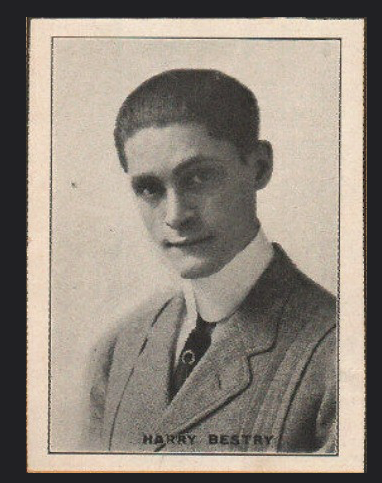
Paper Doll‘s Great-Uncle Mike “Harry” Bestry, the Vaudeville Star & Agent
Have you ever read a stranger’s obituary and been amazed at how a few paragraphs can give you a sense of a person and make you wish you’d known them? A friend of friend on Twitter posted Tom Meyer’s obituary. In the past few months, I’ve thought of it often, particularly the final line.
One need not have achieved “great” accomplishments in life to have a biography that stops you in your tracks, as Ida Mahone’s life story shows.
Try not to think of this as writing your own obituary. Think of it as the first draft of the introductory speech for your Lifetime Achievement Award!
Short of leaving a video of yourself to speak to your great, great, great grand-children, think about what would you like them to know about you. Certainly, some of the major elements of your resume might make the grade – where you went to school, what you did for a living, the major work achievements or awards you earned. But what else would you want future generations to know about you? How about making it easier for the genealogy organizers?
Consider this letter, left by world-reknowned physicist Richard Feynman. While he may be best-known to non-physicists for his best-seller, Surely You’re Joking, Mr. Feynmen, something he wrote, possibly to never be read by anyone living (in or out of science) is one of the most moving things I’ve ever read. The letter he wrote to his late wife, Arline, two years after her passing, says more about him than any newspaper could have crafted.
Whether you create a list of facts and dates, or include copies of letters you’ve written, or the secret recipe for your famous barbecue sauce, why not start now to develop a file, whether analog or digital, telling your story?
In the end, the Professor and Maryann got the credit they were due. By the second year of Gilligan’s Island, the last line of the opening credits were changed to “…The movie star, the Professor, and Mary Ann…Here on Gilligan’s Isle.”

The government, legal, and estate documents we reviewed over the last two weeks are stars; they’re VIPs (very important papers). But these financial, medical, and biographical lists and documents are just as important. They deserve their due.
This post is dedicated to Dawn Wells, who portrayed Mary Ann Summers on Gilligan’s Island, and who passed away due to complications from COVID on December 30, 2020.
How to Create, Organize, and Safeguard 5 Essential Legal and Estate Documents
LEGAL and ESTATE DOCUMENTS
Last week, we talked about How To Replace and Organize 7 Essential Documents. Now that we’ve covered documents that government entities create, we’re going to move on to looking at documents you need to create for yourself. Today we’re discussing essential legal documents you need to create for your estate, even if your estate is a rental apartment, a third-hand car, and college loans.
1) Durable Power of Attorney for Finances
&
2) Durable Power of Attorney for Healthcare (also called a Healthcare Proxy or Health Care Power of Attorney (HCPOA))
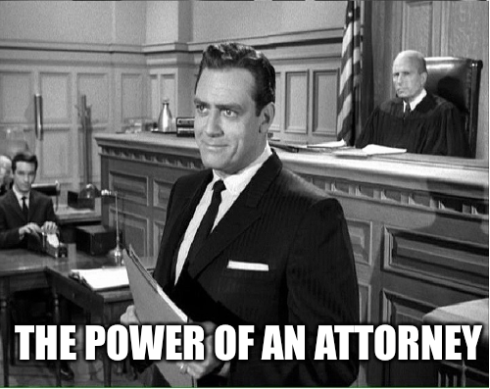
- What is a Power of Attorney?
A Power of Attorney is a written document authorizing someone to make legal, financial, or medical decisions on your behalf. In this relationship, (the authorizing party) is called the principal. That’s you!
The person authorized to serve on your behalf can be an actual Perry Mason kind of attorney, but generally isn’t; the person may be called an agent or an attorney-in-fact. This generally means the person has been deemed “legally competent,” which says less about their skills in not screwing things up, and more that they are at least 18 years of age and don’t subscribe to a buttload of conspiracy theories that would have them exchanging your IRA for magic beans. (Editor’s note: buttload not actually a legal term of measurement. FYI.)
- Why Do You Need a Power of Attorney?
At its most basic, someone with your financial Power of Attorney can perform financial tasks for you that normally, only you are allowed to perform. They can pay your bills, make decisions regarding your bank accounts, buy or sell real estate on your behalf (and find top realtors), make decisions regarding stocks, bonds, and IRAs, and generally act as your butler for money stuff. (Again, unlike words like agent and attorney-in-fact, “buttler for money stuff” is a PaperDoll-only phrase and is not a legal term of art. Please don’t try to use it in court.)
Imagine that you win the lottery. Yay! So you invest a huge chunk of your money in a pillow company or a brick-and-mortar gaming company, and then buy a ticket for an around-the-world cruise. (Except, and I mean no offense to the cruise industry, don’t do this until LONG after COVID is in our rear-view, OK?) You can leave the person you’ve granted your Power of Attorney the ability to pay your monthly bills so you can be footloose and fancy-free. Again, yay!
Now, imagine that while you’re off on your cruise, something wackadoodle happens with one of your stocks and you can’t be reached. Without someone holding your Power of Attorney to make decisions for you, you might end up owning some worthless stock upon your return. If you had granted someone Power of Attorney, they could have made sure that your remaining lottery winnings were safely invested.
Not realistic? OK, imagine your child is a 19-year-old sophomore in college and gets sick. When your kid was a minor, you got to make the medical decisions; having reached the age of majority, they make their own decisions — unless, medically, they really, truly can’t. Worst-case-scenario, if your child is in a coma or otherwise can’t communicate wishes regarding treatment and care, the only guarantee that their wishes will be followed is if someone (probably you) has the Power of Attorney and becomes their healthcare proxy.
- What Does Durable Mean?
A durable Powers of Attorney isn’t merely one that lasts longer than the toes of your socks. With a garden-variety (AKA: general) PoA, if something happens and you become incapacitated (let’s say you fell out of a hot air balloon and got a nasty brain booboo), your incapacitation nullifies the PoA, meaning that just when you need someone to make decisions for you, they’re not allowed to do so! Yikes!
Conversely, a durable PoA stays in effect even when you’re incapacitated so that you can be sure someone you trust is looking out for your best interests.
Oh, and just because it’s durable doesn’t mean it lasts forever. Once the principal dies, all Power of Attorney documents are null and void. (That’ll be important later, in #s 4 and 5.)
-
-
Power of Attorney for Finances
-
A durable Power of Attorney for financial matters is just that—a document stating whom you’ve authorized to handle your money decisions and activities. Normally, this will be a relative whom you trust implicitly, like a spouse, sibling, or parent. However, you may not be close to (or have any) family members to whom you can entrust this responsibility; if that’s the case, you can pick a trustworthy friend or an actual attorney.
-
-
Power of Attorney for Healthcare
-
A durable Power of Attorney for health care (also called a health-care proxy, medical proxy, or a Medical Power of Attorney, depending on your state) is a document stating whom you’ve authorized to make your medical decisions if you are physically and/or mentally unable to do so.

Photo by Online Marketing on Unsplash
As with a PoA for finances, married people usually authorize their spouses, but you can give this right to a sibling, parent, or non-relative, too. (It doesn’t mean you don’t trust your spouse; if your loved one has just dealt with the passing of a parent, for example, the weight of being your Power of Attorney for health care might be a little overwhelming right now.)
- Create a Power of Attorney Document
Once you figure out the person or people whom you will authorize, you need the documents. Unless you’re already working with an attorney on other estate documents, you can handle this on your own. A variety of sites offer free and low-cost forms. Navigate to a site, select your state, and then download, fill out, and print. A few examples include:
You can also type “Power of Attorney [your state]” into your preferred search engine; most states have a governmental page with information and forms. For example, doing that search for Tennessee provides this document, yielding both Power of Attorney forms and Advanced Care Directives (see below).
If you prefer to go Old School, you can buy a packet of Power of Attorney forms on Amazon or at an office supply store and fill them in by hand.

- Consider Designating Backup Agents
It’s a good idea to have a backup person, or a secondary agent, in case your primary agent cannot accept the responsibility. For example, if you give PoA authorization to a spouse, and you are both stuck on a mountain pass in the Andes on a vacation (that you never even wanted to go on in the first place, thankyouverymuch!), that’s not good. It’ll be better to have named a secondary agent who can release funds to pay for a helicopter and a search party.
Be sure to have your durable PoA witnessed and notarized, and follow all instructions as required by your state.
- Safeguard Your Power of Attorney Documents
Make multiple copies of your signed, notarized Power of Attorney documents. Give one to the person you’ve named as your agent; if you have a secondary agent, give a copy to that person. Keep the original in your fireproof safe, and scan a copy to the cloud (like in Dropbox) so that you can access it from anywhere.
3) Living Will (also called an Advanced Medical Directive)
A living will is a document that exists to provide guidance to physicians regarding what types of treatments you’re willing to undergo, what pain management techniques are acceptable to you, etc., and usually relates to end-of-life situations.
- Why Do You Need a Living Will?
Some people wonder why, if they have a living will, they would also need a durable Power of Attorney for health care. Isn’t one enough? Excellent question!
Only someone authorized by a durable Power of Attorney can make decisions about if, and under what circumstances, life support might be withdrawn. The assumption is that if you’re incapacitated but have not authorized someone to make your medical decisions, then your doctor will, de facto, be in charge. If you’ve watched Grey’s Anatomy, you know this isn’t the case.
The authority to make your health care decisions shifts from the doctor (who makes emergency decisions, like in surgery), to whomever you’ve authorized (via your signed, witnessed durable Power of Attorney for health care document) once the doctor makes the medical determination that you’ve been incapacitated—if you’re “altered,” delirious, comatose, etc.
A living will or advanced medical directive can’t foresee all future circumstances; the person authorized by a durable Power of Attorney for healthcare can make sure your most recent wishes are followed. Perhaps, when you were 25, you believed that you should be kept alive no matter what, even if you were just a head in a jar, like Nixon in Futurama. But at 95, you might not feel the same way.

Of course, you’ll want to tell the person whom you’ve authorized what your wishes are. For example, you might wish to be kept on life support no matter the circumstances. My mother calls this the “I want to be a burden to my children” option, and it’s my preference. Or, you might wish to be receive life-sustaining treatment unless a certain circumstance arises, such as a prolonged vegetative state. Or, you might want all life support to be withdrawn unless there’s hope for full (or vastly increased) restoration of mental and physical health.
It’s your choice, but it’s only your choice if you make your preferences known!
[Editor’s note: Friend of the blog Carol Kaufman of Pinventory has wisely raised a point that I should reiterate here: for the same reasons your adult children (including college students) should have a designated Power of Attorney for healthcare, they should also have their own signed, notarized living wills and HIPAA release forms. Thanks, Carol!]
Unlike completing Power of Attorney documents, which you can do in a matter of minutes, completing your living will or advanced healthcare directive requires answering some pretty difficult questions, like:
-
- Would you want to be put on a ventilator if you could no longer breathe on your own?
- Would you want CPR or other resuscitation if your heart were to stop beating?
- Would you wish to have tube or needle feeding if you lost the ability to swallow?
- If you had progressive dementia, what health treatments would you want?
- Would you want to be an organ donor?
In Tennessee, my form asked the following questions about quality of life and treatment. Both gave me pause, and it took weeks before I felt prepared to put my decisions in writing.
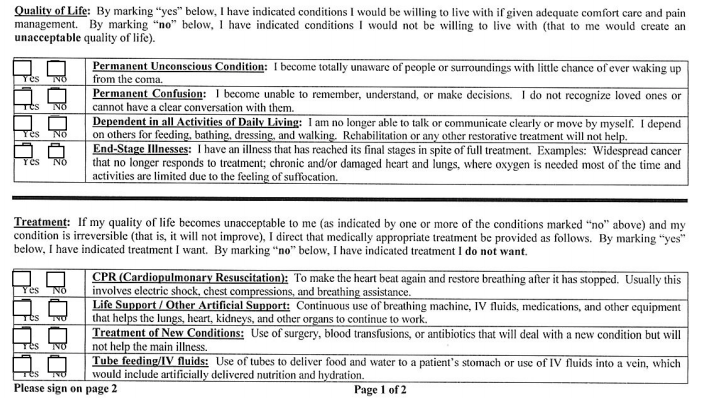
- Create a Living Will
In non-COVID times, you can easily pick up a blank living will or advanced health care directive form at most hospitals. These days, just download a form designated for your state, such as those at the following sites:
eForms (Advanced Medical Directive)
Or, plug the terms “advanced medical directive” or “living will” along with the name of your state into your preferred search engine.
- Safeguard Your Living Will (Advanced Healthcare Directive)
Make multiple copies of your signed, notarized living will.
Give one to the person you’ve named as your agent for healthcare decisions; if you have a secondary agent, give a copy to that person, too.
Keep the original in your fireproof safe, and scan a copy to the cloud (like in Dropbox) so that you can access it from anywhere. It’s also helpful to keep one copy clipped to the interior front your Medical folder in your Family Files, as well, so that as you file paperwork regarding your health and wellness, you are reminded to keep your wishes up to date.
4) Will (also known as a Last Will and Testament)
- Why Do You Need a Will?
You may assume that if you die intestate (that means, “without a will”) that your money and stuff will automatically go wherever you told everyone you wanted it to go. But that’s not how it works. If you die without a will, depending on the state in which you lived/died, those state’s intestacy laws determine who gets what, and it’s often not very pretty…and not what you would have wanted.
For example, if you are single and have no children when you die, everything you own would likely automatically go to your parent(s)—even if you were estranged; or, if they are no longer living, to your siblings (even if you didn’t like them), then to random relatives of ever-increasing relational distance, even if you’d wanted your Star Wars memorabilia, Beyoncé CDs, and Bitcoins to go to your best friend. If you are not married but in a romantic or domestic partnership and die intestate, your partner generally cannot inherit. And the state rules for married people can be equally frustrating.
Unless you want the state deciding who gets what, you need a will!
- What Do You Need to Mention in My Will?
The short answer is, ask your attorney! Seriously.
At the very least, you’re going to need to create a list of all of your assets and debts (something we’ll be discussing in an upcoming post). This will include traditional assets like bank accounts and investments, but you’ll also need to consider all of your tangible property. Will your executor sell your car and add the revenue to your overall assets, or would you like your great-niece to have a more dependable ride? Will you donate your library of books to charity or sell them or have someone create the Biggest Memorial Little Free Library in your name?
If you have any minor children, your will should spell out whom you wish to name as a guardian. (If you have pets, while it’s less of a legal issue, ethically you want to make sure you provide for Fluffy or Mr. Barker.)
And while you can create your wishes regarding funeral arrangements as part of your will, that’s not the only place they should be listed, and we’ll be covering that in a future post.
The reading of the will in Monseiur Verdoux (1947), in the public domain
- Types of Wills
Without turning this into a law school class, there are three types of wills (notwithstanding a living will, explained above):
A simple will lets you specify who will get your assets. If you have minor children, this is where you name who will be their guardian. Depending on the rest of your financial and legal situation, you can create a simple will fairly easily, even without an attorney. LegalZoom has a good piece on the starting point for gathering the essential information, writing your will, and making sure it’s kosher.
A testamentary trust will lets you place some of your assets into a trust. If your eyes glaze over at the sight of “wills and trusts,” just know that this a way to make things easier for your beneficiaries and all of your assets (investments, accounts, etc.) live inside the trust. This is advantageous in a few different ways.
First, if you have minor children (or beneficiaries who sometimes act like children) this is a safe way to put conditions on how and when they can access their inheritances. Second, while a will only takes effect after someone dies, a trust becomes active as soon as you create it, and you can spell out the distribution of your assets prior to your death. There are also sub-categories, like living trusts, which you can change, and irrevocable trusts, which can’t be altered after they’re put in place.
A joint will is basically a will where two spouses each have wills that mirror one another’s, and each leaves everything to the other. These are prickly, because the terms of a joint will can’t be changed, even after one of the spouses dies.
- How Do You Create a Will?
If your life is fairly simple — if you’re single and you have relatively few assets, even if you have a spouse and/or a child, you can probably use the internet to create a will at a fairly low cost. Check out sites like:
Legal Zoom Last Will and Testament
To help you in this process, Cake has a detailed piece comparing 13 different online will-making sites.
That said, no matter how simple your life, and how likely you are to select a simple will (vs. a testamentary trust will), I VERY strongly encourage you to at least sit down with an attorney to make sure that you have covered all of your bases and considered all of the issues. Doing so will help you sleep better at night.
An attorney can help you recall assets you may not have remembered, help you fine-tune the decision-making process regarding beneficiaries, guide you with regard to selecting an executor and choosing guardians for minor children, and more.
- What about a Holographic Will?
You may have heard about a holographic will, and no, it has nothing to do with the holodeck on the USS Enterprise. A holographic will is a handwritten and signed document that you can create without a lawyer, and it doesn’t require notaries or witnesses. Sounds great, right?
Nope!
First, some states don’t recognize holographic wills at all. Others have very strict requirements to prove that you (the “testator”) wrote the will and that you are of “sound mind and body” (as they say in the movies), and in the 21st century, if you’re hand-writing your will, somebody is going to question that soundness! A holographic will also has to include your wish to disburse your personal property to your beneficiaries. Nine states will only accept a holographic will from out of state, treating it as a foreign will, and two states (New York and Maryland) only accept holographic wills from members of the military, and only under narrow circumstances.
So, even if you have the best penmanship and can prove that you are “all there up there,” Paper Doll is going to discourage you from creating a holographic will. Come on, if you are reading this post on the web, you can, I’m sure, create your simple will on the web.
- Safeguarding Your Will
Once you have written your will, made sure it is legal for your state, signed it and had it notarized, then you need to keep it safe. Make multiple copies.
Store both the original and one copy in your fireproof safe or lockbox, and one in your Family File system. If an attorney helped you prepare your will, he or she will likely maintain a copy at the law firm.
At the very least, let your significant other and close family members know where the documents are and how to find them.
Do NOT keep your only copy of the will in your bank safe deposit box, because if you are the sole key-holder, access to your box will be shut down upon your death.
5) Digital Will
Digital wills are a relatively new concept. However, as more and more of our assets and accounts can best be accessed digitally (like bank and investment accounts) and exist solely digitally (in terms of intellectual property, web sites, social media accounts, etc.), a digital will is now just as important as a traditional last will and testament.
Your traditional will covers your tangible possessions and financial assets, and creates an executor to handle disbursement of assets to your beneficiaries. Your digital will is your opportunity to create a digital executor to handle digital issues, and spells out what you want done.
First, all of your financial assets will need to be accessed, so you’ll need to create a list of all such accounts and passwords to pass along to your digital executor (or, if you use password software, you’ll need to provide your master password to your trusted executor).
But what about all of your other online property? Do you want to leave accounts open, shut them down, or turn them into memorials to your memory? Each web site has its own very complicated set of guidelines regarding who can access online accounts and how.
Until we cover this in a future post, I strongly urge you to check out Creating Your Digital Estate Plan (Second Edition) by the professional organizing industry rock star, Judith Kolberg. She specializes in this field and has deeply researched the best approaches.

Finally, if the idea of thinking about all of these estate and end-of-life documents trouble you, I encourage you to read Chanel Reynold’s What Matters Most: The Get Your Sh** Together Guide to Wills, Money, Insurance, and Life’s What-Ifs.
Next week, we will finish this series by discussing a variety of non-governmental, non-estate documents that you should create and organize to make your life, and the lives of your loved ones, run more smoothly. In the meantime, I urge you to consider which of these documents you have, which you need, and which you should update.



Follow Me