Archive for ‘Paper Organizing’ Category
Vibrant and Vertical: Organizing Paper for Back-to-School
 What time is it? (No, this isn’t a follow-up to my Does Anybody Really Know What Time It Is? 5 Strategies to Cope With Pandemic Time Dilation from May 2020, though that may be worth a visit — for all of us.)
It’s Back-to-School Time! (If you said “Howdy Doody Time,” thanks for playing our Boomer Edition!)
THE ASPIRATIONAL PROMISE OF NEW SCHOOL SUPPLIES
After almost 18 months of weirdness and boondoggles, kerfuffles and plague-related malarkey, time has little meaning. But really and truly, it’s back-to-school time. And reminders are everywhere. Leaving aside the specific anxieties of returning to school in this (oh, man, I’m going to say it) unprecedented era, the new school year (whether you’re 5 and entering kindergarten or 55 and going back to finish a degree) holds both panic and potential. We may joke about it, but this tweet holds so much truth!
kids went shopping for school supplies and I am pleased to report the pure, uncut optimism of a new trapper keeper in a kid’s hands for the upcoming school year “is going to finally change EVERYTHING and keep me organized for once!” is still alive and well
— Matt Haughey (@mathowie) August 14, 2021
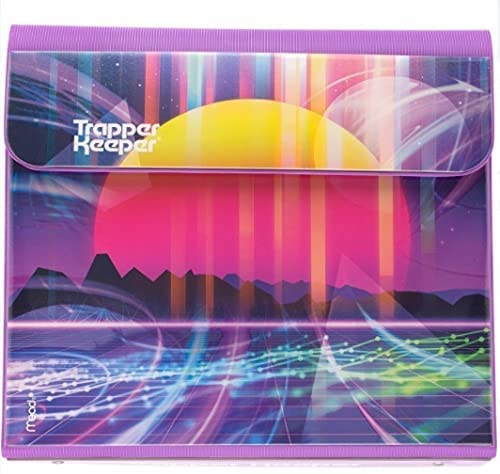
Yes, friends, Mead is still making those Trapper Keepers, the basis for so many our searches for perfect organizing systems in adulthood. Be honest, if you could find something that reflected your personality and offered the flexibility a three-ring binder, hole-punched two-pocket folders, a clipboard, and a Velcro closure, wouldn’t you carry it? Or drive it? Or marry it? (Just me?)
Personally, I always liked those back-to-school days, at least the ones in August, a full month before we Western New Yorkers went back. (Here in the Southeast, kids have been back at school a few weeks in 90° heat. Oy.) August was prime aspirational time. It was the back-to-school issue of Seventeen Magazine, with everything wool and plaid and new.
Our schools didn’t provide lists of what was required for class until the first day of school, but that didn’t mean I was willing to wait. I loved this time of year, and dragged Paper Mommy into the void — I mean, into the school sales. And I vehemently insisted on getting everything all-new every year, even these:
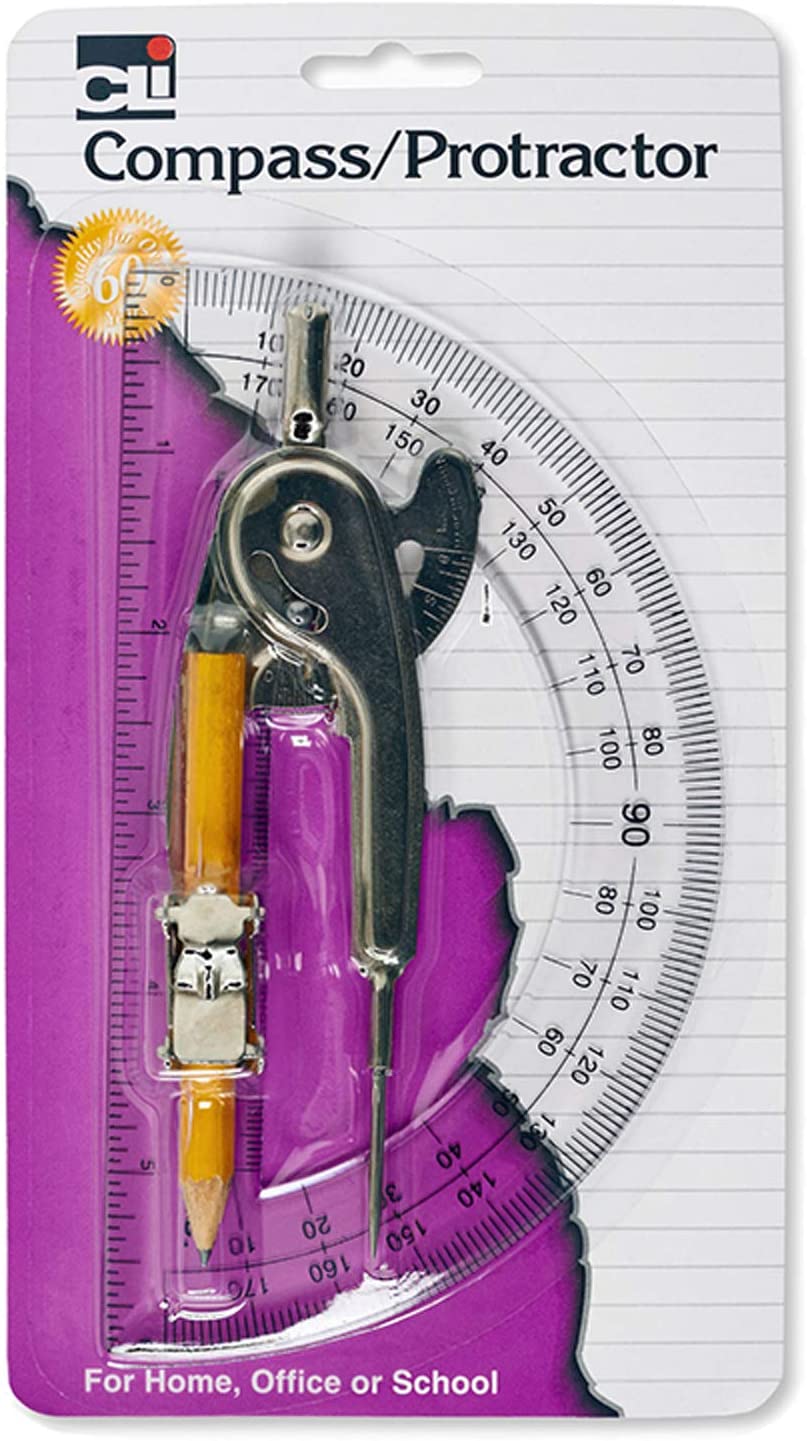
(You know you had them. You know that you probably have no recollection of how to bisect an angle and probably couldn’t figure out what to do with either the compass or the protractor right now, short of making a circle and then cringing when the point of the compass went skittering across the table, making that screechy noise.)
But anyway, do as I say, not as I did. Better yet, do as my colleague Amy Slenker posited in her excellent blog post, 7 Easy Ways to Get Organized for Back to School when she noted, “June scissors work in August, right?” Right!
Of course, as adults, we know that motivation can come in all shapes and sizes, and when the idea of sitting at our desks bring misery, a new set of never-before-used file folders and a snazzy new planner can ramp up our enthusiasm. Also right!
Somewhere in between buying all new everything (even though some things never left your cubby between September and June) and using the same-old, same-old, there’s a sweet spot. So today, we’re just going to look at a few things that might make back-to-school for students of all ages just a little more colorfully delightful.
OPT FOR WHAT’S VIBRANT AND VERTICAL
There’s lots of research showing that color can impact mood. Greens are calming, while reds are stimulating. Studies show that blue “encourages intellectual activity, reason, and logical thought.” Yellow is associated with happy moods, self-esteem and playfulness. While fashion designers may occasionally opt for greys and blacks to convey sophistication, unless your student is a goth (are there still goths?) adding a little vibrancy and color can open up some opportunities, motivationally-speaking.
Color grabs our attention, conveys meaning, and clarifies boundaries. It also just makes us happy. For example, what kind of feeling washes over you when you see this picture?
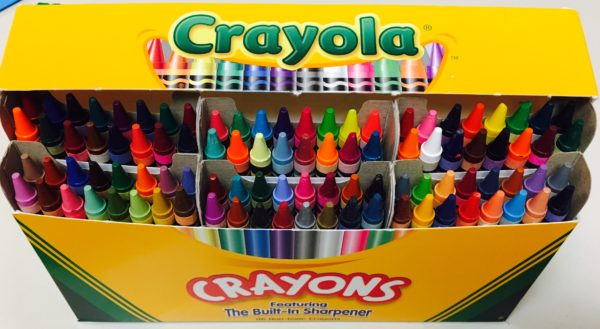
Optimism? Excitement for new beginnings? I took a new 64-box of Crayolas off to college with me in 1985, and I guarantee you I was not the only one!
In addition to the vibrancy of great colors, another boost for students, whether they’re in elementary school or grad school, is the advantage of the vertical hold. We’ve talked a LOT over the years about how vertical solutions aid in organizing, but the key is that when our resources stand attention, we pay attention to them and are less likely to let them get cluttered..
ORGANIZE PAPERS COLORFULLY
College students might appreciate something that keeps papers organized by class, fits squarely in a backpack, but can be displayed easily in a dorm room (their own, or their study-buddy’s) or an empty classroom.
For something both elegant and bright, the Smead Cascading Wall Organizer might be just the ticket.
A revamp of the the classic version, this colorful Gen 2 organizer can hang on the wall or anywhere from a nail, hook (you sent your kid to college with a variety pack of Command Hooks, right?) or even a hanger to reduce clutter on the desktop.
In durable, bright, and easy-to-clean polypropylene, the six colorful (yellow, orange, fuscia, green, blue, and purple) letter-size pockets can be removed to take to class, the library, or an extra-curricular meeting. (Each holds 50 sheets.)
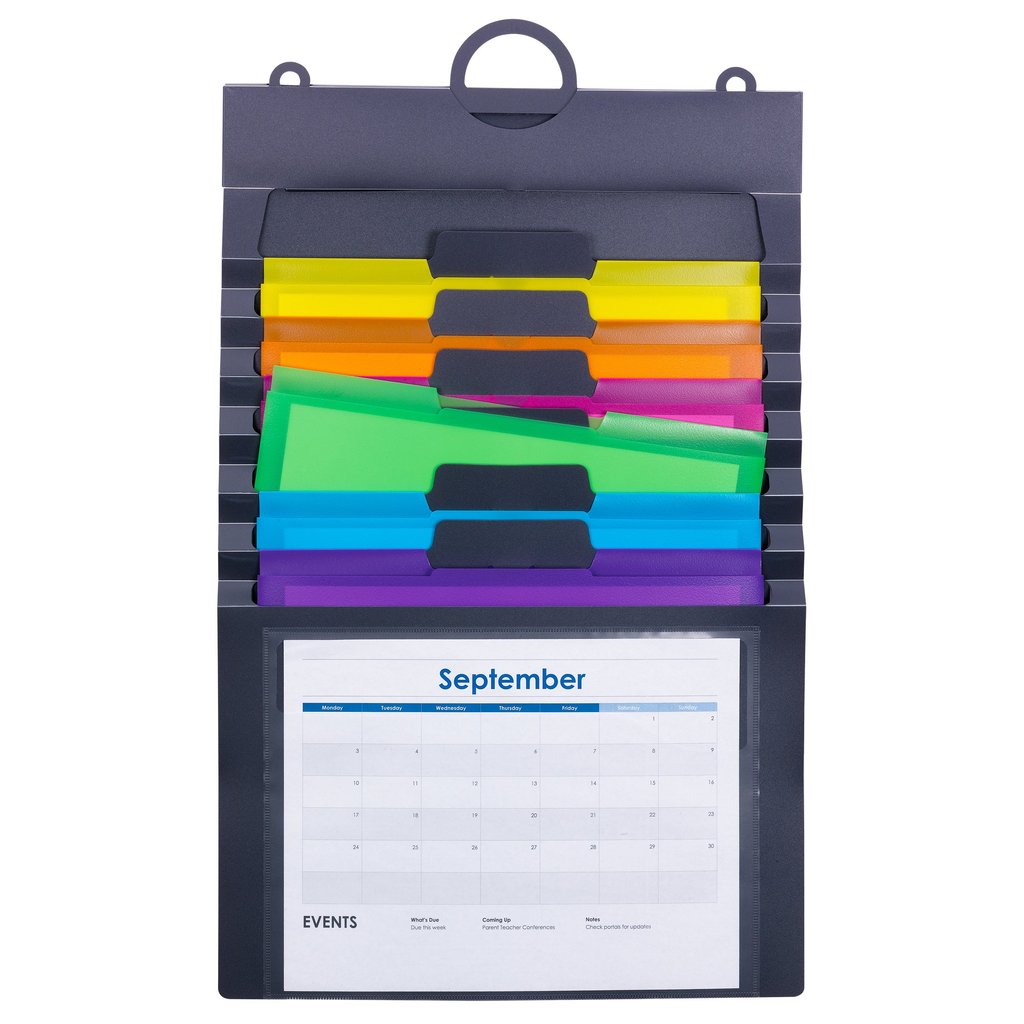
Use the clear front pocket to show the current month’s calendar, a project timeline, or a photo of far-flung friends. There’s a 3-part hanger (use one loop or all three), and an elastic cord closure for putting it all together and stowing it away.
The whole thing is PVC-free and acid-free, and measures 14 1/4″ wide by 24″ high (when fully expanded). Available directly from Smead for $17.99, or you can find it on Amazon for $11.29.
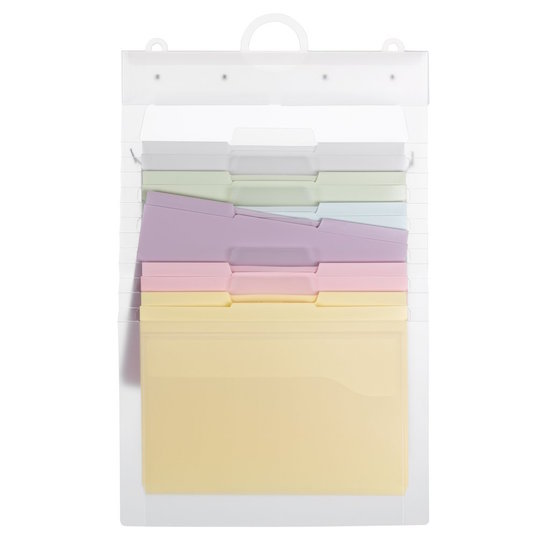
There are two variations on the theme if these brights are too vibrant for you or your student. There’s a pastel version of the Cascading Wall Organizer (well, it’s translucent, but the folders are pastel), also $17.99 at Smead or $13.78 at Amazon:
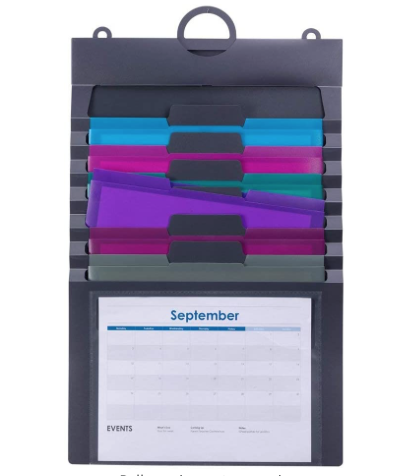
 as well as one with jewel tones for $13.99 (which is Paper Doll’s personal favorite, in case you were wondering).
The Container Store has a similar product, its Multi-Color Cascading 6-Pocket Letter File Wall Organizer Tote.
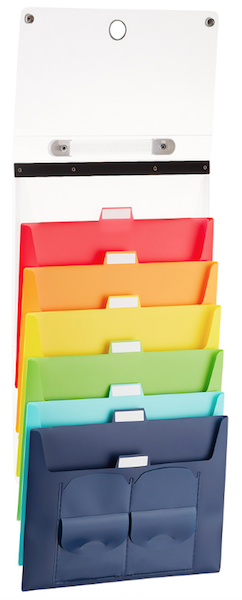
It measures 13 3/8″ wide by 10 1/2″ high, and when it’s not fully extended, it folds and collapses into a 1 1/2″ thick tote. Two snap closures open to reveal six cascading pockets (red, orange, yellow, green, teal, and dark blue) that hold letter-sized interior file folders (sold separately). You can label the tabbed pockets, and there’s both a handle for carrying the closed tote and a ring for hanging it for display.
If you like the idea of bright colors and poly folders but your older student already has a great desktop file system in place and doesn’t need to be mobile, consider Smead’s SuperTab® Poly File Folders. A box of 1/3-cut (left/middle/right) tabbed, letter-size poly folders come 18 per assorted pack, with three folders, each, in blue, green, orange, pink, purple, and yellow. The durable folders are acid-free and PVC-free for long lasting durability. (And nowadays, I’m a super-fan of poly, because you can wipe it down with a Clorox disinfecting wipe.)
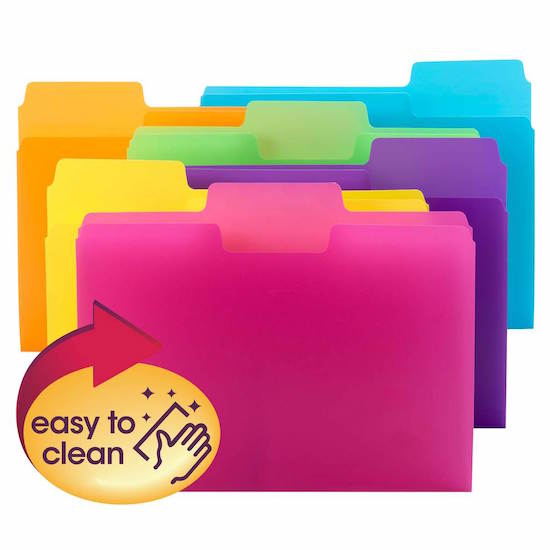
Oversize SuperTabs have a 90% larger labeling area than standard file folders, allowing you to use larger text, larger labels, or more lines of description. Although their tabs are larger than traditional file folders, they’ll nonetheless fit traditional vertical file drawers. These cheery Smead SuperTab® Poly File Folders run $17.06 at Smead or $16.44 at Amazon.
A WARNING ABOUT COLOR-CODING
I should note, I often warn against the potential problem of color-coding files. When a client invests in traditional boxes of assorted colored file folders (or boxes in multiple, different colors), I tend to worry about the Ralph Waldo Emerson’s quote, “Consistency is the hobgoblin of little minds.”
But wait, you might be thinking. Isn’t consistency the key to organizing?
When you color-code your folder system, it makes it easy to organize thematically. Green is biology (or family finances) and blue is literature (or insurance) and red is calculus (or medical records). But what happens when you need to make a new folder but run out of the color you need? For most people, this causes a breakdown in the system. Lacking the right folder, people often just stop filing!
But you see, Emerson’s entire quote is rarely given. It’s actually, “A foolish consistency is the hobgoblin of little minds, adored by little statesmen and philosophers and divines.”
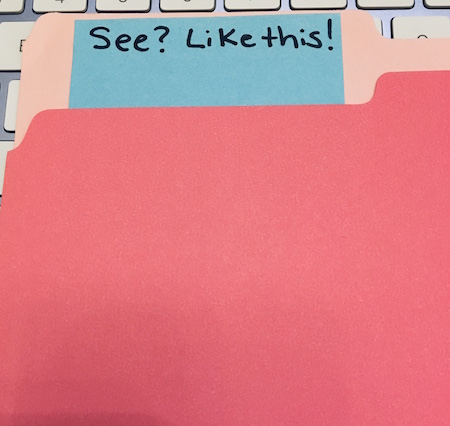
But you are no fool! If lack of the right color is a problem for you or your student, just grab a different color folder and a Post-it! Note. Write a temporary label on the top, and stick it on the inside of the folder so that the label appears just about where a permanent label belongs. (Then go order a box of folders and get on with your day!)
HOMESCHOOL CHEER
If your student is 8 rather than 18, and you’re still doing the home-schooling thing this year (either because you’d planned it or because everyone got sent home a few days into the school year), you might want a colorful, vertical solution for making your home-school “classroom” feeling a little more official.
I like to borrow this trick from teachers who are tight on space in their classrooms or don’t have a base of operations. Scholastic’s File Organizer Pocket Chart lets you create a bright, vertical HQ for your home-schooling student’s worksheets, problem sets, instruction sheets, and other handouts.
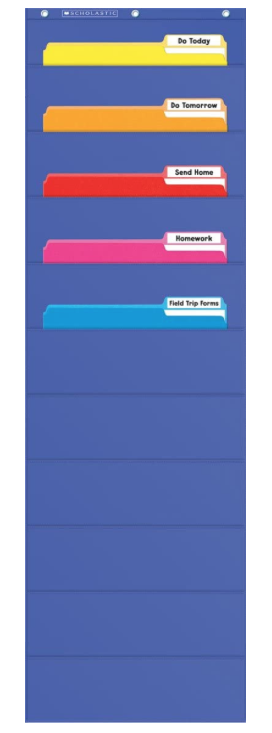
Just as teacher would do in the classroom, you can use the ten sturdy pockets to hold letter-size file folders. The pocket chart is lightweight but made of durable nylon, and measures 14″ wide by 46 1/2″ high. There are three reinforced grommets at the top for hanging the chart on the wall or the back of a door. The pocket chart runs $15 on Amazon.
ACCENTUATE THE POSITIVE WITH A POP OF COLOR
Colorful highlighting is a great way to make important points stand out. But have you or your student ever highlighted the wrong thing? It’s a bummer!
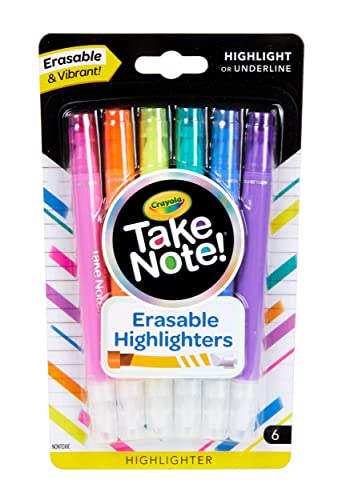
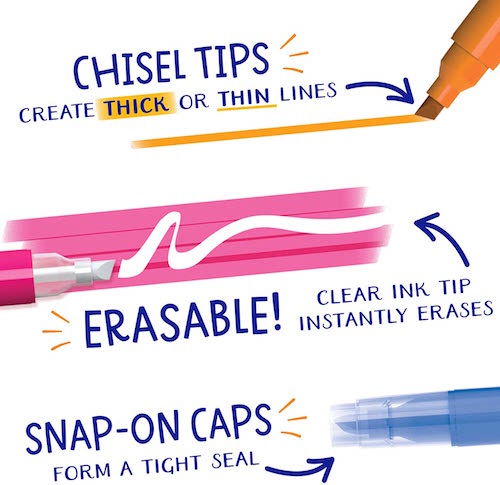
But did you know there are ERASABLE HIGHLIGHTERS? (I know! I can tell that you’re squealing, too!)
Crayola’s Take Note Erasable Highlighters let you highlight (or underline!) in six cheery colors (pink, orange, yellow, teal, blue, and purple). You can color-code your highlighting by class or use different colors for different types of information (yellow for the test, purple for a book report, etc.). And a set of six is only $5.99!
BACKPACKS THAT WILL MAKE YOUR TINY HUMAN SMILE
It’s hard to believe, but when Paper Doll was in school, back when dinosaurs roamed the earth, kids carried book bags rather than backpacks until late middle-school or high school, and even then, backpacks weren’t much of a fashion statement. They also weren’t much of a delight to wear or carry, as they lacked many dividers, pockets, or ways to keep things from falling to the bottom and papers were always getting smushed.
Nowadays, there’s a smorgasbord of backpack options, but I think the most child-pleasing ones are from Bixbee. They make their backpacks (and lunch boxes, duffels, luggage, and sleeping bags) with an eye to the special ergonomic needs of tiny humans so they can carry and organize all of their “stuff” without getting weighed down.
The bright and hardy backpacks are designed for the little tykes’ unique measurements and aesthetic tastes. The medium/large backpacks weigh only two pounds and use “contoured, air-mesh, adjustable shoulder straps with a sliding sternum strap” to distribute the horizontal load. Each backpack has an interior padded pocket to carry and protect a laptop or tablet from drops or bumps.
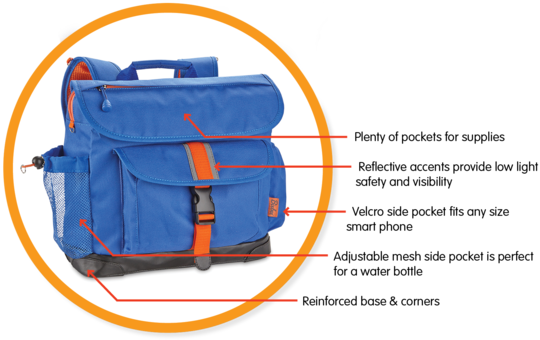
But I just think their stuff is cute, and if your backpack is cute, you’re less likely to leave it behind on the bus or the playground. Right? (Well, I hope I’m right.)
For example, the Firebird Flyer, with the fire-red rising phoenix on wings, comes in two sizes (one for pre-schoolers, one for the 5-7-year-olds). The smaller one is water-resistant, made of durable 600-denier polyester, and has a variety of features, including:
- Padded topside carrying handle
- Top flap zippered pocket offers quick access to small supplies
- Front flap pocket holds small supplies or snack
- 2 side pockets holds small water bottle
- Contoured & padded adjustable shoulder straps
- Padded back panel
- Easy-to-grab beehive zip pulls
- Detailed with reflective material for better visibility in low light
- D-rings for clipping on their favorite accessories
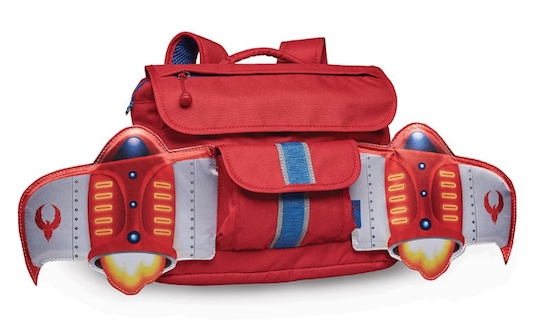
The interior has an ID card holder under main flap, and the main compartment is large enough for a sweater (so hopefully it won’t be left behind on the playground), and two interior slip pockets for small school supplies. The pre-schooler size is $31.99; the larger one is $49.99. For more about Bixbee’s wide array of backpacks, they’ve got a few videos, starting with this one:
Colorful, vertical (and yet, with their innovative design, also horizontal), and totally cute.
This post wasn’t designed to be a complete resource on back-to-school items. Next week, we’ll look at some back-to-school essentials for managing time and tasks at all age levels.
And if you want a throwback to the 1980s while still getting a sense of some college dorm advice that’s apropos today, check out this post from the vault, Paper Doll & Real Simple Organize Dorm Rooms: SUPER-EXTENDED Edition.
Disclosure: Some of the links above are affiliate links, and I may get a small remuneration (at no additional cost to you) if you make a purchase after clicking through to the resulting pages. The opinions, as always, are my own. (Seriously, who else would claim them?) For more information regarding how Best Results Organizing handles affiliate links, please see the affiliate section of the site’s Privacy Policy.
Protect and Organize Your COVID Vaccination Card
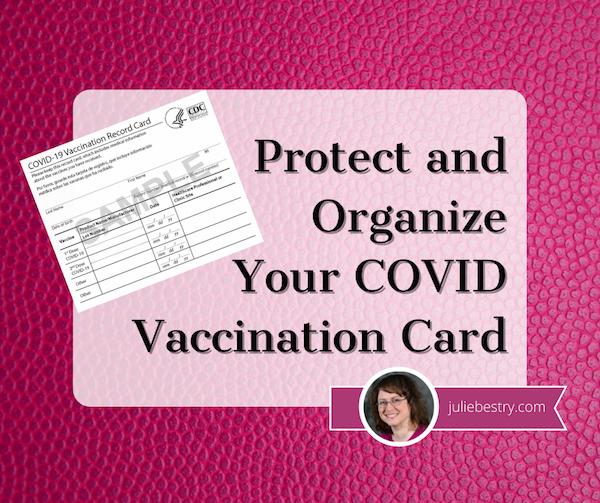
Throughout 2021, I’ve received a lot of questions from clients and readers regarding the best way to protect COVID vaccination cards from damage and where to store them for easy access.
WHY KEEPING YOUR VACCINATION CARD SAFE AND ACCESSIBLE IS ESSENTIAL
Let’s start at the beginning, even before COVID. While there’s been a great deal of hubbub lately about having to prove one’s vaccination status for work or to go various places, any adult knows that there have always been a variety of reasons one has had to prove they’ve had proper vaccinations.
Have you ever registered a child to attend school? Vaccination requirements date back to the mid-19th-century, when states began requiring proof of immunization against smallpox in order to register for school. Dating back at least as far as the WWII era, American schools have required proof of immunization against other communicable diseases. And while each state generally has its own laws regarding exactly what shots must be administered (and what medical or other exemptions exist), there are commonalities across all states.
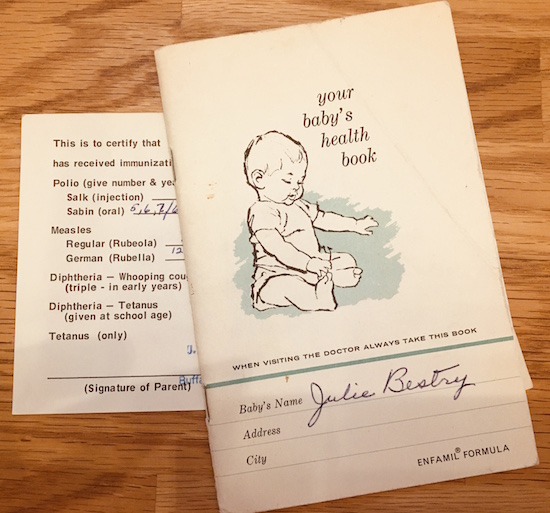
For their children to attend kindergarten, parents usually have to provide documentation from physicians that their children have received the following immunizations:
- Diphtheria-Tetanus-Pertussis (DTaP, or DT if appropriate) — required in all 50 states
- Haemophilus influenzae type B (Hib)
- Hepatitis A
- Hepatitis B (HBV) — required in 43 states
- Measles, Mumps, Rubella — required in all 50 states
- Pneumococcal conjugate vaccine (PCV)
- Poliomyelitis (IPV or OPV) — required in all 50 states
- Varicella — required in all 50 states
(Note: Paper Doll is not a medical practitioner. Speak with your physician(s) regarding the requisite inoculations in your state appropriate for your family members. The CDC has a printable immunization schedule for your reference.)
To attend college, students have to prove they’ve been inoculated against a variety of contagious diseases. Students born before 1957 don’t have to have the MMR because, back then, measles, mumps, and rubella existed as separate shots. Students born before 1980 were generally never inoculated for varicella (that’s chicken pox to you and me) because the immunization for that horrible, itchy, scarring, illness (which can cause painful shingles later in life) didn’t exist yet.
In general, college students have to get the Meningococcal B immunization. (Take meningitis seriously; I know a guy who had meningitis in college, and he lost hearing in one ear.) College students are also advised to be get the vaccinations for HPV and the flu.
Summer camps and extra-curricular athletic programs generally require the same proof of vaccinations as elementary and high schools do, for both employees and campers/participants, with the addition of tetanus boosters. As an aside, we’re all supposed to get tetanus boosters every 10 years. (Considering most of us keep thinking 1980 was just 20 years ago, please check with your physician regarding the last time you actually had a tetanus booster.)
Certain jobs or professions require vaccinations. Obviously, there are requirements (by state) for healthcare workers. Because different illnesses can be airborne, water-borne, or spread by wounds or bodily fluids (OK, let’s all pause to say “Ick!”), hospitality and restaurant workers often have to prove that they’ve received their inoculations for Hepatitis A and B, the flu, and tetanus/diptheria/pertussis. Again, states vary, but teachers are generally required and/or advised to receive all of the same inoculations as students in kindergarten through college.
Vaccinations are required for travel to and from the United States (and many other countries). For travel just about anywhere, you should be sure to be have your DPT, MMR, polio, varicella, and flu shots, but for travel to many nations, you may need to get vaccinated against cholera, malaria, hepatitis A and B, typhoid, rabies, and/or yellow fever. (The CDC has nation-by-nation pages.)
 Photo by Tmaximumge from PxHere
And, of course, there’s COVID. The longer part of the population goes unvaccinated, the more opportunity the Delta, Delta+, Lambda, and other variants have to mutate, evolve, grow, and become more dangerous. So, every day, more schools, employers, governments, and nations are requiring COVID vaccinations, and thus, proof of vaccinations.
For the variety of reasons explained above, you may need to prove you’ve been vaccinated against contagious illnesses. If you are unable to do so, you (or a member of your family) may not be able to attend school, get a certain job, or avail yourself of a variety of travel or entertainment options. In some cases, you can get inoculated again for certain diseases; for others, that’s not possible.
If your pediatrician is still in practice, you may be able to get copies of your records. Paper Doll was delivered by a physician born in 1894 and my pediatricians have all long since retired. But because Paper Mommy was diligent in maintaining family medical records and passing them along, it was easy for me to handle my own information when registering for college and graduate school and for verifying immunizations later in life.
For others, though, lack of organized systems for maintaining medical information presents a problem, which is why this blog has had so many posts over the years regarding organizing medical records and why it will continue to do so.
HOW & WHERE SHOULD YOU KEEP YOUR COVID VACCINATION CARD?
Can you keep your vaccination card in your wallet? Obviously, yes.
But should you keep your vaccination card in your wallet? That’s a more complicated question. Here’s what I suggest you do.
1) Take a photo of your COVID vaccination card. (But no, don’t post it to social media. Your birth date and other personal information on your card is fodder for identity thieves, so don’t post it, or your driver’s license or other ID, on “the socials.”)
Take a photo of your COVID vaccination card. (But no, don't post it to social media. Your birth date and other personal information on your card is fodder for identity thieves, so don't post it, or your driver's license or other ID,… Share on XLabel the photo with your name (or your family member’s name, if you’re keeping records for your spouse, kids, or parents) and date. Something like:
COVIDVax-BenedictCumberbatch-April2021
Once you have your photo or scanned copy, don’t just count on it living in your camera roll. Save it to one or more of the cloud solutions you use often, whether that’s Dropbox, Evernote, OneNote, iCloud, GoogleDrive, or something similar.
Create a folder for Vital Documents or VIPs (very important papers), and you can gather all of your other photos/scans of essential documents, from your birth certificate to other vaccination records, all in one logical place.
2) Think about your lifestyle and how often you will be needing to show your vaccination card. If you are a frequent traveler, you’ll need to show your card often, and may want to keep it in your wallet or purse. If, however, you are working remotely and live somewhere that proof of vaccination hasn’t (and isn’t likely to) come up with frequency because you’re avoiding crowded, indoor spaces, you can file it away.
This is a good time to get aware of the rules of where you live and where you’re going. For example, New York City announced last week that COVID vaccines will be required for anyone wishing to enter restaurants, bars, or gyms; in California, they’re weighing the same types of requirements for using indoor amenities.
In France, the law requires that anyone wanting to go to a bar or restaurant must have proof of COVID vaccination. As of this past weekend, in Italy, you’ll need your proof of vaccination to gain access to indoor seated dining at restaurants and bars, museums, exhibitions, cultural sites, sporting events, swimming pools, gyms, concerts, fairs, conferences, amusement parks and other venues.
3) File your card away if you’re not going to need to carry it around. For many people, the most logical place to file your proof of COVID vaccination will be in your family filing system, in your personal medical file. That might be in a regular file drawer, or in something like the Smead All-in-One Healthcare & Wellness Organizer.
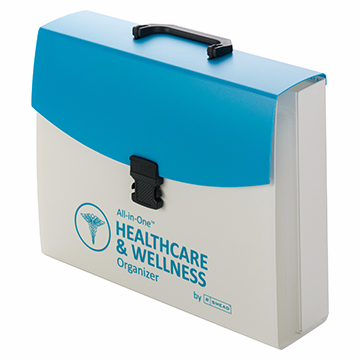
However, if your file is bulky even after you’ve pared it down to your actual medical records, you may want to store your vaccine card with your other VIPs (very important papers), like your birth certificate and Social Security Card, in your fireproof safe, for quick and easy access.
IN WHAT SHOULD YOU KEEP YOUR VACCINATION CARD?
The best way to protect your vaccination card is to find a clear, flat, snug container. At the most basic, you can grab any zipper-lock sandwich bag, which protect your card from moisture, germs, and general schmutz. However, you won’t get a great fit.
The official CDC COVID vaccination card is 4″ wide by 3″ high. A typical zipper-lock sandwich bag rang from 6 1/2″ x 5 7/8″ to 8″ x 5″, yielding a lot of extra space. The half-height snack bags are 6 1/2″ wide x 3 1/4″ high, which offers a slightly better fit, but still with wiggle room, so you’ll either have unused space or be tempted to fold the bag over onto itself.
If you’re going to be keeping your vaccine passport card in a manila folder or three-ring binder, amid your other personal or family records, a plastic sheet protector will generally do the trick. However, sheet protectors are open at the top end, so if you’re going to be carrying your records around (say, if you’re a college student moving at the end of each semester or school year), it’s not a perfect solution.
You might have an old badge holder around the house, if you’ve ever attended a conference or had a job that required an ID to get into the building. I dug through some old NAPO conference paraphernalia and found this badge—but only for photographic purposes.
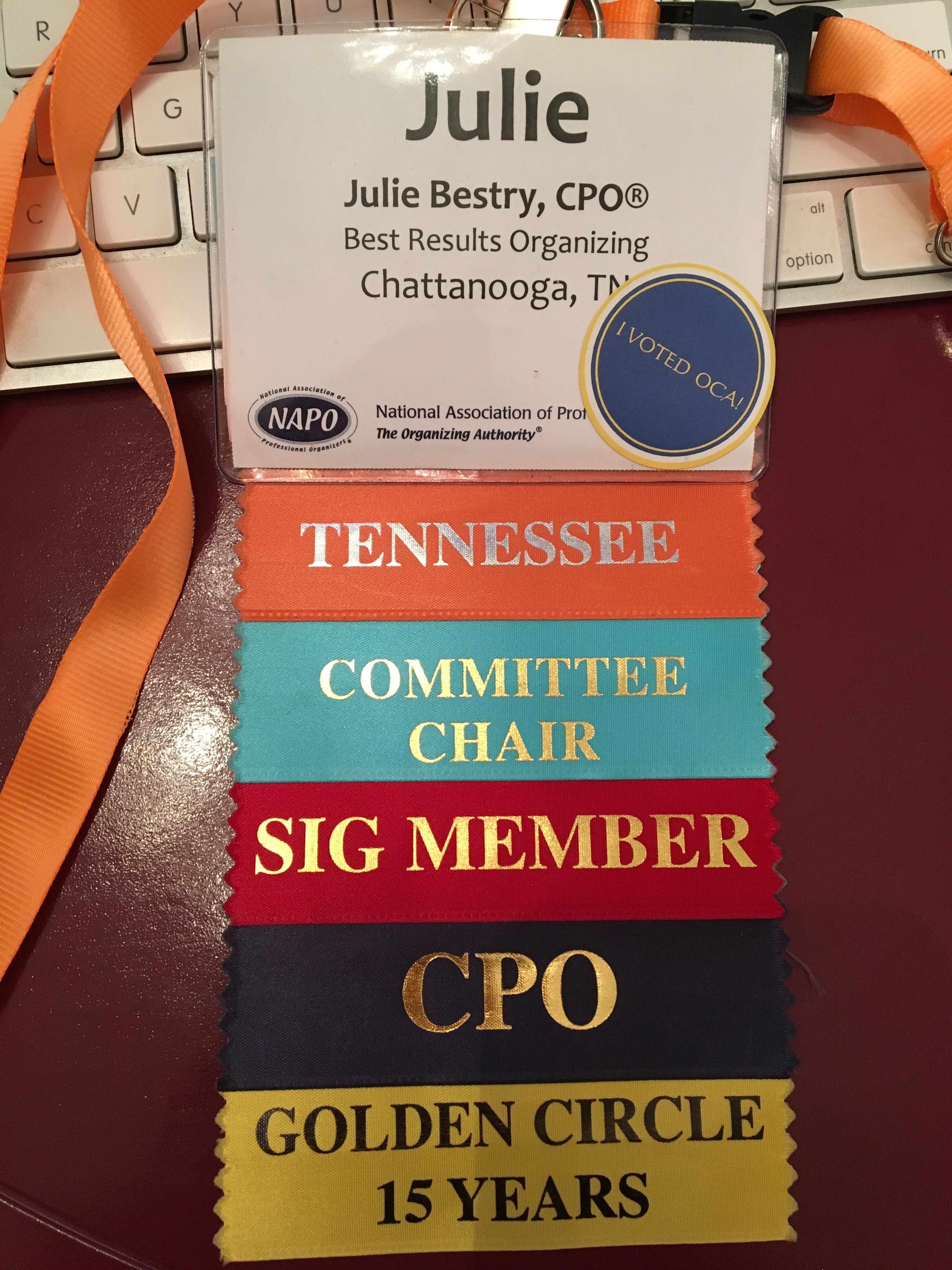
The clear plastic badge holder seems almost ideal and it comes with a lanyard for wearing around one’s neck, which keeps hands free and prevents accidental loss. However, aside from the fact that the ribbons are permanently affixed and the sticker on the front isn’t going anywhere without making a gummy mess, the top of the badge holder is open. Without a snug fit, a vaccine card could fall out and get lost.
Personally, I’m more inclined to recommend one of the following inexpensive solutions. I started by searching Amazon and found a wide variety of basic options.
Clear vinyl plastic sleeves made to accommodate the CDC cards fit all the requirements. I believe no particular brand is better than any other, but as an example, Amazon carries Mljsh (yes, really, no vowels) CDC Vaccination Card record holders.
The sleeve is waterproof and has a re-sealable zipper. The inner dimensions are 4.31″ wide x 3.11″ high to accommodate a laminated card. A package of two costs $5.28.
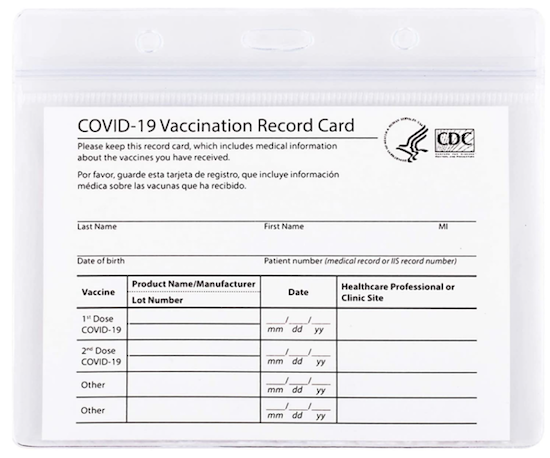
What I like about this particular card is that at the top, there are three slots/punctures so that you can attach your sleeved vaccine card to a lanyard or one of those retractable badge holders, the kind that makes that satisfying zip-line sound when retracting — Zzzzzwwwwjjjjzzzzz!
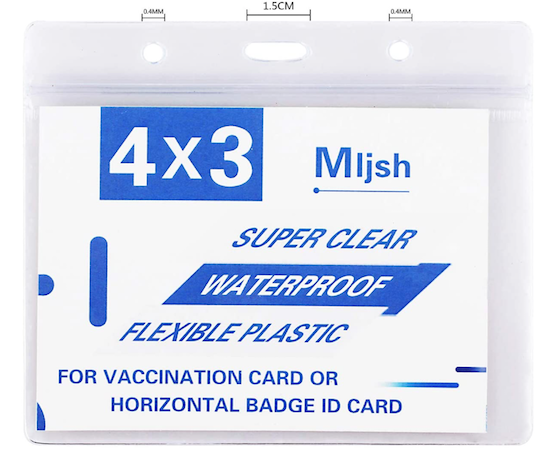
Again, Paper Doll is brand-agnostic regarding what card holder you choose, but I do like the fact that this one has both the plastic zipper top and the punched holes for accommodating a lanyard. However, there are so many options that it would be hard to select a wrong card holder.
If you need color in every area of your life, instead of picking a clear vinyl solution, you could choose something like Gurcyter’s more colorful design.
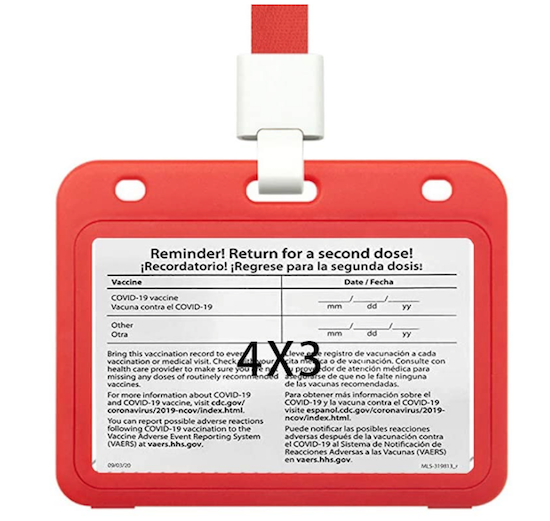
The front and back split open to allow you to center your vaccine card, and you get to choose from among five colors (red, dark blue, light blue, green, or yellow), and it comes with a matching 18.1″ ribbon lanyard.
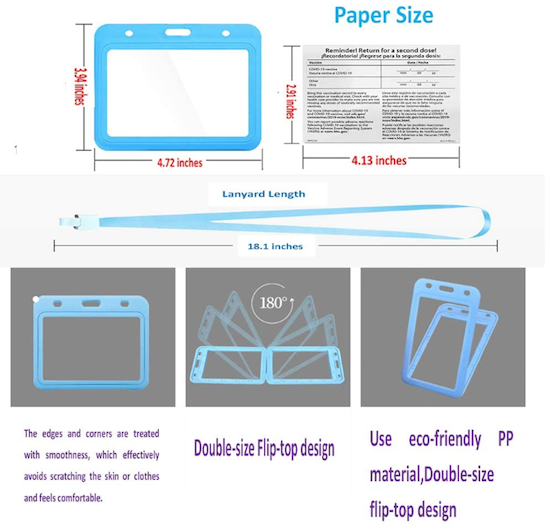
One holder is $6.99. Note, however, that the Gurcyter version is a little bit squished vertically, with the interior of the holder measuring 4.13″ wide x 2.91″ high, wide enough for a standard CDC card, but .09″ (2.2mm) shorter. So, if you pick this option, you might need to trim a little white space on one or both sides. (The things people will do for fashion!)
If you’re doing a lot of traveling, you might want a combination passport and vaccine card carrier. There are a number of colorful combination holders, like this Ciana faux leather, bi-fold passport and vaccine card holder for $5.99.
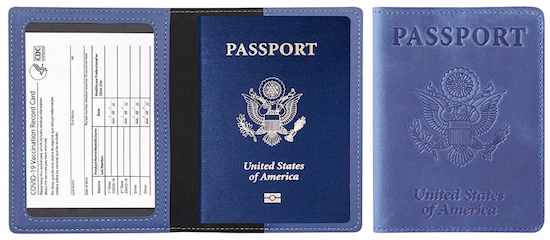
It comes in twelve colors (brown, burgundy, carbon-fiber black, dark blue, green, grey, light blue, pink, purple, red, rose gold, and turquoise), with a see-through compartment for your vaccine card and a sleeve for your passport.
Of course, Amazon isn’t the only place to find these solutions. A quick search of “vaccine card holder” or “vaccine card protector” will yield a number of options. As with masks, which are utilitarian but became fashion statements over the past 18 months, the creative people at Etsy have come up with solutions for every taste and style.
If you’d like to aim for a classier vaccine card holder, the Familiar Paws Etsy shop has leather vaccine card holders with a key ring for $12.99.
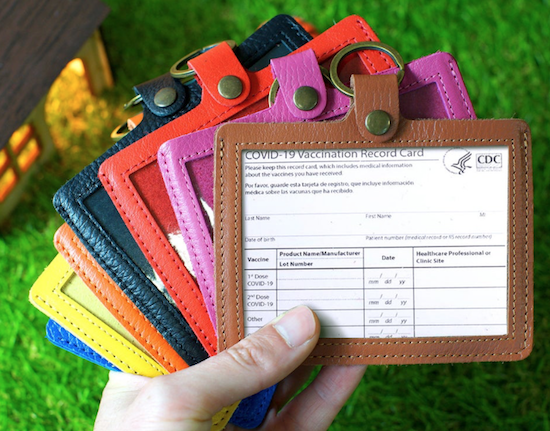
The front of the vaccine card is visible through the clear plastic window, and you can select from among a variety of soft, full-grain genuine leather options in one of eight colors (orange, navy blue, brown, pink, black, red, yellow, and aquamarine). At the top, the leather tab folds over a key ring. (Familiar Paws offers personalization with names or initials for an additional cost.)
For something cozier, Etsy shop QueentopazCreations uses Rifle Paper Company fabrics to create cloth vaccine card wallets.
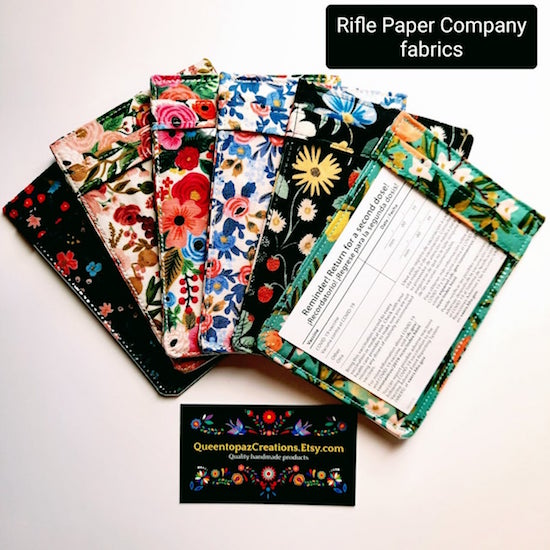
The card wallets come in six fabric designs (Strawberry Fields, Garden Party, Wildwood, Garden Party/Rose, Rosa Periwinkle, Citrus Floral Teal, and Herb Garden) and in two sizes: 4″ wide by 3″ high, for $13, or 4 1/4″ wide by 3 1/2″ high, for $15.
Each cloth wallet sleeve has stiff interfacing and a plastic insert to protect your card from bending. My only concern is that absent a zipper-lock mechanism, you’d want to make sure your card fits snugly in the wallet and won’t fall out.
Etsy also has some splashy and fun (if sometimes potty-mouthed) vinyl vaccine card holders, and more than a few options that say, “Proof of Fauci Ouchie!”
I’d be hard-pressed to encourage any client to spend more than $15 for something to hold a vaccine card, but if you’re the sort of person who buys $300+ shoes and can turn anything into a status symbol, Fashionista.com has a piece on vaccine passport cases and lanyards for keeping your cards fashionably handy (for ridiculous-to-me prices of $100-$500)!
TO LAMINATE OR NOT TO LAMINATE?
When the vaccine first became available, social media buzzed with suggestions for laminating COVID vaccination cards. It’s easy to understand why; paper is easily torn or damaged if it gets wet, and laminating paper protects it from both. However, there are some concerns with laminating your COVID vaccine card.
First, it’s becoming increasingly clear that booster shots may become necessary. If so, we may need to present our original vaccine cards to have more information added to the two lower lines where “other” is printed. Laminating the vaccine cards would prevent new information from being added; the vaccine site would probably end up having to give you a new card, which would obviate going to so much effort to protect your current one.
Second, if done incorrectly, laminating plastics and adhesives can damage your card. So, if you’ve got a laminator but haven’t ever cracked open the box, maybe starting with a vital document isn’t the best notion? Big box stores like Staples and Office Depot have offered to laminate vaccine cards for free, but obviously that’s designed to tempt you into the store to shop.
WHAT IF YOU LOSE YOUR VACCINATION CARD?
The federal government is not keeping a master list of who has been vaccinated, but the individual states are. So, if you lose your vaccination card, don’t panic! Each state has its own computerized vaccination registry. Just contact your state’s department of health to request a replacement; you will likely have to provide some personal information and request the documentation in writing or through the state’s website.
The CDC has a list of contacts for the immunization information systems (IIS) in each state. Not only can you request replacement cards through your state’s system, but you can get copies of your child’s immunization records for all the purposes described earlier in this post.
If you got your vaccination at a national pharmacy chain, you can contact them directly. For example, if you were vaccinated at Walgreens or CVS, the pharmacy chains can check their internal records and replace your card. Also, for most such retail pharmacy chains, you are able to create an account online and access your COVID-19 vaccination records directly.
Meanwhile, because the first thing I told you to do, up above, was photograph your card, you do have some level of proof of which vaccine you received and when.
FINAL NOTE
Nothing in this post should be considered controversial. We live in a society that has rules. “No shoes. No shirt. No service.” We have to wear seat belts and carry car insurance. Income tax filings are due (generally) on April 15th. And historically, to promote the general welfare and safety of students, campers, employees, customers, and citizens, rules are put in place by schools, camps, businesses, and governments.
Just as we have to show that we have a valid driver’s license to operate a motor vehicle or a passport (and visa) to enter a foreign country (or return to our own), there are times that we have to prove that we have been inoculated, whether it’s against polio and smallpox, or against COVID. Today’s post, like many others I’ve written, simply ensures that you know the best ways to protect and organize your vital documents.
I hope you will do all that’s necessary to stay safe, healthy, and organized.
Paper Doll To the Rescue: How To Save Wet Books & Documents
For something that’s supposed to be so good for us, water can cause quite a bit of trouble.
If you drop your cell phone in water, people will rush to tell you to stick it in rice, as though your Samsung or iPhone was a nice piece of baked salmon. It seems everyone has heard and shared that little hack for rescuing wet electronics.
For what it’s worth, you actually shouldn’t put your soaked phone in rice. Phone experts say airflow, not rice, is the key. Apple agrees. Desiccants and air-tight pouches can also help.
So, save the San Francisco Treat for your dinner table, OK?
There’s a common expression when people are talking about all their drawers and piles of papers and books. They say, “I’m drowning in paper.” But what happens when your paper drowns?
Have you ever dropped your book in the tub? Failed to zip your backpack up all the way and had a book land in a puddle? Had someone overzealously splash you while you’re reading poolside?
Ever have your garbage disposal eat a fork, spring leaks, and send all the water running down your drain through a cracked pipe and into your cabinets, soaking books on the other side of the wall? (Yes, that is TOO a thing that happens. Stop looking at me like that.)
What happens when a book gets wet? Well, the first thing that happens is cockling. That’s the official term for when paper (especially bound paper) gets wet and bulges out in certain places, presenting a warped, wrinkled, puckered, or creased surface.
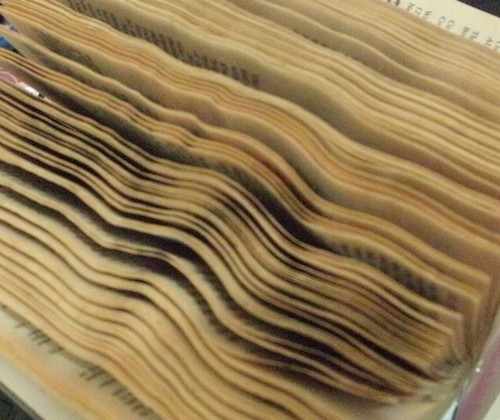
The worst part isn’t the cockling though. (C’mon, people, stop laughing at the word “cockling!”) The biggest concern should be mold. Mold can begin growing within 2-to-3 days, and because mold spores can flourish wherever conditions are warm and wet, you want to jump on solving your wet-paper problem right away!
I should note, Paper Doll is an expert on organizing paper, not restoring it. But I’ve sure had some interesting requests over the years. One client, whose entire library was along a leaking outside wall, wanted to “save” mold-covered books by taking nail scissors and cutting along the edges of the pages to rid them of mold. (No, this wasn’t possible. Not all mold is visible, and mold can be damaging to one’s neurological and respiratory systems. Don’t play around with mold!)
And clients have often asked how to restore important (though not necessarily financially valuable) books, like family Bibles, which have seen better days. For a book with serious financial or sentimental value, please seek the expertise of a professional book restoration service. Check out the website of the The American Institute for Conservation and do a zip code radius search on their Find a Conservator page.
RESTORING WATER-DAMAGED BOOKS
How you deal with a water-damaged book depends on whether the water left your book damp (as if it had been in a sauna), wet (as if you were caught in the rain between your parking space and your building) or soaked all the way through (like the most miserable camping trip, ever)!
If your book is damp, experts advise that you:
- Hold the book gently by the spine and shake the book side-to-side to rid it of any excess water.
- Gently remove any debris. (This works better if you’re trying to get stray leaves out of the book dropped in a shallow puddle; if you spilled your milkshake on the book, you’re not going to get bits of chocolate off of the pages so easily.)
- Cover the surface of wherever you’re going to dry the books with either absorbent paper (like unprinted newsprint — no, NOT actual newspaper!), absorbent towels, or plastic sheeting. This way, as the book dries, the surface you’re using won’t get damaged. The more books you have to restore, the more space you’ll need, as this is often a multi-day process.
- Stand your book up and fan it out so no part is open more than 60°. Official advice will say to stand the book on its “head” or “tail” which just means that you’re not resting the book on its spine or on the part where it opens. Fanning it out means just that — if viewed from above, it’ll almost look like a fan.
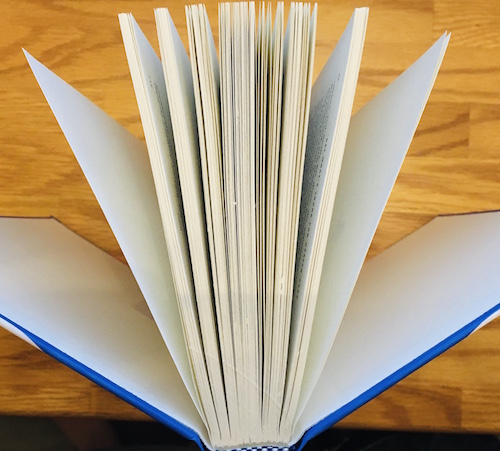
- If it’s mostly the book cover (of a hardcover book) that’s damp, but not the actual text of the book, put some absorbent paper towels between the “boards” of the cover and the pages. Change as necessary (when the paper has absorbed all it can).
- Use fans in the room to circulate air so the book will dry, but don’t point the fans directly at the book.
- If you have a dehumidifier, this is the time to pull it out! Air conditioning is good, too. But none of the air blowing on the book should be so strong as to make the pages flutter.
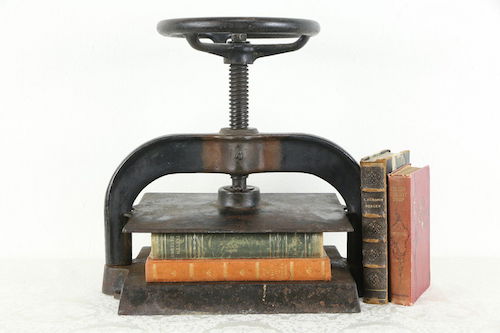
- Once the book is completely dry, lay it on its back cover, sandwiched between two wooden boards, and place something heavy (like a few bricks or an old-fashioned, massive hardcover dictionary) on top of it, making sure the spine (of the previously damp book) isn’t smushed by the weight. Or, you can use a book press, if you happen to have one of these babies hanging around.
RestorationMaster suggests that for paperbacks (which are usually more slender than hard cover books), you can hang the book on a bit of fishing line or string to help it air dry. (But only do this if the book isn’t soaking wet, or the its own weight could cause the book or its binding to tear.)
If the book is wet, think about the value of your time vs. the value of the book. If it’s a $300 textbook, your willingness to carry on may be different from what it would be if it’s a paperback novel.
- Cover your work surface, as described above.
- Lay the book flat and open it carefully (so as not to rip any of the wet pages) and start interspersing (interleaving, in book restoration talk) paper towels about every 20 pages, working from the front to the middle of the book. Once you get to the middle, flip the book over, and repeat the process from the back to the middle.
- Leave the book flat for about an hour so the paper towels can absorb some of the water. (If your book got that wet, chances are good some of your other stuff got wet. Go check on them.)
- Hour is up? Stand the book up, fanned, on the “head” or “tail” as described in the “damp” section, above.
- Switch out the surface covering and paper towels as they soak up the water, and periodically repeat the process until the book is “only” damp.
- Now follow the directions for damp books, above.
It’s hard to envision some of these steps, so I was delighted to find this video from Syracuse University, where I attended graduate school many, many years ago. Their Department of Preservation and Conservation illustrates how to save damp and wet books from becoming wrinkly, moldy goop.
(For more information, you may also want to peruse the Disaster Recovery Manual for the Syracuse University Libraries.)
If your book is soaked through, meaning it fell into a pool or your house flooded to the point that your book was submerged, this is really a job for professionals. The instructions below describe what they’ll do, not what you should do. Unless you are a restoration specialist, you are likely to be out of your depth. That said, there are two possible measures:
1) Air-Dry (For those of us for whom humidity makes us resemble Art Garfunkel, “air-dry” already has some unfortunate connotations!)
This is basically an advanced version of the solution for “wet” books above, with a few changes:
- DON’T OPEN THE BOOK (to the interior). Don’t fan the pages.
- Put paper towels between the front and rear covers and the interior of the book.
- Use those fans! Turn on the A/C. Get out the dehumidifier. And be patient.
2) Freeze!
WAIT! Stop pulling the Eggos and last night’s leftovers out of the freezer to make room. Freezing books keeps mold and mildew from growing and gives professional restorers some extra time to plot out their attack.
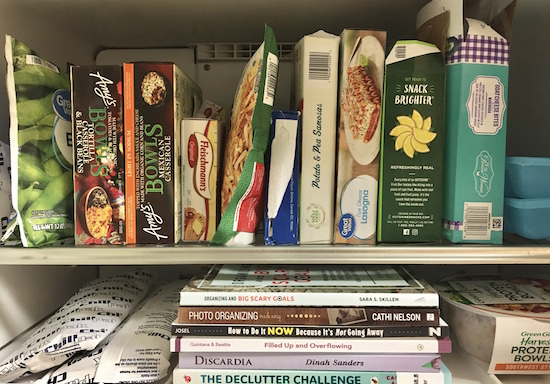 But to save soaked books, restorers use rapid freezing methods at temperatures down to -20°F (-28.9°C) so ice crystals won’t form on the books. Unless you’ve got a seriously fancy-pants freezer, your Frididaire probably isn’t going to cut it.
Once the wet books get frozen, restorers use vacuum freeze-drying to remove moisture, similar to how food is freeze-dried.
The water in the damaged book goes from being a solid (picture microscopic ice cubes) to a gas (think: water vapor) without ever turning into liquid.
This is called sublimation. (Is this starting to remind you of high school chemistry class? Or maybe you soaked your high school chemistry textbook and never read anything the rest of the semester?)
By skipping the liquid stage, there’s less of a chance of the paper cockling, the cover (boards) warping, or the ink running. This is good. But again, this is really the work of a professional.
That said, a number of resources, including WikiHow, advise that you can repair a wet book by freezing it in a regular household freezer. (Scroll down on the linked page to see their Method #2.) They advise removing excess water by interleaving small sets of pages with white paper towels, as described above, and then putting the damaged book into a zipper-lock plastic bag, and sealing it. (They warn, “Do not perform a vacuum seal, however; you want some air to be able to reach the book’s pages, and some space to be between the texture of the bag and the book itself.” OK, then!)
WikiHow says to keep the book in the freezer 1-2 weeks, depending on how long the book is. (So, go the full fortnight if it’s all 963 pages of Anna Karenina, which, coincidentally, Paper Doll just finished reading. I wish I could have frozen the chapters on wheat threshing, let me tell you!)
Then, when you pull the book out, you’ll go back to the methods for “damp” and “wet” books above, because you, my friends, do not have a vacuum freeze-drying machine for books. You got a lot of the water out, but as the book defrosts, there will still be moisture!
Anna Gooding-Call of Book Riot notes that the ice crystal problem (obviated by the fancy vacuum freeze-drying used by professionals) is a bigger deal. She notes, “To a certain extent, you might not be able to avoid this because you are a normal human being and you have a normal human being’s freezer. Ice can wreck your book for the same reason as it can wreck your fleshy body: freezing water expands and ruptures things. Set your freezer to its lowest setting—as in, the warmest temperature relative to how freezy it can possibly get—and check frequently. If you have a no-frost function, use it!”
The Houston Chronicle has similar advice about freezing, but notes that if there are any coated pages in a doused book, such as in a section of illustrations or photos, take extra precautions. Because coated pages may fuse together if not separated, their article advises putting a sheet of wax paper between every coated page to isolate each one.
Interleaving, fanning, freezing. This is a lot of work!
For what it’s worth, WikiHow also has instructions for rescuing your damp books using a hair dryer. After removing excess water, they recommend laying the book down on an absorbent towel and aiming the dryer at the pages, top-to-bottom, a few at a time, and not moving onward until the pages you’ve worked on are dry.
I once tried this dryer method, but it still yielded a LOT of cockling, and in the end, I had to reimburse the public library for a new copy anyway. Reader, beware.
Beyond that, my undergraduate alma mater, Cornell University, specifically says NOT to use heat to dry books! Cornell’s exact (final) words on the subject are:
CAUTION
Do not use artificial heat to try to speed the drying, as this will lead to dimensional distortion.
 Undergrowth Doctor Who (MaxPixel)
“Dimensional distortion” sounds like something that’s better handled in Doctor Who than the Paper Doll blog, so we’ll just leave that right there.
RESTORING WET DOCUMENTS
Let’s say you haven’t soaked a book, but perhaps you were working on your family filing and a tiny human or furry friend got over-excited and upturned your glass of water. Most of the solutions for books will work just as well for individual papers.
The Library of Congress has a page of advice for emergency preservation of museum collections of paper, and this guidance is easily applied to your important documents at home:
- Create your safe workspace (away from the tiny humans, furry friends and, your beverages).
- Lay your wet papers flat on clean absorbent towels or unprinted (newsprint) paper. Periodically change the towels as they absorb water, and until your documents are merely damp.
- DON’T try to separate soaking wet sheets of paper. Wet paper is heavy and sticks together; if you try to separate the pages, they are likely to tear. Instead, just leave them in quarter-inch high stacks until most of the water has been absorbed by the towels or has evaporated.
- Once the pages are only damp, you can try gently prying them apart. Then interleave clean, white paper towels between the documents.
- Lightly weigh the documents down to flatten them and discourage cockling.
- Keep the air flowing in the room, but do not blow fans directly onto your papers. Not only would they cockle or ruffle, but they might blow away into the hands of those tiny humans or paws of the furry friends, and then you’ll have bigger problems than soaked papers.
The Library of Congress also advises against air-drying coated (glossy) paper. Instead, freeze the documents immediately using the same (home-based) methods as described for books.
MORE PROFESSIONAL ASSISTANCE AND GUIDANCE
This post should cover your casual book and document restoration needs. If you represent an association, government agency, museum, or other “collection” and need guidance with regard to restoration and conservatorship, try these resources:
American Institute of Conservation (AIC) and Foundation for Advancement in Conservation (FAIC) (including their downloadable documents on caring for books, photographs, and paper)
Canadian Association of Professional Conservators’ Find a Conservator
Canadian Conservation Institute (offers a free emergency telephone line for damage to paper collections)
Northeast Document Conservation Centre (NEDCC)
The National Archives of the United Kingdom, “How To Deal With Wet Documents”
Stay safe! Stay dry! And keep your phone out of the Rice-a-Roni!
Checklists, Gantt Charts, and Kanban Boards – Organize Your Tasks
Let’s talk about tasks.
How do you keep track of what you have to do? How do you make sure you’re doing the “right” things, the ones that are your highest priorities? How do you keep yourself from getting stressed out by everything waiting to get done?
Beyond your own progress and productivity, how do you make sure your team (whether that’s your department or committee at work, or TeamFamily) is being efficient, getting the right things done, and not duplicating efforts?
There are a wide variety of methods (originally created in analog formats, later adapted to the digital world) to collect your “aspirations” (things you want to do or should do) and track progress. The most common method of noting what you need to do (so that you don’t forget it) and monitoring what you have completed, is a checklist, but we’re also going to look at two other types of tools for keeping on top of your tasks and projects.
CHECKLISTS
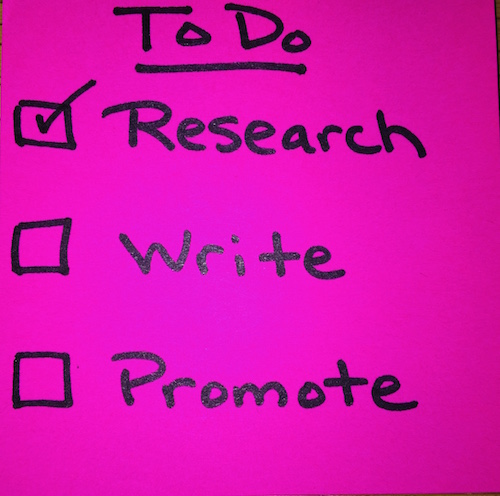
The most basic type of checklist is a “to-do” list. You write down what you have to do — and hopefully, you do it. (Motivation is beyond the scope of today’s post, but feel free to check out Count on Accountability: 5 Productivity Support Solutions and Flow and Faux (Accountability): Productivity, Focus, and Alex Trebek to address ways to get from knowing what you intend to do to actually achieving it.)
If you only have a few items, and you don’t have to worry about the order in which tasks are accomplished or who is getting what done, a to-do list is fine. If you have three or four tasks (say, two errands, a phone call, and a package to box up and mail), you can even get away without checking off the completed items. For our purposes, we’ll even leave aside the debate over checking things off vs. crossing them out. We’ll leave that for a future post! (But Paper Doll is Team Check-It-Off.)
Of course, there are more intricate checklists. In Dr. Atul Gawande’s book The Checklist Manifesto, he wrote about the power of a checklist to combat the problems that arise from the sheer (growing) complexity and volume of human knowledge and our efforts to strive to be better, build bigger, and live more boldly. No matter how much specialized training we have and how we use technology to support our efforts, things go awry. Tiny steps get missed.
But the humble checklist can be the solution. In Gawande’s book, he looked at how mistakes in the operating room (contributing to both mortality and morbidity) have dramatically declined since the institution of the World Health Organization’s Surgical Safety Checklist in many countries.
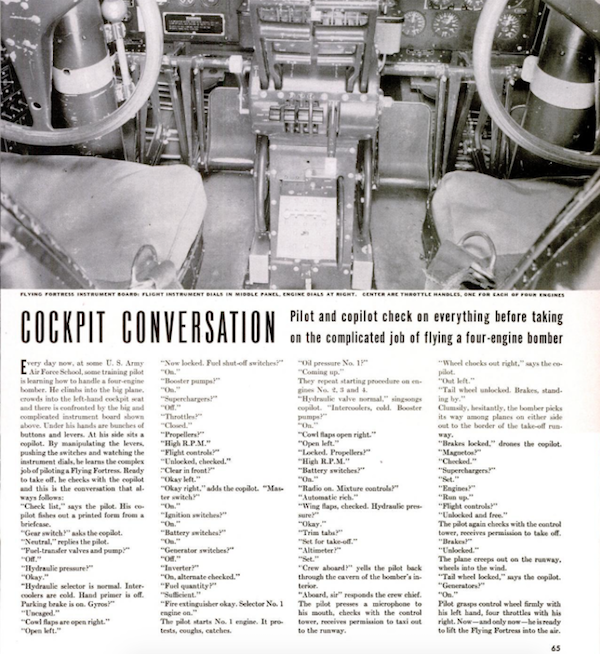
©1942 Life Magazine, August 24
Since 1935, airline pilots have developed and used pre-flight checklists to ascertain that the maintenance and on-deck crews have accomplished all tasks, in the proper order, before takeoff.
Almost all manufacturers have training manuals with checklists delineating proper safety and other precautions for smooth production efforts. In the construction field, they’re called punch lists, and they ensure that the architect, the contractor, the sub-contractors, and even the building owner complete all of the dependent and interdependent tasks so that everyone can finish the job efficiently and safely.
Checklists can be analog (paper) or digital (anything from a document on your computer or in the cloud to a desktop or mobile app).
The appeal of analog is that it’s familiar. You pull out a piece of paper and start listing all of the things you need to get done. Voila. For greater granularity, you can develop sub-lists to improve your productivity. For example:
1) Group all of the tasks that involve errands in one list, then visualize where you’ll have to drive, and develop a sequence so that you travel the fewest total miles.
For example, if you had six errands, you could zig-zag from one to the other, or you could plan a route that would take you to the farthest location first and then complete more tasks as you travel back toward home.
There are even apps that will optimize the most efficient routes, based on what is commonly known as the Traveling Salesman Problem, without you having to do all that math!

Most are designed for delivery companies rather than personal errand runners (and are priced for them, too), but there are a few worth checking out to amp up your out-of-the-house to-do list progress:
- Circuit – free routes for up to 10 stops, then $20/month
- MapZen – really for only the programmers you know, but this article can help
- RouteXL – sadly, it doesn’t integrate with your phone’s GPS, but it is free!
2) Group conceptually related tasks into sub-lists. For example: calls to return, research you have to do, things you have to write. You will improve your productivity if you can get into a flow state, focusing on what task type.
3) Prioritize tasks in your lists so that the most time-sensitive are done first. small victories breed success, and if you get the time-pressured tasks completed first, you’ll have more mental energy to focus on the things ones in line.
When you’re analog, you can easily see everything planned for the day or week (or your “life” lists) and you can make changes wherever you are, as long as you have a writing implement and (given that we just came out of a nine-week notebook series) paper. No charging, no waiting for something to power up, no waiting while an app updating.
Of course, analog lists have a few downsides. The more information you add, the messier your list get. It’s harder to update when plans and priorities change, and then you get a page full of scribbles, and the only way to update to a clean list is to start a new page.
Then again, for some people, that’s the exact appeal of analog; the writing and re-writing of tasks gives you an opportunity to continually reconsider the relative value of tasks in your life. If you’re constantly going to the store to pick up a few grocery items, this frequent review may convince you to upgrade your grocery planning game or even outsource to a delivery service so that you can plan once a week and have food auto-magically appear. (Think: Instacart or Shipt.)
Also, it’s easier to lose an analog list than a digital one. You may prefer your task lists to be created digitally so that, once synced, everything you have to do lives in your phone and computer, going wherever you go. I bet you have at least one task app right now, and perhaps many. One site recently recapped The 82 Best Cross-Platform Tasks Apps of 2021, including their platforms, prices, and whether they support collaboration!
While having your ride-or-die key features may be important, as with most systems, whether it’s notebooks and planners, or software and apps, commitment to one system is generally the biggest signifier of success. Some of the most popular task apps for individuals include:
- Remember the Milk – a classic! Free or $20/year for Pro with advanced sorting, sub-tasks, Apple Watch support, and unlimited task sharing
- Teux Deux – free on mobile, $3/month or $24/year
- AnyDo – free, or from $3-$6/month, depending on billing frequency preference
- Things 3 – Apple only and pricey, but it has die-hard fans; $50/Mac, $10/iOS
- Google Tasks – free with your Google account
- Reminders – free, and built into all of your MacOS and iOS devices)
- Habitica – if gamifying your tasks might give you a little more motivation
If you’ve got a team, and you’re looking for serious project management rather than task lists, you might consider:
- Asana – free for individuals and small teams, $11/user/month for Premium, and $25/user/mnth for companies. Asana is a full-on project management tool.
- Basecamp – the limited personal version is free; for businesses, it’s a flat $99/month
- Trello – free for individuals and small teams, $10/user/month for teams up to 100 users. (Trello is a stellar tool and, in my opinion, much more user-friendly than the other options. More on Trello later.)
GANTT CHARTS
If you’re working through a repeated project, one that generally has the same set of steps performed each time (whether it’s prepping for a vacation, on-boarding new employees, or migrating to a new cell phone), a checklist will give you confidence that you haven’t missed an essential action.
When you’re the only one performing the tasks, and each step is fairly distinct and short-lived, a checklist is enough. But when you’re dealing with multiple projects (each of which have multiple dependent tasks), especially when your whole team is involved, project management devotees find that a Gantt chart is useful.
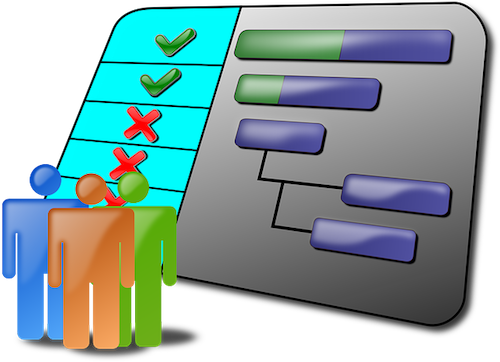
Gantt Chart Image by OpenClipart-Vectors from Pixabay
A Gantt chart is basically just a horizontal bar chart showing the timeline of a project. It’s one way to visualize the project schedule so that you can track the work as it’s getting done (or, not getting done) and noting the key milestones as you as your team hits them.
Each horizontal bar represents a task or element of the project, and however long the bar extends represents how long the task will (or should) take. Think the bars on a Gantt chart like how your cable TV menu shows the programs on individual, horizontal lines, one line per network, and how a sit-com takes up a short time range, a one-hour drama takes up twice as much space, a movie extends even further, and a football game extends off the screen and you have to keep scrolling.
Color-coding identifies which person or team is responsible for each task, and you can use symbols to identify dependent tasks.
While a checklist clarifies what needs to be done and tracking can be updated with a simple checkmark, it’s not very refined. A Gantt chart offers some distinct advantages. You can:
Get clarity – The Gantt chart requires that you have a project plan in place and that you develop a timeline to accomplish everything. A checklist starts as a brain dump of all related ideas, and then may morph into something orderly if precision is required. But a Gantt chart requires precision at the outset – what tasks will be done? By whom? In what order? Started when? Completed when? Which elements are dependent upon other elements being completed?
See time – With a Gantt chart, you are going to estimate timelines with the knowledge that while some things may be completed earlier than expected, other stages will take longer. As necessary, you can update and lengthen the bar for applicable stages. If only the cable TV on-screen guide would update, in real time, when a sporting event ran long so you wouldn’t have to keep checking to see if your show was ready to start!
Each adjustment gives you the opportunity to evaluate potential changes to your process. Will you have to delay your project launch? Or might you authorize overtime or bring in people from other departments (or outsource) to deliver the project on-schedule. Visualizing time in, well, real time, means you know if you need more (human or financial) resources.
Give everyone the big-picture view – The more people are involved, the harder it is to see what’s going on with other teams. A Gantt chart offers perspective and serves as a real-time status report without need for a meeting that could have been an email, or an email that could have been “Just look at the Gantt chart!” With the chart, you know when it’s about to be your turn start, and to deliver, your part of the project.
A Gantt chart offers perspective and serves as a real-time status report without need for a meeting that could have been an email, or an email that could have been *Just look at the Gantt chart!* Share on XGantt charts have some downsides. It takes a while to set them up, and you really need to develop them digitally, as anything beyond the most simple kind will get messy on a whiteboard.
You can create free Gantt charts from templates online or in software you may already be using:
- Google Docs – free, and you probably already have a Google account
- Microsoft Excel, Word, and PowerPoint – if you work in an office, you probably already have these
- Timeline by Asana – especially advantageous if your team is already using Asana
- Airtable – which has the advantage of being pretty (and check out the video below for an in-depth look at Gantt charts in general, as well as Airtable’s approach)
- Agantty – check out the company’s YouTube page for lots of helpful tutorials
- Canva (another pretty option, with lots of templates and customization options, but less easily updatable than the spreadsheet-based options)
There are also web-based software options specifically designed for developing Gantt charts, available at varying price points, including:
- Toggl (free for solo users; $8/user/month for teams, and $13.35/user/month for businesses)
- SmartSheet ($14/user/month for individuals, $25/user/month for businesses)
- ProjectManager.com (free for up to three users; $14.user/month for teams, $25/user/month for large businesses)
- Clickup (a visually appealing solution, with a free level and an inexpensive ($5/month) unlimited option)
- GanttPro ($15/user/month for individuals, $8.90/user/month for teams)
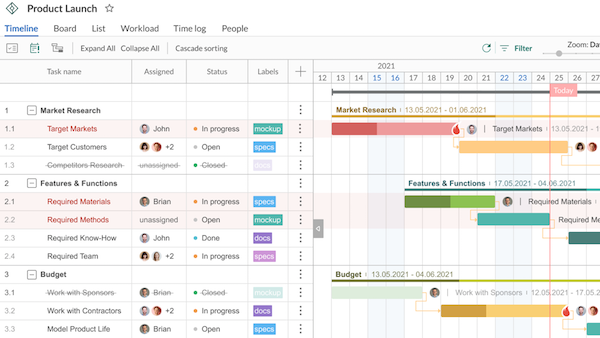
A checklist is simple. A Gantt chart is more complex, but streamlined and visual. Alas, neither is very inspiring. Luckily, there’s a tool that mixes the elements of both to provide visual motivation for your productivity.
KANBAN BOARDS
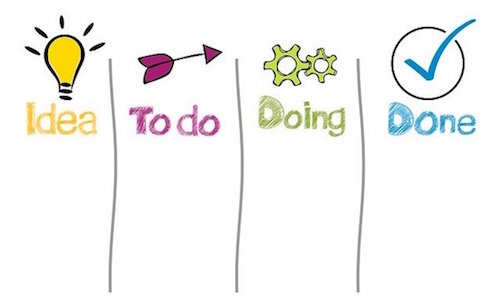
Image by Gerd Altmann from Pixabay
One of the most increasingly popular ways to track tasks is through the use of tasks boards, often known as Kanban boards. Kanban is the Japanese word for “billboard,” and I think a Kanban board can serve as a billboard, advertising and promoting your tasks to you.
Kanban is the Japanese word for 'billboard' and I think a Kanban board can serve as a billboard, advertising and promoting your tasks to you. Share on XKanban boards come out of the Japanese lean manufacturing process, but all you really need to know is how to make a simple one to work for you:
- A Kanban board has columns, sometimes described as “swimlanes,” to help you visualize each element of your efforts at various stages in the process.
- Cards, sticky notes, or icons depicting the task move, from left-to-right, through the stages represented in those columns or swimlanes. This lets you (and your team members, if applicable) see where each task falls in the progress toward completion.
- At minimum, there are three columns: To Do, Doing, and Done. If you prefer, say Pending, In-Progress, and Completed. (But it’s so much fun to move it to the right-most column and shout, “Done!!!”
- In the To Do column, set up all of your brainstormed tasks from that brain dump, just waiting to move forward. There can be a melange, or you can group them by task type.
- When you start working on a task, move it to the Doing column. And, as you’ve probably guessed, once you’ve finished, it can move to the Done column.
Unlike a to-do list, you can see your status and feel motivated. Unlike a Gantt chart, it doesn’t feel so formal!
And you can absolutely make your own Kanban boards. Obviously, this has diminishing returns the larger your group is, but it’s great for you on your own, for your family, or for your small group (dorm suitemates, colleagues in the same office, etc.)
If you want a visual representation of what you (and maybe your family or team) needs to do, you can be as low-rent or as happily crafty and DIY as you prefer.
Me? I’m all about low-effort. If there’s no whiteboard in the space where my client and I are working, I’ll use two vertical strips of blue painter’s tape on the wall and a stack of multi-colored Post-It® notes. Instead of a massive list of tasks that creates a sense of overwhelm, we:
- Put each task on a sticky note.
- categorize tasks types by color – perhaps phonecalls in blue, things to write in red, bills to pay or invoices to send in green
- Select the highest priority task(s) to put in the middle column. Get working!
You may wonder how you can be “doing” more than one task at a time, but the Kanban/task board works best looking at day-by-day progress. If you call the doctor’s office to make an appointment but have to leave a message, leave it in the “doing” column until the doctor’s office calls back and you’ve scheduled the appointment. If you’re writing a document but have to pause while you wait for some data to come in, for today at least, it stays in the doing column. Of course, if a task stays in “doing” more than a few days without any forward momentum, you’ll need to reconsider.
You can take a photo of your board and share it with team members via Dropbox, Evernote, GoogleDrive, etc. Post-it® even makes its own app for scanning, capturing, and sharing! (See what Post-it® has to say about Kanban boards!)
No painter’s tape? Try party streamers.
No wall space? No white board? How about a window or a mirror? Be creative and think vertically.
If you prefer something a little more artistic, office supply giant Quill has put together a nifty infographic on creating a task (AKA: Kanban) board.

If you want to DIY your own digital Kanban board, make a few columns in a spreadsheet like Excel or Google Sheets. Label the top row with column headers for To Do, Doing, and Done. As you work on a task, cut it from the first column and paste it into the second. When you finish a task, cut it from the second column to the third.
But really, if you’re going to go digital, pick one of the Kanban-making apps. The bright colors, drag-and-drop features, and advanced resources will make it worth your while.
- Trello – There’s so much built-in automation, I can’t think of a better place to start. (There’s a lot more you can do, as this video shows, but Trello was created to make Kanban can-do!
There are so many sites getting into the Kanban game, that rather than list other apps, I’ll just point you to some recent round-ups:
- 17 Best Kanban Apps to Improve Workflow
- 8 Terrific Trello Alternatives in 2021
- Best Kanban Software of 2021
The big advantage of a Kanban board is that you (and everyone else) can see it and stay motivated. In your house or office, when the Kanban board is on the wall, it’s a great billboard.
But what if you have 15 people on your team, spread across five cities and two continents? Your Kanban may be in Google Drive or iCloud or in the dedicated software, but I find that things that “live” in your computer or phone just don’t have the same immediacy as brightly colored sticky notes on your wall.
Or do they? What do you think?
Checklists, Gantt charts, and Kanban boards: what do you use for yourself? What would you like best for your team? I look forward to seeing which techniques and which apps have caught your eye.
Noteworthy Notebooks (Part 9): Epilogue and Updates
NOTEBOOK WRAPUP
Over the last eight installments of Noteworthy Notebooks (did I really preview this back in May as a short series?) we’ve looked at landscape notebooks, erasable notebooks, modular notebooks (disc-bound, magnetic, and via other ingenious methods), digitized and digitizable smart notebooks, durable notebooks made of stone paper, and waterproof notebooks.
But this is an organizing blog, not a notebook appreciate blog, and so today is our final installment. I’d like to leave you with some final thoughts to bear in mind as you choose a notebook to gather and organize your creative thoughts and inbound information.
Commitment is key. Just as with choosing a planner for keeping your tasks and appointments, a notebook is only as good as your commitment to using it. If you try to keep a half-dozen notebooks simultaneously, all around your home or office (without designating separate purposes for each), you’ll never know where your notes on the important meeting is, you’ll never find the right shopping list, and by the time you figure out which notebook had the perfect draft of the letter you wanted to write, the need will have passed.
There are two main reasons we’ve discussed for failure to stay committed to a notebook system. Either the notebook itself doesn’t work for you, or you are hesitant for reasons having to do more with yourself than the notebook.
Identify and solve your problems
In the first circumstance, something is wrong, and the notebooks you’ve tried so far just don’t fit your needs. Sometimes, the problem is obvious. But often, we tolerate a problem so long, we don’t even consider whether there’s a solution. (See: Organize Away Frustration: The Only Good Kind of “Intolerance.”) So, start by recognizing that there is a problem, and then look for a solution.
I wanna take my scorebook to the @smokiesbaseball game tonight, but there’s a 50% chance of rain. Probably not worth the risk.
— Bullycon (@Bullycon) July 17, 2021
(That tweet just went up on Saturday, so I haven’t yet found a waterproof baseball scorekeeping book for my friend @bullycon. But I’ll keep looking, and in the meantime, I recommended he try one of the Rainwriter waterproof clipboards I mentioned last week. If I don’t find something just right, I might propose to Rite In the Rain that they develop a series of waterproof sports scorekeeping notebooks. Feel free to share this post and tag @riteintherain.)
A week after writing about @RiteInTheRain waterproof notebooks, @bullycon happened to mention not taking his scorebook to the @smokiesbaseball game due to predicted rain. Let's encourage @riteintherain to develop a line of outdoor… Share on XBack to looking for a solution. For example, if you feel squished and lack space between your body and your keyboard, or you spend a lot of time writing on airplane tray tables, a standard portrait-orientation notebook won’t work, but a landscape-orientation notebook might be just the ticket.
If you’re left handed, writing across the ridge of a spiral-, wire-, or disc-bound book may be uncomfortable and frustrating, but a notebook bound at the top (whether or not it’s landscape in orientation) can eliminate that annoyance. (The same goes for righties who are tired of that ridge on their wrists from writing on left-side pages of notebooks that don’t have a lay-flat design.)
Maybe your frustration isn’t due to the writing experience, but the need to re-organize your notes. While a ring binder lets you change the order of your pages, a traditional notebook is bound such that your page order is set. With the variety of options we’ve covered, from discs to magnets to hooks, there are ways that you can organize, and re-organize, the order of the pages and sections in your notebooks so that you can focus on what’s important.
If you love the experience of a paper notebook, but hate what it does to the environment, this series presented a wide variety of popular (and dark-horse) erasable notebooks that let you capture your thoughts, send them to the cloud (sometimes even turning your handwriting into typewriting!) and then erase what you’ve written so that you can use the pages over again. There are even digital notebooks that “feel” like writing on paper, but digitize your content so that the trees in the forest are safe.
And speaking of trees, whether you’d like to be out among the trees and traipsing around in the rain and other elements, or just want to preserve the rainforests, there are waterproof, super-strong notebooks made of stone and other materials that can protect your writing and the world in which you’re doing it.
Address Perfectionist Procrastination…One Way or the Other
Over the course of this series, we discussed perfectionist procrastination at length. For the same reason people save the “good” china for an important event…and then find excuses never to use it, people don’t feel that their thoughts and scribbles are up to the task of being written in a “fancy” (read: beautiful or expensive) notebook. Piffle!
OK, except it’s not piffle. If you truly feel anxious about writing your thoughts in a notebook that’s too fancy, too sumptuously gorgeous, or too expensive, as if you need to earn the write to set your thoughts down on paper, then a stranger on the internet may not be able to persuade you that YOU AND YOUR IDEAS HAVE WORTH.
As Paper Doll, I grant you my permission to fill the fanciest notebooks you can find with sparkly vampire fanfiction, drafts of angry letters to a long-ago ex-boyfriend at whom you’re still angry (or, angry anew), and even tic-tac-toe boards. There’s no such thing as plates that are “too good” for serving a meal, and there are no notebooks that are too fancy for you to use.
However, if you keep buying fancy notebooks and are still not using them, please stop… You’re teaching yourself to continue feeling unworthy. Until you can really use your pretty notebooks, stick with whatever format notebook will keep you organized, even if they’re just composition notebooks or legal pads; just stay away from writing on random loose papers. (Remember, I’ve been telling you as far back as 2007: no floozies!)
I hope, though, that you’ll develop confidence in the value of your thoughts and your right to write in any notebook you want, no matter how pretty, how fancy, or how pricey. And maybe, when you’re ready, one of those erasable notebooks from Rocketbook or Wipebook, or maybe the lesser-known options, will help you bridge the gap.
Consider Letting Others Delight in Alternative Notebooks
Over and over during this series, I was struck by two things in the comments after each post. First, people were self-identifying: either they loved a notebook style and were eager to explore and shop, or they couldn’t see themselves needing or trying something so different. But second, as the series went on, more and more commenters mentioned that a particular notebook would make an ideal gift: for a spouse, a child, a colleague, or a team member.
So, if you thought a notebook in this series was spiffy, but you’re not ready to change systems, consider buying it as a gift for someone whom you know is a better fit. You’ll be a hero for finding something so neat, and you’ll have a front-row seat for evaluating how much you actually do (or don’t) like it.
UPDATES AND STUFF THAT DIDN’T FIT ELSEWHERE
Before we leave the topic of notebooks entirely, I have a few final options to share.
What if your desires are complex? What if you want a notebook that is both landscape orientation and disc-bound so that you can customize it?
Levenger Circa Landscape Sliver Notebook
The Circa Landscape Sliver Notebook has a faux-leather cover, available in black or blue, and comes in two sizes: Junior (7″ wide x 8 5/8″ high) and Letter (9 3/4″ wide x 11 3/8″ high).
The 3/4″ black discs that hold the notebook together at the top mean the notebook can accommodate 120 sheets of paper. Because it uses discs (as we discussed in Noteworthy Notebooks (Part 4): Modular, Customizable, Disc-Based Notebooks), the notebook has a lay-flat style, and the cover flips to the back, out of the way, while you’re writing, taking up less desk/surface space.
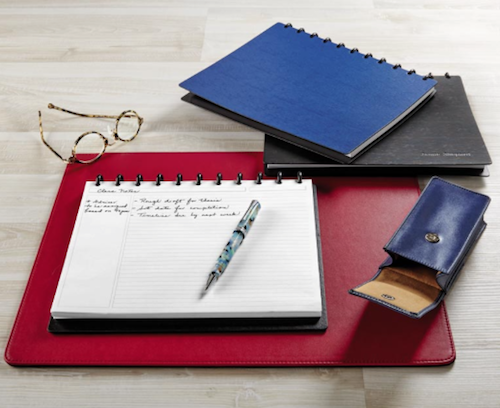
The Landscape Sliver comes with 60 sheets of horizontally-aligned, 100-gsm annotation-style ruled paper. (As a reminder, “annotation” is another name for Cornell Notetaking-system, with a section at the left for highlighting key essentials in your notes.)
In addition to getting Landscape Annotation Refill pages (available in 100- and 300-sheet packs), Levenger makes landscape-orientation refills in five other styles:
Grid Refill – 100 sheets, Letter-size only; these sheets use a 1/4″ grid format, useful for graphing, calculating, and drawing, as well as for writing and list-making.
Annotation Grid Refill – 100 sheets, Letter-size only; like the standard grid refill, these sheets use a 1/4″ grid format, but also have a left-size section for annotations.
Storyboard Refill – 100 sheets, Letter-size only; like the storyboard pages for portrait-layout, these have three boxes for diagrams, drawings, and key points, with an additional 15 lines below for notes or dialogue.
Week’s End Planner Refill – 100 sheets, in both Junior and Letter; these planner refills are only for Saturday and Sunday. (As far as I could find, there are no Circa weekday planning pages in landscape format.) The pages are undated, with four appointment slots (6 a.m., Noon, 9 p.m., and a blank slot) for each weekend day. There are designated sections for activities and events, notes, and shopping, and a to-do list.
Landscape Color Gradient Annotation Ruled Refill – 100 sheets, in both Junior and Letter; these ruled rainbow sheets with an annotation section seem a little at odds with the formal stylings of Levenger’s Circa, but hey, it’s all about what sparks you to commit!
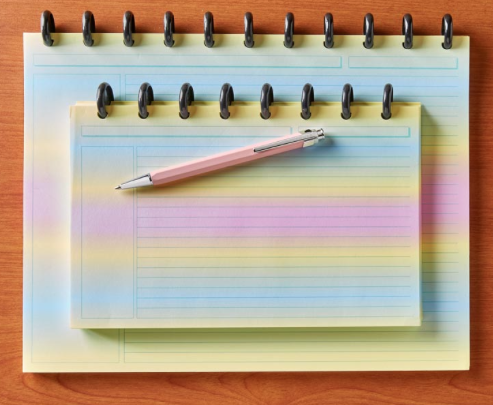
The Circa Landscape Sliver Notebook comes gift-boxed; at $49 for the Junior and $59 for the Letter version, it’s definitely a gift for yourself.
Unlike most of the Levenger items I reviewed back in Part 4, which all had portrait orientation, there are no Arc or Eleven Disc landscape versions available that are alternatives or compatible at lower prices. Be assured, however, that Paper Doll is always on the lookout, and if I find other landscape, disc-based notebooks, I’ll be sure to let you know.
Dot Grid Notebooks — Welcome to Dark Mode
Several of the posts in this series focused on customizing a notebook to meet your specifications, while others accented finding a format or characteristic (like landscape orientations, stone paper, and waterproof notebooks). This line of options is more like the latter.
Most notebooks have white or light paper onto which you write or draw with darker-than-the-paper ink, pencil, or marker. UK-based Dot Grid makes a variety of notebooks, journals, pads, and papers. While some have white or ivory pages, that’s not what I want to show you. Just as our phone, tablets, and computers have added dark mode to view our apps, making reading and writing easier on our eyes at night, Dot Grid has done this with notebooks with an entire line of notebooks that use black paper! There are too many products to discuss all of them, but some of the intriguing highlights include:
Dot Grid A5 Hard Cover – Measuring 5-7/8″ wide x 8-1/4″ high, this black hardcover notebook uses a left-side, double Wire-O binding, so when open, the notebook can lay flat, and the cover can be flipped to the back. The A5 has 130 pages of premium 120-gsm black paper.
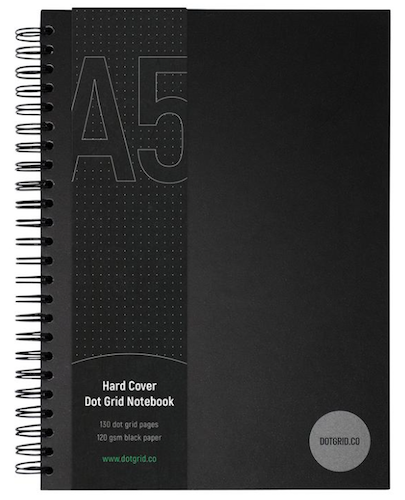
The dot-grid is set at 4.25mm with silver ink. Use white, silver, or color gel ink pens to make your writing come alive. (I suspect neon ink would particularly stand out.)
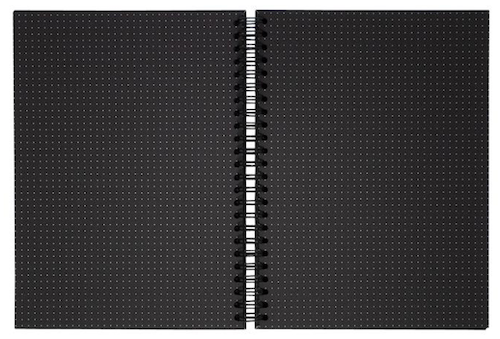
These black notebooks aren’t just for goths (though I imagine goths would find them appealing). They have an intriguing visual style and are suitable for bullet journaling, planning and goal-setting, graphing, and computer/web user-interface design. It costs £25 (British pounds).
In addition to the hardcover version, Dot Grid makes a series of 350-gsm water-resistant covers in multiple sizes. In honor of Bruce Wayne, they’ve nicknamed this the Batmo-book. (Shhh, don’t tell anyone who hasn’t made the connection between the millionaire and the caped super-hero.)
Dot Grid A3 Notebook – Perfect for designers looking to sketch or wireframe a website, this A3 (11.69″ x 16.93″) ultra-large notebook has 80 pages of premium-quality 120-gsm black paper, with the 4.25mm dot matrix in silver ink. Bound at the top with Wire-O binding, this notebook has a lay-flat style, but instead of the hard cover of the A5 above, it has 350-gsm water-resistant cover. It’s £30.
Dot Grid A4 Notebook – Measuring 8.27″ wide x 11.69″ high, the A4 has 160 pages and is bound on the left side, but otherwise has the same features as the A3. It’s £25.
Dot Grid A5 Notebook – Measuring 6.5″ wide x 8.27″ high, this version is otherwise identical to the A4. It sells for £20.
Dot Grid A6 Notebook – A tinier version of the A3, this Wire-O, top-bound notebook measures 3.13″ wide x 6.02″ high and has 80 pages. Perfect for notes-on-the-go, it’s £10.
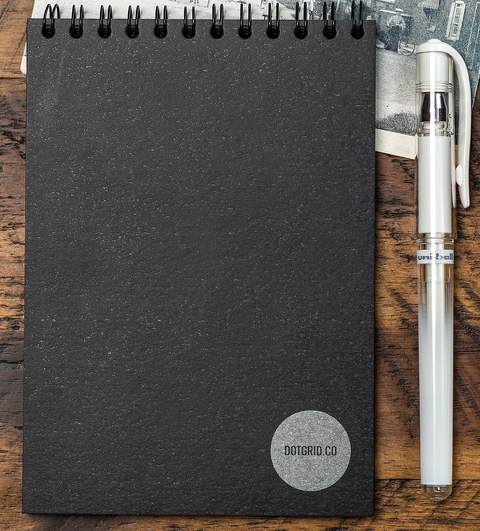
Dot Grid also makes wire-stitched, 40-page blank notepads with black, silk artboard covers in A4, A5, and A6 sizing (priced at £12, £9, and £6, respectively) for those who want to free-write or draw on black pages and prefer a lighter-weight option.
Dot Grid makes no landscape notebooks, but does have an A3 landscape, dot-grid deskpad with 50 pages of tear-off sheets, ideal for designers. The back is made of sturdy, recyclable greyboard, almost identical to chipboard. It’s £28.
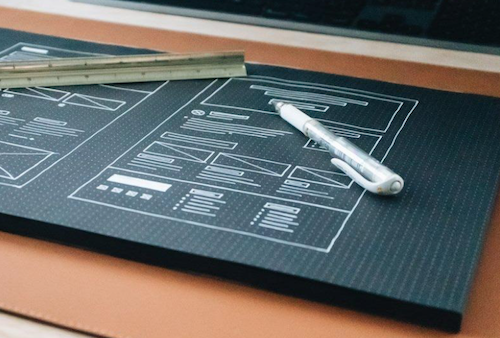
A similar A4, landscape Mobile Device Wireframing Pad might be the perfect gift for your friends who create mobile apps. (£13)
And finally, there’s an A4, undated weekly planner page, with 52 tear-off sheets. The dayparts are outlined in silver ink. It sells for £13.
So, if you (or someone you know) would like to write or draw in Batman mode and you’re willing to shell out for shipping from the UK, Dot Grid has some great options.
Waterproof Sketchpads: The Search Continues | Thrunotes
Last week, in Noteworthy Notebooks (Part 8): Waterproof Notebooks, I told you that other than a children’s size version, I’d been unable to find any waterproof sketchbooks. The search continues, but I was able to find ThruNotes, a UK-based series of colorful, weather-proof, tear-proof, recyclable notebooks for the rough-and-tumble, outdoorsy set, particularly hikers, all for £7.99/each.
Thrunotes Waterproof Sketchpad for the artistically-inclined hiker (ironically, the only one without a cheery, colorful cover), has all of the same features of the other three dotted and lined versions (Thru, Explore, and Blaze). The spine is triple-stitched to enhance strength, and the corners are rounded to improve the notebook’s durability when you’re out in the elements. And for those who care about such things, the notebooks use compostable vegan inks.
As with the other Thrunotes products, the layout is pre-marked with spaces for page numbers, dates, mile-markers, distance, and highlights, and there are metric and imperial rulers integrated into the back cover.
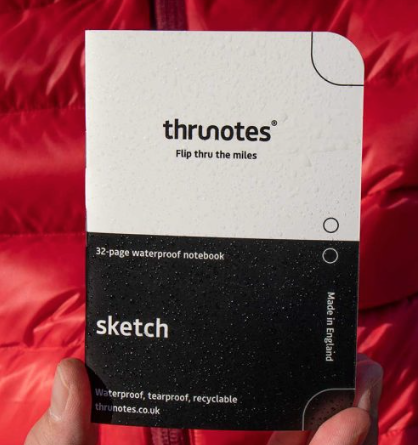
The only issue? Thrunotes describes this notebook as “Small enough to fit in your shirt pocket;
Large enough to draw all you need.” Well, Thru is right about the first part! There are only 32 interior pages – understandable when you need something lightweight on the trail, and that makes it only 0.8 ounces.
But it’s only 3.54″ wide x 7.48″ high; even when you consider that you can sketch across the surface of two (facing) pages, it appears to be no larger than the child-sized Huckleberry waterproof sketchbook we looked at last time! Still, it is a waterproof sketching option. Maybe focus on sketching insects and birds instead of panoramic vistas?
See the video below for more details on how to use the various notebooks from Thrunotes.
To all of the readers who have stuck with this unexpectedly giant-sized Noteworthy Notebook series, thank you! If you missed a post, or are ready to pick your favorite (for yourself or for gift-giving), you can catch up at the links below. Now that you’ve seen them all, please tell me in the comments, which notebook meets your needs? Or, if these still some magical feature you’re seeking, please share, and you might find you problem solved in a future Paper Doll post!
Noteworthy Notebooks (Part 1): Re-Surveying the Landscape
Noteworthy Notebooks (Part 2): The Big Names in Erasable Notebooks
Noteworthy Notebooks (Part 3): More Erasable & Reusable Notebooks
Noteworthy Notebooks (Part 4): Modular, Customizable, Disc-Based Notebooks
Noteworthy Notebooks (Part 5): Customize with Magnets, Hooks, and Apps
Noteworthy Notebooks (Part 6): Get Smart (Notebooks)
Noteworthy Notebooks (Part 7): Stone Cold and Super-Strong
Noteworthy Notebooks (Part 8): Waterproof Notebooks



Follow Me