Paper Doll
Announcing Rubbermaid’s New Bento Boxes…and a CONTEST!
Readers, as I mentioned last week in the Paper Doll 4th Anniversary post, I’ve been looking forward to spilling the beans on this product’s launch ever since this year’s NAPO Conference and Expo. The new collection — which I’d previously left unnamed because information about the product was embargoed — even made it into the I Feel Pretty edition of my post-conference recap, albeit with a big
 stamped on the post. Since April, friends, fans and Paper Mommy have all attempted to inveigle information about the new line, so I’m thrilled to no longer have to keep my adoration of this product under wraps.
Welcome the Bento Box Collection!
BENTO? YUMMY!
I’ll admit, I was a tiny bit predisposed to liking the product line as soon as I heard the name. I’ve always loved the idea of Japanese bento “boxes” — small but carefully designed lunch box-like tray containers with smaller sub-compartments.
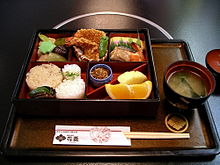
Perhaps it’s the way that a bento box so neatly organizes the food so that sauces or flavors don’t drip onto one another (don’t you hate that?) which has always appealed to Paper Doll‘s sense of order and organization. But it’s not just order, but compartmentalized, aesthetically-pleasing order, that is the apparent goal of the yummy mealtime bento box.
FROM LUNCH BOX TO ORGANIZING TOOL
While Paper Doll was not on Rubbermaid’s research and development team, it seems likely that a combined appeal of aesthetics and functional organization was a main goal in creating the Bento line, and I believe they’ve succeeded. So, without further ado, how about a look at the whole product line?
INTRODUCING RUBBERMAID’S BENTO BOXES AND TOPPERS
The Bento Boxes comes in three color schemes — Paprika,
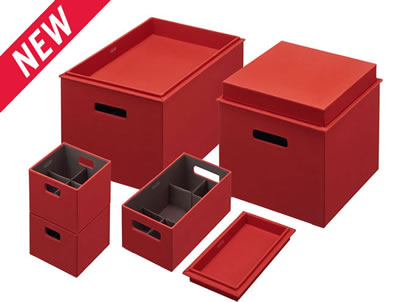
soft brown and khaki-checked Chadwick,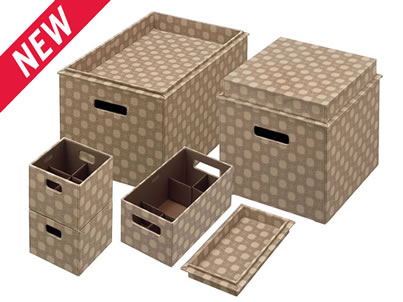
and crisp Linen —
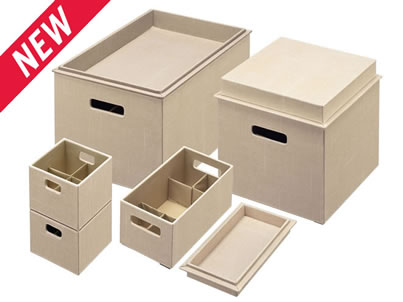
and four sizes, including the Extra Large (19.61″ wide x 12.68″ long x 9.9″ high) and Large (12.05″ wide x 12.05″ long x 9.5″ high), which are eminently suitable for storing files. Very often, my organizing clients want something practical but attractive for keeping their household paperwork and files, but metal filing cabinets and plastic file crates fill them with woe. Professionals also desire something appealing for their offices, but find little that is neither cutesie nor so leathery that it belongs in a cigar bar. Bento’s clean lines achieve the perfect balance.
The Medium (11.42″ long x 6.22″ wide x 4.9″ high) and Small (5.63″ wide x 5.63″ long x 4.5″ high) Bento boxes are smaller, suitable for storing office supplies, electronic gadgets, remotes and cables, gaming equipment or hobby paraphernalia.
The reversible “topper” lids are available for the Extra Large, Large and Medium Bento boxes, and are made of the same heavy-duty material. The dual design allows the toppers to serve as either trays or lids, maximizing your options. For example, if you use your Large or Extra Large Bento boxes for files, turning the topper tray-style makes a tidy in-box or to-file tray. The toppers can also be used as trays separate from the Bento Boxes, themselves, to keep rooms tidy.
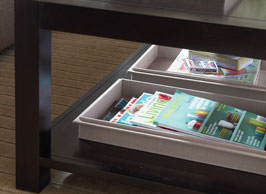
NOT JUST ANOTHER PRETTY FACE
At first glance, the most obvious “new” thing about the Rubbermaid Bento line is that the boxes are pretty. Yay. But you know that Paper Doll doesn’t care much for aesthetics without function. It has to DO something! And that’s why professional organizers at the NAPO conference were so excited about this new design.
The biggest problem with boxes, even pretty boxes, is that the bigger your storage container, the less order that can usually be maintained. One big empty box provides no opportunity to define separate spaces. I have a lovely storage ottoman, and while I can happily tuck away a blanket or a small stack of magazines, there’s no way to keep the interior from becoming cluttered if I want to store multiple smaller items. Rubbermaid has found a way around the problem so you can organize, and not merely store, the materials of work and life.
FLEXING ORGANIZING MUSCLE
Rubbermaid’s Bento Boxes were created with flex dividers that divide the interior space into multiple sections when needed, but they can be popped (well, the noise it makes is more akin to “Fwapp!”) into place, against the interior walls, when a larger interior space is wanted or the boxes will be nested and stored.
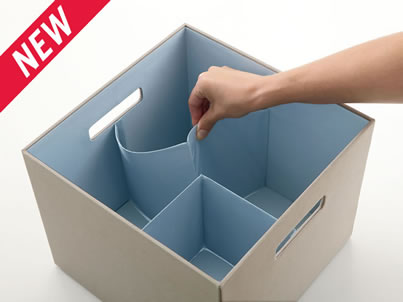
One Large Bento box, completely open? Check. One box with a smaller inset in one quarter? Check. Four equal boxes? Check. The Medium has nifty dividers that allow two smaller sub-sections on each side, with a larger space in the interior.
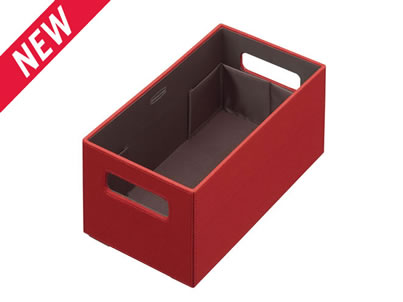
Since each flex divider can be adjusted individually, the design options, while not endless, certainly give myriad opportunities to those who like to customize the number and sizes of their sub-sections.
STACK ‘EM HIGH
One of the problems we often see with “pretty” design-oriented storage containers is that they stack poorly, keeping you from efficiently using vertical space.
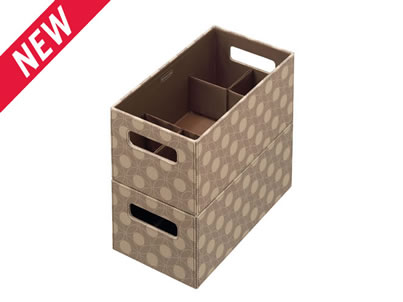
The Bento Boxes, however, can be stacked vertically when in use or nested within one another between projects. Plus, because the Bento Boxes are built to be modular, they can be stacked securely with or without the toppers as lids, offering quick access to items in lower-level boxes.
PHOTOGRAPHIC INJUSTICE
Unfortunately, photographs really don’t do the Bento justice. They are (and feel) much sturdier than they look in photographs. Bento will be in stores in November, so (unless you win the contest) you’ll have to trust me until you can check them out in person to get the full “store, stack, Fwapp!!!” experience.
THE PRICE IS RIGHT
Too often, we have to choose between function and visual appeal and on the rare occasions that we find the right item that will blend in with our homes or offices, it’s more than we want to spend. I was pleasantly surprised to find that the Rubbermaid Bento Boxes are priced so reasonably, from $9.99 for the Small to $26.99 for the Extra Large.
THE CONTEST
The Bento Box Collection is made from sturdy CARB-certified MDF covered in durable polyester fabric. Rubbermaid notes that, “The heavy-duty decorative fabric enables it to remain out in your social spaces while complementing your home’s decor.” Paper Doll thinks the design scheme and style also make the Bento Boxes perfect for home offices and even perking up corporate cubicles.
(Fans of the movie Office Space, don’t you think a Swingline Rio Red Stapler would be best kept safely within a Paprika Bento Box?)
That’s why I’m so excited that Rubbermaid is making available a set of Bento Boxes for me to give away to a lucky Paper Doll reader in celebration of the blog’s four years. Hurray!
The contest is open to all readers with a shipping address in the United States or Canada, and the rules are simple.
1) Use the comment section below to share your favorite Paper Doll post of the past four years and tell us why you liked it. Trouble deciding? Feel free to read last week’s anniversary post to get you amped up. (There are also some helpful recaps in the 3rd anniversary post and the Bastille Day post of 2009.)
2) Tell us which Rubbermaid Bento Box style (Paprika, Chadwick or Linen) you like best, and how and/or where you’d like to use it. For some creative suggestions, check out Rubbermaid’s ideas for entryways, bathrooms, media centers and other living areas.
3) Note your Twitter ID in the body of your submission comment. (If you don’t use Twitter, please provide your email address or some other easy way to contact you online. OnlineOrganizing’s blog system doesn’t allow clickable links in the comments, so remove the http:// from any link you provide.)
The deadline for submissions is Monday, October 31, 2011 at Noon, EST. One winner will be chosen randomly and announced in early November.
Good luck!
Happy 4th Anniversary, Paper Doll Readers!
It’s hard to believe that I’ve been providing strategies and advice for getting your paper organized for four years.
In the past year, we’ve covered everything from the Gift Card Revolution to common paper management mistakes, from organizing and dealing with tax paperwork to bill-paying strategies. We’ve talked about how not to be listless and how to adjust the vertical hold.
I love each bit of research that goes into my posts. This weekend, for example, I learned that up to 70% of the books in British households remain unread, which you just know will help me determine the direction of whatever I write next about decluttering bookshelves. (By the way, what percentage of the books on your shelves are unread?)
Every statistic, every organizing article, every blog post of my esteemed colleagues serves as potential inspiration for a post here. The more I read about subjects ranging from organizing to paper supplies to financial management, the more I realize that there’s a never-ending supply of practical, useful material for this blog.
However, it’s been a tradition at Paper Doll to use the anniversary post to share material that isn’t necessarily about organizing paper, but appreciating it, or at least appreciating what others might do with it. Because, while keeping your paper organized is the bread and butter of Paper Doll‘s work, it’s important for all of us to take a moment to delight in what else paper can mean to us.
For example, there may be the blend of practical and silly, like these Tetris-shaped sticky notes:
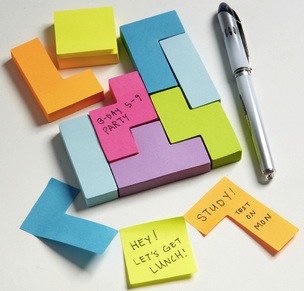
And then there’s the art and artistry that catches the eye. For example, there’s the miniaturization of paper art demonstrated by tinyworldinabottle on Etsy. I’m enamored with this itsy-bitsy park scene, entitled Tiny green tree and a family in a tiny bottle:

The most interesting paper-related story I found this year was a mystery that unraveled over time. It was a story of a paper crime. Or, if not quite a crime, then a reverse crime. Instead of a theft, the staff of the Scottish Poetry Library found a piece of artwork left behind! It began with a fragile poetree carved from hundreds of pages of a mystery book:
 Nobody knew who left the piece behind, though an anonymous note addressed to the library’s Twitter account was nestled into the tree, stating:
But this was just the start of Scotland’s artistic and literary surprises. A few months later, staffers at the National Library of Scotland found a papercraft piece of art in the shape of a coffin and gramophone, carved from the mystery novel Exit Music, by Scottish detective novelist Ian Rankin. Yet another attached tag addressed that library’s Twitter account, in support of libraries.
More mysterious left-behind artwork followed: the Scottish Filmhouse cinema, home to the Edinburgh International Film Festival, received a model of an oddly populated cinema, carved from books, and then the Scottish Storytelling Center found a dragon, carved from a Rankin novel, snuggled into a window bay.
The blog Central Station had a full take on the year-long mystery, with dazzling photos, and then just a few weeks ago, the Edinburgh Evening News identified the mysterious reverse-thief and artist.
Speaking of art, we’ve recently explored one piece by “found art” paper artist Jennifer Collier,

but there’s so much more to know. (Seriously. Surf Collier’s site and try not to crave putting one of her pieces on display in your own space.)
As much as I love blogging about paper, sometimes I still find myself at a loss. It’s not that I don’t have topics on my editorial calendar, but sometimes I just don’t feel like writing about whatever topic I previously selected. This is when I call on Paper Mommy, and ask her to help me brainstorm a paper-related topic. Invariably, at some point in the discussion, Paper Mommy suggests “toilet paper”, usually in a funny accent, and that helps melt the brain-freeze.
Given that, I’m sure she’ll be amused at the next item that caught my eye, from MyBadPad‘s post about 21 Cool Toilet Paper Roll Creations. I just had to share the intriguing toilet paper sculptures that look surprisingly like Andy Rooney:

I can’t get over the idea that the audio track behind these sculptures should be saying, in an annoyingly whiny voice, “Have you ever noticed that bloggers like Paper Doll always take things to ridiculous, off-topic extremes?”
Strategies, services, products, regulations, solutions…the purpose behind all of my practical blog posts is to help you readers organize your essentials so that you have space and time for the charming delights of life. For me, at least, one of those delights is the opportunity to surprise readers with something special.
Back in April, I shared the fact that our friends from Rubbermaid had debuted a really nifty and attractive product at the National Association of Professional Organizers’ Annual Conference and Expo…but that I wasn’t allowed to talk about it. It was:
News about the product was embargoed, first until August, and then until October. Patience, like brevity, is a virtue that Paper Doll lacks!
But it’s secret no more! In fact, next week, as we start the FIFTH year of Paper Doll, we’ll be celebrating with a contest. I’ll be sharing the nitty-gritty about the nifty product, and readers will be rewarded with a chance to win one of my favorite 2011 new products.
Until then…thank you for reading, whether you’ve stuck around for four full years or are relatively new to the Paper Doll neighborhood. Happy anniversary to us!
Paper Doll Tells You A Story…Bit by Bit
Reducing Book Clutter (Part 1): Book Rentals for Grownups
Reducing Book Clutter (Part 2): Book Rentals for Kids
Reducing Book Clutter (Part 3): Trading Books Online
Reducing Book Clutter (Part 4): Borrowing & Returning — A Library Love Letter
Reducing Book Clutter (Part 5): Electronic Books
Reducing Book Clutter (Part 6): Audio Books
To satisfy my frugal nature, I tend to read library books, but have also taken a foray into the worlds of electronic books on the Kindle and audio books on CDs and MP3s. But there’s another clutter-free way to enjoy books when you want to save space, money and time.

Dripread is an app that turns any book into a drip…drip…drip… of knowledge. The steps are simple:
1) Create a free account. (You can choose to skip this step, but then you may only receive readings from books already in the Dripread library.) Subscriptions are free.
2) Select a book or upload a digitized version of one of your own. Uploaded ebooks must be in the EPub format, but as we’ve discussed previously, you can use the free ebook format translation software Calibre to get your non-EPub ebooks Dripread-ready.
Dripread’s library is filled with classic titles in the public domain, in genres ranging from adventures and mysteries to romances and science fiction. While Dripread’s collections lean heavily toward fiction, non-fiction books include a growing selection of science and history titles, as well as offerings on finance, self-improvement and language study.
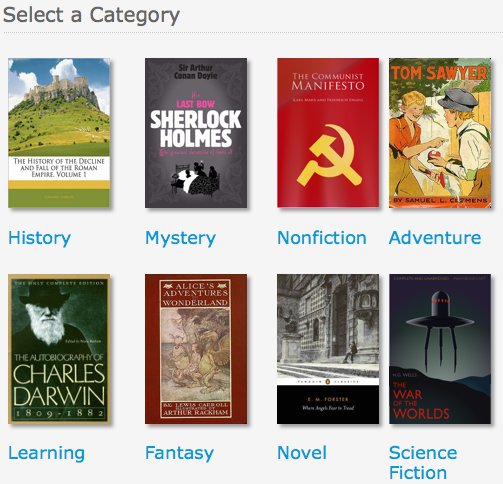
That’s it — just sign up and pick a book. Dripread then emails you one page of your book each day, and you can absorb it in bite-sized chunks. Of course, if you enjoy what you’re reading and want more, just click the “next installment” link in each email. The system knows where you left off and immediately sends the next reading. But if one page is all you need or want, you’re assured of making tiny bits of progress each day.
One page per day? Are you aghast at how anyone could survive on only one page a day? Or are you wondering if you could realistically squeeze a whole page of reading into your already-busy schedule?
No matter how much one might love reading, modern life makes it hard to snuggle under a blanket and read for hours on end. Dripread’s service is designed for those who are truly at a loss for personal reading time, like busy parents of toddlers, or those who just can’t quite get back to a book in between other projects, finding themselves revisiting a title months after starting it, unable to recall the relationships between characters.
Although a voracious reader, Paper Doll never did make it through Anna Karenina. I tried, summer after summer, with no excuse, but just couldn’t fall into the book. Perhaps taking that tome one page at a time might be an awfully long slog, but sometimes it’s easier to spend a moment reading an email than weeks trying to drag yourself back to a heavy classic with heavy Russian names. Count Alexei Kirillovich Vronsky and Princess Darya Alexandrovna Oblonskaya might be easier to embrace one page at a time.
If the idea of a just one percolated drip of a story at a time sounds familiar, you might recall that we’ve discussed this process before.

DailyLit is another free service which breaks down books into smaller installments (though not quite as tiny as one-page chunks) and emails them to you to read at your convenience. DailyLit readings can be viewed wherever you read your email: on your computer, smart phone or PDA, and if you prefer, readings can be sent via RSS instead of email.
DailyLit snippets are designed to take about five minutes to read, though you can change your settings to receive one, two or four installments at a time. Pick from a list of banned books or explore a field of study that’s new to you, like the Wikipedia Tour of Greek Mythology.
You get to choose how many installments you wish to read each day — for example, schedule the emails to pop in at 10a, 2p and 4:30p, to break up the monotony of a heavy workday without taking a jaunt to the break room or coffee cart. Fewer calories, greater enlightenment!
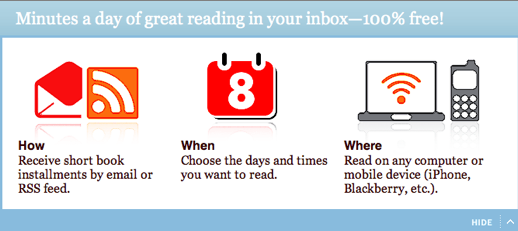
You can also have more installments sent right away, whenever you like, if you encounter a part of the story that’s really getting good. Click “send me the next installment immediately” at times when you can read more: in line at the DMV, waiting for a delayed train, or needing to look like you’re checking important messages when a VIP has left you in a lobby, cooling your heels.
Although registering for an account isn’t required if you merely want to read books, doing so allows you to participate in discussion forums — which helps you to experience the equivalent of a book club without ever having to clean your house or make book-themed appetizers. Having an account also lets you rank and review books and manage any book lists you’d like to create. Once you’ve created an account, you can sign in via Facebook, Twitter, Google, Open ID or whatever new identification authorization system gets invented in the coming weeks.
DailyLit has a larger assortment of titles that Dripread, including titles in the public domain, as well as those covered by Creative Commons and others under copyright, sponsored by advertisers. Browse books by title, author, category or release date to find whatever you hanker to read. I was surprised and delighted to find that DailyLit included twenty installments from Lisa Kogan’s hysterical Someone Will Be With You Shortly: Notes From a Perfectly Imperfect Life, a series of essays I’d just finished in paperback.

Dear Reader is a slightly different kind of installment reading plan. Suzanne Beecher, a novelist, sends daily excerpts of new fiction to subscribers to her service. You can sign up for one or more of her “book clubs” by linking through your own public library system or directly, if your library does not participate. Book clubs, or general categories of interest, include fiction, non-fiction, teen, business, romance, “good news”, science fiction, mysteries, thrillers, classics, and audio books.
The idea isn’t for readers to read entire books over email, but to develop a taste as to whether a book might appeal to them. You indicate the genre(s) you prefer, and Suzanne selects and emails a daily five-minute snippet to whet your literary appetite.
Dear Reader’s mini-forums encourage a shared spirit of affection for reading, and charmingly, the site includes a recipe exchange (because, as we all know, it’s so tempting to nosh while we read).
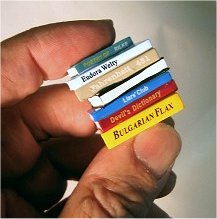
Tiny bits of books. It’s a little ironic that these novel (no pun intended) services are actually not all that novel. In the 1800s, full-length novels were too expensive for most Victorian-era readers to purchase, so books were often serialized in newspapers, so that followers of the stories got chapters in smaller (more affordable) installments. Indeed, when Charles Dickens’ The Old Curiosity Shop was published, fans of the book in New York City, who had not yet received the latest installments, reportedly rushed to the piers to ask sailors arriving from England, “Is Little Nell alive?”
There’s something to be said for a slow sampling of a good book, for a delightful savoring of a story, bit by bit. For those of us who tend to gobble our literary preferences, the drip…drip…drip…of a story over time might uplift the spirit, and for those who can never find time to stick with a book, slow samplings might just ensure that a book is read from “cover to cover”, even when the only cover in sight is a laptop bag.
Would tiny email or RSS installments of books help you read a little bit more? Readers, what say you?
Paper Doll Dishes Out the Super Goodies!

We begin with our old friends at Smead, who are making available free samples of their SuperTab Folders to those who click on a special link. Smead attempted to make it really simple for bloggers and social networkers to spread the word about this freebie, but longtime Paper Doll readers know that I’m an all or nothing kind of doll — someone else’s short blurb just wasn’t going to do it. So, first, I want you to know all about why the SuperTab Folder is nifty.
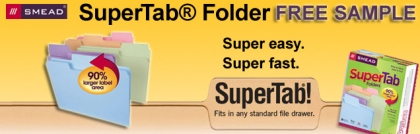
Smead’s SuperTab file folders have a 90% larger labeling area vs. standard manila folders, yielding multiple advantages.
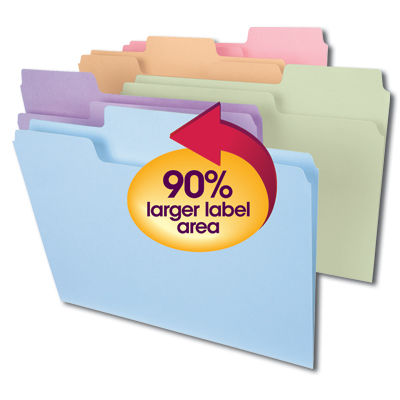
You can:
1) Use Larger Text — This makes it easier to see labels from across the room, assists those with all variety of vision issues from aging eyes to macular degeneration, and ensures that offices with files bearing many similar-appearing labels (Johnson/Jonson/Johnsen) can be discerned with relative ease.
2) Use Multiple Lines of Description — Although brevity is the soul of wit, and although we professional organizers usually advise keeping file folder labels as simple as is serviceable, sometimes a label just has to say more.
Typical labeling style calls for going from the generic to the more specific — “Honda Fit: Blue” (as opposed to “Blue Honda Fit” in case you own multiple Hondas, or even multiple Honda Fits). However, filing systems should be customized to the needs of their users.
Indeed, professional organizer Judith Kolberg, founder of the National Study Group on Chronic Disorganization — now known as the Institute for Challenging Disorganization — discusses an alternative form of labeling, particularly for action files, in her landmark book Conquering Chronic Disorganization. Kolberg notes that for some people, folder labels work better when they are high concept and based on the “Muttering” method, reflecting the emotions brought up by different types of papers.
For example, instead of shorter traditional labels, a longer-length label might include, as Kolberg notes, “Things Clients Bug Me For,” “Stuff I Can Never Find When I Need It,” “Papers for the Tax Man” and “Stuff To Keep Me Out of Jail”. While these are labels that develop organically when working with chronically disorganized clients, one can imagine there are times in all of our lives when we need a few more words on our file labels, and that brevity, while the soul of wit, may need to yield to completion, the heart of comprehension.
3) Use Icons — In addition to labels, colored dots, stickers and other icons can be used to help categorize the content of a folder, and the larger the tab, such as with SuperTab folders, the more expansive the available space for adding definition and clarity.
Stickers can help you teach pre-literate children where to “file” the items they bring home. In an office setting, colored dots (such as are used for price tagging at yard sales) can identify information in-house without tipping off a problem client that a red dot means “whiner”.
Simply put, the bigger the tab, the more one can communicate.
The larger space makes it easier to create clear, vibrant labels with the use of a Sharpie or your favorite label maker. However, if you want to want to computerize professional-looking labels without having to invest in costly software, Smead has created two different free, downloadable, color-coded SuperTab templates. The Alpha Template style and the Blank Template format both work interactively with Word and are pre-set for multiple table use to ensure that labels will print properly on label stock paper.
In addition to the extra height of the SuperTab Folders, the tabs are also cut to extra-wide 1/3 cut (or 1/2 cut oversized) tabs. Depending on how heavy-duty a folder you need, SuperTab file folders are available in 9 1/2 pt. (standard), 11 pt. (reinforced) or 14 pt. (heavyweight) manila stock or 11 pt. (pastel) colored stock . The bottoms of the folders are scored for up to 3/4″ expansion, and all folders are made of 10% recycled content with 10% post-consumer material.
As a gift to you, Paper Doll readers, Smead is offering a free SuperTab Folder for organizing your paperwork. To get it, just go to www.smead.com/SuperTabSample and provide your contact information. Please hurry, though, because the Smead reps assure me that the samples won’t last long.
Oh, and two important legal-lingo notes. First, Smead wanted you to know that information submitted in the free sample form is confidential and won’t ever be shared with a third party. Also, this offer is available to US residents only. (Sorry to all you excellent and dedicated readers in Canada and elsewhere.)
Now, how about a sticky situation of the positive kind?

If you’ve already seen the commercials (with tot or puppy), you know what this product is about — and have spent time laughing at it over and over. If not, read on.
Post-it Brand has come out with Super Sticky Full Adhesive Notes. You know how typical Post-it pads have the adhesive only at the top centimeter or so of the reverse of each sheet? Those are satisfactory for labeling piles of papers that are likely to be kept flat or out of the way of heavy winds (or a parade of coworkers fluttering past your desk on the way to the birthday cake in the lunch room), but sometimes you need just a little more stick-to-it-ive-ness, and that’s where the Super Sticky Full Adhesive Notes come into the picture.

These Super Sticky Full Adhesive Notes were designed to provide versatility in use — they can stick reliably in a greater variety places. While traditional Post-it pads are great on the desktop, their portability can sometimes be problematic.
With a Post-it whose almost whole rear-view is fully adhesive, you can stick a pad (or sub-set of one) on the inside of a three-ring binder or the top of your laptop computer without fear of it falling off. The people of Post-it state that these new notes stick securely, but remove cleanly…which is pretty much all we’ve ever wanted, right?
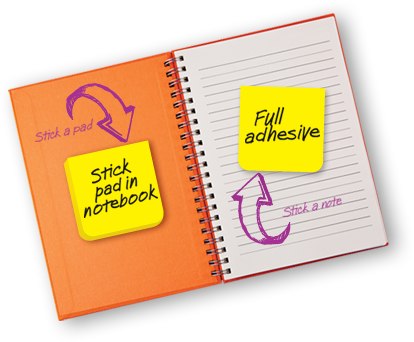
Super Sticky Full Adhesive Notes come in 3″ x 3″ squares, with four pads to a block, in either the traditional electric yellow we all know or in assorted bright colors of yellow, green, blue and pink. Almost the entire reverse side of each note is adhesive — merely the lower half-inch or so is non-stick to provide an easily “grab-able” edge to allow the user to pull off one note at a time.
If you’re like me and really prefer to try new things only when you get a freebie or a coupon, you’ll like this. Just click to get a coupon for $1 off a purchase of Super Sticky Full Adhesive Notes worth $4 or more, or click here for multiple Post-it coupons.

Finally, research shows that we get greater satisfaction from experiences than from tangible objects. So, although this won’t organize your papers, per se, it’ll keep you out of the stores (so no receipts or clutter to amass) while giving you access to great works of art, science and history, many of which…are on paper! (Imagine that!)
This Saturday, September 24, 2011 is Free Museum Day, sponsored by Smithsonian Magazine. You can download and print your two free tickets, and then peruse the list of more than one thousand participating museums. Search by keyword or location to check out museums near you.
Find a buddy, take your kid, or just have an adventure. Then come back and report in the comments section on where you went and what you saw. Whether you get SuperTab Folders, Super Sticky Full Adhesive Notes or just have a Super Saturday, Paper Doll wishes you a superlative week!
Paper Doll Organizing Carnival: The Inaugural Edition
As I mentioned last time, this post launches a periodic series, the Paper Doll Organizing Carnival, to share a variety of serious and silly, fascinating and quirky blog posts, news stories and other items I hope will be of interest to you.
There’s no dress code for the carnival (no beads, no silly hats), but I should note that one reader was kind enough to send in this Neatorama link for the Paper Pattern Stilettos by Jennifer Collier to help set a stylish tone for this new series.
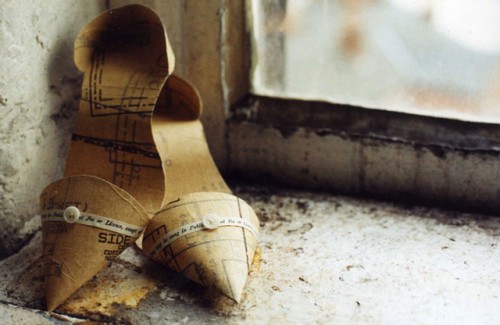
(Be assured, you’re more than welcome to peruse Paper Doll posts in bunny slippers, if that adds to your delight.)
BRILLIANCE IN ORGANIZING — The Experts
Janine Adams of Peace of Mind Organizing had posted BINGO in late July, and she and I had talked about how the idea of a BINGO board could be used for various organizing purposes, from small business marketing to children’s chores. (My tiny suggestion was that the concept would work for developing healthy meal planning ideas that could satisfy all the adults and kids in the family by letting them submit mix-and-match entre and side dish suggestions.)
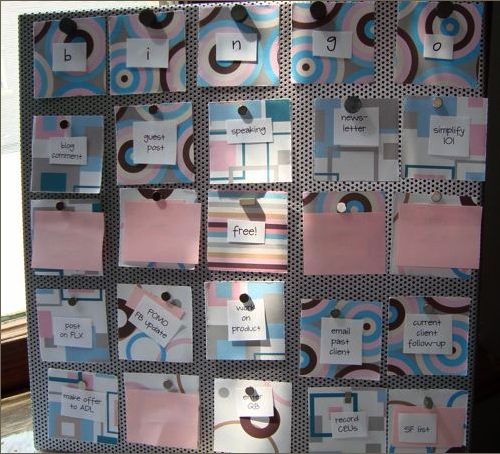
@ 2011 Janine Adams, Peace of Mind Organizing
Janine mentioned that she borrowed the basic idea from Jacquelyn Kittredge’s ebakery for use with accomplishing social media tasks, but applied the framework to To Do tasks, in general. Pretty darn brilliant. The fact that, as we’ve stated before, Paper Doll is not exactly handy, made Janine’s initial post all the more admirable in my eyes. Cutting, glueing? Already above my skill level level.
But then Janine took it a step beyond, consulting with others and coming up with a magnetic version, a foam-board version and even a file-folder version of the BINGO motif. Be sure to check out Janine’s post about how she approached Spreading the Gospel of BINGO via TV, and how she expanded her BINGO paradigm…and made it even prettier.
What about you? How might you organize and motivate yourself using the BINGO method?
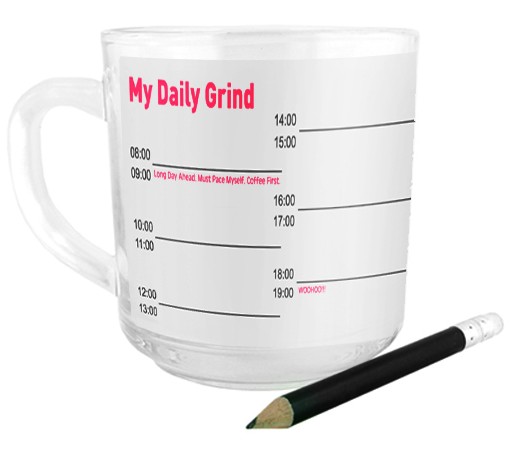
As much as I love paper, I find paper alternatives to be ceaselessly fascinating. Almost a year ago, I wrote a post called Morning, Noon and Night: A Day of Fun Alternatives to Paper. From glassware to paint to To Do-themed tattoos, I was tickled by all of the non-paper options at our disposal. I figured this was a meaty enough topic that I might revisit it on a periodic or annual basis. I’d already collected a few items, such as the Write-On Mug, above.
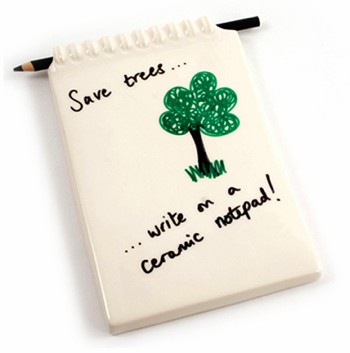
Have you ever read a blog post and thought, “Geez, I wish I’d written that?” That’s a familiar thought to me, whenever I read my colleague Jeri Dansky’s blog. So imagine my glee at reading Jeri’s recent post, Desk Decor: Erasable Notepads and Message Boards. Jeri always manages to find fascinating North American and global resources for the organizing-themed products she showcases, and I have to say, I’m pretty partial to the various write-on dishware from YoYo Ceramics, as well as this nifty notepad:
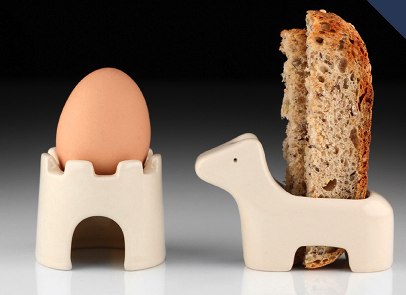
Then again, Jeri’s posts also prompt me to fall in love with items that have nothing to do with paper, but put such a cute spin on organizing that I fall hopelessly in their sway, like this Takae Mizutani Egg & (Toast) Soldiers organizing set:
POST-IT PHILOSOPHY
Of course, not every organizing tool is about organizing stuff, tasks or information. Sometimes, it’s important to organize thoughts. I was intrigued by Mark McGuiness’ If It Doesn’t Fit On A Post-It, It Won’t Fit In Your Day at the99percent. His idea? Simply that:
“If I can’t fit the day’s tasks on the Post-It, I’m not likely to fit them into the day.”
Lengthy or abundant To Do lists can easily overwhelm the user, and though there are many ways to deal with tasks (in a BINGO card, via a digital option like Workflowy, or with various other task or reminder apps), sometimes a 3″ x 3″ sticky note is all you need. (Long-time readers will recall that although I eschew random sticky notes, I have, on record, come out firmly in favor of the Revenge of the Floozies.)
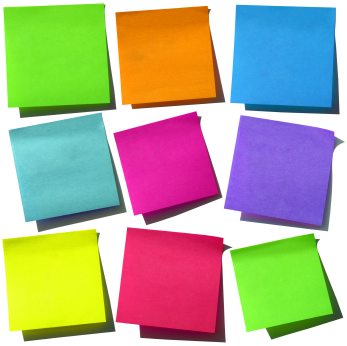
I was particularly intrigued by McGuinness’ approach, with one “top” Post-it for prioritized tasks, and a second sticky note for the secondary task detritus of life, because, as he notes, it’s in line with Mark Forster’s Do It Tomorrow technique. Why? Because I originally learned about time and task management expert Mark Forster last year, from none other than Janine Adams!
IN THE NEWS: ART EMERGENCIES
Andrew Robison has been the Curator of Works on Paper at The National Gallery of Art in Washington, DC for more than thirty years. Robison has been maintaining a rotating collection of watercolors, prints and drawings in a protected storage location. Thus, even though the post Curator Andrew Robison Decides What Goes Into National Gallery’s Emergency Box appeared in The Washington Post last month, it’s an apt and interesting fit for September’s National Emergency Preparedness Month.
As The National Gallery of Art determines which precious paper works go in its “WWIII boxes” (i.e., preserving a percentage of our nation’s masterpieces in case of a World War III-level catastrophe of natural or man-made origins), it’s a good prompt to think about which of your possessions you need to protect in case of emergency. (And don’t forget to make sure you know what kind of insurance coverage you have, and if it’s enough to protect the value of all of your own masterpieces.)
While you’re trying to decide which pieces of your home-based collections are precious, you might want to take a peek at Do You Suffer from Decision Fatigue?, a fascinating New York Times piece on the science of decision-making. I encourage readers who are losing the fight against paring down their possessions (or avoiding snacks at the checkout counter) to read this article and gain a little strength and willpower.
LIBRARY LOVE
Paper Doll is a book lover, which is why this blog sometimes promotes a variety of approaches, from how to downsize and curate one’s library to how to acquire the information contained in books without actually keeping the books, themselves. In that spirit, a variety of book-related blog posts recently intrigued me.
For example, it seems that public bookshelves, like small libraries, have been “sprouting up all throughout Germany”, according to Bookshelf‘s piece on the Rise of Public Bookshelves in Germany.

As DW World also reports, these public bookshelves are giving new hope to old reading treasures in a world of Kindles and Nooks. The concept is less like what we usually think of in terms of quiet, muted public libraries and more akin to those “take a penny, leave a penny” bowls by cash registers in restaurants. Realize you need a good book as you approach a cafe or (as above) bus stop? Take a book. Once finished, instead of letting it collect dust in your living room, return it and take another.
The movement is known by the unfortunate-sounding Bcherschrank (German for bookshelf), and volunteers maintain the collections. The mini-libraries began in indoor locations, like Cologne’s Ikea, but are often now installed in (sponsored) weatherproof outdoor enclosures. Remarkably, vandalism is not an issue.

The Germans haven’t cornered the market on library talk. I first heard about the Little Free Library from Superpunch.
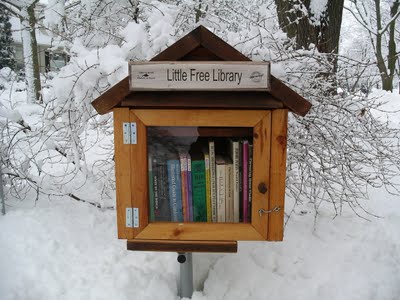
The Little Free Library has an inspiring three-part mission statement:
- To promote literacy and the love of reading by building free book exchanges worldwide.
- To build a sense of community as we share skills, creativity and wisdom across generations.
- To build more than 2,510 libraries around the world–more than Andrew Carnegie!
Each Little Free Library that pops up on the horizon in Wisconsin or Indiana or Minnesota is a “house of stories” just large enough to hold perhaps twenty or thirty books, which might be non-fiction, poetry, novels or even how-to resources.
You can order your own Little Free Library, available in a variety of styles, including the Amish Barn Wood Cabin, above, an Amish Barn Wood Shed, the Classic (with clean, simple lines) or a variety of one-of-a-kind, original art or build-your-own options. Or, you can adopt a library, paying it forward, and help support the movement.
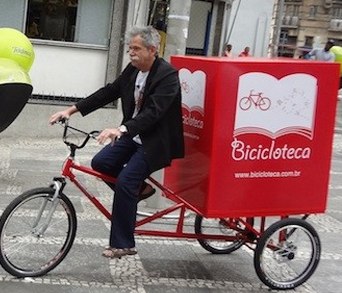
And if one couldn’t get to a library — even a teeny tiny one — a new kind of bookmobile might be in order. As reported by Springwise, Brazil’s Institute of Green Mobility has invested in Bicicloteca, a library made mobile by an adult-sized tricycle, to deliver books to the homeless and other disadvantaged members of society.
MAKING A SHOPPING LIST, CHECKING IT TWICE
Before we sign off on this first-ever Paper Doll Organizing Carnival, I had to note this nifty wood and rubber checklist stamp from Japan’s Pencils.jp, which I
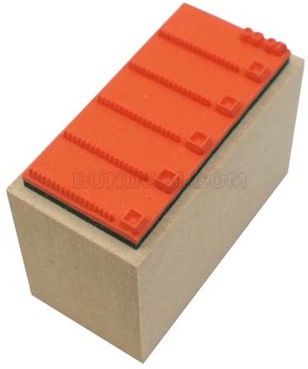
originally found through Book of Joe, a blog which purports to be written by the “World’s most popular blogging anesthesiologist” — a claim one would be hard-pressed to deny.
Until next time, Paper Doll hopes you’ve had a lovely time at the carnival!



Follow Me