Paper Doll
Paper Doll Sends You Over the River and Through The Woods
Dearest Readers:
Whether you’re heading to Grandma’s house for a traditional family holiday or jetting off to a hedonistic, sun-filled long weekend, don’t be so quick to run out the door. Before you step one foot into a plane, train or automobile, here are a few tips to keep you organized so that next Monday, you won’t feel quite as anxious Tom Turkey feels today.

DiGiorno, Not Delivery
Nothing alerts thieves that a house has been left unattended than a full mailbox and a pile of newspapers and packages on the welcome mat. It’s not only disorganized — it’s dangerous.
In the olden days, people had all sorts of things delivered to their homes…newspapers, milk and eggs…and then the process seemed to abate for a while. The sharply uniformed milk man had long since stopped making his appointed rounds. More and more traditional newspapers have folded, and digital versions have usurped the daily paper. And most of the mail seems to be junk.
Nonetheless, stopping deliveries is just as essential as ever. Many of us still subscribe to newspapers, even if only to the weekend (coupon-filled) editions. The popularity of organic foods and community farming means that people are getting milk and eggs, along with all variety of delicious produce, delivered once again. And, at least for now, the Post Office is still delivering mail.
Before heading out of town, call to put deliveries on hold. Are you still lucky enough to have a paper boy or paper girl riding that suburban route to deliver the daily news? Even if you suspend your newspaper delivery by calling the subscription office, consider speaking to your carrier directly (and maybe even your carrier’s mom or dad) to make sure the message gets from the subscription office to the actual carrier. Similarly, don’t just cancel this week’s organic food delivery; make sure your regular delivery person knows to skip you on the route.
Of course, if you have concerns about someone dropping the ball (or, y’know, the eggs), now is the time to ask a neighbor or close friend to keep an eye on your house and take in any wayward deliveries or unexpected packages.

As for mail, skip those yellow “hold mail” cards and take the modern route. Head over to the U.S. Postal Service’s Hold Mail link (under the Manage Your Mail menu) and arrange to have your mail held for anywhere from 3 to 30 days. You have the choice of picking up your held mail at the post office or having the backlog delivered on the day your mail service is resumed. If there’s any chance that inclement weather or airline travel will cause delays in your return, you might wish to opt for the former or add a buffer day and have mail resumed a day or two after your scheduled return.
Don’t Be a Technology Turkey
If you are headed out of town without your laptop — or even if you’re taking it, because a primary rule of technology is that it will eventually fail — make sure you have the following support systems in place.
- A complete and recent backup
Paper Doll doesn’t care whether you’re backed up to the cloud or to a secondary external drive (though both would be preferable). But your backup should be thorough — make sure every document, preference file and whoziwhatsit is backed up.
- A flash drive with your most important documents and templates
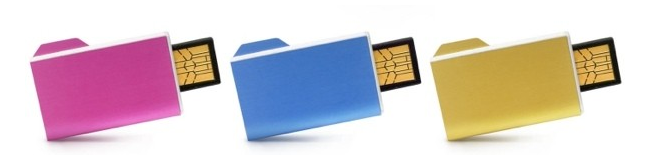
You never know when an ideal prospect or an important client will decide to call from a Thanksgiving retreat with a request that you respond by close-of-business on Friday. Sure, you probably want to make Thanksgiving a family-only weekend, but wouldn’t you prefer to at least have the option of taking advantage of a really good business opportunity? Wouldn’t the holidays be even more fun if you knew you had just what you needed to turn 30 minutes of effort into a money-maker for all of next year?
Sure, if you use cloud-based backup and storage, you might be able to access your essential files from afar, but you never know when your sister-in-law’s internet access will be on the fritz or your hometown public library inextricably has blocked access to the cloud support site you need.
- A cheat sheet (in code, if necessary) of your non-memorized passwords
If you’ve gotten in the habit of letting your browser remember your usernames and passwords, you may not have typed anything but a high-security bank or brokerage password in quite a while. Perhaps you don’t even bother to log out of some of your often-used low-security sites. Indeed, it’s the low-priority sites for which you’re least likely to recall your login data. Sure, it’s no big deal to have your password emailed to you, but when you’re on the road or using Grandma Bessie’s old computer, wouldn’t you like to make things as easy as pumpkin pie?
If you’re in business for yourself, make sure you have the login and FTP information for your web site’s control panel if there’s any chance you’ll need to make an update or correction while traveling. Even if your web designer is willing to make a quick fix over the holidays, you can’t expect that he or she will have your login information handy.
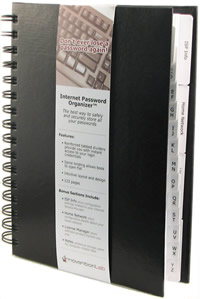
In lieu of an actual cheat sheet, I’m still a huge fan of the Internet Password Organizer™,
- Instructions and codes to call your home, office and cell voicemail
Don’t laugh. Most of us check our cell phone voicemail from our cells and our home or office voicemail in person when we get back, and many of us have all of the codes programmed into our oh-so-smart phones such that we haven’t had to remember them in years, if ever. Assuming wherever you’re visiting isn’t so far over the river and into the woods that it hasn’t upgraded from rotary dial phones, you will be able to call in to your home, office and cell voicemail from any touch-tone phone, even if you can’t get service on your cell (or if it dropped to the cabin floor and got run over by the beverage cart).
Again, even if you’ve chosen to have a work-free holiday, you’ll stress less if you prepare for all eventualities.
- A list of essential phone numbers
The more we become dependent upon the web, the less we rely on our memories. Create a few emergency contact lists on your computer (so they’ll be easy to update in the future) and take the precaution of printing a few copies. Make sure you have:
—Travel-related numbers, including the priority/loyalty/miles contact numbers and your account numbers for the airline, the front desk at your hotel, the rental car agency and anyone who helped you make your travel plans.
—Emergency family contacts for your child’s school and any parents who count on you to drive carpool. If your Sunday morning flight runs into some delays and doesn’t get your family home until late Monday evening, you’ll want to be able to update anyone expecting you or your children.
—Client/Customer contact numbers. It never fails; whenever I go on vacation, I get a (staticky) voicemail from a client, begging for a return call, with no return phone number. In the age of Caller ID, many people assume it isn’t necessary to leave a phone number, and not everyone realizes that a crystal clear connection on their end of the line doesn’t mean their message can be understood.
Don’t Just Prepare For Takeoff — Prepare for (a Soft) Landing
It’s no joke that most people feel like they need a vacation when they return from vacation. Re-entry after a day of return travel and multiple days of unusual eating and sleeping patterns can cause stress. Consider taking the following steps to ensure a smooth return, for you, your family and for the people in your work/life who depend on you.
Set a reminder in your computer or task system or post a note on your calendar for Monday morning to revise your voicemail when you get back. If you’re setting a “Happy Thanksgiving” voicemail message or something that otherwise tells people you’ll be away and won’t return to the office until Monday, make sure the first thing you do on Monday is change back to your standard message. Otherwise, you return from lunch on Wednesday to find, “Um, I don’t know if you’re back yet or if you missed some flights, ‘cos your message says you’ll be back two days ago…and I really need someone this week, and maybe I should call somebody else…” Grrrr.
Similarly, make sure your autoresponder ends when it’s supposed to. Sometimes, missing one check box can mean you’re sending out “Gobble, Gobble” messages well into December. Send yourself a quick test email when you get back, just to make sure everything is working properly.
If you still have a landline, don’t be tempted to change your outgoing message to a jolly one letting everyone know you’re headed away for the holiday. Although most people calling you are friends and family, random callers and scallywags employed by companies with which you do business don’t need to know your house has been abandoned for the week.
Prepare your desk for your return. Before heading out the door, clear your desk of clutter. File away your reference files and put any papers reflecting tasks to do upon your return in your tickler file, or pile them in order of when they need to be accomplished (with the deadline date in the upper corner or on a sticky note). Make a list of your top three priorities for Monday and put it square in the middle of your desk. When you return, focus on those tasks for a few hours before being tempted by email.
Check your calendar for the week after the holiday. December sneaks up awfully quickly after Thanksgiving, so make sure you know what’s on your schedule for the next few weeks. Let your brain do some back-burner brainstorming while you’re playing front-yard, Kennedy-style touch football.
Finally, while flying or riding or just couch-surfing after too many carbohydrates, flip through your calendar pages of the past year to recall the people and events in your life and business worthy of gratitude. You may value some people because of the warmth they’ve brought into your life or the revenue or referrals they bring your way, but also take note of those whom you’ve helped the most. Hasn’t your hard (or inspired) work for them given you a particular sense of esteem and value for which you are thankful?
For more holiday-related organizing tips, please check out Simplify the Season & Save Your Sanity.

Happy Thanksgiving, dear readers. As always, I’m thankful for you. (And for Paper Mommy, without whom there would never be a Paper Doll.)
Paper Doll Cuts Cookbook Clutter and Removes Recipe Rubbish
Last week, we looked at Eat Your Books, a recipe indexing web site designed to help you find the exact recipe you need amid the cookbook clutter in your household. That had me flipping through the Paper Doll archives in search of what we’ve discussed previously about organizing cookbooks and recipes. I was surprised to find that we haven’t touched on the issue since 2007.
So, it’s time to update our recipe for eliminating cookbook clutter and recipe rubbish! Today’s post combines traditional organizing advice with some modern alternatives.
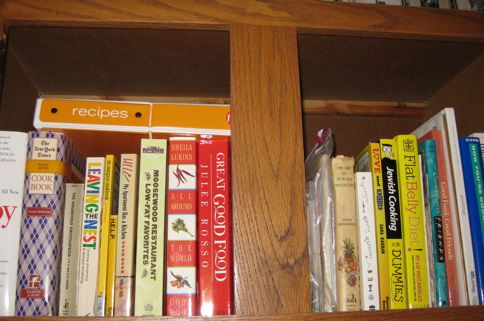
Take a look around your kitchen. Does it practically snow indoors with the flutter of clipped and copied recipes every time someone creates a mild breeze by walking past the counter? Are you drowning in cooking magazines and cookbooks for holidays, special meal requirements and more?
It’s easy for kitchen clutter to become a sticky mess, preventing us from ever finding the perfect recipe when we want or need it. Of course, having something (like a recipe) and not knowing where to find it is no better than not possessing it in the first place.
NOW, THEN AND SOMEDAY
Years ago, I wrote Book ‘Em, Danno: Organizing Your Beloved Books, where I talked about the difference between NOW books (that represent the life you currently lead), THEN books (representing who you used to be, desire and care about) and SOMEDAY books (representing what you hope to become). These categories are applicable to cookbooks, and recipes in general.
NOW recipes include the cookbooks, magazines, clippings and bookmarked sites that fit your current life. They may be for improving a family member’s medical conditions or they might be the tried-and-true holiday recipes your family anticipates all year long. These are the recipes that belong in your collection.
THEN recipes come from outgrown cookbooks, diets and guidebooks that once fit our lifestyles but no longer do. Part amicably with Macrobiotic for a Groovy Life or 172 Ways To Lose Weight With Grapefruit. Trust that Feeding Your Picky Toddler won’t give you insight into solving the nutritional needs of your teen athletes.
SOMEDAY recipes are the cooking equivalent of Fluent In Urdu In 30 Easy Lessons. They’re harder than they seem and impractical for everyday life. If they’re collecting dust because you haven’t looked at the esoteric instructions and exotic ingredients since you acquired them, the cookbooks are rude patrons taking up space in your family restaurant, repeatedly asking for water refills and never ordering.
DECLUTTER YOUR COOKBOOKS
Ask yourself: Have I used a recipe from this cookbook in the past year?
If you use the cookbook heavily, even during just one season, keep it—it’s a NOW book. If you seek it out frequently but only for the same two or three recipes, scan or copy what you use and set the cookbooks free. And, if you can’t remember the last time you opened it, the book has become a stranger in your home—shoo it away. Your options are to:
- Donate the cookbook to your local library book sale or a book-related charity.
- Trade cookbooks with friends or use an online book-trading service.
- Sell it at a local used book store or online.
- Store it elsewhere, outside your kitchen. If you have ample shelf space and enjoy perusing cookbooks even if you don’t actually cook, store extraneous titles as you would history or reference books.
In the future, test-drive a cookbook to see if it’s a good fit by borrowing it from friends or the library before making a purchase.
DECLUTTER YOUR CLIPPINGS
Gather your piles of loose recipes clipped out of magazines or copied after tasting a friend’s culinary triumph. Select one recipe at a time and follow these simple rules:
1) Separate The Eggs
Divide reality (NOW recipes) from fantasy (SOMEDAY RECIPES) by asking yourself “Will I ever really cook this?”
We have to be honest with ourselves and realize that if the fanciest thing we cook is spaghetti, we’re not really going to be dabbling in egg drop soup or meringue flamb from scratch. If your lifestyle is such that you, your spouse and your kids aren’t home yet before stomachs start rumbling, recipes concentrating on dishes that require all-day loving attention just don’t fit your lifestyle.
If the photos with those recipes are truly dazzling but out of your reach, create a Dream Recipes folder to keep in your family file system along with dream vacations and dream decorating ideas. You can preserve the dream without cluttering your kitchen.
2) Publish Your Own Cookbook
This is simply a matter of divide and conquer. First, divide your clippings and index cards into piles. Pretend you’re a cookbook editor and come up with some major categories, and then add the ones that fit your family’s dining style:
- Appetizers
- Salads
- Entres
- Desserts
- Ethnic meals (sub-divided by region)
- Holiday food
- Picnic meals
- Special nutritional requirements (allergy-free recipes, diabetic-friendly, etc.)
Once you have a healthy stack for each category (and are certain you’re really going to attempt to cook each item), you’re ready for the final step.
Buy a fat three-ring notebook and a box of transparent, plastic sheet protectors and slide the recipes into the sheet protectors. If a recipe is continued on the back of a page, you’ll be able to see the front and reverse easily; if the recipe is continued on another page, place it back to back with the prior page. The sheet protectors keep the recipes from getting damaged or sticky and can be easily cleaned with a sponge. Use simple subject dividers to separate the categories.
If you don’t feel like making one from scratch, buy a mix — consider the pre-made Cookbook Binder Tabs Kit.
3) Go Digital
There are two routes for making your fluttering, crumbling recipes virtual. The first involves scanning your recipes to your hard drive or to cloud storage (Evernote and OneNote are popular options) and using note titles and tags to make it easy to search your database for recipes. (Don’t worry — you don’t need a scanner. In most cases, just snapping a photo with your smartphone and uploading it, just like you’d send a photo to Facebook, works fine.)
The biggest advantage of going digital is that you rid yourself of paper clutter in the kitchen. However, out of sight remains out of mind, whether a recipe is buried under the microwave or hiding in the kishkes of your digital recipe library. I encourage you to commit to trying any recipe before you store it digitally, assuring that you’ve got a reason to keep it.
There are a variety of recipe management websites available to help you input, upload and share your recipes. Some popular (free) sites include:

Kitchen Monki is designed to improve your kitchen productivity. Sign up through Facebook, then upload and organize your recipes, plan meals, share recipes with friends, and automate your grocery shopping list.

One Tsp. helps you collect, organize and manage all of your recipes online, in one central account, accessible from anywhere (via computer or mobile device). Enter your favorite recipes in the simple One Tsp. form, or use the browser bookmarklet to clip digital recipes, Evernote-style, and save them in your One Tsp. account.

Recipe Thing is a simple community-based site, still in beta, with over 30,000 recipes contributed by users. Search recipes by key word or recipe contributor, and use the interactive menu planner to prepare meals.

Taste Book features more than 100,000 tested recipes from professional and home chefs. Import your recipes or search the database by ingredient, dietary rules (kosher, low-fat, vegetarian, etc.), cooking method, seasons, convenience, ethnicity, brand names and sites of origin.

We Gotta Eat is an all-purpose recipe organizer. Search existing recipes by ingredients or tags, or upload, rate and tag your own recipes with key words. Share comments and recipes with other site users.
The other digital path involves giving up your clippings altogether. I know, that’s a scary proposition for some people, and this is only an option if you really, truly, don’t ever do anything with those recipes you clip besides tossing them wistfully in the trash when the piles get too high.
If the adventure of recipe discovery outweighs the quotidian act of actually cooking, consider turning your eyes to the internet. For example, sometimes you can just type a short list of ingredients into Google, and you’ll be led to various recipe options. You can also search for recipes at these helpful sites, often by recipe name, category or just ingredients:

Cooklet is an international cooking platform to help inspire cooks with new recipes. Browse the database, share your own recipes, interact with other members of the community, and create a shopping list you can print or send to your cell phone.

Foodista is a wiki-style recipe site where you can search for recipes and cooking techniques, contribute your own recipes or edit existing ones, add or remove ingredients and provide explanatory comments.

Man-Tested Recipes is a community of food-loving dudes. Search recipes by degree of difficulty, main ingredients, meal type, tools or cooking time. View photos, read and write reviews and choose to save, share and print recipes. (OK, please don’t print the recipes — that’s what we’re trying to avoid.)

My Fridge Food is a nifty database that lets you check off the ingredients you have in your own refrigerator (or pantry) to come up with recipes you can make without a shopping trip. Opt for the Quick Find list, or if you keep a well-stocked larder but merely lack culinary imagination, pick the detailed view.

They Draw And Cook presents recipes in an entertaining visual format. Browse by ingredient, meal type or illustration style, or register for an account to submit your own recipes.

Yummly is a shockingly powerful search engine that not only lets you search thousands of recipes by ethnicity or ingredient, but also by taste type (salty, sweet, sour, savory or bitter). Yummly provides a nutritional search scale so that you can select a maximum number of calories, carbohydrate or fat grams, or cholesterol amounts, and lets you refine your search to identify allergy-safe recipe options. You can even search by cooking time and recipe sources!
This is just a sample — consider it a tasting menu of the wide variety of recipe sites available. It may take a while for the inveterate “clippers” out there to give up clipping recipes they don’t actually use, but perhaps the searchability of web options will be a comfort.
Keep your recipe clutter to a minimum and you’ll have more space to cook and dine well, and more time to enjoy your meals and the company of your dining companions.
Bon appetit!
Paper Doll Suggests That You Eat Your Books (To Organize Your Recipes)
Thanksgiving is a little over two weeks away, and myriad holiday dinners, open houses and parties are just beyond. People are starting to think about recipes, and that left Paper Doll shocked to realize that it’s been more than four years since we tackled the issue of organizing cookbooks. A full-scale review of the importance and methods of downsizing recipe clutter is on the way, but today we’ll be looking at an intriguing way to augment organizing your cookbooks.

Eat Your Books offers a twist on helping you organize in the kitchen. Initially, a friend had (mistakenly) described hearing that it put cookbooks online. I couldn’t imagine how it would be possible without violating copyright or that anyone would risk doing it. (It can’t. They don’t.) Rather, Eat Your Books can best be described as an indexing service that helps you turn the contents of your own cookbooks into a searchable database.
Have you ever known you had a recipe among the dozens (or hundreds) of cookbooks you own, but been unable to remember which cookbook it was? Sure, you could search each table of contents, each index, and all of the dog-eared pages (gasp!) of your books, or you could ignore your behemoth of books altogether and search the web to try to find the recipe you recall. Eat Your Books sees itself at the crossroads of “the convenience of the web and the pleasure of using a cookbook.”
HOW IT WORKS
1) Register for an account.
The first five books (and five magazines) you add to your virtual bookshelf are free, and there’s no time limit for the “trial” membership. (Blogs and online recipes are free.) Beyond those, if you want to upgrade, there’s a fee of $3/month or $30/year. If the service makes sense for you, particularly if you have a mammoth cookbook collection, then a year of Eat Your Books costs about the same as one hardcover cookbook.
You can also give one-year, two-year, or three-year gift memberships.
2) Build your bookshelf.
Search the Eat Your Books system and identify the books that you already own from among the list of about 90,000 cookbooks. Once you add titles and create your virtual bookshelf, it’s saved to your Eat Your Books account.
There are three options for adding books, though only two are initially obvious:
—Type a title or author’s name into the search box.
—Scroll through screens where you can see photographs of the covers of cookbooks, and clearly see the titles, authors and ISBNs.
—Use the Import Books feature. If you’ve already digitized a record of what’s in your library, you can add titles by copying and pasting the ISBN numbers from your own database, or you can use a bar code scanner to scan in the ISBNs. Or, if your cookbook library is already logged into Library Thing or GoodReads, you can export your collections from within either of those web sites as a CSV file (a spreadsheet), and your data can then be imported to your Eat Your Books account.
Chances are good that you’ll just be scrolling through the search screen. From there, you can filter your selections — choosing among those which are already indexed, those which are soon to be indexed and those that are unindexed — and sort by an amazing variety of book categories.
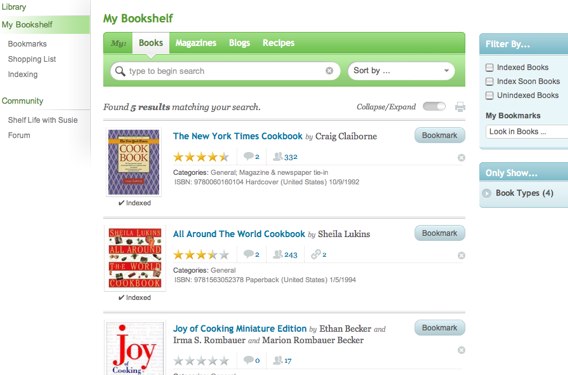
For example, under Book Types, categories like baking or meat and seafood break down into detailed and refined sub-categories. Courses filters not only among cookbooks focusing on breakfast, lunch, and dinner, but also afternoon tea, dessert, hors d’oeuvres, small plates (tapas, meze) and more.
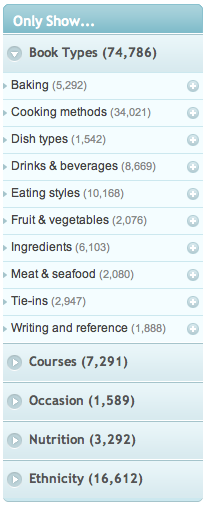
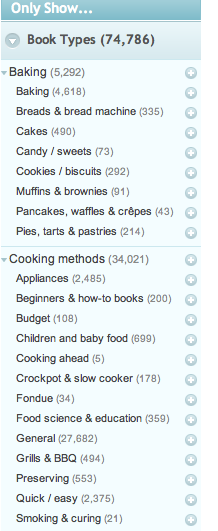
You can also select books by occasion (holidays, seasons) and nutritional focus (diabetic, gluten-free, low-fat, etc.). I was particularly impressed with the wide variety of cookbook categories by ethnicity and region, as one does not usually see Welsh, Norwegian or Sri Lanken cooking given so much attention.
There’s also an “Only Show” filter, which allows you to limit searching to very specific parameters. Let’s say you’re allergic to fennel or graham crackers, or your spouse gets very cranky if you cook with garlic; the “Only Show” filter can be set to show only recipes with or without specified ingredients.
In addition to filtering, you may sort selections alphabetically by author or title, publication date or the date it was indexed or added to the library. You can even search by popularity (among the Eat Your Books members).
If you see a book that you don’t own, you can click a link to buy it — though only from the U.S. and UK branches of Amazon and The Book Depository — there are no direct links for Canadian buyers.
Eat Your Books also includes a list of specific issues of English-language cooking magazines, including American periodicals like Cook’s Illustrated, Food and Wine, Bon Appetit, Saveur, Cooking Light and Gourmet, as well as magazines from Australia and the UK.
You may also add cooking and food-related blogs to your virtual bookshelf. Sure, you could just bookmark favorite recipes from blogs you read, but if you’re trying to organize all of your cooking information in one database, this is a nifty solution.
The rest of the steps are all optional, depending upon your needs and how you want Eat Your Books to serve you. (Hee. “Serve you.” Get it? Perhaps all this talk of food is making Paper Doll a bit giddy.)
3) Search the books and recipes on your virtual shelf by ingredients, recipe type, ethnicity, occasion, course or nutritional restrictions.
4) Tag and organize your cookbooks and recipes.
Eat Your Books’ bookmarking system lets you tag individual recipes and whole books with key words so that your searches of your own bookshelf can be more refined. For example, you can tag recipes for menu planning, such as for 4th of July picnics or for each of your children’s favorite birthday meals. You might make a “snowy day” list of recipes to try on long, boring winter afternoons, or tag recipes by ingredients so that when all that summer zucchini comes out of the garden, you’ll be well prepared. You can even tag by location, in case you have your cookbooks split between your family home and your snowbird condo in Boca Raton!
5) Create a shopping list.
Add recipes to an online shopping list and Eat Your Books will create a printable list of ingredients for each recipe in a menu. This could be a real time saver if your grocery shopping varies widely from week to week based on each new meal plan. It’s definitely a boon for party planning if you have the ingredients for every recipe on one pre-printed shopping list.
6) Talk amongst yourselves! (C’mon, do it with the Cawfee Talk accent!)
Of course, it wouldn’t be the 21st century if the site didn’t have a social networking aspect. Like GoodReads, which allows members to share their comments about books, Eat Your Books lets you share ratings and comments about the recipes and cookbooks on your shelves and see what others have to say.
THE TEAM BEHIND EAT YOUR BOOKS
The site was founded by sisters who hail from the UK: Jane Kelly, now in Massachusetts, and Fiona Nugent, residing in Auckland, New Zealand. Between the two of them, they’re able to add round-the-clock customer service and support. Susie Chang reviews cookbooks for the site and writes the author narratives for Eat Your Books’ monthly newsletter.
The intrepid team spent a year in development, then fully launched the site in December 2010. Throughout 2011, they’ve continued to add to Eat Your Book’s features based on results from surveying members about what they most want to see. Soon, Eat Your Books will add personal recipe archiving — allowing members to add their own clippings, family recipes and online recipes that the site itself hasn’t indexed.
AN IMPORTANT NOTE ABOUT INDEXING
Eat Your Books does NOT display recipes; rather, it indexes the recipes within cookbooks so that you can search the database to figure out which of your books you want to select. Thus, it may not be suitable for people who have only a half dozen cookbooks, or people (like Paper Doll) who own a few dozen cookbooks kept neatly tucked away, and like to read them, but don’t actually cook. (To Paper Mommy‘s chagrin.)
Nor is this for someone who is perfectly happy aimlessly pulling books off the household shelves and flipping through titles as much to discover something new as to find the recipe sought.
My guess is that Eat Your Books makes the most sense for busy cooks who don’t have time to search through their cookbook shelves to find which recipe for kugel, lutefisk, or paneer tikka masala is the one that was so perfect last time, or which cookbook had the bundt cake or blueberry smoothie recipe that everyone cheered. It might also be a stellar tool for the professional or semi-professional chef or caterer whose own cookbook collection needs to be expansive but may be too large to manually search.
SHOPPING LIST
A few kinks still need to be worked out before Eat Your Books can get a full Paper Doll seal of approval. I’d add the following to my personal Eat Your Books shopping list.
First, more books need to be indexed. Apparently only about 2400 7,368 books have already been indexed. Still, that covers 1,500,000 recipes, with more indexed each day. [Editor’s note: This post was published in 2011. As of late 2017, the total number of cookbooks indexed has tripled.] They focus on the most popular books and magazines reported owned by members, and you can send a request for any title to be indexed or index it yourself.
Second, the search engine needs to be a little more intuitive, especially for those of us used to Google’s gentle “Did you mean…?” prompts and Amazon’s great guesses at the intent behind typos. When I mistakenly searched for Silver Palate cookbook co-author Julie Rosso instead of Julee Rosso, Eat Your Books yielded zero results.
Third, when you’re searching for books to list on your virtual shelf, you can only see 25 at a time. You know how some online stores let you change from a default of 10 or 25 items on a screen to “Show all” or at least “Show 100”? Eat Your Books needs that. The How To page offers a makeshift solution that involves a little too much math and URL fiddling — something Eat Your Books admits is not particularly user-friendly. They’re working on it.
Finally, to borrow a kitchen metaphor, the cupboard is a bit bare in the blog section. They’ve got a few standouts, like Smitten Kitchen, but I’d love to see a much broader, more flavorful selection. Perhaps Eat My Books will pick up the blogs of my organizing peeps, like Simplifried from Unclutterer‘s Erin Doland and Spoon and Saucer from SoHo Solutionist‘s Brandie Kajino, as well as my marketing guru Biana Babinsky’s Tasty Galaxy. (Hey, Paper Mommy, who needs to cook when I’ve got friends who do it so well?)
These issues aside, Eat Your Books seems to do something that I haven’t seen elsewhere online. Founders Jane Kelly and Fiona Nugent have developed a novel approach to organizing the clutter of recipes (even those tidily stored in cookbooks) that so many home and professional cooks have. Yum.
Paper Doll Asks: Do You Want More Money to “Occupy” Your Bank Account?
Are you part of the 99%?
No, this post isn’t a political diatribe about the pros or cons of the Occupy Wall Street movement. The movement Paper Doll cares about is the desirable movement of clutter out of your spaces and the unwanted movement of money out of your bank accounts. If you’re like most people, maybe even up to 99% of people, chances are good that your bank account is being eaten up by fees. That’s definitely not the way to keep your finances organized!
You see, recent consumer legislation, like the CARD Act and the Dodds-Frank Wall Street Reform and Consumer Protection Act, was designed to keep credit card companies and banks from levying huge, hidden and unfair fees. In the abstract, this was a good thing.
SWIPING AT CONSUMERS
One provision of the Dodds-Frank Act was the Durbin Amendment, which required reduction of the “swipe fee” that banks charge merchants when customers use their debit cards to make purchases. The average fee had been 44 cents per transaction; effective October 1, the maximum fee for merchants is now 21 cents. Merchants’ fees to banks (set by Visa and MasterCard) had exceeded the actual cost of processing a credit card transaction by a whopping 400%.
This provision is expected to cost the banking industry more than $6 billion annually. However, although the legislation limits how much merchants can be charged, it doesn’t say anything at all about what consumers can be charged.
If you tell the banks, “Hey, you can’t surreptitiously and confusingly sneak hard-earned money from the accounts of your customers [per the CARD Act]!” the banks will not say, “Oh, gee, sorry.” They’ll say, “Okeydokey, we’ll levy other fees and make them more visible.” Transparency is great. More fees? Not so much.
So, the banking industry, led by Bank of America, started finding loopholes and inventing new fees, including a $5 charge to consumers in any month in which they use their debit cards for purchases. (Using debit cards at ATMs would not incur any fees.) SunTrust also added the $5 fee, while Regions Bank had added a $4/month fee, and Wells Fargo and JP Morgan Chase had been conducting state-by-state tests of $3/month fees. Banking industry experts imagined that there might be some push-back on these fees, but seemed to anticipate that consumers would just turn to their credit cards for a larger percentage of their purchases, which in many cases would also mean more money in banks’ pockets.
FEE-A-PALOOZA!
It’s not just swipe fees.
Just two years ago, almost 80% of non-interest bearing checking accounts were free; today, slightly less than half are free. For some accounts, Bank of America is charging close to $9/month if account holders make deposits or withdrawals inside the bank at a teller counter. PNC charges upwards of $3 to call a representative and request a transfer of funds.
More banks are also charging for paper statements. Granted, going paperless is better for the environment, and by lowering paper and mailing costs, it’s better for your bank’s bottom line (though you can be sure the savings won’t be passed along to the consumer).
But there are problems with paperless statements. For example, if you leave your bank for another, you will no longer have access to your closed account’s history. Even if you stay with your bank, some institutions will only let you access statements for a limited period of time, anywhere from six to eighteen months. While, in most cases, that’s satisfactory, if your personal or professional situation requires that you maintain bank records longer, you’ll have to print your own statement copies.
Do you send a little money to Grandma in the old country or your college kid doing a semester abroad? Wells Fargo has just raised its foreign money transfer fee by 125%, from $20 per transfer to $45!
And then there are increasing fees for not maintaining a minimum balance, for over-drafting an account, for using a non-network ATM, for calling to ask a question about your account, for counting and depositing coins, and for monthly service fees for the great and exulted honor of holding an account at the bank.
BACKLASH AND BACKPEDALING
It’s only been a month since Bank of America’s announcement of monthly swipe fees, but response was swift, widespread and loud. From late-night comics to water cooler chat to, yes, the Occupy Wall Street people, the distaste for fees to access one’s own money has been palpable. Consumers are outraged.
But what a difference a day makes!
Just since Friday, some banks have done a Netflix-like mea culpa and reversed themselves. For example, JP Morgan Chase and Wells Fargo have announced they will no longer test or apply their swipe fees. In the time I’ve been writing this very post, SunTrust, which had been quietly charging some customers the $5/month fee since June, announced it would eliminate the fee as of November 2, and would refund any fees customers had been charged.
The cheese stands alone.
As of this writing, Bank of America, which had drawn much of the public ire, is now the only bank not to have reversed its swipe fees. However, representatives of the bank announced Friday that they will not apply the fee to customers who have a monthly direct deposit into their accounts. This is comforting news to employees and anyone receiving direct deposit of a government check, like Social Security. For self-employed individuals (like Paper Doll) and others who do not receive direct deposit, this is no boon.
Of course, this backpedaling comes as a result of the backlash over the swipe fee, but multiple other fees remain in place.
THE MOVEMENT

The Move Your Money Project is one of many non-profit movements encouraging consumers to limit the power of large financial institutions and help support a “more sane, stable and localized” banking system. Consumer’s Union, publisher of Consumer Reports, operates the DefendYourDollars.org website to encourage activism by way of an online, personalized, letter-writing protest campaign.
Bank Transfer Day, set for November 5, is a grassroots initiative. The goal is two-fold, to lessen the bite big banks are taking out of your bank accounts and to communicate dissatisfaction with the onslaught of fees, which many see as corporate greed at a time when so many Americans are struggling financially. It requires no letter writing campaigns, no demonstrating in the streets, and no ability to write a protest sign with proper spelling and grammar.
Bank Transfer Day espouses one simple act. Take your money out of a bank that charges you fees that you find unreasonable, and move to an account at a more acceptable financial institution.
It’s not entirely painless if you’ve got a busy schedule, and you won’t be able to move all your money and actually close your old account until all of your checks have cleared and you’ve changed your automatic transfers and payments. But it will ensure that you get to keep more of your money.
Saturday is the big day, but consumers have already started an exodus from big banks and towards alternatives, like credit unions. Indeed, over the weekend, various media outlets reported that credit unions, on the whole, are seeing a 30% uptick in applications, and some credit unions have doubled their membership ranks in just the last five weeks.
HOW TO MOVE YOUR MONEY
1) Evaluate your situation. Go to your bank’s website and review the schedule of fees. Is it acceptable to you? Are the fees onerous? What is the fee system likely to cost you over the course of a year? For example, a $5/month swipe fee means $60 each year.
2) Identify your needs. Carefully consider what features you need in a financial institution:
- An interest-bearing account?
- A traditional brick-and-mortar bank or an internet-based bank?
- Free email or text alerts regarding account activity?
- Lots of local ATMS?
- Free or refunded out-of-network ATM withdrawals?
- Free or discounted printing of checks and deposit slips?
3) Research alternatives. Before you consider closing your “big bank” account, find the right solution for your needs. To start, take a look at:

Find A Better Bank lets you input the features you’re seeking in a bank and offers you a sortable list of those that meet your criteria.

BankRate has an excellent, searchable database of financial institutions, though it provides fewer search options than Find A Better Bank.
Once you have a few contenders, be sure to request a copy of their schedules of fees or search for them online. Also, make sure that any alternative you consider is FDIC-insured.
Realize that you have multiple alternatives to big banks:
Credit Unions are not designed to make a profit, so they are generally able to offer low-fee and no-fee accounts. While there are still restrictions on eligibility, these restrictions have generally been loosened in recent years. For example, Affinity Plus Credit Union, behind the pithy Ditch Your Bank campaign, opens membership to almost all Minnesota residents.
Find A Credit Union can help you locate credit unions near you in the United States. In Canada, use Credit Union Central of Canada.
Online banks are great because they tend to have very few fees, and those they do have are low. They’re able to do this because they don’t have to pay for the upkeep on physical buildings or employees to staff them. However, it can be inconvenient to deposit checks or make withdrawals via non-online transfers. In addition, speed can be a factor. With ING, for example, it usually takes two days to transfer funds to a non-ING account.
Community banks are small, local or regional banks. Because they lack the heavy infrastructure, mammoth advertising budgets and multi-million dollar golden parachutes for their executives, they can afford to be more customer-centered, charge lower fees and deliver a more personal level of service.
(Note: Paper Doll does not endorse any specific financial institution.)
4) Make lists. Figure out whom you’ll need to contact to change information and keep your finances organized and running smoothly. Include the following:
- Direct Deposits — your employer, federal and state government agencies, trusts, etc. [Call 800-772-1213 to change Social Security direct deposit account information.]
- Automatic Payments (and the dates for which they are set) — mortgage payments, monthly bills, credit card payments, etc.
- Automatic Transfers (and the dates for which they are set)
- Pre-scheduled payments and/or transfers
5) Open your new account with a small deposit and sign up for online bill-pay services.
6) Transfer some funds from the old account to the new one. Be sure to keep enough money in the old account to cover payments, transfers and fees so that you do not overdraw your account or dip below a required minimum balance.
7) Notify all parties associated with your lists from step #3 regarding your new routing and account numbers. Verify the accuracy of all the data you provide.
8) Watch your accounts carefully. Check off all transactions through the old account and keep an eye on your new account’s online dashboard to make sure your transactions are being properly processed.
9) Close your old account only when you are certain everything is now being processed through the new one. Be sure to get written confirmation that your account has been closed.
Organizing involves active decision-making. When you cede those decisions to others, particularly to institutions that don’t have your financial interests at heart, you don’t just lose control. You lose money. Organize your financial accounts so that they serve your needs. “Occupy” a position of leadership over your own money!
Paper Doll Goes on a Field Trip: SMEAD
I was never much for field trips. The Williamsville, NY school district had a penchant for taking us on field trips to farms. I guess they figured that suburban kids had a strong need to see silos and cows. I visited Tifft Farms Nature Preserve so many times in elementary school that I could probably lead a workshop on the proper method of tapping maple syrup in the rain. (As room mother, Paper Mommy came on a lot of these field trips. One senses she, too, was not entirely enamored of the process.)
On Friday, however, I went on a field trip that was a little more in line with Paper Doll sensibilities. I drove down to Atlanta, and then my colleagues, Michelle Grey and Laura Ray, and I carpooled to continue the journey to Locust Grove, GA (population: 5402) to visit Smead.

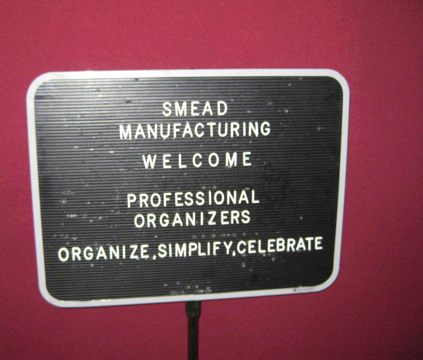
Our chapter members were made to feel at ease immediately. We were welcomed
THE LESSON PLAN
Customer Sales Coordinator Jenae Brown offered up a PowerPoint presentation on Smead’s history and products. Most of us were already Smead devotees, so we were familiar with a bit of the history. We knew Smead:
- was founded in 1906 when Charles Smead created a “bandless file” for safely filing documents

- has been a woman-owned company for more than 50 years
- began producing all paper products with recycled materials 21 years ago, and has many products made of 100% post-consumer recycled materials
- makes 4999 products for organizing paper and information
We were, however, surprised to learn that Smead had an entire custom-made products division. Not only can Smead design customized printing and/or labeling, unique color options and specialized positioning of fasteners, but these options aren’t limited to big businesses with big budgets and the ability to purchase in big lots. In most cases, the minimum quantity requirement is for only 500 items (per color and/or tab position)! Your small business, non-profit, alumni event committee (or whatever) could create unique, customized folders, portfolios, or binder covers for really reasonable prices.
Speaking of customizing, all of our NAPO field trip attendees were intrigued by Smead’s new online Folder Designer. Start by picking the document size (letter or legal) and tab style (top tab — what we think of as a typical file folder — or end tab, like what you’d see in a dentist’s or doctor’s office).
Next, pick your materials. You have a choice of:
- Manila: 11 pt., 14 pt., 18 pt., 100% recycled 11 pt., Antimicrobial Protection 11 pt. or Watershed/Cutless 11 pt. (Because a file folder paper cut REALLY hurts!)
- Kraft: 11 pt. or 17 pt.
- Color: 11 pt., 14 pt., 18 pt. or Watershed/Cutless 11 pt.
- Pressboard: Types 1, 2 or 3
The folder color choices include grey, purple, goldenrod, yellow, blue, orange, green, lavender, white, red and pink (except for the Watershed/Cutless folders, which come in only manila, yellow, green, blue and red).

The pressboard folder color options are more visually subdued but have some intriguing names, like Pacific Blue, Executive Red and a pale hospital green they call “Gopher”.
The next choice regards expansion. You can choose between regular folders with simple scoring on the bottom to expand the folders for larger interior contents or W-fold, enabling a more heavy-duty box-bottom style folder.
Now you get to choose your tabbing! (Can you all imagine Paper Doll rubbing her hands together, Mr. Burns-style, in twitterpated glee over all of these options?)
We tend to think of file folders coming in two styles: 1/3 cut or 1/5 cut (with those tiny tabs requiring tiny labels). Within either of these two styles, you can specify that you only want, for example, left 1/3 cut tabs, or right-of-center 1/5 cut tabs. But there are other tab styles as well, including straight cut (where the tab runs the entire width of the folder), 1/2 cut, and two different styles of 2/5 cut, available at right-of-center or flush right. There are also Alpha Z file folder tabs, which run 8 inches, covering two-thirds of the folder top.
The next step involves selecting whether you want single or two-ply folders, and whether you want a fastener (to allow you to attach papers), in what position,
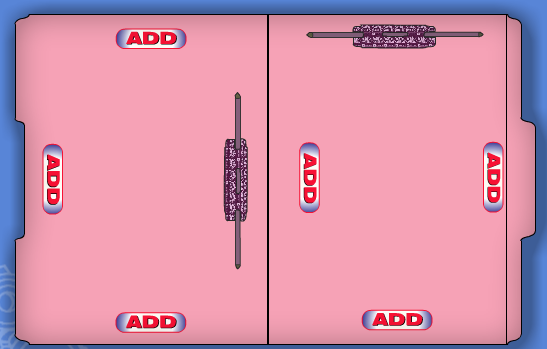
and of what type, including bonded, embedded, U-style or the Safe-Shield version we’ve reviewed previously.
If this weren’t already a mind-boggling array of customization options worthy of the world’s niftiest ice cream parlor, the Folder Designer also lets one select the number and placement of interior folder dividers and upload any graphics before arranging for a vendor quote for the desired specifications. Whoa!
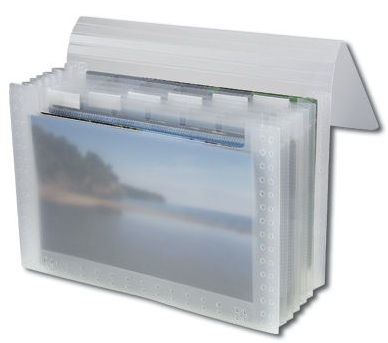
I’d like to think we pleased Ms. Brown and her colleagues with our enthusiasm, though a discussion of individual products led to a rather rambunctious free-for-all with otherwise calm and staid professional organizers offering up their own suggestions for changes and new product lines. I think we fancied ourselves Smead’s newly appointed adjunct Research & Development team.
THE TOUR
As a paper geek who finds the annual NAPO Conference and Expo to be akin to attending ComicCon, I’d say visiting Smead to see the workings of the factory and warehouse is a bit like going behind the scenes on a Spielberg film set. The only factories I’ve ever visited have been those producing ice cream (Ben & Jerry‘s, Mayfield). Our friends at Smead did not require us to wear hairnets, but as we entered the factory floor, we did have to wear ear plugs. Also, in order to protect Smead’s proprietary methods, we were not allowed to take photographs on the factory floor.
My colleagues and I joked that if one had never visited a factory (or even if one had), the whole experience seemed very much like the opening sequence of Laverne & Shirley, with conveyor belts moving materials from place to place.

The Locust Grove Smead plant employs 178 individuals, the vast majority of whom work on the factory floor. I think we were all surprised to see, even in this age of advanced mechanization, how essential the employees are to the manufacturing process. We learned that Smead follows Lean production practices, an organized (and organizing) philosophy focusing on efficiency, but this efficiency was obviously not at the expense of the dignity or individuality of the employees. In the warehouse, we saw enormous two-story rack systems emblazoned with signs noting that “Row 17 is proudly overseen by…” and various employees’ names.
I think many of us were also surprised to see and learn exactly how the absolutely gigantic rolls of paper (which, when stacked, made us all feel like we were actually behind the scenes at a Land of the Giants remake) became the file folders, hanging folders and other office supplies we use every day.
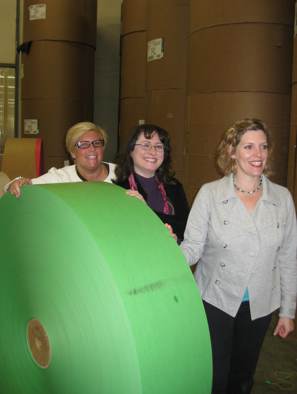
See those towers behind us? Those are multiple rolls of (wrapped) file folder material.

Our tour guide, Distribution Manager David Wilson (pictured below, with your intrepid blogger),

showed us how just one machine is able to punch out left-, center- and right-tabbed manila and colored folders without being reset, which he explained was a significant change from when he was first on the floor 33 years ago, and the machine had to be reset after each folder style was cut.
We also learned how vast wheels of colored plastic about the width of a grocery store receipt get heated, folded and cut to turn into the hanging file folder tabs we know so well, and got to see first-hand how those fasteners aren’t just glued onto folders, but actually “punched” into and embedded in the folder material.
THE GOODY BAG
All of our chapter’s field trip attendees got a goody bag of Smead products. Our tour liaison, Regional Sales Director David Warwick, engaged us in discussion of the attributes of these items, most of which have been reviewed previously on the Paper Doll blog:
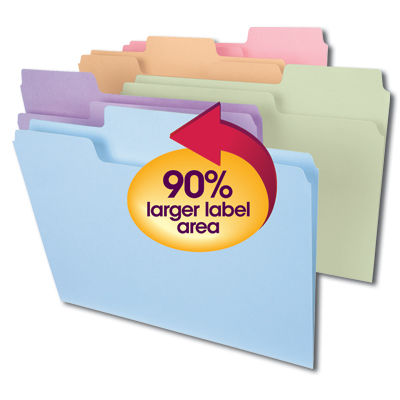
- SuperTab file folders with oversized tabs
- FasTab Hanging Folders with build-in tabs

- Tuff Hanging Folders with Easy Slide Tab
We each also received a sample pink file folder from Smead’s line of File for the Cure in support of breast cancer research, a pressboard classification folder with dividers and SafeShield fasteners
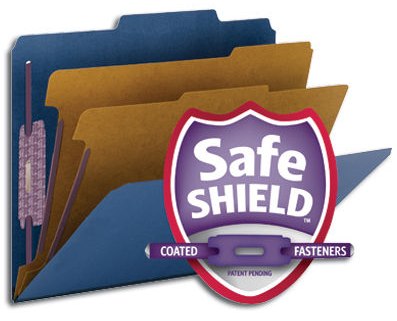
and a spiffy Secure Pocket with Easy Grip 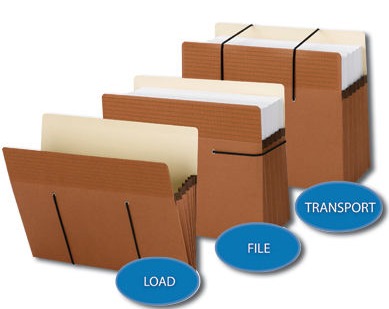 like the one I reviewed last April. (Scroll way down.)
Our goody bags also included some items in Smead’s newest line of attractive and functional presentation products, which will be the subject of an upcoming presentation-themed post.
SAYING GOODBYE
Before we shuffled off to have a delicious lunch at Locust Grove’s famed The French Market Tavern and Grille, we took a moment to get a snapshot of our Smead hosts

(From left: Jenae Brown, David Wilson, NAPO-GA President Sherry Lee Denton, Calvin Ruffin, David Warwick, Donald Plummer, Danny Beheler, Eric Thompson)
No cows. No silos. And no tapping maple syrup in the rain. It was a great field trip!
Now go ahead and sing the Laverne & Shirley theme song…you know you’ve been wanting to do it, and as far as Paper Doll can tell, Smead doesn’t have it’s own theme song yet!
One…two…three…four…shlemiel, shlemazel…Hasenpfeffer Incorporated!



Follow Me