Paper Doll
Going Back to the Beginning: “Maintenance, or How Eyeliner Is Like the Phone Bill”
[In October, 2007, I embarked on the original Paper Doll blog with a post setting out what I planned to do. It seemed sensible to go back to the beginning to get a sense of where we’ve been, and where the blog will be heading. Ms. Ephron may be gone, but she’s definitely not forgotten.]
I’m reading I Feel Bad About My Neck by the brilliant Nora Ephron, famed wit and screenwriter of my favorite movie, When Harry Met Sally. Ephron writes:
Maintenance is what you have to do just so you can walk out the door knowing that if you go to the market and bump into a guy who once rejected you, you won’t have to hide behind a stack of canned food. I don’t mean to be too literal about this. There are a couple of old boyfriends whom I always worry about bumping into, but there’s no chance–if I ever did–that I would recognize either of them…But the point is that I still think about them every time I’m tempted to leave the house without eyeliner.
Organizing your papers is basic life maintenance — very much like the kind of beauty maintenance Ephron is talking about, and every bit as important as looking FABULOUS to the former romantic partner who once foolishly cast you aside. Think of maintaining your papers on a regular basis as an insurance policy against losing money, time, productivity, serenity and self-esteem. Ephron imagines the ensuing result of skipping maintenance; to her, going out sans eyeliner is the 21st century variation on your mother’s warning to wear clean underwear in case you are in an accident.
So paper maintenance is an insurance policy, only instead of spending money betting against yourself in hopes you’ll never have to collect, you invest your time and effort in creating a workable system for handling incoming papers, archiving reference items, acting on the urgent or important tasks the papers represent and purging whatever is unnecessary. It sounds like a lot of work, but once your system is in place, paper maintenance is easier than applying eyeliner.
A big part of paper maintenance is knowing what papers you have and giving them permanent homes. First, there are your essential legal, medical and financial VIPs (Very Important Papers) like birth certificates, car titles or immunization records. Failing to keep these in a safe place from which they can be quickly and easily accessed will detract from your security and life satisfaction in much the same way running into an old beau while dressed in too-tight, tomato-sauce-spotted sweats can shrink your self-esteem to the size of a dust particle.
Perhaps you imagine that if you ever lose your passport in the sedimentary rock-like layers of your desk, it’s no big deal, because you can always get a new one. However, due to new regulations requiring that American citizens have passports even to visit Canada, the Department of State has been overwhelmed. It used to take weeks to get a new passport or renew one; now, it’s taking two and a half months or more. And lest you think you won’t mind paying the cost to expedite delivery, it’s no longer a small fee. To get your passport expedited (that is, to get it in the amount of time it used to take without a rush job) will cost you $60, plus the cost of expedited delivery service to send it to the passport office and then to receive your passport once it’s processed. This is on top of the $97 in fees you’re already paying to get the passport. Do you want to spend weeks worried that your family vacation or vital business trip is in jeopardy just because you’ve let your papers think they’re allowed to play Hide and Seek?
A worst-case scenario for failing to effectively maintain the papers in your life is identity theft. Even with all the hubbub over Internet (in)security, the most popular source of stolen personal information is still dumpster-diving. If you throw out the wrong documents and compound it by failing to shred sensitive data, or even if you just carry your Social Security card in your wallet instead of filing it safely away, you open yourself to being one of the 9.3 million Americans victimized by identity theft each year.
In most cases, thieves just use your credit card number, so keeping organized financial records and quickly alerting the credit card company means minimal financial loss. Maintaining your paper records keeps you solvent and lets you resolve the problem quickly, inexpensively and relatively painlessly. But in the more extreme cases, identity thieves can create an alternative version of you from purloined information and can ruin your credit rating, keep you from getting credit, insurance and jobs, and can even lead to your arrest if someone commits a felony using your forged identity. That certainly puts being seen by an ex while wearing your laundry-day outfit in perspective!
Papers document our lives and give us access to everything we want and deserve. Easily accessed proof of auto registration and insurance may be the difference between that traffic cop being a darling or a devil. Carefully maintained financial records keep the taxman at bay. Quickly-found immunization records mean children can attend school; conversely, lost permission slips don’t just mean your kids miss out on a trip to see how maple sugar gets made – they’ll miss out on the in-jokes that will be a part of in-group history. Not to place a guilt trip, but your paper maintenance skills will impact your children’s permanent record.
There are papers you want and need (legal, financial, medical); papers you want, but don’t need (old letters, school transcripts that prove you once knew why a participle shouldn’t dangle); papers you need but don’t want (bills that need to be paid, reminders for an upcoming dental appointment); and papers you don’t need and don’t want, but haven’t yet tossed (expired coupons, twenty-year-old notes on mitosis or Descartes).
Maintaining the papers of your life may not be fun, and unless you’re a certain breed of professional organizer, it may not be entertaining. But it is essential. That’s why, over the coming blog posts, Paper Doll will be sharing tips to make it easy to keep the unwanted paper away and easier to determine where and how to maintain the rest of the documentary evidence of your time on the planet.
I don’t guarantee I’ll be as witty as Nora Ephron. But like Ephron’s eyeliner, your mother’s clean underwear and your auto insurance policy, paper maintenance means your life will run more smoothly, and whatever catastrophes you encounter will be less catastrophic. And, if I might steal a line from Ephron’s movie, no identity thief will be able to say “I’ll have what she’s having.”
Paper Doll Returns…
After a three month absence, I’m happy to report that the Paper Doll blog is rising from the ashes. I’ll pause while North America unites in an organized cheer!
As many of you have noted in your emails and social media comments, the disappearance was, indeed, abrupt. The company website OnlineOrganizing.com for which I blogged from 2007 through the first week of 2013 unexpectedly went…byebye. Vendors, bloggers and customers were brought up short by the surprise and were given no opportunity to achieve closure or access our data. Your faithful Paper Doll waited impatiently in expectation of a quick and painless resolution. Since the next scheduled post would have appeared on January 8, 2013, I think we can agree resolution was not quick. However, thanks to a brilliant web designer, I have hopes that ramping up the blog in a new way, as well as upgrading the Best Results Organizing web site, will be (mostly) painless.
The platform on which Paper Doll used to live didn’t exactly play nicely with traditional blog platforms. On the plus side, those 5+ years of posts are completely backed up and you’ll get to see them again eventually. On the downside, my backups, though pristinely organized (but, of course!) aren’t easily integrated into the new blog. What does this mean for you readers? At least for a while, fewer background references to classic posts…and a gaping hole in the time-space continuum.
That said, having the Paper Doll blog live right here on my web site is full of advantages. No more forced blogging schedules; before, posts had to go live by Tuesday mornings at 10:30, and it was almost impossible to deliver a post on the spur of the moment. It feels pretty disorganized when you can’t be nimble and responsive! So, instead of one ridiculously long post once a week, you’ll see more digestible posts, and more often.
More importantly, the new format offers freedom to blog about a wider array of organizing subjects. Paper management is still my first love, but without any constraints or edits from The Man (who was, at various times, different women), I’ll be able to share organizing advice on everything from filing systems to time management apps, organized travel to project management, children’s organizing to helping seniors. Excitingly, we’ll finally be in the 21st century, so there will be keyword tags enabling you to search for more information on your favorite topics.
Of course, all of your favorite Paper Doll guest stars, including Paper Mommy and George Clooney, who will likely be appearing with ridiculous frequency.
Best of all, this launch of Paper Doll 2.0 comes just in time for next week’s foray to New Orleans for the National Association of Professional Organizers’ Conference and Expo.

I’m thrilled to be back and talking to you about organizing again. Please pardon the dust as we work to make this a fabulous experience for you.
Paper Doll Looks At the Big Picture: Wall Calendars, Planners and Reminders
As the days spin down, it’s time to be thinking about how to plan all of your events and activities for 2013. In the past, we’ve talked a lot about finding the right planner to keep your days in order. Just a year ago, in Paper Doll Marks the Calendar for a Successful 2012, I shared my tips for selecting the consummate planner system, whether paper or digital, for your needs.
A daily planner is essential for marking your appointments, tracking your tasks, and being able to make decisions as you move through your life as a mobile juggernaut! But you also need a command center that stays put — something to which everyone in the house or office can refer to avoid conflicts and misunderstandings.
If it’s just your life and there are no tiny humans in the house or fellow staffers in the office, and if you’re entirely content to flip through your planner every time you want to gauge momentum on a project, that’s great. But if you’ve got to blend information about multiple people’s obligations or need to track multiple deadlines and goals in a Big Picture way, you’ll want something highly visible and maybe a little in-your-face. Today’s post presents solutions can do that.
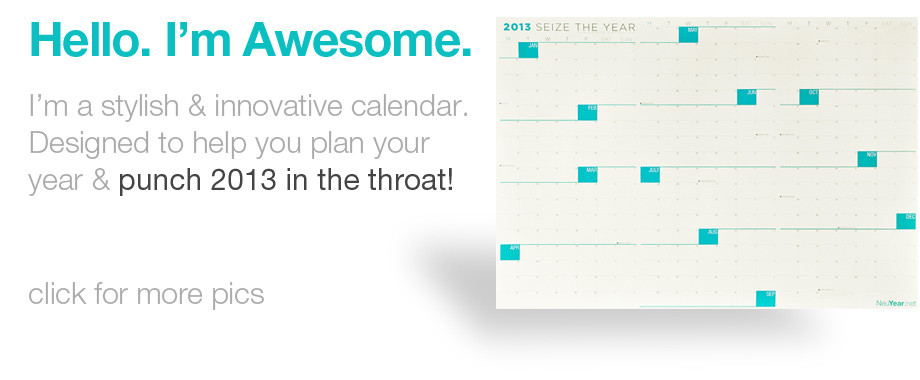
NeuYear‘s Seize the Year 2013 has a novel way of showing you the entire year at a glance. This product, begun on the crowdsource-invention leader, Kickstarter, recognizes that there’s a mental roadblock put up when full year calendars only show you separate months, usually in three rows of four columns each. The problem? When we plan our lives, we tend to think in weeks, not months, so seeing three days of a week on one month’s block and four on another tends to fiddle with our brains.
We see this in monthly planner calendar pages, too, of course. That’s why, when you flip calendar pages from February to March on a Tuesday, you may be shocked to find a major deadline or important appointment happening in the first few days of the new month. Oops! With Seize the Year, you can really see the fingers-do-the-walking distance between start and end dates of projects (whether it means getting into bikini shape for that first beach day or taking your entrepreneurial venture from dream to deliverable).
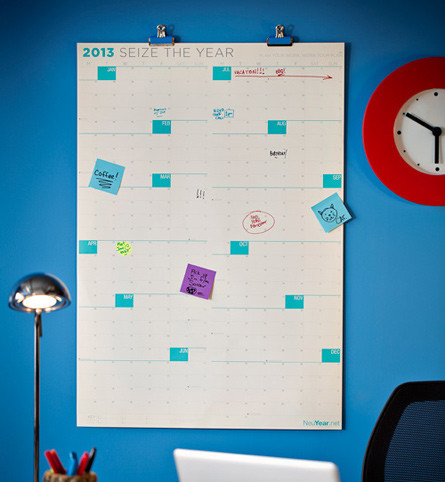
So, the Seize the Year calendar mixes obviously essential features with some nifty new ones. Yes, the calendar spans a full twelve months from January to December, and it’s laminated so you can use dry-erase markers, or sticky notes if that’s your preference. (And uncoated version is available for those who prefer permanence in their scheduling lives.)
However, the boxes are larger than you see on most full-year calendars, giving you more space to write important information so you can see it from across the office. The full 27″ x 39″ poster-size calendar has a vertical orientation on one side and is horizontally arrayed on the other, to fit your door or wall space, as it works for you. In terms of the finer details, each week is displayed with weekdays grouped together and weekends separately, to give you more clarity about what you’re doing and when. And, as NeuYear points out, dotted vertical lines reduce what they call “chart junk” so you can emphasize your deadlines.

It’s $30 at the NeuYear site, but you can choose to Tweet about it (just once) to get a code for 20% off.
If you don’t want something quite so big, but you’d still like to keep your master calendar in front of you, Mead’s Organizer line has some lovely enhancements for home or office. For instance, the Write ‘N Wipe Monthly calendar, which comes in grey or pink, adds some classy snazziness to your time management plan.
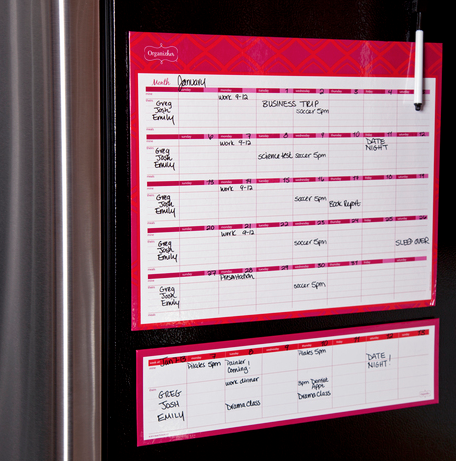
This dry-erase calendar has ample space for each day, with an informational column at the left to help you plan your own life, your kids’ activities and even your meals. For those who prefer to focus on one week at a time, there’s a Write ‘N Wipe Weekly version, too — same colors, same boxes, but it limits excess visual stimuli so you can focus on what you need to know.
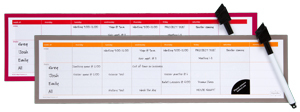
Get two…one for “this week” and one for “next week” and rotate them on the fridge as necessary.
The Organizher line also includes a Magnetic Monthly Deskpad. Be sure to check out the whole line, which includes storage pockets, a fridge “filer” and a responsibility chart that’s an offshoot of Mead’s sister company’s nifty, self-adhesive, re-positionable At-A-Glance WallMates line, about which I wrote earlier this year.
Organizher products are available exclusively at Target, generally for under $10.
Of course, there are many wonderful options for Big Picture thinking in the calendar realm, including the PlanetSafe Dry Erase Planners I profiled when I recapped the 2010 NAPO Conference and Expo. For those who like a more free-form calendaring system and the easy of being able to move colorful “sticky” task assignments at will, the 7-Column Sticky-Note Task Planner may be ideal.
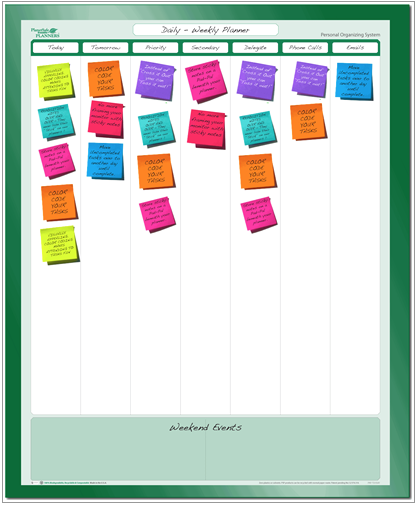
This eco-friendly planner works with dry- or wet-erase markers, is designed to work equally well with colorful sticky notes (which won’t fall off), and comes in two versions, 19″ wide by 24″ tall, or 24″ wide by 19″ tall, depending on how you roll, for $21.95.
And if you want to combine your task planning with a more traditional calendaring system, PlanetSafe has you covered with the Sticky-Note 30-day 7/5 Column option.
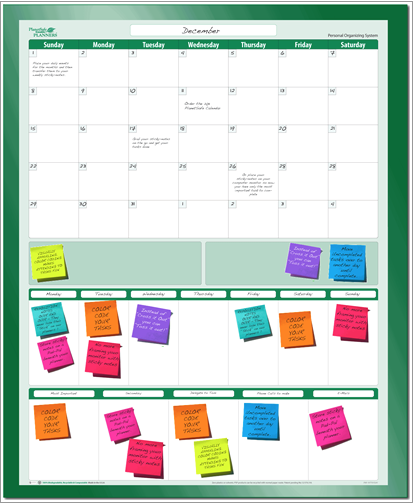
There’s a standard calendar, a place for extra notes, a section for priorities by each day of the week, and a five-section row for each of your special projects…all for $21.95.
And, if part of your plan for the coming year is to be kind to the environment, you’ll be comforted by the fact that PlanetSafe products use no petroleum based products. The entire line is made from 100% (post-consumer waste) recycled paper, organic vegetable inks and a 100% biodegradable plant-based film laminate.
Finally, although it’s not a calendar, per se, Dreamfarm’s Membo is the keenest up-on-the-wall reminder system I’ve seen in a while. Even if you know what you have to do, sometimes you’re not sure — did you do it? You can tell if the dishwasher has been run by inspecting the dishes within, but you can’t tell if someone in your house has fed the kitty by the same method. Did you take your pill? Did someone take the puppy out for a walk? How will you be certain?
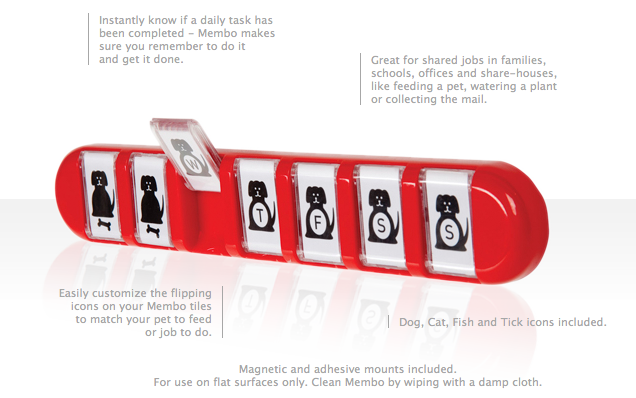
Membo is a slightly off-the-wall, on-the-wall solution for knowing whether a repetitive task has been completed. Just watch the video:
The Membo board holds tiles — on the front of each tile, you see the task to be performed. On the back, a check mark or a filled-in version of the task signifies completion. When you complete the task, simply flip the tile and everyone (including you) will be certain it was done as planned.
The Membo comes in nine yummy colors: Bubblegum, Canary Yellow, Charcoal, Dreamfarm Blue, Fire Truck, Granny Smith, Ivory, Lavender and Pumpkin:

and in four main styles: Dog, Cat, Fish and day-of-the-week “Tick” (by which they mean tick marks or check marks, not the Lyme Disease carriers)!
Purchase Membo from the Dreamfarm website for about $20, or search Dreamfarm’s Find A Store page for a location near you. Dreamfarm’s sales venues are eclectic. Here in Chattanooga, home to Paper Doll HQ, my options were the Hunter Museum gift shop or Mia Cuccina, a cookware emporium.
Finally, as the last days of the year tick down, and you start to plan your goals, your appointments and your tasks, you might want to check out Janet Barclay’s December 2012 Professional Organizing Carnival on “Reflection and Planning” at Janet Barclay’s Organized Assistant blog. (And yes, ahem, there’s a piece from Paper Doll included among the contributions.)
I hope you’ll share your favorite wall calendar and planning solutions, and I hope you’re having a lovely time counting down to the end of the year. (Or, y’know, the end of the world, if you’re Mayan.)
Paper Doll’s 2012 Holiday Gift List: A Compendium of Practical Delights
The Paper Doll 2011 Holiday Gift List was so popular, I wanted to continue the tradition. Of course, I’m still strongly in favor of the experiential gifts of education, entertainment, pampering, adventure, practicality and year-long presents — all items that require no dry-cleaning or dusting. And I still love the standout organizing-themed gift ideas on last year’s list, especially the Grid-It!, The Tote Buddy and The Card Cubby. But today’s list includes a combination of the practical and whimsical to both delight and organize your loved ones (and yourself).
1) The Snapshot Takers. The only area of our lives in which we seem to be approaching a paperless world is photos. People are so busy snapping shots and posting them to Instagram, Twitter and Facebook, that few photos seem to get printed these days. But what about those family photos dating back the eras of poodle skirts or leisure suits?
NAPO-Georgia Associate Members Jennifer “Jiffy” Page of Pixorium and Cathi Nelson of the Association of Personal Photo Organizers recently delivered a presentation on photo organizing strategies, and shared a little secret with attendees: the Flip-Pal Color Mobile Scanner!
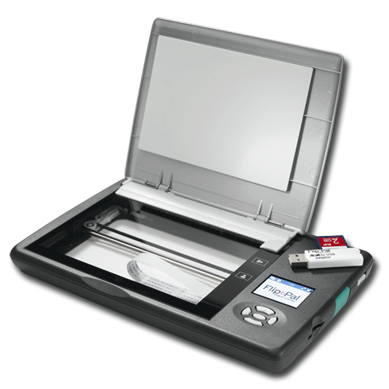
This compact, lightweight mobile scanner is perfect if you’ve got piles of photos and a desire to scan them yourself rather than ship them off to a time-saving photo-scanning service. It’s battery-powered, stores scans on an SD card and requires no computer — just view each scan on the LCD screen.
With one push of a button, scan photos of all sizes for high quality 300 and 600 dpi resolution images. For photos larger than 4″ x 6″, the Flip-Pal’s EasyStitch software lets you scan sections of photos and seamlessly “stitch” the images together. Best, if you have framed photos, you can use Flip-Pal’s patented flip-and-scan technology to scan photos in place — even on the wall. Remove the lid, flip the scanner upside down, and center it over the photo using the see-through window. Cool…and so easy!
2) The Readers In the Dark. Do you read at night but hesitate to wake your significant other with the light? Do you read on nighttime flights or need to follow along on handouts during presentations in dark classrooms or seminar rooms? Sure, an e-reader is fine for when you’re reading electronic content, but for those who prefer traditional books or who have to read documents in dark locations, those itty-bitty, teeny-tiny book lights tend to shed light unevenly and lean at precarious angles.
Enter the LightWedge book lights. Instead of shedding ambient light, this battery-powered LED reading light illuminates the whole page (and little else), creating a clear but diffuse panel of light on the printed page.
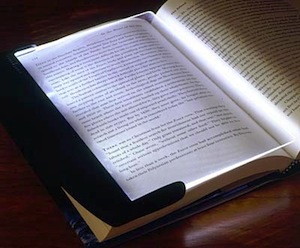
There are three versions — the Original LightWedge (for under $25), the LightWedge Paperback book light (under $25), and the LightWedge Rechargeable 2.0 (for about $32) — available in ten colors, including both opaque and translucent Black, Ocean, Petal, Seaglass and Chocolate. The original measures 6 3/4″ by 9 1/4″ inches and weighs only 8 1/2 ounces (with four AAA batteries installed). The paperback version measures 5 1/4″ x 7 1/4″ and weighs only 6 1/2 ounces (with four AAA batteries installed). Batteries aren’t included. The rechargeable version measures 6 1/2″ x 8 8/9″ and weighs almost eight ounces. The included NiMH battery can be recharged plugging the included USB-to-micro-USB charging cable into your computer.
So, instead of cluttering up the nightstand with piles of books you’ll never get to read because your honey harrumphs about the bright light at bedtime (or instead of complaining that your sweetie clutters the bedroom or keeps you from sleeping), don’t let a wedge come between you. Let the LightWedge bring you closer together.
3) The Hybrid Lovers. A few months ago, we talked about the niftiness of the Evernote Smart Notebook By Moleskine, which combines the on-the-fly creativity of the classically-inspired and colorful Moleskine notebooks with the how-did-I-ever-live-without-it utility of the Evernote suite of productivity tools. Write (or draw) it here; capture it forever, digitally, there. Your high-tech poet and your low-tech doodler will both love you for your the efficiency it brings their way.
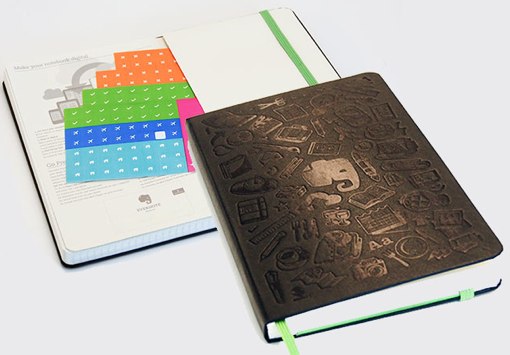
Start by selecting the format: a 240-page Large (5″ x 8 1/4″) notebook for $24.95 or the 195-page Pocket (3 1/2″ x 5 1/2″) notebook for $29.95. Both come with black hardcovers, green elastic bands and four sheets of Smart Stickers (tucked into the back pocket).Then choose your paper style: gridded like graph paper or dotted ruled paper.
Since each Evernote Smart Notebook purchase includes a complimentary three-month subscription to Evernote Premium, this is a gift that will keep on giving.
4) The Self-Improvers. Do you have someone on your gift list who really wants to stay upbeat or make a big, positive life change? Snap It Habit Changers from The Habitude know that if you want to organize change in the ways you think and live your life, you need to change the small habits.
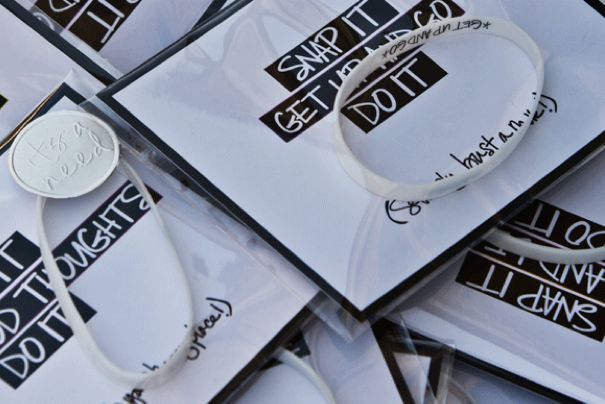
Snap It Habit Changers are bracelets, but not any old baubles. Y’know the old trick of putting a rubber band around your wrist, and when you want to smoke or start dreaming about the lover-who-done-you-wrong, you snap the band? Snap It Habit Changers go that one better. As the site says, “No more negative self-talk. No more ballyboohoo. If you don’t tame your thoughts and actions, they will for sure tame you (eww).”
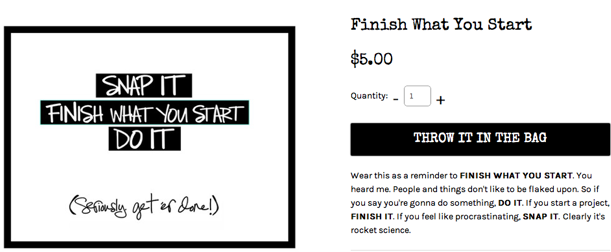
Bargain priced at $5, these rubbery bracelets have their essential messages printed on the inside, so only you (or your giftee) need know the positive, life-affirming message being reinforced. I have to admit, as a professional organizer, I’m pretty partial to the Finish What You Start version.
5) The Kidlets.
For sprightly novice readers who are starting to realize they want to display their books like the big kids, there’s Dasher!
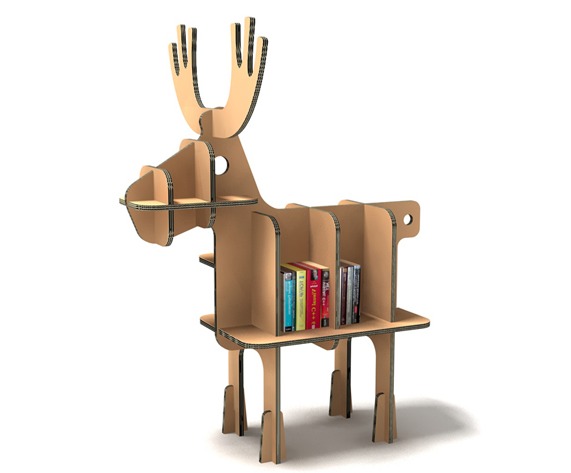
This is just one flat-packed, reinforced fiberboard charmer from the adorable children’s furniture and toy line in the Tsuchinoco Kids collection. Unfortunately, the prices are in Yen and at 14,500 (or about $175), a bit pricey. For a less expensive (if nonetheless international) option, check out the enchanting Karton Barnyard Method Ram, Ewe and Lamb collections we’ve reviewed in this past.


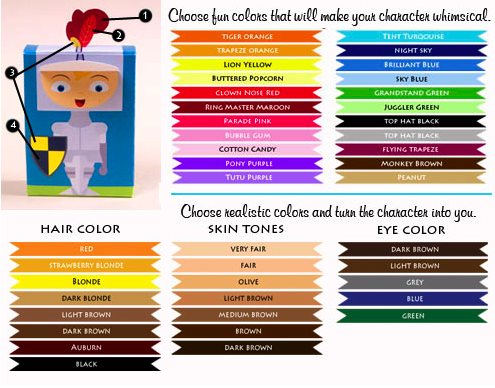
For the tiny squabbling artistes in your family who can’t help tussling over whose crayons are whose, 2012 Entrepreneur.com Indie Merchant winner Cio Prints has the solution — Custom Character Crayons! From Pretty Princess and Knight of Honor to (girl and boy) Superheroes, Prima Ballerina to Moon Martian, Mr. Roboto to kitty, puppy and T-Rex options, you’re not just creating a crayon box, but a character toy and new best buddy.

The crayons and their boxes can be customized in three ways:
- The Wrappers — Pick up to three colors (for the child’s name and stripe, the background and for any symbols) among 22 delightfully-named color options.
- The Box — Truly personalize the character selection by picking hair color, eye color, clothing colors and skin tone, to make the character reflect your child (or his or her imaginary pal).
- The Name — Put the child’s actual name, nickname or “secret identity” to make it really feel customized.
No more fights over crayons? Sounds like a gift for Mom and Dad!
For the tiniest tots who tend to scribble on every bit of paper, from vital documents to their older sibling’s homework, there are the Scribblers.
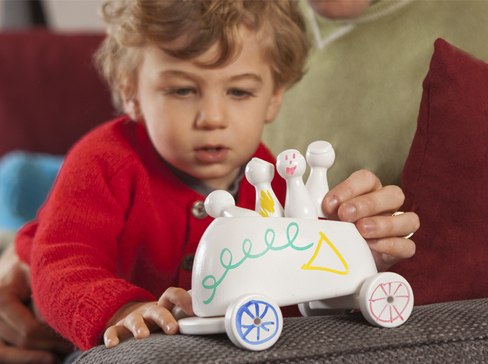
The crowdsourcing inventors at Quirky have created a write-on/wipe-off 3Dtoy for toddlers. This modular kit is bathed in a dry-erase coating, so kids can color and design their toys to their own preferences. The interchangeable pieces can be arranged into three different vehicles (car, plane or boat), and the four little people double as dry-erase markers.
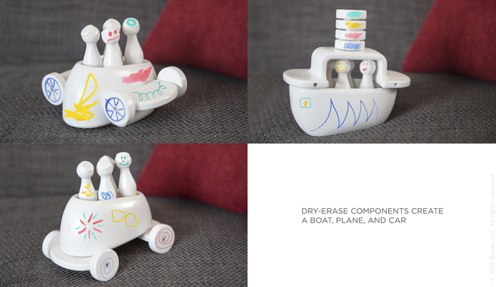
It’s not paper — think of it as pre-paper for the pre-school set. Unfortunately, it’s also pre-available, as the fine folks at Quirky are still crowdsourcing the best way to present this to the marketplace.
6) The Desk Set. Workdays in a cubical can be draining. Brighten up your worker-bee’s space with some fun, fanciful tools.
The Cork Globe from Pat Kim proves that flat is so last decade. If you want to give the world to your favorite office-dweller, consider this handmade, 10″ solid cork sphere atop a powder-coated aluminum base.
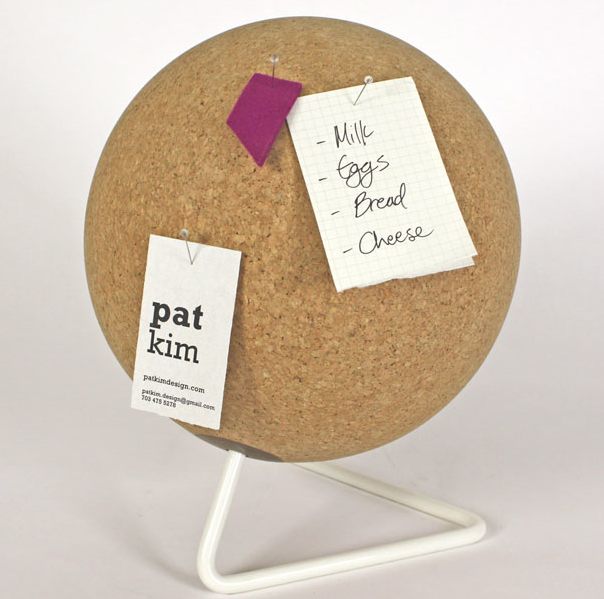
But only get this if you really do think the world of someone, because at $270, this is no mere stocking stuffer! [As of December 2013, this product is no longer listed on Kim’s design page.]
For practical style at a more delicious price, check out Office Candy’s colorful document envelopes — they’re leather!
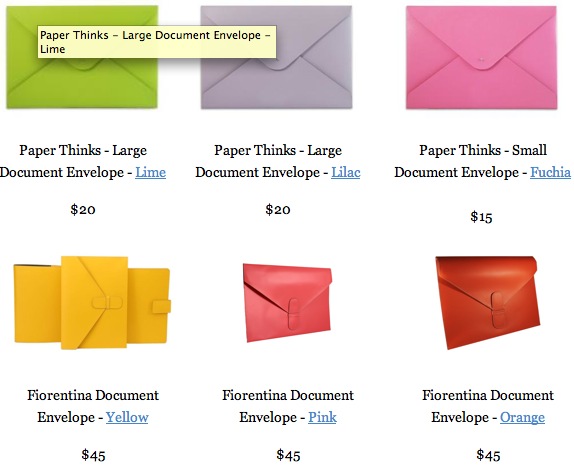
And finally, for anyone who knows and loves a web guru, check out UI Stencils’ Browser Dry-Erase Board. This 9″ x 12″ twenty-pixel grid browser template bridges the gap between brainstorming and web design with a page organizing tool that can be revised with the swipe of a dry-eraser. It’s $26.95 and no batteries or chargers are necessary!

Happy organized shopping!
Paper Doll Organizes Your Many Happy Returns
Shopping days have formal titles now. Black Friday. Cyber Monday. Grey Thursday. (That was the nickname for Thanksgiving because so many stores were open for part of the holiday.) All of those titles are marketing tools to boost retailers’ bottom lines. Depending on your purchasing style, those days either lightened your wallet or helped you stretch your holiday dollar.
I propose that what we actually need is a Return & Exchange Day (or, y’know, Week) where a significant number of the cashiers, registers and customer service departments would be given over to supplying assistance with returns and exchanges. Failing that, let’s look at some simple strategies for taking those gifts that don’t fit (your age, size or lifestyle) and exchanging them for something (financial or tangible) that’s a little more appropriate, without losing value or sanity.
KNOW THE POLICIES
Store return and exchange policies may seem similar, but each has its own twist. Some stores require a receipt for every return or exchange, while Lowe’s won’t ask for a receipt if you use a credit card or provide your phone number when you purchase by check or cash. Some retailers require you to show ID no matter how the gift was originally purchased, and others, like Best Buy, have seasonal return policies that differ from (and are more lenient than) their year-round policies.
From Kohl’s and Nordstrom, which generally let you return just about anything, anytime, to retailers that only allow exchanges of damaged items for the same (but undamaged) thing, to stores that charge restocking fees, and every variation in between, it’s important to know a store’s policy before you buy (or, in the case of gifts you’ve received, before you return or exchange).
In theory, brick-and-mortar stores should have their returns and exchange policies posted near the checkout lines, but this is not always the case. Some stores conveniently print their policies on the reverse of their receipts, but it’s not universal. You might ask a cashier, “if that doesn’t work for us, what’s your return policy?” but seventeen year-old part-time staffers probably aren’t going to have the same sense of diligence that you’d want from someone guiding your financial decision-making.
Caveat emptor. In fact, buyers, don’t just beware, but be prepared. Before you shop (or while shopping, if you’ve got the internet in your pocket), call up a store’s policy by typing the store’s name and “return policy” into your favorite search engine, and take a moment to read the fine print. Think of it as an insurance policy; two minutes now might save $200 later.
To get you started, here are links to some of the more popular stores’ return policies. Please note that many stores have different policies for returning store merchandise vs. online merchandise. For example, Coldwater Creek allows you to return catalog or online purchases at their stores, while Old Navy requires that some merchandise be returned by mail.
Clothing and Department Stores
Chico’s
Coldwater Creek
Kohl’s
Lord & Taylor
Macy’s
Nordstrom
Old Navy
Target
The Gap
Walmart
Specialty Stores
Amazon
Barnes & Noble
Best Buy
Container Store (then search “return promise”)
Toys R Us
Also, be sure to read Consumer Reports‘ 2012 Naughty or Nice List of most the beloved and despised return policies.
RETAIN THOSE RECEIPTS
Paper Doll has talked many times about receipts, from the classic Mom, Why Is There a Receipt Stuff In the Turkey? to What’s Your Receipt Receiver Style? to our recent two-part series on popular and lesser-known digital receipt management tools.
The easiest way to ensure a smooth return or exchange experience is to have the receipt handy, so as you shop this season, keep the following in mind:
1) Ask for a gift receipt before you ring up your purchases, says Professional Organizer and Professional Daily Money Manager Nanette Duffey. If you’re purchasing multiple gifts for multiple people (especially those in different households), request a gift receipt for each item.
Not all stores provide gift receipts, but many do. Mark the name of the person to whom you’re giving the gift on the gift receipt so you know what’s what. (Note: gift receipts generally don’t have the prices on them, so you’re safe tucking them in with whatever you give to the adults on your list. For kids, you might want to hold onto the gift receipts until you can give them to their parents.)
2) Save your holiday receipts for anything returnable. Consider keeping these receipts separate from the receipts you normally save for budgeting purposes, tax deductions or “big ticket” personal purchases.
A few #10 business envelopes or a Smead Tagalong Organizer
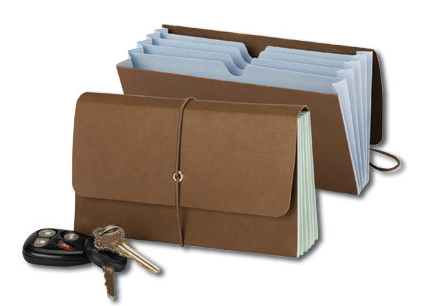
will help you divide up receipts for gifts you bought for your immediate family, your partner’s side of the family, friends, and service providers so that you can find the receipts more easily when necessary.
3) Take note of the return deadlines. Typical policies for returns or exchanges with receipts can be anywhere from 30 to 90 days, with seasonal extensions common. When you get home from shopping, grab your calendar and note the return deadlines on the receipts and gift receipts.
Next, mark your calendar for a week or so before the earliest deadline and schedule a return day for the items you bought for your family. (Later on, when you receive gifts with gift receipts, add them to the pile.) If you’re an efficient holiday bargain shopper, you can probably get it all done in one morning and then reward yourself with brunch. (Mmmmm. Waffles!)
GET A GURU
Paper Doll realizes that not everyone is quite so organized (yet) as to keep track of their return and exchange deadlines on their calendars. But this is one of those times where technology comes to the rescue.

Return Guru is a free app that keeps track of your purchases and returns for you. Just use your iPhone or Windows phone to snap a photo of your receipt, and the app will remind you of upcoming return due dates. Snazzy!
- Sign up for a free account at www.ReturnGuru.com.
- Snap a photo of your receipt or email online receipts to receipts@ReturnGuru.com.
- Receive timely reminders for each thing you purchase according to each individual store’s return policies.
- Skedaddle to the store to return or exchange what you don’t want for what better suits you.
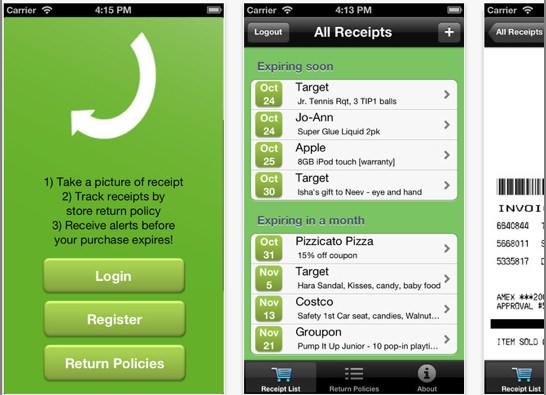
Receipt Guru even has a detailed and handy list of store policies rated by the ease of making a return or exchange. Sort by store name, ease rating, return period, receipt required or policy details. Nordstrom scores a perfect 100%, while Sears, Gamestop and Ross all score failing marks. Tsk.
RETURN/EXCHANGE/RELAX
To make the return process as stress-free as possible, consider these tips:
If you plan to exchange rather than merely return an item, do so as early in the season as possible to avail yourself of the widest array of merchandise.
Sort receipts by store and match the items to be returned. You may want to separate each set of returns into a different canvas bag.
Plan your route. Head to the farthest store or location, first, so that as you make your returns, you’ll work your way back to your car (at the mall) or home (at the end of the day).
Set the stage. Depending on how many returns you have to accomplish for various family members, this could be an all-day affair. Eat a hearty protein-rich meal, just as you did (or should have done) on Black Friday. Wear comfy shoes. Bring your mp3 player or tablet to keep yourself entertained in long lines. Pack a healthy snack.
Smile and be friendly. The cashiers and customer service people have had a long season, and they’re tired and cranky, too. Treat them like human beings and not obstacles to getting out and on your way. The nicer you are, the nicer they’ll be, and the sooner you’ll get the resolution you desire.
Many happy returns!



Follow Me