Paper Doll
Taxing Conversations (Part 3): Form-Free Organizing
For most people, anticipating tax time falls on a continuum from vague annoyance to full-blown anxiety. Getting organized isn’t a panacea against all that causes us stress, but it can inoculate us against the worst of it. (As Paper Doll always says, organizing can’t prevent catastrophes, but it can help make them less catastrophic.)
In our last two posts, we’ve looked at the basics for getting started organizing for tax time (including making use of the IRS’s new Get Transcript service), and we’ve tried to make some sense out of W-2s and the myriad 1099s and 1098s that organizations and institutions are obligated to provide you.
But what about other documents, the kinds that don’t come on forms? Most will be proof of deductible financial transactions. While some may be provided directly to you at the time (like receipts for deductible expenses), others may be sent as part of correspondence. And, of course, other types of proof will require you do some hunting and gathering.
There are a few main categories to consider.
YOUR HEALTH
You could (and probably should) maintain a folder with the receipts and annotated (paid) statements for all of your family’s out-of-pocket doctor’s visits and other medical care. At the end of the year, flipping through this folder allows you to summarize your medical expenses and determine if you’ve met the IRS threshold for deducting them. If you use a financial dashboard like Mint and are faithful about making sure expenses are assigned to the right categories, you may not have to do any math at all.
For reference, effective this year, you may only deduct medical expenses that exceed 10% of your adjusted gross income. (If you are 65 or older, the old 7.5% applies until 2017.)
If you have health insurance coverage, your company probably creates an annual summary indicating how much health care you’ve used and the amount you paid/owed to medical providers during the course of the year. For example, Blue Cross Blue Shield calls theirs a personal health statement.

The trick is that most people have no idea that their insurance companies create these summaries, as they tend not to be mailed to policy holders. Insurers save mailing costs and hope you’ll know to log into your online account to search for your summary. (If your medical expenses for the prior year are too low to qualify to be deductible, just save a PDF of your summary for your records; don’t bother printing.)
If your insurance company doesn’t create annual summaries, you can usually use the “You Owe” column of the Explanation of Benefits (EOB) that your insurer sends after doctor’s visits, hospitalizations and procedures (and you should definitely be able to log in or call to request copies of these, if you’ve discarded them). If your medical expenses are low, no further effort is needed, but if it looks like you’ll be able to take deductions, using your annual summary or EOBs will give you a handle on which receipts or dated statements you’re seeking for tax support.
In the future, try to be vigilant about saving medical expense receipts, as your EOBs and insurance company summaries are not considered proof of what you spent on deductible medical expenses, only indications of what you owed to medical providers. Collect receipts for:
Medical care expenses: Be sure to only count expenses for which you paid and not portions paid by the insurance company or “network savings.” (That’s the amount knocked off the bill simply because you have insurance. If you were uninsured, you’d be charged more than the total paid by you and the insurance company!)
Pharmaceutical expenses: Call or visit your pharmacy to request a printout of all pharmaceutical purchases you made for yourself and your children during the prior tax year. (Because of privacy laws, your spouse may have to make a separate request.) Using only one pharmacy for prescriptions is advantageous.
Health Savings Account documentation: For every qualified medical expense you pay through your health savings account (HSA) or medical savings account (MSA), keep a record of the name and address of each person or company you paid and the amount and date of the payment. Since HSAs can be used to cover everything from orthodontia and acupuncture to durable medical equipment and contact lens solution, be sure to save your receipts, and if a receipt doesn’t clearly describe what you actually purchased, make a note at the top to ease your efforts at tax time.
Medically-necessary travel expenses: If you (or a family member) have conditions that require travel for treatment, you can deduct the travel costs. Keep a paper or digital log of the miles driven and use the current IRS standard mileage rate for medical purposes for 2013 (or 2014).
YOUR HOME
Home purchases: Maintain records regarding the purchase (or sales) documentation for a house, as well as records for closing costs, home inspections, fees paid to real estate agents and any records regarding private mortgage insurance.

Casualty and theft losses require documentation. For thefts, you’ll need to have proof of ownership (that’s why we recommend saving “big ticket” item receipts and videoing a household inventory), proof of theft (usually via a police report) and the date that the item was stolen (to proove it falls in the appropriate tax year).
For proof of loss due to casualty, maintain insurance company confirmation letters regarding the date and cause (ice storm, lightning, fire, auto accident, etc.) of a loss, estimates of original costs and costs of repair/replacement vs. what your insurance company will or will not pay (or has paid), and proof of ownership.
Moving expenses relate to actual costs (movers, truck rental, storage, etc.) and mileage. Did you move more than 50 miles in order to work at a new job/location? Check out IRS Publication 521 regarding what you’ll have to document.
Other home-related paperwork to save include:
- Receipts and records regarding any home improvement efforts you’ve made which materially increase the value of your home (which will have a tax implication when you sell).
- Records of purchases for your primary residence that qualify you for the Energy Star tax credits for the applicable year. This gives you credit for 10-30% of costs for energy-efficient purchases, including biomass stoves, various heating/air conditioning devices, insulation, water heaters and windows and doors, geothermal heat pumps, residential small wind turbines, and more.
YOUR HEART
Childcare/Eldercare costs: To take advantage of the Child and Dependent Care Credit, you’ll need documentation of the name, address, and Tax ID number for any care provider you’ve used for your kids or other dependents. Whether you’re using a babysitter from down the street or employing the services of a daycare facility (for either children or adults), use federal form W-10, Dependent Care Provider’s Identification and Certification.
Even if you’re not planning to run for elected office, be sure you’re not running afoul of Nanny Tax rules regarding FICA (Social Security and Medicare) and FUTA (unemployment insurance). Use a Nanny Tax calculator and keep careful records of what you paid, when, what you withheld and what you submitted to the IRS.
Charitable donations: You may get a nice form letter on a non-profit’s stationery, or they may bury your acknowledgment as tiny text in asterisked comments at the bottom of requests for further donations, so be diligent about opening your mail. A charitable contribution confirmation should include the name of the qualifying charitable organization, a date of donation or at least the date of the acknowledgment (i.e., something to prove the tax year of the donation) and a dollar amount (or a description of materials if an “in-kind” (non-monetary) donation was made).
Not every charity confirms donations in writing. For your protection, keep your own records regarding donations you make. Use the charitable request letter or even a plain piece of paper to mark the date, dollar amount and method by which you paid (check number or credit card name), and file it away. Again, if you use a financial dashboard, identifying all of your donation amounts will be easier. If not, read through your credit card statements and highlight the charitable donations.
YOUR HEAD
Educational expenses: Higher learning can be deducted and the number and type of credits (the Hope Credit, Lifetime Learning Credit, American Opportunity Credit), Savings Bond programs and more can be dizzying. Just be sure that in addition to keeping your 1099-T (for tuition) and 1099-E (for educational interest), maintain transcripts that show your periods of academic enrollment, as well as canceled checks, credit card statements or other receipts that verify the dates of payment and amounts you spent on tuition, books, lab materials, student fees, etc.

Work-related costs: Un-reimbursed employee expenses may include costs for your vehicle or for travel, meals, entertainment or even client gifts. Unfortunately, you have to itemize and not take the Standard Deduction for these to do you any good, and your combined itemized expenses must exceed 2.5% or more of your AGI. Since you have no way of knowing in January what kinds of expenses your employer might force you to rack up in July, start maintaining a folder for these records right away. If you didn’t save receipts during the year, your credit card should provide proof for the largest of the expenses, like airfare and hotel costs.
Proof of payment for jury duty: Yes, it’s your civic duty, and yes, you probably got paid less per day than what you spent at Starbucks to stay awake in the jury box. You might receive a 1099 if you racked up enough days of service, but be sure to keep your own records regarding this kind of payment. If your employers required you to turn your jury duty payments over them, keep records so you can request an adjustment to reduce your AGI.
Tips: If you work in the food industry or a personal service profession where you receive tips, the IRS expects you to keep track of and report what you’ve made. (Yes. Really.) Use a mobile app like TipCounter or Tip Log to record of the tips you took in and what you were required to “tip out” to other support staff members (like bus boys, shampooers, etc.). If you prefer paper, keep a notebook; the IRS form 4070A is pretty clunky.
Self-employed/small business expenses: If you own your own business, you need a unique, separate filing system for all your business-related expenses, including tax paperwork. Check the classic Paper Doll post Organizing Your Tax Paperwork–Part 3: Get Your Business (Receipts) Off The Ground to make sure you capture all the essentials.
I hope this series of Taxing Conversations helps you ramp up your efforts to organize for tax time. Remember, Paper Doll is a professional organizer; in the language of the web, IANAA (I am not an accountant) and IANYA (I am not your accountant). For individual tax-related questions, please contact an authorized tax preparation specialist or financial planner.
Taxing Conversations (Part 2): Organizing Fun With Forms
Last time, we talked about simple steps for organizing the paperwork for your taxes. As Paper Doll mentioned, it all begins with gathering the right documents. Every taxpayer’s situation is different, but we’ll review the most common items you should be seeking and collecting in your Tax Prep folder.
Today, we’ll review the tax support documents called information returns. These are sent to you from outside entities and the law requires them to be provided, generally by January 31st, so they should require the least amount of effort on your part.
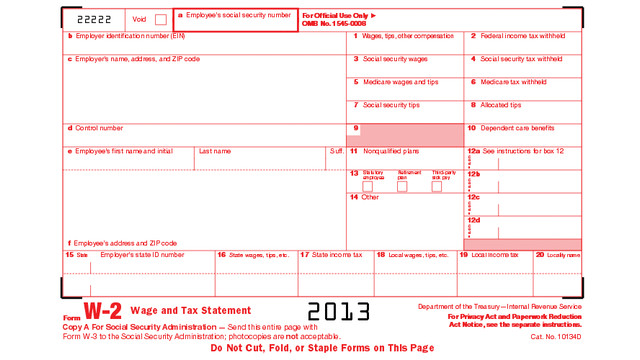
W-2 (Wage and Tax Statement)
If you’ve ever had a job, you’ve probably received a W-2. Not to be confused with a Federal W-4 (the form you fill out so that your employer knows how much tax to withhold), the W-2 is the form your employer gives you (and sends to the IRS) to report how much you were paid (in wages, salaries and tips) and, if applicable, how much money was withheld from you and paid to federal and/or state governments for taxes and FICA (Social Security and Medicare).
Federal, state and local taxes, FICA, unemployment insurance and a few other withholdings are considered statutory payroll tax deductions. Statutes, or laws, require them. Wage garnishments for lawsuits or child support may be the result of non-statutory legal rulings specific to an individual. Your W-2 may also indicate other amounts withheld from your check, which are voluntary payroll deductions. These can include health and life insurance premiums, 401(k) or other retirement contributions, regular donations to the United Way, union dues, etc.
There are generally multiple copies of the same Form W-2. Your employers submit copy A directly to the Social Security Administration and keep copy D for their records. Copies B and C are for you — you send one to the IRS with your federal tax return and keep one for your own records. And, just to make sure you’re paying attention, copies 1 and 2 are provided to file with any applicable state or local tax authorities. (Don’t ask why they aren’t copies E and F. Paper Doll suspects it’s just to perturb her.)
Employers should mail W-2s by the last day of January, so if you haven’t received yours by Valentine’s Day, contact Human Resources (or, y’know, Madge, with the beehive hairdo, down the hall, as applicable). W-2s are usually mailed to the address listed on your W-4, though small businesses may just hand them to employees. Consider a few issues:
- Did you change employers recently? If you had more than one job this year, be sure that you have received W-2s from each employer. If you changed jobs at the same company, you’ll generally only receive one W-2 from each employer, not one per position.
- Did you change addresses since you filled out your W-4? There’s only so much a former employer will do to track you down and give you your W-2. Keep the boss updated!
Just because you don’t have your W-2 doesn’t mean the IRS didn’t get its Copy A. The IRS knows what you made, so be sure you do, too! (If your employer is no longer in business or is otherwise not responsible to your requests, the IRS has a procedure to allow you to file your taxes in the absence of a W-2.)
When you receive your W-2, examine it carefully. Do the numbers seem right? If possible, compare them to the final pay stub you got for last year. Because the calendar year ended mid-week (and therefore, mid-pay period for most people), the numbers won’t correspond exactly, but they’ll be close enough for you to spot if something is seriously wrong. The sooner you call your employer’s attention to an error, the sooner you can prepare your return. (And again, that’s a good thing!)
W-2G is a cousin of the W-2. If you go to a casino and win more than $600 in any gambling session (congrats, by the way!), the “house” will request your Tax ID and either prepare a W-2G on the spot, or send it to you in January of the following year. Note: the IRS knows about your winnings, but not about your losses. To deduct losses, the IRS requires you to be able to provide receipts, tickets, statements or other records that show the amount of both your winnings and losses.
1099
A 1099 is a form that basically says, “hey, we paid you some money for something other than being an employee.” You get a copy; the IRS gets a copy.
There’s not just one type of 1099; actually, there are a whole variety of 1099s. Some of the more common are:
Got a bank account? This form reflects the interest income you receive from interest-bearing savings and checking accounts, money market bank accounts, certificates of deposit, and other accounts that pay interest. It also notes whether foreign or U.S. taxes were withheld and if there were any penalties assigned for early withdrawal from an interest-bearing account. Internet-only banks, like CapitalOne360, require you to log into your account to get your 1099-INT, so don’t count on it coming by mail.
Do you own stock or taxable investments? This form indicates the dividends or capital gains you received as an investor. Your broker, plan services company, mutual fund company or other type of investment company will send this form. Not all dividends are created equally; ask your tax professional if you have any that seem unusual or complicated.
This is what you may receive from a client or customer if you were an independent contractor (i.e., self-employed) or if you got any kind of miscellaneous revenue for doing work for someone else when you were not actually considered an employee. Even if someone paid you for doing work as an independent contractor, they may not know they should be sending you a 1099-MISC. This is why, if you are self-employed or irregularly employed, it’s still vital to keep track of your incoming revenue.
Your 1099s may be hiding in plain sight. Sometimes, instead of sending a 1099 in a separate envelope, a bank or brokerage house may include a 1099 form in the same envelope as (or even perforated, at the bottom of) a quarterly or end-of-year financial statement, so be sure to check all the “official” mail that arrives. Multiple forms may be sent as a “combined 1099,” scrolling across multiple pages, so check the reverse of other forms, in case you seem to be missing one.
A 1099 doesn’t always indicate that you were literally paid money. For example, a 1099-C indicates that a party has forgiven a debt, like a mortgage or part of a credit card balance. You may owe money on forgiven debts, and the 1099-C alerts the IRS that since you didn’t pay money owed, it’s as if you received money.
The IRS maintains a list of other types of 1099s and 1099-related forms.
1098 (Mortgage Interest Statement)
A 1098 is not a 1099 with low-self-esteem. This form reflects the interest you paid on your mortgage, which is generally deductible on your federal taxes. If you rent, you won’t have a 1098; the same goes if you paid off your mortgage prior to the most recent tax year.
There are sub-types of 1098s for things other than interest on property loans. For example, you might receive a 1098-C from a charitable organization if you donated car, boat or airplane. (Paper Doll suspects that if you donated an airplane, you probably tripped over my blog post on your way to Happy Millionaire Magazine.) Your college might provide you with a 1098-T to indicate you paid tuition, or a financial institution might send a 1098-E to show you’ve paid student loan interest.
Chance are good that you will receive a W-2, 1099 and/or 1098 in any given year, but there are many other less common information return forms. This lengthy list and description of all tax-related forms can help you if you receive something mysterious and vaguely official in your mailbox.
Again, these are the forms that others are required to send to you. Next time, we’ll finish up by exploring other kinds of paperwork that you may need to locate and organize to prepare your taxes, primarily documents that may take a little nagging or detective work on your part.
Taxing Conversations: Organizing the Essentials & a New Tax Tool
The other day, I asked a potential client how well she thought her family was doing on keeping up with tax paperwork. She mentioned that they have a “tax drawer” where they collect everything related to taxes. Perhaps she thought I’d be judgmental, but I think she and her family are head and shoulders above where most American taxpayers are at this point in the year.
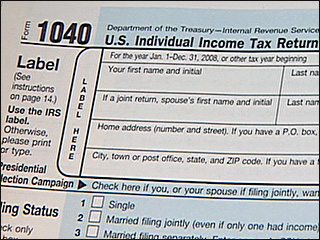
If tax time has given you a headache in the past, Paper Doll has some suggestions for obtaining, sorting and maintaining the forms and supporting material you (or your accountant) will need by April 15th.
The basics of getting ready for tax time aren’t that scary. Five simple steps should get you on your way.
1) Create a folder called Tax Prep 2013. Yes, 2013. In any given year, you’re preparing tax returns for the prior fiscal year.
While you’re at it, you may as well create your folder for Tax Prep 2014, so you’ll have it handy throughout the coming year. For many of my residential organizing clients, we create a hanging folder for tax prep with a variety of tabbed folders for the subset of paperwork that comes into the home throughout the year: Charity (donation receipts), Medical Expenses (sometimes divided into separate folders for prescriptions and doctor visits), Educational Expenses and more. However, if you’ve made it to 2014 without a system for tackling 2013’s receipts, one nicely labeled folder is a great start.
Although Paper Doll prefers tabbed folders because they store easily with the rest of your family filing system, you might like to consider something like the Smead Tax Organizer to corral your documents.
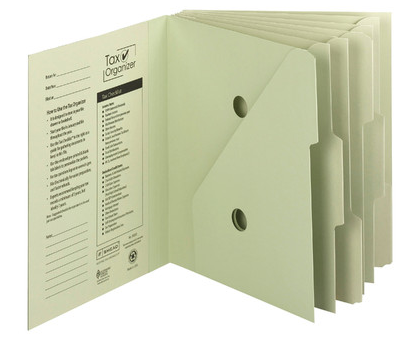
The faster you locate the essential documents, the sooner you can complete your return and earn one of two prizes, either a tax refund or more time to figure out how to come up with the funds to pay your taxes.
2) Watch your mailbox. Most financial institutions still send tax forms through the mail. If you’re not in the habit of opening your mail as soon as it arrives, January is the perfect time to start a new, good habit. Financial institutions have a nasty habit of hiding 1099s (of which, more next time) at the bottom of long annual statements or as enclosures with fourth quarter statements — so again, read your mail.
3) Watch your email inbox. No, you probably won’t receive tax documents via email, as it’s not secure. Financial institutions make a lot of security-related mistakes, but that’s not generally one of them. However, you will likely receive email notifications that you can log in to your online accounts at banks, brokerage houses, etc., to download and/or print your tax forms.
Caveat: this is also the time of year when phishers are trying to get their hands on your Social Security number and other vital information. Do not click on links embedded in emails to get to your online financial accounts. Type the URLs yourself, and make sure that https:// appears in the URL box so you know you’re gaining secure access.
4) Review your prior year’s tax return and supporting materials. (Hopefully, you’ve got them collated in a folder somewhere.) Make a quick list of all the forms and documents you used when preparing a previous year’s taxes. When January’s over, compare the list with what you have in your folder to see what forms might be missing or what recurring donations you might have made but forgotten. This year may not be identical to last year — you may have given to different charities, sold stock or closed an old savings account. But knowing which documents you received previously will help you eyeball the situation and recall changing circumstances.
5) Let the Taxman help. There are a few reasons you might be missing your old tax paperwork. Maybe you prepared your taxes online and had only a few forms and just tossed them in a drawer. Perhaps your paperwork is still in storage because you moved during the year. Or it’s possible that organizing your paperwork hasn’t been your major priority. Happily, getting your old tax returns has never been easier.
In the olden days (that is, before last week), if you wanted copies of your taxes, you had to either trundle down to your local Internal Revenue Service office, fill out forms, and wait in line, or you had to submit forms by mail and wait about ten business days for your forms to arrive by mail. Paper Doll suspects you neither want to cool your heels at the IRS office or have your tax documents slowly wing their way to you. (Oddly, we tend to worry less about mailing our financial information to the IRS than having them send it back to us.)
The good news is that effective immediately, the IRS has created Get Transcript, a real-time online tax transcript request service. (“Transcript” is the fancy term the IRS uses to refer to digital of old tax returns.) For what it’s worth, Get Transcript isn’t merely useful for preparing your taxes. When you apply for mortgages, small business loans, and student loans, presenting an IRS transcript is usually a quick shortcut for helping you validate your income and tax filing status.
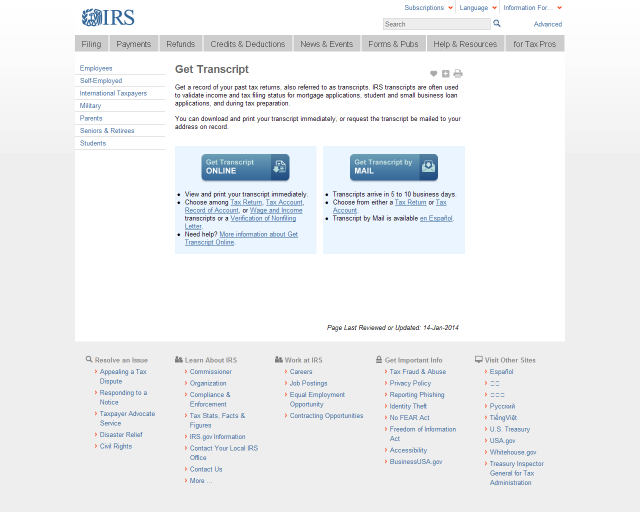
Create a Get Transcript account with your name and email address. You’ll be emailed a confirmation code; once you enter it into the system (which you need to do within thirty minutes of receipt, so don’t dawdle), you’ll provide a variety of identity verification information and then set up a secure profile. Expect this part to take 5-10 minutes — but you’ll only have to do this once.
Get Transcript allows you to get your actual tax transcript (a copy of your original return) or an account transcript (which shows amendments or changes made by you, your tax preparer or the IRS). If you want a document that shows a combination of your original return and supporting information as well as the revisions, you must request a record of account transcript.
Select the type of transcript, year, and the reason you’re requesting it (e.g., mortgage, student loan, immigration, housing assistance, etc.). Your transcript will display on the screen. Save it as a PDF so that you can maintain a digital record on your computer or in the cloud. Don’t forget to sign out of your IRS account when you’re done.
Next time, we’ll review all of those official letters-and-numbers forms that can make tax preparation so stressful, and we’ll follow up with the supporting materials that you may need to collect on your own.
Taking just fifteen minutes to organize today will help make tax time much less stressful. Why not get started now? Dig through your “tax drawer,” climb into your mailbox, and start gathering the essentials.
Delegate Like a Boss (Even When You’re a Party of One)
Are you trying to do it all? (You know you are.) And are you completely overwhelmed by the idea that everything you’re asked to do, everything you’re supposed to do, and everything you want to do can’t quite fit into those measly 24 hours assigned to you? (Take note: we’ve all got the same 24 hours, so if it seems like someone else is rocking getting it all done, consider that maybe they’re not doing it all themselves!)
Although I usually talk to you about organizing tangible things, organizing time and tasks (and clarifying how we think about time and tasks) is also essential to a happy life. That’s why I am so excited to have partnered with Susan Brennan of Consider It Done Personally to be part of her upcoming Delegate Like a Boss video summit.

Success means being able to do what you want when you want (at least as much as is practical), and in order to do that, Susan has put together an exciting opportunity to help people, as she says, “achieve time freedom and be more productive than ever before!”
I have been given a special invitation to join Susan and her amazing band of experts (including my esteemed organizing colleague Donna Smallin Kuper and a variety of coaches and other professionals) to help create the change so many people are looking for. This summit is going to give you the tips and tools you need to achieve your own time freedom so you can do more of what you want, when you want! It is a privilege to join with these other experts to help make that happen!
You all know how frugal Paper Doll is, so I’m especially impressed with just how much information is going to be given out for free in this summit! And, in addition to the material presented in the video summits, many of the participants (including moi) are giving away special bonuses. You longtime readers know how rarely I (OK, practically never) promote events, but I have been so excited to talk about delegating (something at which I think we all need some extra help) that I want to encourage you all to sign up.
So, some info from Susan, our fearless leader:
Imagine being able to do what you want, when you want, without giving up productivity. What if you could begin experiencing that time freedom immediately, just like you’ve always dreamt!
Have you ever found yourself thinking these things?
• Why do other people seem to have so much more free time than me?
• How come I am feeling so behind all of the time?
• Why does my To Do list feel like it’s never-ending?
• Why does vacation never seem to fit into my chaotic schedule?
If any of those questions sound like ones you’ve asked yourself, keep reading.
I know that once you discover how to have time freedom, you’re going to begin enjoying life to the fullest without feeling guilty about it!
Wouldn’t you like to join the thousands of others who are experiencing this very thing? Here’s your chance! Please share this with the people in your life who could benefit from this summit.
The information you’re going to receive on this summit is easily worth thousands of dollars, but I’m giving you access for free, as a special gift!
So, this Delegate Like a Boss video summit is happening next week (if you still don’t have your 2014 calendar yet, that’s the week of January 20th!), and you can join in (again, at no cost) but you have to reserve your virtual seat soon. Begin experiencing the life you want, when you want, without compromising productivity or inviting overwhelm.
I invite you and anyone in your life who feels bogged down by their To Do list to join me and my fellow video summit presenters for “Delegate Like a Boss”. Just click through, sign up, and Susan will email you the essentials. None of the interviews will be long — most are 15-30 minutes (though you know Paper Doll is full of words and will take up every square micro-second).
But seriously, if you think of delegating as something only CEOs get to do, I think you’ll find this an eye-opening video summit for giving you a new way to look at getting things done…productively.
Seek (with Bluetooth) and Ye Shall Find: Tile and Stick-N-Find
Getting organized is about letting go of what you don’t need and arranging what you wish to keep so that you can find it when you want it. There are foolproof ways to keep from losing anything:
1) Designate a home for every item.
2) Don’t put things down; put them away. (In other words, follow step #1 and then use it.)
3) Practice mindfulness so that you can perfect your skills at step #2.
This process is all well and good unless:
- you live and/or work with other humans
- you have tiny humans who like to grab and hide your possessions
- you have tiny (and not so tiny) non-humans in your midst
- you aren’t always so good at mindfulness
- you are so busy corralling your fellow humans, tiny humans and non-humans that you don’t have the time or energy and OH MY LORD JUST FIND MY KEYS AND STOP PONTIFICATING!
Keeping track of small things, even when we’ve isolated homes for them, can be difficult. Years ago, we applauded (literally) a movement to attach little electronic doodads to keys, remote controls and other small devices. We’d clap, and a little alarm would beep to help us find the missing items. In theory, great. In practice, it made people feel like they’d woken up inside a commercial for The Clapper!
Technology has allowed for the development of more refined solutions like Bluetooth-supported tools to locate items with ease. Two options getting attention these days are Tile and Stick-N-Find.
The Basics: Tile is a small, white, flat-ish, plastic square with a hole carved in one corner. Thread key chains and zipper pulls (on purses, wallets, backpacks, or children’s jackets) through the hole, or use the enclosed double-backed adhesive on the reverse of a Tile to stick it to virtually anything. You can also just drop it in a pocket, your wallet’s change compartment or the bottom of a purse. Tile is waterproof, but even if your little ones lose their boots, I wouldn’t test the limits.
Tile is designed so that you never have to charge it or replace the battery. Instead, each lasts one year. Then poof, and you have to buy more. On the one hand, shopping for (and replacing) coin cell batteries is a pain. On the other, a new Tile is pricier than a new battery. Tile sends you an alert when it’s time to replace (and recycle) for a new year.

The Works: When you pull Tile out of the box, you depress the “e” on the face of it and then go to your mobile device. Once you’ve downloaded the free app, go to the Add a Tile screen and hold your new Tile up to your iPhone. The app then automatically adds the Tile to your account. Currently, Tile works with iOS products like iPhones (5c and 5s) and iPads (3rd and 4th generation, Mini and Air). Because it functions with Bluetooth 4.0, it’s not yet supported to work with Android, Blackberry or Windows devices. You can have up to ten Tiles on any one account, but it’s not clear to Paper Doll why there’s a limit since you’re paying for each individual Tile, anyway.
Can’t find your keys in your pile of clutter? Use the app to make your Tile’s teeny built-in speaker sound an alarm. Your kid left his backpack…somewhere…and it could be anywhere in the mall? The app will pinpoint the location on the map. And since the app uses Bluetooth, it remembers the last GPS location it “saw” your item, so if it hasn’t moved, the item can be found lickety-split! You can log into your account from any iOS device, meaning that if you misplaced your iPhone and never activated a service like Find My iPhone (silly you) you can use someone else’s phone to find yours.
The Range: Tile’s app isn’t going to know if your wallet just got on a plane to Barbados. But the app can locate your Tile anywhere up to 50 to 150 feet away, “depending on the environment.” (One assumes this means either mountains or steel girders may interrupt the signal.) Interestingly, however, if your Tile is farther away than that BUT another Tile user’s phone/device is within 50 to 150 feet of your Tile, the information will daisy-chain and you’ll get an update with the location of your own Tile, giving you a pin on the map view. The theory is that once zillions of people are using Tile, the eventual range would be practically limitless. Blue sky thinking? Perhaps.
The Cost: Tile is available for pre-order (to-be-delivered Summer 2014) at $19.95 each, or at package pricing of “Buy 3, get one free,” “Buy 6, get two free,” and “Buy 9, get 3 free.” But once Tile is widely available commercially, the price will go up to $25/each. Yikes!
The Basics: The round, discs (“trackers”) are available in six colors (well, five plus “clear”) in case you want a little designer panache with your private-eye tool.
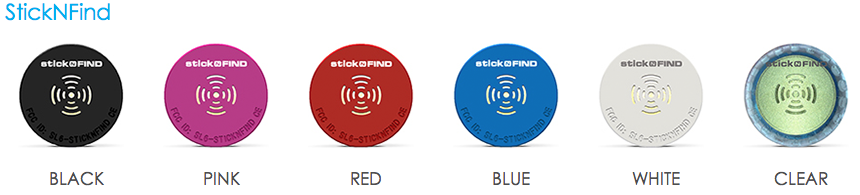 Unlike Tile, the Stick-N-Find trackers use traditional CR2016 coin-style watch batteries, which last about a year. Stick-N-Find discs come with 3M-brand double-sided adhesive stickers. Each pack comes with two Stick-N-Find discs and two key fob mounting plates.
The Works: Pair a Stick-N-Find tracker with your (free) Radar app. Like Tile, Stick-N-Find’s app works via Bluetooth 4.0, but is supported on a broader range of devices, including iPhone 4s, iPhone 5c and 5s, newer iPads, including the Mini, and iPod Touch, as well as Samsung-branded Android devices, including Galaxy S3, Galaxy S4, Galaxy S4 Mini, and Note 2, and any future devices using Bluetooth Low Energy.
The Range: Supporting materials for Stick-N-Find reference ranges of both 100 and 150 feet, and the Radar app should track up to 20 of your Stick-N-Find discs. It doesn’t exactly pin-point your tagged item; instead, the app gives you a visual of how far you are from the item, but doesn’t identify the direction. As they, themselves, note, it’s a bit like playing the old game “You’re getting warmer. You’re getting colder.” Paper Doll would find this annoying, but others might enjoy the adventure.

The Virtual Leash lets you set an audio alarm/alert if an item leaves a pre-set radius around you; the disc will also flash lights in case you’ve dropped your wallet at a dark, noisy party. The Find It function lets you know when an item has come in to range, within 300 feet. (You’re getting warmer…)
The Cost: Each 2-tracker pack costs $49.99 (or 4 for $89.99, 6 for $129.99, 10 for $199.99 and 20 for $389.99) from the Stick-N-Find store; Stick-N-Find is also sold under the Smead brand name and can be found at office supply stores and on Amazon.
Trackable Items
Practically anything can be tracked by Bluetooth tracking devices.
- Things you carry: luggage, wallets, backpacks, purses, phones, laptops, tablets, day planners, musical instruments, gym bags, medical devices, passports, travel document portfolios
- Things that wander off by themselves: pets (affix to their collars), tiny humans (attach to children’s shoelaces)
- Things you share, which wander off when someone else moves them: keys, remote controls, garage door openers, cameras, bicycles, skateboards
Would you use Tile or Stick-N-Find, or does the pricing put you off? What are you always losing and seeking? Please share below.



Follow Me