Paper Doll
Customizable Notebooks: Have It Your Way…Sorta
As we’ve discussed previously, the key to any notebook system is that it fits your individual needs. What could be better than a notebook that you can customize to your specific sense of order?
In the beginning, there was Levenger’s Circa System. The backbone of Circa Notebooks appears to be rings — but instead of three fixed rings inside the spine of a binder, Circa uses discs (11 for letter-sized, 8 for junior-sized notebooks) to hold together a series of component elements: leather and other stylish covers, ink-friendly paper, tab dividers of various types, calendars and more. The discs come in a variety of sizes, from 1/4″ to 3″, and styles from basic black to designer-level sparkly, allowing you to increase the thickness and fashionability of your notebooks by switching out the discs.
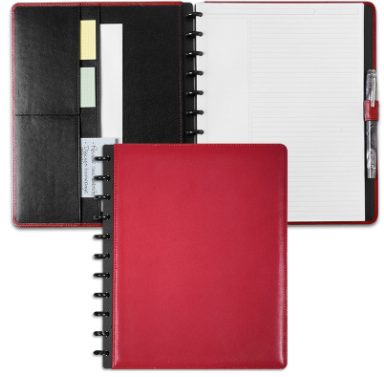
Instead of using a standard hole-punch that creates a series of circles, Levenger designed a specialized punch style (where each “hole” punch looks like a sideways mushroom or umbrella) such that elements can be switched out without tearing the paper edges. This style has been copied, with a little variation by the competition:
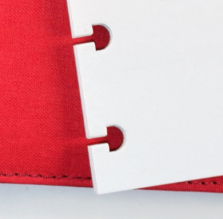
Levenger Punch
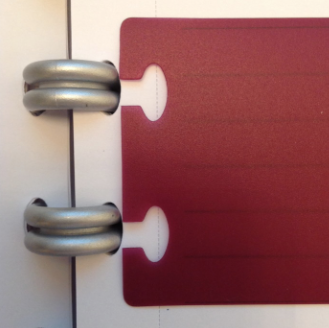
Ampad Punch
Want your calendar in the front and your notes in the back? Decide tomorrow you want to switch it around? Circa can do that. The Circa System is modular, classy and elegant, but oh-so pricey. Notebook covers range from $60 to $150; the discs, which are sold separately from the covers run $12-$25. Refill pages start at $10 for a set, and if you want to keep any of your own papers, the specialized hole punches range from $30 to $80.
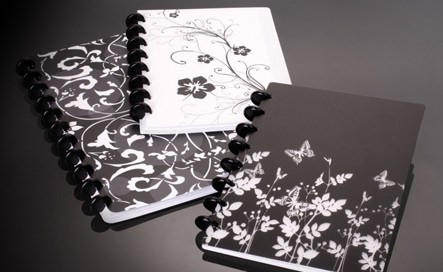
Two years ago, Staples brought out an almost identical notebook style, the Arc System, which I reviewed in my NAPO EXPO 2012 Recap. Arc has the same system of discs (though fewer sizes, and with a less glossy, more utilitarian styling), fewer but still multiple cover options (leather and poly, decorative and solid) and a variety of productivity accessories. Sort the pages to your preference, change them around as necessary, and switch your cover when you move from classroom to internship to boardroom.
The main difference between Circa and Arc was Arc’s more frugal pricing structure, with covers ranging from $12 for poly to $25 for leather; disc expansion packs are only about $3, and plastic/poly dividers and pockets range from $3-$10. Pre-punched notebook, planner and graph paper sets runs $3.50-$4.50, and a specialized punch is $43.
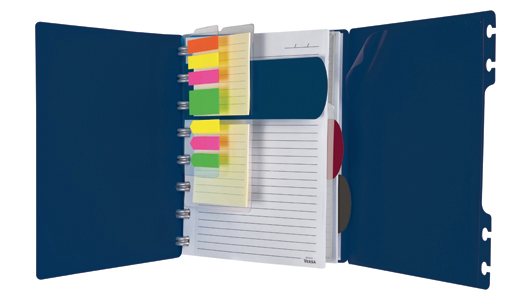
Then just last spring, we talked about the Ampad Versa Crossover, yet another entry into the discs-instead-of-rings customizable notebook arena. As I described it then:
The key to the Versa Crossover Notebook’s appeal, however, is that the paper — indeed, all elements of the notebook, including the covers, flaps, flags, task pads, pockets and dividers — can be re-positioned anywhere in the notebook. That’s because instead of being attached by spiral wires, everything is held in place by the discs nestled perfectly inside uniquely shaped oval “tabby things.”
Same basics, but the Versa has thicker, chubbier discs (like Duplo vs. Lego) and a variety of poly-based elements for creating dividers and holding accessory items. At $12-$17 for the basic notebook and about $3 for refill pages, the pricing is fine, but there’s no hole punch for your own papers, and the types of pages are very limited (to wide-ruled or graph paper).
All three notebooks are spiffy, but I felt like Arc offered the best deal for the money for the average user. Recently, however, a client called my attention to a newcomer in customizable notebooks that’s sorta like Circa, Arc, and the Versa Crossover, but sorta like nothing we’ve seen before.
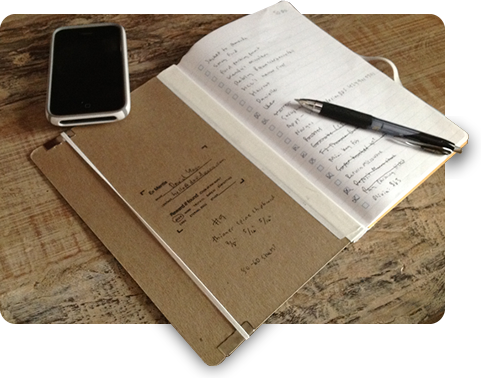
It’s YoonCo’s Sorta, the Adaptive Notebinder.
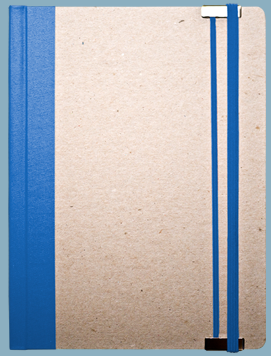
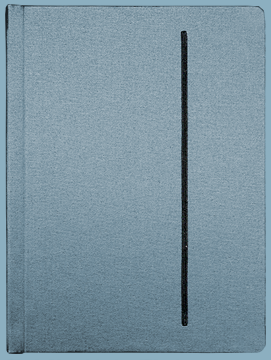
If Circa is for executives, Versa is for students and Arc is for just about everyone, Sorta is for the person who says, “Well, I’m sorta doing the entrepreneurial thing during the week, and I’m sorta working on my tunes in the evenings.” It’s for someone who doesn’t necessarily see himself carrying a fine calfskin planner or a paisley-print poly cover. It’s for someone who wants a notebook that’s sorta cool for all the ways he or she “sorta” is.
The Sorta is customizable and has removable, repositionable pages. But there are no discs and no rings, and the page/element options have been created by designers rather than productivity or office supply experts.
To add, remove or rearrange any of the paper elements in your Sorta, bend back the front and rear covers all the way, and the papers “unpinch” from the springback spine of the notebinder. Toss or archive what you remove, and then sort your papers in a stack. Move your graph paper to the front and your sheet music to the back, change out the style of calendar in the middle — and then bend those covers backward, slide your stack of papers back in, and you’re good to go!
There are two basic elements to the Sorta: the outer notebinder and the varying stationery templates.
To see how it all fits together:
Notebinders — The notebinders come in three styles:
- Original ($15.95), which is sort of the reclaimed wood of notebooks, gritty (and hearty) recycled chipboard with accent color choices of black, red, yellow, blue and white;
- Cloth ($23.95) in black, blue, grey and orange; and
- Leatherette ($28.95) in pebbled black
Each notebinder is 6 1/4″ x 8 1/2″ and features one thick, color-coded elastic band for closure and two thin ones for bookmarks. (The bands are standard in the original version and optional for the cloth and leatherette covers.)
Stationery/Templates — Here’s where Sorta wins me over. There’s a huge variety of paper inserts and designs, and they are all kind of quirky. The ink is blue — and none of that stuffy navy or royal blue ink, either. It’s sort of a dark turquoise.
- Calendars — Three one-day day “glance” styles with increasing detail for the Full-timer, Insomniac and Moonlighter, one-week glance in two styles, two-week glance and one month glance. (Note, these are evergreens — you fill in the date on each page type.) They’ve also designed some Sing Another Song planners, based on the notion that, “Let’s be honest—no one can realistically plan ahead past two days. This planning system (named after a Leonard Cohen lyric) acknowledges this reality, forcing you to focus on what you need to do today and tomorrow only. Everything else is backburner.“
- Forms — Contacts, Expenses, To Do lists, Time-tracking sheets, Recurring checklists

- Notepaper — Traditional-ruled, “fat” and “skinny” ruled, “dot grid” (like graph paper without the lines), traditional graph, and isometric graph for 3D design
- Art and Music — Sheet music, ukulele chords, penmanship charts, Kanji (Japanese writing) practice paper, unlined and watercolor-suitable paper, and drawing-a-day pages for two-, three- or six-doodle panels, in case you’re a budding cartoonist or just like to think visually.
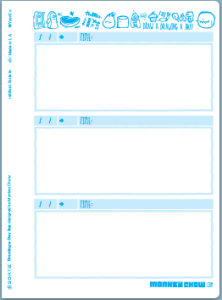
- Dividers — each divider is white for the left and center two-third and dreamily colored (blue, green, yellow and pink) for the right third of the page.
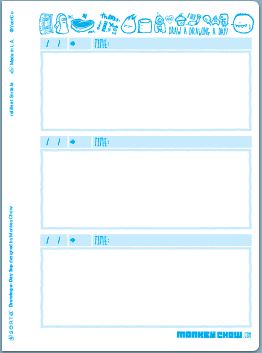
Most of the paper elements range from $3.49 to $4.49 for a packet of 25 sheets, with the drawing pages priced at $5.59. The dividers are $2.49 for three in any one color, and $3.29 for a variety pack of four.
A word on design: Sorta’s aim is to be goofily cool. Unlike the attractive but fairly boring traditional notebook stylings of the three leaders in customizable notebooks, the key to Sorta’s style is that it’s not at all corporate, and not coming from a single corporate direction. There are currently five design companies from around the US, in addition to YoonCo, contributing to the Sorta elements, including Barrel Strength Design, Machine Design Company, Ditherdog, Patrick M. Coyle and Monkey Show. (If you’re a designer, consider joining the Sorta design team.)
So, what’s missing? Huge expansion possibilities. The Sorta only holds 40-60 sheets of paper at a time, so it’s better for carrying around just what you really want and need and taking advantage of the easy-to-remove-pages aspect. Also, there are no rulers, no plastic sheets with sticky notes and tape flags, and no poly pocket inserts for digital media or business cards. It’s all paper (and, well, cloth, leatherette and elastic) and the lowest of low-tech. But there’s something sorta nice about that.
What do you think of the Sorta? What kind of customizable notebook is your speed?
Organize Your Writing Right — With Left-Handed Notebooks
Are you a righty or a lefty? Of course, we’re not talking politics, but handedness. Paper Doll is a righty, but I’m always on the lookout for solutions that make it easier for my left-handed clients to live in a right-handed world.
With file folders, it’s easy enough — it’s just a matter of turning the papers upside down (from my perspective) so that when my clients open their folders (book-style), the tabbed side of the folder is on the left rather than on the right. However, notebooks present a particularly smudgy, and occasionally painful, problem.
Lefties may use their left hands, but assuming they aren’t writing in Hebrew (aha! a clue to a possible solution?), they are still writing from left to right like the rest of us. With typical sheets of paper or notebooks, this means that the left hand often slides or drags over the most recently written material, causing smudges.
Moreover, when writing in a three-ring binder, we righties are can generally keep our bodies entirely to the right of the rings; for a lefty, writing on paper while it’s ring-bound means keeping the wrist tightly bent to keep the forearm away from the rings. (The Handedness Research Institute warns that this is a no-no.) The problem is pretty much the same for spiral notebooks, earning wiry indentations in the hand and arm. How exhausting must this be for our friends on the left?
TOP-BOUND ALTERNATIVES
The easiest solution for left-handers is to use spiral (and other) notebooks wire-bound at the top rather than on the side. Steno pads are fairly good solutions for casual use, provided you’re not distracted by the vertical line down the center (used to guide shorthand).
Mead even promotes their top-bound spiral notebooks for academic and business use as “left handed notebooks.” While these, as well as legal pads and reporter’s notebooks on the low end of the price/quality spectrum, are easy to find, this often condemns left-handed writers to a sort of second-class status.
That said, there are a few upscale top-bound, non-spiral notebooks, including the Moleskine Reporter notebooks (available in black, only). They come in two sizes, Pocket (3 1/2″ x 5 1/2″, 192 pages), suitable for students and others on-the-go, and Large (5″ x 8 1/4″, 240 pages), which work well for professionals.
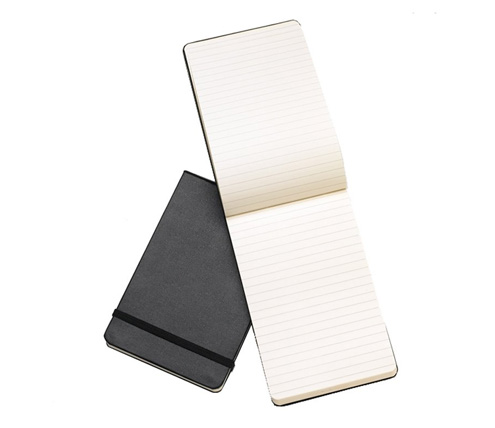
The Reporter notebooks come in hard and soft (lay-flat) cover options, with acid-free paper choices including ruled, graph (“squared”) or plain pages, and top-stitched bindings. Each have 24 detachable (perforated) pages at the back for quick, removable notes, and all of the Reporter-style notebooks can be used both horizontally and/or vertically (though obviously this works better with graph and plain pages than ruled). Reporter notebooks also have expandable accordion pockets inside the back cover and the traditional Moleskine elastic bands to keep things private. The notebooks range from about $11 to $16 at Amazon, Moleskine, LoveNotebooks.com and fine stationers.
NO STUDENT LEFT BEHIND
Flip-top covers aren’t to everyone’s tastes, however.
Certainly, the left-handed writer can simply flip every spiral-bound notebook to the back and choose to write only on the left (reverse) page of each sheet, but this generally subjects users to being greeted repeatedly by a “plain” cardboard or chip-board backing (uh…fronting?). While righties get their pick of the pretty notebooks out there, lefties are left showing their backsides, as it were, price tags and barcodes and all.
Here, at least, the open market for student notebooks has been responsive. I’ve found a number of right-side spiral notebooks designed specifically for left-handed users.
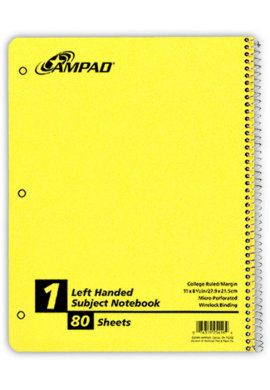
Ampad makes a cheery (OK, perhaps garish), yellow, 80-sheet, 8 1/2″ x 11″ Left Handed Subject Notebook with the spiral on the right side. Find one for around $3.49 through specialty stores like Gonzaga University’s Zag Shop.
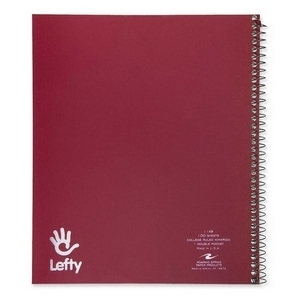
Less well-known stationers are also entering the arena. Roaring Spring makes a 9″ x 11″, 100-sheet, 1-Subject Wirebound Notebook that runs upward from $2.89 at Shoplet and (at an inexplicably higher price) Amazon. The Lefty logo is a cute touch, and the notebook comes in maroon, cobalt, dark green and grey.
TOPS similarly makes a 9″ x 11″ narrow-ruled 80-sheet spiral-bound notebook with cover colors in red, blue, yellow and green. Available from Amazon and office supply stores, prices range from $3.35 to over $9.
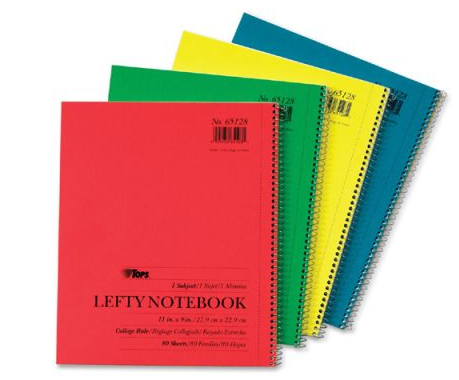
All of these notebooks are suitable for students, but wouldn’t exactly be the right fit for a lefty with style.
HIPSTER STYLINGS
Hipsters usually like the Moleskine look, but if your “Too Cool for School” lefty prefers a grittier, Old School look, Baltimore-based Write Notepads & Co.Write Notepads & Co.
manufactures a notebook specifically for left-handers that might fit the bill.
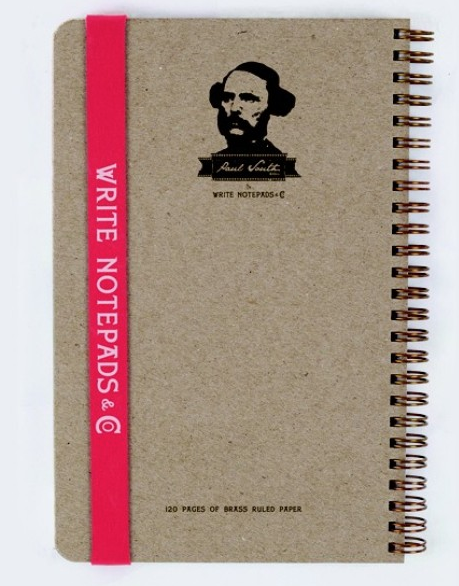
The covers are made from a heavy-duty kraft card stock with brass, twin-loop, spiral rings on the right side. The standard righty version is imprinted with Write Notepad’s regular logo, but the lefty line is imprinted with the likeness of Paul South. (Get it? Say it aloud, sort of drawling. Paul South…for South-paws?)
The notebooks come in two sizes, a 3 1/2″ x 5 1/2″ pocket size (just a touch bigger than index cards) and a larger 5 1/2“ x 8 1/2” version. Each notebook has 120 sheets of paper, and the company notes that the paper is “fountain-pen friendly.“ Both include a Write Notepads & Co.-printed, oversized elastic to hold the book closed, for those who want their left-leaning thoughts kept private. Both sizes are available with either blank or ruled paper, and range from $8 for the smaller notebook and $16 for a larger one.
(If you prefer their traditional “righty” version, note that the bands are white rather than red.)
AMBIDEXTROUSLY ELEGANT
Paper Doll‘s diligent research team came up empty-handed (on the right and the left) with regard to executive-quality notebooks for left-handed writers. However, Levenger’s leather Ambi-Folio does offer a nice touch for keeping up with handwritten and digital work, no matter which hand you favor.
The smooth 10 1/4″ x 13″ full-grain leather portfolio comes in black, red and saddle (a rich brown) and has sections for a top-bound writing pad as well as a tablet or e-reader.
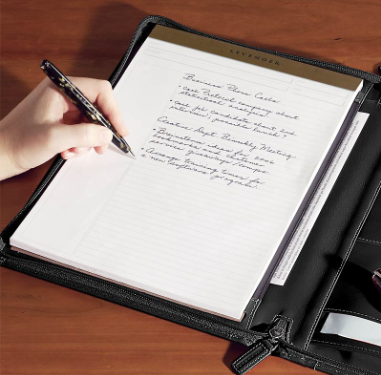
A Levenger notepad is included, and there are right-sized pockets for loose papers, business cards, index cards, and pens (on either side, accommodating lefties and rights). A zippered closure keeps everything safe. The whole arrangement can be flipped to reverse the set up and put your writing pad on the left or right, as is preferred.
SPECIALTY STORES
Aside from the products above, another alternative is to shop online at left-handed specialty stores like Lefty’s, which carries college- and wide-ruled academic, art and speciality notebooks.
And what of Hebrew notebooks, to which I alluded earlier? I suspected that I might find quite a few international versions of notebooks designed specifically for languages written right to left. Sadly, I didn’t have a lot of luck besides elementary school notebooks. Thus, the search continues.
Scientific American reports that approximately 15% of people are left-handed. You’d think in a consumer-driven society, more office supply companies would be developing solution-oriented goodies. If you have any great sources for attractive left-friendly notebooks, please share in the comments section.
5 Key Points for Organizing With Notebooks
A notebook is a notebook is a notebook. Or is it? The truth is, not all notebooks are created equally.
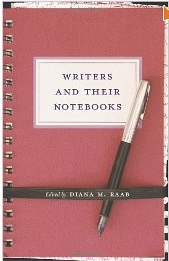
Notebooks seem like they should be pretty simple. At the heart, they are little books (or pads) of paper that allow us to take notes (or draw, or map). Of course, our notes may not be handwritten, so if our notes are digital, our notebooks must live in cyberspace, too. But there’s more to it than that.
Over the next few posts, we’re going to be looking at some new approaches to notebooks, making it a good time to review five noteworthy concepts related to organizing thoughts and information and making notetaking make sense. Bear in mind the following:
1) You can’t remember everything. The space in your brain is finite. It’s a common myth that most of us rarely use more than 10% of our brains. I’m not a neuroscientist, but I do know that our brains can’t maintain an unlimited amount of information and make it all equally accessible when and how we want it.
Simply put, you can’t think about things in-depth and with context if you’re constantly trying to remember to think of them.
Keeping a notebook doesn’t just enhance your memory; it sharpens your focus. When you merely listen to the world (whether the outside world or your own interior world), it’s easy to be passive. However, keeping notes turns listening into an active experience. The mere act of writing something forces you to put effort into comprehension.
Finally, once the general fact of something is written down (and temporarily stored), your brain can focus on analysis, processing and planning.
2) Loose notes don’t work. One of the ultimate, classic Paper Doll posts was Stay Far From Floozies: Avoiding the Loose Paper Trap. In organizing, we often talk about having a landing strip where we unload all the detritus of the day to ensure that phones get charged and keys remain accessible. (In the morning, the process is reversed and the landing strip becomes a launch pad, loaded with whatever essentials are needed to launch you out the door for a successful and organized day.)
If we skip the landing strip and just drop things wherever we let go of them, we’re dependent upon our eyes or memories for finding them again, slowing down the retrieval process. Having a notebook, one central location for incoming stimuli, is similarly a safer bet than letting notes “drop” on the backs of envelopes, the corners of napkins and the palm of your hand.
3) It’s not really about the notebook — it’s about you. As a professional organizer, I’ve found that the most significant reason a system works or does not, whether it’s for notetaking or calendaring or task management (or laundry or workflow or meal planning), has far less to do with the system used and far more to do with the user.
If an organizing system, or even the containers for your organizing system, do not fit your personal style, whether in terms of aesthetics, format or method of function, you’re going to find excuses to avoid using your system, and you’ll go back to whatever you used before, even if it failed you miserably.
(If going by gut instinct worked, we’d never seek outside help in the first place. Remember, if you always do what you’ve always done, you’ll always get what you always got!)
In Notions On Notebooks: Organize Your Paper Picks, we talked about how price and branding, binding, paper quality, lines, and color all determine whether a paper notebook format will be right for you. Reviewing that post will help you think about what notebook features will help you commit to a notetaking system.
4) The platform isn’t the same as the system. When we talk about notebooks, we tend to interchange the two, but they are very different. The platform is the physical (or digital) rendition of what tools we choose for organizing. At your house, you may store items in drawers, cabinets and lidded tubs, but that’s not an organizing system. Notebooks, like drawers, are containers. They serve a function for supporting an organizing system, but they are not the system, per se.
In the past, we’ve talked about a wide variety of notebook platforms, from environmentally-friendly notebooks (Green-Eyed But Not-So-Monstrous) to hybrid digital/paper notebooks (An Organized Hybrid: The Evernote Smart Notebook By Moleskine, From Paper to the Cloud: Ampad Shot Note) to adjustable notebooks (Presto, Change-o! Shape-shifting Organizing Products #2), and even waterproof notebooks (Paper Doll Writes Between the Raindrops: Waterproof Notebooks).
Whatever format or platform you use for a notebook, recognize that while the platform has to inspire your loyalty, it will only get you so far.
5) A notebook is only as good as the system you use for processing the information you put into it. Notebooks tend to exist for three disparate but sometimes interlocking purposes:
- Creating (journaling, sketching, designing) — What you put in these notebooks may not need to be tracked or managed. Just having a place to put your creations is often enough. However, if you are prolific, and retrieval of the product of your brilliance is an issue, you may want or need an indexing system for tracking what you’ve created.
This could be as simple as numbering your pages keeping a blank page at the front of your notebook for listing what you’ve designed or written. You might want to take a page (pardon the pun) out of philosopher John Locke’s approach to indexing commonplace books.
- Capturing (academic notes, business meeting notes, committee notes) — Once you capture essential information, you are generally asked to process it. The notes you take in your European history course may require you to capture fine detail regarding causes of wars or dates of battles so that you can memorize and regurgitate information. Conversely, notes captured in a client meeting might be the jumping off point for creating something new (an ad campaign, a solution to a problem, a product or service).
If you’re a student, to make sure you’ve got command of the subject, consider the Cornell Notetaking System (which is actually a system for learning and studying and not merely taking notes).
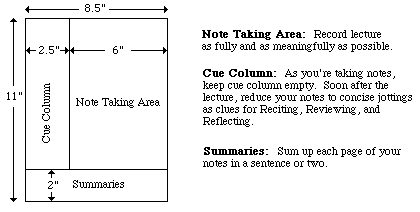
I was introduced to this process as a high schooler, long before I actually attended Cornell University, and it’s so useful, it’s really worthy of its own post. (Lifehacker has an excellent classic post on the Cornell system.)
For keeping up with business or other reading, you might prefer charting, outlining or mapping related concepts.
- Productivity (tasks) — If your notebook is designed to help you amass everything you need to do, rather than everything you need to know, you’ll need to find a workflow that makes sense for your life before you try to pick a snazzy notebook. A few systems that have enjoyed popularity in recent years include:
Bullet Journal — This method was covered in detail last year in Lifehacker’s The Bullet Journal Productivity Method Empowers Your Paper Notebook.
The AutoFocus System devised by time management expert Mark Forster. I’ve always thought my colleague Janine Adams, a Forster devotée, has done an excellent job explaining each iteration of the AutoFocus method. (The newest version of this system is called FinalVersion.)
So, I hope we’re clear that depending on memory or a series of fluttering scraps of paper is no way to master the information in your life. Notebooks can be excellent tools for organizing thoughts, but recognize that success depends on knowing yourself and your aesthetic deal-breakers, and employing information capturing and indexing systems that will keep you sticking to your system long into the future.
Paper Doll’s Cable Conundrums & the MOS: Magnetic Organization System
Cable craziness is nothing new. No matter how many wireless gadgets come on the scene, the cables and cords for charging, connecting and maintaining our electronic devices (for computers, phones, entertainment systems and games) practically multiply on their own. My professional organizing colleagues often talk about solutions for hiding the cords and containing cables, and Pinterest is full of interesting cable-controlling solutions.
But my concern is generally less about the unsightliness of cords than the inconvenience of them. I don’t have oodles, but when I’m trying to deal with multiple cords, I may have more on my desk than USB slots at the rear of my iMac. (Yes, I could buy a USB hub, but that’s another conversation!) Right now, I’ve got both my FitBit’s Bluetooth gizmo and my keyboard permanently plugged in. There’s a charger for the FitBit, too. I use an actual digital camera and not a smart phone, so I’m always using cable whenever I want to download photos from the camera to the computer (so I can then upload them to Facebook to make Paper Mommy happy). Oh, and I’ve got a Lightning Pin charger for the iPad, and a different charger for my early-era iPod Shuffle.
I’m all about the Wi-Fi, so there’s no modem to plug in, but that’s still a lot. Even when something’s plugged in, I may not be using it, and the slight jiggle of the desk can send the unattached doohickey end (y’know, the non-computer end) of the cord or cable slithering back towards the wall and down behind the desk. Swish-swish-ka-clunk!
Enter the MOS: Magnetic Organizing System!
THE BASICS
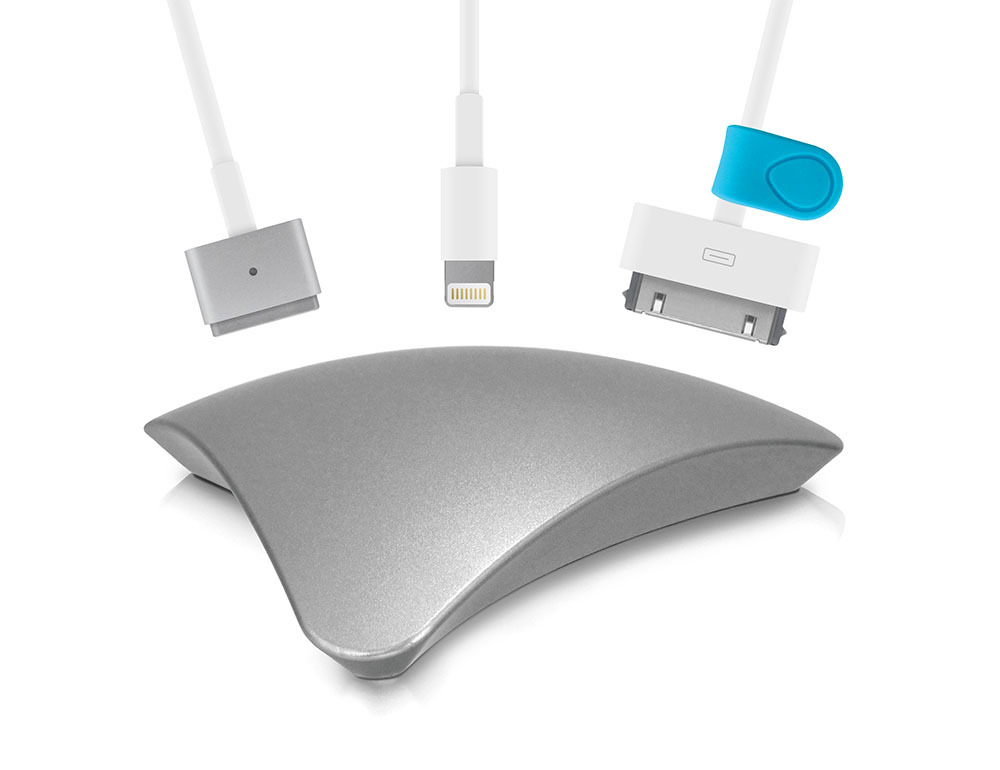
The MOS is basically a paperweight that holds the business ends of your cables in place with magnets. There are three different finishes: black or white plastic, and anodized aluminum. All three are billed as “scratch-resistant and beautiful.” When MOS offered to let me test one of the devices,
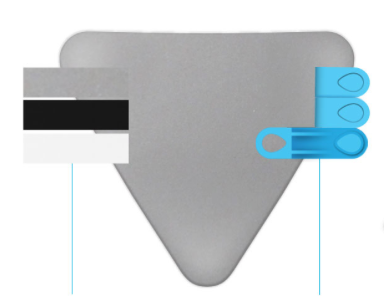
I have to admit I was hoping for the spiffy aluminum model to match my iMac, but I was surprised by how cool the plastic model actual was, and how it fit in perfectly with my (also white plastic) mouse. And the black one is kind of sleek. It’s like the George Clooney of digital accessories (if chargers are twentysomething Hollywood starlets).
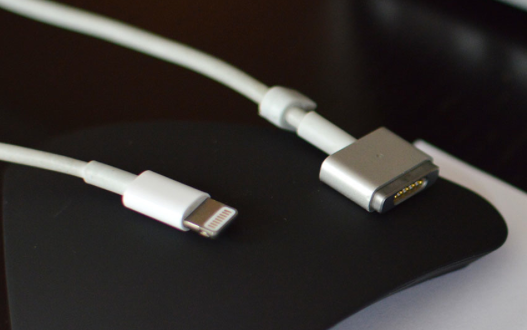
(C’mon, doesn’t it kind of look like a tuxedo with skinny supermodels hanging on?)
THE INNARDS
I was pretty dubious when the MOS team sought me out for my opinion. The gently curving triangular thingiebobber was modern and sleek, a little sci-fi-ish, but seemed too insubstantial to get much done. The joke was on me, however, because this baby is one super-magnet. Below, see the MOS being suspended, swinging from the business end of my iPad’s teeny tiny Lightning Pin charger cable.
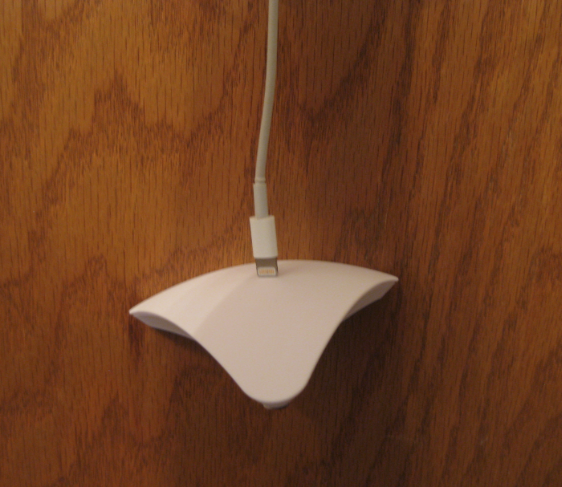
That’s a pretty oomphy magnet.
For really light-weight items, MOS has you covered. Each device comes with three blue, plastic-covered, magnetic cable ties. You wrap it around the cord, near the “head” — almost as if it were a necktie — and it gives recalcitrant cables a little nudge to stick in place until you’re ready for them.
THE BOTTOM
The undercarriage of the MOS has a layer of micro-suction tape. Before I read about the MOS and just looked at the picture (remember, I thought the small thing was insubstantial), I figured it would just slide away across any smooth desk if ever a hearty, heavy cord were actually magnetically attracted. Once I read about the features for keeping the base in place, I figured the tape on the base would be sticky and maybe even a little slimy to the touch.
But actually, this high friction tape, which is made of oodles of microscopic air pockets, holds the MOS in place incredibly well, and it sticks, but it’s not sticky. And I kind of wish my mouse pad had the same tape on the bottom (and yes, though it’s not necessary, I still use a mousepad). It should stay put on clean, flat surfaces. If the MOS starts to lose its clinging power, users are instructed to rinse the bottom of the MOS with room temperature water and air dry. (Am I the only one reminded of the commercials for The Shticky?)
THE BOTTOM — WHEN ITS BACK IS AGAINST THE WALL
Sometimes you just don’t have enough desk space (or entertainment center space) even for a small, curvy, Star Trek triangle. Well, apparently, the bottom of the MOS doesn’t have to be horizontal. Remember kitchen phones in the 1970s, mounted to the wall? You can make your MOS work like that.
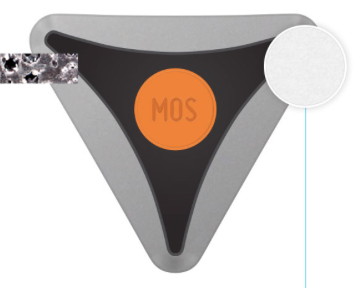
A 3M-brand double-sided adhesive circle is included in each MOS kit, and the team assures me that the sticky dot (which sounds like it has the mighty power of 3M’s Command hooks) will securely hold the MOS and all your magnetized cables and cords, as well as any other small metal items of which you need to keep track.
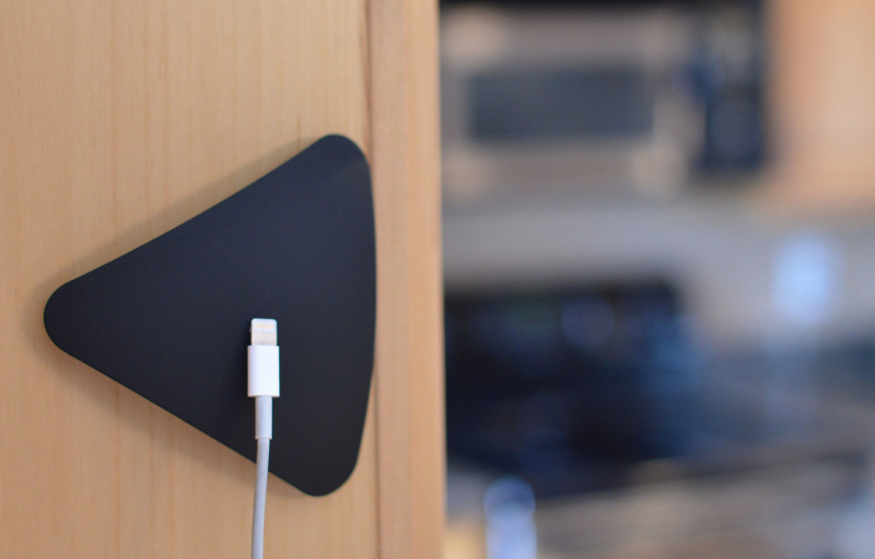
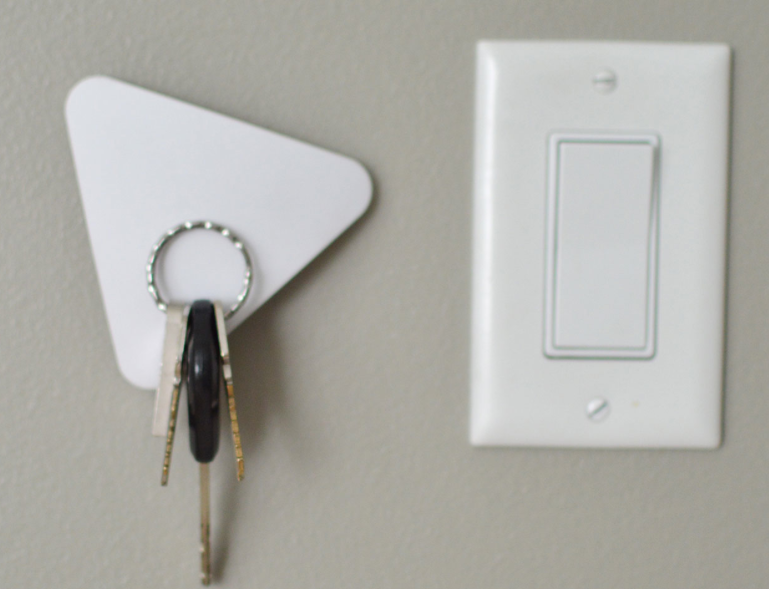
I love the idea of having a wall-mounted MOS right next to my desk, but I’m a renter with bumpy, stucco-like walls, so I’m sticking to the feet-on-the-floor version.
THE PRICE
The MOS is available in Apple stores, and at Amazon, Sewell and BiteMyApple.Co and retails for around $23.95 for the black and white versions and $39.95 for the aluminum version.
THE PACKAGING
As a warning, especially if you’re giving an MOS as a gift, the packaging can be a little tricky. The MOS sits in a little drawer that slides out from the main box with a tug on the pull tab. You have to actually do some fiddling with the main box, as the cable ties, adhesive disk and instructions are tucked away. I must not be the first person to have missed these at first glance, as the rear of the box has “Accessories/Accessoires” and a little arrow pointing to a semi-hidden compartment at the top of the box, above the drawer.
BUT WAIT, AREN’T MAGNETS BAD FOR COMPUTERS AND DATA?
We all know what happens when we put our magnetic phone cases too close to our magnetized hotel key cards or credit cards. They get de-magnetized. And wasn’t the first lesson we learned about computers (well, those of us who started on computers back in the days when data was saved on diskettes) to keep our data away from magnets? As such, the first question I asked the MOS team was whether my flash drives, hard drives and other digital data were in danger from the supermagnetic MOS magic triangle. Their reply?
The answer is no, in most cases. If you put the MOS directly on top of or underneath an electronic device, such as a laptop or hard drive, this could potentially be damaging to the device. However, if you set the MOS right next to an electronic device it will not harm the device in any way. Check out the following link for more information about using magnets alongside electronic devices.
http://sewelldirect.com/articles/Magnets-and-Computers.aspx
That said, there’s a small note on the rear of the package that states, amusingly:
“POWERFUL MAGNETS: To prevent undesirable operation, keep away from computers.”
So, uh. There’s that.
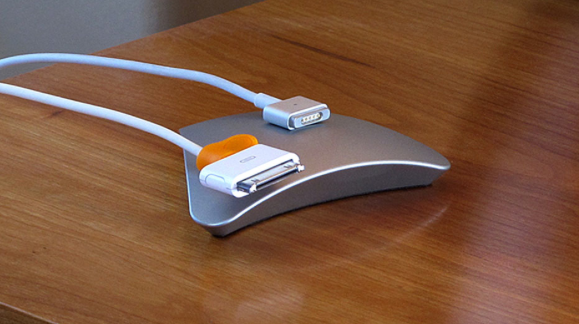
The MOS Menos
Many of my clients deal with cord and cable clutter for their car gadgets. (I certainly hope that they’re not doing much online while they’re driving, but they do have GPS, and passengers watching movies, and phones to charge…) It turns out, MOS has a new project on the horizon.
The regular MOS isn’t huge — it’s about the size of my hand (fingers not included). But the console and dashboard space in a car is pretty limited, and even that much space-hogging might be too much. Thus, in April they will officially be launching the MOS Menos, a smaller version of the MOS created for corralling cords and cables in vehicles. Right now, it’s a successful Kickstarter campaign, just as the original MOS project was.
The Review
Paper Doll is ridiculously frugal and rarely buys gadgets. I sometimes postpone purchases of tools I really need, violating the organizing rule about not tolerating dysfunctional situations. However, I would definitely have put this on my Amazon wish list to request one for my birthday. Which is this week. In case you were curious.
Please share your thoughts. How do you keep your cables and cords at bay? Low tech (binder clips and sliced bread ties) or high-tech fancy doo-dads? What do you think of the MOS?
Disclosure: I received a sample product for review purposes only, and was given no monetary compensation. The opinions, as always, are my own. (Who else would claim them?)
Three-By-Three Helps You Stick-It! To the Writing on the Wall
We often carry our must-do information with us, whether in planning binders or smart gadgets. But when we’re at home or in our offices, we need information to catch our attention even when we haven’t thought to go look for it. Instead of our eyeballs going in search of our lists, our lists have to place themselves (with our help) in our eye lines. That’s what our vertical space is all about.
Over the years, we’ve discussed some nifty options for keeping information (schedules, tasks, etc.) in front of our eyeballs without adding to the clutter. Take a peek back in time at:
Paper Doll Sees the Writing on the Wall: Part One — Dazzling With Dry Erase
Paper Doll Sees the Writing on the Wall: Part Two — Chalking It Up
Paper Doll Looks at the Big Picture: Wall Calendars, Planners and Reminders
Paper Doll Says “Stick ‘Em Up” To Stay Organized
We talked about At-A-Glance WallMates™, Idea Paint, Wink (Walls Love Ink), WallPops, and all varieties of chalkboard paint. We got a good sense of how time can be better managed vertically, with calendars and task reminders like NeuYear‘s Seize the Year calendars, Mead’s Organizher line of write-and-wipe items, and PlanetSafe’s Dry Erase Planners. And we saw how some free-form wall stickers, like RE:writes and Martha Stewart Home Office with Avery Adhesive Dry Erase Decals (on opposite ends of the marketing-power continuum), offered options for turning your walls into organizing tools.
Today, we have a new star in the constellation of products that help you keep information up, up and away.

Three by Three, a Seattle-based company, has created a series of space-saving, vertically-arrayed information-bearing products that make Paper Doll almost giddy with delight. Three by Three has designed dry-erase boards and whiteboards using a variety of hearty materials: bamboo, glass, silicone, stainless steel, magnetic elements and more.
The product line that first caught my eye was Stick-It!, featured at the ever-cool Shoebox Dwelling blog, and certainly, the smaller your surroundings (whether at home or at work), the more important it is to keep useful information accessible without wasting minimally-available horizontal space.
Stick-It! products are silicone organizers. Unlike the vast majority of wall-affixed planners and decals, these silicone organizers require no adhesive, no magnets, and no hardware! This means that the Three by Three products are removable, reusable, and won’t scratch or damage your surfaces.
You can attach Three by Three’s silicone, daily, weekly and monthly dry-erase planners to practically any smooth surface, making them equally useful on mirrors in the bathroom (to remind kids of their chores), metal middle-school locker doors (to keep on top of tests and extracurriculars), kitchen (or dorm room) refrigerators (to know who is supposed to be doing what, where), windows and yes, even walls.
Stick-It! Silicone Dry Erase Monthly Planner

The white monthly planner measures 14″ x 9″ and sells for $13.
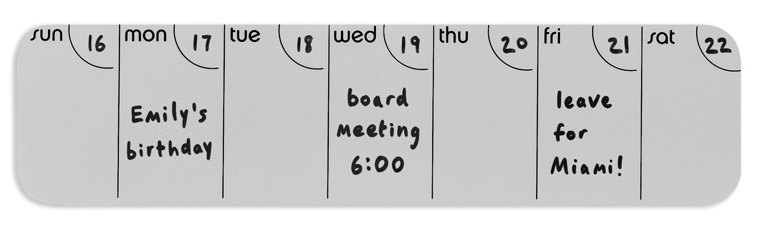
Stick-It! Silicone Dry Erase Weekly Planner
The 14″ x 3.5″ weekly planner comes in white or spring green, and is available in vertical and horizontal formats. You can also post multiple weekly Stick-It!s side-by-side or “stacked” on your vertical surfaces to give you more visible planning space than on the monthly calendar. They’re priced at $9.

Stick-It! Silicone To-Do Board
Three By Three rounds out the Stick-It! line with a 5″ x 9″ daily/ongoing to-do board that’s lined, so you don’t end up accidentally writing your tasks on an ever-decreasing diagonal angle. (What? Only Paper Doll has trouble writing long lists without a lined surface? Never mind!)
 The Stick-It! Silicone To-Do Board has two small hooks embedded at the bottom so that you can keep track of your keys, ID key-card, conference badge lanyard, etc. It sells for $8.
Speaking of conference badges, I think these silicone planners would be particularly useful for business travelers. While family vacations can be free-form, business travel requires careful attention to detail at the very point when you’re likely to be jet-lagged and out of sorts. Pop a weekly version of the silicone Stick-It! in your carry-on and it’s ready to be posted on your hotel room’s bathroom mirror, the back of the door or on the wall above the TV, making it less likely you’ll forget your must-remember tasks until you hit the lobby, the taxi, or the negotiating table.
Stick-It! Silicone Sticky Pads
Finally, the line includes some fun add-ons: small double-sided silicone sticky pads that hold small notes, tiny supplies, stamps and other lightweight items. The sticky pads come in packs of six .8″, 1.2″ and 1.6″ “dots” and are available in white, black, and multicolored (white, black, blue, spring green, pink, and red) selections for $7 per package.
 As I noted above, Three by Three’s product range goes far beyond these flexible, silicone boards, and I anticipate we’ll be looking at items like their bamboo channel+panel planner, colorful and magnetic glass planners, and dry-erase stainless entry butler in the future. For now, though, let’s explore all the ways we might use sturdy vertical planning products that require no mounting, no holes in the wall, and no sticky residue left behind. These silicone Stick-It! items seem pretty organized on that point! Please share your ideas below.



Follow Me