Paper Doll
Declutter Your Life with Uncle Bob’s “Address Your Mess” Contest
Editor’s note: Check the highlighted portion below for an exciting prize update and a chance to win $100!
As a professional organizer, and especially as one who specializes in paper, you don’t see me writing too often about using self-storage. After all, one of the goals of getting organized is to take an honest look at what you have — and how much of it you have — and reduce your number of possessions to reasonably match the space you have.
Opting for self-storage definitely adds to your available space, but can be like increasing your credit limit. The more space (or credit) to which you have access, the more you might potentially use. That’s why it’s essential to know why you’re acquiring off-site storage, estimate how long you’ll be needing it, and make sure your selection fits your needs.
So, a bad reason to book self-storage is because you have too much stuff and can’t be bothered to look at it critically and winnow it down. Have every bill you’ve ever received? Every letter? Every magazine? Booking storage space so you can keep it all, in perpetuity, is just like plopping more purchases on an already-strained credit card. Not good.
That said, there are definitely excellent reasons to use self-storage. For example, self-storage works great when:
- You’ve inherited possessions and have neither the space nor immediate time to review and process them. (Plus, you can review the items with an estate sale agent or meet buyers without opening your home, and all involved parties, including other inheritors, can meet in a neutral space.)
- You’re in temporary housing while between homes (due to relocation to a new city, separation/divorce, graduation or other life-change circumstances).
- You’re going to be giving up your home and traveling (domestically or abroad) for an extended period and are too old (ahem, mature) to fill your parents’ home with your belongings.
- You’ve experienced a catastrophe (fire, flood, tornado, etc.) and need a safe, secure location for your possessions.
- You’re remodeling at your home or office and need a place to keep large, unwieldy, delicate or valuable items out of the way of the workers.
- Your current residence lacks a safe place to park a vehicle, motorcycle, boat, RV or similar item.
- Your business is transitioning between locations and you need a secure location, with temperature and humidity control, to keep equipment, work product, client/customer files, etc.
Again, Paper Doll doesn’t normally talk about off-site storage, but I received an update from our friends at Uncle Bob’s Self-Storage. (They’re based in Buffalo, New York — the home of Paper Mommy and from where I hail.)
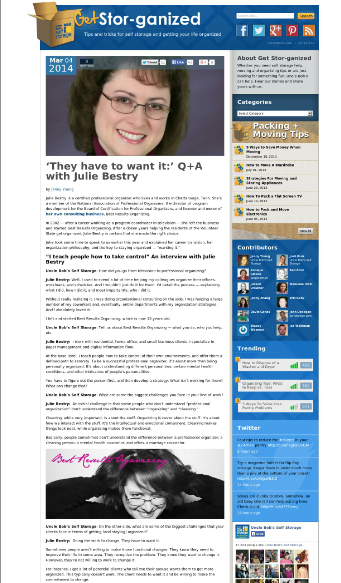
 You may know that Uncle Bob’s blog, Get Stor-ganized, did a fun interview with me a few months back entitled They Have To Want It, about the organizing process and working with professional organizers.
Today, Uncle Bob’s Self Storage launched the Address Your Mess contest, giving entrants an opportunity to win a three-day spa stay and a chance to get control of their clutter.
What’s involved? Contestants should submit a digital photo or short video of a messy room — in your house, apartment, or dorm room — to www.unclebobs.com/mess.
Visitors to the contest site will then be able to vote for the photo or video depicting the messiest, most cluttered room – the space most desperately in need of organizing assistance. (Yes, you can encourage your relatives, friends and social media pals to vote for you — just share links to your entry photo or video.)
Remember, readers, this is for putting forth your own rooms, spaces that fail to give you the serenity you want. Don’t submit photos of loved ones’ spaces in hopes of guilting them into organizing the way you’d like to see it done. (It’s not only bad manners — it’s against the contest rules!)
You’ve got eight weeks to enter the contest. Entrants whose photo or video earns the most weekly votes will receive an Uncle Bob’s prize package, including jackets, t-shirts, and other fun merchandise. I’ve just been notified that, as of this moment (6/11/14), and for the remaining weeks of the contest, the entry with the most votes each week also wins a $100 Amazon gift card! After the eight weekly winners are selected, Uncle Bob’s will then choose one of these finalists as the grand prize winner on Monday, June 30, 2014.
The grand prize includes round-trip airfare for two to Miami, Florida, a three-day/two-night stay at the Mandarin Oriental with one deluxe Bay View room for two, and two half-day Relaxation Program spa treatments. (Yes, I’d say a three-day spa vacation in Miami would be a good way to declutter one’s mind.)
And, while a vacation is lovely, Paper Doll considers the other part of the grand prize to be the true win. The grand prize winner will also receive one free session with a professional organizer (of his or her choosing) to declutter and organize the living space depicted in the entry. (In other words, the point isn’t merely to escape your clutter, but to embrace the organizing process and eliminate the clutter!)
Photo and video entries will be accepted through Sunday, June 29, 2014. One entry is allowed per contestant. No purchase is necessary. Got questions? There’s a contest FAQ page.
This is not a Paper Doll contest. The people at Uncle Bob’s just really seem to get that organizing is about more than just moving stuff from your house to your storage unit, and have interviewed many of my colleagues to help share organizing tips. (For example, they’ve recently chatted with the superb Diane Quintana, Ellen Palestine, and Anna Sicalides.)
If you decide to enter the contest and Address Your Mess, good luck!
Netflix-esque Subscriptions for Books: Oyster, Scribd and Entitle
If you’re a voracious reader, you know that book-love can become an organizational challenge, sometimes even an obstacle. Some readers devour books so quickly and read so many books that either their spaces are overburdened or their bank balances are depleted — or both.
If only there were good solutions for acquiring lots of books, but at minimal cost and without the potential for tangible clutter.
Well, of course there already are. We’ve previously talked about the clutter-reducing aspects of renting individual electronic books for grownups (as well as renting books for kids), borrowing tangible library books (free, but clutter-limiting), and acquiring all manner of ebooks (potentially costly, though borrowing is an option).
Now, two companies have taken a page (no pun intended) out of Netflix’s book, building platforms for renting an unlimited number of ebooks for one flat fee.
Oyster has a basic premise. For $9.95 per month, you get access to an unlimited number of books from Oyster’s collection of 200,000 titles (up from 100,000 at last September’s launch), which you can read on your phone or tablet. The first month is free, and there’s no contract, so trying it out yields no obvious downside. If you buy even one hardcover book per month, or a few Kindle titles, this would seem like a no-brainer. It’s clutter-free and budget-conscious. But is Oyster all it seems to be?
No trip to the store, no waiting for UPS, no per-book cost. If you can acquire a book mere minutes after reading a positive review, without any additional cost, won’t you read more titles and more often? And if you get fifteen pages into it and hate it? It’s far less guilt-inducing to stop reading if you know you haven’t spent an extra penny.
Oyster’s collection of titles ranges from best-sellers to classics, covers fiction and non-fiction, and includes niche genres like science fiction, biographies and self-improvement. In February, Oyster added children’s books, including those from Disney Publishing. (Got a speed-reading tot in the house?)
Of course, breadth of selection is always an issue (just as with Netflix vs. Amazon vs. Hulu). Oyster has partnered with HarperCollins and Houghton Mifflin Harcourt, but most deals are with smaller and niche publishers, including Rodale, Open Road, Melville House, Workman, Algonquin, and self-publishing leader Smashwords.
The Oyster app currently only works on iOS platforms (iPhone, iPad and iPod Touch) but Oyster for Android is allegedly on the way.
Customers can read whether online or offline. Accessible titles are unlimited, but only your last ten titles opened are stored for offline reading. (So, if you want to start a new book while on a flight or Wi-Fi-less train, be sure to read the first sentence or so before heading out!) You can only add or delete titles from your reading list when you’re connected to Wi-Fi.
Currently, Oyster only serves customers in the U.S. or with U.S.-based credit cards. You can read your books “live” when abroad, but your gadget’s roaming charges may apply.
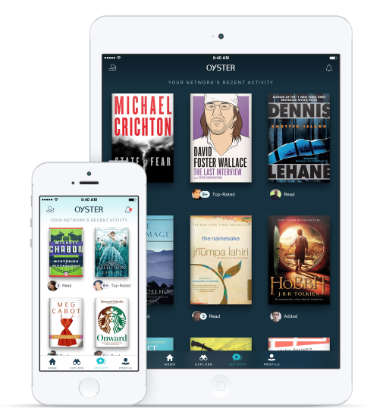
Oyster’s design includes five different font themes. Pages scroll from top to bottom, like web pages, rather than swiping sideways, as on Kindle.
Oyster encourages customers to create profiles linked to their friends, so readers can share what they’re reading via social media. Whether this is a merit or demerit depends on how you feel about your friends knowing you’ve read the Twilight saga.
Scribd launched seven years ago as an online publisher, but released its book subscription service within weeks of Oyster’s debut this past fall. Scribd’s subscription rate is $8.99/month for unlimited digital books and also offers a first month of service for free.
Like Oyster, Scribd offers a wide variety of genres, thought its collections seem to lean more towards genre fiction and older best-sellers. Titles include works published by HarperCollins, E-Reads, Kensington, Red Wheel/Weiser, Rosetta Books, Sourcebooks, Lonely Planet, Workman and Smashwords. Scribd doesn’t say how many titles they have, but as of November 2013, the media was reporting a collection of 50,000 titles with more slightly older offerings.
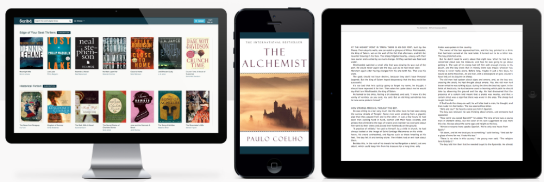
Scribd’s app works on iPhone, iPad, Kindle Fire and Android gadgets, plus any devices using web browsers, meaning you can start a chapter at your desk and finish it in a taxi. When offline, you can access up to ten stored books. Some Scribd books are available for purchase only and cannot be borrowed. Unlike Oyster, Scribd’s service are available worldwide.
As for design, there are three font options, and pages scroll from left to right, like on a Kindle, or downward, as with the web. Scribd also seems to be accenting the social aspect, just like Oyster — send excerpts of books you’re reading to friends via social media, see friends’ reading lists, and view book reviews.
While almost nobody seems to be talking about it, there’s a third entry in subscription-based books, but with a twist.

Entitle (previously known as eReatah) launched a similar service in December that seems more like the Columbia Record and Tape Club with a dash of DVD-era Netflix. Instead of unlimited offerings, subscribers can choose among three plans (2 books/month for $9.99, 3 books/month for $14.99, or 4 books/month for $19.99). Pricier than Oyster and Scribd? Yes, but readers own their downloads forever — even if they cease to be Entitle subscribers.
Entitle has partnered with two of the Big Five publishers (Simon & Schuster and HarperCollins) as well as Houghton Mifflin Harcourt, Ingram Content Group, Workman, M-Y Books, Kensington and more. Titles are accessible on iOS and Android platforms, as well as Kindle Fire, Nook and Kobo, and on computers via Adobe Digital Editions. Entitle’s 125,000+ titles are primarily fiction, including new releases, with some biographies and memoirs.
Entitle offers an alternative to social curation. To help subscribers make book decisions, Entitle offers curated collections, recommendations, and an “If These Books Had a Baby” taste-predictor service. You can also search the Entitle ebook catalog by release date.
Oyster, Scribd and Entitle all offer gift subscriptions.
Unlimited or otherwise, the Netflix-for-books subscription platform has its critics. Techcrunch suspects that Oyster is at a disadvantage because Scribd already has an 80-million-strong user base of self-publishers of documents from its last seven years in business, which would be competitive with Amazon now that the latter has purchased Goodreads and its available social data about reading habits.
Curmudgeonly Cameron Fuller of the International Business Times seems to think the whole concept will fail — he’s dubious that Americans read enough to sustain use of something that offers immediate access to an unlimited number of books. Maybe. But people are aspirational; Paper Doll believes people want to be readers. Perhaps if they can easily access two pages here, while in line, and a chapter there, over lunch, without excess cost or fear of making poor book choices, they will read more.
Unlimited borrowing for under $10? Limited books per month which you own forever? First-day releases or a massive selection of options? What kind of subscription service would work best to organize your reading? Please share your thoughts, below.
Tax Month Freebie: Up to 5 Pounds of Free Shredding at Office Depot
Have you finished up (or are you finishing up) your taxes, only to find that you have a ridiculous “to shred” pile?
Tax time is the perfect opportunity to clear out your file folders, your desk drawers, your purses and wallets and pockets, and shred all the receipts and documents you don’t need to support your taxes. (Not sure what papers you need to keep? We’ve got you covered!)
That mountain of receipts from the coffee truck outside your building? Gone!
Three-inch stacks of cable bills dating back to your first apartment? Ciao!
Frequent flyer loyalty mile statements from airlines that long ago merged with the big guys? Buh-bye!
You know how important it is to shred the documents that you no longer need for tax, legal or proof-of-ownership purposes, because merely tossing them in the trash could make you ripe for identity theft. But you also know that once your shred pile is as tall as a third-grader, your personal shredder is going to wimp out after about fifteen minutes.

Happily, tax season does bring one advantage: an onslaught of Tax Day Freebies, the most Paper Doll-ish of all being Office Depot’s coupon for up to 5 pounds of shredding — for FREE — from now through April 29.
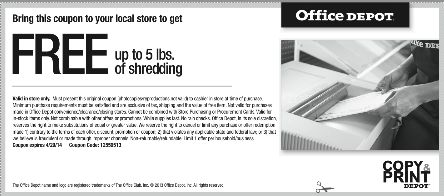
This photo is just a facsimile. So, click on the above link, print it out, clip it, gather up your shredding and get that pile of paper clutter out of your office (or off your kitchen table).
Declutter, protect your identity and save money? Paper Doll approves this messages!
Paperless vs. Less Paper: 6 Ways to Reduce Paper Consumption
If you’ve ever been overwhelmed by the influx of papers in your office, home and life, you’ve probably considered the concept of “going paperless.” But what does going paperless mean?
In many ways, our modern society is already moving towards a paperless protocol. In the old days, you probably used to get a paycheck on periodic Fridays; you still get paid, but most employees get their money via direct deposit. We used to take photos using film and then take them to the corner drugstore (or mail them off) and await an envelope of photo “prints” we could pass around. Now, not only do we not have to wait (because you can tell within seconds whether a photo is worth keeping), but the shots are shared via Facebook, Flickr and any of a variety of digital methods — no prints necessary. But can we get rid of paper altogether?
PAPERLESS ISN’T FOR EVERYONE…OR EVERY SITUATION
As a professional organizer, I hear stories all the time about how the lack of a piece of paper has brought about someone’s financial downfall. For example, if you go to paperless billing and automated payments, your bill doesn’t show up in your mailbox. Sure, you probably get an emailed statement or invoice, but be honest: how often do you let your inbox pile up with unread email when things get crazy?
An envelope that says “Important information about your account” will likely catch your attention more quickly than one of dozens (or hundreds) of daily emails. And if you’re set up for automatically-debited payments and aren’t diligent about checking your online accounts (and especially if you’re not receiving paper bank statements either), it’s easy to miss duplicate charges, fraudulent charges, and account mistakes. One client didn’t read her emails and didn’t realize her credit card account had been compromised; because her replacement credit card didn’t arrive, and because she wasn’t aware of the problem, she didn’t know that all of the bills set to be automatically paid by her credit card failed to be paid at all, as the new card was never activated. Bad news all around.
This doesn’t mean, obviously, that trading paper for digital is a bad idea, per se. It’s just that paperless is probably an unreasonable approach for most people in some circumstances. Instead, I encourage you to find the ways you can use less paper while still maintaining control over your information, finances and life.
6 STEPS TO LESSEN YOUR PAPER CONSUMPTION
1) Opt for electronic bill-pay — but don’t necessarily agree to paperless billing. If you’re used to paying your bills the old-fashioned way, explore your bank’s online bill-paying services. It’s much faster to pay from one central, secure location at your financial institution’s web site than visiting the site for each credit card, utility and lender.
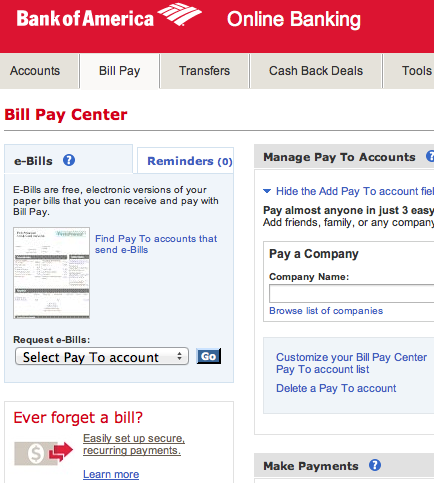
You’ll only have to actively deal with one password, and you’ll keep a closer tab on your bank balances (especially, if like many people, you’ve meandered away from balancing your checkbook manually). You’ll save money on stamps and envelopes, and you’ll worry less about payments getting lost in the mail.
However, for what it’s worth, Paper Doll is not deeply enamored with the idea of auto-debit for all accounts. It’s a great solution to make sure you don’t ever forget any of your major payments (mortgage, car loan, etc.), but I’ve seen enough allegedly closed client gym memberships rise from the dead with zombie bank debits. Assuming your bank account will generally have enough funds to cover auto-debits at any point in the month, you can arrange for minimum (or higher) credit card payments, insurance bills and any other charges that would cause you (financial) pain if a payment were missed, but I advise against giving every vendor carte blanche to debit your account.
2) Consider paperless billing, but only if you are certain that you have the ability and the willingness to be diligent about checking your accounts online (whether or not auto-debits are in place). A quick glance at an excessive water bill can let you know that you’ve got a plumbing leak, and a high cell phone bill could mean you need to have a talk with your teens about texting overages.
If you tend not to operate anywhere in the vicinity of Inbox: Zero, it’s unreasonable to expect that you’ll pay full attention to e-bills. Paying bills on time can be difficult for a variety of reasons, whether you’re receiving and/or paying them digitally or manually. To gain mastery over timely paying of bills, start with:
- Paper Doll’s Strategies for Paying Bills on Time: Part 1
- Paper Doll’s Strategies for Paying Bills on Time: Part 2
3) Limit the flutter of paper receipts by taking advantage of e-receipts. Digital receipts come in a number of flavors. You may have noticed that Staples and Office Depot now ask you, at the point of purchase, whether you’d like a paper receipt, a digital receipt, or both. If you opt for a digital receipt from a brick-and-mortar store, make sure that when it gets to your inbox, you have a plan for moving it to a sub-folder (for tax-deductible receipts) or trash, as is necessary.
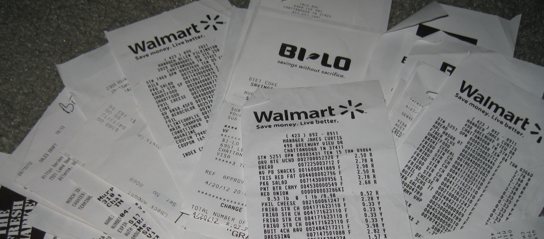
There are lots of apps for making paper receipts a thing of the past. How you manage your receipts is less important than making sure you do manage them so that you neither get buried in digital or paper receipt piles nor lose what you need for tax or proof of ownership purposes. To get a handle on creating a systematic approach to dealing with your receipts, start with my Seven Steps to Conquering Receipt Clutter Flutter. And be sure to review some of the posts where we’ve discussed digital receipt management options:
- Digital Receipt Management Tools (Part 1): OneReceipt, Shoeboxed and a Slice of Lemon
- Digital Receipt Management Tools (Part 2): Itemize, MyThings, MyReceipts, Risiti & PlanetReceipt
4) Digitize what you need — but don’t expect to scan everything.*
Scanning is a great way to reduce your long-term paper collection, if not consumption. Professional organizers have found that upwards of 80% of what gets traditionally filed is never looked at again, particularly if users are not conscientious and systematic about differentiating between what’s essential and what’s tossable before starting the scanning process. Don’t make the same mistake with what you “file” by scanning.
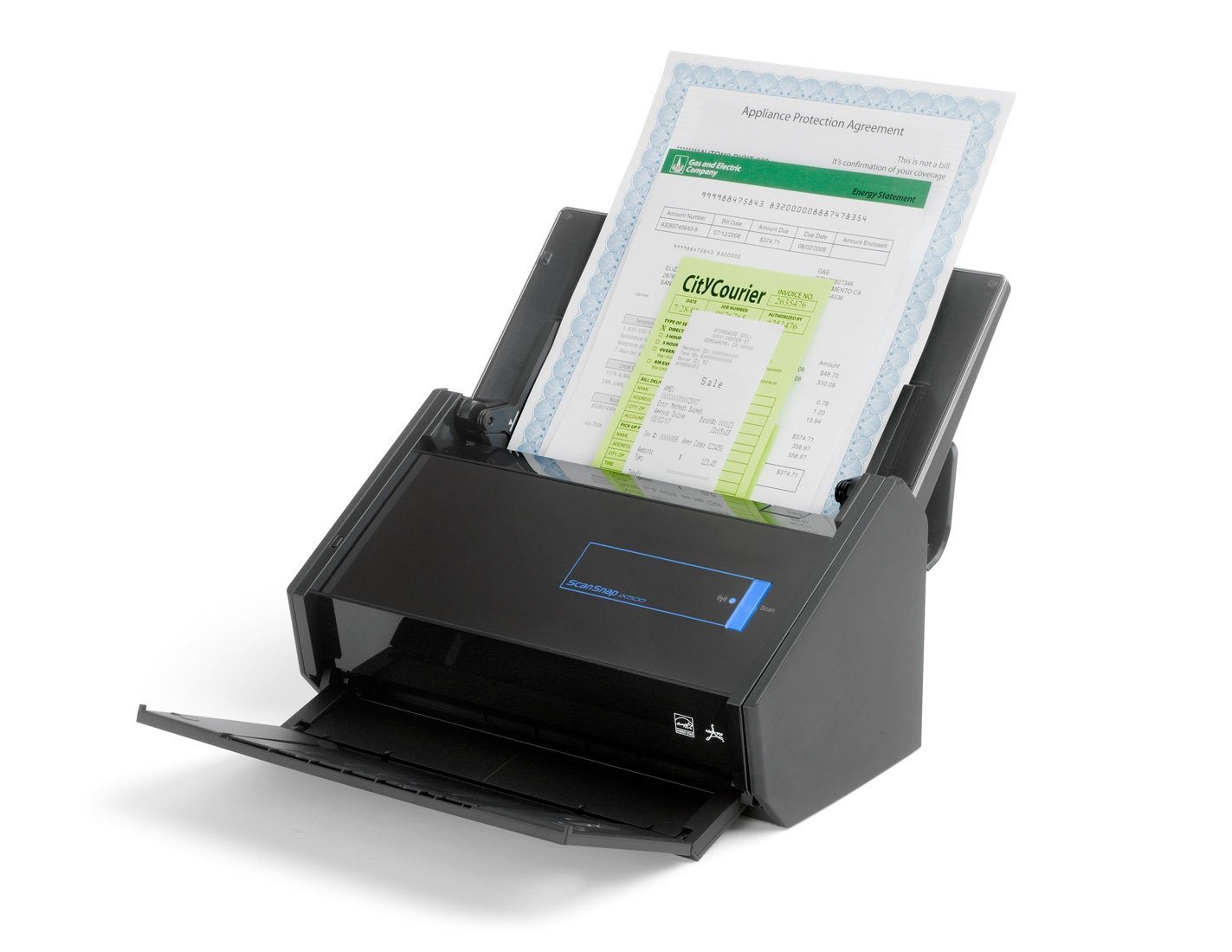
Select a scanning solution that fits your style and needs. An all-in-one printer/scanner/copier or desktop scanning system (like NeatDesk or Fujitsu ScanSnap) works in the office or home; a portable scanner (like Doxie or NeatReceipts) is better if you work from a coffee shop or the carpool lane. Know whether your scanner works equally well with Mac and Windows, has manual or automatic sheet-feeding, and allows for double-sided simultaneous scanning.
Research whether the system assigns automatic (and obscure) names to documents or prompts you to title them on your own, and test the software to make sure the user interface isn’t so awkward that you’ll procrastinate and avoid your scanning tasks.
Echo your paper system’s hierarchy (assuming you have one) and label your digital files with precision. With paper, you use logos, colors, fonts, and familiarity with layouts to help you discern the difference between your bank’s monthly statement and your kids’ report cards. With digital files, you’re generally working with file names only, so be specific.
You may have heard it’s not necessary to organize scanned documents into hierarchical files because optical character recognition (OCR) software and desktop search engines let you search for keywords or phrases within files. While this is generally true, if you’ve had limited success organizing your papers in the past, you may not have the time or inclination to learn how to tag with keywords, use complex search functions or remember exactly matching search terms. Desktop search can be a boon, but relying on it as an organizing tool (or really, a permission-for-not-organizing tool) may not work for you.
Back up your digital file archives to secure off-site hard drives, cloud storage, or both.
Know yourself. If you think scanning is less work than sorting, purging and filing, you’ll be disappointed. Scanning has a plot of plusses, but it’s not painless. There may be less heavy lifting, but there will still be a lot of heavy thinking.
Finally, just because a document is scanned doesn’t mean that the original can be destroyed. Consult your attorney, CPA, or professional organizer regarding which documents must be maintained in original formats, like VIP documents (birth certificates, Social Security cards, etc.).
5) Print less often. Print fewer documents. Retain more information.
So much of what we find online seems like great resources for our aspirational selves, the “we” we want to be, but printing just leads to more paper pileup. Take the time to learn how to keep digital information in digital form by using everything from advanced bookmarking with apps and tools like Pocket to the spiffier options we’ve previously discussed:
- Site-Saving Bookmarklets: Keeping Up With Online Reading While Reducing Paper Clutter (Note: this is a classic post; many of these options now have apps as well.)
- Paper Doll On Paperless vs. Less Paper: Send To Kindle, iPrint & Paperless Post
- Understanding Evernote: What, Why, and How
6) Take notes digitally. It’s beyond the scope of this post to review the numerous options for notetaking on your phone, gadget or computer, whether via tiny app or robust software. From Evernote to Simple Note to SpringPad to OneNote to practically every third app out there, you can find a digital solution for capturing all the information coming towards you each day, organizing it and keeping it safe.
MINDFUL, PAPER-LESS
This is just a quick glance at how you can reduce the paper in your life. In broad strokes, consider the following rules:
- Limit what paper comes into your home or office. Be discerning about what stays and why.
- Know the rules about why to keep documents and for how long.
- Give yourself permission to let go of paper you don’t need (like directions to places you won’t go again or instruction manuals in languages you don’t read) and recycle or shred the excess.
Instead of chasing some mythical paperless perfection, aim to realistically use less paper and master what you keep.
*Note: portions of the section on scanning were excerpted from my new book, 57 Secrets for Organizing Your Small Business.
It’s a Notebook! It’s a Whiteboard!: 3 Dry-Erase Notebook Innovations
With traditional notebooks, even the ones with twists like we’ve examined in the last few posts (for lefties and customizers), we’re dealing with an expectation of some kind of permanence. But what about the times when we need notebooks to let us create, change, recreate, erase, and start all over again — without destroying the environment? Yes, I know that pretty much sounds like a computer, rather than a notebook (or at least an Etch-a-Sketch), but sometimes you need a new way to organize your visions and ideas as they change.
In just the past few months, we’ve seen an upsurge in a new kind of alternative notebook: a dry-erase notebook!
A dry-erase notebook is yet another hybrid solution with specific qualities to suit all possible needs. It must be:
- Erasable like a whiteboard.
- Permanent like a notebook — but only when you want it to be, because sometimes you need to fix mistakes or make revisions. (But it also can’t erase so easily, and unintentionally, that when you casually rub against it, your million dollar doodles become a blur.)
- Portable like a notebook, because whiteboards are great when they stay in one place, but unwieldy to take on the subway or even fit in a backpack.
I’ve found three options that seem to fit the bill, and all come from upstart companies with ingenuity and social backing rather than large corporations. Today, we’ll be looking at Wipebook 2.0, Writerase and Letterforms.
WIPEBOOK 2.0
One big name in dry-erase notebooks is Wipebook, or to be exact, their improved Wipebook 2.0. Canadian student/inventor Frank Bouchard and his team had a goal of $4000 to get the next iteration of his Kickstarter notebook some essential working capital. By campaign’s end in December, $424,314 was raised!
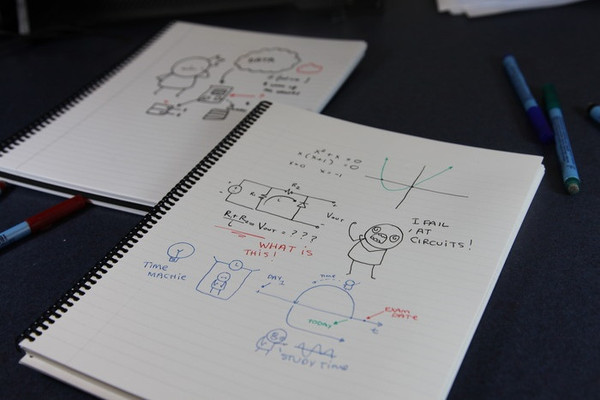
The various iterations of Wipebook 2.0 all come in one standard size, with 25 (double-sided, coated) sheets of 8 1/2″ x 11″ pages bound together with a plastic spiral coil, which allows the notebook to lay flat. The basic notebook with lined pages is $29.99. For notebooks with blank, grid (like graph paper), mixed or music sheets, the notebook is $34.99. You can also get a customized Wipebook for $75.
Playing it close to the vest with company secrets, as do its competitors, Wipebook will only say that it uses a “patent pending glossing process resulting in an enhanced writing and erasing experience.”
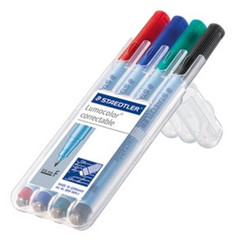
Although the Wipebook works well with all types of dry-erase pens, the preferred writing/drawing instrument (and what Wipebook sells) are fine-tip dry-erase Lumocolor Correctables (singles, black, for $2.89, and four-marker variety packs, with red, blue, green and black, for $11.99).
To get a sense of the Wipebook 2.0 in action, let’s hear from Bouchard and his team:
When we’re talking about keeping the contents of a dry-erase notebook long-term, there’s permanent and then there’s permanent. Eventually, when a project is complete and you’re ready to move on, it would be nice to have a permanent copy of the information or illustrations while being able to wipe the (notebook) slate clean.
A logical solution would be to scan the contents, but might the glossy nature of the paper (or the impermanence of dry-erase ink) make scanning a deal-breaker? Wipebook’s creators anticipated this question, and even created a little video to show how easily Wipebook 2.0 accommodates scanning.
Quick & easy-peasy? Well, yes, except for the part about having to remove the spiral binding (which looked simple enough, but we never did see the Wipebook 2.0 getting re-assembled)!
WRITERASE
Writerase is another dry-erase notebook that began life as a Kickstarter campaign — in fact, as this goes to press, the campaign has a little over 24 hours to go and has already raised over $29,000 towards a $6500 goal. It wasn’t as passionately funded as Wipebook, but it definitely surpassed the initial expectations of the four-man Canadian engineering team. (What’s with these Canadians and their desire to save the environment and provide options for both permanence and a clean slate?)
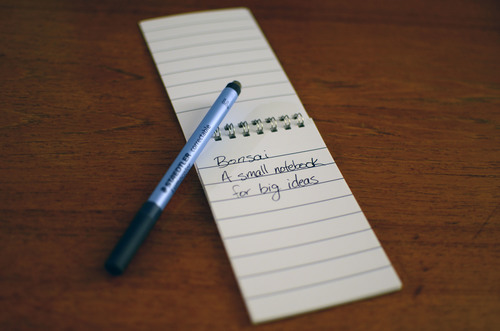
Each of the four Leaf-themed Writerase notebook in their collection (which they call a “forest”) has 54 pages, including 25 (double-sided) thin, resilient sheets of white paper with dry-erase coating plus two sheets of transparencies. (The transparencies are so that you can create a semi-permanent template page, like a calendar, and then modify and erase only the overlaying transparency.) The notebooks have a double-loop (Wire-O) metal binding, allowing the notebook lay flat when open.
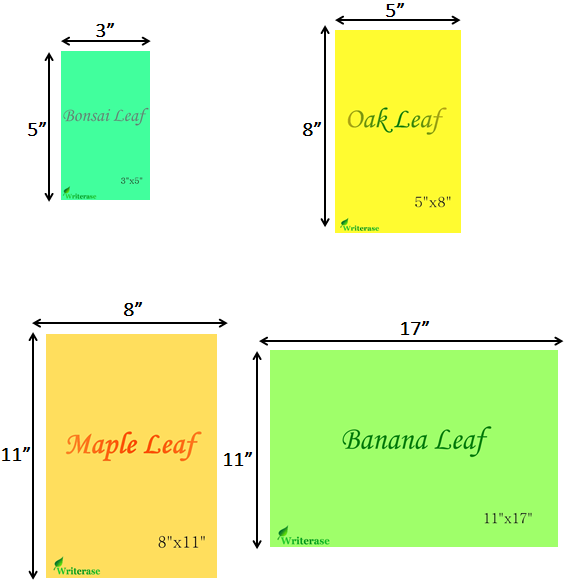
The Writerase Leafs (I’d say “Leaves” but it seems rude to quibble with those nice Canadians) include the following formats:
Bonsai Leaf: 3“ x 5″ (index card size)
Oak Leaf: 5″ x 8″
Maple Leaf: 8″ x 11″
Banana Leaf: 11″ x 17″
There are three paper style choices: college-ruled notebook paper, 1/4″ gridded graph paper, and blank paper (suitable for writing or drawing).
The notebooks are designed to be used with the same dry-erase, non-permanent markers one uses with overhead projector transparencies. (Remember those from math class?) Each notebook comes with one pen eraser suitable for use with standard dry-erase pens, but you can also erase a page with a wet paper towel.
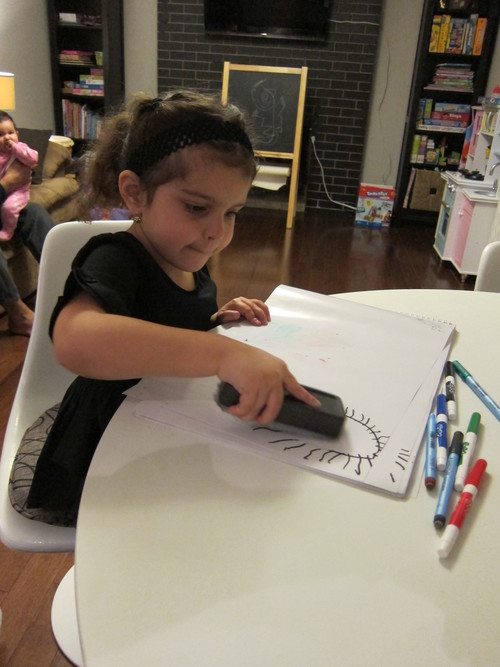
The Writerase team reports using a UV-gloss spray technique on high-quality paper for achieving a dry-erase notebook that is water resistant (meaning the paper won’t be damaged or dry “crinkly” — though of course the ink will still be water soluble) and can be cleanly erased without streaks. They promise an “incredibly smooth writing experience.”
The Writerase Kickstarter campaign will be over tomorrow, but you can still catch the video that got it started:
Writerase’s video page illustrates use with different dry-erase pens (as with Wipebook, Staedtler Lumocolor non-permanent markers are considered the best option), shares the paper quality and water-resistance tests that led to final product selections, shows how kids can use the notebooks, and more.
LETTTERFORMS
Although our neighbors to the north might seemed to have cornered the market on dry-erase notebooks, a Fremont, California-based company entered the fray with the successful Letterforms Kickstarter campaign that ended last month having raised $107,777 towards an $8000 goal. (Do you get the sense that even if Big Paper isn’t immediately seeing the need for dry-erase notebooks, the consumers of North America aren’t going to wait?)
Web developer-turned-designer Venkat Yuvaraj originally focused on creating a washable notebook, but with backer feedback from his first Kickstarter campaign, he came around to a dry-erase format.
Each Letterforms Dry Erase kit comes with one 8″ x 10″ dry-erase notebook bound with plastic-covered coil-style spiral binding and two fine-tip Staedtler Lumocolor correctable markers (one red, one black, with erasers on the non-functional ends). Every notebook contains twenty (double-sided, coated) sheets. While only standard blank and dot-gridded notebooks at this “classic” size were part of the original run, Letterforms created “stretch bonus rewards” for the campaign, including an 8″ x 5″ mini-notebook and a 6″ x 4″ passport-sized notebook, both of which could be added to the product line after the funded campaign is fully shipped this month.
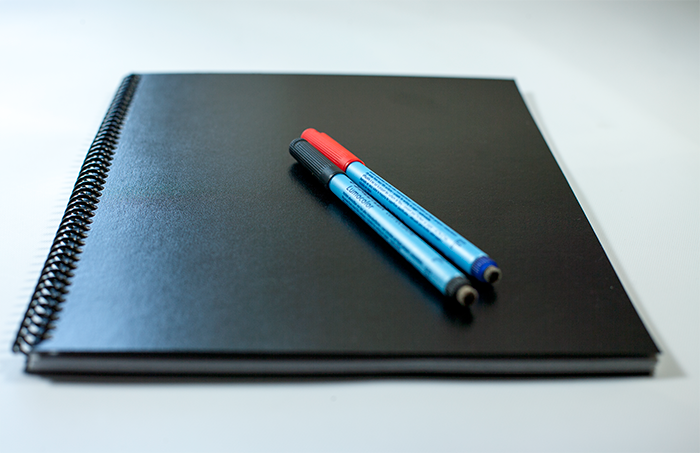
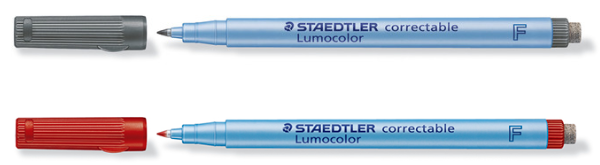
Yuvaraj notes that while the Staedtler markers are included, the notebooks support all dry-erase markers as well as wet-erase, washable and permanent stains, removable with a wet cloth, and promises no ghosting, even after many months of use.
Pricing for the post-Kickstarter period is not described on the website, but the initial pricing for a basic kit was set at $25.
Letterforms’ Kickstarter page includes a number of videos testing how the notebook holds up under a variety of treatments with different pens, smudge attempts, masking tape attacks and more. Indeed, if you’re interested in seeing how inventors get to the point that they can share their products with the public, Yuvaraj is an open book (no pun intended). See the Kickstarter campaign video:
For scientists and mathematicians, musicians and composers, poets and cartoonists, a dry-erase notebook offers a novel way to organize deep thoughts and creations through successive versions. Brainstorming, studying, calculating and engineering, technical drawing, room design, graphic design, and a wicked game of Hangman or Tick-Tack-Toe — all are suitable for dry-erase notebooks.
Do it, doctor it, destroy it, and start all over again without undue deforestation and with ultimate portability.
Dry-erase notebooks are a nifty concept, but as Paper Doll HQ didn’t get to try any of these products first-hand, it may be a while before we have a final verdict. It seems that Writerase has the greatest variety in terms of notebook sizes, while Wipebook 2.0 allows for more customization (albeit at higher prices). Letterforms has slightly fewer pages, but includes two pens in the package cost. All are fairly secretive (and understandably so) about their secret formulas for making slippery, slide-y, write-on-able, wipe-off-able page surfaces. And I’d like each company to provide options for adding section dividers to better organize notebook contents without having to add third-party tape flags or tabs. (Perhaps these companies need to get together with the makers of the customizable notebooks we’ve discussed recently.)
What do you think? Would you use a dry-erase notebook? Please share your thoughts in the comments.



Follow Me