Archive for ‘Time Management’ Category
How to Use Timers for Improved Productivity and Focus — Part 2: Pick the Right Timer
Future, noun. That period of time in which our affairs prosper, our friends are true, and our happiness is assured.
~ Ambrose Bierce, The Devil’s Dictionary
Bierce’s satire aside, the future is unpredictable, and no matter how speedily we attempt to get there, by the time we arrive where the future was, it has moved off again, always out of our grasp. Time is slippery that way, and the only control we have over time is how and what we choose to do with it.
Last week, in How to Use Timers for Improved Productivity and Focus — Part 1, we looked at a variety of ways to use timers to help us be more focused and productive at home and at work, for ourselves on our own or with our work teams or families.
Today, we’ll look at the qualities of what makes a “good” timer, in general and for you, specifically. A lot more goes into your choice than just being able to keep track of time as it keeps on ticking, ticking, ticking into the future.
WHAT MAKES A GOOD TIMER?
You could use an hourglass for noting the passage of time: two (attached) transparent glass bulbs, voluminous grains of sand, and gravity. Hourglasses have existed since the 16th century BCE and offer an somewhat accurate way of time keeping, whether to decorate your mantle or play a mean game of Boggle.

Unfortunately, an hourglass requires you to stop what you are doing, look over at it, and be able to gauge what those collective grains of sand mean.
It’s not very helpful for those who hyper-focus (as they’d never remember to look at the hourglass in the first place) in order to pace themselves. Worse, for those who are prone to easy distraction, hourglasses are silent; by the time you discern the ratio of sand on the top to sand on the bottom and calculate how much time you have left, you’ll have forgotten what you were writing or doing in the first place!
Hourglasses also lack the precision you’ll need if you want to make a soufflé.
So, let’s first look at the basic characteristics of a good timer.
A Good Timer Must Be Simple
It doesn’t matter whether you use a digital timer (or app) or an analog clock timer, though there are features of each style that will make you more likely to enjoy the experience and therefore stick to it.
The first essential principle is that a timer must be easy — preferably intuitive — to operate. You shouldn’t need a thirty-page manual or a YouTube video to figure out how it works.
A Good Timer Should Offer A Bonus
If a timer doesn’t offer something more than or different from what you’ve already got, why are you looking for something new?
Why buy a physical timer that’s not materially different from the kitchen timer on your stove?
If a turn of a dial and a loud, angry buzz will suffice for you, if you only need one timer set at a time, if all your work is done in proximity to the kitchen — why look further?
Similarly, why download an app that does what your phone’s countdown timer can already do?
We professional organizers caution clients that buying more and different bins and storage items won’t solve problems if you don’t purge excess and sort what remains. Similarly, if you’re not using the various timer apps you’ve already downloaded, and there’s nothing materially different about the ones you’re coveting in the app store, back away from the screen!
If a timer can’t do anything but replicate the features you already have available to you, it’s not a benefit; it’s clutter. So, either identify what’s not already satisfying about the timers you have at your disposal, or investigate what else is prompting you to keep shopping for a solution.
A Good Timer Integrates with What You Already Have
A timer should have the capacity to work with your calendar or to-do list, if necessary. You shouldn’t have to learn an entirely new app’s system for scheduling, time blocking, or task completion. If you’re using your timer in conjunction with a virtual meeting, it should integrate with the meeting software (as we discussed last week).
Does the timer you’re considering play nicely with whatever you’re already doing, or does it force you to jump through hoops.
- Got a physical timer that fits in with your desk vibe, so it doesn’t look like a leftover from your 7th-grade math class? Stellar! But if your tangible timer topples off your shelf or is too big to fit in your school or work bag, you’re going to leave it behind.
- Do you need a timer app that syncs with your calendar or to-do list, or at least fits with your digital-only life?
There’s no best timer solution because we all need and want different things. The key to your timer helping you succeed is if it helps reinforce routines and habits you already love (or at least are learning to try to love).
The key to your timer helping you succeed is if it helps reinforce routines and habits you already love (or at least are learning to try to love). Share on XA Good Timer Shows You the Shape of Time
Time is measured in hours, minutes, seconds, even milliseconds, and yet it can seem amorphous. With the exception (as we’ll discuss later) of those who feel anxious working against a visible countdown clock, the prospect of using a timer delivers a great advantage: helping you see the progress of time at a glance.
You want a visual cue that says, “Look! Time is passing… but don’t panic,” — not one that leaves you feeling like Indiana Jones watching the stone door close.
The less cognitive effort and physical attention it takes to check in, the more you stay in flow. And the more you stay in the flow, focused on your goals, the more productive you will be. The timer is there to help you be motivated to start working, and then to prompt you step away when it’s time to rest.
When you look away to see if here’s any time left on the timer, you should be able to quickly refocus on your work. That means your time remaining needs to be displayed clearly and cause no confusion so you can slip seamless back into task mode.
Conversely, if you’ve been resting (or goofing off) and need to get back to work on the next Pomodoro, or must keep the roast from turning into a charcoal briquette, you’ll want a loud (enough) yoo-hoo to help you transition to the next stage!
A Good Timer Should Be Frictionless
If a timer is annoying or awkward to use, you’re going to find reasons to avoid using it. Setting a timer should be as easy as turning a dial or scrolling to the correct time and pushing a button or toggling it to ON.
A tangible timer should either be mechanical and battery-free, or the batteries should be easy to replace with the kinds of batteries you already tend to have on hand, usually AA or AAA. (A client of mine recently bought a large number of small flashlights to keep around her house in case of a power outage; she didn’t realize that they required 3.7 volt lithium ion batteries, so she had to purchase special batteries and a charger. Always check what kind of batteries a gadget requires!)
The annoying truth is that humans are willing to go to ridiculous levels of effort to avoid easy solutions to their problems.
Look at the number of children (and adult significant others who act like children) who won’t lift the lid off the laundry hamper in order to put dirty clothes inside. They’ll pile laundry up on top or just drop things on the floor rather than taking that teeny bit of one-second, lift-the-lid effort to use the hamper.
Thus, anything that creates friction — batteries that die quickly, an app that requires you to log in every time you want to use it — is going to slow you down or prompt you to avoid using it altogether.
When you're looking for a timer to help you be more productive, anything that creates friction — batteries that die quickly, and app that requires you to log in every time — is going to slow you down or prompt you to avoid using it… Share on XA Good Timer Is Process-Agnostic
No, this has nothing to do with timing a Sunday morning or Friday night sermon. Rather, whatever timer you choose should let you develop your own personal system. Francesco Cirillo, the inventor of the Pomodoro Technique, used a process of trial and error to develop the idea of working in no more than four 25-minute sessions with a five-minute break between each.
It’s a popular strategy and definitely helps conquer procrastination. But as convenient as 25/5 Pomodoros are for students struggling to hunker down and study or work on problem sets, these are not magic productivity numbers.
If I wrote this blog in 25-minute chunks, I’d likely be interrupting myself just as I started to get my creative mojo flowing. Instead, I tend to use modified Pomodoros or the 52/17 Method when I’m writing because I can get into more of a flow. However, for boring admin work like accounting or filing, I’ll often opt for 15-minute time blocks because I know I will try to “beat the clock” to get as many tasks as possible done in an hour.
As we’ll see, a timer needs to fit the way you want to use it for you to achieve maximum productivity.
HOW TO IDENTIFY THE BEST TIMER FOR YOUR NEEDS AND PERSONALITY
Beyond the basics of a good timer, what makes a timer fit your path to productivity depends largely on your style and the kind of work you’re trying to accomplish. As we discussed last week, this could involve anything from a team brainstorming meeting at work to getting the laundry folded before company comes, preventing hyper-focus when dealing with email or just getting out the door on time.
Even with all of the basics in play, there are a variety of customizations that will make-or-break your timer experience.
Aesthetics of a Timer
A timer, whether for strict Pomodoros or just to make sure you don’t let the pasta water boil over, needs to invite you to use it.
If you’re a no-nonsense type of person, you may want a digital timer that lets you pick the work and break durations quickly, with no fuss, and that’s all!
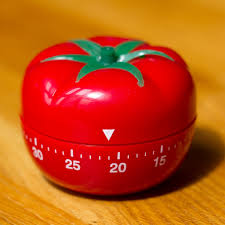
If your aesthetic tastes tend toward the cozy and traditional, you might prefer something nostalgic like the traditional tomato-shaped timer; if you have a cute and twee aesthetic, your ideal timer may look like this:

Nuoswek Mechanical kitchen timer
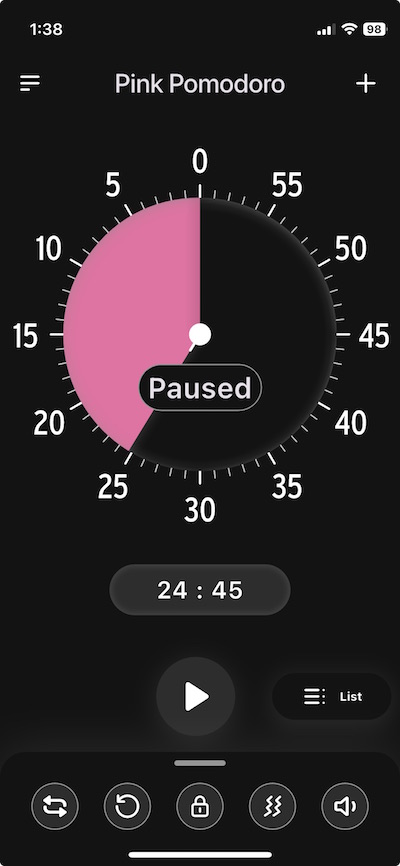
If you’re opting for a digital timer, you might want to be able to adjust the brightness and color. Some people can’t abide the standard screen for a digital app and immediately opt for dark mode; others want a timer set to their personal color aesthetic.
For example, when I’m in the Time Timer app, even though I almost always prefer to use light mode on my screens for writing and surfing, I like dark mode for timers. For me, that makes the timer blend into the background and I can quickly regain my focus after checking the timer.
Similarly, I usually select pink or purple timers, but I have clients who color-code timers for specific tasks: red timers for high-impact work, blue timers for meditation, green for exercise, and so on.
Perhaps the visual aspects of a timer are less important to you than the auditory ones. Maybe you prefer your timer to have an alarm or musical alert that won’t be jarring.
In the comments on last week’s post, my colleague Sabrina Quairoli noted that using timers can make people anxious. That anxiety can come from the concept of a timer itself, or from the sound the timer makes. If it’s the sound, it’s a matter of selecting a timer with customizable auditory options.
If the concept of a timer with the time ticking down quickly makes you antsy, you’re going to want to avoid a digital timer showing the seconds slipping away as if you’re trying to make your Oscar acceptance speech before the orchestra plays you off the stage.
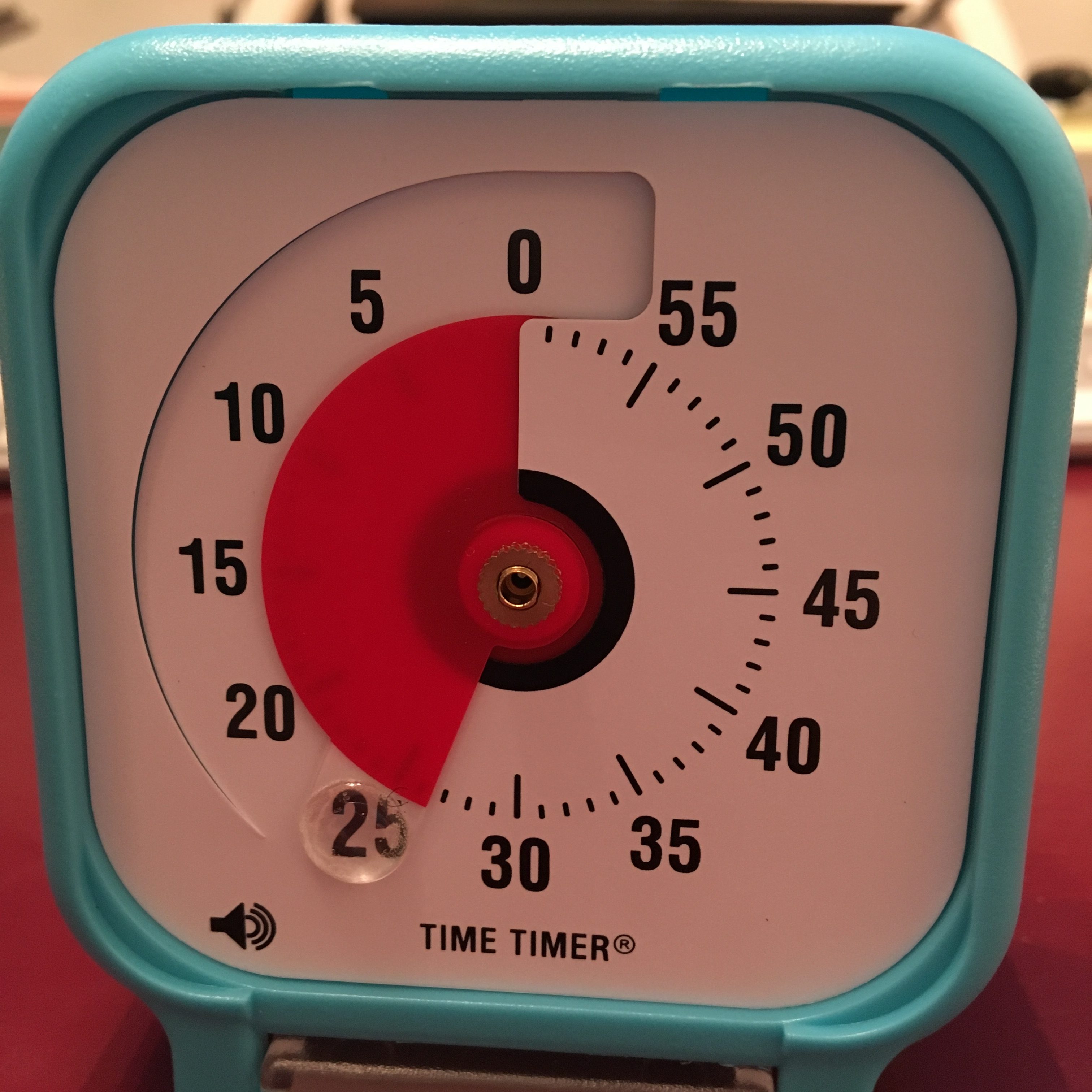
Instead, opt for a timer with a soothing visual approach, one that doesn’t show the second-by-second passage of time. Rather, select one that indicates the overarching passage of time (the minutes or chunks of time) without the more granular metrics.
For example, all of Time Timer‘s analog timers that use a colored disk would be appropriate for a more gentle approach to illustrating the passage of time.
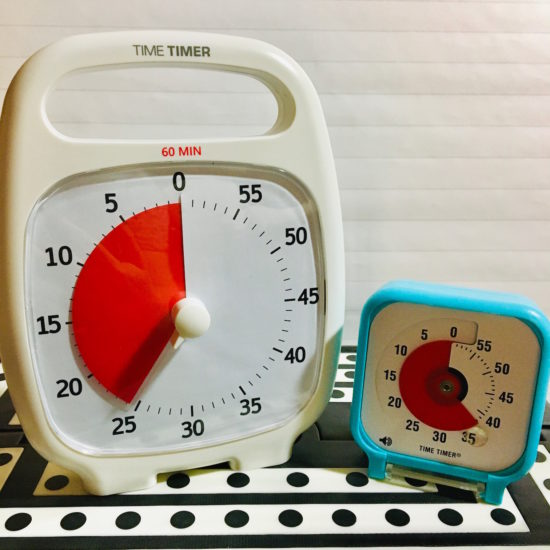
Note: The TimerTimer Twists, have both an analog and digital countdown; if seeing those seconds disappear stresses you out, skip those versions.
Customizability without complexity
You want a timer that will adjust to your rhythm, whether you’re a 25-minute Pomodoro purist for blogging or a “give me 43 minutes because that’s how long (without commercials) it took Columbo to solve a crime” computer code bug tracker.
Consider whether you just want your timer to just block time and alert you when your scheduled time is up, or if you prefer it to automatically set alternating work and rest intervals. Some timers will let you set any increments you want, at least up to 99 minutes. Others are fixed, and will only let you set the timer in five minute increments.
If you’re hoping to use the timer to for cooking, exercising, or for medical purposes (like the seconds after self-administering an injection before you can remove the needle, or the number of seconds to do breathing exercises), you’ll want to be as granular as possible, so seconds and minutes will be key.
Teachers and parents may prefer short-format timers to help kids see and feel the duration of time: of five minutes in time-out, ten minutes of quiet reading, fifteen minutes until bedtime. Meanwhile, knowledge workers will likely need larger chunks of measurable time, from 25 minutes to two hours.
Affective Design Customization
Affective design is an approach that focuses on creating products, services, and experiences that evoke emotions (or, for some purposes, avoid evoking the wrong emotions) in users.
In other words, you want to pick a timer (or selection of timers) with emotionally-supportive vibes (as the kids say). Think about the reason you’re setting up your timer, and how you want to feel while you’re working and, in particular, how you want to feel when the timer goes off and you’re being alerted to the need to transition.
Some people want Mister Rogers with a gentle ding or buzz to remind them that, “Hey, friend, you’re doing great, and you deserve the reward of a five minute break.” (Bonus material: Mr. Rogers Neighborhood episode: Waiting for Time to Pass.)
Others want Judge Judy slamming the gavel to say, “Time’s up, sweetie!” in so harsh a manner that there’s no chance you’ll go back to TikTok or forget to use the restroom if you’ve been hyper-focusing way too long.
As we’ve alluded, may want to adjust your sound options to create the best vibe. Do you want to be be shaken to attention to make sure you’ll stop doomscrolling and get out the door to pick your kid up from ballet? Or might you prefer a soothing trill of music to signal the end of a writing session (without a din) so that you won’t forget that brilliant turn of phrase you were just starting to write?
One-and-done or loop-de-loop?
Just as you may need to consider how in-your-face a timer should be to help you be as productive as possible, you also should think about how attentive a timer you want.
If you’re cooking something and are afraid either your body or your mind will stray, a one-and-done timer will suffice.
Conversely, there are a number of reasons you might want to set repeated or looping cycles, such as if:
- you’re training yourself to tidy up your work area for five minutes every hour
- you want to take breaks between sessions, whether you’re doing a 25/5 Pomodoro, following the 52/17 Method, or considering any of the other productivity techniques in Frogs, Tomatoes, and Bees: Time Techniques to Get Things Done.
- you’re following the advice in Take a Break — How Breaks Improve Health and Productivity and following the 20-20-20 Rule for your vision. (Every 20 minutes, look 20 feet away for 20 seconds to prevent eye strain!)
A looping function is especially nice if you tend to overstay your planned breaks between tasks. Setting a repeated work/break timer prevents “I’ll take a five-minute break” from becoming a Netflix bender.
You may not always want to create repetitive cycles, but a timer that can repeat or remind you to reset will help automate your habits. (Generally, you’ll need a digital timer if you want cycles to loop automatically.)
Discretion is the better part of timing
In addition to considering what’s the best timer for your own situation, you may need to seek one with discreet modes for the benefit of not disturbing the people around you. For example:
 Sleeping baby by Ivone De Melo
- sleeping babies (or easily startled pets)
- roommates or housemates (particularly those on different sleep, class, or work schedules)
- co-workers in cubicles or open-format offices
- fellow library or coffee house patrons
In such situations, you’ll want a timer with the stealth of a Mission: Impossible agent (not the drama of a WWE competitor making a grand entrance.
If you often find yourself working (or otherwise needing to focus) while in the company of others with different focus agendas, consider whether it might be to your advantage to find a timer with alternatives to an audible “time’s up” alert. A gentle blink or color shift can be just as effective as a sound.
Picking a timer for someone else
We all want the timer equivalent of Mary Poppins — practically perfect in every way — but the truth is that we will always have to consider the task involved and personality of the user. Additionally, you may need to identify timer solutions for people with special auditory or visual challenges (like the Time Timer BRAILLE 8”) or medical needs.
In other words, the timer your seven-year-old needs to focus while doing math homework may be very different from what your fifteen-year-old needs to get up from an hour of gaming and leave for band rehearsal.
And both of them may need something very different from what you need from a timer at work or that Grandpa needs to remember to take his medication after dinner.
None of this means you have to spent a fortune on timers; just knowing the advantages of particular features will allow you to discern what will work best. In the next post in this series, we’ll examine traditional and novel timers for improving productivity and yielding the just right amount of focus.
What timer features are the most important to you? How does do these change depending on your work or life contexts?
How to Use Timers for Improved Productivity and Focus — Part 1
Everyone seems to agree that January slogged on, but people are shocked that we’ve suddenly arrived in April, with February and March having disappeared in the blink of an eye.
The truth is, most people aren’t very good at gauging the passage of time. In her A Working Library blog, Mandy Brown wrote Out of Time about writing, taking breaks, and resting. Prompted by another author’s piece about having gone on a retreat to find time to focus and recommending an analog timer (unsurprisingly, a Time Timer), Brown ordered one, but suffered frustration because she couldn’t get it to work. She kept putting in batteries and trading them out for others, finally ending the anecdote with:
I thought perhaps the timer didn’t like rechargeable batteries—some devices are persnickety that way—so I went rummaging around the house for a regular battery, found one in the toolbox, swapped it into the timer, turned the dial. And waited.
And waited.
Nothing.
I gave up, and went to fix lunch.
About a half hour later, as I was putting dishes away, I heard a steady beep from somewhere upstairs.
It was the timer, going off.
The damn thing had been working all along.
I just didn’t think it was working fast enough.
Time often fails to work as we think it should. It drags on, or it disappears. But of course, time is uniform; time is a constant. There are always 60 seconds in a minute, 60 minutes in an hour, 24 hours in a day, and so on. We are the ones with the problem, not time. We lack motivation and procrastinate. At first, the time available seems endless; then we panic and finally settle down, but allow ourselves to be interrupted, and the available time is suddenly gone.
In one of my most popular posts, Frogs, Tomatoes, and Bees: Time Techniques to Get Things Done, we looked at what we need to understand about our problematic time behaviors, and at nifty system solutions, including the Pomodoro Technique and its offshoots (Tocks, 90-Minute Blocks, 52/17 Method, and Flow State).
The exact number of minutes may vary, but the strategies remain the same:
- Do a brain dump to know everything you have to work on.
- Break large projects and concepts into smaller, distinct tasks so you can identify specific activities from which to choose.
- Prioritize what’s important to find the essential next task to tackle.
- Start that task and stay focused.
- Take a break. (Not sure how or why? Read Take a Break — How Breaks Improve Health and Productivity.)
- Lather, rinse, repeat.
Some methods may also involve noting what internal or external disruptions occurred. (Did you get hungry and wander off for a snack? Did a stray notification steal your attention and take you down a social media rabbit hole? Did your kids or co-worker need help finding something right in front of their eyes?)
To improve our use of time, we can incorporate short-term accountability, bringing in co-working buddies to body double and keep us focused and on-task.
- Paper Doll Sees Double: Body Doubling for Productivity
- Count on Accountability: 5 Productivity Support Solutions
- Flow and Faux (Accountability): Productivity, Focus, and Alex Trebek
Other methods involve giving ourselves rewards. Some digital apps support Pomodoro-based work using gamification, rewarding focus and completion. Maybe you’re not a carrot person but a stick person, and need a negative consequence for not sticking with it?
No matter your method, there’s one more commonality to all of these approaches: keeping track of time! And for that, we get the biggest bang for our buck by using timers.
WHY AND HOW TO USE TIMERS FOR PRODUCTIVITY
“C’mon, really?” clients ask, giving me the side-eye when I pull out one of my visual timers. “Can’t I just work until I get it done?”
Sure. Maybe. But probably not, especially if I’m not there with them.
If telling yourself to get down to work — and working a certain amount of time and not getting distracted but also not hyper-focusing to the point of getting burned out, eye strain, and a headache — actually worked for everyone, then time management wouldn’t be a “thing.”
Timers help us in all manner of ways, at work at and home. At its most basic, a physical timer or a visual digital timer/app creates a tangible representation of time passing so you can see and feel time.
Use Timers for Productivity at Work
You’re probably not shocked at the idea of using a timer, but you may feel silly employing one. Do you think that unless you’re a professional athlete, a surgeon struggling to perform a procedure within a safe time span, or a special effects master overseeing synchronization, that timers can’t help you?
There are many ways to improve your productivity at work with the help of timers.
For yourself
- Avoid falling into the email rabbit hole — Set a timer so you don’t “come to” three hours later in the midst of an email-induced stupor, wondering why you just read an entire newsletter about artisanal butter when you were just looking for a sign-up email to send to your colleague.
- Time block your tasks like a pro — We’ve talked extensively about time blocking here at Paper Doll HQ. The only way to make sure you have time for all of your priorities is to schedule time on your calendar — the space where time lives — for attending to them.
But your calendar isn’t the only tool you need for time blocking. It tells you when you’re supposed to start a task, but how will you remember when to move to the next thing?
Want to tackle your bookkeeping and still have time for a snack? Set your timer, get it done, and reward yourself with something yummy like an apple. Or cheese. Or cookies. (As they say on TikTok, we listen and we don’t judge.)
- Prevent perfectionism paralysis — When societies were agrarian, we knew we were “finished” when we’d reaped the harvest; most modern work ends with deadlines — or (seemingly) never ends at all. Give yourself a hard stop on tweaking that PowerPoint so you don’t turn a simple deck into a TED Talk that nobody asked for. When the timer buzzes, you’re done. Move on with your day (and your life).
- Keep deep work from locking you in the deep freeze — You’re focused, you’re in the zone — until you look up and realize that it’s dark outside and you forgot to eat lunch or pick up your kid from soccer practice. A timer keeps you from pulling a Christopher Nolan-style time dilation.
For your team
- Prevent your meetings from dragging on like Martin Scorsese’s “The Irishman” (run-time: 3 hours and 29 minutes!) — Keep a visual timer in sight so everyone knows when the meeting should actually end, not just when it starts to improve satisfaction and engagement. Otherwise, the Monday status meeting begins to feel like a hostage situation.
If you’re the one moderating the meeting, install and set up the Zoom timer in the app:
- Add the Timer – Clock, Agenda, Countdown & Stopwatch to your paid Zoom account
- Using the Zoom Timer App
(Google Meet has a similar option you can add to the Chrome browser. While Microsoft Teams does not have a built-in timer, you can integrate third-party timers into a PowerPoint presentation or add one to the meeting itself.
- Help participants in your virtual meetings keep it snappy — Have you ever been on a Zoom call where someone talks in circles or drones on? Use a timer built into the screen and the meeting won’t devolve into a filibuster.
- Help team members segment their time for time tracking — Use timers to track how long tasks take and identify areas for improvement.
Having a timer go off (no more than) every thirty minutes or hour to prompt logging/tracking activities will help team members be more aware of how they spend their time, and make them (and you) less likely to get distracted by low-urgency, low-importance tasks. (For more on the benefits of time tracking, see my recent post, How to Use Time Tracking to Improve Your Productivity.)
However, it’s important that you don’t use timers to micromanage your team. A timer can be a powerful tool, but the moment you use it to time someone’s bathroom breaks or note that they come back from lunch two minutes after the buzzer, you’ve veered from Motivational Mama to Big Brother.
Use Timers to Improve Personal Time & Daily Living
- Keep your meals from turning into messes — The number one most common reason for using a timer at home is for cooking, and yet people really underutilize timers. Baking brownies? Sure, you’ll set the timer for 25 minutes. You know that it’s important to measure how long something should cook when there’s a recipe in the cookbook or the back of the box.
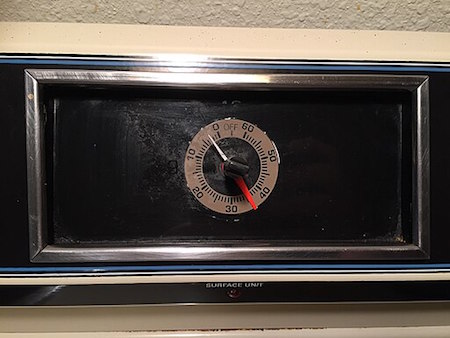
Kitchen Timer of HotPoint Electric Range, Steven Pavlov, CC BY-SA 4.0, via Wikimedia Commons
But how often do you set a timer to make sure you don’t get distracted and walk away altogether? Have you ever put the pasta in the boiling water or started the soup, only to get pulled away from the stove by your kids, a telephone call, a story on the news? Have you ever just turned your back on the stove to scroll through your feed and totally lost track of time until you heard the unmistakeable splish-splash of a pot boiling over?
It’s not really true that a watched pot never boils, but it is absolutely true that an unwatched pot boils over before you’re ready. And an monitored oven or air fryer will turn whatever you put in it into ash.
There’s a reason your microwave has a timer built-in. The manufacturers know that you’ll set a timer for something set to cook for a long while, but that you’ll overestimate your ability to get back in two minutes and forty seconds and completely forget that you were cooking.
If you’re not going to watch your food cook (and you are forgiven for not wanting to do that), set a timer. Use the timer built into your oven or just shout out, “Hey, Siri, set a timer for 7 minutes!”
And honestly, if you are sometimes so distracted that you don’t know why the alarm is going off, even if you set it fifteen minutes ago, you can say, “Hey, Siri, set an alarm for 7 minutes and call it ‘Pasta'” so that when you look at your phone to turn off the alarm, you’ll know what’s what.
- Save your laundry from shrinkage and wrinkleage — Modern washers and dryers have all sorts of bells and whistles. Well, bells and music, at least, with their deedle-deedle-ding musical trills as the washer changes cycles. However, if your laundry machines are in the basement and you’re on the second floor, you might not even hear those twinklingly annoying “dulcet” laundry tones.
And if, like me, you have a practical but not very modern washer/dryer set-up (the kind without myriad settings and just normal/delicate/heavy duty settings), your dryer may have one loud ear-splitting BUZZ to alert you that your clothes are dry and absolutely nothing (but the absence of white noise) to let you know that your washer is done. And again, if you’re not right by your laundry area, you may not even hear that.
But do you know what you always hear?
Your phone, because it’s never more than a foot away from you for long, and usually it’s within arm’s reach. Get to know how long your washer and dryer cycles are and create alarms for them: 17 or 35 minutes or whatever. Name the cycles something simple, like “Get clothes from dryer” or “Switch clothes from washer to dryer.”
The next time you start a load, just slide the toggle to ON and you’ll be alerted just about when your laundry is ready for you. This way, you’ll have no wet clothes sitting all night in the washer growing mold, and no set-in wrinkles from clothes that could have been folded or hung.
- Get a shower time reality check — Ever take a shower so long you accidentally turn it into a spa day?
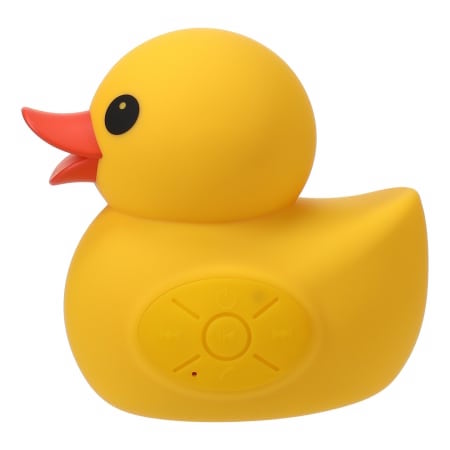
A timer keeps you from running your water bill up like you’re auditioning for The Little Mermaid. An alternative to keeping a regular timer in your steamy bathroom is investing in a Bluetooth shower speaker connected to your cell phone, with an alarm set to play a favorite song. There are a lot of popular, inexpensive shower speakers that look something like this:

Though I have to admit that I’m pretty partial to the aesthetics of this Ernie-approved rubber ducky version:
- Make it out the door…on time (for once) — Somehow, getting dressed and grabbing your keys takes exactly as long as the time you don’t have.
The underlying problem may be that you are always trying to do just one more thing. Or perhaps your physical space’s disorganization holds you back. Maybe you don’t have a good morning routine, or it could be that you’re subconsciously trying to sabotage yourself because you really don’t want to go to work or Jazzercise or your mother-in-law’s house.
But if you truly want to get out the door in time, a timer can help keep you focused on the “time benchmarks” of your day, like when to be done with breakfast and get in the shower, or when to make sure you’re putting on your shoes or grabbing your bag.
A timer is you in the present, sending a message to yourself in the future, which will be received by your future present-self as a message from your past self. (Christopher Nolan has nothing on Paper Doll!)
- Limit doomscrolling before bed∫— Set a timer so you don’t accidentally binge-watch TikTok or Instagram until the sun comes up, causing you to regret your entire life.
And if you tend to doomscroll in the morning and forget to get out of bed, setting a series of morning timers (annoyingly two minutes apart) can’t hurt.
- Speed-Clean Like a Sitcom Montage — Set a 15-minute timer and pretend you’re in a time-lapse TV-cleaning montage. Bonus points for using Eye of the Tiger as your background music.
This works especially well if you want to play 52 Pickup with your kids. Chores are boring; competition (against their siblings, against you, or even against their all-time best score) makes them more challenging. Let’s face it — hours between getting home from school and bedtime can be messy. Set a timer to see who can pick up the most number of things (that don’t belong there) and put them away; the winner gets to pick the background music for the next day’s challenge.
Running around to find things to pick up will either wear your kids out so that they’ll sleep more soundly or make it more likely that they’ll (eventually) put things away after using them; either way, it’s a win, teaching them that it’s not your responsibility to follow them around playing maid!
- Convince your kids that bedtime is not a negotiation — Maybe your third-grader seems more like a tiny corporate attorney when bedtime approaches, acting surprised by the deadline and immediately offering wheedling compromises.
A visual timer lets kids see how much time is left before bedtime, so they can’t argue with Father Time. The idea of 8 o’clock is pretty abstract. Make it more tangible.
When I was growing up, I knew what time I had to go to bed based on what time a particular TV show ended, but with streaming more popular that broadcast, that sense of time in increments of hours and half-hours and even segments between commercial breaks (the served me well when I worked in television) is meaningless to today’s kids, when not only can you start a show at any moment you want, but you can pause it and finish it the next day (or never).
- Pacify the “Just One More Game” gamer — If you, or your partner, roommate, or kid always needs “one more round” of their game before stopping, a timer makes it clear when it’s time to save and quit for the day. It’s harder to argue with a timer alert than a person, and more difficult to resent a non-human telling you it’s time to pack it in.
- Keep screen time from turning into screen day — Whether it’s kids, spouses, or yourself, a visual timer helps prevent an innocent 30-minute YouTube break from spiraling into an entire season of The Office.
To summarize, whether we are at work or at home, we can use timers:
- To make sure we focus.
- To make sure we don’t hyper-focus (or goof off) too long.
- To remind us to take breaks and remember to rest.
Of course, this is just the beginning of the productivity magic of timers.
As this series continues, we’ll look at what makes a great timer — for the way your brain works and for improved productivity for particular tasks. It’s not that tangible timers or digital timers are better, per se, but they each have different positive attributes and potential pitfalls, depending on the purpose for which you’re blocking out time.
As we move on, I’ll share classic, beloved timers as well as the newest and niftiest options for both analog/tangible timers and digital timers/apps, and help you figure out which will help you achieve your productivity goals.
Now that you can envision a wider variety of circumstances for using a timer to amp up your productivity, please share if there are other circumstances you use timers to help you buckle down and focus or, alternatively, keep you from worrying that you’ll hyper-focus right through dinner. What has worked for you, your work team, or your family?
Take Note: Paper Doll’s Guide to Organized Note-Taking for Learning and Creative Projects (Part 3)
Two weeks ago, in Take Note: Paper Doll’s Guide to Organized Note-Taking (Part 1), we looked at the wide variety of situations in which you might take notes, and took a side journey into the relative merits of handwritten vs. digital notes.
Last week, in Take Note: Paper Doll’s Guide to Organized Note-Taking in Lectures & Presentations (Part 2), we explored solutions for taking notes when someone is imparting information to you verbally: in class, watching a webinar, attending a conference, and in collaborative meetings. Some variation on these methods work for casual note-taking situations, like when you’re learning about a diagnosis or treatment, you’re hearing about a new program at a PTA meeting, or even when you’re fielding information on a phone call.)
Whether you want to capture information for a later test, to improve your professional (or passion project) success, or help your team hit its action items, taking notes ensures that information can be captured, processed, learned, and acted upon.
Using my colleague Linda Samuels’ rubric, we looked at how to “listen, capture, and engage” with information using text-based note-taking (e.g., the sentence method, outlining, and the Cornell Note-Taking Method) and visual note-taking (e.g., mind mapping and sketchnoting).
We also harkened back to the idea that not all note-taking depends on information coming to you verbally. When you’re studying printed material as part of coursework, doing academic research (like a term paper on Alexander Hamilton) or writing a non-fiction book (like the history of sandwiches), you will need to take notes on what other people have written to achieve your goals.
You may also create notes from scratch, not based on someone else’s concepts (presented verbally or in writing), but invent something totally new with the help of the elves in your brain. You might write the score for a Broadway musical, engineer the schematics for a cool invention you aim to patent, or draft a novel about vampires from Jupiter or grandmother protesting injustice, or vampire grandmothers…
With modifications, you can take notes using the methods we discussed last week, but there are also note-taking methods that help you create and organize notes on non-verbal content.
ANNOTATION
Picture yourself studying for an exam or preparing to give a speech to your colleagues. However much material you already know, there’s going to be a larger chunk of the unknown printed in books, journal articles, and online.
The advantage of taking notes on what you’re reading is that you can take it at whatever speed you need to make sense of the information and organize it, combined with your own thoughts, without having all the inbound knowledge outpace you. The main disadvantage is that, unlike when a speaker accents what’s important (with voice, body language, or saying, “Hey, you numbskulls, this is going to be on the tests!”), text may not give you a clue as to what is vital.
Sure, textbooks may have concepts in bold or italics, but novels will not; if you’re reading the Federalist Papers, there’s no formatting to clue you in on what Alexander Hamilton (yes, him again!) thought was key. And if you’re researching to support your creative endeavors, only you know what will hit the spot.
Key Benefits of Annotating
Annotating enhances comprehension by allowing you to actively engage with the text, identify key points (either what the writer thinks is key or what is key for your purposes), ask yourself questions (so you can find answers in the text or in other resources), and record your own thoughts.
Annotation can lead to a deeper understanding of the printed word, making it easier to recall information later and prepare for discussions, writing assignments, or drafts. Annotating your notes reaps the following benefits:
- Improved comprehension — By highlighting important information and adding notes, you’re forced to actively process the text, leading to better understanding and retention.
- Critical thinking — Annotating pushes you to question the author’s arguments, identify biases, and form your own interpretations. In fact, as described in the New York Times article, How Students and Teachers Benefit From Students Annotating Their Own Writing, annotating improves metacognition, or thinking about how you think about something.
- Active engagement —The very act of writing notes as you read encourages focused attention and deeper engagement with the material. You’re less likely to let your eyes glaze over if you’re annotating the material.
- Organization of ideas — Annotations can help you identify the main points, structure of the text, and see how different concepts relate to one another. Sometimes it happens as you are annotating; other times, the act of annotating creates the magic that helps you see how things are connected later. If you’ve ever seen the TV show The Good Doctor, this is the way we see Dr. Shaun Murphy arriving at life-saving connections.
- Customization — You can add your own thoughts, reactions, and connections to the text, making the reading experience more meaningful. Whether you’re studying for a test or bringing concepts together to write a book, you can add your own metaphors or connections (and references to pop culture!) to make it resonate.
- Preparation for writing — Annotations are first drafts. They’re the key to making someone else’s first line of research into a foundation for your own work, whether you’re writing essays for Medium, research papers for a class, or a work project where you need to analyze and synthesize information from varied sources.
Analog Methods of Annotating
Marginalia
If you’ve ever scribbled notes, comments, or questions in the margins of a book, you’ve been annotating. You’ve done the active reading and critical thinking referenced above, and created a personal dialogue with the author of which only you are aware. (That’s OK, some authors are cranky and don’t welcome questions.)
Marginalia are great for when you want a quick reference for future review of the material. Last week, I was in a book club Zoom for the National Association of Productivity and Organizing Professionals’ Authorship and Publishing Special Interest Group (no surprise, we call it the NAPO A&P SIG), discussing On Writing Well: The Classic Guide to Writing Non-Fiction by William Zinsser.
Our leader, my colleague Deborah Kawashima, had extensive marginalia, and used those notes to lead the discussion — and to find related material when members brought up points.
I can’t bring myself to write in books — my first job was working in a library, and books are so sacrosanct to me, I can’t bear to even make a pencil notation. I use sticky tape flags combined with handwritten notebook pages for the short term (like a book discussion) and either handwritten or digital notes when working on a blog post or book project.

Transparent Sticky Notes
I wrote extensively about the benefits of see-through sticky notes in my blog post See Your Way Clear: Organize With Transparent Sticky Notes.

To summarize, they give you flexibility when taking notes on written material. You can add non-permanent markings (especially good with library books or borrowed materials), take extensive notes without cluttering the page with marginalia, and reposition them, either on the original text, or as applicable, on your drafts or mind-maps.
Traditional Handwritten or Typed Notes
If you’re taking notes on printed resources to research an article, book, or presentation, you might need room for your mental gymnastics. Taking your notes in a bound notebook, on a sheaf of loose paper, or in a digital document will give you the ample space you need.
You’ll also be able to organize your notes — with clear headings, bullet points, numbering or outlining systems, and any kind of doodles (even marginalia on your notes) you like. The physical act of taking the notes will increase retention.
And yes, in case you’re about to remind me that I talked about how typing/digitizing lecture notes tends to reduce comprehension and memory because you tend to transcribe rather than process, I’m not flip-flopping. When you type what you hear, you don’t process it. But when you type what you read, you translate and process anything that’s not a pure quote.
Additional Analog Annotation Methods
You can also annotate without writing actual sentences, employing:
- Before beginning to read, write down what you know about the subject on a blank piece of paper.
- After you read, add new the information you’ve gained with a different color pen or marker.
- Before you read the next time, review the sheet. (Lather, rinse, repeat.)
Parish recommends storing finished sheets for periodic review and rewriting for clarity.
Digital Methods of Annotating
When taking notes on analog content, analog note-taking may be the best approach. When the material you’re studying, researching, or investigating is already in digital form, it’s often easier to annotate digitally. Some of the more popular digital annotating tools are:
- Adobe Acrobat Reader is best for annotating PDFs. It features highlighting, comments, on-screen sticky notes, drawing tools, and text markup.
- Notability is best for handwritten and mixed-media notes. It can handle handwriting, text, audio recordings, sketching, and PDF annotation. If you use an iPad and want to blend digital and handwritten annotation, Notability is ideal.
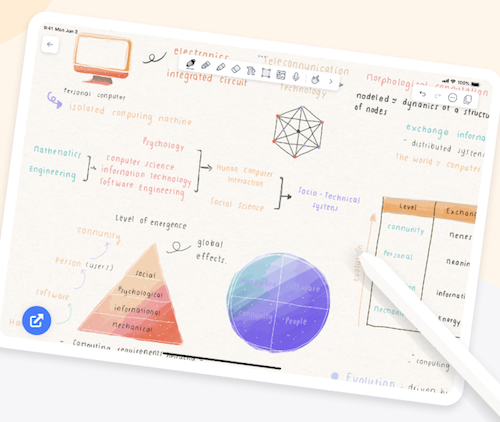
- Hypothesis works best for annotating web articles, blogs, and research. It’s a web-based tool for highlighting, adding comments, and collaborative notes on PDFs and online materials. It’s for students, researchers, writers, and teams.
Analog or digital, as with note-taking methods for verbally-presented material, annotating written material is just the beginning. Whether you “listen, capture, and engage” or “read, capture, and engage,” you still have to engage, and that means keeping your notes organized and connected to one another and the central purpose of your work. For more on annotation:
Annotating Texts (The Learning Center at the University of North Carolina)
The Art of Annotation: Teaching Readers To Process Texts (Cult of Pegagogy)
More Than Highlighting: Creative Annotations (Edutopia)
Why you should annotate your books (Johns Hopkins Newsletter)
Zettelkasten
Do you know Zettelkasten, also called the slip-box method? It was developed by Niklas Luhmann, a German sociologist, to reduce researcher overwhelm and create a network of interconnected ideas, rather than one simple, static archive of information in separate silos.
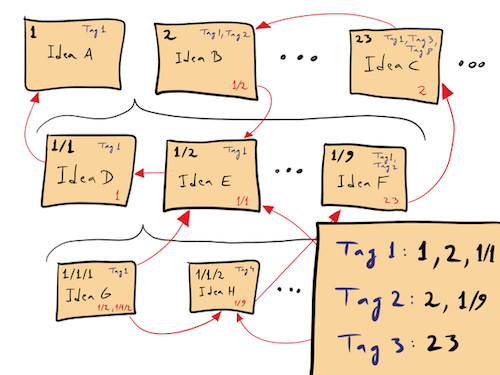
David B. Clear, Zettelkasten — How One German Scholar Was So Freakishly Productive, in: The Writing Cooperative, 31 December 2019, CC BY-SA 4.0, Link
How Zettelkasten Works
Zettlekasten was designed to be analog, using garden-variety index cards. (Obligatory link to The Humble Index Card: Organize Your Life, Then Organize Your Cards.) But with modern computing, you can link digital notes notes to one another easily, as with the internal links in Evernote. Here are the basic steps:
- Capture notes, each with practically microscopic bits of information — A note should have only one fact, concept, or idea. Brevity is the soul of Zettelkasten; so, no long, convoluted, Paper Doll-style paragraphs. Let’s say you’re writing a book: in the analog version, you’d have one quote to prove your point. At first, that quote is isolated.
- Link your notes together — Each subsequent note you take gets connected to related, already-existing notes, forming a network of ideas, a Charlotte’s Web of notions.
- Use unique identifiers — In an analog system, this means you’ll use a system of numbering or indexing the notes. In a digital system, your tools (like Evernote or Obsidian) will offer backlinks, the digital equivalents of the red yarn connecting the bad guys in a mystery movie’s murder board.
- Create “fleeting” (temporary), “literature,” and permanent notes —
- Fleeing notes let you quickly capture raw thoughts that come to you on your own, scratchpad-style. Think of them as shower thoughts.
- Literature notes are one step up; they serve to summarize key ideas from whatever resources you’ve used: articles, journals, books, lectures, etc., but in your own words. (So, don’t copy & paste, but also, don’t use AI.)
- Permanent notes are the refined, interconnected insights that build on the ideas you’ve collected and/or created.
- You may also create “meta” reference notes, which help you think about how your Zettelkasten comes together.
Develop a personal knowledge system (PKS) — Over time, your Zettlekasten becomes an idea-generating machine. It represent what you know, and what you might want to share. It could be everything your freshman needs to write a term paper for Social Studies or the amazing non-fiction self-help book that earns you a place at the top of the best-seller lists — or a series of brilliant stand-up routines George Carlin developed, as explained in this video.
How to understand Zettelkasten
Think of Zettlekasten like the Six Degrees of Kevin Bacon game. Each note you take is an aspiring Hollywood star, just needing to be linked to someone bigger. Let’s say I’m writing a chapter on productivity.
- One lone note about time management is like an indie actor, good but totally isolated and unlikely to reach stardom.
- If I add a note about prioritization techniques, like a link to my well-established character actor Paper Doll Shares Presidential Wisdom on Productivity with the bit about the Eisenhower Decision Matrix, it’s in a movie with my time management note — one degree of separation.
- But let’s say I have a third note about Parkinson’s Law (“Work expands to fit the time available to complete it.”), link it to both the general time management note and the Eisenhower Decision Matrix note, and suddenly they’re all in a Marvel summer blockbuster about productivity!
(Hey, it could happen!)
The point is that a good Zettelkasten is not merely a random collection of notes, but an ever-growing network of interconnected concepts; developing it over time sharpens your thinking and makes your knowledge base not only more expansive, but more powerful.
Zettelkasten is perfect for researchers, authors, deep thinkers, and anyone developing a huge body of networked knowledge. If you’re writing your thesis, a series of books, or building lifelong learning, Zettlekasten is your man (well, system) for less overwhelm, more creativity and retention, better organization, and increased productivity (if handled deftly),
What are the drawbacks of Zettlekasten? It’s freaking complicated if you’re using an extensive numbering/indexing system connecting all the moving parts.
Some of the best tools to develop your own Zettlekasten include:
- Index cards of uniform size (so, go 3 1/2 x 5 or 4×6, but not both)
- Obsidian (for backlinking and networked thought)
- Roam Research (outline-style, with powerful linking capabilities)
- Logseq (a privacy-focused, open-source alternative to Roam)
For more on how Zettelkasten might fit into your note-taking (and organizing) style, read:
The Zettelkasten Method: A Beginner’s Guide (Goodnotes)
Try the Zettelkasten method to manage information overload (Atlassian)
Getting Started: The Introduction to the Zettelkasten Method (Zettelkasten)
Ahrens’ Smart Notes
Sometimes, you need to build an easier mousetrap. Sönke Ahrens, a German author, took Luhmann’s Zettelkasten ideas and modernized them for his now-classic, How to Take Smart Notes: One Simple Technique to Boost Writing, Learning and Thinking.

Ahrens looked at Zettelkasten and said “Jeez, Louise, that’s a lot of complexity with numbering and indexing!” (Well, he said it in German.)
So, the Ahrens’ Smart Notes Method is a simplified method designed for knowledge workers (particularly academics, researchers, and writers) who want to create a structured knowledge workflow without going hardcore into the Zettelkasten approach.
Ahrens’ system focuses less on numbering or indexing of notes and places a much heavier emphasis on summarizing concepts (wherever possible) in your own words. It encourages you to write as you go, rather than taking the fleeting notes and the literature notes and then going back to write your permanent notes.
Ahrens advises creating notes with your own interpretations at an earlier stage so your notes are really first drafts. Less structure, more trusting your gut earlier on.
The Feynman Technique
Physicist Richard Feynman’s system is a learning method, not about note-taking, per se, but baked into his process for helping people understand complex topics is a way to take notes that spur the learning process.
- Write down the concept you’re trying to learn about.
- Explain it in simple terms — On the internet, you’ll often see someone say ELI5 — text-speak for “Explain it to me like I’m five-years-old.” How would you explain what you’re trying to learn to a kindergartener, or at least someone who is an absolute non-expert?
- Identify areas of confusion or gaps in your knowledge — What are you struggling to simplify? If you can’t explain it, then you don’t really know it yet.
- Review and refine your notes — Keep rewriting your notes until your explanation is crystal clear. Picture yourself writing the answer as an exam question, or presenting it on a webinar.
Feynman’s approach is less about note-taking for capturing information than for processing it until you understand it. It’s ideal for students, journalists, speakers, authors, and anyone who needs or wants to both acquire knowledge and put it to use, ostensibly to eventually communicate it to others — even if that communication is solely to pass a test on the material — or use it in their own lives. It can be an academic study aid, or a system for pursuing knowledge on a more lofty level.
Using the Feynman system encourages more active engagement with the content instead of passively copying key phrases out of a book or re-reading lecture notes. It also prompts you to seek clarity, cutting away the excess so your notes are focused and uncluttered. As a professional organizer, Paper Doll approves!
Some good tools for taking Feynman-based notes would be:
- Traditional notebooks (though it may kill trees)
- GoodNotes — especially if you’ll be using an iPad or tablet)
- Evernote — use a combination of handwriting and sketching for clarifying explanations; if you spent your time in the Microsoft environment, OneNote is a similar option.
- Notion (for refining the explanations over time)
- Flashcard apps to help reinforce key ideas over time and find them again. Examples include Anki (free, open-source), Quizlet, and Kards.ai.
DIGITAL NOTE-TAKING PLATFORMS
Beyond options for general academic purposes (and those mentioned in these three posts), there are too many specialized digital note-taking platforms to mention even a representative number.
For casual, situational note-taking on your phone or organizing notes for travel, Apple Notes, Evernote, OneNote, and Google Keep suffice.
Creative writers and journalists alike benefit from Scrivener to keep their research close to their writing; novelists might like Campfire for character notes, world-building, and plotting. Know someone composing musical notes? Try 7 Best Music Writing Software Programs for DIY Musicians or Resources for Creating Your Own Sheet Music.
HYBRID NOTE-TAKING: A MARRIAGE PERFORMED BY A ROBOT

(Although I created this image using AI, be assured Paper Doll‘s words are always my own.)
AI’s role in note-taking will continue to expand in ways we can’t imagine. Right now, we can feed our notes (whether handwritten or typed) into an AI to yield notes on our notes.
You could record a lecture, interview, or meeting and ask your favorite AI for a transcript so you can focus on just key concepts and then go back to flesh things out. After reviewing the transcript, you could ask the AI to write an outline or summary.
Last week, I uploaded the link for the podcast I did with Frank Buck and asked ChatGPT to outline and summarize our conversation. It was revelatory. I stored links, the actual video, and the outline in Evernote to link to other podcast appearances. If I uploaded the audio file, with the click of a button, Evernote could transcribe the entire conversation!
Did you know that your (paid) Zoom account’s Smart Assistant can not only transcribe any Zoom call, but can summarize the chat messages and identify action items? Whatever audio or video recordings you create in any setting, you can turn around and use a variety of AI platforms to transcribe, summarize the discussions, identify next steps, and draft an email to your boss explaining why you deserve a raise!
You can have an AI interrogate your own notes to help you find specific research material without having to hand-search with Command-F. Imagine you’re writing a book and have 1000 research notes in PDF form. Upload them to a tool like Google’s Notebook LM, and instead of having the AI find content from all over the web (and risk AI “hallucinations,” false content), you can have it just provide you with snippets of research specific to what you want to write about that day. Scarily, you can even have “conversations” with the AI about the notes you’ve taken!
Nota bene: the future (of note-taking) is going to get weird.
Paper Doll’s Ultimate Guide to Memento Mori and Appreciating Your Time

Pardon me, handsome stranger, would you happen to know the time?
I can’t find a trace of 1988 or ’89.
If you see the daredevil ghost of my youth go racing by (woah-yeah)
Will you flag him down and let him know I’ll be running a good ways behind?
A Tall Stand of Pines, ©1998 Jeff Holmes/The Floating Men (From the album The Song of the Wind in the Pines)
If you’ll indulge me, let’s start with the inspiration for this post. Last weekend, after five years of avoiding all large groups out of an abundance of COVID caution, I did something essential for my mental health. I saw my favorite band in concert two nights in a row.
I started seeing The Floating Men perform in 1993, and went to just about every gig near me until the last time they performed in Chattanooga, in 2010. I’d also seen them in Johnson City and Nashville, TN, and most memorably, for 30th birthday (with family and friends) in Atlanta.
Their songs range from keening heartbreakers to joy-filled romps, all with complex lyrics and reflecting a louche, delightfully misspent life. I am an old, overly cautious soul, so I’ve lived a misspent youth vicariously through those songs. Seeing The Floating Men’s live made me unceasingly happy.

The Floating Men, Barrelhouse Ballroom, January 19, 2025
The bandmates’ “real” careers took them all over the country, so it had been a long time since they played together. But the fandom, The Floatilla, remains loyal. When the band scheduled one Nashville show in 2024, it sold out in moments; they added another night, and the same thing happened; and a third night. No tickets for me. But for this year, they scheduled one (and then two) shows in Chattanooga, and five years of caution gently stepped aside. Echoing Robert Frost, I can only say, “And that has made all the difference.”
In Act V, Scene 5 of Shakespeare’s Richard II, the erstwhile king bemoans that:
I wasted Time and now doth Time waste me.
King Richard II was indecisive, squandered opportunities, and was forced to relinquish his crown. Time was once a resource he could have directed, but once imprisoned, time became a force that eroded his life and meaning.
Last week, in How to Use Time Tracking to Improve Your Productivity, I wrote about time tracking as a tool for mindfully ensuring that your actions align with your goals and values. That post focused on the minutes and the hours, the nitty-gritty of our lives.
However, I keep coming back to the expression, “The days are long, but the years are short.” We “manage” our time (our days), seeking out new ways to be efficient and get specific tasks done. But fewer of us are adept at working on the bigger picture, making sure that the larger aspects of our lives intentionally arc toward meaning.
Today, we’ll look at how we perceive time and ways to elevate our appreciation of the passage of it in order to organize a life that better reflects what we want. We’ll also review tools to help us achieve a more ongoing sense of mindfulness about the passing of the days (and years) of our lives.
APPRECIATE THE SPEED OF TIME
When Daylight Saving returns, and you Google (for the seventh time) how to change the clock in your car, do you grumble that it feels like we just fell back, and now we were springing ahead? But you’ve also sat in interminably long meetings, shocked that each glance at the clock shows only a minute has passed.
What time “is” and what it feels like can be very different.
Time is a precise, but in some ways, arbitrary set of measurements for something we have never fully understood. St. Augustine believed that time actually just “sits between our ears.” There’s no actual external, objective, universal time; our measurement of time has (mostly) become culturally accepted, but it’s just by collective agreement that we measure time in 60 increments of seconds, 60 minutes, etc.
(Admittedly, the 24-hour day is fairly fixed by the Earth’s rotations, but the number of days in a year is a convention. The Jewish calendar, for example, has lunar months, 28 days each; to make up for the “extra” time, there’s an additional month in a leap year.)
For more on the history, philosophy, psychology, physics, and neuroscience of time, I recommend In Why Time Flies: A Mostly Scientific Investigation by Alan Burdick.

In a BBC article from September, Why Children Perceive Time Slower Than Adults, Teresa McCormack, a professor of psychology at Queen’s University in Belfast, notes that children’s comprehension of time is understudied. We know that tiny humans’ concepts of linear time are limited, and their understanding of time as a dimension (with a sense of duration) is slow to develop.
Adults, however, have both the vocabulary to mark spans of time and understanding of how time works:
- time is unidirectional and linear (outside of time travel movies)
- time is unified such that there is only one timeline (again, outside of fiction), and
- time is event-independent (meaning it’s objective, continuing while we sleep, and existing independent of human perception). Trippy!
But aside from vocabulary and complex neurology, why do kids experience time as moving quickly but it seems to pass more quickly as we age?
One simple answer, explained well on the Inverted Passions blog, is that we have a biological imperative for survival which prompts us to take note of anything that helps us make predictions regarding the future.
Investment legalese says “past performance does not guarantee future results,” but we know that things that worked for us before (or conversely, that caused awkwardness or danger) might happen again; our brains hold onto whatever helps us make predictions. But, when something novel happens, our brains stop and pay attention!
When you’re little, everything is novel. Every experience, whether the cause-and-effect of flipping a light switch or what a sneeze feels like, is new. That’s why we have granular memories of our youths through our college days, but why, other than our first days on a job or meeting our significant others, the rest of adulthood starts to blend fuzzily together.
Our adult lives are routinized; patterns repeat; life whizzes by. Yesterday is like tomorrow is like January 87th; it’s all the same. But we remember each day of our big vacations, doing new things in new places, perhaps with new people.
Predictability helps keep us alive, anthropologically-speaking, but novelty is what allows us to reflect on a life well-lived.
Predictability helps keep us alive, anthropologically-speaking, but novelty is what allows us to reflect on a life well-lived. Share on XMEMENTO MORI AND THE PASSAGE OF TIME
Are you familiar with the term memento mori? It’s Latin, meaning “Remember you must die.”
A reminder of the fleeting nature of life and our impending mortality may sound depressing, but it’s been used in literature, art, and architecture, and as a meditative practice, throughout history. None of us gets out alive, so we need to make our lives more about meaningful moments and less about to-do lists rivaling the length of CVS receipts.
Memento mori helps us realign our priorities — or at least take note when we are not living according to our stated values.
It’s worth revisiting Toxic Productivity Part 3: Get Off the To-Do List Hamster Wheel, where I wrote the following:
REVISITING FINITUDE: THE MACRO AND MICRO APPROACH
Our time on this rock is limited. A central tenet of Oliver Burkeman’s 4000 Weeks: Time Management for Mortals is the ability to see the shortness of life, examine your goals and values, and maximize spending your time on what matters most. This isn’t some hippy-dippy philosophy that says that if we all stop worrying about work or making money, we’ll find ourselves in a vast utopia.
Rather, it notes that life is hard, life is short, and feeling like you only have a right to be here if you’re accomplishing things that make money — whether for your company or yourself (even, or especially, if you are your company) — leads to frittering away the most valuable commodity: life.
Tim Urban’s stellar Wait But Why blog broke ground in this arena. Allowing for a little more time on the planet than Burkeman, Urban posited that we might have 90 years of life, so 4680 weeks rather than 4000.
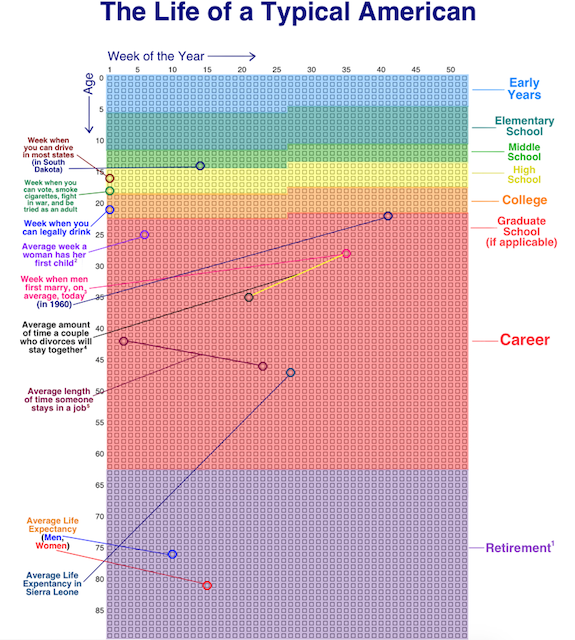
One of his most famous posts, back in 2014, urged readers: visualize your life in years, your life in months, your life in weeks, your life in number of remaining SuperBowls…to appreciate what you do with your time.
For example, I’ve got got 2860 of my weeks behind me. It’s tempting to use these kinds of visualizations for dismay; certainly they can lead to existential angst and even more productivity dysmorphia. “See?” one might yelp! “I have even less time to make the widgets! To earn the money!” And yet, as we’ve seen over the last two weeks, that attitude just leads to focusing more on the quantifiable value you create for others; we want to look at quality, not quantity.
But, we can still turn to Urban for guidance. As a follow-up to his macro look at the finitude of life, he developed a way to organize and examine our lives at the micro level in 100 Blocks a Day.
Inspired by Urban, nomadic programmer Jama of Notion Backups, has identified a way to pause and reflect, giving perspective on where you are, chronologically speaking, in your day (rather than in your life). Rectangles.app gives you a quick glance at how much of today has gone by, in ten minute increments, as of the point in your day when you click the link. Click later in the day, more boxes turn green.
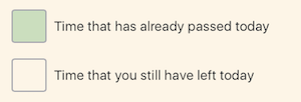
For example, when I visited and took this screenshot, I’d made it through 93 1/3 ten-minute blocks in my day.
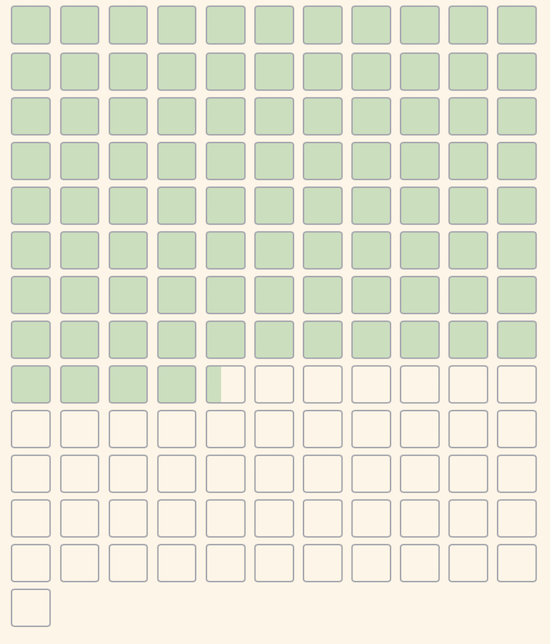
When faced with how much of your day has passed and how much is left, you might have the following reactions:
- Yikes, I’d better get cracking! (A good motivation if you’ve been staring at social media or playing a video game for hours on end, for sure.)
- Yikes, I’ve been working and working, and I’ve only written 17 TPS reports and attended 5 hour-long meetings! (A likely sign of productivity dysmorphia creeping in around the edges.)
- Yikes, all I’ve done all day is work. I haven’t talked to anyone I love, I haven’t exercised or gotten any fresh air. I haven’t laughed. (And here’s where the magic might begin!)
If you’ve been experiencing signs of burnout due to toxic productivity, give this approach a try. Click on Rectangles and think about the day you’re having. Maybe even text the link to a friend, describe your day thus far, and get a reality check from someone who sees you more clearly.
Expanding from how much time is in a day (1440 minutes) to how much time is left in our lives, memento mori yields perspective. There are digital and analog options for helping you do just that.
ANALOG APPROACHES TO MEMENTO MORI
The Meditative Marble Method
Purchase a bag of colorful marbles and display them in an attractive glass jar. Create a ritual such that each day (or perhaps weekly, on Saturday or Sunday), you remove a marble from the jar and think about what you accomplished and gave your life meaning the last day (or week). This isn’t how many blog posts you wrote or how many new clients you signed on, but the intentional awareness of meaningful time spent with your partner, child, or friends, or special things you did to make your life a little more worthy of reflection.
Now, move the marble out of the jar to somewhere else (like an identical jar). If you planned to use this ritual weekly, you’d need to buy at least 52 marbles; daily, you’d want at least 366 (to cover leap year).
Perhaps carry that day’s marble around with you in your pocket to give you a visceral reminder all day that your time has precious value.
Perpetual Calendars
In my prior television career, I sent a lot of faxes, and that meant a lot of cover pages, and you always had a field to write the date. Unless you’re time traveling, it’s not 1997, so we’re not sending faxes much anymore. Instead, most of us check our phones or give a shout to Siri to see what the date is.
Just as digital time feels vague and unmoored from the rest of the hour, seeing just today’s date doesn’t give a sense of how today relates to the rest of the week or year.
Something more three-dimensional may help you be contemplative about the days as they pass.
See the MoMA Sliding Perpetual Calendar, designed by Giancarlo Cipri.
The Sliding Perpetual Calendar is made of plastic (so, not particularly environmentally sustainable) and measures 12 high x 9.2 wide x 0.3″ deep. You can mount it to the wall or prop it up on its included pegs. Each day, slide the red dots down the chutes-and-ladders (OK, just chutes) to select the day, month, and date. It’s currently available from MOMA for $48 ($43.20 for members).
Make the changing of the date into a device-free daily ritual and an opportunity to be mindful and intentional about the activities with which you fill your life.
Any perpetual calendar with moving pieces will work for this purpose. Other options:
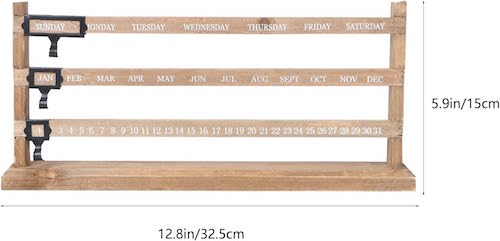
Vosarea Perpetual Desk Calendar is wood, so it’s a bit better for the environment, and measures 12.8″ wide x 5.9″ high. (There’s no information on depth.) While it takes up horizontal real estate, the footprint is minimal. Amazon has it for $18.19 with a digital coupon.
ComiHome Perpetual Calendar Date Desk Calendar measures 10″ wide x 10″ high and has a sleek, modern look. This magnetometer calendar has a circular ring for the month and day of the week, a horizontal plane for displaying the date, and three magnets for selecting each, manually. It comes in red and black, or black and white and runs $22.99 at Amazon.

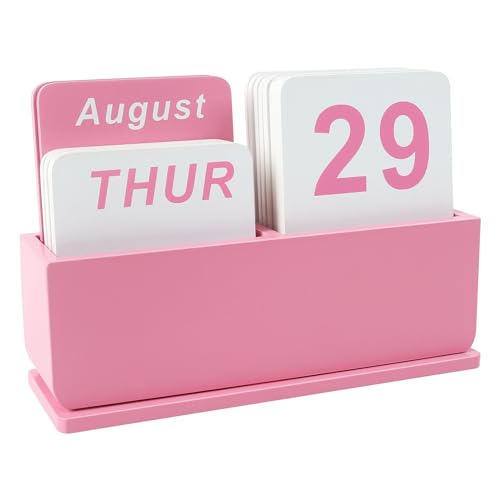
Deerine Wooden Block Perpetual Calendar is an upgrade the old-school block/cube calendar. It comes in pink, green, blue, black, and wood-grain, and runs $13.99 at Amazon. It measures 5.9” wide x 1.92” deep x 4” tall and is made of wood.
Journaling
It’s easy for days and then months to zip by without giving any thought to intentions beyond getting through the day. It’s like how the calendar pages flip and fly off in old black-and-white movies to let you know that significant time has passed. In old photo albums, you can gauge the passage of time by the change of hairstyles and clothing. But to percieve the changes (or lack thereof) in ourselves, a snapshot isn’t enough.
I’ll admit, I’m not skilled at journaling or adept at looking at my life as a big picture. I’m more of a to-do list person. I often write the blog posts I need to read, so I suspect that’s why I’ve been thinking about memento mori.
There are numerous apps for journaling, but I believe we’re more likely to put in emotional effort and pour out heartfelt thoughts on paper. I encourage you to try an analog journaling method if you are able. Something as simple as a One Line a Day journal for capturing the most vivid or uplifting aspects of life might be a good start.

Use Visual Time Trackers
Print or buy a copy of the grid squares from the Wait But Why post referenced above and track your life in weeks by shading the squares.
CONSIDER YOUR MORTALITY DIGITALLY
These apps are designed specifically to encourage memento mori.
Death Clock
The Death Clock app, available for iOS and Android, uses your answers to a questionnaire about your age, sex, lifestyle habits, and nation of residency to predict a death date. It’s not quite as grim as it sounds. Death Clock is AI-powered to help increase your longevity by helping users understand the impact of current habits on life expectancy and encourage making changes to live a longer, fuller life.
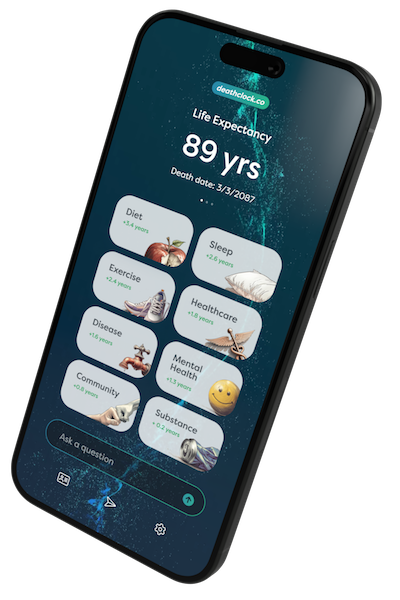
Their makers describe it: “It’s like having a personal grim reaper, but with health tips.” The app is free, but some features require a paid subscription.
Life: Just One
Life: Just One, created by Julien Lacroix for iOS, was inspired by the Wait But Why post. It’s designed to help users recognize that their time is precious and make the right decisions by allowing them visualize the approximate number of years, months, and days they have left on this earth.
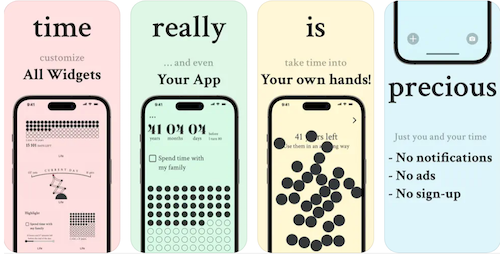
Atypical for apps these days, it pushes no notifications, has no ads, and there’s no sign-up. It collects no life data. The basic app is free, though the Pro level unlocks widgets, a “life in weeks” section, and full customization.
WeCroak
WeCroak was inspired by a Bhutanese folk saying:
To be a happy person, one must contemplate death five times daily.
Each day, the WeCroak app sends five notifications to invite users to stop and contemplate death (and, by extension, the value of life).
Rather than coming at predictable times, the “invitations” arrive randomly and can arrive at any moment (“just like death,” their web site states). Upon receipt, users open the app to reveal a quote from a poet, philosopher, or notable thinker on the topic of death and may choose to pair contemplation with conscious breathing or meditation.
The WeCroak app is free to use on a variety of platforms including Mac, iPhone, iPad, Apple Watch, Apple Vision and Android.
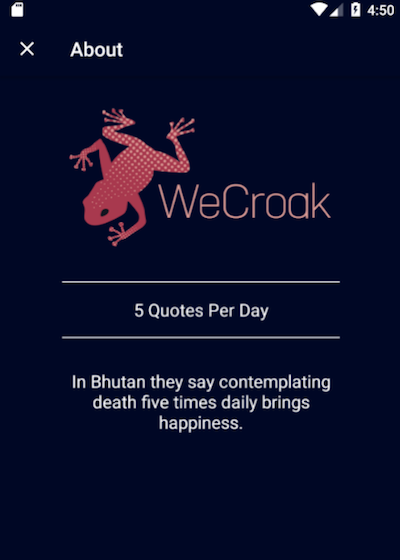
Additionally, WeCroak has subscription-based Leap programs, providing challenges to help “face impermanence in all its aspects and live better lives today.”
Life Clock
Life Clock is a simple, platform-agnostic website. Enter your birthdate and time, and the result is a swiftly moving digital readout of your age to 12 post-decimal point places. Click the right arrow to get your age in months to ten decimal places; click again to get your age in months; click again for your age in days, hours, minutes, seconds, and milliseconds.
You can even see your age in lunations (lunar cycles), dog years, fortnights, galactic years, kilometer light traveled, Poincaré recurrence times (a theorem which theorizes that everything that’s happening now will happen again in exactly the same way!), heartbeats, your age in Friends or Game of Thrones marathons, and more! The data isn’t deep, but offers perspective.
Related apps include 0280, Mori Master, Life Left, and Memento Mori Stoic Reminder.
Ask AI Bots to Play Jeeves
Super-techie? Let AI remind you that life is short and precious:
- Schedule Telegram to deliver daily memento mori reminder messages or affirmations.
- Learn how to make a reminder bot on Discord with dotReminder.
- Contemplate life’s impermanence with Memento Mori GPT-Reflective AI Companion
- Use a service like Replika or create custom bots.
ORGANIZE AND ALIGN YOUR LIFE WITH YOUR VALUES
You know the story of the professor, the jar, the rocks and the sand, right?
Once you see your life racing by, you may be inclined to focus on the big rocks. In addition to applying all of the organizing and productivity lessons this blog shares weekly, try a strategic approach.
Audit Your Life
Identify what really matters to you. Sit quietly and write down your top 5 values: being more present in your children’s lives, leaving a professional, personal, or financial legacy, improving your health to live better longer, having more adventures, being creative, etc.
Look at your calendar and your bank account. Examine how you spend your three currencies: time, money, and attention.
Does your spending reflect your values? Are you giving time to your priorities or just whatever is loudest?
Look at how you spend your three currencies: time, money, and attention. Look at your calendar and bank account. Do they reflect your values? Share on XWrite a Personal Mission Statement
Channel your inner marketing director and figure out what you want your life legacies to be. Post your mission statement where you can see it.
Organize Your Life to Invest in Meaningful Experiences
What are your big rocks? If it’s time with loved ones, personal growth, and joy, do you have inviolable time for vacations, family dinners, or learning opportunities scheduled?
I’ve often referenced Laura Vanderkam’s book Tranquility by Tuesday: 9 Ways to Calm the Chaos and Make Time for What Matters. Her Rule 6 encouragesus to have identify one “big adventure” (lasting perhaps half a weekend day) and one “little adventure” (lasting an hour) each week to introduce novelty.
As Vanderkam has explained, “We don’t ask where did the time go when we remember where the time went.”

What’s keeping you from scheduling adventures?
For five years, I had so few “adventures,” I can count them on one hand, twice meeting up with Nashville colleague Sara Skillen for day trips and last summer’s 1900-mile round trip road trip to see Paper Mommy and go to my college reunion. My two-night adventure of going to see The Floating Men was transformative, reminding me what I want in my life.
Revisit Your Audit Periodically
Memento mori isn’t a one-and-done proposition. Build time into your day, your week, your month, and your annual review to put more life in your life.
Memento Vivere
Author Annie Dillard said, “How you spend your days is how you spend your life.”
Actress Kelly Bishop (A Chorus Line, Dirty Dancing, Gilmore Girls) wrote in The Third Gilmore Girl: A Memoir, “Don’t cry because you think your best days are gone. Smile because you had them in the first place.” So make sure you have them!
Memento mori (“Remember you must die”) has a sibling concept: Memento Vivere — Remember to live. Make every moment count: through mindfulness, gratitude, engagement, a sense of purpose, and celebration.
The lyrics to the song at the start of this post are a little salty for a “family” organizing blog, but I want to share my love of The Floating Men with Paper Doll readers. You can find their catalog on Spotify and Apple Music, and lots of (mostly ancient) concert video on their YouTube channel. And for the first time since 2009, they’ve got a digital EP, #Reoverimagined, with new (joyous) songs and fun bonuses, including:
Thank you, readers, for this extra-long indulgence, and thanks to Jeff, Scot, and The Floating Men for more than three decades of reminding me to (really) live!
 |
 |
Jeff Holmes & Paper Doll (left); Scot Evans & Paper Doll (right) — Barrelhouse Ballroom, 1/18/25
How to Use Time Tracking to Improve Your Productivity
Have you ever reached the end of a day, collapsed onto your couch, and thought, “Where did the day go?”
Time is slippery like that—it vanishes into the ether when we’re stuck in meetings, running errands, or just hanging out and taking a truly shocking number of trips to the fridge.
Back in May 2020, I wrote Does Anybody Really Know What Time It Is? 5 Strategies to Cope With Pandemic Time Dilation. That post looked at how stress and the lack of novelty in our days (such as during lockdown, when every day is much like any other, or that mystery week between Christmas and New Year’s, where nothing feels “real”) can make us lose touch with our experience of time.
Conversely, how do you feel when your schedule is jam-packed with back-to-back client meetings, or there’s no breathing room between getting the kids to school and yourself to work and then reversing course at the end of the day and taking care of everyone else’s needs and you don’t have a minute to exhale? (Did you feel out of breath getting to the end of that run-on sentence?)
When we don’t have variety — it’s the spice of life, or haven’t you heard? — or we’re overtaxed without the chance to pause and reflect, time can cease to have any meaning.
That’s where time tracking comes in: it’s like a GPS for your hours, showing you exactly where your minutes travel without you noticing. Unfortunately, the idea of logging every little thing you do can feel about as appealing as untangling a drawer full of mismatched USB charging cables. It doesn’t have to be that way, though.
This past week, I’ve been participating in Laura Vanderkam’s Time Tracking challenge. (She has a free Time Makeover Guide and time-tracking spreadsheets in 15-minute and 30-minute increments, each in PDF, Excel, and Google formats.)
I’ve done Laura’s challenges each January for several years, and am always intrigued by how it impacts my productivity during the week even before I start analyzing the data. (More on that next week!)
Before we move on, I have to put in a plug for two of my favorite books Laura’s, her classic 168 Hours: You Have More Time Than You Think and the oft-mentioned Tranquility by Tuesday: 9 Ways to Calm the Chaos and Make Time for What Matters.
Today, we’re going to look at the perks and pitfalls of time tracking and see how to make it work for you (without driving yourself loopy).
The Benefits of Time Tracking
If you’ve ever worked a job where your supervisor required you to report what you did with every moment of your day, you may be (understandably) disgusted with the concept of time tracking. When forced to track the minutia of your day for someone else to analyze it, you can feel judged, micromanaged, maybe even infantilized.
However, when you track your own time, it can be empowering. In fact, time tracking may reveal some surprising insights about your daily habits.
Yes, you may have scrolled your social media feed for far too many sessions for your comfort, but tracking your time might help you see that right before most of those digital mental escapes, you were dealing with cranky customers or a stress-inducing in-law, or you were sluggish post-meal.
No one moment stands on its own, so tracking your time doesn’t merely show you what you’ve done, when, and for how long, but shows the pattern of your time usage. Whether your behavior is consistent or inconsistent over time can help you dig a little deeper than knowing you worked on a blog post for 47 minutes or that you spent an hour and a half at Target.
Let’s look at some of the ways time tracking helps.
Mindfulness and Focus
By virtue of measuring something, we bring our attention to it. Without attention to how you’ve been spending your time, there’s little chance of intentionally spending in more effective and efficient ways.
If I asked you what you did last Friday afternoon, you might recall a major event you’d been working toward, unexpected occurrences (whether positive or, more likely, negative), and annoyances (whether large or small), but remember little of the granularity of your day. Time tracking helps you identify, in as granular and detailed a way as you like, how you really spend your time vs. your perceived activity and time usage.
Once you mindfully pay attention to what you’re doing (or have just done, over the last half hour) and log it, it will be easier to highlight when you’ve been inefficient (e.g., fighting with a piece of software vs. having someone help you figure out what’s wrong) or areas for improving what you do, how you do it, or when you do it, and figure out what you might want to delegate, or stop doing altogether.
But you can’t go by your gut, because your gut makes small annoyances seem larger (especially if they are repeated over time) and as though they lasted longer than they actually did.
Tracking our time allows us to measure how we deal with all manner of experiences, and that focused attention helps us better predict our future time needs.
Prioritization
It’s not only a matter of catching yourself “wasting” time, or even spending too much time on the wrong thing. Time tracking clarifies which tasks consume the most time and effort; it’s your role to analyze whether the things taking the most time represent what’s the most valuable.
Are the unimportant things taking a lot of time, leaving you few high-focus and high-energy sections of your day to focus on what’s meaningful?
Do your actions and the use of your time match your goals and values?
Do your actions and the use of your time match your goals and values? Share on XOf course, not everything that takes the most time is the most important for you to accomplish, and vice versa. Time tracking, and seeing how much time you currently put into accomplishing certain tasks, can help you distinguish between what’s “urgent” and/or “important,” as we’ve frequently discussed when reviewing the Eisenhower Decision Matrix.
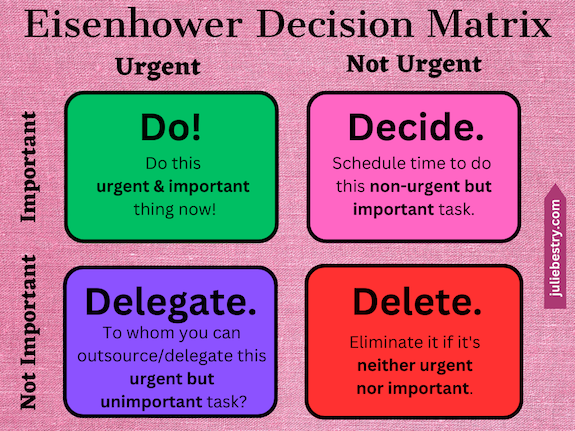
Only then can you “wasted” energy toward what really matters.
Data-Driven Decision-Making
Having actual numbers to back up your interpretation of what’s working (and what’s not) in your schedule is a game-changer. It will grant you actionable insights — prompts for what to do differently — to optimize your current routines and workflows.
When you time track, you’ll have a real-time account of where your time goes — towards what is:
- important and urgent
- important but requiring scheduling during your “deep work” hours
- urgent but unimportant and can be delegated, and
- what’s really so lacking in urgency and importance that it can be drop-kicked into Never-never Land.
In this way, time tracking supports goal-setting and monitoring progress over time.
Time tracking identifies how long tasks take, enabling better planning based on more realistic estimates of how long certain tasks will take to complete in the future.
Stress Busting
Oh, and those realistic estimates time tracking produces? They can reduce overwhelm* by showing you what you can reasonably do (and what you can’t) in the course of a day so that you’ll stop trying to ten pounds of sugar tasks into a five-pound sack of schedule.
If you can clearly see that you can’t get a blog post done in an hour when your kids are at home (or that trying to get it done in one long sitting will keep you from getting seven other things done), you’ll stop forcing yourself to live by unreasonable, unrealistic expectations.
In turn, this can empower you to set better boundaries (for yourself, and for others who demand or encroach on your time) and ensure you schedule breaks more effectively so that you’re doing high-focus deep work when you have high mental energy.
Accountability
A well-known saying is that what we measure gets done. If you’ve ever been in Weight Watchers, you know that they make you log everything you eat. When you know someone’s going to look at your seventeen logged mini Reese’s Peanut Butter Cups on Thursday night, you’re more likely to put the bag back after your third nibble, and maybe lose some weight.
Similarly, while the purpose of tracking time is to get a realistic take on what you’re doing with your time, knowing that you’ll be judging your time use later may help you avoid self-soothing “time wasters” when you’re on deadline and need to stay on task.
Time tracking encourages greater tasks focus in real time. You’ll anticipate, note, and deter distractions when you’re aware of how every minute counts toward your goals. (And while you may not like the experience of judging yourself, it’s better than when your boss does it, right?)
The Challenges and Obstacles of Time Tracking
The concept of time tracking is a great one, but even great things can be problematic. We need to be realistic about how it can trip us up so we can avoid falling over Dick Van Dyke’s ottoman.
Time tracking can be a time sink. Remember that asterisk above about how time tracking can reduce overwhelm? It can, but when tracking your time feels like it’s eating into your day because you have to stop too often to note what you’re doing, you may get frustrated.
Time tracking can interrupt your flow. Some people try to track their time so contemporaneously with their actions that they can’t focus on their deep-focus or creative work.
Time tracking can be boring. There’s tedium in tracking everything. Time tracking can feel counterproductive if you’re taking time away from productive activities to note what you’re doing too many times in the course of an hour.
Time tracking may be used to procrastinate. If you don’t like what you’re doing, either at work or with your life, it’s easy to spend a lot of time fussing over color-coding or pretty fonts (or all the bells and whistles of a digital tracker) to the point where you’re not really leaving much time for the real work.
Perfectionism paralysis can be a type of procrastination. If you obsess over every detail of how you track your minutes, to the point that tracking your time causes you to stress about starting any task, very little of your actual work will get done.
Additionally, resistance to change can short-circuit your efforts in two ways.
First, for people who have mental roadblocks to starting a new habit, it can be difficult to train themselves to track their time. If you’re resistant to making the effort to track time, none of the benefits of time tracking can be reaped.
A second, more insidious problem is that the data you get — and the realization of what you’re really doing with your time (whether wasting it or giving too much time to others as a people pleaser, or just being stuck in crummy jobs or relationships) — may force an issue you’re not ready to deal with.
For time tracking to be meaningful, you have to ask yourself: are you ready to confront your inefficiencies or bad situations? And are you ready to make changes based on what you learn?
For time tracking to be meaningful, you have to ask yourself: are you ready to confront your inefficiencies or bad situations? And are you ready to make changes based on what you learn? Share on XFinally, the prospect of time tracking can trigger privacy concerns. If you’ll dillydally over selecting a digital time-tracking tool because of concerns over privacy, you have two alternatives: choose tools that respect your data boundaries or opt for analog tracking.
Make Time Tracking Work for You
So, how do you avoid those pitfalls?
Start Small
If you anticipate feeling overwhelmed by the practice of time tracking, know that you aren’t bound by any overly ambitious practice. Take baby steps.
For example, aim for a single-day experiment on a random Wednesday when you’re not anticipating major kerfuffles in your schedule.
Similarly, don’t feel like you have to start out with too granular a measurement. I generally track in 15-minute increments, but you might feel more comfortable in 30-minute slots. You’re not writing down the call you made at 1:02 p.m., 1:16 p.m., and 1:22 p.m., but rather “Made client confirmation calls” from 1-1:30 p.m. If that thirty minute slot of one category of activity yields enough information, so be it.
Once you’ve tried a one-day tracking effort, you could opt to expand, gently. For example:
- Try one tracking day per month, changing the day of the week each time. You get two chances at a “normal” Monday, Tuesday, Wednesday, Thursday, and Friday, and can either take two monthly breaks, maybe during summer vacation and December, or use some months to track weekend days to analyze how your personal time is flowing.
- Consider one time-tracking week each year. As noted, I do this as part of Laura Vanderkam’s annual January challenge, but you could do it each spring as a time management refresher, or to coincide with the fresh start of back-to-school each fall.
- Track just the time that you suspect is harboring your time gremlins and vampires. If you (and your team) are satisfied with all you accomplish during the workday, but you feel like you’re doggy paddling at home, then tracking your office tasks may not be necessary.
Pick the Right Tools for You
When I track my time, I do a week at a time on an Excel spreadsheet with columns for each day of the week and rows for each quarter hour, which I keep open but minimized on my screen.
You could use a pre-made tracker or create one for yourself. Or go really low-tech and draw or write out your daily blocks of time from waking to bedtime on a sheet of notebook paper or graph paper — or just track your work hours. (But remember, if you do decide to color-code or make it fancy, do that during your planned recreation time time and not during the period you should be doing the logged, tracked work!)
Alternatively, there are numerous digital time tracking software programs and apps, including:
- Rescue Time — This is the grand-daddy of time tracking software; I wrote about it seventeen years ago, when I first started blogging. Rescue Time will automatically track all of your computer-based work and then provide reports on your time trends. Rescue Time has solo and team plans, all paid (after a 14-day free trial).
- Toggl Track — This veteran platform offers free (for up to five users) automated time tracking, making it ideal for solopreneurs and freelancers, with paid versions for teams. It’s accessible from anywhere via computers or mobile devices.
- Timeular — If you want completely seamless time tracking that’s operating system-agnostic (it works on Android, iOS, Windows, Mac, Web, Linux) and an offline tracking option, Timeular may be for you. However, note that it’s paid-only (after a 30-day free trial). Timeular also has an AI tracker and a cool physical tracker (an eight-sided doohickey where you can assign and link facets of the doohickey to categories of work you do).
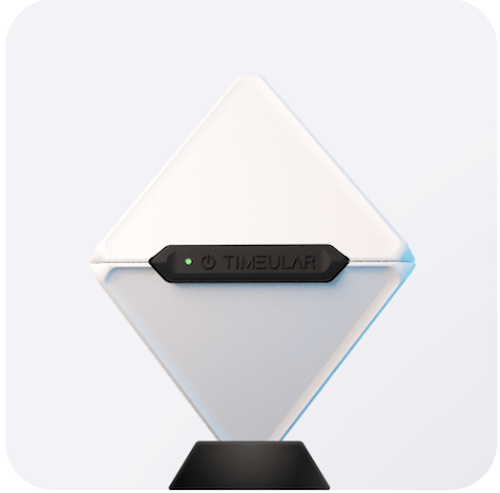
- Clockify — This time tracking software has plans ranging from free, basic, and standard, to pro and enterprise levels, with increasing variety of features. It’s more basic than Toggl Track, but also feels a bit easier to learn. Even the free level has unlimited tracking, reports, projects, and users.
- Harvest — This offers free, pro, and premium plans and is designed for freelancers. It’s available for all major operating systems (Android, iOS, Windows, Mac, Web, as well as browser extensions). While it’s simple to learn and has myriad integrations with other software programs, the free plan is fairly limited. (If you’re just starting to explore time tracking, though, simple is better!)
- Memtime — This has a pretty minimalist interface, so the simplified, automatic time tracking makes it super-easy to use. However, it’s only available for desktop use (so, no mobile tracking) and it’s a paid-only platform (after a 14-day free trial), so it wouldn’t be your best option for first-effort time tracking. Above the basic level, it offers a wide variety of software integrations. Note that Memtime claims, “We’re the only automatic time tracker that guarantees privacy by keeping your activity data offline.”
If you want something less corporate and more minimalist and mindful in a time tracker, you might want to look at Hourlytics (iOS-only) or Balance (MacOS-only). If everything you need to track is computer based, Monitup has an AI-based tracker, but if you’re cool logging everything on the phone, HoursTracker® Time Tracker works on iOS and Android.
Only you know what kind of tracking system — analog, basic spreadsheet, or digital app — will keep you committed to the experience.
Think Patterns, Not Perfection
It’s easy to note one-off times where you went down a rabbit hole on a particular research project or social media thread, but don’t beat yourself up over less-than-ideal time use.
Punishment isn’t the point! Instead, remember that one purpose of time tracking is investigating what doesn’t work so you can find what does.
Because of this, focus on trends. Are you always in a slump after lunch, distracting you from high-focus mental tasks? Maybe you need to schedule more physical tasks until you work off that post-lunch sluggishness, or try tasks that take less brain power.
Set Goals, Then Support Them
Your time tracking efforts will yield a wealth of information about what you’re doing that barely registers in your mind as a “task” (like picking up after your kids or straightening the company supply closet because everyone else leaves it a mess). You’ll see what’s taking too much time, what should be scheduled at different times (or delegated or given up on altogether), and where you have opportunities to do more things or do the same things differently.
Use what you learn from time tracking to help you set your goals; think: what gives you joy or feeds your values? Then schedule supporting efforts in a way to improve your productivity on the things that matter the most to you, whether it’s for money-generating work or happiness-generating life.
The Big Picture
I get why time tracking has a bad rap. If you ever had a bad boss like Gary Cole’s passive-aggressive Bill Lumberg from Office Space, you probably only remember the nasty edge of being asked to track your time.
We should reframe time tracking as a positive, empowering practice, just like practicing mindfulness, gratitude, yoga, or anything that benefits personal development. If we choose to see time tracking’s value as a learning tool about ourselves, rather than a rigid system leading to pejorative judgment, we can reap some pretty impressive benefits.
Time tracking doesn’t need to be done 24/7/365. And tracking your time without reflecting on what your data tells you is going to have fairly limited results. But periodic time tracking, with reflection and review of that data, will help you refine your routines so your schedule of what you do and when you do it can guarantee more wins. Just remember to:
- Find balance — Be just comprehensive enough in your tracking to yield good, meaningful data, but not so much that it becomes a source of stress or uses too much of your time. Make your system flexible.
- Embrace the unexpected — Be openminded about what you find. Even the act of tracking less-productive moments (hello, social media!) can teach you something about yourself and your needs — variety in your workflow, downtime, or maybe even for a different job or relationship that builds you up instead of draining your energy and causing you to self-soothe to inefficient levels.
Time tracking is your personal productivity GPS. Use it to help you read the map of your life, identify where you are, and travel the best possible path to your preferred destination.
Today’s post was about the literal passage of time — being mindful what we are doing with it — so that we can be more productive and self-aware.
But as I noted at the start, time is slippery. I’m sure you’ve heard the expression, “The days are long, but the years are short.” We spend a lot of time rushing to accomplish tasks, mostly for others but sometimes for ourselves, but our awareness of time (and the passage of it), both on a daily basis and as the infrastructure of our lives, can be murky.
Next week, we’re going to look at how we can do more to appreciate the speed of the passage of time to organize a life that better reflects what we want. I’ll also share tools to help us stay mindfully aware of the passing of our moments, our days, and our years.
Do you track your time? Share in the comments!



Follow Me