Archive for ‘General’ Category
Put Manuals on Automatic–Organizing Owner’s Manuals (Part 1-Paper)
Did you accidentally change the default language on your Caller-ID box, and now your messages are listed in Spanish? Get the manual!
- Do you have so much trouble with pictograms that you can’t laundry labels, let alone your new digital camera’s icons? Find the manual!
(Seriously, are we really supposed to know the difference between  (Machine Wash Warm) and
  (Machine Wash Hot, Gentle Cycle) from just looking at the icons? No wonder there are whole web pages created to explain digital camera icons like
  and
and  , which Paper Doll thinks should mean “Oooh, Pretty” and “Zip up your zipper”, respectively. But I digress.)
- When Daylight Savings Time passes into (or out of) vogue in your zip code, do you struggle with resetting the time on your computer, your car’s clock, or your TV, VCR or DVR? Grab the manual!
(FYI, if your DVR clock is set by your cable company, good luck. Paper Doll‘s sister’s cable company changed her time zone setting and is unable or unwilling to set it back, no matter how many imploring calls she makes. It’s as if her televisions have been relocated to a time zone of their own. Indeed, it might be easier for her to just move to Iowa and be done with it!)
Tinkering types who refuse to seek directions, aside, we’ll all need an owner’s manual or user’s manual at some point. In most houses, those manuals tend to get piled up in a kitchen drawer or at the bottom of a magazine rack, making it hard to find the exact one you need, and making it more likely you’ll hold onto a manual long after you have discarded the item it explains. In fact, as a professional organizer, I often encounter manuals for phones, electronics and household gadgets that the clients have long-since lost, sent off to college with their children or otherwise tossed away.
Without a system for managing your manuals, you’ll end up with clutter…you’ll keep things you don’t need and will be unable to put your hands on what you’re seeking. Maintaining your hard-copy owner’s manuals can be really simple, however, if you create a home where manuals live. Just follow these steps:
Gather all the owner’s manuals, user’s manuals and instructions you can find. Make a stack (or multiple stacks) and corral them in a central location so you can quickly review each one.
Eliminate the manuals for items you really know how to use. While you may, someday, want or need to know how the microwave manufacturer advises poaching eggs, it’s highly likely that if you’re savvy enough to use a computer to read blogs, there are no secrets for you to glean from the manuals for your toaster or hair dryer. Flip though each manual–if there’s nothing in it that isn’t dictated by common sense…send it to the recycling bin.
Eliminate the manuals written in languages you don’t speak. It’s become very common for manufacturers to send out packaging with bilingual instructions. Unless you are intending to resell or auction an item of high value in a locale where English is not the primary language (and the non-English manual is in the prospective buyer group’s primary language)…let it go! If you can’t bear to toss these manuals, check with the language department at a local middle or high school to see if they might use the foreign-language manuals for class projects.
Keep “like with like”, so that you not only have the manual, but the unpacking display (also know as “What’s In The Box?”), schematics (in case it’s hard to tell which way is up), the replacement parts re-ordering guide and anything that isn’t merely advertising.
Sort the manuals into categories, such as:
- Major household appliances (water heater, refrigerator, washer/dryer, electric garage door)
- Kitchen appliances (food processor, bread maker, microwave)
- Home theater electronics (televisions, stereos, DVRs)
- Computer hardware and software (including peripherals like printers and scanners)
- Communication devices (phones, smart/cell phones, pagers, walkie-talkies)
- Personal electronics (MP3 players, book readers, pedometers, heart rate monitors)
- Specialty manuals (exercise equipment, home medical equipment)
Create an easily-accessed home for the manuals by selecting options according to your style preference:
1) Maintain a sub-section of the Household division of your Family Files, specifically for manuals.
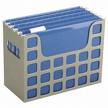
If you have multiple thin manuals in a category, one manila folder per category should suffice. Larger manuals will be more suitable with one to a folder, with one folder per product/item.
*Note 1a: Using the family file system works great for almost all household and personal appliances. However, it’s usually best if computer hardware and software manuals are kept close to your your computer/modem/wireless router/printer/scanner set-up. If your family files are kept in the same general area of your computer (such as in a home office), you’re all set. If not, option #2 might work better for computer/software manuals.
*Note 1b: Keep your auto owner’s manual in your glove compartment. While it’s a minor inconvenience to have to go to your upstairs office to find the fridge manual if the ice maker stops working, it would at least a major inconvenience–possibly even a road hazard–to have to wait until you get home (if you got home) to decipher your dashboard’s emergency lights.
2) Store manuals in magazine files.
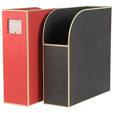 (Heals.co.UK)
 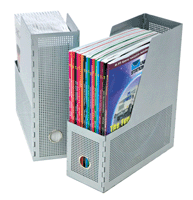 OnlineOrganizing.com
This grants slightly easier, quicker access than having to let your fingers do the walking through your vertical hanging folders. If you miss the sub-labeling that a file system provides, you can label manila folder tabs and divide the categories–like individual software types (productivity, games, drivers, etc.). However, this will slightly diminish available space, and you will only be able to use left-side tabs, as middle and right will fall inside the magazine file and will not be visible for reading.
Alternatively, you can divide manual categories by labeling and affixing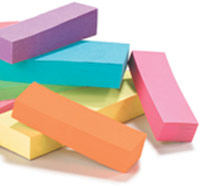 wide tape flags to the left binding of each manual, which will allow you to color-code and even alternate the space so all labels can be viewed at a glance.
3) Maintain manuals in three-ring binders. 
Paper Doll has recommended three-ring binders and plastic sheet protectors as the solution for organizing papers as varied as recipes, maps and school documents. It can be a great solution for most owner’s manuals and instructions, as it allows each manual to be preserved, clean and separate, and the individual plastic sheet protectors can be easily divided by categories using standard index tabs (or the aforementioned tape flags).
Binders do need to be sturdy, and shelf space must be maintained (as with the magazine files in option #2), but the biggest problem is that it’s particularly hard to store thick, book-sized manuals (such as you’ll find for computer hardware/software) in a three-ring binder. If this is an option that appeals to you, consider having at least one magazine file (or adequate bookshelf space next to the binders) to suit storing large manuals.
All of the above solutions keep your manuals vertical, standing at attention like little soldiers, at the ready to do battle against inexplicably blinking lights, stalled motors or flashing messages. But they also require maintaining a library of hard-copy paper manuals. If you’d prefer to skip the paper altogether (or if you already lost the instruction manual before you had a chance to test out your new gadget or appliance), there are myriad digital alternatives to maintaining a system of paper manuals.
Next week, we’ll to explore not only some of the most complete options for finding a digital version of manuals online, but we’ll also discuss how to organize the information for quick and easy digital retrieval (including how to figure out what’s wrong with your computer when your computer (or internet access) is failing you).
Paper Doll’s 2nd Annual “Be A Fool (for Organizing Your Books)” Extravaganza
Over the past month, we’ve been chatting about pretty serious topics, organizing papers related to medical emergencies, visits to the doctor and personal health records. That’s heavy stuff. With springtime in the air, it’s the perfect opportunity to take a break and consider organizing with a little frivolity. Are you with me?
Paper Doll loves books. In the past, we’ve discussed serious ways of organizing your books, less than functional ways of keeping those books in order, and how to organize and keep track of what’s in your personal library. And we’ll have a special feature coming up soon on newer options for organizing your personal reading collections.
But sometimes, we just need to look at things from a different perspective. For example, if you’re short on book storage, you might wonder why you never thought of keeping your books on both sides of the shelves:
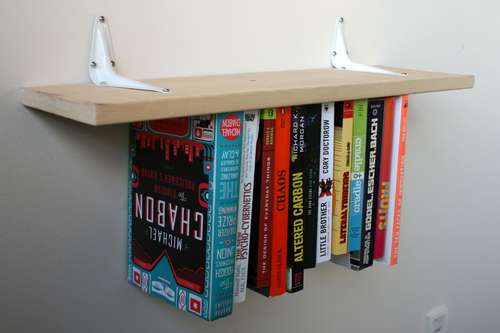
(Interested in making your own inverted bookshelf? Instructables has step-by-step instructions for designing your own version, just in time for springing a good-natured April Fool’s Day surprise on your loved ones.)
Oh, an if anyone gives you a hard time about how you’re not keeping your books organized enough to satisfy them, or, conversely, if you’re trying to teach an object lesson to your kids about what happens when we don’t organize a little bit every day, just point them in the direction of this photo called House of Books, courtesy of Joanna A. at JPG Magazine:

(You’ll prove to the former than things could be much, much worse. The only trouble showing this to the latter is that kids might actually want a book-covered room!)
Speaking of having too many books around the house, there’s always the artistic option of The House of Books Has No Windows (via The Letter):

Last Autumn, The Gallery of Modern Art in Oxford, England displayed this art installation, the result of a collaboration between Canadian artists Janet Cardiff and George Bures Miller. It’s been reported that the house was constructed from 5000 books. While it’s surely sturdier than a proverbial (or literal, I suppose) house of cards, please remember that the goal of organizing is to be functional, and I suspect if more than a few titles were retrieved from over the doorway, it all might come tumbling down. And then who would feel like an April fool?
In this day of unpredictable real estate prices, perhaps a better option than a book house might be a build-it-yourself bedroom bookcase fort, Tokyo’s Point Architects‘ Uroku House:
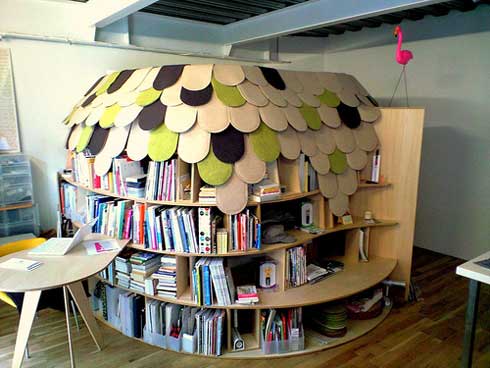
(via Geekologie).
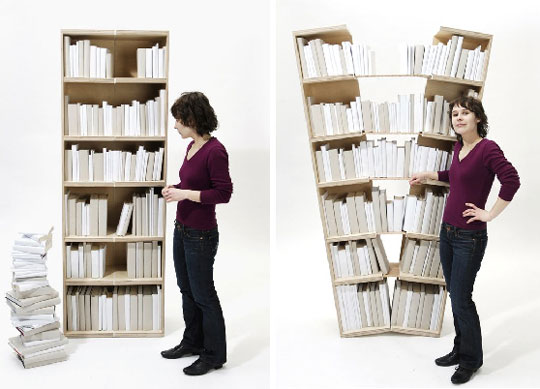
Of course, sometimes you merely need a little more space, and you think “Wow, I wish my bookshelf could slide apart as easily as Grandma could add extra leaves to that fancy dining room table!” Well, you wouldn’t be living in a Fool’s Paradise if you tried to act that out using this expandable bookshelf (via Apartment Therapy) from German designers Farsen-Schoellhammer (Click so you can see the nifty little slide show):
If you’ve failed to take Paper Doll‘s past advice about decluttering your book collections to heart, you may have an ever-increasing supply of books but only five hundred, twenty-five thousand, six hundred minutes (at least, according to Rent) in which to read them. Corral your almost infinite book collections with the Infinity Bookcase from
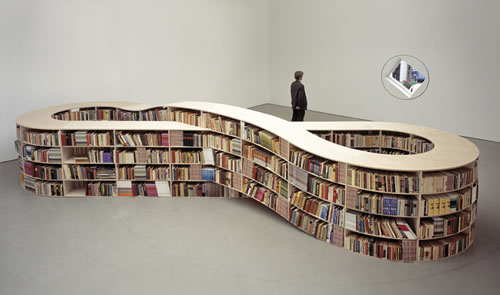
Dutch conceptual artist Job Koelewijn. (Koelewijn really must love books–in 2005, he created a surreal gas station out of book covers.)
If you start feeling a little dizzy from zooming through infinity on this book organizing foolishness, maybe you’ll want to find something soothing that pairs Ernest Hemingway’s A Clean, Well-Lighted Place with Virginia Woolf’s A Room of One’s Own, like these Cave bookshelves from designer Sakura Adachi:
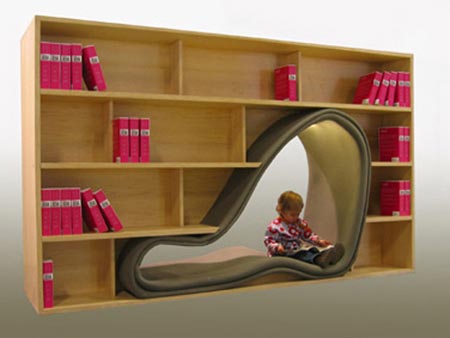
The Caves not only come in adult and child sizes, but for you Paper Doll readers who love to share a bedtime story with a furry friend, there are even pet Caves:
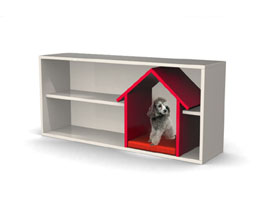
Before someone says that Paper Doll has let this post go to the dogs, let me just wish you the serenity and extra time that true, functional organization brings, so that you can enjoy some reading time this April. Be a fool for knowledge, and if possible, share the gift of reading with someone else.
Special Post: Paper Doll Talks Paper On The O-Myth this Friday!
Have you ever wondered what happened to that paperless office you were promised at the dawn of the personal computer revolution?
Is it true that organized people only touch each piece of paper once and then it’s handled…forever?
Does an organized desk (or house, or car, or office) really equal an organized mind?
Oy.
I am so excited to announce that I will be the guest on this Friday’s broadcast of The O Myth,

hosted by organizers extraordinaire, Brandie Kajino and Krista Colvin. Please tune in live on Friday, March 27, 2009 at 1 p.m. Eastern/10 a.m. Pacific to hear me, Brandie and Krista chat our way through the so-called rules of organizing paper in this modern world. (Don’t worry if you’re busy at that time–the shows are recorded, so you can enjoy them over and over as podcasts on your computer of favorite fancy-schmancy MP3-enabled space-age gadget.)
In case you’re new to Blog Talk Radio’s hot-hot-hot organizing show, The O Myth is all about debating and debunking popular opinions on organization, because strict rules (strictly speaking) can lead to self-sabotage. As Brandie and Krista say,
“Traditional organizing rules emphasize perfection over people and we believe it bends best in the other direction. Our playful debate, helpful tips, sass, wit and laughter bring new perspectives to the discussion, giving our listeners fresh hope that they too can live an organized life.”
If you’re a loyal Paper Doll reader, you know already know how much I love helpful tips (and sass), so I look forward to you joining us on Friday’s broadcast of The O Myth, when we’ll be talking about my favorite subject, PAPER, and the facts and fiction about what constitutes successful paper organizing.
Until Friday!
Vital Signs: Maintaining Your Family’s Medical Records–Part 2 (Digital)
 That tricorder electronically captured vital signs without ever invading the body. Even the hypo-sprays were painless.
Last week, we discussed the essential information we should collect to create our own binders of portable and in-depth medical records and reviewed a few commercial offerings for building our own personal medical records database.
Keeping your papers all in one place certainly provides security, but I know many of you prefer a space-age technological answer–bypassing paper clutter altogether. There are three general options for storing you medical information digitally:
- On your own computer, using a commercial or open-source template or recording information in your own preferred format–This format can then be printed, emailed, saved to a flash drive or uploaded to an online vault.
- On a flash drive, using pre-created software, or by saving your own files.
- Online, using a paid or free online medical records service or tool for retrieval from any location with internet access.
Each option has its own advantages and disadvantages in terms of cost, ease of use, ease of access and flexibility:
On Your Own Computer
This is the simplest and least expensive option, allowing full flexibility in recording the information you think is important. Review last week’s low-tech, low-cost solution and simply use any software you own (e.g., Microsoft Excel, Word, etc.), open-source software (like OpenOffice.org) or a free “cloud computing” option (like Google Docs) to record the basic personal, medical and legal data, as we discussed. (You can also find downloadable forms Word-compatible forms online, such as the 15-page offering at MyPHR.com (about which you can read more, at the end of this post).
Simply type whatever medical or insurance data needs to be saved, using last week’s post as a guideline. Personally, Paper Doll prefers using Excel or a similar spreadsheet format. Excel workbooks allow you to separate categories (general information, insurance, medical history, allergies, contact info, etc.) on separate worksheets within the workbook, and the entire workbook can be easily password-protected.
Next, print two updated copies (periodically, after you’ve made revisions), one for yourself and one for your emergency contact; this way, you can maintain a copy digitally on your computer and still make the data portable in a notebook or three-ring binder.
Additionally, you can save the data to a flash drive and use a label maker or marker to note that it contains information to be used in a medical emergency. However, please note that most emergency medical providers and many emergency rooms, hospitals and even doctors’ offices might lack access to compatible software or the internet.
If you’re concerned that you might forget to enter some data, there are numerous programs for capturing all essential medical data, including MyMedTracks, sold at OnlineOrganizing.com, and ProfileMD Classic, a downloadable shareware program.
Medical Record Flash Drives

MedicTag is an oldie in the world of medical records kept on USB or flash drives. It is simply a flash drive with a Microsoft Word-compatible form (Windows-only, with no Mac or Linux compatibility) that allows you to record the data about which the system asks. There’s a high-priority section for listing medical conditions, and sections for listing emergency contacts, physicians, insurance data, prescriptions and over-the-counter medications (name, dosage and frequency), allergies and other medical conditions, and surgical history. Users are advised to wear the MedicTag on a lanyard, or one could keep it on a keyring or in one’s bag.
Paper Doll thinks that a pre-created form like MedicTag might be satisfactory for someone lacking the basic computer skills needed to create a do-it-yourself version, but at approximately $40, I believe there are better options for the typical computer-savvy or web-savvy user.

MedIDs‘ MedFlash (1 GB) and MedCharm (2 GB) are two alternatives that could allow for more complete medical storage. Designed to be worn or at least visible in case of emergency, both store all user-entered information in the (seriously old-school) ASCII text format, but also allow for uploading of digitally-transmitted X-rays, EKGs, MRI or other imaging results, etc.
Again, this is a matter of spending money for a form and USB flash drive, when that money might be better spent on either actual health care or a more in-depth records service.
Online Services

MedicAlert’s Personal Health Record
You probably know the MedicAlert brand from the bracelets worn by many people with chronic conditions. The company has branched out into a comprehensive set of services, which include:
- secure online access to a personal health summary, which includes your medical profile (diagnoses and conditions), allergy information, medication names and dosages
- log of medical device information, including the manufacturer, model and serial number of any medical devices you may use or have installed)
- notification of family members (listed in your record) of an emergency
Update your information online or by calling into the MedicAlert service, and MedicAlert’s service is 24/7/365, with medical personnel able to relay your medical history to doctors or emergency personnel without anyone having to log into a computer.
MedicAlert also has a deluxe Gold service where you and your doctors can both contribute to your record. MedicAlert creates an account in the Document Center and gives you a “DC” number that can receive both fax and voice messages. Once you authorize your health care provider to give MedicAlert your information (just like when you authorize one doctor to share your information with another), and then they can send your medical records, images, test results, and other essential data directly to your account. All the records, whether sent by your or your health care profession, are translated into PDFs for easy viewing on the computer.
MedicAlert has extra levels of service (at extra levels of cost) that can make it more appealing for those who prefer dictating to typing and prefer knowing that someone else is taking care of the details.

Medsfile helps you create your own secure personal health record simply by typing in basic patient information, including name and contact information, but also birthdate, height and weight, and organ donor status. The sections for listing medical conditions, procedures, surgeries, immunizations and family history is a little bare bones–Paper Doll would have preferred a template for easily providing dates. Medsfile does have some detailed template attributes that surpass those on the flash drive template forms, including:
–An insurance section to track each primary and secondary insurer’s name, toll-free phone number, subscriber name, policy/group/member information, and more. This section could be improved if it linked interactively with an insurance company’s online patient file.
–A medications section that not only lists prescription names, dosages, frequency and dates taken, but also breaks out the list into two categories: medications taken currently and medications no longer taken. Medications can be sorted by name, dates taken or purpose.
–A supplements section lists vitamins, minerals, herbs, and dietary supplements, also broken down by current and former usages.
–An allergy section that indicates allergy type, reaction and provides space for additional comments.
–A detailed emergency contacts section that also has a space for other notes, so if your emergency contact is best reached via Twitter or Facebook, or can only be reached during work hours by calling a supervisor, that can be listed as well.
–A pharmacy section with spaces for pharmacy and contact name, phone and fax numbers, web site and additional information.
–An online medical diary for tracking your symptoms and how you feel.
Patients can access their own health information by logging in, or they can grant access to others (friends or family, medical staffers, etc.) by providing their member card. Medsfile has added a (small) extra layer of security in the form of a security question, so that others can gain access to essential medical information but not personal or financial information. However, emergency medical providers probably won’t have internet access, and if hospital wi-fi services are down, or (as was my situation) the emergency room receives no cellular service, this option might be useless in an emergency situation.
Medsfile is available at no cost, making it more appealing for the user to try.

GoogleHealth is also free, and thus far is Paper Doll‘s favorite non-DIY option because it makes everything so much easier. Once you enter some very basic information (date of birth, gender, ethnicity, blood type, weight and height), the system lets you:
–Create your own profile: Each category (conditions, medications, allergies, procedures, test results and immunizations) allows you to either manually type a response or select from a ridiculously and wonderfully long list of possibilities. This is especially helpful if the proper name for a condition or drug is difficult to spell or remember exactly.
—Import medical records from various personal insurance records and pharmacies to get automatic updates of your health data.
—Have Google point out possible adverse drug interactions based on the information you input.
—Record physicians’ contact information (and help you search for doctors by name, location or specialty).
—Grant or restrict access to your records.
Because GoogleHealth is currently in beta, we can probably expect future advances, including a section for insurance information, a place to track medical billing and a way to upload digital records from providers not associated with the program.
Of course, the standard security concerns apply to all data stored on the web.
Finally, these are only a smattering of the options for creating a digital personal health record. For a more complete list, visit MyPHR.com, operated by the American Health Management Information Association. Search the database of personal health record options:
- First, choose your format: internet service, software or paper based
- Then, consider cost. Select whether you want to purchase your solution or get it for free.
Whatever option you choose, schedule time on your calendar (at least quarterly) to review and update your records. After all, your life could depend on it!
Special Post: Organizing Bonus & Advice for Laid-Off Readers
Franklin Covey is coming to the rescue, and wants to help organize your job search. As their website states:
Anyone who has recently been laid off can go to their local Franklin Covey store and receive a 2009 Franklin Covey planner…for free!
The process is simple:
- Go to a Franklin Covey store near you this Saturday, March 21, 2009.
- Explain to an associate that you’d like to take advantage of the free planner giveaway for recently unemployed workers.
- Provide the name of your former company and supervisor, and the date you were laid off.
- Leave with a free 2009 Franklin Covey planner.
From there on, use the rest of the weekend to work up motivation for your job search.
Use the calendar and task sections of the planner to note interview dates, contacts, and any tasks (reworking your resume, attending job fairs, etc.) you can perform to reach your job-search goals.
Also, use the planner to remind you of the dates/times you need to visit/call/log-in to meet your state’s requirements for receiving your unemployment benefits insurance payments. (And remember, money has already been paid in to the unemployment coffers on your behalf the whole time you were employed, so if you were laid off, unemployment benefits are due to you. They are not charitable handouts; think of them as insurance payments. So don’t delay in filing!)
Use the “notes” sections of the planner to make a list of everyone you know, and check off their names once you’ve let them know you are searching. Give the great people you know an idea of your skills, abilities and background, and ask them to let everyone they know that you’re searching. You never know whose co-worker’s brother’s former babysitter is now the president of a company that desperately needs someone with your expertise. This is what social networking is all about, whether it’s digital or in person.
Schedule time in the planner to do things that will keep you upbeat and make you feel useful and fulfilled. Block your time so you still get up early, eat breakfast and get out of the house, but once you’ve accomplished many of your business tasks (because searching for a job is now your current full-time job), use the extra hours to volunteer. If possible, try to find a volunteer position that either uses the skills you already possess and wish to hone, or one that lets you explore skills and possibilities you’d never previously considered.
So find your local Franklin Covey store, set your alarm to get up tomorrow morning (Saturday, March 21, 2009), get your free planner and good luck with that job search!



Follow Me