Paper Doll
Displaying Children’s Art: Reframing Grandchild Moses & Making Raggedy Andy Warhol More Magnetic
It’s hard to believe, but it’s been two and a half years since we’ve talked about organizing children’s artwork. Today, we’re going to revisit a popular classic Paper Doll post, Whistler’s Mommy Invites Grandchild Moses and Raggedy Andy Warhol For A Playdate. The avant garde coffeehouse that showcased kids’ art seems to have closed, but I’ve updated with newfangled art storage solutions to reflect improved technology.
Do you sometimes feel like you’re the curator of the MMOTA (Modern Museum of Toddler Art) or the AMOKAC (American Museum of Kindergarten Arts and Crafts)?
Do you feel obligated to believe a picture is worth a thousand words because you can’t understand half of what your toddler says?
 Have you forgotten what color your refrigerator is because the doors, like museum walls, are covered with all of the major artistic methods–watercolor, oil(y Play-doh or sticky jam-hands), and mixed media (painted, sparkly macaroni)?
When children are very young, every artistic endeavor may seem like a masterpiece, but soon enough, parents can become overwhelmed by the embarrassment of finger-painted riches. At some point, you realize you’re either going to have to start buying Frigidaires in bulk, or you’re going to run out of display space in the kiddie art gallery you used to call your home.
Unlike the other categories of paper we discuss — bills, To Do lists, references papers, Social Security cards…there’s no agreed-upon records retention schedule for determining how long one should keep art created by tiny hands. It’s neither an art nor a science, but a labor of love wrapped in papier mch and held in place with colored pipe cleaners. Today, we’re going to explore creative methods for displaying the work, and next week, we’ll cover winnowing the collections.
So, before you run to Fridges-Are-Us for your next art wall installation, recognize that there are alternatives to hanging art where your lunch lives.
THE CLASSICS — ON THE WALL
Hang a retractable clothesline a few inches below ceiling height (too high for children to climb to reach) and hang paper artwork, attaching it with clothespins. Paint wooden clothespins or use plastic ones in primary colors for a more kid-friendly atmosphere. Alternatively, you can use curtain rods and drapery clips,  as Heidi Smith of Budgetwise Home suggests.
This can be a fun way to decorate your child’s room as well as any other casual area, like a guest room, mud/utility room, playroom or basement. You can make it a permanent display gallery with rotating collections, or just put on an ad hoc art show.
Invest in a large cork bulletin board or a number of cork tiles (arrayed uniformly or artistically) and affix to a bare wall. Display the art as-is, right on the cork, or cover the entire board with dollar-store wrapping paper or kraft or butcher paper. Your kids can even draw on or decorate the paper, first, creating a meta-message of art-on-art. Or, just use one cork tile in a high traffic area of the home to showcase the Masterpiece of the Week!
Wallpaper an unfinished basement. The walls of a basement laundry room are likely to be gunmetal grey and depressing. Charming and colorful children’s art can brighten the area (and the mood of laundry day) immensely. Artwork can be easily and safely attached to walls with removable Command Poster Strips.
Match your child’s magnetic personality! We’ve spoken before about chalkboard paint, but magnetic paint can help you yield just as much creativity (without risking that your kids will want to scratch their nails across the surface). Pick up some brush-on or sprayable magnetic paint primer at your favorite home supply store, and paint your wood, metal, masonry, drywall or plaster wall.

Once the primer is dry, cover with the latex paint of your choice — one solid color, stripes, or a pattern designed by your little artist. As the paint primer goes on in grey or black, you’ll need multiple coats of the latex, especially for any lighter colors, before your art wall is ready for display. Then attach the artwork with decorative magnets. (Hey, that’s another art project your kids might like!)
Embroider the truth! This may not be a classical display method, but Eydie, a FeelingStitchy blogger, put her crafty talents to excellent use in framing and displaying children’s art. She made an inkjet transfer to muslin, matched the embroidery floss to the colors of the original drawing and completed a bunch of other artsy tasks I can’t comprehend:

Admit your own artistic weakness — really, it’s OK! Sometimes talent skips a generation, or just part of one. While Paper Mommy (and my sister) seem to excel at visual representation, the results of Paper Doll‘s Pictionary attempts at drawing horses, cows and maps of the United States seem to be interchangeable. Last week, in lieu of leaving a note as I departed my sister’s house, I scribbled off a smiley-face self-portrait. The next day, I received the following email:

Sigh.
So, if painting or papering or corking just isn’t in the cards for you, consider purchasing a pre-made hanging art gallery.  With a limit of six frames, you’re helping your kids to develop a discerning eye and focus on showcasing masterpieces.
Frame it to Contain it. Whether you’re a Do-It-Yourself framer with Popsicle sticks or desire upscale and frequent changes of displays, options abound. A few fun choices include the L’il Davinci art cabinet sold at OnlineOrganizing.com and
 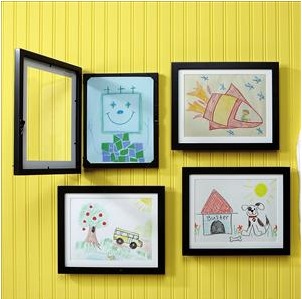 the Wall Art Gallery from Lillian Vernon.
Whatever you choose, no rogue art project will ever complain to the warden that it was framed.
MODERN ART — A LITTLE OFF THE WALL
“Take a picture; it’ll last longer.” Sure, that sounds a little snarky, but it’s a perfect option for preserving mixed-media and other three-dimensional works of art. Better yet, take a snapshot of your child  holding the masterpiece to keep a historical record of the little star during his or her Blue Period.
Scan the artwork using standard scanning software; for oversized pieces, you may have more luck with professional scanners, such as those found at FedEx Office. Either way, suppress your temptation to color-correct green hair or fix the spelling mistakes that actually make children’s art delightful. Maintain backup copies (in the cloud, on hard drives, and on flash drives). Remember: Memory is cheap, but memories are priceless!
Upload scanned art to flickr, Google’s Picassa, or other
If you do want to showcase your kids’ art for the world, acquire a little web real estate. A few years ago, I recommended having your own web site as an option; nowadays, I’d suggest a free WordPress blog for maximum ease and flexibility. In such cases, remember to guard your children’s privacy by providing no identifying names or locations.
Create calendars, mugs, greeting cards and other gifts to share with your little ones’ fans. Make calendars by laminating pages and having them spiral-bound at your local printing shop; they can print your cards, too. Or, you can have a photo developing site like Snapfish produce calendars or cards in bulk, or use an online service like Zazzle, CafePress or RedBubble to make (and even sell) the creations.


Book ’em. (“Framed”? “Book ’em”? Dare we say that some children’s art is criminally cute?) Online book publishing sites like blurb and Tikatok will let you turn digitized versions of your children’s artwork into coffee table art books. 
For proud parents who have the deep pockets to dress up as Medici-level art patrons, Artimus Art specializes in creating entire packages. For one price, get a hardcover book with a customized cover, art box, online art gallery, and e-greetings to showcase prolific little artistes. Artimus Art has you ship the actual artworks and they’ll professionally photograph them before preservation.
Of course, there’s nothing saying you can’t go Old School and use a three-hole punch in the margin of your kids’ art and then help them “sew” it all together into book form with brightly colored yarn.
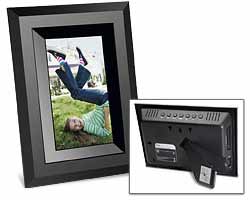
Digitize! Digital picture frames are a great solution for relatives who haven’t quite joined the computer era. Load a series of photos of the art (as well as snapshots of the whole family) onto a memory card or USB flash drive and plug it into a digital picture frame; periodically swap out the card or drive to update to new “collections”. Of course, it can’t hurt to send along an occasional piece of paper artwork along with a letter that says “Dear Grandma and Grandpa” (or “Dear Bubbe and Zayde”, or “Dear Baba and Gigi”, or “Dear Abuela and Abuelo”…)
(DRAWING) THE CART BEFORE THE HORSE
Of course, as we all know, collecting and displaying children’s art is the easy part. It’s the winnowing and the purging (and the vacuuming of the crumbled macaroni and the shaking of glitter off of clothing) and the convincing the pint-sized artists (and yourselves) that the number of pieces of artwork saved bears no relationship to the love for the artist.
Next week, we’ll take a fresh look at how you can oversee the collections of children’s art in your life without becoming a full-time curator.
Things That Make Paper Doll Say “Hmmm”: A Round-Up of Paper Organizing Products
Longtime readers of Paper Doll know that this blog takes the idea of organizing to heart, including organizing each post. Each week, we focus on a theme. We may find ourselves in pop culture culs-de-sac (yes, that is the plural of cul-de-sac — really! Lorelei Gilmore doubted it, too), but each post generally has a theme — a type of paper organizing-related product or service or a view to solving a particular problem.
Sometimes, during my research, however, I come across items that are neither fish nor foul, items for which there’s no category worthy of an entire post, and yet are too captivating to let pass without comment. As my birthday is this coming weekend, and as I’ve been a very good Paper Doll, I thought I’d be a little self-indulgent and dedicate this post to paper-related items that quirkily organize paper, time and space, and which, had you known they existed, you might have considered giving me as a present. Or, y’know, not.
A Gold-Plated Shredder
Readers know how strongly I feel about shredding sensitive documents to protect one’s identity. Shredding anything that has your Social Security number, account numbers or otherwise private (non-public domain) personally identifying information is just good sense. But the El Casco 23-karat gold-plated shredder?

It sells for $627! The product description from Amazon reads:
Readers, you know that I’m all about efficiency without excess. This item not only represents financial excess, but verbal excess as well. The words “fine” and “fancy” each appear three times in one paragraph! The price offends my sensibilities, as does the unnecessary capitalization of the word “gold”. While shredders are essential, this item is not a necessity at the office, at home, or anywhere except a Robin Leach expos of the rich, famous and lacking in good judgment.
Paper Watches
Paper Doll once had a beau who gave her a lovely watch…the silver link bracelet portion of which broke the first time it was worn. (The watch was lovely to look at but kept poor time; the beau was lovely to look at but we had bad timing…and that’s a story for another post.) Lack of dependability in a watch band is a serious flaw, so there’s some appeal to the Patch, a series of Swiss paper watches from Geneva-based Altanus.

The super-thin watchbands, available in 11 solid neon colors and various sports- and international-themed patterns, was inspired by papier-mch floats at an annual Tuscan Carnival festival. They’re manufactured from biodegradable paper and are tear-resistant, like those sturdy 21+ bands one is given to wear at club concerts or the ID bracelets assigned for outpatient procedures like MRIs and mammograms. The digital LED watches are waterproof, and the whole timepiece, including the band, weighs merely 11 grams.
Perhaps you think that in the era of smart phones and other ubiquitous gadgets, watches are pass? This is certainly up for debate — in fact, my colleague Deb Lee made a great case for this on her Organize to Revitalize blog. But there are times when it would be wonderful to have a colorful, inexpensive, environmentally-friendly (and oh-so-thin) chronometer on one’s wrist. Poolside, while working out or walking/running, while playing with children or working in the garden (not that Paper Doll is likely to ever work in a garden)…
Elsewhere, Altanus charges 24 Euros, or about $33.54 (as of this writing). Paper Doll feels that’s a little pricey for a novelty watch; a price point below $15 would have been more expected. Still, they are kind of cute, so if you can’t live without one and are willing to spend a few extra dollars, the Made In Italy Mall is carrying them for $36.50 with free shipping. How could one choose, though, between the Spanish running-of-the-bulls theme and the Ice Cream Stick motif?


Lifesized Furniture Templates
Design Yourself Interiors (DYI) co-founders Melody Davidson and Kathy Wagner have a nifty idea on their hands. I know many people are enthused about decorating. I even hear that there are those who enjoy the furniture acquisition process. Paper Doll is not one of them. To Paper Mommy‘s dismay, Paper Doll could live happily with a bed, a dresser, a desk and every wall made of bookshelves. Furniture is never foremost in my mind. Thus, although I don’t want this product, I can at least see how advantageous it might be for readers, especially those who (like me) completely lack artistic or design skill.
DYI has created life-sized, reusable paper “footprints” to duplicate the actual size of pending furniture purchases, like tables, chairs, couches, dressers, etc. If you’re trying to design a furniture plan for your office or home and measuring or eyeballing isn’t enough, take a peek at these paper templates, which are pre-cut to standard dimensions, and then can then be folded or cut to more accurately represent your purchase options. See below for DYI’s before-and-after visions.

@Copyright Design Yourself Interiors
@Copyright Design Yourself Interiors
Cut to size and placed on the floor, the templates allow you to fashion a floor plan with real-life sizing. You can then quickly and easily, without casters or back strain, rearrange the templates to determine the most appealing layout. Of course, it’s only two-dimensional, so it won’t help you determine whether your prospective overstuffed couch will be too high to comfortably allow you to place snacks on your coffee table, but until they develop pneumatic devices to raise and lower the templates (or your flooring), this is a fun start.
DYI offers five kits for furniture layout for the following rooms:
- Family Rooms — couches, including sectional sofas, upholstered chairs, upright chairs, and round and rectangular side tables, but no templates for bookshelves or entertainment centers. (As Joey from Friends asked, “If you don’t have a TV, what do you point your furniture at?”)
- Living rooms — couches, stuffed chairs and round and square tables
- Dining Rooms — dining tables and chairs, but no china cabinets or breakfronts
- Bedrooms — bed, nightstand, chairs, and tables, but no dressers, toy boxes or TV stands
- Nursery — cribs, rocking chair, changing table and dresser
all at $29.99 each, except for the nursery kit, which is only $19.99, and three- and four-room sets are available for $75 and $110, respectively.
For what it’s worth, Lay-It-Out offers similar life-sized furniture templates.



They’re colorful, but otherwise operate in the same fashion, with furniture templates for the dining room (with a rectangular dining table and chairs, as well as a round breakfast table setting), living room (couch, loveseat, and chair), bedroom (beds only), gameroom (with an adjustable pool table or game table configuration), an accessory table kit (with a rectangular coffee table and square end tables), and a rug template, adjustable by cutting or folding. All kits are $19.99, with a Total Home Package kit priced at $99.
Inflatable Paper Sofa
If you like the design templates above and are curious what it might be like to have three-dimensional paper furniture, look no further than Polish designer Malafor‘s Blow Sofa:

For just $590 (that’s $37 less than the gold-plated shredder), you can get an environmentally-friendly paper couch made from extra-durable, 100% recycled (and recyclable) paper dunnage bags (paper airbags used for security overland cargo), rubber straps and a metal backing rack. The dunnage bags are strengthened by sandwiching two layers of paper and one layer of plastic.
The Blow Sofa ships flat and then can be inflated (to 70.9″ wide by 35.4″ high); when you move, it’s easy to deflate and transport to your new warehouse loft in some chic, up-and-coming urban neighborhood. For $60 more, you can add a cushion! As with Kraft paper or a plaster cast, you can get artsy (or have your soon-to-be-famous artist neighbor in the warehouse loft next to yours) add color and design with markers or bohemian flair.
Intriguing though all of these may be, I don’t have a strong hankering for any of them. In fact, aside from a date with George Clooney, a trip to the UK and, alright, one major tangible item (a new car), I’ve been hard-pressed to identify a particularly strong desire for specific wrap-able birthday presents.
Why?
Well, various news publications were abuzz this past week with references to University of New Hampshire psychologist Edward Lemay‘s research with Yale University colleagues. Lemay’s study found that:
In other words, people who feel loved have a lesser need for material things. Well, from Paper Mommy to my friends and colleagues to all of you dear readers, Paper Doll already feels the love.
A Taxing Conversation (Part 3): Free Tax Preparation Assistance
~Benjamin Franklin
As we saw last week, a sub-set of what is certain includes scams and trickery related to taxes. But even when everyone is playing by the rules, the tax system can still be complicated. The current U.S. Tax Code is 71,684 pages in length! This is not what one would call light reading.
Last year, I created a primer to help you get organized for tax season. The series included:
Organizing Your Tax Paperwork–Part 1:
The Taxman, the Eggman, the Walrus and You
This post broke down the various types of information returns, including W-2s, 1098s, and the myriad types of 1099s.
Organizing Your Tax Paperwork–Part 2:
Health, Home, Heart and Head
The second installment detailed the different types of documentation you should gather to complete your income tax return. Items range from receipts for medical care expenses to proof of home and moving costs, from childcare expense documentation and charitable donations to work- and education-related expenses receipts.
Organizing Your Tax Paperwork–Part 3:
Get Your Business (Receipts) Off The Ground
The conclusion of the series offered tips for organizing small business records to take advantage of all possible credits and deductions.
Anyone filing a tax return more complicated than the 1040-EZ would benefit from working with a certified public accountant or tax attorney, at least once, to ensure no opportunities are lost and that all bases are covered. However, not everyone can afford professional tax services. Luckily, there are alternative solutions for getting your tax questions answered and finding assistance in preparing your tax returns.
Consider the following no-cost options:

Volunteer Income Tax Assistance (VITA) — This IRS program is for those individuals or households with annual incomes of $49,000 or less. Volunteers are often current or former CPAs and enrolled agents, as well as other professionals with financial backgrounds. These trained community volunteers should be able to help taxpayers deal with issues regarding completion of forms, applicable deductions and special credits, like the Earned Income Tax Credit and Credit for the Elderly or the Disabled.
At most VITA sites, the volunteers will not only assist in preparing tax returns, but will also be able to provide free electronic filing (e-filing). The IRS notes that taxpayers who take advantage of the e-file program and who are due refunds can receive those refunds significantly faster than those who mail paper returns, particularly when tax refunds are directly deposited into one’s bank account.
This is far more advantageous than the common refund anticipation loans (RALs) many consumers get through the chain tax services they use, as e-filing through a VITA (or other IRS-approved non-profit service) location allows taxpayers to keep 100% of the refunds due to them.
VITA sites are generally located in conveniently-accessed community centers, public libraries, schools, shopping malls and senior centers. Although the IRS does have a link to a list of many available VITA locations in the fifty states, the District of Columbia and Puerto Rico, the list is not all-encompassing. To find a VITA location near you, call (toll-free) 1-800-906-9887.

Tax Counseling for the Elderly (TCE) — This IRS program is designed for taxpayers aged 60 and above. TCE enables senior citizens to get free tax counseling and tax preparation services (including e-filing) from trained volunteers. Volunteers from where, you might ask?
Section 163 of the Revenue Act of 1978 (Public Law No. 95-600, 92 Stat. 2810, for those of you in training for Jeopardy) authorizes the IRS to form agreements with, and to provide grants to, private or (non-governmental) public non-profit agencies or organizations so that volunteer members of these groups can be trained to provide elderly citizens with assistance in preparing federal income tax returns. Although volunteers are not paid, grant funds can be used to reimburse them for out-of-pocket expenses like transportation, meals, and other expenses incurred while providing tax counseling.
To find a TCE service provider in your area, call (toll-free) 1-800-829-1040 or ask the staff at your nearest public library.
The best known TCE partner organization is AARP’s Tax-Aide.

AARP’s Tax-Aide — In concert with the IRS-sponsored TCE Program, the American Association of Retired Persons (AARP) offers the Tax-Aide counseling program at more than 7,000 venues nationwide during the tax filing season, from late January through mid-April. The tax counseling is designed for persons aged 60 or older with low or middle incomes. Seniors with higher incomes and/or particularly complex investment portfolios should generally seek professional assistance.
To locate the nearest AARP Tax-Aide volunteer counseling site, use the AARP’s online Tax-Aide Locator and search by address (only a zip code is required and no personal information is saved) or county, and select the mileage radius from your address. You can also indicate whether you intend to e-file, although this may reduce the number of Tax-Aide counseling locations available in your search radius.
The Tax-Aide Locator will provide you with results including the venue’s name, complete address, phone number, e-filing availability status, handicapped accessibility status, service schedule and notes regarding whether appointments are necessary or if walk-ins are welcome. The Locator also provides an indication of how far the service locations are from the address you indicate and pinpoints the locations on a Google-powered adjustable map. I was able to find six locations within the 20-mile radius I set, including one that was merely 1.94 miles from Paper Doll headquarters. (If I’m still here when I’m 60, this will be extremely convenient!)
Alternatively, you can call (toll-free) 1-888-227-7669 to find a Tax-Aide location.
In order to have your tax return prepared at a VITA, TCE or Tax-Aide venue, you’ll need to bring the following:
- Proof of identification — While photo ID is not generally required, you may wish to call ahead to the specific venue to verify the requirement if you don’t have a picture ID.
- Social Security Cards for yourself, your spouse and any dependents you intend to claim on this year’s tax return. (If you or any of your dependents are not eligible for a Social Security number, you’ll have to obtain and bring an Individual Taxpayer Identification Number (ITIN) assignment letter for the person(s) in question or Proof of Foreign Status if applying for an ITIN.)
- Proof of birth dates for you, your spouse and any dependents (particularly to prove you are eligible for TCE assistance if you, like PaperMommy, look far younger than your numerical age)
- Wage and earning statement(s) — including any W-2s or 1099-Rs from employers, 1099-MISCs from anyone for whom you’ve worked as an independent contractor, or W-2Gs from gambling establishments from whom you’ve won those big, big bucks!
- Interest and dividend statements from banks, brokerage houses, etc., including 1099s of all varieties and 1098s indicating mortgage interest paid, as well as 1098-Es for educational interest and 1098-Ts for tuition paid
- A copy of last year’s federal returns (and any state returns, if applicable)
- Proof of bank routing numbers and account numbers to enable your refund be delivered via direct deposit — a blank check or deposit slip from an active account will suffice
- Total paid for daycare providers and daycare providers’ tax identifying number, which will either be a Social Security number for an individual provider or an Employer Identification Number for any daycare center
Note: To file taxes electronically on a “Married, Filing Jointly” status tax return, both spouses must be present to sign the required forms. However, if you intend to take the tax return away with you and file by mail (in lieu of e-filing), only one spouse needs to be present.

Armed Forces Tax Council (AFTC) — The VITA program is also associated with the tax program coordinators for all U.S. military personnel in the Army, Air Force, Navy, Marine Corps and Coast Guard. The AFTC administers and oversees the operations of military tax assistance programs worldwide, and is the main source for free assistance and outreach to military personnel and their families.
VITA/AFTC volunteers are not only trained to provide general tax advice and assistance with tax preparation; they’ve received special training to counsel military personnel and their families on the particular tax issues that face military families, including combat zone tax benefits and the impact of the Earned Income Tax Credit (EITC).
Whether seeking AFTC assistance while in the U.S. or abroad, bring all of the paperwork indicated above for VITA/TCE/Tax-Aide visits. In addition, for spouses selecting the “Married, Filing Jointly” status who wish to e-file, both spouses should normally be present to sign the required forms. If military assignment prevents one spouse from being present, be sure to bring a valid Power of Attorney, which will allow for tax preparation and filing.
Note: There is a special exception to using a Power of Attorney for spouses in combat zones. The filing spouse may e-file a joint return with only a written statement verifying that the military spouse is assigned to a combat zone and is unable to sign.
Members of the military serving in “Designated Combat Zones” or “Qualified Hazardous Duty” areas get an automatic 180-day extension for filing returns and paying taxes. Those on an assigned tour of duty outside of the United States or Puerto Rico qualify for an automatic extension until June 15th. (When you do file, attach a statement to the return, indicating you met the requirement.) An additional extension to August 15th is available by using IRS Form 4868.
Military personnel and family members may wish to avail themselves of the information provided in the IRS’s Armed Forces Tax Guide (PDF) publication, also available online. You can also call the IRS at 800-829-3676 to request a free paper copy.
A Taxing Conversation (Part 2): Organize Yourself To Avoid Tax Scams
When I was in high school, my cherished French teacher, Mr. Calandra, would sometimes ask a question that yielded a rush to respond from even the most sluggish students. It was a gimme; an obvious answer and we all jumped for it…and we were all wrong. Mr. Calandra would get a glint in his eye and a grin on this face. He’d make a motion with his hands as if he were a reeling in a bite on his fishing rod and shout out, “You got fished!” Little did we (or, he, I imagine) anticipate that his endearing way of saying “I caught you!” would serve as a warning for internet-related financial and tax scams…especially given that the internet had not yet been invented.
Each year, myriad citizens are taken in by scurrilous tax scams. These scams target the elderly, the poor and those who are inexperienced in the ways of the Internal Revenue Service. To protect yourself and those about whom you care, know the facts:
1) The IRS Will Not Email You
Con artists and scammers send emails purporting to be from the Internal Revenue Service, the Treasury Department or, less often, a state’s tax collecting body, to request personal information: Social Security numbers, birth dates, bank account numbers, credit card numbers, etc.
Scam emails will sometimes state that the taxpayer is late with payments or provision of information and may threaten fines or jail time if this personal information is not turned over immediately. Alternatively, scammers may appeal to our greedier natures and promise that we are due a long-withheld refund for which we must merely provide certain documentation in order to receive.
The purpose of scam emails may be two-fold. Primarily, scammers are phishing, or masquerading as a legitimate entity for the purpose of identity theft. Armed with your personal information, they can apply for credit, insurance or financial benefits in your name, purloining your identity and ruining your financial history.
Often, those who are naive in the ways of the internet mistakenly assume that because the emails do not request a return email reply (and may even warn against it) but instead, direct the taxpayer to a particular “official” link to fill in an online form, that the email is legitimate. For example, someone lacking experience in the darker side of the internet might see the link:
http://www.InternalRevenueService.gov/ThisTotallyIsn’tAScam
and be unaware that hotlinks can be coded to go somewhere other than where they appear to send you. (Go on, click the above link. It’s safe. Paper Doll promises you. We’ll all wait while you click.)
See my point?
The only difference is that scammers will link to their own sites, which they may have made look like official government sites, counting on each email recipient’s inability to notice that the URL in the address box changed to something malicious. If you provide information at the ensuing site, you then become complicit in your own defrauding.
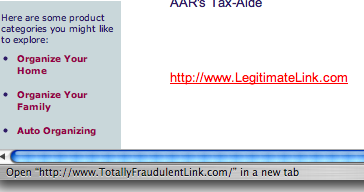
In addition to direct phishing, scammers may embed emails with viruses or may cause malware, malicious software, to engage when you click the links, enabling access to private data on your computer. Scammers count on you not knowing that by hovering your cursor over a link in an email or on a web site, you can actually see (either in a pop-over window or in the status bar at the bottom of your browser) the URL of the real link to which you are being sent.
Microsoft’s security center illustrates what the link might look like if hovered over:

Similarly, if you hover your cursor over a link and look at the bottom of the screen, at your browser’s status bar, you can see if there’s a mismatch, as noted below:
To stay safe, install updated anti-virus software and avoid clicking suspicious links.
One recent scam that has been popular lately is an email warning recipients that they are in trouble because they failed to submit a W-2 by the well-publicized January 31st deadline. The email provides a link which the recipient can click and fill in the requested information — much like the traditional email phishing scams. However, this scam really takes advantage of the recipient not knowing how the United States tax system works, because employers provide W-2s to the IRS by January 31st each year, not employees.
For what it’s worth, the IRS only contacts taxpayers by mail, via the U.S. Postal Service. (If you are married and have filed jointly, both spouses will get identical letters, sent in two separate envelopes, to the same residence.) The IRS uses your full name and address and provides quite a bit of identifying information to show they have adequate knowledge about you. Scammers usually possess no information about you besides your email address and possibly first or last name, generally deduced from your email address.
Another clue to the fraudulent nature of many scam emails is spelling and grammar. The mail the IRS sends is spelled correctly and uses proper, traditional grammar. Conversely, scammers are usually not the sharpest knives in the drawer and their emails are often riddled with misspellings, grammar mistakes and sentences that are circular, incomplete and lacking proper punctuation.
So, as the IRS does not email you, no matter how scary (or intriguing) an emailed warning (or offer) from “the IRS” seems to be, don’t believe it.
Do not click on links in tax-related emails or provide personal information via links appearing in emails.
For more information regarding how you can protect yourself and your loved ones online, visit  OnGuardOnline.gov, co-sponsored by the IRS, the Federal Trade Commission, the Department of Homeland Security and other government agencies.
It should go without saying that the IRS also does not text, tweet or Facebook-message about individual accounts.
2) The IRS Will Not Call To Harass You
Just as with the email examples, taxpayers have reported receiving harassing phone calls from persons who purport to be with the IRS. Usually, these are threatening calls, stating that the taxpayer is delinquent in paying taxes or submitting certain types of documentation. Again, these callers often threaten imprisonment or fines if their demands are not met immediately.
Less often, the callers claim to have state or federal refunds due, either from prior years’ returns or from the estate of some long-lost relative, now deceased. In both cases, whether threatening (to invoke fear) or promising (to inspire greed), these scammers are out to phish as much personal information from you as possible.
Turn the tables. Try to get as much information as you can regarding the caller’s name, phone number and the address to which they wish you to mail funds, without providing any personal information of your own. Then hang up and report the scam to the Federal Trade Commission.
If you believe you have been contacted by a scammer, or have been the victim of a scam, report your experience to the following agencies and organizations:



The web site of the National Association of Attorneys General provides a link and contact information for your state’s Attorney General.

The Anti-Phishing Working Group (APWG) is a consortium of internet service providers, financial institutions, security vendors and law enforcement agencies working to fight phishing.
3) Strangers Who Contact You By Mail, Email or Phone Can’t Reduce Your Tax Debt
Unlike official, government-approved non-profit agencies that can help consumers consolidate and/or reduce their credit card debt, there are no companies that can reduce your tax burden on your behalf. You (and your CPA, tax attorney or enrolled agent) must work directly with the Internal Revenue Service to engage in any negotiations regarding payment terms, fines and penalties.
The Better Business Bureau is contacted each year by thousands of complainants who paid fees for “tax reduction” services to companies that never contacted the IRS on their behalf. Don’t get added to that list.
4) Phishing Scammers Don’t Only Pretend To Be With the IRS
Some scam artists are more creative than others. Although they don’t know you, and don’t have any idea with whom you bank or what brokerage you use, scammers are willing to play the law of averages. Like spammers, they figure if they send enough scam emails, somebody will take the bait.
You’ve probably received bank scam emails before. An email claims to be from your bank, and may even carry your bank’s logo, color scheme and formatting. The email may claim that someone has attempted to access your online account and that access privileges have been locked out until you use their specific link to click and then log in with your user name and password. The only problem is that the link provided does not go to your bank or brokerage, but to their own phishy (and fishy) site.
Wells-Fargo account holders, for example, may immediately realize it’s a scam when contacted by a bank with whom they have no relationship, whether it’s Bank of America or First National Bank of Fiction, and yet they may be much more trusting when the email purports to be from their own Wells-Fargo. In such cases, quickly deleting the email and logging in via a bookmarked or hand-typed URL will soon prove the fraudulent nature of such emails.
At tax time, these phishing emails become more common, promising to provide quick and easy access to essential 1099s if the recipient will merely use the provided link to log in and “prove” or “validate” identity. Paper Doll readers are too smart to fall for this, but be sure to warn your less web-savvy and too-trusting friends.
5) There’s (Almost) No Free Lunch
Another popular tax-related fraud is the free tax preparation scam. While there are non-profit agencies available to help senior citizens, those with low incomes, military families and others in special circumstances with their tax preparation (and we’ll be discussing these programs at length next week), scams abound in this arena.
Some fraudulent tax preparers are just phishing for personal data. Others promise prospective clients unrealistically huge refunds in return for a percentage of the monies secured. They achieve this by claiming inflated or false expenses and deductions and fake or excessive tax credits. Although the preparers get the booty, the clients get the boot — when the IRS detects the fraud, the clients and not the (long-gone) preparers are on the hook for additional owed taxes, interest, fines and penalties.
Per the IRS (FS-2009-7), when selecting a tax preparer, heed the following advice:
- Be cautious of tax preparers who claim they can obtain larger refunds than other preparers.
- Avoid preparers who base their fee on a percentage of the refund.
- Use a reputable tax professional who signs the tax return and provides a copy.
- Consider whether the individual or firm will be around to answer questions about the preparation of the tax return months, or even years, after the return has been filed.
- Check the person’s credentials. Only attorneys, certified public accountants (CPAs) and enrolled agents can represent taxpayers before the IRS in all matters, including audits, collection and appeals. Other return preparers may only represent taxpayers for audits of returns they actually prepared.
- Find out if the preparer is affiliated with a professional organization that provides its members with continuing education and resources and holds them to a code of ethics.
- Ask friends and family whether they know anyone who has used the tax professional and whether they were satisfied with the service they received.
There are far worse ways to be fooled than to be Rick-Rolled. Be wary, online and off, to avoid common tax scams. Don’t let the bad guys say, “You got fished!”
Paper Doll Starts a Taxing Conversation–The Subject of Brackets
Song lyrics. (“Hold me closer, Tony Danza,” indeed.)
Turns of phrase. (Seriously, it’s “I couldn’t care less.” If you could care less, it would mean you cared some amount at all. And aren’t you trying to point out that you really, really don’t care?)
How things work. (When I was a child and saw PaperMommy adjust her rear-view mirror to keep the bright lights of the cars behind us out of her eyes, I assumed adjusting the mirror somehow reflected the brights back at the drivers, alerting them that they needed to somehow reduce the glare. I still think we need an invention like that.)
While in conversation with some very well-versed, knowledgeable folks, I was recently surprised to learn how many people are confused by brackets.

No, not those brackets. We’re a bit early to be talking about March Madness. Though, if you need one, there’s a downloadable 64-team tournament bracket template here.) Rather, I’m talking about the term “tax bracket”. It seems many folks think that if you’re in the 25% tax bracket, that 25% of what you earn each year goes to taxes. That’s not how it works.

[Note: This is not the venue to argue tax reform, flat taxes or political positions. It’s merely an opportunity to make sure we all understand how we are taxed on the little green pieces of paper we earn. So no crankiness in the comments section, OK?]
Let’s start with the basics. For 2010, for singletons like Paper Doll, it works like this:
If you made any money at all, up through but not exceeding $8,375, then you’re in the 10% tax bracket with regard to FEDERAL taxes. That means, on whatever taxable income you have, Uncle Sam will tax you at 10% of the amount. So yes, in that lowest tax bracket, all of your income is being taxed the same amount as your bracket — 10%.
Of course, even that is quite simplified. Our system isn’t set up for us to pay taxes on everything we make. Thus, the 10% tax bracket isn’t levying a tax on 10% of what you made, per se, but on 10% of your adjusted gross income, which is a fancy way of saying “the total (gross) amount you earned, minus deductions and exemptions”.
So let’s say you made the highest amount ($8,375) in that lowest bracket; then you’d be taxed $837.50. But what if you made more? Here’s where it changes.
If you make between $8,375.01 and $34,000, then you’re in the 15% tax bracket. But wait…that doesn’t mean you’ll be paying 15% on everything you made (or, again, more correctly, on your adjusted gross income).
Let’s say your adjusted gross income is the highest possible in this category, $34,000. 15% of that would be $5,100, but that’s NOT what you’ll pay in taxes. Instead, you’ll pay 10% on the first $8,375 (i.e., $837.50) plus 15% of the amount over $8,375. The difference between the amount up to which you’d pay at the 10% level ($8,375), and the total you made ($34,000), is $25,625.
So, if you made $34,000, you would pay:
10% on the first $8,375 (.10 x $8,375 = $837.50)
+
15% on the next $25,625 (.15 x $25,625 = $3,843.75)
= $837.50
+$3843.75
————–
= $4681.25
Remember how I noted that 15% of the total $34,000 would be $5,100? Well, $4681.25 is $418.75 less than 15% of the total. Sure, it’s not king’s ransom, but if you were going along thinking you were going to be paying 15% on everything, that’s good news.
Thus, your tax bracket refers to the highest percentage at which your last dollar earned will be taxed, and not the level at which all of your (adjusted gross) income will be taxed.
Obviously, deductions and credits and exemptions (oh, my!) play a big role in determining one’s adjusted gross income. Also, to get a general idea of what taxes one might pay on that adjusted gross income, filing status plays a major part. There are separate tax bracket charts for those who fall into each of the following situations:
1) Single — If you were legally separated (or divorced) at the end of the calendar year, you can file as single.

2) Married, filing jointly — This category, not surprisingly, is for married couples pooling all of their income and paying taxes based on their total incomes and combined available deductions. You must have been married on the last day of the year to select this filing status.
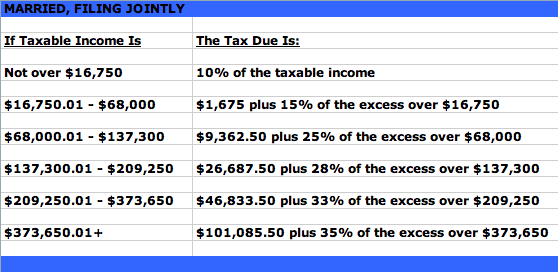
3) Married, filing separately — Although this is usually disadvantageous from a financial perspective, it’s sometimes wise or necessary for married couples to file separately. For example, if one spouse suspects the other of tax evasion, he or she can file separately and avoid liability for any taxes, penalties and/or interest that would be due if the other spouse’s evasion were found out. Also, if one spouse owes taxes while the other would get a refund (and the spouses strictly separate their finances), or if a couple is separated, but not yet divorced, filing separately may be necessary.

4) Head of Household — If you are not married but can claim a dependent for at least one half of the tax year, Head of Household status can be advantageous, because the tax rates are lower than with the “Single” category and the standard deduction is higher.

5) Qualifying Widows/Widowers with Dependent Child(ren) — This is the category for anyone who is unmarried, has cared for a dependent for more than half of the tax year and whose spouse died within the past two tax years. It provides the same advantages as “Married, filing jointly”.
The 2010 tax rates (which did not appreciably change from 2009) are further detailed in an IRS PDF.
Of course, all of this refers solely to federal income taxes. State income taxes have their own particular flavors of rules and number of brackets. Some states have no income tax (like Alaska, Florida, Nevada, South Dakota, Texas, Washington and Wyoming), while others (New Hampshire and Tennessee) only levy tax on dividend- and interest-based income and not earned income. Some states allow personal exemptions and/or deductions for federal income tax payments; others have no allowances.
Tax brackets at the state levels range from one flat tax percentage for everyone (in Colorado, Illinois, Indiana, Massachusetts, Michigan, Pennsylvania and Utah) to twelve separate brackets in Hawaii (edging out Missouri’s ten, and Iowa and Ohio’s nine, brackets). Income brackets range from Alabama’s low of $500 up to Maryland’s $1,000,001.
So, it’ll come as no surprise to you that taxes are complicated. In the coming weeks, we’ll look at some ways to avoid scams and get help with preparing your taxes to ensure they are done accurately and so that you do not miss out on any opportunities.



Follow Me