Archive for ‘Task Management’ Category
How to Use Timers for Improved Productivity and Focus — Part 3: Tangible Timers
So far in this series on using timers, we’ve focused on the “thinky” aspects.
- In How to Use Timers for Improved Productivity and Focus — Part 1, we looked at the the why of using timers and all of the situations in which they can boost productivity.
- Then, in How to Use Timers for Improved Productivity and Focus — Part 2: Picking a Good Timer we identified the general characteristics of a good timer and the specific, customizable aspects supporting individuals in their unique tasks and projects.
That was wordy stuff. Today, we get to start looking at the actual timers that can work their magic in helping you maintain focus, remember to take breaks, and avoid hyper-focusing. Today’s post is what I consider a “feast your eyes” post; read it in its entirety or just scroll through until you see a timer that appeals, and then explore all the salient details.
As we discussed previously, the timers you select should feel like they’re on your team, not like they’re monitoring you for a productivity parole board. They need to support all your functional, as well as aesthetic and emotional, needs. You don’t want — at least under most circumstances — to feel like you accidentally launched a countdown to self-destruction instead of a 25-minute Pomodoro focus session. Embrace a platform that works for you.
A timer should support your functional, as well as your aesthetic and emotional, needs. You don't want to feel like you accidentally launched a countdown to self-destruction instead of a 25-minute Pomodoro focus session. Embrace what… Share on XToday, we’ll focus on physical (primarily analog) timers; next week, we’ll examine digital and hybrid timers. But to begin, we’ll delve into the product line that has done the most to improve the understanding of the passage of time in schools, within the ADHD community, and among anyone seeking productivity support.
DISK-Y BEHAVIOR: TIME TIMER, THE BIG KAHUNA OF PRODUCTIVITY TIMERS
If you read Paper Doll or any productivity or organizing blogs, you probably already know quite a bit about Time Timer. The basics of this beloved product invented by Jan Rogers in 1994 are told in this video.
The key is that Time Timer was the first solution to the problem of time blindness, an undeveloped sense of the passage of time. As explained in ADHD Minds Are Trapped in Now (& Other Time Management Truths) in ADDitude Magazine, those experiencing time blindness are so ensconced in the present moment, in the “now” of things, that recall of the past and anticipation (and planning for) the future are difficult. Understandably, time blindness creates trouble in estimating how long a task will take.
My professional organizing business started in 2002, when Time Timer was still getting to be well known, so I feel as though we’ve “grown up” together. While almost every professional organizer has familiarity with Time Timer, I knew they’d made the “Big Time” when I walked into a Diabetes Sisters support group meeting. The moderator was almost giddy as she showed off the “cool timer” for making sure we’d hit all the planned activities on time.
Seeing Time
Over the years, I’ve been impressed with how this simple innovation has helped children and adults “see” the passage of time in ways they’d never been able to before.
In part, it’s because younger millennials and Gen Z have experienced digital clocks almost entirely to the exclusion of analog clocks. It’s no wonder that young people don’t know what “half past” or “a quarter ’til” mean!
Digital clocks are on their devices and computers, in their classrooms, and on electronic signs as they drive down the street. If you blink, you miss the minutes changing on a digital clock, and there’s no second hand “sweeping away” the seconds, as my kindergarten teacher explained it.
For many others, whether because of ADHD, executive function disorders, or just the complexities of living in the 21st century, they’ve never quite gotten the hang of how time “feels,” so they underestimate or overestimate how long a minute (or twenty) might take. If you don’t know how long a minute is, how can you envision how many you need for any given task?
The basic element of all of the physical Time Timers is two-fold:
- they display time in an analog manner
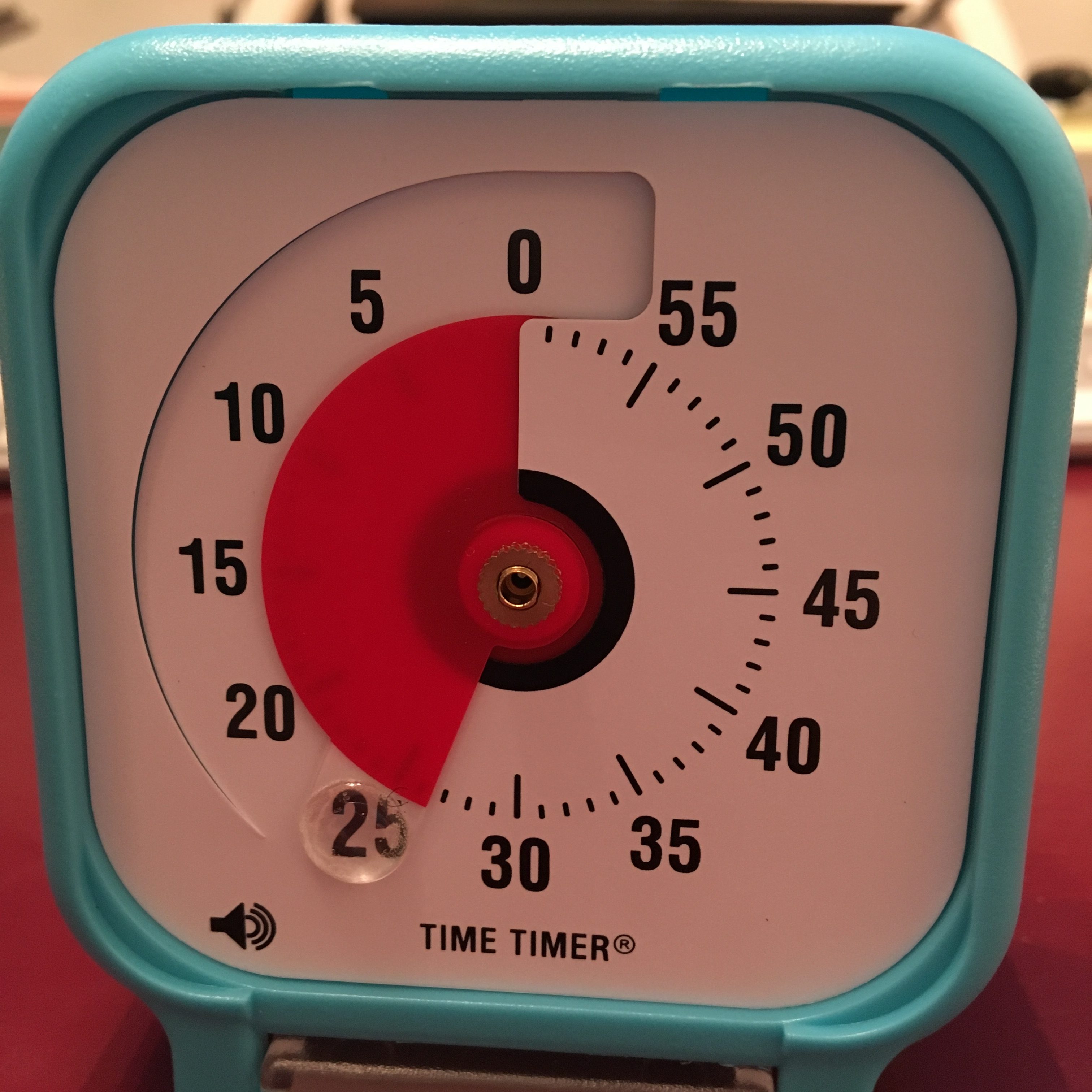
- a colored disk is set to the starting point of the timed period, and the visible area of the colored disk disappears (behind the face of the timer — it’s mechanical, not actually magic!) as time is “used up.”
It seems almost too simple, but users soon see that making time visible in this way calms the nerves and soothes the senses. Whether you’re doing a timed practice test or trying to finish a presentation for your client, you need only flick your eyes to the Time Timer to know how much time you have left.
There’s no need to calculate the math in your head as with a digital clock, and even from a distance (and even if you’re extremely nearsighted!), the flash of color slowly moving in a clockwise pattern is enough to signal if you have a lot or a little time left.
In this way, Time Timer delivers on its mission: it “fosters focus and provides clarity to individuals who struggle with visualizing time.”
Original Time Timers
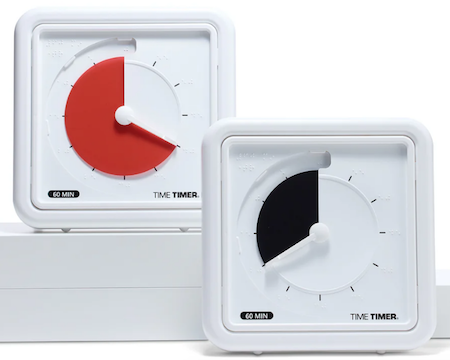
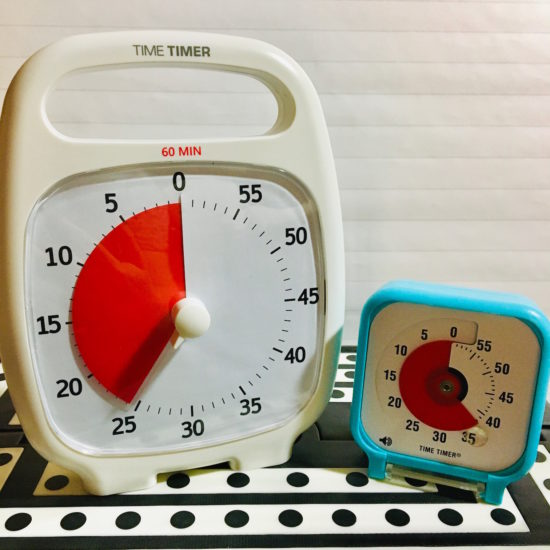
The Original 8″ and Original 12″ versions with the crisp white background, black type, and red disk are for purists (and anyone who wants a variation on the old joke, “What’s black and white and re(a)d all over?”).
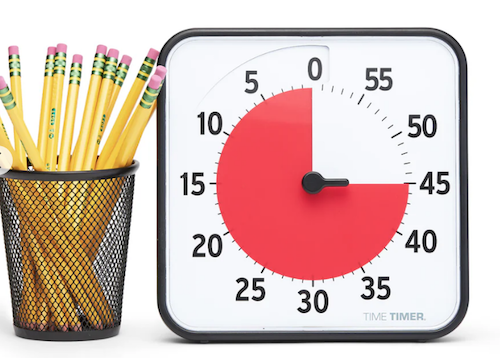
Both sizes are 60-minute timers, good for keeping a typical work or community meeting running without unraveling. Its operations are silent; with no ticking, the Originals are ideal for classrooms, open-plan offices, and for sound-sensitive users or spaces. The alert ding at the end of the set time is optional.
The no-nonsense style makes it appropriate for classrooms or office work, and it has both a magnetic backing and foldable feet, so you can choose the optimum display style for your needs. You’ll need two AA batteries to keep your Original Time Timers in lock-step with you, but it comes with a dry erase activity card to keep you on-task.
Teachers and homeschooling parents may want to opt for the Time Timer® Original 8” Learning Center Classroom Sets, with sets of three Original 8″ timers in either primary or secondary colors.
With all the same features as the other Originals, they add a pop of color, so if the minimalistic look and magnetic backing or table-top options appeal to you for your workplace, but you need to make your stylistic mark, this might be a good alternative.
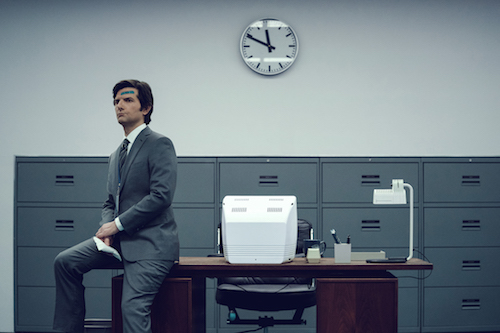
The colored Learning Center versions also prevent you from feeling like you’ve fallen into a creepy, crooked-clock episode of Severance.
You can also amplify the Original 8″ with a Time Timer® Original 8” Visual Scheduler. Encircling the timer is a dry-erase board where you can add calendar/daypart information or time progress details.
Actual minutes are hidden. In addition to the drawn-on markings you can add, there are clips that mark where you have reached in the time allotted.
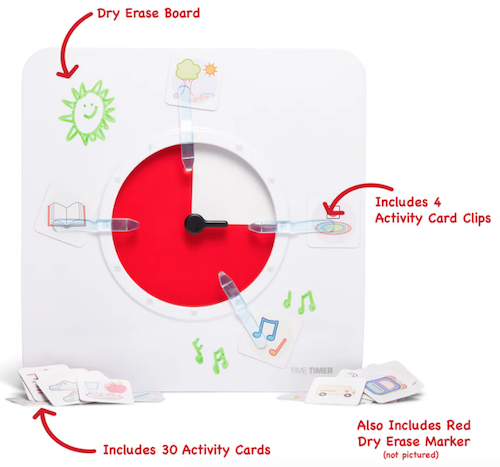
In the reverse portion, there are pockets for holding the clips, dry erase markers and other timer accessories.
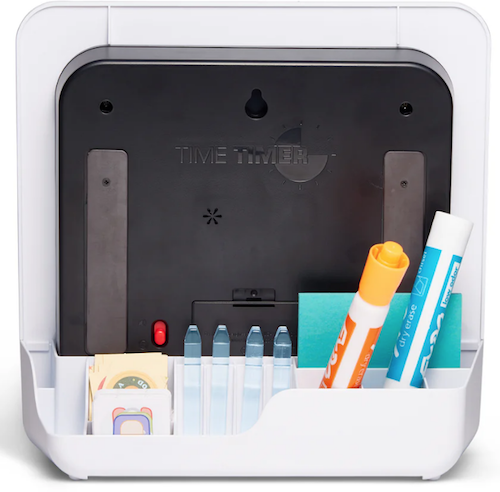
The Original Time Timers include access to the Time Timer apps, which we’ll review next time.
Time Timer Plus
In 2013, the line expanded to include Time Timer Plus, all of which stand upon their own and have handles to make them portable — as more than one client’s child has noticed, somewhat like a purse, or as my GenX clients have said, like a little boombox.
There are two versions of the 7.09″ x 1.7″ x 5.51″ Time Timer Plus 60-minute timers, with relatively serious faces (white backing/black type/red disk) like the Originals; the bodies come in either white or charcoal.
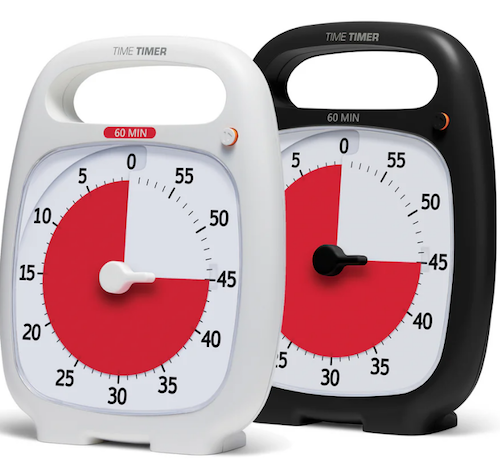
As with the originals, there’s no distracting ticking to interfere with focus, and there’s volume control for the alert, to assure that those who hyper-focus aren’t jarred into anxiety.
These were the first Time Timers I ever owned and used with clients. In addition to the features of the Original version, the timers in the Plus line are the only analog visual timer with a pause button (in the upper right).
The official rules of the Pomodoro Technique say that if your 25-minute Pomodoro is interrupted, you have to start counting from the beginning, but you’re a grownup and can make rules for yourself! If the interruption is worthy — your boss has a question, the school has a fire drill, etc. — hit that pause button, but do get back to what you were doing when you are able.
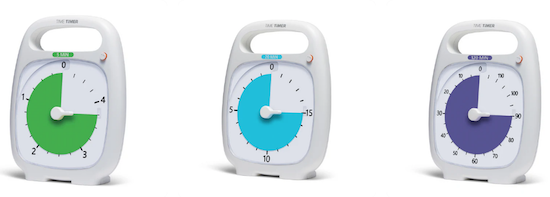
Over time, the company realized that different users might need different iterations. An hour is fairly long; five or ten minutes barely makes a dent. Thus, the colored part of the disk measuring just a handful of minutes would be hard to discern, especially for children or even someone learning to appreciate smaller increments of time, like while meditating or holding yoga positions. For them, 5-minute and 20-minute versions were created.
Conversely, sometimes an hour isn’t enough; if you’re taking timed practice tests or holding a multi-hour group workshop, a longer visual display of time is needed, so the Plus line added a 120-minute timer. All three additions to the Time Timer Plus family have more colorful disks.
Time Timer Mod
The Original and Plus editions always served their purposes, but (especially early on) had a decidedly academic/industrial look about them. Some people felt that it gave off either a juvenile or sterile vibe; some of my adult clients said they feared it branded them as someone who needed help with time. (But c’mon, we all need help with time.)
As I noted last week, aesthetics can matter, and while most people wouldn’t consider timers as bearing a stigma, both the Original and the Plus line are rather “in your face” about their purpose. The Time Timer Mod line was the perfect response.
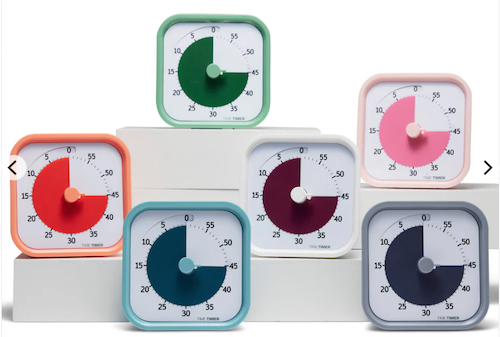
These 3.47″ square timers are just two inches deep, so you can use them anywhere: at home, in an office, working from a coffee house or library, even at the beach. They are small enough to throw into a backpack or purse, and to the uninitiated, they just look like little clocks. And a Time Timer Mod only requires one AA battery.
The standard Time Timer Mod – Home Edition Timers can measure up to 60 minutes and come in six designer colors accent colors coordinating with the timer disks: Lakeday Blue, Fern Green, Dreamsicle Orange, Pale Shale Gray, Peony Pink, and Cottonball White (with a burgundy disk). (Value packs of coordinating silicone “skins” are optional.)
As some people (teenagers? college dudes? macho men in the workplace?) may want or need a timer with a harder-edged aesthetic to stay committed, Time Timer has a new Mod Home Metallic Edition in four different colors/styles that remind me of the eye shadow palettes popular in the 1980s:
- Metallic Midnight (midnight blue timer with gold disks)
- Metallic Indigo (dark purple-blue timer with a light purple disk)
- Metallic Forest (dark green timer with a metallic brown disk)
- Metallic Storm (dark blue timer with a pink frosted disk, the color of an eye shadow I suspect I currently own!)
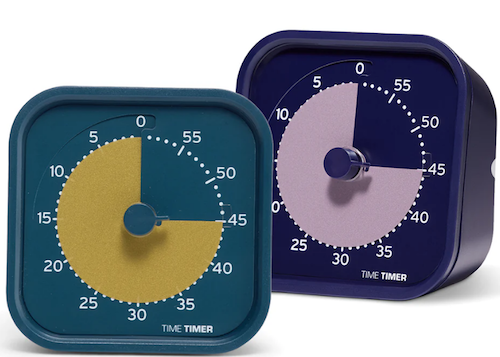
(These are more sparkly in person than they appear on screen.)
And for parents of kids needing something a little more generous with time measurement, the cheery Time Timer® MOD Home Edition Rainbow Wheel colorfully communicates time segmentation to children in five minute increments.
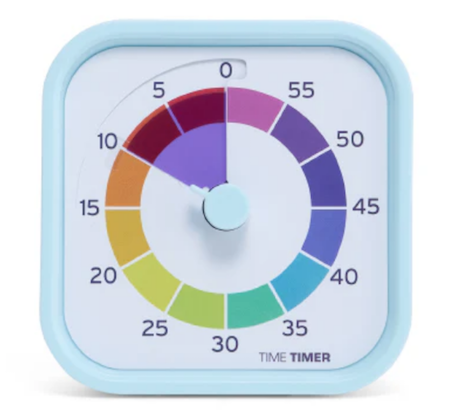
While the Home Editions are equally useful at home or work, the 60-minute Time Timer Mod Education Editions has more specific uses. They come in charcoal with the classic, highly visible red disks and optional silicone skins. However, when Time Timer spoke with educators and therapists, they learned of needs for shorter-duration and longer-timed options, so they created 10-minute (white with a yellow disk), 30-minute (white with an orange disk), and 120-minute (white with a purple disk) versions.
Time Timer RETRO Eco Edition
For those seeking a combination of productivity and sustainability, Timer Timer developed the RETRO Eco Edition. These 7.5″ square timers are smaller than the Original line and come in two styles, Green Land and Blue Water. They take one AA battery, like the MOD line, and come only in 60-minute versions. Their key appeal is how they are manufactured.
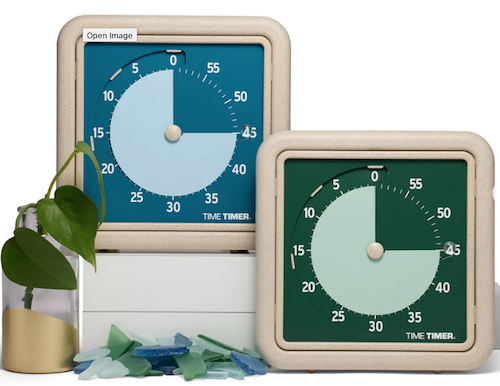
By combining a rice husk byproduct with their plastic, they’ve eliminated any unnecessary plastic pieces, reducing the overall plastic usage these timers by nearly half compared to similar timers. Additionally, 1% of the Time Timer RETRO Eco Edition sales go to their Time Timer® Making Time for Trees Initiative, a program committed to planting more trees and offsetting Time Timer’s carbon footprint. This version also eliminates the plastic lens, making it easier to repair a disk and yield a longer product life cycle.
Time Timer BRAILLE 8”
Closing out the physical Time Timers is the newest and most intriguing, the Time Timer Braille 8″, the first tactile, high-contrast, visual timer!
This innovative, empowering design allows both users with vision impairment and fully sighted users to use the same device simultaneously to monitor time use, stay productive, and support focus without hyper-focus. It’s suitable for classroom use, students taking tests or working on their own or in groups, and adult work or household projects. Like the MOD and RETRO lines, this 8-inch square timer takes one AA battery.
This timer combines their traditional disappearing disk with a tactile-set bar and Braille writing, so that vision-impaired users can set and track time themselves, by touch. The audible alert is optional.
While this is not the only Braille timer I’ve seen, Time Timer’s version offers the advantage of the high-contrast color differences (of the disk against the white background) for low-vision and fully-sighted users with Braille for vision-impaired users, something I’ve not found in other options.
[For current prices of Time Timer, please see the individual product pages linked.]
Time Timer has other products, ones which I would identify as hybrid, offering both an analog and digital approach to timers, and we’ll examine them in the next post.
Again, Time Timer is not the only timer manufacturere, but their wide variety of options make them the first line of productivity support for children and adults, at home, work, and play.
If, based on what I explained in the first two parts of this series, you to believe that you, your child, or someone with whom you work might benefit from a timer that unites the features of a tangible, visual, and analog timer with an optional, gentle (but non-customizable) alert, Time Timer should be your first stop.
OTHER PHYSICAL TIMERS
Lest this post feel like a commercial for Time Timer, there are a variety of other tangible timers worth considering, especially for those individuals most needing both:
- a timer with aesthetic appeal
- a physical timer, something that approximates a fidget toy
but not necessarily one with a visual approach to the passage of time.
Focus Timer® Visual Timer
You may recall that last week, I noted a primary problem with using an hourglass timer: it requires the user to “gauge what those collective grains of sand mean.” With a real hourglass, you must judge the ratio of sand above to what already passed down. A modernized version eliminates that problem.
The Focus Timer® Visual Timer has an adjustable hourglass design allowing you to set customized time measurements from one to 100 minutes.

Made of what the manufacturers call a “magic touch material,” this 3.75″ x 2″ timer has some appealing features:
- a “soothing” chime alert with three volume settings and a mute option (I put “soothing” in quotation marks because, as the video below shows, it’s a little high-pitched for my timer tastes.)
- ability to recharge via an included USB-C charging cable
- 10 hours of use before requiring charging
- 100 days of standby time
- a visual display such that horizontal blue rings are one minute each and yellow rings are 10 minutes each
It works by turning and “twisting” your fingers along the surface, much as you can operate your phone with drags, drops, taps, and pinches. Watch this video to appreciate how it works:
For the right user, this might be ideal for timing quiet reading and working stints, meditating, exercising, or other “gentle” activities, but not for large group meetings.
The Focus Timer® Visual Timer comes recommended by Gretchen Rubin, Cal Newport, Dan Ariely, and others in the productivity realm. It provides a beautiful visual display, making it (fairly) easy to judge the passage of time before the alert.
Note, compared to other timers, it’s a hefty $99 at Amazon or $89 at Focus Timer.
Moaas Timers
I’ve explored a number timers, and for those who don’t need a visual display of time passing but love that tactile, fidgety goodness of a timer they can hold and manipulate, Moaas has a variety of options.
The most basic are the Moaas Cube Timers, requiring two AA batteries. For about $15 at Amazon, these 2.6″ cubes come in violet, coral, mint green, white, and yellow.
Facets of the violet, white, and yellow cubes can be set for 5, 15, 30, and 60 minutes; the mint green version may be set for 1, 3, 5, and 10 minutes, while the coral’s settings are for 10, 30, 50, and 60 minutes.
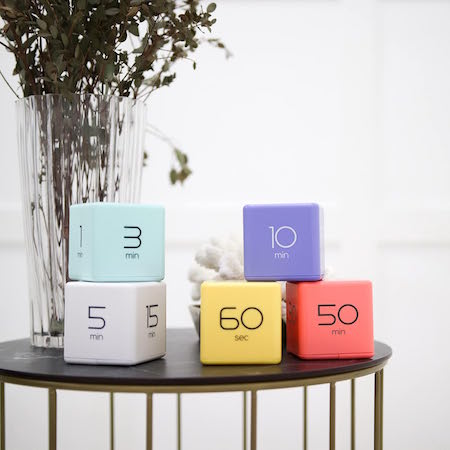
To operate, just turn the timer so that the side with the number faces up and the timer starts counting immediately.
A red light blinks while the timer is in use, which can either be comforting or annoying, depending on how blinking lights impact your focus. Adjust the alarm volume between low and high with a switch; another flicked switch turns off the timer completely.
These very basic timers will suffice for timing exercising, studying, cooking or taking a nap, but I suspect they may be a little “low-rent.” While I don’t have a Mooas cube timer, I do own a fairly ancient, battery-operated, 2.25″ Datexx Time Cube that appears to be much the same. The interior weight that identifies which timer specification has been turned upright (and similar to what Mooas uses) rattles and the whole mechanism lacks the “fun” I expected from a fiddly version.
That said, Mooas has a variety of timer upgrades that may appeal to those who want a timer that looks cute and is fun to handle. The Multi-Cube Timer Clock combines a digital clock readout with pre-set timed facets on the cube. These 2.56″ square cubes come in two versions:
- 5, 15, 30, and 60 minutes in white for $18.90 at Amazon
- 1, 3, 5, and 10 minutes in mint green for about $17 at Amazon

While the Mooas shows them as also coming in yellow, coral, and grey, those do not seem to be sold currently.
Mooas’ Multi-Hexagon Clock Timers are cool to look at and offer similar fidget-worthy features in a hexagonal style, but Amazon has marked as a “frequently returned item,” which is somewhat concerning. As always, function should be a higher priority than aesthetics, even when aesthetic appeal is needed to encourage commitment to timer use.
Happily, there’s no such warning on the 2.24″D x 1.84″W x 2.24″H Mooas Dodecagon Time Ball Rechargeable Mini Timers, which come with eleven different pre-sets: 1, 3, 5, 10, 15, 20, 25, 30, 45, 60, and 90-minute timers and three colors: sand peach, blue, and white. Charge the timers with an included USB-C charger.

There are three alarm modes: sound, vibration, and silent, and it sells for about $25 on Amazon.
I suspect that this small, fiddly timer may appeal best to teenagers and gamers.
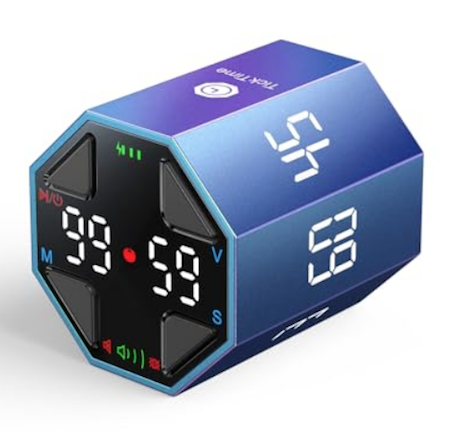
Similarly styled cube, hexagonal, and multi-sided timers can be found all over Amazon and in Big Box stores and dollar stores. This $38 TickTime Pomorodo Cube, which is not a cube at all but a hexagon, comes in blue, black, or white; has pause and resume modes, and the adjustable sound can be silenced or replaced with only vibration.
Mechanical Timers
Finally, remember that the simpler your physical timer is — if it requires no fiddling, no batteries, and no instruction manuals — the more likely you will be to use it.
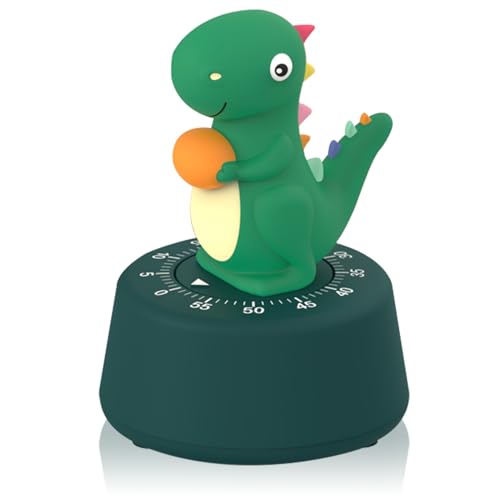
If you don’t struggle with time blindness and don’t need to see the passage of time, and if you can accept (and won’t be startled by) a ding, a mechanical timer may be your best, first, and least expensive option.
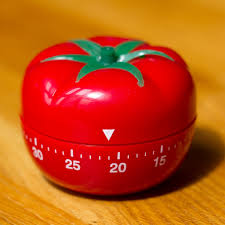
If that’s a traditional pomodoro tomato timer, so be it.

As always, the best solution for any productivity strategy is the one you’ll actually use.
Until then, do you have a tangible timer you love? Did one in this post tickle your fancy? Please let me know in the comments.
Affiliate Disclosure: Some of the links above are affiliate links, and I may get a small remuneration (at no additional cost to you) if you make a purchase after clicking through to the resulting pages. The opinions, as always, are my own. (Seriously, who else would claim them?)
How to Use Timers for Improved Productivity and Focus — Part 2: Pick the Right Timer
Future, noun. That period of time in which our affairs prosper, our friends are true, and our happiness is assured.
~ Ambrose Bierce, The Devil’s Dictionary
Bierce’s satire aside, the future is unpredictable, and no matter how speedily we attempt to get there, by the time we arrive where the future was, it has moved off again, always out of our grasp. Time is slippery that way, and the only control we have over time is how and what we choose to do with it.
Last week, in How to Use Timers for Improved Productivity and Focus — Part 1, we looked at a variety of ways to use timers to help us be more focused and productive at home and at work, for ourselves on our own or with our work teams or families.
Today, we’ll look at the qualities of what makes a “good” timer, in general and for you, specifically. A lot more goes into your choice than just being able to keep track of time as it keeps on ticking, ticking, ticking into the future.
WHAT MAKES A GOOD TIMER?
You could use an hourglass for noting the passage of time: two (attached) transparent glass bulbs, voluminous grains of sand, and gravity. Hourglasses have existed since the 16th century BCE and offer an somewhat accurate way of time keeping, whether to decorate your mantle or play a mean game of Boggle.

Unfortunately, an hourglass requires you to stop what you are doing, look over at it, and be able to gauge what those collective grains of sand mean.
It’s not very helpful for those who hyper-focus (as they’d never remember to look at the hourglass in the first place) in order to pace themselves. Worse, for those who are prone to easy distraction, hourglasses are silent; by the time you discern the ratio of sand on the top to sand on the bottom and calculate how much time you have left, you’ll have forgotten what you were writing or doing in the first place!
Hourglasses also lack the precision you’ll need if you want to make a soufflé.
So, let’s first look at the basic characteristics of a good timer.
A Good Timer Must Be Simple
It doesn’t matter whether you use a digital timer (or app) or an analog clock timer, though there are features of each style that will make you more likely to enjoy the experience and therefore stick to it.
The first essential principle is that a timer must be easy — preferably intuitive — to operate. You shouldn’t need a thirty-page manual or a YouTube video to figure out how it works.
A Good Timer Should Offer A Bonus
If a timer doesn’t offer something more than or different from what you’ve already got, why are you looking for something new?
Why buy a physical timer that’s not materially different from the kitchen timer on your stove?
If a turn of a dial and a loud, angry buzz will suffice for you, if you only need one timer set at a time, if all your work is done in proximity to the kitchen — why look further?
Similarly, why download an app that does what your phone’s countdown timer can already do?
We professional organizers caution clients that buying more and different bins and storage items won’t solve problems if you don’t purge excess and sort what remains. Similarly, if you’re not using the various timer apps you’ve already downloaded, and there’s nothing materially different about the ones you’re coveting in the app store, back away from the screen!
If a timer can’t do anything but replicate the features you already have available to you, it’s not a benefit; it’s clutter. So, either identify what’s not already satisfying about the timers you have at your disposal, or investigate what else is prompting you to keep shopping for a solution.
A Good Timer Integrates with What You Already Have
A timer should have the capacity to work with your calendar or to-do list, if necessary. You shouldn’t have to learn an entirely new app’s system for scheduling, time blocking, or task completion. If you’re using your timer in conjunction with a virtual meeting, it should integrate with the meeting software (as we discussed last week).
Does the timer you’re considering play nicely with whatever you’re already doing, or does it force you to jump through hoops.
- Got a physical timer that fits in with your desk vibe, so it doesn’t look like a leftover from your 7th-grade math class? Stellar! But if your tangible timer topples off your shelf or is too big to fit in your school or work bag, you’re going to leave it behind.
- Do you need a timer app that syncs with your calendar or to-do list, or at least fits with your digital-only life?
There’s no best timer solution because we all need and want different things. The key to your timer helping you succeed is if it helps reinforce routines and habits you already love (or at least are learning to try to love).
The key to your timer helping you succeed is if it helps reinforce routines and habits you already love (or at least are learning to try to love). Share on XA Good Timer Shows You the Shape of Time
Time is measured in hours, minutes, seconds, even milliseconds, and yet it can seem amorphous. With the exception (as we’ll discuss later) of those who feel anxious working against a visible countdown clock, the prospect of using a timer delivers a great advantage: helping you see the progress of time at a glance.
You want a visual cue that says, “Look! Time is passing… but don’t panic,” — not one that leaves you feeling like Indiana Jones watching the stone door close.
The less cognitive effort and physical attention it takes to check in, the more you stay in flow. And the more you stay in the flow, focused on your goals, the more productive you will be. The timer is there to help you be motivated to start working, and then to prompt you step away when it’s time to rest.
When you look away to see if here’s any time left on the timer, you should be able to quickly refocus on your work. That means your time remaining needs to be displayed clearly and cause no confusion so you can slip seamless back into task mode.
Conversely, if you’ve been resting (or goofing off) and need to get back to work on the next Pomodoro, or must keep the roast from turning into a charcoal briquette, you’ll want a loud (enough) yoo-hoo to help you transition to the next stage!
A Good Timer Should Be Frictionless
If a timer is annoying or awkward to use, you’re going to find reasons to avoid using it. Setting a timer should be as easy as turning a dial or scrolling to the correct time and pushing a button or toggling it to ON.
A tangible timer should either be mechanical and battery-free, or the batteries should be easy to replace with the kinds of batteries you already tend to have on hand, usually AA or AAA. (A client of mine recently bought a large number of small flashlights to keep around her house in case of a power outage; she didn’t realize that they required 3.7 volt lithium ion batteries, so she had to purchase special batteries and a charger. Always check what kind of batteries a gadget requires!)
The annoying truth is that humans are willing to go to ridiculous levels of effort to avoid easy solutions to their problems.
Look at the number of children (and adult significant others who act like children) who won’t lift the lid off the laundry hamper in order to put dirty clothes inside. They’ll pile laundry up on top or just drop things on the floor rather than taking that teeny bit of one-second, lift-the-lid effort to use the hamper.
Thus, anything that creates friction — batteries that die quickly, an app that requires you to log in every time you want to use it — is going to slow you down or prompt you to avoid using it altogether.
When you're looking for a timer to help you be more productive, anything that creates friction — batteries that die quickly, and app that requires you to log in every time — is going to slow you down or prompt you to avoid using it… Share on XA Good Timer Is Process-Agnostic
No, this has nothing to do with timing a Sunday morning or Friday night sermon. Rather, whatever timer you choose should let you develop your own personal system. Francesco Cirillo, the inventor of the Pomodoro Technique, used a process of trial and error to develop the idea of working in no more than four 25-minute sessions with a five-minute break between each.
It’s a popular strategy and definitely helps conquer procrastination. But as convenient as 25/5 Pomodoros are for students struggling to hunker down and study or work on problem sets, these are not magic productivity numbers.
If I wrote this blog in 25-minute chunks, I’d likely be interrupting myself just as I started to get my creative mojo flowing. Instead, I tend to use modified Pomodoros or the 52/17 Method when I’m writing because I can get into more of a flow. However, for boring admin work like accounting or filing, I’ll often opt for 15-minute time blocks because I know I will try to “beat the clock” to get as many tasks as possible done in an hour.
As we’ll see, a timer needs to fit the way you want to use it for you to achieve maximum productivity.
HOW TO IDENTIFY THE BEST TIMER FOR YOUR NEEDS AND PERSONALITY
Beyond the basics of a good timer, what makes a timer fit your path to productivity depends largely on your style and the kind of work you’re trying to accomplish. As we discussed last week, this could involve anything from a team brainstorming meeting at work to getting the laundry folded before company comes, preventing hyper-focus when dealing with email or just getting out the door on time.
Even with all of the basics in play, there are a variety of customizations that will make-or-break your timer experience.
Aesthetics of a Timer
A timer, whether for strict Pomodoros or just to make sure you don’t let the pasta water boil over, needs to invite you to use it.
If you’re a no-nonsense type of person, you may want a digital timer that lets you pick the work and break durations quickly, with no fuss, and that’s all!
If your aesthetic tastes tend toward the cozy and traditional, you might prefer something nostalgic like the traditional tomato-shaped timer; if you have a cute and twee aesthetic, your ideal timer may look like this:

Nuoswek Mechanical kitchen timer
If you’re opting for a digital timer, you might want to be able to adjust the brightness and color. Some people can’t abide the standard screen for a digital app and immediately opt for dark mode; others want a timer set to their personal color aesthetic.
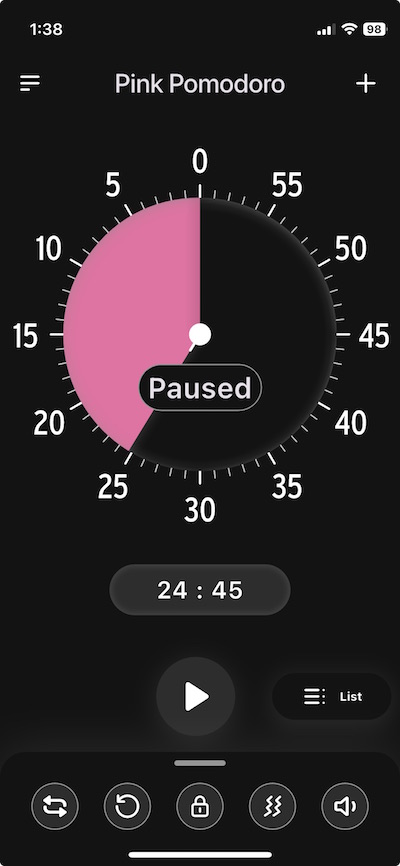
For example, when I’m in the Time Timer app, even though I almost always prefer to use light mode on my screens for writing and surfing, I like dark mode for timers. For me, that makes the timer blend into the background and I can quickly regain my focus after checking the timer.
Similarly, I usually select pink or purple timers, but I have clients who color-code timers for specific tasks: red timers for high-impact work, blue timers for meditation, green for exercise, and so on.
Perhaps the visual aspects of a timer are less important to you than the auditory ones. Maybe you prefer your timer to have an alarm or musical alert that won’t be jarring.
In the comments on last week’s post, my colleague Sabrina Quairoli noted that using timers can make people anxious. That anxiety can come from the concept of a timer itself, or from the sound the timer makes. If it’s the sound, it’s a matter of selecting a timer with customizable auditory options.
If the concept of a timer with the time ticking down quickly makes you antsy, you’re going to want to avoid a digital timer showing the seconds slipping away as if you’re trying to make your Oscar acceptance speech before the orchestra plays you off the stage.
Instead, opt for a timer with a soothing visual approach, one that doesn’t show the second-by-second passage of time. Rather, select one that indicates the overarching passage of time (the minutes or chunks of time) without the more granular metrics.
For example, all of Time Timer‘s analog timers that use a colored disk would be appropriate for a more gentle approach to illustrating the passage of time.
Note: The TimerTimer Twists, have both an analog and digital countdown; if seeing those seconds disappear stresses you out, skip those versions.
Customizability without complexity
You want a timer that will adjust to your rhythm, whether you’re a 25-minute Pomodoro purist for blogging or a “give me 43 minutes because that’s how long (without commercials) it took Columbo to solve a crime” computer code bug tracker.
Consider whether you just want your timer to just block time and alert you when your scheduled time is up, or if you prefer it to automatically set alternating work and rest intervals. Some timers will let you set any increments you want, at least up to 99 minutes. Others are fixed, and will only let you set the timer in five minute increments.
If you’re hoping to use the timer to for cooking, exercising, or for medical purposes (like the seconds after self-administering an injection before you can remove the needle, or the number of seconds to do breathing exercises), you’ll want to be as granular as possible, so seconds and minutes will be key.
Teachers and parents may prefer short-format timers to help kids see and feel the duration of time: of five minutes in time-out, ten minutes of quiet reading, fifteen minutes until bedtime. Meanwhile, knowledge workers will likely need larger chunks of measurable time, from 25 minutes to two hours.
Affective Design Customization
Affective design is an approach that focuses on creating products, services, and experiences that evoke emotions (or, for some purposes, avoid evoking the wrong emotions) in users.
In other words, you want to pick a timer (or selection of timers) with emotionally-supportive vibes (as the kids say). Think about the reason you’re setting up your timer, and how you want to feel while you’re working and, in particular, how you want to feel when the timer goes off and you’re being alerted to the need to transition.
Some people want Mister Rogers with a gentle ding or buzz to remind them that, “Hey, friend, you’re doing great, and you deserve the reward of a five minute break.” (Bonus material: Mr. Rogers Neighborhood episode: Waiting for Time to Pass.)
Others want Judge Judy slamming the gavel to say, “Time’s up, sweetie!” in so harsh a manner that there’s no chance you’ll go back to TikTok or forget to use the restroom if you’ve been hyper-focusing way too long.
As we’ve alluded, may want to adjust your sound options to create the best vibe. Do you want to be be shaken to attention to make sure you’ll stop doomscrolling and get out the door to pick your kid up from ballet? Or might you prefer a soothing trill of music to signal the end of a writing session (without a din) so that you won’t forget that brilliant turn of phrase you were just starting to write?
One-and-done or loop-de-loop?
Just as you may need to consider how in-your-face a timer should be to help you be as productive as possible, you also should think about how attentive a timer you want.
If you’re cooking something and are afraid either your body or your mind will stray, a one-and-done timer will suffice.
Conversely, there are a number of reasons you might want to set repeated or looping cycles, such as if:
- you’re training yourself to tidy up your work area for five minutes every hour
- you want to take breaks between sessions, whether you’re doing a 25/5 Pomodoro, following the 52/17 Method, or considering any of the other productivity techniques in Frogs, Tomatoes, and Bees: Time Techniques to Get Things Done.
- you’re following the advice in Take a Break — How Breaks Improve Health and Productivity and following the 20-20-20 Rule for your vision. (Every 20 minutes, look 20 feet away for 20 seconds to prevent eye strain!)
A looping function is especially nice if you tend to overstay your planned breaks between tasks. Setting a repeated work/break timer prevents “I’ll take a five-minute break” from becoming a Netflix bender.
You may not always want to create repetitive cycles, but a timer that can repeat or remind you to reset will help automate your habits. (Generally, you’ll need a digital timer if you want cycles to loop automatically.)
Discretion is the better part of timing
In addition to considering what’s the best timer for your own situation, you may need to seek one with discreet modes for the benefit of not disturbing the people around you. For example:
 Sleeping baby by Ivone De Melo
- sleeping babies (or easily startled pets)
- roommates or housemates (particularly those on different sleep, class, or work schedules)
- co-workers in cubicles or open-format offices
- fellow library or coffee house patrons
In such situations, you’ll want a timer with the stealth of a Mission: Impossible agent (not the drama of a WWE competitor making a grand entrance.
If you often find yourself working (or otherwise needing to focus) while in the company of others with different focus agendas, consider whether it might be to your advantage to find a timer with alternatives to an audible “time’s up” alert. A gentle blink or color shift can be just as effective as a sound.
Picking a timer for someone else
We all want the timer equivalent of Mary Poppins — practically perfect in every way — but the truth is that we will always have to consider the task involved and personality of the user. Additionally, you may need to identify timer solutions for people with special auditory or visual challenges (like the Time Timer BRAILLE 8”) or medical needs.
In other words, the timer your seven-year-old needs to focus while doing math homework may be very different from what your fifteen-year-old needs to get up from an hour of gaming and leave for band rehearsal.
And both of them may need something very different from what you need from a timer at work or that Grandpa needs to remember to take his medication after dinner.
None of this means you have to spent a fortune on timers; just knowing the advantages of particular features will allow you to discern what will work best. In the next post in this series, we’ll examine traditional and novel timers for improving productivity and yielding the just right amount of focus.
What timer features are the most important to you? How does do these change depending on your work or life contexts?
How to Use Timers for Improved Productivity and Focus — Part 1
Everyone seems to agree that January slogged on, but people are shocked that we’ve suddenly arrived in April, with February and March having disappeared in the blink of an eye.
The truth is, most people aren’t very good at gauging the passage of time. In her A Working Library blog, Mandy Brown wrote Out of Time about writing, taking breaks, and resting. Prompted by another author’s piece about having gone on a retreat to find time to focus and recommending an analog timer (unsurprisingly, a Time Timer), Brown ordered one, but suffered frustration because she couldn’t get it to work. She kept putting in batteries and trading them out for others, finally ending the anecdote with:
I thought perhaps the timer didn’t like rechargeable batteries—some devices are persnickety that way—so I went rummaging around the house for a regular battery, found one in the toolbox, swapped it into the timer, turned the dial. And waited.
And waited.
Nothing.
I gave up, and went to fix lunch.
About a half hour later, as I was putting dishes away, I heard a steady beep from somewhere upstairs.
It was the timer, going off.
The damn thing had been working all along.
I just didn’t think it was working fast enough.
Time often fails to work as we think it should. It drags on, or it disappears. But of course, time is uniform; time is a constant. There are always 60 seconds in a minute, 60 minutes in an hour, 24 hours in a day, and so on. We are the ones with the problem, not time. We lack motivation and procrastinate. At first, the time available seems endless; then we panic and finally settle down, but allow ourselves to be interrupted, and the available time is suddenly gone.
In one of my most popular posts, Frogs, Tomatoes, and Bees: Time Techniques to Get Things Done, we looked at what we need to understand about our problematic time behaviors, and at nifty system solutions, including the Pomodoro Technique and its offshoots (Tocks, 90-Minute Blocks, 52/17 Method, and Flow State).
The exact number of minutes may vary, but the strategies remain the same:
- Do a brain dump to know everything you have to work on.
- Break large projects and concepts into smaller, distinct tasks so you can identify specific activities from which to choose.
- Prioritize what’s important to find the essential next task to tackle.
- Start that task and stay focused.
- Take a break. (Not sure how or why? Read Take a Break — How Breaks Improve Health and Productivity.)
- Lather, rinse, repeat.
Some methods may also involve noting what internal or external disruptions occurred. (Did you get hungry and wander off for a snack? Did a stray notification steal your attention and take you down a social media rabbit hole? Did your kids or co-worker need help finding something right in front of their eyes?)
To improve our use of time, we can incorporate short-term accountability, bringing in co-working buddies to body double and keep us focused and on-task.
- Paper Doll Sees Double: Body Doubling for Productivity
- Count on Accountability: 5 Productivity Support Solutions
- Flow and Faux (Accountability): Productivity, Focus, and Alex Trebek
Other methods involve giving ourselves rewards. Some digital apps support Pomodoro-based work using gamification, rewarding focus and completion. Maybe you’re not a carrot person but a stick person, and need a negative consequence for not sticking with it?
No matter your method, there’s one more commonality to all of these approaches: keeping track of time! And for that, we get the biggest bang for our buck by using timers.
WHY AND HOW TO USE TIMERS FOR PRODUCTIVITY
“C’mon, really?” clients ask, giving me the side-eye when I pull out one of my visual timers. “Can’t I just work until I get it done?”
Sure. Maybe. But probably not, especially if I’m not there with them.
If telling yourself to get down to work — and working a certain amount of time and not getting distracted but also not hyper-focusing to the point of getting burned out, eye strain, and a headache — actually worked for everyone, then time management wouldn’t be a “thing.”
Timers help us in all manner of ways, at work at and home. At its most basic, a physical timer or a visual digital timer/app creates a tangible representation of time passing so you can see and feel time.
Use Timers for Productivity at Work
You’re probably not shocked at the idea of using a timer, but you may feel silly employing one. Do you think that unless you’re a professional athlete, a surgeon struggling to perform a procedure within a safe time span, or a special effects master overseeing synchronization, that timers can’t help you?
There are many ways to improve your productivity at work with the help of timers.
For yourself
- Avoid falling into the email rabbit hole — Set a timer so you don’t “come to” three hours later in the midst of an email-induced stupor, wondering why you just read an entire newsletter about artisanal butter when you were just looking for a sign-up email to send to your colleague.
- Time block your tasks like a pro — We’ve talked extensively about time blocking here at Paper Doll HQ. The only way to make sure you have time for all of your priorities is to schedule time on your calendar — the space where time lives — for attending to them.
But your calendar isn’t the only tool you need for time blocking. It tells you when you’re supposed to start a task, but how will you remember when to move to the next thing?
Want to tackle your bookkeeping and still have time for a snack? Set your timer, get it done, and reward yourself with something yummy like an apple. Or cheese. Or cookies. (As they say on TikTok, we listen and we don’t judge.)
- Prevent perfectionism paralysis — When societies were agrarian, we knew we were “finished” when we’d reaped the harvest; most modern work ends with deadlines — or (seemingly) never ends at all. Give yourself a hard stop on tweaking that PowerPoint so you don’t turn a simple deck into a TED Talk that nobody asked for. When the timer buzzes, you’re done. Move on with your day (and your life).
- Keep deep work from locking you in the deep freeze — You’re focused, you’re in the zone — until you look up and realize that it’s dark outside and you forgot to eat lunch or pick up your kid from soccer practice. A timer keeps you from pulling a Christopher Nolan-style time dilation.
For your team
- Prevent your meetings from dragging on like Martin Scorsese’s “The Irishman” (run-time: 3 hours and 29 minutes!) — Keep a visual timer in sight so everyone knows when the meeting should actually end, not just when it starts to improve satisfaction and engagement. Otherwise, the Monday status meeting begins to feel like a hostage situation.
If you’re the one moderating the meeting, install and set up the Zoom timer in the app:
- Add the Timer – Clock, Agenda, Countdown & Stopwatch to your paid Zoom account
- Using the Zoom Timer App
(Google Meet has a similar option you can add to the Chrome browser. While Microsoft Teams does not have a built-in timer, you can integrate third-party timers into a PowerPoint presentation or add one to the meeting itself.
- Help participants in your virtual meetings keep it snappy — Have you ever been on a Zoom call where someone talks in circles or drones on? Use a timer built into the screen and the meeting won’t devolve into a filibuster.
- Help team members segment their time for time tracking — Use timers to track how long tasks take and identify areas for improvement.
Having a timer go off (no more than) every thirty minutes or hour to prompt logging/tracking activities will help team members be more aware of how they spend their time, and make them (and you) less likely to get distracted by low-urgency, low-importance tasks. (For more on the benefits of time tracking, see my recent post, How to Use Time Tracking to Improve Your Productivity.)
However, it’s important that you don’t use timers to micromanage your team. A timer can be a powerful tool, but the moment you use it to time someone’s bathroom breaks or note that they come back from lunch two minutes after the buzzer, you’ve veered from Motivational Mama to Big Brother.
Use Timers to Improve Personal Time & Daily Living
- Keep your meals from turning into messes — The number one most common reason for using a timer at home is for cooking, and yet people really underutilize timers. Baking brownies? Sure, you’ll set the timer for 25 minutes. You know that it’s important to measure how long something should cook when there’s a recipe in the cookbook or the back of the box.
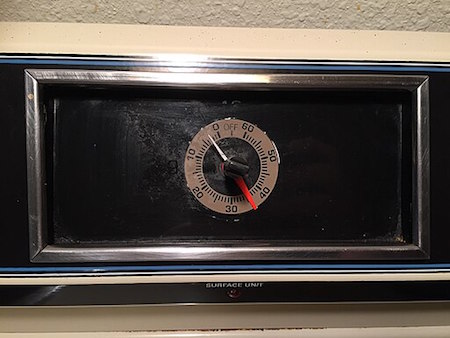
Kitchen Timer of HotPoint Electric Range, Steven Pavlov, CC BY-SA 4.0, via Wikimedia Commons
But how often do you set a timer to make sure you don’t get distracted and walk away altogether? Have you ever put the pasta in the boiling water or started the soup, only to get pulled away from the stove by your kids, a telephone call, a story on the news? Have you ever just turned your back on the stove to scroll through your feed and totally lost track of time until you heard the unmistakeable splish-splash of a pot boiling over?
It’s not really true that a watched pot never boils, but it is absolutely true that an unwatched pot boils over before you’re ready. And an monitored oven or air fryer will turn whatever you put in it into ash.
There’s a reason your microwave has a timer built-in. The manufacturers know that you’ll set a timer for something set to cook for a long while, but that you’ll overestimate your ability to get back in two minutes and forty seconds and completely forget that you were cooking.
If you’re not going to watch your food cook (and you are forgiven for not wanting to do that), set a timer. Use the timer built into your oven or just shout out, “Hey, Siri, set a timer for 7 minutes!”
And honestly, if you are sometimes so distracted that you don’t know why the alarm is going off, even if you set it fifteen minutes ago, you can say, “Hey, Siri, set an alarm for 7 minutes and call it ‘Pasta'” so that when you look at your phone to turn off the alarm, you’ll know what’s what.
- Save your laundry from shrinkage and wrinkleage — Modern washers and dryers have all sorts of bells and whistles. Well, bells and music, at least, with their deedle-deedle-ding musical trills as the washer changes cycles. However, if your laundry machines are in the basement and you’re on the second floor, you might not even hear those twinklingly annoying “dulcet” laundry tones.
And if, like me, you have a practical but not very modern washer/dryer set-up (the kind without myriad settings and just normal/delicate/heavy duty settings), your dryer may have one loud ear-splitting BUZZ to alert you that your clothes are dry and absolutely nothing (but the absence of white noise) to let you know that your washer is done. And again, if you’re not right by your laundry area, you may not even hear that.
But do you know what you always hear?
Your phone, because it’s never more than a foot away from you for long, and usually it’s within arm’s reach. Get to know how long your washer and dryer cycles are and create alarms for them: 17 or 35 minutes or whatever. Name the cycles something simple, like “Get clothes from dryer” or “Switch clothes from washer to dryer.”
The next time you start a load, just slide the toggle to ON and you’ll be alerted just about when your laundry is ready for you. This way, you’ll have no wet clothes sitting all night in the washer growing mold, and no set-in wrinkles from clothes that could have been folded or hung.
- Get a shower time reality check — Ever take a shower so long you accidentally turn it into a spa day?
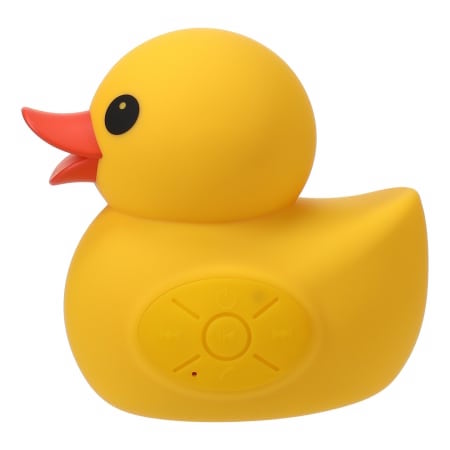
A timer keeps you from running your water bill up like you’re auditioning for The Little Mermaid. An alternative to keeping a regular timer in your steamy bathroom is investing in a Bluetooth shower speaker connected to your cell phone, with an alarm set to play a favorite song. There are a lot of popular, inexpensive shower speakers that look something like this:

Though I have to admit that I’m pretty partial to the aesthetics of this Ernie-approved rubber ducky version:
- Make it out the door…on time (for once) — Somehow, getting dressed and grabbing your keys takes exactly as long as the time you don’t have.
The underlying problem may be that you are always trying to do just one more thing. Or perhaps your physical space’s disorganization holds you back. Maybe you don’t have a good morning routine, or it could be that you’re subconsciously trying to sabotage yourself because you really don’t want to go to work or Jazzercise or your mother-in-law’s house.
But if you truly want to get out the door in time, a timer can help keep you focused on the “time benchmarks” of your day, like when to be done with breakfast and get in the shower, or when to make sure you’re putting on your shoes or grabbing your bag.
A timer is you in the present, sending a message to yourself in the future, which will be received by your future present-self as a message from your past self. (Christopher Nolan has nothing on Paper Doll!)
- Limit doomscrolling before bed∫— Set a timer so you don’t accidentally binge-watch TikTok or Instagram until the sun comes up, causing you to regret your entire life.
And if you tend to doomscroll in the morning and forget to get out of bed, setting a series of morning timers (annoyingly two minutes apart) can’t hurt.
- Speed-Clean Like a Sitcom Montage — Set a 15-minute timer and pretend you’re in a time-lapse TV-cleaning montage. Bonus points for using Eye of the Tiger as your background music.
This works especially well if you want to play 52 Pickup with your kids. Chores are boring; competition (against their siblings, against you, or even against their all-time best score) makes them more challenging. Let’s face it — hours between getting home from school and bedtime can be messy. Set a timer to see who can pick up the most number of things (that don’t belong there) and put them away; the winner gets to pick the background music for the next day’s challenge.
Running around to find things to pick up will either wear your kids out so that they’ll sleep more soundly or make it more likely that they’ll (eventually) put things away after using them; either way, it’s a win, teaching them that it’s not your responsibility to follow them around playing maid!
- Convince your kids that bedtime is not a negotiation — Maybe your third-grader seems more like a tiny corporate attorney when bedtime approaches, acting surprised by the deadline and immediately offering wheedling compromises.
A visual timer lets kids see how much time is left before bedtime, so they can’t argue with Father Time. The idea of 8 o’clock is pretty abstract. Make it more tangible.
When I was growing up, I knew what time I had to go to bed based on what time a particular TV show ended, but with streaming more popular that broadcast, that sense of time in increments of hours and half-hours and even segments between commercial breaks (the served me well when I worked in television) is meaningless to today’s kids, when not only can you start a show at any moment you want, but you can pause it and finish it the next day (or never).
- Pacify the “Just One More Game” gamer — If you, or your partner, roommate, or kid always needs “one more round” of their game before stopping, a timer makes it clear when it’s time to save and quit for the day. It’s harder to argue with a timer alert than a person, and more difficult to resent a non-human telling you it’s time to pack it in.
- Keep screen time from turning into screen day — Whether it’s kids, spouses, or yourself, a visual timer helps prevent an innocent 30-minute YouTube break from spiraling into an entire season of The Office.
To summarize, whether we are at work or at home, we can use timers:
- To make sure we focus.
- To make sure we don’t hyper-focus (or goof off) too long.
- To remind us to take breaks and remember to rest.
Of course, this is just the beginning of the productivity magic of timers.
As this series continues, we’ll look at what makes a great timer — for the way your brain works and for improved productivity for particular tasks. It’s not that tangible timers or digital timers are better, per se, but they each have different positive attributes and potential pitfalls, depending on the purpose for which you’re blocking out time.
As we move on, I’ll share classic, beloved timers as well as the newest and niftiest options for both analog/tangible timers and digital timers/apps, and help you figure out which will help you achieve your productivity goals.
Now that you can envision a wider variety of circumstances for using a timer to amp up your productivity, please share if there are other circumstances you use timers to help you buckle down and focus or, alternatively, keep you from worrying that you’ll hyper-focus right through dinner. What has worked for you, your work team, or your family?
Take Note: Paper Doll’s Guide to Organized Note-Taking for Learning and Creative Projects (Part 3)
Two weeks ago, in Take Note: Paper Doll’s Guide to Organized Note-Taking (Part 1), we looked at the wide variety of situations in which you might take notes, and took a side journey into the relative merits of handwritten vs. digital notes.
Last week, in Take Note: Paper Doll’s Guide to Organized Note-Taking in Lectures & Presentations (Part 2), we explored solutions for taking notes when someone is imparting information to you verbally: in class, watching a webinar, attending a conference, and in collaborative meetings. Some variation on these methods work for casual note-taking situations, like when you’re learning about a diagnosis or treatment, you’re hearing about a new program at a PTA meeting, or even when you’re fielding information on a phone call.)
Whether you want to capture information for a later test, to improve your professional (or passion project) success, or help your team hit its action items, taking notes ensures that information can be captured, processed, learned, and acted upon.
Using my colleague Linda Samuels’ rubric, we looked at how to “listen, capture, and engage” with information using text-based note-taking (e.g., the sentence method, outlining, and the Cornell Note-Taking Method) and visual note-taking (e.g., mind mapping and sketchnoting).
We also harkened back to the idea that not all note-taking depends on information coming to you verbally. When you’re studying printed material as part of coursework, doing academic research (like a term paper on Alexander Hamilton) or writing a non-fiction book (like the history of sandwiches), you will need to take notes on what other people have written to achieve your goals.
You may also create notes from scratch, not based on someone else’s concepts (presented verbally or in writing), but invent something totally new with the help of the elves in your brain. You might write the score for a Broadway musical, engineer the schematics for a cool invention you aim to patent, or draft a novel about vampires from Jupiter or grandmother protesting injustice, or vampire grandmothers…
With modifications, you can take notes using the methods we discussed last week, but there are also note-taking methods that help you create and organize notes on non-verbal content.
ANNOTATION
Picture yourself studying for an exam or preparing to give a speech to your colleagues. However much material you already know, there’s going to be a larger chunk of the unknown printed in books, journal articles, and online.
The advantage of taking notes on what you’re reading is that you can take it at whatever speed you need to make sense of the information and organize it, combined with your own thoughts, without having all the inbound knowledge outpace you. The main disadvantage is that, unlike when a speaker accents what’s important (with voice, body language, or saying, “Hey, you numbskulls, this is going to be on the tests!”), text may not give you a clue as to what is vital.
Sure, textbooks may have concepts in bold or italics, but novels will not; if you’re reading the Federalist Papers, there’s no formatting to clue you in on what Alexander Hamilton (yes, him again!) thought was key. And if you’re researching to support your creative endeavors, only you know what will hit the spot.
Key Benefits of Annotating
Annotating enhances comprehension by allowing you to actively engage with the text, identify key points (either what the writer thinks is key or what is key for your purposes), ask yourself questions (so you can find answers in the text or in other resources), and record your own thoughts.
Annotation can lead to a deeper understanding of the printed word, making it easier to recall information later and prepare for discussions, writing assignments, or drafts. Annotating your notes reaps the following benefits:
- Improved comprehension — By highlighting important information and adding notes, you’re forced to actively process the text, leading to better understanding and retention.
- Critical thinking — Annotating pushes you to question the author’s arguments, identify biases, and form your own interpretations. In fact, as described in the New York Times article, How Students and Teachers Benefit From Students Annotating Their Own Writing, annotating improves metacognition, or thinking about how you think about something.
- Active engagement —The very act of writing notes as you read encourages focused attention and deeper engagement with the material. You’re less likely to let your eyes glaze over if you’re annotating the material.
- Organization of ideas — Annotations can help you identify the main points, structure of the text, and see how different concepts relate to one another. Sometimes it happens as you are annotating; other times, the act of annotating creates the magic that helps you see how things are connected later. If you’ve ever seen the TV show The Good Doctor, this is the way we see Dr. Shaun Murphy arriving at life-saving connections.
- Customization — You can add your own thoughts, reactions, and connections to the text, making the reading experience more meaningful. Whether you’re studying for a test or bringing concepts together to write a book, you can add your own metaphors or connections (and references to pop culture!) to make it resonate.
- Preparation for writing — Annotations are first drafts. They’re the key to making someone else’s first line of research into a foundation for your own work, whether you’re writing essays for Medium, research papers for a class, or a work project where you need to analyze and synthesize information from varied sources.
Analog Methods of Annotating
Marginalia
If you’ve ever scribbled notes, comments, or questions in the margins of a book, you’ve been annotating. You’ve done the active reading and critical thinking referenced above, and created a personal dialogue with the author of which only you are aware. (That’s OK, some authors are cranky and don’t welcome questions.)
Marginalia are great for when you want a quick reference for future review of the material. Last week, I was in a book club Zoom for the National Association of Productivity and Organizing Professionals’ Authorship and Publishing Special Interest Group (no surprise, we call it the NAPO A&P SIG), discussing On Writing Well: The Classic Guide to Writing Non-Fiction by William Zinsser.
Our leader, my colleague Deborah Kawashima, had extensive marginalia, and used those notes to lead the discussion — and to find related material when members brought up points.
I can’t bring myself to write in books — my first job was working in a library, and books are so sacrosanct to me, I can’t bear to even make a pencil notation. I use sticky tape flags combined with handwritten notebook pages for the short term (like a book discussion) and either handwritten or digital notes when working on a blog post or book project.

Transparent Sticky Notes
I wrote extensively about the benefits of see-through sticky notes in my blog post See Your Way Clear: Organize With Transparent Sticky Notes.

To summarize, they give you flexibility when taking notes on written material. You can add non-permanent markings (especially good with library books or borrowed materials), take extensive notes without cluttering the page with marginalia, and reposition them, either on the original text, or as applicable, on your drafts or mind-maps.
Traditional Handwritten or Typed Notes
If you’re taking notes on printed resources to research an article, book, or presentation, you might need room for your mental gymnastics. Taking your notes in a bound notebook, on a sheaf of loose paper, or in a digital document will give you the ample space you need.
You’ll also be able to organize your notes — with clear headings, bullet points, numbering or outlining systems, and any kind of doodles (even marginalia on your notes) you like. The physical act of taking the notes will increase retention.
And yes, in case you’re about to remind me that I talked about how typing/digitizing lecture notes tends to reduce comprehension and memory because you tend to transcribe rather than process, I’m not flip-flopping. When you type what you hear, you don’t process it. But when you type what you read, you translate and process anything that’s not a pure quote.
Additional Analog Annotation Methods
You can also annotate without writing actual sentences, employing:
- Before beginning to read, write down what you know about the subject on a blank piece of paper.
- After you read, add new the information you’ve gained with a different color pen or marker.
- Before you read the next time, review the sheet. (Lather, rinse, repeat.)
Parish recommends storing finished sheets for periodic review and rewriting for clarity.
Digital Methods of Annotating
When taking notes on analog content, analog note-taking may be the best approach. When the material you’re studying, researching, or investigating is already in digital form, it’s often easier to annotate digitally. Some of the more popular digital annotating tools are:
- Adobe Acrobat Reader is best for annotating PDFs. It features highlighting, comments, on-screen sticky notes, drawing tools, and text markup.
- Notability is best for handwritten and mixed-media notes. It can handle handwriting, text, audio recordings, sketching, and PDF annotation. If you use an iPad and want to blend digital and handwritten annotation, Notability is ideal.
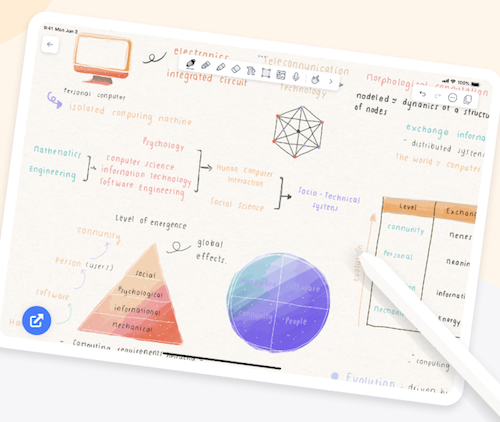
- Hypothesis works best for annotating web articles, blogs, and research. It’s a web-based tool for highlighting, adding comments, and collaborative notes on PDFs and online materials. It’s for students, researchers, writers, and teams.
Analog or digital, as with note-taking methods for verbally-presented material, annotating written material is just the beginning. Whether you “listen, capture, and engage” or “read, capture, and engage,” you still have to engage, and that means keeping your notes organized and connected to one another and the central purpose of your work. For more on annotation:
Annotating Texts (The Learning Center at the University of North Carolina)
The Art of Annotation: Teaching Readers To Process Texts (Cult of Pegagogy)
More Than Highlighting: Creative Annotations (Edutopia)
Why you should annotate your books (Johns Hopkins Newsletter)
Zettelkasten
Do you know Zettelkasten, also called the slip-box method? It was developed by Niklas Luhmann, a German sociologist, to reduce researcher overwhelm and create a network of interconnected ideas, rather than one simple, static archive of information in separate silos.
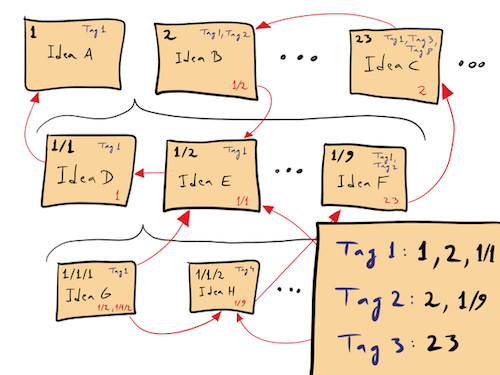
David B. Clear, Zettelkasten — How One German Scholar Was So Freakishly Productive, in: The Writing Cooperative, 31 December 2019, CC BY-SA 4.0, Link
How Zettelkasten Works
Zettlekasten was designed to be analog, using garden-variety index cards. (Obligatory link to The Humble Index Card: Organize Your Life, Then Organize Your Cards.) But with modern computing, you can link digital notes notes to one another easily, as with the internal links in Evernote. Here are the basic steps:
- Capture notes, each with practically microscopic bits of information — A note should have only one fact, concept, or idea. Brevity is the soul of Zettelkasten; so, no long, convoluted, Paper Doll-style paragraphs. Let’s say you’re writing a book: in the analog version, you’d have one quote to prove your point. At first, that quote is isolated.
- Link your notes together — Each subsequent note you take gets connected to related, already-existing notes, forming a network of ideas, a Charlotte’s Web of notions.
- Use unique identifiers — In an analog system, this means you’ll use a system of numbering or indexing the notes. In a digital system, your tools (like Evernote or Obsidian) will offer backlinks, the digital equivalents of the red yarn connecting the bad guys in a mystery movie’s murder board.
- Create “fleeting” (temporary), “literature,” and permanent notes —
- Fleeing notes let you quickly capture raw thoughts that come to you on your own, scratchpad-style. Think of them as shower thoughts.
- Literature notes are one step up; they serve to summarize key ideas from whatever resources you’ve used: articles, journals, books, lectures, etc., but in your own words. (So, don’t copy & paste, but also, don’t use AI.)
- Permanent notes are the refined, interconnected insights that build on the ideas you’ve collected and/or created.
- You may also create “meta” reference notes, which help you think about how your Zettelkasten comes together.
Develop a personal knowledge system (PKS) — Over time, your Zettlekasten becomes an idea-generating machine. It represent what you know, and what you might want to share. It could be everything your freshman needs to write a term paper for Social Studies or the amazing non-fiction self-help book that earns you a place at the top of the best-seller lists — or a series of brilliant stand-up routines George Carlin developed, as explained in this video.
How to understand Zettelkasten
Think of Zettlekasten like the Six Degrees of Kevin Bacon game. Each note you take is an aspiring Hollywood star, just needing to be linked to someone bigger. Let’s say I’m writing a chapter on productivity.
- One lone note about time management is like an indie actor, good but totally isolated and unlikely to reach stardom.
- If I add a note about prioritization techniques, like a link to my well-established character actor Paper Doll Shares Presidential Wisdom on Productivity with the bit about the Eisenhower Decision Matrix, it’s in a movie with my time management note — one degree of separation.
- But let’s say I have a third note about Parkinson’s Law (“Work expands to fit the time available to complete it.”), link it to both the general time management note and the Eisenhower Decision Matrix note, and suddenly they’re all in a Marvel summer blockbuster about productivity!
(Hey, it could happen!)
The point is that a good Zettelkasten is not merely a random collection of notes, but an ever-growing network of interconnected concepts; developing it over time sharpens your thinking and makes your knowledge base not only more expansive, but more powerful.
Zettelkasten is perfect for researchers, authors, deep thinkers, and anyone developing a huge body of networked knowledge. If you’re writing your thesis, a series of books, or building lifelong learning, Zettlekasten is your man (well, system) for less overwhelm, more creativity and retention, better organization, and increased productivity (if handled deftly),
What are the drawbacks of Zettlekasten? It’s freaking complicated if you’re using an extensive numbering/indexing system connecting all the moving parts.
Some of the best tools to develop your own Zettlekasten include:
- Index cards of uniform size (so, go 3 1/2 x 5 or 4×6, but not both)
- Obsidian (for backlinking and networked thought)
- Roam Research (outline-style, with powerful linking capabilities)
- Logseq (a privacy-focused, open-source alternative to Roam)
For more on how Zettelkasten might fit into your note-taking (and organizing) style, read:
The Zettelkasten Method: A Beginner’s Guide (Goodnotes)
Try the Zettelkasten method to manage information overload (Atlassian)
Getting Started: The Introduction to the Zettelkasten Method (Zettelkasten)
Ahrens’ Smart Notes
Sometimes, you need to build an easier mousetrap. Sönke Ahrens, a German author, took Luhmann’s Zettelkasten ideas and modernized them for his now-classic, How to Take Smart Notes: One Simple Technique to Boost Writing, Learning and Thinking.

Ahrens looked at Zettelkasten and said “Jeez, Louise, that’s a lot of complexity with numbering and indexing!” (Well, he said it in German.)
So, the Ahrens’ Smart Notes Method is a simplified method designed for knowledge workers (particularly academics, researchers, and writers) who want to create a structured knowledge workflow without going hardcore into the Zettelkasten approach.
Ahrens’ system focuses less on numbering or indexing of notes and places a much heavier emphasis on summarizing concepts (wherever possible) in your own words. It encourages you to write as you go, rather than taking the fleeting notes and the literature notes and then going back to write your permanent notes.
Ahrens advises creating notes with your own interpretations at an earlier stage so your notes are really first drafts. Less structure, more trusting your gut earlier on.
The Feynman Technique
Physicist Richard Feynman’s system is a learning method, not about note-taking, per se, but baked into his process for helping people understand complex topics is a way to take notes that spur the learning process.
- Write down the concept you’re trying to learn about.
- Explain it in simple terms — On the internet, you’ll often see someone say ELI5 — text-speak for “Explain it to me like I’m five-years-old.” How would you explain what you’re trying to learn to a kindergartener, or at least someone who is an absolute non-expert?
- Identify areas of confusion or gaps in your knowledge — What are you struggling to simplify? If you can’t explain it, then you don’t really know it yet.
- Review and refine your notes — Keep rewriting your notes until your explanation is crystal clear. Picture yourself writing the answer as an exam question, or presenting it on a webinar.
Feynman’s approach is less about note-taking for capturing information than for processing it until you understand it. It’s ideal for students, journalists, speakers, authors, and anyone who needs or wants to both acquire knowledge and put it to use, ostensibly to eventually communicate it to others — even if that communication is solely to pass a test on the material — or use it in their own lives. It can be an academic study aid, or a system for pursuing knowledge on a more lofty level.
Using the Feynman system encourages more active engagement with the content instead of passively copying key phrases out of a book or re-reading lecture notes. It also prompts you to seek clarity, cutting away the excess so your notes are focused and uncluttered. As a professional organizer, Paper Doll approves!
Some good tools for taking Feynman-based notes would be:
- Traditional notebooks (though it may kill trees)
- GoodNotes — especially if you’ll be using an iPad or tablet)
- Evernote — use a combination of handwriting and sketching for clarifying explanations; if you spent your time in the Microsoft environment, OneNote is a similar option.
- Notion (for refining the explanations over time)
- Flashcard apps to help reinforce key ideas over time and find them again. Examples include Anki (free, open-source), Quizlet, and Kards.ai.
DIGITAL NOTE-TAKING PLATFORMS
Beyond options for general academic purposes (and those mentioned in these three posts), there are too many specialized digital note-taking platforms to mention even a representative number.
For casual, situational note-taking on your phone or organizing notes for travel, Apple Notes, Evernote, OneNote, and Google Keep suffice.
Creative writers and journalists alike benefit from Scrivener to keep their research close to their writing; novelists might like Campfire for character notes, world-building, and plotting. Know someone composing musical notes? Try 7 Best Music Writing Software Programs for DIY Musicians or Resources for Creating Your Own Sheet Music.
HYBRID NOTE-TAKING: A MARRIAGE PERFORMED BY A ROBOT

AI’s role in note-taking will continue to expand in ways we can’t imagine. Right now, we can feed our notes (whether handwritten or typed) into an AI to yield notes on our notes.
You could record a lecture, interview, or meeting and ask your favorite AI for a transcript so you can focus on just key concepts and then go back to flesh things out. After reviewing the transcript, you could ask the AI to write an outline or summary.
Last week, I uploaded the link for the podcast I did with Frank Buck and asked ChatGPT to outline and summarize our conversation. It was revelatory. I stored links, the actual video, and the outline in Evernote to link to other podcast appearances. If I uploaded the audio file, with the click of a button, Evernote could transcribe the entire conversation!
Did you know that your (paid) Zoom account’s Smart Assistant can not only transcribe any Zoom call, but can summarize the chat messages and identify action items? Whatever audio or video recordings you create in any setting, you can turn around and use a variety of AI platforms to transcribe, summarize the discussions, identify next steps, and draft an email to your boss explaining why you deserve a raise!
You can have an AI interrogate your own notes to help you find specific research material without having to hand-search with Command-F. Imagine you’re writing a book and have 1000 research notes in PDF form. Upload them to a tool like Google’s Notebook LM, and instead of having the AI find content from all over the web (and risk AI “hallucinations,” false content), you can have it just provide you with snippets of research specific to what you want to write about that day. Scarily, you can even have “conversations” with the AI about the notes you’ve taken!
Nota bene: the future (of note-taking) is going to get weird.
Take Note: Paper Doll’s Guide to Organized Note-Taking (Part 1)
Have you ever seen a sign with the letters “N.B.” on it or a set of instructions where the highlighted part says N.B.?
N.B. is short for nota bene, the Latin for “note well,” or in our own vernacular, “Hey, take note!” and until about thirty years ago, it was common to see N.B. on documents, notices, and signs, warning that something was important.
The Maryland Gazette (March 19, 1801). “Wanted, A Wife (Advertisement, Extra)” Public Domain Link
We may not use the Latin abbreviation much anymore, but we sure do have a lot of things to which we need to pay attention, or pay heed, or take note! Today, we’re going to look at different areas of our lives in which we need to capture and organize information by taking notes.
The inspiration for today’s post was friend-of-the-blog Dr. Frank Buck. Recently, I sat down again with Frank for his fabulous podcast Get Organized!, to talk about note-taking in all of its myriad forms.
In the episode entitled, Your Note-taking Just Got Better (with Julie Bestry), Frank and I chatted about the evolution of note-taking from the structured forms we learn in school to the various ad hoc and formal notes we use in adulthood, and we explored the importance of adapting our note-taking strategies to our individual needs and contexts.
I espoused my personal preference for analog note-taking (on my beloved purple Roaring Springs Enviroshads legal pads) in client sessions, both for the tactile engagement as well as how it helps me ensure my clients feel that I am focusing on them.

But because Frank and I both love tech solutions (and are both Evernote Certified Experts), we also looked at the ways we are able to integrate our notes digitally into searchable, accessible formats.
Our discussion delved into how to establish a consistent system, and we came to some agreement on the practical tips that ensure that notes are useful. But note just take my word for it. Frank included an amazing outline and list of resources in his show notes. (N.B.: scroll down).
You can listen to the episode on the episode page linked above, or on Spotify, Apple Podcasts, or wherever you get your yummy podcast goodness. And, if I managed to link this properly, you might even be able to listen from this embedded version.
Of course, if you prefer to see our smiling faces, can watch the episode on Frank’s YouTube page or even here, but be sure to click through to YouTube to leave Frank some nice comments and a thumbs-up/like.
TYPES OF NOTE-TAKING SITUATIONS
When you think of taking notes, what first comes to your mind? Is it sitting in a lecture hall scribbling notes to later study for a test? Perhaps you envision gathering information for a project? The truth is, the concept of “notes” cuts a wide swath through our lives, and our ability to take notes and keep that information organized may determine our success in a wide variety of endeavors. For example:
Academic Settings
We start taking notes in elementary school, with the teacher telling us what will be important to write down. (“This will be on the test!”) As we get older, in high school and college, we’re expected to suss out for ourselves which material is important enough to capture and how to separate the wheat from the chaff. (“Will this be on the test?”) Why? Because we can’t get it all down before the instructor moves on to something else!
Sidebar: analog vs. digital notetaking in academic settings
We aren’t robots or androids. (Though it might be cool if we were.) We lack the motor dexterity to hand-write everything as fast as the educator can speak, so it’s important to try to figure out what is essential.
While we can type faster than we can write, research have often found that for academic success, it’s not ideal. For children and adults, writing notes in long-hand can improve memory word recall; for kids, that means creating the foundational aspects of learning and literacy. For adults, handwriting notes has been proven to improve conceptual understanding of educational material.

Computer and Notebook photo by Matt Ragland on Unsplash
The research spells out the academic advantages of taking notes by hand as:
- Improved memory retention — The act of physically writing notes engages more brain regions associated with memory formation, so students recall more vs. when they just type their notes.
- Forced summarization — When students write by hand, they must condense spoken words, narratives, asides, jokes, responses to students’ inquiries, etc. into key points. This process promotes “active learning” so the note-taker will better understand the material.
- Reduced distractions — Paper is boring. It just sits there, and unless you doodle, there’s nothing but your notes to look at, so distractions are minimized. On a computer or tablet, audio and text notifications pop up, tempting the note-taker to divide attention between mitochondria being the powerhouse of the cell and the a notification of the latest celebrity breakup.
- Visual organization — “Aha!” you’re thinking! Here’s where Paper Doll must be wrong. Surely you can do more to organize notes visually on a computer, because you can format important things in bold, italicize unusual terms, use different color text, or even highlight entire sections in different colors.
And yeah, you can, but not until later, after class, when you’re studying, and might no longer remember which things needed accenting. Plus, the cognitive component of studying is different from the one at play when you’re taking notes.
But when you’re taking notes contemporaneous with the lecture, you can:
-
- change from cursive to printing
- add block letters
- underline or circle key information
- draw diagrams
- put symbols in the margins (like an asterisk to say, “Hey, this will be on the test!” or a question mark to tell yourself, “I totally don’t get this. Go to office hours to ask the prof what this meant.”)
- use different pens (or sparkly ones!) to color-code as you go
- or use the geographic landscape of the page for different methods of learning the material. (That last part is key to the Cornell Note-Taking Method, which Frank and I discussed in the podcast, and which I’ll explain in greater detail in next week’s post.)
All of these advantages convince me, but one element of this “feels” the most believable to me. In a classroom setting, when we hand-write, we process first, then translate what we hear into those few, condensed phrases; when we type, we’re more likely to try to transcribe (almost) everything we hear, bypassing our brains and letting our fingers do the walking. We become like court stenographer, gathering the details without relating to them. When we transcribe, we may as well be an AI platform.
Of course, there are advantages for students to take academic notes on devices vs. writing in longhand.
-
-
- Typing is faster; when you’re feeling overwhelmed by the influx of information, typing may give you some breathing room to absorb what you’ve taken down in those few extra seconds vs. the pen-on-paper peeps.
- You can organize digital notes with pertinent headings, color-coding, and after-the-fact added graphics, plus you can copy & paste notes you’ve taken from the readings. If a professor makes an aside or expands on an earlier topic because a fellow student has asked for clarification, you can cut & paste the later blurb into the earlier, related section.
- Digital notes can be edited after the fact to make them make more sense. You can’t really edit notes in longhand; you can only re-write them.
- Digital notes are searchable, allowing you to key in on particular concepts.
-
If you’d like to geek out on this, avail yourself of these research papers and articles, arranged starting with the most recent:
- Digital Notes vs Paper Notes in 2025: Benefits of Taking Notes by Hand (January 2025)
- Why writing by hand beats typing for thinking and learning, NPR (May 2024)
- Handwriting but not typewriting leads to widespread brain connectivity: a high-density EEG study with implications for the classroom, F. R. (Ruud) Van der Weel and Audrey L. H. Van der Meer (January 2024)
- Advantage of Handwriting Over Typing on Learning Words: Evidence From an N400 Event-Related Potential Index (2021)
- Computers and productivity: Evidence from laptop use in the college classroom, Richard W. Patterson and Robert M. Patterson (2017)
- Note-taking and Handouts in The Digital Age (2015)
- The Pen Is Mightier Than the Keyboard: Advantages of Longhand Over Laptop Note Taking, Pam A. Mueller and Daniel M. Oppenheimer (April 2014)
Not everyone agrees on this, particularly in an academic setting. The politics of teaching (or not teaching) cursive writing, the neurobiology of how our brains process information when writing vs. typing, and the arguments of the relative merits of speed vs. comprehension make this a fighty topic in the world of education. Maybe I believe the research because I’m already inclined toward a slower, more analog approach to note-taking, or maybe it’s just (in Stephen Colbert’s words) the seeming truthiness of these researchers explanations. Students must find their own way.
As Frank and I discussed, however, it doesn’t have to be either/or.
In academic note-taking, as well as in all of the other note-taking situations described below, you have options.
A hybrid approach, one in which first-level notes can be taken in longhand, then digitized to be edited, organized, refined, and searched, is increasingly applicable, both for students and for most of these other situations.
OK, back to our regularly scheduled program.
Academic settings don’t just include taking notes in the classroom. Diligent students also take notes on what they’re reading, whether by writing on notepads or typing in a document, annotating books and documents by scribbling in the margins (or on transparent sticky notes, as I wrote about in See Your Way Clear: Organize With Transparent Sticky Notes), making flashcards, etc. We’ll look more at this aspect in the next post.
Non-Academic Learning and Skill-Building
When you’re not learning something for a grade, there’s less pressure on your note-taking skills; you may not have to learn as quickly, so you can focus on hitting the things that seem essential, as you can always go back to get help with the finer points. This category encompasses things like learning a new language, learning how to code, even gaining cooking skills.

(Il vegetariano compra l’insalata. In case you were wondering.)
As with academic settings, you may take notes on what you hear from a lecturer (whether in person, on a webinar, or even watching a YouTube video), but you also may make experiential notes: telling your future self that you should only whip the sugar and eggs for two and a half minutes, not the three called for in the recipe, or that you should inhale after the fourth measure of the song you’re learning for choir so you’ll have the lung capacity to make it to the bridge or the chorus.
Conferences and Large-Scale Professional Settings
I’ve attended many NAPO conferences, and the educational offerings are tremendous. But I have to admit, sometimes I psych myself out when trying to take notes.
There’s a voice in the back of my head shouting, “You paid SO MUCH for this conference, air fare, hotel, and cute outfits so your colleagues don’t think you only own that one cardigan you always seem to be wearing on Zoom, so be sure to get EVERYTHING down in these notes.” Even though there’s no exam, there can be self-imposed pressure to capture every nugget of information.
I’ve written in the past about my attempts to take conference notes on my iPad vs. my traditional notepad method. The first year, I’d only had an iPad for a few weeks, didn’t yet own a smart phone, and was so delighted (and distracted) by the availability of email and texting (both of which I’d only had through my iMac at home) that I struggled to focus.
The next year, I wrote about my more concerted digital efforts in NAPO2014: Taking Notes–The Paperless Experiment. I provided the results of my experiment, but ruled that the jury was still out. At that time, I felt the jury was still out, and up until 2020, when the conference was canceled due to the pandemic, I was still not happy with a fully digital note-taking approach. Tech has come a long way in the last five years, making a hybrid method much more appealing.
Work Meetings
You know the expression about how, “This meeting could have been an email.” If it had been an email, you wouldn’t have had to take notes!
Because communication in meetings, even with agendas, can be ad hoc, there are fewer indicators of what is important to capture. Certainly, you want to write down any “next actions” assigned to you, but unless it’s your responsibility to take minutes in meetings, the best reason to take notes is to make sure you don’t get caught being distracted by things on your phone.
When I worked in TV, my otherwise stellar general manager would ask a department head to take notes during meetings when the executive assistant was on vacation. But he only ever asked women. (This was the 1990s.) It made me cranky, not only because it felt sexist that only half of us were ever asked to do it, but also because my handwriting was bad and I couldn’t engage meaningfully if I was playing stenographer.
The first time, I was only 25 and not yet confident enough to either say no or be maliciously compliant, so asked everyone to give me their speaking points and I’d type up a summary. The next time, I said, “No thank you. I’m sure it’s Larry’s turn.” Happily, Larry was much better at it, and after that, we passed a micro-cassette recorder around the table to record what each of us said, so nobody took notes.
Situational
These are “life” notes. They can range from serious, like the notes you might take if you or a loved one has just received a medical diagnosis and you want to write down the treatment options and next steps, to casual, like the notes you take when you make (or receive) a phone call and want to capture quick details like names, appointment times, or directions.
Research
Research notes encompass everything we take notes on where the information is not spoon-fed to us. Unlike in a lecture hall, webinar, or conference, this kind of information involves gathering data from multiple sources — books, periodicals, journals, interviews, and even scientific (or social science) experiments.

Notes by Hand and Computer, Photo by Kaboompics.com
Such notes may be taken by journalists, authors of non-fiction, students writing academic papers, graduate students writing a doctoral or other thesis, etc.
Creative
Unlike taking notes on research, which tends to be outwardly focused on what is found elsewhere, whether created by others or observed by the note-taking individual, creative note-taking is more personal.

Guitarist making musical by Artem Podrez
When you take creative notes — for example, if you’re a novelist, an artist, a musician, a designer, etc. — you are capturing your own thoughts and innovations in the form inspirations, lyrics, sketches, etc. Creative notes may involve words, drawings, musical notes, or other note-capturing formats.
Travel
If you’re planning travel, you might take notes on the research you’ve done regarding options for hotels, flights (or trains or ships), and sights, in advance of your trip. However, you might also make contemporaneous notes about changes in your itinerary, jot thoughts down for later journaling of experiences, or capture must-remember details, like what platform to switch to when you changing subway trains.
Legal and Financial
These are life notes with added importance, similar to the more serious situational notes. These might be require taking notes in a meeting or conversation with your attorney or investment advisor, or could involve making notes on what you’ve read (similar to the different academic note concepts).
For example, I have clients who’ve taken precise notes in divorce mediation meetings, combined with notes on each iteration of the divorce agreement until everything was finalized; for some, this was about having a sense of control during an emotionally roiling time.
If you’re negotiating a contract, figuring out how to invest for retirement or your child’s education, trying to structure a business, or deal with the best possible tax implications, you may want to take notes to help you better understand the options or to make sure that later on, you can reflect on why you chose to make the decisions you did.
Emergency or Crisis Situations
When you’re calm and nothing is distracting you, taking notes can be a perfectly ordinary (or boring) task. But in a crisis situation, when your mind is spinning, keeping track of information and urgent next steps can be overwhelming.
Calming your mind to make sense of things can be difficult if you’re the victim of a crime (as I wrote about in Organize to Prevent (or Recover From) a Car Theft) or there’s a family crisis (such as during the floods in western North Carolina this fall, when my client was trying to capture snippets of phone information while his elderly mother was being airlifted to safety).
During a crisis, taking notes gives you the opportunity to focus on something a little more tangible and removes some element of emotion from the process.
During a crisis, taking notes gives you the opportunity to focus on something a little more tangible and removes some element of emotion from the process. Share on XBack in 2017, Paper Mommy‘s heart surgery ran much longer than we were told it would, and when the doctor finally came to speak with me, he began explaining what had happened. I immediately started writing down what he said, but he discouraged me, saying I wouldn’t be able to get it. I stared him down, and our family friend encouraged him to keep talking.
When he was done, I said, “This is what I think I understand…” and proceeded in my own words to recap what had happened, what they were going to do next, and what the timeline was. This wasn’t just so that I could explain things later to my sister and my mom’s friends (or to prove the doctor wrong). Taking these notes was an essential part of making sense of what was going on in order to calm me down.
I’m not a doctor; I didn’t “need” to know the science of it. But as a daughter (and as a person who struggles when things are vague or confusing), I nonetheless needed to take these notes.
NOTE-TAKING: WHAT’S THE BEST METHOD FOR YOU?
When I initially told Frank I’d be delighted to be on his podcast again, I vaguely thought, “Oh, and then I can write a follow-up post with a few extra ideas. It’ll be a short post.” Well, long-time Paper Doll readers know how that usually turns out!
After recalling the handful of note-taking situations Frank and chatted about, I kept thinking of other, more narrow categories. Then, I’d figured I’d write a few paragraphs about the Cornell Note-Taking Method and a few other analog methods, and then give a nod to digital note-taking platforms.
But then I realized I’d completely skipped the idea of audio notes and AI!
The more I read of my own notes on note-taking (how meta of me!) from recent years, it became obvious that one post wasn’t going to be enough. So, if you’re trying to learn how to take better notes in webinars, or you have a high school or college student who is looking to improve how they capture and organize their notes, be sure to make a note (heh) to come back next week for the follow up.
Going forward, we’ll examine:
- analog note-taking methods you may not be familiar with (like the Cornell Note-Taking Method, Zettlekasten, the Ahrens’ Smart Notes Method, the Feynman Technique, mind-mapping, and more)
- digital note-taking platforms including, but beyond the big names like Evernote, OneNote, and Notion, and including apps for organizing learning, remembering, and being productive
- identifying which of these analog and digital methods might be initially better for the categories outlined earlier in this post
- how to create a hybrid system, combining the advantages of analog and digital note-taking
- the different capturing methods applicable for taking notes on things people are saying vs. concepts you’re reading/researching vs. ideas you’ve created on your own
I can’t guarantee you’ll have fewer meetings that should have been emails, that your novel will sell better, or that your kid will remember what happened in the War of Jenkins’ Ear. But you will have a broader idea of the varieties of note-taking options you have, and a better sense of which might work best for you in different circumstances.



Follow Me