Archive for ‘Paper Organizing’ Category
From Paper to the Cloud: Ampad Shot Note
For a while, Paper Doll kept getting asked the same question: Paper or Digital? Nowadays, that’s the wrong question. More and more, it’s not a question at all, because the answer is paper and digital. Hybrid solutions are becoming more common because people need to organize their information in multiple ways.
Last year, we looked at the Evernote Smart Notebook by Moleskine. On the outside, it was a cool paper notebook, designed for writing or sketching and helping you look like a hipster, but on the inside, it was magically connected to cyberspace. With the Smart Notebook, you added little stickers next to whatever you created, used your digital device to align and snap a photo, and the picture landed safely in your preferred Evernote folder, tagged appropriately because of each sticker’s flavor of magic fairy dust.

Today’s entry into the paper/cloud hybrid notebook arena, Esselte’s Ampad Shot Note, with the motto “From Handwritten to Handheld,” is a little less hipster than Moleskine and a little more corporate/classroom.
The Basics: Shot Note comes in seven varieties. Four are band-bound at the top, like a typical legal pad. The 5″ x 8″ writing pads are available in wide rule and dot graph formats (suitable for to-do lists and quick thoughts); the 8 1/2″ x 11 3/4″ writing pads also come in wide rule and dot graph (appropriate for class and meeting notes). All pads have a rigid 60 pt chipboard backing and 40 micro-perforated 22 lb. paper sheets. (The pages are not lined or dot-gridded on the reverse sides, unlike with traditional notepads.)
Two of the Shot Notes are spiral-bound for easy flipping of pages, but are also micro-perforated. The 9″ x 12″ blank sketch pad has an extra-sturdy 80 pt chipboard backing so the artist in you can be nimble. Each pad has 40 sheets of 50 lb. paper. The 9 1/2″ x 7 3/4″ writing notebook is medium ruled, with 40 sheets of 22 lb. paper and a rigid 60 pt chipboard backing. The sketch pad has the spiral at the top; the notebook is spiral-bound on the left side.
For a larger canvas to display your brilliance, there’s a 23 1/4″ x by 31″ blank easel pad with 25 perforated, self-adhesive, repositionable sheets of bleed-free 20 lb. paper.
All of the Shot Note varieties have corner markers to help you align the pages (of which, more later). Note, the corner markers are only on the “front” pages, so if you write on the reverse of the sheets, it’s no different from writing on a standard notepad.
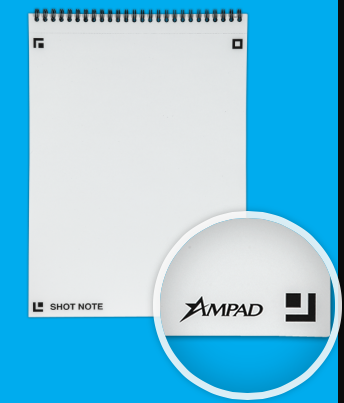
Each of the writing pads has markings in the upper right corner so that you can date your notes. (The sketch pads are undated.)
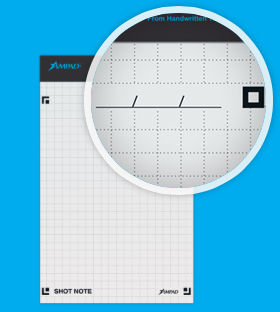
How Shot Note Works:
- Download the free Ampad Shot Note app for iOS or Android.
- Use the notebooks. Write notes, letters, sonnets. Doodle your name and your sweetie’s, or sketch the next architectural wonder.
- Snap a photo of your creation using the Ampad Shot Note app, aligning the four corners of the page with the app’s doohickey for recognizing the corners. This uploads your page to the app.
 Name your file. Add a description and tags. The app will create a date- and time-stamp for you.
- Access and view the items you’ve captured. Search by name, tag or date/time-stamp.
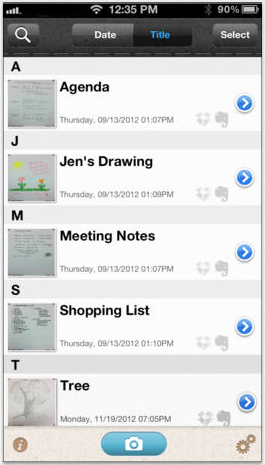 Share your items via email, Evernote, Dropbox, Twitter or message from your camera roll.
Why You Might Use the Shot Note Pads and App
You, like Paper Doll, may have a really shaky hand when it comes to snapping documents and pictures with a tablet. While an increasing number of digital devices have grid lines built into the camera apps to make it easier to shoot “straight,” some are easier to manage than others.
Your creativity only bursts forth when you set pen (or pencil) to paper. Maybe you get tongue-tied (finger-tied?) when you type, but really need to have a digital copy of what you create so can share with collaborators or clients.
Maybe you want to share a personal message for a love note or “good luck” blurb, and don’t want to sacrifice handwriting and personal doodles just to be able to have it received immediately.
What other things could you do with the Shot Note?
- Archive your children’s school projects and drawings.
- Share notes from class with your study group.
- Snap your grocery list and share it with your family so two (or more) of you can divide up zones of the supermarket and finish faster.
- Keep your originals safe at home (or at the office) when you’re traveling.
For more on how the Shot Note works, check out the spiffy little video.
Paper Doll‘s Thoughts: I was intrigued by the Shot Note when it debuted at the 2013 NAPO Conference last spring. I still think it’s neato, in the abstract, but there are some practical concerns. First, price. Available at Amazon, Staples and other office supply stores, the Shot Note regular pads lists between $6 and $10, which is pretty pricey for so few pages per pad, though Amazon carries them at a significant discount (a more reasonable $2-$4). The easel pad, listing from $70-$90 (yes, really!) and discounted at about half of that, is pretty darned expensive for 25 monster-sized sticky notes.
Beyond price, it’s not clear what the Shot Note can do that’s really special. Right now, it’s a camera app that nicely lines up the pages of utilitarian-looking notepads, and it’s decently integrated with the major productivity tools. But it strikes me that Evernote seems to have gotten much farther with integrating its camera app, and can even search handwriting as if it were text. Then again, Ampad is in the business of paper, not digital manipulation, so maybe it’s not fair to hold the two to the same standards.
I had one other thought. The Shot Note focuses on the written and the visually artistic, but Ampad could create a Shot Note side-spiral notebook of blank sheet music. I suspect that there are suitable apps for taking the uploaded, snapped, handwritten notes and allowing the paper and apps to make beautiful music together. (No charge for the idea, Ampad. Enjoy!)
House of Doolittle: Doing Much for the Environment & Time Management (A Shoplet Review)
Periodically Paper Doll reviews new and established office supplies and accessories through the Shoplet Product Review Program. This week, we’ll be looking at two products from the House of Doolittle.

I must admit, although I’ve written about recycled products many times before, I was unfamiliar with House of Doolittle, a 95-year-old office supply company that makes 100% post-consumer paper products, including desk pads, appointment planners, wall calendars, laminated planners, non-dated planning supplies, and USA and international maps.
In 1988, House of Doolittle made the commitment to produce all of their products from recycled paper and materials, eventually converting to recycled cover materials and book wire, soy inks, and Processed Chlorine Free (PCF) and FSC-certified paper. All House of Doolittle products are manufactured in the United States.
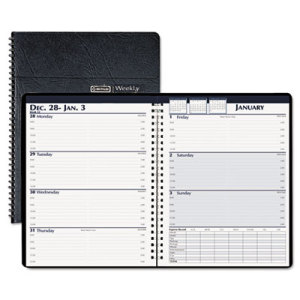
The House of Doolittle Weekly Expense Log Business Planner harkens back to a pre-app era when most professionals kept track of time and tasks using paper planners. Paper Doll, with one foot in the paper realm and the other in cyberspace, still maintains a paper planner, and can see the appeal of having a small, tangible planner where one can quickly schedule appointments, check information and log expenses without need for Wi-Fi or charged batteries.
The Basics: This 7″ x 10″ wire-bound planner uses the two-page-per week style, with Monday through Thursday blocks on the left-side page with lines for 8 a.m. to 5 p.m. standard workday appointments. The right-side page offers the same for Friday through Sunday, as well as a chart for keeping expense records for the week, with columns for Sunday through Saturday and rows for standard travel expenses (like meals, hotel, tips and parking) and typical weekly expenses (like postage, phone, entertainment, auto, gas and miscellaneous). The right-side page also has three small insets at the top, showing monthly calendars for the prior, current and next months.
The black leatherette cover is made of 50% recycled materials; the twin-loop wire binding is made from 90% recycled wire.

The Business Planner doesn’t skimp on extras. Trying hard not to be outdone by the whole of the internet, bonus pages include three-year holiday listings, area codes, time zones, toll-free numbers for airlines, car rental companies and hotels, air and driving mileage distances between major cities, weights and measures, metric conversions, recycling information, monthly birthstones/flowers and an annual anniversary gift list. (Whew!)
The Review: This type of planner is ideal for someone who needs to mark appointments and expenses but has relatively few notes to make regarding either. The space for each day is ample for charting the bare essentials (the who/where/why) of appointments, but with only two small rows for each hour, meeting notes are meant to be taken elsewhere.
Thus, it’s well-designed for what it’s meant to do, but professionals needing more robust planning pages would do well to upgrade from the weekly planner to a daily planner; those wanting House of Doolittle’s environmental commitment but seeking to schedule appointments more frequently than hourly might want to examine their Professional Hardcover Weekly Planner, with time frames on the quarter hour.
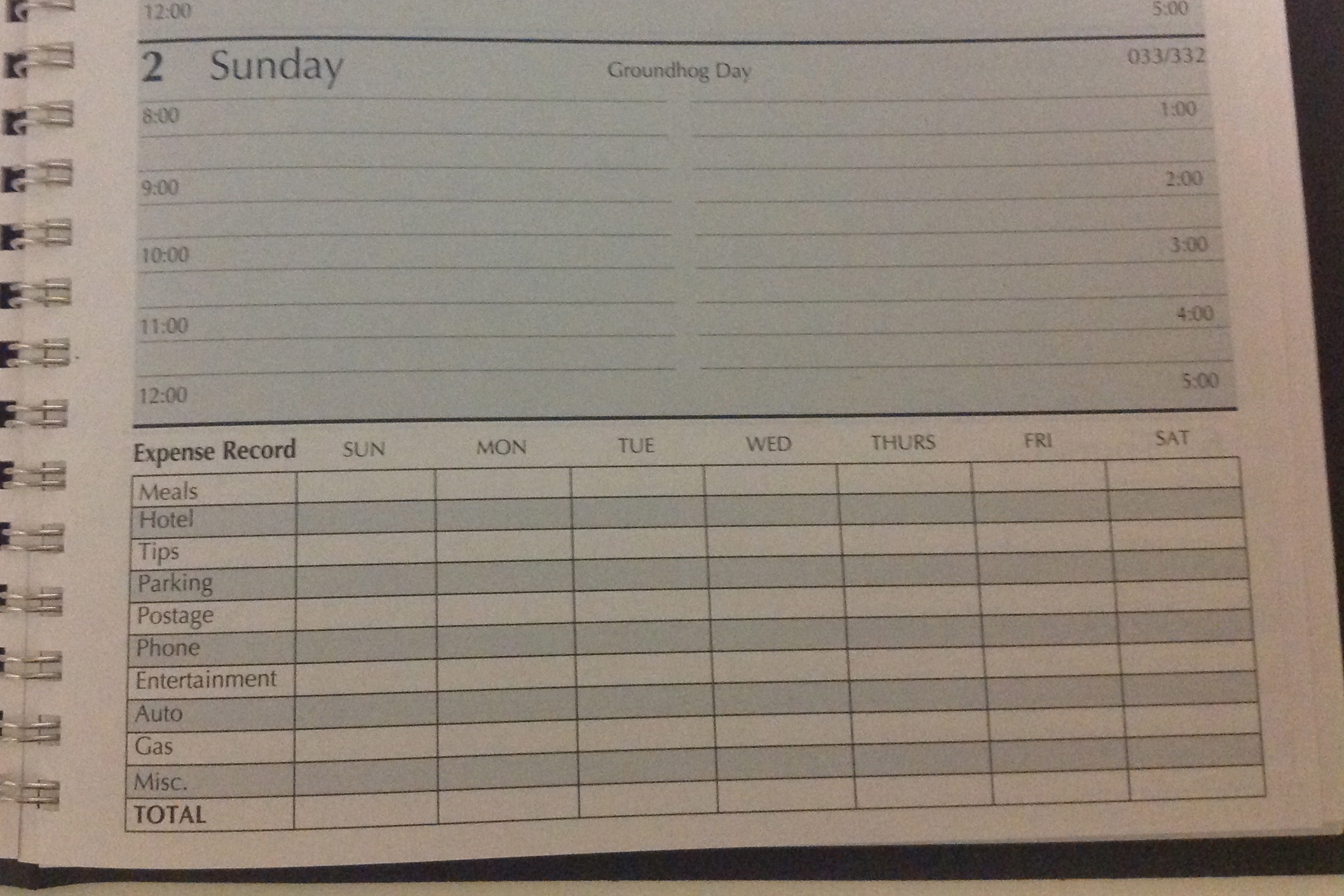
As a professional organizer, my biggest concern with the planner was the expense record section. Although the two-page spread for the calendar goes from Monday to Sunday, the expense section runs from Sunday to Saturday. Should the Sunday in the expense planner refer to the expenses from the prior page? Why don’t the days line up? It’s a small issue, and as long as the user sticks to the same recording method all the time, it’s not problematic, but it does seem confusing. Also, as with most paper expense planners, there’s only one slot per expense category per day, so you have to do your math first before recording anything, which may not be preferable.
The Business Planner runs about $17 at Shoplet for an individual planner, and is under $10 if you purchase in bulk.
The House of Doolittle 2014 Calendar is what Paper Doll used to call a desk blotter in ye olden days, and lets you view the whole month at one glance.
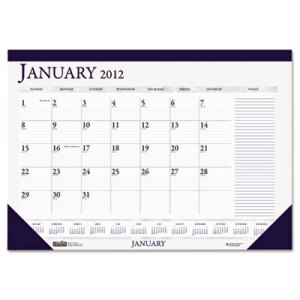 The Basics: The 18.5″ x 13″ January to December calendar, designed to be posted on a wall or used as a desk blotter, has a dark blue leatherette top-band and bottom corners to hold the pages in place. Each perforated page identifies the month, has squares for each weekday (Sunday through Saturday) with count-up/count down numbers (so you know you’ve got only 337 more days until 2015!) and twelve tiny monthly calendars at the bottom. There’s a wide section at the far right for jotting down notes, phone numbers and other incidentals.
The 2014 Calendar is made from 100% post-consumer paper and soy inks, and is made entirely in the USA.
The Review: When Paper Doll worked in television programming, having a desk pad calendar was indispensable for viewing the month at one shot and noting important events without having to look up from the desk. I’d forgotten how useful that was until I examined the House of Doolittle 2014 Calendar.
I think this calendar, which is smaller than the typical desk blotter by a handful of inches, would be perfect for kitchen desks, which tend to be cramped, and for students/bedroom desks, to maintain an eagle-eye view of when assignments and tests are scheduled. The only flaw I note is that the smaller pad size means that the squares for each day are reduced, and perhaps a bit cramped for those of us with sprawling handwriting. Nonetheless, it’s a spiffy little calendar for under $9 (under $6 if you buy in bulk).
Both the House of Doolittle Business Planner and 2014 Calendar, and many others HoD products, are available directly from Shoplet, which also maintains a colorful and often goofy blog about office supplies. Shoplet is also an excellent source for business promotional products, including promotional shirts. In addition to selling office supplies in North America, Shoplet is a purveyor of office stationery in the UK.
Disclosure: I received these products for review purposes only, and was given no monetary compensation. The opinions, as always, are my own. (Who else would claim them?) The planner and calendar will be donated to a Chattanooga-area non-profit.
Taxing Conversations (Part 3): Form-Free Organizing
For most people, anticipating tax time falls on a continuum from vague annoyance to full-blown anxiety. Getting organized isn’t a panacea against all that causes us stress, but it can inoculate us against the worst of it. (As Paper Doll always says, organizing can’t prevent catastrophes, but it can help make them less catastrophic.)
In our last two posts, we’ve looked at the basics for getting started organizing for tax time (including making use of the IRS’s new Get Transcript service), and we’ve tried to make some sense out of W-2s and the myriad 1099s and 1098s that organizations and institutions are obligated to provide you.
But what about other documents, the kinds that don’t come on forms? Most will be proof of deductible financial transactions. While some may be provided directly to you at the time (like receipts for deductible expenses), others may be sent as part of correspondence. And, of course, other types of proof will require you do some hunting and gathering.
There are a few main categories to consider.
YOUR HEALTH
You could (and probably should) maintain a folder with the receipts and annotated (paid) statements for all of your family’s out-of-pocket doctor’s visits and other medical care. At the end of the year, flipping through this folder allows you to summarize your medical expenses and determine if you’ve met the IRS threshold for deducting them. If you use a financial dashboard like Mint and are faithful about making sure expenses are assigned to the right categories, you may not have to do any math at all.
For reference, effective this year, you may only deduct medical expenses that exceed 10% of your adjusted gross income. (If you are 65 or older, the old 7.5% applies until 2017.)
If you have health insurance coverage, your company probably creates an annual summary indicating how much health care you’ve used and the amount you paid/owed to medical providers during the course of the year. For example, Blue Cross Blue Shield calls theirs a personal health statement.

The trick is that most people have no idea that their insurance companies create these summaries, as they tend not to be mailed to policy holders. Insurers save mailing costs and hope you’ll know to log into your online account to search for your summary. (If your medical expenses for the prior year are too low to qualify to be deductible, just save a PDF of your summary for your records; don’t bother printing.)
If your insurance company doesn’t create annual summaries, you can usually use the “You Owe” column of the Explanation of Benefits (EOB) that your insurer sends after doctor’s visits, hospitalizations and procedures (and you should definitely be able to log in or call to request copies of these, if you’ve discarded them). If your medical expenses are low, no further effort is needed, but if it looks like you’ll be able to take deductions, using your annual summary or EOBs will give you a handle on which receipts or dated statements you’re seeking for tax support.
In the future, try to be vigilant about saving medical expense receipts, as your EOBs and insurance company summaries are not considered proof of what you spent on deductible medical expenses, only indications of what you owed to medical providers. Collect receipts for:
Medical care expenses: Be sure to only count expenses for which you paid and not portions paid by the insurance company or “network savings.” (That’s the amount knocked off the bill simply because you have insurance. If you were uninsured, you’d be charged more than the total paid by you and the insurance company!)
Pharmaceutical expenses: Call or visit your pharmacy to request a printout of all pharmaceutical purchases you made for yourself and your children during the prior tax year. (Because of privacy laws, your spouse may have to make a separate request.) Using only one pharmacy for prescriptions is advantageous.
Health Savings Account documentation: For every qualified medical expense you pay through your health savings account (HSA) or medical savings account (MSA), keep a record of the name and address of each person or company you paid and the amount and date of the payment. Since HSAs can be used to cover everything from orthodontia and acupuncture to durable medical equipment and contact lens solution, be sure to save your receipts, and if a receipt doesn’t clearly describe what you actually purchased, make a note at the top to ease your efforts at tax time.
Medically-necessary travel expenses: If you (or a family member) have conditions that require travel for treatment, you can deduct the travel costs. Keep a paper or digital log of the miles driven and use the current IRS standard mileage rate for medical purposes for 2013 (or 2014).
YOUR HOME
Home purchases: Maintain records regarding the purchase (or sales) documentation for a house, as well as records for closing costs, home inspections, fees paid to real estate agents and any records regarding private mortgage insurance.

Casualty and theft losses require documentation. For thefts, you’ll need to have proof of ownership (that’s why we recommend saving “big ticket” item receipts and videoing a household inventory), proof of theft (usually via a police report) and the date that the item was stolen (to proove it falls in the appropriate tax year).
For proof of loss due to casualty, maintain insurance company confirmation letters regarding the date and cause (ice storm, lightning, fire, auto accident, etc.) of a loss, estimates of original costs and costs of repair/replacement vs. what your insurance company will or will not pay (or has paid), and proof of ownership.
Moving expenses relate to actual costs (movers, truck rental, storage, etc.) and mileage. Did you move more than 50 miles in order to work at a new job/location? Check out IRS Publication 521 regarding what you’ll have to document.
Other home-related paperwork to save include:
- Receipts and records regarding any home improvement efforts you’ve made which materially increase the value of your home (which will have a tax implication when you sell).
- Records of purchases for your primary residence that qualify you for the Energy Star tax credits for the applicable year. This gives you credit for 10-30% of costs for energy-efficient purchases, including biomass stoves, various heating/air conditioning devices, insulation, water heaters and windows and doors, geothermal heat pumps, residential small wind turbines, and more.
YOUR HEART
Childcare/Eldercare costs: To take advantage of the Child and Dependent Care Credit, you’ll need documentation of the name, address, and Tax ID number for any care provider you’ve used for your kids or other dependents. Whether you’re using a babysitter from down the street or employing the services of a daycare facility (for either children or adults), use federal form W-10, Dependent Care Provider’s Identification and Certification.
Even if you’re not planning to run for elected office, be sure you’re not running afoul of Nanny Tax rules regarding FICA (Social Security and Medicare) and FUTA (unemployment insurance). Use a Nanny Tax calculator and keep careful records of what you paid, when, what you withheld and what you submitted to the IRS.
Charitable donations: You may get a nice form letter on a non-profit’s stationery, or they may bury your acknowledgment as tiny text in asterisked comments at the bottom of requests for further donations, so be diligent about opening your mail. A charitable contribution confirmation should include the name of the qualifying charitable organization, a date of donation or at least the date of the acknowledgment (i.e., something to prove the tax year of the donation) and a dollar amount (or a description of materials if an “in-kind” (non-monetary) donation was made).
Not every charity confirms donations in writing. For your protection, keep your own records regarding donations you make. Use the charitable request letter or even a plain piece of paper to mark the date, dollar amount and method by which you paid (check number or credit card name), and file it away. Again, if you use a financial dashboard, identifying all of your donation amounts will be easier. If not, read through your credit card statements and highlight the charitable donations.
YOUR HEAD
Educational expenses: Higher learning can be deducted and the number and type of credits (the Hope Credit, Lifetime Learning Credit, American Opportunity Credit), Savings Bond programs and more can be dizzying. Just be sure that in addition to keeping your 1099-T (for tuition) and 1099-E (for educational interest), maintain transcripts that show your periods of academic enrollment, as well as canceled checks, credit card statements or other receipts that verify the dates of payment and amounts you spent on tuition, books, lab materials, student fees, etc.

Work-related costs: Un-reimbursed employee expenses may include costs for your vehicle or for travel, meals, entertainment or even client gifts. Unfortunately, you have to itemize and not take the Standard Deduction for these to do you any good, and your combined itemized expenses must exceed 2.5% or more of your AGI. Since you have no way of knowing in January what kinds of expenses your employer might force you to rack up in July, start maintaining a folder for these records right away. If you didn’t save receipts during the year, your credit card should provide proof for the largest of the expenses, like airfare and hotel costs.
Proof of payment for jury duty: Yes, it’s your civic duty, and yes, you probably got paid less per day than what you spent at Starbucks to stay awake in the jury box. You might receive a 1099 if you racked up enough days of service, but be sure to keep your own records regarding this kind of payment. If your employers required you to turn your jury duty payments over them, keep records so you can request an adjustment to reduce your AGI.
Tips: If you work in the food industry or a personal service profession where you receive tips, the IRS expects you to keep track of and report what you’ve made. (Yes. Really.) Use a mobile app like TipCounter or Tip Log to record of the tips you took in and what you were required to “tip out” to other support staff members (like bus boys, shampooers, etc.). If you prefer paper, keep a notebook; the IRS form 4070A is pretty clunky.
Self-employed/small business expenses: If you own your own business, you need a unique, separate filing system for all your business-related expenses, including tax paperwork. Check the classic Paper Doll post Organizing Your Tax Paperwork–Part 3: Get Your Business (Receipts) Off The Ground to make sure you capture all the essentials.
I hope this series of Taxing Conversations helps you ramp up your efforts to organize for tax time. Remember, Paper Doll is a professional organizer; in the language of the web, IANAA (I am not an accountant) and IANYA (I am not your accountant). For individual tax-related questions, please contact an authorized tax preparation specialist or financial planner.
Taxing Conversations (Part 2): Organizing Fun With Forms
Last time, we talked about simple steps for organizing the paperwork for your taxes. As Paper Doll mentioned, it all begins with gathering the right documents. Every taxpayer’s situation is different, but we’ll review the most common items you should be seeking and collecting in your Tax Prep folder.
Today, we’ll review the tax support documents called information returns. These are sent to you from outside entities and the law requires them to be provided, generally by January 31st, so they should require the least amount of effort on your part.
W-2 (Wage and Tax Statement)
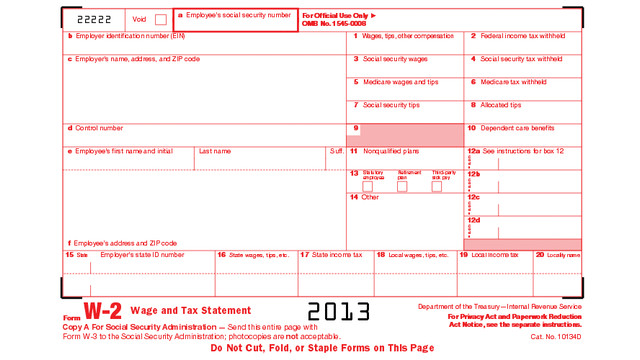
If you’ve ever had a job, you’ve probably received a W-2. Not to be confused with a Federal W-4 (the form you fill out so that your employer knows how much tax to withhold), the W-2 is the form your employer gives you (and sends to the IRS) to report how much you were paid (in wages, salaries and tips) and, if applicable, how much money was withheld from you and paid to federal and/or state governments for taxes and FICA (Social Security and Medicare).
Federal, state and local taxes, FICA, unemployment insurance and a few other withholdings are considered statutory payroll tax deductions. Statutes, or laws, require them. Wage garnishments for lawsuits or child support may be the result of non-statutory legal rulings specific to an individual. Your W-2 may also indicate other amounts withheld from your check, which are voluntary payroll deductions. These can include health and life insurance premiums, 401(k) or other retirement contributions, regular donations to the United Way, union dues, etc.
There are generally multiple copies of the same Form W-2. Your employers submit copy A directly to the Social Security Administration and keep copy D for their records. Copies B and C are for you — you send one to the IRS with your federal tax return and keep one for your own records. And, just to make sure you’re paying attention, copies 1 and 2 are provided to file with any applicable state or local tax authorities. (Don’t ask why they aren’t copies E and F. Paper Doll suspects it’s just to perturb her.)
Employers should mail W-2s by the last day of January, so if you haven’t received yours by Valentine’s Day, contact Human Resources (or, y’know, Madge, with the beehive hairdo, down the hall, as applicable). W-2s are usually mailed to the address listed on your W-4, though small businesses may just hand them to employees. Consider a few issues:
- Did you change employers recently? If you had more than one job this year, be sure that you have received W-2s from each employer. If you changed jobs at the same company, you’ll generally only receive one W-2 from each employer, not one per position.
- Did you change addresses since you filled out your W-4? There’s only so much a former employer will do to track you down and give you your W-2. Keep the boss updated!
Just because you don’t have your W-2 doesn’t mean the IRS didn’t get its Copy A. The IRS knows what you made, so be sure you do, too! (If your employer is no longer in business or is otherwise not responsible to your requests, the IRS has a procedure to allow you to file your taxes in the absence of a W-2.)
When you receive your W-2, examine it carefully. Do the numbers seem right? If possible, compare them to the final pay stub you got for last year. Because the calendar year ended mid-week (and therefore, mid-pay period for most people), the numbers won’t correspond exactly, but they’ll be close enough for you to spot if something is seriously wrong. The sooner you call your employer’s attention to an error, the sooner you can prepare your return. (And again, that’s a good thing!)
W-2G is a cousin of the W-2. If you go to a casino and win more than $600 in any gambling session (congrats, by the way!), the “house” will request your Tax ID and either prepare a W-2G on the spot, or send it to you in January of the following year. Note: the IRS knows about your winnings, but not about your losses. To deduct losses, the IRS requires you to be able to provide receipts, tickets, statements or other records that show the amount of both your winnings and losses.
1099
A 1099 is a form that basically says, “hey, we paid you some money for something other than being an employee.” You get a copy; the IRS gets a copy.
There’s not just one type of 1099; actually, there are a whole variety of 1099s. Some of the more common are:
Got a bank account? This form reflects the interest income you receive from interest-bearing savings and checking accounts, money market bank accounts, certificates of deposit, and other accounts that pay interest. It also notes whether foreign or U.S. taxes were withheld and if there were any penalties assigned for early withdrawal from an interest-bearing account. Internet-only banks, like CapitalOne360, require you to log into your account to get your 1099-INT, so don’t count on it coming by mail.
Do you own stock or taxable investments? This form indicates the dividends or capital gains you received as an investor. Your broker, plan services company, mutual fund company or other type of investment company will send this form. Not all dividends are created equally; ask your tax professional if you have any that seem unusual or complicated.
This is what you may receive from a client or customer if you were an independent contractor (i.e., self-employed) or if you got any kind of miscellaneous revenue for doing work for someone else when you were not actually considered an employee. Even if someone paid you for doing work as an independent contractor, they may not know they should be sending you a 1099-MISC. This is why, if you are self-employed or irregularly employed, it’s still vital to keep track of your incoming revenue.
Your 1099s may be hiding in plain sight. Sometimes, instead of sending a 1099 in a separate envelope, a bank or brokerage house may include a 1099 form in the same envelope as (or even perforated, at the bottom of) a quarterly or end-of-year financial statement, so be sure to check all the “official” mail that arrives. Multiple forms may be sent as a “combined 1099,” scrolling across multiple pages, so check the reverse of other forms, in case you seem to be missing one.
A 1099 doesn’t always indicate that you were literally paid money. For example, a 1099-C indicates that a party has forgiven a debt, like a mortgage or part of a credit card balance. You may owe money on forgiven debts, and the 1099-C alerts the IRS that since you didn’t pay money owed, it’s as if you received money.
The IRS maintains a list of other types of 1099s and 1099-related forms.
1098 (Mortgage Interest Statement)
A 1098 is not a 1099 with low-self-esteem. This form reflects the interest you paid on your mortgage, which is generally deductible on your federal taxes. If you rent, you won’t have a 1098; the same goes if you paid off your mortgage prior to the most recent tax year.
There are sub-types of 1098s for things other than interest on property loans. For example, you might receive a 1098-C from a charitable organization if you donated car, boat or airplane. (Paper Doll suspects that if you donated an airplane, you probably tripped over my blog post on your way to Happy Millionaire Magazine.) Your college might provide you with a 1098-T to indicate you paid tuition, or a financial institution might send a 1098-E to show you’ve paid student loan interest.
Chance are good that you will receive a W-2, 1099 and/or 1098 in any given year, but there are many other less common information return forms. This lengthy list and description of all tax-related forms can help you if you receive something mysterious and vaguely official in your mailbox.
Again, these are the forms that others are required to send to you. Next time, we’ll finish up by exploring other kinds of paperwork that you may need to locate and organize to prepare your taxes, primarily documents that may take a little nagging or detective work on your part.
Taxing Conversations: Organizing the Essentials & a New Tax Tool
The other day, I asked a potential client how well she thought her family was doing on keeping up with tax paperwork. She mentioned that they have a “tax drawer” where they collect everything related to taxes. Perhaps she thought I’d be judgmental, but I think she and her family are head and shoulders above where most American taxpayers are at this point in the year.
If tax time has given you a headache in the past, Paper Doll has some suggestions for obtaining, sorting and maintaining the forms and supporting material you (or your accountant) will need by April 15th.
The basics of getting ready for tax time aren’t that scary. Five simple steps should get you on your way.
1) Create a folder called Tax Prep 2013. Yes, 2013. In any given year, you’re preparing tax returns for the prior fiscal year.
While you’re at it, you may as well create your folder for Tax Prep 2014, so you’ll have it handy throughout the coming year. For many of my residential organizing clients, we create a hanging folder for tax prep with a variety of tabbed folders for the subset of paperwork that comes into the home throughout the year: Charity (donation receipts), Medical Expenses (sometimes divided into separate folders for prescriptions and doctor visits), Educational Expenses and more. However, if you’ve made it to 2014 without a system for tackling 2013’s receipts, one nicely labeled folder is a great start.
Although Paper Doll prefers tabbed folders because they store easily with the rest of your family filing system, you might like to consider something like the Smead Tax Organizer to corral your documents.
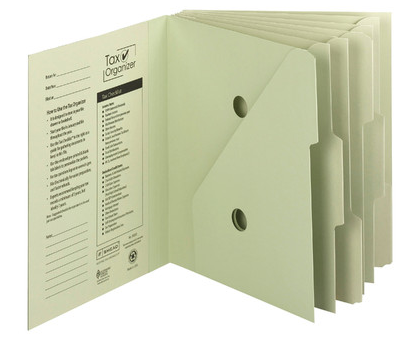
The faster you locate the essential documents, the sooner you can complete your return and earn one of two prizes, either a tax refund or more time to figure out how to come up with the funds to pay your taxes.
2) Watch your mailbox. Most financial institutions still send tax forms through the mail. If you’re not in the habit of opening your mail as soon as it arrives, January is the perfect time to start a new, good habit. Financial institutions have a nasty habit of hiding 1099s (of which, more next time) at the bottom of long annual statements or as enclosures with fourth quarter statements — so again, read your mail.
3) Watch your email inbox. No, you probably won’t receive tax documents via email, as it’s not secure. Financial institutions make a lot of security-related mistakes, but that’s not generally one of them. However, you will likely receive email notifications that you can log in to your online accounts at banks, brokerage houses, etc., to download and/or print your tax forms.
Caveat: this is also the time of year when phishers are trying to get their hands on your Social Security number and other vital information. Do not click on links embedded in emails to get to your online financial accounts. Type the URLs yourself, and make sure that https:// appears in the URL box so you know you’re gaining secure access.
4) Review your prior year’s tax return and supporting materials. (Hopefully, you’ve got them collated in a folder somewhere.) Make a quick list of all the forms and documents you used when preparing a previous year’s taxes. When January’s over, compare the list with what you have in your folder to see what forms might be missing or what recurring donations you might have made but forgotten. This year may not be identical to last year — you may have given to different charities, sold stock or closed an old savings account. But knowing which documents you received previously will help you eyeball the situation and recall changing circumstances.
5) Let the Taxman help. There are a few reasons you might be missing your old tax paperwork. Maybe you prepared your taxes online and had only a few forms and just tossed them in a drawer. Perhaps your paperwork is still in storage because you moved during the year. Or it’s possible that organizing your paperwork hasn’t been your major priority. Happily, getting your old tax returns has never been easier.
In the olden days (that is, before last week), if you wanted copies of your taxes, you had to either trundle down to your local Internal Revenue Service office, fill out forms, and wait in line, or you had to submit forms by mail and wait about ten business days for your forms to arrive by mail. Paper Doll suspects you neither want to cool your heels at the IRS office or have your tax documents slowly wing their way to you. (Oddly, we tend to worry less about mailing our financial information to the IRS than having them send it back to us.)
The good news is that effective immediately, the IRS has created Get Transcript, a real-time online tax transcript request service. (“Transcript” is the fancy term the IRS uses to refer to digital of old tax returns.) For what it’s worth, Get Transcript isn’t merely useful for preparing your taxes. When you apply for mortgages, small business loans, and student loans, presenting an IRS transcript is usually a quick shortcut for helping you validate your income and tax filing status.
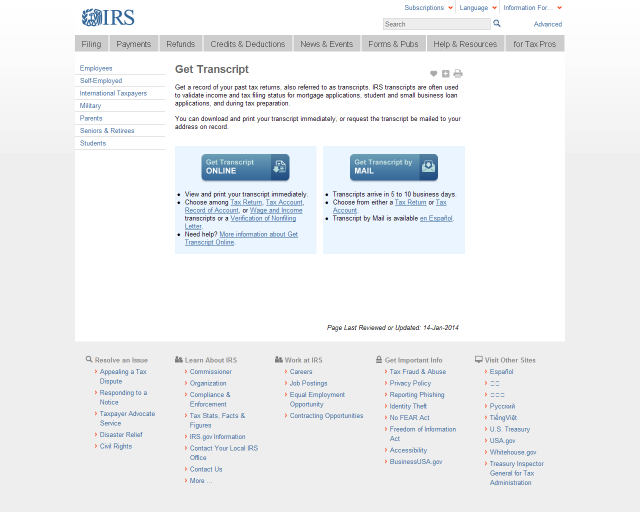
Create a Get Transcript account with your name and email address. You’ll be emailed a confirmation code; once you enter it into the system (which you need to do within thirty minutes of receipt, so don’t dawdle), you’ll provide a variety of identity verification information and then set up a secure profile. Expect this part to take 5-10 minutes — but you’ll only have to do this once.
Get Transcript allows you to get your actual tax transcript (a copy of your original return) or an account transcript (which shows amendments or changes made by you, your tax preparer or the IRS). If you want a document that shows a combination of your original return and supporting information as well as the revisions, you must request a record of account transcript.
Select the type of transcript, year, and the reason you’re requesting it (e.g., mortgage, student loan, immigration, housing assistance, etc.). Your transcript will display on the screen. Save it as a PDF so that you can maintain a digital record on your computer or in the cloud. Don’t forget to sign out of your IRS account when you’re done.
Next time, we’ll review all of those official letters-and-numbers forms that can make tax preparation so stressful, and we’ll follow up with the supporting materials that you may need to collect on your own.
Taking just fifteen minutes to organize today will help make tax time much less stressful. Why not get started now? Dig through your “tax drawer,” climb into your mailbox, and start gathering the essentials.



Follow Me