Archive for ‘Paper Organizing’ Category
Taxing Conversations (Part 3): Form-Free Organizing
For most people, anticipating tax time falls on a continuum from vague annoyance to full-blown anxiety. Getting organized isn’t a panacea against all that causes us stress, but it can inoculate us against the worst of it. (As Paper Doll always says, organizing can’t prevent catastrophes, but it can help make them less catastrophic.)
In our last two posts, we’ve looked at the basics for getting started organizing for tax time (including making use of the IRS’s new Get Transcript service), and we’ve tried to make some sense out of W-2s and the myriad 1099s and 1098s that organizations and institutions are obligated to provide you.
But what about other documents, the kinds that don’t come on forms? Most will be proof of deductible financial transactions. While some may be provided directly to you at the time (like receipts for deductible expenses), others may be sent as part of correspondence. And, of course, other types of proof will require you do some hunting and gathering.
There are a few main categories to consider.
YOUR HEALTH
You could (and probably should) maintain a folder with the receipts and annotated (paid) statements for all of your family’s out-of-pocket doctor’s visits and other medical care. At the end of the year, flipping through this folder allows you to summarize your medical expenses and determine if you’ve met the IRS threshold for deducting them. If you use a financial dashboard like Mint and are faithful about making sure expenses are assigned to the right categories, you may not have to do any math at all.
For reference, effective this year, you may only deduct medical expenses that exceed 10% of your adjusted gross income. (If you are 65 or older, the old 7.5% applies until 2017.)
If you have health insurance coverage, your company probably creates an annual summary indicating how much health care you’ve used and the amount you paid/owed to medical providers during the course of the year. For example, Blue Cross Blue Shield calls theirs a personal health statement.

The trick is that most people have no idea that their insurance companies create these summaries, as they tend not to be mailed to policy holders. Insurers save mailing costs and hope you’ll know to log into your online account to search for your summary. (If your medical expenses for the prior year are too low to qualify to be deductible, just save a PDF of your summary for your records; don’t bother printing.)
If your insurance company doesn’t create annual summaries, you can usually use the “You Owe” column of the Explanation of Benefits (EOB) that your insurer sends after doctor’s visits, hospitalizations and procedures (and you should definitely be able to log in or call to request copies of these, if you’ve discarded them). If your medical expenses are low, no further effort is needed, but if it looks like you’ll be able to take deductions, using your annual summary or EOBs will give you a handle on which receipts or dated statements you’re seeking for tax support.
In the future, try to be vigilant about saving medical expense receipts, as your EOBs and insurance company summaries are not considered proof of what you spent on deductible medical expenses, only indications of what you owed to medical providers. Collect receipts for:
Medical care expenses: Be sure to only count expenses for which you paid and not portions paid by the insurance company or “network savings.” (That’s the amount knocked off the bill simply because you have insurance. If you were uninsured, you’d be charged more than the total paid by you and the insurance company!)
Pharmaceutical expenses: Call or visit your pharmacy to request a printout of all pharmaceutical purchases you made for yourself and your children during the prior tax year. (Because of privacy laws, your spouse may have to make a separate request.) Using only one pharmacy for prescriptions is advantageous.
Health Savings Account documentation: For every qualified medical expense you pay through your health savings account (HSA) or medical savings account (MSA), keep a record of the name and address of each person or company you paid and the amount and date of the payment. Since HSAs can be used to cover everything from orthodontia and acupuncture to durable medical equipment and contact lens solution, be sure to save your receipts, and if a receipt doesn’t clearly describe what you actually purchased, make a note at the top to ease your efforts at tax time.
Medically-necessary travel expenses: If you (or a family member) have conditions that require travel for treatment, you can deduct the travel costs. Keep a paper or digital log of the miles driven and use the current IRS standard mileage rate for medical purposes for 2013 (or 2014).
YOUR HOME
Home purchases: Maintain records regarding the purchase (or sales) documentation for a house, as well as records for closing costs, home inspections, fees paid to real estate agents and any records regarding private mortgage insurance.

Casualty and theft losses require documentation. For thefts, you’ll need to have proof of ownership (that’s why we recommend saving “big ticket” item receipts and videoing a household inventory), proof of theft (usually via a police report) and the date that the item was stolen (to proove it falls in the appropriate tax year).
For proof of loss due to casualty, maintain insurance company confirmation letters regarding the date and cause (ice storm, lightning, fire, auto accident, etc.) of a loss, estimates of original costs and costs of repair/replacement vs. what your insurance company will or will not pay (or has paid), and proof of ownership.
Moving expenses relate to actual costs (movers, truck rental, storage, etc.) and mileage. Did you move more than 50 miles in order to work at a new job/location? Check out IRS Publication 521 regarding what you’ll have to document.
Other home-related paperwork to save include:
- Receipts and records regarding any home improvement efforts you’ve made which materially increase the value of your home (which will have a tax implication when you sell).
- Records of purchases for your primary residence that qualify you for the Energy Star tax credits for the applicable year. This gives you credit for 10-30% of costs for energy-efficient purchases, including biomass stoves, various heating/air conditioning devices, insulation, water heaters and windows and doors, geothermal heat pumps, residential small wind turbines, and more.
YOUR HEART
Childcare/Eldercare costs: To take advantage of the Child and Dependent Care Credit, you’ll need documentation of the name, address, and Tax ID number for any care provider you’ve used for your kids or other dependents. Whether you’re using a babysitter from down the street or employing the services of a daycare facility (for either children or adults), use federal form W-10, Dependent Care Provider’s Identification and Certification.
Even if you’re not planning to run for elected office, be sure you’re not running afoul of Nanny Tax rules regarding FICA (Social Security and Medicare) and FUTA (unemployment insurance). Use a Nanny Tax calculator and keep careful records of what you paid, when, what you withheld and what you submitted to the IRS.
Charitable donations: You may get a nice form letter on a non-profit’s stationery, or they may bury your acknowledgment as tiny text in asterisked comments at the bottom of requests for further donations, so be diligent about opening your mail. A charitable contribution confirmation should include the name of the qualifying charitable organization, a date of donation or at least the date of the acknowledgment (i.e., something to prove the tax year of the donation) and a dollar amount (or a description of materials if an “in-kind” (non-monetary) donation was made).
Not every charity confirms donations in writing. For your protection, keep your own records regarding donations you make. Use the charitable request letter or even a plain piece of paper to mark the date, dollar amount and method by which you paid (check number or credit card name), and file it away. Again, if you use a financial dashboard, identifying all of your donation amounts will be easier. If not, read through your credit card statements and highlight the charitable donations.
YOUR HEAD
Educational expenses: Higher learning can be deducted and the number and type of credits (the Hope Credit, Lifetime Learning Credit, American Opportunity Credit), Savings Bond programs and more can be dizzying. Just be sure that in addition to keeping your 1099-T (for tuition) and 1099-E (for educational interest), maintain transcripts that show your periods of academic enrollment, as well as canceled checks, credit card statements or other receipts that verify the dates of payment and amounts you spent on tuition, books, lab materials, student fees, etc.

Work-related costs: Un-reimbursed employee expenses may include costs for your vehicle or for travel, meals, entertainment or even client gifts. Unfortunately, you have to itemize and not take the Standard Deduction for these to do you any good, and your combined itemized expenses must exceed 2.5% or more of your AGI. Since you have no way of knowing in January what kinds of expenses your employer might force you to rack up in July, start maintaining a folder for these records right away. If you didn’t save receipts during the year, your credit card should provide proof for the largest of the expenses, like airfare and hotel costs.
Proof of payment for jury duty: Yes, it’s your civic duty, and yes, you probably got paid less per day than what you spent at Starbucks to stay awake in the jury box. You might receive a 1099 if you racked up enough days of service, but be sure to keep your own records regarding this kind of payment. If your employers required you to turn your jury duty payments over them, keep records so you can request an adjustment to reduce your AGI.
Tips: If you work in the food industry or a personal service profession where you receive tips, the IRS expects you to keep track of and report what you’ve made. (Yes. Really.) Use a mobile app like TipCounter or Tip Log to record of the tips you took in and what you were required to “tip out” to other support staff members (like bus boys, shampooers, etc.). If you prefer paper, keep a notebook; the IRS form 4070A is pretty clunky.
Self-employed/small business expenses: If you own your own business, you need a unique, separate filing system for all your business-related expenses, including tax paperwork. Check the classic Paper Doll post Organizing Your Tax Paperwork–Part 3: Get Your Business (Receipts) Off The Ground to make sure you capture all the essentials.
I hope this series of Taxing Conversations helps you ramp up your efforts to organize for tax time. Remember, Paper Doll is a professional organizer; in the language of the web, IANAA (I am not an accountant) and IANYA (I am not your accountant). For individual tax-related questions, please contact an authorized tax preparation specialist or financial planner.
Taxing Conversations (Part 2): Organizing Fun With Forms
Last time, we talked about simple steps for organizing the paperwork for your taxes. As Paper Doll mentioned, it all begins with gathering the right documents. Every taxpayer’s situation is different, but we’ll review the most common items you should be seeking and collecting in your Tax Prep folder.
Today, we’ll review the tax support documents called information returns. These are sent to you from outside entities and the law requires them to be provided, generally by January 31st, so they should require the least amount of effort on your part.
W-2 (Wage and Tax Statement)
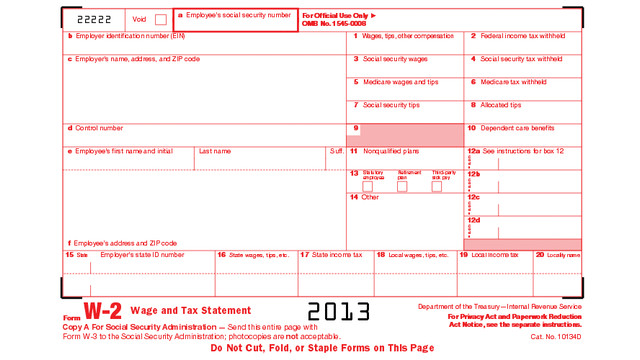
If you’ve ever had a job, you’ve probably received a W-2. Not to be confused with a Federal W-4 (the form you fill out so that your employer knows how much tax to withhold), the W-2 is the form your employer gives you (and sends to the IRS) to report how much you were paid (in wages, salaries and tips) and, if applicable, how much money was withheld from you and paid to federal and/or state governments for taxes and FICA (Social Security and Medicare).
Federal, state and local taxes, FICA, unemployment insurance and a few other withholdings are considered statutory payroll tax deductions. Statutes, or laws, require them. Wage garnishments for lawsuits or child support may be the result of non-statutory legal rulings specific to an individual. Your W-2 may also indicate other amounts withheld from your check, which are voluntary payroll deductions. These can include health and life insurance premiums, 401(k) or other retirement contributions, regular donations to the United Way, union dues, etc.
There are generally multiple copies of the same Form W-2. Your employers submit copy A directly to the Social Security Administration and keep copy D for their records. Copies B and C are for you — you send one to the IRS with your federal tax return and keep one for your own records. And, just to make sure you’re paying attention, copies 1 and 2 are provided to file with any applicable state or local tax authorities. (Don’t ask why they aren’t copies E and F. Paper Doll suspects it’s just to perturb her.)
Employers should mail W-2s by the last day of January, so if you haven’t received yours by Valentine’s Day, contact Human Resources (or, y’know, Madge, with the beehive hairdo, down the hall, as applicable). W-2s are usually mailed to the address listed on your W-4, though small businesses may just hand them to employees. Consider a few issues:
- Did you change employers recently? If you had more than one job this year, be sure that you have received W-2s from each employer. If you changed jobs at the same company, you’ll generally only receive one W-2 from each employer, not one per position.
- Did you change addresses since you filled out your W-4? There’s only so much a former employer will do to track you down and give you your W-2. Keep the boss updated!
Just because you don’t have your W-2 doesn’t mean the IRS didn’t get its Copy A. The IRS knows what you made, so be sure you do, too! (If your employer is no longer in business or is otherwise not responsible to your requests, the IRS has a procedure to allow you to file your taxes in the absence of a W-2.)
When you receive your W-2, examine it carefully. Do the numbers seem right? If possible, compare them to the final pay stub you got for last year. Because the calendar year ended mid-week (and therefore, mid-pay period for most people), the numbers won’t correspond exactly, but they’ll be close enough for you to spot if something is seriously wrong. The sooner you call your employer’s attention to an error, the sooner you can prepare your return. (And again, that’s a good thing!)
W-2G is a cousin of the W-2. If you go to a casino and win more than $600 in any gambling session (congrats, by the way!), the “house” will request your Tax ID and either prepare a W-2G on the spot, or send it to you in January of the following year. Note: the IRS knows about your winnings, but not about your losses. To deduct losses, the IRS requires you to be able to provide receipts, tickets, statements or other records that show the amount of both your winnings and losses.
1099
A 1099 is a form that basically says, “hey, we paid you some money for something other than being an employee.” You get a copy; the IRS gets a copy.
There’s not just one type of 1099; actually, there are a whole variety of 1099s. Some of the more common are:
Got a bank account? This form reflects the interest income you receive from interest-bearing savings and checking accounts, money market bank accounts, certificates of deposit, and other accounts that pay interest. It also notes whether foreign or U.S. taxes were withheld and if there were any penalties assigned for early withdrawal from an interest-bearing account. Internet-only banks, like CapitalOne360, require you to log into your account to get your 1099-INT, so don’t count on it coming by mail.
Do you own stock or taxable investments? This form indicates the dividends or capital gains you received as an investor. Your broker, plan services company, mutual fund company or other type of investment company will send this form. Not all dividends are created equally; ask your tax professional if you have any that seem unusual or complicated.
This is what you may receive from a client or customer if you were an independent contractor (i.e., self-employed) or if you got any kind of miscellaneous revenue for doing work for someone else when you were not actually considered an employee. Even if someone paid you for doing work as an independent contractor, they may not know they should be sending you a 1099-MISC. This is why, if you are self-employed or irregularly employed, it’s still vital to keep track of your incoming revenue.
Your 1099s may be hiding in plain sight. Sometimes, instead of sending a 1099 in a separate envelope, a bank or brokerage house may include a 1099 form in the same envelope as (or even perforated, at the bottom of) a quarterly or end-of-year financial statement, so be sure to check all the “official” mail that arrives. Multiple forms may be sent as a “combined 1099,” scrolling across multiple pages, so check the reverse of other forms, in case you seem to be missing one.
A 1099 doesn’t always indicate that you were literally paid money. For example, a 1099-C indicates that a party has forgiven a debt, like a mortgage or part of a credit card balance. You may owe money on forgiven debts, and the 1099-C alerts the IRS that since you didn’t pay money owed, it’s as if you received money.
The IRS maintains a list of other types of 1099s and 1099-related forms.
1098 (Mortgage Interest Statement)
A 1098 is not a 1099 with low-self-esteem. This form reflects the interest you paid on your mortgage, which is generally deductible on your federal taxes. If you rent, you won’t have a 1098; the same goes if you paid off your mortgage prior to the most recent tax year.
There are sub-types of 1098s for things other than interest on property loans. For example, you might receive a 1098-C from a charitable organization if you donated car, boat or airplane. (Paper Doll suspects that if you donated an airplane, you probably tripped over my blog post on your way to Happy Millionaire Magazine.) Your college might provide you with a 1098-T to indicate you paid tuition, or a financial institution might send a 1098-E to show you’ve paid student loan interest.
Chance are good that you will receive a W-2, 1099 and/or 1098 in any given year, but there are many other less common information return forms. This lengthy list and description of all tax-related forms can help you if you receive something mysterious and vaguely official in your mailbox.
Again, these are the forms that others are required to send to you. Next time, we’ll finish up by exploring other kinds of paperwork that you may need to locate and organize to prepare your taxes, primarily documents that may take a little nagging or detective work on your part.
Taxing Conversations: Organizing the Essentials & a New Tax Tool
The other day, I asked a potential client how well she thought her family was doing on keeping up with tax paperwork. She mentioned that they have a “tax drawer” where they collect everything related to taxes. Perhaps she thought I’d be judgmental, but I think she and her family are head and shoulders above where most American taxpayers are at this point in the year.
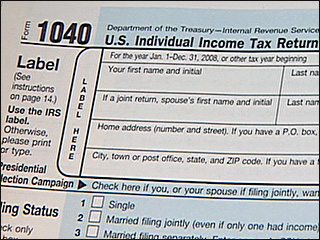
If tax time has given you a headache in the past, Paper Doll has some suggestions for obtaining, sorting and maintaining the forms and supporting material you (or your accountant) will need by April 15th.
The basics of getting ready for tax time aren’t that scary. Five simple steps should get you on your way.
1) Create a folder called Tax Prep 2013. Yes, 2013. In any given year, you’re preparing tax returns for the prior fiscal year.
While you’re at it, you may as well create your folder for Tax Prep 2014, so you’ll have it handy throughout the coming year. For many of my residential organizing clients, we create a hanging folder for tax prep with a variety of tabbed folders for the subset of paperwork that comes into the home throughout the year: Charity (donation receipts), Medical Expenses (sometimes divided into separate folders for prescriptions and doctor visits), Educational Expenses and more. However, if you’ve made it to 2014 without a system for tackling 2013’s receipts, one nicely labeled folder is a great start.
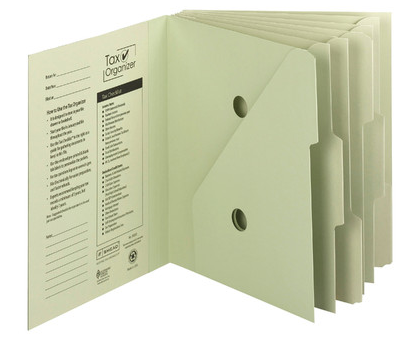
Although Paper Doll prefers tabbed folders because they store easily with the rest of your family filing system, you might like to consider something like the Smead Tax Organizer to corral your documents.
The faster you locate the essential documents, the sooner you can complete your return and earn one of two prizes, either a tax refund or more time to figure out how to come up with the funds to pay your taxes.
2) Watch your mailbox. Most financial institutions still send tax forms through the mail. If you’re not in the habit of opening your mail as soon as it arrives, January is the perfect time to start a new, good habit. Financial institutions have a nasty habit of hiding 1099s (of which, more next time) at the bottom of long annual statements or as enclosures with fourth quarter statements — so again, read your mail.
3) Watch your email inbox. No, you probably won’t receive tax documents via email, as it’s not secure. Financial institutions make a lot of security-related mistakes, but that’s not generally one of them. However, you will likely receive email notifications that you can log in to your online accounts at banks, brokerage houses, etc., to download and/or print your tax forms.
Caveat: this is also the time of year when phishers are trying to get their hands on your Social Security number and other vital information. Do not click on links embedded in emails to get to your online financial accounts. Type the URLs yourself, and make sure that https:// appears in the URL box so you know you’re gaining secure access.
4) Review your prior year’s tax return and supporting materials. (Hopefully, you’ve got them collated in a folder somewhere.) Make a quick list of all the forms and documents you used when preparing a previous year’s taxes. When January’s over, compare the list with what you have in your folder to see what forms might be missing or what recurring donations you might have made but forgotten. This year may not be identical to last year — you may have given to different charities, sold stock or closed an old savings account. But knowing which documents you received previously will help you eyeball the situation and recall changing circumstances.
5) Let the Taxman help. There are a few reasons you might be missing your old tax paperwork. Maybe you prepared your taxes online and had only a few forms and just tossed them in a drawer. Perhaps your paperwork is still in storage because you moved during the year. Or it’s possible that organizing your paperwork hasn’t been your major priority. Happily, getting your old tax returns has never been easier.
In the olden days (that is, before last week), if you wanted copies of your taxes, you had to either trundle down to your local Internal Revenue Service office, fill out forms, and wait in line, or you had to submit forms by mail and wait about ten business days for your forms to arrive by mail. Paper Doll suspects you neither want to cool your heels at the IRS office or have your tax documents slowly wing their way to you. (Oddly, we tend to worry less about mailing our financial information to the IRS than having them send it back to us.)
The good news is that effective immediately, the IRS has created Get Transcript, a real-time online tax transcript request service. (“Transcript” is the fancy term the IRS uses to refer to digital of old tax returns.) For what it’s worth, Get Transcript isn’t merely useful for preparing your taxes. When you apply for mortgages, small business loans, and student loans, presenting an IRS transcript is usually a quick shortcut for helping you validate your income and tax filing status.
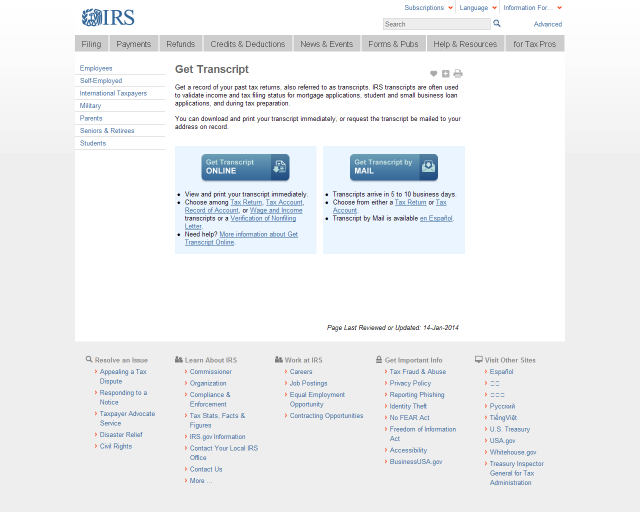
Create a Get Transcript account with your name and email address. You’ll be emailed a confirmation code; once you enter it into the system (which you need to do within thirty minutes of receipt, so don’t dawdle), you’ll provide a variety of identity verification information and then set up a secure profile. Expect this part to take 5-10 minutes — but you’ll only have to do this once.
Get Transcript allows you to get your actual tax transcript (a copy of your original return) or an account transcript (which shows amendments or changes made by you, your tax preparer or the IRS). If you want a document that shows a combination of your original return and supporting information as well as the revisions, you must request a record of account transcript.
Select the type of transcript, year, and the reason you’re requesting it (e.g., mortgage, student loan, immigration, housing assistance, etc.). Your transcript will display on the screen. Save it as a PDF so that you can maintain a digital record on your computer or in the cloud. Don’t forget to sign out of your IRS account when you’re done.
Next time, we’ll review all of those official letters-and-numbers forms that can make tax preparation so stressful, and we’ll follow up with the supporting materials that you may need to collect on your own.
Taking just fifteen minutes to organize today will help make tax time much less stressful. Why not get started now? Dig through your “tax drawer,” climb into your mailbox, and start gathering the essentials.
Notions on Notebooks: Organize Your Paper Picks
There’s a stain on my notebook where your coffee cup was…
Notebooks. Use them for recording clues in your current mystery or keeping a diary of the progress of your great romance. Copy down notes for school or draw up ideas for your next big event. A notebook, in the broadest terms, is someplace to keep your thoughts safe from the vagaries and whims of undependable synapses. Your brain is good at thinking things up, but unreliable at preserving your genius.
As Paper Doll, I value the inherent advantages paper has over electronic devices. It’s immediately available — there’s no need to power it up. Unless you’re involved in government or corporate espionage, it’s unlikely anyone will want to steal your notebook (as opposed to your shiny tablet computer). No specialized tools (stylus, cable, charger) are needed. If you don’t have your favorite pen, you can write with a pencil (even one of those stubby ones from miniature golf), a crayon, or if you’re desperate to get that inspiration down on paper, an eyeliner or lipstick.
Sure, there are numerous benefits to keeping your information digitally, too. You can’t back up a paper notebook, except by photocopying (unless you’re a John Adams with son John Quincy around to make copies of everything by hand). You can’t collaborate simultaneously with a writing or work partner. Sure, you can pass a notebook back and forth like a third grade slam book, but simultaneous collaboration requires a cloud service like Google Drive. (Then again, if you share documents across two Google accounts and one person deletes their account, you lose access to all the shared documents created at the other person’s end. And, of course, reduced security of paper notes is only as problematic as your own lack of vigilance, but while the NSA probably can’t see into your breakfast nook, you don’t know when or whether Evernote or Google is granting somebody a peek at your digital accounts.)
These issues and more have come to my mind after reading Janine Adams’ The Virtues of a Nice Lined Notebook and Lifehacker’s Note Taking Styles Compared: Evernote vs. Plain Text vs. Pen and Paper. At some point, we’ll look at how to select the right electronic note-capturing system for your needs. (We’ve already talked about hybrid systems, like the Evernote Smart Notebook by Moleskine.) But today, I’ve been thinking about (what else?) paper notebooks.
Not all notebooks are created equally; neither should you forget that you are unique, and your choices need to reflect your personal needs. Consider the following!
Price and Branding — If capturing information is your only concern, an off-brand, black-and-white speckled composition notebook from the dollar store should suffice.
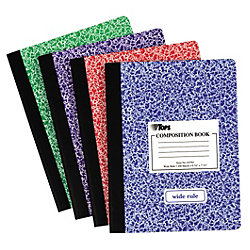
However, if you’re the kind of person who can’t write a grocery list unless it’s bound in leather, then you might want to look at this classic Unclutterer post, 35 Luxury Notebooks To Organize Your Life.
Or, you may be less hung up on price, but it matters to you that your notebook is stamped with a name like Cavallini or Fabriano for cachet or Field Notes or Moleskine for hipster cool. Or maybe Rhodia‘s little trees on a golden backing remind you of your Grandpa. If these things matter to you, buying a notebook that doesn’t fit your need for prestige may mean it’ll just be clutter in the bottom of the drawer a few weeks from now.
Portability — A small spiral-bound notebook, the kind in which school kids used to record homework assignments and (1970’s-era TV drama) reporters used for interviews, will fit nicely in a purse or a man’s front shirt pocket. Many purveyors have lovely (faux-fancy) small notebooks. But if you prefer a larger canvas, with something closer to letter-sized paper, recognize that the trade off is that you’ll have to carry something else, like a backpack or messenger bag, to protect your notebook from the elements. Well, unless you choose waterproof notebooks, like the ones we talked about a few years back.
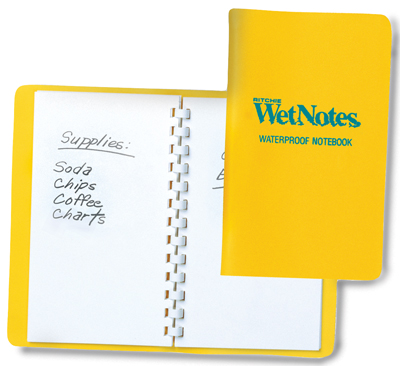
Binding — Spiral can be messy when you tear pages out, unless the paper is also perforated. Fancy sewn bindings with gussets allow upscale notebooks to lay flat when open, making them more like traditionally-bound books. If the difference seems subtle to you, your binding choices won’t matter. If you’re a princess with a pea-green, machine-glued binding, you may never fall asleep and get to use your dream-capturing notebook.
Paper quality — Some people can just as happily write on a paper napkin as parchment, but if you have a fondness for luxe inks, you need to make sure your notebook of choice can stand up to your writing implements of choice without any bleed-through. Tip: The Well-Appointed Desk is a great blog for learning about papers and inks and whether they play nicely with one another.
Lines — Lines on the highway to delineate lanes? Essential. Lines on your face? Misery in the mirror. But lines on your notebook page make a difference. If you’re linear and focused and number your lists, you’ll probably want lines. If you’re all about mind-mapping, the blank page will probably suit you better. Of course, the types of lines may make a difference, in which case, alternatives like the White Lines notebooks we discussed in Green-Eyed But Not-So-Monstrous, might be your preference. Lines, grids, graphs — only you know what you need.
Color — Again, that seventh grader in you might long for the black-and-white speckle, but Paperthinks‘ rainbow of recycled leather notebooks (from pocket-sized to large, slim or regular, ruled or unlined) might fulfill your passion for a colorful lifestyle.

Or, you might eschew color for classic Parisian chic, like the Moleskine Black Line we talked about last year.
CAVEAT: Over the years, I’ve had many clients who loved the sensory delights of fancy-schmancy notebooks: the colors, the materials, the bindings. They haunted bookstores and stationers and gift shops and bought them giddily, as if they were guilty pleasures. But they never used them. Why? For the same reason we save the “good” china for a special occasion and never wear that perfect outfit because the event doesn’t live up to the dream occasion we imagined when we bought it.
Could you dare write “broccoli, Lemon Pledge, dental floss” in a $52 leather-bound, crimson notebook? If not, either stick to manhandling those sexy notebooks in the stores (but skip buying them) or purchase notebooks with fancier covers but replaceable inner workings. Switch out the paper parts of the notebooks when you’ve filled them with brilliance or drivel, but keep your signature-style colors and fabrics on display as you desire.
Tell Paper Doll — what’s your notebook style? What do you think it says about you? Please reply in the comments.
Max Headroom Meets John Hancock: Digital Signatures Series: SignEasy
Your business partner just realized he needs your signature on an important client contract that will impress the venture capitalist he’s meeting in two hours. Unfortunately, you just headed off on a well-deserved vacation to a remote mountain cabin. And let’s imagine everyone involved is the buttoned-up type who needs more than a handshake and a promise. Do you really want to divert yourself through one tiny town after another until you can find a random stranger willing to let you use her printer and fax machine so you can send the document on its way?
Or, closer to home, let’s say you forgot to sign your middle schooler’s permission slip to attend an important field trip, and said kid is pretty miffed at you. What do you do?
Use it as a chance to build up the tough love and teach your kid that “tsk, stuff happens” and get back to what you were doing? Feel guilt-tripped enough to excuse yourself from work, and then drive halfway across town in crazy traffic to sign the permission slip under the gaze of a disapproving school secretary?
What if there were a better way? There is! You can use a digital signature!
Electronic signatures are legally binding in the United States, Canada, the UK, Australia, throughout the European Union and elsewhere, per the Global and National Commerce Act (ESIGN), the Uniform Electronic Transactions Act (UETA) and European Directive (EC/1999/93).
Major players in the digital signature field include Docusign and Echosign. This is just the first in a series of ongoing posts on innovative ways to sign-and-send, without needing an envelope, stamp, fax machine or courier service. Watch this space for more on this topic.

SignEasy just turned three this summer, but this company has some pretty advanced features for a toddler.
Start by downloading the SignEasy app, and then create an account with a valid email address. Next, you’ll log in to create your signature and save it. From there, it’s just three easy steps: import, sign and send!
IMPORT
No matter where it lives, you just import the document in any of a few easy ways:
If someone emails you a document, just tap on the attachment and select SignEasy as the Open In option. (You know, like “Open in Safari” or “Open in Microsoft Word.”)
You can also forward it to add@getsigneasy.com from the email address set as your SignEasy username.
Or, if you want to import the document from Dropbox, Evernote, Google Drive, Box or some other file storage app/accounts, just open it, select the option of “Send to” or “Export to” and then tap on SignEasy.
No matter how you import it, the document will appear in the “My Documents” section of your SignEasy app.
SignEasy supports PDFs as well as all the Microsoft Office (DOC, DOCX, XLS, XLSX, PPT), Apple Pages and OpenOffice formats, images (JPG, BMP, PNG, TIFF), Text, HTML, RTF, and CSV. With the most recent release, SignEasy can handle importing filenames containing native alphabets or scripts in Spanish, Russian, Chinese, Korean, Japanese, Arabic and Hebrew.
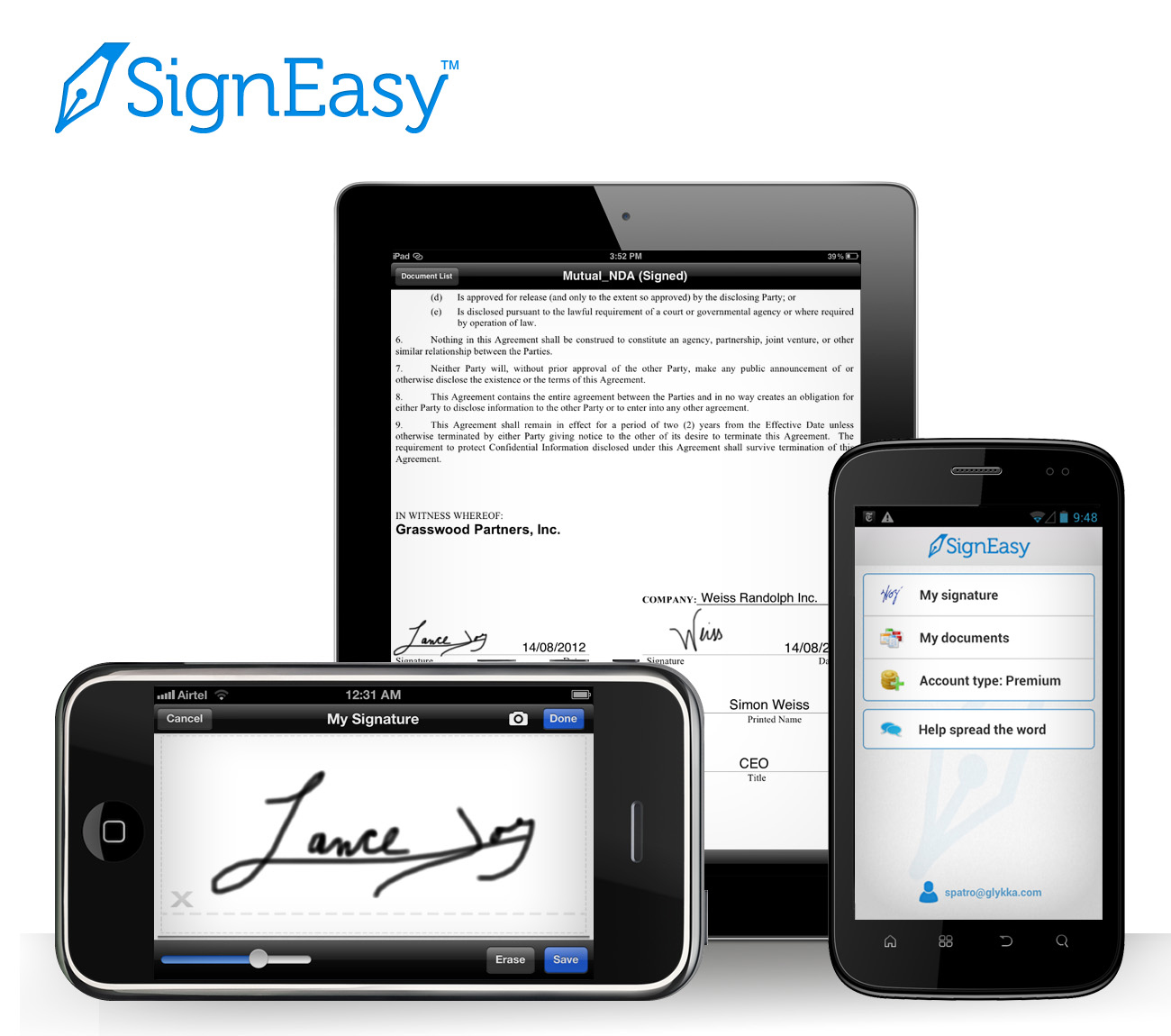
SIGN
Once you’ve got your “paperwork” in front of you on your phone, tablet or other gadget, sign the document using a stylus or your finger. (Don’t turn this into a blonde joke; don’t use a real pen.) I suggest using a narrow-tipped stylus so that your signature will look more “real” and reflect the types of signatures on other documents you’ve signed, just in case there are any legal questions later on.
The app will let you adjust the color and size of your signature to your preferences, either on an ad hoc basis or to create a default. You can also use the security settings to password-protect your signature so nobody can steal your John or Jane Hancock.

Complete your document, as necessary, with your initials, the date, any additional text, your company logo and more. You can also insert buttons and checkmarks on the iPhone/iPad version (but not on the Android or Blackberry versions, so far).
Any given document can be signed by up to three signers, including the account holder. If you’ve got a whole board or committee needing to sign off, there’s a slightly kludgy work-around where you get the initial three signatures, and then you reimport the finalized document back to SignEasy and repeat the process.
Offline signing is supported, so you can sign multiple documents and save them as drafts until you’re able and/or ready to send them.
Signatures created with SignEasy are only stored on the mobile device where they are created, never on the server. Signatures “pass through” the server, along with all the rest of a document’s contents, only when users generate the final signed document.
SEND
Email the signed document to whomever needs it, CC it to yourself, or tuck it away in your digital filing cabinet (Dropbox, Evernote, yadda yadda).
PRICING
SignEasy is a free app, and is available for iOS, Android and Blackberry platforms. You can sign up to three documents for free each month, too. If you want to sign unlimited documents each month or have cloud storage integration, there’s an annual fee of $29.99 per year for the premium package — about the cost of 65 First Class postage stamps or one or two overnight deliveries. Less frequent users can purchase pay-as-you-go document credits, where $4.99 gets you ten sign-and-sent documents. These plans are designed for individuals/single professionals only, so if you’ve got a whole staff looking to use this, there’s a volume licensing schedule for business and enterprise level usage.
Do you use an electronic signature program or app? Do you have a favorite? Please share your thoughts and concerns in the comments section, below.



Follow Me