Archive for ‘Paper Organizing’ Category
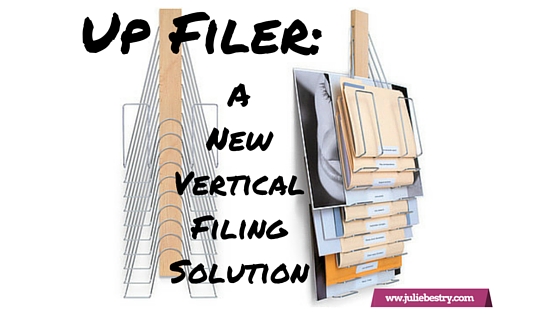
Up Filer: A New Vertical Filing Solution
Got paper?
Of course you do. And most of your papers for your life and work probably live in some typical places: standing up in file folders in desk-top file boxes or step risers, or hidden away in filing cabinet drawers, or flat on your desk (and maybe piled all around it), with whatever is larger and/or on top obscuring whatever is below.
If you have lots of flat, non-bulky paper items, perhaps you’ve invested in a flat filing cabinet, with a variety of drawers to allow art projects, historical documents, and architectural designs nap in relative obscurity, often ignored or forgotten.
 Or maybe you’ve embraced the vertical approach with creativity — have you piled a bunch of related papers on a series of clipboards and hung them on your wall?

@2013 ASpareAndAPairDIY.com
The problem is that many people find that it’s fairly hard to gain purchase on your projects when they are hidden away. If you’re in a communal office setting, sharing resources and working on projects requires that everyone can have access without having to knock on Joe’s door and interrupt a meeting (or his tearful third-fight-of-the-week with his sweetheart) just to get the updated specs on the current blueprints. While it may seem like more and more of what we do is digital, there is still so much flat, tangible stuff and it needs to be easily stored and fairly accessible.
A new solution from Denver-based Westerville Design is a cross between a file step-riser and an on-the-wall clipboard, with a dash of the old-fashioned library newspaper rack and a soupçon of inventiveness.
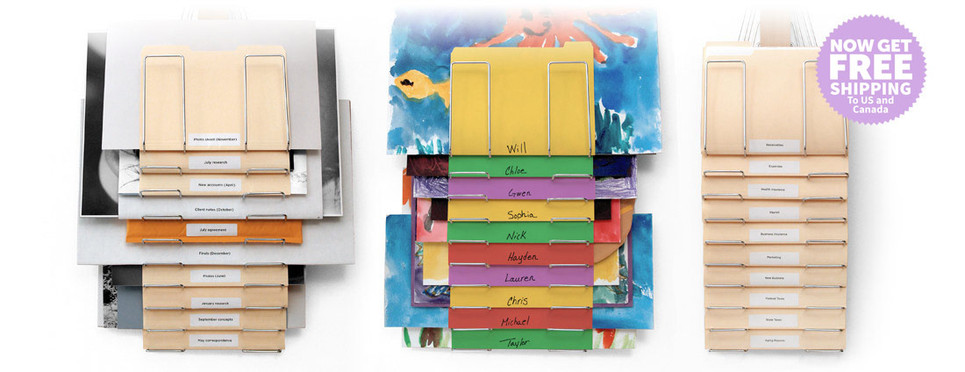
The Up Filer™ Original Vertical Wall File
Each Up Filer™ unit has ten nickel-plated steel hangers designed to hold whatever flat content you need to keep off your desk, like:
- file folders
- blueprints
- design layouts
- photos
- newspapers (remember those?)
The central spine of the Up Filer™ is made of solid maple hardwood, and the full size of the contraption, spine and hangers, combined, is 11.5″ wide x 34.5″ high x 2.5″ deep (29.2cm x 87.6cm x 6.3cm).
You don’t have to limit yourself to uniform height, weight, or thickness of papers or folders. Westerville says both the thickness of the content and the width can vary greatly (though they’ve not provided maximum measurements). The site notes that the height of the content depends on the thickness, but can measure up to approximately 16.5″ (42 cm) depending on the thickness (just as when too-thick file folders tend to stand a bit too tall in a hanging folder, beyond a certain point).
The Up Filer™ Original runs $149.99 and comes with a 60-day money-back guarantee.

If you’re looking for something with similar capabilities but a little more panache, Westerville Design has you covered.
The Up Filer™ Bamboo Vertical Wall File
The Bamboo version conforms to the same measurements and specifications as the original version, but adds environmentally friendly sustainability with style, and you can select one of three colors (arranged from lightest to darkest)
- Natural
- Light Caramel
- Caramel

The Up Filer™ Bamboo runs $169.99.
Westerville Design is currently offering free shipping on both versions of the Up Filer™ to customers in the United States and Canada.
Why is the Up Filer™ better for some flat paper and storage displays?
- It doesn’t matter how small or large an item is — the design ensures that it won’t obscure what’s behind it, and it won’t be obscured by what’s on top of it.
- The Up Filer™ saves precious horizontal space and makes use of the always-forgotten-but-so-magical vertical space. The Up Filer™ is wall-mounted, so your flat items get up and out-of-the-way of your workspace.
- It’s easy. The spine of the Up Filer™ holds the hangers, and the pivoting hanger design makes it simple to remove or add items. Just lift a hanger to pop something new into the system or grab what you need.
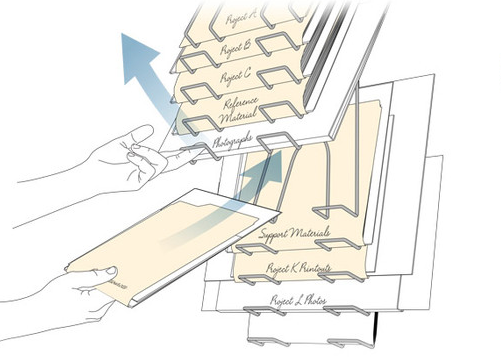
The Up Filer™ system is designed so you put labels at the bottom of each item. It may be unusual at first to see labels at the bottom, but it lets you quickly scan your eyes down the center and see everything at a glance. Nothing will be hidden or forgotten.
In the words of the people of Westerville Design:
It quickly became obvious that it wasn’t just good for designers but would be perfect for engineers, architects, fine artists, teachers or anyone who needs a filing system that keeps all the important stuff visible and at your fingertips.
Not having been able to examine the Up Filer™ up-close-and-personal, my sense of the drawbacks is limited to a few key items:
- The price is pretty up there. Granted, a flat file cabinet is even pricier, but most people and businesses are more likely to opt for a less gorgeous and more cost-conscious storage+display solution.
- Installation/mounting shouldn’t be difficult, but if you’re all thumbs, or have a cubicle, or your home office walls are really just flimsy sheet rock, the stability of this solution may not be adequate.
- Capacity is limited. Each unit has only ten hangers, and thus holds only ten “items,” albeit those that can get fatter or larger than what you can put in a filing cabinet or on a desk-stop step riser.
To get a sense of how the Up Filer™ works, peek at this short (and silent — seriously, none of that common plinking ukulele soundtrack) video.
Of course, if you like vertical paper storage solutions, the Up Filer™ isn’t your only option. At first, I recalled the Rackit File, a wall-mounted hanging file solution I reviewed back in 2011 in Paper Doll Adjusts the Vertical Hold: Space Saving Filing Solutions. (And, of course, that post is full of more portable approaches to vertical filing.)
So, readers, on the up-and-up — would you give the Up Filer™ a try?
Paper Doll’s 16 Ways To Organize Your Money In 2016 — Part 4

How have you been doing on your money-organizing efforts so far? To recap our prior posts:
- Paper Doll’s 16 Ways To Organize Your Money In 2016 — Part 1
- Paper Doll’s 16 Ways To Organize Your Money In 2016 — Part 2
- Paper Doll’s 16 Ways To Organize Your Money In 2016 — Part 3
we’ve covered pulling your credit reports and credit score, tracking expenses, and organizing your financial information. We also looked at accessing your Social Security data, planning for retirement, organizing your way out of debt, lowering your interest rates, and so much more. Today, we’ll do our final roundup of ways to organize your money in 2016.
13) Make your money make money.
Credit card marketing often promises cash back just for using a specific card, but usually it’s category-specific and requires careful monitoring. This month or quarter, you’ll get cash back on groceries (but most don’t include groceries you buy at Walmart Supercenters or Costco); next time, it might be department stores. Make your purchase within the window but on a weekend, and you might have it processed after the window closes on the following Monday, and you’ll get no cash back at all! It’s a pain to periodically register for cash back categories and remember which cards earn you money on which categories in any given month or quarter.

My favorite tool for getting cash back while shopping online is Ebates. (Note: that’s an affiliate link, and if you register with my link, I may get some brownie points; feel free to just type Ebates.com into your browser if you prefer.) Here’s what I said about Ebates back in 2014:
Ebates rocks! Imagine if every time you walked into your favorite store, a doorman slipped you a tip.
Ebates began as a shopping portal. You clicked on the name of the online store, were taken to the store’s site, and any purchase you made gave you cash back. Now, it’s even easier with the Cash-Back Button installed in your browser. Shop online as usual, and Ebates gives you a little on-screen alert that if you make a purchase at that store, it’s worth 3% (or 5%, or whatever) back. Click, which reloads the page and through the magic of cookies (the non-edible kind), Ebates knows you bought something at whatever store, and then you get a cash-back check. Apple’s the least joyous — you only get 1% back; the magazine subscription company I use yields 15%. Most are anywhere from 2-10%, with all sorts of extra bonuses and discounts. The Ebates app for iOS and Android has deal alerts and scan-and-compare features.
I keep waiting to hear that there’s something secretly malevolent about Ebates, but after using it for years, it’s all still good. But here’s the main thing — there’s no work (beyond signing up for the account). How’s that for organizing your finances and time management?
I like Ebates, but there are definitely other popular “cash back & coupon” shopping programs, including:
The exemplary personal finance site, Wise Bread, has even written 30+ CashBack Sites to Earn You Thousands Per Year, and you may also want to consult CashbackHolic, a site that purports to compare and contrast the features at various cash back sites.
Even if you don’t shop online much, or even at all, there are other options for getting cash back when shopping at stores. For example, I’ve recently started using the Walmart Savings Catcher app.

Every time I shop at Walmart, I snap a picture of the barcode on my receipt. Walmart’s magic computers keep a record of what I’ve purchased (yes, I’m completely giving up my retail privacy) and when any item’s price goes down, I get cash back applied to my account, which I can receive at any time, or “let ride” and pile up. I use the free iOS Savings Catcher app, and you can get the Android Savings Catcher app in the Google Play store.
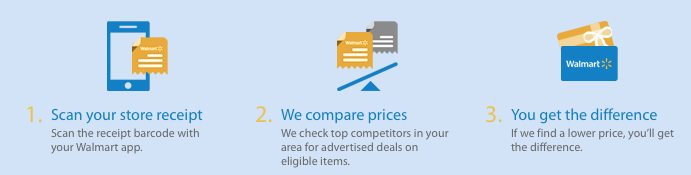
However you shop, remember that cash back programs only make sense if you were going to buy the items anyway. Otherwise, you’re just giving yourself a tawdry excuse to amass more clutter, and of that Paper Doll does not approve!
14) Organize how you get paid.
Have you ever tried to split a check among four people when three only have credit cards with them? Sure, you can ask the server for separate checks, but as many National Association of Professional Organizers members learned in Los Angeles at our 2015 conference, “separate checks” just aren’t part of some types of restaurant culture. Many people nowadays are cashless — they swear by Apple Pay or their debit cards, and nobody seems to carry a checkbook anymore. So, you end up with the one or two people best at math with their heads down, pencils in hand, trying to calculate the check and figure out who will pay for whom and how everyone will get even.
A few years ago, the first answer that would have come to mind for a quick transfer of funds was Paypal. All you need is someone’s address and you can send a request for funds, and someone can pay you from her Paypal account or from a credit card. If you tell Paypal it’s personal rather than business, there’s no fee attached. But for a lot of people, Paypal is so 2013. Too many hiccups — frozen accounts, slow transfers, etc. — have left some people uncomfortable with it as a personal money-sharing solution.
The word on the street is that the young folks — those Instagramming, What’sApping, SnapChatting millennials have been using Venmo for quite awhile. Download the app, sign up for an account using Facebook or your email address, and send funds securely using the money you store in your Venmo account, or directly or via debit card from your linked bank account.
But I do have (quite a few) words of warning about this beloved app. Venmo is owned by Paypal, so if you have philosophical issues with the parent company, Venmo may not be your ideal solution. Worse, from my oldster perspective, is that Venmo is very public; your linked friends can all see one another’s transactions (of at least who paid whom, if not the actual amounts). For a generation of share-everything types, that might not be a problem, but some of us prefer a bit more discretion. Finally, some people have been defrauded by scammers taking advantage of Venmo’s lack of immediacy in financial transfers. And Venmo’s customer service is, at best, lackluster.
My favorite money transfer option is Square Cash, at the adorable URL Cash.Me, which I learned about from my colleague, Deron Bos when I hired him for some computer organizing support for my Mac.

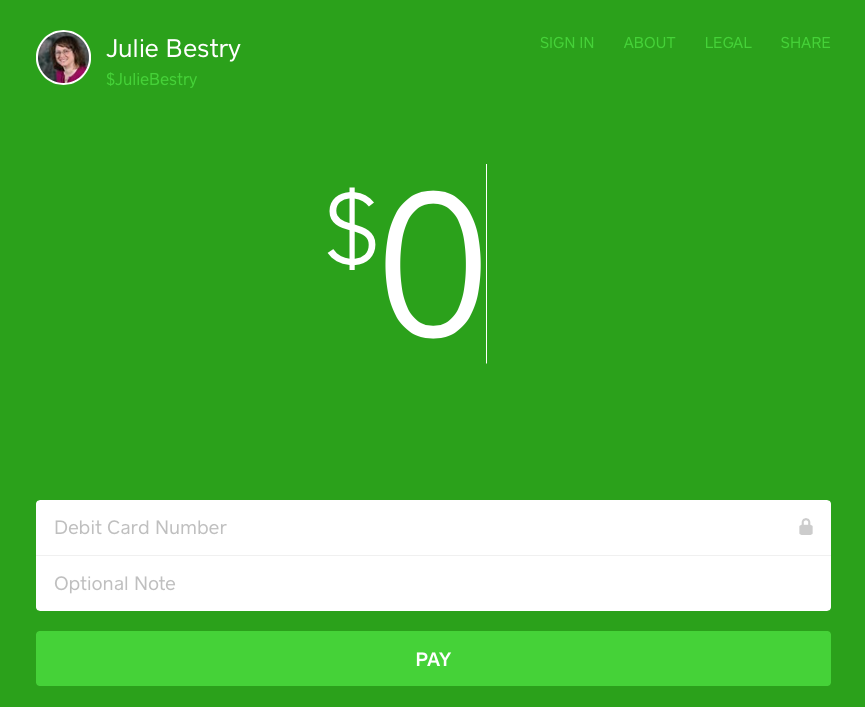
SquareCash is really designed more for people in business, and charges the recipient a small 2.75% fee, but that’s generally smaller than the merchant fees associated with accepting credit cards. [Editor’s note: Deron has pointed out, rightly, that you can make personal transactions at no charge.] Deposits hit your bank within minutes, and it’s easy for clients to pay via your “cashtags.” For example, if you wanted to send PaperDoll a tip for a fabulous blog post, you could just go to https://cash.me/$JulieBestry, enter the amount, your debit card number, and an optional note, and I’d get the money. It may not be worth it for getting $4.95 for sharing a dessert with a pal, but it’s an easy way to pay your babysitter or dogwalker.
And if it’s the math, rather than the payment, that gets you down, there are a number of splitting-the-check apps out there. For example, Divvy (0.99) lets you snap a photo of the bill, drag each item to the person who ordered it, and the app will determine how much each person owes. Tab (free) works similarly and calculates the tax and tip. And Billr (0.99) can both identify who ordered what and split shared items (like a bottle of wine) among the group.
15) Use technology for money-saving apps — judiciously.
Throughout the course of this series, we’ve looked at a wide variety of apps for every use case. There isn’t a day that goes by that someone doesn’t tweet about a new app for making sense of your finances — getting discounts, finding better deals, organizing receipts, logging charitable donations, and so much more. In the last week, I learned about a handful of new apps:
Hopper is a spam-free, pop-up-free app for anticipating when the best price for a flight will be available and then booking it right from your phone. Tap in the flight preferences, and Hopper tells you whether to buy now, or watch and wait, and then it sends you a text notification when it’s smart to purchase the ticket. So, at no cost to you, there’s an app that does the research for you, offers predictive advice, and keeps you from losing money by buying too early or waiting too long.
What could be bad? Well, probably nothing, especially if you have flexibility for booking. But if you’re the sort of person to wait until the last minute, or ignore your texts for days on end, or put all your spending eggs in one basket (and not set aside funds or available credit), this app might be no better for you than plunking down your money when you actually have it and going about your business, knowing ticket buying is one less item on your task list.
Lesson: know yourself, your needs, and your productivity style. Don’t depend on apps to counteract your procrastination habits or be error free. Trust (your apps) but verify.
Penny is a new and nifty app that takes the financial dashboarding efforts of sites like Mint and makes it all very pretty. Your transactions are categorized, analyzed, and Penny texts you gorgeous, personalized charts regarding your spending habits.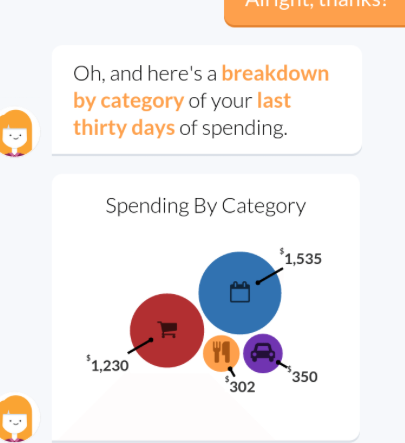
Knowledge is power, but only if you act on it. If your mother tells you that you’ve spent 90% of your income on beer and mascara, you’re likely to block it out after a while. The same with an app. If Penny nags you similarly, it’s only to your advantage if you act on the information the app gives you.
Lesson: Use the information you get to work wisely.
Trim is an app that evaluates all of the recurring subscriptions (Hulu? Dollar Shave Club? Netflix? Apple iCloud?) on your registered credit cards and checks in with you by text to remind you that you’re spending $25 a month on X and asks if you want Trim to cancel it for you. Trim cancels most subscriptions for free, and charges a $6 fee for hard-to-cancel subscriptions. (One imagines Comcast fits that category.)
Lesson: Sometimes, there’s really no downside to a tech solution. You have to decide if you’re comfortable with giving yet another company access to your financial information, though, and that’s something with which we’re all struggling.
16) Get to know money-smart people.
Paper Doll has always been fascinated by personal financial management tools for organizing financial information and activities. I believe that the more advice you get from people who are smart about money, the more alternatives you have at your disposal to spend, save, invest, and enjoy your own money. Here’s a roundup of some of my favorite bloggers, podcasters, and otherwise cool places to visit on the web for smart financial advice, along with samples of their wise words.
Read what smart people have to tell you:
- Laura Adams — Your Emergency Fund: 5 Tips To Build a Financial Safety Net
- Money Girl (Also Laura Adams) — 6 Essential Habits of Financially Health People
- Wise Bread — How To Do Money Like a Grownup
- Consumerist — Does Paying With Cash Increase Your Emotional Investment In A Purchase?
- Top 100 Personal Finance Blogs (curated by Wisebread)
Check out the agencies dedicated to helping you keep more of your money:
- National Foundation for Credit Counseling (NFCC) Financial Education
- Consumer Financial Protection Bureau (CFPB) — Adult Financial Education
- MyMoney.gov — Financial information for teachers, researchers and the public
Listen to smart people talk about money:
- Planet Money — Put a Chip On It
- Payoff’s YouTube Channel — Giving Pays Off
- Payoff’s Financial Personality Quiz and Payoff’s Financial Personality Comparison Guide
- The Top 15 Personal Financial Podcasts to Follow
As we end this series on organizing your finances in 2016 and near the middle of the year, please remember, just as organizing it’s not about the stuff, it’s about the people who own the stuff, organizing your finances is less about how much money you have, and more about how you can live your financial life happily and without stress. Spend more of your money on experiences, and then save and invest your money so you can do the things you enjoy with the people you love.
Paper Doll’s 16 Ways To Organize Your Money In 2016 — Part 3

Whether it’s that shiny nickel that burns a hole in your Garanimals pocket at age 5 or the wallet overflowing with wrinkled receipts or a hot mess of old abandoned 401(k)s that have never been rebalanced or rolled over, money can be a source of pleasure or pain. This series on organizing your finances is designed to give you some actionable ideas for gaining more control over your money in 2016. Review the first nine strategies in Part 1 and Part 2, and continue with today’s money-organizing tips.
10) Organize yourself out of debt.
“Annual income twenty pounds, annual expenditure nineteen [pounds] nineteen [shillings] and six [pence], result happiness. Annual income twenty pounds, annual expenditure twenty pounds ought and six, result misery.” ~ Charles Dickens, David Copperfield
It might seem as though getting out of debt would have little to do with organizing — perhaps you think it’s solely a matter of making more money or spending less. In theory, both of those things should help you get out of debt; in reality, humans are irrational. To get ahead on your debt repayment, you’ll need to add a little rationality to your approach:
- Stop paying only the minimums — Recognize that just because your bill tells you that $34 is the minimum you have to pay doesn’t mean that’s what you should pay. The less you pay each month, the more interest you’ll pay over time, and the longer it will take you to pay off your debt. It’s in each lender’s interest for you to pay as little as possible beyond the minimum, because it keeps you indebted (and them in business), and because the minimums are so small, they seem inconsequential, leading you to take on more debt. Obviously, your goal is to pay off all unsecured, revolving debt each month; if you can’t, at least throw as much money at your debt as possible.
- Let your right hand know what the left hand is doing — If you have money in savings or investments earning low interest, but credit card or other debt at high interest, consider applying the former to the latter. If you’re earning less than 1% on $1000 but racking up interest at 13% on $1000 in credit card debt, you are losing money. Of course it’s always important to have a liquid (that is, accessible) financial cushion for emergencies, but letting debt pile up each month while low-earning funds wallow, you may be penny wise but pound foolish. Make sure your savings/investing brain is talking to your debt-payment brain by getting a reality check; use the National Foundation for Credit Counseling “Debt or Invest” calculator to see where your money will best serve you.
- Make sure your head and heart converse — Being rational is important, but if you’re in a constant struggle against your instincts, it will be hard to stick to a repayment plan. Pull up your most recent statement for every credit card and take note of the interest rates. If you have three credit cards, for example, you might have three different amounts at three different rates. Now that you’re not paying merely the minimum, you might be tempted to take the total amount you’ve earmarked to pay off debt and divide it equally among those three credit cards every month. Not so fast! There are better methods that work, either logically or psychologically, and both have advantages and disadvantages.
The Snowball Method — With this strategy, you pay the minimum on all debts except the smallest, and throw all the rest of your budgeted debt-reduction funds toward paying off that smallest debt. Armed with this bit of success, you’ll rebalance your efforts and take all the money you’d been putting against the smallest balance, and now apply it (plus what you were already applying) to the next-lowest balance, and so on. This method has a psychological reward — by focusing on the smallest debt owed, you’ve got something in your “win” column to motivate you to stay committed to the plan. But it’s not particularly logical — by focusing on balances rather than interest rates, your total debt keeps growing.
The Debt Avalanche Method — Line up your debts by interest rate, pay the minimum toward all but the highest-rate debt, and put all of your available money (salary, birthday money, funds raised from selling your books or your plasma, etc.) toward the highest rate debt. This method is logical, but it lacks the immediate sense of victory of the Snowball Method.
Still not sure how much to put toward your individual debts? There are some great no-cost debt calculators available to help you, including:

Mint — If you’re using Mint as a complete financial dashboard service, its Financial Goals feature is ideal for paying off specific debts — one or many. Once you sync the service with your accounts, you can select which accounts you want to include in your debt payoff goals. Mint will already know your interest rate and minimum payment, and will display how your payoff options will impact interest owed over time.
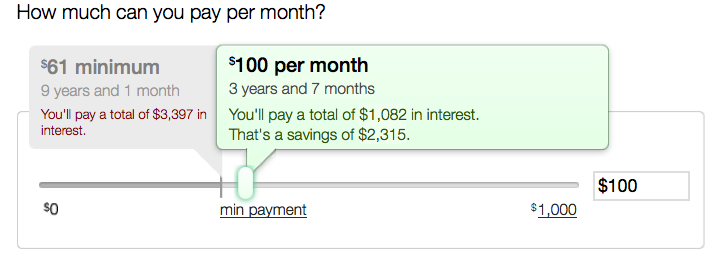
As you make monthly payments, because Mint will already be tracking your money, the system will display how you’re progressing toward your monthly goal (telling you, for example, that you’ve paid “$73 toward your goal of $200 for the month) and how you’re progressing toward your overall goal.
If you have multiple types of debt, like personal debt, business debt and medical debt, you can create multiple goals and view them separately or on one screen. However, note that the goals element of the dashboard service is only viewable from a browser, not from the Mint app.

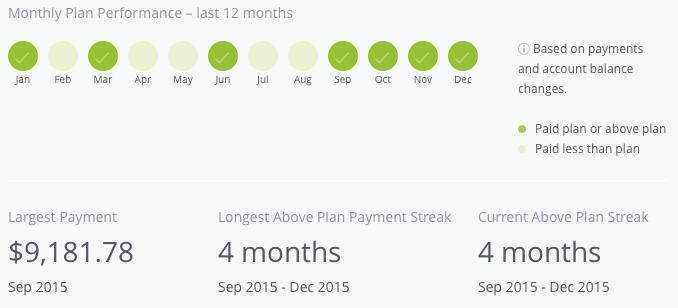
Ready for Zero — As with Mint, once you sync all of your accounts, Ready for Zero knows your account details: balance, minimum payment, interest rate, etc., and auto-updates when you make payments, add debt, etc. It has similar sliders for setting your approach to your goals, but Ready for Zero’s app seems to be more seamlessly integrated with the browser version, and overall, offers much more variety of display views and reminders. If visual feedback helps you stay motivated, this is a great option.
Of course, if you’re experiencing crushing debt, organizing your information and game plan is just one aspect of financial recuperation. Debt counseling is an important option, but there are a variety of predatory and/or irresponsible so-called debt counselors out there. Begin your search with the National Foundation for Credit Counseling to find an NFCC-Certified Consumer Credit Counselor.
11) Lower Your Interest Rates
You can’t walk into Target and tell the cashier you’d like a discount on toothpaste, or warn the front desk clerk at your hotel that you’d prefer to pay only one-third the hotel tax. You can’t just ask for better deals! Or can you?
There’s little chance of getting your bank to bump your measly .087% savings account interest rate up to 5%, let alone double-digits. That’s just not how banking works. But credit card interest rates are more complex. Sure, the rate you’re charged is dependent upon your credit history, credit score and earning power, but the credit card industry is highly competitive. If you have an unblemished payment history and have been a solid customer, you can try to request a better interest rate.
First, log into your online account for each lender and see if there are already options for things like changing your payment date, requesting a higher credit limit, or getting a lower interest rate. (Don’t get a higher limit for ego’s sake; you don’t need it.) You may be able to handle this with a few clicks. If not, call your lender, be cheerfully polite, and once you’ve identified yourself with your name, account number and all matter of ridiculous levels of proof, tell the representative something like:
I’ve been a loyal customer of [credit card company], pay my bills on time and have been generally happy, but I’ve been receiving offers in the mail from other credit card companies with lower APRs. To be as financially responsible as possible, I want a lower rate on my card. Before I cancel my card with [your company] and switch, I wanted to see what you could do to help me.
And then shut up. You might get a grumpy rep and a rejection, or you might get good news. Either way, you’re out nothing except your time.
If requesting a change in interest rate from your own lender doesn’t work, you can always initiate a balance transfer, either to one of your other cards or a new credit card, for 0% or a very low rate, but balance transfers come with their own caveats:
- There are fees attached, usually 2-5% of the value of the transfer; this fee is added on top of your transferred debt and is subject to the same interest rates that apply to the transferred amount.
- These are short-term interest reduction periods, usually for 9-18 months; any unpaid debt as of the end of the transfer period will be charged interest at whatever the card’s normal rate might be.
- You should only transfer debt to cards that already have a zero balance, and do not charge new purchases on the card until the transferred debt is paid off. Otherwise, with multiple concurrent interest rates on one card, your progress towards repayment will be muddied.
12) Ask and Ye Shall Receive…Better Deals and Discounts
If you’ve ever seen those long, convoluted blog and Facebook posts about extreme couponing, you may think you don’t have what it takes to lower your costs. However, getting good deals doesn’t have to be complicated. Whether you’re trying to buy something at a lower price or reduce the cost of a service for which you’re already paying, try these options:
Let your fingers do the walking. The next time you’re going to buy something online, stop at your favorite search engine first and type in “[name of store where you’ll be shopping anyway] discount” and you’ll be amazed at the number of coupon code sites that will pop up, including:
From free shipping to percentage discounts, it often takes no more than a few extra minutes to find a rewarding promotional code to use at checkout.
Ask for a better rate. Using the same kind of script described above for lowering your interest rates, call your phone or cable company, or similar service provider, and explain that you’ve been a loyal customer for [X number of] years, have been offered discounts by other providers, or have seen lower rates and inducements the company has offered to new customers, and ask what can be done to keep you happy.
Ramit Sethi of I Will Teach You To Be Rich walks through how to have these kinds of conversations with confidence.
In 2014, NPR’s This American Life did an interesting segment on the concept of the “Good Guy” discount — and how sometimes, just asking for a price break can work. What could it hurt?
Threaten (politely) to cancel your service. This is the next level up from merely asking. It takes a little more aplomb, and may require you asking to get transferred to the Retention Department, but state your case, reference competitor pricing, and then be quiet. At first, they will inevitably try to up-sell you to services you don’t want or need. But stand your ground and it’s more likely that not that you’ll be offered six months or more of discounted service. I have one client who merely calls to cancel her satellite radio service every time she’s billed and achieves a discount in return for her few minutes of effort; with many of my clients, we set aside a “canceling” session a few times a year to see how many discounts we can get.
David Bach, better known for his Finish Rich financial advice empire, wrote a great book a few years ago called Fight for Your Money: How to Stop Getting Ripped Off and Save a Fortune. It’s a superior resource for developing the skills necessary to master a system that’s gamed in favor of large companies.
Too anxious to talk to reps personally? That’s OK, as you can use the same approach online. You’ll often find that if you go into your online account for an entertainment, dating, or gaming service (e.g., Hulu, Netflix, Match, X-Box Live) and “cancel” your account, you’ll get a pop-up notice offering a discount if you’ll keep your account active. Sometimes, the cancelation will go through, but you’ll receive an email within the day, inducing you to reactivate.
And, of course, you can put any of your newfound windfall toward debt-reduction or savings goals!
Next time, in the final post of this series, we’ll look at ways to organize how you get paid, how to make your spending habits boost your return on investment, and fun options to learn more about mastering your money.
Paper Doll’s 16 Ways To Organize Your Money In 2016 — Part 2

Your money has different personalities. Some just sit there like your college roommate’s freeloading boyfriend, drinking your milk and putting the empty carton back in the fridge. (Y’know, those investments you were talked into, but which have gone nowhere?) And some are delightful surprises, like friends who show up to drag you to the movies when you’ve had a bad day. (Think of that crisp $20 bill you find in your jeans pocket after doing laundry.) But your money won’t organize itself.
In Part 1 of 16 Ways To Organize Your Money In 2016, we looked at accessing and organizing the information others have about you in your credit report and credit score, and what you can do to improve your finances by tracking and making wise decisions about your expenses.
Today, we’ll look at more tips for keeping your money life in order.
6) Organize Your Financial Information
All the paper and digital information you have regarding your finances represents money going out (bills and statements for fixed necessities and variable luxuries) and money coming in (birthday checks from Grandma, your direct-deposit paycheck, investment interest and dividends). To keep control of your finances, to help you prepare your taxes, and to safeguard your financial future, it’s important for this information to be accurate and accessible.
The financial paperwork we receive or create usually breaks down into these sub-categories:
Outgoing Money
When you get a paper bill, you either tear off the stub to mail it back with your payment and keep the remainder, or you pay online and keep the whole statement/invoice. When I help my clients organize their financial information, we start by breaking the paper piles into categories:
- Monthly or periodic household bills (e.g., rent/mortgage, utilities, insurance, etc.)
- Credit cards statements
- Loans (e.g., home equity, auto, college, personal, etc.)
- Medical bills (which may be ad hoc or part of an ongoing payment plan)
- Anything else being paid on a regular or predictable basis (e.g., piano lessons, tuition, personal chef, professional organizer, fitness trainer) for which you wish to keep careful records
In this case, your basket is your financial information filing system. Usually, I advise this approach:
- Label (and alphabetize) tabbed interior folders within each sub-category. It doesn’t matter if you use generic terms (cable, power, water) or company-specific (Comcast, CityPower, Valley Water Authority) — just be sure to choose labels that reflect how you think. For credit cards, if you have more than one card from any one issuing company, you may want to put the last four digits of the card number on the label (Discover-1234, Amex-9876), just to help you file quickly. If your system is complicated, you’ll find excuses not to use it. Stay simple.
Group related sub-categories in hanging files in a filing cabinet, milk-style file crate, or desktop file box. - File the backlog in reverse-chronological order.
- File paper bills as you pay them.
Alternatives to file folders are three-ring binders and accordion folders. However, binders require three-hole punching of papers, and each additional step leads people to procrastinate. Accordion folders can work for college students and those with very few expenses, but a system you can expand as your financial complexity increases will be easier to maintain.
If you get all your bills and statements digitally, there’s no need to print them out; just set up a new behavioral system to acquire the information, label it, and store it.
 You can manually download each statement, or use FileThis, an app/service which, once linked to your account, fetches your online statements and bills so you can pay them and store them as you see fit. Let everything live in the FileThis Cloud, on your computer, or in Evernote, Box, Dropbox or Google Drive. (FileThis ranges from free to $5/month, depending on your needs.)
To create a uniform digital system for labeling (for example, bill name and date, like Verizon-2016-1). Some people prefer to keep all of the digital invoices in one online folder and use search to find what they want; others (like Paper Doll) prefer a folder hierarchy system that matches the one described above for paper.
Finally, while some people refute the idea of maintaining bills once they’ve been paid, I suggest it for a couple of reasons. First, many companies only provide access to a limit period of billing, sometimes only a year or six months, making it difficult to source errors or track information. Second, for those who tend to be disorganized with their finances, a tangible (paper) system yields a greater sense of control.
Incoming Money
Incoming revenue information may involve pay stubs from employment, alimony or child support payments received, Social Security income, disability payments, IRA disbursements, personal loan repayments (to you), lottery winnings, and stock dividends (if not part of a dividend reinvestment plan). If you’re regularly getting money from any source, or have gotten a large lump sum for something other than employment, make a folder (or folders) to maintain records until tax time.
Transitional Money
The above categories talk about what you are doing to your money, but others show what your money is doing, with or without you. Bank statements for checking, savings, and trusts represent collections of funds in transition. They may accrue interest or have fees associated with them, so take time each month to make sure these accounts reflect what you think they should.
Brokerage statements contain investment information. Sort these by investment type: retirement, college savings, goal-related (like a vacation fund), first, and further sub-categorize (and alphabetize) by company or specific investment. So, in the Retirement hanging folder, you might have interior folders for your 401(k), an old 403(b) that remains in place, IRAs with Fidelity or Vanguard, and so on. Each account should have its own folder.
Simulated Money
Some of your records represent money that’s not real yet. These files might include quarterly or annual statements reflecting either regular or atypical benefit plans for your job, such as if you’re vested in an employee stock ownership plan. If you’re not particularly active in managing this information, maintaining it in digital form will keep you from getting overwhelmed.
You can also have a folder in this section for gift certificates, gift cards and store credits so you can keep track of the money value owed to you. If you prefer to keep them portable, a Card Cubby is a nice alternative to mixing them into your financial filing.
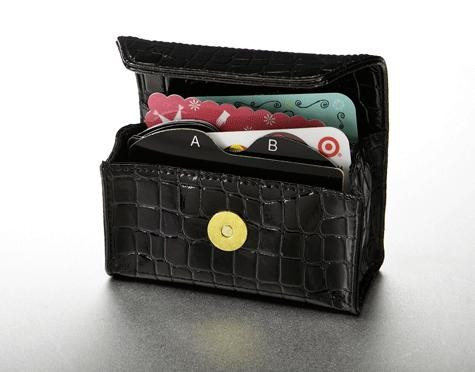
Keep stock certificates, bearer bonds, or other papers of significant value in your safe deposit box or fire-proof safe.
7) Create Tax Prep Folders (for the tax year just ended and for the one to come)
Depending on your financial situation, one folder per year might suffice; if your financial life is complex, you might want a handful of folders for each year’s incoming tax forms, charitable donation receipts, medical expense annual summaries from your insurance company, etc. Create a safe place for incoming papers to land and you’ll be ahead of the game.
Any day now, you’ll start receiving official-looking forms (1098s to indicate interest income you’ve paid on certain loans, 1099s to show interest, dividends, and other payments to you, W2s from employers, etc.) to help you prepare your taxes for last year. To get an idea of the forms to expect, these tax-related Paper Doll posts will walk you through it:
Taxing Conversations: Organizing the Essentials & a New Tax Tool
Taxing Conversations (Part 2): Organizing Fun With Forms
Taxing Conversations (Part 3): Form-Free Organizing
Securing these documents (plus any items that pop up when you’re following the steps in #6, above) will make tax time run much more smoothly, whether you file on your own or use a preparer.
8) Organize a (Socially) Secure Future
Cleaning up your credit history will organize your past; getting a handle on your expenses, financial paperwork, and taxes will take the wobble out of your financial present. But what about your future? Banking (if you’ll pardon the pun) on Powerball isn’t going to do it.
There are numerous ways for minimizing taxes and maximizing your odds for a financially secure future, and if you don’t have one or more of the alphabet soup of IRAs, 401(k)s or 403(b)s, you should be talking to a financial advisor about how to get started. But whatever your retirement plan, there’s one program in which you’re probably already participating (unless you work for the railroads): Social Security.
Start by signing up for your online Social Security account, as I’ve been pestering you about since Paper Doll Makes a Statement: The Social (Security) Network.

If you haven’t yet signed up yet, go to the my Social Security website and click on Create An Account. Once you create your account, you’ll be able to track your earnings and verify that they’ve been properly reported (by you and/or your employer), and get estimates of your future benefits. If you’re already receiving benefits, accessing your account enables you to obtain a letter with proof of benefits (often needed for legal and financial purposes), change your address and direct deposit payment information, and manage your benefits.
If you have already set up your account, change your password! The Social Security Administration actually makes you do what you’re already supposed to do — update your password every six months. If you haven’t, it’ll prompt you to do so when you log in.
Speaking of Social Security, take your card out of your wallet or purse — you shouldn’t be carrying it around with you.
 As we talked about in What’s In Your Wallet (That Shouldn’t Be)?, in the wrong hands, your Social Security card is an invitation to identity theft and financial fraud. Memorize your number for when you have to unexpectedly fill in forms. (Really, it’s like a phone number, just nine digits.) Put the actual card in your VIP (very important paper) file system or in your fireproof safe, and only pull it out when you need it.
Can’t find your Social Security Card? Report it, especially if you think you’ve been the victim of identity theft, and then replace it.
9) Save for More Than Retirement: Cheating the Obstacles to Willpower
I know, I know. Saving isn’t sexy. But a beach vacation is. And not having to go into credit card debt to pay for next year’s Christmas presents is an idea that gets the blood flowing. But saving is difficult. Usually, in order to save money, you have to use up all your reserves of willpower to keep from spending it in the first place.
What’s willpower, really? Psychologists have defined it as the ability to delay gratification, resisting short-term temptations in order to meet long-term goals. But the more you delay gratification, the more worn-down and put-upon you can feel.
So, why not do an end-run around willpower? Automate! No, you don’t need to be a robot; you just need to take the ongoing decision-making (to put money aside) out of the equation. Make the decision once and be done with it.
Remember last time, in step #5, you audited your expenses and figured out what bills you could lower? Let’s say you lowered your monthly entertainment expenses by $18 and your phone/communication bills by $11, and maybe eliminated a few other ongoing items by about $15 a month. On their own, that may seem a pittance, but that’s $44 every month. Set up an automatic transfer from your checking to your savings account for $11 per week.
Of course, even if you haven’t identified ways to pare down your spending, as long as you’re not at risk of falling into the red, having small amounts automatically transferred to savings on a regular basis is a way to improve your savings rate without feeling you’re being denied life’s pleasures.
There are other automated savings options. Bank of America’s Keep the Change Program helps its customers save by rounding up each debit card purchase to the nearest dollar, and sequestering that extra money in savings but allowing you to track the movement of money via online banking. For example:
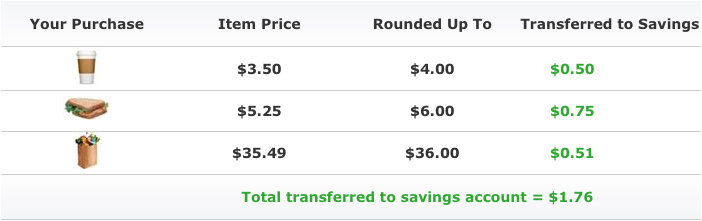
Prefer a little more tech support? The Digit web service works similarly. Once you link Digit to your checking account, it analyzes your spending patterns, predicts your cash flow, and transfers small but varying amounts of your money to your Digit account in an FDIC-insured bank.
You won’t earn interest, but whenever you want your money, just text Digit, and the money can be transferred back to you, so you could wait until you reach a benchmark amount, like $500, and then transfer that to savings.
Digit sends one text each day to let you know your new checking account balance; it can also text you how much your bank balance has changed over the prior two days, and can list all your debits from the prior day. The more you use it, Digit not only helps you save, but also gain more awareness of your spending habits. Isn’t that organized?!
Still to come in this series: organizing to get out of debt, streamline getting paid, using technology to achieve your financial goals, and more!
Paper Doll’s 16 Ways To Organize Your Money In 2016 — Part 1

Two of the most popular and enduring New Year’s Resolutions are to get organized and to save more and spend less. In honor of 2016, over the next few posts, we’re going to look at 16 ways to organize your finances with small, easy steps you can take today.
1) Pull your credit history.
How? Pulling your credit reports is easy. Just go to AnnualCreditReport.com and click on “Request Yours Now.” You’ll be prompted to answer some questions about things like your prior addresses or current or previous loans. (They really want to make sure it’s you, so think before you click.)
Because you’ll be supplying personal financial information, you want to pull your reports from a secure computer, preferably one on your own network, rather than a public computer. If you’d prefer to avoid the web altogether, you can call toll-free at 1-877-322-8228 to request your report, or download, print, fill out, and mail a paper form.
Why? Your credit report includes information that is used to determine interest rates on loans and mortgages, rates you’re charged for insurance, and even whether or not you can rent an apartment or get hired for a job. The best way you can be certain that creditors have properly reported your financial activities, not misconstrued someone else‘s honest activities as yours, and haven’t let bad dudes secure credit in your name, is to check your credit history.

You are guaranteed one free credit report from each of the three credit reporting agencies (Equifax, Experian and Trans-Union). You could just contact them individually, but the Fair and Accurate Credit Transactions Act (FACTA) of 2003 made it federal law to guarantee your right to access your report, for free, once each year.
Once you’ve convincingly proven that you are who you say you are, go ahead and print (or better yet, save a PDF of) your credit reports. And make a note on your calendar to check again next year.
When? You can choose to pull all three reports simultaneously once per year, or stagger them and pull one report from each agency whenever you like, perhaps every four months. While experts sayl that the staggered approach is more likely to catch an error quickly, most people are not diligent about remembering to pull their reports on a regular basis. If you’ve never pulled your credit history before, I suggest pulling all three reports simultaneously, familiarizing yourself with the formats, and then you can decide what you want to do going forward.
2) Check — and, if necessary, dispute — your credit history.
According to a Federal Trade Commission study, 20% of consumers have errors on at least one of their credit reports, and 5% have errors which could adversely impact them during the lending process.
Just as buying (and even watching) exercise DVD won’t help you achieve your resolutions to lose fat and gain muscle if you don’t actually do the workout, downloading your credit report is an exercise in futility of you don’t actually review it. Go through it page by page, line by line:
- Are there credit cards or financial accounts you never opened? (Note, credit card lenders often buy one another out, especially with store-specific credit lines, so be sure to cross-check account numbers to make sure something unfamiliar isn’t just the product of a buyout.)
- Are there addresses or places of employment that don’t pertain to you? (Minor errors, like misspellings, are worth fixing, but don’t necessarily require disputation. Correct them to prevent confusion in the future, especially when filling out forms where you have to jump through hoops to verify your identity.)
- Does it list liens or judgments against you that have no relation to your actual financial history?
- Is there information that should no longer appear on your history, such as a bankruptcy that is more than 10 years old?
If there are mistakes on your credit report, contact the appropriate credit reporting agency and the lenders in question to dispute the errors.
3) Check your credit score.
Although you’re guaranteed access to your credit reports for free, there’s no such promise for your credit score. You hear a lot about your FICO score, but different lenders access multiple scores to assess the interest rates they will offer you for credit cards, auto loans, and mortgages. You can purchase your individual credit scores from each of the credit reporting agencies, or buy bundled scoring from MyFICO.com.

LendingMemo.com
However, unless you’re getting ready to make a major purchase, you have a variety of free options to gain access to least one of your credit scores, which should give you a ballpark sense of your official creditworthiness. Barclaycard, Citi, Discover, First Bankcard, US Bank and others offer credit scores to customers on their web sites; Discover also provides credit scores on monthly bills. In addition, some banks and credit unions are offering free scores to customers as inducements for their loyalty, and CreditKarma, is a surprisingly non-spammy option for accessing your score.
In Paper For Your Plastic: Organizing a Better FICO Score, I’ve written about how understanding the makeup of the FICO score can help you improve your creditworthiness in the eyes of lenders. Since that post was written, new rules about medical indebtedness guarantee that unpaid medical debt will carry less weight than other types of consumer debt, and any medical debt eventually paid off will be removed from your credit history immediately, even if it had been in arrears.
4) Track your expenses.
With the advent of online banking, automatic transfers, and even mobile payment (like Apple Pay), it seems like nobody writes checks anymore. But that means people have gotten out of the habit of reconciling or balancing their checkbooks. It may seem to make sense — no checks, no checkbooks, but we still have checking accounts, and so whether they are paper or digital, I think we need check registers.
When we all wrote checks, we were forced to pay attention to where our money was going, but with all of those swipe-and-done transactions, we’re far less likely to notice how much money is draining out of our accounts until the money is gone. And with automatic transfers, we tend not to look too closely at the bills that come on a monthly basis, so we may not notice errors (fraudulent or otherwise) until it’s well past the date they might be reversed.

At the very least, set an alarm or alert on your computer, phone or tablet to remind you to check your bank account and credit card statements monthly, before manually paying or allowing automatic payments to go through. (Weekly would be better, if you hope to catch fraud.)
Write down or track everything you spend during this first month of getting your finances organized. If you’re just getting started with tracking expenses, it will help to do a little bit every day. When you’re sitting in front of your computer to authorize a payment, mark it in your paper checkbook register. (Your bank will give them to you for free.) Yes, it may seem old-fashioned, but the observer effect notes that the act of observation changes the phenomenon being observed. So, just as Weight Watchers has proven that journaling calories and activity has a positive impact on weight loss, you’ll likely see that the mere act of tracking your expenses to organize them will improve your finances.
When you come from a day of shopping, pull the receipts out of your wallet, and mark anything that drafted from your checking account in your register, and put your credit card receipts in an envelope for easy access. If you follow along daily, it shouldn’t take more than five minutes (unless, of course, you’re a BIG spender), but the value will be returned to you.
Periodically, by checking your online accounts, and certainly once your monthly statement is generated (whether on paper or digitally), check in with your finances:
- Balance your checkbook register, even if you haven’t written actual checks in eons.
- Check receipts against your online bank and credit card statements.
- Visually scan your credit card statements as soon as they arrive, and call to verify anything that looks hinky.
Once you’re familiar with your spending patterns, especially if you rarely use cash, it’s also a great idea to set up an online financial dashboard service with web- and app-based trackers like Mint. But to start this process, you’ll pay more attention to those little drips and drops of funds if you put pen to paper. (We’ll talk more about financial dashboards in the upcoming posts of this blog series.)
Being organized doesn’t just mean sorting the paperwork and digital receipts. It means knowing what you have and where you have it, keeping what works and getting rid of what doesn’t suit your goals.
5) Audit your ongoing expenses.
Clutter piles up when we don’t think about whether we even want or need something. Financial clutter piles up the same way. No matter what you pay monthly, quarterly or annually for a service, if you don’t think about whether you still want it (or want it at that price), your expenses are likely to get out of control.
Comb through your digital and paper records, and consider your subscriptions and ongoing purchases. What purchases duplicate what your household already buys? What could you replace with a better deal? What could you eliminate altogether? Consider the following categories:
Video: Do you have Amazon Prime, Netflix, Hulu, and cable/satellite? Are you watching enough of each to justify keeping them all? (Paper Doll is a huge TV fan, but even I find it’s sometimes worth my while to pause a subscription for a few months when life is too busy to catch up with all my stories.)
Audio: Do you have satellite radio in your car, like Sirius XM? What about subscriptions to Apple Music and premium streaming music via Spotify or Beats? If you already have Amazon Prime, could you scale back on paid streaming? Could you bear to listen to commercials and drop from paid streaming to free versions?
Reading: Do you have ongoing (digital or paper) magazine and newspaper subscriptions that you never get around to reading? Do the magazines pile up until you guiltily toss them in the recycling bin?
Communication: They’ll have to pry my landline from my cold, dead hands, but for some people, the switch to mobile-only makes good financial sense. Also, have you checked to make sure your cell phone plans line up with the number of minutes, texts, and data you use?
Computers: From Evernote to Dropbox for storage and collaboration to the various plugins that keep a blog running to software and app subscriptions and upgrades, there’s a truth to be told. Just like with some relationships, when it comes to some digital loves, the bloom is off the rose.
Gaming: Paper Doll doesn’t judge. (OK, she does, but…) If you’re actually playing and enjoying the various MMORPG or online or interactive games for which you pay, more power to you. But if your digital ranch has long gone untended and you haven’t logged in for a long while, it might be time to cull the herd.
IRL, or In Real Life: Do you belong to a gym, associations or clubs? Do you go often enough to make the fees expenses worth what you’re paying? If you haven’t been active in a while, cancel, or see if your membership can be suspended for a few months, until you can gauge your interest.
Gifts: Do you automatically renew your grandpa’s golf magazine or your BFF’s CatFancy? Make sure they still want these particular benefits of your largesse. (And, in general, think about giving gifts of experiences rather than tangible objects.)
Professional expenses: Do you need to renew dues or pay for certifications or licenses? Just make sure you still participate in all of those activities before continuing to rack up expenses.
Just as with our new year, this is only the beginning. The rest of this series of 16 financial organizing strategies will share more tips about organizing your financial paperwork, budgeting with the help of technology, lowering your expenses, streamlining how you get paid, and more.



Follow Me