Archive for ‘Paper Organizing’ Category
The 2016 NAPO Organizers’ Choice Awards
Organizing is about losing (getting rid of things that no longer serve your goals, whether that’s clutter or bad habits) and winning (freeing up space in your home and office, time in your schedule, and peace in your thought processes).
Every year, the attendees of the National Association of Professional Organizers’ NAPO Conference and Expo vote for the best of the best among exhibitors. Categories in the 2016 NAPO Organizers’ Choice Awards include the best residential and business products, the best residential and business services, and an overall “Best In Show” award for whatever really captured the attention of the professional organizers and productivity experts in attendance.
And the winners were…
BEST RESIDENTIAL PRODUCT: Time Timer (modeled by Heather Rogers)
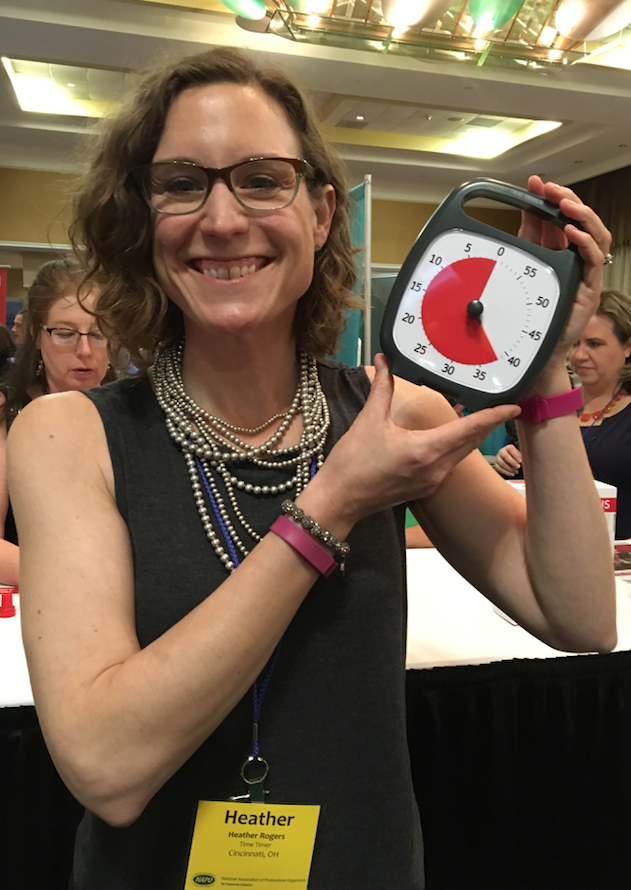 Few time management products could be considered more of a classic than Time Timer, which was already a beloved tool when I started my professional organizing business more than 15 years ago. At that time, back when dinosaurs roamed the earth, I owned one of the original Time Timers, an analog timer with a patented thick, red, circular “fanning-out” disc-like covering that diminished in size (from a maximum of 360° coverage for an hour) until time was up, and the red portion disappeared (hiding behind the clock display).
It was obvious that Time Timer provided a superlative way to explain the passage of time in a variety of circumstances — for teaching children the concept of time, for giving all participants in a discussion group equal time speaking (without needing an orchestra to “play them off”), for keeping meetings on task and on time, and for helping clients with ADHD and other time-related challenges master their appreciation of the passage of time. Let’s let Time Timer tell it:
The Time Timer product line has expanded in a variety of ways. From the original boxy Time Timer, there are now six varieties:
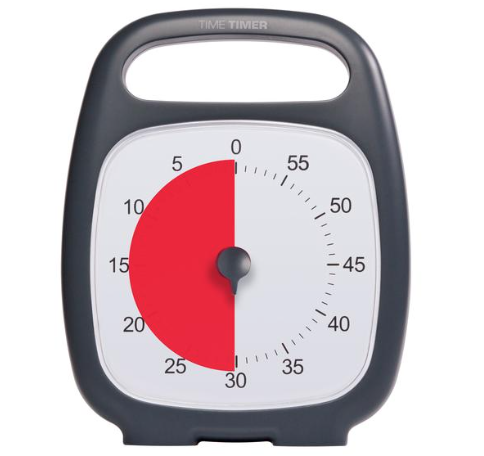
- Time Timer PLUS, with a quick-grab handle, a rugged case, and a durable clear lens to protect its patented red disk, measures 5.5″ x 7″ and requires one AA battery. It’s whisper-silent.
- Time Timer 3″, tiny enough to be tucked anywhere
- Time Timer 8″, perfect for your desktop, bedside, or anywhere you’re working
- Time Timer 12″, ideal for an office or meeting session, so you can see it from across the room
- Time Timer MOD is a 3.5″ x 3.5″ version that adds a little color to your productivity. The MOD features a colorful, removable, silicone cover for an extra layer of protection, like a thick smartphone skin. You can purchase the MOD with a Sky Blue, Charcoal Gray, or Lime Green cover, and there’s a Berry cover available separately.
- Time Timer MOD Sprint Edition ties in with the Jack Knapp book, Sprint, and comes with a Quick Start Guide highlighting the key principles of the “design sprint” framework developed by Google teams.
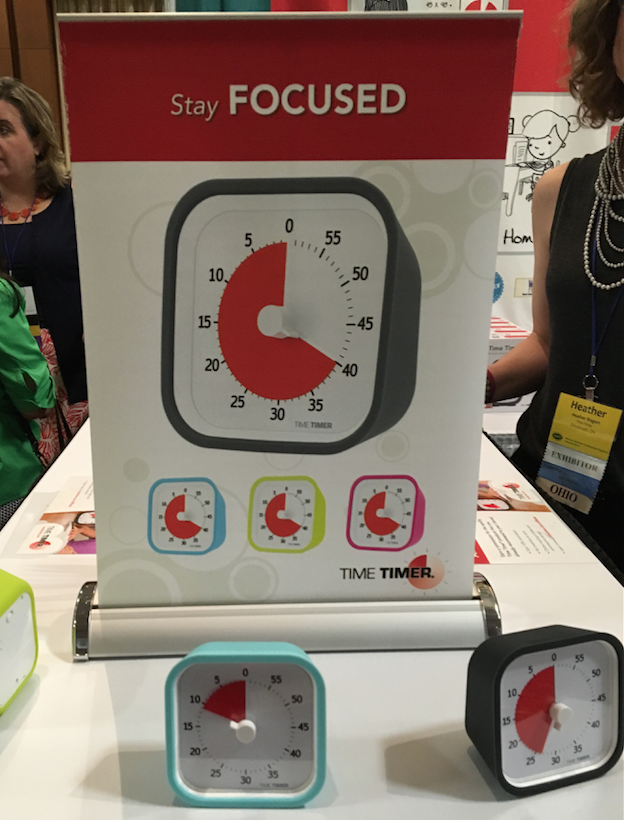
These Time Timers range from $29 to $39 on the Time Timer website.
Over the years, the Time Timer line branched out to include watches for a personal approach to managing time, from staying on task at work, home, or while doing school work to remembering to take medications or transition to the next location or task.
- Time Timer Watch PLUS Small — The small watch comes in Berry, Sky Blue, and Lime Green, with clock, timer, and alarm functions, vibrating and audible alerts, repeatable time segment settings (for interval training, Pomodoro productivity, etc.). The small watch has a soft silicone watch band designed to fit wrist circumferences of 4.75″ to 7″.
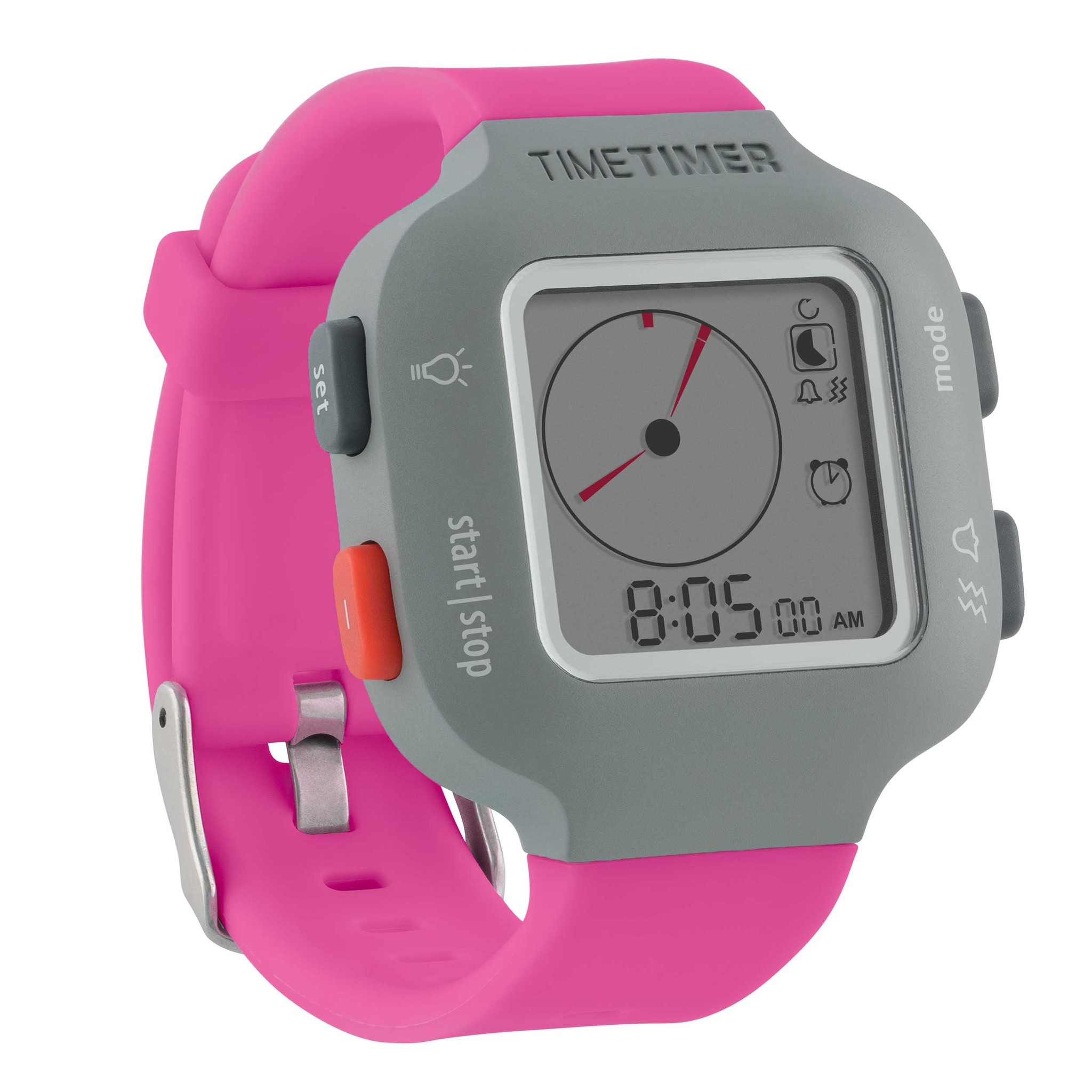
- Time Timer Watch PLUS Large, for larger wrists, has all of the same features, but measures 5.5″ to 8.25″ and comes only in Charcoal Grey.
Both styles of watches are $84.95.
Finally, because the need for time management doesn’t just live in the tangible world, there are Time Timer apps for the iPhone, iPad, Android phones, as well as Mac and Windows apps, offering customized timers. Prices range from $0.99 to $19.95.
BEST BUSINESS PRODUCT: Fujitsu ScanSnap
Longtime readers of Paper Doll know that good paper management sometimes means determining which information should exist in digital form, and that means mastering the skill of scanning.
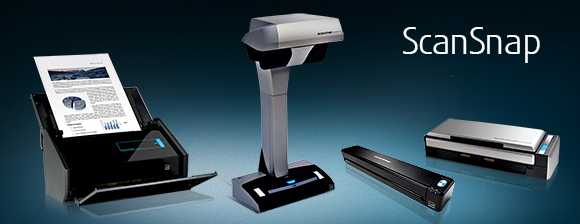
Two years ago, in NAPO2014: Wirelessly Scanning the Horizon — What’s New in Scanning?, we looked at the Fujitsu ScanSnap iX500 Desktop Scanner. With an output resolution of up to 600 dpi for black and white (and 300 dpi for color), the ability to scan single-sided or duplex, a 25 page-per-minute scanning speed, a 50-page automatic document feed, one-button searchable PDF creation, and wireless scanning to Mac, PC, iOS or Android devices, the iX500 is still the belle of the scanning ball as far as professional organizers and productivity experts are concerned.
But the iX500 is only one member of the ScanSnap family, which also includes the mobile, handheld Fujitsu Document Scanner ScanSnap iX100. This little guy is only 14.1 ounces, so it lets you scan receipts and contracts on a business trip, school notes from the library or college dorm, or recipes and plastic ID cards from anywhere to your PC or Mac as well as well as your iOS or Android device. Via USB or Wi-Fi, the iX100 lets you scan to PDF (or even searchable PDF, if you’re using your computer), JPEGs, editable Word and Excel docs (again, on the computer), and send your scans via the ScanSnap Cloud feature to your Dropbox, Evernote, Google Drive, and other cloud services.
Paper Doll has often covered the best ways to decide if and what to scan, in classic posts like in Get Organized Month: Paper Control 102–Advanced Topics & Office Hours and Paperless vs. Less Paper: 6 Ways to Reduce Paper Consumption. However, I recognize that when it comes to the intricacies of the technical side of scanning, I am definitely not the ultimate expert. That’s why, on your behalf, dear readers, I rub elbows with someone who is. (Actually, in this person’s case, he’s super-tall, so his elbows would probably clock me in the ear, but you get the idea.)
If you’re new to going paperless, you definitely want to become familiar with Brooks Duncan of DocumentSnap. Start with his blog post, Going Paperless in 5 Easy(ish) Steps, and move on to his website for others of his gems:
- DocumentSnap Blog — from scanning into Evernote (and exporting out of it) to creating your own private cloud to document search, Brooks is your guy.
- Sign up to get his Paperless Cheat Sheet (linked from the front page) so that you can approach scanning in the right way.
- If you’re going to go the ScanSnap route, look into his Unofficial ScanSnap Setup Guide ($5 each for Mac or Windows, $8 for both.)
- And finally, if you’re thinking of scanning to the cloud, check out Brooks’ Paperless Security Guide, which, at $7, is a steal.
In addition to Time Timer and ScanSnap, the two big productivity stars, other winners of the 2016 NAPO Organizers’ Choice Awards included:
BEST BUSINESS SERVICE: NAPOSure
NAPOSure offers customized professional insurance for practitioners in the organizing and productivity fields. This includes coverage for property, loss of income, professional liability, auto, and employee bonding.

Because the federal government is slow to assign new NAICS industry classification categories, many professions that have existed for multiple decades (including professional organizers and productivity experts, coaches, ADHD specialists, and a variety of technology-related professionals) lack aAICS categorization, which makes it difficult to ensure appropriate professional insurance. For years, professional organizers were categorized by insurance companies as interior designers, even though that coverage approach was, at best, inappropriate. NAPOSure was the first insurance designed and customized for professional organizers.
Metropolitan Organizing’s Geralin Thomas has an excellent short post on How To Get the Best Insurance Coverage for Your Organizing Business, including selecting the appropriate types and levels of coverage.
BEST RESIDENTIAL SERVICE: 1-800-Got-Junk
We know that even if our clients are comfortable with purging the excess from their homes, not everything can find its way to a logical and useful next “home” via consignment or donation. Sometimes, stuff is broken, too far out of date, or otherwise too damaged to be of use to anyone, and that’s when 1-800-Got-Junk comes to the rescue. If you’ve got something non-hazardous that “two strong, able-bodied crew members can lift,” then they can get it out of your space.
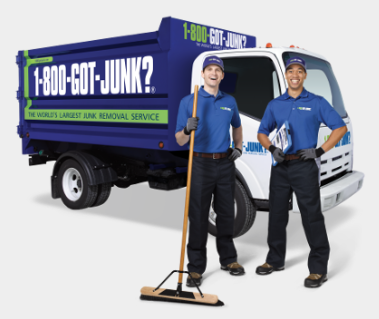
This full-service junk removal company offers the upfront pricing, convenient pickups, and responsible disposal services that make professional organizers and our clients feel confident using. 1-800-Got-Junk was voted Best Residential Service, because they’ll pick up your household detritus, including old appliances and TVs, mattresses, furniture, carpets — even hot tubs! But they also service businesses, and will remove “junk” and recycle computers, monitors, and printers from your office space.
BEST IN SHOW: Lock & Rollin’ Flooring Solutions
I’m a generalist, working with both residential and business clients, but I specialize in paper and information management. So, I’m not often involved with garage and attic organizing systems, or other “heavy-duty” tools. However, clients are often looking for recommendations, and it was interesting to learn about Lock & Rollin’s Flooring Solutions.
Designed to help turn attics and crawl spaces into safe storage options, Lock & Rollin’ uses 32″ lightweight slats which slide together to form adjustable lengths of roll-out flooring that fit between attic joists. The creators state that it holds up to 250 pounds per square foot while being lighter than typical attic flooring, like plywood, so it should be easy enough to lift and carry, and they say it’s resistant to mold, mildew, and termites.
Lock & Rollin’ was surrounded by crowds throughout the conference, so all I could see while craning my neck was something that looked like a seriously heavy-duty Transformers-style yoga mat. At the risk of associating myself with an annoying “As Seen on TV” late-night commercial, as someone who fears falling through an unfinished attic floor, I found this video to be both explanatory and intriguing.
Congratulations to all the NAPO2016 Organizers’ Choice Award Winners!
Disclosure: Some of the links above are affiliate links, and I will get a small remuneration if you make a purchase after clicking through the links. The opinions, as always, are my own. (Who else would claim them?)
Paper Doll Takes a Play Break with Edo: Organizing the Imagination
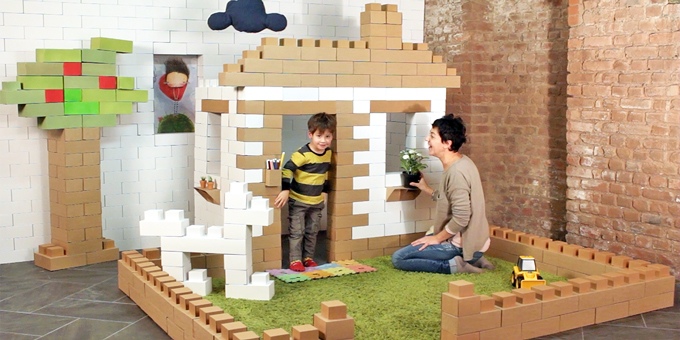 Here at Paper Doll, the focus is almost always on how paper (and the information it represents) can be better managed to improve your productivity, reduce your stress, save you time, and put your money to good use. We don’t usually talk about play.
“Play is often talked about as if it were a relief from serious learning. But for children play is serious learning. Play is really the work of childhood.” ~ Mr. Fred Rogers
Abraham Maslow (yes, for those of you who just barely recall Psych 101, the Hierarchy of Needs dude) said, “Almost all creativity involves purposeful play.”
And Maria Montessori, founder of the Montessori approach, based her eponymous schools on the principles of self-directed activity, hands-on learning, and collaborative play.
While we strive for order and productivity, we sometimes fail to notice that creating disorder, and then order out of that, is how children (and creative adults) make sense of the world.
When I work with (adult) clients to help them divest themselves of their own clutter, we start with some basic questions: Do you wear it or use it? When was the last time you used it, accessed it or read it? If it were more accessible, would that increase how often you incorporate it into your life or work? Does it fit with who you are, or who you are actively trying to be?
Understanding organizing issues with children it isn’t very different — though they may lack the self-awareness to discuss their toys and clutter. They snuggle with beloved stuffed animals that are “loved to death,” with floppy ears missing, and own bins of crayons worked down to the nubs. But more often, they have popular and expensive toys, given by well-meaning grownups who remember not a whit of childhood, that languish in toy chests or on shelves, while the cardboard boxes in which they were shipped become playhouses, or rocket ships, or science labs, or any of a million other things that fuel the imagination.
It’s with this notion, that cardboard boxes or bricks can organize a child’s play so that it’s robust, fulfilling, and full of reinvention, that we look today at Edo.
EDO
Edo are sturdy, flat-packed building blocks made of high-quality micro-corrugated cardboard. The Italian trio who created Edo developed the patent-pending features to provide a perfect strength-to-weight ratio in the assembled bricks. Parents (or older kids) simply fold the bricks into shape and then are ready to build new worlds.
In the words of the creators:
With Edo, kids can create and play with their own ideas. The possibility to create something from scratch stimulates imagination and creativity. The dimension of the blocks and the chance to create life-size buildings develops spatial awareness and social skills. Edo lets kids play alone while inspiring the creative thought process and easily gets contagious in groups of all sizes.
Edo currently has three types of double-decker Lego-like (but, y’know, cardboard!) bricks based on combining single-decker pieces folded from the “flats.”
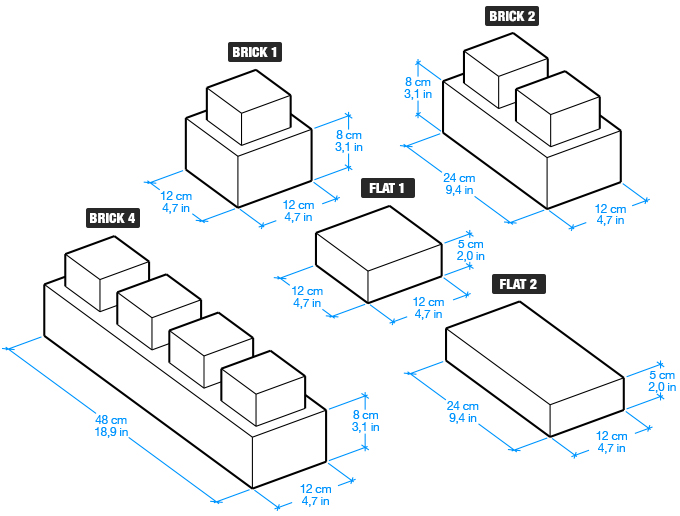
Edo is environmentally friendly, as the bricks are made of recycled cardboard, and they are 100% recyclable. The dye colors are non-toxic, and the creators state that the cardboard will be FSC-certified in the United States and will have CE-certification in the European Union.
Once properly assembled, each Edo block can support at least 100 pounds, though the video below shows ways to push the envelope! (So, I guess…don’t show the video to Grandpa?)
They come in Havana (or what we’d call cardboard brown), Icy White, or (eventually) in a mix of five colors (green, red, yellow, blue, and orange). The individual bricks can be colored, spray-painted, or otherwise “transformed over and over again to tell countless stories.”
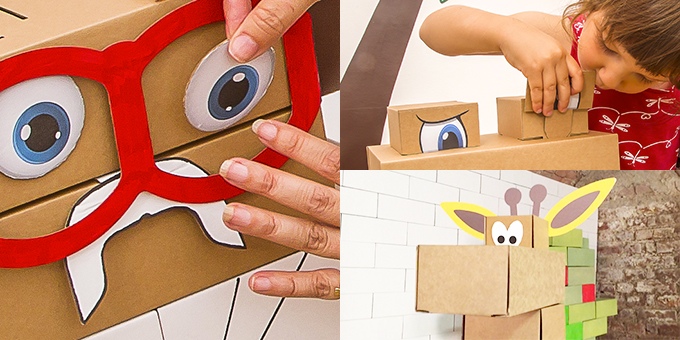
Add-on kits with accessories, such as ears and eyes for making animals, people, or monsters, can be purchased separately. Of course, DIY accessories can be made at home, by parents and children, with scraps of cloth, junk jewelry, pipe cleaners, and whatever else has outlived its otherwise practical usage.
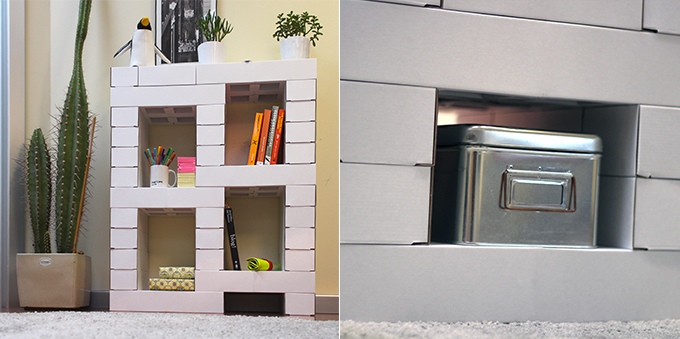
The annoyance of many types of children’s toys is that when they are not being played with, they turn into a mess. Small items like toy cars and small blocks fall to the bottom of toy chests or bins never to be seen again unless the chests or bins are completely upended. Larger toys don’t fit anywhere, and, at best, get pushed against a wall, untidily. However, Edo can be stacked, even turned into a wall of bricks, flush against a playroom, bedroom, or family room wall.
Edo can also be used for functional storage and utilitarian purposes. You can turn it into a bookshelf, a bed-side table, a drawing table or child’s desk (with a smooth surface placed on top). As the web site notes, “You can also build the legs for a coffee table to be used with any top and of course you can create other furniture.”
The delightful Edo has a Kickstarter right now, with three weeks to go. Please visit their page to view their package descriptions in greater detail. Right now you can get:
- Edo 25 — a sort of starter kit
- Edo 100 (also available in a two-pack) — you can build almost anything, including a T-Rex!
- Edo 500 — for developing serious Edo architecture!
- The Edolinis (also available in a two-pack) — 27 blocks plus three pairs of eyes to create life forms for which the creators hope to develop sets of clothes and uniforms, such as for firefighters, business-suited office workers, doctors, and construction workers.

- Choose Your Animal (also available in a two-pack) — Pick a crocodile, giraffe, or elephant!
- The Snowy Castle of Wonders — If this were available with enough pieces to build it for a full-size adult, Paper Doll would move in.
Pledge prices range from $35 for the smallest set to over $500 for the 500-piece set (which is more suitable for a school or entertaining all the kids in your neighborhood). Shipping is available to the United States, Canada, and European Union countries. Delivery dates for orders placed through the Kickstarter are planned for October 2016. [Edited to note: Ten hours after this Paper Doll post went live, and one week into the Kickstarter, Edo’s creators have canceled the funding campaign, with explanatory notes in English and Italian. Happily, this is a temporary pause, and Edo’s campaign reboot should be back up in September, in time for the holidays. Timing, eh?]
Oh, and even if you don’t have kids, the concept still holds that play boosts productivity.
Now skedaddle! Go play!
Paper Doll’s NAPO2016 Recap: Smead Takes On Coloring, Minis, and Corners
As we discussed in last week’s Paper Doll post on Samsill’s new products, there’s a particular delight to the pseudo-shopping aspect of attending the NAPO Expo. For me, there’s a specific magic in the air when I get to see exciting new products from our industry stalwarts, and nowhere is that more true when I get to see new paper management products.
Yep, I’m an office supply fangirl. Particularly a paper-related office supply fangirl. That may explain why, although I love all my NAPO Corporate Associate Members and NAPO Conference Expo vendors, I have a special place in my heart for my friends at Smead, who have been kind enough to have me on their Keeping You Organized video podcast twice, once to talk about small business organizing, and again to discuss organizing-related fears.
So, of course, as soon as NAPO President Ellen Faye cut the Expo ribbon with those giant scissors, I made a beeline to my Smead buddy, Leiann Wright.

With file folder aficionados (say that three times, fast) crowding around the booth, it took three visits over two days to learn everything about the new offerings, and I’m still finding items in the 2016 New Product Guide that I missed in person!
Today, we will focus on just a few of the new products that had conference-goers talking.
SuperTab® Coloring Folders
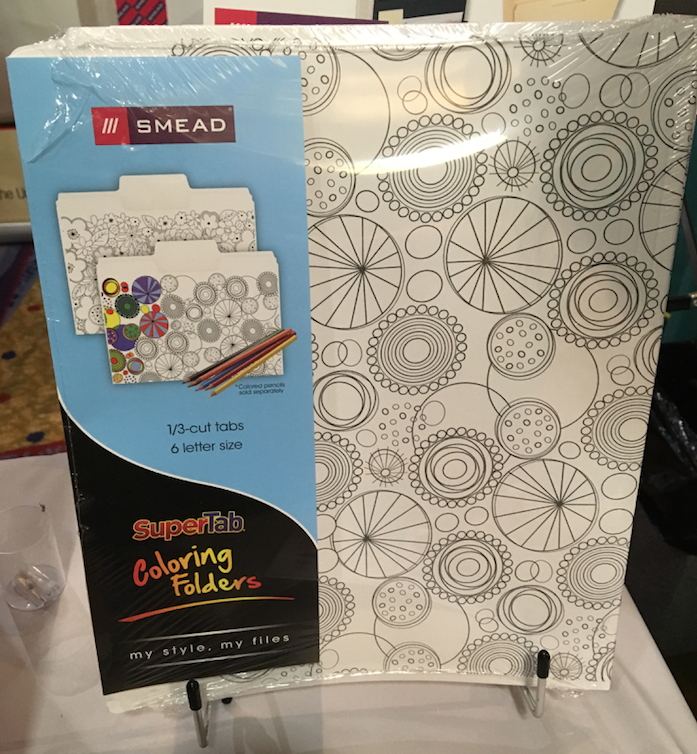 Smead’s SuperTab® folders aren’t exactly new. I originally reviewed them back in Paper Doll Dishes Out the Super Goodies back in 2011. Back then, I explained that with larger tabs, one could:
1) Use Larger Text — This makes it easier to see labels from across the room, assists those with all variety of vision issues from aging eyes to macular degeneration, and ensures that offices with files bearing many similar-appearing labels (Johnson/Jonson/Johnsen) can be discerned with relative ease.
2) Use Multiple Lines of Description — Although brevity is the soul of wit, and although we professional organizers usually advise keeping file folder labels as simple as is serviceable, sometimes a label just has to say more.
3) Use Icons — In addition to labels, colored dots, stickers and other icons can be used to help categorize the content of a folder, and the larger the tab, such as with SuperTab® folders, the more expansive the available space for adding definition and clarity.
This new product takes the practicality of the 90% larger tab of the original SuperTab® and combines with a colorful new trend.
As Paper Doll doesn’t have any artistic inclinations (and recently went into anxiety-mode at a recent visit to one of those paint-the-pottery places), I have long wondered what it was about these best-selling and highly coveted adult coloring books I was missing. So many of my high-profile colleagues, including Deb Lee, Janine Adams, and Danielle Liu, enjoy this pastime that this year’s NAPO conference planners added a lounge area with oversized coloring pages at which my friends could be found doodling in spare moments, when in prior years, they might have chugged coffee or returned phone calls.
If you’re unfamiliar with this latest habit of adults pulling out crayons and markers to color, I direct you to A Neuroscientist Patiently Explains the Allure of the Adult Coloring Book from New York Magazine. My favorite aspect of this article notes:
Our prefrontal cortex is responsible for coordinating thousands of decisions each day, from which socks we should wear to life-altering relationship and career choices. As an unconscious response to this so-called daily “decision fatigue,” making a series of small, inconsequential decisions (teal or mahogany for this squiggly line?) may give us a refreshing sense of self-control after a long day of big, important ones.
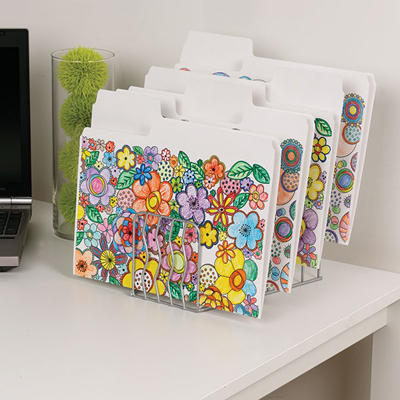
Smead SuperTab® Coloring Folders are letter-sized and come in geometric and floral designs. The tabs are 1/3-cut and constructed of 11 pt. (reinforced) paper stock, which works with colored pencils, crayons, and markers. The bottoms of the folders are scored for up to 3/4″ expansion, and all folders are made of 10% recycled content with 10% post-consumer material.
I should note that 11 pt. paper stock is a little less robust than the 14 pt. heavyweight folder stock I prefer, but I suspect that for typical office work, aesthetic appeal may outweigh (pardon the pun) sturdiness for those who are visually focused or inclined to reduce stress with conference call coloring.
Find the Smead SuperTab® Coloring Folders at office supply stores and Amazon, in packs of 6 or 12, with a dozen running about $12.
Mini Stadium® File
Fans of the original Smead Stadium® File, which we reviewed in our NAPO 2010 Conference Expo Recap, liked the fact that it was portable, lightweight, and (surprisingly) sturdy. It had 12 pockets, could hold up to 900 sheets of paper, and most importantly, was stepped like a riser or stadium to ensure that nothing could be hidden.
The Mini Stadium® File has many of the same features as the original, but is more compact, so it’s suitable for correspondence and small projects you need to keep on your kitchen counters, dorm room desks, and small offices. As always, the idea is that if you clear your paper clutter, categorize it, and contain it, you’ll get your space and sanity back. Smead has taken this approach to the desktop file box and made it fun-sized.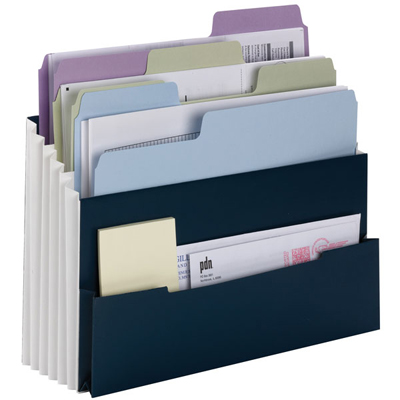
The three pockets are tiered and fixed so the papers don’t fall to the bottom of the organizer, and is suitable for holding both papers and folders. There’s also a small, low-profile, flat outer pocket. Like its predecessor, the Mini comes in Navy with fully lined Tyvek® gussets to allow for expansion. The Mini also includes labels for alphabetical (A-Z), monthly (Jan-Dec), and daily (1-31) filing, as well as household subjects and blank indexing.
Right now, the Smead Mini Stadium® File seems to be sold primarily at smaller online office supply stores and at Amazon, where it costs $19.95.
Corner Organizer File
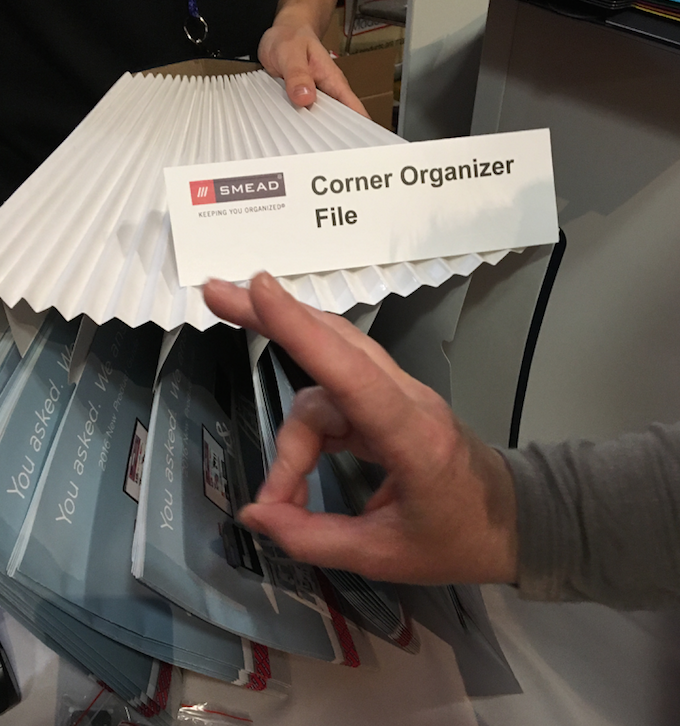
Smead Corner Organizer, with Bunny Ears
While the two prior products are updates of popular Smead products, the Corner Organizer File seems to turn a product on its head, or at least its side. Picture if the traditional Stadium were turned 90° and cut on an angle to provide accessible storage in a corner, where two walls, a desk/wall edge, or the top of a filing cabinet meets a cubicle divider. Paper Doll‘s first thought was that it worked to make typically dead spaces more accessible much like Lazy Susan kitchen cabinets allow you to store food or small appliances in the netherworld where two cabinets meet at right angles.
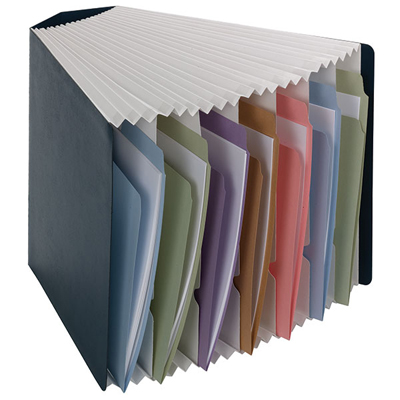
Smead’s Corner Organizer is letter sized, Navy with a white interior, and has seven expanding pockets. It’s suitable for storing top-tab and side-tab folders. Like the Mini Stadium® File, the Corner Organizer File doesn’t seem to be distributed by the major office supply big box stores, but you can find it at a variety of smaller and online stores, as well as Supply Geeks and aAmazon for about $28.
These are just a few of the Smead products that caught my eye at NAPO2016. Be assured that after our recap series, I’ll be circling back to discuss some of their fun new poly products — poly expanding files, poly file boxes, and poly pockets — as well as new document wallets, line extensions for Viewables, and soooo much more about folders. Until then, enjoy this photo of professional organizer Lita Daniel showing of her grown-up approach to today’s moment of Zen.
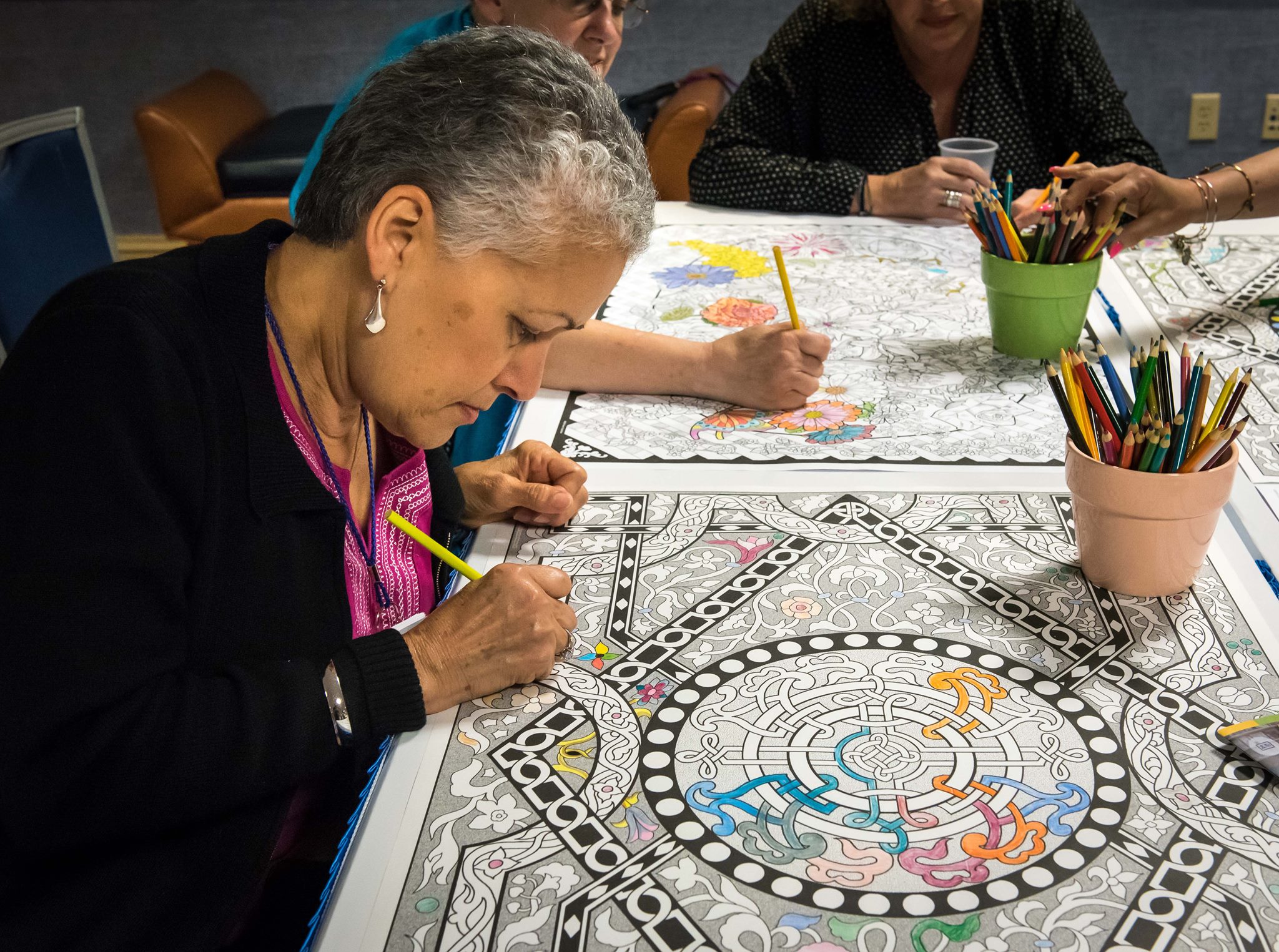
Photo courtesy of Dan Slutsky, NAPO Photographer Extraordinaire
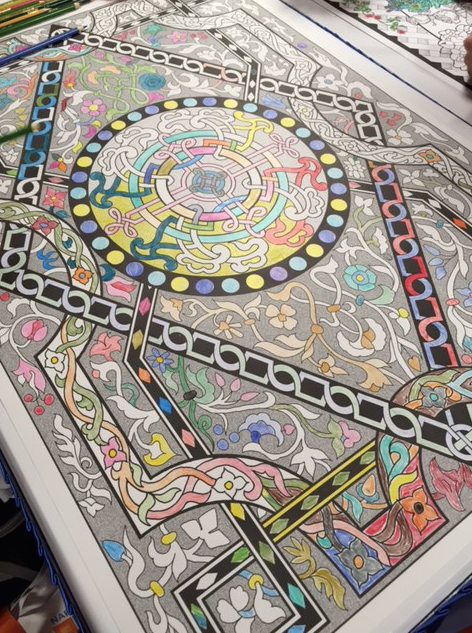
Photo courtesy of Ellen Delap, NAPO President-Elect
Up Filer: A New Vertical Filing Solution
Got paper?
Of course you do. And most of your papers for your life and work probably live in some typical places: standing up in file folders in desk-top file boxes or step risers, or hidden away in filing cabinet drawers, or flat on your desk (and maybe piled all around it), with whatever is larger and/or on top obscuring whatever is below.
If you have lots of flat, non-bulky paper items, perhaps you’ve invested in a flat filing cabinet, with a variety of drawers to allow art projects, historical documents, and architectural designs nap in relative obscurity, often ignored or forgotten.
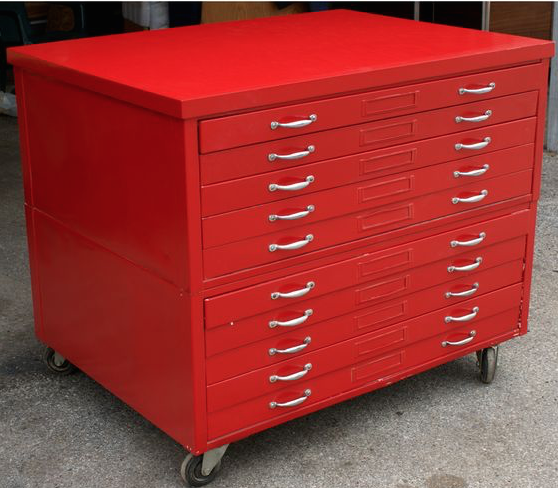 Or maybe you’ve embraced the vertical approach with creativity — have you piled a bunch of related papers on a series of clipboards and hung them on your wall?
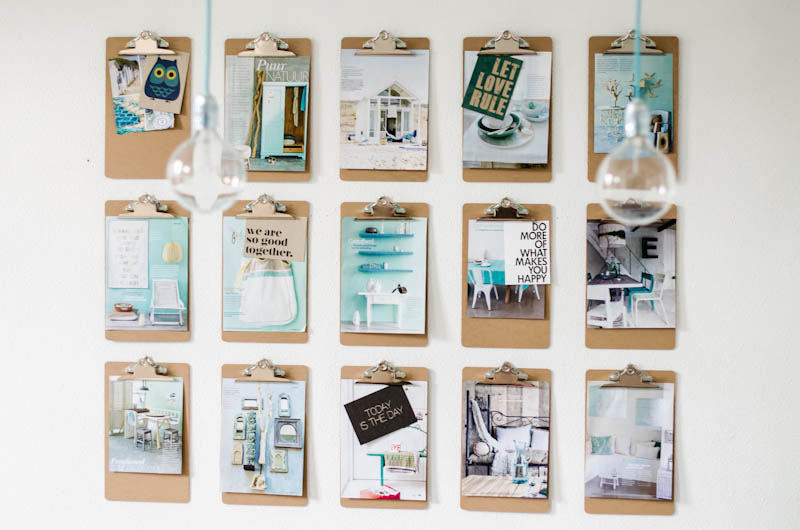
@2013 ASpareAndAPairDIY.com
The problem is that many people find that it’s fairly hard to gain purchase on your projects when they are hidden away. If you’re in a communal office setting, sharing resources and working on projects requires that everyone can have access without having to knock on Joe’s door and interrupt a meeting (or his tearful third-fight-of-the-week with his sweetheart) just to get the updated specs on the current blueprints. While it may seem like more and more of what we do is digital, there is still so much flat, tangible stuff and it needs to be easily stored and fairly accessible.
A new solution from Denver-based Westerville Design is a cross between a file step-riser and an on-the-wall clipboard, with a dash of the old-fashioned library newspaper rack and a soupçon of inventiveness.
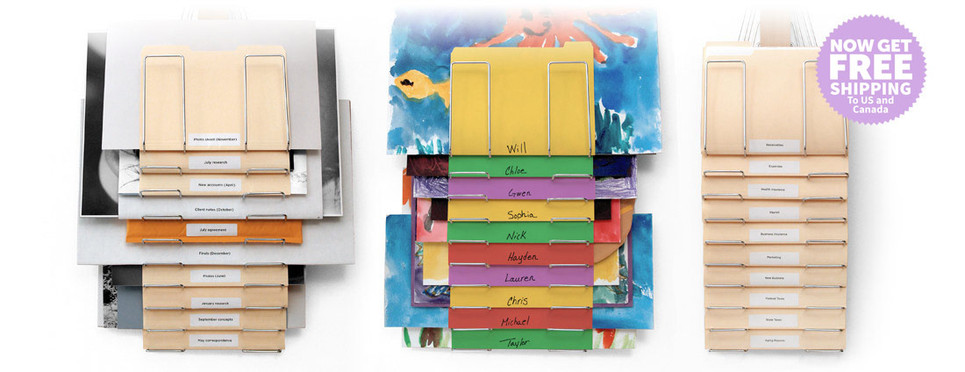
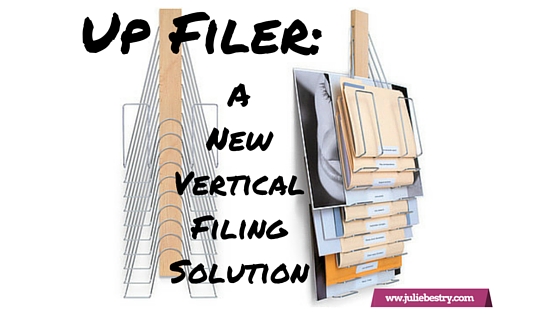
The Up Filer™ Original Vertical Wall File
Each Up Filer™ unit has ten nickel-plated steel hangers designed to hold whatever flat content you need to keep off your desk, like:
- file folders
- blueprints
- design layouts
- photos
- newspapers (remember those?)
The central spine of the Up Filer™ is made of solid maple hardwood, and the full size of the contraption, spine and hangers, combined, is 11.5″ wide x 34.5″ high x 2.5″ deep (29.2cm x 87.6cm x 6.3cm).
You don’t have to limit yourself to uniform height, weight, or thickness of papers or folders. Westerville says both the thickness of the content and the width can vary greatly (though they’ve not provided maximum measurements). The site notes that the height of the content depends on the thickness, but can measure up to approximately 16.5″ (42 cm) depending on the thickness (just as when too-thick file folders tend to stand a bit too tall in a hanging folder, beyond a certain point).
The Up Filer™ Original runs $149.99 and comes with a 60-day money-back guarantee.
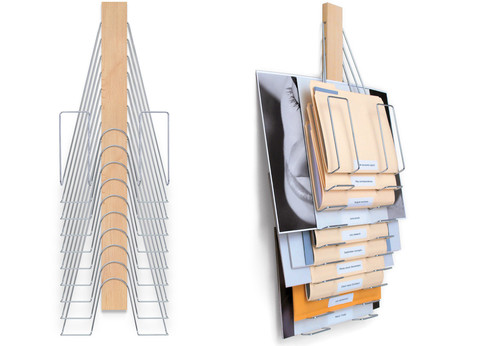
If you’re looking for something with similar capabilities but a little more panache, Westerville Design has you covered.
The Up Filer™ Bamboo Vertical Wall File
The Bamboo version conforms to the same measurements and specifications as the original version, but adds environmentally friendly sustainability with style, and you can select one of three colors (arranged from lightest to darkest)
- Natural
- Light Caramel
- Caramel
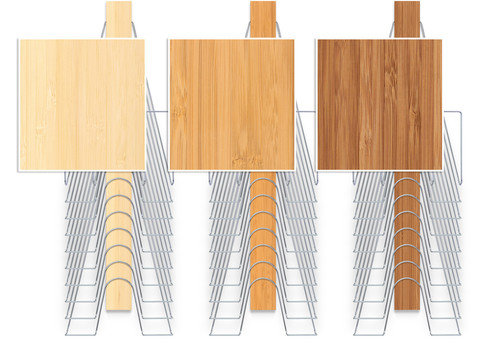
The Up Filer™ Bamboo runs $169.99.
Westerville Design is currently offering free shipping on both versions of the Up Filer™ to customers in the United States and Canada.
Why is the Up Filer™ better for some flat paper and storage displays?
- It doesn’t matter how small or large an item is — the design ensures that it won’t obscure what’s behind it, and it won’t be obscured by what’s on top of it.
- The Up Filer™ saves precious horizontal space and makes use of the always-forgotten-but-so-magical vertical space. The Up Filer™ is wall-mounted, so your flat items get up and out-of-the-way of your workspace.
- It’s easy. The spine of the Up Filer™ holds the hangers, and the pivoting hanger design makes it simple to remove or add items. Just lift a hanger to pop something new into the system or grab what you need.
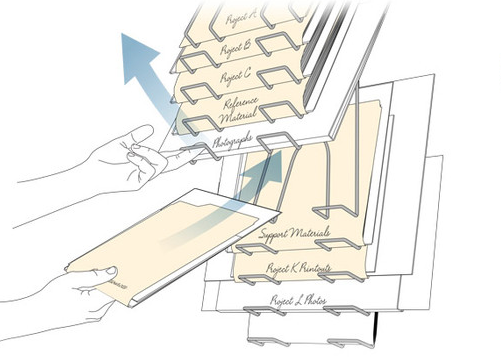
The Up Filer™ system is designed so you put labels at the bottom of each item. It may be unusual at first to see labels at the bottom, but it lets you quickly scan your eyes down the center and see everything at a glance. Nothing will be hidden or forgotten.
In the words of the people of Westerville Design:
It quickly became obvious that it wasn’t just good for designers but would be perfect for engineers, architects, fine artists, teachers or anyone who needs a filing system that keeps all the important stuff visible and at your fingertips.
Not having been able to examine the Up Filer™ up-close-and-personal, my sense of the drawbacks is limited to a few key items:
- The price is pretty up there. Granted, a flat file cabinet is even pricier, but most people and businesses are more likely to opt for a less gorgeous and more cost-conscious storage+display solution.
- Installation/mounting shouldn’t be difficult, but if you’re all thumbs, or have a cubicle, or your home office walls are really just flimsy sheet rock, the stability of this solution may not be adequate.
- Capacity is limited. Each unit has only ten hangers, and thus holds only ten “items,” albeit those that can get fatter or larger than what you can put in a filing cabinet or on a desk-stop step riser.
To get a sense of how the Up Filer™ works, peek at this short (and silent — seriously, none of that common plinking ukulele soundtrack) video.
Of course, if you like vertical paper storage solutions, the Up Filer™ isn’t your only option. At first, I recalled the Rackit File, a wall-mounted hanging file solution I reviewed back in 2011 in Paper Doll Adjusts the Vertical Hold: Space Saving Filing Solutions. (And, of course, that post is full of more portable approaches to vertical filing.)
So, readers, on the up-and-up — would you give the Up Filer™ a try?
Paper Doll’s 16 Ways To Organize Your Money In 2016 — Part 4

How have you been doing on your money-organizing efforts so far? To recap our prior posts:
- Paper Doll’s 16 Ways To Organize Your Money In 2016 — Part 1
- Paper Doll’s 16 Ways To Organize Your Money In 2016 — Part 2
- Paper Doll’s 16 Ways To Organize Your Money In 2016 — Part 3
we’ve covered pulling your credit reports and credit score, tracking expenses, and organizing your financial information. We also looked at accessing your Social Security data, planning for retirement, organizing your way out of debt, lowering your interest rates, and so much more. Today, we’ll do our final roundup of ways to organize your money in 2016.
13) Make your money make money.
Credit card marketing often promises cash back just for using a specific card, but usually it’s category-specific and requires careful monitoring. This month or quarter, you’ll get cash back on groceries (but most don’t include groceries you buy at Walmart Supercenters or Costco); next time, it might be department stores. Make your purchase within the window but on a weekend, and you might have it processed after the window closes on the following Monday, and you’ll get no cash back at all! It’s a pain to periodically register for cash back categories and remember which cards earn you money on which categories in any given month or quarter.

My favorite tool for getting cash back while shopping online is Ebates. (Note: that’s an affiliate link, and if you register with my link, I may get some brownie points; feel free to just type Ebates.com into your browser if you prefer.) Here’s what I said about Ebates back in 2014:
Ebates rocks! Imagine if every time you walked into your favorite store, a doorman slipped you a tip.
Ebates began as a shopping portal. You clicked on the name of the online store, were taken to the store’s site, and any purchase you made gave you cash back. Now, it’s even easier with the Cash-Back Button installed in your browser. Shop online as usual, and Ebates gives you a little on-screen alert that if you make a purchase at that store, it’s worth 3% (or 5%, or whatever) back. Click, which reloads the page and through the magic of cookies (the non-edible kind), Ebates knows you bought something at whatever store, and then you get a cash-back check. Apple’s the least joyous — you only get 1% back; the magazine subscription company I use yields 15%. Most are anywhere from 2-10%, with all sorts of extra bonuses and discounts. The Ebates app for iOS and Android has deal alerts and scan-and-compare features.
I keep waiting to hear that there’s something secretly malevolent about Ebates, but after using it for years, it’s all still good. But here’s the main thing — there’s no work (beyond signing up for the account). How’s that for organizing your finances and time management?
I like Ebates, but there are definitely other popular “cash back & coupon” shopping programs, including:
The exemplary personal finance site, Wise Bread, has even written 30+ CashBack Sites to Earn You Thousands Per Year, and you may also want to consult CashbackHolic, a site that purports to compare and contrast the features at various cash back sites.
Even if you don’t shop online much, or even at all, there are other options for getting cash back when shopping at stores. For example, I’ve recently started using the Walmart Savings Catcher app.

Every time I shop at Walmart, I snap a picture of the barcode on my receipt. Walmart’s magic computers keep a record of what I’ve purchased (yes, I’m completely giving up my retail privacy) and when any item’s price goes down, I get cash back applied to my account, which I can receive at any time, or “let ride” and pile up. I use the free iOS Savings Catcher app, and you can get the Android Savings Catcher app in the Google Play store.
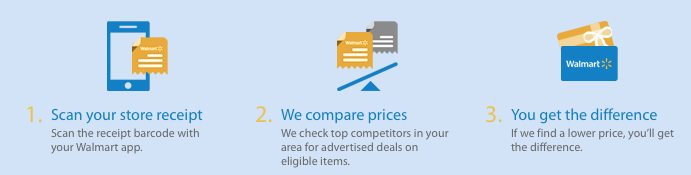
However you shop, remember that cash back programs only make sense if you were going to buy the items anyway. Otherwise, you’re just giving yourself a tawdry excuse to amass more clutter, and of that Paper Doll does not approve!
14) Organize how you get paid.
Have you ever tried to split a check among four people when three only have credit cards with them? Sure, you can ask the server for separate checks, but as many National Association of Professional Organizers members learned in Los Angeles at our 2015 conference, “separate checks” just aren’t part of some types of restaurant culture. Many people nowadays are cashless — they swear by Apple Pay or their debit cards, and nobody seems to carry a checkbook anymore. So, you end up with the one or two people best at math with their heads down, pencils in hand, trying to calculate the check and figure out who will pay for whom and how everyone will get even.
A few years ago, the first answer that would have come to mind for a quick transfer of funds was Paypal. All you need is someone’s address and you can send a request for funds, and someone can pay you from her Paypal account or from a credit card. If you tell Paypal it’s personal rather than business, there’s no fee attached. But for a lot of people, Paypal is so 2013. Too many hiccups — frozen accounts, slow transfers, etc. — have left some people uncomfortable with it as a personal money-sharing solution.
The word on the street is that the young folks — those Instagramming, What’sApping, SnapChatting millennials have been using Venmo for quite awhile. Download the app, sign up for an account using Facebook or your email address, and send funds securely using the money you store in your Venmo account, or directly or via debit card from your linked bank account.
But I do have (quite a few) words of warning about this beloved app. Venmo is owned by Paypal, so if you have philosophical issues with the parent company, Venmo may not be your ideal solution. Worse, from my oldster perspective, is that Venmo is very public; your linked friends can all see one another’s transactions (of at least who paid whom, if not the actual amounts). For a generation of share-everything types, that might not be a problem, but some of us prefer a bit more discretion. Finally, some people have been defrauded by scammers taking advantage of Venmo’s lack of immediacy in financial transfers. And Venmo’s customer service is, at best, lackluster.
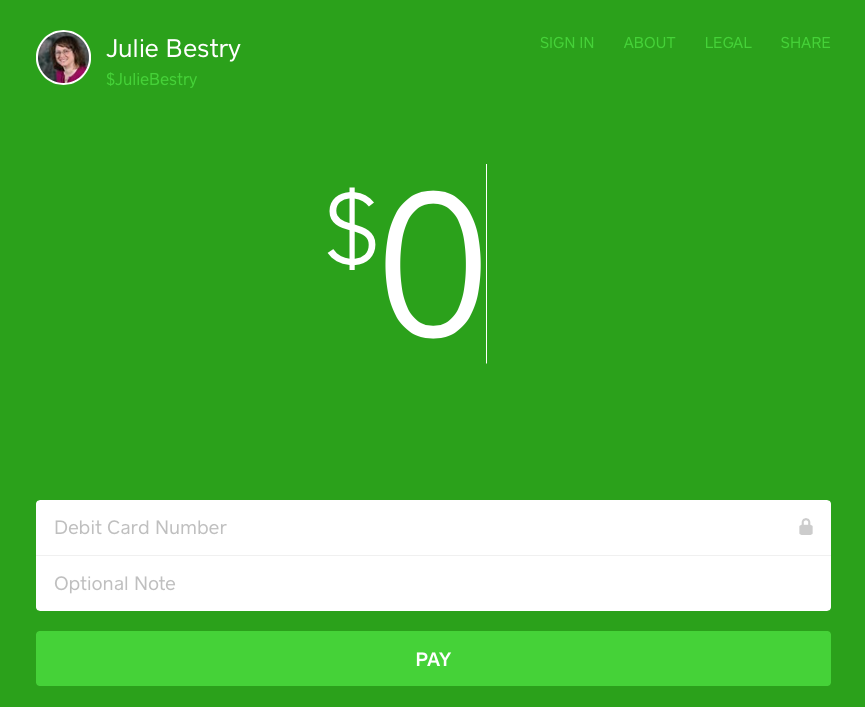
My favorite money transfer option is Square Cash, at the adorable URL Cash.Me, which I learned about from my colleague, Deron Bos when I hired him for some computer organizing support for my Mac.

SquareCash is really designed more for people in business, and charges the recipient a small 2.75% fee, but that’s generally smaller than the merchant fees associated with accepting credit cards. [Editor’s note: Deron has pointed out, rightly, that you can make personal transactions at no charge.] Deposits hit your bank within minutes, and it’s easy for clients to pay via your “cashtags.” For example, if you wanted to send PaperDoll a tip for a fabulous blog post, you could just go to https://cash.me/$JulieBestry, enter the amount, your debit card number, and an optional note, and I’d get the money. It may not be worth it for getting $4.95 for sharing a dessert with a pal, but it’s an easy way to pay your babysitter or dogwalker.
And if it’s the math, rather than the payment, that gets you down, there are a number of splitting-the-check apps out there. For example, Divvy (0.99) lets you snap a photo of the bill, drag each item to the person who ordered it, and the app will determine how much each person owes. Tab (free) works similarly and calculates the tax and tip. And Billr (0.99) can both identify who ordered what and split shared items (like a bottle of wine) among the group.
15) Use technology for money-saving apps — judiciously.
Throughout the course of this series, we’ve looked at a wide variety of apps for every use case. There isn’t a day that goes by that someone doesn’t tweet about a new app for making sense of your finances — getting discounts, finding better deals, organizing receipts, logging charitable donations, and so much more. In the last week, I learned about a handful of new apps:
Hopper is a spam-free, pop-up-free app for anticipating when the best price for a flight will be available and then booking it right from your phone. Tap in the flight preferences, and Hopper tells you whether to buy now, or watch and wait, and then it sends you a text notification when it’s smart to purchase the ticket. So, at no cost to you, there’s an app that does the research for you, offers predictive advice, and keeps you from losing money by buying too early or waiting too long.
What could be bad? Well, probably nothing, especially if you have flexibility for booking. But if you’re the sort of person to wait until the last minute, or ignore your texts for days on end, or put all your spending eggs in one basket (and not set aside funds or available credit), this app might be no better for you than plunking down your money when you actually have it and going about your business, knowing ticket buying is one less item on your task list.
Lesson: know yourself, your needs, and your productivity style. Don’t depend on apps to counteract your procrastination habits or be error free. Trust (your apps) but verify.
Penny is a new and nifty app that takes the financial dashboarding efforts of sites like Mint and makes it all very pretty. Your transactions are categorized, analyzed, and Penny texts you gorgeous, personalized charts regarding your spending habits.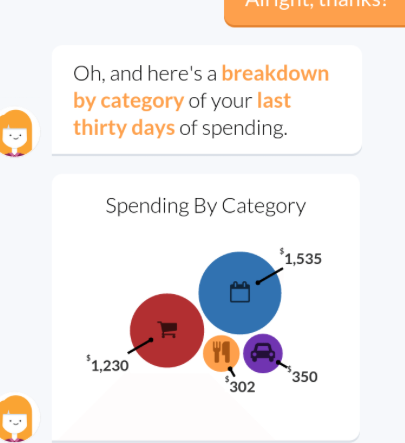
Knowledge is power, but only if you act on it. If your mother tells you that you’ve spent 90% of your income on beer and mascara, you’re likely to block it out after a while. The same with an app. If Penny nags you similarly, it’s only to your advantage if you act on the information the app gives you.
Lesson: Use the information you get to work wisely.
Trim is an app that evaluates all of the recurring subscriptions (Hulu? Dollar Shave Club? Netflix? Apple iCloud?) on your registered credit cards and checks in with you by text to remind you that you’re spending $25 a month on X and asks if you want Trim to cancel it for you. Trim cancels most subscriptions for free, and charges a $6 fee for hard-to-cancel subscriptions. (One imagines Comcast fits that category.)
Lesson: Sometimes, there’s really no downside to a tech solution. You have to decide if you’re comfortable with giving yet another company access to your financial information, though, and that’s something with which we’re all struggling.
16) Get to know money-smart people.
Paper Doll has always been fascinated by personal financial management tools for organizing financial information and activities. I believe that the more advice you get from people who are smart about money, the more alternatives you have at your disposal to spend, save, invest, and enjoy your own money. Here’s a roundup of some of my favorite bloggers, podcasters, and otherwise cool places to visit on the web for smart financial advice, along with samples of their wise words.
Read what smart people have to tell you:
- Laura Adams — Your Emergency Fund: 5 Tips To Build a Financial Safety Net
- Money Girl (Also Laura Adams) — 6 Essential Habits of Financially Health People
- Wise Bread — How To Do Money Like a Grownup
- Consumerist — Does Paying With Cash Increase Your Emotional Investment In A Purchase?
- Top 100 Personal Finance Blogs (curated by Wisebread)
Check out the agencies dedicated to helping you keep more of your money:
- National Foundation for Credit Counseling (NFCC) Financial Education
- Consumer Financial Protection Bureau (CFPB) — Adult Financial Education
- MyMoney.gov — Financial information for teachers, researchers and the public
Listen to smart people talk about money:
- Planet Money — Put a Chip On It
- Payoff’s YouTube Channel — Giving Pays Off
- Payoff’s Financial Personality Quiz and Payoff’s Financial Personality Comparison Guide
- The Top 15 Personal Financial Podcasts to Follow
As we end this series on organizing your finances in 2016 and near the middle of the year, please remember, just as organizing it’s not about the stuff, it’s about the people who own the stuff, organizing your finances is less about how much money you have, and more about how you can live your financial life happily and without stress. Spend more of your money on experiences, and then save and invest your money so you can do the things you enjoy with the people you love.



Follow Me