Archive for ‘Paper Organizing’ Category
Paper Doll Organizes the Internet: 5 Tools for When the Web Is Broken

Photo of doggy using the web by Nataliya Vaitkevich from Pexels
Have you ever tried to access a web site but nothing happens? At least nothing good? You may fiddle around, clicking the site over and over. Sometimes, you manually retype the link even though you know what you clicked should work.
Instead of getting progressively more agitated, there are a few different things you can do to maximize your efforts and use your time efficiently.
MAKE SURE THE PROBLEM ISN’T AT YOUR END
Verify that you are connected to the internet. It may seem obvious, but sometimes you’ll be working along and then all of a sudden your router decides to have a brain freeze and sever your WiFi. Less often, your internet provider might have hiccup. It can last a few seconds or (too) many minutes.
I have two router networks, a main one, and a secondary one that I could (should?) probably delete. Sometimes, when my primary router goes down, my WiFi kicks over to the secondary one, which is iffy. It can be perfect or wonky, depending on how it feels that day (much like my hair). Usually, I won’t have any idea this has happened unless I check the WiFi drop-down from my Mac’s menu bar. (Yes, I have a lot of neighbors, and no, I don’t borrow their WiFi.)

If your connection to the internet isn’t the problem, it’s time to check your tools.
Try a different browser or a different device. In general, any modern website should work on any browser. However, if your operating system is older, such that you can’t upgrade your browser, some sites may refuse to render properly, or even at all. If you’re using Safari and a site won’t show up, try using Chrome, Firefox, or some other browser, upgraded as much as possible, to see if the site works there.
If the site won’t open on your computer, your next step is to try to pull it up on a mobile device, like your phone or tablet. There, you get two options. First, you get to check to see if it’s a device-specific problem. You can also turn off WiFi on the phone and check to see if you can reach the site via your cellular data.
Sometimes, for no clear reason your computer or WiFi just doesn’t like a site anymore. There’s a solution!
Clear your cache and cookies for that site. Most people don’t want to clear their cache or cookies because then they’ll have to log back into sites for which they’ve been semi-permanently logged in for eons. But you can just clear your cache and cookies for specific sites.
Lifewire has an excellent article on how to clear cookies for one specific site for Chrome, Firefox, Safari, Internet Explorer, and Opera, the browsers you’re most likely using. For other browsers or platforms, enter “clear cookies for one site” along with the name of your platform/browser, like iOS/Safari, or Android/Chrome.
USE TWITTER INSTEAD OF GOOGLE
Check Twitter. Whatever else you think of Twitter’s role as a social network, it’s probably the fastest way to get a real-time update if something somewhere has gone awry. If you can’t connect to your bank or Disney+ or Instagram, try just typing the site into the search box. If it’s been down for more than a moment, you’ll likely see a crowdsourced timeline of complaints about the problem.
Of course, this is not the best solution when Twitter is the site that’s down, as happened this weekend.
USE A SITE STATUS SERVICE TO GET REAL-TIME REPORTS
The following sites are great for those times when you can’t tell if your WiFi is flaky or your favorite site has been hit with a DDOS attack. It’s also a quick way to check whether your own web site is down after you’ve done some updates and aren’t sure you’ve cleared your cache properly or done those other mysterious things your webmaster told you to do.
I should note that one thing all of these sites have in common is that they are not going to win any awards for aesthetics. Most were built anywhere from 10 to 20 years ago and have a decidedly early 21st-century design style. I’m not sure why nobody has created an attractive status reporting site that can still (sigh) sell advertising unobtrusively, but until that happens, these sites offer quick updates so you know whether to wait a minute or move on to some other task.
Also, these sites are free (advertising notwithstanding) and don’t require you to create an account.
Down For Everyone Or Just Me?
Down for Everyone Or Just Me? is the best known and most classic of the site status services. Visually, it is as simple as you could want. Just enter the URL of the site you’re trying to reach, Mad Libs-style, and Down For Everyone will tell you whether your site is up or down within five seconds. Easy-peasy.
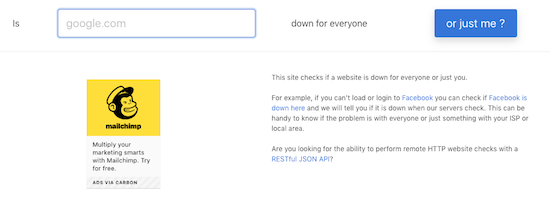
Below the search search section, there are two columns of plain-text site names grouped into categories: online grocery stores, travel Sites, e-commerce sites, financial companies, dating sites, etc. So, if you think that maybe you’ve somehow been mistyping Trader Joe’s URL and that perhaps you missed a silent 3, you can click on those popular links to speed a search instead of typing.
Down for Everyone Or Just Me is fast, and has an uncluttered interface. In recent years, they’ve added one small ad on the search page, but otherwise, there’s little to pester a user.
Also, for a nice shortcut, if you’re checking from your phone and haven’t previously bookmarked it, just type IsUp.me. (While it’s not grammatically correct, with only seven characters counting the dot, the site couldn’t be easier to locate.)
Down for Everyone isn’t ideal under all circumstances, though. It gives you a quick thumbs up or down, but you get no indication of whether other users have reported the same problem, or whether there’s a regional component. (Granted, these things may or may not interest you.) But it’s a quick-and-dirty status indicator if you just want to know whether to keep clicking or go make a sandwich.
Down Detector
Down Detector works much like Down for Everyone or Just Me, but has some attractive bonuses. First, you don’t have to type the entire URL into the search box; you can often just type the site name. (For example, type “Netflix” instead of “https://Netflix.com.”)
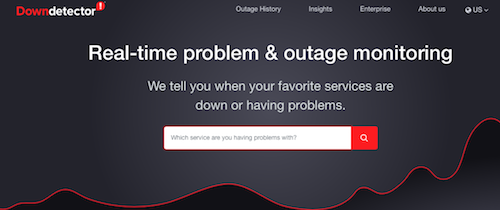
Under the search box, there are also three columns of popular services (social media sites, internet suppliers, banks, online games, etc.), with their names, logos, and a graph of their recent uptime performance. These boxes serve as shortcuts for getting real-time status reports on the most popular sites.

Type a URL or select a pre-existing box; the resulting page will give you a chart of recent outage reports,
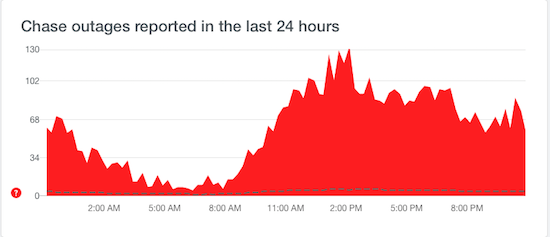
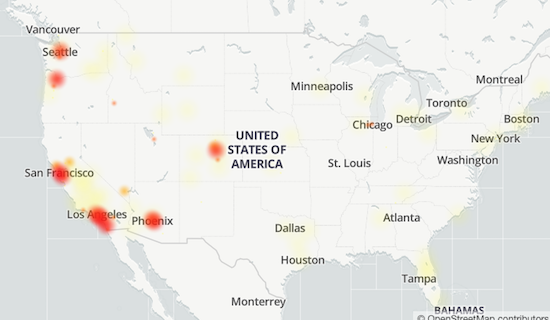
a chance to report an outage at your end, and a map of locations where there’s currently an outage.
Down Detector does have some small drawbacks. It’s advertising-supported, so the search page has ads both between the search box and the cheat sheet columns of services and on the right side, and the results pages are fairly cluttered with ads.
It’s also slightly inconvenient if you want to see a heat map of the current outages, as you have to click on a faux map on the results page to be taken to yet another results page just for the map.
Finally, both the general results page and the map page have Facebook-like comments made by others, some of which are expressed in unpleasant ways. As with most social media, it’s not always for the faint of heart.
Is It Down Right Now?
Is It Down Right Now?, like the others of its ilk, offers you the ability to check a specific site, or to view the status of popular services like Netflix, Facebook, YouTube, and many more.
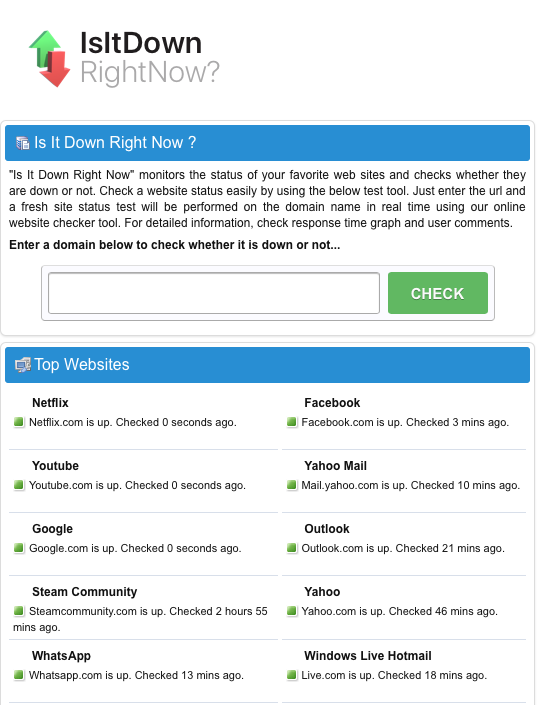
One advantage of Is It Down Right Now? is that there’s a javascript Website Status Checker bookmarklet, similar to the Evernote web clipper or Pinterest pin button you may already use. You just click and drag the icon to your browser’s toolbar, and you never even have to go to the website. Anytime you want to check the status of a site, just click on the bookmarklet on your toolbar, and you’re good to go.
Is It Down Right Now? also shows a list of the most recently down and most recently checked sites.
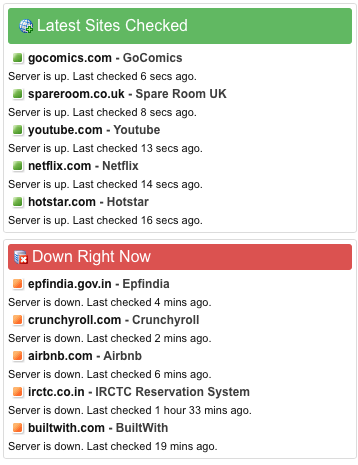
On the results page, whether a site is up or down, you’ll get to see a screen shot of what it should like when it’s working, as well as a status report showing either that it’s up or how long it’s been down, and a multi-week chart of the status history.
The search page is streamlined (with just two columns) and has just two, fairly unobtrusive, ads. However, the results page is a bit of a hot mess, with ads and Facebook comments interspersed with essential status information.
While there’s a nifty troubleshooting section, explaining how to deal with potential browser and DNS problems reaching a site, it’s hidden away on the results page. (It’s also a bit out-of-date, referring to 3G when most of us are on the precipice of using 5G.)
Outage Report
Outage Report isn’t your typical status report site. You can’t search to see if any random website is up or down. Rather, the front page lists companies with recent reports of outages, along with squiggly little graphs representing the timing of the problems.
However, the site does have a list of international and U.S. companies it monitors. If you want to know if Outage Report tracks that site, just type part of the site’s name and you’ll get a real-time filter. (Type “time” and you’ll get FaceTime, New York Times, Showtime, TV Time, Time-Warner Cable, and Lifetime. By the time you add an S to the end, it’ll have filtered out all but the New York Times outage map.)
When you click on a site name, Outage Report not only tells you what’s going on at a site, but gives you a graphic representation of the history of the site being down and tells how many reports of problems have come in during a recent period. For those who like graphics to see what’s what, this site provides some goodies.
However, I’ve been a little disappointed by how ads have taken over the flow of the site. For example, on May 19, 2017, Twitter suffered a denial of service attack. Afterward, I was able to get this quick screen shot indicating anything I could possibly want to know about the DDOS attack and uptime history prior to the attack.
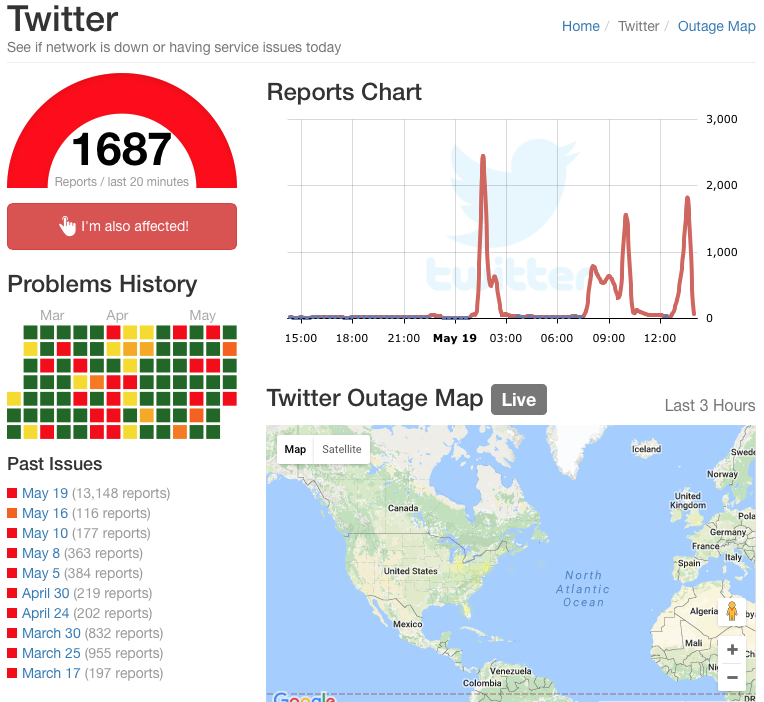
However, nowadays, Outage Report has interspersed ads such that there’s no tight, ad-free grouping of information and the long-term periodic reporting of issues has been eliminated.

The results page is overwhelmed by ads, as well as on-site comments and ported-in tweets. However, the site does a great job of telling you where (in terms of countries or regions) particular outages exist, so if you work with clients abroad, you might find this a useful auxiliary tool.
Google Workspace Status Dashboard
If you live and work in the Google environment, you may be less concerned about a social media or banking site going down and more about whether you can get to your life-giving Google Doc, Sheet, Slide, calendar or Gmail. Last Monday morning, for example, millions of users were up in arms over Google Docs being inaccessible.

If you have a paper due for school or a presentation to give over Zoom, not being able to access your materials is pretty stressful, but at least being able to screenshot this should make it feel less like you’re claiming that the dog ate your homework.
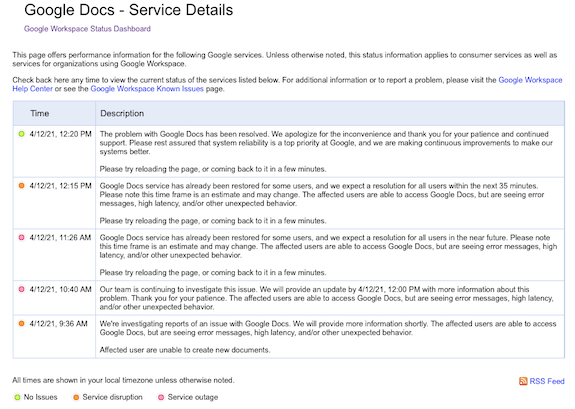
The Google Workspace Status Dashboard should be your first stop if you’re experiencing a kerfuffle with a Google product. The dashboard simultaneously reports the status of 18 regular Google products: Gmail, Calendar, Drive, Docs, Sheets, Slides, Sites, Groups, Hangouts, Chat, Meet, Vault, Currents (formerly Google+ for GSuite), Forms, Cloud Search, Keep, Tasks, and Voice, with a column for each of the past seven days and a status indicator for each day.
- Green indicates that there are no reported issues
- Orange indicates a service disruption
- Pink indicates an actual service outage (and no, I am not sure about the difference between a disruption and an outage)
Click on the dot and it opens a problem-specific page like the one above. At the bottom of the seven-day chart, you can select “older” to see more historical data.
In addition to the above products, the Google Workspace Status Dashboard also tracks the status of website management apps like Admin Console, Google Analytics, and App Maker, as well as Google Maps, Blogger, Google Sync for Mobile, and Classroom.
I encourage you to pick one of the solutions above, and the bookmark the URL on your computer and mobile devices. Next time you encounter difficulties getting to a site, verify that the problem is not on your end, check the status, and if you find that a site is down, move along to the next thing on your task list.
Divide and Conquer: Improve Productivity With Privacy Screens
One of the most popular photos ever posted to the Paper Doll blog has been the Privacy Pop Bed Tent. Whether for a shared dorm room, children’s room, or any situation where you might want a little privacy – for sleeping, reading, meditating, or focus – a bed like this lets you place a divider between yourself and the world.

Organizing your space for privacy can yield much greater productivity.
A room or personal space divider can have the following advantages:
- Delineate a purpose for a space, motivating a stronger sense of purpose.
- Eliminate visual distractions for the user so you can maintain focus longer.
- Eliminate visual distractions for the audience during online classes, video chats, or during webinar presentations. (While virtual backgrounds can be useful, many computers are too old to run this digital solution.)
- Eliminate auditory distractions for the user.
- Dampen sounds for podcasts and audio/video production (if your dividers provide help with acoustics).
- Provide a sense of privacy from prying eyes. (If you aren’t worried about who is watching watching you, you can stay focused on your work.)
- Create a sense of ownership of one’s own space.
- Create a healthy barrier between oneself and others, particularly during flu season (and, obviously, as we are recovering from a global pandemic).
Recently, I’ve had a number of conversations with clients who are looking for better solutions for dividing their spaces.
Some have been working the better part of the pandemic from home with little to divide their own work space from that of their spouses or to divide grownup workspace from remote schooling space or play space from living space.
Others have been been struggling with a year-long, “Maaaahhhhhhhhm, she’s touching me!” lack of personal space among their kids.
Further, others are approaching a return to working in their offices and are dreading being distracted by their colleagues, anticipating having their focus, concentration, and privacy being threatened after a year of (somewhat) controlling the sensory inputs during work time.
And some are just freaked out about breathing around other people in an open workspace that, even during the best of times, ensured that they all got one another’s cold and flu germs.
Wouldn't you like to create your own private, dedicated workspace wherever you are? Share on XWouldn’t you like to create your own private, dedicated workspace wherever you are? Today, we’re going to look at a variety of options that can help you at home and work to give you more focus, a greater sense of privacy and a little more division between you and everyone else.
SET UP PERSONAL WORKSPACE DIVIDERS
The Poppin Dark Gray Portable Space Divider suits multiple circumstances where you might want a little privacy to accomplish your work:
- At desks or tables shared by multiple students (whether at home or at school)
- At a desk or table in your public or university library
- At a table in a coffee house or co-working venue

This sturdy 54″ wide by 20″ high divider unrolls and sets up to serve as a self-standing structure and says (politely), “This is my work area. All others, keep out! This means you!” letting you study, read, or work with efficiency and without distractions.
The Poppin Portable Space Divider is made of medium density fiberboard (MDF) and fabric. (MDF is an engineered wood product, manufactured by breaking down residual hardwood or softwood byproducts and turning them into wood fibres, mixing the fibers with wax and a resin to keep it bound. Then, by applying high temperature and pressure, MDF is turned into panels, which are generally more dense than plywood, so they’ll stand up sturdily.) Each of the 18 MDF panels is inserted as a slat in the dark grey fabric.
The divider is lightweight and and portable; just roll it up like a yoga mat, fasten the hook and loop closure, and carry it over your shoulder with the nylon carrying straps. No downward-facing dog required.
 The Poppin Portable Space Divider is available for $59.99 at The Container Store
. (Poppin has also created Curved Desk Pads
in grey, slate blue, and blush to partner with the Portable Space Dividers. They are also available from The Container Store, for $19.99.)
If you own (or work in) an open office, you might be looking for something a little more upscale to give returning employees something to help them maintain focus. eScape Desk Screens come in a wide variety of colors (including Sky Blue, Green, Emerald Green, Orange-Yellow, Orange, Red, Purple-Red, Purple, Blue, Dark Blue, and for some versions, Silver Grey, White, and Sesame Black) and mounting styles.
The eSCAPE Edge Clamp with Knob Acoustical Desk Divider 12″ high version is made of colorful, 12 mm-thick, round-edged, acoustic tiles made from recycled plastic (PET) bottles. Five width options are available (23″, 35″, 47″, 59″ and 71″) and they are attached to desk surfaces with a knobbed clamps (two for the three smaller sizes, and three clamps for the two larger versions):

The 16″ high (shown below) and 24″ high versions offers the same colors, features, and options, but more privacy:
 The clamped versions are sold by Skutchi for $133.39.
If you’d prefer a free-standing version of the eScape Desk Dividers, Skutchi also sells those.

You’ll lose a quite a bit of desktop real estate to make room for the mounts, but you’ll save a bit of money, as the 12″, 18″, and 24″ high options (all with the same width, color, and feature options of the clamped versions) sell for $96.59.
Skutchi’s dividers are custom-made and available with free shipping.
Given everything that’s happened over the past year, you may be considering getting some kind of sneeze-guard to surround your work area or classroom space (for yourself, your children, or for the school in which you teach). These come at a wide variety of price points and aesthetic levels, from Applied Ergonomics’ fold-flat, polycarbonate school hygiene barriers, $299 a ten-pack:
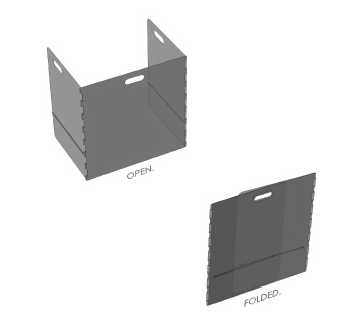
to Mergework’s Terrace and Enclave Sneeze Guard Workspace Social Distancing solutions with multiple mounting options at fancy-pants pricing.

If you’ve ever worked in an office with cubicles, you know that the absence of a door can have impact on privacy. (To be honest, so does the absence of a ceiling, but unless you move that Privacy Pop Bed Tent into your cube, I’ve got nothing for you.) If you’ll be returning cube setup, your HR department might be interested in this rolling Quartet Workstation Privacy Screen to improve productivity (and morale).
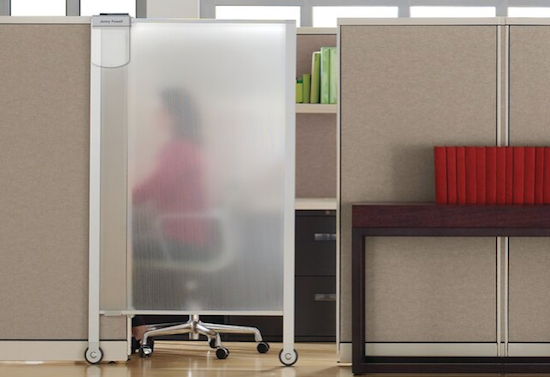
The translucent, shatterproof privacy screen measures 38″ wide by 64″ high. The frame is aluminum, while the screen itself is polycarbonate, making the unit durable and lightweight. As-is, the screen can roll into place for cublicles up to 65″ tall, and there are leg extenders included for cubicles taller than 68″.
There’s even an attached whiteboard with a nameplate so you can tell colleagues when you’ll be available and let them leave messages for you.
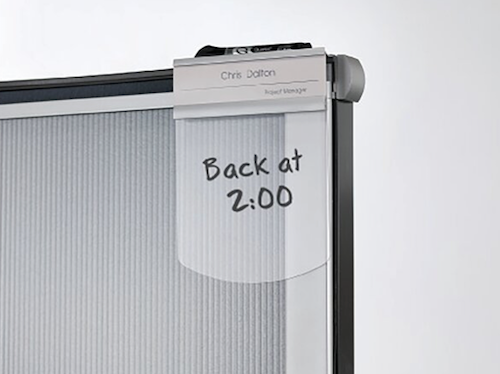
The Quartet Workstation Privacy Screen is available from Staples, Quill, Granger, Amazon, and Walmart. Currently, the price ranges significantly, from $261 to $390, and is the least costly at Walmart and Amazon. (There is also a sliding, non-wheeled version, measuring 36″ wide by 48″ high, which slides into cubicle walls and is not wheeled; it runs about $205.)
USE ROOM DIVIDERS TO CREATE WORK ZONES
Sometimes, you need a divider of greater size and scope. Over the years, I enjoyed being interviewed online, like the eight shows I did for Smead‘s Keeping You Organized video podcast:
Secrets to Organizing a Small Business
Fears That Keep You From Getting Organized
Paper vs. Digital Organizing (Part 1)
Paper vs. Digital Organizing (Part 2)
How to Get Organized When You Have an Extended or Chronic Illness (Part 1)
How to Get Organized When You Have an Extended or Chronic Illness (Part 2)
Essential Lists for Organized Travel (Part 1)
Essential Lists for Organized Travel (Part 2)
The problem? Behind my office is another room that is not appropriate as a professional video backdrop. Until 2019, as a stop-gap measure, whenever I made these kind of videos, I’d turn my desktop computer toward the opposite wall and move my chair; however, the overhead lighting against this background made spidery shadows above and around my head. I felt like a true Not-Ready-For-Prime-Time Player.
About eighteen months ago, when participating in Ray Sidney-Smith’s Productivity Summit 2019, I needed a better solution. My plan was to try to get a pretty room divider, something along the lines of the gorgeous Japanese shoji screens one often sees in movies — light wood, rice paper, hinged panels. Something like this, from Wayfair:

However, I was hoping for something a little less expensive than the (reasonable) $169 that this one goes for, and one available on a little speedier delivery schedule. Unable to find an appropriate screen locally, and with only a few days to go until the summit, my colleague Maria White suggested that I try Ollie’s, a factory close-out store.
There, for a decidedly more pleasing $38, I got a rattan, indoor-outdoor, hinged divider that, on video, looks far more elegant than it does up-close. If you have seen me on any recent webinars or video podcasts, you’ve seen it (and more importantly, you haven’t seen the room behind my office).
For a taste, you can peek at two recent Anything But Idle episodes I did with hosts Ray Sidney-Smith and Augusto Pinaud, focused on women experts on productivity, organizing, and technology. There’s March 8th’s where I was a solo guest panelist, as well as March 15th’s (below), where I shared the spotlight with the always-glorious, brilliant, and charming Deb Lee:
(If you make it all the way through, see if you can find where I almost devolve into a fit of giggles.)
For what it’s worth, if you do want any of a variety of hinged screens, upscale or downscale, two good shopping options are these at Wayfair and the sumptuous designs at RoomDividers.com, including their shoji screens, art prints, office partitions, and other room dividers, like this 6-foot double-sided, Lavendar Road canvas print for $149:

In researching this post, I occasionally found intriguing room dividers that do double-duty. For example, this RHF 5 1/2-foot tall, four-panel privacy screen at Amazon doubles as a corkboard message board and costs only $119.99.

It’s not necessary to purchase special furniture simply to divide a room to provide more focus on each space’s individual purpose.
For example, if you already have a free-standing bookshelf, around five-feet tall or higher, like the Ikea Kallax shelves, you can easily divide a room into sections merely by placing the bookshelf between your two spaces, making a sleeping area and study space, or office and workout area. Check out Apartment Therapy’s The Best Bookcase Room Dividers to get some inspiration.
CONSIDER SPECIALITY DIVIDERS FOR YOUR SPECIAL NEEDS
Of course, sometimes, you will want specialized furniture.
Imagine you’re building a career as a podcaster but you’re a renter and can’t affix acoustic tiles to the wall to create an audio studio. And let’s say you don’t have a walk-in closet loaded with a wardrobe of clothes to muffle the sound. You might opt for the Versare Versipanel Flexible Sound Control Partition Wall, sold by Walmart for $819.

The Versipanel is designed to be an attractive, sound-absorbent, wall enhancement. It’s 8 feet wide by 6 1/2 feet high, comes in blue, black, and grey, and is one single fabric panel with flexible segments.
Rather than being positioned straight-up, like most room dividers, the panel is meant to be positioned with some curve in it in order to stand up & be stable on its own. (For a larger divider, multiple units can be connected end-to-end with the pre-installed heavy-duty magnets.)
Store the Versipanel flat against the wall, or (like a VERY LARGE yoga mat), it can be rolled up and carried away to storage.
If you offer specialized teaching services for tiny humans, whether at a child care center, private school, or tutoring service, you might have a reason to invest in a more serious set-up. Discount School Supply has a wide variety of room dividers, from their Big Screen Right Angle Panels (for $185):

to their line of Big Screen Right Angle Panels mini-classrooms (sure to muffle sounds and improve focus) for $586.87.

FIND YOUR IDEAL DIVIDER
This post is just a sample of your options for organizing by dividing your space, creating zones, giving you privacy, and eliminating distractions. It’s meant to give you a taste of the possibilities available rather than a complete resource. Depending on your physical needs, budget, and the size of your space, you may want to use the following search terms to locate the right dividers for you:
- Room Dividers
- Privacy Panels
- Modesty Panels
- Hygiene Barriers
- Anti-Microbial Barriers
- Acoustic Dividers
THE ULTIMATE IN PRIVACY
If none of these ideas provide you with the level of privacy you need, especially in the workplace, there is one option short of sealing yourself up at home and pretending you’re still on lockdown, though it may be difficult to get your company onboard with the costs.
Poppin has a line of office “phone booths” that gives you a safe, quiet office within your office. The PoppinPod Om Sit and PoppinPod Om Stand, both for $5499, are made of high-grade glass and steel, and give you the privacy to focus, make confidential telephone calls, and isolate yourself from that office mate who does that thing. (You know what it is. Let’s not spell it out.)
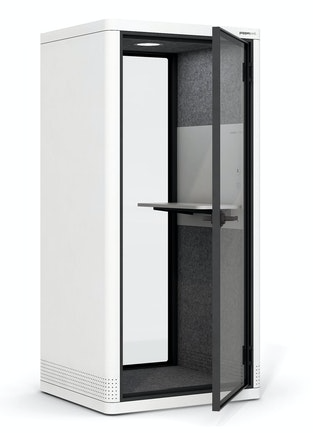
Both of the PoppinPod Om versions come in black or white, have USB chargers and a motion-activated light and fan, and feature dark grey, sound-absorbing PET lining. They’re shipped and delivered fully-assembled, because apparently the Poppin people have seen us trying to assemble Ikea furniture and don’t want to embarrass us.
For fancier workspaces, or if you’re hoping to have a work partner with you but still divide yourselves from your colleagues, the PoppinPod Kolo series upgrades from the Om experience and can accommodate 2, 4, or 6 individuals at prices ranging from $7000-$30,000.
And let’s face it, this is as close to Doctor Who‘s TARDIS as we’re ever going to get.
Paper Doll’s Secrets: Shred Successfully & Save Money

Klop. KaKLOP! Klunkety klunkety. KaKLOP! Grrrrrr uggggggg. KaKLOP!
No, unlike the officer at U.S. Strategic Command (STRATCOM), I haven’t let a tiny human take over my keyboard. The above is a close approximation of the sound my shredder made last weekend when, after two decades of faithful service and about halfway through shredding documents no longer necessary for tax time, it gave up the ghost.
At first, I thought I might have just fed one too many staples into the grinding teeth of my little document destruction devil. But, when I lifted the shredder from the bin and turned it over, nothing was stuck in the teeth. However, as I shifted the up-ended shredder motor from my left hand to my right, I could hear something sliding back and forth within. Ruh-roh!
Far more curious than mechanically inclined, I took a screwdriver to the whole housing unit, wondering if I might be able to just stick something back in place. (Yeah, go ahead and laugh.) Sadly, I found that a large octagonal metal washer (for want of a better description) had broken completely in half. The wheels on this bus were NOT going to go round and round any longer. I had to buy a new shredder.
DIY SHREDDER ESSENTIALS
Although I haven’t had to purchase a shredder in a long time, this is not my first shredding rodeo. Many of my clients find themselves either buying a first or replacement shredder as part of our work when we’re organizing and purging paper. So at least I knew what I needed to consider.
I hate to be crude, but size matters: the size of your shredder unit, the size of your “shreds,” and the size of the pile (or capacity) you can shred at one time.
Shredder Unit Size
There are three general sizes/types of shredder units: mini, medium, and heavy-duty.
Don’t buy a mini.
Yes, I know, regular readers of this blog recognize that I rarely invoke absolutes; the world is far more grey than black-and-white. However, unless you are buying a shredder for a child, I want to discourage you from buying a mini, or desktop, shredder.
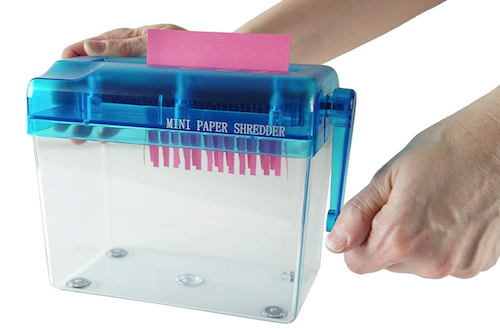
I admit, most “desktop” shredders are not hand-cranked and adorable like the one above. Indeed, most are more like the Aurora AS420C Desktop Style Cross-Cut Shredder below, in that it looks spiffy. But looks can be deceiving.
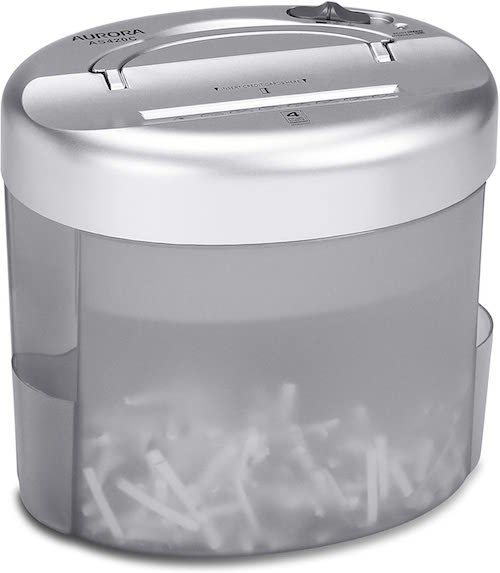 Often, I find that clients purchase desktop mini-shredders hoping that the small profile and easy desktop access will incline them toward keeping up with their shredding. However, the opposite is true.
Tiny shredders like the one above only take four sheets at a time (vs. 8 or 12 for a more serviceable shredder), fed through its 4 1/2-inch “throat,” or feeder slot. As most mail is 8 1/2-inches wide, anything not already folded into halves or thirds will need to be folded before fed. If you’ve got a multi-page credit card or utility bill (AmEx bills are usually a ridiculous number of pages, for example), you’ll have to separate the bill and feed just a few pages at a time. And the entire shredder can only accommodate 40 sheets, meaning you’ll have to repeatedly empty the basket.
You may not ever need to power-shred, but mini- or desktop shredders just aren’t designed for the kind of paper that the average household, and especially the home-based office or actual office, needs to destroy. I‘ve said it before: A mini-shredder is a lot like an Easy-Bake® Oven. Yes, it can do what it promises, but would you cook Thanksgiving dinner without a full-sized oven?
'A mini-shredder is a lot like an Easy-Bake® Oven. Yes, it can do what it promises, but would you cook Thanksgiving dinner without a full-sized oven?' Share on XFor typical home use, and for one-person offices, a medium-sized shredder should suffice. It should be able to handle four to six gallons of shredded paper (or about 150 to 400 sheets).
If you work in a large office, particularly one that deals with medical paperwork (covered by HIPAA regulations) or client financial information, you will want a shredder designed for large-capacity, heavy-duty shredding, one with an eight-gallon or larger basket/bin. (You’ll also be looking at a shredder that costs many hundreds of dollars, rather than one in the $30-$150 range.)
Shred Size (and Shape)
There are generally three types of shred sizes produced by consumer shredders. (Industrial shredders can pulverize paper into a fine dust, but that might be going overboard for destroying old bank statements.) These are known as strip-cut, cross-cut, and micro-cut.
Shockingly, I have another absolute for you: don’t buy the old-style strip-cut shredders; they’re rarely sold anymore, but even if you see a good deal at a garage sale, pass it by. Strip-cut shredders offer poor identity theft protection if someone really wants to get their hands on your data.
You will want a cross-cut or micro-cut shredder. A cross-cut shredder reduces your paper to 1-inch to 1 1/2-inch squiggly strips; such shredders are considered secure or “medium-security” and are rated P-4 or P3 security levels, respectively. On average, a cross-cut shredder shreds paper into 200 pieces (for a P3-rated shredder) or 400 pieces (for a P4-rated shredder). At home or in a one-person office, a cross-cut shredder will suffice.
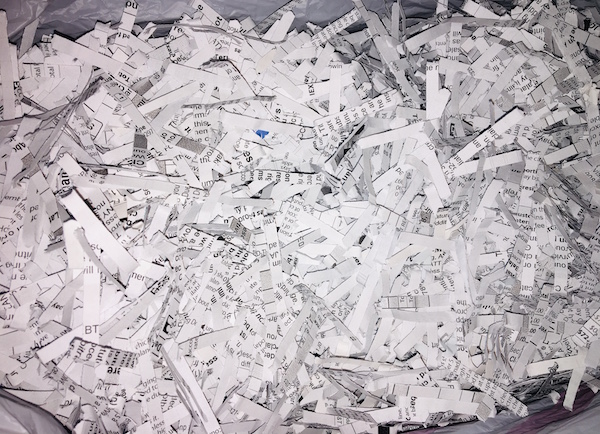
A micro-cut shredder chops paper into tiny fragments; micro-cut shredders are rated P5, P6, or P7 (the latter is also called nano-cut, and recommended for government and classified documents) in terms of security levels, shredding papers into 2000, 6000, or 12,000 pieces, respectively.
For an office that deals with HIPAA compliance, financial data, or spycraft, consider a micro-cut shredder. However, this is going to be over overkill (in terms of both function and cost) for use in a home office. (I mean, unless you’re a work-from-home spy, in which case…cool, dude!)
Capacity
There are three aspects to consider when looking at the capacity of a shredder:
1) How many sheets of paper can you feed at one time?
Most shredders you’ll be looking at for home use will be listed as handling 5-10 sheets at a time; for an office, a capacity of 10-18 sheets can be fed at one time. (There’s some cross-over in the home and office categories.) Bear in mind that at the home level, staples and thicker paper can reduce the number of sheets that can be safely fed at one time.
Heavy-duty shredders designed for office use can accommodate anywhere from 13 to 38 sheets at a time, with those at the higher level being much pricier.
While shredders are generally rated by the number of sheets shredded simultaneously, Paper Doll believes many manufacturers are a bit too optimistic in self-reporting. Just aim for the highest capacity shredder in your budget range.
2) How long can you shred before the shredder conks out? (This is called the shredder’s duty cycle.)
Ever get the red light while you’re shredding? This is the “Do not pass GO, do not collect $200!” message that means your shredder needs to cool down. Promotional materials usually claim that smaller shredders for home use can operate for two-to-three minutes continuously before needing a 20-to-30 minute break.
That doesn’t seem like very much time, but recognize that if you’ve got your shredder set to “on” rather than “automatic,” the shredder is only operating while you are pushing papers through. So, skip the automatic setting, take a few seconds between each multi-page pile of papers, and you’ll be OK.
Shredding companies have started listed their duty cycles on promotional material, but official capacity and real-world usage can be at odds, so do read the reviews.
3) What else can your shredder accommodate besides paper?
Any shredder you acquire should be able to handle stapled papers and (expired) credit cards. Most should also be able to shred CDs and DVDs, but if you have a lot of data on disk, be sure to check that your intended purchase can accommodate what you need to shred.
Other Considerations
Aesthetics — Unlike cell phones and other modern electronic devices, nobody seems to have given any thought to whether a shredder is attractive (to the eye or to the ear). I have yet to see a shredder in designer colors, and you’re pretty much limited to combinations of black and silver.
Obviously, design shouldn’t be your main concern, but you are likely to avoid using an ugly shredder or one that screeches. (Remember The Great Mesozoic Law Office Purge of 2015? When we cleaned out my father’s law office, he had an ancient, “yellowing” beige shredder. It was capital-U ugly, but Paper Mommy needed a shredder and was convinced she’d make use of it. Yeah. No.)
With regard to sound, whenever possible, test a friend’s shredder or ask a sales associate to help you test a floor model. The noise a shredder makes won’t exactly be pleasant, but some have more vibration or grinding than others.
Ease of Use — The main concerns are an adequate-width feeder and an easy-to-empty basket or bin. The nicest shredders have a removable bin that slides out like a drawer or tips out like a laundry chute, but these tend to be more expensive than the budget versions, where the shredding mechanism lifts off to reveal a metal or rubber receptacle. Avoid the low-rent shredders that only provide a mechanism to set atop a trash can; these are usually ill-fitting, poorly balanced, and lead to a flurry of shreds on your carpet, which furry animals and tiny humans will spread far and wide.
Special features — Some shredders, particularly those designed for a communal workspace, market special features at a higher price. For example, Fellowes markets a “100% Jam-Proof” micro-cut shredder for $1726.99! Others promote energy savings and quiet operations. As always, consider how often you’ll be using your shredder to determine how much extra you are willing to pay for special features.
At the lower end of the scale, you may want to consider the basket or bin into which you shred. The bin for my shredder, the one that bit the dust, was made of metal mesh, which meant that a lot of the shredding dust poured into the air if I didn’t use a bag, but when I used a bag, I couldn’t tell when it was almost full. Further, most shredders are designed so that the shredding unit/lid won’t fit properly into the bin if you’ve lined it with a bag, and if they do, most grocery-style plastic bags are smaller than the bin, so you’re not able to use your full capacity.

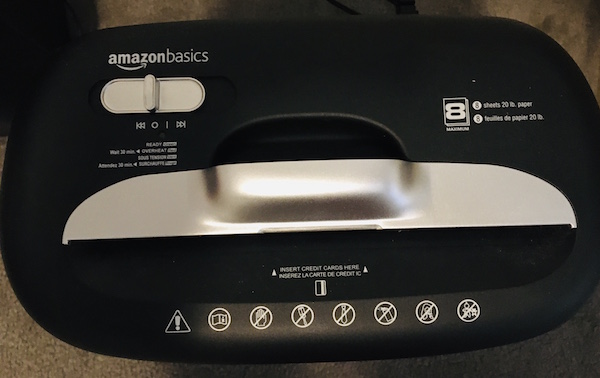
My new purchase warns not to use a bag; however, the base is made of a solid plastic (much like a trashcan) so there’s no shred dust plume, and has a nice window to give me a sense of when I’m about to reach maximum capacity. At that point, I must carefully lift up the shredding unit, tilt and flip it quickly to avoid spreading bits of shreds everywhere, and then I can upend the whole bin into the trash.
There’s always a trade-off. I’m frugal and don’t have a lot of demands, aside from my shredder not making the “Klop. KaKLOP! Klunkety klunkety. KaKLOP! Grrrrrr uggggggg. KaKLOP!” sound more often than every few decades. I purchased the Amazon Basics 8-sheet shredder because it was on sale last week, running five dollars less than it is right now, and because it was a Best Seller (probably because it’s so inexpensive). But again, because you need to live and work with it, it’s important to pick a shredder with the features you need and want.
Still not sure what you want? Fellowes offers an interactive Shredder Selector tool to help you choose among a variety of features, including shredder capacity, feeder type, number of users, volume of shredding, maximum run time, security level, shredder safety, and even a few extras.
PROFESSIONAL SHREDDING SERVICES
You already know how important it is to shred the paper that you no longer need for tax, legal, or proof-of-ownership purposes; merely tossing them in the trash could make you a quick victim of identity theft. But you also know that once your shred pile is as tall as the youngest of your tax-deductible dependents, your home-rated shredder is likely to wimp out before you get through your seasonal pile shredding.
If you lack the time, space, shredding power, or intestinal fortitude to conquer your backlog of shredding, you have a variety of options for getting professional help. A number of companies are available nationwide to help with document destruction, including:
You are likely to have local and regional shredding companies at your disposal as well.
If you need help finding shredding services in your area, turn to the National Association for Information Destruction.
NAID’s interactive map will locate shredding companies nearest to you. Enter your zip code and the system will provide you with a map and list of document destruction services in your area. You can also narrow your search to filter for different kinds of destruction certifications.
Note: Most shredding services offer a combination of drop-off and secure pick-up services; if your office or organization requires regularly scheduled shredding, you can arrange for periodic pickups.
Many retail locations also have relationships with document destruction services. In these situations, you generally self-serve your papers into a slot in a large, locked container that looks much like the garbage and recycling cans you wheel to the street on trash day; the shredding companies usually do pickups every week-to-two weeks and either shred paper in a specialized truck in the store’s parking lot, or trade out an empty bin and take the full one to their physical operations.
Getting your shredding done in the same parking lot where you pick up your groceries or get your office supplies is convenient (and less labor than shredding piles of paper for yourself), but the cost is likely to be a little more than you’d pay if dealing directly with a document destruction service. Prices typically range from 99 cents per pound, upward.
Check with your local retail locations to see if, how, and at what price they offer shredding services. Start with:
Before you go, be sure to check the retailers’ sites for discounts, or use your favorite search engine to search “[store name] shredding coupon 2021” to see what discounts are currently available.
Tax time is usually one of the best times of year to get discounts on shredding. For example, as I write this post, FedEx office is offering a 40% discount on shredding services, so their usual $1.49/pound costs just $0.89/pound from April 1 – May 31, 2021. (No coupon required.)
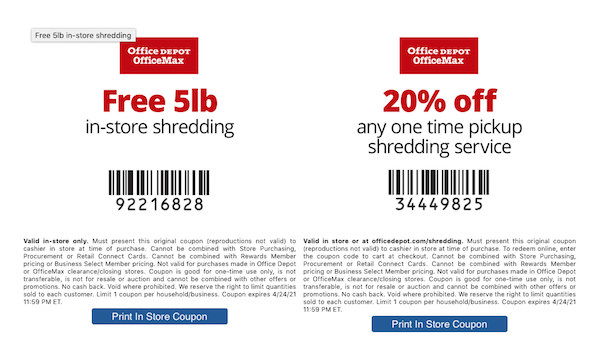
Office Depot tends to change their discount offerings each month. Right now, Office Depot is offering 5 pounds of in-store shredding for free and 20% off any one-time shredding pick-up service. The photo below is a facsimile, so scroll to the bottom of the Office Depot shredding page and click “print” for the coupon you prefer.
FREE SHREDDING EVENTS
Throughout the year, various government agencies, community groups, senior centers, houses of worship, and universities partner with shredding companies for free events billed as shredathons and shred days.
Document destruction companies (like Iron Mountain, Shred-It, Pro-Shred, and Shred Nations) bring their giant paper-chomping trucks so you can get your papers securely shredded on-site. While these events have been less common throughout the pandemic, a quick Googling indicates that they’re starting up again.
Search these terms plus your city or town name to find events near you. Many are held in mid-to-late April, so don’t delay. In addition, the Better Business Bureau also sponsors free shredding events associated with Secure Your ID Day. Canton, Ohio kicks off their event this coming Saturday, April 10, 2021, with many more around the country continuing throughout the month.
Tax time is the perfect opportunity to clear out your file folders, your desk drawers, your purses, wallets, and pockets, and to shred all those random receipts and documents that you don’t need to support your tax returns, keep you legal, or prove ownership of your stuff.
Of course, if you don’t know what you need to keep vs. what you should shred, Paper Doll has you covered with Do I Have To Keep This Piece of Paper?
Whether you shred at home or work, use a service, or attend a shredding event, plan time in your schedule to shred. Declutter, protect your identity, and save time and money!
Paper Doll Models the Spring 2021 Organizing Products

It’s finally springtime, the perfect time for new organizing supplies!
For most of the fourteen years I’ve been writing this Paper Doll blog, I’ve delighted in sharing new organizing products displayed at the annual NAPO Conference & Expo. Unfortunately, last year, the conference was canceled due to COVID. This year, although we’re very excited that we will get to have a 2021 NAPO Conference (albeit virtually) next month, there will not be an expo.
However, that doesn’t mean you’ll miss out on new organizing products! I’ve been collecting tidbits and emails over recent months, enough to assure you that there are novel and interesting organizing products out there in the world, and today, we’ll look at a few of them.
Organize Your Papers & Information
Whether you feel like you’re working from home or living at the office, whether “work” is your career or your volunteer gig or having a serious meeting at your kids’ school, the business of your life involves a lot of moving parts. Let’s look at what make these efforts run more smoothly.
Smead Soft Touch Cloth Expanding Files
Right now, most people’s “meetings” are held virtually, with each person in his or her own Brady Bunch-style box on Zoom or the equivalent. As long as we’re dressed from the waist up and have combed our hair, we pass muster. Nobody can see much below our shoulders, so if we’ve scribbled our notes on a Snoopy memo pad, our co-workers won’t be able to tell.
But imagine someday soon, it will be like the “before times” – eventually, we’ll all be back in the “real” world, with in-person meetings. And for good or ill, style will matter, at least a little, and we won’t be able to just carry an armload of papers as we might do now, from couch to desk. Somehow, I suspect our old briefcases will seem stodgy, a remnant of another era, but backpacks will feel just a little too casual for a meeting with the CEO. Smead has found a middle path.

Smead Soft Touch Cloth Expanding Files offer up an attractive way to look professional and keep your documents organized. It’s never too early to make a good impression, and I think these cloth expanding files help you accomplish just that.
One step up from poly or paper expansion folders, the Smead Soft Touch Cloth Expanding File provides 2 inches of expansion capabilities, so you can store your important documents and files, a small laptop or tablet, your phone, and maybe a bullet journal. Closed on three sides, the top flap has one of two styles of closures to secure the fourth side, securely containing everything when you’re on the go.
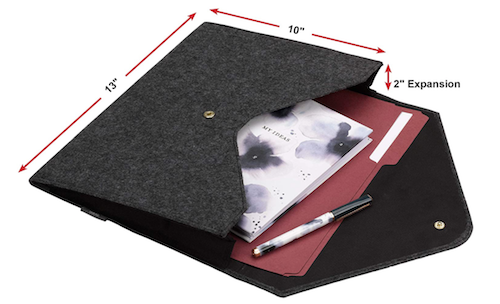
The Smead Soft Touch Cloth Expanding Files come in two styles, letter-sized (13″ wide x 10″ high) with a snap closure or tabloid ( 12″ wide x 18″ high) with a magnetic closure. The soft cloth design comes in black, grey, and dark blue. All versions feature a cloth exterior with matching sewn stitching and a satiny, purse-like, black cloth interior. (Caveat: Smead calls the exterior “soft,” which is a relative term. Let’s say it’s a bit like a woolen blazer.)
You can find these sharp-dressed portfolios at the Smead links above (about $15 for the letter-sized or $25 for the tabloid sized) or on Amazon (about $13 for letter-sized and $21-$25 for the tabloid version).
So, when the world gets back to “normal,” whether you’re heading into a client meeting or an interview, something snappy and professional may not only help keep you organized, but like a new pencil box on the first day of school, might just give you just the confidence you need to re-enter the working world.
Quartet Portable Glass Dry Erase Pads
Recently, Quartet, one of the ACCO family of brands, reached out to show me their new line of Keep notes handy wherever you are with the Quartet Portable Glass Dry-Erase Pad. The idea is that you can keep notes and reminders on a small glass whiteboard that fits in a bag or purse, and opens and folds like a notebook for easy dry-erase writing.

The dry-erase pad is a non-porous glass board made of 5″ x 8″, 4 mm thick tempered glass; along with the cover, it weighs one pound. The pad opens and closes like a notebook, so you can quickly jot down notes, reminders, or squigglies throughout the day, while the durable, poly cover and its small foam pads protect the glass whiteboard’s surface (so there’s no jostling or unintended erasure of your notes).
Write, close, drop it in your bag, roam around our brave, new world, open it again, and pick up where you left off, without smudges.
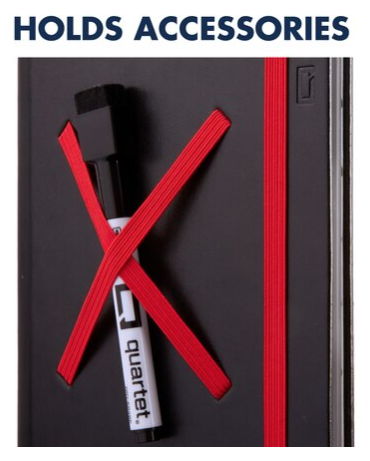
There’s a bungee closure to keep it closed and protected, and criss-crossed elastic bands hold dry-erase markers and accessories.
The magnetic kickstand embedded into the cover holds the pad in place and angles it so you can comfortably view your notes while you’re speaking on camera or to a group, or just trying to review your mind-map while eating at an outdoor cafe among other humans (as we’ll all be doing soon, I hope).

The Portable Glass Dry-Erase Pad comes in two cover styles: blue (with orange closures and bands) and black (with red closures and bands), and with one dry-erase marker. (Note: Quartet does make a 9″ x 6″ glass dry-erase desktop “notepad” in two styles, floral and dotted, but these are designed to use at your desk and have no cover (and thus no protection from jostling), so please be careful when ordering.)
The Portable Glass Dry-Erase Pads are priced at $40 on the Quartet website, or a little under $30 at Amazon.
I’ll admit, at first I was puzzled by the appeal of the product. Why would you carry around a piece of glass when you’re already carrying your phone, and maybe your tablet? What’s the appeal of writing something down that’s erasable when you’re mobile if you could type or dictate into your phone? I mean, I’m a paper girl, so I could see the appeal of a notebook or note pad, but to me, dry-erase is for your office space. (Hey, that rhymes!)
What was I missing?!
I shared the product with a few of my colleagues. A few were “meh” about it as I was, finding the sleek design appealing but the utility doubtful. However, others got very excited. For them, the combination of being able to hand-write their notes but have zero impact on the environment (no trees killed, no landfill topped off) got them very jazzed. And, of course, we all noted that information on the pads can be captured and kept permanently via a quick snapshot and upload to Evernote, OneNote, or similar data storage before erasing.
Readers, what are your thoughts? Would you tote around a one-pound dry-erase board? What other uses could you find for this product? Feel free to share in the comments!
Quartet Desktop Glass Whiteboard Computer Pads
While I was scrolling around the Quartet website, I did find something that appealed to me. Although it appears the product isn’t new, it’s new to me.
Quartet’s Desktop Glass Whiteboard Computer Pads are just as environmentally friendly as their portable cousins, but they are designed to be used at the computer, where there’s far less chance of dropping them! (What?! I can’t be the only person who fears being klutzy and having a purse full of shattered glass!)
This two-pound, 18″ wide by 6″ high, angled organizing tool does double-duty. The contemporary-style glass top is made of a sleek, durable, dry-erase surface, designed to fit in with any office or home décor.
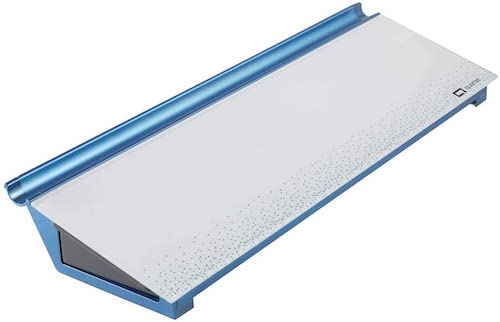
The non-porous glass does not absorb ink, so Quartet guarantees (for 15 years!) that it will not stain or ghost, and it’s made to resist dents and scratches in case you have a cat or tiny human (or co-worker who behaves like either one) visiting your desk. So, write your task list or the phone numbers you’re transcribing from voicemail, erase, write something completely new – all to your heart’s content.
The writing area is only part of what makes the Desktop Glass Whiteboard Computer Pad useful. The item as a whole is designed to sit between your keyboard and your monitor, and the built-in storage drawer slides out to expose space for markers, sticky notes, flash drives, and whatever you want to keep at your desk while maintaining a clutter-free work environment.
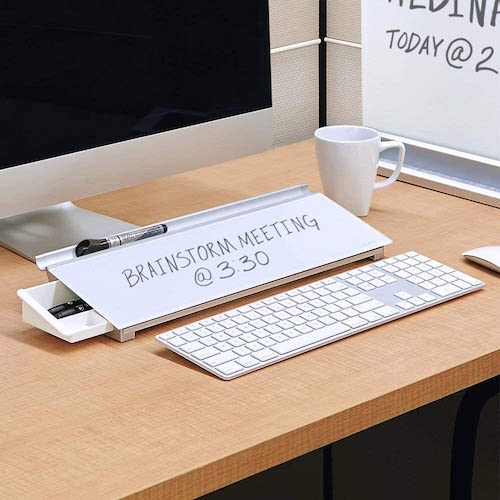
There’s also a small trough at the top of the angled surface where your dry-erase markers can nest comfortably until you write your next reminder.
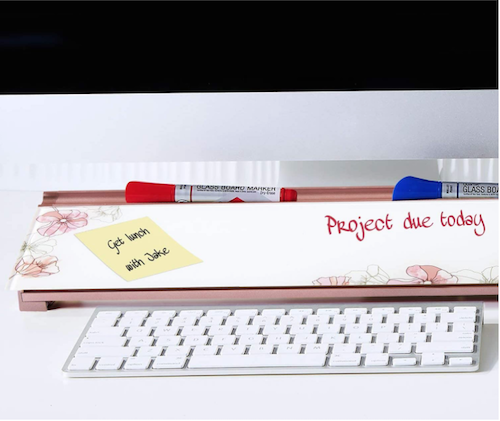
The Quartet Glass Dry-Erase Desktop Computer Pads come in five styles: White, Marble (grey with gold accents), Floral (white with pink accents), Dot (white with blue accents), and Black (with silver accents).
Reviewers advised that while a variety of dry-erase markers will work, the Quartet brand seem to have the best staying power and erase the most cleanly, so caveat emptor. I should also note that it’s not immediately obvious what color dry-erase ink colors would be visible on a black background. It appears the black version comes with white dry-erase marker.
The different versions range in price from $27-$34 on the Quartet website, and $34-$37 on Amazon.
Organize Your Space
Organize Your Home 10 Minutes at a Time Deck of Cards
Longtime friends of the blog and beloved NAPO-Georgia colleagues Diane Quintana and Jonda Beattie have had their own, separate professional organizing practices for some time; they’ve also been collaborating on projects, including speaking gigs, classes, and their children’s books, Suzie’s Messy Room and Benji’s Messy Room.
Recently, Diane and Jonda joined forces to create a collaborative company, Release * Repurpose * Reorganize, and even wrote a book together, Filled Up and Overflowing: What to Do When Life Events, Chronic Disorganization, or Hoarding Go Overboard. But apparently, even that wasn’t enough excitement for them!
Diane and Jonda have created the Organize Your Home 10 Minutes at a Time Deck of Cards. Fully aware that most people don’t have the desire, motivation, or stamina to conquer organizing an entire room or space all at once, they’ve created a 52-card deck to guide you through organizing your home step-by-step, one 10-minute task at a time.
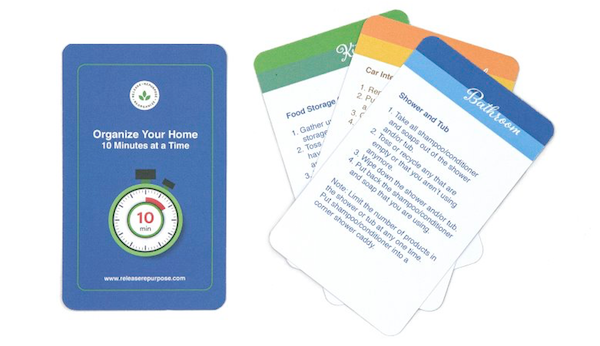
The deck includes two instruction cards to help you get started, plus 50 categorized task cards for coping with typical areas of a home, including kitchens, closets, bedrooms, bathrooms, family rooms, and similar spaces. The top of each card color-codes to the spaces covered, and tells you the space and task to be handled. The body of each card provides instructions for completing the task.
Whether you could use a little personal motivation to get your home organized or want to get your family (or housemates) in on the organizing action with a little competitive guidance, Diane and Jonda have you covered.
The Organize Your Home 10 Minutes at a Time Deck of Cards is available on their website for $19.95.
Organized Travel
As you know, it’s rare for me to report on organizing products unrelated to paper, information, finances, or office space…except when I’m reporting from the NAPO Expo. Given that this post replaces an actual expo report (and the realization it’s my blog and I can make my own rules!), I’ve got one more product to share.
Hang|Fold
HangFold calls itself a “travel partner,” to prevent wrinkled clothes. As someone who despises ironing and generally owns an entire travel wardrobe of (upscale) polyester and spandex in order to avoid ironing, this pricked up my ears. According to the company, Hang|Fold allows you to pack shirts and delicates — perfectly folded — into your suitcase, and then once you get to your destination, you don’t have to worry if there will be enough hangers. The hangers are built in!
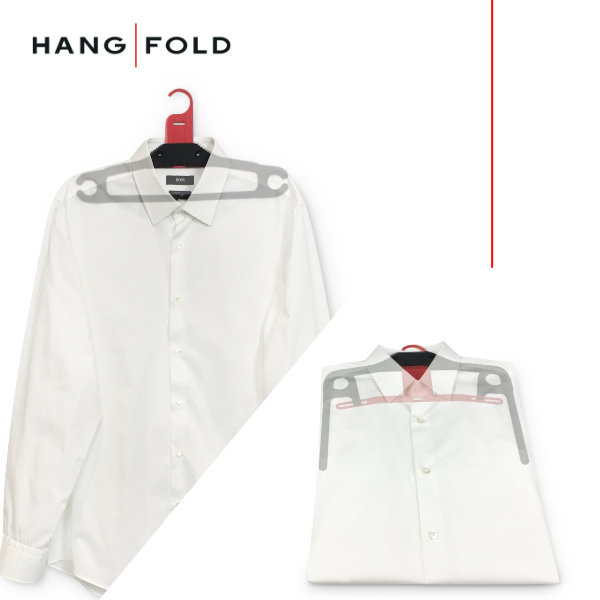
Hang|Fold is a hanger, but it’s also a template for perfectly folding shirts, sweaters, and other clothes to make them both suitcase-ready while traveling and hanging-ready for when you get to your hotel or home-share. (Remember hotels? Remember traveling?)
Everything you fold goes into your suitcase the same size, as if you were using Dr. Sheldon Cooper’s Flip & Fold method, and it all comes out smooth, unwrinkled, and unsquished.
Hang|Fold is less than a quarter of an inch wide and measures 15″ long x 7.5″ high in the hanger position. In template mode, it’s less than 12” x 10”. It is a one-size-fits-all product. Pull up or push down on the hanger to change modes.
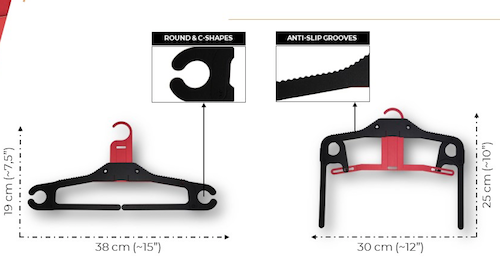
Hang|Fold features rounded edges and C-shapes, as well as anti-slip grooves, so no pointy shoulders or unseemly clothing dents!
Hang|Fold weighs about the same as a dress shirt (6.34 oz) but is capable of supporting more than 5 1/2 lbs. on the shoulders and more than 6.6 lbs. on the trouser bar. It’s light weight, but it’s no lightweight, if you know what I mean!
Hang|Fold is a patented product made 100% out of recycled polypropylene (PP), and is produced in the European Union (Spain) by ISO 9001-certified manufacturers, ensuring the quality and sustainability.
While I don’t usually promote products that are in crowdsourcing mode, in case they don’t come to fruition, I liked that the company is thinking about the environment as well as the future of travel:
Juan Flores, CEO at Hang|Fold reports that, “It has not been easy to move ahead with a project created from scratch in the middle of a pandemic, especially with a product aimed for travelers and a business model that defies the status quo in production, financing and materials used. However, despite all the challenges faced, we’ve launched our crowdfunding campaign in Indiegogo and shared this dream with our customers hoping they will join and support us.”
It’s not available yet, but is going live on April 13, 2021. You can sign up at Hang|Fold’s Indiegogo page to get notified when the campaign goes live and to get a 45% discount. Until then, see Hang|Fold in action:
Usually, my NAPO Expo recap runs for a few posts, and it’s quite possible that in the run-up to the 2021 NAPO Conference, I might get more sneak peaks at new and unusual organizing products. Until then, share what you think of these, and let me know if you have any of the items I’ve profiled.
Affiliate Disclaimer: This site uses affiliate programs to help generate a supporting income which allows us to continue our work and provide you with the best overall experience and valued information. If you have any concerns, we suggest you do not click on any affiliate links found throughout the website or blog. If you are uncertain as to the resulting link’s destination, you may hover your cursor over the linked material to see where it goes. We will always provide you with a company or agency name, which you can type into any search engine in order to reach the site independently of our links. For more information, please see the Affiliate Tracking section of this site’s Privacy Policy linked at the bottom of each page.
Paper Doll’s Tax-Smart Organizing Tips: 2021

Photo by Khaosai Wongnatthak at Vecteezy
I know this will be hard to believe, but “doing” your income taxes does not have to be painful. (Paying your taxes is another issue altogether.) The key to succeeding is, no surprise, getting organized — knowing what information you need, what specific forms to expect, and having it all ready when the questions are asked.
Today’s post will give you some guidance regarding what you need to organize to get your taxes completed. But first, you should be aware of some important news regarding preparing your 2020 tax return.
TAX NEWS YOU CAN USE TO KEEP ORGANIZED
Tax Deadline Changed
Most years, Tax Day is April 15th, give or take a day for weekends or special holidays. (For example, in 2023, April 15th falls on a Saturday, so Tax Day would normally be April 17th, the following Monday. However, that’s Patriots’ Day in Massachusetts, Maine, and several other states, so Tax Day will be April 18, 2023, nationally.) In 2020, due to the pandemic, the IRS moved the federal Tax Day forward to July 15, 2020, and most states delayed their tax filings, too.
Last week, after leaving people guessing for several months, the IRS announced that Tax Day 2021 has been delayed one month to Monday, May 17, 2021.

Note: this extension only refers to individual tax returns; federal estimated quarterly payments and other federal tax deadlines haven’t changed. Thirteen states have already changed their tax deadlines to May 17, 2021, with more considering a change, so please consult your own state’s revenue department websites for up-to-date information in your state.
I encourage you to pretend that the IRS did not delay the date, and use this as an opportunity to set up small blocks of time, even 20 minutes each evening over the course of a week or so, to gather your resources. If you work on your taxes in small chunks of time, bit by bit, it won’t seem so overwhelming. Again, once you have all the information, it’s just about being able to answer the questions.
Unemployment Funds “Bonus”
Did you receive unemployment benefits during 2020? (You should have a 1099-G if you did!) Many Americans did, including self-employed individuals who had never been able to collect unemployment previously. Often, people are so relieved to receive these funds that they do not consider that unemployment payments are taxable and they do not opt to have taxes deducted, assuming (or hoping) that by April of the next year, their financial fortunes will have improved. This can be problematic even when there isn’t a global pandemic going on!
If you did not think about paying taxes on that compensation, there’s a little good news. Although it’s really rare for this kind of retroactive relief, as part of the American Rescue Plan of 2021, the first $10,200 of unemployment benefits earned in 2020 will not be taxable for people with incomes of less than $150,000.
Last week, most of the online tax preparation companies updated their software to adjust for this. If you started doing your taxes weeks or days ago but didn’t finish, when you log in you may be surprised to see that your amount owed is lower or your refund is higher. Whoohoo!

Nick Youngson via CC BY-SA 3.0 Alpha Stock Images
Are you Old School? Do you do your taxes on paper? The IRS has released instructions and a worksheet for taking advantage of that $10,200 exclusion for unemployment compensation. (Cheatsheet: you’re going to focus on line 7 of your 1040!)
What if you already filed your taxes? You may be thinking that you’ll have to file an amendment to your tax return in order to get money refunded to you. Not so fast! Hold your horses!
The IRS has stated that individuals who have already filed their returns and who paid taxes on their unemployment benefits (either through them being taken out by their states or on their recently-filed returns) should NOT amend their returns. Rather, the IRS will be recalculating those returns and money will be refunded to individuals by direct deposit or check, depending on their circumstances.
Again, for those of you in the back, still high-fiving about this income not being taxable: the IRS will automatically process refunds to account for the first $10,200 in unemployment benefits! Don’t amend your taxes for this!
Stimulus Not Taxable
You may have received a federal stimulus check in 2020, $1200 for each individual under a certain income threshold plus $500 for each dependent child. Your stimulus payment is NOT taxable. Why? Because, due to the way the law was written, stimulus checks are not considered “income.” Rather, they are advance payments of a tax credit, and tax credits aren’t taxable income.
However, if you were eligible but did not receive your stimulus check, you will be able to report that fact on your return to apply it toward your taxes owed or refund due. You do this by claiming the Recovery Rebate Credit. Your accountant or tax software will know how to handle this, but keep your eye on line 30 of your 1040 form. (Do you like reading the nuts and bolts? Check out page 58 of the IRS tax instructions for the Recovery Rebate Credit worksheet.)
Earned Income Tax Credit (EITC) Option
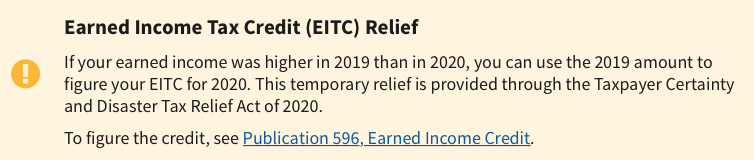
Those of you who earned less in 2020 than in 2019 (and that includes a lot of people) have a delightful surprise awaiting you. When doing your 2020 taxes, you have the option of using either your 2020 or 2019 income to calculate your Earned Income Tax Credit.
Special Forms for Seniors
Are you a senior? As of last year, if you are over 65, instead of filing the standard 1040 form, you can file the 1040-SR. The main benefit is that this form, when printed, uses a larger font and provides easier readability.
New Kind of 1099 for Freelancers
In the past, freelancers, independent contractors, and similar non-employees received the 1099-MISC — you know how organizers feel about a “miscellaneous” category! This year, there’s a new form, the 1099-NEC for non-employee compensation. (See below for more on this new form.)
Photo courtesy of Chris Potter/CCPix at www.ccPixs.com under CC 2.0
KNOW WHAT YOU SPENT
The best time to get ready for doing your taxes in 2021 was back in early 2020, but something tells me you were a little distracted by world events and trying to buy toilet paper. To file your taxes for this most wackadoodle of years, you’re going to have access a lot of information about your 2020 spending, like:
- receipts for tax-deductible purchases (check for paper receipts as well as email confirmations of purchases)
- statements for ongoing accounts
- an online financial dashboard (like Quicken, Mint, Personal Capital, or YNAB)
If you made a lot of Amazon purchases this year (and really, who didn’t?), especially if you are self-employeed and can expense office supplies and other work-related items, you can select “2020” from the drop-down section under Your Orders in your Amazon account; digital orders (such as for educational materials) have their own drop-down, three tabs to the right. To download your entire Amazon order history, go to the Amazon Request My Data page.
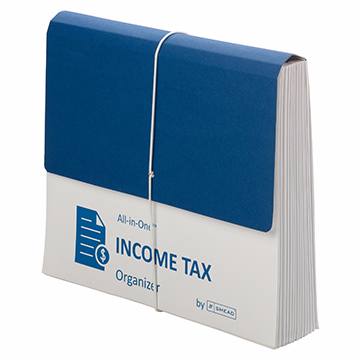
Gather all your tangible information in a folder labeled Tax Prep 2020, or use something like the Smead All-In-One Income Tax Organizer. Just having it all together will be the first step toward tabulating the correct amounts.
GATHER YE FORMS
Of course, most of the big-ticket items you’ll be entering into tax software (or, gulp, on paper forms) comes not from the little receipts and statements you get during the year, but from the official forms you receive.
It all starts with the supporting documents called information returns. These are sent to you by others – employers, banks, brokerage houses, schools, casinos, and others. The law requires these entities to send them to you by February 1, so you shouldn’t have to do much searching. They should have shown up in your mail. So that scary-but-official mail you threw on top of the microwave the week before Valentine’s Day? Move the oven mitts and get looking!
MONEY YOU RECEIVED
W-2 (Wage and Tax Statement)
Did you have an employer in 2020 (even for part of it)? Then you should have received a W-2. Your employer is supposed to send one copy to you and one to the IRS, reporting how much you were paid (in wages, salaries, and/or tips). If applicable, it should also indicate how much money was withheld from you and paid to federal and/or state governments for taxes and FICA (Social Security and Medicare).
Federal, state, and local taxes, FICA, unemployment insurance, and a few other withholdings are considered statutory payroll tax deductions. Statutes (that is, laws) require them. Duh!
Sometimes, a court might rule that an an employee’s wages may be garnished, but this has nothing to do with sprigs of parsley. People behind on child support payments or who owe money in lawsuits may have money removed from their earnings, before it ever gets to their paychecks, to ensure it goes directly to whomever is owed.
Your W-2 may also report voluntary payroll deductions. These are amounts withheld from your paycheck because you’ve granted permission. These may include your portion of health and life insurance premiums, contributions to your 401(k) or other retirement fund, employee stock purchasing plans, one-time or ongoing donations to the United Way, union dues, etc.

Photo by The New York Public Library on Unsplash
You probably got multiple copies of the same W-2. Employers submit copy A directly to the Social Security Administration (remember that FICA we talked about?) and keep copy D for their own records. Copies B and C are for you (the employee) – you send one to the IRS with your federal tax return and keep one for your own records. Then, copies 1 and 2 are provided to file with any applicable state or local tax authorities. (I’ve never figured out why W-2 copies 1 and 2 aren’t called E and F. Did the same person who came up with this decide that bras should be sized as A, B, C, D, DD, DDD, F, FF, and G, skipping E entirely?)
I've never figured out why W-2 copies 1 and 2 aren't called E and F. Did the same person who came up with this decide that bras should be sized as A, B, C, D, DD, DDD, F, and G, skipping E entirely? Share on XIn theory, a W-2 should be mailed to the address listed on your W-4. (Don’t be confused. The W-4, is the form that tells your boss how much to withhold based on your number of dependents you have an any necessary adjustments.) Many smaller companies don’t bother mailing the W-2 and just hand them to you, but given how many people are still working from home and how iffy the postal service has been (cough, cough), you might have to Zoom or send an email to Madge in HR. Some things to consider:
- Did you change employers last year? You should have received W-2s from each employer. (If you changed jobs at the same company, you’ll receive one W-2 from each employer, not one per position. If you changed companies within a larger corporation, though, you may get one for each.)
- Did you change addresses since you filled out your W-4? There’s only so much a former employer will do to track you down to give you your W-2. Keep the boss updated!
Don’t assume that if you don’t have your W-2, then nobody knows what you made. Remember, the IRS got Copy A. The IRS knows what you made, so be sure you do, too! (If your former company went out of business or is otherwise not returning your calls, possibly due to COVID weirdness, the IRS has a procedure to allow you to file your taxes in the absence of a W-2.)
Examine your W-2 it carefully. Do the numbers seem right? Compare them to the final pay stub you got for last year. Calendar years usually end mid-week (and sometimes, mid-pay period), so the numbers won’t correspond exactly, but they’ll be close enough for you to spot if something is seriously wrong. The sooner you call your employer’s attention to an error, the sooner you can prepare your return.
W-2G (Certain Gambling Winnings)

The W2G is the freewheeling cousin of the W-2. While a W-2 is for money you make while working, the W-2G is what you get while playing. If you win more than $600 in any gambling session at a casino – whoohoo! – the “house” should request your Tax ID (generally your Social Security number) and either prepare a W-2G on the spot or send it to you in January.
Casinos aren’t interested in keeping up with your losses, just your winnings, so they only tell the IRS about what they paid you. If you do go gambling and want to deduct losses, the IRS requires you to be able to provide receipts, tickets, statements or other records that show the amount of both your winnings and losses.
(And yeah, all of 2020 did seem like a gamble. You’re right.)
1099s (Income)
A 1099 is a form that basically says, “Hey, we paid you some money for something, but you weren’t an employee.” You get a copy; the IRS gets a copy. Easy-peasy.
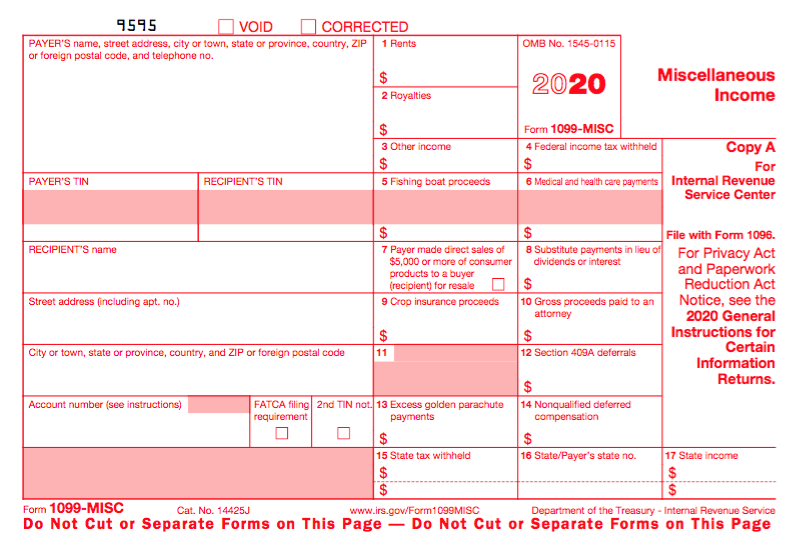
There’s not just one type of 1099; actually, there are a whole bunch of 1099s. Some of the more common are:
Got a bank account? This form reflects the interest income you receive from interest-bearing savings and checking accounts, money market bank accounts, certificates of deposit, and other accounts that pay interest. It also notes whether foreign or U.S. taxes were withheld and if there were any penalties assigned for early withdrawal from an interest-bearing account. Internet-only banks often require you to log into your account to get your 1099-INT, so don’t count on it coming by mail. If you received less than $10 in interest, your bank may not send a 1099-INT.
Do you own stock or other taxable investments? This form indicates the dividends or capital gains you received as an investor. Your broker, plan services company, mutual fund company or other type of investment company will send this form. Not all dividends are created equal; ask your tax professional if you have any that seem unusual or complicated. Whether you receive dividend checks or your dividends are held in a DRIP (a direct re-investment plan), if you did not earn at least $10 in dividends, you are unlikely to receive a 1099-DIV.
This form is subtitled “Certain Government Payments” and can cover everything from state unemployment compensation to tax refunds, credits, and offsets at the state and local level. It can also be used to report payment of taxable grants, agricultural payments, and other nifty things where a state or local government gives you money.
1099-NEC (NEW!!!)
As noted above, this is a new form designed to take some of the weight off the 1099-MISC (see below). If you’re self-employed (a freelancer, an independent contractor, etc.), you should get a 1099-NEC, starting this year. However, people are unfamiliar with this form and may still send you 1099-MISC until the 1099-NEC is more widely known.
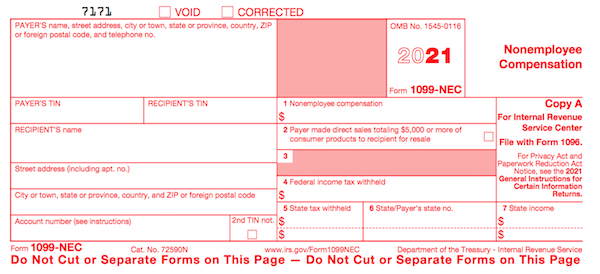
Another problem is that even if someone paid you for doing work as an independent contractor, they may not know they should be sending you a 1099-NEC. So, if you are self-employed or irregularly employed, it’s essential to keep track of your own incoming revenue. Otherwise, if the person who paid you ever gets audited, it could trigger some messy situations for you, too.
Now that this form no longer covers all the different forms of income for freelances and independent contractors, it is truly more applicable to call it “miscellaneous.” It will generally be used to report payment of royalties, broker payments, certain rents, prizes and awards, fishing boat proceeds (yes, really!), crop insurance proceeds, and some payments to attorneys that wouldn’t be reported on a 1099-NEC, like if you received a settlement and were required to pay an attorney a portion of it. In general, once people get used to the 1099-NEC, you’ll only get this miscellaneous form to report truly miscellaneous payments.
SSA-1099 (Nobody knows why the numbers and letters are reversed on this one form! It must be done by the same people who label the copies of W2s and bra sizes!)
If you receive Social Security benefits, you should receive an SSA-1099 or an SSA-1042s, the latter being for non-citizens who live outside the United States but receive benefits. (For example, widows or widowers who are receiving spousal benefits.) The 1099-SSA tends to come on a long form, folded and sealed such that it makes its own envelope.
A 1099 doesn’t always indicate that you were literally paid money. For example, a 1099-C indicates that a party has forgiven a debt, like a mortgage or part of a credit card balance. You may owe tax on forgiven debts, and the 1099-C alerts the IRS that since you didn’t pay money owed, and got to keep it in your pocket, it’s as if you received money.
Your 1099s sometimes hide in plain sight. Occasionally, instead of sending a 1099 in a separate envelope, a bank or brokerage house may include a 1099 form in the same envelope – sometimes perforated, at the bottom of a quarterly or end-of-year financial statement, so be sure to check all that boring-looking official mail that arrives. Multiple forms may be sent as a “combined 1099,” scrolling across multiple pages, so check the reverse of other forms, in case you seem to be missing one.
MONEY YOU PAID
1098 (Mortgage Interest)
A 1098 is not a 1099 with low-self-esteem. The vanilla, no-frills 1098 reflects the interest you paid on your mortgage, which is generally deductible on your federal taxes. Renters don’t get 1098s; neither do homeowners who’ve paid off their mortgages.
There are also sub-types of 1098s for things other than interest on property loans:
- 1098-T indicates tuition you paid; you’ll get this from a college or training school.
- 1098-E shows you’ve paid interest on a student loan and will come from your lender.
- 1098-C indicates the donation value of a car, boat or airplane.

Photo by Diego F. Parra from Pexels
1095-A (Health Insurance Statement)
The 1095-A is also called the Health Insurance Marketplace Statement. We are all generally required to have health insurance. If you purchased yours through a state or federal exchange, this document helps you determine whether you are able to receive an additional premium tax credit or have to pay some back.
Related forms include the 1095-B (supplied by companies with fewer than 50 employees), detailing the the type of coverage you had, the period of coverage, and your number of dependents, so you can prove you had the Minimum Essential Coverage (MEC) required by law. A 1095-C is similar, but for employers with more than 50 employees.
FINAL THOUGHTS
While I spelled out the most common ones, there are other, less common, information returns. If you receive a mysterious form, or have questions about how to use a form, the IRS has a surprisingly easy Forms, Instructions and Publications Search. Also, I am a Certified Professional Organizer, not an accountant, so please address any concerns to your friendly neighborhood tax preparer.
Making sure you have all of the necessary forms in hand will make it much easier to prepare your tax return. Once you have filed your taxes, make a list of all the forms you received this year, and tuck that list into your tickler file for next January. Check off each form as it arrives, and you’ll have a better sense of when you’ll be ready to start working on your 2021 taxes in 2022.



Follow Me