Archive for ‘Paper Organizing’ Category
Paper Doll’s Ultimate Guide to Clutter-Free Experiential Gifts: Adventure, Practicality & Pampering
Last week, in Paper Doll’s Ultimate Guide to Clutter-Free Experiential Gifts: Educational, we began our look at the importance of giving gifts that are experiential rather than tangible. As a reminder, experiences are not only more memorable, but unlike gadgets or clothing, they feel unique to us. As such, gifts of experience make us feel unique, as well.
In a recent Vox article, How To Become a Truly Excellent Gift Giver, the author turned to experts in the field of the art of gift giving. (I recommend reading it to help you for this holiday season, but for giving gifts in the future.)
Too often, we become fixated on spending too much, or getting the perfect gift to prove we know the recipient well. But in the piece, the author quotes Erica Cerulo, co-host of the podcast A Thing or Two, who suggests asking oneself:
“Can I introduce someone to something they might not otherwise know about? Can I get them a nicer version of something than they would buy for themselves? Or can I make them feel seen?”
To this, I add, can I give a gift that someone might not think to lavish upon themselves at all? Whether they know of something or not, or whether they’d restrict ourselves to the bare minimum rather than an upgrade, when we gift someone an experience of delight, it says that we see them as deserving of something special and unique — that we see them as unique! What more could someone want?
So, today, we continue with a variety of experiential gifts to charm your holiday recipients.
GIFTS OF ADVENTURE
One person’s adventure is another person’s nightmare, so you do need to know your giftee. My sister once went on a blind date with a guy who leaned across the table and with great gusto pronounced, “Don’t you just love camping?”
No, she did not.
In fact, for my sister, as well as for myself (and Paper Mommy, too), the thought of hanging out with bugs and critters in a locale absent air conditioning and hot-and-cold running water is misery-making. For us, last year’s (COVID-safe) escape room was ideal Thanksgiving adventure. But for others, a few days in one of the 63 National Parks or 2000+ federal recreation sites is an adventure worth dreaming about. Know your person.

So consider what adventurous gifts might appeal to those on your gift list. Here’s a sampler platter of ideas:
- National Parks Pass — Give your recipient the chance to explore America’s natural beauty. An annual parks pass is $80; if this gift is for Grandma, note that annual passes for senior citizens are only $20 (and Lifetime passes are $80)! Purchase through the USGS. Each pass covers entrance fees at national parks and national wildlife refuges, as well as standard amenity fees and day use fees for a driver and all passengers in a personal vehicle at per-vehicle fee areas (or up to four adults at sites that charge per person). Kids age 15 or under are admitted free.

- An AllTrails+ subscription is another great option for your favorite outdoor adventurer who wants some guidance in picking the best walking, hiking, camping, and riding trails. They can filter for distance from their current location, activity types, difficulty, length, suitability (is it dog/kid/wheelchair-friendly?), and more. For $2.99/month (billed once annually at $35.99), your giftee gets off-route notifications, downloadable maps so they can stay on track even when they’re somewhere without cellular service, real-time map overlays, and a Lifeline service to keep friends and family informed and worry-free.

- Axe-Throwing — For about $20-$25/per person per hour, your recipient can get a heart-pumping physical adventure without having to traipse out into the woods; they can then get dinner afterwards without having to build their own fire. Most places have throwing “lanes” where there’s a target on the wall, and players take turns throwing axes — like bowling except a little more apt to help get out those frustrations! Lest you think I’m making this up, here’s some news coverage about the trend.
- Escape Room — This is more of a gift for two or more people; consider escape room tickets for a couple or a group of housemates. There are always a number of different adventures, and it puts a variety of skills (logic, knowledge of trivia, creativity) to work, so it’s fun for a all types of personalities. Tickets tend to range from $25-$45/person, depending on the activity and location. While escape rooms have been popular for most of the past decade, they (like most venues) saw a downturn in attendance in 2020. You’ll find most now have great COVID-safe rules.
- Batting Cage Rentals — Google “batting cages near me” and you should find a bevy of solutions. Nationwide, D-Bat has memberships which yield discount pricing for batting cage rentals and lessons, but non-members can play too, for a slightly higher price. (Pricing examples; but expect to pay from $12-$30/half-hour rentals, depending on where your giftee lives.)
- Trampoline Parks — A few years ago, I went to a friend’s son’s birthday. When I heard “trampoline,” I was thinking of the kind we had in gym class, with one person jumping and lots of spotters waiting to take a turn. Fun for one, but boring while you wait. However, modern trampoline parks are enormous, with “bouncy” opportunities laid out across the floor. You can usually buy a pass for about ninety minutes or two hours for kids to get their bounce-mode on for upwards of $20, or an all-day pass for $25+. (Some indoor trampoline parks have memberships, like bouncy country clubs, for the young or young at heart.) Get a sense of what it’s like:
- Pre-paid rounds of golf at a public course
- Zipline rides
- Hot-air balloon rides
- A Getaway — literally! Could someone in your life use some time away — from a difficult situation at work or at home, or to finish a meaningful project? A gift certificate for Getaway (in increments from $50-$2K) for a tiny cabin rental for a night or a weekend surrounded by nature might give them the ideal experience to regain equilibrium or achieve that elusive goal. (Want to rent one for yourself? Try this link; it should get you $25 off, and send me some affiliate coin, too.)

- Fantasy sports camp — If you’re looking for a big-ticket adventure for your favorite big kid, fantasy baseball camps abound. Major League Baseball leads in this kind of project; Google your bestie’s favorite team and “fantasy camp” and you’ll see the (pricey) options. But there are other adult sports camps, Nike has sports camps for everything from baseball and basketball to water polo and pickleball, and there are other camp experiences, like for golf and tennis or surfing.
- Racing Ride-Along — It’s another big-ticket gift, but if you’ve got someone on your list who loves racing, a day at the NASCAR Racing Experience program or Daytona Speedway course would be an experience to remember.
- DriveShare lets you rent a fun-to-drive “classic” car, whether you feel like that means a 1957 Chevy Bel Air, a 1963 Ford Falcon, or a 1981 Delorean. Type in your zip code, search the auto options, and book! Since this takes some advanced planning, consider making a gift certificate and let your recipients pick their own dream car; package it with a toy car.

GIFTS OF PRACTICALITY
On the other end of the spectrum from adventure, we find gifts of experiences that are practical in nature.
Practical gifts don’t have to be boring; but to be winning, they have to be something the giftees can use for an experience that makes their lives easier or better.
Practical gifts don't have to be boring; but to be winning, they have to be something the giftees can use for an experience that makes their lives easier or better. Share on XIf you save your BFF time she’d otherwise spend on the drudgery of adulting, she’ll have more time to focus on things that really matter to her (whether that’s work or play). Gift your favorite dude something he’d otherwise have to pony up the Benjamins to experience, and he’s got folding funds for fun!
As with the adventures above, these can really range in price from stocking stuffers to once-in-a-lifetime presents, but with gifts of practicality, you can control the size of your largesse, picking how long an experiential subscription might last, or how many opportunities you’ll buy. So, it’s not only a practical gift for them, but a practical (affordability) consideration for you!
Does your giftee need to drive from here to there? How about gift certificates for:
- Car washes or detailing services — More card wash companies are offering membership services where, in return for a monthly membership, drivers can get their cars washed an unlimited number of times. Many people forgo the expense of getting their cars washed, especially in winter, but regular maintenance includes keeping a car clean; you’ll be saving the money in the long run! (For some busy folks, three quiet minutes in the car wash tunnel might be their only calm moments in the day, so getting to go more often makes this experiential gift good for the car and the care owner!)
- Oil changes — Yet another adulting expense I suspect most grownups resent.
- Annual AAA or other automobile club membership — I’m a huge fan of AAA because you get so much more than a tow when you’re stranded. Yes, your GPS has probably replaced those TripTiks of long ago, but AAA membership yields a variety of other benefits, from bicycle servicing to free travel services to discounted rates for everything from Disney World to local movie tickets.
Does your gift recipients live in the 21st century?
If so, they’re paying for a lot of services nobody purchased (because nobody had them) 30+ years ago. It’s hard to find gift certificates for these, so consider them as kinds of gifts you could give in the form of cash, earmarked for specific services like:
- Internet Service — Pay for months or a year of service, or buy your favorite gamer an upgrade on the household internet plan so nothing is every sluggish when they’re on the cusp of achieving a big win!
- Cellular Service — Just about everyone has a phone, but not everyone has a plan that lets them do all that they want. If you’ve got a college student on your list who isn’t on a family’s plan, covering the costs for a few months to a year could make all the difference in how they experience keeping in touch with others, stress-free.
- Cable (yes, some people still have cable television!) or Satellite TV
- Streaming Television Services — There are the big guys, like Amazon Prime, Netflix, Hulu, AppleTV+, Paramount+, Disney+, or HBOMax. But you might want to give a year of a specialty service like BritBox or Acorn (for the Anglophiles), ESPN+ or Fubo (for sports fans), Fearless (for friends who care about stories about inclusivity, whether for LGBTQ+, women, BIPOC, or disability communities), Univision Now (for Spanish-language content), PBS Passport or Criterion Channel (for the classy stuff)…and so many others. For more ideas, check out Consumer Reports’ recent Guide to Streaming Video Services.
- Streaming Music/Audio Services — Video gets all of the attention, but from a Spotify Premium gift card to Apple Music to SiriusXM Satellite Radio (which you can listen to online as well as in the car), nothing improves your humdrum life experiences (commuting in the car or by public transportation, doing housework, waiting on hold) like listening to something fun.
Do they lead a digital life?
If the people on your gift list do literally anything with computers, tablets, or phones, there are so many practical options to make the experience of being in the digital realm less costly or stressful. Consider purchasing a year (or at least several months) of the following:
- Computer (and device) backup services — I’m a fan of Backblaze (and if you buy through my link, we will both get a free month) but iCloud, Carbonite, iDrive, and LiveDrive are all popular. Not convinced that backup services make for a sexy gift? Read through Paper Doll’s Ultimate Stress-Free Backup Plan and then imagine how your giftees might feel if all their photos or assignments or drafts of their novel went kablooie. (I have it on good authority that Kablooie is the technical term.)
- Digital password managers — Again, this is another one of those “if you know, you know” kinds of gifts. From LastPass to Roboform to 1 Password to Dashlane, digital password managers do so much more than just remember passwords. They help you create secure login credentials, safekeep important documents, and allow you to grant access to your important information to someone (like the person with your Power of Attorney) when you need them to handle your affairs. (Read more at How to Create, Organize, and Safeguard 5 Essential Legal and Estate Documents, if you’re not sure why that might come up.)
- Evernote — As an Evernote Certified Expert, I’d be remiss if I didn’t suggest that you gift a year’s worth of upgraded services to someone you know would benefit. (If your person uses Microsoft OneNote, Bear, Notion, or SimpleNote, that’s also a valid experience help get their thoughts and plans organized.) And while you can’t buy a gift certificate from Evernote for coaching/training, you can offer gift your loved one the services of an Evernote Certified Expert.
- Software Services & Apps — How are these experiences, you wonder? If you’ve got a writer in your life, Grammarly Premium or Pro Writing Aid can improve the quality of their writing, while Scrivener goes one step further to give them the ability to organize their research and their writing, and then format it for publication. Need a gift for someone visually creative? Canva Pro will give your special person some premium features to create and design like a pro, whether for a Science Club flyer or small business web site. And, of course, if your loved ones have a favorite app, a year’s membership or an upgrade is the cherry on the sundae for showing them you’ve been paying attention to the experiences that matter to them.
GIFTS OF PAMPERING
Somewhere in the middle, between high adventure and nitty-gritty practicality, is where you’ll find holiday gifts that acknowledge that your recipient deserves to be treated with kid gloves. Gifts of pampering can be found at all price points, but you might consider the following:
- Hair Care Services — Your giftee probably has a favorite salon or barber. If you know where they go, it should be easy to get a gift certificate for services or products.
- Massages & Spa Treatments — Having someone touch your body is a pretty personal thing; if you’re not sure if your recipient would be into a massage, consider buying a gift certificate to a full-service spa, where anything from a pedicure to a full-on shiatsu are all on the table (no pun intended). By the way, don’t overlook the men and teen guys on your gift list. “Sportsman services” — a manly rebranding of everything from massages to facials to manicures — have become very popular in recent years.

Massage photo by engin akyurt on Unsplash
- Relaxation Apps — Not every pampering experience needs to be an all-day event. Sometimes, what your recipient needs most is a moment of quiet. Monthly or annual upgraded subscriptions to apps like Headspace or Calm can help your recipient achieve a moment of zen.
- Meal Delivery Services/Meal Kits — Mama is tired of cooking, and that’s true whether Mama is an actual mom (or dad) of three or a Grandpa or a one-year-out-of-college GenZer. If they don’t love cooking (or even if they do, but are busy), meal delivery services save shopping, measuring, and prep time, making the meal experience more delightful and less fraught.
And it’s not all Blue Apron or Hello Fresh or the other usual suspects; whether they prefer plant-based meals (Sunbasket) or high protein (FlexPro), there’s a meal kit alternative for everyone on your list. Check out Self Magazine’s article, The 35 Best Meal Delivery Services to Cut Down on Prep Work in 2022 to get identify your person’s best option.
- Personal Chef — Maybe what your giftee needs is a break from cooking altogether. I’ve used a personal chef, and it is definitely not always a fancy-pants service for rich people. A personal chef will meet with a client to find out favorite cuisines, flavors, and textures, and ascertain what dietary restrictions (kosher or halal, low-carb, low-sodium, heart-healthy, etc.) are needed. Personal chefs go shopping (saving your giftee time), cook the meals (more time), clean up (time and sanity) and package the meals so usually all they have to do is pop a meal into the oven. Search your local listings, visit Hire A Chef (run by the United States Personal Chef Association) or the American Personal & Private Chef Association, or search Chefs for Seniors to make dining a little easier for your older loved ones.
About a decade ago, I had a stellar personal chef who really understood my picky eating habits. She came once a month, left me with 4 servings of entrees sides for each of five meal experiences, giving me a month or so of dinners, not counting my regular evenings out. I saved money on groceries because I wasn’t roaming up and down the candy aisles, making impulse purchases (or well-intentionedly buying vegetables that would just die ignoble deaths in the fridge’s crisper). Personal chefs rock!
- Professional Organizing Services — Although organizing is a necessity to lead a calm, orderly life, some people would never consider hiring a professional organizer for themselves because it seems like too much of a luxury. So why not let your giftee luxuriate?
This is not to say that a gift of professional organizing services can’t be a sticky wicket. There’s definitely a right way and a wrong way to give a gift of organizing.
Most professional organizers offer gift certificates or gift services. When people call me to buy a gift certificate, I ask the husband/mother-in-law/adult children if the recipient has already indicated an interest in working with a professional organizer. If the answer is yes, it’s easy to go ahead; however, just as often, the inquiry may come from a well-intentioned person who doesn’t like someone else’s clutter. That’s an interpersonal issue, not an organizing issue. In those instances, the actual client may never call to schedule an appointment, or may do so reluctantly. (As the years have passed, I’ve encouraged gift givers to offer the gift, rather than immediately give it without inquiring. Your mileage may vary.)
While many professional organizers are generalist, there are dozens of specialties, from the spaces where we work (kitchens to closets to offices) to the clients we service (from new moms to seniors to executives). For example, I’m a generalist and in the past month, I’ve trained a client how to use Evernote, organized two clothing closets and a laundry room, and helped a small business owner plan her 2023 marketing needs. I specialize in paper and information management, as well as productivity training. But each professional organizer has different skills and offers different services.

If you’re in North America, start with the National Association of Productivity and Organizing Professionals (NAPO) or Professional Organizers in Canada (POC) and search the zip/postal code for an organizer near your recipient. (Many of us also offer virtual services, so if you find a professional organizer/blogger whose style you like, see if they offer organizing or productivity help virtually, via Zoom, phone, or similar arrangement.) Outside of North America, we have sister organizations around the world; check out the International Federation of Professional Organizing Associations (IFPOA) to find professional organizers near you.
If your giftee needs specialized assistance with chronic disorganization or organizing while dealing with brain-based challenges (like ADHD, anxiety, depression, hoarding disorder, PTSD, or traumatic brain injuries), you may also want to cross-check the organizing services of professionals who are subscribers with the Institute for Challenging Disorganization.
And while working with a professional organizer may feel like luxurious pampering, you’ll soon see how the experience is a gift that keeps on giving.
You may give a BIG WOW of an experience. Or, your gift could make some or all of the other experiences in someone’s life a little easier (or less expensive). Either way, there are lots of opportunities for you to give gifts that your loved ones will never have to dust or dry-clean or find a place to store.
Paper Doll Post:

Paper Doll’s Ultimate Guide to Clutter-Free Experiential Gifts: Educational
THE PSYCHOLOGY OF EXPERIENTIAL GIFTS
What’s the best tangible holiday present you ever received? Hold that thought. Now, what’s best experiential gift?
If your biggest sense of delight came from a gift you got as a child, most of your gifts were probably tangible. When we’re little, our frames are reference are smaller, and our wished-for things take up a large proportion of our hopes and dreams: a bicycle, a dollhouse, a magic set. You probably remember getting stuff.
If the holiday gift came in adulthood, however, there may be a few special tangible gifts you recall, but I’d bet you’d be hard-pressed to talk about the gifts you received in 2021, or 2017, or a decade ago. Tangible gifts recede in our memories; gadgets get replaced by updates, clothing wears out, books and music gets consumed and blended in among our possessions. But experiential gifts, in part because our experiences are unique to us and are also separate from our everyday lives, live on in our memories.
Experiential gifts are not only more memorable, they are also more satisfying than tangible ones, overall. Research from a variety of sources, including Thomas Gilovich, the Irene Blecker Rosenfeld Professor of Psychology at Cornell University, found that enjoyment received from experiential purchases far exceeds that of tangible items.
The anticipatory aspect is part of it. When we decide to do something, we start thinking about what we will be experiencing. Thus, our imaginations fill in the details in a way that makes thinking about tangible items pale in comparison. Most research has followed this with regard to the things we buy for ourselves, but when we get experiential gifts, they are endowed with the same anticipatory delight between when we get them and when we can use them. The gifts we give should have the same power to stir imagination in our recipients between when they unwrap their presents and when they get to use them.
There’s also a reflective or retrospective aspect that makes experiential gifts more powerful. While we shouldn’t compare the gifts we get to what our friends and loved ones gets, comparison is natural. My iPhone 14 to your Google Pixel; my air fryer to your InstaPot.
If what I have is inferior to what you have in even one aspect, it it may decrease the delight I feel about what I received, even if I loved mine before comparing it with yours. And if mine is better than yours, well, the excitement doesn’t last. It’s just a thing. Moreover, very few tangible things retain their charm after weeks or months or years. (We’ve talked about the concept of the hedonic treadmill before, with regard to Diderot’s dressing gown in Toxic Productivity Part 2: How to Change Your Mindset. Basically, we get used to stuff.)
Conversely, it’s practically impossible to compare different experiences (yours vs. someone else’s) because there are so many relative differences. My family’s hour in an escape room is going to be completely different from the hour your family spent in one, even if it was at the same location following the same clues and scripts.
At most, you can compare elements of your memories (of the escape room clues, of locations in your trip to Italy, with someone else’s memories of their experiences, but you’re far less likely to compare and feel your own experience to be unfavorable unless your trip was a catastrophe. (Fell into a volcano? Well, at least you get to sell the movie rights!) Experiences, like the individuals who do the experiencing, are unique.
Today, we’re going to look at a specific kind of experiential gifts — gifts of learning, which involve both learning how to do things and learning for the sheer joy of knowledge.
GIFTS OF EDUCATION
The opportunity to learn something new is a gift that keeps on giving. Outside of the formal education of high school or college, we rarely get permission to be a “beginner” in a subject, and the stakes are so much lower because we need not worry about our permanent record. Paper Doll didn’t study Italian or learn how to ballroom dance, two courses readily available at my university, out of a fear of failure. But as an adult, the stakes for “failure” are much lower if there are no grades or rankings.
Learn By Doing
We’ll begin with participatory educational gifts that let you learn by doing. Consider these gifts for your friends and loved ones.
- Music lessons — Whether your recipient wants to pick up where they left off in middle school and learn the flute without being forced to participate in the marching band, or learn guitar for the first time to play a favorite song, learning to play an instrument has been found to improve patience, memory, and self-confidence, among other benefits.
- Singing lessons — Your bestie may want to get up on stage or just feel more confident singing in the shower, but vocal lessons have been proven to improve posture, boost concentration, and even reduce sleep apnea.
- Dance classes — It doesn’t matter whether you want master the TikTok dances like Lizzo’s About Damned Time or Meghan Trainor’s Made You Look; dancing isn’t just for tots in tutus and hip GenZ kids. From ballroom to ballet, tap to jazz, if you know someone who loves to dance and wants to master some skills, a package of classes from a dance studio may make your giftee twirl!
- Physical education classes — This isn’t about passing that Presidential Physical Fitness Test. (Oh, how I hated that!) And obviously you don’t want to body shame a loved one into working out.
However, if your BFF wants to get leaner or stronger, you can gift several months of an in-person gym membership or a package of online on-demand classes, like at Obé Fitness, Barre3, ClassPass, Alo Moves, and Peleton.
From aerobics and bootcamp to Pilates and Peleton to yoga and Zumba, you can find classes that work for your recipient. Or maybe your bestie would prefer to have private fitness coaching sessions. (You can even secure gifts of session with online personal trainers, such as with Future.)

- Self-Defense Classes — This may seem like a downer; nobody wants to be reminded that the world isn’t safe. But there are so many other benefits to learning self-defense methods, from improved self-confidence and self-respect to better balance and quicker reflexes!
- Horseback riding — Horseback riding has been incorporated into some types of therapy because of a variety physical benefits (improved core strength, balance, and coordination) and mental ones (reduced anxiety, increased compassion, and relaxation). If your loved one shouts “Horsie!” any time you pass a horse while driving and can’t pass up a repeat viewing of National Velvet, consider riding lessons as a gift.
- Driver’s education — For teens or adults, a package of driving lessons can help give the twin gifts of safe driving skills and confidence. As a bonus, many 55+ drivers can find their car insurance rates reduced if they take safe driving or defensive driving classes.
- Language lessons — Learning a language may initially seem like a purely intellectual pursuit, but it’s definitely a learn-by-doing experience. Your mouth has to move in different (dare I say, “foreign”) ways, and learning a language can be a full-body experience. (You really have to throw yourself into listening, speaking, reading, and writing in a different language, and you may find yourself walking and gesturing in line with the language you learn!)
If you’ve been reading Paper Doll for a while, you know that I’ve been studying Italian since 2018. So far, I’ve been happy with the free lessons via Duolingo. In fact, I recently hit a milestone!
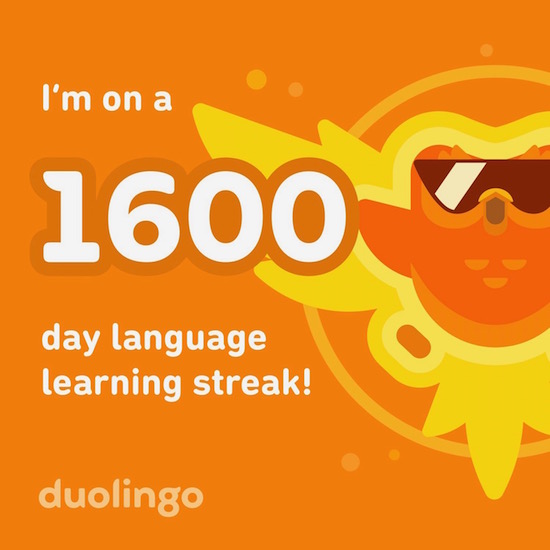
However, Duo (as the cool kids call it) has a paid “Super” (formerly “Plus”) subscription with advanced features for $6.99/month.
Other options for giving online language learning subscriptions include Pimsleur, Rosetta Stone, Mango, Babbel, and Memrise. If you think your recipient would prefer more structured, in-person classes, you could pay for a local university or community college class. Another alternative, especially if your giftee would like to refresh long-lost language skills, might be a package of lessons with a language tutor.
- Cooking classes — Whether your recipient is a post-college cooking novice or a veteran who wants to learn to specialize in a particular cuisine, there are so many great cooking class options. Just type “cooking classes” and the name of your recipient’s city into a search engine to find classes taught at local restaurants, culinary schools, community colleges, and cooking supply stores.
Other in-person options include:
Eataly — With locations in Boston, Chicago, Dallas, Las Vegas, Los Angeles, New York City, and Silicon Valley, these Italian marketplace/restaurants have classes and special events ranging from cooking classes for adults and kids to market tours (to learn where the experts go), from butcher to baker.
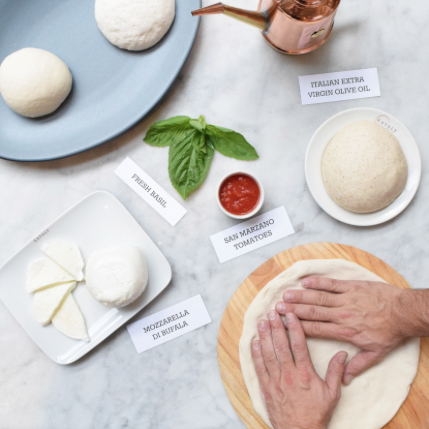
Sur La Table, maker of fine cookware, offers both in-store classes as well as a variety of affordably-priced online courses (beginning at $29/household). Experts teach the live 90-120 minute classes, offered via password-protected Zoom sessions, so your giftee (and any other family members hanging out in the kitchen) can ask questions as they follow along step-by-step.
From Thai stir-fried dumplings to homemade tiramisu, they’ve got you covered.
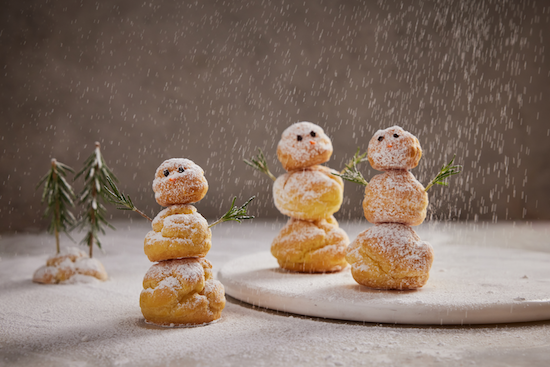
Creampuff Snow People. ©Sur La Table
Goldbelly Live! Cook-Alongs help you send a combination gift of food and education. You purchase a Goldbelly meal kit and the Live! (via Zoom) cook-along group classes are included. The ingredients arrive the day prior to your class, and you can learn how to make pizza to dumplings to cookies, class-and-kit combos tend to range from $99 to $159.
Unfortunately, it looks like all the current classes are sold out, but take a peek at the video to get a sense of what might make a great upcoming gift.
Would your recipients prefer more intimate cooking class experiences? Buy a gift card (from $100+) from The Chef & the Dish‘s to give private classes with “white glove service” taught by chefs around the world. Your giftee books a class, and a Kitchen Assistant makes contact to host a personal Kitchen Prep Session to check the camera settings, review the shopping list, and answer pre-class questions.
Recipients can pick from 100+ courses covering a variety of cuisines: American Basque Country, Brazilian, Canary Island, Caribbean, Dominican, Eastern European, Hungarian, Indian, Italian, Japanese Mediterranean, Mexican, Moroccan, Peruvian, South African, Spanish, Thai, Turkish, and Tuscan. (There are also group classes, if your recipient prefers that kind of conviviality.) See it in action!
One of my favorite finds is League of Kitchens, which features immigrant women from around the world who are experienced home cooks rather than restaurant chefs. League of Kitchens describes itself as is a “culinary dream-team of women from around the world who will welcome you into their homes, teach you their family recipes, and inspire you with their personal stories.”
League of Kitchens’ online cooking classes include an interactive cooking instruction session, a virtual dinner party, a packet with the instructor’s family recipes, and a video recording of the class. (For New York City-based learners, there are also in-person immersion cooking classes in the instructors’ homes, featuring lessons as well as a light lunch and beverage.)
International cuisines represented include Afghan, Argentinian, Bengali, Greek (nomnomnom), Indonesian, Japanese, Lebanese, Mexican, Nepali, Persian, Russian, and Uzbek. Classes are $60/device, and you can buy gift cards so your besties can pick the cooking course of their choice.
This is just the beginning; the internet is full of intriguing cooking classes; review the courses for your recipient’s tastes and check the reviews. Other options:
Cozymeal offers live vegetarian, vegan, pescatarian, and other healthy-option cooking classes for $29; you can buy a gift card in increments of $50+.
Traveling Spoon is an option if your giftees like to travel abroad and would like to have a cooking lesson with a home cook wherever they journey. Options include in-home meals, cooking classes, and half-day market visits. You pick the gift card, they pick the location.
Speaking of travel, if your giftee likes to eat but (like Paper Doll) isn’t that enamored of cooking, another educational option might be gifting a food tour. Depending on the tour, one might learn the historical or cultural significance of different types of foods or dining experiences.
To find tours to give as gifts, use your favorite search engine and type in the recipients’ hometowns or wherever they tend to travel (i.e., where their parents, in-laws, or adult children live). Alternatively, for food tour ideas around the world, check out:
- 10 Best Food Tours in the USA
- 25 Best Food Tours in the United States
- 20 of the Best Food Tours Around the World
Similarly, winery and brewery tours might be just the surprise your recipients might enjoy to learn about their favorite adult beverages.
Learn for the Delight of Learning
Not all gifts of learning center around about doing. Sometimes, people just want to absorb knowledge, whether it’s about literature, music, and the arts, or about how the world has come to be the way it is.
The Great Courses is a perfect place to start, because there’s an absolute buffet of options, from history, literature, and language, to economics and finance, to philosophy and religion, to science and mathematics, and so much more.
Your recipients can take a (virtual) grand tour of England, Scotland, and Wales, or get tips on how to train a dog; they can get a handle on Norse Mythology or understand the Federalist Papers; there are even language classes for those wanting to learn Spanish, Japanese, Italian, and more. The 2022 Great Courses Gift-Giving Guide is full of (currently) discounted course offerings — 537 of them!
The Great Courses’ Wondrium YouTube channel provides playlists of video equivalents of free “ice cream samples” of various classes. Peruse them to spark ideas for which of your people would like which classes.
Courses are offered on online as “instant” audio or video (and on DVD!), and are priced anywhere from $29.95 upward. You can purchase a specific course for a gift, or buy a gift certificate so your giftees can choose what they like best.
Master Class is the ultimate option if you want to give a gift that’s educational but less academic. I’m sure you’ve seen the ads everywhere you go online, but in case you’re unfamiliar, MasterClass is a streaming platform where you (or, y’know, your recipients) can watch or listen to hundreds of video lessons taught by 100+ of the world’s best in their fields.
Master Class content is less like sitting in a classroom and more like being mentored by recognized experts. From business and leadership to filmmaking, screenwriting, and acting, to a melange of photography, cooking, music, sports, science and technology, and government, it’s all there.
Even within categories, there’s lots of variety. Does your recipient like music? Master Class has courses taught by Yo-Yo Ma, Big Nas, and Metallica. (Yes, really.) Bill Nye teaches Science and Problem Solving, Malala instructs on how to create change, and Gloria Steinem and colleagues present the evolution of feminism.
Melinda Gates teaches a course for using your powers (and money, one imagines) for good. From Indian cooking to how to think like an FBI profiler to courses on creating an athlete’s mindset to buying and selling real estate, your recipient will never get bored. From Neil Gaiman to Neil deGrasse Tyson, and from Jane Goodall to Christina Aguilera (and seriously, watch both those links to see how similarly these women begin their videos!), there should be something here your giftee will find compelling.
Master Class offers three annual plans: Standard, Plus, or Premium (at $15, $20, and $23/month, respectively, billed annually, though right now they’re offering a $180, 2-for-1 holiday special — buy an annual membership for yourself and get one free to give as a gift). The main difference is the number of devices one can be using simultaneously (1, 2, or 6, respectively), and if using the Standard plan, you can’t download the courses for offline viewing.
Gifts of learning are one kind of experiential gift; next week we’ll round out the gift advice with other alternative types of clutter-free presents that allow your recipients to have memorable, appealing experiences.
Meanwhile, please share in the comments about your favorite thing to learn. What kind of classes or learning experiences have you received, or would you like to get, as a gift?
Paper Doll Post:

Calm Cooking Chaos (Part 3): Organize With Recipe Apps
Recipes aren’t just recipes. They’re guidebooks to health. Remembrances of family legacies. Step-by-step guidelines for bringing people together. The fact that most people’s recipes are messy and scattered from cookbooks to index cards to clippings (and online) reflects modern life. Families are scattered across time zones; people’s schedules are filled to the brim. Bringing order to recipe collections and cooking plans helps bring order to your life.
Bringing order to recipe collections and cooking plans helps bring order to your life. Share on XIn the last two posts, we looked at how to organize recipes from a number of perspectives.
Calm Cooking Chaos (Part 1): Organize Your Paper Recipes covered paring down recipe excess and creating a tangible binder (or set of binders) to organize and keep track of all of your important recipes, divided by categories. This method is approachable and designed for any skill level.
Calm Cooking Chaos (Part 2): Organize Your Recipes Digitally looked at three methods for digitally organizing recipes, from how to get them into digital form to how to make sense of them once you do. We looked at organizing through creating computer files, using Evernote to finesse the system with notes, notebooks, and tags (and ramp up the system with amazing Boolian search power), and employing Pinterest to organize visually.
APPS FOR ORGANIZING YOUR RECIPES DIGITALLY
The previously mentioned systems, and especially Evernote, aren’t designed for cooks, so specialized apps have been developed to bridge the gap and help collate and organize recipes specifically.
As has been firmly established, Paper Doll is not a cook but an organizer. So, the following post is not a review of apps, but is merely informational. (If you burn the Thanksgiving pie because an app had a wonky public-facing recipe (or because you set your oven to 500°, that’s not on me.)
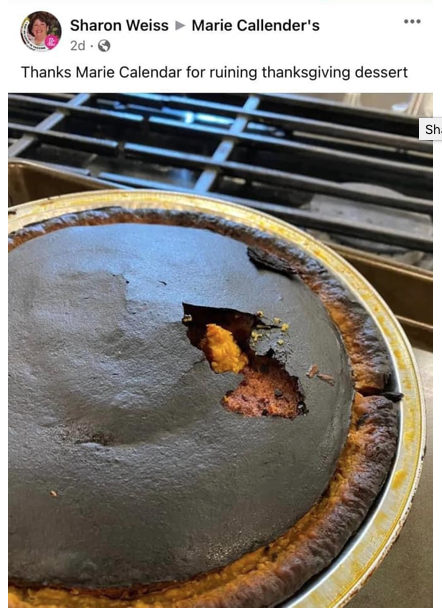
When trying to assist my clients in organizing their recipes, we first downsize and collate to make sure we know what’s important to them; the very last step is storing recipes, whether on paper or digitally. My clients have different needs, and have chosen different apps, each with their own merits and demerits.
Make sure you take into account ease of use, ability to clip recipes and/or import them or create your own, and the granularity of the search function in any prospective app selection.
Meal-planning functions or one-click shopping list may be important to you, or you might hunger for a social recipe-sharing aspect. Caveat cibus praeparator (which was the closest I could get to the cook equivalent of “caveat emptor” — it directly translates as “food preparer beware”).
Paprika Recipe Manager
Paprika Recipe Manager is a classic in this field. Paprika lets you add your own recipes via uploading from your camera, but it’s really designed to let you capture recipes you find online (like through Google, on blogs you read, from recipe sites, etc.). Add the bookmarklet to your browser and click (much like the Evernote Web Clipper we discussed last week), or navigate to the web page you want from within Paprika’s browser and find the recipe you want.
In general, you’re capturing recipes with one click. Once you’ve added a recipe to your Paprika account, it uploads to the cloud, auto-formats the recipe, and syncs automatically across your devices, so if you add a recipe to your phone while scrolling in the grocery line, you’ll be able to pull it up from your tablet in your kitchen. Once uploaded, the recipes can be sorted by category and searched.
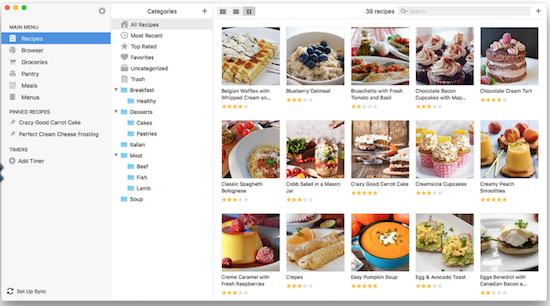
Paprika can also help you generate smart grocery lists based on the recipes you save; the app intuits where individual ingredients can be found and sorts and assigns them to specific aisles (Produce, Dairy, Canned & Jarred, etc.). If you’ve got the same ingredients in multiple recipes you tell Paprika you’ll be making, it will combine them so you’d know you need 6 eggs across three recipes, or two apples for two different meals.
Paprika has interactive features to help you keep your place in a recipe — tap to highlight a step or cross off a now-used ingredient. Paprika can also help you scale ingredients for different number or size servings, convert measurements to metric (and back), and set timers.
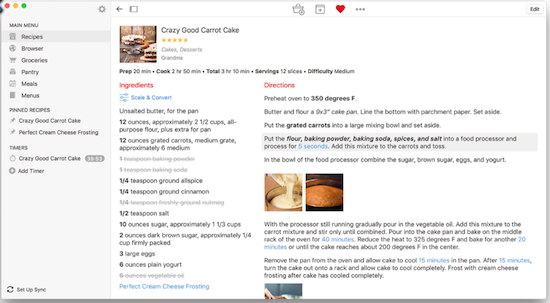
Paprika has platform-specific apps ranging from $4.99 (mobile) to $29.99 (computer); each app is sold separately, which can get pricey. However, all versions are on sale now through the end of November 2022 for 40%-50% off: iOS ($2.99) and Android for mobile, and Mac ($14.99) and Windows ($14.99) for computers.
Users have noted that the different versions of Paprika excel at different things. So, when you want to save one of your own recipes or capture from online, it’s somewhat easier on a computer; however, for grocery shopping, you’re obviously going to want to access the app on a mobile device. For cooking, itself, you’ll likely want the largest text possible and not want to have to hold your phone, so using a tablet may split the difference.
Paprika works best when you’re using its built-in browser, so bear in mind that if you’ve tricked out Chrome or Safari with extensions and share buttons galore, you’ll have to remember to switch to Paprika to surf recipe sites. Otherwise, you’ll have to copy a link from your regular browser and paste it into Paprika to capture it. Your comfort level will depend on how much you usually personalize your tech.
Big Oven Recipes & Meal Planner
Big Oven — Around since 2003, this platform has all the standard features you might seek. Upload your own scanned recipes, copy and paste a recipe from a text document, type your recipe in Big Oven’s simple form, or clip online recipes with the Big Oven Clipper bookmarklet.
Use up leftovers by typing in three ingredients you have on hand in your pantry, fridge, or freezer, and Big Oven yields screens of recipe options (with photos and titles) as static recipes or videos. You can even narrow it from all of the sites’ recipes to just from your own collection, or toggle categories like main dishes, desserts, side dishes, soups and stews, salads, etc. I entered cheese, butter, and eggs and then filtered for appetizers and got more than my fair share of pages of mouth-watering options.
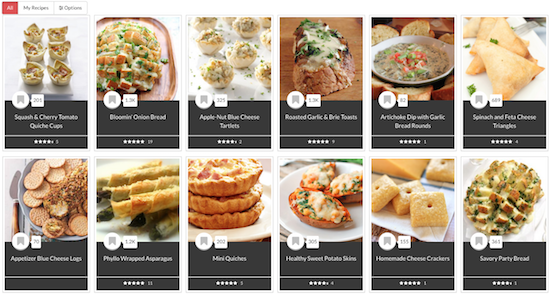
Big Oven has over one million recipes already uploaded from more than 3000 food bloggers and worldwide websites (with attribution and permission — Big Oven takes copyright seriously). They’re divided by searchable categories including courses (breakfast, dinner, etc.), collections (low-carb, vegan, vegetarian, gluten-free, dairy-free, keto, low-sodium, easy weeknight dinners, make-ahead recipes, and yes, my favorite, a whole collection for grilled cheese!), and editorial content, as well as a search by ingredients.
It also has meal planner and grocery list functions.
Use Big Oven in your browser on your computer, or download the iOS or Android apps. Big Oven’s basic membership is free, and includes the million+ recipes and search, the grocery list function, the Leftovers tool, and access via web, mobile, and tablet. However, you can only save up to 200 recipes; for more, plus advanced organization and nutrition tools, there’s a Pro version ($2.99/month or $24.99/year).
Pestle
Pestle feels like the most modern, high-tech version of all of the apps in this list, but it’s iOS-only, so if you’re Android or prefer to handle your recipes on your computer, it’s not for you. It’s also designed more for collecting and organizing recipes from the web than from your own collection.
When you identify a recipe you want, Pestle scan the recipe for ingredients, steps, nutritional information, etc., and save the information for you. Then Pestle turns the recipe into a step-by-step guide, so cooks who ordinarily get overwhelmed and keep losing don’t need to worry.
Pestle lets you tap the screen to start an unlimited number of timers (good for holiday cooking!). Cooler still, you don’t have to touch your device at all — just say “Next”, and Pestle moves the recipe to the next step for you.
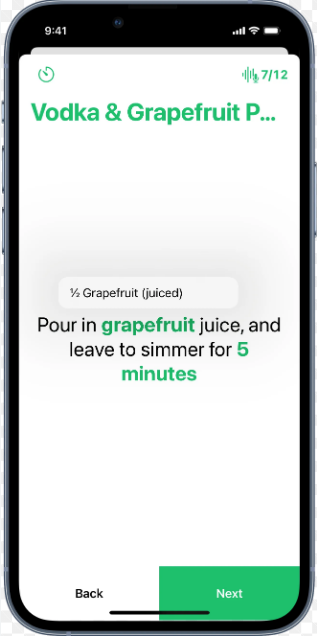
Via Apple’s SharePlay, Pestle also gives you the opportunity to cook along with anyone else, anywhere. Get on FaceTime, start cooking with Pestle, and the steps synchronize between you and your cooking buddy. Click Next on your screen, and it moves to the next step for both of you!
The Pestle Household function allows you to share both recipes and meal plans with anyone designated as friends or family, so when you save a recipe to your device, it shows up at their end, too!
The app also does scaling and conversion calculations, so if you need to change servings from 4 people to a dozen, Pestle does the math. It will convert Imperial measurements (that’s what we Americans use, even though we don’t have royalty) to metric (and vice versa).
Dish Dish
Dish Dish helps you clip recipes from cooking sites using its recipe import tool or type your recipes in, and then arrange them into collections or cookbooks. Users can search their recipes, tag them, and choose a preferred level of privacy.
Opt to keep collections private or share them with the Dish Dish community (or just with Dish Dish friends); you can also share your recipes selectively via email or on social media. There’s also a social aspect on Dish Dish, letting you comment on other users’ recipes.
The recipe search lets you sort and search by category (everything from food type, like beef or eggs or fruit, to meal type, like main dish or breakfast), by cuisine (almost A-Z, from African to Vietnamese), or by tags you’ve selected. Note, unlike the Evernote tagging we discussed last week, you must choose pre-existing tags in the system, like for specific events or holidays (Thanksgiving, baby showers), special needs (cancer care, diabetes-friendly, low cholesterol), or gadget (convection oven, slow cooker).
Avail yourself of their huge substitutions list in case you get halfway through a recipe and find you’re missing something fairly vital. For math-phobic folks, Dish Dish will recalculate ingredient measurements with one click — just enter the number of servings you want.
Dish Dish works on the web or in mobile apps; the apps are free, as is the basic membership, which lets you add recipes, tag/organize/search, connect with friends, and view both public and friends’ recipes. There are also two levels of paid membership with additional features: Private ($19/year) gets you unlimited recipe sharing, the shopping list, a menu planner, and friend’s recipes, while Private Pro ($29.99) has private recipe sharing and unlimited recipe sharing.
Dish Dish’s allegedly also has concierge service (mentioned on their promotional video, but I couldn’t find it on the site), whereby you can send 30 recipes to them to input for you.
Personally, I found the site to be a bit buggy, and was disappointed by the lack of photos in a lot of the public recipes. I also noticed that many of the recipes are incomplete beyond the ingredients and instructions, so the fields for prep time or cook time may be blank.
Recipe Box

Recipe Box works on the web via your browser or an iOS-only app (sorry, Android, Chrome, and Firefox folks) and is designed more for the person whose recipes are all over the internet (whether privately saved or public-facing). Save the URL of any recipe you find online to get just the recipe, but none of the background stories, ads, or the rest of what surrounds the recipe so you can focus on the cooking.
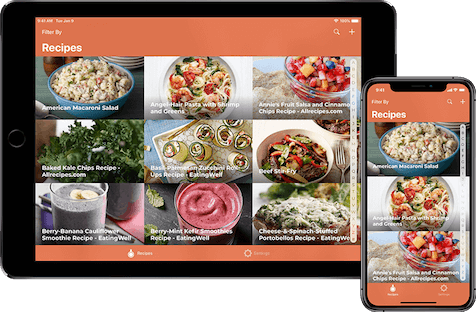
Add a recipe to your collection in one of two ways: either copy the URL of a recipe (from an article, blog post, Evernote, Pinterest, etc.), launch the app, and select “Import URL,” or use the Share Extension from your browser.
To organize your collection, just add a “category” to whatever recipe you’ve saved; then choose from their tags or create your own. Search to browse all recipes or within categories (breakfast, lunch, dinner; keto, vegetarian; Asian, Indian, Italian, Mexican, etc.). In addition to any recipes you add yourself, the site is packed with recipes from a variety of blogs and sites, like the Food Network and other recipe management sites (like Big Oven).
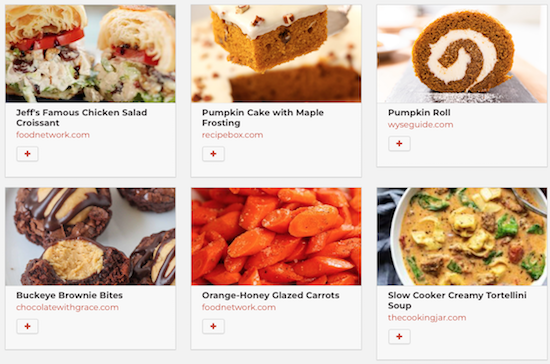
As with most platforms, Recipe Box has cloud sync, so if you’ve saved a recipe through your phone, it’ll show up in your account when you log in via your computer, and vice versa.
On the plus side, Recipe Box is free. However, it lacks many of the functions (shopping lists, meal planning, substitution lists, calculations) other recipe management tools have.
ChefTap
ChefTap can be bare bones or as fancy a recipe management tool as you want, depending on which version you select. It syncs in the cloud and can be used online or off, but you must use the mobile app (Android or iOS) to register for an account. (The web app is downloadable at no cost from Amazon.)
Add recipes in a variety of ways: use ChefTap’s built-in browser to open recipe sites and then import recipes (meaning you can’t use your preferred browser as you surf), import recipes from text files, paste a URL from an online recipe site, or type in one of your own recipes manually. (Of which, more later.)
To keep your recipes organized, avail yourself of tags, favorites, sorting by category, and searching.
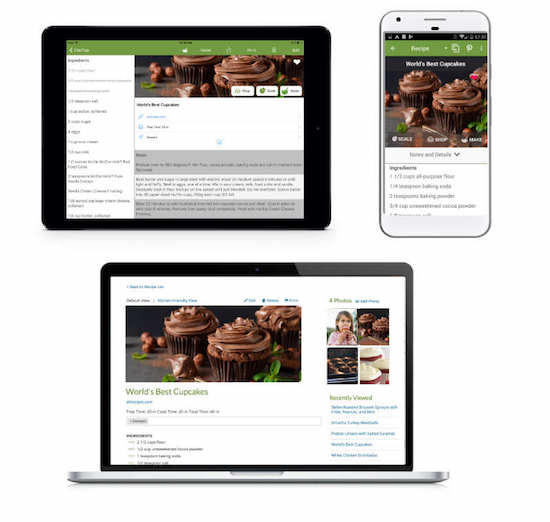
With ChefTap’s free account, store up to 100 recipes and manually enter or edit recipes and add photos. Manual entry is fine for copying your personal recipes, but if you want to manually save online recipes, you’ll have to copy and paste content into each of pre-existing fields. The Free version only lets you sync your mobile with your web account every ten days, which seems a bit risky.
However, if you want to save more recipes, create smart grocery lists, access the menu planning feature, get unlimited syncing or use the web clipping feature, you’ll need a Pro account. The Pro version also has a “recipe cloning” feature that allows you to take a pre-existing recipe and duplicate and modify it so you can keep both versions. The Pro version costs $19.99/year.
Even More Recipes Organizing Apps & Platforms
With so many apps and sites in this field, this could be a month-long series all on its own. Here’s a short list of other recipe organizing platforms you may want to consider.
OrganizEat — Snap a photo of a handwritten recipe or cookbook page, type into freeform fields, or import an online recipe with one click, then categorize in folders and tag to help you find what you want when you want it. It syncs across all devices, works on iOS, Android, and on the web on Chrome, Edge, and Safari. (Check out the tutorials.) Fun feature: Cooking Mode on your mobile device keeps the recipe full-screen and won’t let your device go dark if you haven’t touched it in a while. Play around with the basics for free but features are limited; the iOS/computer subscription upgrade is $3.33/month or $39.99/year; the beta Android version is $27.99.
Copy Me That — This free platform is a recipe clipper that lets you edit and tweak what you’ve captured. Organize recipes into with collections and then search, filter, print, email, and share via text or social sites. If you upgrade to premium, you can also scale your recipes for more servings. Shopping list and meal planner features are included, and it runs in any browser or via iOS or Android apps, and then syncs across devices.
Mela — This award-wining iOS/Mac-only platform is a hybrid recipe organizing app and RSS reader. Scan recipes from a book or clips from Mela’s own in-app browser to build your personal collection, and subscribe to your favorite recipe blogs from within Mela. The Cook Mode highlights only the step you’re currently on and dims the others; it also lets you cook multiple recipes concurrently, like on Thanksgiving! There’s also a meal planning calendar, grocery lists, and timers.
Recipe Sage — Collect, organize, and keep recipes, perform drag-and-drop meal planning, and develop a shopping list with this free, open-source (with donations accepted) personal recipe platform. There’s a powerful search and you can tag recipes to filter to your needs and preferences. It works on the web as well as Web, IOS, and Android.
Whisk — Save online recipes using the app’s mobile share extension in Chrome, scan and digitize your physical recipes with your phone’s camera, input your own recipes with the recipe builder, or collect recipes from the member community. Then customize recipes with edits or substitutions. Organize with collections, then search by ingredient or recipe name, and filter by cuisine or dietary needs. Whisk also lets you drag and drop meal plans, create instant shopping lists, and share with friends. Whisk is available for iOS or Android, and is free.
APPS FOR LETTING THE WORLD ORGANIZE RECIPES FOR YOU
Not all people who cook, or who would like to cook, have their own robust recipe collections. Some people are happy to let the internet or apps make arrangements for them. Think of it like a library and card catalog and interlibrary loan; instead of feeling like you have to have all the books in your own house, you can acquire what you want to read from the library.
So, you don’t need an app. Just Google! Type the ingredients you have on hand into Google. For example, if you type “bread butter cheese” into Google, it will yield a variety of recipes, mostly for grilled cheese sandwiches (yum!) using those ingredients. They’ll be divided into sections by recipe type: photos, videos, and text.
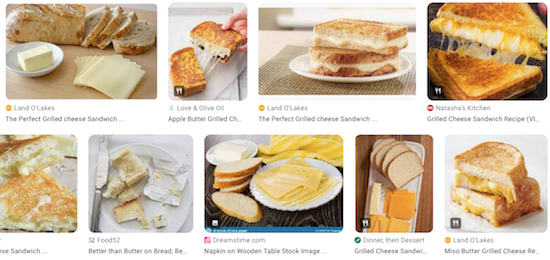
If you have a Google assistant, like Home or Nest, or Alexa on your phone, you can say “Hey, Google, find me a lasagna recipe,” which will yield oodles of gooey options. Continue with commands as shown in this video to have recipes read to you, step-by-step.
There’s also Kitchn’s Recipe Box — Sometimes, you want the equivalent of a bookmark for your favorite sites without having to actually use your browser’s bookmarks or saving to a notes app. Imagine you’re on the Kitchn website, perhaps perusing this Sirniki (cheese pancake) recipe. (Paper Mommy simply calls “cheese patties.” Delish!)
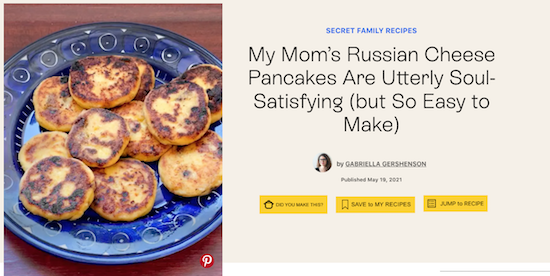
Reading a recipe? Comment or click a button to take you past the backstory (because some people apparently hate the stories on recipe sites). Or, click “Save to My Recipes” and anytime you visit Kitchn, visit your account and look at the recipes you’ve saved in your Kitchn Recipe Box.
APP FOR INDEXING YOUR RECIPES

Eat Your Books is a different sort of app/platform altogether. I first wrote about it back in 2011 in Paper Doll Suggests That You Eat Your Books (To Organize Your Recipes), and most of that is apt, but it’s grown a lot since then.
Eat Your Books doesn’t have recipes on the site. Rather, it indexes a bazillion recipes (well, more than a third of a million) from 160,000+ cookbooks, as wells as blogs, magazines and websites, into a massive library database, with recipes listed and searchable by title, author, ingredient, and even ISBN (if they come from cookbooks).
Search for “polenta” or “kale” or “cheese.” Further filter by recipe type (from books, magazine, or online; video recipes; occasions, ethnicities, courses; and much more.) You can then sort recipes alphabetically, by author, by publication date, by PR buzz, by rating, or even by how recently it was added.
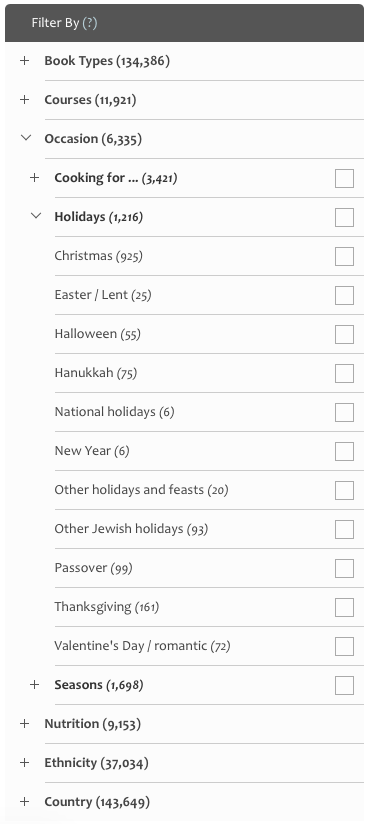
I filtered for “cheese” and “Thanksgiving” and “appetizers” and got offerings like these, below. Yum.
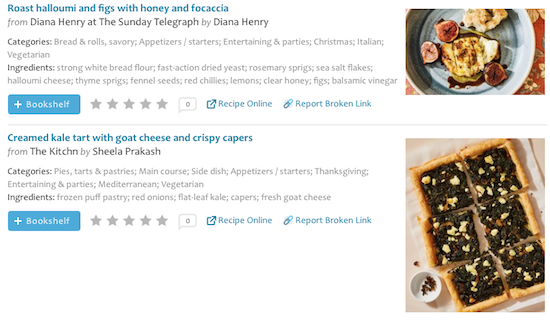
From the perspective of indexing your own cookbooks, imagine you know you have a recipe for a special casserole or icebox cake, but not enough time to search to find the right page in the right cookbook for your spouse’s fave.
Once you’ve created your own Eat Your Books bookshelf, you can search and filter what you seek in the same way as with the library, but from your personal collection, then know to walk to your bookshelf, pluck the right book and go to the right page, and get on with cooking. (You can also add recipes from Eat Your Books’ online library to your own bookshelf.)
Non-members can search the site to get some familiarity, but registering for a free Eat Your Books membership lets you save up to five books and five magazines to your virtual bookshelf, index online and personal recipes, and use the search functionality. Free members can also request that books be indexed by the Eat Your Books team, build grocery lists, add notes for recipes and books, enter contests, and socialize on the community forum.
A Premium membership is $3/month or $30/year. (I got a lifetime membership back in 2011 when I researched that old post, but sadly, those are no longer available.) At the Premium level, you get everything in a free membership, plus the ability to add and index an unlimited number of cookbooks and magazines to your bookshelf. (No, that doesn’t mean you shouldn’t still pare down your cookbook collection! Don’t try to be sneaky! Paper Doll is watching.)
If literally any recipe in any book or magazine in your house (assuming you’ve added it to the virtual bookshelf) is indexed, Eat Your Books will tell you where to look. No more eating your heart out, searching for recipes. Instead, you can eat cheese. Or, y’know, whatever you like best.
I hope this three-post series for organizing your recipes has given you plenty of ideas and inspiration as we enter the season of celebratory eating,
From the entire Paper Doll team (OK, from me and Paper Mommy), may you have a happy, healthy, delicious, and organized Thanksgiving.
Readers, I am thankful for you!
Paper Doll Post:

Calm Cooking Chaos (Part 2): Organize Your Recipes Digitally
We’re now one week closer to “Recipe Season,” which spans from Thanksgiving to New Year’s Day. Whether you’re aiming to replicate everyone’s favorite tried-and-true or you’re looking to discover (or invent) a recipe to dazzle the tastebuds, it all begins with organization.
Last week, in Calm Cooking Chaos (Part 1): Organize Your Paper Recipes, we covered how to gather your paper recipe collection (from cookbooks, magazines, clippings, family scribblings, and note cards), sort them, downsize, and create a recipe binder.
BUT FIRST, WHY NOT FILE FOLDERS?
Before moving on to digital recipes, I’d like to note why I focused on binders but ignored recipe files using the same categories. Given that, as Paper Doll, I’ve brought you 15 years of pro file folder posts, a few readers wondered about this omission.
The truth is, as great as file folders are for most reference categories (including financial, legal, medical, household, and personal papers), recipes in file folders tend to be more easily forgotten. In two decades of testing recipe filing with clients, I’ve noticed that paper recipes organized in binders tend to be flipped through and used more frequently, while file folders of recipes, sorted and categorized in the same manner, tend to be ignored and often forgotten.
There’s a serendipity to opening a binder (much like a cookbook) and flipping the pages, happening upon something sumptuous — something that just doesn’t exist when having to turn floppy magazine or newspaper clippings, one-by-one, in a file folder, carefully assuring that the whole pile doesn’t fall off your lap. Recipes encased in sheet protectors, clipped into binders, are both more functional and more given to yielding inspiration.
Cooks are also more likely to stop to consider whether a new recipe is deserving of joining a binder, whereas someone using a filing system might just throw a new clipping into a folder, leading to another build-up of never-used recipes. If file folders work for you, embrace them, but I’m on Team Recipe Binder.
Now, on to the digital discussion.
PAPER VS. DIGITAL RECIPES?
Before we look at how to create a digital recipe collection, it’s important to understand why you might choose to stick with a paper system, move to digital, or embrace a hybrid approach. In part, it depends on what format of recipes you already have. If most are in hardcover cookbooks, the effort to organize individual recipes is different from what it would be if you mostly have loose clippings or even random digital versions.
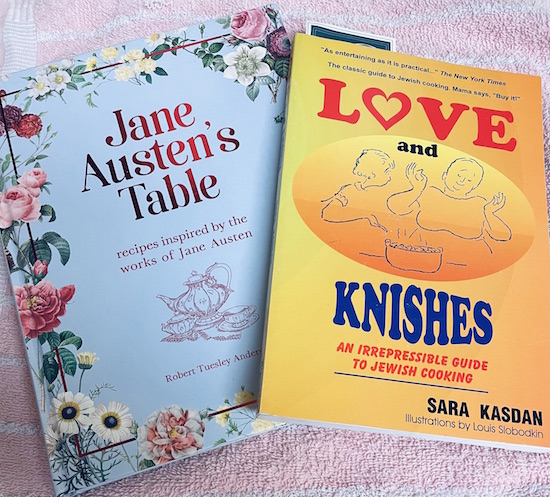
Advantages using a paper recipe collection:
- No learning curve — If your recipes are already on paper, you can sort and organize them quickly and easily in your physical space without needing any new skills. Let’s face it, if you can play Gin Rummy or parcel out the mail to the right person in your household, you can sort your paper recipes and organize them (as described in last week’s post). Conversely, organizing recipes digitally will require you to use basic computer or smartphone skills; if you don’t already have those skills or don’t want to learn them, paper might be better for you, at least for now.
- No technology required, Part 1 —You don’t have to keep a digital tool (computer, phone, or tablet) in your cooking space, where things can get wet and/or sticky.
- No technology required, Part 2 — Cooks whose recipe collections are solely on paper aren’t dependent upon electricity, internet, or Wi-Fi. If you tend to cook in a rustic old cabin, or your home is far from cell towers or internet service, paper might be better for you than digital.
- Nostalgia makes some meals taste better — There’s a sense of warm wistfulness when you cook with a recipe card written by your great-grandmother. If that means something to you, you may not get as excited about organizing your recipes digitally.

Moving from a paper recipe collection to one that is all digital has a different set of advantages:
- Digital recipes are accessible from anywhere — If you visit your adult children across the country, you can pull up your child’s favorite cake recipe and share it with their spouse in a matter of seconds. (Do not malign the spouse’s cooking skills. That’s a no-no!)
- You can share digital recipes easily — If someone wants to try making your favorite recipe, there’s no hand-copying or searching for a scanner. Opt for texting, tweeting, or (if you’re in the same space and both iOS users) Airdrop.
- You can eliminate all the recipe clutter from your home once you go digital — So many of my clients are eager to downsize in retirement but are overwhelmed by how they’ll fit their cookbook collection and piles of recipes in a much smaller kitchen space. Going digital means they don’t have to worry.
- Recipes won’t get misplaced, Part 1 — With a paper system, there’s always a chance for human error and sliding a recipe back into the wrong space, but if your recipes are on the computer or in the cloud, they’re backed up. (You do regularly and automatically back up your computer, right? If not, be sure to check out Paper Doll’s Ultimate Stress-Free Backup Plan.)
- Recipes won’t get misplaced, Part 2 — Search is magical. Whether you’re doing a simple search of your computer or a fancy-pants Boolian search with lots of “this ingredient AND that ingredient BUT NOT this other ingredient” options, digitizing your recipes makes it easier to find what you want.
- You can add/create recipes in more ways (again, without clutter) — There are so many ways to add recipes to your digital collection through various digital capturing methods:
- Photograph or scan the recipe via an app
- Use a traditional scanner
- Use the Web Clipper in Evernote (of which, more later) or a similar capture method in a recipe-specific app.
- Accept a shared recipe via Airdrop, email, or texting to get it into your digital space and then move it where you want it to live.
- Type a recipe from scratch (or even handwrite it into your phone or tablet with a stylus or Apple pencil). This works whether you’re copying an old recipe or creating a new one.
- Dictate the recipe into your computer or mobile device using the built-in dictation system.
What about a hybrid system?
There’s no reason that you have to choose between paper and digital recipes. If you’re feeling iffy about a move to a digital collection, but are overwhelmed by all of the paper recipes you have right now, explore baby steps toward getting comfortable going digital.
For example, you could keep your cookbooks, but start transitioning your clippings and loose recipes to a digital system. Or, you could begin a practice of backing up all of the family favorite recipes to digital so that all of your adult children (or grandchildren) can impress their friends and make those beloved dishes year-round, not only when you’re all together. (Trust me, a recipe will be just as delicious even if it’s not limited to once a year.)
YOU COULD START WITH A BASIC DIGITAL RECIPE FOLDER SYSTEM
In a comment on last week’s post, my colleague Sabrina Quairoli mentioned her approach:
Some years ago, I decided to get rid of my paper binders and go digital with those recipes. I scanned them using the Tinyscanner app and saved them in a folder by the recipe’s name. It works great, and I still pull from these recipes every so often.
A digital recipe filing system like Sabrina’s is similar to a recipe binder or file folder system. It allows you to “file” your recipes into digital folders by category, such as “meat entrées” or “desserts” with little muss or fuss. Whatever category you might have in a tangible system can work in a digital one.
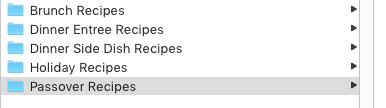
Whether your recipe files are on your computer or in a cloud-based system like Google Drive, you get to create basic categories, and then use the search function to find recipes by keywords in their names as well as content in the saved files, dates created/modified, and so on, as with all computer files. The learning curve here is low; anyone who already saves files and knows how to search them can use this method.
UPGRADE AND ORGANIZE YOUR RECIPES WITH EVERNOTE
As an Evernote Certified Expert, this upgrade is my favorite option to recommend to clients who are tech-inclined. There’s a slightly steeper learning curve (but you can build up to mastery, starting with skills you already have).
Evernote is a step-up for cooks who already have recipes in any digital format, like Word or Google docs stored on their computers or in cloud accounts, as well as recipes in any kind of digital note app, photo app, or scanned files. But with Evernote, you have some extra advantages over other digital systems.
Capture
Cooks can use all of the methods I described above (scan, type, record, etc.) to get a recipe into Evernote, but the platform has some additional goodies:
- Record recipes verbally — If the elder chef in the family isn’t much for writing down the ingredient measurements or instructions, you can just tap and record as they cook, creating a legacy recording of what they’re saying and any questions or observances you make as they work. This is a fun, interesting alternative to using the dictation function.
- YouTube — Evernote has a nifty feature where, if you put a YouTube link into a note, instead of just being able to see and click the link, the entire video appears. If you’ve got a favorite recipe you’ve watched on a YouTube cooking channel, you can capture and watch the entire video right from your note, then type as you watch to add ingredients (so you can make a shopping list) and note any vital instructions.
- Autocapture — If you’re not so adept at taking close-up photos or scanning with your phone’s camera, Evernote has you covered. You can set your in-app camera to Auto mode, then hold the phone steady over any recipe or card so that the edges of the paper are visible inside the frame. Evernote’s camera will automatically detect, focus, and take a great snapshot of your recipe. (See below. Note: there’s no audio.)
- Web Clipper — Customize how you capture a recipe. One of the nifty things about the web clipper (available on all the major browsers, like Chrome, Safari, Internet Explorer 7+, Firefox, Opera, Microsoft Edge for Windows 10+) is that you can choose how much of a page you want.
Have you noticed how much extraneous material is on some web pages, especially those with recipes, like ads, pop-ups, navigation panels, etc.? The Evernote Web Clipper lets you choose how you want a page clipped. There’s Article (the main section of the page), Simplified Article (which removes ads, formatting, and layouts), Full Page (a copy of everything in the window, Bookmark (a link with a thumbnail photo), and PDF.
- Create your own recipes as new notes — In addition to all of the creative methods, there’s also the standard one of typing your recipe in. Initially, I was going to tell you that Evernote has stellar templates — just create a new note, give it a title, and instead of writing in the body of the note, click “Open Gallery” to select a template.
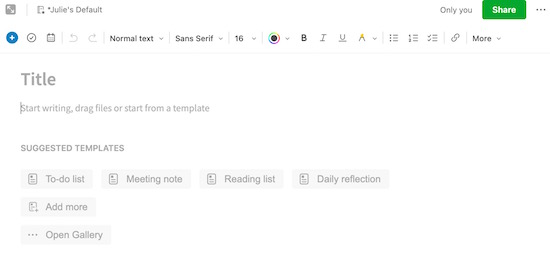
But I was surprised to learn that right now, there are no recipe templates (although there is one for menu planning). As I started writing this post, I texted my colleague Kimberly Purcell, whose entire business, Amethyst Productivity, focuses on Evernote training.
Kimberly is a foodie and cook (and her husband is even a professional chef!), so I turned to her the other day and challenged her to design a recipe template for the new section of templates created by Evernote Experts. So, if you’re an Evernote user already, when that template pops up someday soon, you’ll know how it got there!
Annotate and Add Materials
Evernote’s Web Clipper also lets you capture selected areas of a web page, which is great for those times when a site has multiple recipes on a page and you just want to capture that gorgeous Icebox Cake and not those Brussels Sprouts. You can change formatting (bold, italics, underline), font, and size of anything you input yourself, and you can choose highlight colors.
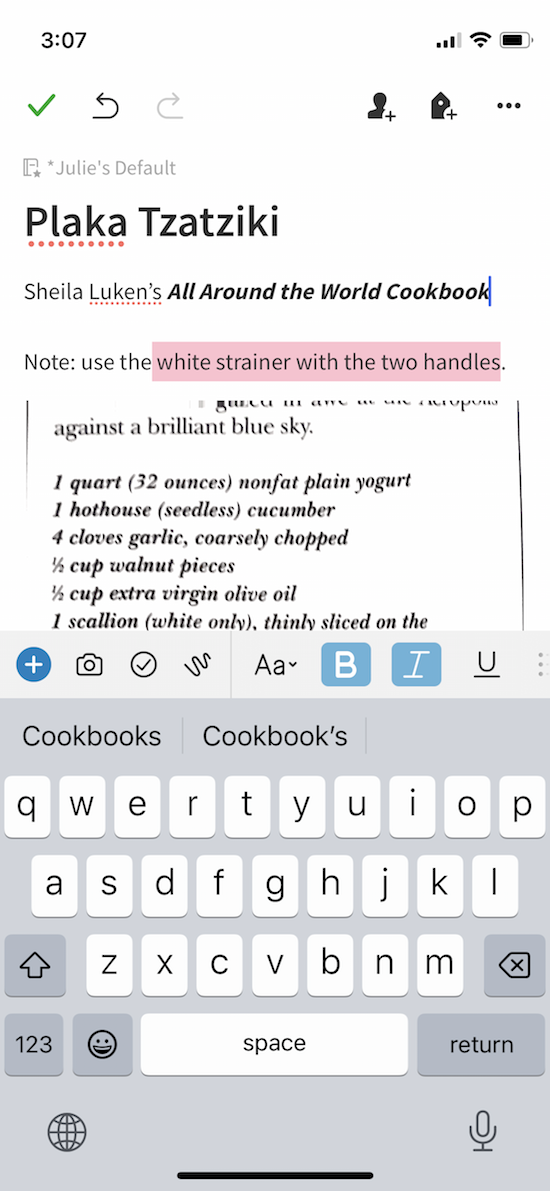
- Customized Clips let you annotate your captured recipes. Evernote has annotation tools to let you add shapes, colors, and stamps (with text) to let you tweak a recipe you capture. You can annotate recipes whether you clip them with the Web Clipper or capture them through scanning, photos, or any other method.
- Add your own photos and comments to your recipe collection. — Not only can you save the photo from a cookbook, print, or online recipe, but you can add your own photos of how you’ve created, plated, and garnished a recipe. Then, whether you include text or annotation via Evernote’s tools, you can add your own notes to recipes you’ve acquired to say how you’ve tweaked it for your preferences, keeping the original and updates all visible but without clutter.
Tag Recipes to Increase Search Capabilities
The basic format of Evernote is to create notes and then related notes can be grouped into notebooks. However, there’s an additional system that allows you to create tags, like little sticky-note tabs, to connect recipes with important information.
So, you might have notebooks with all the general categories (appetizers, salads, entrées, desserts, etc.) we discussed last time. But then you can create much more granular notations with simple tags to label, and later find, any or all elements:
Cuisine/Ethnicity: Italian, Indian, Mexican, Chinese, Mediterranean, etc.
Diet Type: vegetarian, vegan, low-sodium, low carb, gluten-free, high protein/keto, kosher, halal, etc.
Meal experience: breakfast, brunch, lunch, dinner, dessert, sides, appetizers, beverages
Main ingredient: eggs, pasta, fish, chicken, beef, cheese, chocolate, etc.
Prep or Cooking Time (or separate tags for each): 10minutePrep, 30minutesPrep, 45MinuteCook, etc.
Cooking method (gadget or method): oven, stovetop, toaster oven, grill, crock pot, air fryer, Instant Pot, etc., or bake, fry, roast, slow cook, sheet pan, etc.
Holiday or seasonal item tags: Thanksgiving, Christmas, Hanukkah, New Year’s, SuperBowl, picnics, barbecues, autumn soups, winter casseroles, etc.
Recipe origin — You might put the name of a cookbook or magazine, the name of the person who gave you the recipe, or note whether it’s a family legacy (on your side or your spouse’s side) recipe.
Family-specific tags — Whether someone loves or hates a recipe (or an ingredient) or is allergic, you can create whatever tags you like to quickly add or eliminate a recipe from a search.
Tagging is easy. Just click the tag icon when you create a recipe note; if you’re clipping a recipe with the Web Clipper, you’ll be offered a field to type tags. As you type, if you’ve already created a tag, it will auto-populate the field (just like when you type on Google).
Notes About Evernote Search
Organizational structure is always important. That said, whatever system you use, digital organization can be about more than hierarchy and structure because of the availability of search, and Evernote’s search is powerful. Beyond looking in a specific notebook, you can:
- Use search if you can’t remember the exact recipe, but you know you have one that uses kale and cod, or chocolate and heavy cream.
- Use the optical character recognition aspect of Evernote’s search text in photos or scans of handwritten recipes. Seriously, if you scan in a photo, search can read and find text in the photo. As for handwriting, it does a better job with printing than cursive, but I’m impressed it can read my writing.
- Use a combinations of tags to search for dinner recipes with a main ingredient of fish, made with a sheet pan, that you can finish in 20 minutes, and which does not include garlic. Or a kosher recipe for brunch that uses salmon and dill. Boolian search is mindblowing!
As you know from last week’s post, Paper Doll is not much of a cook, but the leader of the Evernote Certified Expert, Brittany Naylor team does cook. Last year, she was interviewed by fellow Expert Vlad Campos on a few Evernote-related subjects, and provided a peek into her own digital recipe collection, talking about how to Create A Smart and Beautiful Recipe Book on Evernote.
CONSIDER PINTEREST IF YOU PREFER VISUAL RECIPE ORGANIZATION
Not everyone wants to reinvent the recipe wheel. If most of your recipes come from food websites, recipe blogs, or social media, you can use Pinterest to save your recipes, as well as to search for recipes from within Pinterest (pinned by other users) that fit your interests. And then you can save other people’s recipes to your boards, too.
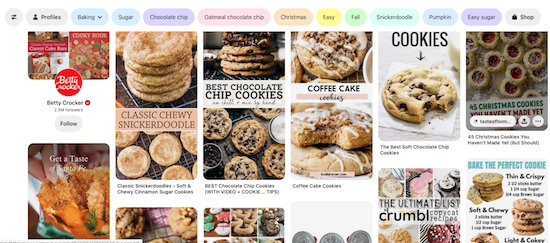
You’ll need to set up a Pinterest account, and then create boards for your overarching categories (like Dinners or beef recipes or cookies). If you’ve never used it, you can click on my Pinterest page to see all of the organizing (and other) boards I’ve created.
When you see a recipe you like on the web, simply click the “Pin” icon that hovers over most photos on the web, or use the share option on your mobile device or the pinning applet in your browser.
Beyond boards, Pinterest has no complex structure, and your ability to provide keywords or tags is limited to the little comment field at the bottom of your pinned item. Think of it as the digital equivalent of clipping a recipe from a magazine, pinning it to a cork board, and writing a note in the margin.
So, you can’t be as granular or creative with tagging as you could be with Evernote, but if you prefer simplicity and a search as familiar as Google’s, Pinterest might be your preference.
APPS FOR ORGANIZING RECIPES DIGITALLY (PREVIEW)
The above methods all use digital platforms that already exist for other purposes — computer files, Evernote notes, Pinterest pins — to organize the recipes you already have and the ones you want to collect in the future. But what if you want a system that was specifically developed for organizing recipes?
As you may have guessed, there’s an app for that.
Actually, there are dozens of apps for that. Next week, in the final installment of this recipe-oriented series, we’ll look at a number of recipe organizing apps — some that are famous and have been around for a long time, others that new but gathering steam. (And no, that wasn’t a cooking pun, unless you enjoyed it.)
We’ll even revisit a fabulous app that helps you to index, discover, and organize your recipes with a bit of a social aspect.
So, be sure to put next week’s post on your colander calendar. Until then, keep planning your Thanksgiving week meals, and please let me know in the comments if you have a preferred method for organizing your recipes digitally.
Paper Doll Post:

Calm Cooking Chaos (Part 1): Organize Your Paper Recipes
The flip of the calendar page to November doesn’t just bring darker evenings and colder weather. The minute the Halloween candy left the store shelves, it was replaced with holiday ingredients. Minutes ago it was barely autumn and now we’re mere weeks from Thanksgiving, and you know what’s right around the corner after Turkey Day!
There’s never so much of a resurgence in interest in recipes — and recipe organizing — as during the approach of the holiday season. Clients start calling with a twinge of trepidation in their voices.
They’ve got decades of acquired cookbooks, recipe boxes filled with handwritten index cards, and mountains of recipes culled from magazines or printed from the internet. The desire to create a perfect family holiday is weighed down by the stress of recipe clutter.
And with some families, there’s a desire to create a culinary legacy, a way to pass down the favorite meals prepared for special times. For example this recent Washington Post piece, A Holocaust Survivor, A Rescued Family Cookbook, and the Taste of Home, reminds us of how important it is to be able to bring alive the favorite tastes of childhood.
THE COOK CONTINUUM
You might think this is only a problem for people who suffer with general household clutter, but I assure you recipe clutter is a problem all along the culinary continuum, from people who rely on PB&J skills (that would be Paper Doll) to lifelong cooks to professional chefs, and the existence of recipe clutter may or may not correlate with any other clutter in the home.
We answer the age old question: Is it safe to you use your oven as a closet like Carrie Bradshaw did or nah? https://t.co/BxYQ2vATB2 pic.twitter.com/0sU8QDWqMt
— Reviewed (@reviewed) July 21, 2018
Sex and the City‘s Carrie Bradshaw famously kept her sweaters in the oven. Similarly, to Paper Mommy‘s distress, I’m really not inclined to cook, and if it requires more than boiling pasta and drizzling it with olive oil, I’m not going to do it. There’s only one “special” recipe I make when called upon to bring something to a potluck, Hello Dollies (also known as Magic Cookie Bars), the recipe for which has lived under a succession of magnets on my fridge for several decades.
But that doesn’t mean I don’t have cookbooks or even individual recipes. I do, but they’re organized and out of the way.
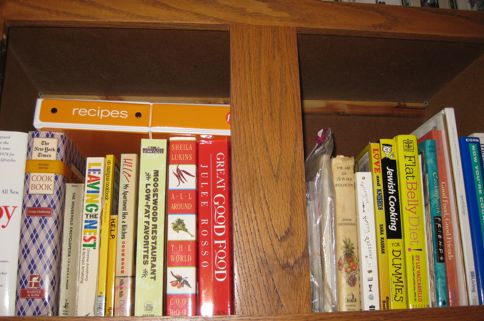
But even for non-cooks, cookbooks and loose recipes represent potential. Those glossy photos enchant us. We can imagine ourselves as Julia or Nigella or Ina, whipping up something fabulous.
For the same reason we read fashion magazines and follow tips on “how to turn a daytime look into an evening look” when our evening “look” is actually leggings and an oversized sweatshirt, we non-cooks collect recipes because they represent an imagined lifestyle.
Whether we’re the ones whipping up healthy and visually stunning recipes to delight our families and friends, or we imagine our butler Jeeves taking our recipe collection in hand, recipes seem like a more reasonable fantasy than jetting off to Paris or Madrid.
For those who actually do cook, whether a little or a lot, recipe clutter tends to expand over time. If you’re a good cook, people give you cookbooks as gifts. If you’re a good eater, people press their lovingly handwritten recipes into your palms at the end of dinner parties, believing their secret sauce will help you achieve your greatest dreams.
So no wonder, between our own inclinations to gather potentially delicious and delightful recipes and others’ penchants for sharing the magic with us, we all end up with more recipes than we will ever make, and that leads to clutter.
HOW TO PARE DOWN A COOKBOOK COLLECTION
Is your family food headquarters littered with clipped and copied recipes, cooking magazines, regular and diet-related cookbooks, and other detritus from the pandemic sourdough wars? It’s not just you. Kitchen clutter is often a sticky mess, preventing us from ever finding the perfect recipe when we want or need it.
The toys and clothes that surround us may no longer be age-, size-, or lifestyle-appropriate. Similarly, we can outgrow cookbooks, diets, and recipes that once fit us so well. You have probably accepted that it’s time to (amicably) part with Macrobiotics for a Groovy Life or 172 Ways To Lose Weight With Grapefruit.
Find all the tendrils of your sprawling cookbook collection.
Most people tend to treat their cookbooks as a separate entity from the rest of their personal libraries. They are content to keep their fiction and reference books on bookcases and shelves in their living rooms, family rooms, and bedrooms, in their reading nooks and wherever they cozy up to read.
But herein lies the first problem. If your cookbooks are far from where you cook, you’ll probably never use them. It’s not like there are miles between your living room and kitchen counter, but if your cookbooks are on the bookshelves two rooms over, unless you’re diligent about creating new menus, you’ll probably forget that you even have the cookbooks.
Conversely, if you follow the general organizing practice of keeping possessions where you use them and your cookbooks are in or near your kitchen, you’ve probably got sticky, sauce-stained, powdered sugar-covered pages piled on spare chairs and kitchen counters and inside cabinets. No matter how excited people are to cook, and then eat, their creations, most people aren’t that excited about tidying up.

Cookbook Photo by Alfred Kenneally on Unsplash
Even if we organizers persuade clients that dinner isn’t done until the dishes are washed and the leftovers are put away, that final step of wiping down spattered cookbooks and putting them back into the collection tends to be a bridge too far.
So, meet your cookbooks where they are. If there are too many to deal with all at once, start with the ones that constitute clutter, that live where they’ve been dropped, in and near the kitchen, and once you’ve reviewed them, then move on to making determinations about the ones that are tidily living (if forgotten) on your bookshelves.
Take one book at a time and ask yourself some important questions.
Have you ever used a recipe from this cookbook?
If you received a cookbook as a holiday present or for your birthday, you likely flipped through the book, perhaps looked at the Table of Contents, and then tucked the book away to clean up after all the wrapping paper was tidied away. Maybe you never looked at it at all.
Sometimes, we buy cookbooks because the cover or the author made the book tempting. A few years ago, Spoon University published a piece on The Hottest Male Chefs of All Time. I’m sure it sold cookbooks. But just because you love watching Jamie Oliver cook, melt over Gordon Ramsay yelling at his kitchen staff, or giggle over the performance stylings of Alton Brown, it doesn’t mean you’re ever going to prepare recipes from their collections. Let go of unread cookbooks!
Just because you love watching Jamie Oliver cook, melt over Gordon Ramsay yelling at his kitchen staff, or giggle over the performance stylings of Alton Brown does not mean you're ever going to prepare recipes from their collections.… Share on XAs you go through your cookbooks, if you come across one you’ve never made even one recipe from, flip through the Table of Contents to get a sense of the chapters or categories. If you don’t see at least a handful of recipes you’d like to try — like in the next two weeks — it may be a sign that it’s time to set that cookbook free.
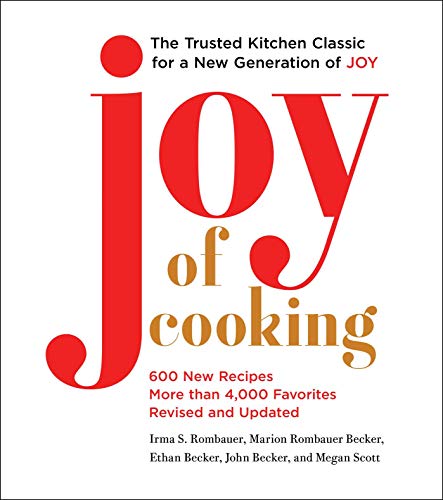
If a cookbook is a time-tested classic, like Irma Rombauer’s The Joy of Cooking, Julie Child’s Mastering the Art of French Cooking, or even a modern classic like Samsin Nosrat‘s Salt Fat Acid Heat and you consider yourself a shaky cook, you might find comfort in these standard-bearers.

But if you’ve got a big tome of recipes that you’ve never used, and you aren’t inspired by them? Buh-bye!
Have you used a recipe from this cookbook in the last few years?
I used to ask if you’d used recipes in the past year, but nothing about the past few years has been normal.
In quarantine, people cooked more, but they entertained less, and using only one year for a gauge isn’t helpful, just as the old rubric of determining wardrobe purging by whether we’ve worn it in the last year isn’t wise. (Has anyone worn a cocktail dress in the era of COVID?)
But if you pick up a cookbook and have fond (or not-so-fond) memories of what you used to make, but haven’t touched since your kids went off to college or you and your spouse opted for heart-healthy meals, that cookbook has overstayed its welcome.
How many recipes from this cookbook do you ever actually use?
If you use the cookbook heavily, even in just one season, it makes sense to keep it and give it a place of pride in your eventual (but reduced) cookbook library.
However, if you seek the cookbook frequently but only for the same two or three recipes, copy out what you use and set the cookbook free. Next time, we’ll look at options for maintaining your recipes digitally, but for how, you have a few options:
- Hand-copy the recipe to your paper system.
- Photocopy the pages from the cookbook if you’ve got a home copier/scanner.
- Scan the recipe (with your scanner, a scanning app on your phone, or even just the scan function in your phone’s camera), then store the recipe in a digital file.
However, if you can’t remember the last time you opened it, the book has become a stranger in your home — send it away!
Give the cookbook away. If you don’t cook, but someone you love does, gift it with the chiding stipulation that you’d love it if they’d invite you over when they make the soup on page 135 or the pastry on page 310.
Donate the cookbook to your local library book sale or a book-related charity. See Ask Paper Doll: How And Where Can I Donate Lots of Books? for guidance. See if your local middle or high school has a Home Economics department (though they are vanishingly rare) that wants cookbooks or leave them in a Free Little Library.
Sell it at a local used book store or online. If your cookbooks are vintage, make up an inventory and inquire about selling them at Blackbird Cookbooks or even open your own Etsy shop. For a behind-the-scenes look at vintage cookbook sales, Taste recently published Vintage Cookbook Collecting Is Often Kind, Sometimes Cutthroat, and Now Extremely Online
Store it elsewhere than your kitchen. If you can’t bring yourself to let go of some cookbooks, whether because they’re gorgeous and or because they represents family history, and you have the bookshelf space elsewhere in your home, store extraneous ones as you would history or reference texts.
Prevent cookbook clutter in the future.
Test-drive a cookbook to see if it’s a good fit by borrowing it from friends or the library before making a purchase. Set aside a newly gifted cookbook where you can easily review it. If there’s nothing that inspires you to cook it (as opposed to inspiring fantasies of an Instagram photo showing you have cooked it), return the gift.
(Once you write the thank you note, a gift is yours. Do with it as you would if you bought something for yourself and later realized you didn’t want it!)
If you feel like you must store your active cookbooks in the kitchen, create dedicated storage where you can maintain your cookbooks upright. That might be in an unused cabinet or shelf, or you might want to invest in creating a cookbook box or drawer, building shelves, or creating a display area. For some ideas, peruse:
Food 52’s Clever Ways to Store Your Many, Many Cookbooks
The Spruce’s 15 Stylish Cookbook Display and Storage Ideas
HOW TO PARE DOWN A LOOSE RECIPE COLLECTION
Cookbooks are hard to part with because they’re fancy. Someone went to the effort of writing and collecting the recipes, taking photos, and the editing and publishing it. It’s easy to see how all that expended effort makes it hard to discard a book from your collection.
But what about the piles of loose recipes clipped out of magazines or copied after tasting a friend’s culinary triumph? They still represent potential, just as cookbooks do, but they’re usually a little easier to discard.
Unless you’re a beginner, you’re not going to tackle all of your recipes in one sitting. Instead, try to gather your recipes of similar types. Aim to deal with loose recipe pages first; later on you can tackle index cards that are banded or boxed together, or recipes already gathered in notebooks using the same process.
Select one recipe at a time and follow these simple rules:
Sift for gold.
When you pick up a recipe page, especially one clipped from a magazine, your first task may be to figure out what you were saving. If there were multiple recipes in an article on a particular theme, you may have been endeavoring to downsize your magazine collection and just clipped all the recipe pages to make a fast getaway.
When you find a recipe, identify whether it’s actually a masterpiece or a reproduction. Do you need yet another recipe for chocolate chip cookies or smoothies or meatloaf?
Is there anything special about this recipe? Did you clip it because you were hungry when you were reading the magazine? Or because the magazine’s production team made the glossy photo look gorgeous? (Do your creations ever look like the food in magazines?) Did you clip the recipe because it was created by a popular chef on TV?
If a recipe truly still appeals to you, keep it; otherwise, set it free.
Separate dreams from reality.
Friend, I ask you, will you ever really cook this?
We have to be honest with ourselves and realize that if the fanciest thing we cook is spaghetti, we’re not really going to be dabbling in egg drop soup or meringue flambé from scratch.
If your lifestyle is such that you, your spouse, and your kids aren’t home until 15 minutes before stomachs start rumbling, recipes that require all-day attention just won’t fit your lifestyle.
If the recipes (or, more likely, the photos with those recipes) are truly dazzling but out of your reach, create a “Dream Recipes” folder to keep in your files along with dream vacations and dream decorating ideas. You can preserve the dream without cluttering your kitchen.
If the photos with those recipes are truly dazzling but out of your reach, create a Dream Recipes folder to keep in your files along with dream vacations & decorating ideas. You can preserve the dream without cluttering your… Share on XDivide and conquer.
Once you’ve managed to reduce your recipe pile from a mountain to a bundt cake-sized mole hill, sort your recipes into categories. Ask, under what meaningful category does this recipe fall?
By meaningful, I mean meaningful to you and your family. Pretend you’re a cookbook editor and come up with some major categories, and then add the ones that fit your family’s dining style. For example:
- Appetizers — if you’re the type to design charcuterie (warning: you will salivate when exploring that page) or have jumped into the viral trend of butter boards, and your pre-dinner delights are more hors d’oeuvres than string cheese and potato chips, gather your inspiration here.
- Salads
- Entrées
- Side Dishes
- Desserts
- Holiday recipes and menus — think: family traditions by holiday and celebrations, with each family member’s favorites
- Birthdays
- Hanukkah
- Christmas
- Passover
- Easter
- Independence Day picnics
- Sporting event tailgates
- Ethnic dishes, subdivided by world region, if you don’t blend them into your other categories
- Specialty recipes for family members with dining limitations — vegetarian, vegan, allergy-free, gluten-free, etc.
Once you have a healthy stack for each category (and are certain you’re really going to attempt to cook each item), you’re ready for the final step.
“Publish” your own cookbook.
Buy a fat (2″ or 3″) three-ring (D-ring) binder notebook or several 1″ binders, depending on your preference, and a box of transparent, plastic sheet protectors.

Slide each recipe into a sheet protector. If a recipe is continued on the back of a page, you’ll be able to see the front and reverse easily; if the recipe is continued on another page, place it back to back with the prior page. For recipes that are only on one page, you can arrange two recipes back-to-back.
If you’re happy with recipes on index cards and have a preferred metal or wooden index box, stick with it, but to blend your recipe cards with the binder system, you can purchase recipe card sheet protectors in 3″ x 5″ or larger sizes.
Why else do you want a sheet protector? You will not want to punch holes in each of your recipe sheets before putting them in your binder, and you won’t want to deal with ripped edges/holes of often-used recipe sheets.
The sheet protectors keep the recipes from getting damaged or sticky and can be easily cleaned with a sponge.
If you’re keeping multiple categories in one binder, label simple subject dividers to separate the categories. I find clients prefer hard plastic dividers and use my label maker to create clear and uniform labels.
Alternatively, you can use adhesive index tabs. Post-it has some nice versions in primary colors and richer assorted colors.

3-ring binders come with clear front panels. Slide a yummy photo into the front panel to make it look snazzy. Similarly, most 
For an upgrade that’s still DIY, the Cookbook People specializes in personalizable binders and labels. Taste of Home Magazine recently published 15 of the Prettiest Recipe Books You Can Buy, and The Spruce Eats reviewed The 8 Best Recipe Organizers in 2022. The Kate Spade recipe binder in multiple styles seems to be a favorite, but I find the version listed in both articles to be garish and extra-pricey. Not that my preference matters, but I prefer this lemony version.

Check the measurements of any recipe binder you purchase; the binder needs to meet or exceed the length and width of any recipe page you have. Most magazines are just about 8 1/2″ x 11″, the same size as the copy paper onto which you might print a recipe from the web; larger magazines like Real Simple are 9″ x 11″. However, some pre-made recipe binder kits can be shorter and/or narrower, leaving recipes sticking out.
Preserve the family recipes you love — and actually use — in a way that’s handy, organized, and easy to keep intact. If paper is your preferred method, these tips with keep you afloat through the holidays and for all cooking seasons.
However, if digital is more your style, next week’s post will offer more modern, sharable options for organizing and accessing your favorite recipes.
How do you keep your family recipes?



Follow Me