Archive for ‘General’ Category
Of Penmanship and Pendaflex
As I mentioned in last week’s post, the NAPO conference in Reno included, as it does every year, an expo where vendors get to show off their wares. We were treated to a variety of nifty non-paper-related goodies, including:
Neat Containers–I can best describe this by asking you to picture a game of Jenga, only instead of small wooden pieces, imagine you’re in Land of the Giants (so that Jenga is really big) and the Jenga pieces are made of sturdy and transparent plastic boxes in which you could store stuff. Stack the pieces and let them interlock, but you can pull out various ones without the others tumbling down. It’s a nifty way to store shoes and boots, accessories, or anything else where the item itself doesn’t lend itself easily to stacking without containerizing.
Tote Trac–is a spiffy garage/attic storage system that allows you to make use of all that dead space near the ceiling or rafters to store all the different plastic totes you’ve currently got stacked, gathering dust, around the periphery of your storage spaces. My colleague (and heretofore known as fashion plate extraordinaire) Lorie Marrero blogged about this last week at Clutter Diet Blog, and does more justice to the system than your garage-averse correspondent can provide.
ScrapRack— Paper Doll is, sadly, not a scrapbooker. I know, it’s a terrible failing of mine (or a reflection of my fabulous memory that I don’t need tangible proof of that which I recollect), but there are some scrapbooking geniuses out there, like Aby Garvey and Aby Garvey (nope, that’s not a typo–she’s here at OnlineOrganizing.com and has her own blog elsewhere) and Megan Spears, and Jennifer Crabtree who can keep you better informed about the world of scraps that you should keep. Well, these scrappy ScrapRackers have come up with a way to keep all those papers and borders and doodads (OK, I told you I don’t know about this stuff) portable, so you can access your materials easily at Scrapping Bees without having to schlep your whole portfolio with you. (What? That’s not a thing? There are quilting bees, why not scrapping bees? Be on notice, scrapbookers of the web, if there’s no such thing, I’m trademarking the idea!) There’s even a little video available to see how the ScrapRack system works.
But Paper Doll is all about paper, so we don’t want to get too far afield. There were two vendors who warmed my heart the most.
First, it will come as little surprise to friends that Paper Doll has bad penmanship. Always have. I can concentrate and make it acceptably dainty, sacrificing speed, and thereby wasting valuable time that could be spent watching the newest episode of Lost or crafting this blog. One of the first and greatest joys in my professional life was acquiring a Brother P-Touch 65 Home & Hobby labelmaker to ensure my folders and containers are pleasingly-labled, but the fine folks at Brother have told me my little green pal is obsolete.
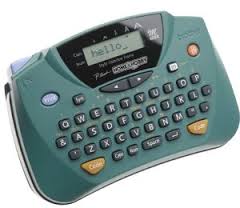
The king is dead; long live the (new) king: the Brother P-Touch 80…the Brother reps actually showed me a whole royal family of labelmakers. My Home & Hobby is still chugging along (in perfect condition, I should note), but an organized person must always plan for the future. Some labelmaker tips:
- Unless you’re a non-typist, get one with a QUERTY keyboard. The Star Trek tri-corder style where the letters are in alphabetical order will drive a touch-typist to distraction.
- “Crack & Peel” labels (much like the shrimp) are easier to use for those without long fingernails. In the olden days, I used to believe that Brother had the better labelmakers while their competitors (like Dymo) had the better label tapes. Now, depending on the tape used by the machine model you prefer, you can have the best of both worlds.
- I’d hate to be sued for saying this, so I’ll be oblique. A certain Doyenne of Domesticity turned poncho-wearing jailbird, whose name rhymes with Siddhartha had previously marketed her own line of labelmakers. It’s been my experience (and those of my clients) that those break easily and have been known to reach their demise while still in their shrink wrapped packages. Forewarned is forearmed.
Another of Paper Doll‘s favorite companies is Pendaflex, part of the Esselte/Oxford/Pendaflex/Xyron family of productivity goodies. (Warning: turn down your speakers if you visit them this week. The site is running a cute-the-first-time commercial for their Earthwise 100% recyclable products (about which we’ll discuss more when the whole world isn’t already caught up in Earth Day talk).
If you’ve been reading this blog for a while, you know that I have a strong affection for real filing systems, in 1/3-cut interior filing folders (of any color or style you prefer), with sub-categoried folders inside of broader categories in hanging folders. Sure, Pendaflex has them all. However, as much as Paper Doll is loathe to admit it, some people just won’t join on the vertical filing bandwagon, and Pendaflex is much more flexible than Paper Doll. Indeed, they developed a whole new system around pilers who don’t want to be filers! (Yes, I’m shocked!)
Right now, when you file, you look in front of you and your files are vertical, perpendicular to your face. Well, with this snazzier version alternative to the pile up, where all your stuff rises in layered heights until it falls or bumps into the wall, you can look down instead of straight ahead, and the tabbed labels of the system are still perpendicular to you. You still need to square the edges, but the PileSmart Desktop organizer tray  makes it easy and their keen clips double as label tabs, so you always know what files and documents are where. More importantly, anyone else who needs to find something amid your piles can do so, too.
Don’t quite get it? Check out Pendaflex’s full downloadable how-to explanation for piling smart. (Paper Doll would still prefer you filed and not piled, but she’s feeling magnanimous now that the jet-lag has receded.)
Happy Earth Day!
Paper Doll Shot A Man In Reno Just To Watch Him Declutter…
Did you miss me?
Due to the wonders of technology, I’ll bet you didn’t even know Paper Doll was gone. But I, and many of my colleagues around the blogverse, spent most of last week in Reno, Nevada at the National Association of Professional Organizers annual conference.
Most of the time, Paper Doll shares little of her own life (deeply held affection for Reese’s Peanut Butter Cups and George Clooney, notwithstanding), in lieu of sharing ideas for what you should (or should not) do with the paper and clutter in your life. However, with close to a thousand of my fellow NAPO members all in one place, there were too many tidbits to that I wanted to share. Next week, we’ll get back to my motherly dispensing of advice and counsel, but for now, let’s dish…
First, the airline experience last week was as bad as you’ve heard. Ramona Creel, OnlineOrganizing.com’s founder, was one of several hundred NAPO-ites left stranded. Despite Herculean efforts, Ramona and others never got to Reno, thanks to American Airlines’ grounding of thousands of flights for maintenance and inspection issues. But dangerous weather in the Midwest, the FAA scandals in general, and a sad goodbye to three airlines last week–ATA, Skybus and Aloha (pun intended?)–on top of the usual security nightmares made all of us who did make to the conference all the most excited to be there.
Paper Doll, herself, survived six flights (three each way), lost luggage (in both directions, including to Salt Lake City, a city through which I wasn’t even traveling!), one expedited landing due to a medical emergency on board, and five flights delayed by an hour or more, including one in 100+ degree heat due to a failed piece of equipment called “Smart Cart”. (Paper Doll imagines that anything leaving shrieking babies and sleep-deprived professional organizers in a sauna for 90 minutes is an unlikely item to be deemed “smart”.)
Was this a star-studded event, you might wonder? Well, our keynotes, panels and exciting closed-door meetings were graced by the presence of professional organizer, speaker, author, celebrity, friend-of-Oprah and hunk (did I just type that out loud?) Peter Walsh of Clean Sweep fame. Maybe it’s the straight-shooting approach, the chiseled features, the gift for humor or the amazing Aussie accent, but a room full of professional organizers sat in rapt attention to drink in every word Peter spoke, the upshot of which was that we, as professional organizers, do (or strive to do) much more than clear clutter. He said, as all professional organizers try to convey, that “organization is a path to incredible freedom”.
Walsh also encouraged us to CHANGE THE WORLD, something echoed throughout the beliefs of many cultures, from Judaism’s philosophy of Tikkun Olam to Mahatma Gandhi’s reflection that “We must be the change we wish to see in the world.”
Next, the blogging community of professional organizers loves you…and we giddily love one another! On the first full day of the NAPO conference, three fearless industry leaders—magnificent-even-on-crutches John Trosko (of the Organizing LA blog), NAPO Founders’ Award-winning Monica Ricci (of Your Life. Organized) and the just-stepped-out-of-a-magazine, fashion plate organizer Lorie Marrero (of The Clutter Diet Blog) hosted a get together of blogging professional organizers.
Readers, I must tell you, it was an honor to be in such stellar company, and amusing to see how we’re all secret (or not-so-secret) fans of one another’s work. I finally got to meet the indefatigable Katherine Macey who blogs Traveling With Kids and lets a singleton (to Paper Doll‘s mother’s chagrin) vicariously experience the family travel scenario. Fellow Blog Central blogger Joan Kosmachuk proved to be a wealth of information, and Brandie Kajino (who also blogs here and here) may be one of coolest people you might ever hope to meet in the blogverse or the 3D world. There were famous bloggers, like Jeri Dansky of the eponymous Organizing & Decluttering News and there was an intriguingly high representation of Australian and New Zealand professional organizer bloggers, including Wendy Davie and Lissanne Oliver. International bloggers, masters and mistresses of both organizing and magic links, and fascinating individuals, one and all.
Over the last three weeks, we’ve been talking about organizing books and your personal libraries. I’d be remiss if I didn’t mention a few of the new books my colleagues have written. In particular, I’m all ready for dynamo Valentina Sgro’s Patience and the Porsche, a novel with a professional organizer as protagonist (hmmmm) and one has to admit that Peter Walsh’s Does This Clutter Make My Butt Look Fat? definitely has the most marketable title!
We took classes to make ourselves better educated and better skilled professional organizers to bring our clients (and our readers) the wise and the cutting edge, the fun and the fabulous. We’ll all strive to be careful that our notes are sourced, sorted, filed or tossed with precision to reduce clutter. And because professional organizers are human, many of us ate too much, slept too little, Purelled elevator buttons within an inch of their plastic lives and reveled in the community of all of us who hope to spread the blessing (and wackiness) of living a more organized life.
Next week, Paper Doll will highlight some of the nifty products and services presented at the NAPO conference and expo. Until then (OK, until my luggage with all my notes on the products and services presented at the conference arrives), your jet-lagged blogger wishes you an organized and productive week.
Shhhhh… We’re organizing the library…
The library is not a shrine for the worship of books. It is not a temple where literary incense must be burned or where one’s devotion to the bound book is expressed in ritual. A library, to modify the famous metaphor of Socrates, should be the delivery room for the birth of ideas – a place where history comes to life.
The specifics of organizing books can run from practical to whimsical. As the size of one’s library begins to expand, the more difficult it can be to keep track of what we have, and where. For example, if we have six cookbooks, or three books on investing, it’s relatively easy to know what lives where, and the fewer books we have, the more easily we’ll recall that we lent Rosemary or George one of our titles. But if we have sixty cookbooks or three hundred titles on any of a variety of topics, knowing what we own, what versions or editions, and where they are can become quite a mess.
If you have a large collection of books (or really, anything shelve-able), you have various indexing options:
NO-TECH
Think back to your elementary school library’s card catalog. (Paper Doll waxes nostalgic about “library days” and how at even a tender age, she realized they were infinitely superior to “gym days”.)
Your supplies: lined index cards (white or colored
 , depending on how fancy you wish your cataloging system to be) and an index card file box.
Your method: Determine what color (if you’ll use colored cards) will represent each genre or category. White for fiction; for non-fiction, red can be history, green for financial, blue for medical, yellow for history and so on. This is your personal system, so create your own simple standards. You could just pick one color for “things to do” like cooking, gardening and how-to and another color for “things to know” like history, literary review, and so on. Or, simply use all white cards and be done!
Write the title of the book and the author’s name on the card. If it’s non-fiction, write the category, as well. Most books have the genre or non-fiction category written on the back cover. For example, on the back, top-left cover of Judith Kolberg’s Organize For Disaster: Prepare Your Family And Home , it says (in small print) “How To/Disaster Preparedness/Reference”. On the back of Flirting with Price & Prejudice: Fresh Perspectives on the Original Chick-Lit Masterpiece, the top-left back corner says “Fiction/Essays”.
Write the location of the book. if you have small libraries in multiple rooms (cookbooks in the kitchen, religious books in a room designated as a sacred space or shrine, computer and financial books on the shelves next to desk in your home office, etc.), indicating generally where the books are shelved will be helpful. If you have one massive library, or something creatively funky like the Stairbookcase or color-coded bookshelves we discussed last week, you’ll want to specify at least which room, which bookcase and even which shelf.
Finally, use the rest of the card and the reverse to note if someone has borrowed the book–who borrowed it and when?
HIGH-TECH, LOW-COST
There are multiple shareware or freeware software programs available; none listed below should be taken as an endorsement, per se, but as a starting point for your own research.
On the Web
LibraryThing is a free online service…up to a certain collection size of 200 books; beyond that, the fee is $10/year or $25 for lifetime membership, which seems, to Paper Doll, to be a bit of a steal! Once you’ve created your account, you can access your catalog from anywhere, even via your mobile phone. So, if you’re in a fancy restaurant, having a conversation about the great book you just bought but you can’t recall the author’s name, it’s a snap to obliterate that senior moment.
Start cataloging by typing a title, author or ISBN number into the web database and LibraryThing searches the Library of Congress, all five national Amazon sites, and more than 80 worldwide libraries to help you find the match. Later, you can edit information, search and sort it, “tag” books with your own keywords the way bloggers tag posts, or use the Library of Congress OR Dewey Decimal systems to organize your collection.
LibraryThing even has a collaborative experience, similar to social bookmarking sites like Digg, connecting people who own the same books, and providing suggestions for what to read next based on extrapolated recommendations.
GuruLib is a similarly fabulous option which lets you add content to your library in any of five ways:
- Use a barcode reader such as Cuecat (didn’t you get one for free in the 90’s?) or type in the UPC or ISBN code.
- Use a webcam as a barcode reader. Just wave and GuruLib extracts the barcode from the image.
- Type the title, author or keywords
- Take a picture of the UPC or barcode on the book using your cellphone and send it as a picture message to barcode@gurulib.com
- Simply take a picture or group multiple barcode pictures in a single zip file and upload the file to the website!
Paper Doll likes to think of herself as tech-savvy, but some of those options make me swoon!
GuruLib can search more than 500 libraries to find content, catalogs where books are in your home and lets you create parallel virtual shelves, track your loaned books, and share your reviews with other users.
Other web options include Good Reads and Shelfari.
On Your Own Computer (Downloadable options)
Windows-users
Book Collector uses a simple three-step process. First, type or scan the book’s ISBN number and Book Collector uses it to search various national libraries and Amazon online book stores for matches. Select your book from the search results and once you find what you want, just click “Add” to add the book to your database. Book Collector downloads everything including title, author, publisher, publication date, number of pages and even, when available, the cover art (like on iTunes). Book Collector has an under-$40 pricetag.
Libra is shareware, which means that it’s currently free for non-commercial use. It’s also “in beta”, which means that there may be more bugs than you’d find in a for-fee software package; however, because they’ve got a user forum, you’re likely to get a much faster response in getting those bugs fixed than with some huge corporation. (Plus, their driving directions to their offices are pretty funny.) Yes, you can use your web cam as a barcode reader, import existing collections, share reviews with friends, and they promise an “eye candy treat” to Vista users.
Readerware (which actually also works on Mac and Linux platforms, as well as on Palms and iPods) is another popular PC option.
Mac-users — Paper Doll is a Mac baby. The word is that the best downloadable program for us is Delicious Monster. After a free test, it comes with a pricetag of $40.
Just point any FireWire digital video camera, like an Apple iSight (built in to most iMacs), or a Bluetooth scanner at the barcode on the back of any book, movie, music, or video game. The barcode is scanned and within seconds the item’s cover appears on your “digital shelves” filled with tons of in-depth information downloaded from one of their six different web sources. You can also “drag and drop” the book’s URL from Amazon!
For the cool hipsters out there, you can sync your cataloged library with your iPod or even print a color catalog to take with you. Keep track of the items your friends are borrowing using Delicious Library’s loan management system, which integrates with Apple’s Address Book and iCal. (And yes, Mac users, there is a Delicious Monster dashboard widget!)
For more Mac library cataloging options, check this list.
HIGH-TECH, MODERATE COST
One of the neatest hardware/software combos I’ve seen is the Intelliscanner Mini used with their Intelliscanner Media Collection software. The little hand-scanner is like a smaller version of a Star Trek phaser.
Just use the “Mini” to scan the bar code on the back of your book (or CD or DVD), and then the barcode reader automatically retrieves detailed item information and even artwork from a comprehensive database software to sort, organize, sell, and even share your books or other media. Search by title, author, ISBN, etc. and know who borrowed a book when it’s not on the shelf.
With a higher price tag, this is for the gadget-loving crowd, but it makes the cataloging process not merely simple, but entirely automated. If you have a huge library, this type of solution saves you time…and it’s important to remember that time is money, especially when you’d rather be reading.
No Fooling–Fabulous, if Not Functional, Ways to Organize Your Books
Outside of a dog, a book is man’s best friend. Inside of a dog, it’s too dark to read.
Your eyes are not deceiving you, and this isn’t (exactly) an April Fool’s Day joke, though the joke’s on Paper Doll, because I never thought of anything so delicious. It’s a staircase. It’s a bookcase. It’s a STAIRBOOKCASE.

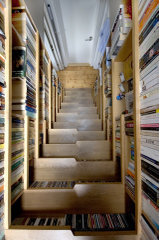
It’s fabulous, stylistically, isn’t it?
Paper Doll is drooling with envy. Books, DVDs and CDs, all neatly arranged in one snug space. For more information, or just an enlarged and truly dizzying view from the top (which the photo on the right fails to convey due to the bite-sized photo space we’ve got), check out DIY Maven’s blog the Amazing Staircase from Levitate Architecture in the UK, which learned about it from the amazing Apartment Therapy blog. Isn’t the web wonderful?
Indeed, in trying to research the more novel ways we might organize our books, beyond what even the most fabulous professional organizers might consider, I found some curiosities. Submitted for your review, if not exactly my approval, the growing artistic trend of organizing one’s book collection by COLOR as illustrated best in this photo but also here, and even this for children’s books.
OK, perhaps this is best thought of as an April Fool’s Day post, because coolness of style aside, there are serious impracticalities of both the gorgeous stairbookcase and especially the notion of organizing books by color.
Indeed, the stairbookcase has an advantage in that books are out of the path of direct sunlight, so they will be less likely to fade. It also has the advantage of built-in category delineation, such that each shelf is almost like one section of the Dewey Decimal catalog. Once books fill a full shelf, no more books for that category can go in unless some are let go. It’s a self-limiting system!
One might imagine, however, that unless one has socks-only house, the bookshelves, and therefore the books themselves, might be prone to getting more outside dirt, grime and dust on them. Also, books can be a source of pride and joy and how can you display your books with pride if you have to balance precariously and turn in a semi-circle in a phone-booth size area, to see what books you have?
As for the color-categorizing of books, it’s spectacular from an aesthetic perspective, but all of Paper Doll‘s faithful fans know that in the battle of form vs. function, Paper Doll will always side with Mr. Function (whom I like to imagine looks quite a bit like George Clooney). Without some kind of cataloging system, whether a low-tech card catalog, or an online digital indexing system like Library Thing, or indexing software like Book Collector, ReaderWare or Delicious Monster (for Mac users) or how would you ever find the book you want when you want it?
Pretty shelving, pretty arrangements? Pretty nifty. But Paper Doll is a book lover, and nothing would ever break my heart more than if I couldn’t find my copy of Pride & Prejudice, The Eyre Affair or The Monster At the End of This Book the moment I wanted it.
And I’m sure Elizabeth Bennett, Thursday Next and Grover would feel the same way. No foolin’!
Book ’em, Danno! Organizing Your Beloved Books
Books are the treasured wealth of the world and the fit inheritance of generations and nations.
This weekend, as I visited a beloved used bookstore and left with a few new (used) books, as well as extra cash and trade-on-account, I thought that Thoreau was right that books are, indeed, the inheritance of generations, but that doesn’t mean every book is fit to bequeath to our great, great grandchildren. (Novelizations of movies about Transformers, I’m talking about you! Diet books touting all-grapefruit menu plans? You, too!)
It’s hard to let go of books, but if we kept every book we bought over a lifetime, those of us who live on the second floor would soon collapse, and those with a lifetime of books on the first floor might be pushed, by force, all the way through to China.
Paper Doll is indeed a lover of books; the written word is my dearest companion. But even books, if left unrepentantly unorganized, become clutter. That way, madness lies.
I generally advise my clients that when they begin to get organized, they should consider some basic rules under the rubric of “Don’t put things down, put them away”. The rules are simple.
1) Everything should have a place to live.
If you’ve been reading organizing blogs, you already know that clutter is deferred decision making. You acquire a book (and you may even read it) but then don’t know what to do with it. You might pile it on your bedside table with the intention of reading it, but more likely, you’ve plopped it down atop any other stack of books in your kitchen, living room, bedroom or staircase.
When you make a conscious effort to determine where something should go, it forces you to make the decision if it even needs to be with you in the first place. Everything should have a place to live, but not everything has to live with you!
The Pareto Rule or 80/20 Rule says that 80% of success comes from 20% of the effort. This is why paring things down gives you a much bigger bang for your buck than you expect. You usually don’t miss the things you purge out (even though you anticipated you would) which was what blocked you from downsizing in the first place.
Not counting essential reference books (and yes, you should always have a dictionary and thesaurus nearby), the books you’re keeping (and likely tripping over) represent three aspects of your life:
NOW Books—These are the books that represent who you are now, TODAY!
They might be novels by authors you love (or whom you hope to come to love) and subjects you find compelling enough to actually read. For me, these would be my complete collection of Jane Austen (which I reread yearly, as Mr. Darcy is the closest some of us get to Mr. G. Clooney), new novels I’ll to read on my flights to the NAPO conference in April, guidebooks to online marketing and blogging…for just a few examples. Your own NOW books might be the latest thriller, some pretty gardening books and a biography you’re slowly but satisfactorily nibbling your way through. If these were library books instead of books in your personal collection, they’d be the ones you’d read hungrily and return on time.
Keep NOW books, but sort and maintain them well so you’ll be able to find them when you need them, and be able to identify easily when they’ve become THEN or SOMEDAY books.
THEN Books—These types of books represent who you used to be.
Subjects of THEN books might be parenting newborns, titles you read when your own children were small, but you’re now an empty-nester. My own THEN books cover all aspects of the television industry dating from when I was in graduate school and the days I was a television program director. The books are chock-full of facts that the Internet could now supply more quickly than I can amble to the book nook, but more importantly, they represent a time in my life when I needed and wanted that information. I no longer need to know the details of libel law court cases or how to calculate gross rating impressions. The books are like 9th grade lab assignments. They dutifully served their purpose, but the frog is dead.
THEN books are the ones that need to leave your home; they’re taking up space like guests who have overstayed their visits. The options for ridding your home of these overdue interlopers include:
- Sell books to brick & mortar used bookstores.
- Sell them via Amazon, Powell’s or any online bookstore’s used book section.
- Donate them to your library’s annual book sale.
- Donate to school libraries. Local elementary, middle, high school or even college libraries are often desperate for titles. Your house of worship and community group buildings may also be eager to accept book donations.
- Donate them to our hardworking military personnel or incarcerated persons seeking to improve their literacy.
- Set them free via Bookcrossing. (Check it out. It’s so cool!)
- Trade them (if you must acquire more) at PaperbackSwap or BookMooch.
- For more ideas, just type “donate books” into your favorite search engine.
SOMEDAY Books—These are the books representing who you wish (or once wished) to be someday.
SOMEDAY BOOKS are the literary equivalent of the exercise videos that gather dust next to the TV. They’re the guides to speaking Italian or Urdu that you bought in hopes of learning an exotic language, the cookbooks for cuisines that are too complicated, too fattening or too much fuss for you to approach in this lifetime…or the books on topics that represent your less realistic dreams. If you’ve decided that you’re starting a home-based business, books on writing business plans belong in your NOW collection; if you’ve been talking about starting a business for ten years but have never made any movement towards your goals, sell these books and let them fund a current dream.
2) Things should live with others like them.
3) Things should live where they’re used.
These two rules go together. If you’ve got books of all sort piled up without rhyme or reason, you’ll never be able to select the book you want when you need it or find a quote that escapes you. Instead, focus on these two rules—group like with like so that all your cookbooks are in one place, all your novels are grouped together, every book on personal finance can be found in the same place, and so on.
If you group similar subjects together, you need not worry that you lack a large library in which to corral them. The trick is to have mini-libraries, preferably on sturdy bookshelves with your tomes stacked vertically (for the health of the books and the functionality of your library).
Fiction is the easiest to organize, if you choose to do so at all. (You could just keep all fiction together and go no further!) Alphabetize by the last name of the authors and you’re done. If you’re really intent on the organizing process, you could organize books alphabetically by title within authors.
If you’re a budding librarian with disparate reading tastes, you could even have separate sub-sections by genre (romance, science fiction, mystery, etc.). However, alphabetizing authors and titles is objective and can be done quickly; it can even be delegated to older children and teens as part of their chores. Determining genres can be very subjective; even the Library of Congress has trouble with books that are mysteries and romances, or science fiction and mystery. Some books, like those by Jasper Fforde, defy category. Make it easy on yourself.
Non-fiction books are a little more complicated. As for a former page (i.e., library worker), I had to learn the Dewey Decimal and Library of Congress classification systems for cataloging books. Unless you have a personal library that rivals those of most small towns, you won’t need anything quite so complex. Just sort your books by subject, generally, and perhaps by sub-section.
So, if you’re like my friend, Paul, who is partial to reading about war history (and explosions), you might have one sub-section for Revolutionary War history, one for Civil War history, one for each of the World wars, and so on. If you have an extensive cookbook collection, consider dividing them by ethnicity (Italian, Mexican) and/or by food or meal type (desserts, soups, etc.).
Children’s books can generally be divided by age groups: picture books, storybooks, chapter books and so on. If these are shelved separately, when your children age out of the toddler or pre-school books, you can select one or two favorites, toss the ones that have been gummed and chewed to dilapidation, and send the rest to live with someone else.
Next, once sorted, these mini-libraries should be organized where they’ll be used.
Thus, you might have a cabinet or shelf in or near your kitchen or pantry where you keep your cookbooks. It wouldn’t make sense to store your romance novels there (the concept of “heating up”, notwithstanding), but keeping the cookbooks near where you use them is logical.
Similarly, if you have a small collection of personal finance books, these would fit nicely on the shelf nearest the desk where you pay bills, research investments, complete your tax return and plan your financial future.
Children’s books are best suited to be kept in your kids’ rooms for bedtime reading or the family “library” if there is one; chances are low that kids will choose books over toys (except for use as truck ramps), so playrooms aren’t usually the best option for kids’ books.
4) Things should be arranged according to the rules of proximity and utility.
In general, if you should be using something all the time, whether it’s the dictionary, tax code, or moisturizer, keep it at your fingertips. These are the things that deserve PRIME REAL ESTATE on your desk or the bulletin board next to your phone or your bedside table. Conversely, if you can’t bring yourself to get rid of your THEN or SOMEDAY books, or if they’re the kind of NOW books that aren’t “now” in terms of your busy life, but will be this summer for your beach vacation, store them on higher shelves or out of your way.
Your bedside table is for true NOW books; the shelf next to your computer desk is perfect for the computer guides you reach for all the time; your desktop itself should probably only have a dictionary or a resource you grab all the time.
5) Know What’s Living Where!
Think of your books as people, and an index or catalog of your books as a census to know who (or what) lives where and with whom. The larger your book collection, the harder it may be to know exactly where a book is located (on your shelves or even lent out to a friend?) or whether you even own it anymore.
Over the next few posts, we’ll talk about easy ways to organize and catalog your library. You may be amazed at the creative ways to arrange them and the wide array of low- and high-tech methods available for making cataloging books as easy as the wave of a magic wand (or the wave of your book in front of your web cam).
Happy reading!



Follow Me