Paper Doll
Give Yourself Some Credit: An Update on the CARD Act
Almost a year and a half ago, Paper Doll told you about the benefits of the Credit Card Accountability and Disclosure Act of 2009, a honking-big name for an omnibus set of protections for consumers. Some provisions went into effect in late 2009, while most rolled out between February and August, 2010. As a reminder, those protections included the following:
BILLING IMPROVED:
Credit card statements must be mailed to consumers 21 days before the payment is due. All those variable pay-by time limits also went away, so no matter what credit card you pay, you’re on time if your payment arrives by 5 p.m. on the due date. If you tend to be poky, know that late fees have been capped a $25 for a first offense and $35 for a second late payment within a six-month period. And a late fee can’t exceed the amount owed, so if you’re late paying at bill of $10, your late fee is curtailed at $10.
Monthly credit card statements now indicate how long it will take to pay off a balance (including all that pesky interest) if you make only minimum payments. Previously, credit card issuers were like the man behind the curtain, showing you only the minimum payment and hiding the true (scary) picture of your increasing debt. Bills also now include toll-free numbers to find out more about credit counseling.
INTEREST RATE MODIFICATIONS REGULATED:
Credit card companies must provide 45 days’ advanced notice regarding changes to interest rates and fees.
Credit card issuers can’t increase rates on existing balances unless one or more of the following is true:
- Your payments have been more than 60 days late
- The teaser (i.e., introductory) rate on your card has expired
- Your card has a variable interest rate tied to a financial index that has increased
Credit card issuers can’t increase the rate on new purchases in the first year you hold a credit card, not counting the expiration of an introductory teaser rate.
Teaser rates must stay in effect for at least six months.
Any payments over the minimum amount due must be applied to balances with the highest interest rate. Thus, if you have a balance at a low promotional rate and another at your higher, regular rate, that high balance (and the interest on it) won’t keep growing.
UNFAIR LENDING PRACTICES CURTAILED:
Universal default was eliminated. That was where a credit card company could raise your rates if you defaulted on some other credit card, even one operated by an unrelated company.
Two-cycle billing was eliminated. That was where card issuers were averaging your daily balances from the previous billing cycle, so that you were basically getting billed on charges for which you’d already paid.
Credit card issuers can’t market on college campuses or at events sponsored by colleges, or entice them with nifty gifties, like T-shirts, mugs, and gadgets.
Applicants under 21 have to have an adult co-sign for their credit cards unless they can provide proof of an ample regular income.
CONSUMER CONTROL INCREASED
Over-limit fees are now opt-in only. That means that if you don’t have enough left on your credit limit to buy that weird floofy thing in the fancy boutique, your card issuer can’t just let the purchase go through and charge you a ridiculous over-limit fee unless you’ve previously agreed to it. (And why would you?) You get to decide whether you’d rather have the snooty girl behind the counter tell you the purchase has been declined or whether you’d rather sink further into debt, beyond your limit, and pay a huge fee on top of it.
(Paper Doll would like you remind you that you need not ever see the snooty salesgirl again; you can’t say the same about your money woes.)
Consumers who get dinged for paying late can reclaim their prior (lower) interest rates if they pay on time for six consecutive months. Thus, significant (over 60+day) late payments can trigger penalty interest rates, but consumers can’t be stuck with higher rates in perpetuity.
DID IT WORK?
It’s been almost a year since the last of these regulations went into effect. Your credit card bills now nag you, warning that if you don’t pay off that expensive gadget right away, and only make minimum payments, you’ll eventually pay double (triple?) its cost in interest. This past year’s freshman college class isn’t already on its way to graduating with massive revolving consumer debt. And as we continue to slowly climb out of a recession, credit card companies aren’t mailing us letters telling us our credit lines are going down or our interest rates are going up tomorrow.

Before the passage of the CARD Act, naysayers (primarily those with a vested interest in keeping the prior status quo) predicted doom and gloom if the proposed provisions became law. However, a report entitled, Credit Card Clarity: CARD Act Reform Works put out by the Center for Responsible Lending found that:
“Contrary to credit card industry claims, the new rules have not caused prices to increase or access to credit to fall. Instead, they have benefited the public by making credit card pricing significantly more transparent. Price transparency is likely to lower costs long term by spurring competition and making it harder for issuers to manipulate or arbitrarily raise prices.”
The CRL noted in its key findings that:
- New rules have reduced the difference between stated rates and actual rates paid on credit cards, resulting in more transparent pricing. An estimated $12.1 billion in previously obscure yearly charges are now stated more clearly in credit card offers.
- Once the economic downturn is taken into account, the actual rate consumers have paid on credit card debt has remained level.
- Direct-mail offers have been extended at a volume and pace consistent with economic conditions.
Other studies agree that the legislation has improved the overall environment for credit card users. For example, a survey by Bankrate revealed that in 2011, 79% of cards had no over-limit fee, compared to 60% in 2010.
Thus, the CARD Act has led to improved disclosure and fairer lending practices. However, there remain some mixed reactions to some aspects of the new rules:
1) During the lag between when the CARD Act was passed and when the last provisions were put into place, many credit issuers hiked interest rates.

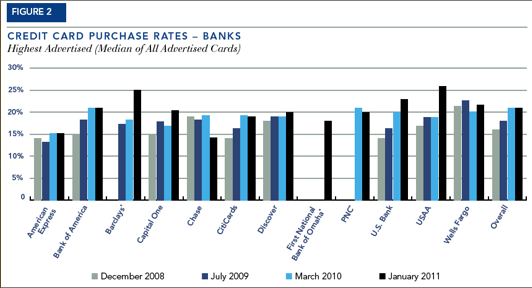
However, despite claims that interest rates would continue to rise, the Pew Charitable Trusts‘ new study, A New Equilibrium, found that interest rates have generally stabilized, and that requiring lenders to abide by fair practices has not had a detrimental impact on consumers. Further, many conclude that most rates that have risen are due more to issues related to the economic landscape, including unemployment and general individual creditworthiness.
For a comparative view, Pew has charts showing the year-to-year rate changes of credit card purchase rates and cash advance rates for 12 major credit card lenders and 12 credit unions, 2008 through 2011.
2) The CARD Act didn’t block new fees from being assessed. And assessed they were! Lenders started charging (or charging more) for everything from paper statements to annual fees, from cash advance fees to foreign currency transaction charges. Minimum finance charges and inactivity fees have also increased. However, there’s nothing to say lenders wouldn’t have started or increased such fees if they hadn’t been forced to scale back their predatory lending and lack of transparency.
3) Larger banks issued less consumer credit. However, during this same period, smaller banks and credit unions have become more competitive, loaning more (and to more consumers) than they had previously.
4) Credit card companies started issuing more variable-rate cards, allowing them to bypass the CARD Act regulations and increase rates even when a consumer isn’t delinquent. This, in particular, points out why it’s so important to comparison-shop for new credit cards and not accept the first offer that comes in the mail.
WARNING FOR BUSINESS OWNERS…and INDIVIDUALS
CARD Act regulations only apply to consumer credit card debt. If you hold a business credit card for your small business, or have opted for a business card marketed as a “professional card”, you are not guaranteed protection under any of the CARD Act stipulations.
Many solopreneurs and micro-business owners have opted for business credit cards in lieu of business loans in hope that doing so might improve the tax deductibility of their business expenses, unaware that the lack of protections are numerous. Further, credit card companies market a preponderance of such protection-devoid cards to individuals with less than a $50,000 annual income and who have no actual business dealings, inveigling them to apply for cards that lack the protections they’d otherwise have if they opted for consumer-oriented cards.
Some lenders, including Bank of America and Capital One, have voluntarily elected to abide by the some of the same regulations for their business credit cards, but none are required to do so and they may choose to reverse such policies at any time. Research by the Pew Charitable Trusts, in a new study entitled U.S. Households At Risk From Business Credit Cards found that:
—67% of business credit cards still include high penalty rates for late fees that exceed the regulated rates for consumer credit cards.
—80% of business (or “professional”) cards include an “any time” clause, allowing terms and conditions to change at any time, with any (or no) amount of warning.
—84% of business cards apply (or reserve the right to apply) cardholder payments to lower rate balances before higher rate balances.
—Penalty fees are virtually unrestricted for late payments or other violations of the terms and conditions on business credit cards.
See Table 1 of the Pew report for a side by side comparison of protections (or lack thereof) between consumer and business credit cards.
Last week, four members of the U.S. Senate called for the Federal Reserve Board to require increased disclosure on business credit cards and to crack down on false marketing practices related to professional and business credit cards. And so, we wait.
Paper Doll is in no way recommending carrying revolving debt or spending beyond one’s means. However, whatever your financial choices, it’s important to be an educated consumer and know your rights.
Dear Readers, have you noticed what the CARD Act has meant for your personal clutter of debt, or the piles of credit card statements and offers in your mailboxes? Please share your thoughts in the comments section.
Paper Doll Cleans Out Her Backpack: Foreign Studies Edition
This week, I’m emptying my blogging backpack of some captivating paper-related organizing products from beyond our shores. You may ooh and ahh as I have, but don’t fall in love with them, or you’ll be tempted to shell out the big bucks for shipping, or, in the case of one product, a transoceanic flight!


Book Pack — From a distance, it appeared to be a purse. Up closer inspection, the utility of its delightful variations became obvious. The Book Pack is a rugged book cover for those who want ease of transport, quirky styling and a bit of privacy.
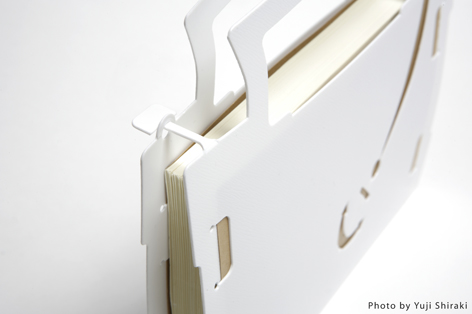
The Book Pack cover is cut from one polypropylene layer, so there are no loose pieces to break off. Books slide in between the portfolio sides and the books’ covers are held in place by tabs cut from the polypropylene sheet. When folded closed, small extensions tabs cut from one side of the sheet interlock with small circles  on the other side, flanking the handles and securing the book. When clicked into place, the user can hold the two handles together as if it were a small pocketbook, without fear that jaunty swinging of one’s arms might send the book flying from its cover.
(Think that kind of thing can’t happen? When I was in seventh grade, one of the popular boys in my middle school, surrounded by a bevy of sixth grade beauties, was holding court in the school cafeteria. As he spoke more and more animatedly about whatever 12 year-old-boys discuss with a throng of admirers, the Nutty Buddy in his hand dislodged from the conical paper wrapper and flew through the air, over tables and students, and smacked a young Paper Doll in the head. Trust me. These things happen.)
Anyone who has ever tried to carry a lunch bag, a bottle of water, and a book on a hot day without getting the condensation from the water bottle on the book or having to juggle various items can appreciate the ease of use of this little purse-like book cover, which, in a pinch, one can carry in the crook of one’s pinkie.
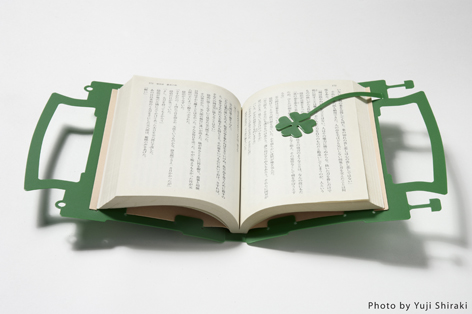
The Book Pack only comes in one size, and measures 170mm W (i.e., when the Book Pack is closed, carried purse-style) x 152mm H x 15mm D (approximately 6.69″ W x 5.98″ H by .59″ D). After measuring a few mass market fiction and non-fiction books, Paper Doll has realized that the Book Pack is designed primarily for standard Japanese paperbacks and would not be suitable for most North American texts. However, it would provide a whimsical solution for covering a variety of writing journals and small sketchbooks.
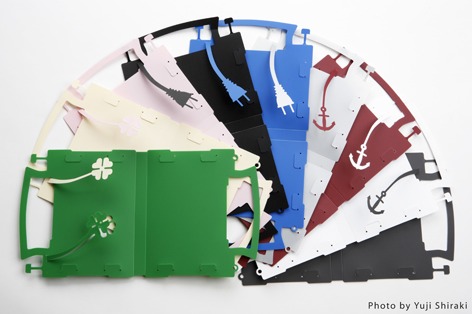
The Book Pack comes in nine colors, with three colors associated with each bookmark pattern. The four-leaf clover bookmark Book Pack comes in green, ivory in pink, the anchor bookmark pattern is sold in white, grey and wine-red and the electric plug theme comes in blue, black and silver. The Book Pack sells for 1155, or about $14.39, as of this writing.
The Book Pack is one of many products from Japan’s MicroWorks design studio, created by Shunsuke Umiyama, whose motto is “No Humor, No Design!” While most of MicroWork’s designs, including furniture, accessories, and dcor items are sold through museums and Japanese “design stores”, if you simply must own a Book Pack, inquiries in English may be emailed to label@microworks.jp.

BrickBox is the brainchild of industrial designer Anxton Salvador and illustrator and graphic designer Roger Zanni. The Spanish design company has zoomed light years beyond the dorm room “milk crate” concept to create patented stackable elements that can be used for transport or to combine into modular bookcases of differing heights, widths and layouts. Remember the old Saturday Night Live faux commercials? “It’s a floor wax! It’s a dessert topping!” Well, BrickBox could create a commercial that announces: “Es una caja! Es un estante!” (Well, at least Google Translate tells me I’ve said, “It’s a crate! It’s a bookshelf!”)

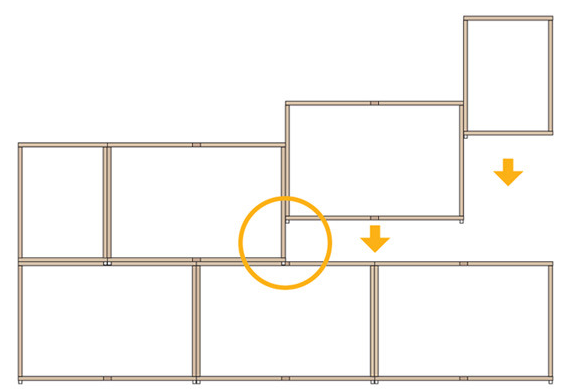
The layers of BrickBoxes fit together with small nylon plugs that affix the upper portion of the lower BrickBoxes to the next layer above. BrickBox walls are packed flat and a Phillips-head screwdriver is necessary to put together each box, but no nails, screws, or tools are required for creating a safe, sturdy stackable bookcase from the modular boxes. Easy assembly and disassembly make this a perfect option for dorm-dwellers, apartment renters and anyone who likes to frequently change the shape or look of their dcor.
Creativity is a key BrickBox advantage, as one can modify more than the height and width of the shelving. Options include rectangular styling (with or without wheels), laddering and 90 angled layouts, but Paper Doll was particularly intrigued by the idea of reversing some bricks, such that the unit serves as a room divider with open shelving available in dual directions:
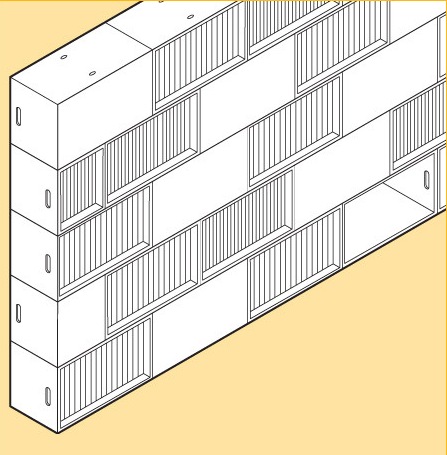
The patented BrickBox modules are manufactured in Spain out of 12mm birch plywood from certified forests and laminated with a white coating. Each BrickBox comes with a packet of screws for putting together the box, and nylon plugs for secure stacking.
Unfortunately for my North American readers, pricing is listed in Euros (from €39.95/Large, €32.95/Small), by country, with costs adjusted to include shipping to more distant locales. If you (likely) reside in nations other than those listed, contact BrickBox at info.brickbox@gmail.com for alternative solutions.

Karton, is a fascinating Australian furniture company that takes paper design to the next level. Previously, we’ve discussed paper furniture like the inflatable paper sofa, but Karton’s line of 100% recyclable, heavy-duty, truly attractive cardboard beds (with drawers!), tables and storage pieces are as functional as they are convenient and intriguing. As Karton’s website states,
“Discover the flexibility and convenience of a dining table you can carry across the room, a bed you can flatten when your guests head home and a kid’s table that relishes a lick of paint!”
While the bedroom, office and wall storage sets 
are what originally caught my eye (especially that Paperpedic Bed with under-bed storage and a load capacity of 2000 pounds!), Karton’s delightful Barnyard Method line of shelves for keeping books, magazines, DVDs and CDs tidy keeps Paper Doll enchanted.

The Barnyard Line comes in three styles:
- The Ram is 64cm W x 74cm H x 102cm D (25.2″ W x 29.13″ H x 40.16″ D) in Kraft (traditional cardboard coloring) for AU$72 ($76.25).
- The more compact Ewe, at 76cm W x 56cm H x 50cm D (29.92″ W x 22.04″ H x 19.69″ D) comes in Kraft or White for AU$55 ($58.25).
- The Kraft-colored petite, desktop-size Lamb, at 13cm W x 18cm H x 14cm D (5.12″ W x 7.09″ H x 5.51″ D sells for AU$12 ($13.76).

All Karton products fold into place, requiring no tools or hardware of any sort, and are easily disassembled. If you like, Karton’s designs can be varnished or painted with water-based polyurethane finishes or paints to better match your home dcor.
Sadly, Karton’s very cool products are not yet available outside of Australia. However, if enough Paper Doll readers spread the word via Twitter and Facebook, Reddit and Digg (hint, hint: see the social networking links below each Paper Doll post), and perhaps plead with Karton directly at info@kartongroup.com.au, maybe they’ll soon find a North American distributor.
Paper Doll Cleans Out Her Backpack: Book Lover Edition
School’s out, and the first step towards enjoying summer vacation is cleaning out the old overstuffed backpack.
(That’s not your first step? If there’s even a remote chance that there’s a half-finished tuna sandwich at the bottom of the backpack — trust me, do not pass GO and do not collect $200. Empty the backpack, purge whatever the 21st century equivalent of mimeographs might be, and save only the truly stand-out test papers or reports for archiving. If the backpack will go unused all summer, toss a fragrance-free fabric softener sheet inside before tucking the bag away for the summer.)

Paper Doll sometimes needs to clear out the blogging backpack. There are links and products and photos that pop up during the year that either don’t fit a particular topic, or arrive too long after a post has gone live. Today, we’ve got a mixed (book)bag of items to dump out and sort through so that we can enjoy summer vacation.
At the beginning of our “academic” year, a special six-part Paper Doll series focused on reducing book clutter through multiple methods, including:
Book Rentals for Grownups
Book Rentals for Kids
Trading Books Online
Libraries
Electronic Books
Audio Books
Since then, some worthy additions have come to light.
How many of your piles of books are filled with unlovable titles you ended up with because you judged the book by its cover or because the blurbs on the back made it sound appealing? When you’re in an actual bookstore, you can flip through a book to see if the writing style really appeals to you. If you’re like Billy Crystal in When Harry Met Sally, you can even flip to the back page:
Sally: Amanda mentioned you had a dark side.
Harry: That’s what drew her to me.
Sally: Your dark side?
Harry: Sure. Why? Don’t you have a dark side? I know, you’re probably one of those cheerful people who dot their “i’s” with little hearts.
Sally: I have just as much of a dark side as the next person.
Harry: Oh, really? When I buy a new book, I read the last page first. That way, in case I die before I finish, I know how it ends. That, my friend, is a dark side.
In a bookstore, it’s easy to flip through the pages and get that sample “ice cream” taste. But as more and more people buy both tangible and digital books online, it’s hard to be sure you’re really going to like the book.

Page 99 Test has a solution that might help keep those unfinished, unlovable books at bay. The site is based on the Ford Madox Ford quote, “Open the book to page ninety-nine, and the quality of the whole will be revealed to you.”
Once registered for a free membership, you gain access to page 99 of random books depending on the genre preferences you’ve selected. Read page 99, declare whether you’d turn the page, offer feedback to the writer as to why you would (or would not) keep reading, and use a sliding scale to state how likely you are to buy the book.
Once you submit your feedback, the site tells you the title of the book and the name of the author, whether it’s a traditionally published book, a self-published book or an unpublished 99th page submitted by an aspiring author. The site also shares how others rated the book and lets you read their feedback.
Page 99 Test gives readers the chance to peruse samples of writing, and in the cases of published works, increases confidence about decisions to purchase or reject books. Some authors (including those of self-published and unpublished works) provide their Twitter IDs or other contact information, so readers can follow writers they enjoy. And authors gain the chance for honest reader evaluations without having to suffer the indignity of seeing someone who panned their life’s work across the breakfast table or in the checkout line at Piggly Wiggly.
The idea is intriguing, but Paper Doll would truly love a site that provided the opportunity to read page 99 of any published book. Amazon’s “Search Inside” function is similar, but is not universally available, and you often get only the table of contents, index or foreword of non-fiction titles and the opening pages of novels. A 99th page seems a better way to gauge whether a book has more promise than merely a splashy opening.

Obooko is a new twist on the electronic book market. Most of the sources we’d previously covered handled books published or sold in mainstream venues. Obooko, however, provides an opportunity for new (as well as established) authors to self-publish and promote their books digitally, free of charges or commissions, to gain wider audience attention.
Writers often toil in obscurity, waiting for mainstream publishers to fall in love with their books, or they struggle with self-promotion via social networking and their own blogs to help get the word out. Obooko provides an additional opportunity for writers to develop a following by making their work not only available for free, but via an outlet where their titles share (online) shelf space with select known authors.

Obooko also gives writers the chance to get feedback and ratings, so an author could use the site as an “open-source” editorial and review board. Obooko provides step-by-step instructions for preparing titles for submission and even furnishes free genre-specific ebook templates for those who have nifty ideas about narrative but find the technical side of things, including formatting, a bit daunting.
The ebooks, in PDF form, are free of charge to readers, with no hidden fees or in-book advertising. Obooko offers titles in a wide range of fiction and non-fiction genres, though the non-fiction shelves seem a bit sparse at this time. All books are either protected by standard copyright or Creative Commons licensing, or are already in the public domain.
Membership is required, but free to both authors and readers. Register with your first name, email address, and a little demographic data, create a user name and confirm that you are over 13 years old. Obooko will send you a password, which you can then change to something eminently more memorable than a string of random letters and numbers.
Once registered, readers can easily surf the site by genre, and then click on a title to get a synopsis and general information. One click on a large “Download” button delivers a book directly to readers’ desktops.
Are the works great literature or best-seller-worthy non-fiction? That’s for readers to decide, title by title. Certainly self-published titles are going to vary in quality from the next as-yet-undiscovered gem to the kind of fiction even the most word-hungry reader might eschew. But it’s free, and when pennies count, or when you feel like you’ve read everything in the house and just want something new, Obooko has a window on the world of novel novels and nouveau non-fiction.

Open Library is a global initiative to create an editable library catalog of every book ever written. It’s a slow, laborious, volunteer project which already includes one million digitized, readable ebooks. For the rest of the collection, there are upwards of 20 million title (information) records in anticipation of the eventual availability of digital texts to match those records.
This spring, a group of 150 North American public and university libraries, led by the Internet Archive (the amazing people behind the famed Wayback Machine) heralded a collaborative program via OpenLibrary for lending more than 100,000 ebooks, primarily 20th century titles.
To participate, patrons of the participating libraries must open an account with OpenLibrary. Then, when visiting library branches, patrons may borrow up to five ebooks at a time and can keep each for a two-week lending period. Only one person at a time may borrow any particular book — by which I mean licensed copy, as there may be multiple licensed copies of any given title. There’s no need to “return” the ebooks — access just goes poof at the end of the borrowing period.
If they’re digital, why can’t you keep the books forever? And why can’t dozens, or even hundreds, of borrowers have the same licensed copy at the same time? Good questions!
Libraries need to purchase licenses for ebooks, just like individuals and companies purchase software licenses and can’t make unlimited copies. Otherwise, if an unlimited number of ebooks were made available, authors and publishers would receive dramatically reduced revenue and would be inclined to refuse to sell digital books to libraries at all, thus severely curtailing access to books that many readers would otherwise be unable to obtain.
Borrowers have the choice between two alternative versions of ebook formats. Select either an in-browser version, which can be viewed via the Internet Archive’s BookReader web application) or a PDF or ePub version through Adobe Digital Editions. Books may be read on users’ own laptops or devices (including iPads), or on public library computers, providing greater access to borrowers who may not own computers, thus eliminating some of the current digital literacy divide.
Readers who are not members of the initial 150 member libraries of this collaboration may still access close to 10,000 of OpenLibrary’s Open Lending collection.
Please join me next week as we continue to shake quirky but forgotten items out of Paper Doll‘s blogging backpack.
Paper Doll Gets Tip-sy, Reviews Tips Books “Clutter Rehab” and “Sync or Swim”
If you’ve ever spent any time in the Organizing and Time Management sections of a bookstore, you know that there are a few different sub-genres of these books.
For example, there are the glossy coffee table books and otherwise hefty tomes that are mainly photo arrays, designed to appeal to the aesthetic fantasies of readers. The layouts are usually accompanied by a sentence or two of explanation, and the reader is expected to know where to buy the tools or materials to accomplish the vision, and how to bring that vision to fruition. Like high gloss fashion magazines and dcor catalogs, these books reflect an illusion more suited to a parody blog than a serious review. I’m fairly sure you’ll never see Paper Doll review a book of that sort.
Conversely, there are books at the opposite end of the spectrum that delve into the psychology behind organizing and time management issues. For example, in the past I’ve reviewed Everything I Know About Perfectionism I Learned From My Breasts by Debbie Jordan Kravitz.
In the middle, there are the best-sellers from big-name professional organizers like Julie Morgenstern and Peter Walsh, and the authors whom I’ve reviewed previously, who combine philosophy and practicality around a central organizing theme or rubric. To benefit fully from these books, the reader must make a greater investment of time.

And then there are the tips books. This genre isn’t for those who are chronically disorganized or suffering from hoarding, nor is it for those who need a primer on the basic elements of getting organized because they were never given a foundation in creating streamlined systems.
Rather, tips books are perfect for the those seeking a few ideas to help them solve small, specific problems and to enable them to visualize what the solution might look like. Taken as a whole, tips books usually don’t yield absolute revelations, epiphanies or grand new ways of looking at life. I truly doubt anyone who has spent thirty or forty years going by her gut, tossing things hither and yon, is going to read a tips book and say, “Aha! Henceforth, I shall group like with like, purge items that fail to support my goals and label my color-coded files hierarchically.” (Actually, I’m fairly sure I’m one of the few people who still uses the word “henceforth” outside of the legal realm.)
Thus, rather than providing revelation, tips books mostly succeed by reminding readers of what they already know (organizing basics), clarifying the essence of a type of problem, and offering a reasonable, cost-effective solution. A clear, colorful photo or a link to a helpful product, service or website is a bonus.
Today, I’d like to share two of the recent tips books that have caught my eye.
Clutter Rehab: 101 Tips and Tricks to Become an Organization Junkie and Love It! by Laura Wittmann
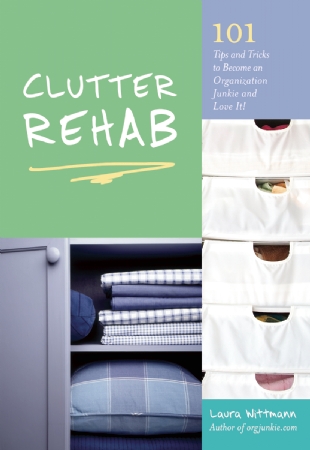
Wittmann may be better known to you as @orgjunkie on Twitter and the author of the Organizing Junkie blog. A work-at-home mom in Alberta, Canada, Wittmann is not a professional organizer working with clients, but over the years, she has consistently impressed me with the organizing information empire of her website and blog, where she teaches readers how to organize their space, systems (including menu planning) and time.
Most of Wittmann’s Clutter Rehab tips are practical and instructional. She’s created a series of self-enclosed, miniature projects for making strides towards achieving organization in one small area of life at a time. Wittmann’s Clutter Rehab is no Martha Stewartesque Create-A-Household-Delight-in-Forty-Seven-Simple-Steps…of which I say, it’s a good thing. (Pun entirely intended.) Rather, Wittmann’s tips are cheery, straightforward, and easy to put into action with 15 or 30 minutes of effort.
Each kernel of wisdom includes advice describing a problem and how to quickly and easily solve it with low-budget solutions using materials likely to already be on hand or which can be inexpensively acquired. For example, some tips provide guidance on how to quickly create simple systems like using a dollar store carabiner clip to keep keys accessible and organized (#6) or how to create a jewelry organizer with a ribbon memo board and some small hooks (#79).
Wittmann is also a big believer in setting up “stations”, zones for accomplishing specific tasks, and keeping all the items necessary for that task in each zone. She includes stations for backpacks, beverages, donations, crafts, games and gift wrapping. Other tips walk the reader step-by-step through an entire process, from organizing a cosmetics drawer (#36, complete with a makeup expiration date cheat sheet) to organizing toys (#s 43-45).
While most of Clutter Rehab focuses on quick, specific tasks the reader can perform to get more organized, Wittmann has sprinkled the book with tips that help the reader think differently about how to accomplish a more organized life, from “Eleven Tips for Parting With Your Clothes” (#41) to creating a Housekeeping Mission Statement (#67).
Tips books, by nature, focus on imperative sentences, giving (well-intentioned guidance as) commands. If you’re the type of reader who bristles at hard-and-fast rules like “No food in bedrooms” or “Limit your family to two towels and two sets of sheets per person”, remember to read the whole tip to understand the “why” behind Wittmann’s counsel.
I enjoyed Clutter Rehab‘s chipper, non-fluff approach and the colorfully inspiring photos. However, Paper Doll feels the book does have two small flaws, both of which relate more to formatting than content.
First, the tips aren’t organized into a clear hierarchy or grouping. If you look closely, you can sense that most (but not all) of the “station”, “clothing” or “toy” tips are near one another, but then the tips for organizing kitchen utensils, pantries and coupons are many pages away from both the menu planning and grocery shopping tips and the kitchen cabinet organizing tips. I think the book would have benefited from the publisher dividing the tips into chapters focused on different areas: philosophy of organizing, specific rooms/zones, product tips, etc.
Second, while there is a table of contents listing the title of each tip, the book lacks an index, which means if you’re inclined to go back to a tip you read a while ago, you’ll have to flip through the book for something that jogs your memory or slog through four tightly packed page of title listings.
Clutter Rehab is available in paperback from Amazon, Amazon.ca and Chapters.
Sync or Swim: 201 Organizing Tips You Need to Survive the Currents of Change
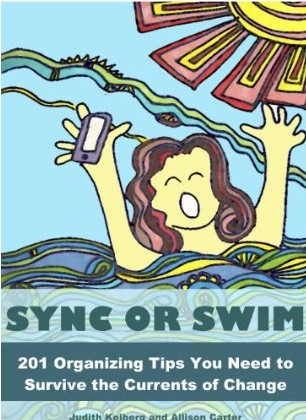
This ebook, by Judith Kolberg and Allison Carter, includes submissions from more than sixty practicing professional organizers (including yours truly) to help make sense of the craziness of modern life. It could easily have been subtitled This is Not Your Grandma’s Organizing Tips Book.
Divided into eight themed sections, Sync or Swim focuses on specific areas that make modern life messy and complicated, including:
- Storing and syncing information digitally
- Managing the inflow of information (in terms of both pace and amount)
- Communicating and sharing (including social networking and collaboration tools)
- Organizing money
- Modern organizing techniques for home and family
- Traveling safely and efficiently
- Living safely and securely
- Staying healthy
By dividing the tips into categories of usage, the book makes it easier to locate what you need when seeking to solve a particular type of problem. (Although there is no index, all versions of the book are digital, so searching requires only the typing of a keyword.)
As a professional organizer who deals with tactics for trying to simplify life on a daily basis, I often fall into the trap of thinking everyone else knows what I know…and that there’s not much new under the sun. Reading through the submissions to Sync or Swim made me realize how many ways we can use technology to save time and avoid stress…and how many ways we can outsmart the complications of modern life when it fails to deliver as promised.
Thanks to Sync or Swim, I learned how a dollar sign can help me prioritize downloaded books that cost money (vs. the freebies) (#13) and how my clients can enjoy all kinds of ebooks (and not just PDFs and Kindle books) thanks to Calibre (#14). I also gained an arsenal of new resources for helping clients sync information across their devices, within companies or between family members (#s 1-4, 18, 45, 61, and 112), plan meals with ease (#s 22 and 109) or combat obstacles to saving money (#s 77 and 107).
Even if you only use a computer to watch cat mommies hug their kittens, wouldn’t know a text from a trampoline or an app from appendicitis, and don’t consider yourself a digital doyenne, Sync or Swim has countless tips for using simple technology to improve your life. The book presents tips on how to find your car in a crowded parking lot, retrieve possessions lost in a taxi, or visit the doctor without schlepping all of your prescription bottles. Tips #60 and #61 present a bevy of alternatives for painlessly finding the best meeting time for a disparate group of PTA committee members, community activists, or extended family members. One of my clients recently estimated that the first tip she tried saved her two hours of effort vs. her usual methods.
I should point out that there are many tips in Sync or Swim which focus on surviving non-technological “currents of change”. Life is more complicated and faster-paced that it was in Grandma’s time (even if grandma is a hip former hippie), and in order to keep up, we may as well take advantage of every possible time-saving, money-saving solution. Tips show how something as simple as a camera can make decorating for the holidays a snap (no pun intended) or reveal how to easily and painlessly give new life to old electronics.
My own favorite section of Sync or Swim is the chapter on travel, but I can’t imagine any parent, executive, business owner or 21st century citizen of the world not finding these tips helpful for organizing travel information, saving time on planning, and protecting finances and property. Speaking of which, Sync or Swim devotes an entire chapter to un-hexing yourself from the curses of modern life, like identity theft, computer crashes, and disasters, whether caused by nature or man.
So, if you’re not a professional organizer (or heck, even if you are one), and want the inside scoop on ways to make your personal, professional, financial and family life sail more smoothly through the rough waters of modernity, Sync or Swim offers up some spiffy advice, nifty and novel resources (many of them free) and reminders for keeping yourself afloat.
The main flaw one might find in Sync or Swim is certainly one for modern times. It’s only available in a digital format, so while on the plus side, you don’t have to dust it or make room for it on your bookshelf, if you’re the sort who just can’t bear to read a book in any but a paper format, you’re mostly out of luck. (I suppose you could print it, but although the content is the cream of the crop of professional organizer expertise, do you really want to print almost 100 pieces of paper?)
Sync or Swim is available as a PDF directly from Kolberg’s own Squall Press publishing company or in Kindle format from Amazon.
Happy reading! Just don’t get too tip-sy!
Paper Doll’s Strategies for Paying Bills On Time–Part 2
Bills paid after their due dates have severe repercussions, ranging from late fees to increased interest rates to severe dinging of FICO scores. Last week, we began reviewing some strategies for making sure those bills got paid on time in order to avoid the unfortunate circumstances that befall the late payers.
1) Pay Bills the Day They Arrive
2) Tickle Yourself With an Organized System
3) Don’t Worry, But Be Alarmed
4) Set Up Automatic Payments
Today, we delve into further strategies for making sure bills get paid on time so that your finances can stay in the black. (Does anyone else think it’s funny that while being “in the pink” implies health, finances “in the red” are bleak? Wouldn’t it make more sense for good financial health to be “in the green”? No? Just me, eh?)
5) Use Online Bill-Pay

Using an online, non-automated, bill-paying system allows you to reap the rewards of going digital while maintaining the control that automated payment systems lack. There are no stamps, envelopes, trips to the post office or worries that your check will get lost in the mail. A few keystrokes are speedier than writing out checks.
You can arrange for a bill to be paid any time between receipt of the bill and the due date; actually, if you have a sense of the amount that needs to be paid, you can even arrange to schedule payment before the official bill has arrived. And you can set payments to be made while you’re traveling or otherwise occupied, without fear that a bill might fall through the cracks.
This satisfies the needs of those who normally would have blanched at the idea of strategy #1, paying bills the day they arrive. By scheduling the exact payment due date in accordance with your cash flow, you can maintain hold on your funds for as long as is convenient. This is especially advantageous for those who have interest-bearing checking accounts — earn interest on your funds for as long as possible, but ensure that no due dates are bypassed.
Non-automated bill payment systems can also make great use of two other strategies we’ve covered. First, strategy #2 (having an organized system) means that even when you’re scheduling online payments, if you manually (but digitally) review your financial obligations and schedule payments on a regular basis, you’ll monitor fluctuations in your charges, notice errors and perhaps shop for more competitive rates.
Online bill-pay also works well in tandem with strategy #3. Most vendors, and just about all banks, allow you to set email and/or text alerts to warn you of impending due dates or low-balance thresholds so that you can make quick adjustments.
There are three ways to use online bill-pay for maximum convenience and benefits:
A) Pay each bill from an individual vendor’s website — This option involves going to the web site of each individual vendor to set up an online payment program, providing personal information to validate yourself as the account holder.
Gather all of your files for your monthly or quarterly bills to make sure you don’t forget anything you regularly pay. These might include bills for:
Mortgage or Rent
Landline and/or Cell Phone
Utilities (Electric, Gas, Water, Internet)
Debts (Credit Cards, Loans)
Insurance
Whenever a bill is due, you will log into the account for that creditor (using your username and password), click on the bill payment option, and specify the amount you wish to pay. With many vendors, the sole option will be to pay the amount due. With credit card companies, the options will include paying the total amount due, the minimum amount due or some other specified amount between those two. Some vendors (and all credit card companies) will maintain records of your bank routing number and account number; others may require you to provide it anew with each payment.
Once you set the payment date and amount, you’ll be asked to review and confirm the transaction. Upon transaction approval, you’ll be provided with a confirmation number (or a combination of letters and numbers). Most systems provide a method for quickly printing the confirmation; obviously, this increases rather than decreases your use of paper. I encourage you to (carefully) scribble the confirmation number, date and amount of payment on your statement and file it away. If you get paperless statements, save the confirmation page as a PDF.
This method gives you maximum control, but is time-consuming and a bit awkward. You must maintain login information for each vendor and must log in to each site, one after the next, to complete your transactions.
B) Pay all bills from your bank or credit union’s centralized online bill-paying center.
Your online bank or credit union account may already be set up to allow you to pay bills online. If not, you’ll need to create an account, with a user name, password and a series of security questions.
Next, with all of the same bills used in the prior example, create a payee for any vendor whom you may want to pay on a regular basis. Your bank or credit union will probably have many of your payees (and their addresses) already in the system; for those they don’t have, you’ll need to provide information including each payee’s payment address and telephone number and your individual account number with each vendor. Once set up, the payees will stay in the system until or unless you delete or revise them.
Logging in to pay a bill (or many bills, all on one screen) should take no more than a minute or two. Enter the payment amount and select the date on which the bill should be paid and the account from which the funds should be withdrawn (if you have more than one account at that financial institution). Again, I suggest you write the confirmation number on your statement, along with the date and, if you’re not paying a bill in full, the amount paid.
Assuming your bank or credit union offers a robust online banking system with free bill-payment services, using this as your primary method is quick and convenient. However, while some payees can receive electronic checks, others may require checks, and will therefore need payments scheduled at least four days prior to their due dates for ample delivery time.
C) Combine Vendor and Bank Bill-Payment Systems
Paper Doll encourages clients to use their bank bill-pay systems as their primary payment method. However, it’s still a good idea to set up those online accounts with individual vendors as a back-up for special circumstances, such as when:
–A busy life or emergency situations overwhelm you such that even combining strategies 2, 3 and 5B fail, and a payment due date is looming. Even if 99% of the time, you’ll pay via your online bank account, if unexpected travel or personal emergencies flummox you, you can generally log into a vendor account and have a payment scheduled today be credited for today.
–Your bank is experiencing online difficulties. This is extremely rare, but denial-of-service attacks on financial institutions sometimes make logging in impossible for minutes to hours. Being able to switch gears and quickly make a payment at a vendor site on an ad hoc basis is a nifty (belt) alternative to your normal (suspenders) method.
6) Bill Everything to One Rewards-Earning Credit Card
Yikes. Yes, I’ve known people for whom this system is workable. They set up everything from utility bills to gym memberships to insurance premiums to be billed to one credit card upon which they earn points for every dollar spent. Points can be turned into cash, miles, or any of a variety of perks, and the user only has to pay one bill each month.
This option can work well for high wealth individuals who can easily pay off balances — every single month! If you only have one bill to pay, it’s probably a lot easier to notice it when it comes in the mail, and paying it as soon as it arrives (whether via traditional or online means) is relatively convenient.
If you select this option, you must have enough of a cushion so that if you run into a revenue problem, it doesn’t turn into a cash flow problem. You’d need to have at least two months’ worth of funds in your checking account to cover payment of this credit card (and at least eight months’ worth in your emergency fund) before considering this option.
Also, it’s essential to have a back-up plan in case you are unable physically (as opposed to financially) pay this bill. If you are unexpectedly caught out of the country, without access to the internet or phone, you would need to have a system in place whereby your spouse, assistant or trusted friend could pay your huge, honking credit card bill (and/or transfer funds between accounts to accommodate this, if necessary). Otherwise, you’re likely to have not only a hefty late payment fee but a huge boost in interest payments, a possible increase in your interest rate, and a serious a ding to your FICO score.
In theory, there’s not a huge difference between having all of your bills paid by credit card and then paying the lump sum and a dozen separate monthly bills that add up to the same amount. In actuality, however, I’m concerned about the psychological shift this process entails. As with automatic bill payment, I fear you’re less likely to pay attention — to feel the pain — of the money you spend if you don’t actually, manually, make a payment on a regular basis.
7) Outsource Bill-Paying to a Specialist
We all have things at which we excel…and things at which we don’t. Paper Doll doesn’t blink at an organizing project, is a speed demon when it comes to typing, and can decipher a muddled check register from fifty paces. I cannot, however, do any formal dance step that would have been out of place in Desperately Seeking Susan.
You, dear readers, have your own things at which you excel. But even after employing some combination or even all of the first six strategies, any of a variety of life circumstances (ranging from juggling the care of both elderly relatives and lively kids, to running a business, to dealing with ADHD), may leave you waiving a white flag.
If trading tasks with your spouse or significant other meant the bills would all be paid on time, even if it meant giving up titular control over the household finances, you’d probably consider it. But what if your partner is treading water at least as furiously as you are? Or what if you’re a singleton? There’s still someone to whom you can turn.
You might think outsourcing bill payment is a luxury, but many people find that hiring a professional relieves them of the anxiety, dread and annoyance related to financial tasks. They believe the amount they pay for assistance is vastly outweighed by the money they save, ensuring their financial pictures stay rosy.
Certainly many individuals and businesses make use of bookkeepers to keep their finances straight and ensure that bills are paid on time. Similarly, one of the many specialty practices of members of the National Association of Professional Organizers (NAPO) is financial organizing. A professional organizer specializing in financial organizing may help prune and organize financial records, assist with setting up online payment systems, or actually pay bills and monitor the accuracy of financial transactions — all depending on a client’s needs and desires.
One should also note that the American Association of Daily Money Managers (AADMM) is a national organization of professionals who provide personal financial and/or bookkeeping services to senior citizens, the disabled, busy professionals and others who find keeping up with bills and other financial tasks to be onerous or inconvenient. (Not surprisingly, many financial organizers are members of both NAPO and AADMM.)
Just as you might make use of the services of a fitness trainer, life coach, or academic tutor, a financial organizer can help you accomplish your essential financial tasks so that you can focus on what means the most to you. A financial organizer is also a superior solution for overwhelmed members of the sandwich generation who are trying to oversee their own finances, as well as those of their senior citizen parents or grandparents.
Whatever bill-paying strategies you employ, know that you can control your financial destiny.



Follow Me