Paper Doll
NAPO Expo 2012 Recap (Part 5) — Mother Knows Best
As we finalize our look at the 2012 NAPO Expo, we’re just in time for Mother’s Day and some EXPO exhibitors who created organizing products especially for busy parents.

HatchedIt is a free (advertising-supported) online service. The founders call it a “mobile whiteboard for managing your personal life” and say:
The site is collaborative, so you can communicate important information to spouses, grandparents, nannies, babysitters and even the kids, themselves. Once logged in, the site greets you with a dashboard to give you an at-a-glance view of your life.
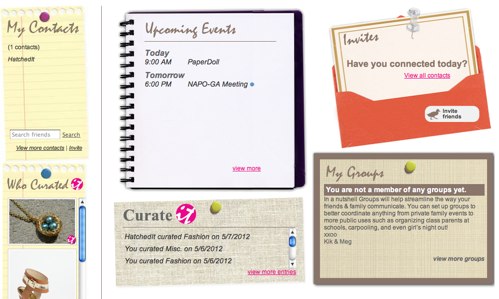
Calendar — Add events or tasks just as you might do in Google or Outlook — just select the event name, date, time, whether you want a reminder and any additional information. However, while events can be scheduled as repeating, tasks cannot, and scheduling is not particularly sophisticated. For example, you can’t schedule an event specifically for the second Tuesday of each month, and the system requires you to schedule an end date, even if your recurring event does not have one, which might cause hiccups unless you mark an end date in 2025.
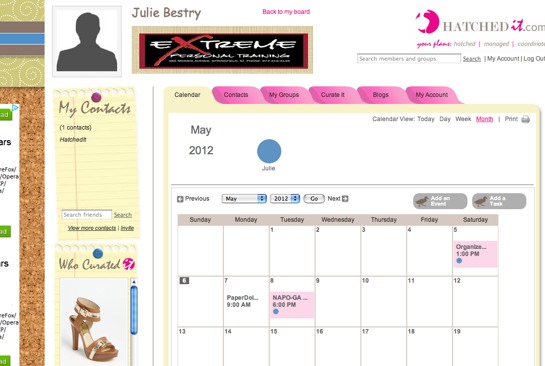
Grant everyone in your immediate family (i.e., those you specify as members of “My Account”) access to view the family calendar. Each member has his or her own log-in and password. Then you can choose if you’d like to allow other, specific, members of HatchedIt to see select categories on your calendar. For example, you might give grandparents access to see all sporting events or school events, but not items related to your work schedule.
Contacts can be uploaded from Yahoo, Gmail, Mac iAddressBook or Outlook directly into the system or you can input individual names. Anyone to whom you grant any viewing access will be designated as part of your circle.
Groups are designed to work like real-life groups — members of your book club, other PTA parents, etc. HatchedIt envisions Groups as a way to have a private, central location for sharing information and discussion.
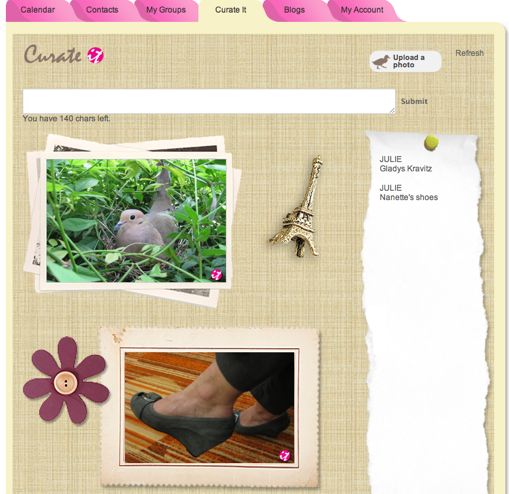
Curate It is a place to hold important photos, articles and information. Think of it as an in-HatchedIt Pinterest board, though curated pages need not be reciprocally or publicly shared. Tag items for easy categorization in five classifications: family, home, love, fashion or miscellaneous.
Blogs — HatchedIt has a built-in RSS reader to make it easy to keep up with your favorite blogs and news sources. HatchedIt pre-loads some feeds and you can add any of your own favorites.
Default settings are always set to Private, and privacy is very granular, such that you could give access to only your Curate IT page and not your Calendar, or only specific calendar categories.
When you add family members to your account, you designate each member’s rights to view and/or edit parts of your family’s account (so your web-savvy six-year-old doesn’t cancel all piano lessons). You can always adjust these permissions later, but any HatchedIt member designated as a child will only be allowed to interact with members of the family account.
The ability to gather all of this information in one central location, with multiple adjustable privacy settings, should appeal to parents. However, I was concerned that the calendars cannot sync with other calendar systems. I must admit, as one who prefers slightly more sophisticated technological tools, it seems more like a training wheels system more ideal for someone who isn’t particularly comfortable with technology.
For my purposes, separate email accounts, private Facebook groups, RSS feeds and Pinterest boards (or a private board on a Pinterest alternative site) would be adequate, as I generally prefers separate tech solutions to modular solutions under one umbrella. However, as a non-parent, I don’t have the wide variety of interacting family contacts and activities to juggle. Plus, my NAPO colleagues voted HatchedIt as Organizers’ Choice for Best Tech Product at this year’s conference, so I encourage you to test it out.

AboutOne is like a digital filing cabinet for keeping track of all your important documents, information and memories. The system has an easy, fun set up where you merely click people-shaped icons and input the names of adults, kids and pets in your family.
Records — Visit the Organization Station, the central hub of AboutOne, to fill in fields, as appropriate, for each record you wish to add. (Later, you’ll click the Add button on the site’s dashboard.) Provide a title, location, date, time, description, and add attachments (like photos, videos or files). For any item, select up to four categories under which the entry can be concurrently filed:
Memories (Photos, Quotes, etc.)
Health Info
Possessions (Home, Car, Inventory, etc.)
Education or Training
Attach photos, videos or files, like scanned insurance policies, medical records or home inventories, and if there’s an associated web site, like a purchase page for your new car or the Facebook update for a big event, you can link the entry to that URL.
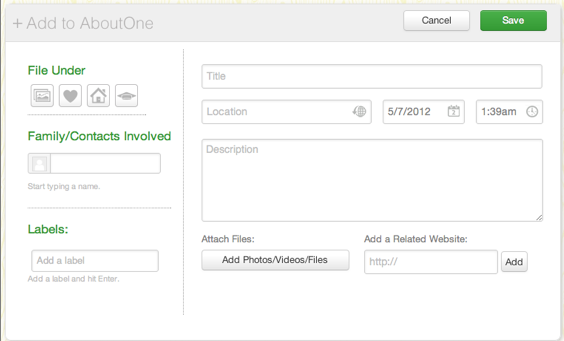
So, if Billy lost his first tooth on 5/8/12 at 4 p.m. at Friendly’s, you’d enter that information as a Memory, and then attach a photo of his toothy, toothless grin. Similarly, if you bought an iPad, you’d fill in the pertinent information and then scan, upload and attach the receipt and the AppleCare policy.
The screen also lets you pick family members or contacts related to the entry, and add a label, like a tag, to improve searchability. So, if you buy an auto insurance policy, you can link the contact information for your agent to the scanned-in policy.
To search records, just click on the categories (Memories, Health, Possessions or Education) in the dashboard’s left-side menu and select what you wish to view, either from a list or a card (like little square sticky notes lined up in a grid pattern). There’s also a menu item for Stream, to simply view everything, in case you can’t remember how you categorized or tagged an entry.
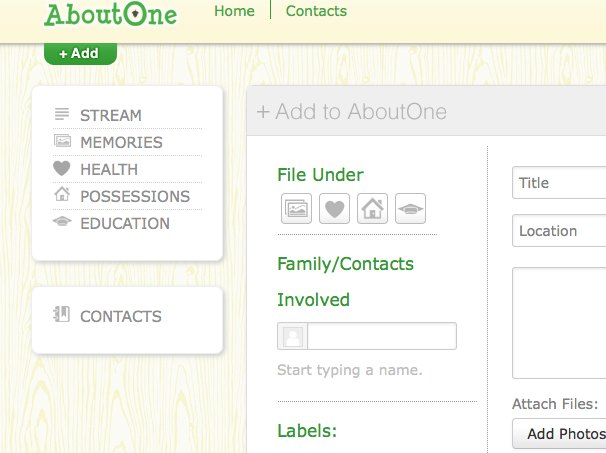
Contacts — Import from Gmail, Outlook and other contact systems, or directly input any individual’s essential information, like phone, email, physical addresses, and social media profiles (including Twitter, Facebook, LinkedIn, Google+ and Skype). Add tags for categorizing contacts.
You can also create groups from your contacts, so you can easily access, for example, all of your physicians, your home improvement team (contractor, decorator, professional organizer) or your financial team (bookkeeper, accountant, insurance agent, attorney).
Shareables — Once you enter data, AboutOne can manipulate the information to provide a wide variety of lists, updates and reports. For example, once you enter birthdays and anniversaries, you can create a gift log for recording gift ideas, as well as gifts given and received, and be reminded of important dates.
There’s an online scrapbook to which you can add “multimedia memories and milestones” simply by emailing from your smart phone or scanning directly to your account. Each memory is automatically timestamped, so you don’t have to remember when something happened. Paper Doll particularly likes that you can easily pull from the Memories section to format a printable or email newsletter to keep people up-to-date on your family.
Other Shareables include babysitter instructions, health history reports, and caregiver reports. When kids are applying to college or for scholarships, the organized records can help them create education histories and volunteer summaries. You can create home maintenance summaries to share with prospective buyers, and the system can even calculate your capital gains at tax time.
AboutOne currently has no calendar, but a sync-able calendar system, with emailed reminders and historical records, is planned. Up to 2 GB of storage is free; premium paid plans will soon be available.
AboutOne’s system is relatively intuitive. However, at various points in the data entry process, users are offered social gaming-style points and badges, which I found distracting. Nonetheless, I can see how some users might find this motivating to help discourage procrastination.

Organizables is a remedy for morning chaos in households with kids. Every busy parent knows what it’s like to try to get children dressed and out the door each morning. Professional organizers often suggest easing morning tensions by helping kids select their next-day’s wardrobe the night before. In some homes, we even advice selecting a week of outfits and setting them in a drawer or hanging sweater organizer.
Of course, there are other times when planning can hit snags — when trying to pack outfits for sleepovers at Grandma’s, or when parents have shared custody, and even when kids need outfits packed up and ready to wear for recitals or other special events.
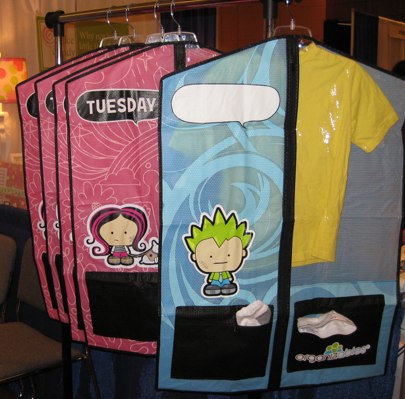
Organizables has created child-sized hanging garment bags for boys and girls. Each weekday set includes five Monday-Friday bags, each with pockets for socks, underwear and accessories. The clothes stay clean, dry and wrinkle-free, even on travel days, while parents and kids can enjoy the relative serenity of calm mornings, where every essential is ready and available in one tidy package. And there’s even a customizable daily checklist to make sure everything makes it into the hanging bag!
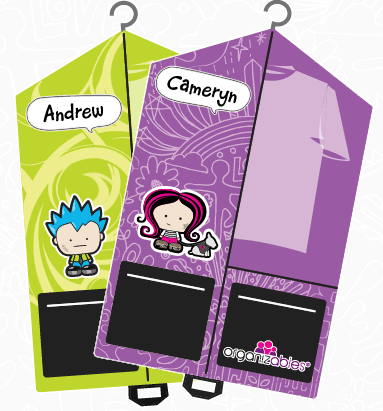
The weekend sets are designed for on-the-go kid activities — each set has a Saturday and Sunday hanging bag (for everyday activities and/or going to a house of worship or family event) and two zippered activities bags (like for ballet lessons, sports or sleepovers) also with bright graphics. Since the latter are more likely to be used outside the child’s main home, they can be customized with the child’s name, favorite saying or key word.
Organizables bags are printed on durable, lightweight, water-repellent material with zippered storage compartments, and boldly labeled with each of the days of the week. They’re made with durable, non-toxic materials and comes with a one-year warranty. Sets are available with or without the cute graphics, in case older kids prefer a little more subtlety.

On a related note, I fell in love with one item from NeatFreak!’s NeatKids line. The cabana-esque Whimsical Wardrobe, available in either Candy Taffy (shown below)
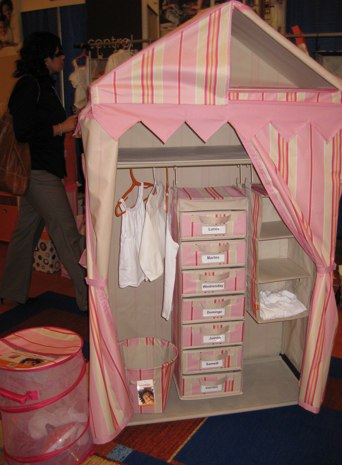
or Pop Rocks (a more neutral, boy-friendly) is a perfect stand-alone wardrobe for hanging clothes, folded dresser items and toy storage. It’s adjustable and customizable, and just so darned cute, that I have to admit that I’d like one of my own. (Paper Mommy, are you reading this?)
Happy Mother’s Day!
NAPO Expo 2012 Recap (Part 4) — New Twists On Old Favorites
This year, three products particularly caught my eye because they offered something comfortable (high quality, for example, or proven concepts), twinned with something novel (either visually or functionally). They’re things that make you say, “Oooooh!”
BOXES FOR THE HOME BANKER
As we’ve discussed previously, Bankers Boxes aren’t the stuffy file boxes they used to be. Fellowes has made some nifty strides in modernizing what used to be a product for simply boxing up documents. Nowadays, they’re a snap to assemble, have internal dividers to keep papers from getting squished or falling over, and can come complete with internal file rails to make use of hanging folders. Bankers Boxes even come in fashionable colors and are made from environmentally-friendly recycled materials.
So, I suppose I shouldn’t have been surprised when I came across the Bankers Box display at the 2012 NAPO Expo, but I have to say, I did a double-take.
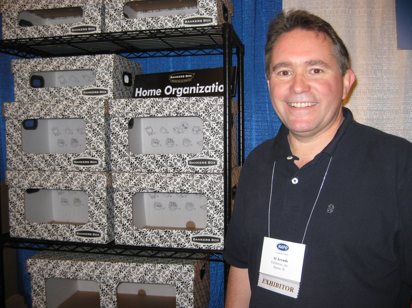
Fellowes Representative Al Arends with a New Expo Star
I’m pleased to report on the new Bankers Box Home Organization Stackable Storage boxes. Most notably, as you can see in the photos above and below, the new boxes are PRETTY! A classy black and white brocade pattern makes them attractive enough that one needn’t feel the obligation to hide them in the basement, attic or the back of a closet. These boxes would not be amiss sitting on shelves in a home office, bedroom or craft room, and one wouldn’t want hide them away if unexpected company were to arrive.
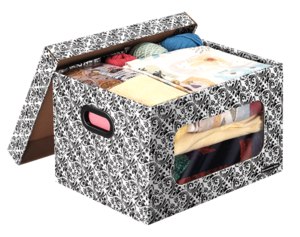
Each lidded Bankers Box Home Organization Stackable Storage box has:
–A large vertical window to make it easy to identify the contents stored within
–Heavy-duty double-wall or triple-wall construction to make the boxes sturdy enough to stacking and long-term use
—Sturdy, reinforced plastic handles that snap into place, easing lifting and carrying, and maintaining the structural integrity of the box
–Patented FastFold design which allow for easy set-up without glue, tape or complicated instructions
In addition, all of the Bankers Box Home Organization Stackable boxes fold flat when not in use, helping you maximize storage space. Because of the heavy-duty construction, you can use, fold flat and reuse the boxes with minimal impact or wear. Fellowes designed the stackable boxes to fit standard-sized shelving:
- Small Stackable: 6″ high x 12″ wide x 15″ deep
- Medium Stackable: 10″ high x 12 wide x 15″ deep
- Large Stackable: 10″ high x 15″ wide x 24″ deep
The Stackables are suitable for storing memorabilia, non-archival photographs, school papers, craft projects, baby blankets, and so on — whether you’ve got paper, clothes, home dcor or whatever, you can bank on this solution. (C’mon, you’d have used that pun, too!) They’re sold four to a package.
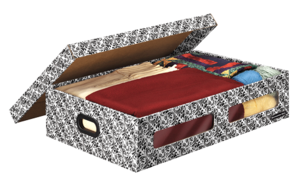
There’s also a Small Underbed box, with the same features (though not designed for stacking) measuring 6 1/4″ high by 17 1/2″ wide by 27″ deep. The underbed boxes come two to a package.
Fellowes is also manufacturing a line of Holiday Stackable Storage boxes. The green-lidded, red-bodied boxes have many of the same features as above: a large, clear plastic window to view contents, easy FastFold set-up, heavy-duty construction and the ability to fold flat. However, instead of snap-in handles, the holiday versions have built-in plastic handles and a multi-level design with adjustable dividers for protecting delicate ornaments.
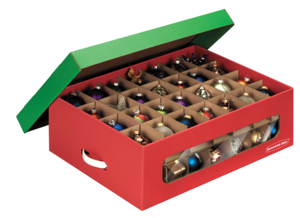
The Large Ornament Box measures 8″ high x 15 1/2″ wide by 23″ deep and is sold in packages of two.
Bankers Box Home Organization Stackable Storage boxes can be purchased at Staples, Office Depot, Office Max, Walmart and Sam’s. To see how the boxes come together and fit ideally into your home, take a peek at this video.
GET MAGNETICALLY ATTRACTED TO YOUR TASKS
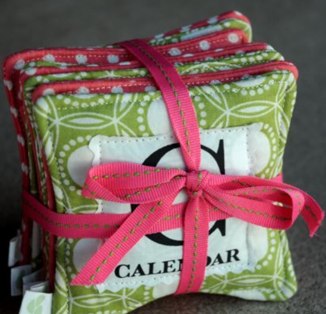
Abundance Organizing, a company run by five professional organizers, had a nifty display of organizing products at the 2012 NAPO Expo, none more captivating to Paper Doll than the magnetic task organizers called Pile Tiles™. Each of the colorful, cloth-covered magnets is coded with a large letter standing for an associated task or category.
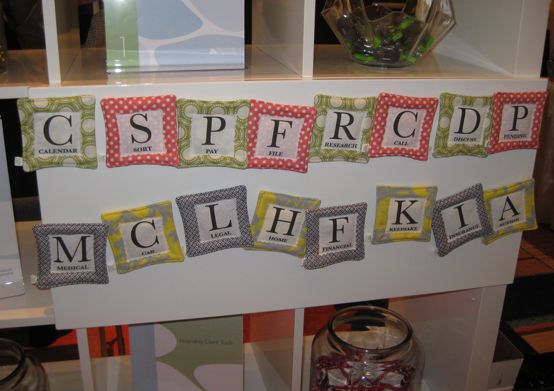
At first glance, Pile Tiles™ may merely seem adorable, but they serve an important organizational purpose. First, they can be used in a traditional manner to help sort papers and hold them down (to protect against a wafting breeze); instead of using sticky notes or index cards, these re-usable darlings are environmentally-friendly and charming to behold.
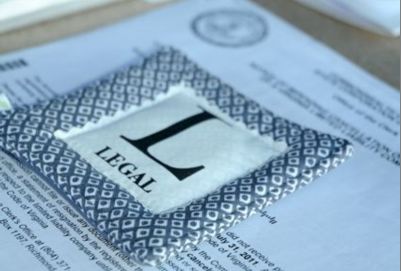
But not everyone has the space or the inclination to pile up or spread out papers to sort them. By making use of magnets (and a spare refrigerator, metal door or even hanging baking sheet), you can easily sort and hang papers vertically, without the need for paper-poking pushpins or a bulletin board.
In either respect, Pile Tiles™ are perfect for visual learners and they add a delightful decorative note, allowing you to feel good about leaving your papers out even when company arrives.
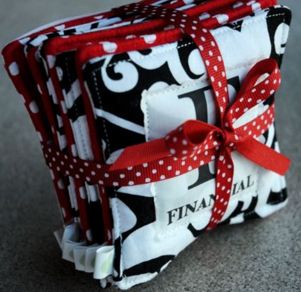
- The Starter Set categories are: Financial, Legal, Medical, Insurance, Home, Car, Keepsake and Action.
- The Action Set includes: Calendar, Call, Discuss, File, Pay, Pending, Research and Sort
The Starter Set of Pile Tiles™ is designed to help you initially sort your papers. Once your piles are organized, the Action Set is focused on helping you tackle individual tasks, like phone calls, scheduling, and paying bills. Each set sells for $39.
(Special thanks to organizational product maven Jeri Dansky, who made sure I hightailed it over to the Abundance Organizing booth to see the Pile Tiles™.)
BOXING UP THE PROJECTS
Certainly, between file folders and three-ring binders, paper peeps haven’t been at a loss for products to contain their papers. But Smead’s My Organizer (MO) System has three elements that replace the need for hanging folders and binders, while still promising to keep project paperwork collated, tidy and vertical, whether on your desktop, shelved, or tucked away in file drawers.
The MO Kit has three basic elements:
1) MO File Cases — Each file case is a sturdy snap-open, fold-into-place, flat-bottomed file box capable of holding up to 750 sheets of letter-sized paper. The File Case fits most standard file drawers, including those with hanging file rails already in place, or can be easily placed vertically (narrow edge outward) on bookshelves.
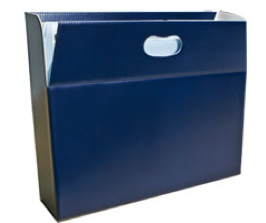
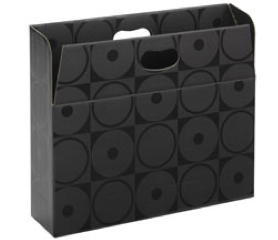
The file cases are envisioned for sub-dividing categories of documents or individual projects, but can also be used as small desk-top file boxes for action or quick-reference items. Die-cut handles make the open-top file cases easy to lift out of file drawers and transport to meetings or events.
The cases come in Navy and Black Circle designs (as shown above), as well as in Moss Circles, similar to the black pattern above, but in a creamy beige and moss green.
2) MO Kits — Each kit includes standard letter-size SuperTab file folders, pre-printed and blank labels, and an easy-to-follow instruction sheet with organizing tips for starting common projects, like taxes. Options include Medical, Financial, Project and Starter kits. Because the file folders are standard, they can be used within the MO File Case, or, as necessary, in standard hanging folders.
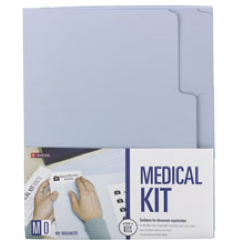
The MO Kit file folders come in three colors: Camel, Moss, and Light Blue, while the oversized, SuperTab-ready label templates are keyed to the individual kit types:
Projects — with label templates for budgets, contracts, expenses, invoices, etc.
Medical — with labels for medical history, dental procedures, insurance claims & EOBs, receipts and HSA records, etc.
Financial — with templates for bank statements, tax information, investment records, charitable contributions, etc.
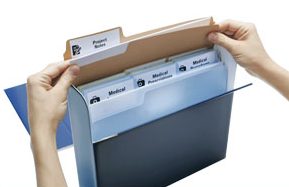
3) MO Case Wraps — Available in Navy, Black Circles and Moss Circles to match the case files, the MO Case Wraps, as noted by Smead, “provide security and discretion for important files and hold documents securely for easy storage.”
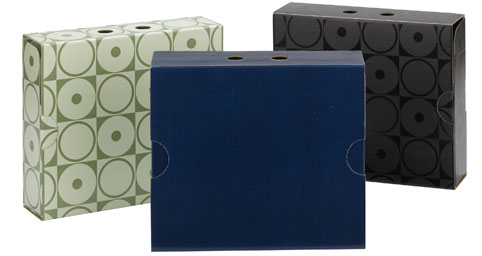
Made from durable, professional-quality corrugated paper, the Case Wraps are designed to pack flat, “pop open” into shape and stand up to heavy usage. Top die-cut holes and side die-cut half-moons provide easy access for sheathing/unsheathing the cases without pinching or paper cuts.
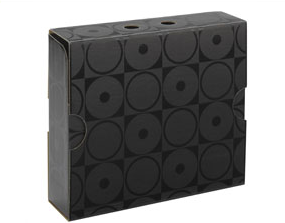
The MO system offers a secure, attractive, streamlined alternative to hanging folders or binders. Use the kit folders to sort the essential documents of any project — tax records, trust documents, divorce paperwork, etc. Gather the kit folders in a File Case to keep vital papers together. Finally, for your 007 Super-Top-Secret documents, wrap it all in a Case Wrap for extra security, preventing files from falling out and non-essential documents from being mistakenly tossed in.
Next week, we’ll close up our tour of the 2012 NAPO Expo with some mom-themed organizing resources — just in time for Mother’s Day.
NAPO Expo 2012 Recap (Part 3) — Catch A Falling Star and Put It In Your Pocket
So far, we’ve talked about the NAPO 2012 Conference, itself, and have explored some dreamy paper products, as well as meat-and-potato organizing essentials. Today, we’ll be looking at more NAPO 2012 Expo innovations — so get ready to pocket some organizing solutions.
CAPTURE THE WRITING ON THE WALL
The prettiest paper-related booth at this year’s Expo had to be 3M’s Post-It extravaganza. Post-It has come a long way from basic blocks of yellow, as we discussed in the Paper Doll Winter 2012 Carnival. Indeed, there was so much to discover, we’ll have to have a “stick ’em up” day to cover all of 3M’s sticky innovations. But today, the topic is pockets. (Trying saying THAT aloud three times, quickly.)
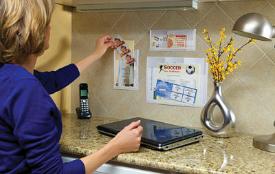
The first time I heard about Post-it Wall Pockets, I was jealous, and not just because a colleague had received a sample and I hadn’t. It was such a simple but brilliant idea, I kicked myself for not having come up with it!
Now that I’ve finally seen the product up close, I have not been disappointed. All varieties come with 3M’s durable adhesive-backed strips, which hold securely but remove cleanly. My curiosity as to whether the Post-it pockets would have the stamina to support multiple pieces of paper has been satisfied, and I can envision the wide variety of applications, including:
- Inside kitchen cabinets for keeping emergency numbers, cooking/measurement equivalencies, important dates, etc.
- On the interior of school locker doors for holding permission slips, ID cards, notes, photos, etc.
- Behind the garage door for keeping recycling and trash pick-up schedules handy
The pockets are designed to stick anywhere other than on wallpaper or delicate surfaces, though I can’t imagine you’d want to apply adhesive pockets on Great-Grandma’s antiques in the first place.
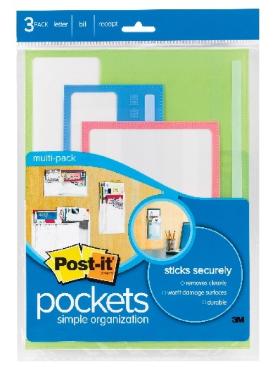
Post-it Translucent Greek Key Pockets — Don’t know what a Greek Key is? Neither did Paper Doll, but Google made clear that the 3M folks were talking about the decorative pattern on the colorful pocket fronts.
Longtime readers know what a fan I am of pink, but I have to say that the mossy green isn’t to my tastes. Paper Doll is hopeful that 3M will expand the line, as they’ve done with so many of their compellingly sticky products, to include blues, reds and other “serious” colors that might make these incredibly useful pockets more appealing to tough guys and bank-serious office-supply shoppers.
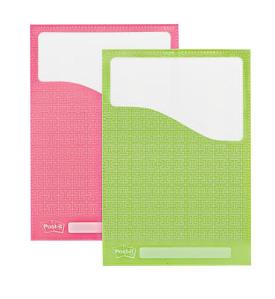
These designer pockets come in three distinct layouts:
Vertically arrayed for bills (5 3/8″ wide x 7 7/8″ high) so you can keep pending invoices and bills to be paid in one tidy spot, perhaps on the side of your filing cabinet next to your home office bill-paying center or in the information hub of your kitchen.
Horizontally arrayed for letters (9″ high x 12″ wide) to handle all letter-size invoices, handouts, flyers, etc.
Horizontally arrayed for organizing receipts and coupons (4″ high by 9″ wide) with a shorter vertical profile to prevent items falling out of reach.
The Greek Key pockets come two-to-a-pack (of the same dimensions) or in multi-packs (with three different shapes/sizes).
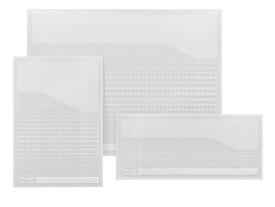
Post-it also has clear pockets in the same dimensions, in single packages or multi-packs, in case you’d rather have your pockets blend in to your home or office surroundings. These clear pockets have a delicate (but translucent) dotted pattern, allowing you to still see which documents are contained.
HOLD ON TO YOUR DIGITAL DEVICES
As we saw last week, folders are great for corralling presentation papers as well as academic materials. When all of your information is paper-bound, you’re set. But what happens when you need someplace to put your flash drives? Sure, most have a little plastic hole in the casing to let you attach a cord, but flash drives as jewelry aren’t always optimal.
Carrying them around in backpacks, purses and attach cases keep them relatively safe, but flash drives are tiny, and if you’re carrying multiples, it’s easy for the cords to get tangled or the drives to get lost in the bottom of your pack. Of course, keeping your digital files in the cloud (via Dropbox or a similar service) can make it easy to access your files, but as many of us at the NAPO 2012 conference learned, free (and even paid) internet access is not always dependable. It’s best to have your digital files close at hand.
Smead’s Self-Adhesive Poly USB Flash Drive Pocket solves that problem.
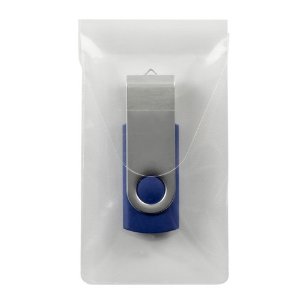
At a slim 2″ wide by 3 9/16″ high, this clear, acid-free, PVC-free, polypropylene pocket has a white peel-away liner which reveals a permanent adhesive backing.
Having pockets for your USB flash drives offers an efficient way to safely store your digital files with the corresponding hard copies. The pockets are sized to fit most common USB sizes, and feature a reclosable flap for added security. The Self-Adhesive Poly USB Flash Drive Pockets come in packages of 6.
POCKET YOUR PAPERS ON THE GO
There are lots of other times you might want to have a pocket handy. For example, the Smead Self-Adhesive Poly Corner Pockets may look like the beginning of an origami lesson, but they pack a powerful organizational punch.
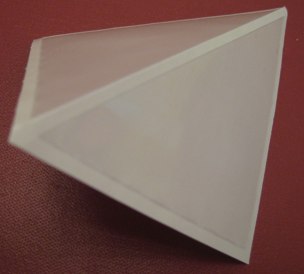
Arranged with two clear, PVC- and acid-free polypropylene right triangles to a white liner sheet, the adhesive-backed pockets fit practically anywhere you might need to store full-sized pages, index cards, spare note cards, cheat sheets, etc. If you’ve got a flat surface, whether vertical or horizontal, you’ve got a way to keep things copacetic.
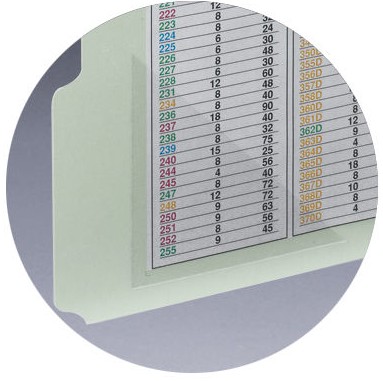
The great thing about the poly pockets (not to be confused with Polly Pocket) is that they can be quickly and easily added anywhere — inside a daily planner, file folder, three-ring binder, or wherever — to provide a safe place to tuck items away.
Just peel, stick the (permanent, water-based acrylic adhesive) pocket, and tuck your items in. The Self-Adhesive Poly Corner Pockets come in two sizes, small (4″ x 4″) and large (6″ x 6″), but only in 100-to-a-box cartons.
Smead also manufacturers similar poly pockets for business cards (3″ wide x 4″ high), CDs/DVDs (5″ x 5″) and documents (9″ wide x 6″ high) such as for packing slips attached to the outside of containers, all in packages of 10.
For something with a larger pocket profile, 3M’s Post-It line has created some nifty Notebook Pockets, available in two sizes: Small (5.5″ x 5.3/4″) and Large (5″ x 8″), sold three pockets to a package.
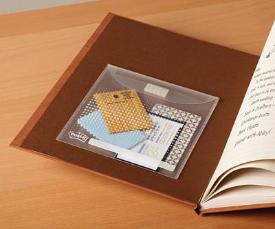
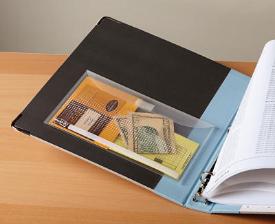
These are ideal for students, busy volunteers or professionals, for holding note cards, coins and cash for the vending machine, receipts, coupons, or schedules. The durable, clean-removing adhesive strips allow you put them in daily planners, notebooks or binders quickly and easily.
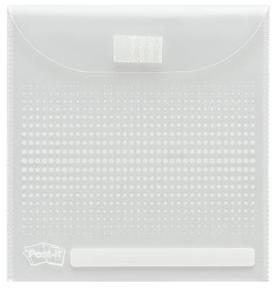
A dotted pattern on the front of the pocket affords attractive light security, and there’s a re-writeable stripe for labeling the pocket. 3M’s Dual Lock flap closure protects papers from sliding out — and it’s surely a nicer solution than taping a zip-lock bag to the inside of a notebook.
FINDING THE (K)NACK(it)!

No recap of the NAPO Expo’s pocket organizing solutions would be complete without mentioning our friends from NACKit, whose products Paper Doll reviewed at length a few years ago.
As you organize — as you purge non-essentials, group similar items together and tidily contain them — the final key is knowing what’s living where. Labeling boxes is essential if you don’t want to lift, move and look through stacks of boxes to find what you want. But labels can be problematic — adhesive can dry up, ink exposed to the elements can fade, and people tend to just scribble new, sometimes indecipherable, labels on top of old ones.
NACKit! developed a refillable, re-usable labeling system based on a simple premise. Apply durable adhesive-backed pockets to any container and merely change out the NACKit! label card, as appropriate.
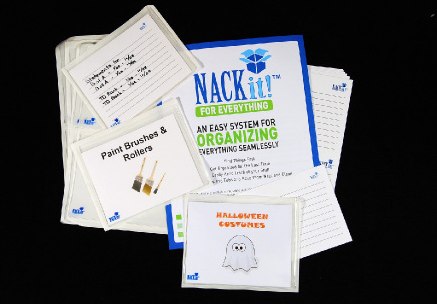
Each original NACKit! kit contains two dozen 4 3/4″ x 6″ self-adhesive vinyl pockets and 28 blank NACKit! cards with lined backs for listing contents. Mini kits contain three dozen 2 3/8″ x 3 3/4″ pockets and 40 blank cards. Original NACKit! kits are most suitable for packing boxes and storage tubs, while the Minis work best with smaller boxes, bins and totes.
Every Original kit includes 24 pre-printed label cards and four blank cards for customizing. Label any blank card by hand or use the NACKit! card template and Card Designer to create labels that fit your preferences and inimitable style.
Get the basic NACKit! for Everything (with all cards blank) or select a kit with pre-printed cards for popular categories.
- NACKit! for Home — with cards for Arts and Crafts Supplies, Baby Clothes, Books, Camping Supplies, Financial Papers, Holiday Decorations, Photographs, Shoes, Sports Stuff, Summer Clothes, Winter Clothes and Toys.
- NACKit! for Moving — with cards for Attic, Basement, Bathroom, Bedroom, Dining Room, Family Room, Garage, Kitchen, Laundry, Linens, Living Room and Master Bedroom.
- NACKit! for Office — with cards for Accounts Receivable, Accounts Payable, Banking Documents, Clients/Patients, Contacts, Office Supplies and Tax Documents.
The NACKit! for Christmas includes 16 self-adhesive pockets as well as 16 red and green cards for Indoor Lights, Outdoor Lights, Tree Ornaments, Wrapping Supplies, Greeting Cards, Wreaths/Garland, Decorations and Holiday Dishes, and four blank cards.
You can also buy the NACKit! Origimini, which includes a combination package of one dozen original-size self-adhesive pockets and 16 original cards, as well as one dozen mini pockets and 20 mini cards. And if you’re setting up a new home, NACKit even sells a huge combination Toolkit, which includes two Everything kits, two Mini kits, two Origimini kits and one pre-printed kit of your choice.
Happily, you don’t need deep pockets to make use of any of today’s pocket-based organizing solutions. But if you’ve got money burning a hole in your pocket, be assured there are more nifty NAPO 2012 Expo product recaps to come.
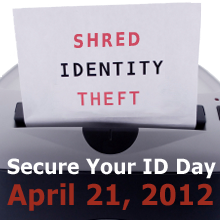
Secure Your ID Day — This Saturday, April 21, 2012
You’ve finished your taxes, mailed them off, filed away copies of your returns and supporting documents, and taken a breather. But what about all those scribbles of worksheets, non-essential receipts and other statements that you don’t need to maintain and store away? (You do know the difference, right?)
On Saturday, April 21, 2012, 72 Better Business Bureau locations are helping you observe Secure Your ID Day by sponsoring community shred-a-thons.
Will The Real Paper Doll Please Stand Up?
A Boy Named Sue May Hate His Name (but that doesn’t mean you can steal it!)
The Big OUCH!!! (Medical Identity Theft–Part 1)
Doctor, It Hurts When Total Strangers Do This! (Medical Identity Theft, part 2)
so you know that documents you choose not to maintain need to be safely destroyed.
We’ve also talked about picking a shredder in Shredding the Documents: Find Your Shredding Solution and even debated the merits of privacy stampers. (Remember Stamping Out the Evidence: Are Stampers a Viable Alternative to Shredders?) But if you’ve got a mountain of paperwork, you probably want to skip the constant buzzing of a shredder as you make your way to the bottom of the pile.
So, moms and dads, small business owners, volunteers and professional organizers, gather up any paper (and computer discs) with personally-identifying information (but which you no longer need), and transport it (securely!) to your nearest participating U.S. or Canadian Better Business Bureau location. BBB-partnered document destruction specialists in your area will shred your documents (for free) and help you preserve your good name.
Here’s your game plan:
1) File away your essential tax-supporting documents.
2) Gather all the papers you no longer need to keep — anything bearing your Social Security or Employer Identification number, account numbers or other personal or sensitive information.
3) Head to the nearest Secure Your ID Day event to get your documents shredded.
4) Review past Paper Doll posts on protecting yourself against identity theft and peruse some of these resources:
Everyday Habits To Safeguard Your Identity — The Better Business Bureau offers its words of wisdom on simple steps to take to protect your family’s data.
The Federal Trade Commission’s Identity Theft Microsite — Avail yourself of the latest information on identity scammers and hoaxes, resources for reporting identity theft, and materials for educating your community to protect against identity theft.
The Bureau of Consumer Protection’s Privacy and Security Business Center — Do you run a web site for your business? Review the actions you can take to protect children’s privacy and general consumer privacy, abide by rules regarding credit reporting documents and keep data secure.
Security Privacy Made Simpler — If you run a small business and are wondering what you need to be doing to protect your data and your customers’ information, this report is your one-stop shop. It details how to draft a privacy policy, secure data, and integrate data security policies into your company’s daily operations.
 Remember, you are the only you you’ve got. Protect your identity!
NAPO Expo 2012 Recap (Part 2) — Dine Before Battle and Have a Little Candy for Dessert
An organized army travels on its stomach, and here at Paper Doll HQ, we like to set out a smrgasbord of organizing options to help readers do battle with paper clutter. Longtime readers know that the bread and butter of paper organizing tends to come from the two bigwigs of the industry, the butcher and baker, so to speak:

&

Today, we’ll start with some innovations that each brought to the dining table at NAPO Expo 2012, and then follow up with some candy for dessert.
DIVIDE AND CONQUER
Typically, file containment falls into two categories — solo or bulky. Folders, whether 1/3- or 1/5-cut file are designed to work on their own. Sure, you can group a series of file folders in a hanging folder, or plop them in your briefcase, but they’re still distinct entities that can get separated from the group.
Conversely, accordion files tend to be bulky, and they’re designed to gather individual sheets together, even if sorted by category. They work best for specific types of projects, like collecting tax documents, but they’re not particularly attractive or efficient for presentations.
Also, most paper solutions are arrayed horizontally. Sure, the minute you pluck a file from a cabinet or a paper from the accordion file, you’re likely to turn it to display vertically…but what if you didn’t have to?

Smead’s Stackit™ Organizers offer an intriguing approach for projects and presentations. This letter size (9 3/4″ x 11 1/2″) vertically-arrayed organizer has three 5″ pockets (each of which are able to hold up to 50 sheets). The top-tabbed back panels of the first two pockets serve as dividers and are suitable for labeling. Because of the pocket styling, papers are protected from shifting, wrinkling or other damage during transport.
As with accordion files, the Stackit™ Organizer has a flap to secure documents and protect them from the elements (like a rain of coffee), and it’s even lightly scored (like the bottom of a file folder) to allow expansion. However, instead of requiring an elastic band to hold the flap in place, the cover flap neatly tucks in to the front pocket, creating a streamlined little package.
The Stackit™ is made of durable linen stock (available in black, dark blue and grey), from 40% recycled content/10% post-consumer material, with a reinforced bottom. It’s so new that it’s not yet listed at most of the major office supply stores, so keep your eyes open.

A sister product is the Stackit™ Folder in linen and textured stocks. These folders, which hold up to 100 pages, are also arrayed vertically, making them backpack-friendly. As with the Stackit™ Organizer, the pockets are 5″, safely securing the papers on three sides, preventing “floppiness” — and the folders bear the same fold-over, tuck-in flap. The front of the pocket is die-cut to hold a business card.
The linen Stackit™ Folders come in packages of five, in the same black, dark blue and grey as the Stackit™ Organizer; the textured versions come in black, red, green and light blue. Paper Doll envisions using a rainbow of Stackit™ Folders for separate elements of a larger project or for providing personalized presentation folders to each member of a board or committee.
Another divide-and-conquer advancement comes from Pendaflex. Readers may recall that Paper Doll reviewed an innovation in the NAPO Expo 2011 recap, the Pendaflex Divide-It-Up Multi-Section File Folder.
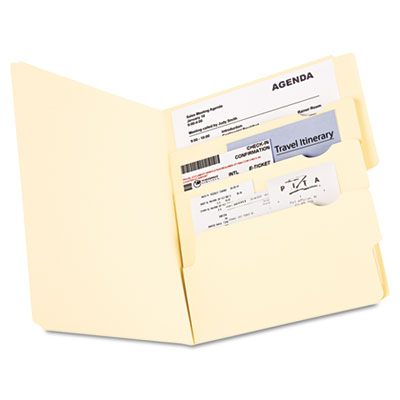
As that review indicated, the Divide-It-Up did as described, using an origami-ed folder to create sub-sections, making it ideal for travel documents and other itinerary-based papers. At the time of my Expo recap, I was pleased with the general concept, but not entirely thrilled with the execution.

The prototype felt flimsy and was available only in a drab manila, which, while suitable for general office filing, lacked pizzazz. Happily (though Paper Doll takes no credit for it), Pendaflex has radically improved the Divide-It-Up, creating a sturdier product. Plus, making it available in bright blue, yellow and red means it’s easier to locate and quickly retrieve from a check-in counter.
Better yet, by using the brighter material, the pockets alternate light and dark coloring, making it easier to differentiate the individual sections. The other features remain the same — four divided sections, or pockets, of elevating height, with 2 1/2″ tabs for the first three folders. One 5 1/2″ tab covers half the folder’s height (or width, depending on your vertical or horizontal layout) at the back.
LOCK AND LOAD
Remember the PeeChee folder from last week? When I shared it with colleagues, it started a vibrant conversation about pocket folders. (Yes, we professional organizers really do get excited about such things!)
In office settings, the standard is generally horizontally-arrayed top-tab manila folders. But a pocket folder definitely has its place — in board rooms for presentations, and in school rooms, lockers and backpacks, for academic papers. This year, Smead introduced multiple new lines of pocket folders, with the lion’s share of the attention focused on the Lockit line of two-pocket folders.
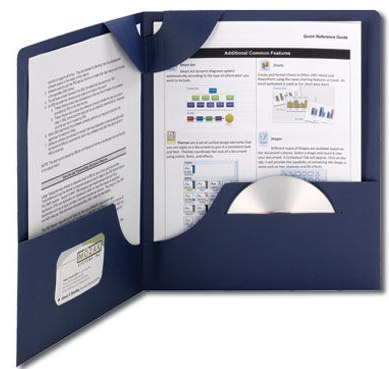
A basic two-pocket folder is just that: basic. One large piece of heavy-duty paper with the bottom edge folded up and a crease down the middle creates two pockets. Every other embellishment is gravy. (See, we’re still sticking with that meal metaphor!)
The biggest problem with two-pocket folders has always been the inability of the rough-and-tumble user to keep contents tidy. Mead’s middle-school standard-bearer, the Trapper Keeper, organizes folders by keeping the two-pockets corralled in a three-ring binder, and the pressure of the binder and other folders is usually (but not always) enough to keep errant papers from wiggling loose.
Smead’s Lockit Two-Pocket Folder works on the same basic principles, but brings something new to the table — a little loop. When raised, it makes the folder look like a prop briefcase for a third-grade production of Death of a Salesman.

When lowered, it locks the papers down! Tight!
The Lockit comes in boxes of 25 letter-size, textured (pebbled) black, blue, red and assorted color folders, as well as black, dark blue and maroon linen. Each 4 1/2″ pocket holds up to 100 sheets of paper. The pockets are die-cut; a business card fits on the left pocket, a CD or DVD on the right.
An even niftier advance is the Lockit SuperTab Two-Pocket Folder. It combines all the features of the standard Lockit with Smead’s patented SuperTab, so that when you’re done with your folder (at the end of the semester or after a project has been completed) you can label the tab and file it with traditional file folders.

As with all SuperTab products, the tabbing space is 90% larger than on standard folders, offering abundant room to label your contents. The extra-wide 1/3-cut tab is also advantageous; however, the tab is only available in the first (i.e., left) tab position, and I’d like to see Smead revisit this with tabbing at the center position, as well. The Lockit SuperTab Two-Pocket Folder is made of 11-point laminated stock, and comes in 5-packs of shiny black, blue, green and red. The pockets can accommodate 50 sheets, each.
STAND AT ATTENTION
It’s hard to be too innovative with hanging folders. Sure, we’ve looked at strengthening the hooks and firming up the rods, but there’s rarely BREAKING NEWS about hanging folders. Pendaflex has been trying to rectify that.
First, Pendaflex came out with the Ready-Tab Reinforced Hanging Folders. With these, instead of plastic inserts, the folders came with little tabs, in five positions, awaiting being folded up into place.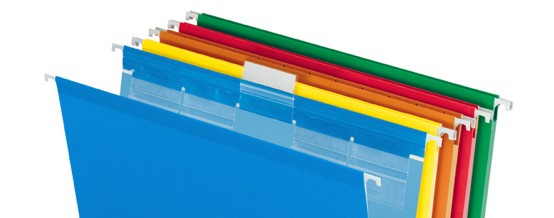
Should you choose to change placement, just fold the tab down and lift another tab upward. The durable polylaminate strips reinforce the top edges and the bottom fold, making it extra-sturdy for repeated use, and the boxes of 20 or 25 (depending on color selection — available in standard green, assorted, blue, red, yellow, violet, bright green or pink), all include a printer-ready insert sheet for labeling.
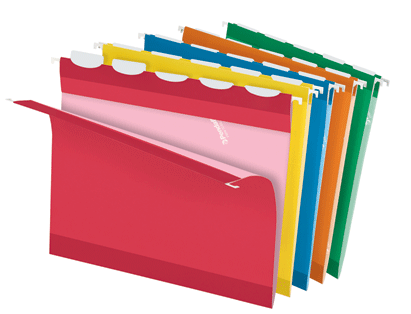
This year, Pendaflex added a new variation: the breathlessly-titled Ready-Tab Extra-Capacity Hanging Folders with Lift Tab™ Technology! The 2″ capacity letter-sized folders, available in standard green and a narrow assortment of colors, makes use of the stuffed-crust pizza metaphor for positioning tabs. Sturdy plastic-coated write-on/erase-off tabs (yes, you can erase pen marks) are tucked away inside the wrapping of the hanging rods. Just select one of five positions and pull upward on the tab. Change your mind, press it back into the pizza crust (I mean, hanging folder) and select a new tab.
AT EASE — WITH DESSERT
Man cannot live by bread (or meat and potatoes) alone. Paper supplies, particularly for filing, are the functional main course of organizing products, but just because something is useful doesn’t mean it can’t be yummy. That’s the belief, at least, of the enterprising women who shared some gorgeous wares at this year’s NAPO Expo.
Office Candy, a distribution company started by professional organizers Laurie Noelle Meek and Beth Schlatter,
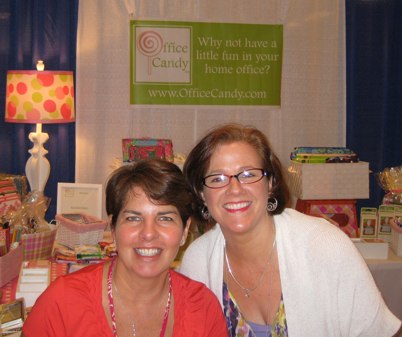
asks, Why not have a little fun in your home office? Why not, indeed?
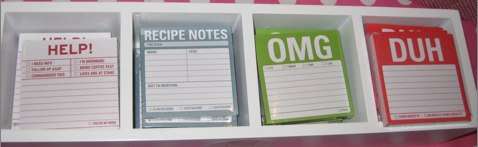
Office Candy has gathered a delightful collection of colorful, appealing organizing tools, from file folders and notebooks to clipboards and gadget holders. It’s a one-stop shop for pretty. The theory is simple — if you’re working with attractive tools, you’ll be more inclined to use them to their greatest benefit.
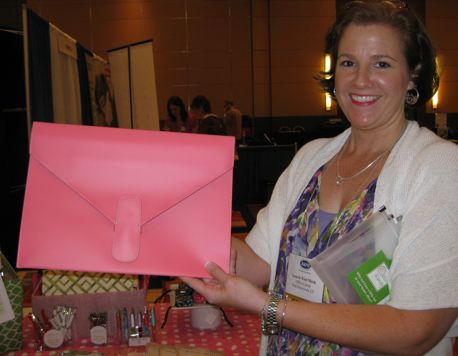
Office Candy carries some favorite brands, including Knock, Knock and Gallison, and has introduced Paper Doll to some new charms, including folders from Lady Jayne (seen below) and Cavallini.

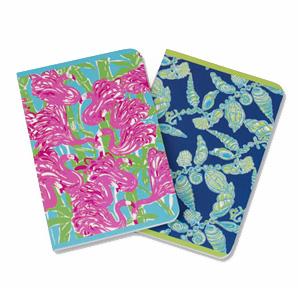
The gals at Office Candy stock the classy Jamie Raquel mobile file totes I reviewed last year, as well as a variety of other fun, new products, like these Lilly Pulitzer notebooks.
Win the paper clutter war. Taste the rainbow.



Follow Me