Paper Doll Introduces Ergonomic Helpers that Organize Your Posture
Last week, in The Productivity-Boosting Power of Ergonomics — Organizing Your Workspace and Systems for Success, we looked at the field of ergonomics and how adjusting the placement of things in your workspace and revising your systems can be a huge boon to both your health and productivity.
We examined screen height, keyboard and mouse placement, chair selection and spinal support, foot placement, and lighting set-up. We also reviewed the importance (for your body, brain, and eye health) of taking breaks, how to optimize your frequency and type of movement, and how to listen to your body.
Did you take last week’s advice to heart? Roll your shoulders. Roll your hips. Roll your eyes. If everything feels wonky, you probably didn’t.
ORGANIZE YOUR BODY FOR THE LONG TERM
When we think about work-related injuries and dangers, we often think about firefighters, people in the military, or other workers in environmentally precarious situations. But without ergonomic tweaks to your space and systems, sitting at a desk can be dangerous, too.
According to a recent study published in Nature, Musculoskeletal Disorders Among Office Workers: Prevalence, Ergonomic Risk Factors and Their Interrelationships, work-related musculoskeletal disorders (WMSDs) impact up to 81% of workers across their careers. 58.6% of these injuries affect the neck, 52.5% happen to the lower back (52.5%), and 37.4% are located in the shoulders.
The research found that “suboptimal workstation ergonomics” lead to our ouchies. However, as we reviewed last week, intervening with ergonomic improvements to your surroundings and your behaviors can mitigate the risks of these musculoskeletal booboos.
Unless you’re watching The Big Bang Theory, these kinds of injuries aren’t a laughing matter.
As with everything related to organizing and productivity, knowing what you should do and actually doing it aren’t always the same thing.
We’re humans, not robots. We hunch and lean and squint even when we know better. Even when we’ve set up our physical space so we can do better.
Even if we want to do everything we’re advised, we may still need a little extra help — perhaps from technology.
There are three general types of posture-improving tech. One focuses on reminding workers to straighten up and fly right (or at least to straighten up). Timed reminders can be somewhat helpful, as soon as we focus intently on our work, the more likely it is that our proper posture will degrade.
The second method, software, especially when it combines AI with observed data via webcams and/or earphones, is a more robust approach for analyzing and improving posture for better health.
A third method, as described in Worker Wellness: Manual Checks vs Tech—What Improves Posture Most?, indicates an even more effective route: continuous monitoring through wearable tech that alerts you to ergonomic problems and prompts automatic breaks. Those solutions are often expensive and impractical for use at your desk. However, there are some interesting developments, like the Upright GO 2 Monitor, with a posture monitor for back tilt via movement sensors and vibrational biofeedback.
Today’s post shares some intriguing and quirky solutions to help you on your ergonomic path for posture. Next week, we’ll end this series on organizing your ergonomics by exploring solutions for safeguarding your vision and other bodily wellness aspects.
IMPROVE YOUR POSTURE WITH AI & WEBCAMS
SUPERSHRIMP
Created by Marc Lou, who wasn’t happy with his own posture, SuperShrimp turns your webcam into a posture coach to help catch you when you’re slouching. (You just checked to see if you were slouching, didn’t you?)
@2026 SuperShrimp
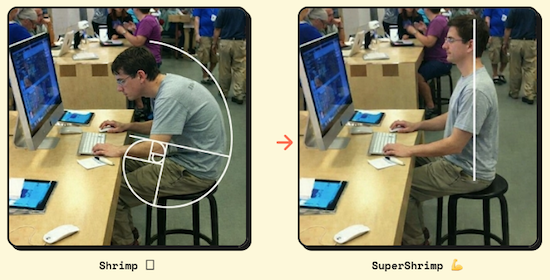
SuperShrimp was designed to turn your webcam into a posture coach. Like an Elf-on-a-Shelf, it catches you being ergonomically naughty while you work. It also offers real-time posture scores, alerts, and analytics.
When AI detects you sitting “like a shrimp,” curved over onto itself, it sends you a notification with a video of your posture to alert you to sit up straight and reposition your body. It’s kind of like a traffic camera, spotting (and then snapping a photo of) you violating the posture laws — but you can self-correct instead of paying a fine (musculoskeletal disease) later on.
SuperShrimp Posture Score
SuperShrimp uses your webcam and on-device AI to analyze your posture gives you a real-time score from 0 to 100.
@2026 SuperShrimp
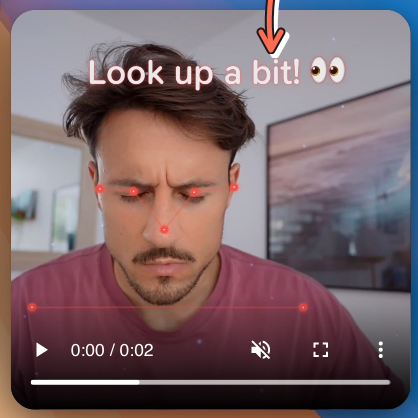
SuperShrimp also provides on-screen guidance to tell you not only how to stop sitting the way you are, but how to move to the correct position. Whether your eyes aren’t looking at your work at the right angle or you’re curving your spine into a hunch, bad ergonomic positioning shows up on-screen in red, but turns green when you move into the correct position. Positive reinforcement for the win!
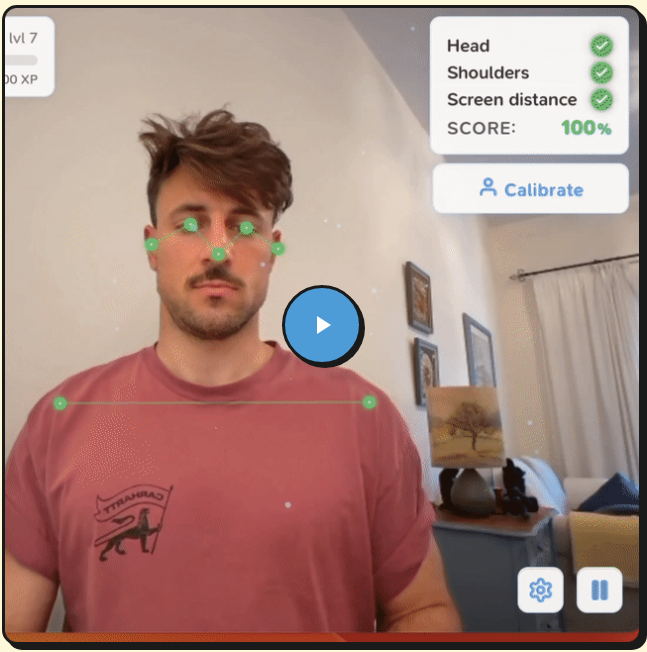
As you work, a live video of yourself pops up onscreen, noting incorrect positioning of your:
- head — Remember, from last week, the importance of positioning the screen so you’re not looking too far up or down?
- shoulders
- the distance from your eyes to the screen — Once again, get the right prescription for eyeglasses or contacts, or at least adjust the font and contrast, as explained in last week’s post.
@2026 SuperShrimp
Get a Slouch Alert
The SuperShrimp app runs in the background, silently, so you can minimize the window and ignore it. However, as soon as it detects that your posture has become sub-optimal, a visual notification pops up so you can see what you’re doing wrong and course-correct, all without your cranky 7th grade teaching shouting, “Stop slouching!” at you.
Lou describes the live notification as “non-intrusive,” which I take to mean that there’s no audio to pull you away from your work. But you do see a video of yourself, just as when you’re on Zoom. Instead of fixing your bangs, though, you’ll glance at it to fix your posture.
Track Your Improvement Over Time
Are you into tracking your progress and comparing today’s self to last month’s self to improve your behavior? SuperShrimp includes detailed analytics to allow you to track your posture-related habits. Visualize exactly how much of your work day you spend in good vs. bad posture, and whether you are trending toward improvement or couch potato-dom. The app offers:
- Good vs. bad posture time splits
- Daily and weekly score trends
- Progress tracking over time
Embrace the Competitive Shrimp Spirit
If gamification motivates you, Super Shrimp has you covered. It lets you earn XP (experience points) across ten levels of good posture development.
For each minute of good posture, you earn XP and get to see your shrimp evolve, up to the top level.
There’s even a leaderboard for a little healthy competition.
Even Shrimp Need Privacy
Most of don’t want our posture to end up splattered on the internet. SuperShrimp runs locally on your computer with on-device AI. None of the images are captured by SuperShrimp or stored on their (or any) servers, and you don’t need the internet for it to detect your posture.
Your webcam’s feed gets processed and displayed in real time and then is immediately discarded. Thus, no matter what’s going on in front of your webcam, whether it’s bad posture or funny faces or silent swearing, nobody but you will see.
How the SuperShrimp Tech Works
SuperShrimp works with any kind of modern web cam, including built-in laptop/desktop cameras, after-market/external USB webcams, and even the iPhone continuity camera. In each case, your activity is auto-detected by the camera.
Although the site promotes that this was invented for MacOS, it also works on Windows and Linux; just be sure to download the right version for your operating system.
SuperShrimp is designed to be a “lightweight background app,” using minimal battery power while monitoring and correcting your posture. When you’re working, it’s working.
If you’re using a laptop, you may be concerned about battery usage, but SuperShrimp claims to have a few tricks up its sleeve. (Do shrimp have sleeves?) The software focuses on you in the foreground and analyzes fewer frames in the background (because who cares whether your bookshelf or window has good posture?). If you walk away from your work area, SuperShrimp pauses the posture detection.
The Cost of Seafood These Days
Once purchase the right version of the app for your operating system, you’ll receive an email with a license key and download link. Download the app — one license is good for any one device — and enter the license key when prompted to activate it on your computer or phone. (If you want to use it on multiple devices, like your office desktop and your laptop, you’ll need to buy a separate license for each device.)
Officially, the software is $29 but it’s available now for a one-time payment of $17 (with the promo code LAUNCH) for a lifetime license for one device. There are no subscriptions, per se, and this price includes all features, plus one year of updates. There’s a 30-day money-back guarantee on all purchases of SuperShrimp; just use the support page to request your refund.
[If this reminds you of something you’ve already seen on the pages of Paper Doll, it’s similar the Do Not Touch Your Face app I wrote about early in the pandemic in Organize Your Health: Parental Wisdom, Innovation, and the New Time Timer® Wash.]
SITSENSE
Launched in 2025 by students Chaitanya Agarwal and Rithik Kulkarni, SitSense is a glossier competitor to SuperShrimp, billing itself as the “#1 AI Posture Coach.” It’s available as a web app (working with all modern browsers, like (Chrome, Firefox, Safari, Edge) and as a Chrome extension (with Edge and Firefox extensions reported to be coming soon).
SitSense and Sensibility
SitSense analyzed 540+ hours of real posture data, finding that most muscle strain starts with nuanced alignment changes related to the “head–neck angle, forward head posture, and tilt.” To stop problems before they begin, SitSense uses the webcam to detect these moments right away, and then uses on-screen guides you to help you re-set and prevent discomfort.
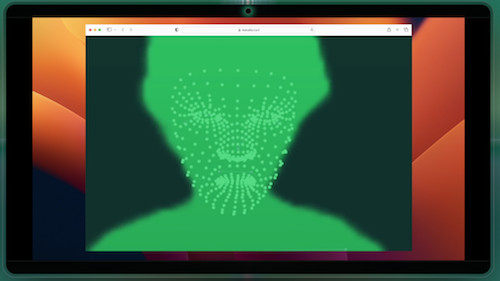
So, once you start your webcam, SitSense begins tracking your posture in real time. It scores your spinal/neck/head alignment, and then uses personalized on-screen cues to guide you back to a neutral posture to prevent muscle tension.
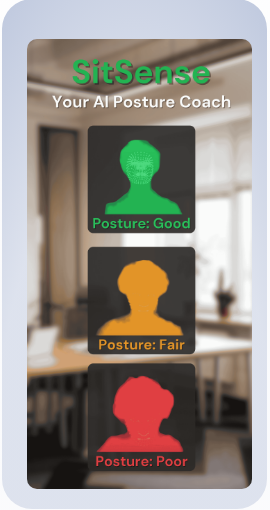
©2026 SitSense
In addition to the instant feedback of live posture scoring and nudging into healthy posture, SitSense uses micro-goals and daily goals, streaks, badges, and leaderboards to gamify and motivate healthy improvements.
SitSense Privacy
All of the video analysis is processed locally on your device, so no video or images get stored or transmitted to SitSense. They do save the numerical posture metrics that track your progress and train their AI, but all video processing happens in the browser and is not uploaded. (See more on their privacy policy.)
Cost
SitSense has a 3-day free trial, after which Pro pricing is $4.99/month or the equivalent of $2.99/month if you pay annually ($34.99).
Need a budget option? There’s also a completely free Chrome extension.
SitSense’s blog included a bevy of evidence-based posts about “posture science, workplace ergonomics, and building healthier habits at your desk.” If you’re dubious AI-based programs like this can help, Does Posture Correction Software Actually Work? may change your mind.
SIT APP
Sit App, developed by UK software engineer Ali Smith, uses on-device AI and your webcam to monitor your posture from your laptop or desktop. It works on Mac, Windows, and Linux operating systems.
Train the Droid
Getting started with Sit App is as easy as posing for a selfie. When prompted, take ten seconds to show the Droid how you’d like to sit, posing proudly. Next, show off your shlumpiest poor posture.
While you go back to work, Sit App’s cartoon Droid (whom I imagine sounds like a Minion), lives up in the corner of your screen (like in a minimized Zoom window), and its cyclops-like eye observes your posture via the webcam.
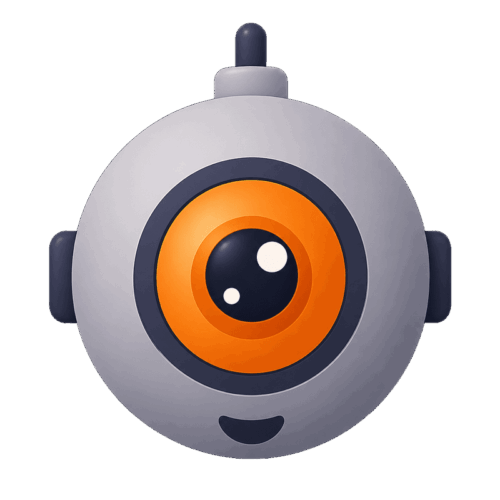
If you start sinking and slouching, the Droid icon “pokes its head into the corner of your screen” and, depending on which nudging method you pick, will display silent visuals, provide a quiet vocal prompt, or give a loud yoohoo to get you sitting up properly again.
When not monitoring, Sit App quietly in the background, using only minimal memory and CPU and shouldn’t impact your computer’s operation. You can use it during video conferencing, and (if using the Pro level), Sit App only takes abut 10 seconds to recalibrate if you switch from sitting to standing, or vice versa.
Stay Motivated
Sit App has three elements to keep you inspired:
- Daily streaks — Because habits (like improving your posture) depend on consistency, Sit App notes your repeated wins and the Droid icon shares in your celebration.
- Weekly insights — The more you understand your weak moments, the easier it is to course correct. The app can tell you when you are slumping, so you can figure out how to conquer the obstacles, whether it’s during Monday Meeting demoralization or after Friday’s heavy carb lunches.
- Nudges, not nagging — You get to decide when the Droid greets you (and when not, setting quiet hours) and the level of sensitivity.
Sit App’s Privacy-First Pose
The Droid is no tattletale. It processes all data on your computer, and no photos or videos are saved, so your image never gets transmitted online. In fact, it doesn’t even require internet, so you can work offline (which is healthier for your brain, anyway).
The Droid sneaks a quick check of your posture and then like Dory in Finding Nemo, forgets what you looked like. Sit App does maintain the metrics you care about: time spent in good posture, and the above mentioned streaks and weekly trends. The facts of your successes are tracked, just not the visual evidence.
See Sit App at work.
Cost
Sit App is free for one hour of daily posture monitoring — there’s no trial and you won’t be asked for your credit card, which should give you an idea of whether it helps you.
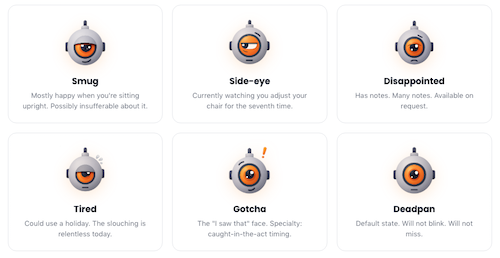
Additionally, there’s a Pro level for $2.92/month (billed annually at $34.99) with a 7-day free trial to see if you like the extra bells and whistles, for unlimited monitoring. You also get reminders to take standing and stretching breaks, priority support (from a person, not an AI), and customized moods and voice alerts from the Droid. (Droid “moods,” are depicted by the little dude’s mouth, eye, and eyebrow positioning include: smug, side-eye, disappointed, tired, gotcha, and deadpan.)
The Pro level also gives you a variety of setups, whether for home, office, or standing desk use. (You can cancel the Pro level at any time.)
Sit App’s blog is new but fairly robust, with science-based posts covering a wide variety of desk-related musculoskeletal issues and how to solve them. How to Tell If You Have Bad Posture (5 Self-Tests You Can Do at Home) is a good place to start.
GET ANIMATED ABOUT POSTURE COACHING
Are the above methods all well and good, but you want something more adorable, a posture monitor that reflects your cute personal aesthetic?
There are a number of too-precious solutions for monitoring posture, but unfortunately, they all seem to be for Apple fans.
HEADSUP — IMPROVE POSTURE
Created by JiaHao Wang, HeadsUp detects your head position through your AirPods or Beats Fit Pro earphones and your webcam, and helps you align your sitting posture. It works on Mac, iPhone, iPad, and Apple Watch.
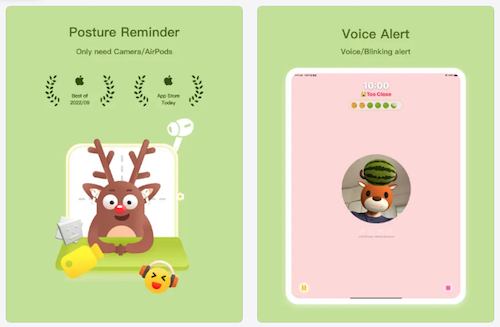
The app will analyze your posture and take that data to “transform” you into an on-screen cartoon animal with a watermelon on your head. If this brings to mind Dirty Dancing, yes — you, too, can say that you carried a watermelon.
The key is that if you lower or tilt your head, the watermelon will fall off your animated (dear, dog, cow, or bear) avatar’s head, prompting you to straighten your head.
There’s a customized sensitivity adjustment, so your watermelon doesn’t wobble unnecessarily. Lower it when you’re reading and writing by hand; aim it higher when using the computer.
HeadsUp offers a variety of gentle reminder modes, including a human voice, a chirping frog, and a silent mode to reduce distraction. There’s also a reminder to take a break after 40 minutes of continuous sitting. Additionally, HeadsUp has an on-screen Pomodoro timer to improve productivity unrelated to body-based fatigue.
For those who value statistics, the app provides metrics regarding your head and neck posture (and focus time) for the current day, the past seven and thirty days, and the entire past year. The statistics screen is held in your iCloud, ensuring that only you have access to your data. (You can also install a desktop widget to view today’s and the past week’s statistics.)
There are no ads or push notifications, and the app is free.
POSTURE PAL
Similar to HeadsUp, PosturePal is a cartoon-based monitor for your head, neck, and shoulder posture, and works on Mac and iPhone. Developed by Samuel McGarry, Vicki Petrova, and Jordin Bruin, the app uses the motion sensors in AirPods (or Beats Fit Pro) to detect your positioning and keeps track of your neck tilt.
If your posture becomes unhealthy, Posture Pal can alert you in multiple ways:
- visually, with your animated pal popping up on your screen with a concerned look
- via a sound alert
- vibrationally, on an iPhone
- via notifications on an Apple Watch
- by lowering the volume level on your phone when poor posture is detected and raising the volume when you correct your positioning
You can set daily goals, use timers (for 5 to 60 minutes) to focus on improving your posture, and set low, medium, or high sensitivity levels for monitoring. View detailed information about posture sessions, including average pitch, roll, and yaw (which sounds far more science-y than the little cartoon would imply).
Users can upgrade from the free App to Posture Pal Pro ($24.99/year or $6.99/month) and get added options, including selecting custom colors and themes, 12 different app icons, and picking one of three Posture Pals.
NEKOZE
Want cute posture feedback but the only animal you care about is a cat? Try Nekoze. Using facial recognition software, the desktop app detects slouching and Nekoze’s cartoon cat pops up on-screen and meows at you.
That’s pretty much the whole app, though you can adjust the detection sensitivity and silence the cat for visual alerts without audio.
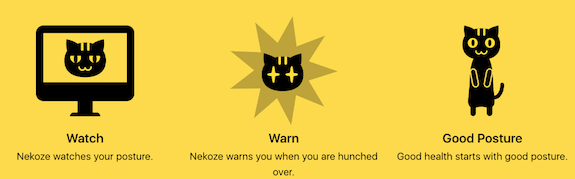
Nekoze has niche appeal; it’s Mac-only, kitty-only, and slouching-only. (The description at the App store says, “Requires MacOS Monterey or later and a hunchbacked human.”) It doesn’t use AI, and users report the interface hasn’t been updated.
Nekoze’s developer, Katsuma Tanaka, says no data is collected, as detailed in the Nekoze privacy policy.
Nekoze is free; there’s not even a paid tier.
Interestingly, Nekoze seems to have been developed back in 2015, and presented at the 9th International Conference on Pervasive Computing Technologies for Healthcare by Tanaka, et. al.
The Other Kind of Posture Pal
We’ve looked at AI and data points. We’ve looked at cartoonish posture detection. But sometimes, you want a solution that’s not based in technology.
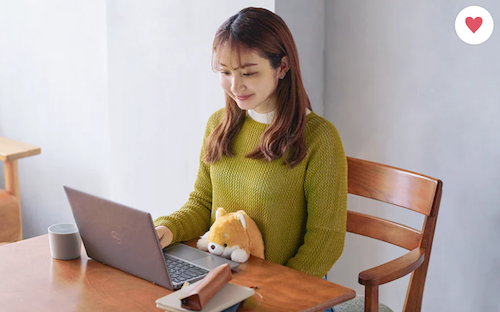
Would you prefer something warm and fuzzy to the uncanny valley of AI? How about a stuffed animal designed to help you maintain better posture?
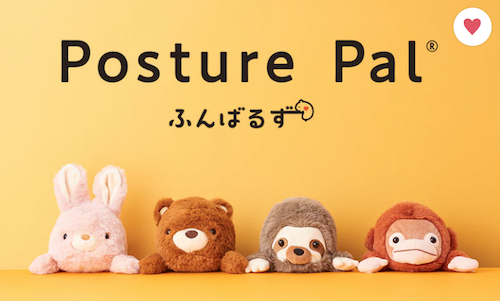
©2026 Posture Pal® at Sonny Angel USA
The Japanese plush toys from Dreams are designed to promote good posture while giving you some cozy affection.
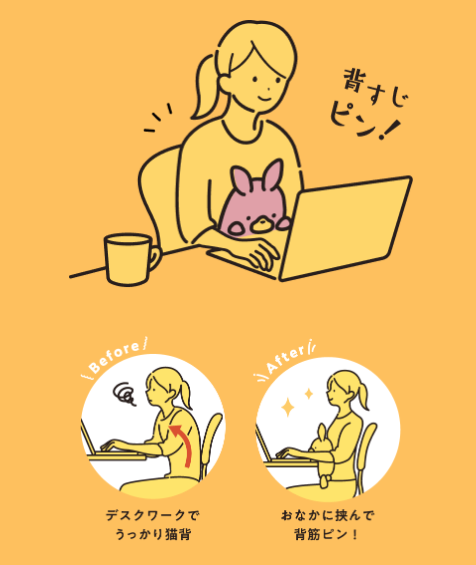
Place your plush buddy firmly between your abdomen and the edge of your desk to keep it upright without squishing it. In order to keep your little friend from falling, you’ll need to maintain a straight spine and keep your back muscles elongated, while relaxing your whole body form so that you can stay in this position while working without dividing your focus.
The soft, sweet Posture Pals can soothe your inner child while you reply to cranky emails or work on expense reports, all without messing up your alignment. The translations of the Japanese websites note that inside each Posture Pal, there’s a “heart” to help each stuffy stay upright and hold your desk while you’re away from your seat.
Posture Pals currently come in 40+ varieties, and more are being introduced, including through special partnerships with designers and “celebrities,” like Shark Meow and Shrimp Meow from pop illustrator Juno, and Elmo and Cookie Monster from Sesame Street. English-language updates are announced at the Dreams site.
Make friends with Rabbit, Bear, Sloth, Monkey, Orangutan, Shiba Inu, Calico Cat, Hedgehog (Paper Doll‘s favorite), Koala, Snakes (green and white), Horses (brown and white), Lobster, Turtle, Whale, Walrus, Seal, Axolotl (my other favorite), Triceratops, Stegosaurus, Tyrannosaurus, Unicorn, Yeti, and a handful of Japanese creations that I’ve been unable to identify.
©2026 Dreams
In the United States, they run $38 at Sonny Angel USA and Strange Cat Toys; in Europe, they range from €25.95-€34.95 at Fioko, which seems to have the most complete inventory. Only the Rabbit seems to be available on Amazon, for $32.
Posture Pal may be too twee to use in a corporate office or on a Zoom, but at home or in a dorm room, why not get a little comfort while preserving your posture?
Next week, we’ll continue our foray into organizing your wellness with ergonomic tweaks for your eyes, hands, arms, and healthy movement breaks.
Until then, catch up on last week’s post, take note of where your body is trying to tell you something is “ouchie,” and share your thoughts about these AI and other posture-coaching options.



Gosh, Julie! I had no idea there were so many ways to monitor posture. I actively work on my posture for many reasons – not the least of which is to avoid the ouchies!
I was catching up on work last Monday after being in Toronto with the ICD Board of Directors and didn’t read your post last week. I will do so today so I can be all caught up.
Oh, I hope you’ll enjoy last week’s post; it was very much a “how-to” organize your space and self for better health and productivity. This week’s post (and next week’s, at least) just offer some intriguing options to assist.
I am sure you had an amazing time with the ICD BoD, but be sure to take lots of self-care time and rest up!
Thank you for reading!
Julie, Wow, the posture tech space has grown so much. The Posture Pal stuffed animal is delightful, and I love that it works on the simplest possible principle. I’ll be sharing this with clients who spend long hours at a desk. Thank you for researching so we don’t have to.
Yes, Cathy, I was amazed at how much has been invented since the early days of the pandemic, when I first started noticing the options. AI has definitely made a difference.
I know Japan is into “cute” objects, but in the U.S., I think students (in middle and high school, but maybe also college) must be the primary target for the Posture Pals. That said, if the Hedgehog (or Axolotl) showed up at my doorstep, I’d find it much more appealing than having to stair at my own data-point(ed) face on the screen. Still, the more options we have, the more likely we’ll do ANYthing to improve our postures.
Thank you for reading this continuation of last week’s process-oriented “organizing your ergonomics” theme of posts, and I hope you’ll enjoy the next one, designed to soothe our eyeballs (and other non-neck/shoulders/back parts).
I just might try the SitApp (when I’m feeling brave enough to face the truth). Thank you for letting us know about it and so many other resources!
I was tempted to do the free trials and test each of these, but I think I’d need a longer lead time between research days, writing days, and publishing days. And I think I’d rather snuggle a hedgehog against my desk that see my face, neck, and shoulders covered with scary data points.
Thank you for reading; I love doing this kind of research!
Oh my gosh, Julie, it seems like you were just peeking into my life. I just came from my massage therapist and she said, “I don’t think you’re sitting on your sitz bones.” The SitSense Chrome extension says I’m doing okay, though after following my massage therapist’s guidelines. So many fabulous resources. I can’t believe it.
Yep, Pam, I was peeking in your window and saw you slouching and squinting. Wait, no! That was a mirror I was peering at! I think we’re all suffering from these issues.
Thank you for reading, and I hope that between last week’s post, this week’s, and the next one, my readership will be feeling looser, stronger, and more energized!
Wow, I’ve never heard of any of these.
It is hard to maintain proper posture at a desk. I do try and think about it, and I’ll sit up straight, and then I notice in a few minutes I’m back into the slump. To be honest, one thing that really motivates me to work on my posture is seeing people around me who are slumping, developing that “neck forward” position, etc.
That said, I don’t know if I’m ready to have my computer spying on me. I have to think about this. Tools can be helpful, but I might resent it. It’s one of those cases where I need to seriously as, “Do I want to do this, or do I just talk about wanting to do this?”
I do love the clever names. Supershrimp is hilarious.
Seana, when remote work became a thing at the start of the pandemic, everyone seemed to be paying more attention to posture. It’s not like we didn’t slouch and squint when we were in offices — I know I did, back in my TV days — but working from home became a global experience, and while everyone was starting to pay attention, posture monitoring was very, very new.
I suspect that different people will benefit from different things. I like the immediate biofeedback aspect of the UprightGO 2 monitor, and if given the chance, I’d test it; conversely, my sister wouldn’t want to wear anything necklace-like, as she wants everything away from her collarbone. I might find more continual observation and feedback by AI appealing, while you might prefer more frequent reminders to straighten up and/or move.
I know many people who would prefer the cute cartoons animals to prompt them to fix their posture, and I bet more men than women would appreciate the competitive gamification of the more intense AI versions. Either way, I want a hedgehog. Or an axolotl.
Thank you so much for reading!