Archive for ‘Paper Organizing’ Category
Paper Doll Organizes Boxing Day Downton Abbey-style with Give Back Box®
You’ve got boxes, right? After a weekend of giving and receiving gifts, you’re likely surrounded by boxes. Everywhere you turn, boxes. It’s practically a Day of Boxing! Well, actually…
Boxing Day, observed on December 26th, the day after Christmas (and this year, the second day of Hanukkah), is a holiday popularly celebrated in the UK and various Commonwealth nations, many of which used to be British colonies. The history of the holiday is complex and widely debated, but traditionally, servants and tradespeople were given Christmas boxes on the day after Christmas, when they were granted leave to visit their own families and did not have to work. How very Downton Abbey of them.
Before you move along to another post, affecting a posh accent and saying, “I’m going upstairs to take off my hat,” I’d like to suggest a much more rewarding way to observe Boxing Day.
Give Back Box®, through a partnership with Amazon, Overstock.com, Ann Taylor, REI Co-Op, and more than a dozen other retailers, has found a solution that allows you to encourage yourself to pare down your excess possessions, bless others with donations of your largesse, and get those cardboard shipping boxes out of your house, all in one fell swoop.

THE MISSION STATEMENT
The purpose of Give Back Box® is to provide an effortless and convenient method of donating your used household items. Give Back Box not only provides an easy way to be part of a truly good cause, it also allows cardboard boxes a second life by recycling them and keeping them away from landfills to help improve our environment. So this is an all-round CSR & Sustainability solution that costs you literally nothing.
THE PROCESS
- Take your Amazon (or any other retail partner’s box), and empty out the goodies you’ve received. (You can also use a plain cardboard box, if you like.)
- Fill the box with donations of clothing, shoes, and various household goods. But please, no liquids, electronics, ammunition, or fragile or hazardous things! (And do check the pockets for any train tickets that might prove you innocent of murder.) Then seal up the package.
- Print a free pre-paid shipping label from Give Back Box’s site and affix it to the box. The cost is covered by Give Back Box’s partner retailers, most of whom have special Give Back Box pages on their sites, too.
 There’s no weight limit, so you can fill the box to the brim — and print as many labels as you need.
- Now, just send the package to Goodwill via UPS or the United States Postal Service at any UPS Store or post office, all at no cost to you. You can even request a free USPS pick-up of your package at your home, if the weather outside is not so delightful and you’d rather lounge about and have your lady’s maid, Anna, serve your meals in bed.
THE BENEFITS
Give Back Box box has a variety of benefits — personal, social, economic, and environmental.
You’ll make donations more often — You know you’re busy. You know your house is full of things you don’t use, don’t wear, or don’t want. (Honestly, what was Aunt Rosamund thinking?) You want to donate more things and more often, but the truth is that every time you find something in your home that you want to donate, you set it aside and forget about it. Maybe you have a donation station in your home, with the pile getting bigger and bigger, but it practically takes an act of Congress to get the donations out of your house, into your car, and to whatever non-profit you choose.
By making it free and convenient, Give Back Box prompts you to think about what you can let go of every single time you receive a box from one of their partner retailers.
Boom! There’s your habit! Get a box of stuff? Give a box of stuff!
That’s good for you, and it’s good for all the work that Goodwill does, providing job training and putting people to work in the local community. And people who want and need what you no longer have space or time to manage reap the benefits, too!
It’s also sustainable. About 30 million tons of retailers’ cardboard box material is zooming around the earth each year. By following the principles of “reduce, reuse, and recycle,” Give Back Box and its partners are helping you clean out your house and helping us all clean up the environment.
Even the Dowager Countess would be excited!

Still have questions? Read through the Give Back Box page of frequently asked questions, and check out this little video.
Paper Doll & Smead Continue the Debate: Paper vs. Digital for Calendars & Task Lists
Last week, in Paper Doll & Smead Talk Paper vs. Digital Organizing: It’s Not Either/Or, you got to see the first part of my discussion with John Hunt of Smead about the anxieties many people face when thinking about moving their information from paper to digital. We discussed control vs. convenience, and how the learning curve with technology can be an obstacle to exploring solutions.
We also reviewed the scientific research on learning and cognition related to taking notes by hand vs. on the computer, and even explored the relative merits and drawbacks for reading paper books vs. using digital devices. We even talked about how marketing messages on paper vs. digital can have differing persuasive powers.
I made the case that there were different situations and individuals for which paper might be the right choice, and others where a digital solution could be better. And there were definitely indications that a hybrid system might be best.
Today, in a continuation of that Keeping You Organized podcast discussion, we continue that chat and explore two of the productivity tools that engender the most debate on the paper vs. digital landscape: calendars and task lists.
Calendars — We discuss the relative advantages and disadvantages of paper vs. digital calendars, and delve into portability, syncing, visualization, creativity vs. linearity, and personalization. We also got into how comprehension of the passage of time (whether via analog or digital clocks, or using paper vs. digital calendars) can impact how we live our lives.
To Do and Task Lists — With a plethora of to do and task apps out there, some people are overwhelmed by the depth and breadth of options and choose the analog paper list every time, while others live and die by the task app. John and I talk about my hybrid approach to task tracking, and why using your calendar as a task or to do list is really fraught. And because productivity is all about priorities, we had to talk about the role prioritization plays in getting things done, whether you’re jotting those priorities on a sticky note or accessing them from the cloud.
Jump right in:
Remember, you can also watch (or download the audio only, if you prefer an auditory podcast experience) right at Smead’s page for Part 2 of our chat.
And, if you like what you hear, be sure to check out the other discussions John and I have had about organizing, and listen to what my great colleagues in professional organizing and productivity have had to say. Just pop over to the stellar Keeping You Organized podcast archive page.

Podcast 041: Secrets to Organizing a Small Business
Podcast 108: Fears that Keep You from Getting Organized
Podcast 153: Paper vs. Digital Organizing: Part I
Finally, once you’ve listened to parts 1 and 2 of our Paper vs. Digital podcast discussions, share your thoughts in the comments sections of either or both posts. What are your thoughts and preferences:
- Do you have app overload, or do you enjoy exploring tech solutions for organizing?
- Ebooks or dead trees — how do you like to read?
- Notetaking — would you rather grab a pen and pad, or put your notes into something like Evernote? Does it differ whether you’re taking notes for academic work vs. meetings?
- Paper planners or digital calendars: where do your appointments live?
- Task lists: sticky note/paper pad or task app?
Paper Doll & Smead Talk Paper vs. Digital Organizing: It’s Not Either/Or
Recently, I sat down again with John Hunt for Smead‘s excellent video podcast series, Keeping You Organized. We wanted to get to the heart of that question, “Which is better, paper or digital organizing?” But as we got into it, I was able to explain my view, that it’s really a false dichotomy.
There are so many things we have to organize — our academic notes and research, our to do lists, our appointments, our thoughts — in order to keep our heads afloat. Even the fun things in our lives, like the books we read, can be overwhelming if we don’t have a way to organize the collections so we can enjoy and remember what we’ve read. And would you believe certain marketing messages — which impact our pocketbooks and those little green pieces of paper — can have a greater or lesser effect depending on whether they come on the page or the screen?
Sometimes, the decision over whether to go paper vs. digital is aesthetic — we like the feel of paper, or the glossy nature of a screen. But I’ve found that emotions play the largest role in how we choose a platform.
The problem we professional organizers often see is that people have anxiety around this whole issue of paper vs. digital. Some people feel anxious about not moving their whole lives to the cloud — digital task lists, calendars, ebooks, phone books — they’re afraid they will seem out of touch if they don’t eschew paper and embrace everything digital. Meanwhile, just as there is a backlash against modernity with hipsters and music purists preferring vinyl, there are those who will only relinquish their Moleskines when you pry them from their cold, dead hands. But it doesn’t have to be like this!
In my discussion with John, we talk about all the different situations, and the different types of learning styles and personality types, for which organizing by paper, or digitally, or through a combination of the two, might work best.
Take a look:
If you visit the source, you can watch us right at Smead’s Keeping You Organized podcast page or download the show as an audio podcast to listen while walk or work. While you’re there, peruse other episodes in the multi-year series, including some with me, your Paper Doll:
Podcast 041: Secrets to Organizing a Small Business
Podcast 108: Fears that Keep You from Getting Organized
Finally, John and I had SO MUCH to discuss (because when does Paper Doll ever run out of words?) that there’s a second whole video podcast on the way, where we continue the conversation. How’s that for organizing a holiday gift for you readers and viewers?
Organize Your Social Security Account Securely with Multi-Factor Authentication
A few years ago, we discussed how Social Security replaced the annual paper statements (for individuals under age 60) with an online system called My Social Security, and I explained the steps for registering for an account. (Officially, it appears everywhere as “my Social Security,” complete with the italicized, lowercase “my” and color-coding, which Paper Doll finds frustrating and will not emulate, but let’s stay on point.)
In step #8 of the Paper Doll’s 16 Ways to Organize Your Money in 2016, I reminded you of the importance of registering for your My Social Security account.

My Social Security is similar to your IRA, 401(K), and other retirement-related websites, in that it provides essential information for planning your retirement. At the website, you can see your estimated benefits if you were to retire early (at age 62), at your full retirement age (for Paper Doll, that’s 67) or later, at age 70. You also have the opportunity to view your complete earnings record (and taxes paid for both Social Security and Medicare purposes), back to the first time you filed your taxes. For example, my record begins in 1984.
In addition to providing comforting figures (or spurring you to improve your retirement-related investment habits), the My Social Security online account gives you other opportunities. You can:
- Provide eligibility proof (for yourself or your family) that you have qualified to receive Medicare, disability, retirement, or related benefits.
- Identify under-reporting errors, generally caused when an employer neglects to provide an accurate 1099 to the IRS.
- Identify over-reporting errors, which most often happens when you’re a victim of identity theft. If someone fraudulently uses your Social Security number when applying for a job (which they would be unable to get under their own name and number), that income can be erroneously applied to your Social Security record.

Starting this month, as the result of an executive order for all federal agencies to provide more secure authentication for their online services, the Social Security Administration is creating an additional level of security to protect users’ privacy. Social Security, like other agencies that that provides online access to its customer’s personal information, will be using multi-factor authentication. That’s a fancy way of saying Social Security will be using more than one method to make sure you are really you.
It also means that you’ll have to do a little more to prove that you are you. Annoying? Well, wouldn’t it be more annoying to have someone fraudulently log into your Social Security account?
Effective immediately, when you sign into your Social Security account at ssa.gov/myaccount, you will still use your username and password, as always. However, the site will then ask you to add your text-enabled cell phone number. From then on, every time you log into your Social Security account, the system will text you a one-time security code you will then enter on-screen before you can successfully complete your log-in.
So, if you already have a My Social Security account, you can go test it out:
Step 1: Sign in with your username and password. (Remember, Social Security makes you change your password every 6 months, so be prepared to make note of your new password somewhere secure, like your password notebook or password app, and not on a sticky note next to the computer!)
Step 2: Get a text message from Social Security. It won’t say it’s coming from Social Security — there will just be a phone number and a one-time security code.
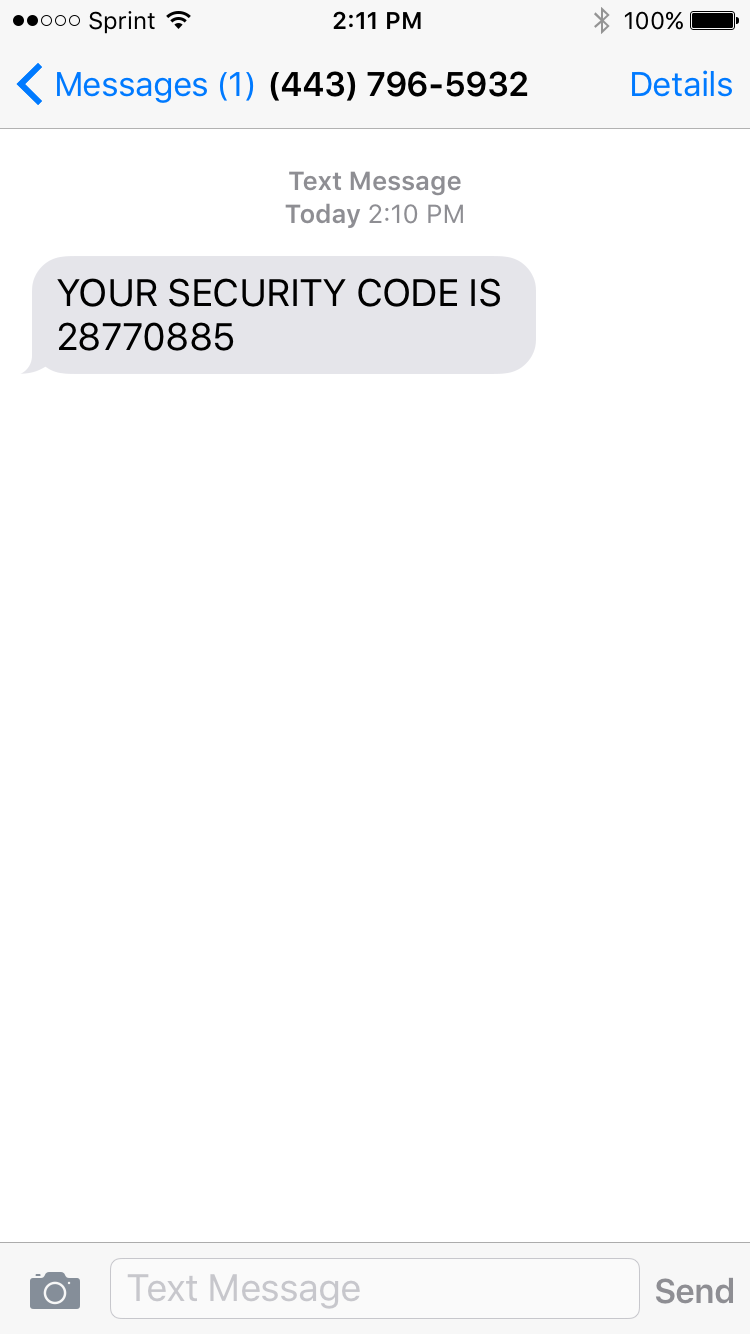
Step 3: Submit the security code by entering the code from the text into the field on the screen and hit “submit.”
That’s it! Because I had my phone next to the computer, the whole process took about six seconds. If you have to go hunting around your home or office for your phone, it might take a few extra minutes. Still, pretty easy for helping protect your data, eh?
There are some potential downsides to this plan, of course.
You have to have a text-enabled cell phone. If your first reaction is, “That’s silly. EVERYONE has texting!” then you’re probably younger, have some form of disposable income, and are used to texting. But not everyone has texting. Until mere months ago, Paper Doll enjoyed the gentle chiding of colleagues over this very issue.
Yes, it’s true, I had a flip phone and a 2000-era legacy account for 300 minutes for $30/month. I didn’t text because it’s nearly impossible to text out on a dumb-phone, and I froze texting on my plan so I wouldn’t be charged for incoming spam calls and wrong numbers. However, because texting has “almost zero marginal cost” for service providers, the advent of unlimited talk-and-texting plans means that upwards of 88% of Americans have access to unlimited texting.
If you don’t have an unlimited plan, your cell phone provider’s text message (and possibly data) rates may apply.
You have to be willing to provide your cell phone number to the Social Security Administration. But y’know, they have your address, they have access to all your tax returns, and they know how much money you make and will get back. Unlike your favorite coffee bar or fast food place, they probably won’t be tempted to sell your cell phone number to other marketers. I can’t be certain, but I think your cell phone number is pretty safe with Social Security.
So, from now on, if you want to be able to log into your account, you’ll have to be willing to adhere to two-factor/multi-factor authentication, and not only know your user name and password (which, again, Social Security makes you change every six months), but you’ll have to have your cell phone nearby so that when you log in, you can pause for a few seconds and type in that special code.
If you don’t have a text-enabled cell phone [note: it doesn’t have to be a smart phone] or you don’t want to give up your digits, you won’t be able to access your Social Security account. That doesn’t mean you’re out of luck — you’ll just have to contact Social Security “Old School” by phone, US Mail, in person, or by email.
Multi-factor authentication isn’t the wave of the future; it’s the wave of the present. My bank just upgraded its online app, and I went through the same process to prove my identity. The bank also gave me the option of using my thumb or fingerprint to log into my account. I have no doubt that future options will include voice authentication or retinal scans — perhaps psychic readings, someday! The point is, the safer your information is, the safer your financial future is, and isn’t that a goal of a more organized life?
The Pareto Principle, the Internet of Things, and Paper: A Printer to Make You Smile
Do you hate your printer? OK, hate is a strong word, but let’s talk.
My first printer, a noisy dot-matrix Imagewriter II, was part of my first Mac purchase in December 1985. It had a sleek white housing, took continuous-form feed (or fan-fold) paper (which, at the time, we likened to paper towels), and took black ink only. It had a few simple lights and buttons that didn’t require reading a manual to understand. It was sleek, did what it was told, and aside from being incredibly heavy, fit well with my student life requirements.
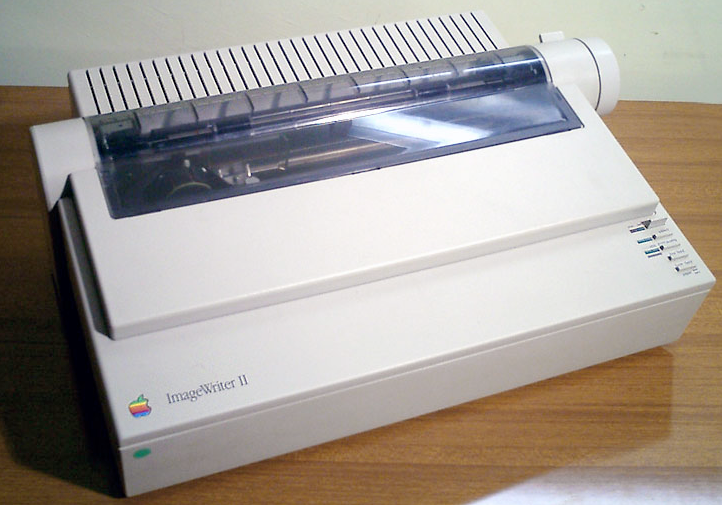
I’ve had a few printers in the past three decades, but none as pleasing as that Imagewriter II. Epsons and Canons and HPs, oh my! They’ve frozen, their drivers have mysteriously failed, and they have crankily refused to print with black ink when the cyan (that’s yellow, y’know) was not tippy-top. My current printer, since it was about six months old, refuses to print unless I unplug it from the power supply and plug it in again before printing. Every. Darn. Time.
You’d think there would have to be a better way! Well, one 27-year-old German industrial designer thought so, too.
PAPER
Ludwig Rensch had an idea. What if printers weren’t horrible, awful, frustrating pieces of technology that we depended upon for providing tangible representations of information, but were instead easy to use and nifty to gaze upon, and did what we needed?
His prototype? Paper: A Printer You Actually Want
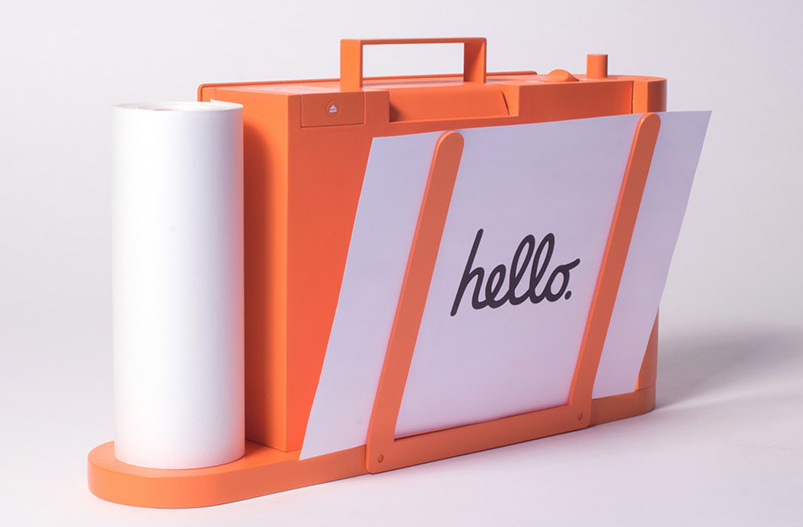
In Rensch’s words:
Paper is a machine that can print, scan and copy in a pleasant way. It communicates its function, provides clear feedback and uses physical controls to operate the key functions with ease.
Seriously? No randomly blinking lights that are reminiscent of Morse Code but have no clear meaning?
No refusal to print in black and white unless three other color inks are full?
No ugly metal and plastic blob that makes your kitchen or living room feel industrial?
Well, that is a breath of fresh air.
THE BASICS
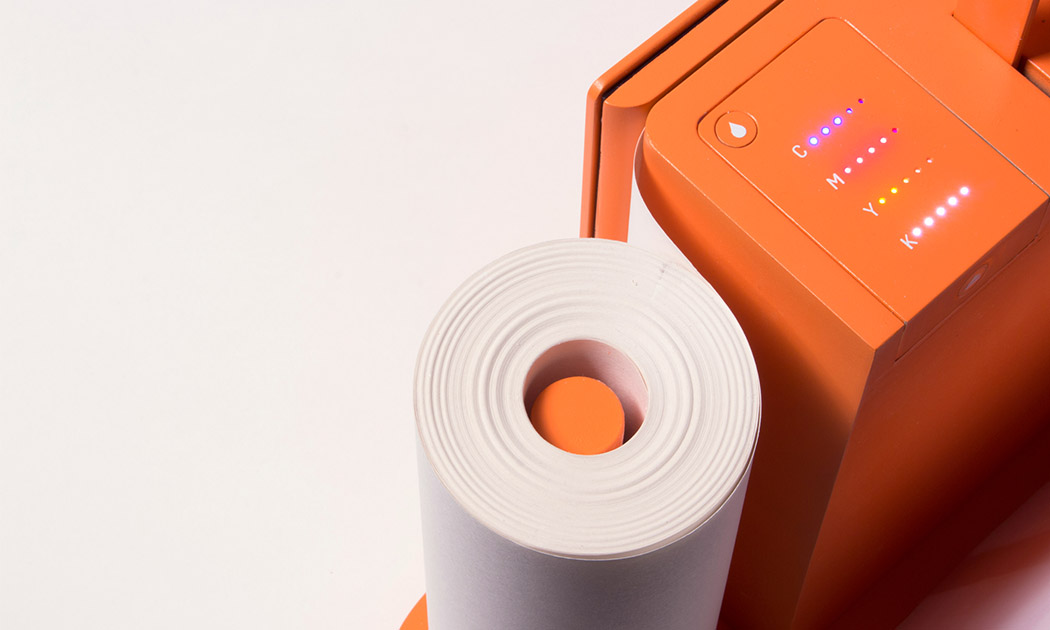
Instead of the black and grey boxes we’ve come to know, Rensch’s Paper is a brightly colored, lightweight, all-in-one printer/scanner/copier.
Imagine having a traditional flatbed printer or scanner but then turning it on its side. In lieu of a traditional stack of copy paper, Rensch’s Paper prints or copies to a continuous sheet (sans tractor-feed holes) on an upright paper roll with pages cut one slice at a time, much like Berg’s Little Printer, which I wrote about in Indulgences, Unitaskers and Paper Doll’s Take on the Little Printer.
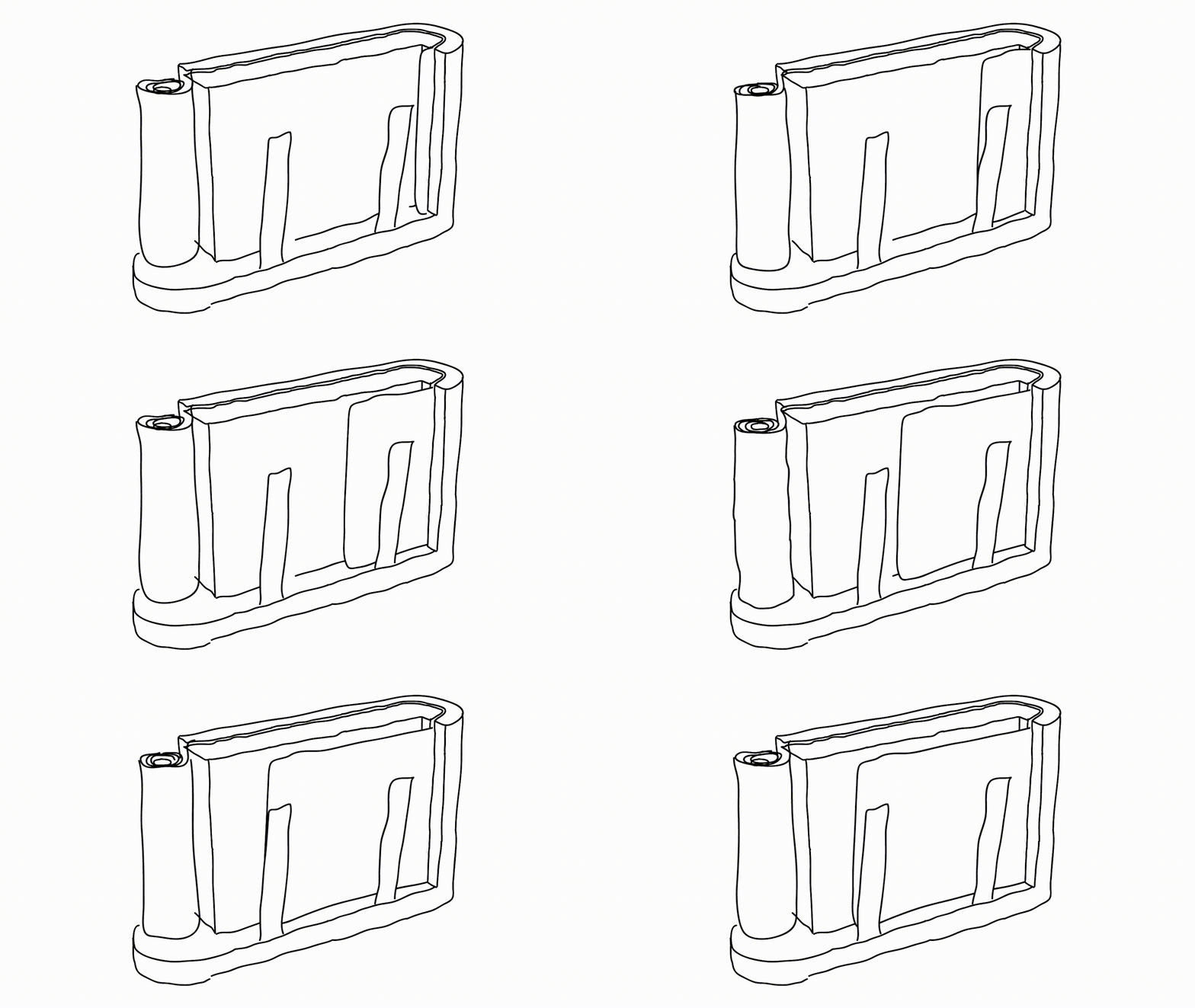
Instead of black or grey plastic and metal that’s suited for office space, Rensch designed something that adds some quirky color. (Although Paper Doll, herself, has a lifelong history detesting the color orange, this blog will not hold that against Paper.)
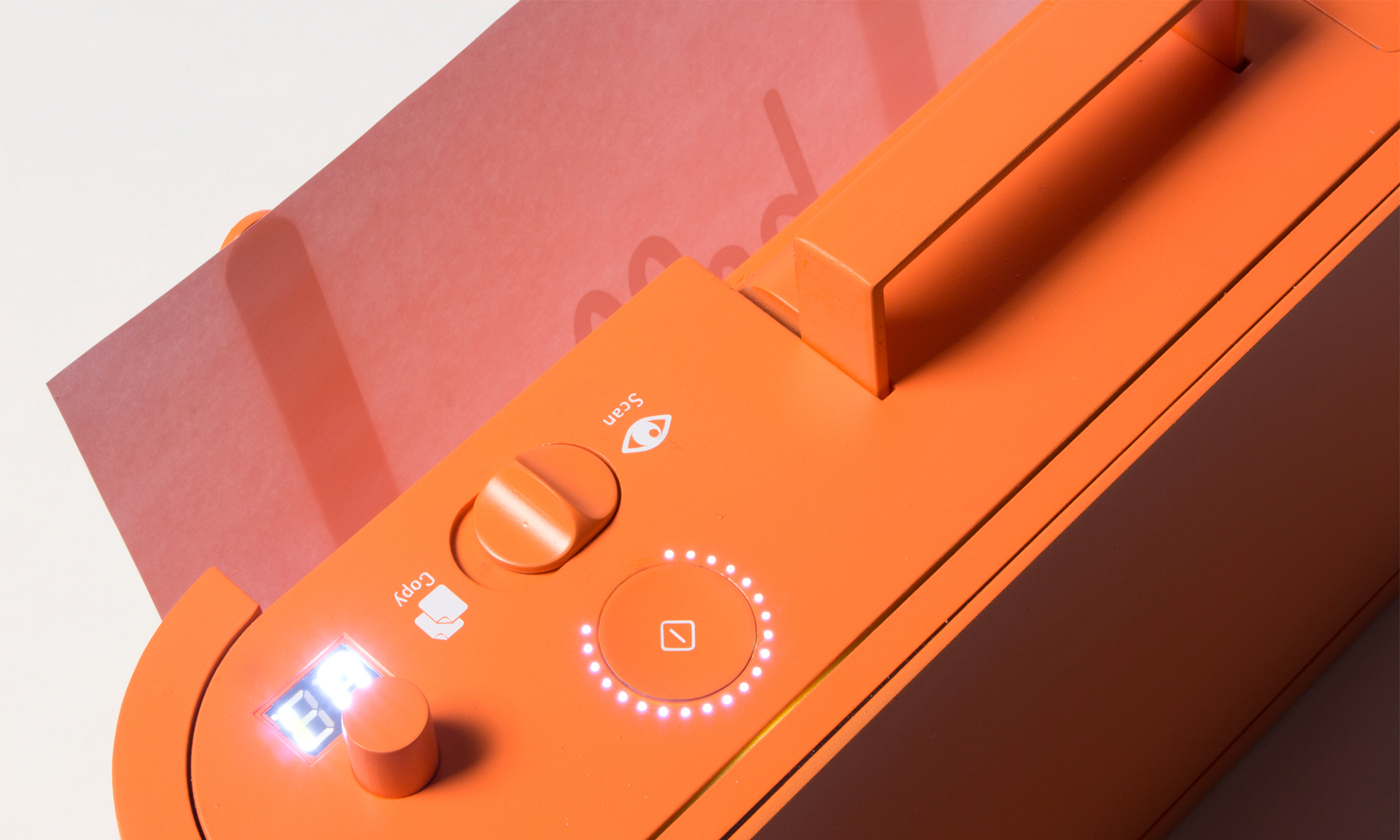
The revised design makes it more compact, space-saving and mobile. There’s just one switch to select “scan” or “copy,” the LEDs let you know the status of Paper’s ink levels, and there’s a handle on top so you can pick it up at a moment’s notice without feeling like you’re carrying all your worldly possessions like in the closing scene from Fiddler on the Roof.
THE PRINCIPLES
As a professional organizer, I was delighted to see that Rensch developed the user interface to follow the Pareto Principle: 80% of your success comes from 20% of your effort. In organizing, we usually take that to mean that 80% of the time, we wear 20% of our clothes (wearing and washing, and storing them for easy access and wearing them again), while kids play with 20% of their toys, and so on. We focus on that to show how, when we discard some subset of the 80% were rarely use or touch, we regain space without regretting the loss of what we’ve donated or tossed.
Rensch says:
This is where the paradox of technology kicks in. Devices become incredibly complicated. Microwaves, Remote Controls, TVs, Cars, Ovens, Printers, Coffee Machines – they all have features that the majority of the owners never use. That is because they don’t know how or why, and they’re not willing to spend time and energy to learn how to use something. Especially in the days of streamlined services and apps, that make life so easy without instructions or efforts, it seems ridiculous that one has to read a user’s guide to heat up some food.
Rensch applied the Pareto Principle, considering the likelihood that 80% of the time, we only use 20% of the features of office appliances like printers, copiers, and scanners, so why create bulk and disarray with more than is needed? To achieve his goal, Rensch started at the beginning: he defined a printer’s key functions, analyzed the required procedures and simplified everything until he had created an easy-to-learn, simple-to-understand, aesthetically pleasing, and minimalistic product.
THE INTERNET OF THINGS…USED BY REGULAR PEOPLE
Rensch designed his Paper printer/scanner/copier as part of his graduate thesis Interacting with Things, which looked at how machines can be used more intuitively, and he asked three basic questions:
- Is it possible to transfer the quality of a digital user experience to an everyday object?
- Can we use physical feel to improve digital experiences?
- Are we able to make the information and the opportunities of the internet more tangible and experience them in physical things?
Then, he applied his concepts to three designs: Paper, PostPoster (an interactive graphical poster that uses a specialized conductive paint to generate sounds), and Musikbox 1188 and its app, a Bluetooth loudspeaker that lets you listen to music from your friend’s phone, tablet, or computer even if your friend (and her gadgets) are on the other side of the world.
The ever-expanding concept of the Internet of Things, upon which Rensch’s work is predicated, is key to understanding his designs. The Internet of Things, or IoT, is like where your Nest programmable thermostat or your “fridge of the future” can talk to your phone or computer and to one another to make your life more enjoyable. The thermostat can increase the A/C on a hot day so it’s just perfect when you walk in the door, but also send you an alert if your furnace is acting weird and the pipes might burst in winter. Meanwhile, your fridge can detect when you’re low on milk, your ingredients are about to expire, or you’re lacking what you need for the recipe you programmed in for Saturday — and then auto-order more groceries!
While most designers are eager for this Rise of the Machines and are welcoming our new programmable toaster overlords, the rare detractors are usually concerned with the security of IoT. Rensch, however, is more concerned about the humanity of it (per his thesis):
It’s the age of the smartphones. Like no other technology in the recent decades, they become part of our lives. Services offered in the internet allow us to do really complex stuff in no time, with no effort and in pleasant ways, for instant [sic] sell a bike to someone, find directions in foreign places and do business on the go. Static information that was bound in books and maps is now fluid and accessible from everywhere at everytime.
But these developments also must be viewed critically.
Even these miracle-machines have their down-sides. We all know people who are sunken into their Smartphone screens, absorbed by virtual worlds. And from time to time, we’ve been that person. All the Apps and Services are good and useful on their own, but to take care of everything only with our phones is distracting us from the outside world and our environment. Interactions with screens demand an enormous amount of concentration and leave the human motor functions and haptics unused.
Paper looks a lot like a throw-back to the days of mechanical buttons and dials, making use of the user’s fine motor skills to tune in the desired solution with basic physical controls and verify them with simple light signals. In that way, it reminded me of an old radio, where you turned the dial and when you hit upon an AM or FM station clearly, the tiny light would shine brightly.
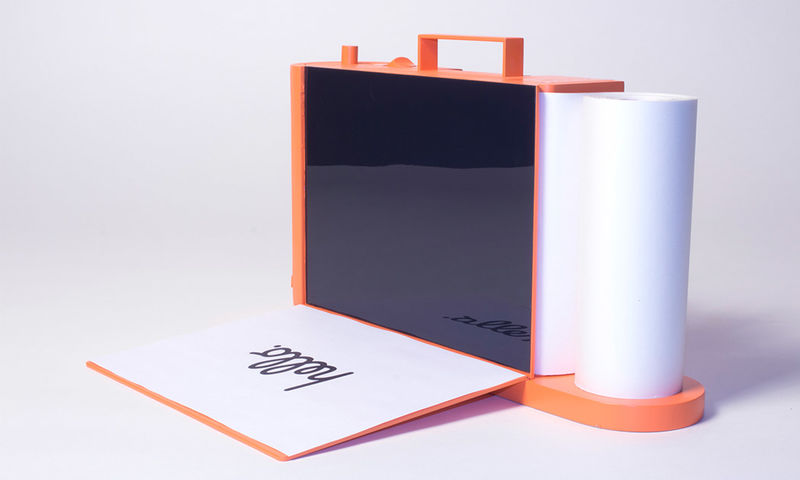
Paper could work manually, only, but Rensch designed it to operate as an Internet of Things device — but better. According to Rensch, the device is meant to be seen as more of an “aesthetically pleasing creative tool that brings together the analog and digital worlds for transferring content from one to the other.”
Paper hasn’t left the virtual world behind. It can be operated via its own app on your mobile device or at a website in your computer’s browser.
To really appreciate the experience of using Paper, which to me, harkens back to my first experience with the design of Apple products, check out the video.
IN THE REAL WORLD
Of course, and I’m sure you expected this, there is sad news for those of us eager to try Paper out. You see, Paper is not-ready-for-prime-time because of the economics of the Office Supply Industrial Complex. Your frustrating HP or Epson is frustrating because it’s cheap, and it’s cheap because the companies know they can hook you with the low-price printer and weigh you down with printer ink made only for your style of printer, forcing you to come back time and again for a cyan you don’t really want or need.
Without Big Ink money to subsidize the development, manufacturing, and distribution of Rensch’s Paper, this pretty little thing won’t be on desks (or kitchen counters) anytime soon. We can only hope that the big guys will take Rensch’s approach under advisement, and give us a printer/scanner/copier we’d actually enjoy using.



Follow Me