Archive for ‘General’ Category
Dewey Defeats Truman On The Moon: The Truth About Collecting Newspapers
Do you run out the day after Election Day or immediately following huge Dow-Jones fluctuations to pick up multiple copies of the newspaper? Do you imagine your great, great grandchildren getting rich from the proceeds of your well-planned newspaper acquisitions?Think again!
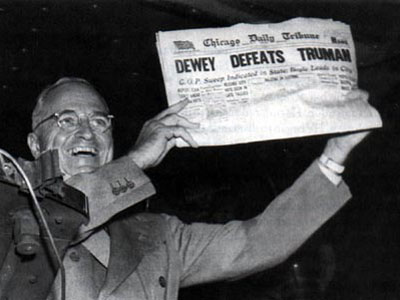
Some events naturally bring to mind famous newspaper front pages. For example, on Election Day, the iconic Chicago Daily Tribune headline “DEWEY DEFEATS TRUMAN” provides a superb “nyah nyah” to arrogant pollsters:
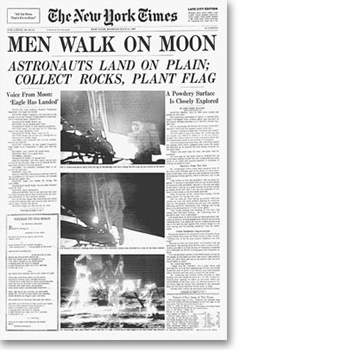
Nobody can forget the day that mankind took that giant leap into the future. In my baby trunk in my parents’ basement in Buffalo, NY, there’s a wrinkled, slightly-yellowed copy of the (then-entitled) Buffalo Evening News reporting on the very same topic shown in The New York Times:
And of course, you music lovers might have kept copies of the papers the day the music died: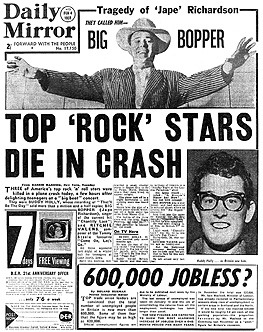 Even if for you that wasn’t Buddy Holly, Ritchie Valenz and the Big Bopper, but Elvis, or John Lennon or Kurt Cobain, that “bad news on the doorstep” probably made you shiver, whatever time of the year you read the paper.
And in my own life, I recall my mom painstakingly saving multiple copies of Buffalo Evening News columnist Karen Brady’s piece on my third grade class. A mini-feminist, I’d ended my letter imploring Ms. Brady to speak to Miss Minklein’s 3rd grade Writer’s Club by saying it had been a campaign promise that I’d get a real writer to speak to our class. And I’d P.S.ed that I had beaten out boys to attain the presidency. (How could the hip columnist turn that down?)
In the case of the first three papers, while the stories had (and still have) great historical significance, the newspapers themselves have little financial value. Our moon landing issue, complete with news stories, cartoons and grocery ads, is quaint, but is likely worth little more than pennies and certainly not in excess of the daily copy price. It might please future family members to have it, but it’s not going to allow my folks to afford a ride on the Space Shuttle.
The very reason newspaper collecting is a great hobby is that antique newspapers aren’t very expensive. According to HistoryBuff.com, even original copies of historic newspapers from the early 1800s, in perfect condition, cost around $10, and rarely more than $20. That’s great news if you like to acquire old newspapers, but hopefully it will dissuade Paper Doll readers from saving tomorrow’s election results, no matter how historical, in hopes of a big collectors’ payday. (Of course, if you just find elections fascinating, Timothy Hughes of History’s Newsstand Blog, has some advice on which post-Election Day papers might have the most historical, if not financial, significance.)
The truth is, for antique newspapers to be valuable, they must meet very specific criteria:
- Front-page coverage of major historically-significant events in either U.S. or international history.
The reason the news has more value if it’s on the front page is that the paper can be more easily displayed, and one can view the newspaper’s full name and, with truly historic events, the banner headline. Papers with local-interest only, like your town’s worst blizzard or wackiest pie-eating contest, would rarely garner interest from anyone other than your community archivists.
- Condition of a newspaper should be pristine.
My parents’ moon landing paper, all wrinkly and slightly yellowed, is of no use to any collectors. Crinkled, stained, multi-folded, laminated or just plain worn newspapers have no value.
But don’t assume that condition indicates age. Newspapers from prior to 1880 actually look newer than week-old papers due to the high rag/cotton/linen content. Kept away from sunlight, extreme heat and humidity, those old rag newspapers look new, while new newspapers, conversely, are made from newsprint, which is generally non-archival, and wear out quickly. In other words, newer papers are only a step or so up from those splinter-filled, wide-ruled sheets on which we learned to write in cursive.
- Original issues have actual value because they are more rare.
Back in the days of newsboys on street corners, newspapers put out early editions, mid-day editions, late editions, and so on. People discarded the older issues as updates came out. The very first time a publication reported a story, it was called the “First Report”, and according to HistoryBuff.com, the first paper in the United States to report on a story got the bragging reports to “First Report in the Nation”. Such papers have greater financial (if not informative) value than later editions. Novice collectors often think they possess original issues, when in fact they have special edition or anniversary reprints of original newspapers, which in fact have little or no monetary value. So, tomorrow’s city papers you’re tempted to save? They’re just not rare. (I’ll leave it to history and journalism critics to say whether they’re well done.)
- Proximity to the original event might matter, too.
A Hawaiian newspaper reporting on the bombing of Pearl Harbor or a New York City newspaper’s coverage of 9/11 has more impact than a story in a suburban publication halfway across the country of a major event.
Nowadays, newspapers generally print thousands, or hundreds of thousands, of one daily issue. Further, papers are now printed on highly acidic newsprint, rather than olden days rag that kept its like-new condition. So, the paper that thuds onto your front step too-early in the morning just won’t have monetary value.
Hopefully, this is enough to convince you that saving entire newspapers isn’t going to make you rich. Newspaper collecting may be a fun hobby, but not a lucrative one unless you are planning to become one of the world’s pre-eminent collectors. (Paper Doll readers probably don’t have that kind of spare time. As Mr. Monk and Paper Mommy both say, I could be wrong. But I don’t think so.) So, if paper clutter is your problem, perhaps this something to eliminate from your list of prospective hobby options?
Of course, if your daughter’s engagement photo is in this weekend’s paper, or your spouse’s winning pumpkin-growing entry got full-color treatment, you’re probably not thinking dollar signs but family history. While sentimental memorabilia has its place, my job as your Paper Doll is to help you save what you love without getting buried in clutter.
Next week, we’ll be talking about how to (manually and digitally) preserve personally significant newspaper clippings for posterity. Gather your clippings, and I’ll meet you back here next week.
The Paper Doll Win An Internet Password Organizer™ contest closes Wednesday (11/5/08) at Noon Eastern Time. If you haven’t already entered for your chance to win, time’s a wastin’, as they might have said in those olden-days papers! The winner won’t be profiled in any national newspapers, but will be announced right here at Paper Doll by Wednesday evening. Good luck!
Happy Halloween from Paper Doll

Have fun, whether you’re Trick-or-Treating, bobbing for apples at a party or snuggling under the covers, watching scary movies. But if you or someone you love is headed out for the spooky revelries, please pay attention to these Halloween Safety Tips.
Also, if you’re more artistically-inclined than craft-gene-free Paper Doll, you might want to take a peek at some of the neat paper crafts pointed out by our friends at Craftzine.com, including instructions for making these pumpkins from HostessWithTheMostess.com:

and How-To’s for creating some lovely, if scary, paper art from blogger Julie K in Taiwan:

Have a safe and happy Halloween!
Paper Doll Contest: Win An Internet Password Organizer™
There’s always something going on at Paper Doll.
In the past, we’ve run series on topics like setting up your family file system, preventing and recovering from identity theft, coping with lost important papers, dealing with magazine clutter and organizing your wallet (what to keep, what to toss, etc.). And, of course, we’ve covered a wide-variety of single-post paper topics, like selecting the right calendar and organizing all variety of papers, from recipes to maps.
Earlier this month, we had our first official Paper Doll product review. I reviewed the Internet Password Organizer™. Well, the folks at Innovention Lab must have been pleased with what I blogged (even my suggestions for making a second edition of the product even better), because they wrote to say they want to reward you for your readership of Paper Doll.
That’s right, three weeks into the second year of this blog, I’m running my first contest. I’m so excited, I’ll need to password-protect my glee! If you are the winner of this contest, you will get a fabulous Internet Password Organizer™ of your very own!
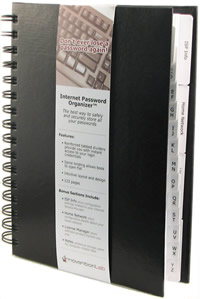
Maybe you’ve never entered a blog contest before. (That’s OK–I’ve never run one before.) Or maybe you’ve done lots and are your neighborhood’s champion blog contest winner, like The Prize-Winner of Defiance, Ohio. No matter–everyone (who follows the instructions) has a chance to win.
First, the INSTRUCTIONS:
- Reread the original post so you can be really excited about the prize you might win!
- Post a comment in THIS post thread, here. (You can still post comments in the original review’s thread, but those won’t count towards the contest.) Just scroll to the bottom of this post, and you’ll see something that looks like:

You’ll be asked for your name and your comment. You can provide feedback for our friends at Innovention Lab, the creators of Internet Password Organizer™, or you can tell me what you’d like to see discussed in future Paper Doll posts. Just share your thoughts (on Paper Doll or paper-organizing issues). - Because OnlineOrganizing.com’s Blog Central does not capture email addresses, I need a way to make sure the people posting the comments are who they say they are. (You wouldn’t want someone to pretend to be you and take your prize, would you?) So, as soon as you post your comment, copy it into an email and send it to me at contest at juliebestry dot com (I’m assuming all of you savvy enough to be reading Paper Doll know that this configuration is designed to keep those evil spambots at bay. Just replace “at” with an @ sign, “dot” with a period, and eliminate the blank spaces. I know you can do that!)
Be assured, your email addresses will be kept completely confidential and won’t be stockpiled or used for nefarious (or any) purposes. Once the winner has been announced and contacted, all of your email addresses will be deleted. Poof.
I figure, if you wanted me to keep your address, you’d sign up for my electronic newsletter, Best Results For Busy People: Organizing Your Modern World, where I help you save time and money, reduce stress and increase your productivity, one fabulous monthly email at a time. (Go ahead and check out the sign-up page. I’ll wait. Of course, signing up won’t improve your chances of winning this contest, but it will help you become more organized!)
Next, a few RULES AND CLARIFICATIONS:
- To ensure fairness, the winner will be selected by Paper Mommy.
- The winner will be announced on Wednesday, November 5, 2008.
- Please enter only once. You can always add as many (polite) comments to any blog posts as you like, but only your first entry here (copied to me via email) will count. Any duplicates or additions will not be counted.
- We are only able to ship the prize to addresses in the United States and Canada. Apologies to Paper Doll readers residing elsewhere; we’ll work to include you in future contest opportunities.
- Use family-friendly language, please. While Paper Doll (and Paper Mommy) are not averse to colorful language, our hosts, OnlineOrganizing.com, run a family-friendly site.
Got all that? Read (or reread) the original review, post a comment here, copy it to me at contest at juliebestry dot com and watch this space for the announcement of the winner on 11/5/08.
Finally, please spread the word about this contest. The more attention we get, the more likely vendors will want to offer up goodies for future Paper Doll contests. So spread the word on Twitter and Facebook, via text message or email–even over the telephone. Digg it, Del.icio.us it, social-bookmark-of-your-choice it. But you know how Paper Doll feels about floozies, so don’t pass notes in class or leave Post-Its for your pals.
Cyberspace-Age Cinema Pummels Paper Piles…or Does It?
In the olden days (that is, when Paper Doll was still young enough to think the olden days involved the kind of wardrobe you see on AMC’s Mad Men), going to the movies was an activity low on the paper clutter scale. If went to a play, a musical, a concert or even the circus, you were likely to get a program, a brochure, or some sort of sizable paper memorabilia.
But the movies? Even if you were the sort of person who became so sentimentally attached to the experience (first date? baby’s first Disney film?) and felt compelled to save the ticket stub, the tickets were relatively tiny.

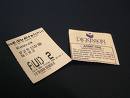 You could save many years’ worth of movie-going stubs in an envelope until your spouse “accidentally” tossed it out, or you could lovingly paste the stubs into scrapbooks. But even if you went to the movies every single week, movie-watching just didn’t produce clutter.
And then came online DVD rental. By now, most people have experienced Netflix (or the similar Blockbuster Online) and the nifty little snip-slide-view-slide-rip-fold-seal-mail ritual of the specialized envelopes. The idea is brilliant: rent movies and return them with minimal effort and no charge for postage. It was especially intriguing for people who used to rent videos but forgot to return them, racking up huge late fees, as well as for those who made lists of the movies they wanted to see and then forgot to take the lists to the store.
This modern era of movie watching has eliminated late fees and lost movie lists. Once you set up an account, you create a queue, your laundry list of movie (and TV series) titles you want to rent. You can easily add, remove or change the order of the items in your queue. The top movie on your list is sent automatically, and once you return a DVD, the next title is sent. No late fees or fines for pokey viewers or forgetful consumers. But the new solution, as we’ll soon see, has created some new problems.
REMEMBERING TO RETURN
Forgetting to return a DVD doesn’t cost money in terms of fines, but that doesn’t mean you’ll get your money’s worth. Are you an Absent-Minded Professor? If your problem is remembering to return DVDs, so you’ve not only got paper clutter but unreturned DVD clutter, cyberspace-age help is available.
FeedFlix.com is your own personal Jeeves (DVD-reminder service)–plus, it’s free! Sure, we’ve talked about cool online reminder services before, but this one works along with your Netflix account with minimal initial effort on your part. You probably didn’t even know your Netflix queue had an RSS feed (yes! just like a blog), but it does, and that’s the key to making sure you get the biggest bang for your movie buck:
- Visit http://www.netflix.com/rss to identify your personal queue’s RSS feed code. (Don’t worry if you don’t know HTML from AARP–you’ll merely have to cut and paste.)
- Enter it in the box that looks like this:

- Verify your login name and password.
Within minutes, FeedFlix is busy calculating all sorts of interesting info about your Netflix account. For example, given your monthly plan and your speed (or lack thereof) in returning movies), it will identify your relative rental cost per movie. For a sample:
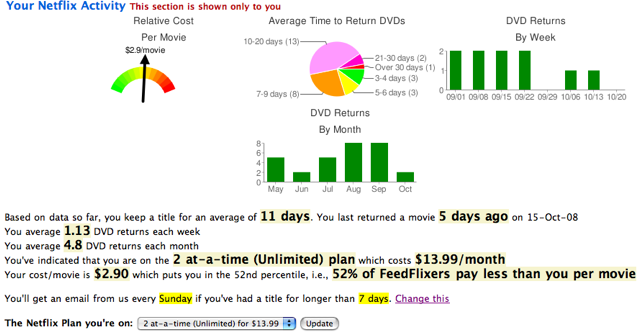
So, if FeedFlix finds that you’re like Uncle Joe (he’s movin’ kinda slow), it’s a cue to either watch and return your movies more quickly or change your rental plan to fewer movies per month. Why spend to three movies at a time (the standard) if it takes you two weeks to watch and return a DVD?
Even better, FeedFlix has account alerts, which you can set for the day of the week you prefer, to tell you if you’ve kept a movie too long to make it worth your monthly cost. (You can pick 3, 5, 7, 10 or 15 days.) So, Netflix (for which you pay) can be monitored by FeedFlix (which is free) to make sure you get your money’s worth…and eliminate paper and DVD clutter from around your home. It also helps save those little green pieces of paper we all love.
By the way, if you’re one of those developer/programmer types who lives to make apps (applications, for the rest of us Luddites) for Facebook and the iPhone, Netflix has made it possible for you to create your own Netflix-based funky-cool applications, just like FeedFlix. Just don’t expect Paper Doll to understand any of them.
NOW WHAT WAS THE NAME OF THAT MOVIE?
So, let’s backtrack. Modern movie watching helps us save money and reduce clutter when it comes to getting movies returned. But what about paper clutter created when we try to find movies?
Have you ever tried on a heavy winter coat for the first time all season, only to put your hand in your pocket and pull out a crinkled ATM receipt or sticky note bearing the scribbled title of the movie you wanted to see all last summer?
As long as you can remember the title (or the stars or the genre or any other searchable attribute) long enough to get to your your computer or mobile device and the movie to your queue, you’re all set. No more wandering video store aisles in search of a match for a vaguely recalled movie promo. No more messy lists or forgotten titles. The 21st century rocks!
For reference, Paper Doll is not assessing the relative merits of Netflix vs. Blockbuster Online. I admit that I’m a Netflix customer; however, I do see the advantage of Blockbuster Online’s Total Access, which allows you to return movies rented online at actual stores (assuming you still have a brick and mortar video store in your area) and get a new DVD. For those who have a burning need to see a particular flick right this minute, that’s an advantage.
Enjoyed it while it lasts. We loved Polaroid pictures, but they’re a technology of days gone by. Now, Netflix and Blockbuster Online allow on-demand viewing, bypassing the U.S. Postal Service and the need for return envelopes in the first place. (Yet another chance to reduce paper clutter!) The services have been offering PC users the option for a while, and now Mac users will be able to have Netflix magically beam movies into their homes, too. But until that’s widespread, let’s talk about that pesky paper clutter.
THE DVD/PAPER CLUTTER PROBLEM
OK, so you’ve got an online DVD account. You create your list or queue of the movies you want to see, and then prioritize them in some order that make sense to you. And then the movies start showing up in your mailbox:
- The envelope arrives.
- You break the seal made by the the little white dot.
- You slide the DVD sleeve out of the envelope.
- You slide the DVD out of the sleeve.
- You watch the DVD…or don’t.
- Lather, rinse, repeat.
- Eventually, you decide to return the DVD and put the DVD in the sleeve and the sleeve in the envelope. Here’s where trouble arises.
- You tear the extra (flappy) advertising page off at the perforation and you remove the plasticized paper strip covering the adhesive.
- You fold over the edge to seal the package, and give the Netflix envelope to your friendly, neighborhood postman,
 Mr. McFeely, for speedy delivery.
So what’s the problem? You still have the flappy advertising page and the plasticized paper strip. You know you should pick them up, walk them to the recycling or trash bin and get them out of you living room. You know that. But instead, you keep them. You let them pile up around your kitchen and TV room and front hall.
You know you don’t need to file the flappy page. You don’t need to shred it, either. Yes, your name and address are on the reverse side, but these are a matter of public record. So, unless you joined Witness Protection but had your old Netflix account forwarded to your new address–in which case, paper clutter probably isn’t your most serious problem–there’s no need to shred the flappy advertising page.
I wish I could tell you there’s an official professional organizer secret to throwing out these scraps, but the truth is, this one depends on self-discipline. You have to actually make the decision to get the piles of paper clutter, the flappy pages and skinny strips, to the bin. No secrets. The best I can offer are some tips:
- Open your DVD rentals when and where you open the rest of your mail.
If you’re following our game plan, as soon as the mail comes in, you’re taking the time to open each piece of mail, tossing the external envelopes, the shiny advertising copy and the unnecessary inserts.
If you’re doing this daily, tossing out flappy advertising pages easily becomes part of your ritual. Then, bills get carried to the household billpaying center, DVDs get carried to the logical home (coffee table? remote control stand? counter above the DVD player?), and so on with the rest of your mail. (This solves the flappy advertising page clutter. However, since you can’t pull the strip off the adhesive until you’re ready to mail your DVD back, the strips may still create clutter.)
- Create a ritual and schedule your activities.
To get yourself to return the DVD in the first place, you need to encourage yourself to pack up your shipment. If paper clutter is generally an issue anyway, set an alarm on your cell phone or computer for the same time every day, and make a quick sweep around the family room to pick up paper clutter, toss it and then package up your DVDs.
- Put a trash can or recycling bin in the TV viewing area.
The more convenient an item’s home is, the more quickly and easily it’s put away. If the flappy advertising page and the plasticized paper strip have a home in the trash, keep the trash can close at hand.
- Give up on organizing and trade order for art.
I know, it’s almost sacrilegious for Paper Doll to turn people away from organizing, but there are just such adorable alternatives. So, at least for today, reflect on occasionally skipping the step of tossing or recycling the flappy advertising pages. Make the world a goofier, more beautiful place by following the step-by-step guidance of NetflixOrigami.com.
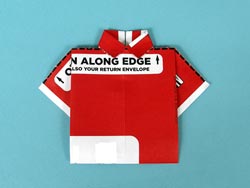
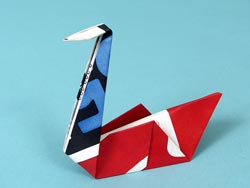
- And finally, be glad Netflix has evolved, and take a gander at this slide show of how Netflix’s DVD packaging has changed since 1999. Without this evolution, your home would be more cluttered and our environment would be less green.
It’s a beautiful day. Go watch a movie!
Groucho Told Me “Say the Secret Word” To Win Access To My Sites (Password Talk)
 On the old television show, You Bet Your Life, Groucho Marx would encourage contestants to “say the secret word” and the audience would watch with baited breath to see if the prize-winning word would be uttered. If so, the prize duck, complete with Groucho-glasses and mustache
  would drop from the ceiling and HURRAY, the contestant would win the prize. No magic word? No prize.
Do you ever feel like trying to remember the correct internet password is like being a contestant on a game show? If you win, you can transfer money from one account to another or post an update on your blog. If you lose, you may struggle for hours to gain access to your accounts or files. Sometimes, frustrated, the best you can hope for is to go home with a parting gift of Rice-A-Roni (the San Francisco treat).
Previously, we’ve discussed why it’s dangerous to leave your passwords on your desk and monitor. Who wanders by your office computer? Customers, vendors, consultants? Friends and family of other employees? Maintenance staff and colleagues? Who else? Can you be certain that you’re safe from corporate espionage and identity theft?
Even in a home office, where only the UPS guy and babysitter see your desk, it’s crucial to protect sensitive data from disclosure—whether that’s your own Social Security number and bank data or your clients’ proprietary information. The more clutter in your desktop environment, the harder it is to know when something is missing or if prying eyes have settled on them.
The same is true if you’ve got a mini Post-It taped to your laptop. Turn away from your screen for a moment to get a napkin to wipe up the coffee this random guy at Starbucks just spilled and…YIKES! Random Guy’s partner-in-crime just made off with your laptop, passwords, identity and financial future!
If you’re a long-time Paper Doll reader, you know how I bemoan floozies. Well, having your login name and password on an accessible, visible (albeit tiny) piece of paper is a disaster waiting to happen. In a future post, we’ll review the advantages and disadvantages of various paper and digital alternatives to floozies and undependable memories, but today, I have something special to share.
Back when we were talking about identity theft, I said:
Well, the folks at Innovention Lab have done my cheat sheet one better with the Internet Password Organizer™. Now, you don’t need to encode your passwords (though you still could do so) because your passwords, though accessible, are no longer visible to every Groucho, Harpo and Zeppo.
The Internet Password Organizer™, upon cursory examination, looks like any ordinary address book. The 5.5″ x 8″ covers are made of marbled, black paperboard, firm to the touch and likely to survive multiple drops and dings. The binding is double-loop or Wire-O rather than the more common but less hardy comb or coil-style binding, so you don’t have to worry about the binding unraveling. The binding makes it easy to open the book and lay it flat to add new entries.
From most angles, it could easily pass for a personal journal or diary. So, unless a thief wants to know about your latest crush, the Internet Password Organizer™ is unlikely to inspire any curiosity, whether you keep it on your reference bookshelf, on your desk or locked in a drawer. (Note: The narrow label wrapper you see above simply slides off, leaving no indication of the contents.)
There are 13 tabbed dividers with the alphabet pairings (AB, CD, EF, etc.) on both sides, a boon to lefties (or anyone writing in Hebrew)! Each individual page provides the opportunity to list the login information (web page name, username, password and ample room for comments/notes) for five sites.
The Internet Password Organizer™ is sold online its own website, at OnlineOrganizing.com, Amazon.com and other retailers for $19.99.
The Extras
Innovention Lab would have a fine product with just the basics, but the Bonus Sections give the Organizer a chance to shine because they remembered what we always forget. Click the links to see the page layouts:
- ISP (Internet Service Provider) Info–Be honest, in an emergency, what’s the chance that you could find the notes from when you first switched ISPs? The Organizer provides a gentle nudge to collect and record info about your network settings, server information and technical support contacts, with prompts for all the details you just know you’d otherwise have missed.
- Home Network Configuraton Info–I won’t steal Innovention Lab’s thunder. Suffice it to say they remembered all the things you need to know to configure your home network and keep your modem, router, networks and wireless settings from going kafflouie, or to reconfigure after you’ve become a kafflouie victim.
- License Manager–You know how impossible it is to get technical support for software issues if you can’t prove you are the lawful license-holder. Again, the Organizer rocks with ample space for logging all the software data that keeps you sane, safe and happy.
- Notes–They even added a notes section, because there are always procedures and protocols for fixing problems that pop up just infrequently enough that you forget what to do. The Internet Password Organizer™ saves you from wasting valuable timing calling tech support (or bruising your ego, calling a tech-savvy ex).
What Paper Doll liked:
- The simplicity of the design. Discretion may be the better part of value, but it’s the be-all and end-all of internet security. Nothing about the design calls attention to it as a technical security tool. It’s a blunt-cut bob. A beige four-door sedan. An American cheese sandwich. The design lets the Internet Password Organizer™ hide in plain sight.
- The ease of use. The promotional material notes the “intuitive layout and design”, and one cannot argue. A seven year-old could understand how and where to record essential data.
What Paper Doll loved:
- It’s low-tech–there’s no learning curve whatsoever. You, your kids and Great-Grandma Gert can all start using the Internet Password Organizer™ without having to read a manual, download any software or firmware, or create a password for your passwords!
- The bonus features. Any Hello Kitty address book could be reconfigured for recording URLs and passwords, but the bonus section serves in lieu of your own professional organizer for reminding you which technical information you need to gather and preserve. A+ to Innovention Lab for doing the thinking for us, especially for those of us who don’t know a WAN from a LAN from a sodapop can, or a subnet mask from a Halloween mask.
A few (minor) drawbacks:
You can’t really travel with your Internet Password Organizer™, or you’ll dramatically increase your risk of loss . After all, keeping both your laptop and secret passwords in the one bag carry-on bag means that if a thief gets one, he gets everything. However, this would be a problem with any non-technical security protocol. In future posts, we’ll talk about high tech gizmos that protect access with thumb prints or generate new umbrella password keys every few minutes. However, with added technology comes added costs, while the Internet Password Organizer™ is priced conservatively.
It’s not expandable. You get 5 web sites per page, with room for entries on the front and back of every page. Each divider tab represents 2 letters of the alphabet, so behind each tab, you have room for 40 passwords. For the typical user, this should be more than adequate, but power users might welcome an upgrade. Perhaps someday an Internet Password Organizer™ version 2.0 could include double the number of pages, or small binder rings instead of spiral binding to allow for pages to be added.
Two suggestions for improvement:
- The first page bears the name Internet Password Organizer™, and the reverse side of that page says the same, along with providing a place to provide your name, phone number and email address if the book is found.
On the one hand, I applaud Innovention Lab for putting this data on the reverse of the front page so that someone who opens the book and is inclined to use it will not immediately notice he/she has access to even more personal information. On the other hand, I’d love to see a false front page added without the product’s name. (Perhaps it could just say Innovention Lab?) Then again, perhaps reviewing this product has made me a little too much of a paranoid Agent 005 (License to File).
- A special section for web site owners would be great, or perhaps this could be a new line extension for Innovention Lab altogether.
As more and more of us have our own web sites and blogs, we’re acquiring even more passwords for managing our sites’ control panels and maintaining our IP addresses and domain registrations. There’s no reason the existing sections of the Organizer can’t suffice, but a whole new section (perhaps as part of a deluxe version) would probably sell like hotcakes to all of us who are slowly growing our online empires.
The Bottom Line:
The product promises it’s “the best way to safely and securely store all your passwords”. With a deceptively simple design and no fanfare, it helps you protect your online privacy and manage your computer discretely, cost-effectively and simply. If only our computers behaved so well!
At the risk of sounding like a politician, Paper Doll approves of Innovention Lab’s Internet Password Organizer™. (And that’s the secret word!)



Follow Me