Archive for ‘General’ Category
Going Paperless?
Going paperless? What?!! Has Paper Doll lost the faith with organizing paper?
Not at all. The truth is that keeping your paper organized sometimes means organizing it right out of dead-tree form and up into the ether. But the process by which you figure out how to take yourself from overwhelmed by paper to secure in your fluffy white cloud needs to be carefully considered.
A few months back, Paper Doll and my esteemed colleague Erin Doland of Unclutterer were interviewed for the January 2014 issue of Kiplinger’s Personal Finance Magazine. It’s on newsstands now — check out page 77 for The Lowdown: What You Need to Know About Going Paperless.
 The article covers some essential steps to taming the paper monster, including decreasing the influx of paper at the source. It also touches on the ins and outs of scanning, shredding (as we covered in Shredding the Documents: Finding Your Shredding Solution), backing up your electronic documents, and developing a plan for digital receipt management apps and tools.
Of course, you know that Paper Doll would never advise eschewing paper altogether, and so I talked about discernting the difference between what can be digitized and what you need safeguarded in paper form. (Because you loyal readers know there are lots of VIP documents and essential papers for which you need those raised, bumpy seals for everything to be kosher.)
If you’re buried under paper and snow, and can’t get out to buy your own copy of Kiplinger’s, the article was also picked up by the Chicago Tribune, under the title, Spending: What You Need To Know About Going Paperless. Check it out!
Get Your Head In the (Right) Cloud
The word of the decade seems to be “cloud” and it has nothing to do with global climate change. There are numerous cloud options for storing documents and your other digital goodies. For backing up specific files, solutions range from simpler storage options (like Google Drive and Amazon’s Cloud Drive and S3), to more robust alternatives (like iCloud, Dropbox, SugarSync, SkyDrive and Box), which allow files to securely sync across devices and live simultaneously in the cloud and locally.
If you’re trying to get out of the pile of papers and get your head in the cloud, it can be hard to make sense of competing storage options. Security, ease of collaboration, user experience…these and other features and functions are all pretty hard to detect from reading the glossy marketing on a company’s web site.

Managing Editor Holly Regan and her peeps over over at Software Advice Test Labs have parted the clouds and let a little sun shine on the issue. As you’re looking to put some data points into the mix, Software Advice serves up a plethora of vivid answers that can help you figure out whether Box or Dropbox might be the better choice for your family, your project, your small business or your big, impressive operations.
Software Advice compares apples to apples with a straightforward, if occasionally cheeky, visually appealing approach. The graphics are colorful, clear and easy to understand. For a sneak peek:
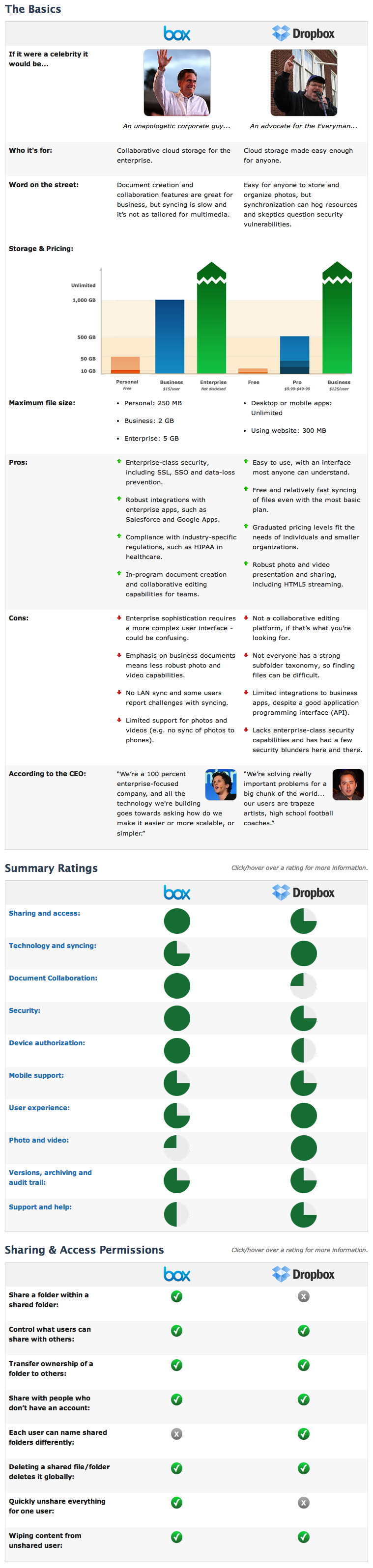
Beyond the features covered in the graphic above, Software Advice also looked at:
Technology & Syncing — LAN and free syncing, application integration, API
Document Collaboration — Creating and edit documents in-program, simultaneous collaboration (which I recently, and sadly, learned that Dropbox can’t do), downloading documents created in-program, and collaborating with outside users
Security — Single sign-on (SSO), two-factor authentication, HIPAA compliance, multiple backup data centers, password-protected documents and folders…and a whole lot more
Device Authorization — Viewing, controlling, remotely disconnecting, linking accounts to specific devices and more
Mobile Support — For example, did you know Dropbox doesn’t play nicely with Blackberry Playbook, while Box isn’t so friendly with Kindle Fire? Their review tells you everything you could want to know about what you can do with Box and Dropbox on your preferred device, from storing files locally and downloading them, to viewing offline and inviting collaborators, to streaming video and beyond.
User Experience — They really went beyond expectations with in-depth reviews of the user experience, providing screen shorts for everything from the home screen, to drag-and-drop vs. one-click uploading, to navigation. They even talk about common glitches.
Photo and Video — From photo navigation to video streaming, they cover all the bases.
Versions, Archiving and Audit Trail — Want to save past versions? Need to know if extra versions will count against your storage quota? They hit that.
Support and Help — Email, phone and web self-service, because when you want help, you want it the way you can understand it, right?
The Corporate Stuff — Paper Doll doesn’t care how many total users in a customer base or the valuation of a company, but I suppose these features help determine how long a company will be around to take care of your information.
So, head over to Software Advice, and for all of these charts, just click over any given rating to get more detailed information.
Now, if only Software Advice would help out the Affordable Care Act web site and do a detailed comparison of all the health insurance plans, with and without subsidies, by state, this could be a favorite go-to tech website. As it is, this is a nifty offering for helping people figure out whether Box or Dropbox may offer a fluffy place to lay their heads.
Think Outside the (Storage) Box
Do you own three staplers but can never find one that works? Are you always searching for the three-hole punch? There’s a science to arranging your work tools so that you can find exactly what you seek. Start with three questions:
Why are you keeping it?
Uncertainty is often the driving force behind holding on to outdated gadgets or tools that are awkward to use. If you haven’t used it, don’t know how to use it, or could easily use a less spiffy alternative, donate or toss it. (Of course, longtime readers of Paper Doll know that uncertainty is the reason we hold on to papers, notes and formal documents, too, which is why it’s so important to have a good records retention schedule to guide the process.)
Who needs access to it?
In a home-based office, your storage system only needs to satisfy you, but in a communal office environment, territorial disputes abound. Reduce perceived inequities by selecting a neutral storage location that gives everyone equal access without cramping anyone’s workspace.
Office Space, @20th Century Fox
Also consider who should NOT have access to certain stored items. Personnel records, proprietary files, and other sensitive data should be stored in a location with controlled access, by key, combination lock, or password. For home offices, a lockable filing drawer can keep office supplies from becoming school supplies.
How often will you need it?
Frequency of access is inversely proportional to the distance between you and your storage. In other words…
Limit what you keep on your desktop to tools you access frequently throughout the day. Resources you use less often (have you really used that gigantic dispenser of Scotch® tape this month?) should be tucked away, sorted by category and separated by drawer dividers. (Rubbermaid has some nice, basic modular dividers.) Embrace creativity, but emphasize efficiency over form. An Elvis paperclip dispenser may be fun, but if it spills clips across the desk each time you use it, let it go.
Keep only a usable number of supplies at your desk to minimize clutter and maximize efficiency. You may instinctively hoard pens or Post-It® Notes out of fear being caught short, but it’s more efficient to “go shopping” at your private office supply store when you actually need something.
Create a main storage area for your business or home office, with everything from paper to toner, burnable discs to those scary looking devices for adding spiral binding to your presentations. Group related items together, so that all writing implements or inks, or all paper, copier, and printer supplies, are kept together. Keep the most-often accessed supplies at eye-level, and use shallow bins or dishpans to corral loose items. In an office without a lot of horizontal space, consider hanging clear shoe organizers or something like Christy Designs’ Simply Stashed, which works just as neatly in a workplace environment as it does at home.
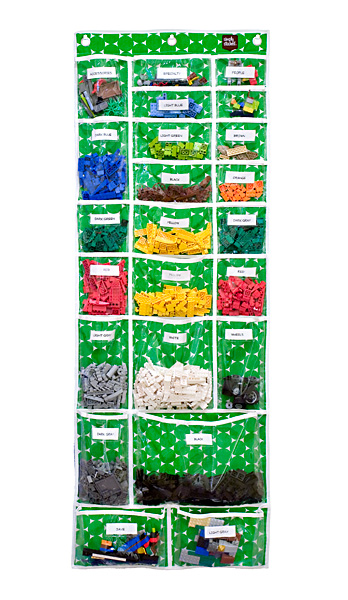
Attach labels to the edges of shelves to make it easier to locate items or identify when supplies are out of place or running low.
In large offices, post a laminated master inventory supply list, including brands and vendor product codes, on the supply cabinet door. For home offices, keep a running list on your legal pad or favorite shopping app.
Finally, no matter how powerful the siren song of the office supply stores may be, don’t buy solutions for problems you don’t even have. It’s an invitation for chaos and clutter.
The above post contains material excerpted from my forthcoming book, 57 Secrets for Organizing Your Small Business, in the 57 Secrets series from Logical Expressions, Inc.
Organize Yourself for New Vistas

This was my view of the mountains and the labyrinth on my last day at Red Mountain Resort near St. George, Utah, where I spent my vacation last week.
“Adventure” resorts aren’t really Paper Doll‘s thing. I am not much for hiking, and “out” is not one of my favorite doors.
However, taking the better part of a week away in a completely different environment was eye-opening. I challenged myself — multiple exercise classes each day, getting up early, eating *vegetables* — and I also gave myself space — away from my computer, my client work, my committee projects, and the frustrating news stories of the day.
I’d been running on empty for a while, rushing to get things done, and get them done well and quickly. I needed to put a project away. But productivity isn’t just about getting things done quickly, just as organizing isn’t just about putting things away. The goals are to do the right things efficiently, and store only the things that are needed, and only where their accessibility is made easy. But that can take inspiration, motivation and clarity, elements we all occasionally (and sorely) lack.
I didn’t quite know it at first, but I needed a break. That might seem like a strange thing to say in my first post back after taking the summer off, but I spent the months finishing my upcoming book, 57 Secrets for Organizing Your Small Business, which the publisher informed me this morning was in the copy-editing stage and soon to be moving on to the layout stage. There were days this summer when I felt permanently welded to my desk chair. I’m not too proud to admit that there were floozies fluttering in my wake when I’d pace to try to find the right words. And poor Paper Mommy heard a lot of “I’d love to talk but I’ve got to finish this chapter…” By the time I turned in the manuscript earlier this month, my posture was wrecked and my brain was mush. (Apparently, even professional organizers fail to take their own advice sometimes.) I needed a break.
Taking a break can be scary for many of us. What if everyone realizes they’re getting along fine without you? What if you can’t get back into the work groove when you return? What if…
But no matter which mental hecklers try to boo you off the stage of your life, the truth is that just as we need sleep to recuperate from the day, we need vacations, weekends off and free time in each day to recharge our batteries. Whether it’s working out (or snuggling in), we need time to explore new vistas and get out of our own heads. In advertising page layout, it’s called white space and in organizing our schedules, we call it buffer time. We professional organizers advise our clients to fill filing cabinets and bookshelves and closets and drawers no more than 80% full; we need space to grow.
As I relearned on my vacation, sometimes, the best way to be organized and productive is to stand still and breathe deeply. Give yourself time. Grant yourself space. I did, and now I’m ready for adventure!
Organized Once Again: Your Paper Doll Archive Is Back!
Dear Paper Doll readers:
Thank you so much for your loyalty and patience as we’ve been striving to create this new home for the Paper Doll blog after the unexpected closure of OnlineOrganizing.com. Your support as new posts have launched is so gratifying — comments, emails, and even a few phone calls have provided a delightful re-entry after too many weeks away from blogging.
As you know, we’ve been carefully nurturing all of those gently-used classic posts, keeping them from inclement weather and nibbling creatures, safe in the vault, guarded by Paper Mommy, George Clooney and a representative selling Coffee Crisp candy bars. But now it’s time to blast the doors off this baby!
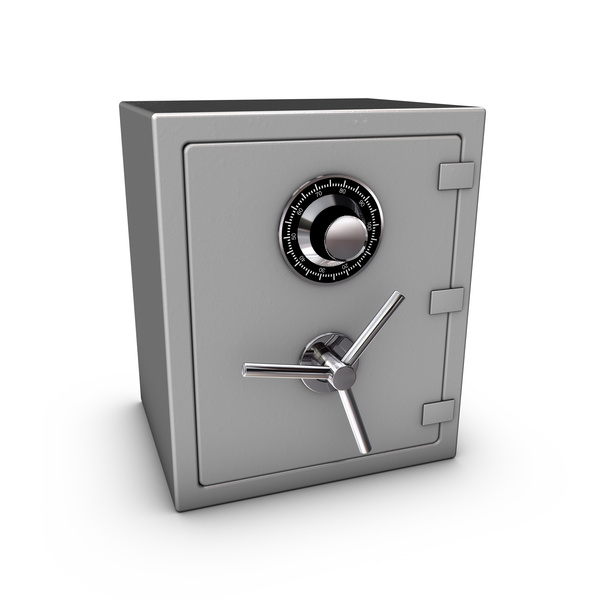
As of this week, almost the entire 5 1/2 year archive of Paper Doll posts has been resurrected — and they’re all ready for you to peruse. The search engine spiders are still in the process of indexing those posts at their new homes, so it might be a bit before you can Google something specific, but an on-site search box for finding specific tags is in the works.
A few caveats: Because all of the links referencing old OnlineOrganizing.com URLs (that is, links from one old post harkening back to an even older post) are linked to a black hole, it’s going to be necessary to manually re-do any pre-2013 internal links. That will roll out over time. (Of course, if you’re looking for something to do over the holiday weekend, you could just reread the entire archive for kicks! You’ll feel so much more organized!)
Occasionally on the really old posts, fonts may suddenly shrink or grow. If you see something completely wacky, please send me feedback. I want the blog to be quirky, but in a Zooey Deschanel manner, not in an Urkle kind of way.
Also, our IT team wasn’t able to transfer individual comments on old posts. Again, we may be able to manually enter them, but it’s not going to happen overnight. If you once made a brilliant comment about the content of a post, here’s your chance to share your genius anew! Comment! Reply! Opine!
Please feel free to share these “classic” Paper Doll posts on Twitter, Facebook, Pinterest and wherever else you tell people about funny cat videos and what you had for lunch…and, y’know, how to save time and money, reduce your stress and increase your productivity through organizing your paper and your life.
Love,
Paper Doll



Follow Me