Paper Doll
Wait, This Mail Is For the Other Guy!
A few weeks ago, we talked about what happens when you start a new job and inherit the piles of papers that belong to “the other guy”, the previous occupant of the desk or office. That post resulted in lots of emails from people who had suffered with trying to make sense of what could be purged and what was important.
Others wanted to know what do to with the mail that comes for a previous occupant. It can be hard enough to deal with our own junk mail–as we’ve discussed before. What can (or should) you do about mail meant for someone else?
How you deal with mail not meant for you depends on whose mail it is, what kind of mail is being delivered and how helpful you care to be. To start, when/why might you get mail meant for someone other than yourself?
- You’ve bought a new home but you keep getting bills, letters, holiday cards and dental appointment notes for the former owners.
- You’ve rented a new apartment, but the previous renter’s subscriptions to Inappropriately Named Body Parts Monthly or Political Stands You’d Rather Not Take Gazette keep coming to your door.
- You asked your previous spouse or significant other to remove him/herself from your place of residence. You’ll recall this is what happened to Felix Unger. (Go on and click…you know you want to hum that theme song!)
- Your child has graduated and is no longer using your home as a permanent residence.
- The landlord or owner of your rented home is receiving junk mail, legal notices, or foreclosure warnings. (Eek!)
- You’ve purchased a lake house and are receiving letters sent from the future from people who sound suspiciously like Keanu Reeves and Sandra Bullock.
Your next action depends on what kind of mail is showing up in your mailbox.
1) To stop receiving general junk mail send to the previous owner or resident, you can use the suggestions previously posted at Out of the Mouths of Moms: On Paper You Don’t Want.
Send a postcard or letter to the Direct Marketing Association:
Mail Preference Service
Direct Marketing Association
PO Box 643
Carmel, NY 15012-0643
Specify that you’re requesting that they “Please activate the mail preference service” to eliminate mail, and then include the name (if applicable), full street address (including apartment or suite number), city, state, and zip code (with four-digit extension, if possible) for the previous resident and the applicable address.
If you’ve taken over an apartment belonging to college students  (or, perhaps, a long line of college students dating back to the Watergate era), you’ll have to send individual cards or letters for each named person. (Understandably, the Direct Marketing Association isn’t keen on dropping lucrative names from their rolls, so they’re less likely to respond favorably to bulk requests in one envelope.)
You may also wish to check out the Direct Marketing Association’s online service, DMAChoice, to manage the types of mail you wish (or don’t wish) to receive. (For more information on this ever-expanding service, check their Learn More: Direct Mail 101 section.)
2) To stop receiving First Class and some (but not all) bulk mail belonging to previous residents, your adult children, or former significant others, you can just fill out an official U.S. Postal Service Change of Address card. You can pick up an official form at any post office, ask your mail carrier for one or even fill it out online. (Note, in order to use the online form, you will need a valid credit card and will be charged $1.)
- If your adult child has made a temporary but “lengthy” relocation — let’s say she’ll be at college for the next nine months — you or she should fill out a temporary change of address request. Of course, if your kid is just away for summer camp or an internship, you’re better off keeping the mail and forwarding a stack (as part of a loving, delicious care package) every few weeks.
- If groups of people lived in your home before you (flatmates, college students, a different family), you will need to fill out one permanent change of address card for each unique LAST name.
If you know the forwarding address, simply fill out the form and the post office will take care of the rest.
If you don’t know the address to which a prior resident has moved, write “Moved, Left No Forwarding Address” in the space for the new address. You should sign your own name (because it would be fraudulent to do otherwise, and Paper Doll doesn’t think they’ll let you read blog posts in prison). Then write:
I know, you’re thinking “it’s just mail…”, but the legalese does require that you write “agent for the above” in order for everything to be kosher.
Then give the form to your mail carrier, so he/she has can approve it and make sure it gets entered in to U.S. Postal Service’s National Change of Address (NCOA) database.
3) If you only occasionally receive mail meant for someone else, you can just write “Return to Sender/Not At This Address”  on the outside of the envelope and drop it into any mailbox or your post office’s “misdirected/misdelivered mail” box or slot.
4) To stop receiving magazines, newspapers and other informational mail to which you are not subscribed, the above change-of-address and/or “return to sender” methods should work within a few issue periods. However, sometimes you might want a quicker response, especially if the publication something you’d prefer not to arrive at your mailbox in the first place.
The quickest way to stop general publications is to turn to the masthead of the publication and follow through to the small print to find the toll-free phone number or website for the publication’s subscription services department. Explain the situation and request that the publication no longer be sent to you. You may be asked to read some of the information from the subscription label, but you will not have to provide any personal information about yourself.
5) Sometimes, you might find the last guy’s mail icky. If you are receiving something that you consider inappropriate content, such as sexually suggestive magazines or advertising, the U.S. Postal Service will intervene so that you do not have to contact the sender yourself.
Fill out postal form #1500, which lets you choose from two postal service programs. The first forbids a particular sender from mailing any further pandering advertisement to you. The second puts you on a general postal service list of “those not wishing to receive sexually oriented advertisements through the mail”. Be aware, this may cause you to stop receiving other mail you don’t consider icky, like catalogs from Victoria’s Secret and fitness clothing retailers. It shouldn’t, but it might.
6) To deal with mail for the former occupant of your office/desk/mail drop, determine whether the mail is business or personal. For business mail, simply notify each sender of your name, title, direct extension and other pertinent details in a “Hi, just introducing myself. I’m the new guy/gal!” email/letter. If you receive personal mail for the former occupant of the desk and he/she still works in your company, you can hand-deliver it. However, if Elvis has left the building, turn his mail over to your Human Resources department to cover your legal bases.
Finally, there may be circumstances where you just want to make sure it gets where it needs to go. If you’re receiving mail that you don’t want, but are afraid redelivery may cause undue difficulties, consider these options:
- If your landlord or owners of your residence receives legal notices, call them or their legal representation within two business days of receiving the mail. This isn’t just a matter of being nice. If a bank or creditor has sent a notice of a lien or foreclosure, this could adversely impact your living situation, even if you’ve paid your rent on time. Time may be of the essence!
- If your former significant other receives a legal notice or other First Class mail at your residence, don’t just toss it out. (Paper Doll isn’t going to tell you that you shouldn’t read it. You know right from wrong.) If you don’t have an amicable relationship, arrange a transfer via email or text message, which is often less stress-inducing than a phone call. Then, send the mail (in a sealed
 kraft envelope) via mutual responsible friends/family, or, if you share custody, via whomever handles the periodic transfer of weekend custody, but do not burden your child with the responsibility of playing postmaster. At the very least, use steps #2 or #3, above, to return the mail to the original sender or have it forwarded to the rightful owner.
Whether you concentrate on karma or manners, just do the right thing. Always act First Class!
A Taxing Treasure Hunt
Have you ever been on a treasure hunt? Given a list of oddities, you and your team members are sent out into your city or neighborhood for a limited period of time, to “collect” (in fact or by digital photo) the items described. Whoever collects the complete set of listed wins the big prize. Yay! The last team to show up, cranky with one another and missing at least two items, ends up having to pay everyone else’s restaurant tab. Boo!
Well, organizing your paperwork for tax season is a lot like a treasure hunt. (Don’t roll your eyes at Paper Doll!) There’s a set list of possible items, a limited neighborhood in which the items can be found (in your mailbox, under those receipts Paper Doll encouraged you to file, at the end of a phone line with a heretofore less-than-diligent corporation, etc.), and a deadline (April 15th). The faster you find all of the necessary treasures, the sooner you earn one of two prizes, either a tax refund or more ample time to figure out how to come up with the funds to pay your taxes.
This Saturday, January 31, 2009, is the deadline by which companies and individuals are should mail most of the treasures you need. (Rumor has it some mysterious items, such as the 1099-B (Proceeds from Broker and Barter Exchange Transactions), need not be mailed until mid-February.)
Every taxpayer’s situation is different, but we’ll review the most common items you should be collecting in your treasure hunt kit (i.e., a hanging folder labeled “Tax Prep 2008) to complete your tax return.
Let’s start with the tax support paperwork sent to you from outside entities:
W-2
Not to be confused with a Federal W-4 (the form you fill out so that your employer knows how much tax to withhold) or a W-W-W-W-W-W (used only in the municipality surrounding Sesame Street), the W-2 (Wage and Tax Statement) is the form your employer gives you (and sends to the IRS) to delineate how much you were paid, and, if applicable, how much money was withheld from you and paid to the federal and/or state governments for taxes and FICA (Social Security and Medicare).
Your W-2 may also indicate other values withheld from your check, including payroll purchase of United States Savings Bonds, regular donations to the United Way, payroll purchases of stock options, etc.
There are multiple copies of the information on Form W-2. Your employers submit copy A directly to the Social Security Administration and keep copy D for their records. You get to keep copies B and C (to send with your federal tax return and keep for your records, respectively), as well as copies 1 and 2 to file with any applicable state/local tax authorities. (Don’t ask why they aren’t E and F. Paper Doll just reports these things; she doesn’t make them up.)
Your employer(s) should mail your W-2(s) by the last day of January, so if you haven’t received it by Valentine’s Day, be sure to amble down to Human Resources or place a call to them. W-2s may be given directly to you at work, or might be mailed to the address of residence you listed on your W-4. Thus, there are a few other issues you might want to consider.
- Did you change employers this year? If you had more than one job this year, be sure that you have received W-2s from each employer. If you received a promotion (or, demotion, because you were reading blogs on company time), you’ll still only receive one W-2 from each employer, not one per position.
- Did you change addresses? There’s only so much a former employer will do to track you down and give you your W-2. But remember, just because you don’t have your W-2 does not mean the IRS doesn’t know what you earned. Don’t forget about that Copy A! The government always knows!
1099
Actually, there are a whole bunch of 1099s, a veritable Alphabet Soup of versions of 1099s, to reflect the myriad types of financial transactions of which you might have been a part. Some of the more common are:
1099-MISC is what you may receive from a client/customer if you were an independent contractor (i.e., self-employed) or received any kind of miscellaneous revenue for doing work for someone else when you were not actually considered an employee. Please note that even if someone paid you for doing work as an independent contractor, they may not know they should be sending you a 1099-MISC. This is why, if you are self-employed or irregularly-employed, it’s still vital to keep track of your incoming revenue.
1099-INT reflects the interest income you receive from interest-bearing savings and checking accounts, money market bank accounts, Certificates of Deposit, and other other accounts that pay interest. This form also notes whether foreign or U.S. taxes were withheld and if there were any penalties assigned for early withdrawal from an interest-bearing account.
1099-DIV indicate the dividends or capital gains you received as an investor. (In 2008, the numbers on your 1099-DIV might seem particularly small.) You would receive this from a broker, mutual fund company or other type of investment company. Not all dividends are created equally; ask your tax professional if you have any that seem unusual or complicated.
1099s can be sneaky, hidden treasures.
Quite often, instead of sending a 1099 in a separate envelope, a bank or brokerage may include a 1099 form in the same envelope as a quarterly or end-of-year financial statement. Indeed, the 1099 for many stocks may be found at the bottom of a quarterly statement, divided only from the actual statement by a faint perforation. If the legal-sized paper was folded multiple times, the 1099 may merely be a flap, folded backward, that you might not notice. Keep your eyes open!
Some internet-only banks, like ING, often only provide 1099-INTs online. Log into your online bank account by the end of January to see if your 1099s are accessible as downloadable PDFs.
1098
In case you were wondering, 1098s are not merely 1099s with low-self-esteem. This form, the Mortgage Interest Statement, reflects the interest you paid on your mortgage, which is generally deductible on your federal taxes.
There are sub-types of 1098s. For example, you might receive a 1098-C from a charitable organization if you donated car, boat or airplane; a college might provide you with a 1098-T to indicate you paid tuition, or a financial institution might send a 1098-E to show you’ve paid student loan interest.
If you’ve stayed with this treasure hunt so far, you might be interested in a fairly lengthy list and description of all tax-related forms. (Knock yourself out.)
Correspondence
In addition to the W-2s, myriad 1099s, 1098s and more, you might have received other treasure over the course of the tax year:
- Confirmation of donations from charitable entities–These may come in the form of full letters or they may appear as small asterisked* comments at the bottom of other requests for donations. A confirmation should include the name of the qualifying charitable entity, a date (or at least a year) and a dollar amount or a description of materials, if an in-kind (non-monetary) donation was made.
- Insurance company summaries of out-of-pocket health expenditures during the prior calendar year can yield a treasure trove of information if your family’s medical expenses were high in any given year.
- Notice of gambling or lottery winnings–Yay! But be assured, even if you don’t receive the notice, the government did. Don’t think you can hide these winnings.
- Proof of payment for jury duty–Most people get less than $9/day, but since it’s reported to the government, you need to keep your records, too.
Of course, all of the above are tax paper treasures that should find their way to you with minimal effort on your part. The rest of what you’ll need to prepare your taxes will include the papers you should have been collecting all throughout the year in your tax prep folder. These would include receipts for:
Medical expenses–Be sure you’re counting only medical expenses you paid and not portions paid by the insurance company or the section on the “Explanation of Benefits” generally referred to as network savings. (That amount isn’t something you paid, or even something paid by the insurance company. It’s the amount knocked off the bill simply because you have insurance. If you were uninsured, you’d be charged more than the total paid by you and the insurance company. Oy.)
Pharmaceutical expenses–Did you know you can call or go into your pharmacy and request a printout of all pharmaceutical purchases you made for yourself or your children? Because of privacy laws, your spouse, however, may have to make a separate request.
Self-employed/small business expenses–If you own your own business, Paper Doll is sure you have a carefully-created filing system for all your business-related expenses. Right? (If not, don’t worry. We’ll be talking about this soon enough.)
Un-reimbursed employee expenses–Unfortunately, you have to itemize (i.e., not take the standard deduction) and these itemized expenses must equal 2% or more of your adjusted gross income.
Childcare-related costs–While you want to keep these records to support tax deductions, as the news stories surrounding political appointments always indicate, be sure you’re not running afoul of Nanny Tax requirements for withholding if you have an employee to care for your children. If you have a dependent in elder-care, bear these expenses in mind, as well.
The foregoing is by no means a complete treasure list, but it’s a chance to help you into the game. If you haven’t yet started on your treasure hunt, check your mailbox and recent paper piles and begin collecting what you need. Please join the game and start hunting for your tax treasures now–and i f you plan on using a tax professional to advise you and prepare your taxes, there’s not a moment to waste. The sooner you call to set up an appointment, the closer you’ll be to your own pot of gold.
Good luck!
Transferring Power…and Paper: The First Day at a New Desk
Do you have a new office?
The concept of the American inaugural process is fascinating to anyone who has studied history. Throughout most centuries, transfer of power between leaders involved one death (of the monarch) or lots of death (from the blood of war). No matter who one favors in any given election, the notion of a celebratory and bloodless transfer of power every four or eight years is remarkable…in both theory and practice.
But what about the transfer of stuff? All last week, the news reporters were talking about how, in six hours, a White House staff of 95 (the one group of people who never even get to watch the inaugural speeches and proceedings), using only two elevators, will move all of the outgoing president’s (and his family’s) belongings out while simultaneously moving all of the incoming president’s (and his family’s) belongings in…and not just in, but organized and put away. The new First Family (and every new First Family in modern times) arrives at their new home without a packing box in sight!
(Wouldn’t you love it if every household move you made could be so free of chaos?)
Paper Doll, however, has noticed that nobody ever interviews the Civil Service or administration staffs about effecting the transfer of paper, files and documents. Whenever you see the Oval Office (whether the real

or fictional  variety), any president’s desk is pretty devoid of paper clutter (though there always seem to be lots of photos and knick-knacks).
I’ve often wondered if an efficient aide whisks away any document the minute the president has ceased using it so that our Commander in Chief may request it (Mrs. Landingham?!!!) as if from a reference librarian, to ensure that nobody ever has to whisper a sing-song “Well, we were going to give everyone a $10,000 tax credit, but somebody seems to have lost the file between his desk and his curved office walls.”
So, whether you’ve just been put in charge of a country, a company or a cubicle, there are a few things you might want to do in the early days to get a handle on the paper bequeathed to you by the former occupant(s):
Don’t Complain
Don’t be quick to make assumptions about the last owner of the office. Skillfully organized files are not necessarily signs of genius (though Paper Doll likes to believe it’s so), nor do toppling piles tell you anything about the intellect of your predecessor. For all you know, the last person spent every waking hour trying to undo the clutter of her predecessor. Don’t badmouth his (or her) paper systems (or lack thereof). If anyone asks, your working quickly to get up to speed and customize the material into a system that lets you maximize everyone’s priorities. (Or create your own brand of corporate-speak.)
Create Categories
Once you’ve gone through everything, you’ll have a better sense of what you have as well as what you can toss, but start by sorting the papers and files into categories that work for you. At the beginning, think in terms of:
- Emergency contacts–Even if you have a Rolodex or computer database, there are going to be addresses and phone numbers for people you’ll be calling to beg for help in the early days. Set aside loose papers bearing that data so you can make an emergency file. Once you’ve created a list on the computer, print it out and keep it on the wall or bulletin board next to your desk.
- Administrivia–Maintain information about your staff, if you have one, handbooks and policy manuals, human resource policies, general 401(k) and other benefits information. If your interview did not make clear all of the administrative or supervisory duties you’ll have, now is the time to find out.
- (Personal) Personnel/Financial–Keep copies of blank and completed time sheets, vacation request forms, evaluation forms, expense report sheets, and purchase orders; if possible, keep your personal benefits and financial information in files at your residence rather than at work.
- Contracts–Make sure the documents you have are valid and up-to-date. Once you’ve sorted them, take notes and make a cheat sheet so you can consult the deal points (costs, schedules/delivery dates, contact numbers, etc.) at a glance. Create the information in a spreadsheet you can easily change, and keep a printout handy.
- Clients/Customers–Again, use the files to help you create a cheat sheet until you are familiar enough to chat with clients without any notes. Make sure you’re clear on who is a prospect vs. who is or was an actual client.
- Vendors or Service-Providers–Are the files complete? Up to date? If the previous occupant wasn’t diligent, you might have brochures and background on companies that are no longer in business.
- Creative or marketing–If you can sort creative work by project or type, and then in reverse chronological order by date, you’ll have a sense of the history of each project. If papers lack background information, you can sort visually, by what “seems” to match, until you can check with others.
- Computer information–Passwords, file names, network protocols all need to be sorted out and updated (See below)
- Computer manuals–Don’t clutter the prime real estate of your desk or drawers with these files. Obtain and use a small bookshelf for reference documents.
Get a Reality Check
Make a list of all the vendors, clients and/or contracts you currently have and check them against the computer records and the records of your financial department. If you have a staff, make sure the employee files (including pay data) are in a drawer you can lock.
Change the Passwords
There’s no knowing how long those Post-Its bearing passwords have been affixed to the monitor for all (from coworkers to cleaning staff) to see. Check with IT and/or your supervisor, and then change and document every internal and external password. Keep this information under lock and key.
Request Feedback
Talk to your boss, your colleagues, your assistants early in the moving-in process to make sure you haven’t made erroneous assumptions. For example, Joe’s Little Store could actually represent millions of dollars to your company, and files called “Important Stuff” could yield nothing worthy of your attention. Find out what your boss (and his assistant!) thinks are the most important clients or customers, what are the most urgent priorities (so you can search for papers related to them amid the toppling piles) what were the biggest mistakes made in the past
Get Rid of Ghosts
In other words, you need to jettison the former occupant of your desk. Seriously. You don’t need her dental appointment reminder cards, the novel she was reading, or her children’s artwork. If you’re inclined, you can put anything personal in a big kraft envelope and give it to the human resources department to transfer to the former owner. The stuff doesn’t belong to you, so deciding what to keep and toss doesn’t fall under the purview of your position. Let HR work it out.
Develop A System That Works For You
Even if it means coming in on a few Saturdays, create a filing system for your action papers and reference documents that works the way you think. The type of system is only important in that you will likely only commit to using something that makes sense for you.
You spend a third or more of your life in your office, and much of that time at your desk. Don’t you want to use that time as efficiently and as effectively as possible?
- Become a member of the Clean Desk Club and you’ll likely impress your boss, improve your productivity and reduce your stress level.
- Get a tickler file (and learn how to use it) to handle actionable papers (those that represent tasks) and start by following up on the stuff your predecessor failed to complete. The sooner you close those open loops, the sooner you can craft your office set-up to reflect the way you work best.
- Consult your supervisor, your contracts and your colleagues to make sure you know all of your upcoming deadlines, and schedule them in your planner. Work backwards from those deadlines to make sure you have all of the documents you need to get where you want to go.
Of course, if you’re the leader of the free world and are reading this for tips on how to handle the papers left by the other guy, maybe you should just forward the URL for this post to your Chief of Staff? With all due self-respect, Paper Doll thinks you may have more important things to do right now.
A Different Kind of Bankruptcy: Jettison Email Overwhelm

[Editor’s note: This post from the Paper Doll vault was originally published January 13, 2009, back when we were still using two spaces after a period. Sixteen years later, email still plagues people, so this post has been refreshed and updated as of February 2025.]
My parents once told me about a long-lost relative who, when his bank statement got too terribly out of balance, withdrew all but a small amount (estimated to cover all outstanding checks), opened a new checking account at a different bank across town, and abandoned the old one! New bank account, new check register, new sense of freedom.
That long-ago relative declared bankruptcy on his unfathomably unbalanced checking account.
We tend to think of bankruptcy as a bad thing, and certainly by the standard definition, but it’s sometimes the best of a bad set of options. When you lack the funds to pay your bills, bankruptcy is the legal option that allows people (or businesses) to liquidate their assets, create a payment plan going forward, and start fresh without the stress associated with unpayable debts.
But today, let’s look at a different kind of bankruptcy, inspired
EMAIL BANKRUPTCY
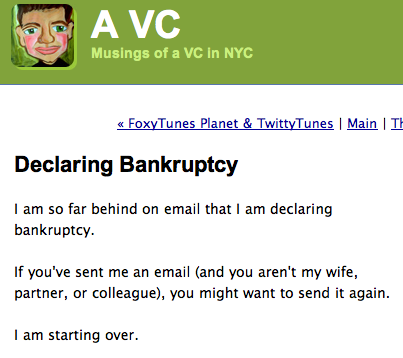
In the 21st century, that old story has new wings. For avid web surfers, the idea seemed to have started with a man named Fred Wilson, a venture capitalist. In early 2007, Wilson declared bankruptcy on his blog — email bankruptcy. He wrote, simply:
Wow.
While Wilson’s pithy post got linked and tracked and repeated all over the web (and this, in the days before social media), he wasn’t the first.
It turns out the real father of this movement might have been Stanford professor, copyright attorney and Wired columnist Lawrence Lessig, who, in 2004 sent an email to everyone in his address book, apologizing for a “lack of cyber decency” (which, I suppose, we could almost consider 21st century moral bankruptcy), and saying that if anyone was awaiting a response to an as-yet-unanswered email from him, they should reply directly to this particular email, implying all emails that had come before would be ignored.
Lessig apparently saw a declaration of email bankruptcy as the only option to allow him to repay any of his email debts — attacking the most urgent or important would be better than the hopeless and time-consuming attempt to handle them all. With this method, he’d give “creditors” with the most valid claims on his time a chance to recoup their long-awaited loses, and he’d start clean.
Certainly, this method has some appeal. Lessig and Wilson absolutely aren’t the only ones in email bankruptcy court; they’re not even the only high-profile ones. Even musician Moby (known for his high-tech & digitally-designed creations) is reported to have done it.
Although often credited to Lessig, the term email bankruptcy seems to have been coined a full decade ago by MIT Professor Sherry Turkle, and she’s been speaking on the subject for a decade, and as recently as national conferences in 2008. Apparently, the fantasy of freeing oneself from the burden of massive and multiple screens’ worth of email is a common, appealing and compelling one.
The concept for anyone who works at a desk all day is fairly shocking. But isn’t it also intriguing?
As a professional organizer, I’ve seen clients facing this dilemma, with anywhere from hundreds to thousands to tens of thousands of emails in their in-boxes haunting and taunting them. I’m sure you can empathize and see the appeal of this seemingly reckless abandon.
There are great advantages, not the least of which is that unlike financial bankruptcy, you don’t have to wait 7 years to rebuild your online reputation. However, I can’t say I’ve ever encouraged a declaration of email bankruptcy, which seems to involve three steps: alerting everyone to your situation, apologizing, and deleting everything emailed prior to this moment.
I’ve you’re thinking of email bankruptcy, Paper Doll encourages you to consider some compromise measures. Instead of complete bankruptcy, it puts (email) debts in abeyance so that you can focus on what are likely the most pressing obligations.
Peruse the following approach, which can be taken in baby steps. Sit down at your computer, where it’s easier to manage email than on your phone:
- Sort emails by date — Just click the top of the date column, no matter what platform (Gmail, Outlook, etc.) you’re using. It will reorder your emails, just like magic, and is an entirely reversible action.
- Create an email folder called “Archive” so you can move mail (without deleting anything, assuming that’s too scary a step for you).
- Drag old mail (everything from prior to last two weeks) to the Archive folder. It’s staying within your possession, you’re just moving it to a different pile. Of course, if you’ve got 50,000 emails in your inbox, this fear (and anticipating the time it might take) could be paralyzing. If that’s too overwhelming, try carrying over just one smaller chunk at a time, starting with the oldest. If you’re moving 134 emails from July 2008, you’re going to immediately eyeball that “Jeez, I don’t need any of that” and the fear of just moving them out of your inbox will abate.
- Take a deep breath — Remember, you can still do a global search of your email account to find something specific you want. This is just to give you a little elbow (or eyeball) room.
- Now, just handle whatever is current, and you can define that any way you like. — Perhaps that’s the last 10 days or two weeks’ worth of mail in your in box; maybe it’s everything from this calendar year. Only you know what’s going to relieve you from your sense of recent email debt. But be ruthless about processing that email getting it out of your inbox. Use any of the productivity tools Paper Doll has given you. Maybe you’ll want to do a series of Pomodoros to complete the tasks associated with those emails. Maybe you’ll Zoom with an accountability party to body-double one another. And maybe you will recognize that not only can you comfortably delete the email, but you can unsubscribe from the obligation to get more. (It’s like canceling your gym membership when you’re getting billed monthly but realize you’ll never, ever go to the gym!)
- Pat yourself on the back. Having dealt with the most recent email, you should already feel lighter. From here, you have a few options. You can completely stop, or you can organize that whole backlog, knowing you can always use the search function to find any of that older stuff.
- Go to the Archived Folder. Create a sub-folder called “Archive [YEAR] & Prior” or “Before [YEAR]” or something like that.
- Move everything from the Archive folder that’s dated prior to (for example) 01/01/2025 to the sub-folder. In other words, the last year’s worth of stuff is archived, but stuff older than a year is SUPER-ARCHIVED. (If you’ve been using your email inbox as an endless “to do” inbox for years, you may have up to 10 years worth of emails in your box. Chances are good that if you missed anything prior to about 6 months ago, someone has already called to bug you about it.)
At this point, you could just stop and walk away, content that you’ve caught up on what’s truly essential. You could also delete the whole sub-folder, because how likely are you to really need something sent to you between when you got your first AOL account in 1994 and the start of last year?
But just having all your most previous year of email set aside can make it seem more manageable, because if someone does contact you about an email sent a few months back, using your search function to find one email out of a year’s worth will be easier than location one in a decade’s.
Now that things are tidier, you might decide to handle ten ancient emails a day. You could sort that archived folder by sender and look at everything your colleague who retired three years ago sent you to see if anything is vaguely useful, or mass delete everything Kohl’s has sent you since you first got a charge card there. (Seriously, Kohl’s, do you really need to send me three emails every day? I’m not going to forget I have a 40% discount, but more emails aren’t going to trick me into shopping if I don’t already need to buy it at full price. I’m strong that way!
But remember, don’t feel like you have to delete everything from your archive. Inbox:Zero is still only a snapshot in time; people will no more live forever with Inbox:Zero any more than you’ll achieve LaundryHamper:Zero by any method other than becoming a nudist. Email, to our dismay, is here to stay. But getting rid of the ancient and the excess will give you some breathing room to get your work done.
I’m Paper Doll, so why am I talking about email? Because this urge to run away, to abandon your paper debts, is just as strong as that to free yourself of email. Look around — do you have months, even years, of magazines, catalogs, old charitable requests, junk mail, greeting cards, credit card statements, and loose papers surrounding you? Wouldn’t it feel good to be free? (Wouldn’t the foundation of your house be less likely to creak under the weight of it all?) To that end, consider similar bankruptcies.
CATALOG BANKRUPTCY
It’s January. Last year’s (or last decade’s) prices don’t magically stay valid just because you’ve saved the catalogs.
- Get a recycling bin and dump every catalog into it.
- If you REALLY think you’ll order from any of these catalogs, take a minute to bookmark the URL so you can surf anytime you like.
- If you’ve spotted a turned-down page bearing a product you simply must have, tear out just that page–catalogs print their names/URLS/phone numbers on at least one side of every page. Surf the site, bookmark the product page in a bookmark folder called “pending purchases” and recycle the paper.
- Call the 800 numbers and take your name off their mailing lists.
MAGAZINE OR NEWSPAPER BANKRUPTCY
Do you hand-write a transcript of every episode of Oprah? (No!!!) Then you don’t need to save every issue of O Magazine! If nobody is paying you to be an archivist, stop taking that on as a responsibility. [Editor’s Note: Oprah’s magazine may be gone, but the concept still stands.]
- Read what I had to say about magazine clutter last year, here and here.
- Go back and read it again. This time, take it to heart. Owning a magazine does mean you have a slightly greater potential to gain the knowledge within, but it’s only potential unless you actual read the articles, retain the information and release the magazine back into the wild. Set them free!
- Start by making some rules to make the pain of letting go a little easier. Perhaps you can save just the fancy-pants Holiday Issue of each magazine and let go of other months?
- Recognize that old news is history; if you haven’t read Time or your local paper from last April or even last week, trust me, your life will be none the poorer.
- Affirm that there’s not that much new under the sun; if you throw out an issue emblazoned “A Flatter Belly in 30 Days,” be assured “A Tighter Tummy in 4 Weeks” will probably appear in your mailbox next week, anyway.
- Trust Paper Doll (and failing that, Antiques Roadshow) that your 6-year-old National Geographic issues and daily papers will not become collectors’ items.
- Stop renewing subscriptions to magazines you don’t read in full by the time the next issue arrives. Really. (If you miss them that much, go read them at the library where the magazine clutter gets managed by the staff.)
- Donate the magazines to doctor’s office waiting rooms (where they’ll still be decades fresher than whatever is there) and enjoy your free space.
JUNK MAIL BANKRUPTCY
- Do a reality check. Last week, there was a vigorous discussion on social media regarding how so very many of us spent our childhoods coveting Samantha’s or Tabitha’s magical twitches (from Bewitched). But we accept it’s not going to happen. Now it’s time to face another truth. You are very unlikely to win a magazine clearinghouse’s million dollar sweepstakes. Your time is too valuable to play affix-the-sticker-on-the-contest-form, and we’ve already determined you don’t need new magazine subscriptions.
- Donate or don’t, but make a decision. Too many people hold onto charitable donation requests for week, months or even years. There’s no more or less inherent value in replying to any given request from the same non-profit (except, quite possibly, letting their marketing firm make suppositions regarding which design was more popular).
- Shred convenience checks and any other “junk” mail that bears any personal information. It’s junk if you don’t want it, but that doesn’t mean it’s not appealing to dumpster-diving identity thieves.
There are dozens of ways you can free yourself by declaring a positive kind of bankruptcy. Starting today, think about what else you can jettison: tasks and obligations that don’t fit your goals so you can spend more time with your loved ones? Email newsletters you only subscribed to so you could read the bonus ebook? Delete those apps you never, ever use!
Set yourself free! Declare bankruptcy.
Lost Time, Dinner With the King of Norway and The Curse of Multiple Calendars
My dear reader, when you got back to work or school or your regular routine after the holidays, was something not quite right? Have you found that after multiple days wondering “Wait, what day is today?”, you feel like you’ve lost a few days or even a week?
What does it mean to lose time? I’m not talking about a Ray Milland-style Lost Weekend  complete with raucous over-imbibing, but situations where, through no naughty behavior on your part, important days are completely lost.
Case in point: Last week, the brilliant Stephen Fry (as in A Bit of Fry & Laurie and Jeeves & Wooster, acting partner of Hugh Laurie (House), and director of Bright Young Things) posted the following to Twitter, the addictive social networking/microblogging service:

Wouldn’t losing your birthday annoy you? And what about all those kids born on Leap Day, February 29th? It must seem entirely unfair to them to lose their birthdays three out of four years.
Around-the-globe flights and Leap Days aren’t the only ways we lose time. In case you were snoozing (and missed about 52 minutes of time) during high school Social Studies, you may not know that we all lost about a dozen days. Well, not “we” as in us, you (and you, and you) and I, because we weren’t born yet, but historically speaking, depending on where our ancestors lived, we have lost anywhere from ten to fourteen days!
Didn’t know that? Let Professor Paper Doll give you the Cliff’s Notes version.
Everybody used to use the old Julian calendar. (OK, not everybody. Not the Chinese, which is why their new year is later this month, nor those following the Hebrew calendar, which starts the year at Rosh Hashanah, in early Fall. But a whole hunk of Europe following the days of the Roman Empire…back when the European calendars were getting the most use and attention.) The Julian calendar was a lunar calendar, with dates calculated according to the phases of the moon, dating back to the start of what is known as Anno Domini or the Common Era.
HEY! WAKE UP! (This is what happened to you in Social Studies, isn’t it?) Trust me, this’ll be quick.
Suffice it to say that back in olden days, the Catholic Church used a lunar calendar to properly calculate Easter, but after some number of centuries, everything got out of whack and the vernal equinox kept getting moved around, so that Easter showed up anywhere from March 22 to April 25! (Right–you’re thinking that meant that half the time, the marshmallow Peeps were stale by then!)
They kept making tweaks, but by the 16th century, the lunar calendar and the real Moon (yeah, the one with the giant leap for mankind!) were four days out of phase. If everyone kept going on like that, it would soon be snowing on Independence Day!
So, the Catholic Church decided to correct the calendar. It took a while for them to get the whole thing moving, so if you want to read about everything they tried, feel free, but the biggie is that they solved the problem of “drift” over the 13 centuries since the Council of Nicaea by just ZAP!!! deleting ten days from the calendar.
So, if you went to bed on Thursday, October 4, 1582 on the old (Julian) calendar, when you woke up the next morning, it was Friday, October 15, 1582 on the new (Gregorian) calendar, and you’d lost 10 days! (Good luck if you forgot to TIVO Roman Idol–Results Show!) As if that weren’t freaky enough, when this whole thing began, Spain, Italy, Portugal and (what was, in the 16th and 17th centuries) the Polish-Lithuanian Commonwealth all joined in, but non-Catholic countries and much of the rest of the world said “Uh, no thanks!”, kind of like how parts of Indiana rejected Daylight Savings Time prior to 2006.
It took hundreds of years for all of the other countries to eventually jump on the bandwagon–as time went on, adopters had to skip eleven, then twelve, and eventually fourteen days to catch up. Greece adopted the Gregorian calendar in 1923, and China in 1929. As a possession of Great Britain, the soon-to-be-known-as United States adopted it in 1752; however, Alaska still belonged to Russia and thus did not adopt the Gregorian calendar until 1867. This is why you’ll often read books that refer to Shakespeare’s or Washington’s dates of birth under the “old” calendar with a sniff of derision. In many cases, remote areas took so long to fall in line, that there’s no certainty as to matching up of dates.
Can you imagine if you lived near a national border or were trying to accomplish any sort of diplomacy? You invite the King of Norway to dinner, but you’re so offended when he doesn’t show up, you decide to start a war. Just as you’ve waved off your generals, King Ole shows up–almost two weeks late, and now he’s offended that you haven’t cooked or even put on the nice tablecloth and is ready to do battle! Oy, vey.
What is the point of all of this little history lesson? Having multiple calendars that aren’t in sync with one another isn’t merely disorganized. It’s disorienting and can cause upheaval in the lives of all of the little fiefdoms that surround you.
My first blog post of 2008 was about selecting and using your calendar. All of the contents of that post are still valid, so please go back and check it out if you’re not certain how to pick the right calendar for you. But there’s something else I should have said. You may have heard the adage:
The man with one watch knows what time it is.
The man with two watches is never sure.
It might be ideal, but the truth is that it’s not always feasible to have only one calendar. If you’re a busy corporate parent with your business obligations filling up your own work calendar in the office and a group-wide Google calendar with your colleagues, and you’re also trying to make sure that your spouse’s commitments and the plans of your kids (the little and not-so little ones) don’t conflict, you know that one calendar isn’t going to do it. If you’re a Paper Doll reader, you’re probably the defacto designee in charge of making sure all these potential conflicts get stopped in their tracks. So, to avoid wars with Norway (and your family and co-workers), bear in mind the following tips:
- Have a portable calendar or planner. As I stated in last year’s blog, it’s your commitment to the system, rather than the format, that matters most. However, you have to be able to verify your prior obligations before you can confer with the orthodontist, the PTA bake sale planning committee or the Vice President in charge of Norwegian distribution. That means you have to have your calendar with you, whether it’s paper or digital.
- Have an ALL-FAMILY calendar at home in a high-traffic area. Make it clear that it’s everyone’s obligation to post the dates for their soccer games and band concerts, corporate conferences and slumber parties.
- Schedule a block of SYNC TIME (that can’t be canceled, negotiated or skipped over due to national degree) each week for making sure that nothing has changed or moved. Families are busier than ever; if yours is up in arms, scheduling time for diplomacy can earn you a little dtante.
Getting and staying organized is all about creating homes (physical or temporal) for your stuff and tasks to live. While Paper Doll can’t stop the loss of leap day birthdays or time zone wormholes (yet), I hope 2009 will find you and the Norways in your life to be compatible and always on the same (calendar) page.
Oh, I almost forgot: Happy Get Organized Month!



Follow Me