Archive for ‘Paper Organizing’ Category
Paper Doll’s Cable Conundrums & the MOS: Magnetic Organization System
Cable craziness is nothing new. No matter how many wireless gadgets come on the scene, the cables and cords for charging, connecting and maintaining our electronic devices (for computers, phones, entertainment systems and games) practically multiply on their own. My professional organizing colleagues often talk about solutions for hiding the cords and containing cables, and Pinterest is full of interesting cable-controlling solutions.
But my concern is generally less about the unsightliness of cords than the inconvenience of them. I don’t have oodles, but when I’m trying to deal with multiple cords, I may have more on my desk than USB slots at the rear of my iMac. (Yes, I could buy a USB hub, but that’s another conversation!) Right now, I’ve got both my FitBit’s Bluetooth gizmo and my keyboard permanently plugged in. There’s a charger for the FitBit, too. I use an actual digital camera and not a smart phone, so I’m always using cable whenever I want to download photos from the camera to the computer (so I can then upload them to Facebook to make Paper Mommy happy). Oh, and I’ve got a Lightning Pin charger for the iPad, and a different charger for my early-era iPod Shuffle.
I’m all about the Wi-Fi, so there’s no modem to plug in, but that’s still a lot. Even when something’s plugged in, I may not be using it, and the slight jiggle of the desk can send the unattached doohickey end (y’know, the non-computer end) of the cord or cable slithering back towards the wall and down behind the desk. Swish-swish-ka-clunk!
Enter the MOS: Magnetic Organizing System!
THE BASICS
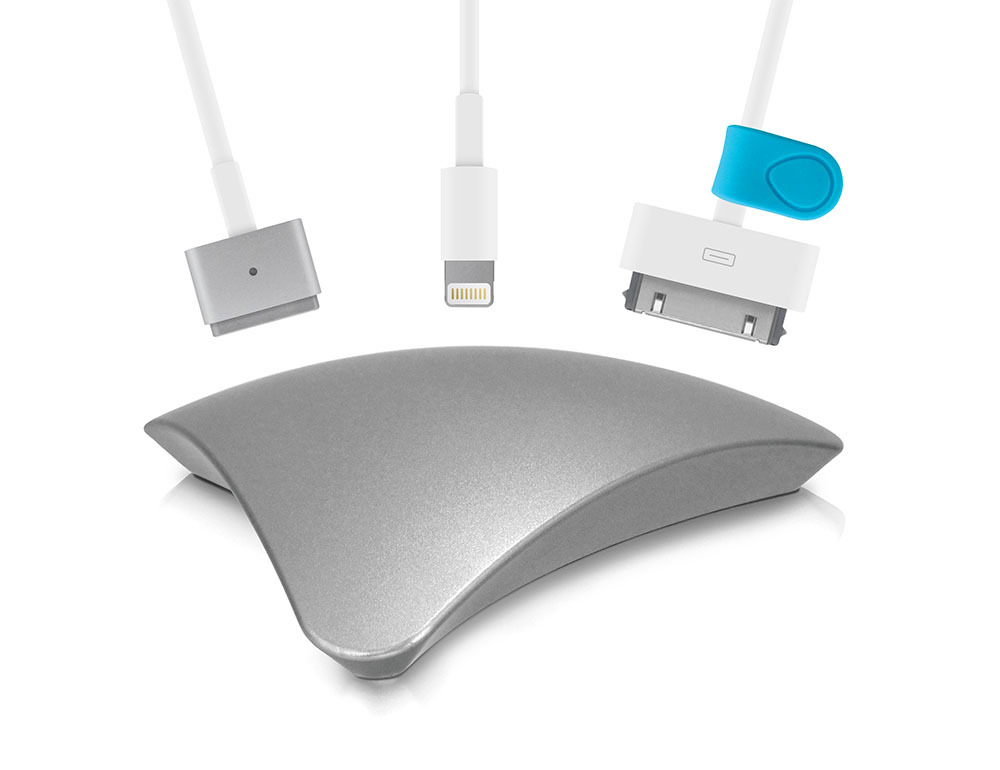
The MOS is basically a paperweight that holds the business ends of your cables in place with magnets. There are three different finishes: black or white plastic, and anodized aluminum. All three are billed as “scratch-resistant and beautiful.” When MOS offered to let me test one of the devices,
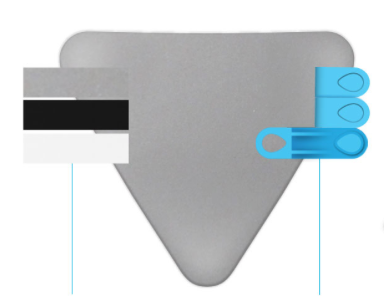
I have to admit I was hoping for the spiffy aluminum model to match my iMac, but I was surprised by how cool the plastic model actual was, and how it fit in perfectly with my (also white plastic) mouse. And the black one is kind of sleek. It’s like the George Clooney of digital accessories (if chargers are twentysomething Hollywood starlets).
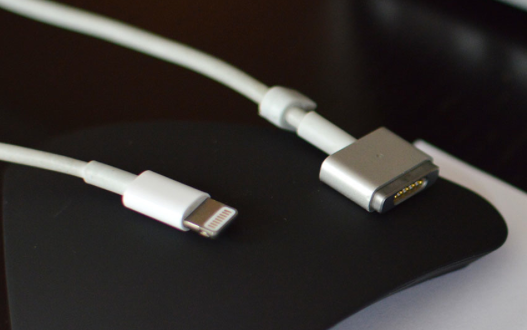
(C’mon, doesn’t it kind of look like a tuxedo with skinny supermodels hanging on?)
THE INNARDS
I was pretty dubious when the MOS team sought me out for my opinion. The gently curving triangular thingiebobber was modern and sleek, a little sci-fi-ish, but seemed too insubstantial to get much done. The joke was on me, however, because this baby is one super-magnet. Below, see the MOS being suspended, swinging from the business end of my iPad’s teeny tiny Lightning Pin charger cable.
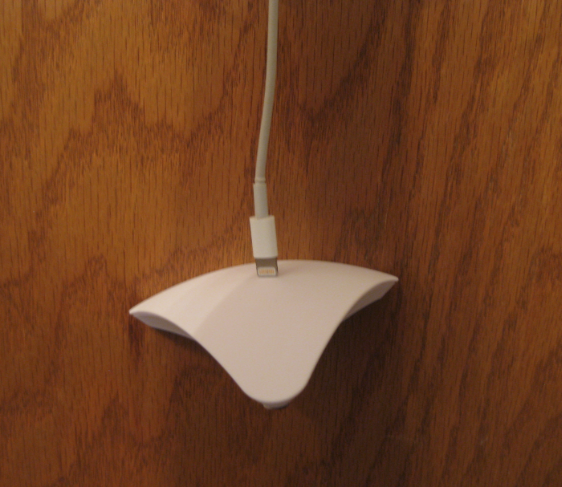
That’s a pretty oomphy magnet.
For really light-weight items, MOS has you covered. Each device comes with three blue, plastic-covered, magnetic cable ties. You wrap it around the cord, near the “head” — almost as if it were a necktie — and it gives recalcitrant cables a little nudge to stick in place until you’re ready for them.
THE BOTTOM
The undercarriage of the MOS has a layer of micro-suction tape. Before I read about the MOS and just looked at the picture (remember, I thought the small thing was insubstantial), I figured it would just slide away across any smooth desk if ever a hearty, heavy cord were actually magnetically attracted. Once I read about the features for keeping the base in place, I figured the tape on the base would be sticky and maybe even a little slimy to the touch.
But actually, this high friction tape, which is made of oodles of microscopic air pockets, holds the MOS in place incredibly well, and it sticks, but it’s not sticky. And I kind of wish my mouse pad had the same tape on the bottom (and yes, though it’s not necessary, I still use a mousepad). It should stay put on clean, flat surfaces. If the MOS starts to lose its clinging power, users are instructed to rinse the bottom of the MOS with room temperature water and air dry. (Am I the only one reminded of the commercials for The Shticky?)
THE BOTTOM — WHEN ITS BACK IS AGAINST THE WALL
Sometimes you just don’t have enough desk space (or entertainment center space) even for a small, curvy, Star Trek triangle. Well, apparently, the bottom of the MOS doesn’t have to be horizontal. Remember kitchen phones in the 1970s, mounted to the wall? You can make your MOS work like that.
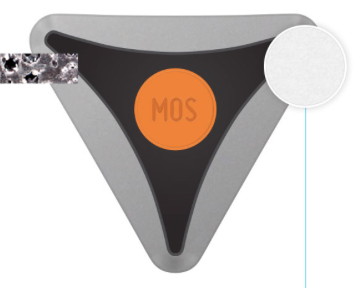
A 3M-brand double-sided adhesive circle is included in each MOS kit, and the team assures me that the sticky dot (which sounds like it has the mighty power of 3M’s Command hooks) will securely hold the MOS and all your magnetized cables and cords, as well as any other small metal items of which you need to keep track.
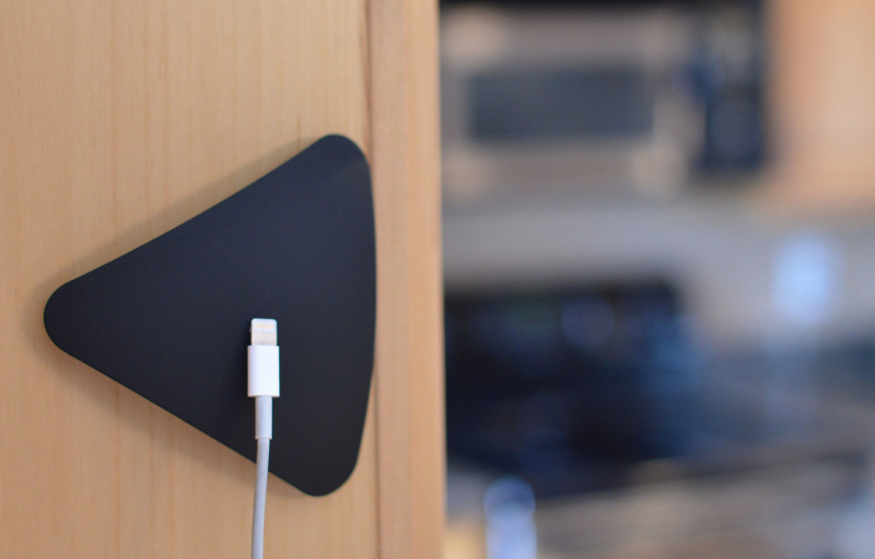
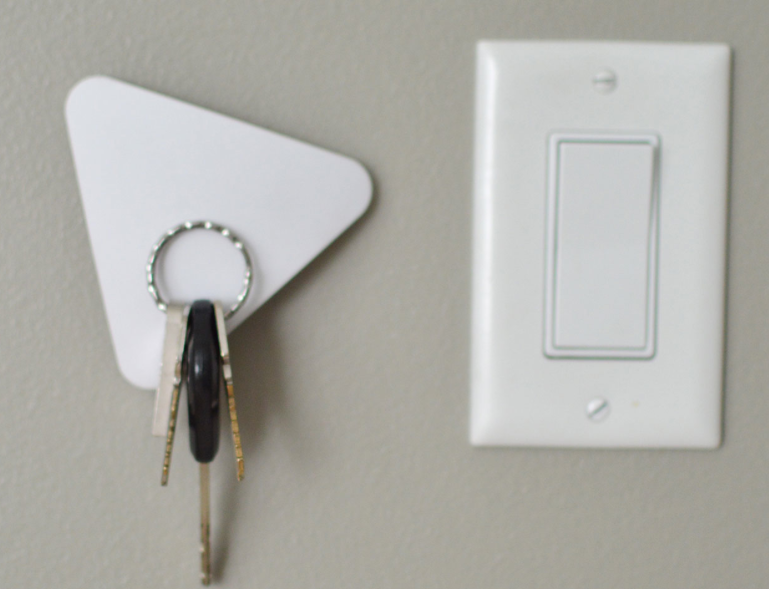
I love the idea of having a wall-mounted MOS right next to my desk, but I’m a renter with bumpy, stucco-like walls, so I’m sticking to the feet-on-the-floor version.
THE PRICE
The MOS is available in Apple stores, and at Amazon, Sewell and BiteMyApple.Co and retails for around $23.95 for the black and white versions and $39.95 for the aluminum version.
THE PACKAGING
As a warning, especially if you’re giving an MOS as a gift, the packaging can be a little tricky. The MOS sits in a little drawer that slides out from the main box with a tug on the pull tab. You have to actually do some fiddling with the main box, as the cable ties, adhesive disk and instructions are tucked away. I must not be the first person to have missed these at first glance, as the rear of the box has “Accessories/Accessoires” and a little arrow pointing to a semi-hidden compartment at the top of the box, above the drawer.
BUT WAIT, AREN’T MAGNETS BAD FOR COMPUTERS AND DATA?
We all know what happens when we put our magnetic phone cases too close to our magnetized hotel key cards or credit cards. They get de-magnetized. And wasn’t the first lesson we learned about computers (well, those of us who started on computers back in the days when data was saved on diskettes) to keep our data away from magnets? As such, the first question I asked the MOS team was whether my flash drives, hard drives and other digital data were in danger from the supermagnetic MOS magic triangle. Their reply?
The answer is no, in most cases. If you put the MOS directly on top of or underneath an electronic device, such as a laptop or hard drive, this could potentially be damaging to the device. However, if you set the MOS right next to an electronic device it will not harm the device in any way. Check out the following link for more information about using magnets alongside electronic devices.
http://sewelldirect.com/articles/Magnets-and-Computers.aspx
That said, there’s a small note on the rear of the package that states, amusingly:
“POWERFUL MAGNETS: To prevent undesirable operation, keep away from computers.”
So, uh. There’s that.
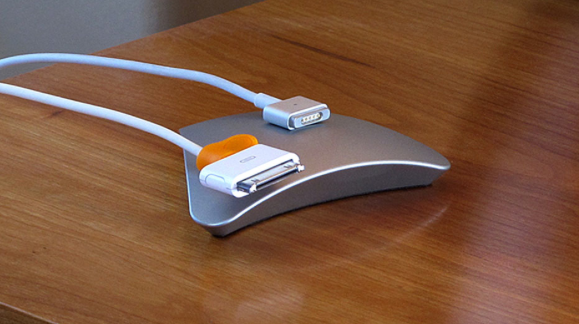
The MOS Menos
Many of my clients deal with cord and cable clutter for their car gadgets. (I certainly hope that they’re not doing much online while they’re driving, but they do have GPS, and passengers watching movies, and phones to charge…) It turns out, MOS has a new project on the horizon.
The regular MOS isn’t huge — it’s about the size of my hand (fingers not included). But the console and dashboard space in a car is pretty limited, and even that much space-hogging might be too much. Thus, in April they will officially be launching the MOS Menos, a smaller version of the MOS created for corralling cords and cables in vehicles. Right now, it’s a successful Kickstarter campaign, just as the original MOS project was.
The Review
Paper Doll is ridiculously frugal and rarely buys gadgets. I sometimes postpone purchases of tools I really need, violating the organizing rule about not tolerating dysfunctional situations. However, I would definitely have put this on my Amazon wish list to request one for my birthday. Which is this week. In case you were curious.
Please share your thoughts. How do you keep your cables and cords at bay? Low tech (binder clips and sliced bread ties) or high-tech fancy doo-dads? What do you think of the MOS?
Disclosure: I received a sample product for review purposes only, and was given no monetary compensation. The opinions, as always, are my own. (Who else would claim them?)
Three-By-Three Helps You Stick-It! To the Writing on the Wall
We often carry our must-do information with us, whether in planning binders or smart gadgets. But when we’re at home or in our offices, we need information to catch our attention even when we haven’t thought to go look for it. Instead of our eyeballs going in search of our lists, our lists have to place themselves (with our help) in our eye lines. That’s what our vertical space is all about.
Over the years, we’ve discussed some nifty options for keeping information (schedules, tasks, etc.) in front of our eyeballs without adding to the clutter. Take a peek back in time at:
Paper Doll Sees the Writing on the Wall: Part One — Dazzling With Dry Erase
Paper Doll Sees the Writing on the Wall: Part Two — Chalking It Up
Paper Doll Looks at the Big Picture: Wall Calendars, Planners and Reminders
Paper Doll Says “Stick ‘Em Up” To Stay Organized
We talked about At-A-Glance WallMates™, Idea Paint, Wink (Walls Love Ink), WallPops, and all varieties of chalkboard paint. We got a good sense of how time can be better managed vertically, with calendars and task reminders like NeuYear‘s Seize the Year calendars, Mead’s Organizher line of write-and-wipe items, and PlanetSafe’s Dry Erase Planners. And we saw how some free-form wall stickers, like RE:writes and Martha Stewart Home Office with Avery Adhesive Dry Erase Decals (on opposite ends of the marketing-power continuum), offered options for turning your walls into organizing tools.
Today, we have a new star in the constellation of products that help you keep information up, up and away.

Three by Three, a Seattle-based company, has created a series of space-saving, vertically-arrayed information-bearing products that make Paper Doll almost giddy with delight. Three by Three has designed dry-erase boards and whiteboards using a variety of hearty materials: bamboo, glass, silicone, stainless steel, magnetic elements and more.
The product line that first caught my eye was Stick-It!, featured at the ever-cool Shoebox Dwelling blog, and certainly, the smaller your surroundings (whether at home or at work), the more important it is to keep useful information accessible without wasting minimally-available horizontal space.
Stick-It! products are silicone organizers. Unlike the vast majority of wall-affixed planners and decals, these silicone organizers require no adhesive, no magnets, and no hardware! This means that the Three by Three products are removable, reusable, and won’t scratch or damage your surfaces.
You can attach Three by Three’s silicone, daily, weekly and monthly dry-erase planners to practically any smooth surface, making them equally useful on mirrors in the bathroom (to remind kids of their chores), metal middle-school locker doors (to keep on top of tests and extracurriculars), kitchen (or dorm room) refrigerators (to know who is supposed to be doing what, where), windows and yes, even walls.
Stick-It! Silicone Dry Erase Monthly Planner

The white monthly planner measures 14″ x 9″ and sells for $13.
Stick-It! Silicone Dry Erase Weekly Planner
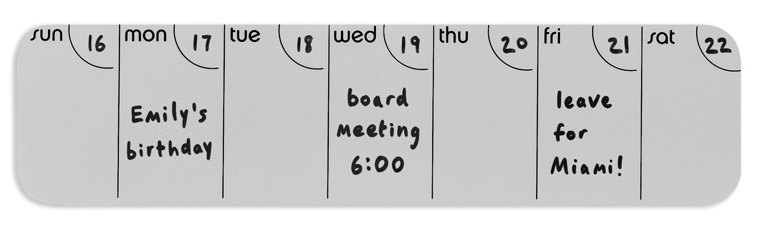
The 14″ x 3.5″ weekly planner comes in white or spring green, and is available in vertical and horizontal formats. You can also post multiple weekly Stick-It!s side-by-side or “stacked” on your vertical surfaces to give you more visible planning space than on the monthly calendar. They’re priced at $9.

Stick-It! Silicone To-Do Board
Three By Three rounds out the Stick-It! line with a 5″ x 9″ daily/ongoing to-do board that’s lined, so you don’t end up accidentally writing your tasks on an ever-decreasing diagonal angle. (What? Only Paper Doll has trouble writing long lists without a lined surface? Never mind!)
 The Stick-It! Silicone To-Do Board has two small hooks embedded at the bottom so that you can keep track of your keys, ID key-card, conference badge lanyard, etc. It sells for $8.
Speaking of conference badges, I think these silicone planners would be particularly useful for business travelers. While family vacations can be free-form, business travel requires careful attention to detail at the very point when you’re likely to be jet-lagged and out of sorts. Pop a weekly version of the silicone Stick-It! in your carry-on and it’s ready to be posted on your hotel room’s bathroom mirror, the back of the door or on the wall above the TV, making it less likely you’ll forget your must-remember tasks until you hit the lobby, the taxi, or the negotiating table.
Stick-It! Silicone Sticky Pads
Finally, the line includes some fun add-ons: small double-sided silicone sticky pads that hold small notes, tiny supplies, stamps and other lightweight items. The sticky pads come in packs of six .8″, 1.2″ and 1.6″ “dots” and are available in white, black, and multicolored (white, black, blue, spring green, pink, and red) selections for $7 per package.
 As I noted above, Three by Three’s product range goes far beyond these flexible, silicone boards, and I anticipate we’ll be looking at items like their bamboo channel+panel planner, colorful and magnetic glass planners, and dry-erase stainless entry butler in the future. For now, though, let’s explore all the ways we might use sturdy vertical planning products that require no mounting, no holes in the wall, and no sticky residue left behind. These silicone Stick-It! items seem pretty organized on that point! Please share your ideas below.
Pushing the Envelope: Small Solutions that Stick

Paper cuts. Buzzing mosquitos. Wallace Shawn. Sometimes, it’s the smallest things that are the most annoying. But as Nashville singer/musician (and pal) Andra Moran notes, it’s also the small things for which we can often be the most grateful.
If you’ve ever licked an envelope and then sounded like you just had root canal due to the blech-y taste in your mouth, then you know how important it is to have self-adhesive envelopes, one of the greatest envelope-related inventions of the last century. But y’know what? Sometimes even self-stick envelopes lack the sticktoitiveness (it’s a word! honest!) to get the job done and keep your mailings organized and safe.
Enter: Ampad DoubleSeal, bringing the belt-and-suspenders approach to packaging up your mail.

The DoubleSeal delivers exactly what it says. First, there’s a traditional gummed flap. Lick (or moisten with a sponge or wet napkin, as Paper Doll prefers), and then fold down the flap. Next, there’s a bit of adhesive tape built in to the rear of the envelope, below the flap. Peel the tape off and affix it over the seal of the flap as if it were one of those shiny Hallmark Gold Crown stickers you get when you buy a card. If my description wasn’t exciting enough for you, believe it or not, there’s a video:
There’s not much variety to add spice to your mailing life. The DoubleSeal comes only in one style: 24 lb. White “Wove” (but with a nice privacy design on the interior), 100 to a box. The envelopes are 4 1/8″ x 9 7/8″, making them the same height but a little wider than traditional #10 mailing envelopes. DoubleSeal is available from Staples.
The big question to Paper Doll‘s mind: why use a gummed flap at all? Why not just use an adhesive closure for the flap, just like with Ampad’s #10 peel & stick envelopes?
In addition to organizing the contents of your envelopes, sometimes it can be a relief to organize the envelopes themselves. It’s a petty annoyance, but have you ever noted that boxes of envelopes, particularly oft-used #10 envelopes, tend to topple over, inconveniently? And even if you keep the box on its side in the drawer, cheap envelope boxes tend to open, splaying envelopes across the inside of desk drawers. At a NAPO-Georgia meeting last year, one of our colleagues showcased an interesting little product that solves this problem.

Ascend Mailing Products, designed exclusively for Office Max, has created a book of envelopes!
Accordion-bound and perforated at the top of the flap, Ascend binds 36 “Peel-To-Seal” 24 lb. #10 security envelopes in one little book, keeping your envelopes tidy until you’re ready to use them. Is it the cure for the common cold? No, but it might stop some common cursing in offices where orderliness is preferred.
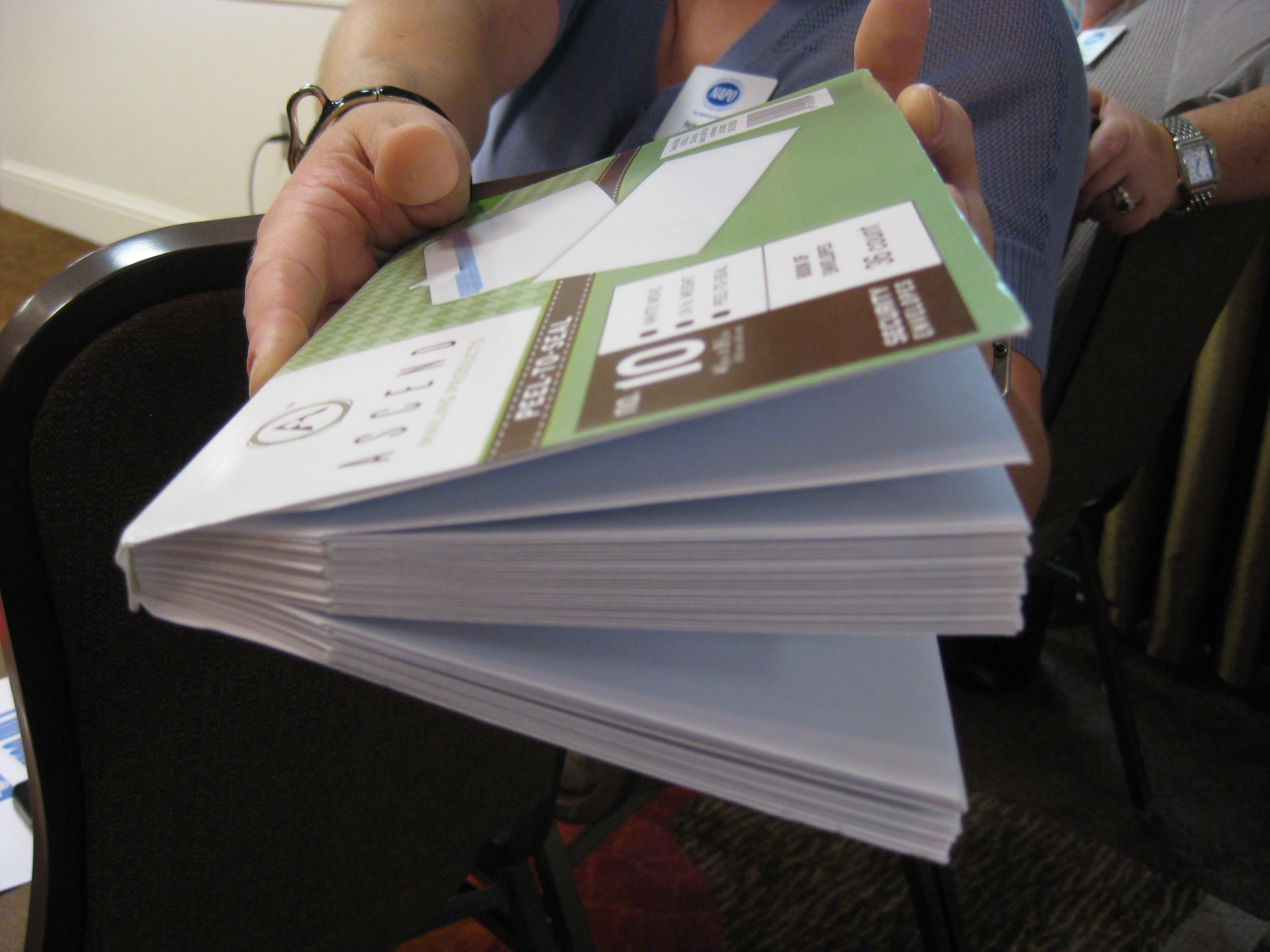
The book of envelopes doesn’t appear to be sold online at this time, but can still be found in some OfficeMax stores.
From Paper to the Cloud: Ampad Shot Note
For a while, Paper Doll kept getting asked the same question: Paper or Digital? Nowadays, that’s the wrong question. More and more, it’s not a question at all, because the answer is paper and digital. Hybrid solutions are becoming more common because people need to organize their information in multiple ways.
Last year, we looked at the Evernote Smart Notebook by Moleskine. On the outside, it was a cool paper notebook, designed for writing or sketching and helping you look like a hipster, but on the inside, it was magically connected to cyberspace. With the Smart Notebook, you added little stickers next to whatever you created, used your digital device to align and snap a photo, and the picture landed safely in your preferred Evernote folder, tagged appropriately because of each sticker’s flavor of magic fairy dust.

Today’s entry into the paper/cloud hybrid notebook arena, Esselte’s Ampad Shot Note, with the motto “From Handwritten to Handheld,” is a little less hipster than Moleskine and a little more corporate/classroom.
The Basics: Shot Note comes in seven varieties. Four are band-bound at the top, like a typical legal pad. The 5″ x 8″ writing pads are available in wide rule and dot graph formats (suitable for to-do lists and quick thoughts); the 8 1/2″ x 11 3/4″ writing pads also come in wide rule and dot graph (appropriate for class and meeting notes). All pads have a rigid 60 pt chipboard backing and 40 micro-perforated 22 lb. paper sheets. (The pages are not lined or dot-gridded on the reverse sides, unlike with traditional notepads.)
Two of the Shot Notes are spiral-bound for easy flipping of pages, but are also micro-perforated. The 9″ x 12″ blank sketch pad has an extra-sturdy 80 pt chipboard backing so the artist in you can be nimble. Each pad has 40 sheets of 50 lb. paper. The 9 1/2″ x 7 3/4″ writing notebook is medium ruled, with 40 sheets of 22 lb. paper and a rigid 60 pt chipboard backing. The sketch pad has the spiral at the top; the notebook is spiral-bound on the left side.
For a larger canvas to display your brilliance, there’s a 23 1/4″ x by 31″ blank easel pad with 25 perforated, self-adhesive, repositionable sheets of bleed-free 20 lb. paper.
All of the Shot Note varieties have corner markers to help you align the pages (of which, more later). Note, the corner markers are only on the “front” pages, so if you write on the reverse of the sheets, it’s no different from writing on a standard notepad.
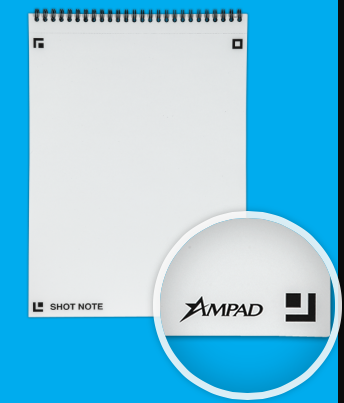
Each of the writing pads has markings in the upper right corner so that you can date your notes. (The sketch pads are undated.)
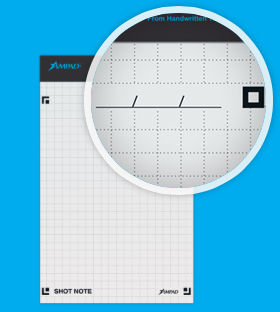
How Shot Note Works:
- Download the free Ampad Shot Note app for iOS or Android.
- Use the notebooks. Write notes, letters, sonnets. Doodle your name and your sweetie’s, or sketch the next architectural wonder.
- Snap a photo of your creation using the Ampad Shot Note app, aligning the four corners of the page with the app’s doohickey for recognizing the corners. This uploads your page to the app.
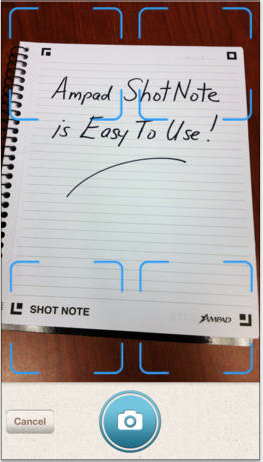 Name your file. Add a description and tags. The app will create a date- and time-stamp for you.
- Access and view the items you’ve captured. Search by name, tag or date/time-stamp.
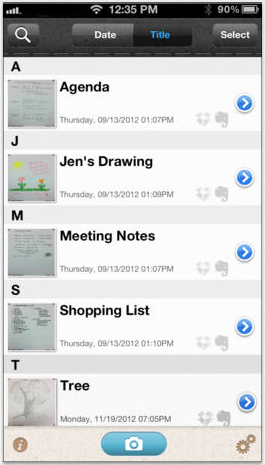 Share your items via email, Evernote, Dropbox, Twitter or message from your camera roll.
Why You Might Use the Shot Note Pads and App
You, like Paper Doll, may have a really shaky hand when it comes to snapping documents and pictures with a tablet. While an increasing number of digital devices have grid lines built into the camera apps to make it easier to shoot “straight,” some are easier to manage than others.
Your creativity only bursts forth when you set pen (or pencil) to paper. Maybe you get tongue-tied (finger-tied?) when you type, but really need to have a digital copy of what you create so can share with collaborators or clients.
Maybe you want to share a personal message for a love note or “good luck” blurb, and don’t want to sacrifice handwriting and personal doodles just to be able to have it received immediately.
What other things could you do with the Shot Note?
- Archive your children’s school projects and drawings.
- Share notes from class with your study group.
- Snap your grocery list and share it with your family so two (or more) of you can divide up zones of the supermarket and finish faster.
- Keep your originals safe at home (or at the office) when you’re traveling.
For more on how the Shot Note works, check out the spiffy little video.
Paper Doll‘s Thoughts: I was intrigued by the Shot Note when it debuted at the 2013 NAPO Conference last spring. I still think it’s neato, in the abstract, but there are some practical concerns. First, price. Available at Amazon, Staples and other office supply stores, the Shot Note regular pads lists between $6 and $10, which is pretty pricey for so few pages per pad, though Amazon carries them at a significant discount (a more reasonable $2-$4). The easel pad, listing from $70-$90 (yes, really!) and discounted at about half of that, is pretty darned expensive for 25 monster-sized sticky notes.
Beyond price, it’s not clear what the Shot Note can do that’s really special. Right now, it’s a camera app that nicely lines up the pages of utilitarian-looking notepads, and it’s decently integrated with the major productivity tools. But it strikes me that Evernote seems to have gotten much farther with integrating its camera app, and can even search handwriting as if it were text. Then again, Ampad is in the business of paper, not digital manipulation, so maybe it’s not fair to hold the two to the same standards.
I had one other thought. The Shot Note focuses on the written and the visually artistic, but Ampad could create a Shot Note side-spiral notebook of blank sheet music. I suspect that there are suitable apps for taking the uploaded, snapped, handwritten notes and allowing the paper and apps to make beautiful music together. (No charge for the idea, Ampad. Enjoy!)
House of Doolittle: Doing Much for the Environment & Time Management (A Shoplet Review)
Periodically Paper Doll reviews new and established office supplies and accessories through the Shoplet Product Review Program. This week, we’ll be looking at two products from the House of Doolittle.

I must admit, although I’ve written about recycled products many times before, I was unfamiliar with House of Doolittle, a 95-year-old office supply company that makes 100% post-consumer paper products, including desk pads, appointment planners, wall calendars, laminated planners, non-dated planning supplies, and USA and international maps.
In 1988, House of Doolittle made the commitment to produce all of their products from recycled paper and materials, eventually converting to recycled cover materials and book wire, soy inks, and Processed Chlorine Free (PCF) and FSC-certified paper. All House of Doolittle products are manufactured in the United States.
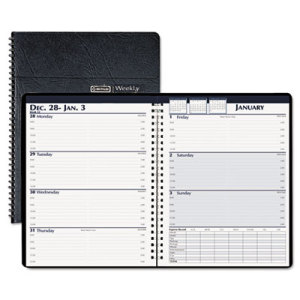
The House of Doolittle Weekly Expense Log Business Planner harkens back to a pre-app era when most professionals kept track of time and tasks using paper planners. Paper Doll, with one foot in the paper realm and the other in cyberspace, still maintains a paper planner, and can see the appeal of having a small, tangible planner where one can quickly schedule appointments, check information and log expenses without need for Wi-Fi or charged batteries.
The Basics: This 7″ x 10″ wire-bound planner uses the two-page-per week style, with Monday through Thursday blocks on the left-side page with lines for 8 a.m. to 5 p.m. standard workday appointments. The right-side page offers the same for Friday through Sunday, as well as a chart for keeping expense records for the week, with columns for Sunday through Saturday and rows for standard travel expenses (like meals, hotel, tips and parking) and typical weekly expenses (like postage, phone, entertainment, auto, gas and miscellaneous). The right-side page also has three small insets at the top, showing monthly calendars for the prior, current and next months.
The black leatherette cover is made of 50% recycled materials; the twin-loop wire binding is made from 90% recycled wire.

The Business Planner doesn’t skimp on extras. Trying hard not to be outdone by the whole of the internet, bonus pages include three-year holiday listings, area codes, time zones, toll-free numbers for airlines, car rental companies and hotels, air and driving mileage distances between major cities, weights and measures, metric conversions, recycling information, monthly birthstones/flowers and an annual anniversary gift list. (Whew!)
The Review: This type of planner is ideal for someone who needs to mark appointments and expenses but has relatively few notes to make regarding either. The space for each day is ample for charting the bare essentials (the who/where/why) of appointments, but with only two small rows for each hour, meeting notes are meant to be taken elsewhere.
Thus, it’s well-designed for what it’s meant to do, but professionals needing more robust planning pages would do well to upgrade from the weekly planner to a daily planner; those wanting House of Doolittle’s environmental commitment but seeking to schedule appointments more frequently than hourly might want to examine their Professional Hardcover Weekly Planner, with time frames on the quarter hour.
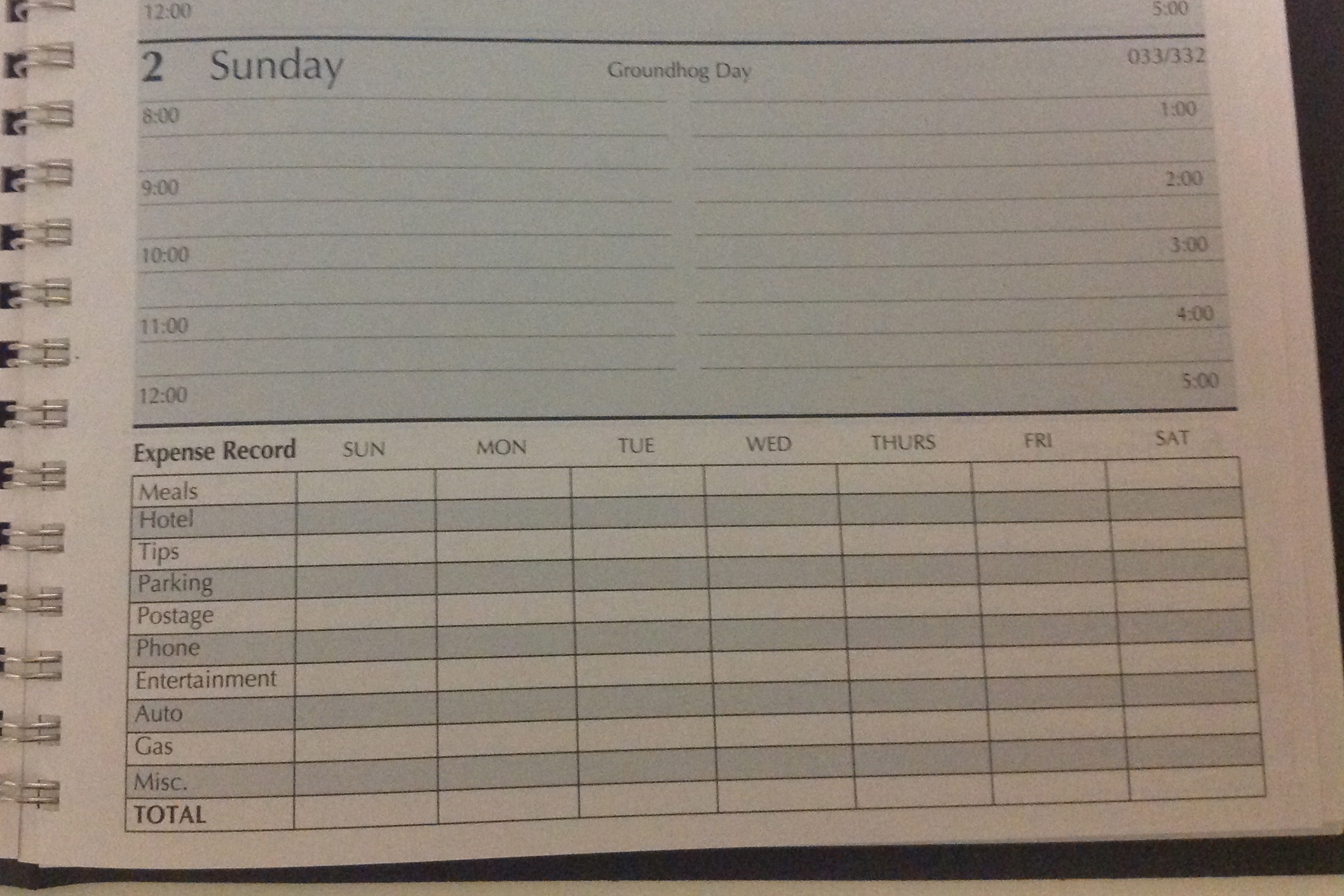
As a professional organizer, my biggest concern with the planner was the expense record section. Although the two-page spread for the calendar goes from Monday to Sunday, the expense section runs from Sunday to Saturday. Should the Sunday in the expense planner refer to the expenses from the prior page? Why don’t the days line up? It’s a small issue, and as long as the user sticks to the same recording method all the time, it’s not problematic, but it does seem confusing. Also, as with most paper expense planners, there’s only one slot per expense category per day, so you have to do your math first before recording anything, which may not be preferable.
The Business Planner runs about $17 at Shoplet for an individual planner, and is under $10 if you purchase in bulk.
The House of Doolittle 2014 Calendar is what Paper Doll used to call a desk blotter in ye olden days, and lets you view the whole month at one glance.
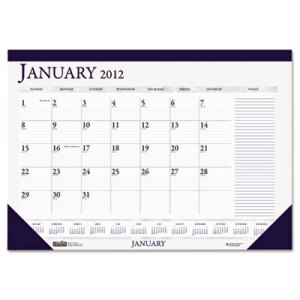 The Basics: The 18.5″ x 13″ January to December calendar, designed to be posted on a wall or used as a desk blotter, has a dark blue leatherette top-band and bottom corners to hold the pages in place. Each perforated page identifies the month, has squares for each weekday (Sunday through Saturday) with count-up/count down numbers (so you know you’ve got only 337 more days until 2015!) and twelve tiny monthly calendars at the bottom. There’s a wide section at the far right for jotting down notes, phone numbers and other incidentals.
The 2014 Calendar is made from 100% post-consumer paper and soy inks, and is made entirely in the USA.
The Review: When Paper Doll worked in television programming, having a desk pad calendar was indispensable for viewing the month at one shot and noting important events without having to look up from the desk. I’d forgotten how useful that was until I examined the House of Doolittle 2014 Calendar.
I think this calendar, which is smaller than the typical desk blotter by a handful of inches, would be perfect for kitchen desks, which tend to be cramped, and for students/bedroom desks, to maintain an eagle-eye view of when assignments and tests are scheduled. The only flaw I note is that the smaller pad size means that the squares for each day are reduced, and perhaps a bit cramped for those of us with sprawling handwriting. Nonetheless, it’s a spiffy little calendar for under $9 (under $6 if you buy in bulk).
Both the House of Doolittle Business Planner and 2014 Calendar, and many others HoD products, are available directly from Shoplet, which also maintains a colorful and often goofy blog about office supplies. Shoplet is also an excellent source for business promotional products, including promotional shirts. In addition to selling office supplies in North America, Shoplet is a purveyor of office stationery in the UK.
Disclosure: I received these products for review purposes only, and was given no monetary compensation. The opinions, as always, are my own. (Who else would claim them?) The planner and calendar will be donated to a Chattanooga-area non-profit.



Follow Me