How to Track, Lower, or Cancel Your Recurring Subscription-Based Bills
Subscriptions aren’t just for magazines anymore. Financially speaking, a subscription is anything for which you have an ongoing expense for a non-essential service. And I bet you have a bunch of them.
According to a recent study by CNET, American adults spend an average of $90 per month on subscriptions. Additionally, another study found almost one-half (48%) of those surveyed registered for at least one free trial and then forgot or neglected to cancel.

Photo by Markus Winkler on Unsplash
WHAT IS A SUBSCRIPTION MANAGER?
A subscription manager is an app or platform that centralizes information to help users gain better control over their finances and make more informed spending decisions. Most track, organize, and manage recurring payments for subscriptions by:
- scanning bank and credit card information to identify subscriptions
- listing all subscriptions in one place
- tracking expense increases over time to help analyze spending patterns and identify opportunities to reduce costs
- organizing and sorting by subscription name, cost, billing cycle, or due date
- identifying redundancies (like a standalone subscription for a streaming service as well as one acquired through an Amazon Prime 7-day trial)
- setting up payment reminders before renewals or payment due dates (to help avoid late fees or unintended renewals of free trials or forgotten subscriptions)
Additionally, some subscription management tools and apps can negotiate costs or assist in canceling subscriptions, making it easier to terminate services you no longer need.
CONSIDERATIONS FOR CHOOSING A SUBSCRIPTION TRACKER
Price
Look for free options, or free tiers (or trials) on platforms that offer multiple levels. You can always upgrade if a premium tier offers a feature you find beneficial once you’ve mastered the free plan. Too often, we sign up for paid software-as-a-service plans and don’t them; a tracker will reverse that habit, so don’t go to all the effort to get rid of your other recurring payments only to end up with one for a tracker you don’t need!
Remember: platforms with services to negotiate a discount or rebate for a forgotten/unused subscription will take a portion — like a finder’s fee — of what they’ve saved you for the coming year. There’s no such thing as a free lunch; in return for picking up your lunch tab (that is, negotiating the refund after cancelation or price reduction) the app gets your pickle or a handful of your fries!
Security
In order to track your expenses to find recurring costs, these platforms must access your bank accounts and credit cards. Thus, protect your online safety by verifying that whatever platform you choose uses:
- bank-level security
- end-to-end encryption
- two-factor authentication
Once you find a service that passes those tests, dig into their boilerplate security and privacy language to make sure the app doesn’t sell or share any of your personal information.
Features and Functions
A subscription tracker will analyze the data in your bank and credit card statements to identify recurring charges and create reminders about them.
More advanced trackers should be able to cancel subscriptions with minimal input from you, negotiate lower bills on your behalf, and if part of a larger financial dashboard suite, help you quickly and easily create a budget.
Ease of Use
The point of a subscription expense tracker is to make your life easier. You want an app that’s intuitive so you’ll be able to add, delete, or change information or navigate your way around without much study. If an app is has so many bells and whistles that you have to consult Google or Chat GPT for instructions so managing the software becomes a second job, you won’t use it.
Read reviews to make sure it will be relatively easy to:
- set up and sync the app with the information in bank and credit card accounts
- identify recurring payments and set reminders to pay them
- navigate the app
- negotiate billing with relatively little input on your part
- cancel accounts with minimal effort
DO I REALLY NEED AN APP TO TRACK, LOWER OR CANCEL SUBSCRIPTION COSTS?
Short answer? No, you don’t.
I call SiriusXM every year to lower my costs, and help clients do the same. I can’t fathom why anyone would actually spend the exorbitant full price, but the “negotiated” lower cost feels reasonable.
How to DIY Your Subscription Management
Canceling a subscription-based service (unless it’s a gym membership) is also fairly straightforward, but not fun.
If you’re organized, patient, and diligent, especially if you don’t have a lot of subscriptions, you can handle the process yourself:
1) Create a spreadsheet with columns for the subscribed service or license, how you pay for it, when it renews (monthly, quarterly, annually), and the cost.
2) Pull up the past year of bank and credit card statements.
Why a year? Although many subscription-based transactions are monthly, some are paid quarterly or annually. Streaming services generally charge monthly, but I have a marketing-based service for my business that, until last year, charged me quarterly. And once a year, I pay Apple for ongoing Applecare and an online service to protect this blog from the thousands of attempted comment spams. These subscriptions are easy to forget!
3) List your recurring expenses, starting with your most recent statement.
Run your fingers down the transactions, and each time you spot a new one, log the key elements.
4) Work your way through a statement until you’ve captured every recurring expense until you’ve reviewed a year’s worth of statements and aren’t finding previously un-logged subscriptions. You will find more than you realized.
5) Repeat the process with every bank account and credit card statement.
6) Group the recurring expenses in an appropriate category. For example:
- Entertainment — streaming video and audio, paid podcasts, Patreon memberships
- Utilities — telephone, cable, internet, security systems
- Fitness — gym, online workout classes, premium apps for devices like Fitbit or Peleton
- Health — supplement subscriptions, concierge medical services
- Food — meal prep services, food delivery services
- Professional expenses at the paid tier — Zoom Pro, Evernote, AI tools, Microsoft 365
7) Evaluate each item by category.
- Are there duplicates, like an ad-supported Hulu subscription offered through your cable company as well as a paid bundle for Disney+ and Hulu?
- Do you have unnecessary subscriptions, like a membership to a gym where you no longer live?
- Do you have subscriptions that you never use? Are the apps are no longer appealing? Does something make them difficult to use? Do you just need someone to guide you until you master it and take advantage of what it has to offer?

8) Contact each vendor to negotiate costs or cancel services you don’t want to accept as-is.
Whew. There are several disadvantages to this process.
- It takes time. If you call, you may have to navigate a complex phone tree, repeatedly hearing how important your call is, and sit on hold for eons.
- They may give you a hard sell or push you to upgrade, convincing you that your cable and internet costs will decrease if you add cell service through them, but then you’d have to port your number from your original cell company, which you may like, lose your legacy status, and have to deal with those annoyances, and may find your rates going up a year hence. Be strong!
Recently, I worked with a client with cognitive decline; they sign up for services the don’t need; we call, they authorize me to speak on their behalf, and usually, we accomplish our goals fairly easily.
However, one company that keeps calling and tricking her has a habit of asking invasive and unnecessary questions, over and over, about why we wants to cancel and attempts to scare us into what will happen without this expensive auto part protection on the 11-year-old car that’s almost never used.
Having more moxy than Chandler Bing, I just keep insisting that we does not want the service anymore, and by law we have the right to cancel. (Occasionally, I have to invoke the possibility of calling the Attorney General of the state in which they’re headquartered.)
- It involves talking to other people. If you’re an introvert (or a young millennial or GenZ), the idea of having to talk to someone on the phone may nauseate you.
- It’s frustrating to talk to a bot (or an online agent typing from a bot-like script).
- You’ll still have to monitor your bill to make sure that your charges are reduced or stopped.
- You’ll have to schedule reminders to prompt you to cancel free trials before you get charged.
Can you pause subscriptions instead of canceling them?
Maybe you’d rather temporarily stop paying for a subscription while you can’t use the service. For example, when my car was stolen [Organize to Prevent (or Recover From) a Car Theft], I didn’t want to pay for Sirius XM for the two months my Kia was being repaired. I paused my subscription, but they sent me a notice after four weeks that they were going to start charging again, and I had to call to re-pause it.
There are a few reasons you might want to pause instead of cancel:
Maintain your viewing or listening history — Got a busy few months at work and won’t be able to watch your favorite shows? Maybe you’ll be traveling in the Australian Outback and won’t have cell signal to listen to streaming music and podcasts? When you’re ready again, you want your apps to show you what episodes you left off at and what’s on your to-be-watched lists.
Avoid the re-subscription process — If you can pause your subscription, returning to the service will be much easier and you won’t lose any of your preferences settings.
Eliminate guilt over paying for services you don’t use — Whether it’s a gym membership you can’t use while healing from a knee replacement or a streaming service you won’t watch while traveling or working, this can be a pause that refreshes.
Use a pause to “churn” streaming television services. When you’ve watched everything you want to see on Netflix, pause your subscription for six months and binge all the streaming Star Trek Paramount+ has to offer. (Strange New Worlds is fabulous!)
- Hulu lets you pause for up to 12 weeks.
- Amazon Prime Video lets you pause indefinitely during the cancellation process. Note: you must pause all of your Prime benefits.
- Netflix has no official pause feature, but canceling your subscription provides a 10-month grace period for your account and viewing history.
- Disney+ is rolling out the ability to pause subscriptions
- Sling TV, Fubo, and YouTube TV all have pause features.
Be creative! Call any service you’re paying for but underusing, and ask whether you can pause instead of cancel. You never know which companies will be eager to keep you on with hopes and expectations you’ll return.
Call any service you're paying for but underusing, and ask whether you can pause instead of cancel. You never know which companies will be eager to keep you on with hopes and expectations you'll return. Share on X
Pause Photo by Kelly Sikkema on Unsplash
Does this DIY approach give you a headache?
Reduce pain points by dealign with the subscriptions on one credit card at a time, or make one call a week. Or change all recurring expenses so that they go to just one credit card on which you otherwise never charge anything, making it easier to manually track expenses going forward.
But you’ll still have to call and negotiate on your own.
YOUR SUBSCRIPTION MANAGEMENT OPTIONS
If you just want someone to cancel your subscriptions but your mom isn’t willing to do it for you, try:
Billshark
Billshark — will cancel or negotiate internet, wireless, streaming TV and satellite radio, and audiobook subscriptions. They even handle Dollar Shave Club and StitchFix! It costs $9 per canceled subscription, and 40% of your total negotiated savings, capped at two years (so check the value of what you’re canceling against the costs of using the service as a personal expense hitman).
Billshark doesn’t track expenses; rather, you upload a bill and they negotiate on your behalf; for cancellations, they try to negotiate credits or refunds. They claim a 90% success rate and take no fee if they don’t succeed in saving you money. They also track your savings’ expirations and automatically restart negotiations to keep you at the best rate.
Billshark may uncover better rates if you change plans, but seeks your authorization to make changes, and will never lower your service level, though sometimes, they can “expand services (higher speed, more channels, etc…).”
If you want it all — an entire financial suite for tracking your recurring expenses (and more) but also want help negotiating or cancelling services, try:
Rocket Money
Rocket Money (iOS, Android, web browser) — Previously called TrueBill, RocketMoney is one of the biggest names in this realm. Rocket Money’s basic plan is free; the Premium tiers are $6-$12/month with a 7-day free trial.
The basic level links bank and credit cards to the app, identifies recurring payments, and sends alerts if your checking balance goes below, or your credit card spending exceeds, a pre-arranged amount.
Rocket Money Premium include negotiating bills, canceling unwanted subscriptions, and tracking net worth and credit scores (VantageScore 3.0 credit score and Experian credit report), as well providing auto savings, customizable savings categories, and unlimited budgets.
Rocket Money retains 35% to 60% of the savings earned on bills it negotiates.
In terms of security, Rocket Money uses an encrypted token to access transaction data and uses Plaid API (so login credentials aren’t stored in the Rocket Money system). It hosts its servers at Amazon Web Services and provides bank-level 256-bit encryption.
(This video, from when Rocket Money was still called TrueBill, illustrates the cancelation process.)
Hiatus
Hiatus (iOS, Android, web browsers) — The basic Hiatus plan is free, while Hiatus Premium costs $9.99/month or $35.99/year. Unlike many of the other apps, Hiatus does not take a percentage of the saving you get from its bill negotiation services.
Hiatus is designed primarily as an app for budgeting, letting you set limits on spending for streaming services and displaying spending over the prior week/month/year. However, its free tier includes a subscription tool for tracking streaming services; you can manually input anything not pre-set in the app.
To use the subscription cancelation and/or bill negotiation service, upgrade to the Premium.
Hiatus protects user financial data with 256-bit SSL encryption.
Trim
Trim (web browser) — is free, but it isn’t a traditional app. Instead, you access your account via the web and communicate with Trim agents via SMS text messages or Facebook Messenger.
Trim links to all of your credit and bank accounts and then locates and cancels unwanted subscriptions (including phone, internet, cable, streaming services, and gym memberships) and will negotiate bills with a service fee equivalent to 33% of any savings recouped.
For a separate fee, Trim will identify less expensive auto insurance rates and negotiate bills. There’s also a Trim Simple Savings high-yield savings account with a 4% annualized bonus on the first $2,000 you save.
Trim employs 256-bit SSL encryption and two-factor authentication.
Trim has an intriguing approach, but I advise against using Facebook Messenger to communicate about your finances!
This the least informative but most adorable of all the subscription tracker videos.
Albert
Albert (iOS, Android, web browser) — In addition to budgeting and investing services, Albert has bill negotiation and cancelation services. It automatically scan bills found in checking or credit card accounts for extra savings, or you can submit a bill for the expert negotiators to process. Albert costs $14.99/month after a 30-day free trial for a Basic plan, $19.99 for a Standard plan including data protection, credit score monitoring and more; a $39.99/month Albert Genius plan is required for subscription negotiation and canceling.
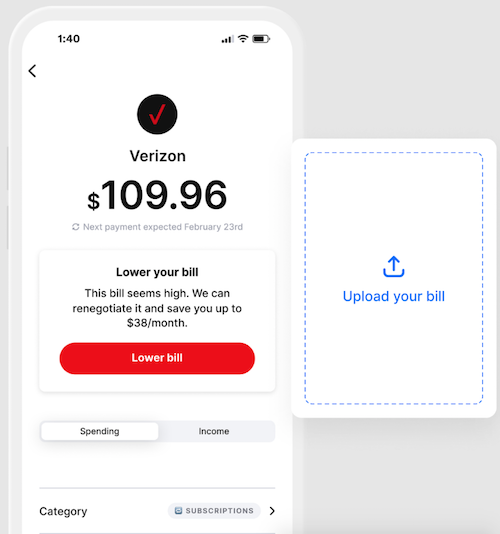 If you really want a subscription tracker to keep you focused on how much you’re being charged, for what, and when, but don’t need help with canceling or negotiating, subscriptions there are a variety of options:
Pocketguard
Pocketguard (iOS and Android) — PocketGuard has a free 7-day trial and a free version that’s kind of hard to find (see video below); for unlimited categories and bank connections, rollover budgeting, subscription tracking, and customized financial goals, upgrade to PocketGuard Plus for $12.99/month or $74.99/year.
Pocketguard is primarily a budgeting app, picking up where the late, lamented Mint left off. It links to your various accounts to track income, ongoing expenses, and savings goals and provide guidance on suggested daily spending limits in the “Leftover” section. It tracks expenses and categorizes them (though you can customize the categories). Pocketguard also alerts you to approaching billing due dates and potential fraud situations.
Pocketguard partners with Billshark to negotiate lower bills and takes an undefined cut of the savings.
PocketGuard uses bank-level encryption, and limits access through both PINs and biometric methods like FaceID and TouchID. Users can automatically connect and import data from their accounts to Pocketguard using Plaid or Finicity. At the Plus tier, add cash accounts manually and track them, and get a debt payoff plan.
The guidance page for how you log and mark Pocketguard’s bills makes it seem possibly more laborious than my DIY model. Your mileage may vary. For more, financial coach Brittany Flammer has a great updated review.
Track My Subs
Track My Subs (web browsers) — This Australian app lets you track up to ten subscriptions on the free plan; paid plans range from $10/month for unlimited subscriptions to $30/month for enterprise-level plans for multiple users.
Track My Subs is marketed for small business use, but the website can can be used by individual consumers, making it an interesting option for solopreneurs. There’s no mobile app; instead, it’s browser-based, and you do the labor: enter your subscriptions, periodic costs, and due dates. It supports multiple foreign currencies, and your own bills can be converted to a “home” currency.
Categorize subscriptions however you like, and use the color-code calendar view to track payment dates and the generated graphs of subscription expenses to analyze your costs. You’ll have to do your own negotiations and canceling. One of my favorite tech guys, Steve Dotto of Dottotech, explains why he likes Track My Subs:
Pocketsmith
Pocketsmith (web browsers; mobile apps are not fully-functional) — Not to be confused with Pocketguard, Pocketsmith has a free level with six months of projections for two accounts and twelve budgets, and you must manually import expenses. For $9.99/month, on the Foundation level, you can automatically import transactions, and have unlimited accounts and budgets. There’s also Flourish ($16.99) and Fortune ($26.66) levels for finding and organizing transactions, as well as budgeting, projecting, cash-flow forecasting, and reporting. If you miss Mint, this finance-management option is robust and has bank-level security with 2-factor authentication.
Quicken Simplifi
Quicken Simplifi (iOS and Android) — There’s no free tier or trial, but you can request a refund within first 30 days of your $5.99/month for a month-to-month subscription or $2.99/month for an annual subscription (billed annually at $35.88).
Simplifi is a budgeting app that can track subscription spending; it also offers automatic budgeting, shares spending insights, and tracks goals. Customizable reports track income, savings, and spending, income and your personalized spending plan adjusts in real-time. There’s also an investments dashboard, refund tracker, and credit monitoring function.
Simplifi syncs with bank, credit card, and investment accounts, loans, and financial data from bank servers transmitted using 256-bit encryption.
Monarch Money
Monarch Money (iOS, Android, web browsers — Identifies and tracks recurring bills and subscriptions, and alerts users to upcoming payments. Monarch Money is designed as a comprehensive financial planning tool, with a focus on budgeting, investment and net worth tracking, and long-term financial goals. There’s a 7-day free trial, after which it costs $14.99 per month or $99.99 per year. (There’s a 50% discount for the first year with code MONARCHVIP.)
Other apps and financial dashboards for tracking subscriptions include:
Subtrack (iOS and Mac only) — This privacy-focused app lets you quickly add subscriptions from a pre-existing list of 300+ options or create your own and manage them by tag. Customize themes and icons, get detailed spending insights, drag-and-drop information, and sync with iCloud.
Origin (iOS, Android, MacOS, and web browsers) — This is a full financial dashboard with elements for investing, net worth tracking, forecasting, and estate planning. After a free trial, the monthly plan is $12.99; an annual plan is $99.
Subscriptions (iOS, MacOS) — Focused solely on subscriptions, this app organizes subscriptions using categories, due dates, tags, and payment accounts, and offers comprehensive analytics with summarizing charts. It supports more than160 currencies with daily updated exchange rates, and has a widget for reminders of upcoming payments. It’s $1.99/year, $7.99 for a lifetime license, or $14.99 for a lifetime Family license.
Subby (Android-only; don’t confuse with similarly-named Apple App Store app) —The basic level (with ads) is free; an ad-free tier is $2.99. A customizable interface makes it easy to manually enter an unlimited number of subscriptions, record which account they’re associated with, and get notifications about upcoming payment dates.
Credit Card Subscription Management
Finally, you may find that your credit cards have subscription managers embedded in their mobile apps. For example, Capital One’s app has a full suite of subscription management tools through which you can track or block expenses, and even cancel subscriptions.
How do you manage your subscriptions?



My husband and I were just having this discussion yesterday. We’re pretty good at keeping track of recurring expenses and subscriptions. However, we don’t have a complete list, which I’d like to have.
Reading your article made me want to follow through with that even more.
I’m not sure I’d use an app or company that needs all my data. That doesn’t feel safe, even though you said many are. However, for the relatively few subscriptions we have, I think we can manage on our own. The first step is creating the list. Thank you for the extra nudge.
I’ll be curious what you find when you make a list of ALL of your subscriptions. When I listed mine methodically, there weren’t any I’d forgotten (because I schedule the cancelations of free trials as tasks), but seeing how many there were (cable, Prime, AppleTV, Paramount+, Applecare, cell service, Spotify, Akismet (to stop blog spam), domain registration, ZoomPro, and so on), it became obvious that negotiating lower rates was worth investigating.
I understand the concern for security; hence the section on what kinds of bank-level security features to seek. For example, for years, I used Mint for budgeting and tracking purposes for more than 20 years until I had to replace it, and most people use some kind of financial management dashboard. If you use Quickbook or Quicken, or really any financial management app, releasing your data is the only way to make money management functional. It’s sort of like how we were all weirded out by online bill-pay…until we weren’t.
Thanks for reading!
Whew. I had no idea there were so many apps out there to manage this stuff. It’s a good idea, because like all acquisition, the “getting” is easier than the “shedding.”
I think I would like having that spreadsheet so I understood, via some digging, what subscriptions we actually have. I’m sort of like Linda in that I think we can manage this on our own, and I think I like the idea of being in control of it.
However, if you have a lot, or don’t have any time, I can see how these services are valuable. They definitely give you a very hard time when you try and cancel. When they start in with all the questions to get you to give a reason they can argue, I just say “I’ve just decided to cancel”… over and over again. 🙂
You hit the nail on the head; “the getting is easier than the shedding” is exactly why this is a problem for people. We acquire, but we don’t purge. I really didn’t think I had very many subscriptions, especially compared with my clients, but there were a handful that are billed so infrequently (annually, quarterly) that I forget about them until it’s time.
I’m a spreadsheet girl; I prefer the deep data dive to the pretty, color-coded convenience…until I am on the road or otherwise not at my desk, and then I really appreciate the pretty, color-coded convenience (because it’s really hard to read a spreadsheet on your phone).
The process is so frustrating, I suspect that just canceling things could be a lucrative professional organizing sub-service!
Thank you for reading, Seana!
I’m still tracking subscriptions the old fashioned way. I had no idea there were so many financial tracking apps! One trick I learned is that when I subscribe to something that I don’t plan to keep forever — free trial, paid month, or even year, depending on what it is — I immediately cancel it. I’m not trying to get my money back, and I don’t do it if it involves talking to someone. Usually what it means is that the service is cancelled BUT I still get to use it until the desired date. This date goes into my calendar with a warning or two (a week prior, a month prior) so I remember to use it by then. Kind of a backwards reminder system, I guess. I also have paused my Audible account a couple of times when I got backed up on credits due to not reading as much or getting free audiobooks through Libby.
How do you always manage to find the perfect TV video examples? LOL!
LOL, the Chandler Bing gym video? The easy part is remembering the clips; once I’ve seen the show, pretty much every scene from every TV show since the late 60s, at least, is stuck in my brain. The hard part is finding the clips on YouTube by using the right keyword combination. I was tempted to also use the Saturday Night Live video about canceling cable, but although I didn’t find it in my records, I had the sneaking suspicion I’d used it before. Otherwise, I would have included:
https://www.youtube.com/watch?v=V5DeDLI8_IM
I think most of us, as organizers, find the traditional spreadsheet approach appealing because we like to control and manipulate the data, and arrange it exactly the way we want it. If we could work directly with app designers, we’d be unstoppable!
Your approach to canceling free trials is fascinating. It’s been my experience that when I cancel a free trial, I lose all access; earlier this year, through a membership, I got a one-year free access to a diabetes-related nutrition site. I used it a few times and then forgot about it; when I was cleaning up my phone, I saw that the expiration wasn’t for another six months, but went ahead to delete the free trial, and I lost access immediately. I guess I assumed all free trials worked that way. I’ll have to experiment!
And I am not surprised Audible can be paused; I just couldn’t find much information online about pausing anything except streaming TV.
Thanks for reading and weighing in!
First of all, I loved the video about cancelling the gym. I don’t do free trials mainly because I don’t want the hassle of getting out of the program.
I budget and so keep track of all my spending – and I each month I reconcile my checking account and my credit cards, so I know where the money is going.
The tricky ones are the yearly ones, and I do have a couple of those that I am considering closing. I just want to check to be sure and then gird my loins and get strong.
I do have some clients that could probably use one of those apps. I’ll have to review your blog again later to pull together some ideas for them.
Thanks for all the research that you do for all of us.
Like you, I’m dubious of free trials. It would be one thing if they’d just end and go poof, but having to cancel or get charged is just no fun. And yes, those annual ones are tricky. I’m glad you liked the Friends clip. I have one client for whom we had to tag-team, go in person, and then threaten legal action, so gyms are the worst!
Thanks for reading!