Archive for ‘Scams’ Category
The Password for Your Passwords: Understanding ID.me and Login.gov
Are you over it? Do you feel like you’re all prepared, password-wise?
Two weeks ago, in Not Your Mama’s Passwords: Passphrases, Passkeys, and the Future of Logging In, we did a deep dive, examining:
- how the characteristics of a good password have changed over the years
- what it means to have strong passwords nowadays
- all the elements to consider when picking your login credentials (Did I at least convince you that having capital I and lowercase L (I vs. l), and zeros and O’s (0 vs. O vs. o) might be confuse your eyeballs as you age?)
- the advantages of a passphrase over a traditional password
- how to fix weak, compromised, and re-used passwords
- the advent of passkeys and the many reasons why they’re advantageous (and getting more popular)
- what the difference is between 2-Factor Authentication (2FA) and Multi-Factor Authentication (MFA) and how you can use those methods to the advantage of your digital security.
Then last week, in Paper Doll’s Guide to Managing Passwords for the 21st Century, we had a bit of a reality check as to how we can no longer hope to remember our passwords and why keeping them on sticky notes isn’t (and was never) a good idea. We looked at:
- the advantages and disadvantages of analog password management and whom they are likely to serve best
- the advantages and disadvantages of digital password managers (the solution that’s best for most of us)
- the most built-in digital password managers you may already have
- the most popular third-party digital password managers (plus their features and costs)
- essential features of digital password managers, and some bonus features you might want to check out
- resources for learning more about digital password management.
So, I’d get it if you think you know everything there is to know about organizing your passwords for a more orderly digital life.
Except…maybe not quite yet?
Having access to your login credentials and using your fingerprint or FaceID to prove to a website that you have the right to access your digital stuff should be enough. <sigh> But as we go along, for some sites, that’s still not enough.
The question for this point in the 21st-century is: How do you prove that you are really you?
WHAT IS DIGITAL IDENTITY VERIFICATION?
If you’ve tried to log in to Social Security, EFTPS, the Veterans Administration or any of a number of government websites in the last few years, you may already know that having a password isn’t enough. Because of this, in recent years, new kinds of digital identity verification platforms have been developed.
In the simplest of terms, digital identity verification is the process by which you can prove that your identity is real — that you are really you — without necessarily having to interact in person. Instead of a company making you come in for in-person identification — like how you have to go to an airport to interview for TSA Pre-Check — government agencies, organizations, and businesses can now outsource the collection of that biographical and biometric data digitally, remotely, and match it against trusted, verifiable sources.
These outsourced sites require you to jump through some reasonable hoops to sign up and prove your identity so that when you go to log in to your actual destination (like the Social Security Administration), it’s like there’s a drawbridge with a guard asking you to prove that you are who you say you are before you can go any further.
You just have to have the right answers.
The two best-known sites for digital identity verification, particularly for use federal and state agencies, are ID.me and Login.gov.
ID.me
ID.me was started in 2010 by two U.S. Army Ranger veterans. It’s a secure digital identity verification service that has been described as acting “like a driver’s license for the internet.”
Once you prove who you are to ID.me, it won’t help you buy alcohol or get you on an airplane, but it will unlock access to your accounts with government agencies and programs, healthcare portals, and online store discounts that are dependent on you having a particular kind of status.
How to Get Validated By ID.me
To get validated by ID.me, there’s a one-time set-up where you create a single, unique set of login credentials and confirm the sign-up via email, then choose a multi-factor authentication method. (You also get to create a VERY complex recovery code you can use in case you ever lose your device and/or phone number.)
And, of course, you have to verify your identity.
On the plus side, you won’t have to answer those pesky security questions like you used to have to do to get your credit score. (This is a boon to anyone who no longer recalls their address when they were twelve or the lending company for their first car loan.) But you will need the following basic identifying information:
- your email address — Select one that you check frequently and that you can access during the sign-up process. (So, don’t use your work email if you can’t access it from home, or vice versa.)
- your Social Security number — Alternatively, if you do not have an SSN but do have an Individual Taxpayer Identification Number (ITIN), use that.
- your valid state or federal ID, like a driver’s license, passport book or passport card
- a reliable multi-factor authentication (MFA) method — This may be the ability to receive a security code via text message, an authentication app (like Google Authenticator), a security key, or backup code.
- your phone, tablet, or computer with a camera — You will be asked to take photos of your ID and of your face to verify your identity. You may not want to do this at 2 a.m. after you’ve rubbed off half your eye makeup or mussed your hair to the point that you’re no longer recognizable, so consider this before starting the process.
Once you have everything in hand and provide your identifying information, you will be prompted to either take a brand-new selfie or join a brief video call in order to prove that the photo on your driver’s license matches the photo of your face. I hope, for your sake, your driver’s license photo doesn’t look like Nick Nolte’s famous mug shot.
Be ready to create your ID.me password. Yes, you need a password for the site that let’s you log in to other sites with passwords you already have. And yes, I recognize how ridiculous that sounds.
And, of course, you’ll have to abide by wisdom we’ve previously discussed regarding letters, numbers, special characters, randomization, length, etc.
The process is only slightly laborious, fairly painless, and free, and you will only ever have to do it once.
Where Can You Use ID.me?
More than 21 federal agencies and at least 45 state government agencies in the United States use ID.me as a trusted credential service provider to allow you to safely access information, manage your benefits, and help stop fraud. Government agencies using ID.me include:
- Internal Revenue Service (IRS)
- Social Security Administration (SSA)
- U.S. Department of Veterans Affairs (VA)
- Centers for Medicare & Medicaid Services (CMS)
- U.S. Department of the Treasury
- U.S. Department of Commerce
- U.S. Department of Health and Human Services (HHS)
- Patent and Trademark Office
Various individual states use ID.me for their Departments of Labor or Unemployment, Departments of Revenue/Taxation, and Health & Human Services programs, like state Medicaid and SNAP. You can access a list of all federal and state agencies using ID.me at https://www.id.me/government.
But it’s not just the government that wants to verify your identity. Various businesses offer discounts based on status, and that status is built into your provable identity with ID.me. For example, if you go to ID.me and select Shop instead of Government at the top of the screen, you can use your ID.me Wallet to prove your status as a:
- current member of the military
- veteran
- nurse (or other medical professional)
- first responder
- teacher
- student
- government employee
and access a variety of discounts on product categories including clothing and accessories, health and beauty, sports and outdoor equipment, travel and entertainment, lifestyle items ranging from publications to meal delivery to toys, technology and office equipment, home and auto supplies, pet supplies, and delivery services.
Two Ways to Log On Using ID.me
In order to log in using ID.me, there are two main methods. The first represents my own experience, because I like to jump through hoops.
I pay quarterly estimated taxes for my business through the Electronic Federal Tax Payment System (EFTPS). When I first signed up, more than a decade ago, I had to submit an application and then wait for the government to send me a PIN and an enrollment number in the mail. Only once I received it could I create a password, after which, every time I logged into EFTPS to pay my taxes, I would have to provide my email address and password, as well as that PIN.
Then, several years ago, I was prompted to sign up for either Login.gov, ID.me, or a third verification platform that no longer exists. At the time, ID.me seemed the easiest, so that’s what I picked. Now, when I go to EFTPS and start to log in, I’m immediately sent to ID.me, where I log in, and it then takes me back to EFTPS, to use my agency-specific login credentials.
It’s a lot, but it protects me from someone else logging in and paying my taxes for me. (Wait. Tell me again why that would be bad?)
There’s a second method. Because ID.me is considered single sign-on (SSO), an identification method allowing users to log into multiple independent apps and websites using a single set of credentials, you can get to all of the various government agencies (and the aforementioned shops) directly from the ID.me website.
Once logged in there, your ID.me wallet can take you to any federal or state government agency or shop that’s part of the program.
How ID.me Ensures Safety and Privacy
ID.me follows strict federal security rules for consumer authentication set by U.S. Department of Commerce and is approved by the National Institute of Standards and Technology (NIST) as a NIST 800-63-3 IAL2 / AAL2 credential service provider per the Kantara Initiative. (If you think that sounds like something out of Star Trek, well, we’re on the same page.)
ID.me is a private company, not operated by the government. So how does it make money?
ID.me states it does not sell your personal data to advertisers. Rather, ID.me stays afloat by:
- Charging software subscription and verification fees to government agencies and businesses — Government agencies pay ID.me for Identity as a Service (IDaaS) while enterprise-level companies pay ongoing subscription fees or per-verification fees to securely verify their users and prevent fraud.
- Charging individual retailers transaction fees to verify customer groups (like military members, or teachers) so they can securely offer discounts to identity/status-linked audiences.
- Receiving affiliate commissions on anything users purchase through the ID.me Shop.
However, because people have now experienced signing up with ID.me, leading to trust in the name, you can be sure bad guys are pretending to be ID.me.
As always, watch out for fake emails and text messages purporting to be ID.me in order to purloin your data. Every time you use ID.me, check the URL and security padlock icon (the one that Paper Mommy thinks it looks like a purse), and make sure you’re on the real website before typing any personal information.
LOGIN.GOV
Login.gov is a secure, single sign-on service managed by the U.S. General Services Administration, an independent federal agency.
Login.gov allows you to use one username, password, and multi-factor authentication (MFA) method to access participating federal and state government websites. Unlike ID.me, Login.gov is only for accessing government sites, not retail shops or other types of sites.
How to Create Your Login.gov Account
In addition to all the same bulleted items (above) that you would need to set up an ID.me account, Login.gov also requires that you have a US-based telephone number on a plan that’s in your name.
So, if you’re on a family account that doesn’t list your name or your cell phone is owned by your employer, that can be a sticking point, which is why some people prefer ID.me.
Signing up for Login.gov works much the same way as ID.me, although in addition to using the same standard personal information and matching your ID to a photo or doing video check, Login.gov also matches your identity to your credit history and checks government databases.
There’s one more twist. If any part of the verification process for matching your selfie to your face via Login.gov is problematic, you can go to a United States Post Office location in person, smile that 1000-watt smile of yours, and prove your identity to a human being in order to complete the process.
Your Login.gov credentials will allow you to access many of the same government websites as ID.me, including the IRS, the U.S. Department of the Treasury, and the VA, as well as various sites in the Trusted Traveler Programs (like TSA PreCheck application management, Global Entry, NEXUS, SENTRI, and FAST).
SO, WHAT’S ARE THE DIFFERENCES BETWEEN ID.me AND LOGIN.GOV
Login.gov and ID.me are both official secure single sign-on services used by the United States government to access official websites. So, you may be wondering, what are the differences between Login.gov and ID.me?
The main differences are that Login.gov was built and is managed by the federal government to access only government sites, while ID.me is run by a private company that also contracts with private businesses.
Both meet strict federal security rules, but they handle setup and verification differently.
As mentioned, ID.me requires uploading photos of your ID, like a driver’s license or passport, and uses biometric checks like a selfie scan via your device’s webcam or a live video chat with a support agent.
Login.gov is similar in that it uses the same personal information, and biometric scans, but also digs into what the government already knows about you (whatever is in those sneaky government databases and credit bureaus) to check you out. And again, you’ve got an out if your selfie skills are abysmal — just head to the post office.
So, which should you choose?
The answer may be you-specific, or situation-specific.
ID.me is the more flexible choice if you are currently living outside of the United States, don’t have a Social Security number, don’t have a phone plan in your own name, or need specialized verification via video call.
Additionally, ID.me is often required for specific tasks, like if you want to use the IRS tool to get an Identity Protection PIN.
And if you fit one of those special identity/status categories as a current member of the military or veteran nurse (or other medical professional), first responder, teacher, student, government employee, you may want to use ID.me’s Shop to get discounts. (That said, always shop around to make sure that the price of what you’re buying can’t be found for less elsewhere.)
However, there are times when Login.gov might be better. If you’d prefer to avoid facial recognition software or biometric uploads and would rather visit your local post office, Login.gov might be your cup of tea.
But guess what? You might not have to choose. Assuming you live in the U.S., have a Social Security number and U.S.-based phone in your own name, there’s no reason (aside from annoyance at having to use either one at all), that you can’t sign up for both.
But in all likelihood, you will eventually have to sign up for at least one, as an increasing number of government agencies are requiring one of these two forms of identity validation.
SEE ID.ME AND LOGIN.GOV AT WORK
So, let’s say you want to create your brand-spanking-new online Social Security account.
Before 2026, you’d go to SSA.gov and answer a long list of questions about your childhood addresses, cars you used to own, and financial information in your name, just to prove your identity.
Now, when you click to log in, the site will prompt you to either sign in or create an account with either ID.me or Login.gov. You select which you plan to use and then follow the prompts for whichever you choose. For example, ID.me:
or Login.gov:
Once your account is set up, on future visits, you’ll be able to log in by choosing either “Sign in with ID.me” or “Sign in with Login.gov” from the Social Security website and authenticating your identity with your selected MFA method.
It works the same way with any other site (governmental or otherwise) that prompts you to use one of these verification systems.
HOW ABOUT CANADALOGIN, EH?
Are you reading Paper Doll from above the 49th parallel? Welcome, Canadian readers! Did you know that you will soon have your own, nifty single sign-on and identify verification program similar to ID.me and Login.gov?
CanadaLogin provides a simple, reliable, and secure way for Canadians (and those residing in Canada or needing to avail themselves of Canadian governmental agency services) to sign in to the websites for various programs and services of the Canadian government.
It’s designed to “prioritize security, convenience, and usability.” As such, it’s not just a matter of being able to verify identity, but make it easier for people to access the 270+ online services offered by the government of Canada. (And remember, Canada is bilingual! Everything has to be available in English and French!) Apparently, there are more than 60 different access points for these services. So, Canada is moving toward streamlining everything!
Eventually, all Government of Canada online services will connect to a single entry point through CanadaLogin. This will eliminate the need to remember (or even have) a bazillion sets of login credentials. (Paper Doll apologizes for not knowing if there is a metric conversion for bazillion.)
So far, users can only start setting up CanadaLogin credentials with two-step verification through one of three MFA methods:
- a one time code sent as a text message or by voice call,
- a passkey, or
- a security key
Soon, though, CanadaLogin will start adding more kinds of 2FA/MFA methods and other ways to log in and recover login credentials, including through Interac sign-in partners. For readers unfamiliar with Interac, here’s a cheatsheet:
And eventually, Canadians will be getting the same kinds of secure, online identity confirmation options as Login.gov and ID.me, but likely with a charming, polite, Canadian approach.
Currently, Canadians do have access to a mix of identity verification options, including eID-Me, an encrypted digital ID on one’s cell phone. It offers a secure digital wallet, almost-instantaneous identity verification, password-free logins, and high security and privacy. To register for eID-Me, you need a valid Canadian or U.S. passport as well as a Canadian driver’s license or photo ID card.
Canadian residents can also get verified to access identity/status-based (first responders, teachers, etc.) Canadian Shop ID.me discounts.
THE FUTURE OF IDENTITY VERIFICATION
The first post in this series looked at the question, “How do I prove something (an account) is mine?” and found solutions in developing passwords, passphrases, passkeys, etc.
The second post examined, “How do I manage it all security to keep organized and productive?”
And today, we’re answering, “How do I prove that I am who I say I am?” so that, again, we can productively access our online stuff.
It’s not going to stop here.
Just last week, I was asked by the brokerage company for my IRA to set up a digital voice print identifier so that when I call in, there will be an additional level of security.
On the one hand, the process was easy and interesting. I was asked to stand in the middle of a room and turn 360° as I described various things I could see in a long and rambling discourse. (Paper Doll is very good at delivering a long and rambling discourse.)
On the other hand, given what I’ve learned about AI and the ability to spoof our voices and our faces for scams, I can’t say I’m comforted. Of course, when fingerprint identification for phones came out, I have to admit I was a little queasy, imagining thieves stealing iPhones and cutting off people’s fingers, and as far as I know, that never came to pass.
The only thing we know for sure about the future of login credentials, identity verification, management of all of it is that it will continue to evolve, which means we will have to keep monitoring the changes to protect our identities and access credentials with more and more care. Our ability to stay productive online will depend on embracing these methods, even while familiarizing ourselves with the methods will initially slow us down. ‘Twas ever thus.
Do you already have accounts with ID.met or Login.gov? Do you have a preference?
Slam the Scam! Organize to Protect Against Scams
Being organized and productive depends on having systems in place. The problem is that sometimes things happen that throw all of our carefully curated systems out the window. Things like getting the flu, having your car break down (or get stolen), your computer crashing — or getting scammed.
It’s shockingly easy to fall for a scam, and frustratingly difficult to recover financially and legally after being a victim. It may require time, money, the services of specialists (like attorneys) and more. The best thing you can do is to organize yourself to protect against being victimized.
SCAMMERS PREY ON EVERYONE
You may have heard about a recent viral article in The Cut by Charlotte Cowles, the online magazine’s financial advice columnist. You wouldn’t have expected someone with that professional identity to write a column entitled, The Day I Put $50,000 in a Shoe Box and Handed It to a Stranger. But she fell for a scam, and she fell hard. And now, risking public and professional embarrassment, she has spoken out.
For weeks, there’s been debate online regarding what happened to Cowles. Many people can’t imagine that a grown woman with a professional background in financial writing could have been fooled by the ring of scammers who convinced Cowles that they were representatives of Amazon, of the Federal Trade Commission, and of the CIA.
But scams are real, they are everywhere, and we need to organize ourselves (and warn our loved ones) to be vigilant. Gallup found that 15% of American households were victims of financial scams just last year.
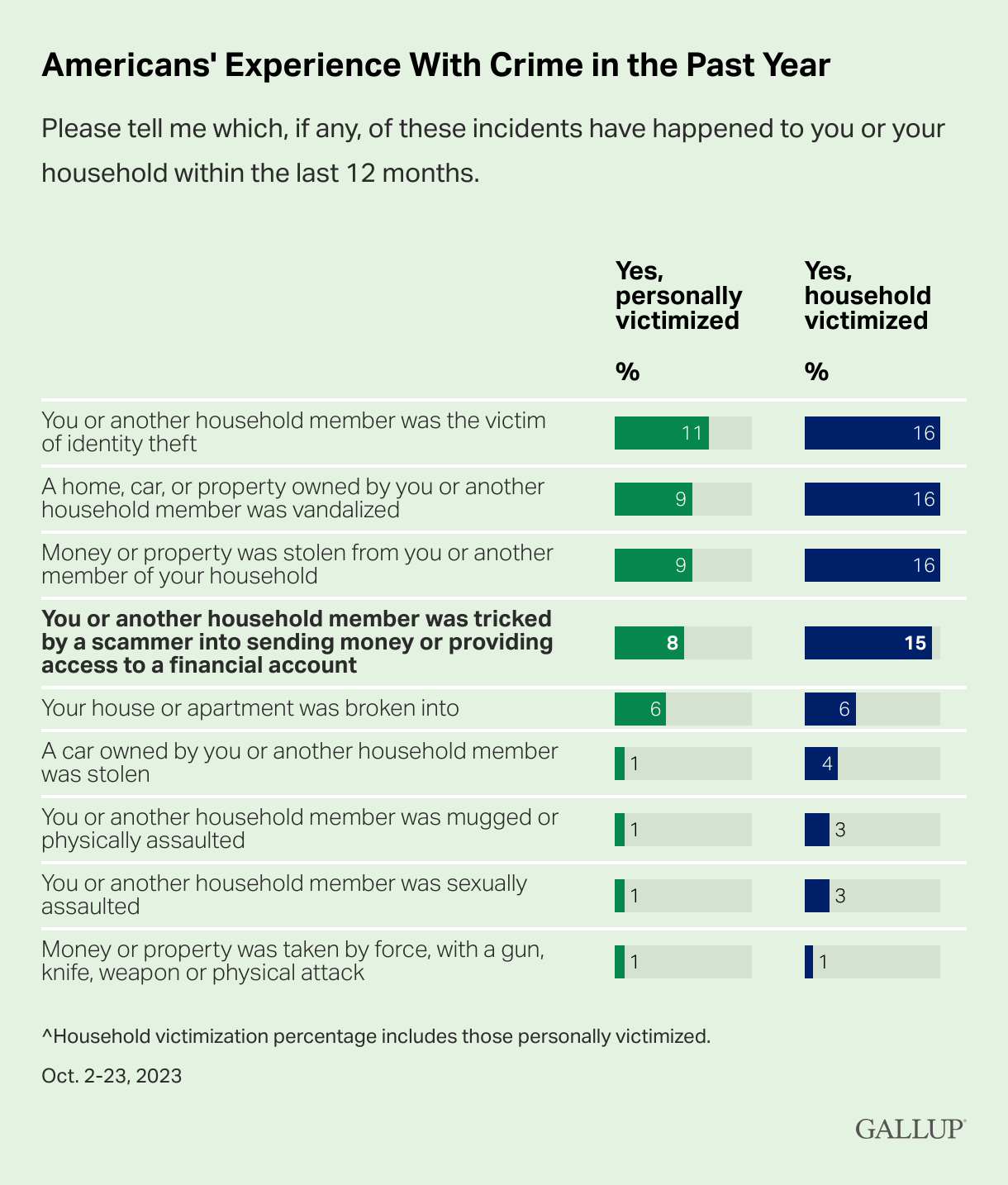
Graph provided by Gallup
And, while we tend to think of victims as being older, every demographic group is at risk. In fact, younger adults (like Gen Z and the youngest Millennials) are overrepresented as victims of scamming (at 22%); meanwhile Gen Xers like Paper Doll and Baby Boomers are somewhat less likely to be scammed, at 9% and 14%, respectively.
The rate of victimization is lower among adults without a college education and with lower incomes than those who have college educations and who earn at least $50,000 per year. One might surmise that both of the latter groups have more opportunity to be warned and prepared to identify elements of scams.
But people with education, experience, savvy, and money can also be scammed. Last month, author Cory Doctorow wrote How I Got Scammed, explaining how a Christmas holiday travel week, a failed ATM transaction, and the post Alaska Air 737 Max door-plug disaster created a perfect storm for him being taken advantage by a phone-phishing fraudster pretending to be from his credit union.
Sometimes, a scam is obvious. Out of nowhere, you’ll be cooking or watching TV and the phone will ring. A mysterious and heavily accented speaker will say that there is “something seriously wrong with your Microsoft computer.” It doesn’t matter if you actually have a Mac, or if you don’t even have a computer. They’ll use that wearily patient voice so identifiable as IT customer support.
You immediately know it’s fake; but would your grandparents? Would your teenager?
Other scams are less obvious because they come wrapped in the kind of tech-related language we see every day. In just the 24 hours prior to writing this post, Paper Doll and Paper Mommy experience attempted scams.
I received an email claiming that I’d purchased $500+ in services, and if had not made those purchases, I should immediately click to be connected with the company’s fraud department. Of course, merely hovering my cursor over the return email address (displayed as the company’s name) showed it was actually sent by gibberishletters@Yahoo.com. Real companies don’t use Yahoo addresses; in theory, they shouldn’t even use Gmail addresses. Dependable companies have their own domains.
Meanwhile, Paper Mommy got the all-too-common email advising her to click because her iCloud was full. [Be assured, her iCloud was not full. It has a backup of her iPad and probably a few dozen photos and not much more.] Paper Mommy may be 87, but she is one smart cookie, and even if she hadn’t received one of these same phishing attempts previously, she knows enough to verify such things.
However, it’s common enough to get random notification texts, popups, and emails claiming that something is awry. One of the immediate clues is bad spelling, grammar, or punctuation, something that older generations are more likely to take seriously; a 50- or 70-year-old is more likely to immediately realize that a poor command of English (in an email sent, ostensibly, by an American company to an American customer) is a sign of a scam. Thus, given the propensity of younger people for text-speak and a lesser reliance on standard usage, younger adults might be more easily tripped up.
Still other scams prey on the inclination of individuals to be good natured. One popular scam comes in the guise of a text regarding a sick or injured dog. The sender addresses you by the wrong name and says that they’re at the vet; their dog won’t eat and is whimpering, and they’re waiting for assistance. I “fell” for such a scam a few months ago, in that I replied and said, “Sorry, you have the wrong person. I hope everything turns out OK for you and the dog.”

Sad Doggie Photo by Bruno Cervera at Pexels
I thought nothing more of it until the person kept texting and trying to inveigle me in conversation, asserting that I must be a dog lover, too. (Readers, while I’d hate for you to think I’m a Disney villainess, I’m not fond of animals in person, though I do love monkeys, puppies, kittens, and penguins, as long as they’re on my device screens and nowhere near me.)
I Googled, and immediately found that this is a long-running scam to convince text recipients to get emotionally enmeshed in the condition of the dog, and end up giving money. One can understand how Congressman George Santos managed to set up fake Go Fund Me accounts for animal care and steal the proceeds. People are softies and want to be kind.
We’re also inclined to be law-abiding. There have been a number of jury duty scams where recipients get calls or texts saying that there’s a bench warrant for them to be arrested because they have not shown up for jury duty. Sometimes, recipients are warned that deputies are on the way to arrest them unless they pay a fee over the phone, or buy gift cards and send them to the caller.
Government agencies don’t text you out of the blue. In most cases, none but teeny, hyper-local government offices will even email. They certainly don’t take payment in gift cards.
Scams are designed to prey on your lack of experience or information, your good nature, and your fear of getting in trouble (as with Cowles’ example). Do not let scammers waste your time, ruin your productivity, or take advantage of your goodwill.
SOCIAL SECURITY: SLAM THE SCAM DAY
The Social Security Administration has declared this Thursday, March 7, 2024 Slam the Scam Day!
On National Slam the Scam Day and throughout the year, the SSA provides tools to help seniors and others recognize scams related to Social Security and prevent scammers from stealing both funds and personal information.
Social Security and Paper Doll want you to protect yourself, your loved ones, and people in your community this Slam the Scam Day by educating everyone about government imposter scams. Discuss the issue and let people in your life know they shouldn’t be embarrassed to report if they shared personal information or suffered a financial loss. It’s important to report scams as quickly as possible, both to aid recovery and identify the culprits.
The Social Security Administration encourages us to share their Scam Alert fact sheet to help educate others about how to protect themselves. Report Social Security-related scams to the Social Security Office of the Inspector General (OIG).
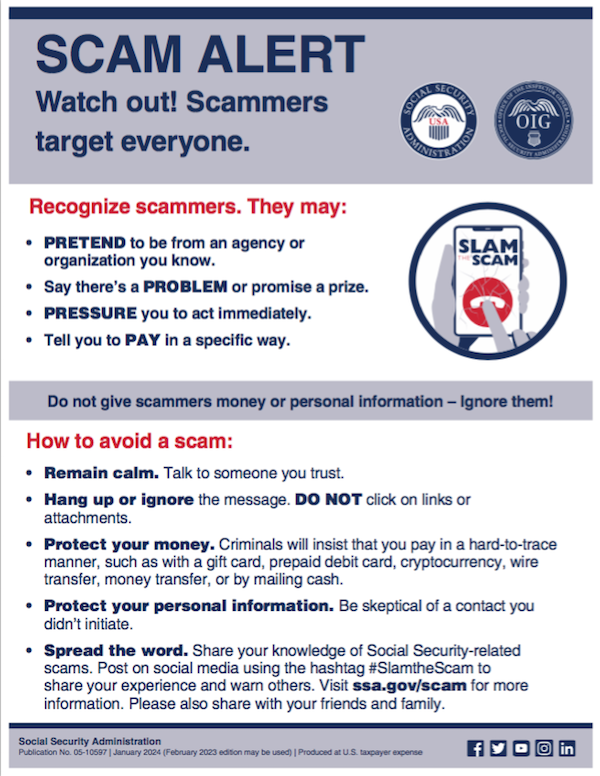
If you do encounter scammers in any way related to Social Security, report the scam online with as much information as you have regarding the characteristics of their claims.
Social Security encourages you to visit www.ssa.gov/scam for more information and follow the SSA OIG accounts on Facebook, Twitter, and LinkedIn. Those accounts aren’t going to share the newest viral dances or memes, but will keep you informed of the latest nasty tactics. Please consider sharing this post with the #SlamtheScam hashtag on your social media platforms.
OTHER SCAMS TARGETING SENIORS
Scams targeting seniors aren’t limited to those involving Social Security.
The “Grandma, I’m in Jail!” scam has been prevalent for more than a decade. Your phone rings and you hear a young person’s distraught voice begging for help. The caller, ostensibly your grandchild, has somehow accidentally run afoul of the law and is in jail. “Please send bail money but don’t tell Mom and Dad,” the caller begs, providing a phone number and case number; you call as directed and the faux police officer verifies the case number and takes your money. These scams assume Grandma doesn’t hear your voice often enough to recognize it on the phone.
Help your grandparents not fall for such scams by 1) explaining how they work and 2) calling them more often so that they recognize your voice!

Photo by RepentAndSeekChristJesus on Unsplash
Elders are often the victims of medical scams designed to impersonate legitimate agencies related to Medicare, diabetes supplies, medical equipment, hospice, and more. Romance scams, which prey on lonely people of all ages, but especially tender-hearted seniors, are also on the rise.
The American Association of Retired Persons (AARP) is great resource for keeping on top of scams targeting the elderly. Bookmark AARP’s Scams and Fraud page to learn about new schemes as they become known.
KNOW THE SCAMMERS’ TRICKS
Similar to “Grandma, I’m in Jail” is “Dad, I’ve had a car accident!” There’s loud traffic noise (and perhaps sirens) in the background and the faux-distraught caller is saying that they’ve caused an accident and that the police say they need to pay a fine right away. Don’t fall for it.
Remember how I said that government agencies won’t ask for payment in gift cards? Neither will your boss. The Do Me a Favor scam shows up via email or text, when your boss (or maybe the CEO of your company) sends a message asking you to purchase gift cards for a work-related charity promotion, promising to pay you back after he receives them.
Yeah, no. The email or text may look like it’s coming from your work contact, your church leader, or your Facebook friend, but it’s almost certainly not.
Similarly, your friends aren’t going to be at the Paris Olympics and lose their wallets and ask you to send them money via Facebook.
The best way to organize yourself against scams is to stay informed of what scams are popular. When you know what to expect, it’s easier to identify scammers and avoid engaging.
- 5 Financial Scams To Avoid in 2024 as Expert Warns Fraud Has Reached ‘Crisis Level’ (NASDAQ)
- 6 Top Scams to Watch Out for in 2024 (AARP)
- 10 Scams You Should Know About in 2024 (Express VPN)
- 17 Facebook Marketplace scams to avoid in 2024 (Lifelock)
- Credit Card Scams to Know in 2024 (and How to Avoid Them) (Time Magazine)
- Five Biggest Frauds To Watch Out for in 2024 (Kiplinger)
- The Latest Scams You Need to Be Aware of in 2024 (Experian)
- No Love for Romance Scammers in 2024 (IRS)
DON’Ts AND DOs TO KEEP YOURSELF SAFE FROM SCAMMERS
DON’T CLICK — If you receive an email or text with links to your bank or other financial account, go instead to the official website and log in from there. If you don’t know the URL, look it up on the back of your bank or credit card or on your statements. And, as you’ve been told since the dawn of email, do not click on attachments from somebody you don’t know.
DON’T TRUST — The Caller ID may say that the inbound call is coming from your bank or the IRS, but it’s ridiculously easy to “spoof” (that is, fake) the identity of a caller. Consider not answering; scammers rarely leave voicemail.
Don’t assume that the caller having the last four digits of your Social Security number or even all of the digits of your account number is on the up-and-up; there’s just too much of our private information on the dark web. Instead, hang up and call the official number for your financial institution and request to be connected to the fraud department.
DON’T DIVULGE — If a stranger claiming to be from your bank or credit card’s fraud department contacts you, ask for a case number. Do not give out your personal information. Do not give out your PIN.
DON’T SAY YES — Do not answer questions in the affirmative. That is, if they ask, “Is this Jane Smith?” don’t say yes; if you must say something, reply, “What is this regarding?” Your voice could be recorded and cloned for AI-related scams. The less you say, the better.
DON’T RUSH (OR BE RUSHED) — It’s the nature of scammers, like the stereotypical used car salesman, to use the pressure of time to get you act against your best interest. Don’t be fooled into making a decision or taking action quickly. Check with advisors, whether more technologically savvy friends or relatives, your accountant or financial advisor, your attorney, or the police.
DO READ UP — The American Bankers Association has a nifty website called BankersNeverAskThat.com. The site explains what to watch out for in terms of email, text, phone, and payment app scams, and also has a great eight-question quiz where you can walk through the situations (on your own, or as part of coaching with a loved one) to identify whether something is a scam or legitimate.
For reference, I did pretty well, but I dithered on the question regarding payment app alerts; if you’ve only recently begun using apps like Zelle, Venmo, or other peer-to-peer payment services, you might find the example sneaky, too, so read (and share) AARP’s How to Avoid Scams on Zelle, Venmo and Other P2P Apps.
The site offers a goofy “retro” scam-themed video game and a series of lighthearted videos to drive the point home.
>
DO HAVE FAMILY PASSWORDS — Schools have security that was non-existent when I was a kid; there are lists of who is allowed to pick up little Johnny or Janey from school to ensure not only that there’s no Stranger Danger but that wackadoodle exes and pushy in-laws don’t insert themselves between you and your kids. Modern parenting includes having family passwords so that if someone says, “Hi, your mommy told me to come pick you up from soccer practice today,” even if the child recognizes Mommy’s best friend as Auntie Karen, the kids know to wait for the official password.
This concept should be applied to families at all ages. Have a communication password designed so that if Grandma or Dad or College Kid gets a call purporting to be from one of the others and is in in need of emergency funds, there’s a level of security involved. (But, y’know, if Grandma calls from jail too often, maybe let her think about the consequences of her actions for a little while.)
DO TELL THE AUTHORITIES — No matter how embarrassing it is to have been scammed, it’s important to report suspected and actual scams.
- Notify your bank, credit card company, brokerage, or other financial institution immediately. If scammers have actually taken your money via credit card, the company should be able to flag the transaction as fraud and reverse it immediately; other financial institutions may also be able to freeze the transaction and save your money. Take screenshots of texts or emails, and don’t delete the original messages in case law enforcement wants to dig more deeply into the source code.
- Contact the police, and file a police report. Do not be dissuaded if the police officer seems blasé about the crime.
My credit card company once notified me that someone had used my card number to buy an inordinate amount of mail order men’s underwear and stereo equipment. Algorithms had already flagged the purchases as fraud, but they asked me to file a police report. The police officer who took the report at my workplace could not have looked more bored if I’d asked him to watch paint dry. It doesn’t matter. Report!
- File reports with applicable state and federal agencies. Whether the case involves the Social Security Administration, Medicare, or other federal crimes, report scams to the applicable agencies. The Federal Bureau of Investigation (FBI) and the Federal Trade Commission (FTC), as well as your state’s bureau of investigation all have fraud departments. Learn more at the FTC’s Reportfraud.ftc.gov and the FBI’s Internet Crime Complaint Center at IC3.gov.
THE FUTURE OF SCAMS
Scams — and scammers — aren’t going away. There will always be scammers who take advantage of anyone more easily duped because they have less information, less experience, and fewer people watching out for them. But, as I alluded to earlier, there are higher tech scams on the horizon.
Artificial intelligence is scary. I bet you’ve heard about deepfakes, video imitations made to sound and look like a real person is saying something they never actually said.
Voiceprints and voice cloning constitute the audio version of deepfakes. A scammer can record you — or take your teenager’s Instagram or TikTok video — and create a completely new message using words and expressions that were never actually said, and then create an “emergency” where it’s believable that money or your Social Security number or other private information is requested. If your college-age kid still hasn’t memorized his Social Security number, you might be tempted to believe it if “he” calls from a spoofed number that looked like his and says he’s filling out a form at school and needed his (or your) digits.
Voice cloning is already being used. Scammy deepfake videos could just as easily be to sent via Facetime or text video. Be careful.
FUNNY THINGS (NOT) TO DO TO SCAMMERS
You shouldn’t engage with scammers, so don’t emulate Paper Mommy or her friend in the stories below. Still, it’s fun to imagine retribution against bad guys.
When I was a teen, my mother was visiting a friend, a suburban woman of (shall we say) means. A phone scammer interrupted their visit and was urgently pushing some sort of financial scheme. Mom’s friend told the caller that she was sorry, but he’d have to wait, that her husband busy shoveling the cow s***.
Later, my mother spoke of her friend’s response with a twinkle in her eye.
Paper Mommy, as longtime readers know, is a hoot. After a friend briefly fell prey to the “Grandma, I’m in jail!” scam (until she learned that her teen grandson was fast asleep in his own bed), Paper Mommy began plotting her revenge on scammers. A few years ago, she called me with delight to report that the day she’d been anticipating had finally arrived.
“Grandma, I need your help!” the voice implored. The scammer had already made a tactical error; much to Paper Mommy‘s chagrin, neither my sister nor I have made her a grandmother. My mom tut-tutted as the scammer wove his tale, offering periodic, “Oh, no, darling! … Oh, you poor thing? … You need me to send you money?”
She kept him on the line for eons, repeatedly leading the evil-doer to believe she was prepared to turn over her credit card number to secure grandson’s release. Oh, she just had to find her purse. Oh, fiddlesticks, where was her wallet? Just when his frustration led him to almost crack and he implored, “Grandma, aren’t you going to help me?” my mom uttered her Oscar-worthy line:
“No, Sweetheart. I never really liked you that much.” Click.
#SlamTheScam



Follow Me