Archive for ‘Office Supplies’ Category
The Pareto Principle, the Internet of Things, and Paper: A Printer to Make You Smile
Do you hate your printer? OK, hate is a strong word, but let’s talk.
My first printer, a noisy dot-matrix Imagewriter II, was part of my first Mac purchase in December 1985. It had a sleek white housing, took continuous-form feed (or fan-fold) paper (which, at the time, we likened to paper towels), and took black ink only. It had a few simple lights and buttons that didn’t require reading a manual to understand. It was sleek, did what it was told, and aside from being incredibly heavy, fit well with my student life requirements.
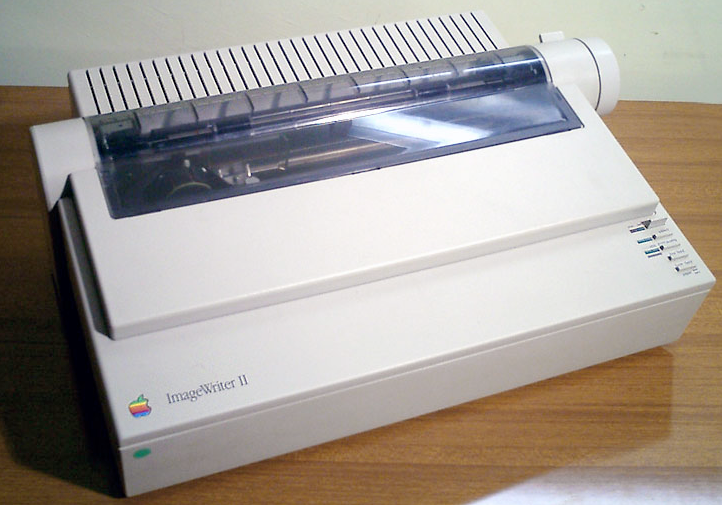
I’ve had a few printers in the past three decades, but none as pleasing as that Imagewriter II. Epsons and Canons and HPs, oh my! They’ve frozen, their drivers have mysteriously failed, and they have crankily refused to print with black ink when the cyan (that’s yellow, y’know) was not tippy-top. My current printer, since it was about six months old, refuses to print unless I unplug it from the power supply and plug it in again before printing. Every. Darn. Time.
You’d think there would have to be a better way! Well, one 27-year-old German industrial designer thought so, too.
PAPER
Ludwig Rensch had an idea. What if printers weren’t horrible, awful, frustrating pieces of technology that we depended upon for providing tangible representations of information, but were instead easy to use and nifty to gaze upon, and did what we needed?
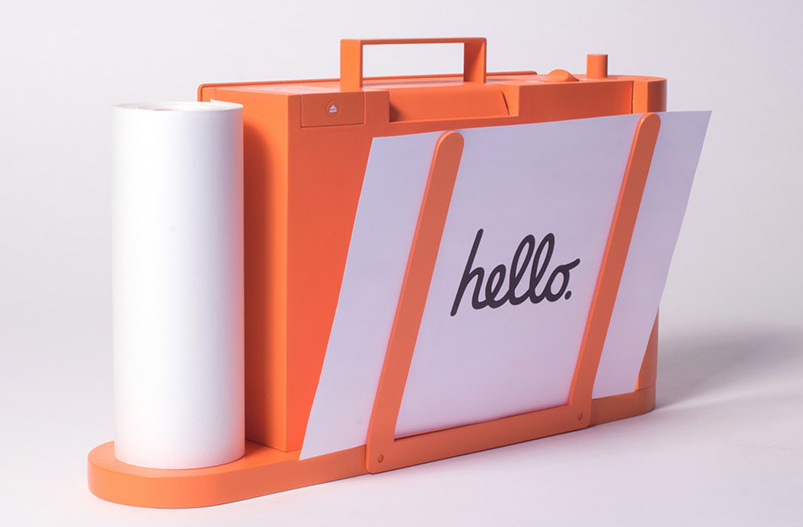
His prototype? Paper: A Printer You Actually Want
In Rensch’s words:
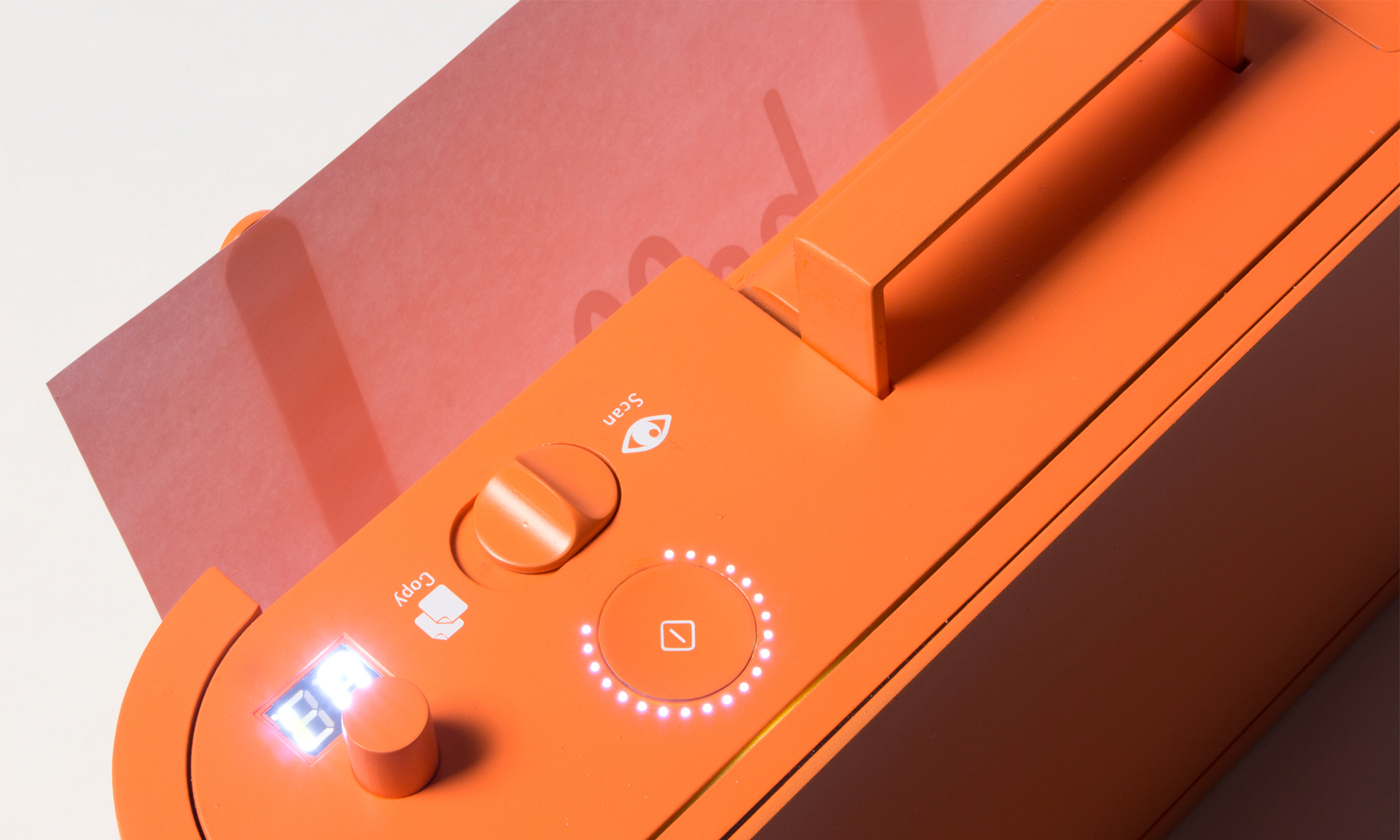
Paper is a machine that can print, scan and copy in a pleasant way. It communicates its function, provides clear feedback and uses physical controls to operate the key functions with ease.
Seriously? No randomly blinking lights that are reminiscent of Morse Code but have no clear meaning?
No refusal to print in black and white unless three other color inks are full?
No ugly metal and plastic blob that makes your kitchen or living room feel industrial?
Well, that is a breath of fresh air.
THE BASICS
Instead of the black and grey boxes we’ve come to know, Rensch’s Paper is a brightly colored, lightweight, all-in-one printer/scanner/copier.
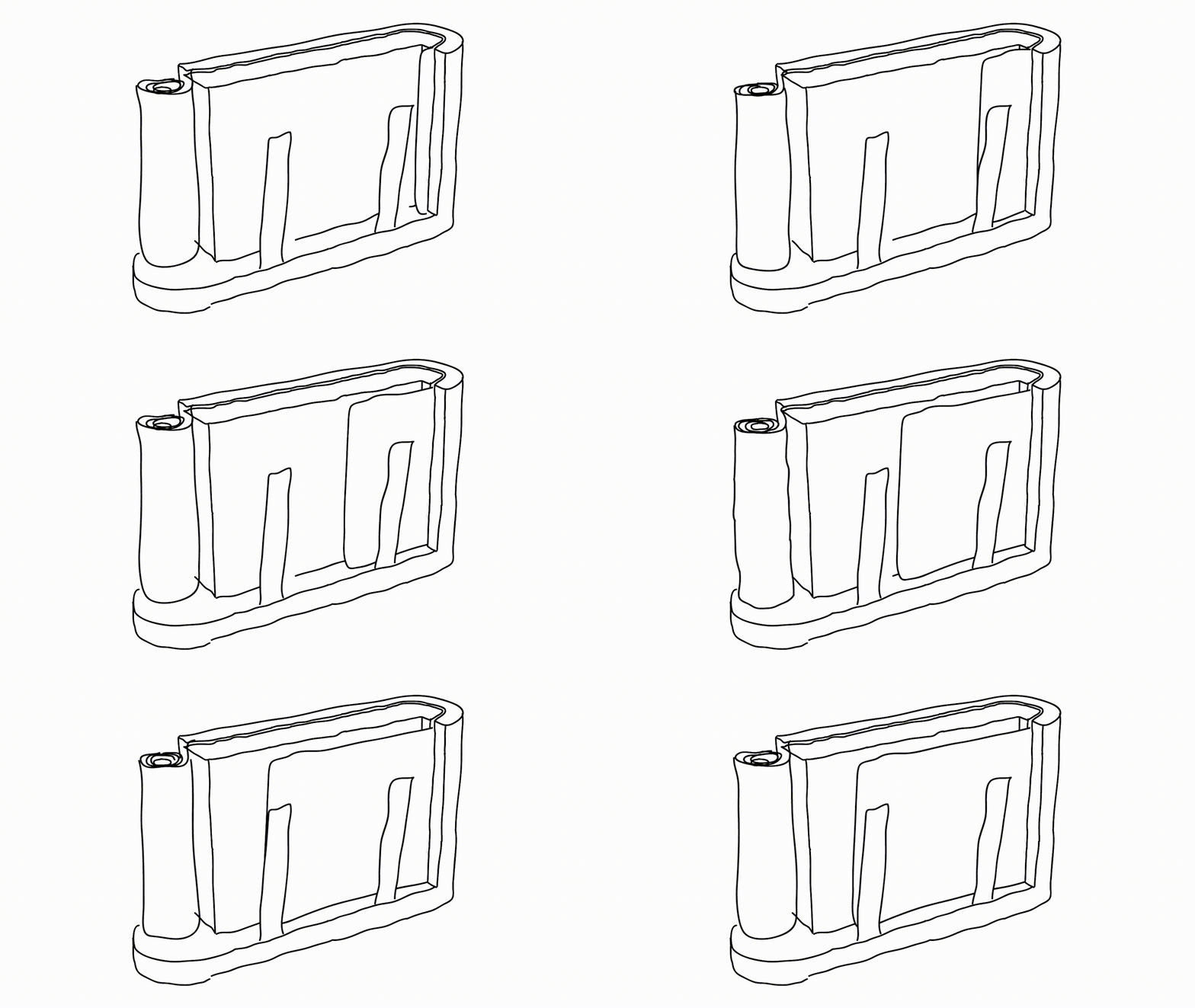
Imagine having a traditional flatbed printer or scanner but then turning it on its side. In lieu of a traditional stack of copy paper, Rensch’s Paper prints or copies to a continuous sheet (sans tractor-feed holes) on an upright paper roll with pages cut one slice at a time, much like Berg’s Little Printer, which I wrote about in Indulgences, Unitaskers and Paper Doll’s Take on the Little Printer.
Instead of black or grey plastic and metal that’s suited for office space, Rensch designed something that adds some quirky color. (Although Paper Doll, herself, has a lifelong history detesting the color orange, this blog will not hold that against Paper.)
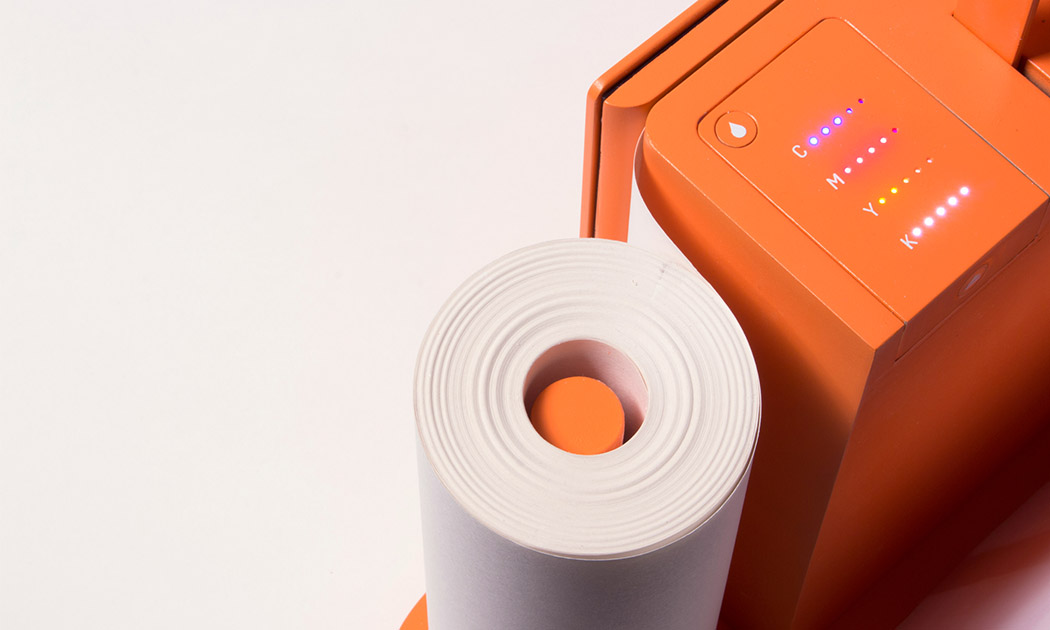
The revised design makes it more compact, space-saving and mobile. There’s just one switch to select “scan” or “copy,” the LEDs let you know the status of Paper’s ink levels, and there’s a handle on top so you can pick it up at a moment’s notice without feeling like you’re carrying all your worldly possessions like in the closing scene from Fiddler on the Roof.
THE PRINCIPLES
As a professional organizer, I was delighted to see that Rensch developed the user interface to follow the Pareto Principle: 80% of your success comes from 20% of your effort. In organizing, we usually take that to mean that 80% of the time, we wear 20% of our clothes (wearing and washing, and storing them for easy access and wearing them again), while kids play with 20% of their toys, and so on. We focus on that to show how, when we discard some subset of the 80% were rarely use or touch, we regain space without regretting the loss of what we’ve donated or tossed.
Rensch says:
This is where the paradox of technology kicks in. Devices become incredibly complicated. Microwaves, Remote Controls, TVs, Cars, Ovens, Printers, Coffee Machines – they all have features that the majority of the owners never use. That is because they don’t know how or why, and they’re not willing to spend time and energy to learn how to use something. Especially in the days of streamlined services and apps, that make life so easy without instructions or efforts, it seems ridiculous that one has to read a user’s guide to heat up some food.
Rensch applied the Pareto Principle, considering the likelihood that 80% of the time, we only use 20% of the features of office appliances like printers, copiers, and scanners, so why create bulk and disarray with more than is needed? To achieve his goal, Rensch started at the beginning: he defined a printer’s key functions, analyzed the required procedures and simplified everything until he had created an easy-to-learn, simple-to-understand, aesthetically pleasing, and minimalistic product.
THE INTERNET OF THINGS…USED BY REGULAR PEOPLE
Rensch designed his Paper printer/scanner/copier as part of his graduate thesis Interacting with Things, which looked at how machines can be used more intuitively, and he asked three basic questions:
- Is it possible to transfer the quality of a digital user experience to an everyday object?
- Can we use physical feel to improve digital experiences?
- Are we able to make the information and the opportunities of the internet more tangible and experience them in physical things?
Then, he applied his concepts to three designs: Paper, PostPoster (an interactive graphical poster that uses a specialized conductive paint to generate sounds), and Musikbox 1188 and its app, a Bluetooth loudspeaker that lets you listen to music from your friend’s phone, tablet, or computer even if your friend (and her gadgets) are on the other side of the world.
The ever-expanding concept of the Internet of Things, upon which Rensch’s work is predicated, is key to understanding his designs. The Internet of Things, or IoT, is like where your Nest programmable thermostat or your “fridge of the future” can talk to your phone or computer and to one another to make your life more enjoyable. The thermostat can increase the A/C on a hot day so it’s just perfect when you walk in the door, but also send you an alert if your furnace is acting weird and the pipes might burst in winter. Meanwhile, your fridge can detect when you’re low on milk, your ingredients are about to expire, or you’re lacking what you need for the recipe you programmed in for Saturday — and then auto-order more groceries!
While most designers are eager for this Rise of the Machines and are welcoming our new programmable toaster overlords, the rare detractors are usually concerned with the security of IoT. Rensch, however, is more concerned about the humanity of it (per his thesis):
It’s the age of the smartphones. Like no other technology in the recent decades, they become part of our lives. Services offered in the internet allow us to do really complex stuff in no time, with no effort and in pleasant ways, for instant [sic] sell a bike to someone, find directions in foreign places and do business on the go. Static information that was bound in books and maps is now fluid and accessible from everywhere at everytime.
But these developments also must be viewed critically.
Even these miracle-machines have their down-sides. We all know people who are sunken into their Smartphone screens, absorbed by virtual worlds. And from time to time, we’ve been that person. All the Apps and Services are good and useful on their own, but to take care of everything only with our phones is distracting us from the outside world and our environment. Interactions with screens demand an enormous amount of concentration and leave the human motor functions and haptics unused.
Paper looks a lot like a throw-back to the days of mechanical buttons and dials, making use of the user’s fine motor skills to tune in the desired solution with basic physical controls and verify them with simple light signals. In that way, it reminded me of an old radio, where you turned the dial and when you hit upon an AM or FM station clearly, the tiny light would shine brightly.
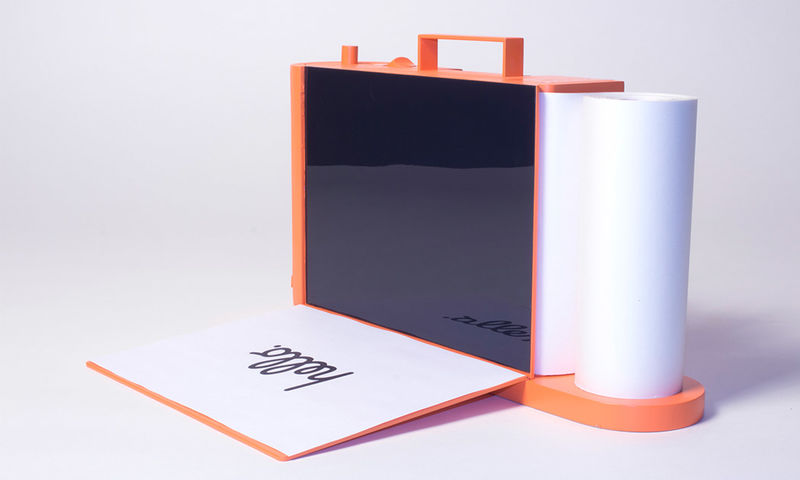
Paper could work manually, only, but Rensch designed it to operate as an Internet of Things device — but better. According to Rensch, the device is meant to be seen as more of an “aesthetically pleasing creative tool that brings together the analog and digital worlds for transferring content from one to the other.”
Paper hasn’t left the virtual world behind. It can be operated via its own app on your mobile device or at a website in your computer’s browser.
To really appreciate the experience of using Paper, which to me, harkens back to my first experience with the design of Apple products, check out the video.
IN THE REAL WORLD
Of course, and I’m sure you expected this, there is sad news for those of us eager to try Paper out. You see, Paper is not-ready-for-prime-time because of the economics of the Office Supply Industrial Complex. Your frustrating HP or Epson is frustrating because it’s cheap, and it’s cheap because the companies know they can hook you with the low-price printer and weigh you down with printer ink made only for your style of printer, forcing you to come back time and again for a cyan you don’t really want or need.
Without Big Ink money to subsidize the development, manufacturing, and distribution of Rensch’s Paper, this pretty little thing won’t be on desks (or kitchen counters) anytime soon. We can only hope that the big guys will take Rensch’s approach under advisement, and give us a printer/scanner/copier we’d actually enjoy using.
Paper Doll’s NAPO2016 Recap: Samsill’s Duo & Trio & Pop…Oh, My!
Last time, we covered the conference aspect of NAPO2016. That’s the part that’s a mixture of college courses (education), class reunions (networking), and cocktail parties (food, beverages, and entertainment). But Paper Doll knows that you come here for the expo talk — you want to know about the shopping!
This year, we start with a newcomer, a vendor we’ve not seen before at NAPO conferences, Samsill. If Samsill were a person, it would be almost old enough to collect Social Security, but it’s not as well-known as some of its competitors in the world of office supplies.

Samsill showcased three products that really got attention at this year’s NAPO Expo.
Duo 2-in-1 Organizer
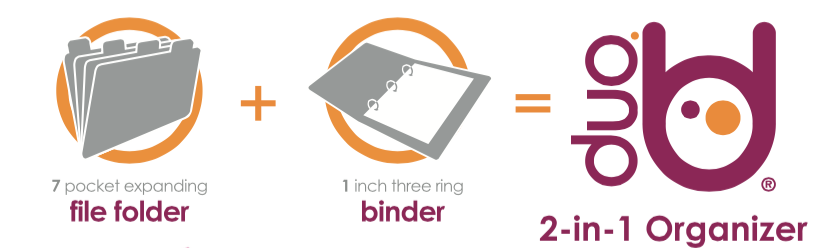
The Duo is the first of two hybrid products from Samsill. It combines a seven-pocket expanding accordion file with a 1″ three-ring binder. The accordion file portion holds up to 225 sheets of paper, while the accordion-style expanding portion includes blank write-on index tabs so you can customize your labels.
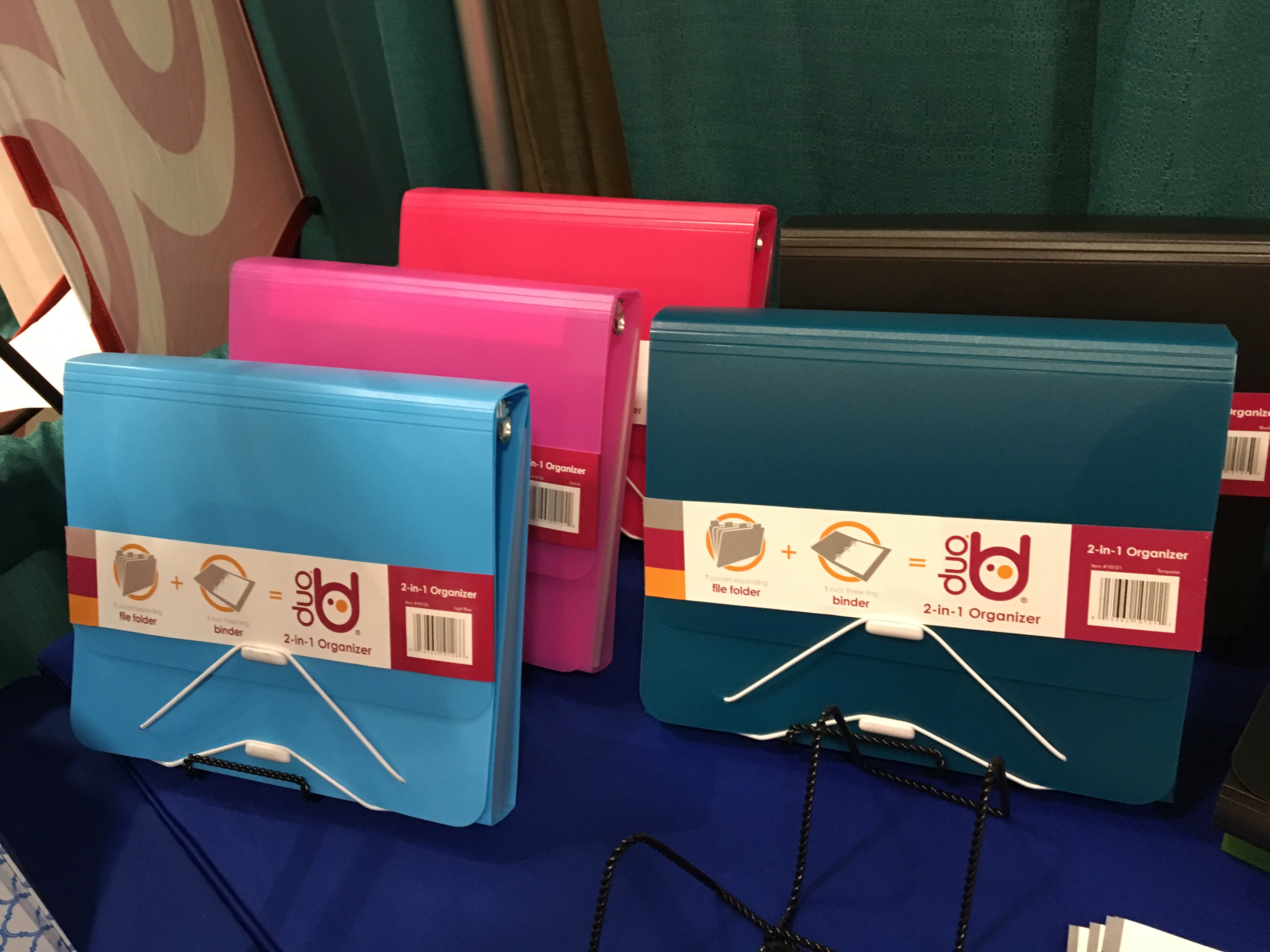
The Duo has a dual elastic clasp and cord closure to provide access to each portion (pockets or binder) individually while maintaining a secure closure to either or both sections. The Duo weighs 14.6 ounces and measures 9.8″ x 1.5″ x 11.8″.
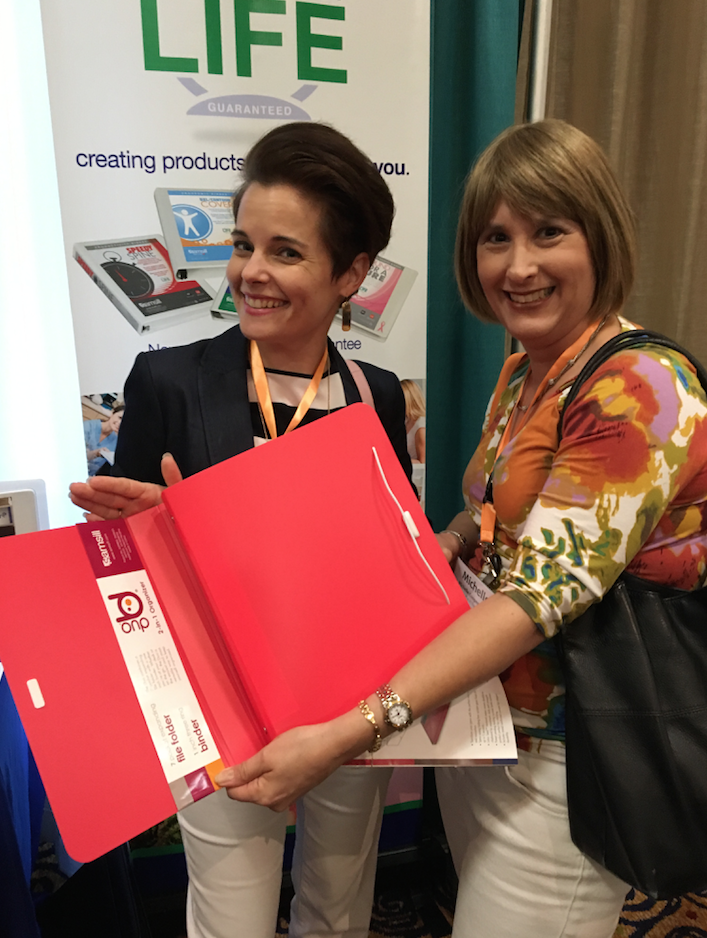
Here, we see Paper Doll friends and colleagues Nanette Duffey and Michelle Cooper modeling the flexibility of the Samsill Duo.
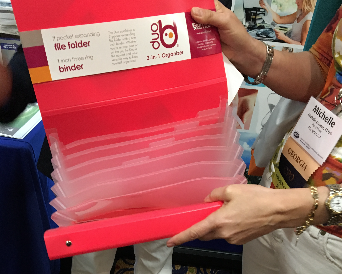
Think of the Duo as a grown-up Trapper Keeper in which you can store tax prep or financial information (budget, bills, coupons, and shopping lists), family medical files (with categories for tests, prescriptions, and dietary rules), or household plans (with sections for decorating, monthly upkeep, garden plans, etc).
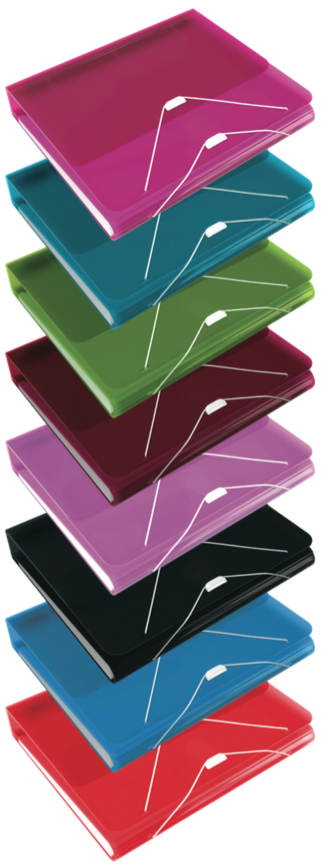
The Samsill Duo is lightweight and flexible, but durable and water-resistant, and is made of PVC-free, acid-free, archival-safe environmentally flexible polypropylene. (Paper Doll fans know that while I am a paper doll, I do love my poly products!) The Duo comes in Hot Pink, Turquoise, Green, Burgundy, Orchid, Black, Light Blue, and Coral.
Find Duo 2-in-1 Organizers at Amazon for about $10.79.
Trio 3-in-1 Organizer
With the Samsill Trio 3-in-1 Organizer, you still get:
- the seven-pocket expanding accordion file folder (which holds up to 225 sheets of paper)
- the 1″ three-ring binder with blank write-on index tabs so you can customize your labels
- the dual elastic clasp and cord closure which allows you to open or close the areas independently of one another
- PVC-free, acid-free, archival-safe environmentally flexible polypropylene
- the same weight and measurements
BUT WAIT, THERE’S MORE!
The Trio also has retractable hangers which turn the TRIO into a hanging file, so you can store it conveniently in a file cabinet, desktop file box, or filing drawer in your desk without fearing that it will sink below the visibility of other files or worrying that the poly will make it slide to the bottom of the drawer.
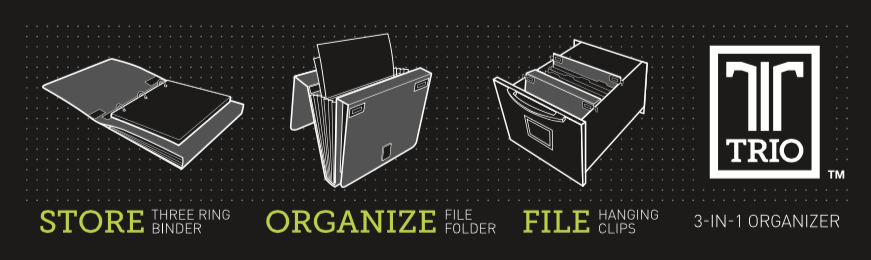
Store your ringed notes, sort and organize your handouts, bills, and paperwork, closed it all, secure the binder, and safely file away your Trio when you’re not using it.
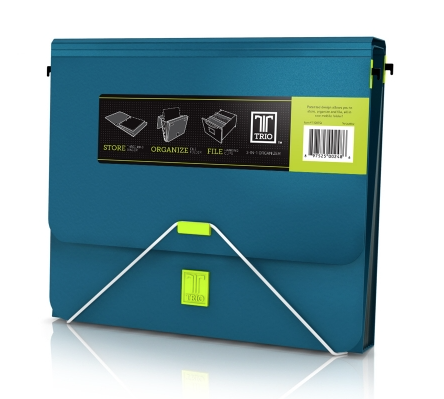
The Trio currently only comes in only two colors, Black (sometimes labeled Dark Grey) and Turquoise, but I’m sure if you all let them know how much I’d like them in Hot Pink and Burgundy, the people at Samsill would be happy to oblige. Find the Samsill Trio for about $9-11 on Amazon.
Both the Samsill Duo and Trio are eminently designed for durability, portability, and storage. They — particularly the Duo versions — are bright and colorful. However, there is significant “floppyability” about this combined binder/accordion file when open, and poly can be slippery, so these are probably more suited to office supply use than for younger school-aged kids (or adults, I guess) without sufficient fine motor control.
Pop N’ Store
The Belle of the Samsill Ball was definitely their line of Pop N’ Store boxes, which offer innovation, practicality, and aesthetics. The Pop N’ Store’s space-saving folding-box system is sold flat-packed, but POPS from flat to popped up in five seconds. Samsill’s patent-pending locking system holds the boxes’ bottoms in place, so they are entirely suitable for stacking.
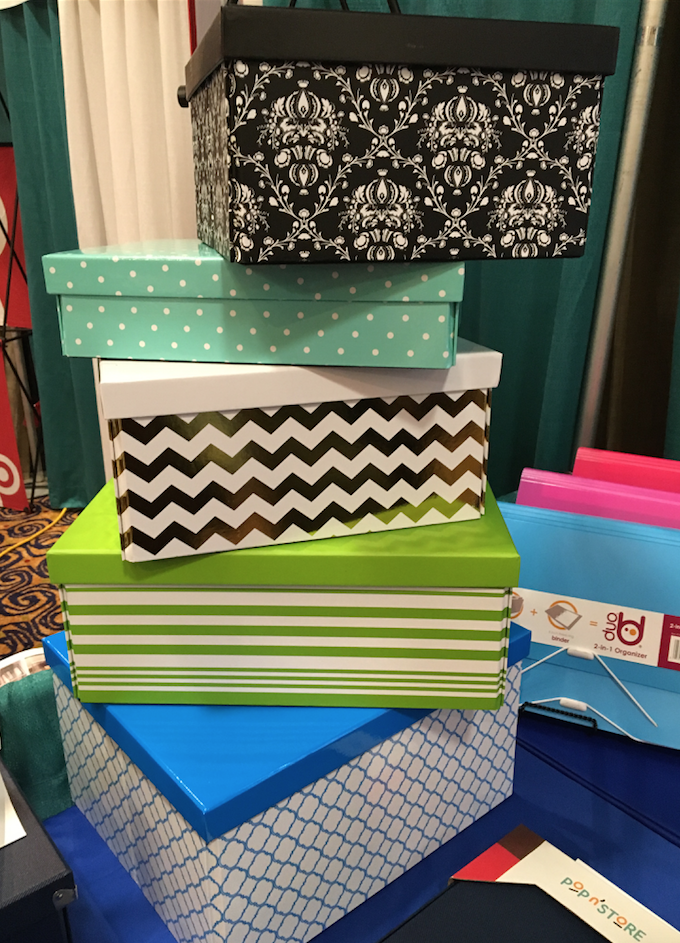
The double-thickness walls of the boxes are made of heavy-duty chipboard and are covered with
Lotus Seed™ textured paper, and the box bottoms are covered in scratch-resistant fabric to protect delicate surfaces in your home or office and offer a touch more support for the contents of any box. And the box corners are metal-reinforced to add durability and smart accenting.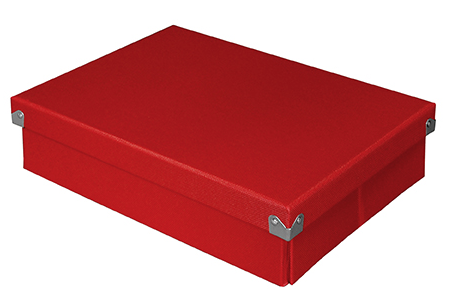
The boxes are made of 100% recycled material and 70% post-consumer material.
These lidded, decorative storage boxes come in five sizes with the following (internal) dimensions:
- Document Box (12″ x 8.5″ x 3″)
- Essential Box (14.625″ x 7.5″ x 5.34″)
- Medium Document Box (12″ x 8.625″ x 5.8″)
- Medium Square Box (9.75″ x 9.75″ x 5.75″)
- Mega Box (14.625″ x 11.875″ x 7.34″)
The boxes currently come in Black, Navy, Red, Brown, Grey and White. (At press time, Paper Doll was awaiting word on the availability of the colorful, patterned versions shown above, but we have learned that these are prototypes for future line extensions.)
Pop N’ Store lets you organize everything from linens to office supplies, gifts to crafts, toys to CDs, to whatever you want to store: tucked away, stacked, shelved, and shown off. Find them at Amazon from $11.99 to $16.99.
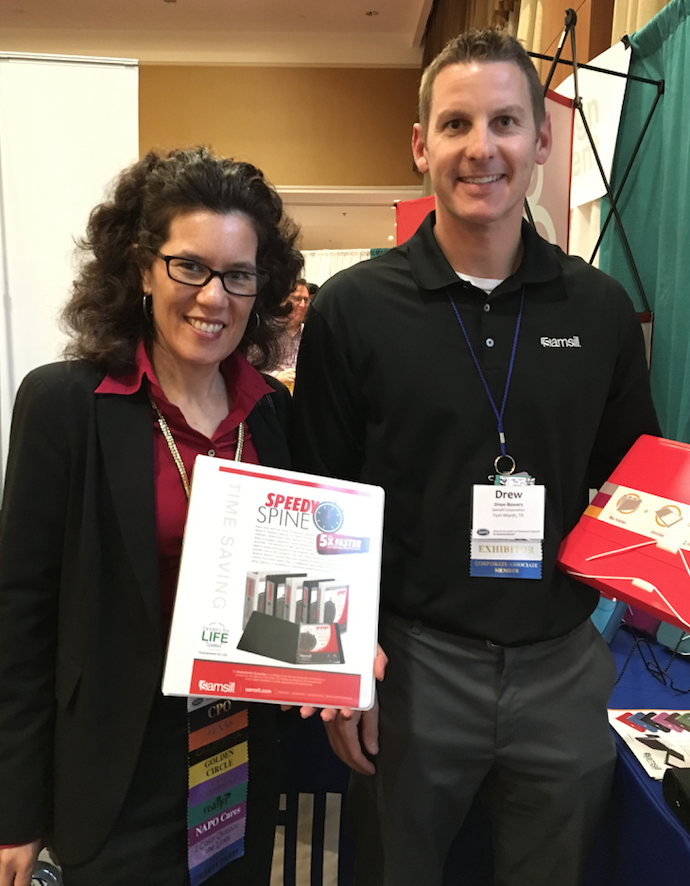
The Due, Trio, and Pop N’ Store are just a few of the items Samsill had on display at NAPO2016, and just a small subset of their wares. Samsill is best-known, for example, for their traditional three-ring binders in traditional and D-style rings. Above, Samsill’s Drew Bowers with my NAPO and BCPO® colleague Helene Segura are showing off the Speedy Spine, which purports to let you insert spine labels five times faster than other types of binders.
Samsill also makes Heavy Duty Clean-Touch Anti-Microbial binders (to keep you germ-free in a medical setting or around jam-handed colleagues), value-priced storage binders, Earth’s Choice™ Biobased + Biodegradable Round Ring View Binders, traditional poly round-ring binders (suitable for schlepping to Social Studies), truly enormous 6-inch capacity binders, and a collection of 1″ Fashion Print round-ring binders.
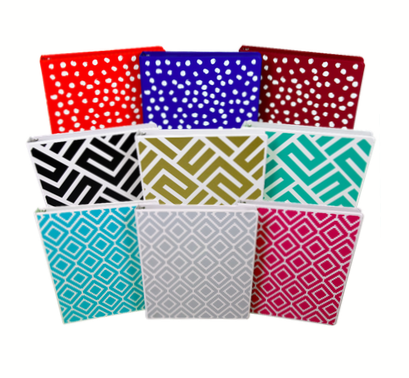
Samsill also makes padfolios, business card holders, laptop cases, tablet sleeves and a variety of other office supplies, and I’m looking forward to what they will be displaying at NAPO2017. From their website, it appears their retail locations are primarily in Kansas and Oklahoma, but you can find all of the above products on Amazon.
Up Filer: A New Vertical Filing Solution
Got paper?
Of course you do. And most of your papers for your life and work probably live in some typical places: standing up in file folders in desk-top file boxes or step risers, or hidden away in filing cabinet drawers, or flat on your desk (and maybe piled all around it), with whatever is larger and/or on top obscuring whatever is below.
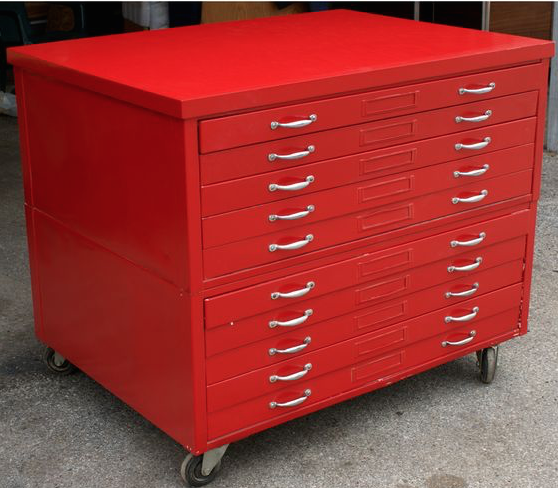
If you have lots of flat, non-bulky paper items, perhaps you’ve invested in a flat filing cabinet, with a variety of drawers to allow art projects, historical documents, and architectural designs nap in relative obscurity, often ignored or forgotten.
 Or maybe you’ve embraced the vertical approach with creativity — have you piled a bunch of related papers on a series of clipboards and hung them on your wall?
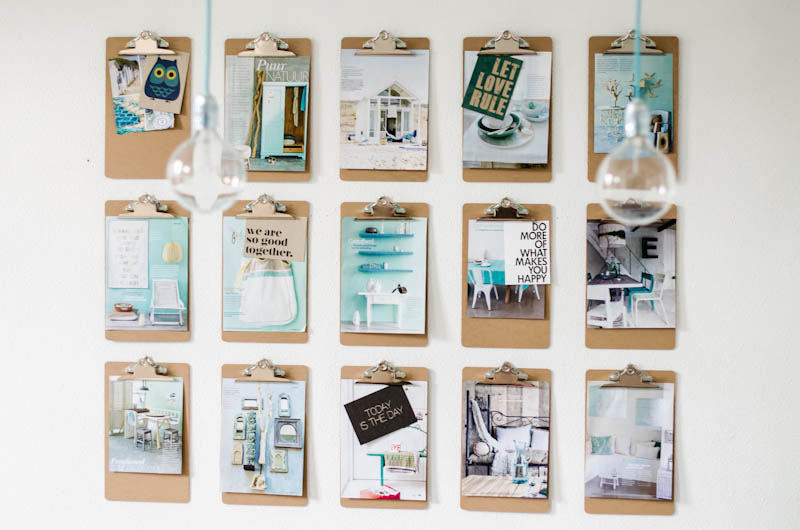
@2013 ASpareAndAPairDIY.com
The problem is that many people find that it’s fairly hard to gain purchase on your projects when they are hidden away. If you’re in a communal office setting, sharing resources and working on projects requires that everyone can have access without having to knock on Joe’s door and interrupt a meeting (or his tearful third-fight-of-the-week with his sweetheart) just to get the updated specs on the current blueprints. While it may seem like more and more of what we do is digital, there is still so much flat, tangible stuff and it needs to be easily stored and fairly accessible.
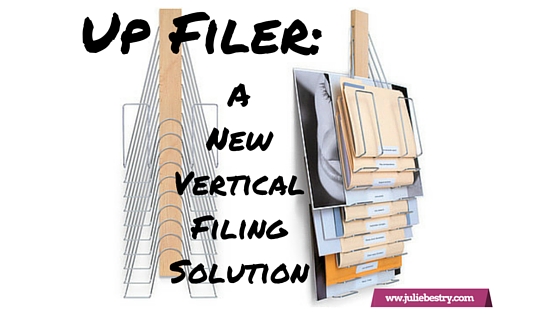
A new solution from Denver-based Westerville Design is a cross between a file step-riser and an on-the-wall clipboard, with a dash of the old-fashioned library newspaper rack and a soupçon of inventiveness.
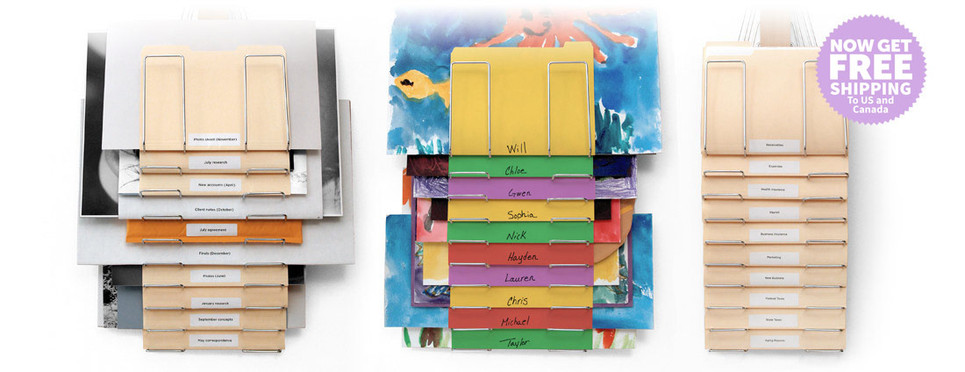
The Up Filer™ Original Vertical Wall File
Each Up Filer™ unit has ten nickel-plated steel hangers designed to hold whatever flat content you need to keep off your desk, like:
- file folders
- blueprints
- design layouts
- photos
- newspapers (remember those?)
The central spine of the Up Filer™ is made of solid maple hardwood, and the full size of the contraption, spine and hangers, combined, is 11.5″ wide x 34.5″ high x 2.5″ deep (29.2cm x 87.6cm x 6.3cm).
You don’t have to limit yourself to uniform height, weight, or thickness of papers or folders. Westerville says both the thickness of the content and the width can vary greatly (though they’ve not provided maximum measurements). The site notes that the height of the content depends on the thickness, but can measure up to approximately 16.5″ (42 cm) depending on the thickness (just as when too-thick file folders tend to stand a bit too tall in a hanging folder, beyond a certain point).
The Up Filer™ Original runs $149.99 and comes with a 60-day money-back guarantee.
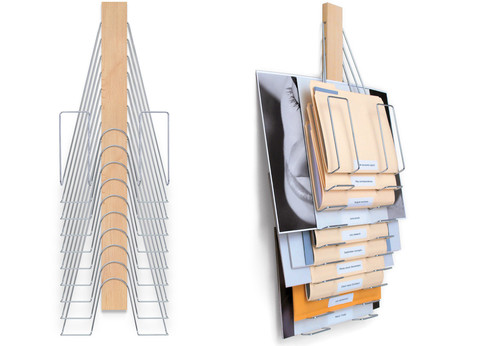
If you’re looking for something with similar capabilities but a little more panache, Westerville Design has you covered.
The Up Filer™ Bamboo Vertical Wall File
The Bamboo version conforms to the same measurements and specifications as the original version, but adds environmentally friendly sustainability with style, and you can select one of three colors (arranged from lightest to darkest)
- Natural
- Light Caramel
- Caramel
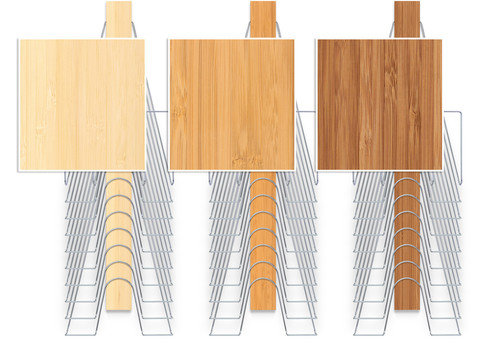
The Up Filer™ Bamboo runs $169.99.
Westerville Design is currently offering free shipping on both versions of the Up Filer™ to customers in the United States and Canada.
Why is the Up Filer™ better for some flat paper and storage displays?
- It doesn’t matter how small or large an item is — the design ensures that it won’t obscure what’s behind it, and it won’t be obscured by what’s on top of it.
- The Up Filer™ saves precious horizontal space and makes use of the always-forgotten-but-so-magical vertical space. The Up Filer™ is wall-mounted, so your flat items get up and out-of-the-way of your workspace.
- It’s easy. The spine of the Up Filer™ holds the hangers, and the pivoting hanger design makes it simple to remove or add items. Just lift a hanger to pop something new into the system or grab what you need.
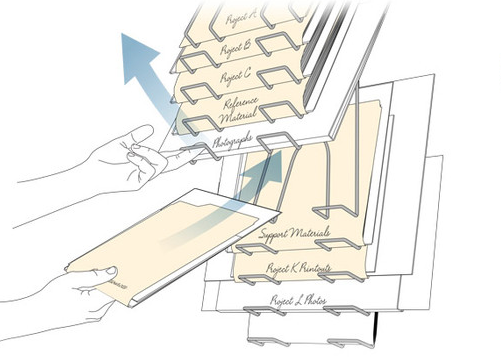
The Up Filer™ system is designed so you put labels at the bottom of each item. It may be unusual at first to see labels at the bottom, but it lets you quickly scan your eyes down the center and see everything at a glance. Nothing will be hidden or forgotten.
In the words of the people of Westerville Design:
It quickly became obvious that it wasn’t just good for designers but would be perfect for engineers, architects, fine artists, teachers or anyone who needs a filing system that keeps all the important stuff visible and at your fingertips.
Not having been able to examine the Up Filer™ up-close-and-personal, my sense of the drawbacks is limited to a few key items:
- The price is pretty up there. Granted, a flat file cabinet is even pricier, but most people and businesses are more likely to opt for a less gorgeous and more cost-conscious storage+display solution.
- Installation/mounting shouldn’t be difficult, but if you’re all thumbs, or have a cubicle, or your home office walls are really just flimsy sheet rock, the stability of this solution may not be adequate.
- Capacity is limited. Each unit has only ten hangers, and thus holds only ten “items,” albeit those that can get fatter or larger than what you can put in a filing cabinet or on a desk-stop step riser.
To get a sense of how the Up Filer™ works, peek at this short (and silent — seriously, none of that common plinking ukulele soundtrack) video.
Of course, if you like vertical paper storage solutions, the Up Filer™ isn’t your only option. At first, I recalled the Rackit File, a wall-mounted hanging file solution I reviewed back in 2011 in Paper Doll Adjusts the Vertical Hold: Space Saving Filing Solutions. (And, of course, that post is full of more portable approaches to vertical filing.)
So, readers, on the up-and-up — would you give the Up Filer™ a try?
Paper Doll Surveys the (Paper) Landscape
Serendipity is an interesting thing. Last year, an unexpected project introduced me to a wide-format clipboard, and a little research into that novelty turned into a revelation about the option of landscape-oriented office supplies. At the time, I mentioned the relative rarity of landscape-formatted writing pads, sourced one, and promptly forgot about them.
Then, just this week, while trying to solve the conundrum of my favorite (and suddenly unavailable) purple legal pads, two different blogs would prove to be the inspiration for this post. But not because they were profiling pastels — because they talking about writing pads with landscape orientation.
Suddenly, that previously discovered line of landscape-orientation, Roaring Springs Wide LandscapePads, have become this week’s must-have office supply. They come in four varieties:
Standard
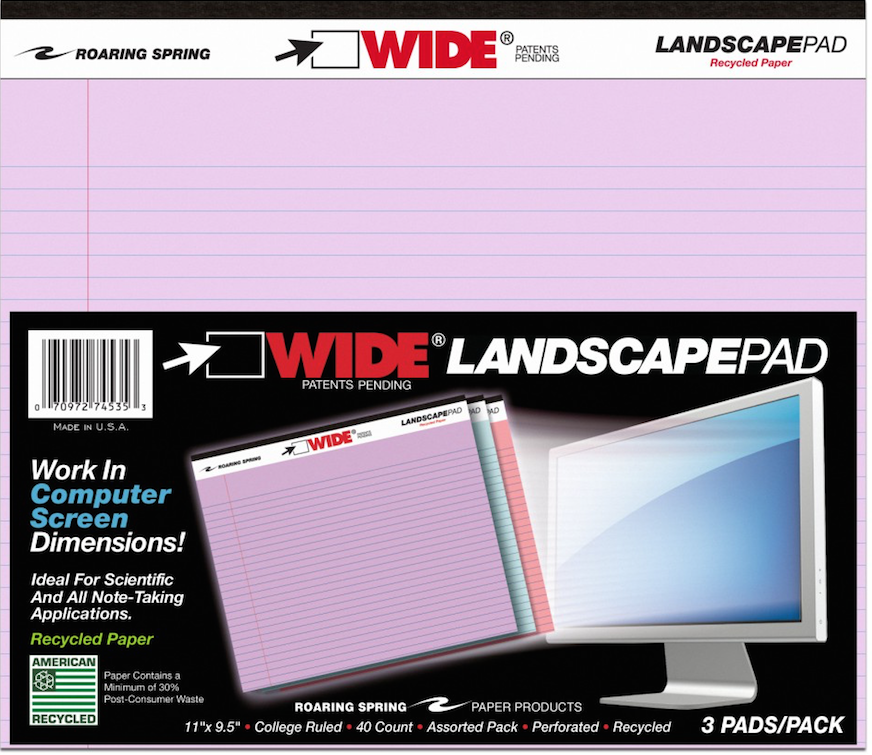
- 11″ x 9.5″, WHITE, college-ruled. Each pad includes 40 sheets of 20-pound, 30% post-consumer recycled paper per pad, with left-side margins. Micro-perforations at the top yield an 11″ x 8.5″ sheet. (Available singly or in two-pad packs.)
- 11″ x 9.5″, CANARY (yellow), college-ruled. Each pad includes 40 sheets of 20-pound, 30% post-consumer recycled paper per pad, with left-side margins. Mirco-perforations at the top yield an 11″ x 8.5″ sheet. (Available singly or in two-pad packs.)
- 11″ x 9.5″, ASSORTED* PASTELS (orchid, pink and blue), college-ruled. Each pad includes 40 sheets of 15-pound 30% post-consumer recycled paper per pad, consumer recycled paper, with left-side margins. Micro-perforations at the top yield an 11″ x 8.5″ sheet. (Available in three-pad packs.)
Graph
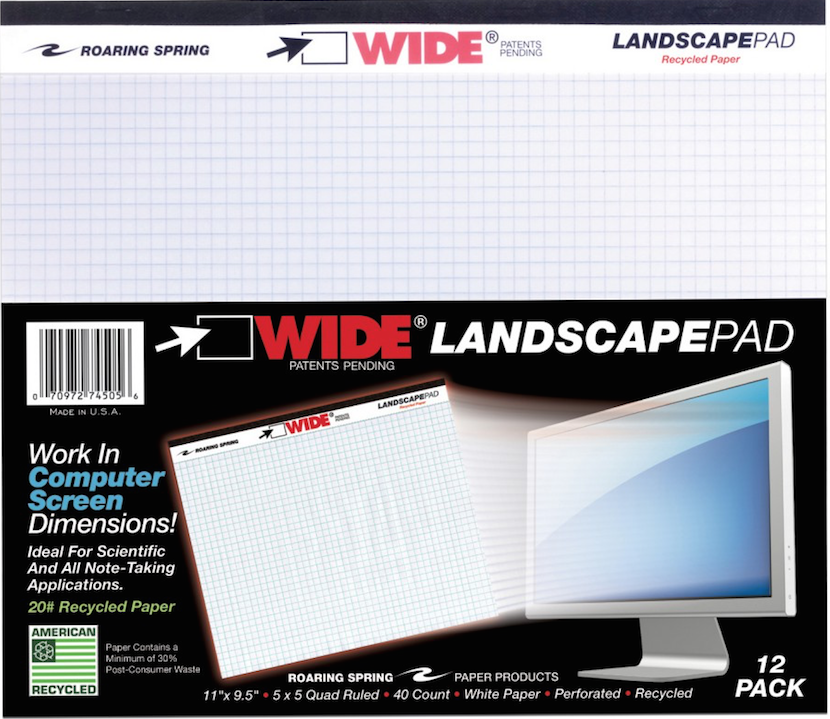
- 11″ x 9.5″, WHITE, gridded with 5×5 graph paper. Each pad includes 40 sheets of 20-pound, 30% post-consumer recycled paper per pad, with left-side margins and micro-perforations at the top. (Sold singly and in packs of two, four and six.)
Punched (for easy storage in traditional three-ring binders)
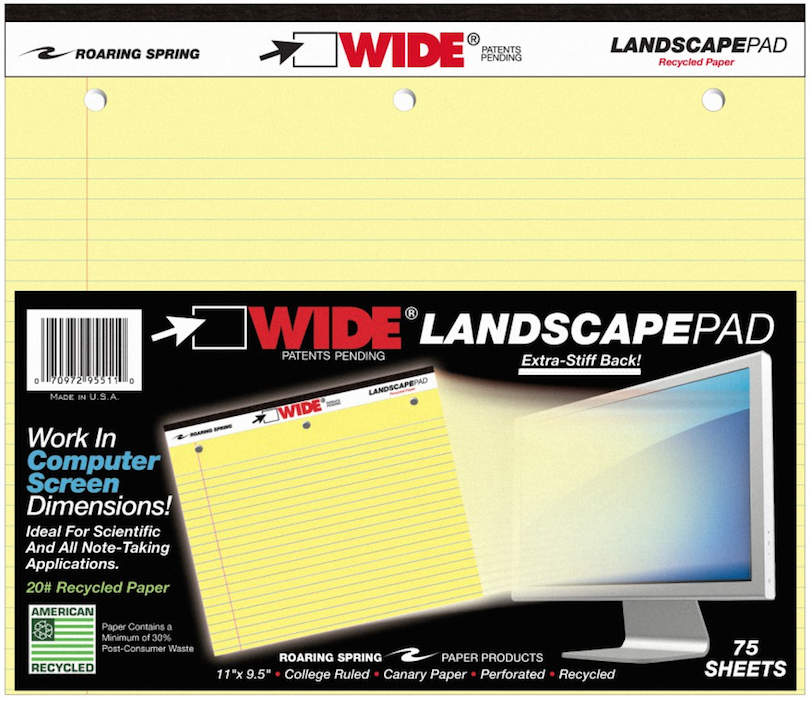
- 11″ x 9.5″, WHITE, college-ruled, three-hole-punched across the top. Each pad includes 75 sheets of 20-pound, 30% post-consumer recycled paper per pad, with left-side margins, backed by an extra-stiff 80-pt. chipboard backing. Mirco-perforations at the top yield an 11″ x 8.5″ sheet. (Sold in singly.)
- 11″ x 9.5″, CANARY (yellow), college-ruled, three-hole-punched across the top. Each pad includes 75 sheets of 20-pound, 30% post-consumer recycled paper per pad, with left-side margins, backed by an extra-stiff 80-pt. chipboard backing. Micro-perforations at the top yield an 11″ x 8.5″ sheet. (Sold singly.)
Junior
- 8″ x 6″, WHITE, college-ruled. Each pad includes 40 sheets of 20-pound, 30% post-consumer recycled paper per pad, with left-side margins. Micro-perforations at the top yield an 8″ x 5″ sheet. (Available as individual pads or in multi-packs.)
- 8″ x 6″, CANARY (yellow), college-ruled. Each pad includes 40 sheets of 20-pound, 30% post-consumer recycled paper per pad, with left-side margins. Micro-perforations at the top yield an 8″ x 5″ sheet. (Available as individual pads in multi-packs.)
- 8″ x 6″, ASSORTED* PASTELS (orchid, pink and blue), college-ruled. Each pad includes 40 sheets of 15-pound 30% post-consumer recycled paper per pad, consumer recycled paper, with left-side margins. Micro-perforations at the top yield an 8″ x 5″ sheet. (Available in three-pad assorted packs.)
*Note: Assorted pastel pads are listed on the website as 50 sheets/pad, but specifications and packaging verify they are 40 sheets/pad.
Roaring Springs Wide Landscape Pads are sold in office supply stores and on Amazon, and range from $5.28 for single pads to $13 for three-packs.
Thanks to Office Supply Geek for reminding me that these pads exist, and The Well-Appointed Desk, for inspiring me to dig more deeply.
OK, Landscape. But Why?
At first glance, landscape notepads may look a little funny to us — one client said she thought if legal pads were business suits, these landscape pads were more like crop tops. The question, though, is what can you do with them? In fact, Office Supply Geek‘s Brian Greene actually stated, “To be totally honest, after having them in my hands I still don’t really know what I’d do with them that I wouldn’t do with a regular legal pad.”
Well, Brian, that’s why Paper Doll is here!
Most of the time, when we hand-write, we are in portrait mode, and it usually makes sense. However, I can think of a sampling of reasons why we might want to have some side-to-side breathing room.
1) Notetaking — When we’re taking notes in a committee meeting or for class, we’re often creating a linear, outline-style set of notes. But, as we discussed when we reviewed the exceptional Cornell Notetaking Method, we need to make room for cues or other special attention-getting markings on the left side.
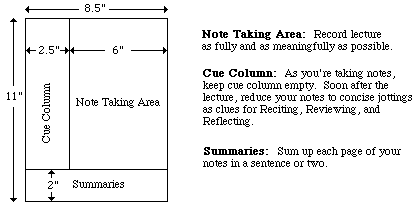
With traditional 8.5″ wide paper, that either reduces our notetaking space or forces us to write in the narrow margin, making it more likely that we’ll get inky smudges on that all-important cue-section. Landscape orientation provides more breathing room.
2) Ergonomics — Look at the available space on and around your desk. If your computer is in front of you, your keyboard is probably somewhere between elbow-and-wrist distance away, not leaving you very much space for alternating typed notes and handwritten notes. Because of that limited space, you may find you’re turning your traditional (portrait-orientation) notepad sideways, with the top to your left (unless you’re a southpaw). This lets you take written notes, but you’re probably twisting at the waist to do so. This is not sustainable or ergonomically friendly.
3) Expansive thought — When we take notes, journal, free-write, or craft letters, we’re often thinking linearly. It’s easy to follow a unidirectional flow of ideas, or paths, with a narrower piece of paper. When we’re on the computer, using Microsoft Word or any other word processing program, unless we’re using design features for creating signs or brochures, we echo that same tall/narrow format.
But what happens when we want to think more broadly (no pun intended)? When we’re on the computer, using a spreadsheet like Excel, we create multiple columns so that we can visualize information best seen side-by-side, like multiple fields in a record. But what’s the paper version? I can think of a number of times when I’ve been working with a client to brainstorm ideas in parallel (like how different departments will handle particular situations), and we end up turning a notepad sideways. The lines go the wrong way, and the content gets messy; it suffices, but it’s not optimum.
4) Mind mapping — Paper Doll is a fairly linear thinker, but when I’m trying to mind-map, or show the relationship between different processes, or do anything that’s more visual, I need more space. With some clients, we may choose mind mapping software or apps like MindNode or XMind, but we often find that an analog solution is faster and more immediate. Most often, we end up using multiple Post-It! Notes on a wall or window. That’s great when we’re in a house or office, but not so optimal when we’re in the field (even in a field), in a warehouse, or going mobile. That’s where these landscape notepads (and the aforementioned landscape clipboards) really come into their own.
5) Flow Charts — It might not be immediately apparent, but a number of law students have posted online comments regarding how landscape writing pads make it easier to visualize case-law timelines, precedents and conceptual flow. Scientists have also reported that wide-format paper helps conceptualize scientific reactions more clearly.
6) Computer/TV Screen Dimensions — Tablets and phones aside, we spend a lot of time looking at screens in landscape orientation, and sometimes we still need to make our analog notes approximate what we’re seeing, or make our digital notes approximate what we’d like to be seeing on the screen. Writing pads that parallel those dimensions are helpful.
Granted, web designers are more likely to use paper prototyping tools like the kind we discussed in Tech Planning on Paper: From Old-Fashioned to Cutting Edge, but the rest of us just need a good piece of paper that’s wider than it is tall.
Oh, but you ARE a web designer (or you play one on television)? Well, then, UI Stencils’ landscape-orientation Responsive Sketchpad may be just what you want.
Printed on both sides, the landscape-orientation, letter-sized pad is dot-gridded (150 PPI), includes fields for a project’s name, screen, date of work, and notes, as well as two device silhouettes on the front and three on the reverse.
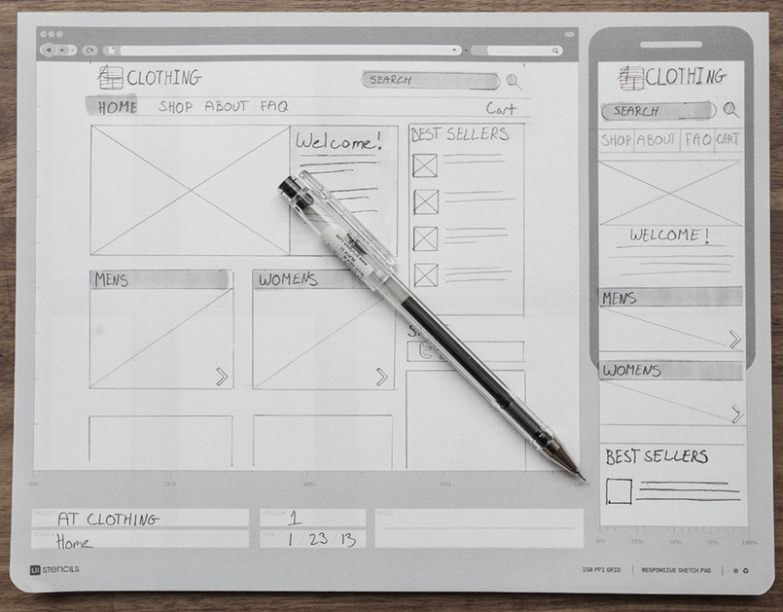
The Responsive Sketchpad comes 50 sheets/pad, with a cardboard backing and rounded bottom corners. It runs $12.95/pad and is available at discounted rates in three-packs, five-packs and with other UI Stencils’ sketchpads.
Upgrading the Landscape
The Roaring Springs Wide LandscapePads, as well as the more tech oriented UI Stencils’ Responsive Sketchpads, aren’t the haute couture of office supplies. You’ve got something to say, and you can get it down. Function is generally prioritized over form. The Roaring Springs pads are made of recycled paper, and the focus for all is in on utility rather than beauty.
As Ana Reinert pointed out in this week’s The Well-Appointed Desk’s “Ask the Desk” feature, there’s an assumption among notebook/notepad makers that landscape orientation is for the visual artists and not for the scribblers, writers, note-takers and wordsmiths. I think that’s short-sighted, and a bit of disappointment.
Ana’s post offered up some options for the individual who asked “the Desk” about finding attractive, non-black, fountain-pen-friendly landscape-oriented notebooks. Tall order! The Well-Appointed Desk covered a nice variety of these, but most of the options were for unlined sketchbook-type pages. For those of us looking for a wide spot in the road to make our (written) mark, the choices are limited. There are handmade options, of course, but whether we’re talking bespoke Etsy creations or fin Italian handcrafted leather bindings, veering from the ordinary is not inexpensive.
How limited are the choices? One of the only mid-range lined landscape-orientation notebooks I found was an intriguingly named Düller Croquis Note. It’s manufactured in Japan by I.D.E.A. Internationals, with a German name, as part of the Schreibwaren Kollektion. The website is only written in Japanese (the English-language URL yields an error), and the only English-language sales information I could find was through AAREVALO Ltd. in London!
The notebook contains recycled paper and a mysteriously unexplained “specially textured writing surface.” There’s a “practical pocket” on the back cover, and the notebook also comes in black or light grey.
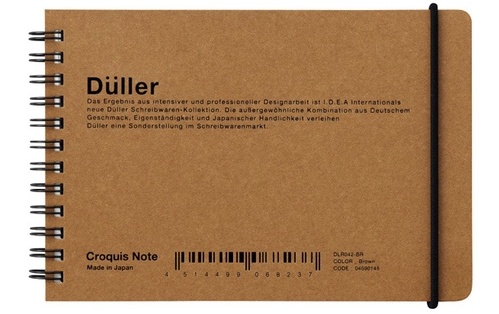 So, a Japanese company, selling a notebook described in German, is most easily accessed through a British stationery company’s online catalog? It shouldn’t have to be so hard!
It’s a little bit shocking that the go-to journal purveyor for hipsters, scholars, soccer moms and pundits, Moleskine, doesn’t have a single lined landscape-orientation journal or notebook. There really should be other widely available options aside from the Rhodia lined landscape Webnotebooks, with orange or black covers.
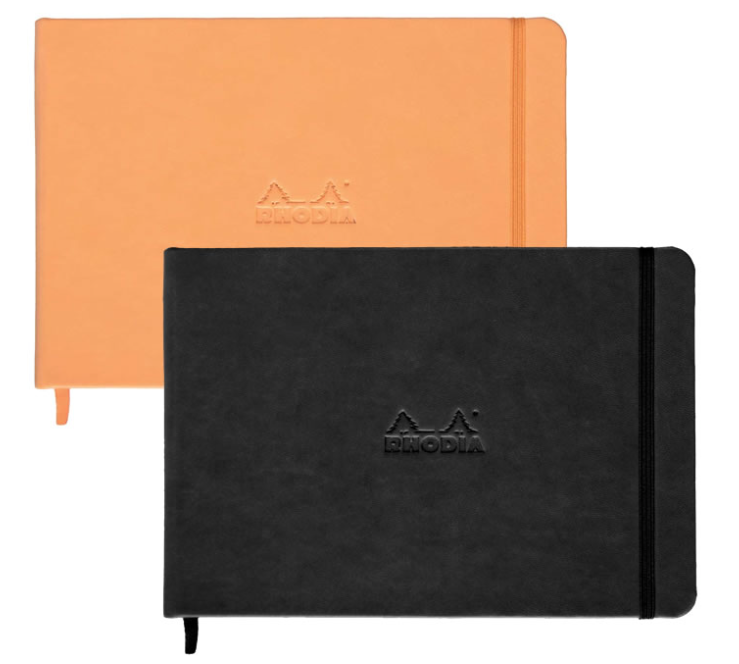
Paper Doll will be on the lookout (across the landscape, and over the horizon). Until then, I welcome your ideas for how you’d use landscape notepads and notebooks, and hope you will share your resources for finding lined landscape-orientation journals, notebooks and otherwise upscale writing pads.
NAPO 2015 Expo: Magically Organize Your Writing with the Equil® Smartpen 2
We professional organizers are pretty easy to intrigue, but hard to impress. We like novelty, and you can hear our oooohs and aahhhs across the ballroom floor at the NAPO Organizing Conference and Expo when a vendor lengthens a folder tab, come out with a poly version of a product formerly only available in paper, or builds a better hanging folder.
But as much as we appreciate novelty, we’re quick to note shortcomings as well. We’re dismissive of features we can’t see our clients actually needing, and we’re dubious of also-rans — the third or fourth or fifth practically identical copy of a product or app that doesn’t improve upon the original.
One of the products that caught Paper Doll‘s eye, and kept it focused, at this year’s Expo is a hybrid, bringing two separate but related processes together. In the past, we’ve focused on paper hybrid office products:
- An Organized Hybrid: The Evernote Smart Notebook By Moleskine
- From Paper to the Cloud: Ampad Shot Note
- It’s a Notebook! It’s a Whiteboard!: 3 Dry-Erase Notebook Innovations
In the above cases, we’ve looked at notebooks and notepads that work two ways. But what about a writing implement that can do double-duty?
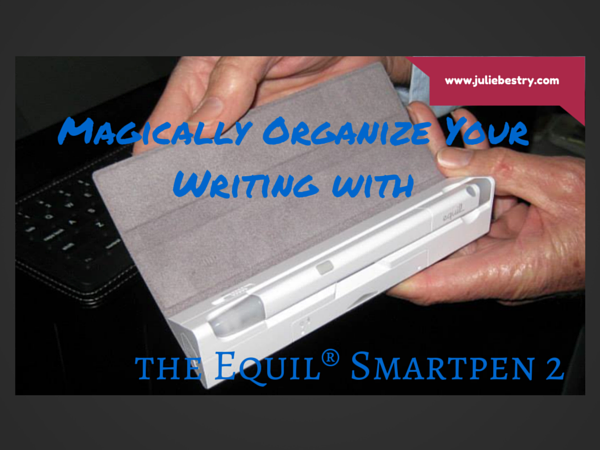
Equil® SMARTPEN 2
Friend of the blog, Smead, is known primarily for paper-related office products (e.g., folders, organizers, dividers, folios, etc.), and we’ll get to the newest of them in an upcoming post. But recently, Smead has been acquiring interesting and useful tech and tech-ish products, like the MOS: Magnetic Organization System for cable and cord organizing, Stick N Find bluetooth trackers, and MOS Spring Cables for strong, tangle-free syncing, charging and playing audio.
The Equil® SMARTPEN 2 is the latest innovative acquisition, and it’s a doozy. What does it do? The SMARTPEN 2 lets you:
- Create handwritten notes, sketches and diagrams on real paper (whether that’s a fancy Moleskine or a cocktail napkin). But it can also be used as a stylus to write and draw on your iPad, which the company claims it does with superior accuracy. (Paper Doll‘s drawing skills would be a poor test of this acuity, I assure you.)
- Capture writing and doodlings and digitally transfer them to Windows, Mac, iOS and Android devices without scanning or snapping photos.
- Save, modify and share the digital version of your notes (so you’ve got the original paper version, suitable for framing on your wall or locking in your safe deposit box, and the digital — even modified — version in the cloud or on your devices.
- Oh, and that modification? It includes the ability to convert your handwriting into readable, searchable, editable printed text.
- Share via email, Facebook, Twitter, and other social media, or upload to the cloud for saving and sharing to Evernote, Dropbox and iCloud.
- Whatever you create with the Equil® SMARTPEN 2 syncs across all of your devices, so wherever you are, you’ll be able to create anew or access what you’ve already written.
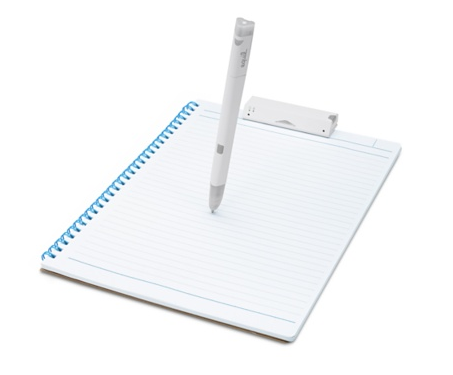
THE BASIC ELEMENTS
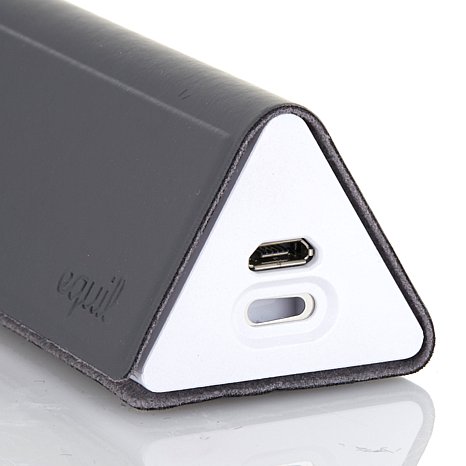
The Equil® SMARTPEN 2 looks like an Apple product. It’s all white-on-white, and comes packaged in a streamlined charging cradle, a triangular base into which the two operational parts snap, and the case comes with a grey “wrap” (called a convenience case) similar to the iPad Smart Cover.
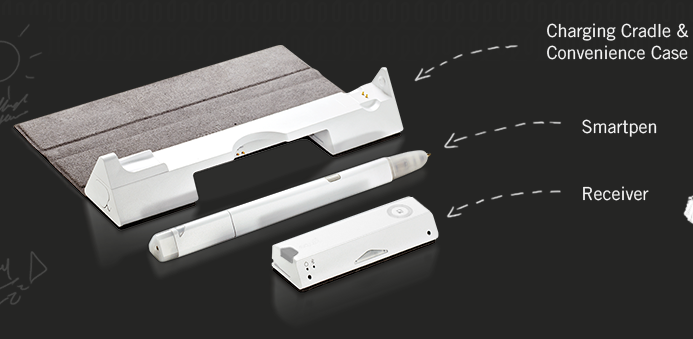
The Pen — This is a technology-“enabled” pen. That means it’s a real pen, on its own, and uses regular ballpoint ink cartridges. It’s pressure-sensitive, so it can capture every nuance of what you draw, and if you press heavily (and perhaps repeatedly), with insistence, the pen knows you’re doing the equivalent of bolding your text and SHOUTING with intensity.

In order to save the battery life, the pen goes to sleep if you don’t write for a while. One press of the small button atop the pen wakes it up, and that same button functions to alert the receiver to a “new page” (creating page breaks) and to let you go back and forth between saved pages of notes.
The charging cable includes one replacement ink cartridge.
The Receiver — At first glance, the 3″ W x 1/2″ H receiver device looks like a clip for a clipboard, and it fastens to the top of your notepad or paper in a similar manner. The pen and the receiver connect via magic (OK, infrared and radio frequency communication). The receiver determines the boundaries of the page and flashes a small red light to alert you when you’re getting too close to the top or the bottom edge of what it can detect.
As you write with the pen, the receiver device saves your notes in the built-in memory.
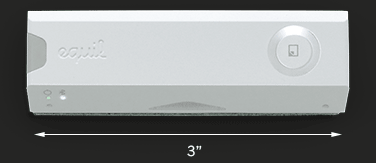
The receiver holds 10,000 pages of notes. When you reconnect your pen to your digital device, you automatically receive an alert about any new notes, which are ready to be imported.
You can digitize your notes in real time, but it doesn’t matter if you’re not connected to your phone or other device when you’re in creation mode. When you are ready, at the touch of the button on the top of the receiver, whatever you’ve created can be uploaded from the device and imported to your computer, phone, or tablet. (Not your fancy watch, though. At least, not yet.)
The pen and receiver are rechargeable, and the specs claim you can write or draw for eight hours between charges. Just pop both the pen and receiver into the USB-compatible charging cradle. (The receiver has a battery life indicator and a charging indicator, so you shouldn’t have any surprises.)
The SMARTPEN works with two free apps:
Equil Note — This app lets you save and organize any of the written notes you take with the SMARTPEN 2. Edit, enhance, and share them with friends and colleagues. Convert your handwriting to text for easy editing and sharing.
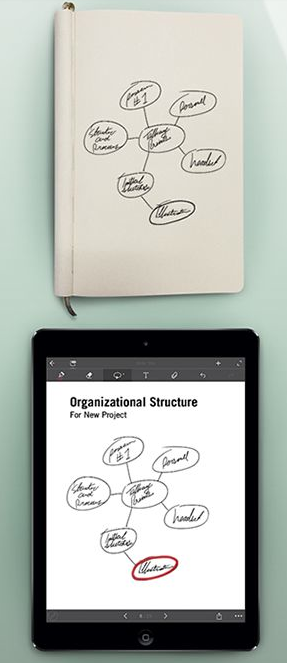
Equil Note has apps for iPhone, iPad, and Android mobile devices, as well as Mac and Windows for desktop use. It’s available in English, French, Spanish, German, Italian, Portuguese, Russian, Chinese (Simplified and Traditional), Japanese, and Korean.
Equil Sketch — The sketch app lets you draw with a finer degree of control, and includes digital options like multiple brush styles and layering. You can start a picture on paper, and finesse it on the screen.
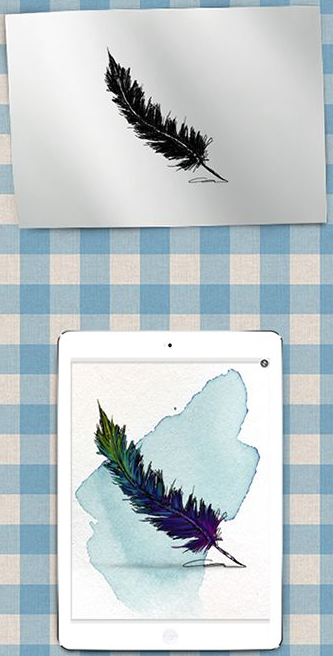
Through the apps, you can digitally choose from a variety of colors and pen tips, and up to 600 levels of pressure sensitivity, and then add more text and/or photos, digitally. You can also tag your notes so you can search and locate your content quickly.
The Equil Sketch app is only available for iPhone, iPad and Android digital devices (not desktop), and is compatible with all of the same languages as Equil Note, except for Korean, Portuguese, and Russian.
PRICE
The Equil® SMARTPEN 2 retails for $169.95 from the Equil shop, or for about $149 from Amazon, Apple and Best Buy. Access to the apps is free with a purchase of the pen.
THE FINE PRINT
There’s glossy marketing, and then there’s the occasional factual balloon pop.
Although the press materials reference doodling on a napkin, and the pen can capture notes on paper as small as a sticky note, the official specs say that the recommended paper size is 250mm x 330mm (9.85″ x 13″) or smaller — that’s anything below Letter size (US standard) or A4 (UK standard) — and notes that things “may not work properly if the paper is too small for the receiver to clip on and may have writing recognition issues if the paper surface is rough. (i.e., cardboard).“ So, don’t plan to write on something the size of a postage stamp or your next summer camp care package.
Next, the Equil® SMARTPEN 2 communicates to your digital devices through bluetooth pairing — if you’ve ever used a bluetooth headset for your phone or a keyboard for your iPad, you know to prepare for some set-up time before you can get started. One note I found in the FAQ caused a slight pause: “Make sure to go through bluetooth pairing process each time you switch the devices you are using with Equil JOT.” It’s not entirely clear whether this means you have to pair the pen each time you switch from your tablet to your phone, or just the first time for each. FYI.
Finally, the SMARTPEN 2 measures 1/2″ around the thickest part of its triangular shape, slightly thicker than a traditional Sharpie. It tapers down as you get closer to the pressure-sensitive pen-tip. Still, if you’re used to a slender, rounded pen, the grip of this might take some practice for creating fine detail.
Take a look at the Equil® SMARTPEN 2 in action.
THE COMPETITION
The Equil® SMARTPEN 2 isn’t the first to combine writing on paper with writing on a digital device and making it all interactive. (Even the SMARTPEN 1, the first iteration, wasn’t exactly first.) The Livescribe Smart Pen series (including the newest Livescribe 3, the Sky WiFi, and Echo, and older iterations) was the first to break out in this area, and for many years, I would gush when techie colleagues would show off their Livescribes. The Livescribe pens also had an embedded audio recorder, so you could tap a portion of your notes to hear what was being said contemporaneously with whatever you wrote. Pretty grand!
But the SMARTPEN 2 continues to have one advantage over the various Livescribe versions that can’t be overlooked. You can use the Equil® SMARTPEN 2 with pretty much any type of paper or notebook, so you can stick to your preferred notebook style, but after all these years, the Livescribe options still require that you buy special digital paper notepads to work. Paper Doll doesn’t know about you, but while I’m occasionally willing to shell out for a truly exceptional gadget, having to buy pricey notepads just so the pen can work is a deal-breaker for me.
WHO IS IT FOR?
Obviously, not everyone needs a smart pen. If you’re fine with keeping handwritten notes and rarely need information in digital form, you can pass. If you spend your time sitting at a desk, fully Wi-Fi-enabled, or are good with the “thumby” thing, typing without a real keyboard, even when standing or walking, it may not be for you. The SMARTPEN 2 is ideal, however, for those who are on-the-go, often standing, or in rough-and-tumble surroundings. I’m thinking of my client who is usually up in a bucket truck, using his iPad to take notes but risking damage to his expensive gadget. Or camp counselors checking kids in for the summer and taking notes of parents’ special requests. Engineers and architects, working on-site. Community physicians and nurses who don’t have immediate access to electronic medical records and are taking notes on-the-fly.
With the handwriting recognition feature, particularly the ability to turn handwriting into text, and the ability to use regular paper, the Equil® SMARTPEN 2 is worth some attention.
I’d love to hear your thoughts.



Follow Me