Archive for ‘General’ Category
“May We See Your Papers?” Redux: Enhanced Driver’s Licenses
Surely any of us who’ve had our DMV photograph compare unfavorably to Nick Nolte’s  mug shot would find the idea of enhancing a license to be appealing. However, this isn’t a makeover; it’s actually another travel document alternative to a traditional passport.
Last week, I referenced the Western Hemisphere Travel Initiative, which requires travelers entering the United States from Canada, Mexico, the Caribbean and Bermuda to present either a passport or alternative document that proves identity and citizenship. Until recently, a birth certificate and photo ID had sufficed. By standardizing what documents can be used for entry (including returning home), and standardizing which supporting paperwork can be used to acquire those documents, the Department of Homeland Security’s U.S. Customs and Border Patrol believes it can better ensure safety.
But what does it mean for us? As travelers, we want to comply with regulations while neither having our wallets weighed down with redundant documents nor lightened in terms of available funds.
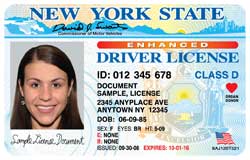
In effect, an enhanced driver’s license combines the properties of a regular driver’s license with those of a passport card. An EDL proves you’ve earned the right of driving privileges while also serving as proof of U.S. citizenship (if issued by a U.S. state) or Canadian citizenship (if issued by a Canadian province). Thus, you can use an enhanced driver’s license to cross the U.S.-Canadian and U.S.-Mexican borders by land or sea. As with the passport card, you can’t use an EDL as proof of identity for travel by air. (The International Civil Aviation Organization requires a traditional passport book for air travel.)
The main advantage of an enhanced driver’s license, aside from keeping the clutter in your wallet from bulking up, is reduced cost. Whereas a first-time passport book costs $100, EDLs generally cost $15-45 over the cost of a regular license. (In Canada, it’s $30-40 extra, though Quebec does not charge any extra fee beyond the cost of a regular license.) Costs vary depending on whether the EDL is acquired as a first-time driver’s license, a renewal, or a non-driver identification card, and whether your prior license has expired. Some states’ EDLs are even less expensive than passport cards.
While the passport card and Trusted Traveler program cards are issued by the Federal government, enhanced driver’s licenses can only be issued by individual states or provinces. Right now, the use of EDLs is not widespread; only four U.S. states and four Canadian provinces issue them, although recently, Minnesota governor Tim Pawlenty signed a law allowing enhanced driver’s license use. Minnesotans will be able to register for the new $15 enhanced licenses on June 1, 2012. (Yes, red tape takes time.) A Texas law authorizing the Texas Department of Public Safety to issue EDLs was passed and approved by a ruling from the Texas Attorney General, but remains unsigned by the governor.
Who Can Get an EDL?
Enhanced driver’s licenses are only issued by individual states or provinces, and only United States citizens legally residing in the state of issuance and Canadian citizens legally residing in the province of issuance can obtain an EDL.
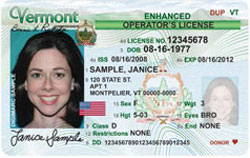
Click on a state or province for detailed information regarding the EDL registration process. The fees indicated are for the cost of the EDL only, unrelated to other license-related charges:
Vermont $25
New York $30
Michigan $45
Washington $15
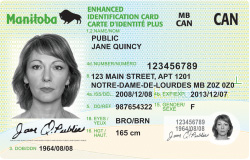
Quebec (where it’s known as Driver’s License Plus) $0
Ontario $40
Manitoba $30
British Columbia $35
What Documents Will You Need To Apply?
For American citizens:
1) Proof of Social Security Number — Bring any one of the following: your Social Security card, a W-2 or 1099, or a pay stub containing both your name and Social Security number.
In New York State, a first-time applicant will need to show an actual Social Security card.
In Michigan, a military ID with photo (DD2, DD1173, or CAC card) will also serve as proof of Social Security number.
2) Proof of U.S. Citizenship — Have your original or certified birth certificate (the kind with the raised, bumpy seal), OR an unexpired passport, OR a U.S. Certificate of Citizenship (Forms N-560 or N-561), OR a Certificate of Naturalization (Forms N-550 or N-570 or N578) OR a Consular Report of Birth Abroad issued by the U.S. Department of State (FS-240, DS-1350 or FS-545).
If the name on your certificate of birth, citizenship or naturalization doesn’t match the name on your Social Security card or other supporting documents, you’ll also have to bring proof of a legalized name change — for example, a marriage certificate, a divorce decree or a court order of name change.
3) Proof of Identity — You’ll need either a driver’s license (current or expired within the past three years), an out of state driver’s license, an unexpired passport or passport card, a federal, state or municipal government-issued photo ID card, or a valid military photo ID card.
In Michigan, a tribal photo ID from a federally recognized Native American tribe will also serve as proof of identity.
New York has a complicated system of points to prove identity, with different forms of documentation, from jury notices to pistol permits, each providing one to six points of proof toward the required total of six.
4) Proof of Residency — Each state has different requirements:
Vermont: Bring two pieces of mail addressed to you by name (Resident/Occupant won’t cut it) at your current street address. If you only use a post office box, you can alternatively show a utility or property tax bill showing your name and the street address, a lease or landlord statement, a Vermont EBT or AIM ID card, or a proof of a claim or coverage statement from your renter’s or homeowner’s insurance company.
New York: Show any two of the following:
–New York State license, learner’s permit, or a non-driver photo ID
–Original credit card statement on letterhead issued within the last 120 days
–Bank statement issued within the last 120 days
–Utility bill with name and address issued within the last 120 days
–Proof of current mortgage
–Federal or New York State Income Tax W-2 (with SSN) issued within the last year
–Current proof of homeowner’s/renter’s insurance policy or claim
–A New York State Professional License (medical, nursing, accounting, etc.)
–Federal or New York State Income Tax or Earning Statement (1099, 1098)
Michigan: Bring two of the following:
–Utility bill or credit card bill issued within the last 90 days*
–Account statement from a bank or financial institution issued within the last 90 days*
*Unlike in New York, where original letterhead is required, Michigan allows printouts of electronic copies for both of the above options.
–Michigan high school, college or university report cards or transcripts
–Mortgage, lease or rental agreement (Leases must include landlord’s phone number)
–Pay stub or earnings statement with the name and address of the employer
–Life, health, auto or home insurance policy
–Federal, state or local government documents (e.g., receipts, licenses or assessments) identifying the name and address)
–Michigan property or asset title or registration
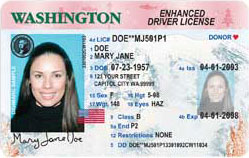
Washington — Show any one of the following documents:
–Concealed weapons permit
–Homeowner’s insurance policy or invoice with address of the insured property or residence
–Home utility bill or hook-up work order dated within the past 60 days
–Mortgage documents
–Property tax bill or statement dated within the past 12 months
–Your name and address in a current phone book made by a telephone book publisher
–Moorage bill or contract showing that you live on a boat in a marina
–Federal or state government agency-issued check
–Tribal ID that contains your current resident address
–A filed property deed or title for your current residence
If you don’t have any of the above documents, the state of Washington will also allow you to provide two of the items from a lengthy list provided here, including a report card or transcript from an educational institution in Washington, making the process easier for older teens who still may live at home but not pay bills or even have jobs.
Canadian citizens will generally need a provincial birth certificate or Canadian citizenship document, a Canadian or U.S. driver’s license, and one other form of identification (though not proof of provincial residency), a well as, in some cases, a completed provincial questionnaire.
What’s So Enhanced About an Enhanced Driver’s License?
U.S. Customs and Border Protection worked work in tandem with individual states and provinces to develop a secure, tamper-resistant card that, like the passport and Trusted Traveler cards we discussed last week, have vicinity radio frequency identification (RFID) capability. The same RFID technology that lets you pay tolls electronically enables a machine to read data from a wireless “tag” without making any physical contact or even requiring a direct line of sight. (Vicinity just means that the machines that read the data can be up to 20-30 feet from the card.)
If it all works properly, travelers should be able to get into the right customs lane, point their card towards the RFID reader, and quickly advance with minimal fuss. The machines read the RFID chip, and wirelessly-accessed information from the chip signals the database. Then, biographical information, a photo, and the results of terrorist/criminal checks are displayed to the Customs and Border Patrol officer as your vehicle pulls up to the inspection booth. In theory, he or she can see the results quickly, focus on the people in the car, and assess the situation for (hopefully) faster processing.
Does an Enhanced Driver’s License Make Sense for You?
Obviously, unless you live in a state or province that currently allows for an EDL, the point is moot. If an enhanced driver’s license is available where you live, then the question is one of economics and convenience. Some things to ask (and remember, if you travel by air, you must use a passport book.):
Do you travel frequently enough to Canada, Mexico, the Caribbean or Bermuda (by land or sea) to make it worth paying the fee for an enhanced driver’s license?
If not, would a passport card suffice for occasional travel needs? (Or, do you already have a passport which you don’t find inconvenient to carry when traveling?)
If so, do you travel so frequently that it’s worth the upfront financial and time investment (including the interview process) to get a NEXUS or SENTRI card?
Bon voyage!
“May We See Your Papers?”: Passport Cards and Trusted Travelers
Growing up in Buffalo, Paper Doll cheerfully recalls taking jaunts across the U.S.-Canadian border on a whim. When visitors wanted to see Niagara Falls, or if we had a craving for Chinese food in Fort Erie, Ontario, or we just had a hankering for the best candy bar ever invented 

we needed only to gas up the car and head over the Peace Bridge.
Traveling is more complicated these days. As a result of the Intelligence Reform and Terrorism Prevention Act of 2004 (IRTPA), the Western Hemisphere Travel Initiative (WHTI) began requiring that all American and Canadian travelers present passports or other citizenship/identification documents when entering the United States. In theory, the WHTI is supposed to strengthen border security by allowing the Department of Homeland Security to reliably identify all travelers while facilitating entry for U.S. citizens and legitimate foreign visitors.
However, once the WHTI went into effect on June 1, 2009 (for land and sea travel — for air travel, it had already been active in 2007), life changed dramatically for those living along the borders. While it had often been a slow and complex task to cross back into the United States from Mexico, Americans recall fondly their ability to spend summer afternoons in Canada and cross home without effort.
In the past, we’ve discussed how to get, renew and replace a passport, one of the truly vital VIPs (Very Important Papers) at our disposal. But there are actually some other incredibly useful documents that work as alternatives to, or in addition to, the U.S. passport.
PASSPORT CARDS
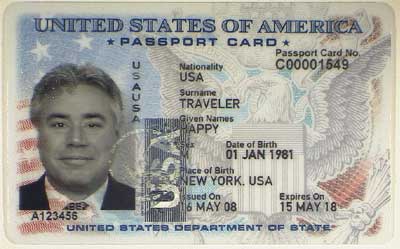
Passport cards, which have been in existence since July 2008, are similar in many ways to traditional passport books, but are less expensive and smaller (and therefore, more convenient); however, their use for travel purposes is more limited.
Passport books are valid for all international travel — by air, sea or land — and are good for 10 years (for adults, or five years for minors under 16). They measure 5″ x 3 1/3″ when closed, and currently cost $100 ($75 plus a $25 application fee) — new — or $75 to replace.
By comparison, the new passport cards are valid only when entering the United States
from Canada, Mexico, the Caribbean and Bermuda, and are valid only at land border crossings or sea ports-of-entry. You cannot use a passport card for international travel by air. The cards are wallet-sized, similar to credit or library cards. New cards cost only $45 ($20 plus the $25 application fee) and cost $20 to renew.
Adults who already have a passport book that’s been renewed within the last 15 years can get a passport card for a teeny $20 (and no application fee). If you jointly apply for a first-time passport book and passport card, you’ll save $25 and pay a single application fee.
Like the new passport books, passport cards have vicinity-read radio frequency identification (RFID) chips embedded within them to prevent forgeries, and application times run the same as for passport books.
Wouldn’t it would be nice if you were visiting friends in Washington State or Michigan or New York State and someone suggested a quick day trip to Vancouver or Windsor or Niagara Falls, if you could jump into the car and go? After all, few of us travel domestically with our passports. If you live anywhere close to the Canadian or Mexican borders, or are far more likely to visit border communities than travel abroad, a passport card makes spontaneous wanderlust a little more convenient.
If you don’t already have a passport book or card, you can apply for just the passport card at any of the 9400 passport acceptance facilities. (It’s likely that your nearest post office is on the list.) You’ll need all the same documentation you’d provide if applying for a passport, and will have to fill out a DS-11 form.
If you already have a passport book and just need a passport card, or wish to renew your passport while acquiring a passport card, you’ll want form DS-82 — fill out the online version or print out the application to mail with your documentation.
TRUSTED TRAVELER PROGRAMS
The Department of Homeland Security’s U.S. Customs and Border Patrol (CBP) has created special cards, separate from the passport card, as part of the new Trusted Traveler Programs. These card programs include NEXUS and SENTRI.
Applicants have to submit to a thorough background check, fingerprinting (inky!) and an in-person interview, but the cards help you access dedicated commuter lanes and skip past the long customs lines. So, a little inconvenience and cost up front will free up hours of standing in line over the course the coming years. This is great for frequent business travelers, people who live on one side of the border but work on the other side, and divorced parents attempting to make cross-border weekend custody hand-offs no more stressful than the ubiquitous McDonald’s playground exchanges.
NEXUS
NEXUS is a joint U.S.-Canadian program that was designed to enable “low-risk”, pre-approved travelers to cross the border quickly–via air, sea or land. Whether you travel for business or pleasure, as a member of the NEXUS program, you’re allowed to skip long border entry points by using self-serve computerized airport kiosks (similar to the kiosks you’ve probably already used for checking in). There are also special NEXUS reserved lanes at land (drive-across) border crossings. For members crossing by boat, there’s a special phone system to make contact with border officials.
If you frequently cross the U.S.-Canadian border, you’ll still need to have a passport (book or card), but a NEXUS card, available for just $50 (once you apply and are approved) will speed your travels and make it much easier for you to get back to business (or fun) without waiting in long lines or idling in traffic lanes. (The $50 fee is waived for applicants under 18.)
To qualify for NEXUS, you must be an American citizen or a permanent resident of either Canada or the United States, and you must have lived continuously in either the U.S. or Canada for at least the past three years. For applicants under 18, both parents must grant written consent.
Obviously, to be approved, you must be legally admissible to both the U.S. and Canada (having complied with all the immigration and customs rules during prior travel), and you can’t have a single conviction on your record. (So, if you were convicted for trespass for protesting Apartheid in the 1980’s or were caught streaking in the 1970’s, there will be no speedy U.S.-Canadian travel for you!) After passing the initial investigation, applicants are interviewed in person and documents proving identity and admissibility are physically verified. Finally, if approved, applicants submit to being photographed, fingerprinted and, if they wish to use the NEXUS card for air travel, have their irises scanned. Whew.
Once approved, NEXUS member cards are valid for five years from the birthday following issuance. You have to start the renewal process about six months prior to expiration, which requires another interview to ascertain that you still qualify. (Yep, your streaking days are over!)
Submit applications (in English or French) online via the Global Online Enrollment System (GOES) or begin your enrollment in person at any of 24 enrollment centers in the U.S. or Canada, mainly at airports, sea ports and bridges. Although online applications are preferable, you may also print out the application.
Once you set up an account, GOES allows registered users to apply for any of the Trusted Traveler Programs. The CBP processes payment and certifies the application, and if membership is conditionally approved, the GOES account gets updated with instructions for scheduling an appointment for a NEXUS interview. (Note: every member of a household, children included, must have his or her own GOES account.) If everything goes according to plan, your NEXUS card will be mailed to you. To activate the card, you’ll go back to the GOES page to enter data from the card and verify receipt.
SENTRI
Like the NEXUS card, a Secure Electronic Network for Travelers Rapid Inspection, or SENTRI, card will speed your travels, and may be the right choice for you if you’re a frequent traveler between the U.S. and Mexico. SENTRI is pricier then NEXUS — the SENTRI card costs about $122.25, but generally operates in the same manner.
However, unlike NEXUS, SENTRI can only be used for arriving in the U.S. via land and sea; it can’t be used for speeding access to air travel. That’s because, unlike NEXUS, which is jointly operated by the CBP and the Canada Border Services Agency, only the CBP oversees SENTRI–Mexican authorities do not participate in oversight.
To apply for the SENTRI program, set up an account (as described in the NEXUS section) with GOES and apply in English or Spanish. You can also fill out a Form 823S and submit it at any of the SENTRI enrollment centers in Arizona, California, and Texas.
Remember, you still have to carry your actual passport when traveling internationally; the NEXUS and SENTRI cards merely speed the process.
Organized travel begins with organized paperwork. It makes sense to apply for passports and passport cards even before you have travel destinations in mind, so that if you ever win an all-expense paid trip to Montreal or Vancouver, Guadalajara or Puerto Vallarta, you’ll be ready. And, if your life makes you a frequent traveler to our nearest neighbors, consider whether your time is worth a little investment and investigation.
Happy traveling!
“Hey, You Guuuuuuys!” Why Rita Moreno Needs A New Birth Certificate…and You Might, Too
Puerto Rico’s in America!
~”America”, West Side Story, lyrics by Stephen Sondheim
Anyone who has sat through fourth grade Social Studies, or who has ever paid attention to the lyrics of West Side Story, knows that people born in Puerto Rico (or, indeed, any of America’s territories, including Puerto Rico, Guam, the U.S. Virgin Islands and the Northern Mariana Islands) are American citizens.
What you may not know is that effective July 1, 2010, just one month from now, per Puerto Rico’s Law 191 of 2009, the birth certificates of everyone born in Puerto Rico will become null and void…and they will all have to get new ones. That means you, Rita Moreno, Jos Feliciano, Ricky Martin and Benicio del Toro!




Here at Paper Doll, we’ve often discussed the importance of VIPs (Very Important Papers) and how to find replacement documents. But why new birth certificates? Is everyone on La Isla del Incanto (The Island of Enchantment) having a collective New Age-y rebirth?
Actually, according to a March story on NPR that explains the issue in some detail, the current system for use of birth certificates has been rife with problems, leaving Puerto Rico-born citizens vulnerable to identity theft of grand proportions, including destroyed credit histories and stolen Social Security benefits. It has also been the basis of 40% of passport application fraud cases investigated by the U.S. Department of State.
Here, if we are asked for proof of birth for official reasons, we need to provide an official birth certificate, for which we must pay a fee to some governing entity in the county or municipality where we were born, as we’ve discussed previously. However, to prove our child is old enough to play PeeWee soccer, a non-official photocopy is usually fine and dandy.
In Puerto Rico, various agencies and organizations have generally required submission of actual official birth certificates, causing parents to plunk down $5 each for multiple copies of their children’s birth certificates. Whereas we might have merely had to present copies of official birth certificates for examination, residents of Puerto Rico have been expected to actually leave their originals with the requesting parties. Kenneth McClintock Hernandez, Puerto Rico’s Secretary of State, says Puerto Ricans acquire an average of twenty official birth certificates over the course of a lifetime, and according to the text of the explanatory section of the new law, most of these certificates are usually for entirely non-governmental, unofficial purposes.
As media coverage has noted, this means that in addition to official government agencies, everyone from schools to athletic coaches to music teachers to summer camps have possession of multitudes of unguarded birth certificates. In fact, the new legislation is, in part, resulting from March 2009 arrests related to a crime ring stealing thousands of birth certificates from elementary and secondary school files throughout Puerto Rico. The purloined certificates would have been sold on the black market, at a rate currently valued at upwards of $10,000 per document!
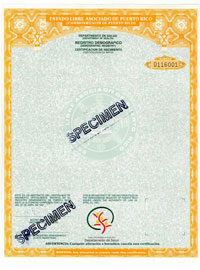
The new Law Prohibiting Public and Private Entities from Retaining, Storing, or Holding Certified Copies of Birth Certificates, enacted this past December, amends the Law on Vital Statistics, such that, as of July 1, 2010:
–Every birth certificate registered in Puerto Rico prior to 7/1/2010 will be invalidated and (upon request) will be replaced by a new one; and
–No individual will be allowed to receive or stockpile official birth certificates other than their own (or those of family members for whom they are legal guardians)
To apply for a new birth certificate online, go to http://www.pr.gov/gprportal/inicio and then click on the Certificado de Nacimiento link. You’ll be able to securely upload a scan of any valid government-issued photo identification document (in .jpeg, .jpg or .pdf format), such as a passport or driver’s license, pay by credit card (Visa or MasterCard only) and receive an electronic receipt.
To apply by mail from outside of Puerto Rico:
- Print out and fill in the form at this link
- Enclose a $5.00 Money Order payable to Secretary of the Treasury
- Enclose a photocopy of a valid government-issued photo ID document, such as a passport or driver’s license
- Enclose a self-addressed, stamped envelope
- Mail the form and money order to:
(Registro Demogrfico)
P.O. Box 11854
San Juan, PR 00910
- If you want to use a premium delivery service, such as FedEx or UPS, send the same paperwork to:
(Registro Demogrfico)
171 Quisqueya Street
Hato Rey, PR 00917
The new birth certificates will start being mailed as of July 1, 2010. They will have no expiration date, and residents of Puerto Rico will no longer be required to submit multiple original “official” copies of birth certificates for common transactions.
Although new birth certificates will cost $5, the fee will be waived for anyone over the age of 60 and for veterans (who will have to present their Department of Defense Form 214 – Discharge Papers and Separation Documents – which we’ve discussed previously).
If you were born in Puerto Rico for any reason, whether because your family was living there or temporarily visiting (on vacation, residing on a military base, etc.), you’ll need to get a new birth certificate eventually, to apply for a passport or to register for Social Security benefits. Also, although not all states require birth certificates to apply for a new driver’s license, many states, including Florida, Oregon, Maryland, Utah and Indiana, as a result of the REAL ID Act of 2005, have recently changed their regulations to require birth certificates as part of the application process.
But don’t worry, there’s no rush. If you’re not traveling or applying for anything official in the near term, consider making a note on your calendar to apply at the end of the summer, after the big rush has subsided.
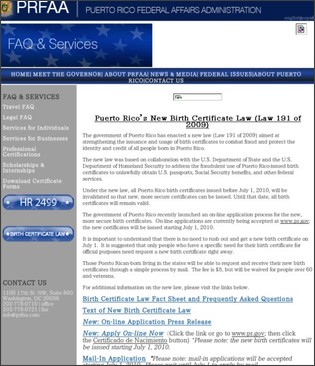
Finally, Puerto Rican authorities have been concerned that this new law has not received ample media coverage. If you know someone who was born in Puerto Rico, please chat about this, and if you encounter anyone not familiar with the new law, please pass this post or any of the appropriate links along to them. Oh, and if you know Rita or Jos, Ricky or Benicio, please tell them hello from Paper Doll.
~~~
Next week, we’ll be discussing some important alternative travel documents that will help you save time and money. Until then, happy June!
NAPO 2010 Conference Expo Recap #4: Taste The Rainbow
Over the last three weeks, I’ve tried to give you an insight into the standout products from this year’s NAPO Conference and Expo. While there are always nifty products, even Paper Doll has to admit that aside from multicolor file folders, paper organizing tools aren’t always colorful or stimulating. In today’s final wrap-up, however, I’d like to share a few of the items that caught my attention as vivid examples of how organizing your paper and information can be fun.

PlanetSafe is billed as the world’s only non-plastic erasable wall planner. These planners all have the write/wipe attributes of typical plastic wall planners, but use no petroleum based products. PlanetSafe’s line is made from 100% (post-consumer waste) recycled paper, organic vegetable inks and a 100% biodegradable plant-based film laminate.
The planners are designed to work with either dry-erase or wet-erase markers, as well as sticky notes. (And yes, Paper Doll usually bans the use of sticky notes as floozies, but you’ll see momentarily why I give PlanetSafe a pass in this regard.)
Sure, they have the usual 1- and 2-year calendar planners, and like all of the PlanetSafe products, are made from durable, heavyweight write/wipe material with a glossy finish, and each calendar has ample room to write the essentials. The college/academic calendars are undated, so you can use them year after year, and they’re arrayed vertically, suitable for hanging on a dorm room door, so you can view all four months of the semester at once, with extra space for a weekly schedule and notes.
However, PlanetSafe’s niftiest, most colorful products are the sticky note planners.
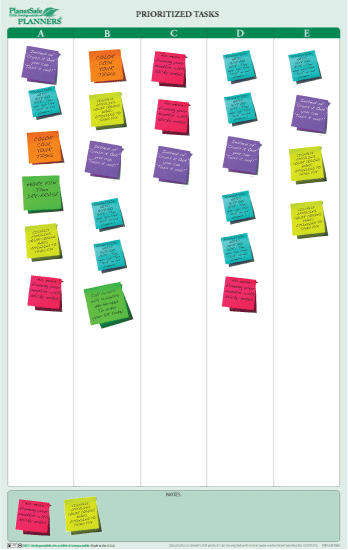
While the boards have ample space for writing one’s thoughts, To Do items and action plans, and then wet or dry erasing them afterward, I like the notion of tracking concepts and tasks on recycled-paper Post-It notes. This allows you to quickly re-prioritize by moving, rearranging, and even color-coding the notes…it’s sort of the retro version of cut-and-paste in Word, without a single keystroke.
It also actually refines one of the non-traditional To Do list strategies, The Panel Method, suggested by professional organizing veteran Judith Kolberg in her groundbreaking book Conquering Chronic Disorganization.
The product line includes multiple varieties, including a weekly planner with abundant space for the days of the week, a prioritized task planner (above), which lets you brainstorm tasks related to specific projects, a yearly long-term goals planner, with room for notes on major projects, and a combo planner, which has weekly calendar space for scheduled tasks, unassigned tasks and specific projects.
Co-founder Stacey D’Amico was inspired by an Oprah segment on environmentally-friendly products. She started researching green office products that her husband, W. Ward Turner, could produce in his small manufacturing company. After extensive trial and error to come up with a plant-based biofilm that erased as well as plastic products and a bonding agent that didn’t involve plastic adhesives, this mom-and-pop shop hit the ground (well, actually, the wall), running. They consider their wall planners to be the first erasable line that is 100% recyclable, biodegradable and compostable.

The Card Cubby is a fashion-forward alternative to carrying a wallet. Paper Doll noticed a few different vendors on the Expo floor were carrying versions of the Card Cubby, but I’ll admit, it didn’t make a big dent in my consciousness at first. However, a week back from conference, I was introduced to a new friend, an extremely busy medical professional. When she learned that I was a professional organizer, she began gushing over her new “organizing system” — a nifty Card Cubby that matched her needs and her personality.
The Card Cubby is a miniature card file designed to fit stylishly in a purse, briefcase or diaper bag. The Cubby measures 5″ wide by 3″ high by 2″ deep, and comes with alphabetical dividers, so you can use it to keep track of business cards, gift cards, frequent shopper rewards cards, insurance and identification cards, etc. If you tend to overstuff your wallet with things you don’t need and store them all haphazardly, the Card Cubby presents the option of organizing your portable items more methodically.
The clear front pocket is perfect for storing a driver’s license or photo ID so that you don’t need to remove or expose your other cards when you need to show your identification (making it less likely you’ll forget to retrieve your ID).
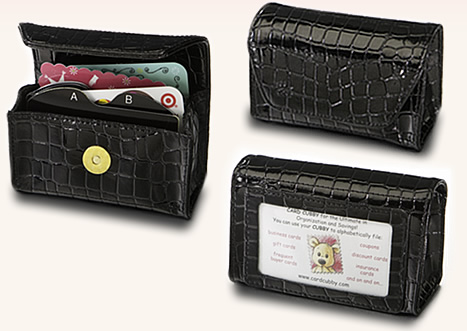
The Card Cubby comes in a variety of styles and colors, from animal prints to patent leathers, from faux crocodile to more elegant simple styles. It’s no surprise that Paper Doll favors the Passion Pink:
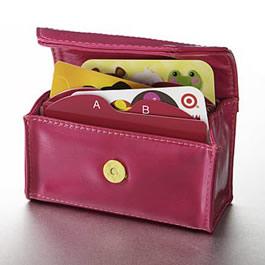
As always in organizing, aesthetics should be secondary function, but if a designer-style wallet with the ability to alphabetize will make you more likely to keep your wallet organized and your possessions safe and accessible, then Paper Doll approves.

Unikeep, part of the Univenture design and manufacturing family, isn’t a newcomer at the NAPO expo. For years, we’ve seen their three-ring case, presentation and high-capacity storage binders 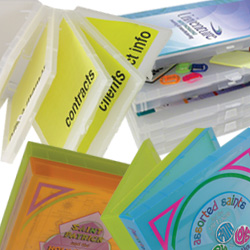 , CD wallets, mailers and other media packaging and office products designed to keep the world of work running smoothly. In recent years, their EcoEndure lines of environmentally sound products have been offering up sustainable, compostable, biodegradable and recyclable options.
To be honest, I was tempted to by pass the booth this year in the interest of time, but I’m glad I stopped, because they’ve added an interesting product that’s both colorfully appealing and just plain neato. As part of the Envy-Pak line, Unikeep has developed a 100% polypropylene, clear mailing envelope with a permanent peel-&-stick closure and double-perforations for easier opening. It’s 9″ x 12″, designed to hold an 8 1/2″ x 11″ catalog, brochure or other paper/photo items.
It’s an envelope? That’s what Paper Doll is so excited about, you’re asking? Well, sort of. In business parlance, it’s a mailer. If you’ve got a small (or even a large) business, having the flexibility to eliminate envelope labeling and use the envelope as a window to create “high impact visibility” of the contents, you can use one single sheet of paper for both marketing and addressing what you send.
Since it’s available in biodegradable polypropylene and PLA (polylactic acid, an environmentally-friendly, biodegradable, thermoplastic made from the fermentation of various agricultural products, like corn starch) and has US Postal Service approval, the translucent mailers offer a wide variety of custom-design options for full color printing and private labeling.
And that’s what caught my eye. Our friends from Unikeep brought a sample of a custom-designed mailer
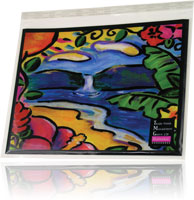
that won their client, the Hawaii Trade Winds Management Group, a 2007 PEAK (Print Excellence and Knowledge) Award. Pretty, isn’t it? While you probably aren’t going to use this product anytime soon to have Unikeep custom-design your third-grader’s birthday party invitation envelopes, it gives a great (and colorful) indication of advancements to come in terms of intriguing and attractive office supplies.

NackIt! is a labeling solution that can be colorful, depending on what methods you use, but it’s definitely a bit green, as it offers a refillable, reusable label organizing system.
If you’ve ever worked in an office setting, you know that those plastic FedEx envelopes, into which you place your shipping form, have adhesive backing (perfect for use as a poor-gal’s lint brush). Fill out the paper form (in triplicate), insert in the envelope, remove the protective backing and the plastic pocket adheres to whatever box you ship. NackIt! used this basic method to create a twist for labeling shipping boxes, storage containers, and anything else you might want to label.
Each original NackIt! kit contains two dozen 4 3/4″ x 6 1/4″ self-adhesive vinyl pockets and 28 pre-printed and/or blank NackIt! labeling cards with lined backs. The idea is that you affix the pockets on your storage containers or boxes. Then, list the contents of the container on the reverse of the cards and insert cards in the pockets.
For moving boxes and typically large storage bins, the large front of the label provides ample room for a view-from-a-distance summary, while the lined reverse of the card holds the details. The pockets are permanent, but you can change out the cards any time you change the contents of your containers. No matter what’s in the box, you need never wonder what’s inside.
For smaller containers, there are NackIt! mini-kits, which include three dozen 2 1/2″ x 3 1/2″ self-adhesive pockets and forty blank cards (with lined reverse sides).
The system is pretty simple — use a Sharpie to hand-write the front label and a traditional pen to list the contents on the back, or use a labelmaker or computer for a polished, professional look and adjust the font to maximize the detailed inventory on the reverse.
For those with less than stellar handwriting, or a desire to show off design skills, NackIt! has a downloadable card template that lets you create the font color and style you prefer, and you can add any graphics of your choosing. And of course, if you’re storing items for your children and they’re not yet able to read, you can even insert a photograph or a drawing of the contents to serve as the front-facing label.
In addition to the original and mini kits, NackIt! has kits for the home, with pre-labeled cards, for arts & craft supplies, baby clothes, books, camping supplies, financial papers, holiday decorations 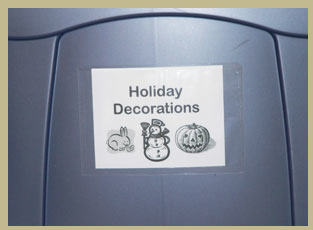 , photographs, off-season clothing and shoes, sports paraphernalia, and toys. The NackIt! office kit has pre-printed cards for accounts receivable and payable, banking documents, clients/patients, contacts, office supplies and tax records. There are also kits for moving, with labeled cards delineating to what room the boxes should be delivered, and a Christmas-themed kit for holiday-related storage. Many of the pre-existing labels include appropriate graphics, as well, to help you see what’s on that oh-so-high top shelf.
This is the last of our recaps of products from NAPO’s 2010 Conference and Expo. While Paper Doll focuses on paper-related organizing products, this year’s NAPO conference had so much more to offer. Virtual assistant and blogger extraordinaire, Janet Barclay, hosted guest posts on the whole conference experience from two views. I wrote NAPO 2010 Through the Eyes of a Seasoned Conference-Goer; Randi Hutton covered A First Timer’s Perspective On the Annual NAPO Conference.
I also encourage you to review the blogs of some of my esteemed, incredibly charming, colleagues, Jim Deitzel of Rubbermaid’s Adventures in Organization and Deb Lee’s Organize To Revitalize.
NAPO 2010 Conference Expo Recap #3: Keep Your Data (and Not Your Head) in the Clouds
In the last two weeks, we discussed some of the stars of the NAPO 2010 Expo, both for gathering and safekeeping paper files and for improving filing productivity. Today, we’ll go a little higher tech and explore some new digital offerings just introduced.
LeeLogic has created two suites of digital applications to keep information organized “in the cloud”, meaning that data is stored and manipulated in a web-based (rather than software-based) environment, working equally well on PCs and Macs. MobilLogic is for business use and StuffLogic organizes personal data.
MobilLogic’s digital indexing and storage system creates a hierarchy of information based on how businesses already categorize. It was designed by a professional organizer to make electronic files, scans, links and other digital information, as well as hard copy information, accessible and retrievable via one simplified, searchable web-based system.
MobilLogic uses a standardized numeric filing system with keyword-based identification. New files are assigned a number/name, but users also get to select keywords that will best help them quickly search for and retrieve the exact item…and learn its location. When in search mode, the system even highlights keywords to ease identification, and users can save searches to provide one-click access in the future — that’s great for when you have a file you need just infrequently enough that you might have had to take a few stabs to recall your keywords.
Many businesses use both digital and paper documents, so MobilLogic works with both — you don’t have to scan or upload everything in order to know where things are. Users can select which files to upload into the system, but because the information about each file is documented (even if it’s not living on the MobilLogic server), you can still click-through MobilLogic directly to the electronic file, whether it’s housed on your computer, your company’s network, or living as a web-based file. For non-digital documents, the system will identify locations based on what you’ve previously told it. (So don’t move stuff without telling the system!)
Because MobilLogic is web-based, users can access the system and search, view, revise or add from anywhere. The system has user-level security, from departmental to individual, ensuring that everyone who needs (and has a right) to access material can do so. It’s even HIPAA compliant.
So, some departments or employees can have full admittance, but you can restrict access to others who lack the James Bond-esque, eyes-only, need-to-know clearance. The security protocols and cloud-based system, combined with four-times-daily backups of MobilLogic’s multiple server locations, mean that companies need not worry about disgruntled former employees wreaking havoc, computer crashes destroying the system or the inability of new employees to access a former employee’s essential files. Because backups can be set for various retention periods, you can restore data from last week, or hit reset to time travel to anywhere up to when you first began using the system.
MobilLogic doesn’t just organize information for storage and retrieval. You can set up email reminders and text alerts associated with individual document-related tasks or deadlines, so nothing falls through the cracks.
MobilLogic has a one-time $25 set up fee, plus a $25/month/license fee, up to four users, with discounted monthly fees the more concurrent user licenses you add. If only three people need access most of the time, but you have a virtual assistant or part-time employee who needs access certain days per month (or quarter, or whatever), you only pay for the number of people using the system at any given time, and you can change the number of licenses you’re using — up to once per day.
StuffLogic operates just like MobilLogic, keeping track of personal files and possessions (digital and hard copy), from electronic files and bookmarks, to magazines, hobby material and those boxes of memorabilia in the hall closet. Just as with the business version, you can set email or text reminders based on tasks or deadlines related to the stuff you’ve “filed” and might later want to access. It’s priced at $20/month for a single license fee, or $25/month/concurrent licenses for the Premium plan, which includes additional security and administrative features.

CareBinders is a personal recordkeeping software package — the digital equivalent of the boxing-it-up method we discussed two weeks ago to collect and track the data for all elements of your life. For each category, the software has specially-created screens to trigger your recall and help you identify exactly what data you need to store. Input information directly, import it from other programs, or scan and attach photos and digital versions of vital documents. For example:
Financial–Account numbers and data for banks, credit cards, brokerage houses, and insurance policies; Descriptions/photographs/videos of tangible assets and financial assets; Contracts and other legal documents; Inventories of valuable collections; Data regarding subscriptions and ongoing payment plans.
The system can then generate a data locator report, which aggregates all the information you’ve input into the CareBinders system (with or without the dollar valuations) so that you can safekeep a copy for loved ones, in case anything happens to you, or place in your safe deposit box to use in case of theft or disaster in your home.
Medical–The system prompts you to report every medical detail, including allergies, diagnoses and medical/prescription histories, medical practitioner contact information and dates/notes from doctor visits, test results, and more.
Personal–In one sitting, you can enter all the vital details of your life, so you (or someone acting on your behalf) can gather information necessary on everything about you: Educational and employment history; contact information for residential service providers (like that guy who stopped the heat pump from making that scary noise that one time), pet information, groups and affiliations, volunteer projects, passwords, all your personal contacts (including how you know them and from where), awards and achievements, etc.
Fun–CareBinders has special modules to keep track of whatever you collect or want to remember and track, whether it’s tangible items like baseball cards, DVDs, wine or stamps, or plans for or memorabilia from wedding, parties, vacations or holidays.
Once you’ve entered all of your data (and reminded yourself to create updates on a regular basis), the CareBinders system works in a few ways. First, it lets you get everything out of your head and into the system, so you can stop wracking your brain to remember a company’s or contact’s exact name, or where you put the new insurance policy.
Second, once you enter something, the CareBinders system populates other screens with the data you need, so you don’t have to enter the same darned information over and over on multiple screens. Once you’ve told the system something, it knows where to put that data in other files or documents. So, if your family moves, you don’t have to enter the new address for the records for yourself AND your spouse AND Jimmy, Johnny, Jessica and Janine (whoever those kids are)…unless you aren’t all moving to the same place.
Third, the system saves the data you enter and manipulates it to create new documents, in addition to the document locator, like a:
–Medical Intake Form you can bring to a doctor’s visit so you (or someone helping you) can fill in everything from blood type to insurance IDs to medical history)
–Asset/Inventory lists to help your insurance salesperson or claims adjuster complete your paperwork more quickly
–Emergency medical wallet card
–Pet profile, with demographic data and an immunization and medical history
–Resume
–“Grab & Go” reports you’ll need if there’s a natural disaster and you must leave home quickly
A CareBinders Master license runs $199 for downloadable software. For $5 more, you get the download and a program CD, suitable for gifting. CareBinders offers volume discounts ranging from 15% for purchases of 4-5 copies, up to 35% discounts for large volume purchases.

LegacyIt provides a digital opportunity to collect the elements of your life history in a simple, fun, interactive way. While LeeLogic’s suites are designed to keep your data easily organized and retrievable from the cloud, and CareBinders keeps your digital information safe and organized for practical reasons, LegacyIt is all about preserving the impractical…the sentimental…the ineffable qualities that make you who you are. Instead of tracking the data of your life: the numbers, the assets, the diagnoses – LegacyIt helps you gather the meaningful experiences of your life to share with others.
LegacyIt involves three steps:
1) Preserve your legacy by digitizing and preserving your memories in one collective space. Once you set up your account and download Microsoft Silverlight (at no cost), you can upload your existing digital photos and scan your traditional photos (or negatives) to make them ready for uploading.
If you haven’t yet, or only recently, upgraded to digital photos and can’t bear the thought of scanning forty or fifty (or 90!) years of your life in photographs, LegacyIt has partnered with Digital Pickle, a photo and video restoration service. Ship them your shoeboxes of personal archives, and they’ll scan your photos, slides, or negatives for you.
2) Build your legacy in two ways:
First, organize your photos by category — for example, you can create an event and gather together all of the photos and commentary about a particular family vacation.
Second, record the detailed history behind each photo, using LegacyIt’s audio, video and text features. For example, you can use text to tell the story on the “reverse” side of any digital photo, so it’s just like when people used to write on the backs of their snapshots (before we all knew that was bad for the photographs). Or, use the audio or video features to share the anecdotes related to the pictures. You might get creative and let others, like grandchildren or old friends, interview you so that the story has a more conversational feel.
3) Share your legacy in a secure environment and create Legacy Trees, which grant permission to individuals to view what you’ve created. LegacyIt has taken on many of the qualities of popular social networking sites to create privacy settings so that you can share (or restrict) access to individual photos and stories. You select who gets to see and hear which elements of your legacy…so that if you only want one grandchild to know that she’s your favorite, you can do it!
Create public and private “sharing galleries” of photos, write journal entries and guide others to share their own legacy stories. LegacyIt has a module to design your bucket list, identifying all the things you’d like to achieve in your lifetime, and then you can add photos of these accomplishments as you attain them. LegacyIt even gives a nod to the other, more practical, data organization systems with a secure place to store personal and financial data, passwords and other vital information.
LegacyIt has four pricing plans, with monthly fees ranging from $5-$25/month and 16-20% discounts for annual, rather than monthly, billing. Every plan includes access to all photo, audio, video and text features and enhanced security, but pricing determines how number of users per account and the amount of storage granted. The Basic plan allows only two users, the Deluxe allows three and the Premium and Premium Plus package allows up to five users; at the Basic level, accounts gets 2 GB of storage, while Deluxe plans get 5 GB, Premium 10 GB and Premium Plus plans include 20 GB of storage.
LegacyIt is an intriguing blend of social networking and digital memorabilia storage. For families with plethora of history but a dearth of technological know-how, this all-inclusive training-wheels approach can be a boon. However, as with all cloud computing options, Paper Doll is concerned regarding what happens long-term. If you help Grandma upload photos and record a detailed history, can your family afford to keep paying the fees in perpetuity? LegacyIt says you can cancel your membership at any time, but suggests retrieving your data within 60 days. Long term, it would be wise to appoint a tech-savvy family member as family archivist and account beneficiary, to oversee the process and truly maintain your legacy.



Follow Me