Archive for ‘Environmentally-friendly’ Category
Cool, Sustainable Packing and Shipping Solutions for Earth Day
Nobody will ever call Paper Doll an outdoorsy person. I’m as indoorsy as you can get. People shout about being “at one with nature” but I’m definitely at two with nature; we couldn’t be less compatible. When I saw this video, I thought, yeah, that’s me. (OK, it’s Retta. But philosophically, it’s me.)
So, in a “Ground Control to Major Tom” way, I definitely recognize that Earth is the only home we have, and with Earth Day 2024 just a week away, I’ve had some paper-related sustainability issues on my mind. In particular, after recently helping a client try to downsize, corral, and store packing and shipping materials that had taken over space in her home, I started looking at how we could reduce mess but be more planet-friendly.
TRADITIONAL SHIPPING AND PACKING SUPPLIES
When I was in college, Paper Mommy regularly sent me care packages: mail and magazines I’d received at the house, homemade baked goods and packaged snack surprises, articles from our hometown newspaper, and stick-figure cartoons she drew of herself with curly hair and big feet, signed off with funny and loving captions.
I’d pick up my package downstairs in the student union and then my friends and I would head upstairs to the dining hall, where I’d perform a show-and-tell of all the contents. There was always so much packing material that we all had a blob of it to throw in the trash along with the remains of our dining trays.

While the items in the care package were still memorable, the packing material wasn’t. She might have used bubble wrap, but this was definitely decades before we all had those plastic “air pillows” that come in our Amazon boxes. I suspect Paper Mommy alternated crumpled newspaper and styrofoam peanuts, depending on what she was shipping.
Newsprint
In the olden days, newsprint was commonly used as a packing supply. Newsprint is inexpensive, low-quality, absorbent paper; it’s made from coarse wood pulp and primarily used for printing — you guessed it — newspapers. So, people just crumpled their news and sports sections after having read them and turned them into box filling. (Sometimes Paper Mommy included the comics when she sent care packages so I could smooth them out and read the funny papers as an added treat.)
Printed newspapers are dying, so most people are unlikely to have enough on-hand to pack items for shipping. Unless you’re already a daily subscriber, it’s not an optimal solution. And you’re not going to want to buy weeks and weeks of newspapers in advance of packing delicate items for a move.
You can buy rolls or stacks of “clean” newsprint paper without ink. This is often used as packing paper for shipping and moving, and there are environmentally-friendly versions. For example, you can purchase pads of it, like this package of 360 sheets of Tree House paper. It’s soft, clean newsprint made of recyclable materials.

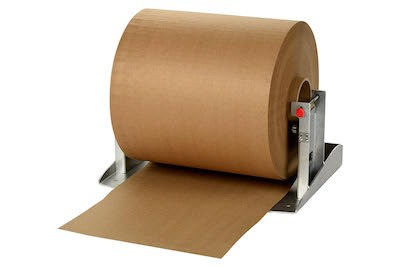
Alternatively, you can get a sturdier (I think of it as “crunchier”) type of sustainable, environmentally-friendly paper. It’s easy to find industrial-grade Kraft paper on a roll at Amazon and big-box stores.
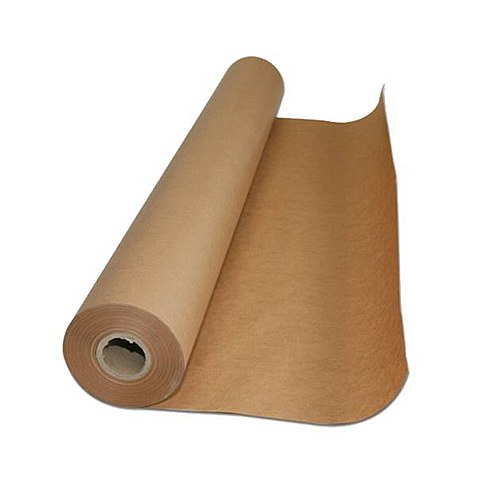
Kraft paper photo by Marian Gutierrez under CC0
EcoEnclose sells custom-branded paper made of recycled and post-consumer content, from readily renewable raw materials that can be regrown, and it uses no synthetic fibers. Their curbside recyclable products include 100% recycled packing paper, Kraft paper, and “bogus” paper on rolls. (No, bogus paper isn’t fake paper. It’s paper that’s made from a variety recycled paper materials, including newsprint, recycled Kraft paper, chip board, and corrugated paper. Because it’s kind of a mutt, it’s both softer and less dense than other kinds of packing paper.)
The problem is that even sustainable packing paper is bulky. It comes on rolls or in thick, folded stacks, and while it’s useful when you’re packing for moves, it’s not particularly convenient to keep large amounts on hand for when you’re shipping occasional packages. (On the plus side, any excess is a great resource for crafts and painting if you’ve got tiny humans at home.)
Packing Peanuts
Traditional foam packing peanuts are bad for the environment and had the annoying feature of being very staticky. If someone sent you a package full of packing peanuts, no matter how carefully you removed the contents from the box, bits of foam stuck to the item and spilled out onto the floor, sticking to the carpet and sometimes making you look like you rubbed a balloon on your head.
Nowadays, you can purchase environmentally-friendly versions, which are starch-based and biodegradable, disintegrating in water; some even have an anti-static feature. You can find the modern versions in traditional peanut or noodle-shapes and at least one company, Bubblefast!, makes a line of FunPak holiday-themed foam peanuts.


Packing peanuts are, by nature, space-hogging. Whereas paper rolls can be stored vertically and paper is at least somewhat tidy on its own, packing peanuts need to be contained to keep from spilling all over. If you ran a store where you needed to pack and ship inventory, you could install wall canisters — the kind grocery stores use for bulk candy and nuts — to dispense packing peanuts, but for household storage, it’s not the best alternative for packing or shipping.
Recently, I learned of a truly new product in the packing arena that’s effective, earth-friendly, and pretty cool, developed by a company you probably already know and like.
SCOTCH™ CUSHION LOCK™ PROTECTIVE WRAP
Before we get to the new product, I have to give credit where it’s due. In the past few years, I’ve been a huge fan of Scotch™ Flex & Seal Shipping Roll (as I described in How to Organize and Track Your Packages and Mail). I particularly loved it because it allowed me to rid myself of a clutter of Amazon boxes I’d held onto for shipping weirdly-shaped items.
The Flex & Seal is cool because you just need to cut it to fit what you’re shipping, fold it over so the grey sides stick together, and press the edges to seal it up. For a full-on packing experience, it’s super-cool, especially when you need to ship something weirdly shaped. Plus, the roll is fairly compact, so it’s easy to store. To be clear, I’m not giving it up.
However, unfortunately, the Flex & Seal Shipping Roll just not super-duper for the environment. It’s made of plastic, and plastic comes from petroleum, and petroleum comes from dead dinosaurs. And, while the dinosaurs probably don’t mind, the impact on our environment (i.e., our carbon footprint) makes creating such products not so fabulous for our long-term prospects to avoid ending up like dinosaurs.
So, it’s cool and convenient product; just not the best for the planet.
Generally, it’s hard to find packing solutions that are useful, easily stored, and environmentally friendly. But 3M, the purveyor of so many beloved consumer products, from Post-it! Notes to Command hooks to Scotch tape, didn’t stop with Flex & Seal. It’s “not for nothing” that 3M’s motto is “Science. Applied to Life.”
Thus, 3M’s Scotch™ has come out with Cushion Lock™ Protective Wrap.
OK, that was fast. And weird. Did you get all that?
How Cushion Lock™ Protective Wrap Works
I’m sure you’ve heard of origami, the artsy folding of paper to create cool shapes like swans. Cushion Lock™ Protective Wrap uses kirigami, a variation of origami that involves both the folding AND cutting of paper.
Think of those paper snowflakes kids make in elementary school, where you fold and cut a regular piece of paper and it magically turns into a symmetrical snowflake. This product uses the same principles to quickly make a 3-D textured material out of flat, 2-D paper on a roll.
3M is positioning Cushion Lock™ Protective Wrap as “the paper that protects.” The key is that it looks and feels different from the packing paper we’re used to because their scientists have designed this weird product to “withstand the jostles of transit” by making it out of intricately cut, 100% recycled paper. All these fold-y/cut-y kirigami‘d bits interlock so they’ll wrap tightly around packed items and conform to them, making a safe little nest.
So, how does it work? Well, you could read their oh-so-serious instructional PDF — that was obviously vetted by attorneys and engineers, given that it says things like, “It does not protect against water damage, crush damage, piercing damage, or thermal damage” and:
“Expand Cushion Lock™ completely, until the fingered walls are vertical but not so much that it narrows to less than five inches in width. 150% expansion in length is ideal, but it works well between 130% – 180% expansion as well. You can also judge the length expansion by how much the protective wrap narrows when you pull on it. Narrowing to 10 inches gives about 150% expansion and is correct if it opens completely, or you can pull more until it is completely open, then relax back to the 10-inch width.”
Um, yeah, OK. Maybe just read the next few paragraphs instead.
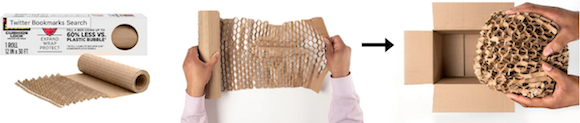
Start by unrolling the wrap. It doesn’t look like much at first, but it stretches! So, as they warn, don’t unroll it up in the air at face- or chest-level or it’ll stretch unevenly. Instead, lay it on a flat surface like your desk or kitchen counter and unroll for a nice, even stretch.
Stretch the wrap to about shoulder width; as you stretch, it goes from a flat wrap to a 3D, textured, honeycomb appearance.
Place your item on top of the stretched surface and roll. Keep rolling. Hum “Merrily We Roll Along” if necessary as you roll the now-three-dimensional honeycomb paper around your item.
As you roll, pull more wrap off of the roll and scrunch (my words, not theirs) the wrap around whatever you’re shipping or storing. Keep rolling it up until you can’t actually see your item anymore. (Think of what a nice surprise itwill be for the recipient, who won’t immediately know what’s contained when the box is opened!)
You’re going to use multiple layers to create a protective cushion around your shipment until the whole item looks like friendly cartoon bees will fly out and offer you honey!
Finally, box it up snugly. That means the edges of your big, blobby, honeycombish-wrapped item will touch the inside walls of the box. 3M’s scientists have tested the “nested protection” of the Cushion Lock™ Protective Wrap on various fragile items including jars, ceramic mugs, and glass vases.
For what it’s worth, while the instructions focus on packing in boxes, I suspect think this would be a great way to pack gifts and purchases in your suitcase when visiting at the holidays or traveling by air!
[Finally, once you’ve boxed up what you turned into a nifty honeycombed, protective package, Scotch™ even has sustainable Box Lock Paper Packaging Tape, which comes with a “Stay Sealed” guarantee.]
On the flip side, once the item reaches its destination, unwrap and toss the wrap in your curbside recycling bin, knowing it’s entirely recyclable!
Benefits of Cushion Lock™ Protective Wrap
I see three main categories of benefits to using Scotch™ Cushion Lock™ Protective Wrap: usability benefits (it’s nerdy-cool, convenient, protective, and secure), reduced packing-related clutter, and sustainability.
Coolness and Convenience Factors
- Starts flat but expands; as you pull it, the wrap lengthens from side-to-side, but shortens and raises up, revealing a hexagonal pattern.
- Uses a honeycomb pattern so it conforms to whatever you’re sending.
- Easy to tear one-handed, so there’s no need for scissors or a blade.
- Cushion Lock™ absorbs shocks and vibrations, protecting delicate objects, making it suitable for shipping, moving, or packing items for long-term storage.
Storage Advantages
- Saves up to 85% (over other product types) on storage space.
- Here’s some wild math on usage equivalents: One thirty-foot roll of Scotch™ Cushion Lock™ can expand to do the same packing work as 75 feet of plastic bubble wrap! A 175-foot roll can expand to do the work of 435 feet of bubble wrap. 1000 feet of Cushion Lock™ will expand to equal the power of 2,500 feet of plastic bubble wrap. Whether you’re sending care packages across the state to your college kid or shipping your Etsy store products across the continent to customers, there’s a lot to be said for reducing your storage while expanding your packing power.
- Use up to 60% less to fill a cubit-foot box vs. plastic bubble and other expanding paper wraps.
Sustainability
- Made of 100% recyclable materials, which means it’s entirely curbside-recyclable after it’s been used.
- One truck of Cushion Lock™ is as useful as 10 trucks of 3/16″ bubble wrap, decreasing the carbon footprint for manufacture and retail delivery.
- Scotch™ Cushion Lock™ is the only GreenCircle-Certified paper wrap, having been rigorously tested and verified to have met the standards for sustainability.
You can purchase Scotch™ Cushion Lock™ Protective Wrap in 12-inch wide rolls of 30 feet ($6.78), or 50 feet ($11.22), suitable for periodic shipping use. If you’re using Cushion Lock™ for packing and shipping a lot of delicate items for business, or packing for moving, you may want to power up to the 600-foot roll ($74.98).
There are also two container options if you need to accommodate a larger inventory of the wrap. The first is just a larger amount of Cushion Lock™, in a cardboard dispenser box. You can buy a 175-foot roll in the cardboard dispenser for $30.21 from Amazon.

However, if you really need to pack a lot, like if you have an online store and ship merchandise daily, there’s a more heavy-duty option. The Scotch™ Cushion Lock™ Protective Wrap Refillable Dispenser holds up to 1000ft of the product, and has a tension-adjusting knob making it easy to get optimal tension for expansion. It runs a little under $100 on Amazon.
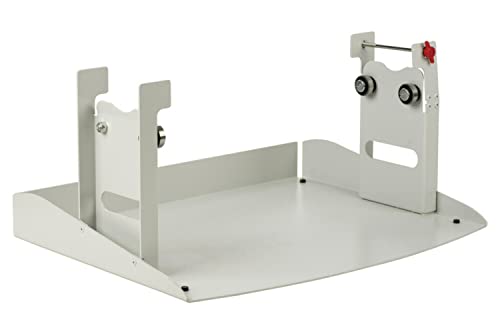
Empty Cushion Lock™ Protective Wrap Refillable Dispenser
Loaded Cushion Lock™ Protective Wrap Refillable Dispenser
The Power of Science
Paper Doll‘s knowledge of the intricacies of science begins and ends with recalling that the mitochondria are the powerhouse of the cell. However, I find science-y things to be fascinating.
Somebody had to sit down and use too many years of math (and knowledge of origami and kirigami) to figure out how to make flat paper turn into sticky-uppy paper.
And that paper would need to cushion delicate things enough to withstand an overzealous FedEx driver tossing your shipment the way the American Tourister gorilla used to batter 1970’s luggage!
If you, too, find the science intriguing, I have two more videos you might enjoy. 3M’s Scotch™ scientists Tom Corrigan and Marcia Popa sound really proud as they describe the science behind the development of Cushion Lock™. (You can just imagine how proud their moms are, right?)
Additionally, this video from ASAP Science offers up an explanation of the science behind using kirigami for packing materials. It’s mind-blowing to imagine how the applications of this paper science could have far reaching impact for other industries and applications.
EARTH DAY 2024 READING
Finally, as we approach Earth Day 2024 next week on Monday, April 22, 2024, you may wish to explore other issues of paper sustainability and productivity:
Choosing Paper for a Healthier Planet (Paper & Packaging)
Get Ready To Celebrate Earth Day 2024! (Earth 911)
Is the Paper Industry Sustainable? (American Forest and Paper Association)
Recycled Content: The Truth About Third-Party Certification (GreenCircle)
Sustainable Paper Products: What to Look For and Where to Buy (Environment.co)
Whether you love nature or are prone to shouting at overly friendly squirrels, I hope this gave you some ideas for more sustainable and easy-to-organize packing and shipping solutions. Happy Earth Day 2024!
Paper Doll Post:

Paper Doll Organizes Boxing Day Downton Abbey-style with Give Back Box®
You’ve got boxes, right? After a weekend of giving and receiving gifts, you’re likely surrounded by boxes. Everywhere you turn, boxes. It’s practically a Day of Boxing! Well, actually…
Boxing Day, observed on December 26th, the day after Christmas (and this year, the second day of Hanukkah), is a holiday popularly celebrated in the UK and various Commonwealth nations, many of which used to be British colonies. The history of the holiday is complex and widely debated, but traditionally, servants and tradespeople were given Christmas boxes on the day after Christmas, when they were granted leave to visit their own families and did not have to work. How very Downton Abbey of them.
Before you move along to another post, affecting a posh accent and saying, “I’m going upstairs to take off my hat,” I’d like to suggest a much more rewarding way to observe Boxing Day.

Give Back Box®, through a partnership with Amazon, Overstock.com, Ann Taylor, REI Co-Op, and more than a dozen other retailers, has found a solution that allows you to encourage yourself to pare down your excess possessions, bless others with donations of your largesse, and get those cardboard shipping boxes out of your house, all in one fell swoop.

THE MISSION STATEMENT
The purpose of Give Back Box® is to provide an effortless and convenient method of donating your used household items. Give Back Box not only provides an easy way to be part of a truly good cause, it also allows cardboard boxes a second life by recycling them and keeping them away from landfills to help improve our environment. So this is an all-round CSR & Sustainability solution that costs you literally nothing.
THE PROCESS
- Take your Amazon (or any other retail partner’s box), and empty out the goodies you’ve received. (You can also use a plain cardboard box, if you like.)
- Fill the box with donations of clothing, shoes, and various household goods. But please, no liquids, electronics, ammunition, or fragile or hazardous things! (And do check the pockets for any train tickets that might prove you innocent of murder.) Then seal up the package.
- Print a free pre-paid shipping label from Give Back Box’s site and affix it to the box. The cost is covered by Give Back Box’s partner retailers, most of whom have special Give Back Box pages on their sites, too.
 There’s no weight limit, so you can fill the box to the brim — and print as many labels as you need.
- Now, just send the package to Goodwill via UPS or the United States Postal Service at any UPS Store or post office, all at no cost to you. You can even request a free USPS pick-up of your package at your home, if the weather outside is not so delightful and you’d rather lounge about and have your lady’s maid, Anna, serve your meals in bed.
THE BENEFITS
Give Back Box box has a variety of benefits — personal, social, economic, and environmental.
You’ll make donations more often — You know you’re busy. You know your house is full of things you don’t use, don’t wear, or don’t want. (Honestly, what was Aunt Rosamund thinking?) You want to donate more things and more often, but the truth is that every time you find something in your home that you want to donate, you set it aside and forget about it. Maybe you have a donation station in your home, with the pile getting bigger and bigger, but it practically takes an act of Congress to get the donations out of your house, into your car, and to whatever non-profit you choose.
By making it free and convenient, Give Back Box prompts you to think about what you can let go of every single time you receive a box from one of their partner retailers.
Boom! There’s your habit! Get a box of stuff? Give a box of stuff!
That’s good for you, and it’s good for all the work that Goodwill does, providing job training and putting people to work in the local community. And people who want and need what you no longer have space or time to manage reap the benefits, too!
It’s also sustainable. About 30 million tons of retailers’ cardboard box material is zooming around the earth each year. By following the principles of “reduce, reuse, and recycle,” Give Back Box and its partners are helping you clean out your house and helping us all clean up the environment.
Even the Dowager Countess would be excited!

Still have questions? Read through the Give Back Box page of frequently asked questions, and check out this little video.
Paper Doll Post:

Lightening Up With HP’s EcoFFICIENT™ Paper: A Shoplet Review Post
Periodically Paper Doll reviews new and established office supplies and accessories through the Shoplet Product Review Program.

In the past, I’ve reviewed pens, decorative tape, clipboards and desktop organizers, in posts as varied as Paper Doll Puts Pen To Paper, If It Quacks Like a Duck, Then It Might Be a Zebra, and Organize With Clipboards & Desktop Caddies. However, today is the first time that Paper Doll has been called upon to review actual paper!
THE BASICS
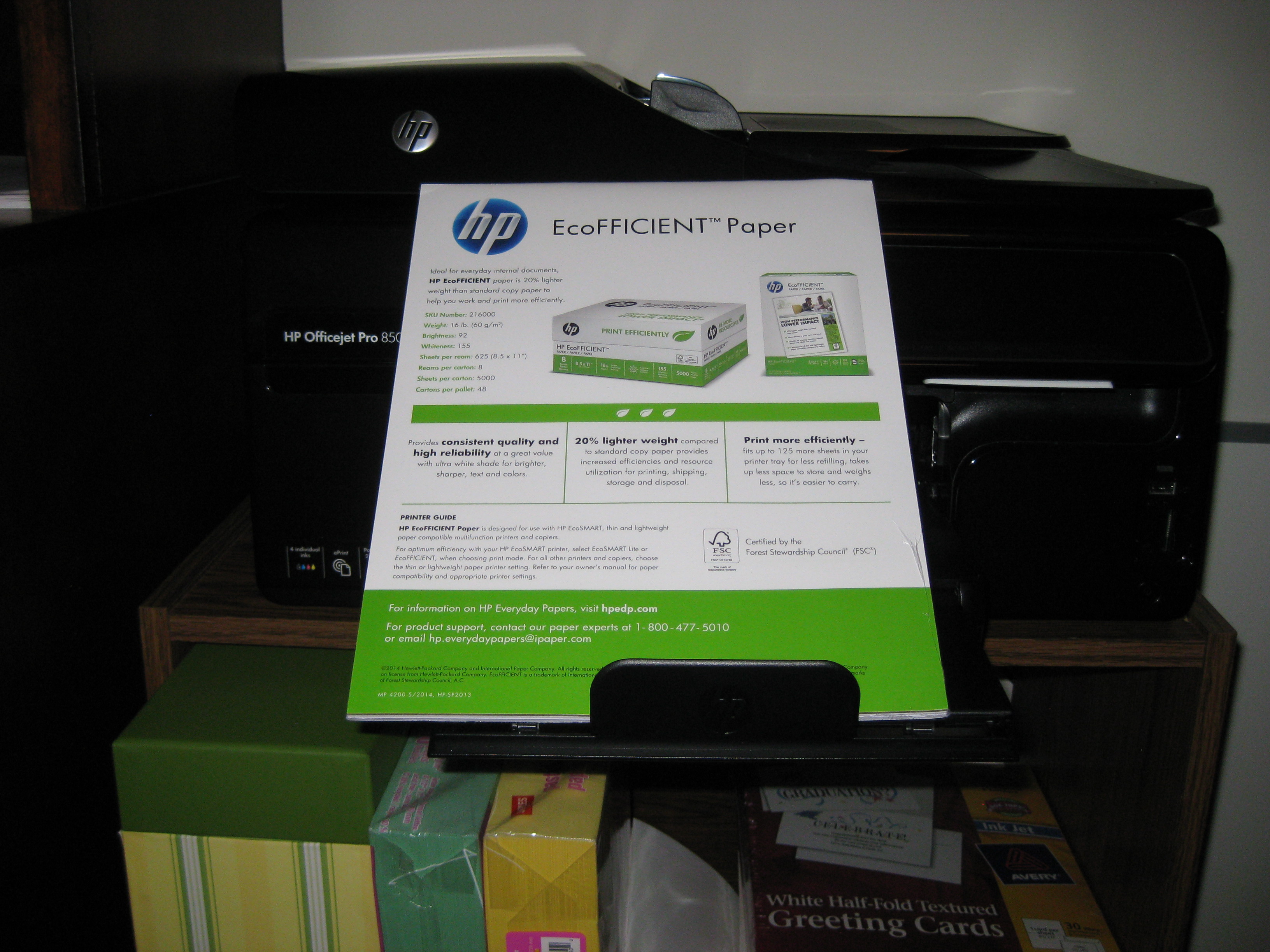
I received two identical trial packs of HP’s new EcoFFICIENT™ Paper from the HP Everyday Papers line, with 50 sheets in each package. The Paper Doll Product Evaluation Team for this review was comprised of myself and a discerning client, using one incredibly stripped-down, basic printer (my own) and her fancy-schmancy printer/copier/scanner/fax/cappuccino maker/hair dryer. (OK, maybe client’s machine just seems exotic by comparison with mine.)
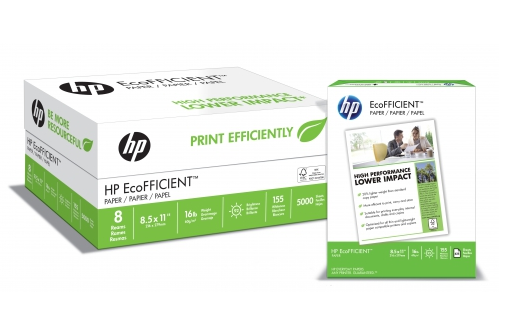
Like typical copy paper, the HP EcoFFICIENT™ paper is 8 1/2″ x 11″ and white. The stats are as follows:
Weight: 16 pound paper (Reviewing my client’s stockpile and my own, it appears we both usually use 20 pound paper.)
Brightness: 92 (My most recently used paper was 88; my client was using 92.)
Whiteness: 155 (My usual was only 125; my client’s stack didn’t reference whiteness.)
And, as you’d expect, the EcoFFICIENT™ is Certified by the Forest Stewardship Council.
THE CLAIMS
HP’s packaging blurb touts that the EcoFFICIENT™ paper prints more efficiently. The basis for these claims? It fits up to 125 more sheets in a printer tray for less refilling, takes up less space to store, and weighs less, so it’s easier to carry. Taking these issues one at a time:
Less refilling! Tastes Great! (Oh, wait, that’s not what they meant.): Well, yeah. You’ll be refilling a stack of (say) 200 sheets 20% more often with the unbearably chubby paper you’ve been using all along than with this svelte version.
Less storage space needed: Yup. The paper is flatter, so you can store more in the same space (or, if space is at a premium, store the same amount in a more compact space).
Weighs less: To me, this is the major advantage. Paper Doll may be a verbal and organizational powerhouse, but I have weak, wimpy wrists. A ream of paper, let alone two, can be heavy. Even if I weren’t too frugal to buy a whole case of paper at once, I still wouldn’t be able to carry it to my car and schlep it up a flight of stairs. A ream at a time, as it is, is hefty enough. EcoFFICIENT™ is definitely lighter.
HP reports the EcoFFICIENT™ runs 625 sheets per ream (instead of the typical 500). Using a digital food-grade scale, which I am sure is not at all scientifically accurate for my Ms. Wizard-ing, I found that HP wasn’t fibbing that this paper is 20% lighter weight compared to standard copy paper.
So far so good.
THE FINDINGS
The first thing I noticed, before opening the packages, was that the label said there were 50 sheets to each trial pack. I was dubious — it looked more like 25. I’ve been loading printers and copy machines since dinosaurs roamed the Earth, so I know what 50 sheets of paper looks (and feels) like. And this wasn’t it. Was this going to be like that old AirMail onion-skin paper on which my third grade pen-pal sent me letters about her fascinating life in Europe, circa 1975?
HP’s packaging promised the paper would provide “consistent quality and high reliability at a greater value with ultra white shade for brighter, sharper, text and colors.“ So, we put that to the test.
We stacked the printer tray and printed off all the ridiculous pages of a recent Comcast/Xfinity online bill. Our findings?
- The paper is sufficiently bright and white (though, to borrow from the cosmetics language women’s magazines use to describe foundation and blush, we found it to have a more bluish undertone, vs. traditional paper’s more yellow undertone).
- The paper is thin, but not appreciably more easily torn.
- The ink didn’t smudge or bleed.
- The text is as sharp as we’d expect to see on traditional weight paper, though (as with the paper’s brightness/whiteness) my photographic skills may leave that in doubt.
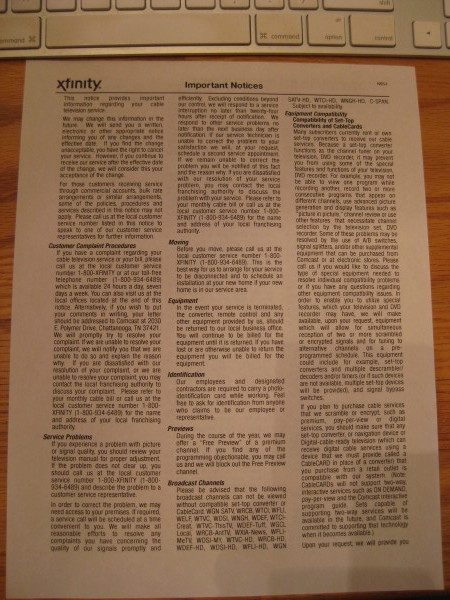
Note: the above-pictured, extremely wordy “Important Notices” page was printed double-sided, and unless you hold the paper directly up to a light bulb, it’s fairly easy to read without the reverse-side text image bleeding through.
However, the same can’t be said about our next experiment, when we printed the double-sided version of the last few pages of the bill, with a full-color SEC/ESPN logo ad on the reverse of a fairly blank page.
- We saw serious image bleed-through with color printing and double-sided pages.
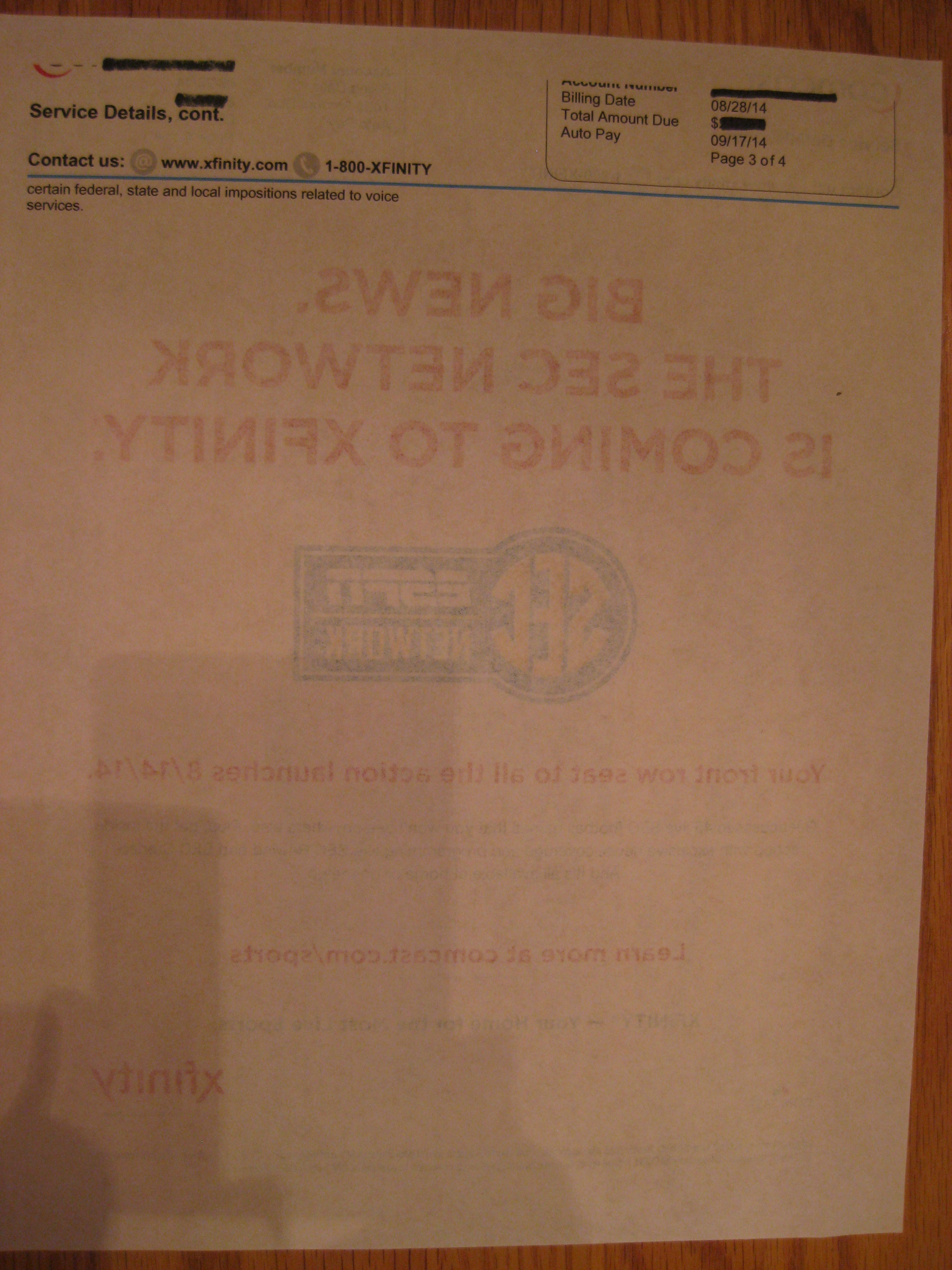
I should note, HP’s packaging for the EcoFFICIENT™ paper deems it “suitable for printing everyday internal documents, drafts and copies.” So, you’d still want to go for the high-end stuff for presentation papers, and Paper Doll suggests not printing double-sided color pages, which, depending on your printing needs, may reduce the sought-after efficiency.
THE TECH LINGO
HP says that the EcoFFICIENT™ Paper is designed for use with HP EcoSMART thin and lightweight paper-compatible multifunction printers and copiers. The packaging states:
For optimum efficiency with your HP EcoSMART printer, select EcoSMART Lite or EcoFFICIENT, when choosing print mode. For all other printers and copiers, choose thin or lightweight paper printer setting. Refer to your owner’s manual for paper compatibility and appropriate printer settings.
When did printers get so complicated?
Also, is it just me, or doesn’t it seem like they lightened the weight of the whole package by getting rid of an E in the word “efficient” to make it EcoFFICIENT™? Who knew an E could be so heavy?
HP EcoFFICIENT™ Paper is available directly from Shoplet, which also maintains a (literally and figuratively) colorful blog about cool office supplies. Shoplet also carries business promotional products and medical supplies. In addition to selling office supplies in North America, Shoplet is a purveyor of office stationery in the UK.
Disclosure: I received these products for review purposes only, and was given no monetary compensation. The opinions, as always, are my own. (Who else would claim them?)




Follow Me